Medical billing software keeps your revenue cycle moving by automating the claims, coding, and payment processes that eat up clinical staff time. From my experience, manual billing creates costly errors, delayed reimbursements, and compliance headaches that compound fast. This guide walks you through how medical billing software works, what features to look for, and how it compares to related tools. Whether you're evaluating your first platform or rethinking your current setup, you'll leave with a clear picture of what these tools do and what to prioritize.
What Is Medical Billing Software?
Medical billing software is a digital tool that automates the process of coding, submitting, tracking, and managing healthcare claims and patient billing. It creates a single place to handle everything from insurance verification to payment posting. With this software, your team can cut down on manual entry, reduce billing errors, and make sure payments come in on time—helping you focus on clinical work, not paperwork.
Examples of Medical Billing Software
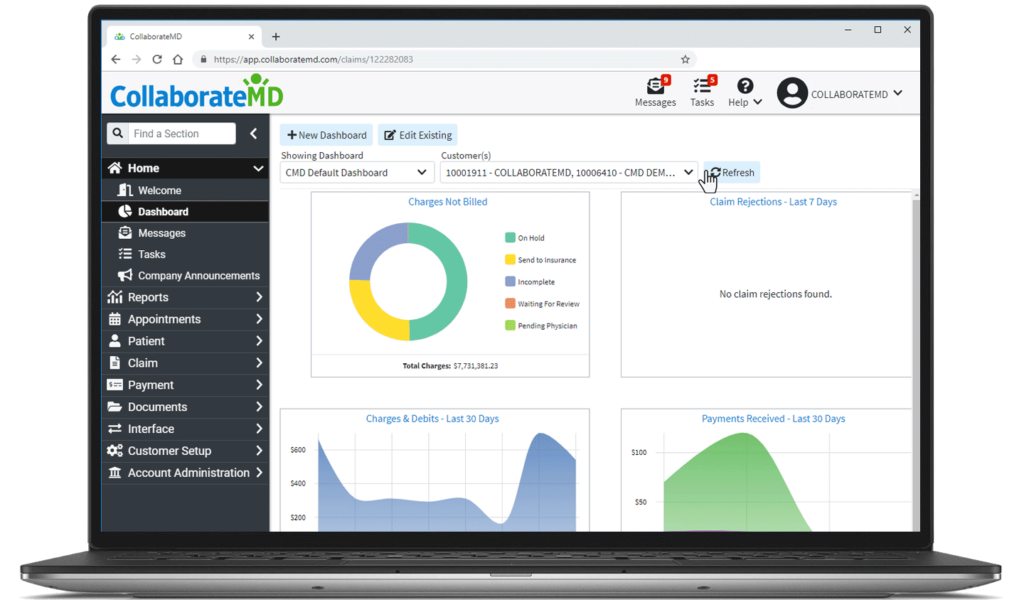
Here are some visual examples of medical billing software interfaces to show you what these tools typically look like:


Top Medical Billing Software to Consider
Here's my shortlist of the best medical billing software solutions:
Who Uses Medical Billing Software?
Medical billing software is used by a range of healthcare organizations and teams seeking to manage billing and insurance claims efficiently:
- Private Medical Practices: Physicians, specialists, and practice administrators handling patient billing in outpatient settings.
- Outpatient Clinics: Teams in urgent care, specialty, or diagnostic centers processing high volumes of insurance claims.
- Multi-Specialty Medical Groups: Administrative and billing teams coordinating claims and payments across different specialties.
- Physical Therapy and Rehabilitation Centers: Facilities billing insurance and tracking patient accounts for ongoing treatment plans.
- Behavioral Health Providers: Mental health practices and counseling centers managing insurance and patient payment workflows with mental health billing software.
Key Medical Billing Software Benefits & Potential Business Impacts
Medical billing software helps practices improve billing efficiency, reduce errors and compliance risks, accelerate payments, and capture more revenue. While there are upfront and ongoing costs to consider, using the wrong tool or poor implementation creates the risk of billing backlogs or regulatory penalties.
Use this table to weigh the benefits against the risks of adopting medical billing software in your practice:
| Benefits | Risks |
|---|---|
| BenefitsFaster claims processing | RisksData migration errors |
| BenefitsFewer billing and coding mistakes | RisksStaff resistance to new workflows |
| BenefitsEasier insurance eligibility verification | RisksSystem downtime or outages |
| BenefitsBetter compliance with regulations | RisksLost revenue from setup/configuration issues |
| BenefitsImproved payment tracking and reporting | RisksOngoing subscription and support costs |
| BenefitsEnhanced patient account management | RisksIntegration problems with EHR/PM systems |
| BenefitsIncreased collections and cash flow | RisksCybersecurity and privacy vulnerabilities |
Medical Billing Software Case Studies
This section shares real-world case studies to show how medical billing software changes billing performance and daily workflows. You'll see how practices addressed common challenges before implementation and what changed after.
Case Study: CoxHealth's Implementation of medaptus Charge Pro
CoxHealth originally approached medaptus to resolve billing inefficiencies caused by disconnected front-end and back-end systems. After reviewing medaptus' capabilities, CoxHealth implemented Charge Pro to automatically review, queue, and hold charges generated in its Cerner EHR system prior to insurance billing.
Here are the results of CoxHealth's implementation of medical billing software:
- Preserved physician workflow: medaptus was installed with no impact to physician workflow, and the software was configured to accept what physicians had already documented in the EHR.
- Automated compliance checks: Cerner now transmits coded encounters to medaptus, where an embedded compliance engine runs configured rules to evaluate appropriateness before billing.
- Reduced coding errors: Habits that had previously led to billing errors were surfaced, allowing CoxHealth to engage providers to refine their coding decision-making process.
- Reduced charge lag: Prior to medaptus, there was an allowed two-day grace period between the visit and printing the superbill, a process that has since been eliminated with a system-wide charge lag reduction of at least 3–4 days, with some clinics billing same day of service.
Case Study: Mountain View Medical Billing's Implementation of RXNT
Mountain View Medical Billing founder Robin Scott-Tripp launched her company in 2011 with a focus on family practice, mental health, and physical therapy clients, and after an exhaustive five-month search, selected RXNT's cloud-based medical billing solution. RXNT's customizable, easy-to-navigate billing workflows enabled Mountain View to reduce administrative time dedicated to client service, and the company now manages twenty accounts in the same time it took to manage its initial five.
Here are the results of Mountain View Medical Billing's implementation of medical billing software:
- 300% client growth: The company now manages 20 accounts in the same time it previously took to manage five, with no increase in staff members.
- Reduced claim rework: Instant claim scrubbing, alerts, and accuracy checks cut down on the time spent correcting and resubmitting claims.
- Lower software costs: Mountain View achieved savings on monthly software costs compared to its previous vendor while gaining increased functionality.
- Faster reimbursements: RXNT's billing workflows contributed to a measurable decrease in reimbursement time across the client portfolio.
Core Features & Capabilities of Medical Billing Software
Here are the essential features you should expect in medical billing software as a medical practice manager:
- Automated Claims Submission: Speeds up getting claims to insurance payers and reduces human errors so you see revenue sooner.
- Insurance Eligibility Verification: Checks a patient’s coverage details automatically to avoid denials and missing information at the point of care.
- Integrated Coding Tools: Helps staff select accurate diagnosis and procedure codes, lowering the risk of rejections and regulatory trouble.
- Denial Management: Flags denied claims and provides workflows for correcting and resubmitting, helping minimize lost income.
- Patient Billing Management: Creates and manages statements, payment plans, and reminders, making it easier to keep patient accounts up to date.
- Reporting and Analytics: Tracks claim status, collections, rejection rates, and key financial indicators so you can measure billing performance and identify gaps.
- Payment Posting: Applies payments to patient accounts as they’re received from insurers and patients to streamline financial reconciliation.
- Secure Data Handling: Uses roles, encryption, and audit trails to protect patient financial data and support compliance with privacy laws.
Medical Billing Software Use Cases: Typical Processes & Workflows
Medical billing software supports daily workflows like patient registration, insurance verification, charge capture, and claims management. These tools automate repetitive billing tasks, flag missing or invalid information, and support faster claim resolution. I think you'll see fewer mistakes, less administrative burden, and a smoother payment process for both patients and your practice.
Use this overview to understand how medical billing software supports your critical billing and administrative processes:
| Process | Description | How Software Helps |
|---|---|---|
| ProcessClaims Submission | DescriptionSending billing claims to insurance payers for patient visits and services. | How Software HelpsAutomates data entry, checks for errors, and batches submissions to speed up the process. |
| ProcessInsurance Verification | DescriptionConfirming patient coverage and eligibility before services are rendered. | How Software HelpsAutomatically checks insurance databases in real time to avoid denials and delays. |
| ProcessCharge Capture & Coding | DescriptionDocumenting and coding treatments or procedures for billing purposes. | How Software HelpsProvides coding tools and prompts to ensure accuracy and compliance with billing rules. |
| ProcessPayment Posting | DescriptionRecording payments from insurers and patients against billed charges. | How Software HelpsPosts payments directly to accounts, flags discrepancies, and speeds reconciliation. |
| ProcessDenial Management | DescriptionTracking and addressing claim denials or payment rejections. | How Software HelpsFlags denied claims, suggests corrections, and automates the resubmission process. |
More Articles
Types of Medical Billing Software & Similar Tools
Medical billing software comes in several distinct forms, and there are related tools that serve overlapping but different purposes. Here's a breakdown to help you understand what you're actually evaluating:
| Type | Differentiator |
|---|---|
| TypeStandalone medical billing software | DifferentiatorFocused exclusively on billing and claims workflows, without clinical or scheduling features |
| TypePractice management software | DifferentiatorCovers scheduling, patient registration, and reporting alongside billing |
| TypeElectronic health records (EHR) software | DifferentiatorCenters on clinical documentation, with billing often added as a secondary feature |
| TypeRevenue cycle management (RCM) software | DifferentiatorManages the full financial lifecycle from patient intake through final payment collection |
| TypeMedical coding software | DifferentiatorSpecialized for translating diagnoses and procedures into billing codes, not submitting claims |
Ready to Find the Right Tool for Your Practice?
Now that you understand what medical billing software is, how it works, and what to look for, the next step is comparing your options. If you want a structured framework for narrowing down vendors, our guide on how to choose a medical billing software walks through the full process. Or browse this expert-reviewed list of the best medical billing software to find a tool that fits your practice's workflows, specialty, and budget.