

CDI software—clinical documentation integrity software—helps you improve accuracy, clarity, and completeness in your clinical documentation. If you’re looking for better ways to support compliant, high-quality records, reduce administrative errors, or keep up with changing coding guidelines, you’re not alone.
Finding the right CDI tool can help you ensure your team delivers clear, thorough, and actionable patient documentation. In this list, you’ll get a side-by-side look at top-rated options that can help you tackle record-keeping challenges, improve workflows, and feel more confident about the integrity of your documentation.
Why Trust Our Software Recommendations
6,700+
Reviews
20
Industry experts
16+
Evaluation factors
14
Years
Our team has been testing and reviewing software since 2012. As medical practice leaders ourselves, we know how difficult—and important—it is to choose the right software.
For this guide, we evaluated tools using hands-on testing and independent research, scoring tools using our selection criteria.
Our reviews reflect our human editorial judgment, not a sales pitch.
CDI Software Comparison Table
This comparison table outlines pricing for my top CDI software:
| Tool | Best For | Trial Info | Price | ||
|---|---|---|---|---|---|
| 1 | Best for enterprise clinical documentation | Not available | Pricing upon request | Website | |
| 2 | Best for EHR-integrated documentation | Free demo available | From $25/user/month | Website | |
| 3 | Best for CDI analytics and insights | Free demo available | Pricing upon request | Website | |
| 4 | Best for outsourced CDI and coding | Free demo available | Pricing upon request | Website | |
| 5 | Best for integrated coding and CDI | Not available | Pricing upon request | Website | |
| 6 | Best for AI-driven documentation integrity | Free demo available | Pricing upon request | Website | |
| 7 | Best for automated chart review | Not available | Pricing upon request | Website | |
| 8 | Best for point-of-care documentation guidance | Free demo available | Pricing upon request | Website | |
| 9 | Best for clinician query management | Not available | Pricing upon request | Website | |
| 10 | Best for AI-assisted revenue integrity | Free demo available | Pricing upon request | Website |


Best CDI Software Reviews
Below are my detailed summaries of the best CDI software that made it onto my shortlist. My reviews offer a detailed look at the features, integrations, and best use cases of each platform to help you find the best one for you.
 Best for enterprise clinical documentation
- Not available
- Pricing upon request
Visit WebsiteCustomer Rating:4/5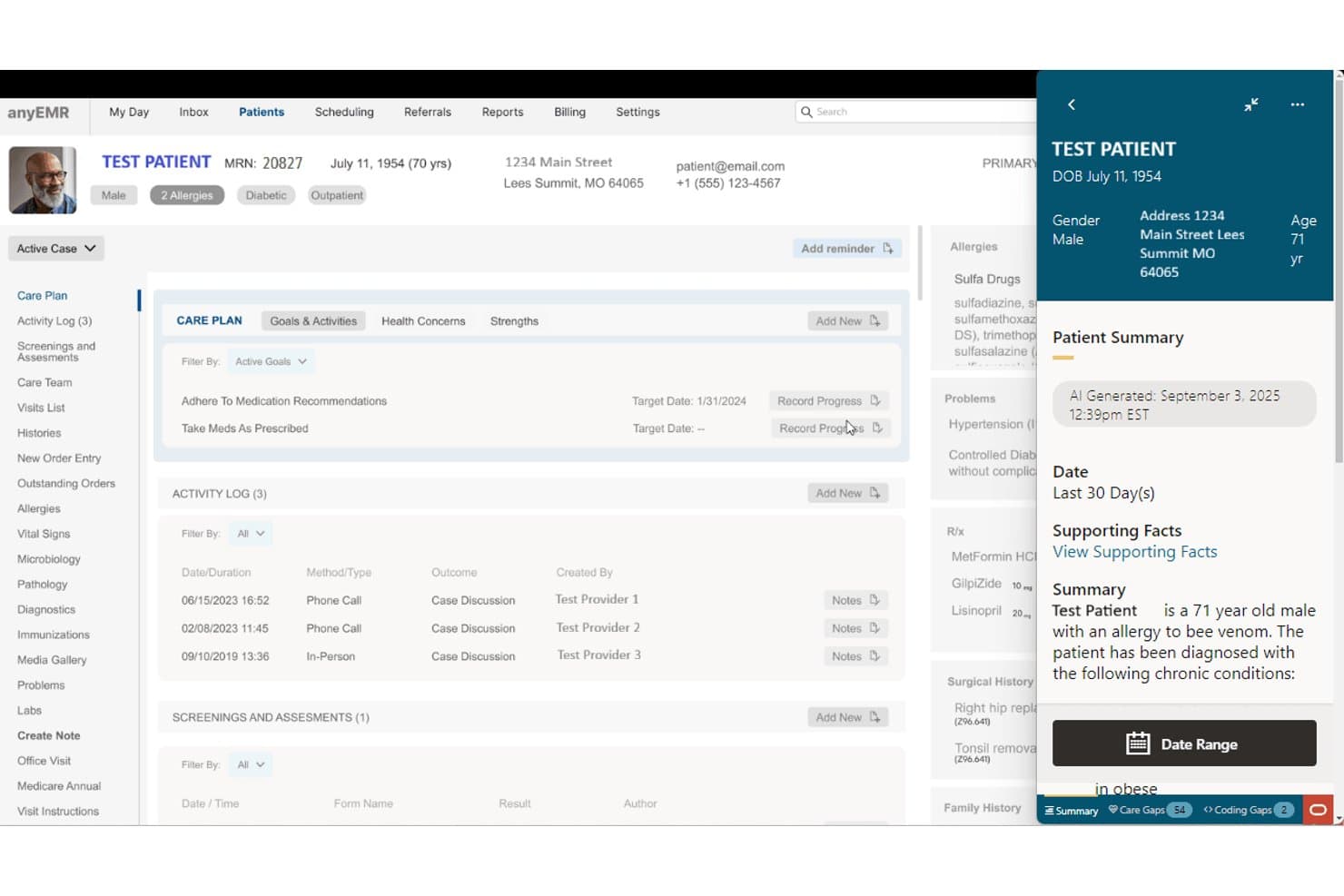
Oracle Health offers an AI-generated patient summary panel that surfaces care gaps, chronic conditions, and supporting clinical facts within the patient chart. Oracle Health is an enterprise EHR platform with embedded AI documentation tools, including an AI-powered Clinical AI Agent that handles note drafting, chart summarization, and context-based coding recommendations within clinical workflows.
Who Is Oracle Health Best For?
Oracle Health is a strong fit for large health systems and enterprise hospitals already running on the Oracle Health (formerly Cerner) EHR ecosystem.
Why I Picked Oracle Health
I've included Oracle Health in my top picks because its Clinical AI Agent handles documentation at the point of care, using voice capture to generate chart summaries, draft notes, and surface coding recommendations drawn directly from clinical conversations. I like that coding suggestions reflect the actual care context rather than static rules. That distinction matters when a health system is processing thousands of inpatient encounters and needs documentation to hold up for DRG validation.
Oracle Health Key Features
- Advanced capture with OCR: Automates document scanning and indexing directly into patient records using barcode and optical character recognition technology.
- Device connectivity: Connects bedside medical devices for automatic data entry into the EHR, reducing manual documentation.
- Clinical intelligence reporting: Offers reporting tools to analyze data around utilization, compliance, and documentation quality.
- Native EHR integration: Embeds documentation and coding tools within the Oracle Health EHR environment for in-context workflow support.
Oracle Health Integrations
Oracle Health offers native integration with its own EHR platform, supports data exchange via HL7 and FHIR APIs, and can connect to interoperability networks like CommonWell. An API is available for custom integrations.
Pros and Cons
Pros:
- Scales across large multi-hospital systems
- Deep EHR-native clinical documentation support
- AI-powered voice capture for note drafting
Cons:
- CDI-specific query tools are less developed
- Implementation complexity outside Oracle EHR environments
Learn more about Oracle Health: Best for EHR-integrated documentation
- Free demo available
- From $25/user/month
Visit WebsiteCustomer Rating:3.1/5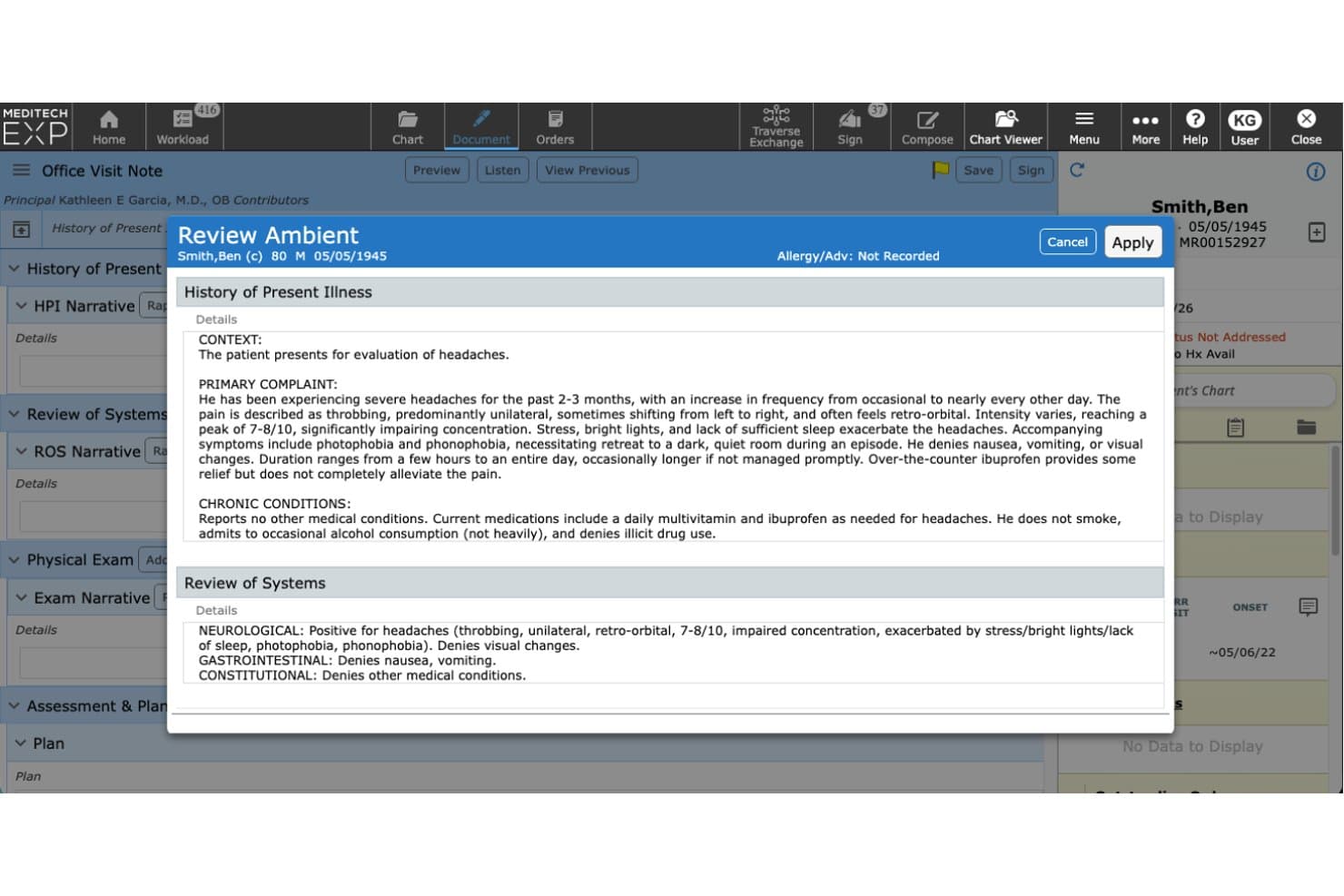
MEDITECH offers an AI-powered Ambient documentation tool that automatically generates structured clinical notes, including HPI and Review of Systems, for provider review before applying to the patient chart. MEDITECH Expanse is a cloud-based EHR platform with native clinical documentation tools, AI-assisted note generation, ambient listening, and clinical decision support built directly into hospital and health system workflows.
Who Is MEDITECH Best For?
MEDITECH Expanse is a strong fit for hospitals and larger health systems that want clinical documentation capabilities built directly into their EHR of record.
Why I Picked MEDITECH
I picked MEDITECH because its CDI-relevant tools are embedded directly in Expanse, not layered on top of it. Expanse Navigator surfaces both structured data and unstructured clinical notes in a unified view, making it easier to spot documentation gaps during active admissions. The ambient listening feature, available through Suki or Nuance DAX, transcribes real-time encounters and auto-generates discharge narratives using Google Cloud's AI models.
MEDITECH Key Features
- Clinical decision support: Surfaces best practices and guideline-driven prompts in documentation workflows.
- Specialty documentation templates: Offers 800+ templates for clinical documentation across care settings and specialties.
- Surveillance case review: Flags abnormal patient data in real time so teams can identify records needing extra attention.
- Bidirectional EHR integration: Supports FHIR-based data exchange and interoperability with external systems and partner applications.
MEDITECH Integrations
MEDITECH offers native integrations with Nuance DAX, Suki, Google Cloud Vertex AI, and supports FHIR-based data exchange with external systems. An API is available for custom integrations.
Pros and Cons
Pros:
- Single platform for EHR and documentation review
- AI ambient listening captures real-time encounter notes
- Documentation natively embedded in the EHR workflow
Cons:
- Physician query tools require third-party add-ons
- CDI-specific analytics less developed than standalone tools
Learn more about MEDITECH: Best for CDI analytics and insights
- Free demo available
- Pricing upon request
Visit WebsiteCustomer Rating:5/5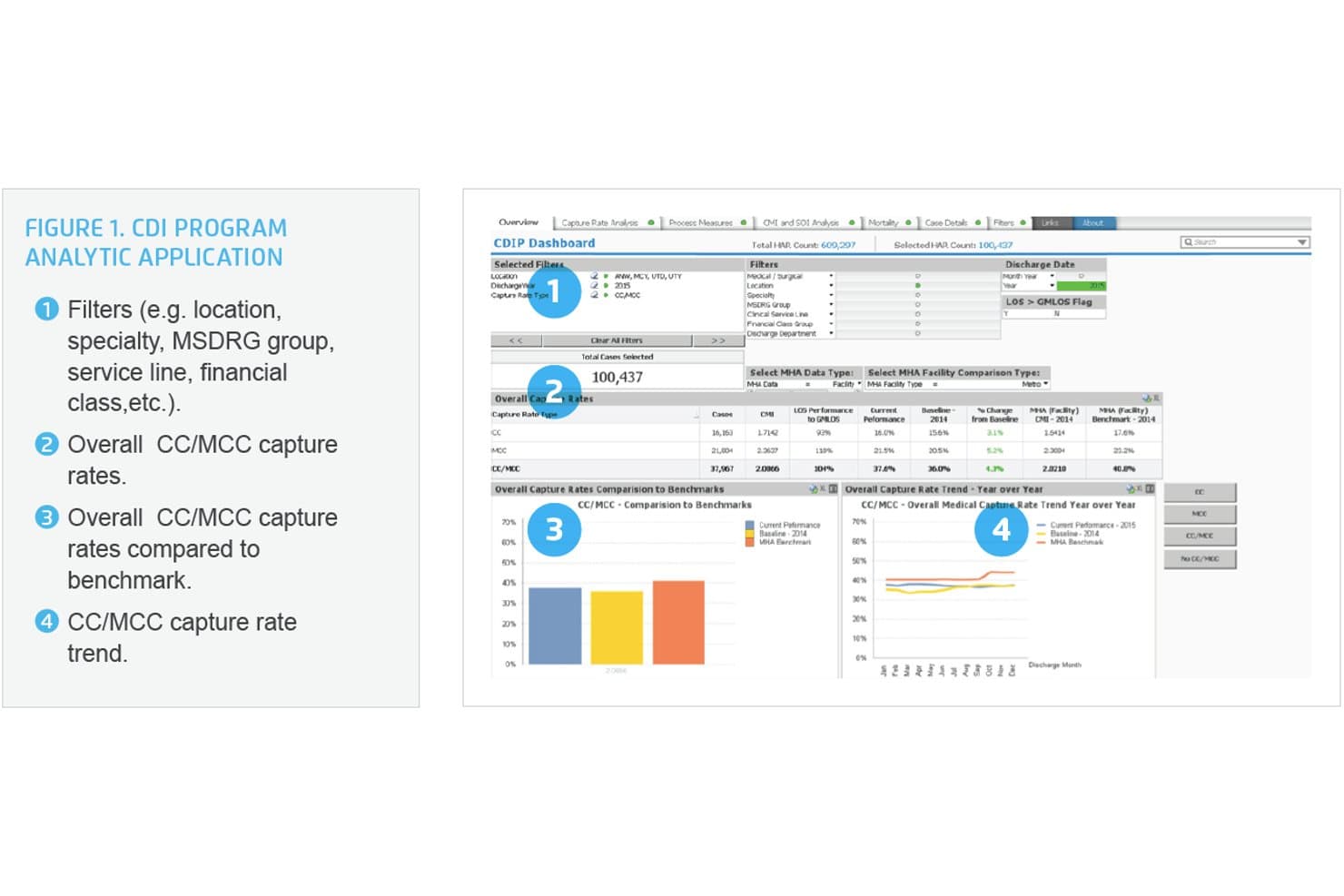
HealthCatalyst offers a CDI Program Analytic Application dashboard with CC/MCC capture rate tracking, benchmark comparisons, and year-over-year trend analysis. Health Catalyst is a healthcare data and analytics platform with a built-in CDI solution that combines concurrent chart review, AI-powered physician documentation nudges, automated query workflows, and DRG and risk adjustment tools.
Who Is HealthCatalyst Best For?
Health Catalyst is a strong fit for large health systems and acute care hospitals with dedicated CDI and HIM teams looking to tie documentation improvement to broader data analytics.
Why I Picked HealthCatalyst
I picked Health Catalyst as one of the best because its CDI analytics depth genuinely sets it apart. The platform visualizes CC/MCC capture rates, case mix index, SOI, and mortality data alongside benchmark comparisons in a single view. I also like the AI-powered CAPD, which pushes physician nudges at the point of care, with 73% of resolved nudges completed within two days of admission.
HealthCatalyst Key Features
- Prioritized worklists: CDI specialists receive intelligent, automated prioritization of charts by financial or quality impact.
- DRG and risk adjustment calculators: Built-in DRG, SOI/ROM, and HCC scoring tools support accurate CDI review and coding.
- Concurrent and retrospective review tools: The platform supports both real-time inpatient review and post-discharge audit workflows.
- Encoder and EHR compatibility: Integrates with encoders like 3M and with major EHRs for smoother data exchange and coding processes.
HealthCatalyst Integrations
Health Catalyst offers native integrations with Epic, Cerner, Meditech, and 3M 360 Encompass. An API is available for custom integrations.
Pros and Cons
Pros:
- Supports concurrent and retrospective review workflows
- AI-driven physician nudges at point of care
- Deep CDI-specific analytics and benchmarking
Cons:
- May be overpowered for smaller CDI teams
- Implementation can be lengthy for large systems
Learn more about HealthCatalyst:
AGS Health offers AI-Powered Clinical Documentation Improvement (CDI) Automation, showcased with a healthcare professional using a desktop interface. AGS Health is a technology-enabled CDI and revenue cycle platform that combines AI-driven chart analysis, automated physician query workflows, concurrent chart review, and integrated coding tools.
Who Is AGS Health Best For?
AGS Health is a strong fit for large health systems and hospital groups that want to combine CDI software with access to an outsourced team of specialized coders and CDI professionals.
Why I Picked AGS Health
AGS Health earns its spot on my shortlist because no other CDI platform pairs AI-driven chart analysis with a workforce of 4,900+ specialized coders and CDI professionals. I particularly like the Intelligent CDI Worklists, which prioritize charts based on predicted query opportunities and hold cases awaiting physician responses so nothing slips through. The built-in MS-DRG grouping and real-time HAC, readmission, and PSI alerts mean my team can act on documentation gaps before charts close.
AGS Health Key Features
- Real-time EHR data synchronization: Automatically pulls patient charts and updates documentation analysis as new clinical notes and attachments become available.
- Customizable reporting dashboards: Lets you track CDI key performance indicators, query rates, and financial metrics in easily configurable views.
- Integrated encoder with coding references: Provides guideline info, coding clinics, and DRG calculations directly within the documentation review workflow.
- Multi-location data storage: Supports data redundancy and uptime with distributed cloud storage across multiple secure facilities.
AGS Health Integrations
AGS Health provides native integrations with Epic, Cerner, MEDITECH, Allscripts, athenahealth, eClinicalWorks, Harris Healthcare, and Evident. An API is also available for custom integrations.
Pros and Cons
Pros:
- Tracks PSI, HAC, and HCC simultaneously
- AI surfaces query opportunities during concurrent reviews
- Outsourced coding team included with the platform
Cons:
- Onboarding can extend beyond typical timelines
- Reporting customization requires vendor support to configure
Learn more about AGS Health:
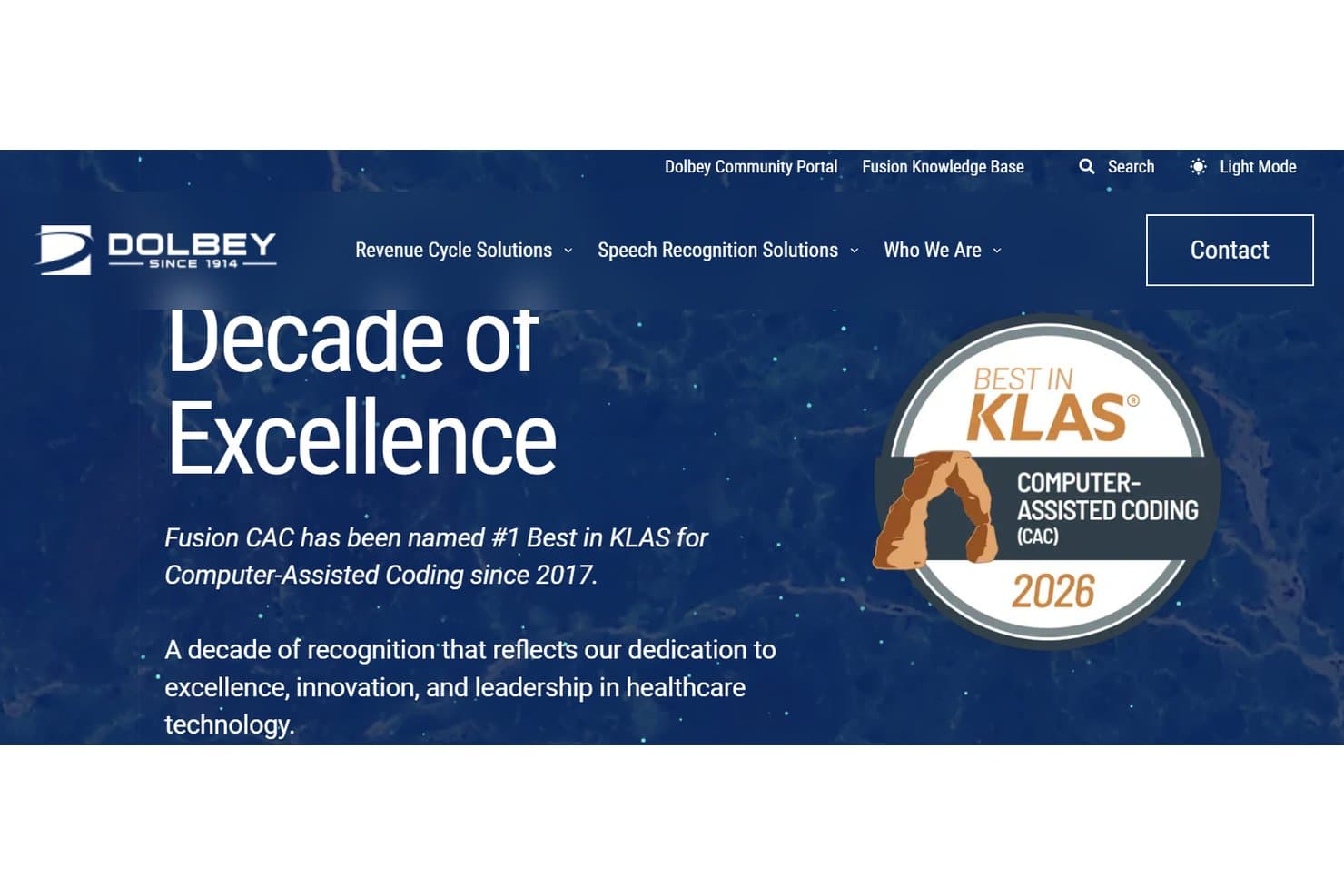
Dolbey Fusion CAC recognized for excellence in computer-assisted healthcare coding Dolbey Fusion CDI is a clinical documentation improvement platform that combines AI-driven chart review, automated gap identification, physician query management, and CDI analytics within a unified CAC and CDI workspace.
Who Is Dolbey Fusion CDI Best For?
It's a strong fit for HIM directors and CDI program managers at acute care hospitals that need coding and CDI teams working from a single, shared platform.
Why I Picked Dolbey Fusion CDI
Dolbey Fusion CDI earns its spot on my shortlist because of how tightly the CDI and coding workflows are wired together. I particularly like CDI Alerts™, which flags documentation gaps before a specialist even opens the chart, so your team isn't hunting for issues manually. What I find most compelling is that CDI, coding, and auditing teams can work simultaneously on the same encounter in a shared workspace, cutting the back-and-forth that typically slows concurrent review.
Dolbey Fusion CDI Key Features
- Real-time dashboards: Monitor CDI program KPIs, productivity, and query response rates from customizable dashboards.
- DRG and HCC calculators: Access built-in tools for MS-DRG, SOI/ROM, and HCC risk adjustment tracking.
- Bidirectional EHR integration: Connect directly with Epic, Cerner, MEDITECH, and other EHRs for streamlined data and query exchange.
- Flexible workflows: Support concurrent, pre-bill, post-discharge, and retrospective CDI review processes.
Dolbey Fusion CDI Integrations
Dolbey Fusion CDI offers native integrations with Epic, Cerner, MEDITECH, Allscripts, Siemens, and CPSI. An API is available for custom integrations.
Pros and Cons
Pros:
- AutoClose autonomously codes simple outpatient encounters
- Single platform covers CAC, CDI, and auditing
- Rated Best in KLAS for CAC nine consecutive years
Cons:
- Reporting and automated coding features need more development
- Issue resolution can take longer than expected
Learn more about Dolbey Fusion CDI: Best for AI-driven documentation integrity
- Free demo available
- Pricing upon request
Visit WebsiteCustomer Rating:4.4/5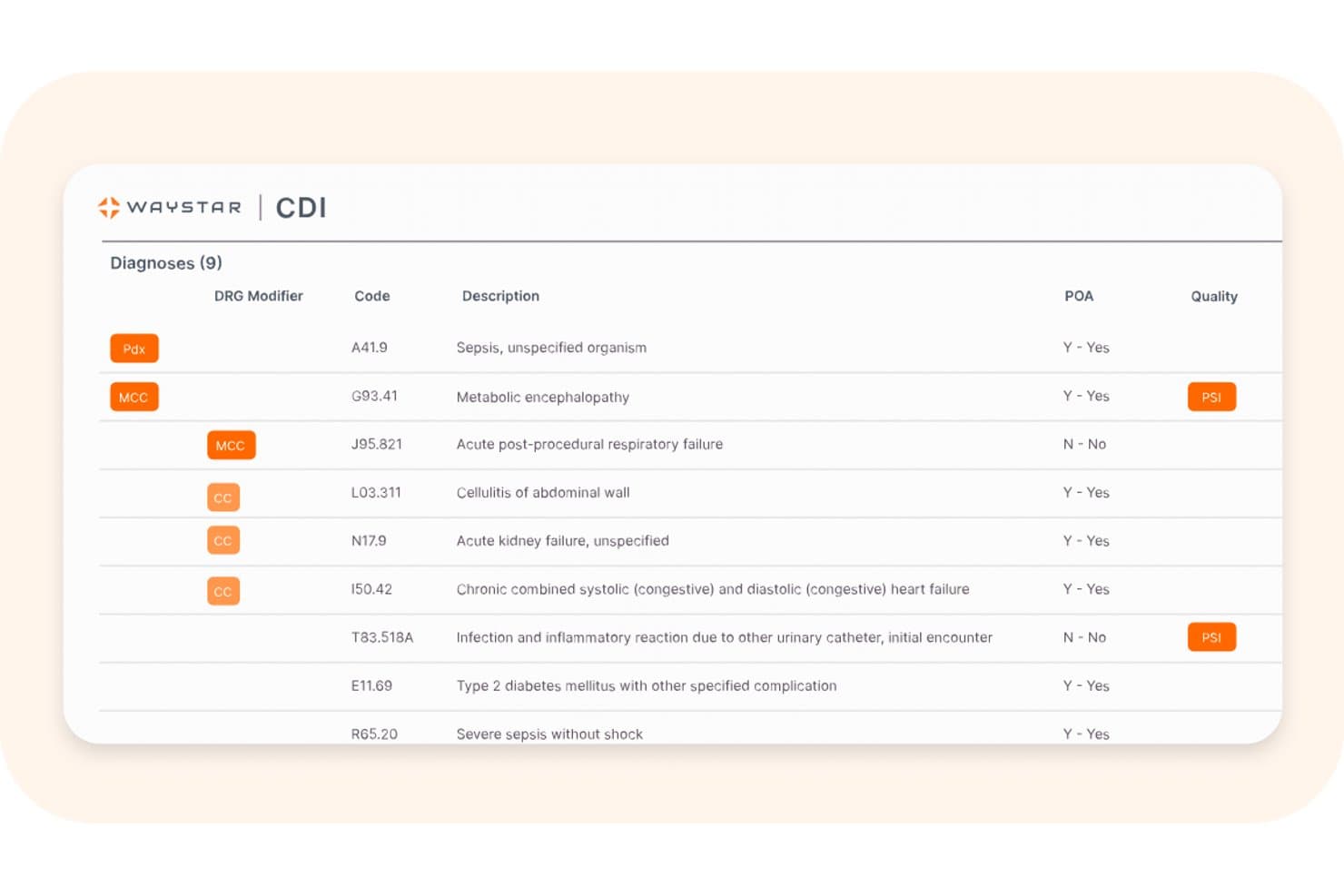
Waystar offers a CDI interface that displays a structured list of 9 diagnoses with DRG modifiers, ICD codes, descriptions, POA status, and quality flags like PSI. Waystar's CDI solution is an AI-native clinical documentation integrity platform built for inpatient settings, combining autonomous chart review, physician query management, and DRG analysis powered by the AltitudeAI™ engine.
Who Is Waystar Best For?
Waystar's CDI solution is a strong fit for large health systems and hospitals with high inpatient volume looking to modernize or scale an existing CDI program.
Why I Picked Waystar
Waystar earns its spot on my shortlist because its AI-first approach to chart review is genuinely different from query-driven CDI tools. AltitudeAI™ is trained on more than one-third of all U.S. inpatient discharges, which means it catches documentation gaps that narrower models routinely miss. I also like the QueryAgent feature, which uses generative AI to draft post-discharge queries directly within physician workflows, keeping response rates high without adding burden to CDI specialists.
Waystar Key Features
- Prioritized worklists: The platform presents CDI specialists with AI-ranked worklists sorted by financial impact and documentation urgency.
- Integrated DRG calculators: Built-in tools calculate and display current and potential DRG groupers, SOI, and ROM for each encounter.
- Physician engagement dashboard: Monitors provider-level query response times, outstanding queries, and documentation trends within a unified view.
- Bidirectional EHR integration: Connects directly with Epic, Oracle Health, and Meditech to sync patient data and embed queries in clinician workflows.
Waystar Integrations
Waystar offers native integrations with Epic, Oracle Health (Cerner), and Meditech EHR systems. An API is available for custom integrations.
Pros and Cons
Pros:
- Post-discharge query drafting via generative AI
- Autonomous chart review without specialist prompting
- AltitudeAI trained on U.S.-wide inpatient data
Cons:
- Implementation timelines can extend beyond 90 days
- Primarily designed for inpatient settings only
Learn more about Waystar:
Solventum offers AI-powered, real-time insights for physicians and CDI teams to drive clinical and revenue integrity. Solventum 360 Encompass CDI is a clinical documentation integrity platform that combines NLP-driven chart review, automated physician query workflows, DRG and risk adjustment tools, and CDI performance analytics across inpatient, outpatient, and professional services settings.
Who Is Solventum Best For?
It's a strong fit for large health systems and academic medical centers that run dedicated CDI programs across multiple facilities and service lines.
Why I Picked Solventum
I picked Solventum 360 Encompass CDI as one of the best because its NLP-driven prioritization algorithm handles automated chart review at scale. It scans unstructured clinical notes to surface high-priority cases, including those missing CC/MCC captures or where length of stay doesn't align with documented severity. What I particularly like is the machine learning layer, which continuously refines worklist priorities as new documentation arrives, so my team isn't manually triaging charts.
Solventum Key Features
- Bidirectional EHR integration: Connects with Epic, Cerner, and Meditech to exchange data and embed queries in physician workflows.
- Dedicated quality indicator modules: Tracks PSI, HAC, SOI/ROM, HCC, and other quality and risk adjustment metrics in one platform.
- Customizable CDI reports: Lets users design and run self-service analytics on CDI KPIs, reviewer productivity, and financial impact.
- Automated code sequencing: Orders diagnosis codes for optimal DRG assignment and quality measure reporting.
Solventum Integrations
Solventum 360 Encompass CDI offers native integrations with Epic, Cerner, and Meditech. An API is also available for custom integrations.
Pros and Cons
Pros:
- Deep concurrent and retrospective review support
- Strong DRG and HCC coverage across settings
- NLP-driven automated chart prioritization
Cons:
- Reporting customization requires vendor support
- Implementation timeline can exceed 90 days
Learn more about Solventum: Best for point-of-care documentation guidance
- Free demo available
- Pricing upon request
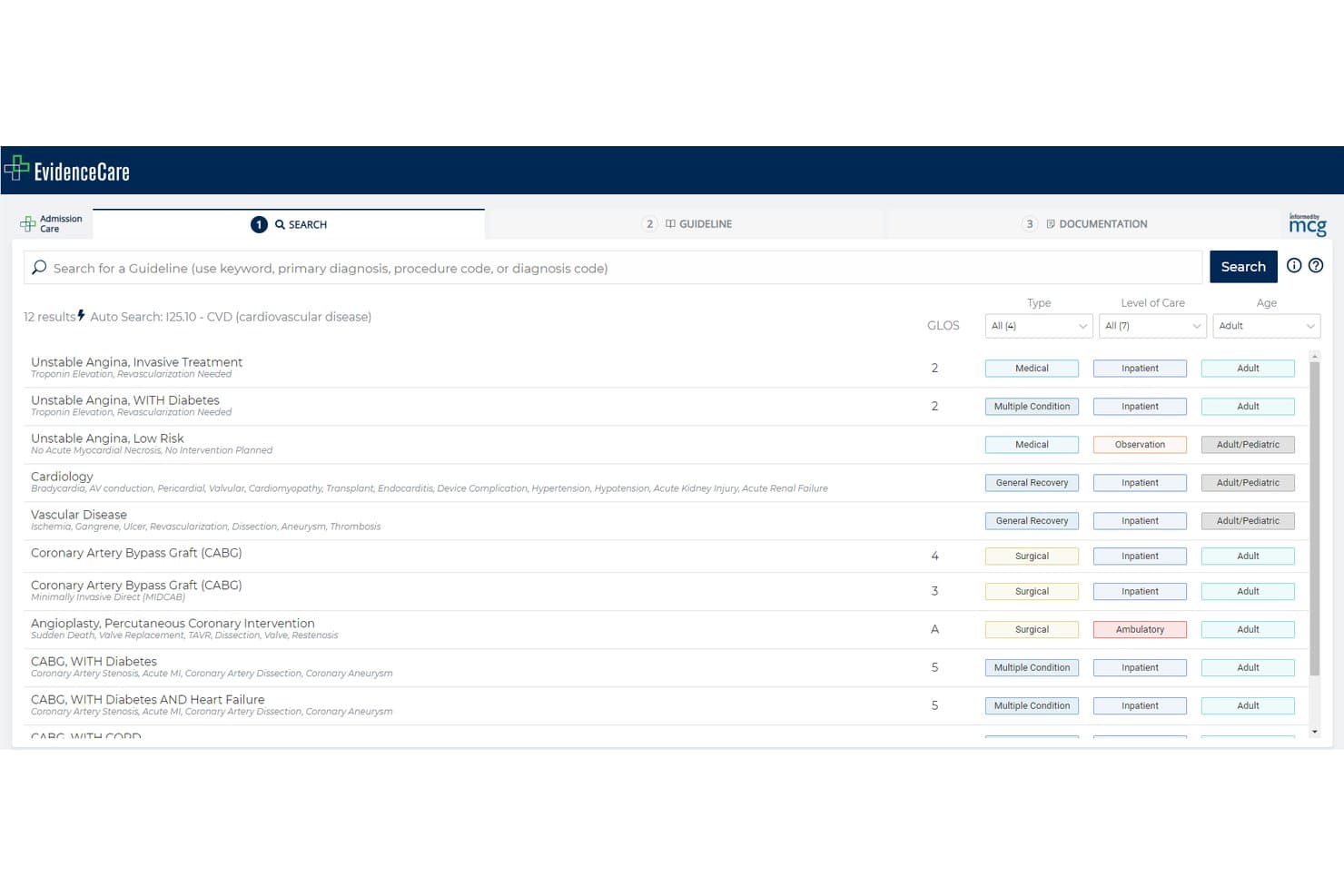
EvidenceCare offers an auto-search feature that surfaces relevant clinical guidelines by diagnosis code, such as ICD-10 I25.10 for cardiovascular disease, supporting CDI workflows. EvidenceCare is a point-of-care clinical documentation platform that embeds medical necessity criteria, bed-status guidance, and working DRG tracking directly into EHR workflows for inpatient care teams.
Who Is EvidenceCare Best For?
EvidenceCare is a strong fit for enterprise health systems where physician advisors and revenue cycle teams need to reduce inpatient medical necessity denials at the point of admission.
Why I Picked EvidenceCare
EvidenceCare earns its spot on my shortlist because of how it handles documentation guidance directly inside the EHR, before a denial can happen. I like that AdmissionCare surfaces payer bed-status criteria at the moment of admission, giving physicians the exact documentation prompts they need in around 42 seconds. The InterQual AutoReview integration takes it further by automatically pulling clinical data from the chart and applying evidence-based criteria without manual chart abstraction.
EvidenceCare Key Features
- Working DRG prompt in CareGauge: Prompts providers to update progress notes and diagnoses when the working DRG doesn't match expected utilization.
- Concurrent review triggers: Automatically notifies clinicians to conduct subsequent reviews for observation patients at specified LOS milestones.
- Bidirectional EHR integration: Embedded within Epic, Oracle Cerner, and MEDITECH to sync documentation and criteria directly in clinician workflows.
- Secure, compliant cloud platform: HITRUST r2 and SOC 2 Type 2 certifications ensure high standards for data security and regulatory compliance.
EvidenceCare Integrations
EvidenceCare offers native integrations with Epic, Oracle Cerner, and MEDITECH electronic health record systems. An API is also available for custom integrations.
Pros and Cons
Pros:
- HITRUST r2-certified cloud platform for PHI protection
- Admission reviews completed in under 60 seconds
- Embeds directly in existing EHR workflows
Cons:
- Limited outpatient and ambulatory CDI workflow support
- Narrower scope than full-suite CDI platforms
Learn more about EvidenceCare:
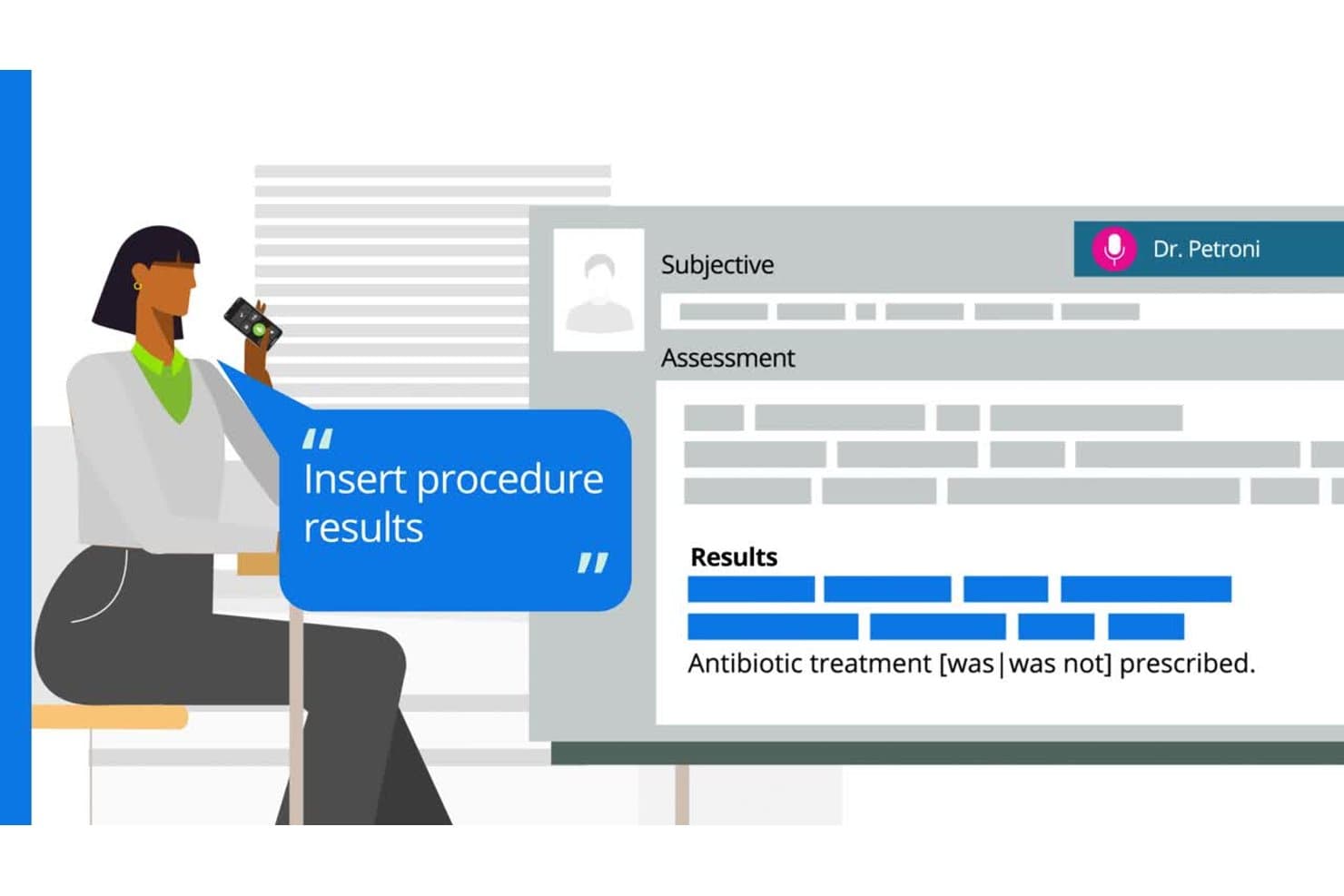
Microsoft CDE One offers voice-driven documentation with real-time insertion of procedure results and treatment notes into structured clinical records. Microsoft CDE One is an AI-powered clinical documentation integrity platform that combines concurrent chart review, physician query management, NLP-driven documentation analysis, DRG calculators, and CDI performance analytics.
Who Is Microsoft CDE One Best For?
CDE One is a strong fit for large health systems and multi-facility hospitals running enterprise-scale CDI programs that need standardized workflows across departments and sites.
Why I Picked Microsoft CDE One
I picked Microsoft CDE One as one of the best because of how its query workflow actually operates in practice. CDI specialists send electronic clarifications directly from CDE One, while clinicians receive and respond through a centralized inbox embedded in their EHR. Responses flow back into CDE One automatically, and the AI-powered worklist uses clinical evidence and documentation opportunity scores to prioritize which charts need attention first.
Microsoft CDE One Key Features
- AI/NLP documentation analysis: Uses advanced natural language processing to identify documentation gaps and missing specificity in clinical notes.
- Prioritized worklists: Automatically ranks cases by documentation opportunity, financial impact, or quality measure for focused CDI review.
- DRG and SOI/ROM calculators: Includes working MS/APR DRG calculators and severity scoring tools to support accurate reimbursement workflows.
- Enterprise analytics dashboards: Offers customizable dashboards to monitor CDI KPIs, financial outcomes, and reviewer productivity across facilities.
Microsoft CDE One Integrations
Microsoft CDE One offers native integrations with Epic, Cerner, and Meditech EHRs, and has native integrations across the Microsoft ecosystem, including Microsoft 365 and Azure. An API is available for custom integrations.
Pros and Cons
Pros:
- Continuous product updates driven by customer feedback
- Strong HITRUST, SOC 2, and HIPAA compliance posture
- Evidence-based clinical criteria library with 750+ strategies
Cons:
- Not suited for small or mid-sized hospital CDI programs
- Post-acquisition, personalized account support has declined
Learn more about Microsoft CDE One: Best for AI-assisted revenue integrity
- Free demo available
- Pricing upon request
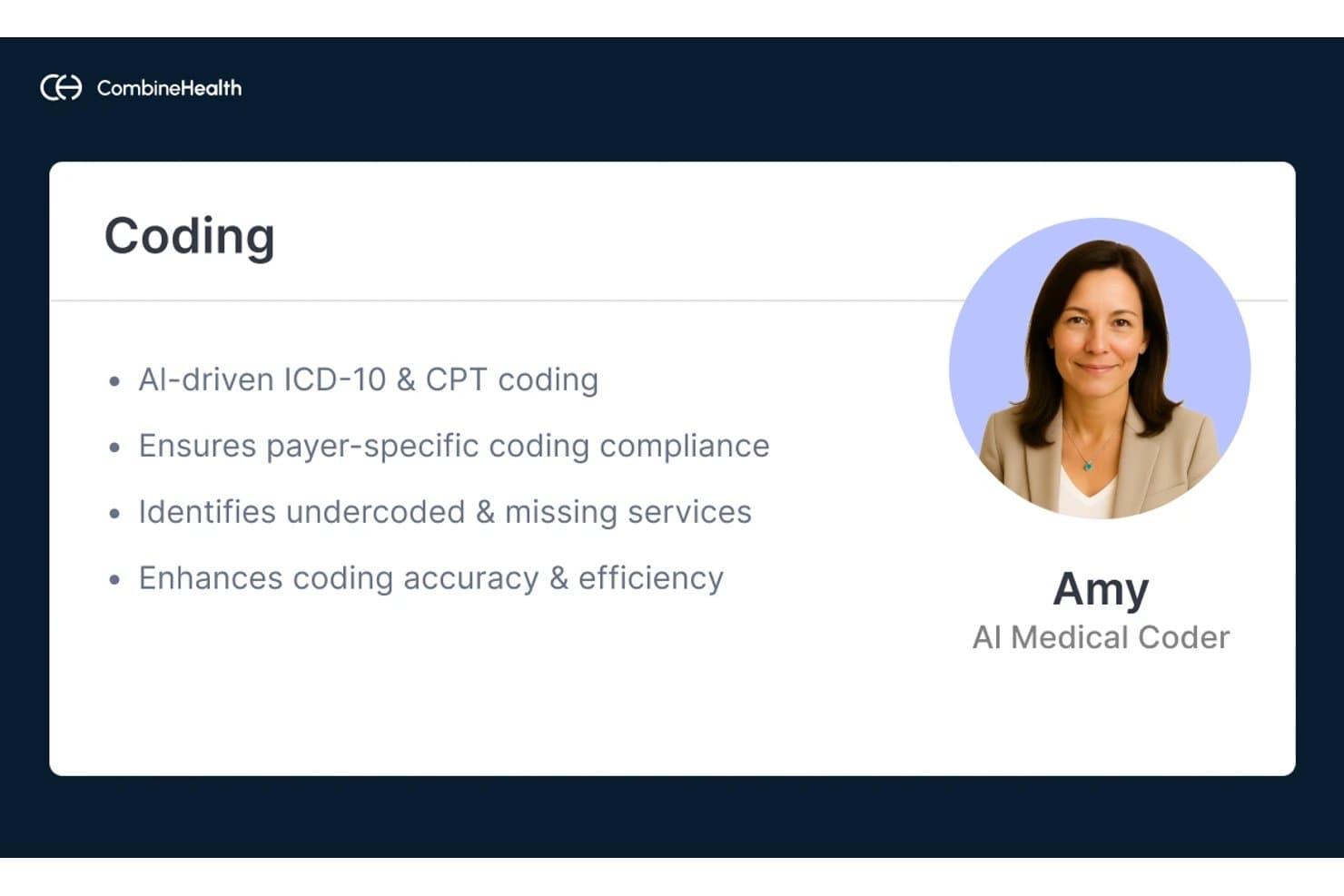
Combine Health offers an AI Medical Coder named Amy that performs AI-driven ICD-10 and CPT coding to enhance coding accuracy and compliance. Optum Enterprise CAC and CDI 3D is a hospital-grade CDI and computer-assisted coding platform that combines NLP-driven documentation analysis, concurrent chart review, automated physician query workflows, and coding reimbursement tools in a single integrated system.
Who Is Combine Health Best For?
It's a strong fit for HIM directors and CDI program managers at large hospitals and health systems running high-volume inpatient coding operations.
Why I Picked Combine Health
I picked Combine Health because the Clinical Language Intelligence NLP engine processes over 3 million clinical documents daily, reading each word and mapping diagnoses to codes in under a second. CDI 3D catches documentation gaps as notes enter the EHR, and the Audit and Compliance Manager flags cases for pre-bill review before denials occur. In one documented case, that workflow reduced medical necessity denials by 37% in the first month.
Combine Health Key Features
- Concurrent chart review with AI prioritization: The platform reviews all inpatient documentation in real time and automatically ranks cases for CDI specialist attention.
- Comprehensive DRG and risk adjustment tools: Built-in calculators support MS-DRG and SOI/ROM assignment as well as HCC/risk adjustment flagging.
- Customizable CDI analytics dashboard: Power BI dashboards display CDI KPIs, productivity metrics, audit trails, and financial impact tracking for program leaders.
- Mobile physician query response app: A secure mobile app enables physicians to receive, respond to, and manage queries directly from their device.
Combine Health Integrations
Combine Health offers native integrations with Epic, Cerner, and Meditech EHR systems. An API is available for custom integrations.
Pros and Cons
Pros:
- Mobile query response app for physicians
- Concurrent and retrospective CDI review supported
- NLP accuracy across high-volume inpatient charts
Cons:
- Implementation requires significant hospital IT involvement
- Better suited to large inpatient settings
Learn more about Combine Health:
Other CDI Software
Here are some additional CDI software options that didn’t make it onto my shortlist, but are still worth checking out:
- 11Enjoin CDIBest for physician-led CDI services
- 12RapidClaimsBest for automated coding workflows
- 13Cotiviti CDIBest for payer-focused documentation review
- 14XsolisBest for AI-driven utilization and CDI
How I Evaluate CDI Software
I evaluate CDI software in two layers: the core workflows every tool must handle—concurrent chart review, query management, DRG analysis—and the differentiators that separate the best options.
Core Functionality (Table Stakes For This List)
When I'm selecting tools for my list, I rank each one on a scale from 0 (does not offer the functionality) to 5 (excels in this area) for each core functionality listed below. Then, I calculate the tool's total score into a percentage. Each tool needs to achieve a minimum total score of 65% to be considered for inclusion.
- Concurrent Chart Review: I check whether CDI specialists can review inpatient charts in real time—not just retrospectively—with prioritized worklists that flag high-impact cases.
- Automated Query Workflow: I look for compliant, templated queries with routing, tracking, escalation paths, and audit trails that align with AHIMA/ACDIS practice briefs.
- AI/NLP Documentation Analysis: The tool should use NLP to surface missing diagnoses or specificity gaps in clinical notes, not just basic keyword matching or rules-based alerts.
- DRG & Risk Adjustment Tools: I evaluate whether the platform includes a working DRG calculator, SOI/ROM scoring, and HCC/risk adjustment prompts in one view.
- CDI Performance Analytics: Dashboards should cover core KPIs like query response rates, CMI impact, and reviewer productivity—with the ability to drill down by service line.
- EHR Integration: I look for bidirectional integration with major EHRs like Epic, Oracle Health, and MEDITECH so queries reach physicians inside their existing workflow.
Once I have a list of tools that meet the criteria, I consider what sets each platform apart.
Differentiating Factors (What Sets Vendors Apart)
Here's how I compare and contrast different vendors:
Standout Features
AI-powered query suggestions are a key differentiator—I look for platforms where NLP surfaces documentation gaps with clinically linked evidence, not just generic prompts. Prioritized worklists also matter because they let CDI specialists focus on cases with the highest DRG shift potential or risk adjustment opportunity first. Beyond reimbursement, I evaluate quality and risk adjustment tracking modules for PSI, HAC, and HCC capture that connect CDI work directly to value-based care outcomes.
Beyond Features
EHR and encoder integration is one of the first things I check—bidirectional connections with major EHRs and compatibility with encoders via HL7 or FHIR make a real difference in coding handoff speed. Regulatory compliance matters too, especially ACDIS/AHIMA-aligned query practices and timely ICD-10-CM/PCS and MS-DRG rule updates that keep your program audit-ready. I also evaluate scalability for multi-hospital systems, looking at whether licensing stays manageable as you expand across inpatient, outpatient, and ambulatory settings.
How to Choose CDI Software
It’s easy to get bogged down in long feature lists and complex pricing structures. To help you stay focused as you work through your unique software selection process, here’s a checklist of factors to keep in mind:
| Factor | What to Consider |
| Scalability | Will the platform handle growth across hospitals, outpatient, and ambulatory sites without new contracts or licenses? |
| Integrations | Does it support true bidirectional integration with your EHR and coding systems, or is manual data entry still required in key workflows? |
| Customizability | Can you tailor query templates, dashboards, and workflows to your program’s documentation standards and clinical focus areas? |
| Ease of use | How intuitive is the interface for CDI specialists, coders, and providers? Will it require substantial training or workflow changes? |
| Implementation and onboarding | How clear are the rollout steps, project timelines, and access to domain experts or clinical trainers during system setup? |
| Cost | Does the vendor offer flexible models—such as per-user, per-encounter, or per-bed pricing? Watch for hidden support or integration fees. |
| Security safeguards | Are they certified for HIPAA, HITRUST, SOC 2? Is data encrypted in transit and at rest? Ask how updates affect compliance. |
| Compliance requirements | Does the software stay current with ACDIS/AHIMA standards, and automatically update for new ICD-10 and DRG rule revisions? |
What Is CDI Software?
CDI software is a specialized platform that helps healthcare organizations improve the accuracy, clarity, and completeness of clinical documentation. These systems support concurrent chart review, automated query workflows, coding compliance, and performance analytics to reduce denials, optimize case mix, and support proper reimbursement. CDI software is used by CDI specialists, him teams, physician advisors, and revenue cycle leaders seeking consistent, compliant documentation standards.
Features of CDI Software
When selecting CDI software, keep an eye out for the following key features:
- Concurrent chart review: Enables specialists to review patient records in real time while care is being delivered, helping to identify documentation gaps before discharge.
- Automated query workflow: Streamlines the creation, routing, and tracking of physician queries to clarify or supplement clinical information in the medical record.
- DRG and risk adjustment tools: Provides calculators for DRG assignment, SOI/ROM scoring, and HCC prompts to support accurate case mix and reimbursement.
- Physician engagement tools: Includes mobile portals, query response dashboards, and trend reports to keep physicians informed and involved in documentation improvement.
- Performance analytics: Delivers dashboards and reports on KPIs like query rates, CMI influence, denial trends, and reviewer productivity to support data-driven management.
- EHR integration: Facilitates two-way connectivity with EHR platforms so clinical data and queries are synchronized directly in the provider’s workflow.
- Customizable templates: Offers pre-built and editable query, note, and report templates to reflect local documentation, coding, and compliance requirements.
- Audit trails: Tracks all documentation changes, query communications, and user actions to maintain regulatory compliance and support retrospective reviews.
- Multi-setting workflow support: Supports inpatient, outpatient, pre-bill, and post-discharge CDI review, giving teams flexibility across all care environments.
Common CDI Software AI Features
Beyond the standard CDI software features listed above, many of these solutions are incorporating AI with features like:
- AI-powered query suggestions: Automatically generates clinically relevant queries by analyzing chart context and identifying documentation gaps that require clarification.
- Predictive case prioritization: Uses machine learning to rank patient records by potential financial impact, risk adjustment opportunity, or likelihood of denial, helping CDI teams focus on high-value cases.
- Natural language processing (NLP) documentation analysis: Scans unstructured clinical notes to surface missing diagnoses, specificity, or clinical indicators that may be overlooked in manual review.
- Automated evidence linking: Connects suggested queries or documentation gaps to supporting clinical evidence within the patient record, making it easier for providers to respond confidently.
- Real-time compliance monitoring: Continuously checks documentation and queries against regulatory standards, flagging potential compliance risks or audit triggers as records are updated.
Benefits of CDI Software
Implementing CDI software provides several benefits for your team and your business. Here are a few you can look forward to:
- Improved documentation accuracy: Real-time chart review and automated queries help close gaps and ensure clinical records are complete and compliant.
- Optimized reimbursement: DRG and risk adjustment tools make it easier to capture accurate case mix, supporting proper revenue and reduced denials.
- Greater operational efficiency: Automated workflows, integrated templates, and analytics reduce manual tasks so CDI specialists and physicians can focus on care.
- Better compliance and audit readiness: Built-in audit trails, regulatory monitoring, and up-to-date code sets keep your documentation practices defensible and current.
- Actionable performance insights: Reporting dashboards track productivity, financial impact, and trends, helping leaders prioritize resources and measure ROI.
- Enhanced provider engagement: Mobile portals and clear query tracking make it easier for physicians to respond to CDI requests and improve documentation habits.
Costs and Pricing of CDI Software
Selecting CDI software requires an understanding of the various pricing models and plans available. Costs vary based on features, team size, add-ons, and more. The table below summarizes common plans, their average prices, and typical features included in CDI software solutions:
Plan Comparison Table for CDI Software
| Plan Type | Average Price | Common Features |
| Free Plan | $0 | Limited chart reviews, basic query creation, restricted analytics, and single-user access. |
| Personal Plan | $40–$100/user/month | Concurrent chart review, automated query workflow, limited reporting, and EHR integration. |
| Business Plan | $120–$250/user/month | Multi-setting review, advanced analytics, custom templates, EHR and encoder integration, and audit trails. |
| Enterprise Plan | $300+/user/month | System-wide scalability, full compliance tools, real-time AI features, custom onboarding, and dedicated support. |
CDI Software FAQs
Here are some answers to common questions about CDI software:
How does CDI software integrate with existing EHR systems?
Most CDI software offers native or API-based integrations with major EHR platforms. This allows clinical data, queries, and responses to flow directly into patient records, minimizing double entry and reducing the risk of missed documentation.
Can CDI software help reduce claim denials?
Yes, CDI software helps reduce claim denials by identifying documentation gaps, prompting precise queries, and ensuring accurate coding, which supports cleaner claims and helps you avoid common reasons for payer rejections.
What roles typically use CDI software in a healthcare organization?
CDI specialists, HIM professionals, physician advisors, coding teams, and revenue cycle leaders all use CDI software for concurrent reviews, query workflows, analytics, and quality tracking.
Is CDI software suitable for smaller hospitals or clinics?
Yes, many CDI platforms offer scalable plans and user-friendly interfaces tailored to smaller settings, making them accessible for hospitals and clinics of all sizes.
What ongoing support should I expect from a CDI software vendor?
You should expect training for new users, access to help desk or knowledge base resources, periodic compliance updates, and a dedicated account manager or support contact for troubleshooting and optimization.