

Automated medical billing software manages and processes patient billing, insurance claims, and payment posting with minimal manual entry. If you’re exploring these platforms, you’re likely juggling complex workflows, claim rejections, and non-stop administrative demands that eat into patient care time.
The right automated solution can help your team tackle errors, reduce repetitive tasks, and keep your revenue cycle on track. In this guide, you’ll find top-rated options, along with key features and practical details to help you choose software that fits your practice’s real needs.
Why Trust Our Software Recommendations
6,700+
Reviews
20
Industry experts
16+
Evaluation factors
14
Years
Our team has been testing and reviewing software since 2012. As medical practice leaders ourselves, we know how difficult—and important—it is to choose the right software.
For this guide, we evaluated tools using hands-on testing and independent research, scoring tools using our selection criteria.
Our reviews reflect our human editorial judgment, not a sales pitch.
Automated Medical Billing Software Comparison Table
This comparison table summarizes pricing details for my top automated medical billing software selections:
| Tool | Best For | Trial Info | Price | ||
|---|---|---|---|---|---|
| 1 | Best for small practice billing needs | Free demo available | From $199/user/month | Website | |
| 2 | Best for instant claim submission | Free demo available | Pricing upon request | Website | |
| 3 | Best for multi-location scheduling integration | Free demo available | Pricing upon request | Website | |
| 4 | Best for iPad-native billing solutions | Free demo available | Pricing upon request | Website | |
| 5 | Best for streamlined claim tracking | Free demo available | Pricing upon request | Website | |
| 6 | Best for billing and payment integration | Free demo available | Pricing upon request | Website | |
| 7 | Best for multiclinic billing management | Free demo available | Pricing upon request | Website | |
| 8 | Best for customizable workflow automation | Free demo available | Pricing upon request | Website | |
| 9 | Best for integrated practice management features | Free demo available | Pricing upon request | Website | |
| 10 | Best for specialty-specific billing rules | Free demo available | Pricing upon request | Website |


Best Automated Medical Billing Software Reviews
Below are my detailed summaries of the best automated medical billing software that made it onto my shortlist. My reviews offer a detailed look at the features, pricing, and integrations of each platform to help you find the best one for you.
 Best for small practice billing needs
- Free demo available
- From $199/user/month
Visit WebsiteCustomer Rating:4.5/5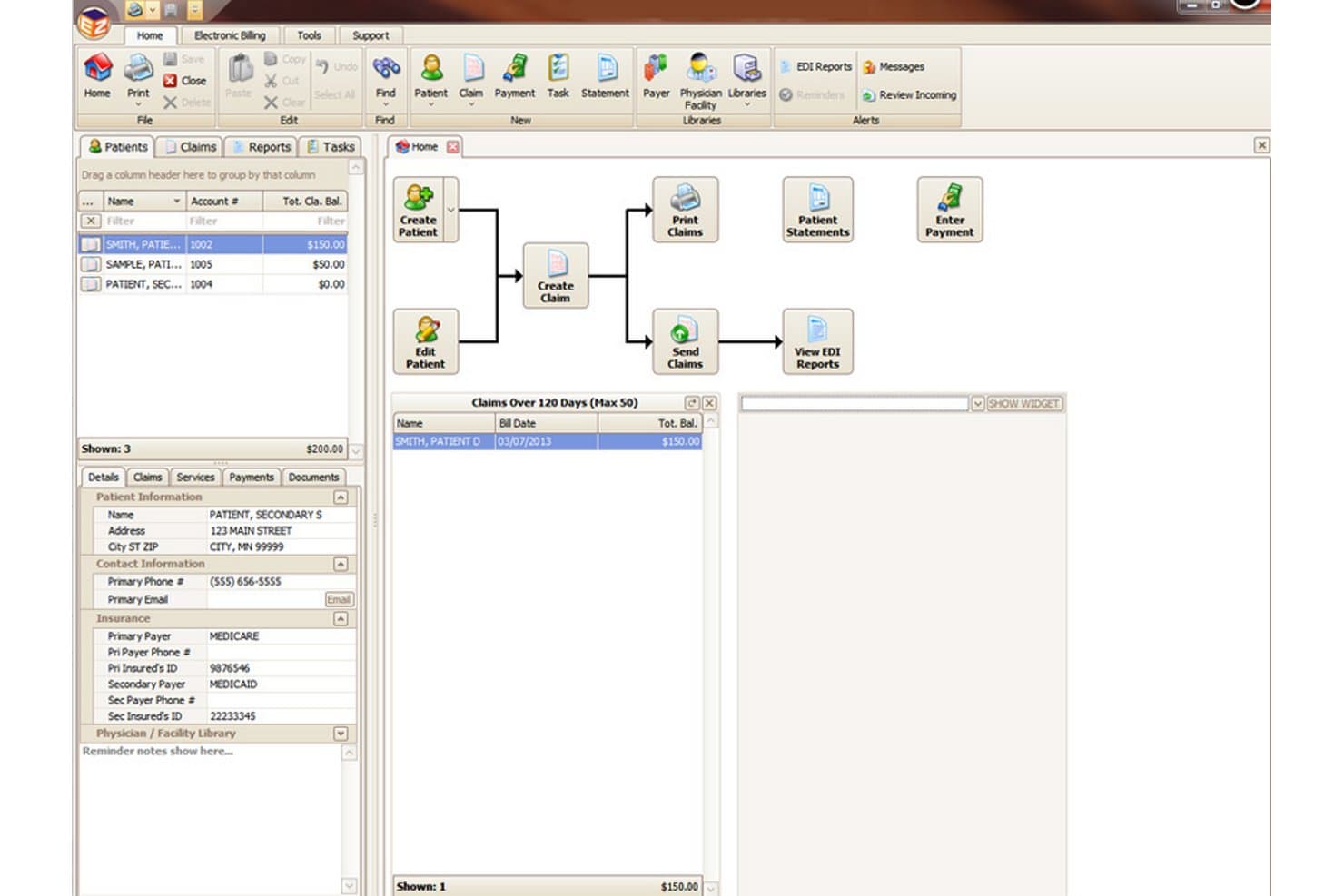
EZClaim offers a visual workflow dashboard with patient management, claims processing, and EDI reporting tools for automated medical billing. EZClaim is a cloud-based medical billing platform that covers electronic claim submission, automated claim scrubbing, real-time eligibility verification, ERA payment posting, and patient billing for small to mid-sized practices.
Who Is EZClaim Best For?
EZClaim is a strong fit for independent physicians, small group practices, and outsourced billing companies that need a straightforward billing platform without enterprise-level complexity.
Why I Picked EZClaim
I picked EZClaim as one of the best because it's purpose-built for the scale and workflow that small practices actually operate within. I particularly like EZClaimPay's card-on-file feature, which lets a practice store patient payment details securely and charge outstanding balances without mailing paper statements. On top of that, real-time eligibility verification runs before a claim is ever submitted, which catches coverage issues before they become denials.
EZClaim Key Features
- Electronic claim submission: Submit claims directly to payers using integrated clearinghouse connectivity.
- Auto-posting of ERA payments: Apply payments and adjustments automatically from electronic remittance files.
- Comprehensive reporting tools: Access over 40 built-in and customizable reports for monitoring billing activity.
- Cloud-based data backup: Receive daily automatic cloud backups to protect billing and patient information.
EZClaim Integrations
EZClaim offers native integrations with TriZetto, Practice Fusion, Amazing Charts, HomeTrak, WebPT, BillFlash, QuickEMR, ReminderCall, AxisCare, and ElationHealth. An API is available for custom integrations.
Pros and Cons
Pros:
- 40+ built-in billing and reimbursement reports
- Fast electronic claims and remittance processing
- Single- and multi-provider workflows supported
Cons:
- No advanced predictive claim scrubbing features
- Limited advanced denial management automation
Learn more about EZClaim: Best for instant claim submission
- Free demo available
- Pricing upon request
Visit WebsiteCustomer Rating:4.1/5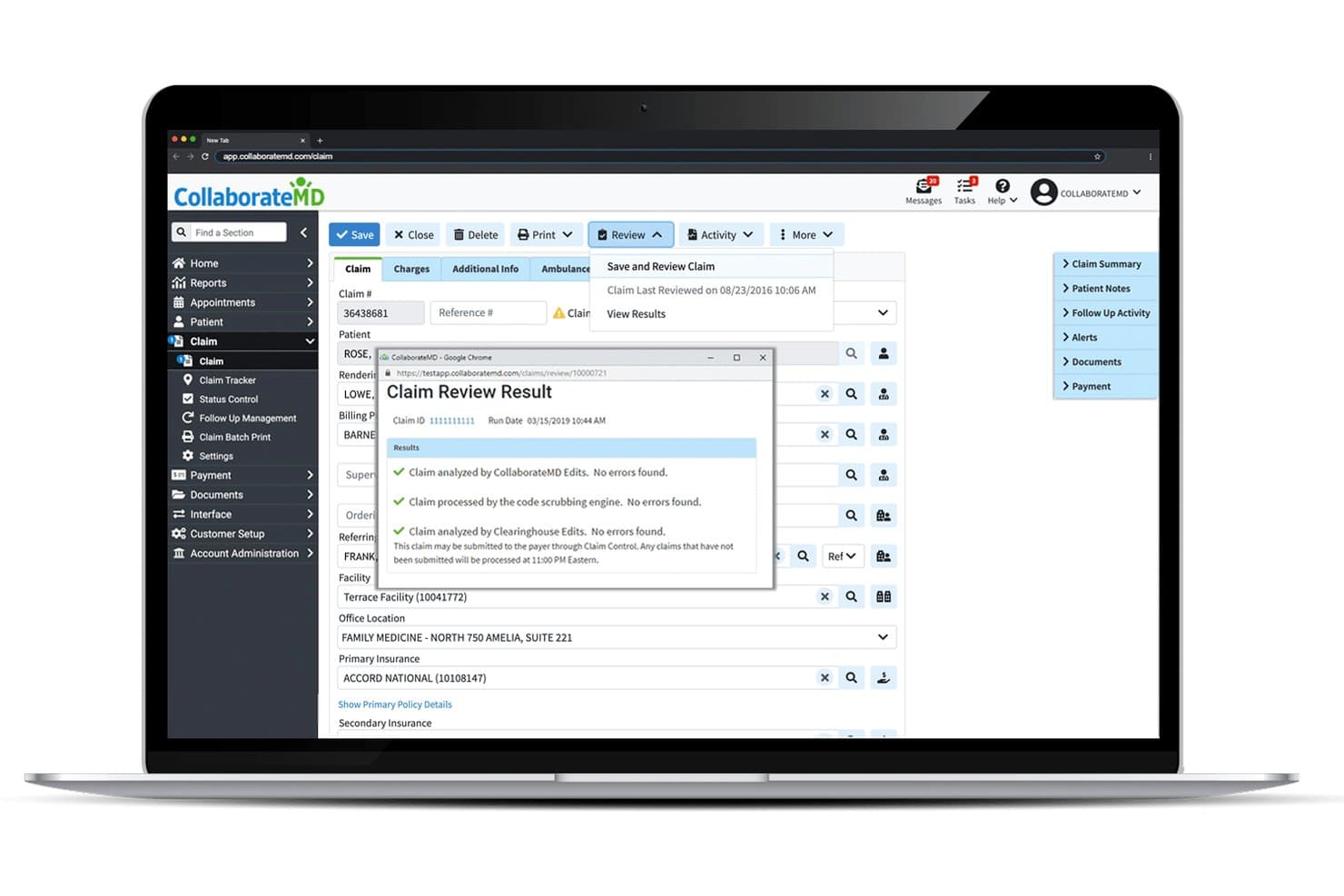
CollaborateMD offers automated claim review with real-time error checking across CollaborateMD Edits, code scrubbing, and Clearinghouse Edits before submission. CollaborateMD is a cloud-based medical billing and practice management platform built around real-time electronic claim submission, automated eligibility verification, ERA auto-posting, denial management, and patient billing tools.
Who Is CollaborateMD Best For?
CollaborateMD is a strong fit for small to mid-sized medical practices and independent billing companies that need a dedicated billing platform without enterprise-level complexity.
Why I Picked CollaborateMD
I picked CollaborateMD as one of the best because its built-in clearinghouse delivers real-time electronic claim submission with instant accept/reject feedback. I also like Intelligent Claim Rejection Support, which translates payer rejection codes into plain-language explanations with suggested next steps. That, combined with automated Level 2 claim edits applied before submission, supports the 99% first-pass rate that reviewers consistently report.
CollaborateMD Key Features
- Automated eligibility verification: Instantly check patient coverage and benefits directly within the platform before services are rendered.
- Customizable analytics dashboard: Track provider productivity, payer reimbursement, and financial KPIs with real-time reporting tools.
- Patient payment plans: Set up and manage patient payment schedules and online collections through a secure portal.
- Appointment scheduler: Coordinate and manage all practice appointments alongside billing workflows in one system.
CollaborateMD Integrations
CollaborateMD offers 10+ native integrations, including Practice Fusion, Elation, Amazing Charts, Hello Health, Kipu, Medical Mime, Praxis EMR, PrognoCIS, Ritten, and WebPT. An API is available for custom integrations.
Pros and Cons
Pros:
- Built-in clearinghouse with unlimited claim edits
- Automated eligibility verification for every patient
- Real-time claim submission with instant feedback
Cons:
- Occasional delays in ERA auto-posting
- Basic patient portal lacks advanced features
Learn more about CollaborateMD: Best for multi-location scheduling integration
- Free demo available
- Pricing upon request
Visit WebsiteCustomer Rating:4.1/5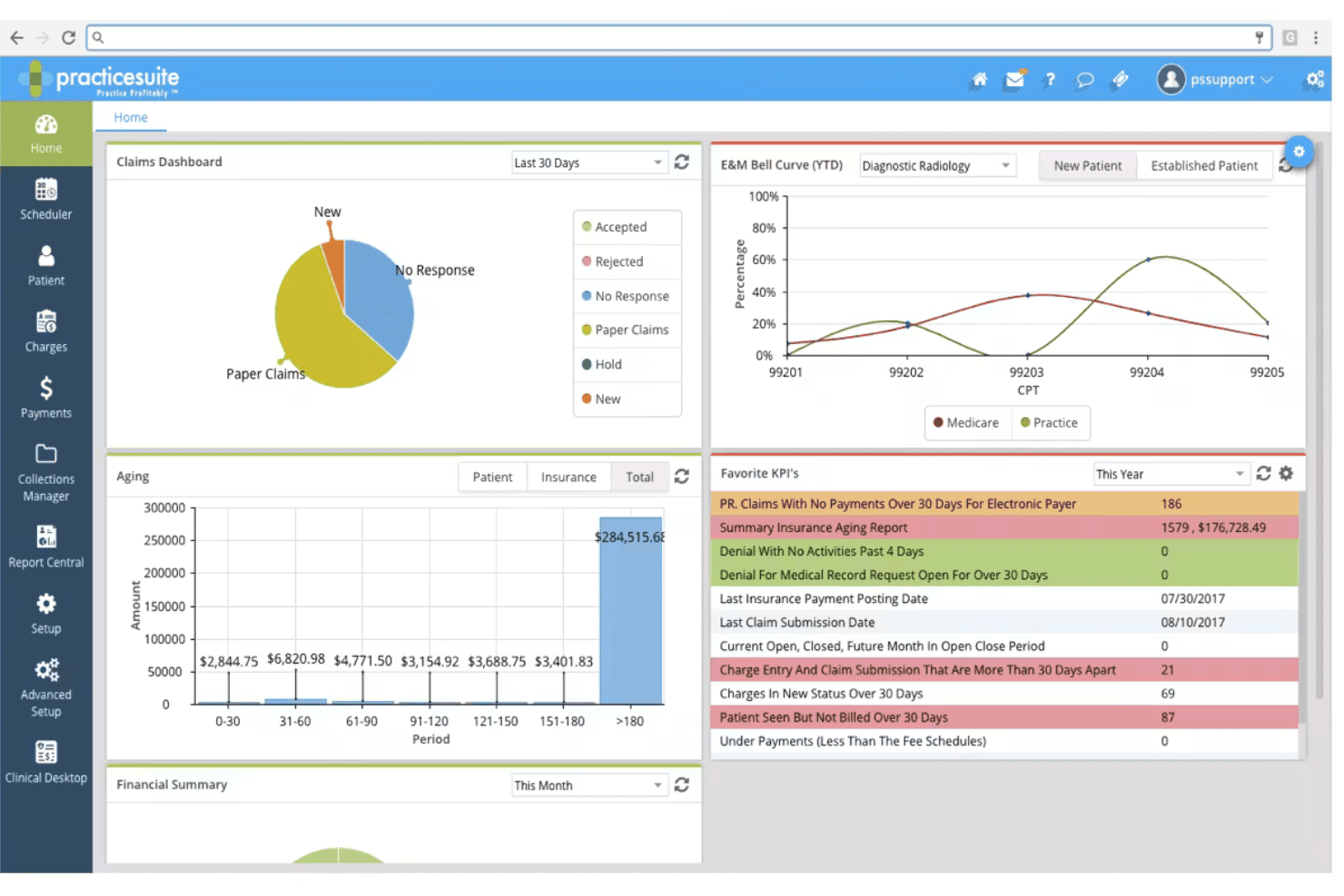
PracticeSuite coordinates claims, denials, eligibility, billing, and scheduling. PracticeSuite is a medical billing and practice management platform that handles claim submission, denial management, eligibility verification, patient billing, and multi-location scheduling across independent practices and third-party billing companies.
Who Is PracticeSuite Best For?
PracticeSuite is a strong fit for third-party medical billing companies managing multiple client practices from a single platform.
Why I Picked PracticeSuite
I picked PracticeSuite as one of the best because its scheduling and billing systems are genuinely built to work together. When scheduling a patient across multiple locations, PracticeSuite triggers eligibility verification at that point, not just at check-in, which catches coverage issues before they become denied claims. The granular location-level security controls also let me restrict which staff can access billing data by site, which matters when running a distributed practice.
PracticeSuite Key Features
- AI-powered denial intelligence: Uses AI tools to analyze claims and identify potential denial risks before submission.
- ERA payment auto-posting: Automatically ingests and applies electronic remittance advice to patient accounts for faster payment reconciliation.
- Integrated patient portal: Lets patients access statements, schedule appointments, and make online payments in one place.
- Custom reporting suite: Offers 140 pre-built reports and real-time financial dashboards for in-depth billing analysis.
PracticeSuite Integrations
PracticeSuite offers native integrations with Elation and Practice Fusion for EHR connectivity, and Relay Health for clearinghouse services. An API is available for custom integrations.
Pros and Cons
Pros:
- Mass claim correction for billing companies
- Offers AI-powered denial analysis tools
- Supports multi-location and multi-provider scheduling
Cons:
- No built-in patient insurance card capture
- Reporting interface feels outdated to some users
Learn more about PracticeSuite: Best for iPad-native billing solutions
- Free demo available
- Pricing upon request
Visit WebsiteCustomer Rating:3.9/5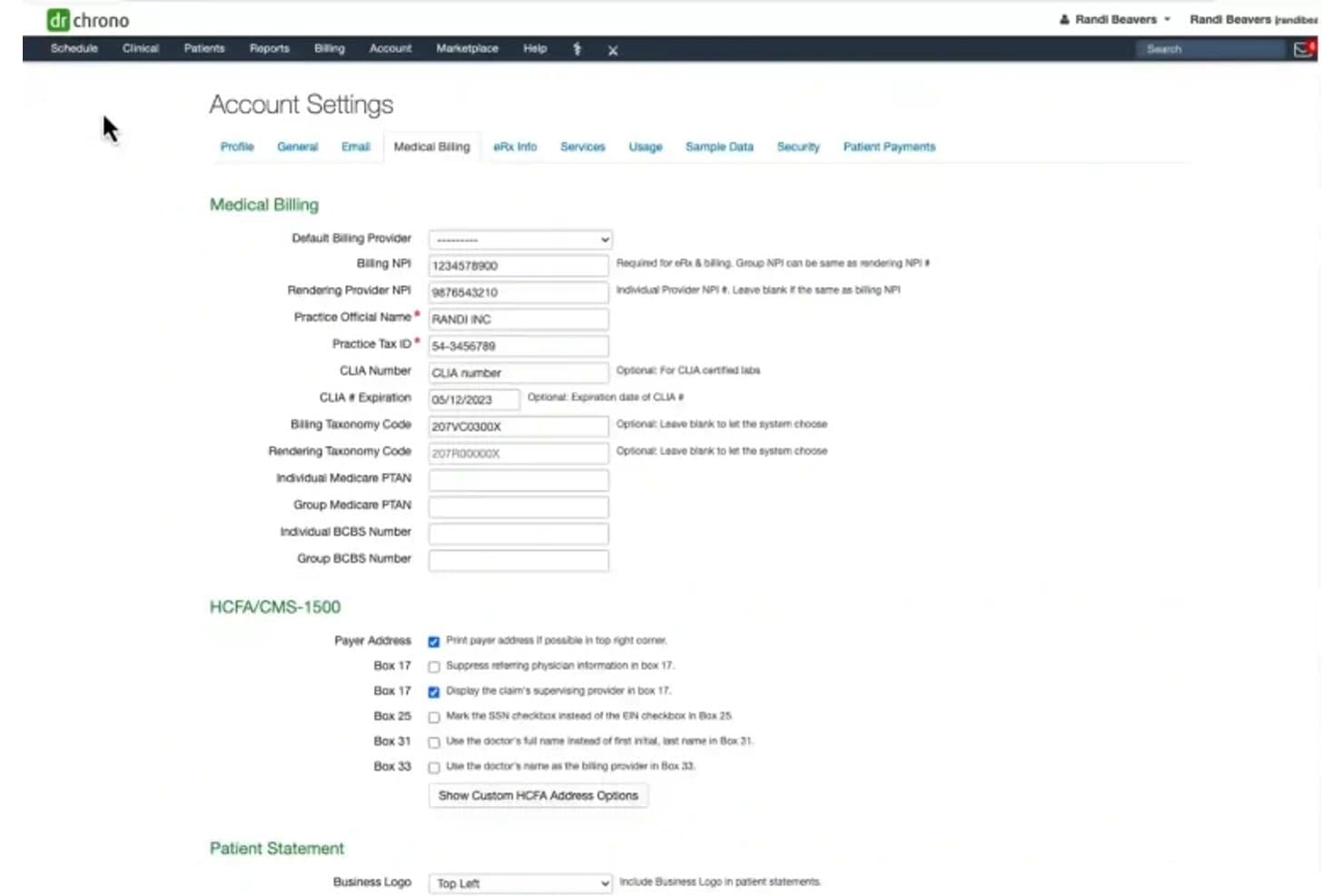
DrChrono offers a detailed Medical Billing settings page where providers can configure NPI numbers, taxonomy codes, HCFA/CMS-1500 options, and patient statement preferences. DrChrono is a cloud-based EHR and medical billing platform with native iOS architecture that integrates claim submission, eligibility verification, ERA auto-posting, and revenue cycle management in a single system.
Who Is DrChrono Best For?
DrChrono is a strong fit for independent and small-to-mid-sized medical practices that run clinical and billing workflows on Apple devices.
Why I Picked DrChrono
DrChrono earns its spot on my shortlist because it's the only billing platform built natively for iPad from the ground up. You can move from charting to claim submission to auto-generated CMS 1500 forms without ever switching to a desktop. I also like that the native iOS architecture supports offline charting, so a dropped Wi-Fi connection mid-visit doesn't interrupt your billing workflow.
DrChrono Key Features
- Integrated claim management: Submit, track, and manage claims from one connected dashboard.
- Automated eligibility checks: Run real-time and bulk patient insurance eligibility verifications before appointments.
- ERA auto-posting: Automatically import and post electronic remittance advice from payers to patient accounts.
- Custom billing profiles: Save and reuse sets of CPT, ICD-10, and diagnosis codes for speedy, accurate claim creation.
DrChrono Integrations
DrChrono offers native integrations with Quest Diagnostics, LabCorp, eProvider Solutions, iHCFA, PaySimple, Stripe, and Medsender. An API is available for custom integrations.
Pros and Cons
Pros:
- Supports electronic and paper patient statements
- Automated ERA posting from payer remittances
- True iPad-native medical billing workflow
Cons:
- iOS only, no Android mobile app
- Reviews cite recurring claim processing glitches
Learn more about DrChrono: Best for streamlined claim tracking
- Free demo available
- Pricing upon request
Visit WebsiteCustomer Rating:3.7/5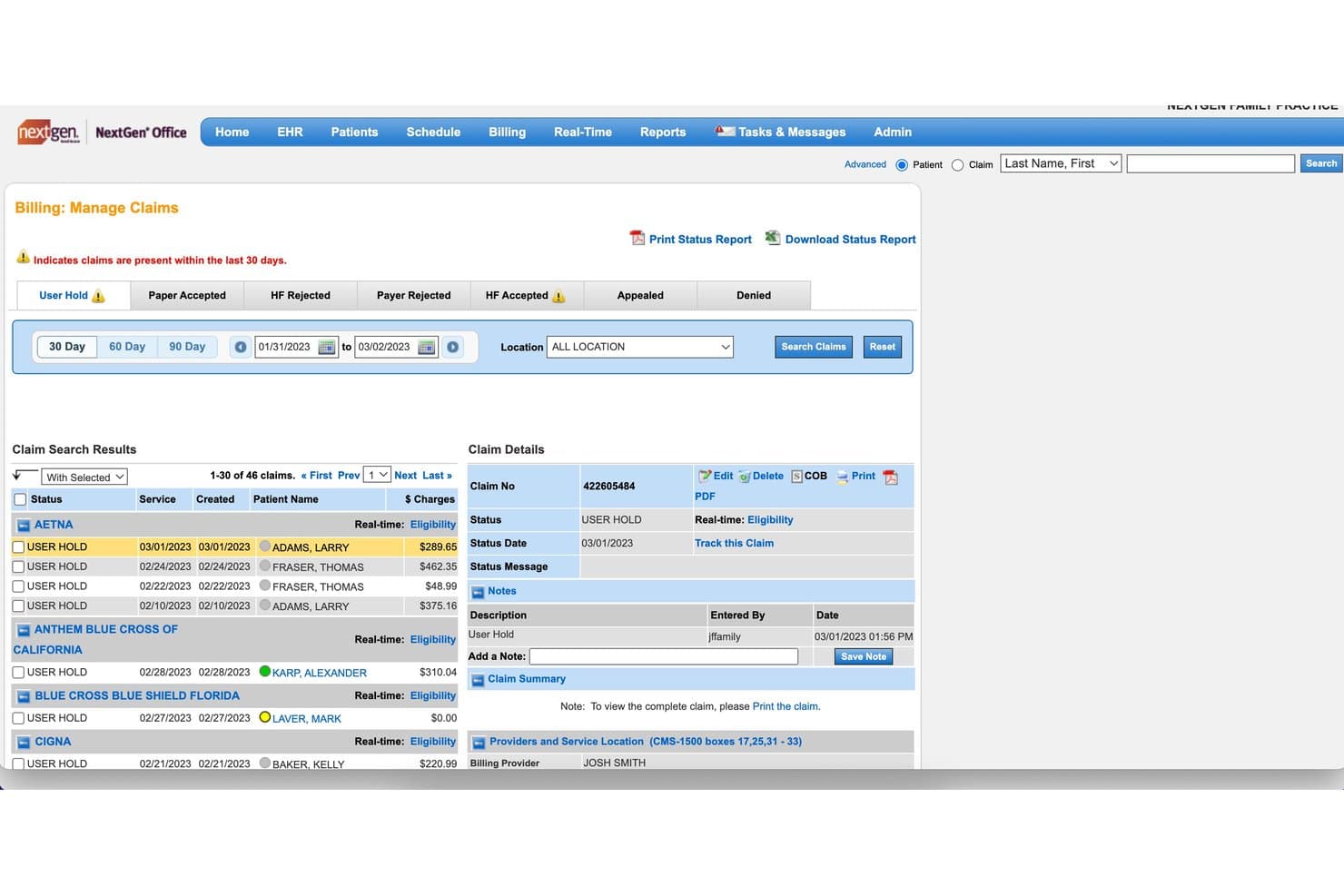
NextGen Healthcare offers a Billing: Manage Claims screen that displays claim statuses, patient names, charge amounts, and detailed claim information including notes and provider details. NextGen Healthcare is a revenue cycle management platform for ambulatory practices that combines automated claim scrubbing, eligibility verification, payment posting, denial management, and patient billing into a single, modular service.
Who Is NextGen Healthcare Best For?
It's a strong fit for medical practices of any size, with dedicated RCM tiers designed for small independent offices and larger multi-provider groups alike.
Why I Picked NextGen Healthcare
I picked NextGen Healthcare as one of the best because its claim tracking goes well beyond a simple status dashboard. The platform monitors 100+ key performance indicators across all payers and specialties, giving billing teams real visibility into where claims stand. I especially like the claim edit technology, which applies both standard and custom edits before submission, and the predictive rules engine that drives a 98% first-pass acceptance rate.
NextGen Healthcare Key Features
- Eligibility verification tool: Automates real-time insurance eligibility and benefits checks before each patient visit.
- Payment posting system: Supports automated ERA importing and payment posting to patient accounts.
- Integrated coding services: Lets certified coders extract and assign procedure codes based on your documentation.
- Patient statement generator: Produces itemized statements and supports both electronic and mailed delivery options.
NextGen Healthcare Integrations
NextGen Healthcare offers native integrations with NextGen Office, NextGen Practice Management, OnBase by Hyland, and Mirth Connect. An API marketplace is available for third-party applications and custom integrations.
Pros and Cons
Pros:
- Dedicated support for multi-specialty practices
- Advanced claim edit customization options
- Predictive rules engine for denial prevention
Cons:
- Occasional delays with support ticket resolution
- Reporting dashboard setup can be complex
Learn more about NextGen Healthcare: Best for billing and payment integration
- Free demo available
- Pricing upon request
Visit WebsiteCustomer Rating:3.9/5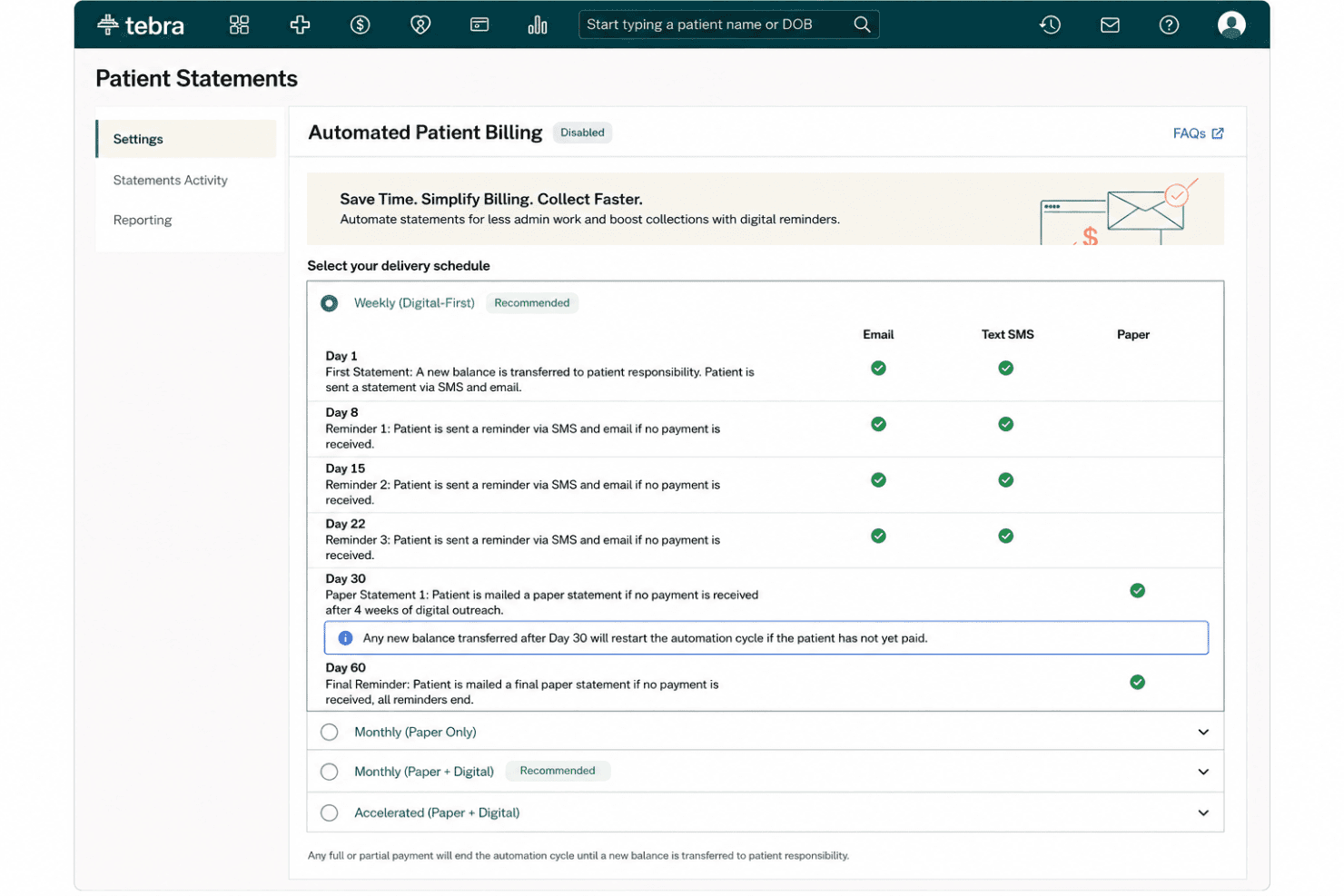
Tebra combines claims, eligibility checks, ERA posting, and automated patient billing. Tebra is a cloud-based medical billing and practice management platform built for independent practices that combines electronic claim submission, insurance eligibility verification, ERA auto-posting, and automated patient billing.
Who Is Tebra Best For?
Tebra is a strong fit for small independent practices with up to 10 providers and for medical billing companies managing claims across multiple clients.
Why I Picked Tebra
I picked Tebra as one of the best because of how tightly it connects eligibility, claims, and patient payments in a single workflow. I like that eligibility checks return copay, deductible, and coinsurance details across 2,700+ payers in seconds, so my team knows patient balances before they arrive. On the collection side, Tebra sends payment links via text and email, supports card-on-file, and auto-posts ERAs using RPA.
Tebra Key Features
- Automated claim scrubbing: Built-in rules engine screens claims for coding errors before submission using payer-specific rules.
- Denial management workflow: The system flags, categorizes, and routes denied claims for follow-up and appeals.
- Provider-based licensing: Pricing allows unlimited staff users per licensed provider without extra charges.
- Batch patient statement generation: Create and send paper or e-statements in bulk with QR codes and payment links.
Tebra Integrations
Tebra offers native integrations with QuickBooks Online Advanced, Stripe, WebPT, QuickEMR, Relatient, NextPatient, PayPal, DocSpera, and Kareo Billing, and provides an API for custom integrations.
Pros and Cons
Pros:
- Fast automated ERA payment posting
- Batch statement generation with QR codes
- Automated eligibility checks return financial details
Cons:
- Reporting options limited for billing companies
- Denial reporting lacks advanced filters
Learn more about Tebra: Best for multiclinic billing management
- Free demo available
- Pricing upon request
Visit WebsiteCustomer Rating:3.6/5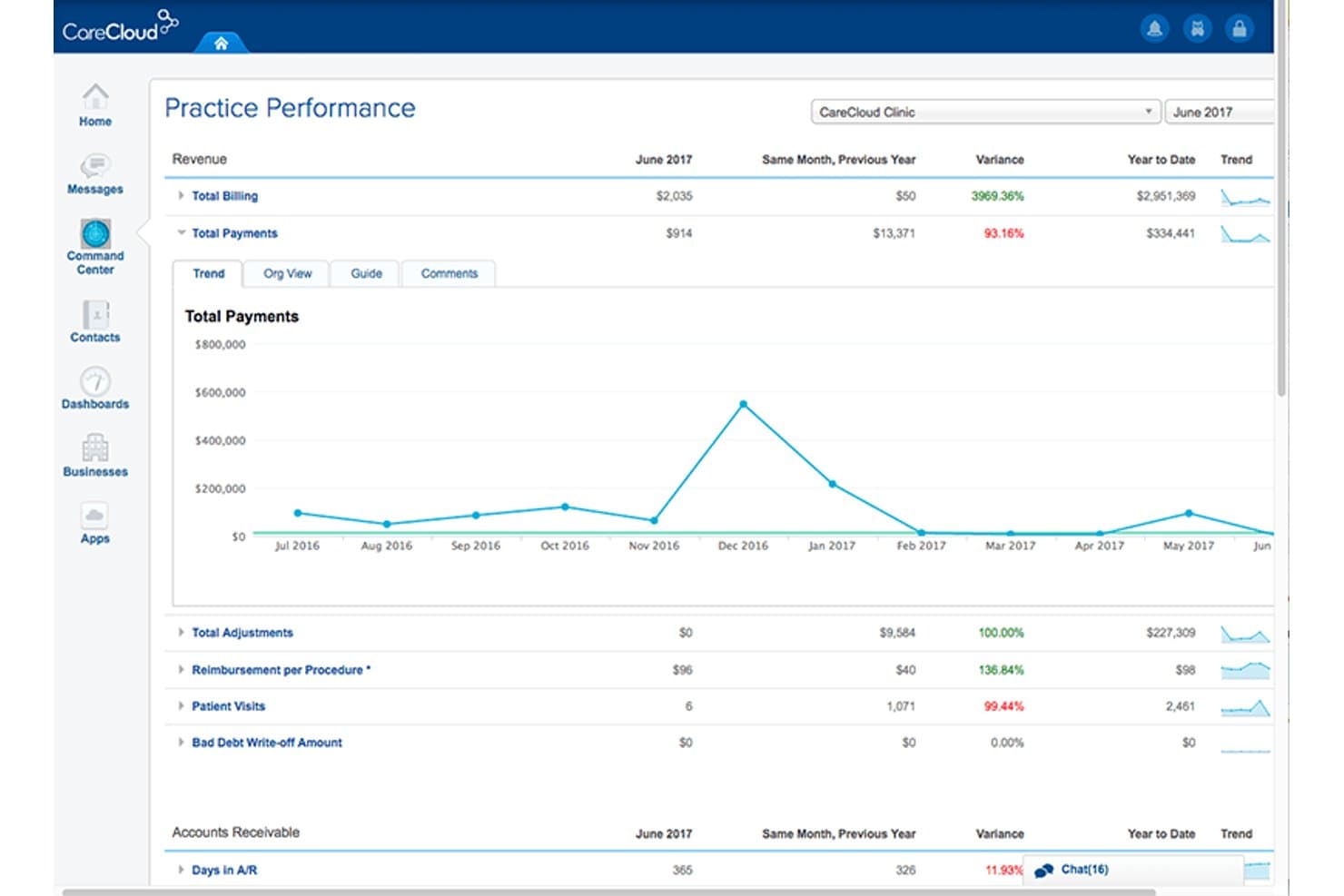
CareCloud offers a Practice Performance dashboard that displays billing, payments, adjustments, and accounts receivable metrics with trend charts for medical billing oversight. CareCloud is a medical billing and revenue cycle management platform that covers automated claim scrubbing, electronic claim submission, denial management, eligibility verification, and patient billing across single and multi-location practices.
Who Is CareCloud Best For?
CareCloud is a strong fit for group practices and multi-location clinics that need to centralize billing across multiple providers without managing separate logins or systems.
Why I Picked CareCloud
CareCloud earns its spot on my shortlist because of how well it handles billing across multiple providers and locations from a single interface. I particularly like the CollectiveIQ rules engine, which runs claims through 180 million+ billing rules before submission to catch errors before they become denials. I've also found cirrusAI Appeals genuinely useful: it pulls together claim data, the denial reason, and the specific payer to auto-generate customized appeal letters rather than forcing my team to write them from scratch each time.
CareCloud Key Features
- Real-time eligibility verification: Instantly check patients’ insurance benefits and coverage before each visit.
- Centralized claims repository: Manage all claim statuses and submissions from a single dashboard.
- Batch payment posting: Process and record multiple payment entries in one workflow.
- Patient billing portal: Enable patients to view statements and make payments online.
CareCloud Integrations
CareCloud has native integrations with its own EHR, Practice Management, and Patient Experience modules, as well as pVerify for insurance eligibility verification. An API is available for custom integrations.
Pros and Cons
Pros:
- Automated denial management and appeals workflow
- High claim acceptance with advanced rules engine
- Multiclinic billing tools in one platform
Cons:
- Occasional slow system performance
- User-reported issues with customer support
Learn more about CareCloud: Best for customizable workflow automation
- Free demo available
- Pricing upon request
Visit WebsiteCustomer Rating:3.6/5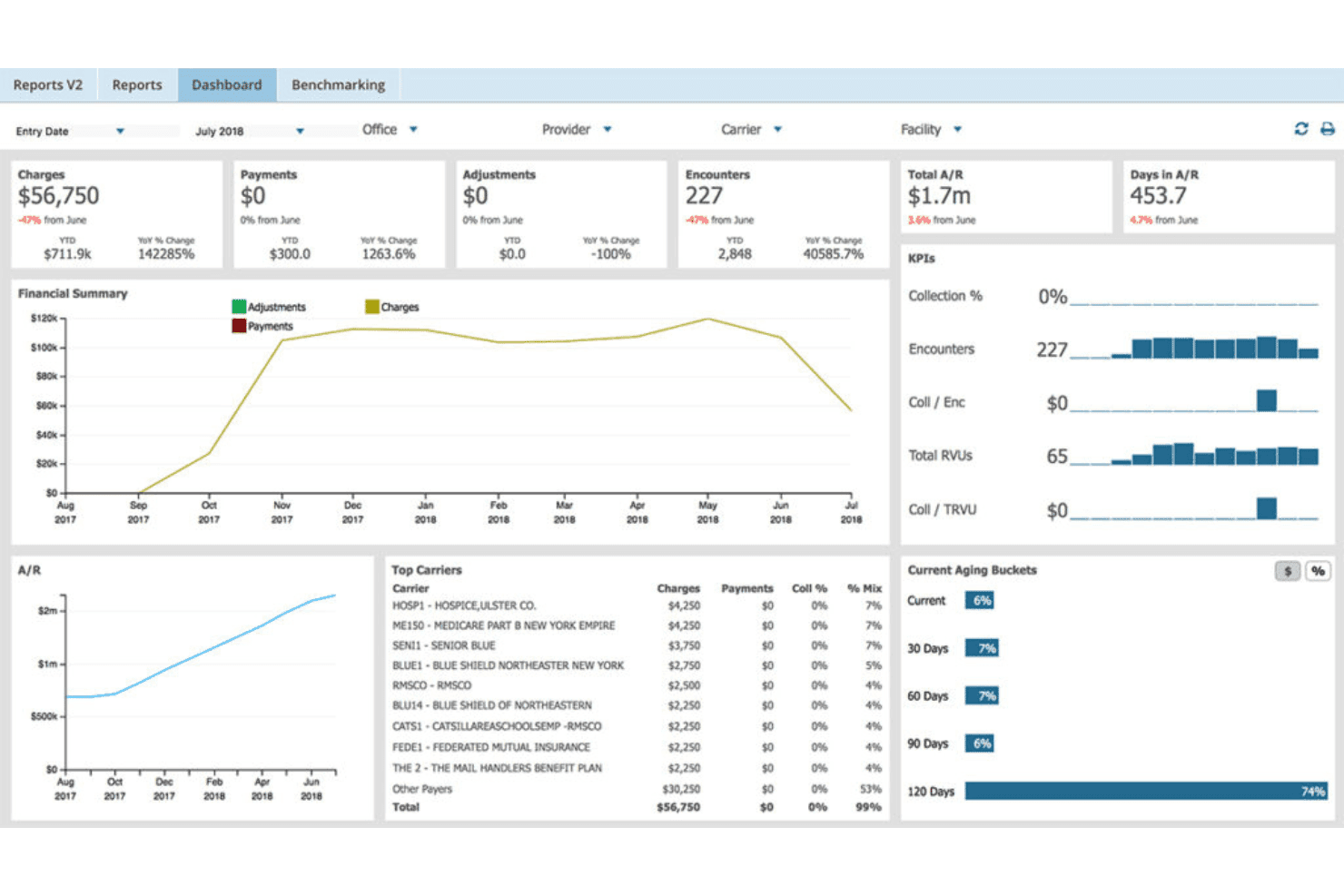
AdvancedMD unites EMR, documentation, billing, claims, eligibility, and RCM. AdvancedMD is a cloud-based medical billing platform that combines claim scrubbing, clearinghouse submission, ERA auto-posting, denial management, eligibility verification, and A/R analytics across a single unified suite.
Who Is AdvancedMD Best For?
It's a strong fit for independent practices and medical billing companies managing multi-provider, multi-location billing from a single platform.
Why I Picked AdvancedMD
AdvancedMD earns its spot as one of the best on my shortlist because of how deeply you can configure its billing workflows end to end. ClaimInspector, for example, runs nearly 3.5 million edits per claim using customizable payer and CCI rules, so my team can tailor scrubbing logic by specialty rather than relying on a one-size-fits-all approach. The Central Billing Office (CBO) is another feature I rely on: it lets my team work across every client database simultaneously, without logging in and out of individual accounts.
AdvancedMD Key Features
- A/R Control Center: Provides dashboards for denial tracking, actionable insights, and prioritizing outstanding accounts.
- eEligibility verification: Runs real-time and batch insurance checks with benefit details before patient visits.
- Analytics and reporting: Delivers customizable financial dashboards and detailed business intelligence tools.
- Integrated patient payment processing: Supports credit card transactions and automatically posts payments to patient accounts.
AdvancedMD Integrations
AdvancedMD offers native integrations with Optum clearinghouse, Surescripts, and e-prescribing networks, plus supports lab interfaces, credit card processors, and has an API for custom integrations.
Pros and Cons
Pros:
- Real-time batch eligibility with OCR scanning
- Multi-database billing for separate client accounts
- Granular rules in customizable claim scrubbing
Cons:
- Workflows can require extensive initial setup
- Reporting module has limited visual customization
 Best for integrated practice management features
- Free demo available
- Pricing upon request
Visit WebsiteCustomer Rating:3.4/5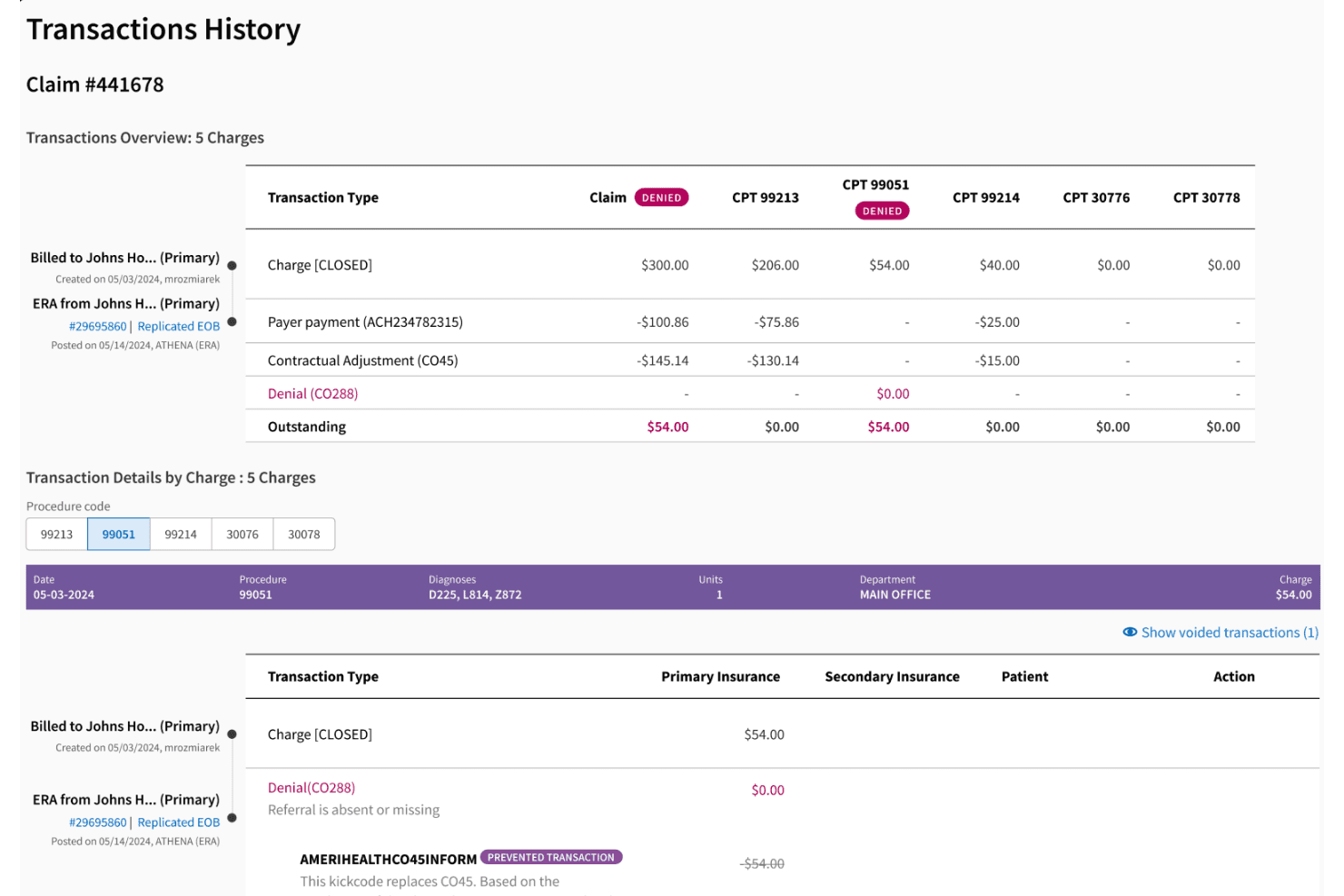
athenahealth powers claims, ERA posting, denials, eligibility, and AI coding. athenahealth is a cloud-based RCM and practice management platform that combines automated claim scrubbing, EDI claim submission, ERA payment posting, denial management, eligibility verification, and AI-powered coding into a single integrated system.
Who Is athenahealth Best For?
athenahealth fits multi-provider ambulatory practices and specialty groups that need EHR, practice management, and RCM managed within one connected platform.
Why I Picked athenahealth
I've included athenahealth in my top picks because it's one of the few automated billing platforms where scheduling, registration, eligibility verification, charge capture, and claim submission all run inside the same system. A charge created during a patient visit flows directly into the claim scrubbing engine without any manual handoff. I particularly like how athenahealth's rules engine sits on top of the EHR layer, catching coding gaps before a claim is ever generated.
athenahealth Key Features
- Automated denial management: Routes and categorizes denied claims for follow-up, appeals, and resubmission using AI-driven workflows.
- ERA auto-posting: Ingests electronic remittance advice and posts payments, adjustments, and write-offs directly to patient accounts.
- Real-time insurance eligibility checks: Verifies patient coverage and benefits before each visit.
- Patient statement automation: Generates and delivers digital and print patient bills, with integrated online payment options.
athenahealth Integrations
athenahealth offers over 380 APIs and supports marketplace integrations with tools like GetWell Practice, Experian Health Patient Estimates, Dulcian Health's CCM Solution, PatientPop, Epion, esvyda, and SolutionReach. An API is available for custom integrations.
Pros and Cons
Pros:
- Real-time eligibility and payment tracking
- Advanced AI-powered denial management tools
- Unified EHR, scheduling, and billing workflows
Cons:
- User-reported slow support response times
- Manual workarounds often needed for unique billing scenarios
Learn more about athenahealth: 10Best for specialty-specific billing rules
CureMD
- Free demo available
- Pricing upon request
Visit WebsiteCustomer Rating:3.5/5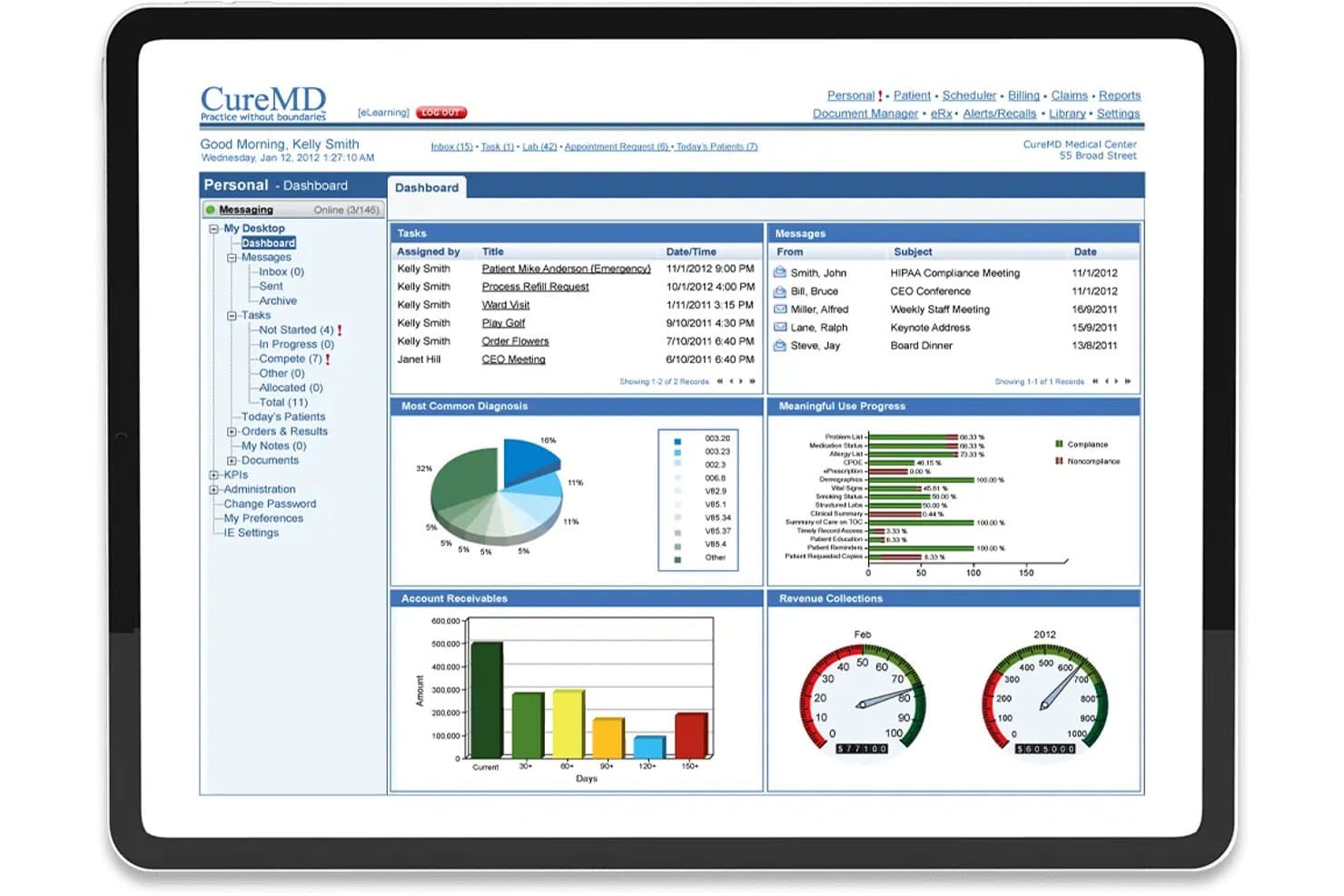
CureMD offers a comprehensive dashboard with revenue collections, account receivables, billing tasks, and meaningful use progress for automated medical billing management. CureMD is a cloud-based medical billing and practice management platform that automates claim scrubbing, eligibility verification, denial management, and payment posting across specialty-specific billing workflows.
Who Is CureMD Best For?
CureMD is a strong fit for specialty medical practices—including cardiology, neurology, OB/GYN, and radiology—that need billing rules tailored to their specific coding and payer requirements.
Why I Picked CureMD
I picked CureMD as one of the best because its rules engine runs claims through more than 4 million specialty-specific edits before submission. That means a cardiology or OB/GYN practice catches payer-specific mismatches before they ever cause a denial. I also like the AI Coder, which surfaces real-time ICD-10 and CPT suggestions, and the e-Super Bill, which recommends E&M code levels to prevent up-coding or down-coding on complex visits.
CureMD Key Features
- Integrated clearinghouse connectivity: Submit electronic claims and remit payments directly to commercial and government payers.
- Automated denial management workflow: Flag, categorize, and route denied claims for follow-up, appeals, and resubmission.
- Real-time insurance eligibility verification: Instantly check patient coverage and benefits before every visit.
- Patient statement processing: Generate and deliver automated statements with support for online payments and balance management.
CureMD Integrations
CureMD offers native integrations with hundreds of hospitals, labs, and radiology centers, including electronic prescribing to over 40,000 pharmacies and electronic labs for automated order and result exchange. An API is available for custom integrations.
Pros and Cons
Pros:
- Automated denial tracking and appeals workflow
- Real-time eligibility and benefits checks
- Specialty-specific billing rules engine
Cons:
- Limited transparency on long-term contract terms
- Occasional performance lags during peak hours
Learn more about CureMD:
Other Automated Medical Billing Software
Here are some additional automated medical billing software options that didn’t make it onto my shortlist, but are still worth checking out:
- 11eClinicalWorksBest for real-time eligibility verification
- 12RXNTBest for cloud-based billing access
- 13NueMDBest for rapid claim scrubbing
- 14WaystarBest for denial management analytics
- 15MEDISOFTBest for customizable reporting options
- 16AllegianceMDBest for AI-driven coding assistance
- 17Office Ally EHRBest for easy EHR-billing integration
- 18AvailityBest for payer-provider connectivity
- 19ClaimocityBest for mobile charge capture
- 20Veradigm (Allscripts) PayerpathBest for clearinghouse integrations
How I Evaluate Automated Medical Billing Software
I split my evaluation into must-have billing fundamentals—like automated claim scrubbing and ERA posting—and the differentiators that set platforms apart for specific practice types and workflows.
Core Functionality (Table Stakes for This List)
When I'm selecting tools for my list, I rank each one on a scale from 0 (does not offer the functionality) to 5 (excels in this area) for each core functionality listed below. Then, I calculate the tool's total score into a percentage. Each tool needs to achieve a minimum total score of 65% to be considered for inclusion.
- Automated Claim Scrubbing: I look for built-in scrubbers that validate claims against current CPT/ICD-10 codes and payer-specific edits before submission, so coding errors don't turn into denials your team has to chase down.
- Electronic Claim Submission: The platform should support native EDI 837 submission to both commercial and government payers through integrated clearinghouse connections, not manual file exports.
- ERA & Payment Posting: I evaluate how well each tool ingests ERA/EDI 835 files and auto-posts payments and adjustments, including secondary crossovers, without requiring staff to reconcile everything by hand.
- Denial Management Workflow: A solid denial workflow flags rejected claims, categorizes them by reason code, and routes them to the right team member with appeal templates ready to go.
- Eligibility Verification: I check whether the platform runs real-time insurance eligibility checks at scheduling or check-in, pulling back benefits detail like co-pays and deductibles before the patient arrives.
- Patient Billing & Statements: I look at how statements are generated and delivered—whether the platform supports online payments, payment plans, and multiple delivery channels like email, text, and print.
Once I have a list of tools that meet the criteria, I consider what sets each platform apart.
Differentiating Factors (What Sets Vendors Apart)
Here's how I compare and contrast different vendors:
Standout Features
Predictive denial management is a major differentiator—I look for platforms that use machine learning to flag at-risk claims before submission, not just after a rejection lands. AI-powered coding assistance matters too, especially for high-volume practices where coders need auto-suggested ICD-10 and CPT codes pulled directly from clinical notes. I also evaluate whether a platform offers a custom rules engine, which lets billing teams build payer-specific scrubbing logic without waiting on the vendor to push updates.
Beyond Features
I evaluate how well each platform integrates with existing EHR and practice management systems. Bidirectional data flow via HL7 or FHIR prevents duplicate entry and keeps the revenue cycle unified. Specialty and practice size fit also matters. A mental health practice needs different code sets and workflows than an orthopedic group, and third-party billing companies need multi-tenant capabilities that in-house teams don't. Pricing structures range from percentage-of-collections to per-provider subscriptions, and hidden fees for clearinghouse access or statement printing can shift the total cost.
How to Choose Automated Medical Billing Software
It’s easy to get bogged down in long feature lists and complex pricing structures. To help you stay focused as you work through your unique software selection process, here’s a checklist of factors to keep in mind:
| Factor | What to Consider |
|---|---|
| FactorScalability | What to ConsiderWill the software handle increased patient volume, specialty expansion, or new locations as you grow? Look for flexible licensing and proven multi-site support. |
| FactorIntegrations | What to ConsiderDoes the platform connect seamlessly with your EHR, clearinghouse, and practice management systems? Check for live, bidirectional syncing and compatibility with your current tools. |
| FactorCustomizability | What to ConsiderCan you adapt workflows, templates, and reports for your specialty, roles, and billing processes, or are you boxed in by defaults? Assess hands-on configuration options. |
| FactorEase of use | What to ConsiderWill your front office, providers, and billing staff find the design intuitive? Consider training needs, learning curve, and how quickly teams can handle core billing tasks. |
| FactorImplementation and onboarding | What to ConsiderWhat’s the average go-live timeline and what support is offered for data migration, payer setup, and user training? Look for clear timelines and real onboarding guidance. |
| FactorCost | What to ConsiderBreak down every expense: upfront, subscription, transaction, and optional add-on fees. Ask for sample quotes based on your claim volume to avoid surprises. |
| FactorSecurity safeguards | What to ConsiderDoes the vendor offer HIPAA-compliant hosting, encryption at rest and in transit, and detailed audit logging? Review their incident response policies and BAA terms. |
| FactorSupport availability | What to ConsiderCan you access billing-savvy support via phone, portal, or chat during your operating hours? Ask about account manager access and after-hours escalation options. |
What Is Automated Medical Billing Software?
Automated medical billing software refers to platforms that manage, process, and submit healthcare claims and patient billing with minimal manual intervention. These systems handle claim scrubbing, electronic submission, payment posting, denial management, eligibility checks, and patient statements.
Automated solutions help practices maintain coding accuracy, reduce administrative overhead, and improve revenue cycle reliability by streamlining core billing workflows from claim generation to final payment.
Features of Automated Medical Billing Software
When selecting automated medical billing software, keep an eye out for the following key features:
- Automated claim scrubbing: Validates claims for coding errors and payer rule violations before submission to minimize denials and rework.
- Electronic claim submission: Transmits claims to insurers electronically through integrated clearinghouse connections, reducing mailing delays and lost paperwork.
- ERA and payment posting: Automatically posts electronic remittance advice (ERA) and payments to patient accounts to speed up reconciliation and revenue tracking.
- Denial management: Flags denied or rejected claims, categorizes them by reason, and automates follow-up and resubmission processes to boost collections.
- Insurance eligibility verification: Checks patient coverage and benefits in real time before appointments or procedures to avoid billing surprises and rejected claims.
- Patient statements and billing: Generates and delivers patient bills, supports payment plans, and offers online payment portals to simplify patient collections.
- Reporting and analytics: Provides detailed dashboards and custom reports on collections, denials, payer trends, and A/R metrics for performance tracking and decision making.
- Security and compliance: Ensures HIPAA-compliant storage, encrypted data transfer, access controls, and activity audit trails to safeguard patient information.
- Custom rules engine: Lets you set up rules and automation for unique payer requirements or specialty-specific workflows, adapting the platform to your organization’s needs.
Benefits of Automated Medical Billing Software
Implementing automated medical billing software provides several benefits for your team and your business. Here are a few you can look forward to:
- Faster reimbursements: Automated claim submission, payment posting, and denial management accelerate revenue cycles and help you get paid sooner.
- Fewer claim denials: Built-in claim scrubbing and real-time eligibility checks reduce coding errors and payer rejections from the start.
- Reduced administrative burden: Automation streamlines repetitive billing tasks, freeing up staff for patient care or higher-value work.
- Better patient collections: Digital statements, payment portals, and payment plans make it easier for patients to pay, improving overall collections.
- Improved compliance: Secure, HIPAA-compliant solutions with up-to-date rules help you avoid costly errors and stay aligned with regulatory requirements.
- Increased visibility: Real-time reporting and analytics offer insight into billing performance, A/R trends, and process bottlenecks.
- Scalability and adaptability: Tools that support custom rules and flexible workflows adapt as your organization grows or changes specialties.
Costs and Pricing of Automated Medical Billing Software
Selecting automated medical billing software requires an understanding of the various pricing models and plans available. Costs vary based on features, team size, add-ons, and more. The table below summarizes common plans, their average prices, and typical features included in automated medical billing software solutions:
Plan Comparison Table for Automated Medical Billing Software
| Plan Type | Average Price | Common Features |
|---|---|---|
| Plan TypeFree Plan | Average Price$0 | Common FeaturesLimited claim submission, basic reporting, manual payment posting, and email support. |
| Plan TypePersonal Plan | Average Price$50-$150/month | Common FeaturesAutomated claim scrubbing, electronic submissions, basic denial tracking, and phone or chat support. |
| Plan TypeBusiness Plan | Average Price$200-$600/month | Common FeaturesERA payment posting, real-time eligibility checks, patient billing portal, and custom reporting. |
| Plan TypeEnterprise Plan | Average Price$800-$2,500/month | Common FeaturesMulti-location support, advanced analytics, custom rules engine, API integrations, and dedicated support. |
Automated Medical Billing Software FAQs
Here are some answers to common questions about automated medical billing software:
How does automated medical billing software reduce claim denials?
Automated medical billing software reduces claim denials by scrubbing claims for coding errors and missing information before submission and by running real-time insurance eligibility checks, ensuring accurate, payer-compliant claims go out the first time.
Can automated medical billing software integrate with my existing EHR or practice management system?
Yes, most automated medical billing software offers integrations with leading EHR and practice management systems, allowing for bidirectional data sync that eliminates duplicate entry and manual claim uploads.
What kind of training or onboarding is required?
Training usually includes virtual or onsite sessions for billing, front office staff, and providers, along with step-by-step guides for claim workflows, payer enrollments, and system configuration. Some vendors provide dedicated onboarding teams for more complex projects.
Are patient payments supported in these systems?
Yes, many automated medical billing solutions include digital patient statements, payment portals, payment plans, and automated reminders, which help practices collect balances more easily and improve cash flow.
How is data security handled with automated medical billing software?
Vendors typically provide HIPAA-compliant hosting, encryption in transit and at rest, audit logging, and access controls. Always check for a signed BAA and ask about incident response protocols before committing.