

În calitate de profesionist din domeniul sănătății, probabil că sunteți în căutarea unui software pentru portaluri de pacienți care să poată automatiza multe dintre sarcinile plictisitoare implicate în gestionarea unui cabinet medical. Aceste soluții software, de obicei bazate pe web și completate de o aplicație mobilă, oferă o multitudine de funcții. Ele pot eficientiza totul, de la programarea pacienților la întocmirea fișelor medicale și software-ul medical certificat ONC, devenind astfel un instrument neprețuit în orice cadru clinic.
Pe scurt, software-ul pentru portaluri de pacienți le oferă cadrelor medicale instrumentele potrivite pentru a-și automatiza soluția de gestionare a cabinetului, economisind timp și îmbunătățind în același timp experiența pacienților. Acestea pot accesa și gestiona toate datele relevante de pe smartphone-uri, sporind și mai mult comoditatea și eficiența.
Why Trust Our Software Recommendations
6,700+
Reviews
20
Industry experts
16+
Evaluation factors
14
Years
Our team has been testing and reviewing software since 2012. As medical practice leaders ourselves, we know how difficult—and important—it is to choose the right software.
For this guide, we evaluated tools using hands-on testing and independent research, scoring tools using our selection criteria.
Our reviews reflect our human editorial judgment, not a sales pitch.
Tabel comparativ pentru software-ul de portaluri de pacienți
Acest tabel comparativ sintetizează detaliile privind prețurile pentru selecțiile mele de top de software pentru portaluri de pacienți:
Sorted by: Default
| Tool | Starting Price | Website | |
|---|---|---|---|
Best for Medicare and NDIS billing | 4.7 out of 5 | $29/user/month Free demo + 14-day free trial available | Website |
Best for integrated e-prescribing tools | 4.3 out of 5 | $335/month Free demo available | Book Demo |
Best for seamless healthcare operations | 4.4 out of 5 | $5,000/year Free trial + free demo available | Website |
Best for healthcare networks seeking improved patient engagement | 5.0 out of 5 | Pricing upon request Free demo available | Website |
Best for building custom patient portals with no coding | 4.5 out of 5 | $392/month 14-day free trial | Website |
Best for offering multilingual patient portal solutions | 4.2 out of 5 | $1,250/month Free demo available | Website |
Best for a patient-centric experience with passport feature | 4.4 out of 5 | Pricing upon request Free demo available | Website |
Best for facilitating telemedicine consultations | 4.0 out of 5 | Pricing upon request Free demo available | Website |
Best for patient engagement tools | 3.9 out of 5 | Pricing upon request Free demo available | Website |
Best for cloud-based community care coordination | 3.6 out of 5 | Pricing upon request Free demo available | Website |


Recenzii despre cel mai bun software pentru portaluri de pacienți
Mai jos sunt rezumatele mele detaliate ale celui mai bun software pentru portaluri de pacienți care a ajuns pe lista mea scurtă. Recenziile mele oferă o privire detaliată asupra principalelor funcții, avantajelor & dezavantajelor, integrărilor și cazurilor de utilizare ideale pentru fiecare instrument, pentru a vă ajuta să îl găsiți pe cel mai potrivit pentru dumneavoastră.
 Best for Medicare and NDIS billing
- Free demo + 14-day free trial available
- From $29/user/month
Visit WebsiteCustomer Rating:4.7/5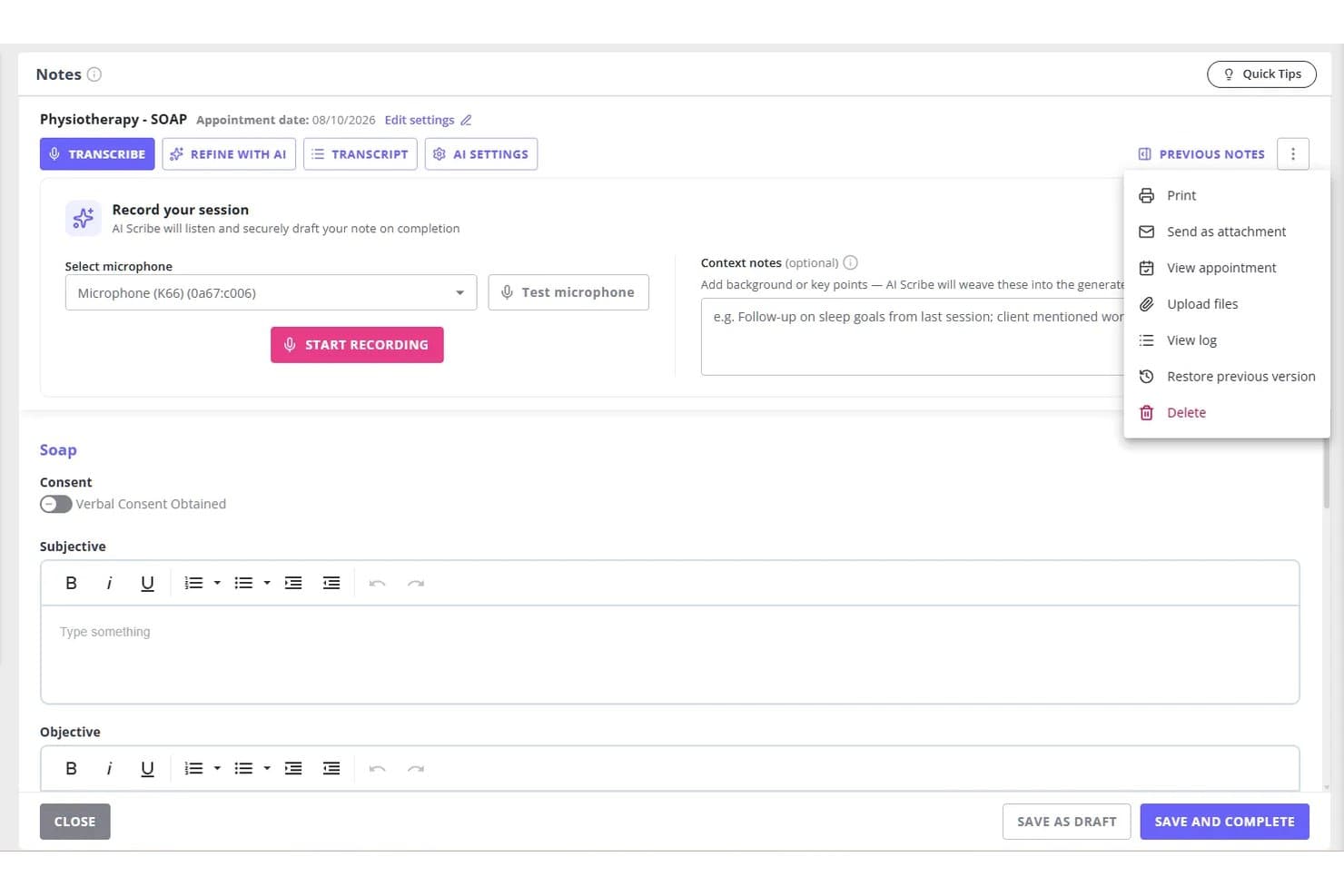
Zanda lets users record, transcribe, and save SOAP notes with AI. Zanda is a practice management platform with a client-facing portal that covers appointment scheduling, digital intake forms, invoice viewing and payment, and file sharing for health practices.
Who Is Zanda Best For?
Zanda suits allied health practices that handle Medicare or NDIS billing and want scheduling, invoicing, and client intake managed in one place.
Why I Picked Zanda
I've included Zanda in my top picks because it handles Medicare and NDIS billing natively, which is a real differentiator for allied health practices that deal with government-funded care programs daily. I like that clients can view, filter, and pay invoices directly through the portal, while the practice side manages Medicare claims and third-party NDIS billing without switching systems. The digital intake forms also pre-populate from client profiles, cutting down the manual data entry that tends to pile up during onboarding.
Zanda Key Features
- Online appointment booking: Clients can self-book, reschedule, cancel, and join waitlists through the portal based on the practice's availability and booking rules.
- Digital intake forms: Customizable forms with e-signature support can be shared via email or portal, with submitted responses syncing directly to client profile fields.
- Portal invoice and payment access: Clients can view, filter, and pay outstanding invoices online through a Stripe-powered portal when billing access is enabled.
- BizzyAI session transcription: Practitioners can record client sessions, auto-transcribe them, and generate draft notes using their preferred clinical templates.
Zanda Integrations
Zanda offers native integrations with Stripe, Zoom, Google Calendar, Apple Calendar, Outlook Calendar, Xero, Physitrack, and Google Analytics. Its beta REST API supports custom connections to client, appointment, invoice, payment, and location data.
Pros and Cons
Pros:
- Portal supports Medicare and NDIS billing access
- Digital forms capture signatures and profile details
- Clients can self-book and reschedule appointments
Cons:
- Clinical notes, labs, and medications stay hidden
- No secure patient messaging inbox
Learn more about Zanda: 2Best for integrated e-prescribing tools
RXNT
- Free demo available
- From $335/month(billed annually)
Visit WebsiteCustomer Rating:4.3/5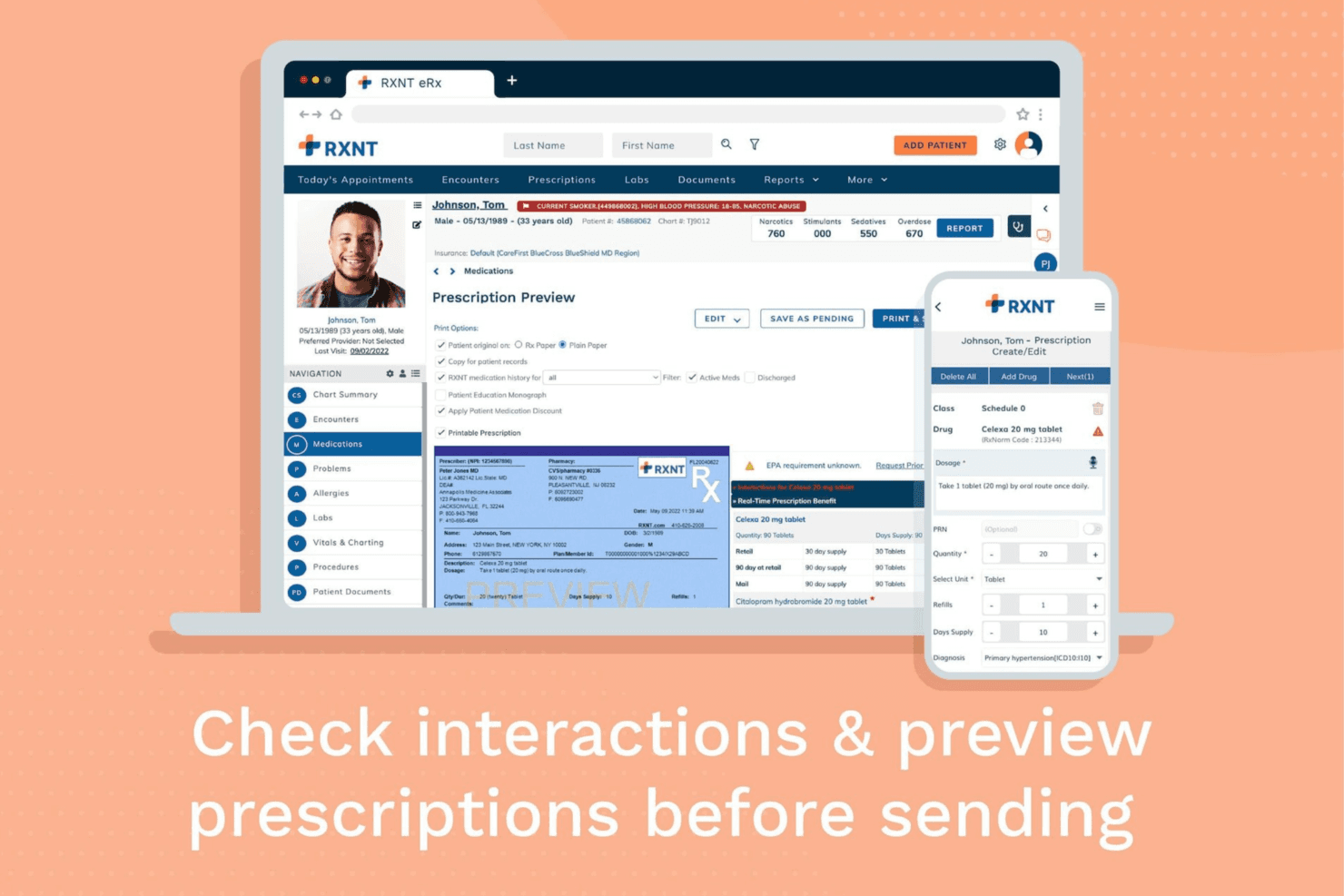
RXNT ePrescribing helps providers create, review, and send prescriptions electronically while checking medication interactions and patient-specific prescribing details. RXNT is a cloud-based EHR and practice management platform that combines patient portal access, e-prescribing, scheduling, billing, and telehealth tools for medical practices.
Who Is RXNT Best For?
RXNT works well for independent practices and small-to-mid-sized medical groups that want an all-in-one EHR, patient portal, and billing platform under one system.
Why I Picked RXNT
I picked RXNT as one of the best because its e-prescribing is built into the same system as the patient portal, not added on as a third-party feature. Patients can view and manage their prescriptions through the MyRXNT portal, while providers transmit scripts to any U.S. retail or mail pharmacy from within the EHR. I also like that RXNT is DEA-certified for EPCS (Electronic Prescribing for Controlled Substances, Schedule II–V) and connects to state Prescription Drug Monitoring Programs (PDMPs) via Bamboo Health, so controlled substance prescribing happens within the same workflow.
RXNT Key Features
- Secure patient messaging: Patients and providers exchange HIPAA-compliant messages directly through the MyRXNT portal.
- Online appointment scheduling: Patients request and manage appointments through the portal, receiving automated confirmations after booking.
- Lab result access: Providers deliver lab and imaging results through the portal for patients to view or download on demand.
- Online bill pay: Patients view balances and submit payments using RXNT's built-in billing tools.
RXNT Integrations
RXNT integrates with Kno2 for TEFCA-based health information exchange, connecting providers to over 10,000 participating organizations for bi-directional patient data sharing. It also integrates with Bamboo Health for direct access to state Prescription Drug Monitoring Programs (PDMPs) and with Change Healthcare (Relay Exchange) for claims clearinghouse connectivity. RXNT supports HL7 lab and radiology interfaces with national and regional diagnostic facilities, and connects with third-party telehealth platforms like Zoom and Doxy.me. Documentation for Zapier support is limited, and API details are not highlighted.
Pros and Cons
Pros:
- Controlled substances can be prescribed with PDMP access
- Billing, scheduling, and portal are integrated in one system
- E-prescribing works from mobile devices anywhere
Cons:
- Patients have reported issues logging into the portal
- Duplicate patient records sometimes happen
Learn more about RXNT: 3Best for seamless healthcare operations
Moxo
- Free trial + free demo available
- From $5,000/year (billed annually)
Visit WebsiteCustomer Rating:4.4/5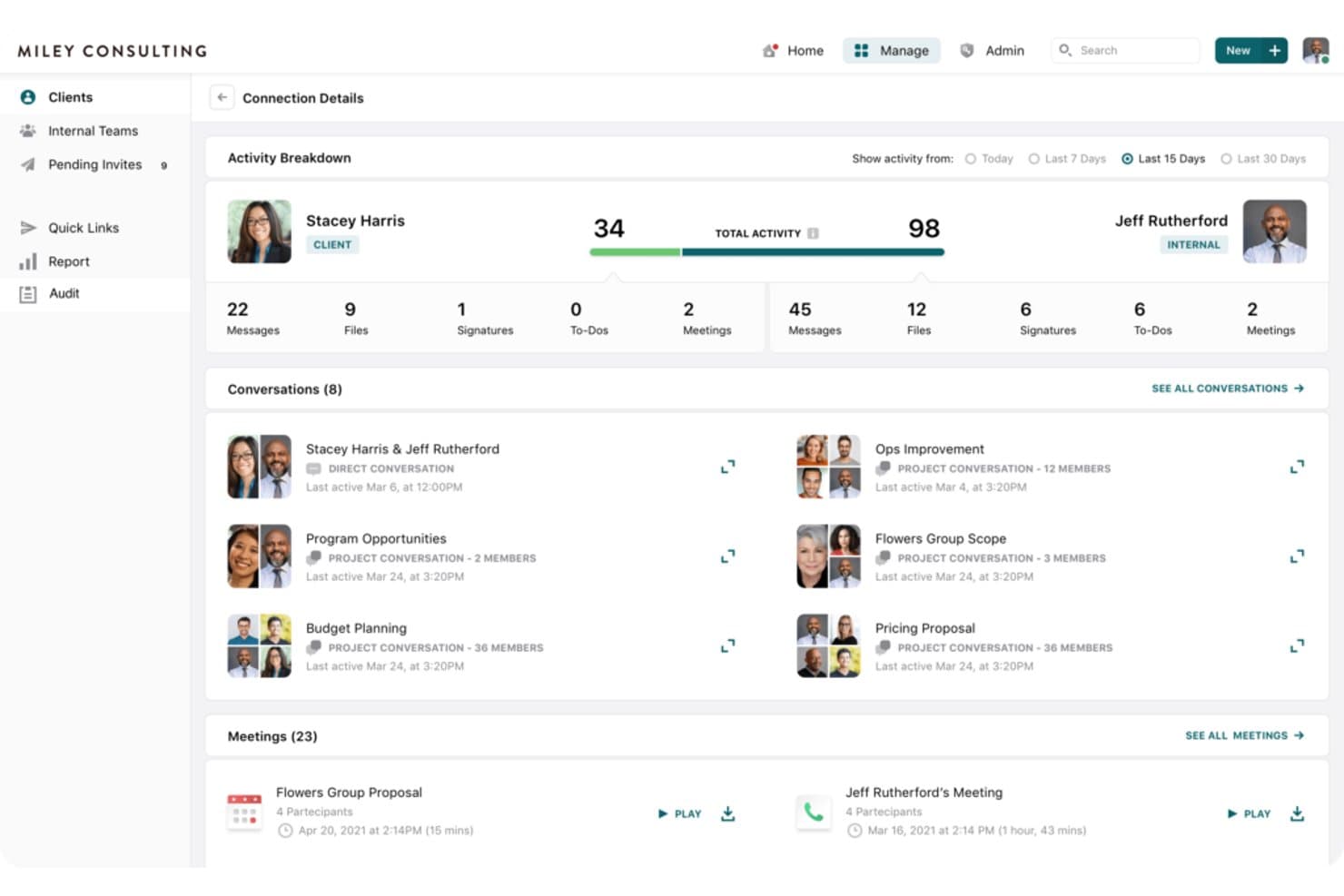
Moxo Matter Management Software Interface Moxo is a cloud-based client interaction and workflow platform that helps healthcare organizations coordinate patient communication, digital intake, scheduling, virtual care, and administrative processes in one secure workspace.
Who Is Moxo Best For?
Moxo works well for healthcare organizations that want to streamline patient-facing workflows while improving coordination between staff, providers, and patients.
Why I Picked Moxo
I picked Moxo because it combines patient engagement with workflow automation rather than focusing on communication alone. Healthcare teams can guide patients through scheduling, intake, document collection, approvals, payments, and virtual interactions within structured workflows. This makes Moxo a strong option for organizations that want to reduce fragmented processes and create a more consistent patient experience.
Moxo Key Features
- Patient self-scheduling: Let patients select available appointment times without relying on phone-based booking.
- Digital patient intake: Collect forms, documents, signatures, and patient information before appointments.
- Virtual care: Support remote interactions through secure digital communication and video-enabled workflows.
- Workflow automation: Build step-by-step processes for tasks, approvals, document collection, and patient follow-up.
Moxo Integrations
Moxo supports connections with EHRs, billing platforms, practice management systems, CRM tools, and other business applications. Its integration and API capabilities help healthcare organizations connect patient-facing workflows with existing clinical and administrative systems.
Pros and Cons
Pros:
- Supports a variety of integrations for comprehensive healthcare management
- Enhances patient experience through features like self-scheduling and virtual care
- Operational efficiency through feature-rich platform
Cons:
- The platform's wide range of features may be overwhelming for smaller practices
- Pricing information is not readily available
Learn more about Moxo: Best for healthcare networks seeking improved patient engagement
- Free demo available
- Pricing upon request
Visit WebsiteCustomer Rating:5/5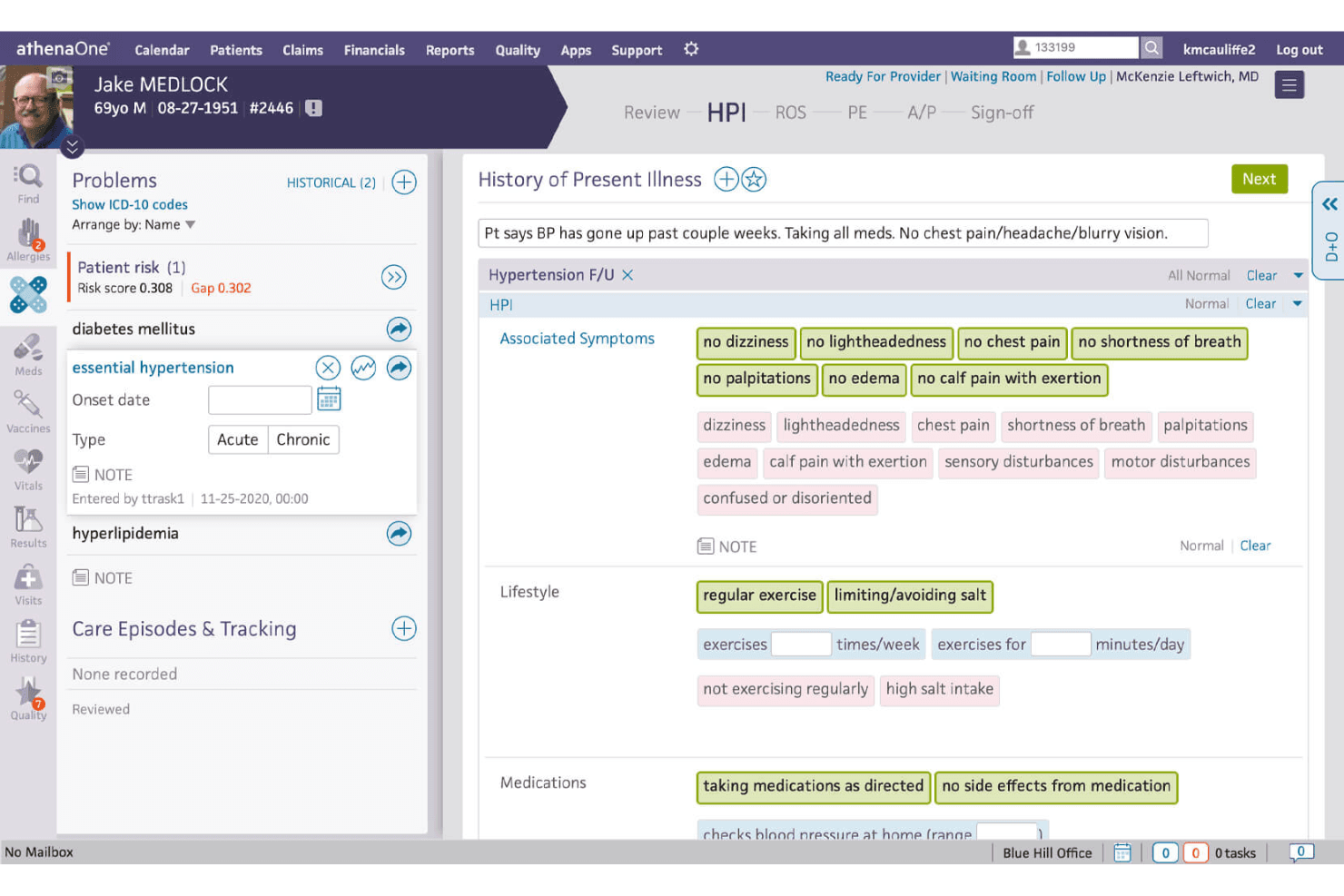
Athenahealth offers a centralized place to access patient records and manage information. athenahealth is a cloud-based healthcare IT platform that combines electronic health records, practice management, medical billing, patient engagement, and interoperability tools.
Who Is athenahealth Best For?
athenahealth works well for ambulatory practices and healthcare networks that want to improve patient engagement while managing clinical and administrative workflows in one system.
Why I Picked athenahealth
I picked athenahealth because its patient engagement tools are closely connected to the broader clinical and practice management platform. Patients can use the portal to review health information, schedule appointments, complete forms, and communicate securely with their care teams. This makes athenahealth a strong option for healthcare organizations that want to strengthen patient-provider communication without relying on a separate engagement platform.
athenahealth Key Features
- Patient portal: Give patients secure access to health records, test results, appointments, forms, and billing information.
- Online scheduling: Let patients request or book appointments through digital scheduling tools.
- Secure messaging: Support protected communication between patients and healthcare teams.
- Patient intake tools: Allow patients to complete registration forms and provide information before their visits.
athenahealth Integrations
athenahealth supports connections with laboratories, pharmacies, hospitals, imaging providers, payers, and third-party healthcare applications. Its APIs and interoperability tools help organizations exchange patient and operational data across connected systems.
Pros and Cons
Pros:
- Robust patient portal
- Comprehensive healthcare IT solution
- Emphasis on improved patient engagement
Cons:
- May require significant time investment for complete implementation
- Might have features that some smaller practices do not require
Learn more about Athenahealth: Best for building custom patient portals with no coding
- 14-day free trial
- From $392/month
Visit WebsiteCustomer Rating:4.5/5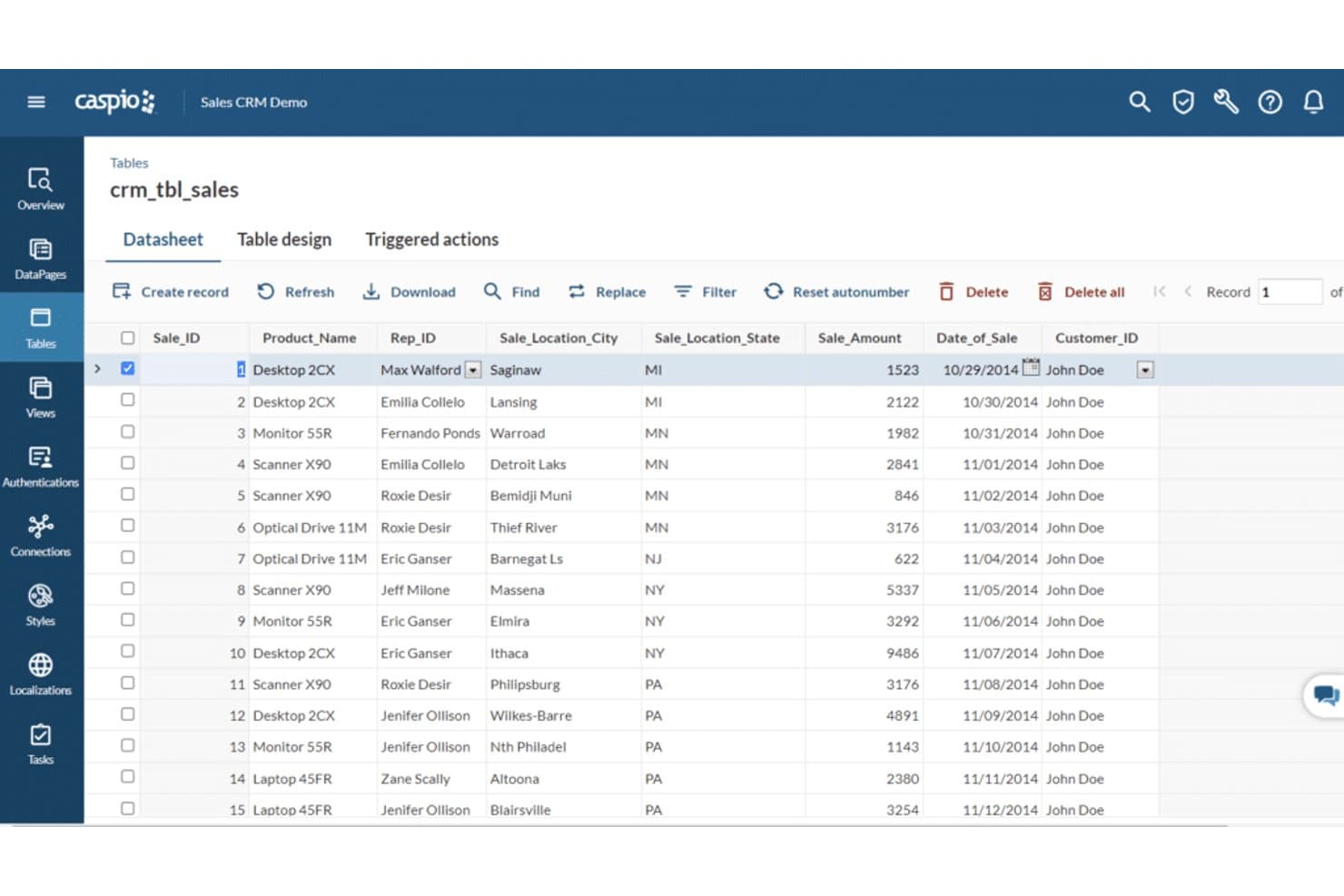
Caspio data sheet is simple and easy to use. Caspio is a low-code cloud platform that helps healthcare organizations build custom patient portals, workflow applications, and data management tools without extensive programming.
Who Is Caspio Best For?
Caspio works well for healthcare organizations that need a highly customized patient portal or internal application that cannot be handled by a standard, prebuilt system.
Why I Picked Caspio
I picked Caspio because it gives healthcare teams the flexibility to build patient portals around their own workflows instead of adapting to a fixed template. Its drag-and-drop tools make it possible to create forms, dashboards, databases, and user-facing applications with limited coding. This makes Caspio a strong option for organizations that need tailored portal functionality without investing heavily in custom software development.
Caspio Key Features
- Drag-and-drop app builder: Create patient portals, forms, and workflow applications using visual development tools.
- Custom dashboards: Build interactive views for patient information, operational metrics, and clinical or administrative data.
- Data management: Store, organize, and manage healthcare-related information in configurable cloud databases.
- Role-based access: Control what patients, providers, and staff members can view or edit within each application.
Caspio Integrations
Caspio supports connections with EHR systems, payment gateways, Microsoft 365, Google Workspace, and other third-party applications. Its APIs and automation tools also allow organizations to connect custom portals with existing clinical and administrative systems.
Pros and Cons
Pros:
- Extensive third-party integrations
- Highly customizable
- No coding knowledge required for portal creation
Cons:
- No free plan available
- May have a learning curve for non-technical users
Learn more about Caspio: Best for offering multilingual patient portal solutions
- Free demo available
- From $1,250/month (billed annually)
Visit WebsiteCustomer Rating:4.2/5
A sneak peek at the Bridge appointment calendar feature. Bridge is a patient portal software that aims to break down language barriers in healthcare. It provides comprehensive features in a multilingual setting, making healthcare management accessible to a diverse patient population. Given its multilingual capabilities, Bridge is a top choice for offering multilingual patient portal solutions.
Why I Picked Bridge: In evaluating different patient portal software, I found that Bridge's commitment to multilingual support set it apart. By addressing the language needs of diverse patient populations, significantly enhances patient engagement and care.
I chose Bridge because it offers multilingual solutions, which is crucial in our globalized world where language barriers often impede access to healthcare.
Standout Features & Integrations:
Bridge offers an array of useful features such as appointment scheduling, bill payments, health information access, and secure messaging with healthcare providers, all accessible in multiple languages. It also integrates smoothly with several Electronic Health Record (EHR) systems, practice management systems, and revenue cycle management platforms, enhancing its functionality and ease of use.
Pros and Cons
Pros:
- Robust third-party integrations
- Wide range of features
- Multilingual support
Cons:
- Advanced features require higher-priced plans
- No free plan available
- High starting price
Learn more about Bridge: Best for a patient-centric experience with passport feature
- Free demo available
- Pricing upon request
Visit WebsiteCustomer Rating:4.4/5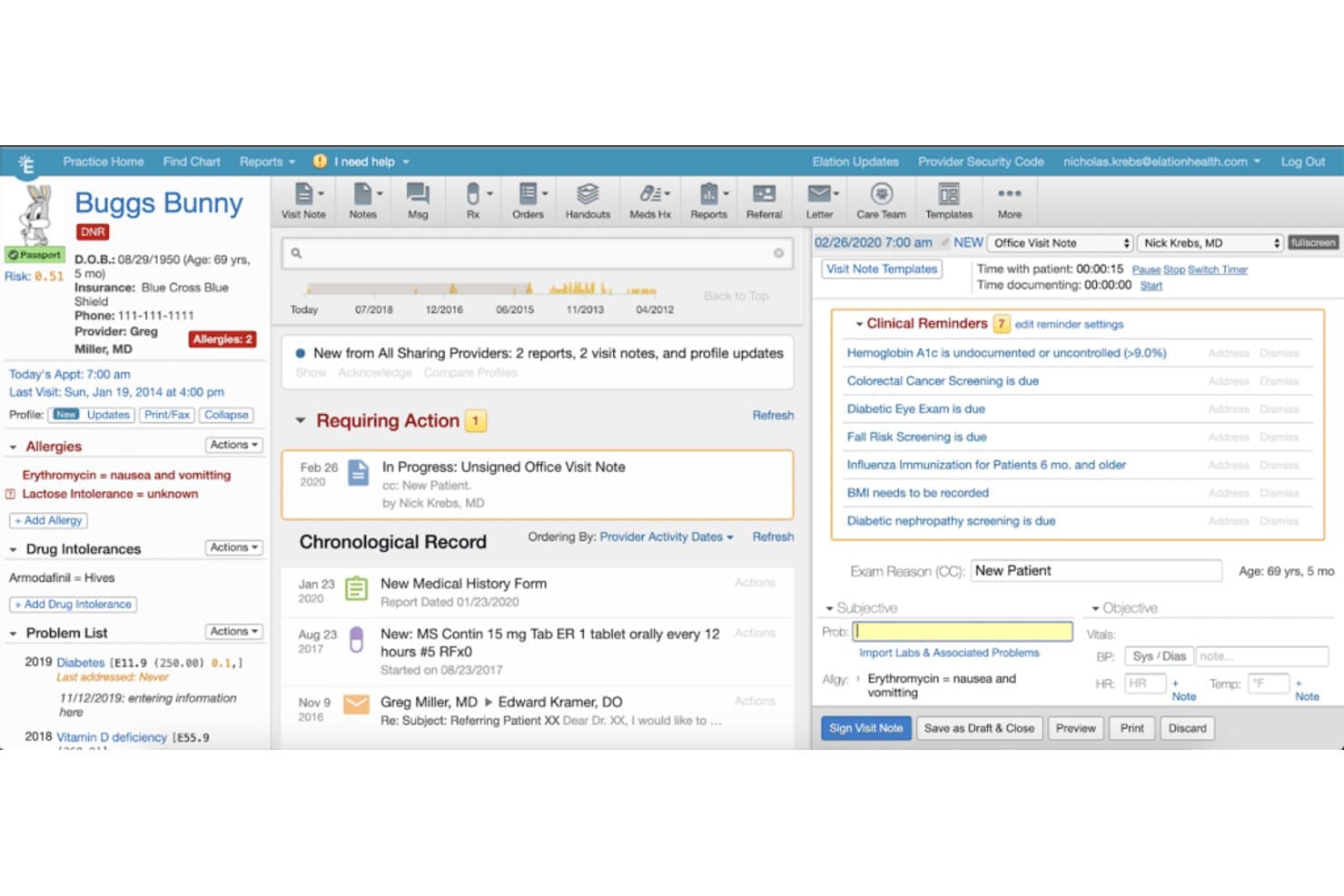
A look at the Elation Health patient summary feature. Elation Health is a clinical-first EHR and patient engagement platform that combines patient records, appointment management, prescription workflows, secure communication, and the Elation Passport patient portal.
Who Is Elation Health Best For?
Elation Health works well for independent primary care practices that want a patient-centered portal closely connected to the clinical record.
Why I Picked Elation Health
I picked Elation Health because its Passport portal gives patients a convenient way to access and manage their health information. Patients can review shared records, communicate with their care team, manage appointments, and participate more actively in their care. Since Passport connects directly with Elation’s EHR, providers can maintain patient communication and clinical information within the same workflow.
Elation Health Key Features
- Elation Passport: Give patients secure access to shared health information, visit details, and communication with their care team.
- Secure patient messaging: Allow patients and providers to exchange protected messages through the portal.
- Appointment management: Help patients review upcoming visits and manage appointment-related information.
- Prescription management: Support medication and prescription workflows through the connected EHR platform.
Elation Health Integrations
Elation Health supports connections with laboratories, pharmacies, billing platforms, health information exchanges, and other healthcare applications. Its APIs and integration network help practices connect clinical, financial, and patient engagement workflows.
Pros and Cons
Pros:
- Efficient third-party integrations
- Wide range of features
- Innovative passport feature for patient-centric care
Cons:
- Might require a learning curve for non-tech-savvy users
- High starting price
Learn more about Elation Health: Best for facilitating telemedicine consultations
- Free demo available
- Pricing upon request
Visit WebsiteCustomer Rating:4/5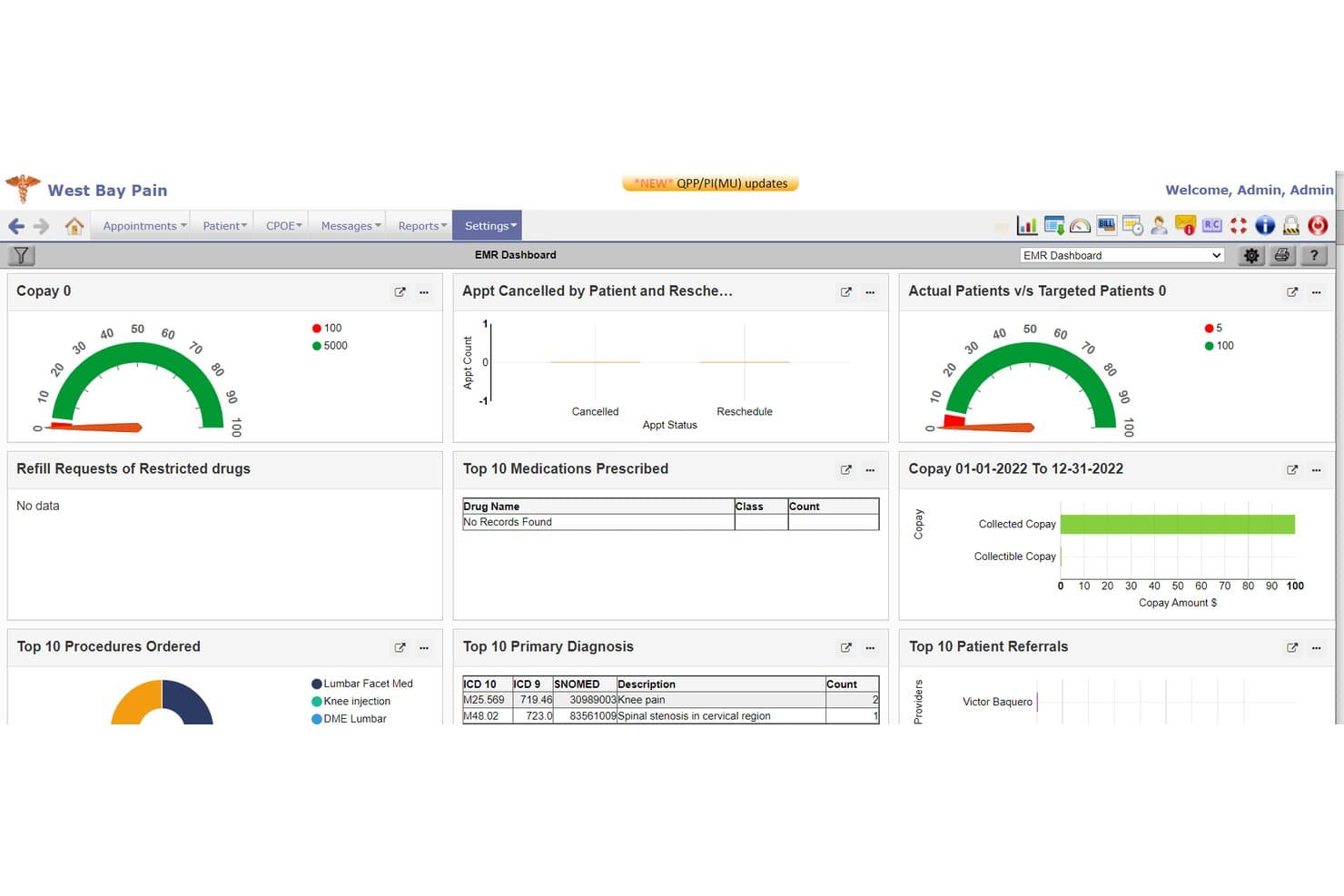
PrognoCIS EMR analytics dashboard PrognoCIS is a cloud-based EHR and patient engagement platform that combines clinical documentation, appointment scheduling, secure messaging, prescription management, billing, and patient portal tools.
Who Is PrognoCIS Best For?
PrognoCIS works well for ambulatory practices that want a patient portal closely connected to a comprehensive EHR and practice management system.
Why I Picked PrognoCIS
I picked PrognoCIS because its patient portal is integrated directly with the broader EHR platform. Patients can review medical information, schedule appointments, communicate securely with providers, and request prescription refills without relying on a separate portal system. This makes PrognoCIS a strong option for practices that want patient self-service tools connected to clinical and administrative workflows.
PrognoCIS Key Features
- Medical record access: Let patients review visit summaries, test results, medications, and other available health information.
- Online appointment scheduling: Allow patients to request or manage appointments through the portal.
- Secure messaging: Support protected communication between patients and healthcare providers.
- Prescription refill requests: Let patients request medication renewals electronically through their portal accounts.
PrognoCIS Integrations
PrognoCIS connects its patient portal with its EHR, scheduling, billing, telemedicine, and e-prescribing tools. It also supports integrations with laboratories, pharmacies, imaging providers, health information exchanges, payment systems, and other healthcare applications through HL7, FHIR, and API-based connections.
Pros and Cons
Pros:
- Supports secure messaging, enhancing communication between patients and providers
- Fully integrable with various EHR, billing, and scheduling systems
- Provides a comprehensive suite of features, improving patient autonomy
Cons:
- Limited information about user interface and ease of use
- The extensive functionality may be complex for smaller practices
Learn more about PrognoCIS Psychiatry EHR: Best for patient engagement tools
- Free demo available
- Pricing upon request
Visit WebsiteCustomer Rating:3.9/5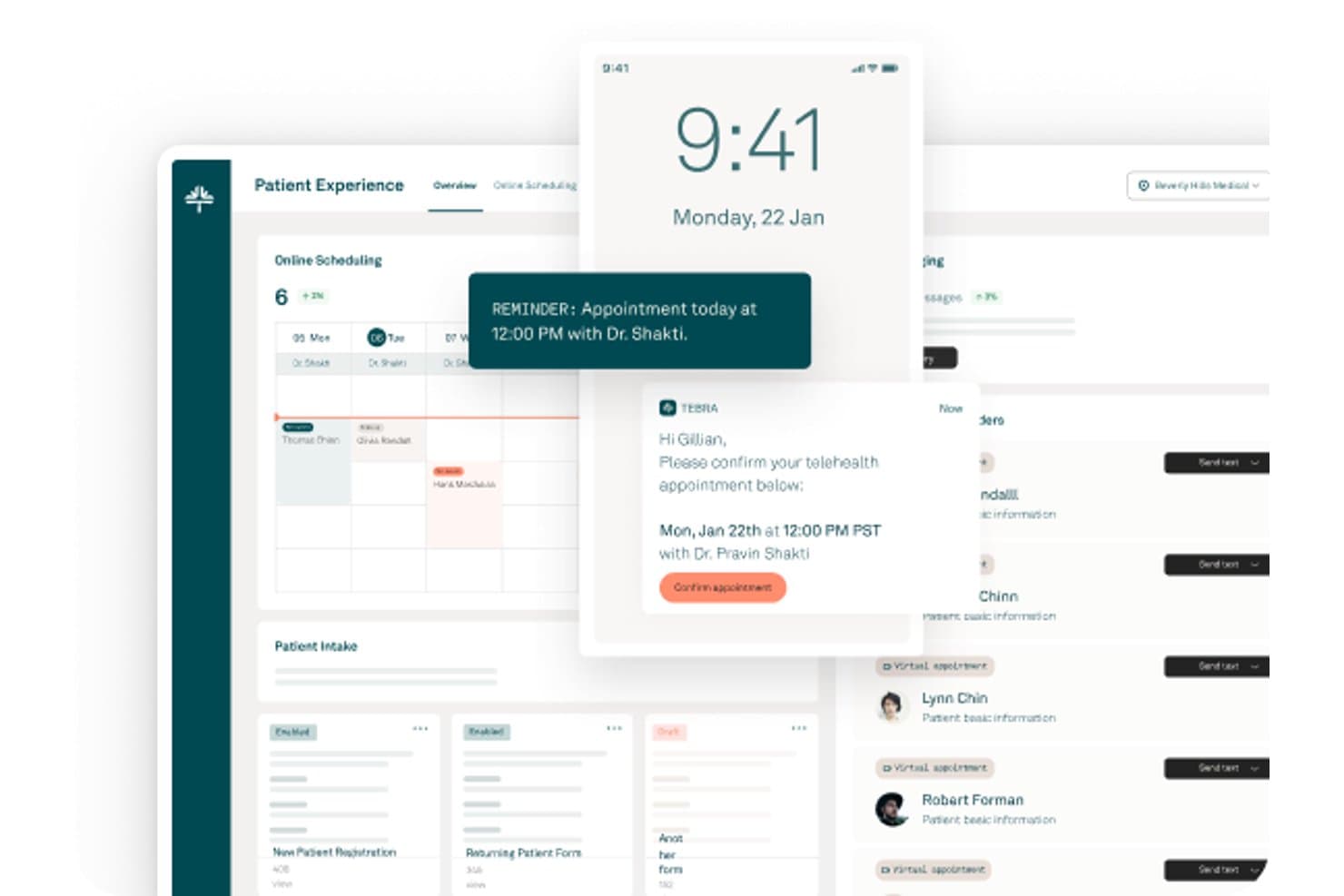
Tebra offers a patient experience dashboard with online scheduling, appointment reminders, telehealth confirmations, and patient intake management. Tebra is an all-in-one patient portal and practice management platform built for independent medical practices, combining secure messaging, digital intake, online scheduling, medical records access, and integrated billing in a single system.
Who Is Tebra Best For?
Tebra is a strong fit for independent and small-to-mid-size medical practices that want patient engagement and portal tools built into their existing EHR and billing workflows.
Why I Picked Tebra
I picked Tebra as one of the best because its patient engagement tools go well beyond a standard portal. I particularly like the AI-powered reputation management layer, which automatically sends post-visit review requests and generates HIPAA-compliant AI Review Replies. Paired with digital intake forms that deliver by text or email and sync directly to the EHR, Tebra turns routine patient touchpoints into active engagement moments.
Tebra Key Features
- Cloud-based EHR: Access patient records, chart notes, and visit summaries from any device.
- Integrated online bill pay: Patients can view and pay bills directly through the portal without external redirects.
- Provider calendar sync: Real-time appointment availability updates for accurate scheduling and rescheduling.
- HIPAA-compliant two-way messaging: Securely exchange messages between patients and care teams within the portal.
Tebra Integrations
Tebra offers native integrations with DrFirst, Fullscript, and Appriss Health, and syncs provider profiles across Google, Tebra Care Connect, and 80+ directories. An API is available for custom integrations.
Pros and Cons
Pros:
- Appointment scheduling links sync with EHR
- Seamless patient intake and consent forms
- Built-in automated review request workflow
Cons:
- Phone support can be slow during peak hours
- No patient-side cost estimator tool
Learn more about Tebra: Best for cloud-based community care coordination
- Free demo available
- Pricing upon request
Visit WebsiteCustomer Rating:3.6/5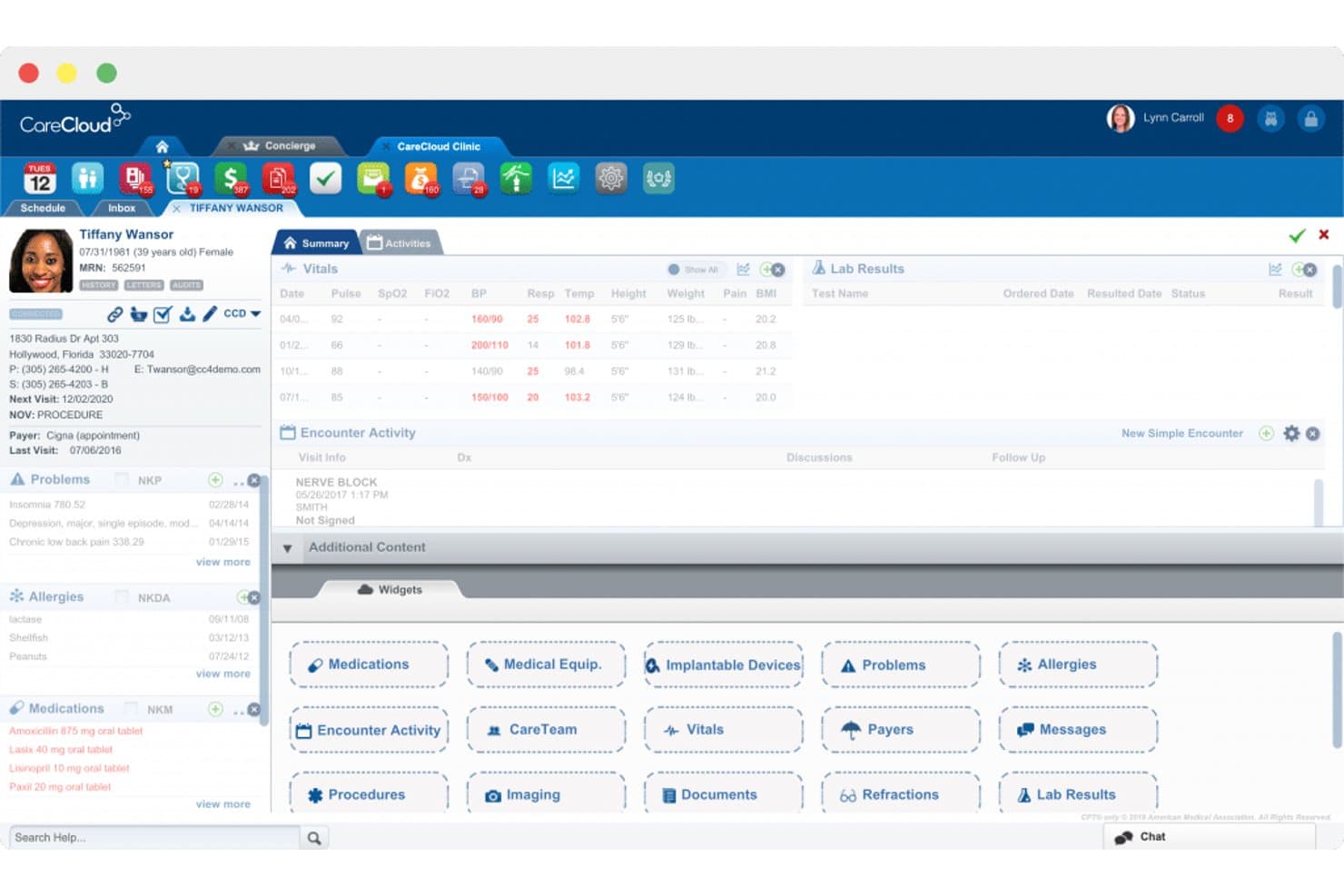
CareCloud patient summary feature. CareCloud is a cloud-based healthcare platform that combines patient engagement, electronic health records, practice management, billing, scheduling, and care coordination tools.
Who Is CareCloud Best For?
CareCloud works well for ambulatory practices and multi-location healthcare organizations that want to connect patient engagement with clinical, administrative, and financial workflows.
Why I Picked CareCloud
I picked CareCloud because its cloud-based platform helps patients, providers, and administrative teams access shared information across different locations. Its integrated portal, scheduling, EHR, and billing tools can support more consistent communication and reduce fragmented workflows. This makes CareCloud a strong option for organizations that want to improve patient access and coordinate care across multiple providers or sites.
CareCloud Key Features
- Patient portal: Give patients secure access to appointments, health information, messages, forms, and billing details.
- Appointment scheduling: Manage provider calendars and let patients request or book visits through digital scheduling tools.
- Electronic prescribing: Send prescriptions electronically from within the connected clinical workflow.
- Integrated billing: Manage claims, payments, patient balances, and financial reporting alongside clinical records.
CareCloud Integrations
CareCloud supports connections with laboratories, pharmacies, clearinghouses, payment systems, and other healthcare applications. Its interoperability tools help organizations exchange clinical and administrative data across connected systems.
Pros and Cons
Pros:
- User-friendly interface
- Efficient community care coordination
- Comprehensive cloud-based patient portal
Cons:
- One-time setup fee required
- Higher starting price compared to other software
Learn more about CareCloud:
Alte software-uri pentru portaluri de pacienți
Iată câteva opțiuni suplimentare de software pentru portaluri de pacienți care nu au ajuns pe lista mea scurtă, dar care merită totuși luate în considerare:
- 11PowerDiaryBest for mental health professionals needing robust diary management
- 12CorticoBest for canadian clinics seeking an EMR
- 13PlexiaBest for clinics needing advanced document management
- 14Creatio AI CRMBest for self-service options
- 15SimplePracticeBest for private practices seeking streamlined client management
- 16NextGENBest for scalable patient communication
- 17CarepatronBest for real-time communication with caregivers
- 18AdvancedMDBest for complete patient engagement features
- 19AIMDekBest for custom healthcare IT solutions
- 20OpenDentalBest for integrated dental practice management
How I Evaluate EMR Patient Portal Software
I split my evaluation into core requirements—like HIPAA-compliant messaging and EHR sync—and the differentiators that set platforms apart for specific practice types.
Core Functionality (Table Stakes for This List)
When I'm selecting tools for my list, I rank each one on a scale from 0 (does not offer the functionality) to 5 (excels in this area) for each core functionality listed below. Then, I calculate the tool's total score into a percentage. Each tool needs to achieve a minimum total score of 65% to be considered for inclusion.
- Secure Messaging: I check whether the portal supports HIPAA-compliant, two-way messaging between patients and care teams, including attachments and message threading.
- Appointment Self-Scheduling: Patients should be able to book, reschedule, or cancel visits on their own, with automated reminders sent via text, email, or both.
- Medical Records Access: I look for portals that let patients view lab results, medications, immunizations, and visit summaries without needing to call the office.
- Online Bill Pay: The portal should support integrated statement viewing and electronic payments so patients can handle balances directly after a visit.
- Digital Intake & Forms: I evaluate whether intake forms, e-signatures, and pre-visit questionnaires sync into the patient chart automatically before the appointment.
- EHR/PM Integration: Bidirectional data sync with EHR and practice management systems matters here, so updates flow both ways without manual re-entry.
Once I have a list of tools that meet the criteria, I consider what sets each platform apart.
Differentiating Factors (What Sets Vendors Apart)
Here's how I compare and contrast different vendors:
Standout Features
Telehealth integration is a key differentiator. I look for portals with built-in video visits and virtual waiting rooms so patients don't need a separate app to see their provider. Family and proxy access also matters—pediatric and geriatric practices need caregivers to manage records and messages on behalf of dependents with granular permission controls. A dedicated patient mobile app with biometric login and push notifications goes a long way toward driving portal adoption beyond the initial signup.
Beyond Features
Regulatory compliance is where I start. I check for HIPAA and HITECH compliance, SOC 2 Type II certification, and whether the vendor provides a BAA and audit logging. EHR/PM ecosystem fit is equally important—a portal that supports FHIR/HL7 APIs and certified integrations with your existing systems saves months of implementation headaches. I also evaluate how well each platform scales across practice sizes, from solo providers to multi-location groups, and whether it supports specialty-specific workflows like behavioral health consent or pediatric immunization tracking.
Cum să alegeți software-ul pentru portaluri de pacienți
Este ușor să vă pierdeți în liste lungi de funcții și structuri complexe de prețuri. Pentru a vă ajuta să rămâneți concentrat în timp ce parcurgeți procesul unic de selectare a software-ului, iată o listă de verificare a factorilor de care trebuie să țineți cont:
| Factor | Ce trebuie avut în vedere |
|---|---|
| FactorScalabilitate | Ce trebuie avut în vederePoate software-ul să crească odată cu cabinetul dumneavoastră? Verificați dacă acceptă un număr tot mai mare de utilizatori și date fără probleme de performanță. |
| FactorIntegrări | Ce trebuie avut în vedereSe conectează la sistemele existente, precum dosarele medicale electronice sau software-ul de facturare? Căutați integrări native pentru a evita configurările personalizate complexe. |
| FactorPosibilitatea de personalizare | Ce trebuie avut în vederePuteți adapta software-ul la nevoile cabinetului dumneavoastră? Luați în considerare flexibilitatea setărilor, aspectului și permisiunilor utilizatorilor. |
| FactorUșurința în utilizare | Ce trebuie avut în vedereEste software-ul intuitiv pentru toți utilizatorii? Testați interfața pentru simplitate și claritate, astfel încât să reduceți timpul de instruire și numărul de erori. |
| FactorImplementare și integrare inițială | Ce trebuie avut în vedereCât timp va dura până când sistemul va fi funcțional? Evaluați opțiunile de asistență disponibile în timpul configurării, precum materialele de instruire și sprijinul pentru integrarea inițială. |
| FactorCost | Ce trebuie avut în vedereCare este costul total de deținere? Luați în considerare taxele de abonament, eventualele suplimente și orice costuri ascunse. |
| FactorMăsuri de securitate | Ce trebuie avut în vedereCum protejează software-ul datele pacienților? Asigurați-vă că include criptare, actualizări regulate de securitate și respectă reglementările din domeniul sănătății, precum HIPAA. |
| FactorCerințe de conformitate | Ce trebuie avut în vedereÎndeplinește software-ul standardele de reglementare necesare? Verificați conformitatea cu reglementările locale și internaționale relevante pentru cabinetul dumneavoastră. |
Ce este software-ul pentru portaluri de pacienți?
Software-ul pentru portaluri de pacienți este un instrument digital care le permite pacienților să interacționeze online cu furnizorii lor de servicii medicale. Profesioniștii din domeniul sănătății, precum medicii, asistenții medicali și personalul administrativ, utilizează aceste instrumente pentru a îmbunătăți comunicarea și a gestiona eficient informațiile despre pacienți. Programarea consultațiilor, mesageria securizată și accesul la dosarele medicale contribuie la implicarea pacienților și la coordonarea îngrijirii. În general, aceste instrumente îmbunătățesc experiența pacienților, făcând serviciile medicale mai accesibile și mai bine organizate.
Funcții
Atunci când selectați software-ul pentru portaluri de pacienți, urmăriți următoarele funcții esențiale:
- Programarea consultațiilor: Le permite pacienților să programeze și să gestioneze consultații online, reducând volumul de muncă administrativă și sporind comoditatea.
- Mesagerie securizată: Permite comunicarea securizată între pacienți și furnizorii de servicii medicale, sporind implicarea și satisfacția pacienților.
- Acces la dosarele medicale: Oferă pacienților acces facil la istoricul medical și la rezultatele analizelor, promovând transparența și luarea unor decizii informate.
- Plata online a facturilor: Facilitează plata online a facturilor medicale, eficientizând procesul de facturare atât pentru pacienți, cât și pentru furnizorii de servicii medicale.
- Solicitări de reînnoire a rețetelor: Le permite pacienților să solicite online reînnoirea prescripțiilor, reducând necesitatea apelurilor telefonice și îmbunătățind respectarea tratamentului medicamentos.
- Integrarea serviciilor de telemedicină: Susține consultațiile virtuale, extinzând accesul la îngrijire și răspunzând nevoilor pacienților de a beneficia de consultații la distanță.
- Tablouri de bord personalizabile: Oferă utilizatorilor vizualizări și setări personalizate, permițând cabinetelor să adapteze portalul la nevoile lor specifice.
- Analiză și raportare: Oferă informații despre datele pacienților și utilizarea portalului, ajutând cabinetele să ia decizii bazate pe date pentru îmbunătățirea serviciilor.
Beneficii
Implementarea unui software pentru portalul pacienților oferă mai multe beneficii pentru echipa și afacerea dumneavoastră. Iată câteva dintre avantajele de care vă puteți bucura:
- Implicarea sporită a pacienților: Mesageria securizată și accesul la dosarele medicale îi mențin pe pacienți informați și implicați în îngrijirea lor.
- Comunicare îmbunătățită: Canalele directe de comunicare dintre pacienți și furnizorii de servicii medicale reduc neînțelegerile și îmbunătățesc coordonarea îngrijirii.
- Eficiență sporită: Programarea consultațiilor și plata facturilor online economisesc timp atât pentru personal, cât și pentru pacienți, reducând sarcinile administrative.
- Acces mai bun la date: Pacienții își pot consulta cu ușurință informațiile despre sănătate, ceea ce îi ajută să ia decizii informate cu privire la îngrijirea lor.
- Reducerea costurilor: Prin automatizarea sarcinilor de rutină, precum programarea și facturarea, cabinetele își pot reduce costurile operaționale și își pot îmbunătăți situația financiară.
- Comoditate sporită: Funcții precum solicitările de reînnoire a rețetelor și integrarea serviciilor de telemedicină le oferă pacienților flexibilitate în gestionarea nevoilor lor medicale.
- Informații bazate pe date: Funcțiile de analiză și raportare ajută cabinetele să înțeleagă tendințele în rândul pacienților și să îmbunătățească furnizarea serviciilor.
Costuri și prețuri
Alegerea unui software pentru portalul pacienților necesită înțelegerea diferitelor modele de tarifare și planuri disponibile. Costurile variază în funcție de funcții, dimensiunea echipei, modulele suplimentare și alți factori. Tabelul de mai jos prezintă planurile uzuale, prețurile medii ale acestora și funcțiile incluse de obicei în soluțiile software pentru portalul pacienților:
Tabel comparativ al planurilor pentru software-ul portalului pacienților
| Tipul planului | Preț mediu | Funcții uzuale |
|---|---|---|
| Tipul planuluiPlan gratuit | Preț mediu$0 | Funcții uzualeProgramare de bază a consultațiilor, mesagerie limitată și acces minim la date. |
| Tipul planuluiPlan personal | Preț mediu$5-$25/utilizator/lună | Funcții uzualeProgramarea consultațiilor, mesagerie securizată și acces la dosarele medicale. |
| Tipul planuluiPlan pentru afaceri | Preț mediu$30-$60/utilizator/lună | Funcții uzualeProgramare avansată, funcții complete de mesagerie, plata facturilor și analiză. |
| Tipul planuluiPlan pentru întreprinderi | Preț mediu$70-$100/utilizator/lună | Funcții uzualeIntegrări personalizate, analiză cuprinzătoare, telemedicină și personalizare completă. |
Întrebări frecvente despre software-ul pentru portalul pacienților
Iată câteva răspunsuri la întrebările frecvente despre software-ul pentru portalul pacienților:
Se poate integra software-ul pentru portalul pacienților cu sistemele EHR existente?
Da, majoritatea soluțiilor software pentru portalul pacienților se pot integra cu sistemele EHR existente. Integrarea asigură un flux continuu de informații între sisteme, reducând introducerea manuală a datelor și minimizând erorile. Atunci când alegeți un portal, verificați compatibilitatea cu sistemul EHR actual și luați în considerare eventualele costuri suplimentare de integrare.
Cât de sigur este software-ul pentru portalul pacienților?
Software-ul pentru portalul pacienților este conceput pentru a fi sigur și conform cu reglementări precum HIPAA. Căutați funcții precum criptarea, controalele de acces și jurnalele de audit pentru a proteja informațiile pacienților. Verificați întotdeauna dacă furnizorul software-ului respectă standardele din industrie privind protecția datelor, pentru a proteja datele pacienților.
Poate portalul pacienților să afișeze rezultatele investigațiilor imagistice?
Unele instrumente le permit pacienților să vadă rezultatele investigațiilor imagistice după ce un medic le validează, în timp ce altele întârzie accesul sau nu le includ. Va trebui să decideți ce se publică automat și ce necesită mai întâi o verificare. Întrebați dacă portalul acceptă previzualizări ale fișierelor sau dacă pacienții trebuie să descarce fișiere PDF. Unele clinici limitează accesul pentru a evita confuzia sau întrebările ulterioare.
Există o modalitate de a trimite formulare prin portal?
Da, multe platforme acceptă formulare digitale, precum cele pentru înregistrare, consimțământ sau actualizări privind starea de sănătate. Le puteți trimite înainte de consultație sau le puteți atribui atunci când pacienții se conectează. Unele instrumente vă permit să vă creați propriile șabloane, în timp ce altele percep taxe pentru formularele personalizate. Asigurați-vă că funcționează pe dispozitive mobile și că nu necesită conectări suplimentare. Pacienții sunt mai predispuși să finalizeze formularele dacă procesul este rapid.
Cât timp ar trebui să dureze configurarea?
Depinde de furnizor și de complexitatea configurării dumneavoastră. Unele instrumente sunt gata de utilizare în câteva zile, în timp ce altele necesită săptămâni dacă aveți nevoie de integrări sau fluxuri de lucru personalizate. Va trebui să alocați timp pentru instruirea personalului, testarea accesului pacienților și curățarea înregistrărilor vechi. Întrebați dacă vi se va desemna o persoană care să vă ghideze în procesul de implementare. De obicei, acest lucru face procesul mai simplu.