

Ținerea evidenței notițelor de terapie poate fi o adevărată bătaie de cap. Probabil cunoașteți dificultatea de a gestiona documente nesfârșite în timp ce încercați să oferiți cele mai bune îngrijiri pacienților. Aici intervine software-ul pentru notițe de terapie. Acesta este conceput pentru a vă ajuta pe dumneavoastră și echipa dumneavoastră să economisiți timp și să reduceți erorile.
În cercetarea mea, am constatat că software-ul potrivit poate face o diferență semnificativă în practica dumneavoastră. Scopul meu este să prezint recenzii imparțiale ale celor mai bune instrumente pentru notițe de terapie, astfel încât să găsiți cea mai potrivită soluție pentru nevoile dumneavoastră. Voi analiza caracteristicile, avantajele și dezavantajele fiecăruia, pentru a vă ajuta să luați o decizie informată.
Why Trust Our Software Recommendations
6,700+
Reviews
20
Industry experts
16+
Evaluation factors
14
Years
Our team has been testing and reviewing software since 2012. As medical practice leaders ourselves, we know how difficult—and important—it is to choose the right software.
For this guide, we evaluated tools using hands-on testing and independent research, scoring tools using our selection criteria.
Our reviews reflect our human editorial judgment, not a sales pitch.
Tabel comparativ al software-urilor AI pentru notițe de terapie
Acest tabel comparativ rezumă detaliile privind prețurile pentru selecția mea de software-uri AI pentru notițe de terapie:
Sorted by: Default
| Tool | Starting Price | Website | |
|---|---|---|---|
Best for supervisor sign-off on trainee work | 4.7 out of 5 | $29/user/month Free demo + 14-day free trial available | Website |
Best for customizable clinical forms | 4.3 out of 5 | $335/month Free demo available | Book Demo |
Best for robust scheduling and billing | 4.4 out of 5 | $69/user/month 30-day free trial + demo available | Website |
Best for outcome tracking and reporting | 4.5 out of 5 | $59/user/month Free demo available | Website |
Best for data-driven decision making | 4.1 out of 5 | Pricing upon request Free demo available | Website |
Best for mental health practice management | 3.6 out of 5 | $130/user/month 30-day free trial + free demo available | Website |
Best for integrated practice management | 3.7 out of 5 | $80/month Free demo available | Website |
Best for smart practice management features | Not rated | $3.75/month Free plan available | Website |
Best for Canadian mental health professionals | 3.0 out of 5 | $60 CAD/month 14-day free trial | Website |
Best for streamlined clinical documentation | Not rated | $39/user/month | Website |


Recenzii ale celor mai bune software-uri AI pentru notițe de terapie
 Best for supervisor sign-off on trainee work
- Free demo + 14-day free trial available
- From $29/user/month
Visit WebsiteCustomer Rating:4.7/5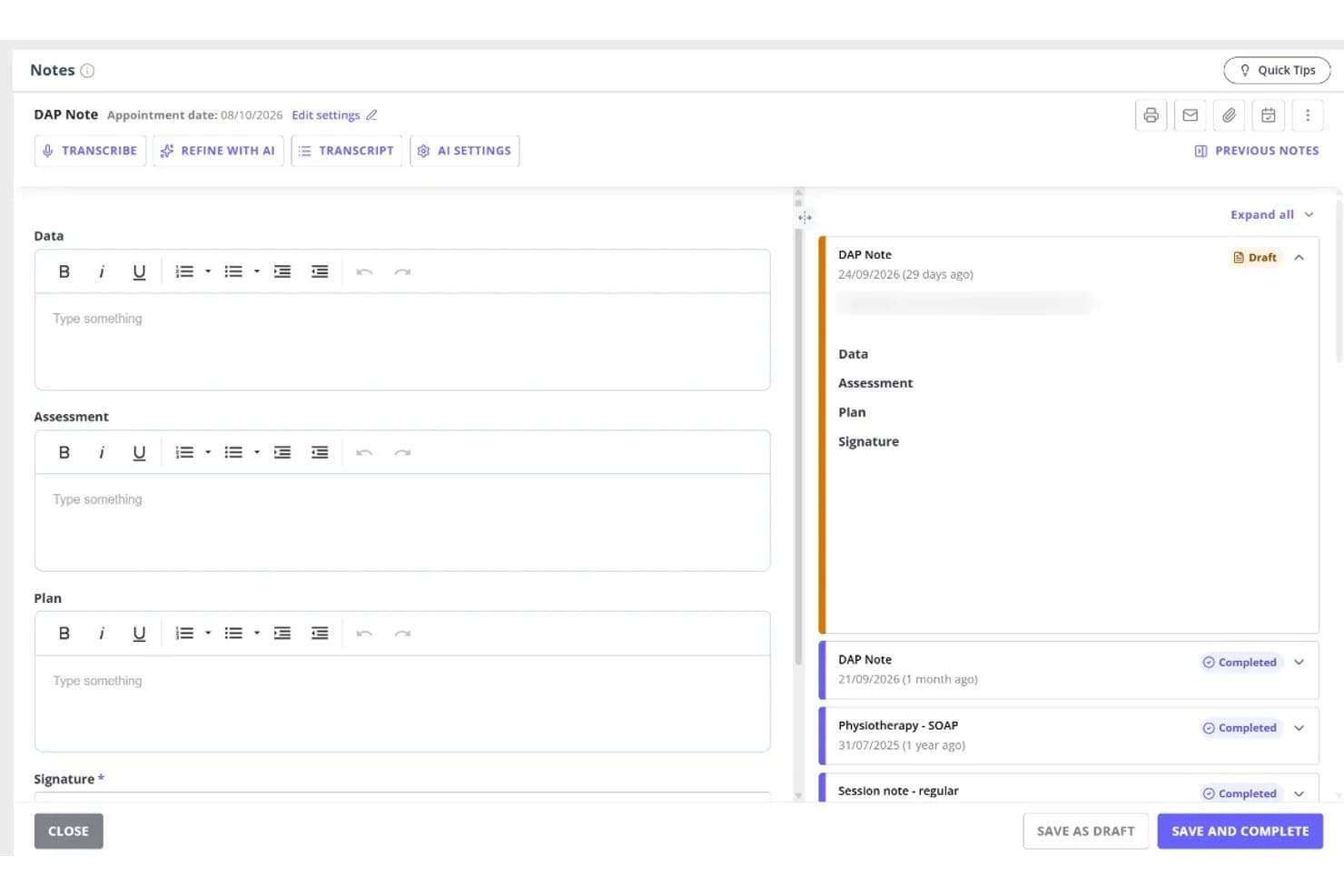
Here's where you can write a session note with previous notes open alongside it in Zanda. Zanda is an all-in-one practice management platform for health practices that combines clinical notes, appointment scheduling, billing, client intake forms, and AI-assisted documentation tools.
Who Is Zanda Best For?
Zanda is a strong fit for training clinics and supervised practice settings where a supervising practitioner needs to review and sign off on a trainee's clinical notes.
Why I Picked Zanda
Zanda earns its spot on my shortlist because of how well it handles supervised practice settings, where a trainee's clinical notes need a qualified sign-off before they're finalized. I particularly like that supervisors can be granted access to a trainee's client profile, review their notes directly, and add a typed-name signature field, with the library even including a dedicated "Other - Supervisor Sign Off" template. Templates can hold multiple signature fields, so a single note can capture both the trainee's and supervisor's input in one place.
Zanda Key Features
- BizzyAI Scribe: Records live session audio through your browser microphone and drafts a clinical note using your selected template.
- Scored outcome assessments: Built-in forms for PHQ-9, GAD-7, and other standardized assessments calculate and interpret scores automatically on submission.
- Note locking: Finalized session notes can be locked, restricting edits to users with the necessary access rights.
- Automated appointment reminders: Sends SMS and email reminders to clients, with confirmation or cancellation replies updating the appointment status in the system.
Zanda Integrations
Zanda has native integrations with Stripe, Xero, Google Calendar, Apple Calendar, Outlook Calendar, Zoom, Physitrack, and Mailchimp. A public API is available in beta, with GET endpoints documented and POST endpoints planned.
Pros and Cons
Pros:
- Client self-booking cuts scheduling back-and-forth
- Scored PHQ-9 and GAD-7 track progress
- Supervisor signatures support trainee oversight
Cons:
- Supervisor sign-off lacks enforced review queues
- Session notes require a selected template
Learn more about Zanda: 2Best for customizable clinical forms
RXNT
- Free demo available
- From $335/month(billed annually)
Visit WebsiteCustomer Rating:4.3/5
RXNT enables healthcare providers to document patient encounters using customizable charting templates, integrated clinical records, and mobile access. RXNT is a cloud-based EHR and practice management platform built for ambulatory and behavioral health practices, with tools for clinical documentation, e-prescribing, scheduling, telehealth, and medical billing.
Who Is RXNT Best For?
RXNT works well for independent and small-to-midsize behavioral health and mental health practices that need an all-in-one clinical and billing platform.
Why I Picked RXNT
I've included RXNT in my top picks for its Smart Forms library, one of the most flexible documentation systems I've seen in an EHR built for behavioral health. With over 1,000 customizable templates, including pre-built PHQ-9 forms and SOAP note structures, therapists can build note formats that match how they document sessions. I also like that these forms tie directly into the encounter workflow, so clinical data captured in a Smart Form feeds into the patient chart without any re-entry.
RXNT Key Features
- Ambient IQ: Uses AI to listen to patient encounters and auto-generate clinical notes in real time.
- Telehealth: Built-in video visit feature connects directly to the patient chart and encounter workflow.
- Group appointment documentation: Supports group session visits with scheduling and notes for multi-patient charting.
- Patient portal: Secure portal for patients to complete intake forms, view visit summaries, and message their provider.
RXNT Integrations
RXNT connects to Surescripts for e-prescribing and uses the Relay Exchange clearinghouse via Change Healthcare for claims processing. It also supports HL7 interfaces for lab and radiology connections, with a network spanning all 50 states that links to clinical diagnostics providers. Through a partnership with Kno2, RXNT is adding TEFCA connectivity for broader health information exchange. RXNT connects to Keragon for HIPAA-compliant workflow automation with third-party tools. Zapier support and a public API are not documented.
Pros and Cons
Pros:
- iOS and Android mobile apps included
- EPCS-certified and PDMP-integrated e-prescribing
- 650+ customizable mental health encounter templates
Cons:
- Patient portal lacks message notifications
- Duplicate patient records occur often
Learn more about RXNT: Best for robust scheduling and billing
- 30-day free trial + demo available
- From $69/user/month
Visit WebsiteCustomer Rating:4.4/5
A look at the comprehensive practice management and EMR software feature in TherapyNotes. TherapyNotes is a highly regarded software solution designed specifically for mental health professionals. Its excellent scheduling and billing functionality streamlines the administrative side of practice management, making it ideal for those seeking robust and efficient tools for these tasks.
Why I Picked TherapyNotes: TherapyNotes secured its spot on my list due to its impressive and comprehensive scheduling and billing capabilities. The platform stands out with its user-friendly interface and ability to handle complex tasks efficiently. This, combined with its feature-rich offering, makes it perfect for the title "Best for robust scheduling and billing."
Standout features & integrations:
TherapyNotes comes with a variety of useful features, such as therapy-specific templates, a patient portal, and, of course, its outstanding scheduling and billing modules. It provides vital integrations, too, including seamless connections to clearinghouses like Office Ally and Availity, as well as credit card processing via CardConnect.
Pros and Cons
Pros:
- Efficient clearinghouse integrations
- User-friendly interface
- Robust scheduling and billing capabilities
Cons:
- Lacks teletherapy integration
- Limited customization of note templates
- Additional cost for base fee
Learn more about TherapyNotes: Best for outcome tracking and reporting
- Free demo available
- From $59/user/month
Visit WebsiteCustomer Rating:4.5/5
A sneak peek of the BestNotes treatment plan worksheet feature. BestNotes is a comprehensive EHR and CRM solution tailored for behavioral health and addiction treatment providers. This platform shines in its capacity for thorough outcome tracking and reporting, making it a prime choice for practices focused on measurable results.
Why I Picked BestNotes: In the process of choosing the right software, BestNotes stood out with its impressive outcome tracking and reporting features. The system's ability to accurately monitor and report patient progress differentiates it from other options. It is in this context that BestNotes emerges as the "Best for outcome tracking and reporting," providing tools that help monitor therapeutic efficacy and drive improved patient outcomes.
Standout features & integrations:
BestNotes offers a broad spectrum of features such as custom forms and templates, a dedicated patient portal, and, notably, robust outcome tracking and reporting tools. The software integrates effectively with billing solutions like Office Ally, as well as lab services, providing a comprehensive care management system.
Pros and Cons
Pros:
- Effective billing integrations
- Customizable forms and templates
- Robust outcome tracking and reporting
Cons:
- User interface could be modernized
- Learning curve for customizing templates
- No free trial available
Learn more about BestNotes: Best for data-driven decision making
- Free demo available
- Pricing upon request
Visit WebsiteCustomer Rating:4.1/5
Valant's mental health practice dashboard shows robust reporting and analytic capabilities. Valant is a specialized EHR platform purpose-built for behavioral health providers. It champions data-driven decision-making, incorporating robust analytics tools to guide practice management and patient care.
Why I Picked Valant: In the process of selecting suitable therapy notes software, I was drawn to Valant for its strong emphasis on data analytics. Its focus on equipping practitioners with insightful data set it apart from the rest. I believe Valant earns the title of "Best for data-driven decision-making" as it integrates clinical and financial data effectively, providing actionable insights to enhance both patient outcomes and business performance.
Standout features & integrations:
Valant offers a sophisticated suite of features, including clinical documentation, a billing system, a patient portal, and robust reporting and analytics tools. Its integrations are notable as well, seamlessly connecting with labs like LabCorp and Quest, as well as with popular billing services and telehealth platforms for comprehensive care delivery.
Pros and Cons
Pros:
- Efficient lab integrations
- Comprehensive EHR platform with integrated billing
- Powerful analytics and reporting tools
Cons:
- Lacks a free trial option
- Learning curve for data tools
- High starting price point
Learn more about Valant: Best for mental health practice management
- 30-day free trial + free demo available
- From $130/user/month
Visit WebsiteCustomer Rating:3.6/5
AdvancedMD's dashboard shows its comprehensive suite of tools. AdvancedMD is a specialized platform that streamlines practice management for mental health professionals. With a comprehensive suite of tools to manage clinical, administrative, and billing operations, it emerges as an excellent choice for complete mental health practice management.
Why I Picked AdvancedMD: AdvancedMD captured my interest for its holistic approach to mental health practice management. The software's blend of administrative, clinical, and financial management tools set it apart from other options. For these reasons, AdvancedMD is my choice for "Best for mental health practice management" because it provides a comprehensive solution for managing all aspects of a mental health practice.
Standout features & integrations:
AdvancedMD offers features such as a patient portal, teletherapy options, appointment scheduling, and robust reporting tools. The platform integrates with numerous insurance and healthcare networks for efficient billing and claims management and also connects with labs and pharmacies, offering a seamless patient care experience.
Pros and Cons
Pros:
- Extensive integration with insurance networks and healthcare systems
- Robust reporting tools
- Comprehensive practice management suite
Cons:
- Some users may find customer support to be lacking
- Complex interface may require training
- High starting price
 Best for integrated practice management
- Free demo available
- From $80/month (for 1 user)
Visit WebsiteCustomer Rating:3.7/5
A look at the therapy practice feature in ClinicSource. ClinicSource stands as an all-in-one therapy practice management software designed with an eye for integration. It ensures efficient, seamless coordination between different practice areas, making it a prime pick for practices requiring a holistic approach.
Why I Picked ClinicSource: I chose ClinicSource because of its comprehensive approach to managing a therapy practice. When comparing various options, ClinicSource stood out for its robust integration capabilities. It's a platform that truly encompasses the 'best for integrated practice management' category as it manages not just therapy notes, but also billing, scheduling, and reporting, all from a unified dashboard.
Standout features & integrations:
ClinicSource shines with features like its therapy-specific templates and an intuitive scheduler that even manages multiple locations. It also offers robust reporting tools to track progress and facilitate better decision-making. Integration-wise, ClinicSource smoothly connects with a variety of payment gateways and electronic health record systems, enabling seamless data flow across your practice.
Pros and Cons
Pros:
- Intuitive scheduler with multi-location support
- Specialty-specific note templates
- Comprehensive integration across practice areas
Cons:
- Interface might require a learning curve
- Pricing can be steep for small practices
- High base fee per month
Learn more about ClinicSource:

Here are Halaxy's all-in-one practice management features. Halaxy is a robust software that revolutionizes the way healthcare practices are managed. Its suite of smart features provides an all-in-one platform for patient records, appointments, invoices, and more, creating an optimal solution for practice management.
Why I Picked Halaxy: I picked Halaxy due to its impressive array of smart practice management features. The platform combines multiple key practice management tools into one easy-to-use system, making it the "Best for smart practice management features". Its comprehensive solution to healthcare practice management truly makes it stand out from the rest.
Standout features & integrations:
Halaxy offers a range of features, including electronic medical records (EMR), appointment scheduling, billing and invoicing, and an intelligent to-do list. It integrates well with major health systems for efficient data exchange, adding to its streamlined practice management capabilities.
Pros and Cons
Pros:
- Efficient integration with health systems
- Free core software
- Comprehensive suite of smart features
Cons:
- The interface could be more intuitive
- No dedicated mobile app
- Pay-as-you-go model might be costly for frequent users
Learn more about Halaxy: Best for Canadian mental health professionals
- 14-day free trial
- From $60 CAD/month
Visit WebsiteCustomer Rating:3/5
The patient management feature of Owl Practice is a secure and efficient tool. Owl Practice is a therapy notes software platform tailored to Canadian mental health professionals. Designed with Canada's healthcare regulations in mind, it provides a secure and efficient tool for patient management and note-taking.
Why I Picked Owl Practice: In my quest for the best therapy notes software, Owl Practice stood out with its emphasis on meeting Canadian healthcare standards. Its deep understanding of the unique requirements and challenges of Canadian mental health practitioners sets it apart. As such, I chose Owl Practice as the "Best for Canadian mental health professionals" due to its specialized focus and commitment to adhering to Canadian healthcare protocols.
Standout features & integrations:
Owl Practice offers features like secure messaging, therapy notes management, and scheduling, all of which are compliant with Canadian healthcare laws. The software integrates with other Canadian health systems, providing a holistic solution for Canadian mental health professionals.
Pros and Cons
Pros:
- Efficient scheduling tools
- Secure messaging and note-taking
- Tailored for Canadian healthcare compliance
Cons:
- Interface may feel dated
- No free trial available
- May not be suitable for professionals outside Canada
Learn more about Owl Practice:

The clinical documentation feature in Care Patron is simple and easy to use. Care Patron is a dynamic healthcare software that optimizes clinical documentation processes. Its easy-to-use interface and comprehensive features make it a perfect choice for healthcare professionals seeking efficient ways to manage their clinical documentation.
Why I Picked Care Patron: Care Patron caught my eye due to its dedication to simplifying clinical documentation. Its streamlined workflow and emphasis on efficient note-taking make it stand out. I chose Care Patron as "Best for streamlined clinical documentation" due to its intuitive design and smart features, making the documentation process a smooth experience for clinicians.
Standout features & integrations:
Care Patron boasts features like appointment scheduling, billing, and importantly, a robust clinical note-taking system. The software integrates with a variety of healthcare systems, providing seamless data exchange and ensuring all aspects of patient care are effectively coordinated.
Pros and Cons
Pros:
- Seamless integration with healthcare systems
- Comprehensive feature set
- Streamlined clinical documentation
Cons:
- May require a learning curve for less tech-savvy users
- Limited customization options
- No free trial available
Learn more about Care Patron:
Alte software-uri pentru notițe de terapie
Mai jos este o listă de software-uri suplimentare pentru notițe de terapie pe care le-am selectat, dar care nu au ajuns în top 10. Merită cu siguranță să le verificați.
- 11PowerChart TouchBest for mobile note-taking efficiency
- 12My Clients PlusBest for diverse therapeutic disciplines
- 13SimplePracticeBest for a simplified yet comprehensive approach
- 14WebPTGood for physical therapy practices
- 15ICANotesGood for behavioral health clinicians
- 16Practice FusionGood for cloud-based EHR and patient management
- 17LuminelloGood for streamlined mental health practice management
- 18Kareo EHRGood for seamless patient charting
- 19CarePathsGood for integrated teletherapy solutions
- 20Patagonia HealthGood for public health organizations and agencies
How I Evaluate Therapy Notes Software
My evaluation splits into two layers: baseline requirements a platform must meet—like HIPAA compliance and SOAP/DAP templates—and the differentiators that matter for your practice.
Core Functionality (Table Stakes For This List)
When I'm selecting tools for my list, I rank each one on a scale from 0 (does not offer the functionality) to 5 (excels in this area) for each core functionality listed below. Then, I calculate the tool's total score into a percentage. Each tool needs to achieve a minimum total score of 65% to be considered for inclusion.
- Therapy Note Templates: I check for structured formats like SOAP, DAP, and BIRP notes, plus whether templates can be customized to fit specialty areas like child therapy or SUD counseling.
- HIPAA-Compliant Security: Every platform I evaluate needs a signed BAA, encryption at rest and in transit, and documented access controls to protect PHI.
- Treatment Plan Tools: I look at whether you can build structured plans with goals, objectives, and interventions—and whether those plans link directly to your session notes.
- Scheduling & Client Records: A good platform ties your calendar, client history, and session documentation together so you're not toggling between tabs to pull up a client's file mid-session.
- Billing & Insurance Integration: I evaluate whether the tool generates CMS-1500 claims, connects to a clearinghouse, and handles superbills—especially for practices billing multiple payers.
- Telehealth & E-Signatures: Platforms like TherapyNotes and SimplePractice bundle these in, and I look for HIPAA-compliant video and e-signatures on intake and consent forms.
Once I have a list of tools that meet this criteria, I consider what sets each platform apart.
Differentiating Factors (What Sets Vendors Apart)
Here's how I compare and contrast different vendors:
Standout Features
AI-assisted note generation is a growing differentiator—platforms that draft progress notes from session audio save clinicians real documentation time. Built-in outcome measures like PHQ-9 and GAD-7 scoring matter too, since they let you track client progress directly within your notes. I also evaluate client portals, where clients handle intake paperwork, booking, and payments independently. For group practices, specialized documentation for couples and group sessions is worth checking.
Beyond Features
Pricing structure matters a lot here—some platforms charge per clinician while others offer flat-rate plans, and add-on fees for claims filing or telehealth can shift the total cost quickly. I also evaluate how well a tool fits different practice sizes, from a solo therapist to a 30-clinician group with supervisory co-signing needs. Clearinghouse and e-prescribing integrations are worth checking too, since a platform that connects to your existing payers and pharmacy networks saves real administrative work during onboarding.
Cum să alegeți software-ul pentru notițe de terapie
Este ușor să vă pierdeți în liste lungi de funcții și structuri complexe de prețuri. Pentru a vă ajuta să rămâneți concentrat pe parcursul procesului dumneavoastră unic de selectare a software-ului, iată o listă de factori de care trebuie să țineți cont:
| Factor | Ce trebuie să luați în considerare |
|---|---|
| FactorScalabilitate | Ce trebuie să luați în considerarePoate software-ul să se dezvolte odată cu practica dumneavoastră? Verificați dacă acceptă mai mulți utilizatori sau funcții suplimentare pe măsură ce nevoile dumneavoastră se extind. |
| FactorIntegrări | Ce trebuie să luați în considerareFuncționează cu sistemele dumneavoastră existente? Asigurați-vă că se conectează la instrumente precum sistemele de facturare, programare și EHR, pentru o integrare fără probleme în fluxul de lucru. |
| FactorPosibilități de personalizare | Ce trebuie să luați în considerareÎl puteți adapta pentru a răspunde nevoilor dumneavoastră specifice? Căutați opțiuni pentru ajustarea șabloanelor, câmpurilor și rolurilor utilizatorilor, astfel încât să corespundă fluxului dumneavoastră de lucru. |
| FactorUșurință în utilizare | Ce trebuie să luați în considerareEste ușor de utilizat pentru toți angajații? Evaluați interfața și aflați dacă este necesară instruirea sau dacă membrii echipei se pot familiariza rapid cu software-ul. |
| FactorImplementare și integrare inițială | Ce trebuie să luați în considerareCât timp va dura până când veți putea începe? Evaluați timpul și resursele necesare pentru configurare și verificați dacă furnizorul oferă asistență în această etapă. |
| FactorCost | Ce trebuie să luați în considerareSe încadrează în bugetul dumneavoastră? Comparați planurile de prețuri, inclusiv eventualele taxe ascunse sau costuri pentru upgrade-uri, și verificați dacă este disponibilă o perioadă de testare gratuită sau o demonstrație. |
| FactorMăsuri de securitate | Ce trebuie să luați în considerareProtejează datele pacienților? Verificați dacă respectă standardele HIPAA și alte reglementări relevante, pentru a asigura confidențialitatea și integritatea datelor. |
Ce este software-ul pentru notițe de terapie?
Software-ul pentru notițe de terapie este un instrument digital conceput pentru a ajuta terapeuții și alți profesioniști din domeniul sănătății mintale să își gestioneze eficient documentația pacienților. Aceste instrumente sunt utilizate de obicei de psihologi, consilieri și asistenți sociali pentru a îmbunătăți păstrarea evidențelor și îngrijirea pacienților. Programarea, stocarea securizată a datelor și șabloanele personalizabile ajută la gestionarea consultațiilor, păstrarea confidențialității și adaptarea documentației la nevoi specifice. În ansamblu, aceste instrumente simplifică sarcinile administrative, permițând profesioniștilor să se concentreze mai mult asupra îngrijirii pacienților.
Caracteristici
Atunci când alegeți software pentru notițe de terapie, urmăriți următoarele caracteristici esențiale:
- Programare: Ajută la gestionarea eficientă a programărilor, reducând numărul absențelor și permițând reprogramarea cu ușurință.
- Stocarea securizată a datelor: Asigură păstrarea confidențială a informațiilor despre pacienți și respectarea reglementărilor precum HIPAA.
- Șabloane personalizabile: Permite profesioniștilor să adapteze documentația la nevoile și preferințele specifice terapiei.
- Acces la portalul clienților: Oferă pacienților o modalitate securizată de a-și accesa informațiile despre terapie și de a comunica cu terapeutul.
- Posibilități de integrare: Se conectează la alte sisteme, precum cele de facturare și EHR-uri, pentru a crea un flux de lucru coerent.
- Posibilități de telesănătate: Permite desfășurarea ședințelor virtuale, extinzând accesibilitatea atât pentru terapeuți, cât și pentru pacienți.
- Disponibilitatea unei aplicații mobile: Oferă terapeuților flexibilitatea de a accesa fișele și de a gestiona sarcinile din mers.
- Instrumente de raportare: Oferă informații despre progresul pacienților și eficiența cabinetului prin analize detaliate.
- Interfață ușor de utilizat: Asigură ușurința utilizării pentru toți membrii personalului, reducând la minimum necesitatea unei instruiri extinse.
- Resurse de instruire: Oferă asistență prin videoclipuri, seminare online și ghiduri pentru a-i ajuta pe utilizatori să valorifice la maximum potențialul software-ului.
Beneficii
Implementarea unui software pentru notițe de terapie oferă mai multe beneficii pentru echipa și afacerea dumneavoastră. Iată câteva dintre acestea:
- Eficiență îmbunătățită: Automatizează sarcinile administrative, precum programarea și documentarea, economisind timp pentru terapeuți și personal.
- Securitate sporită a datelor: Oferă stocare securizată a datelor și respectarea reglementărilor, asigurând confidențialitatea pacienților.
- Implicare mai bună a pacienților: Funcții precum accesul la portalul clienților și posibilitățile de telesănătate îmbunătățesc comunicarea și accesibilitatea pentru pacienți.
- Luarea deciziilor pe baza informațiilor: Instrumentele de raportare oferă informații despre progresul pacienților și performanța cabinetului, sprijinind deciziile bazate pe date.
- Accesibilitate sporită: Disponibilitatea unei aplicații mobile le permite terapeuților să acceseze informații și să gestioneze sarcini de oriunde.
- Fluxuri de lucru personalizate: Șabloanele personalizabile le permit terapeuților să-și adapteze documentația pentru a răspunde nevoilor specifice terapiei.
- Reducerea absențelor: Funcțiile eficiente de programare ajută la gestionarea programărilor, reducând probabilitatea ședințelor ratate.
Costuri și prețuri
Alegerea unui software pentru notițe de terapie necesită înțelegerea diferitelor modele și planuri de preț disponibile. Costurile variază în funcție de funcții, dimensiunea echipei, suplimente și multe altele. Tabelul de mai jos rezumă planurile comune, prețurile lor medii și funcțiile incluse de obicei în soluțiile software pentru notițe de terapie:
Tabel comparativ al planurilor pentru software-ul de notițe de terapie
| Tipul planului | Preț mediu | Funcții comune |
|---|---|---|
| Tipul planuluiPlan gratuit | Preț mediu$0 | Funcții comuneProgramare de bază, funcții de bază pentru luarea notițelor și stocare limitată a datelor. |
| Tipul planuluiPlan personal | Preț mediu$10-$30/utilizator/lună | Funcții comuneȘabloane personalizabile, stocare securizată a datelor și asistență prin e-mail. |
| Tipul planuluiPlan pentru afaceri | Preț mediu$30-$60/utilizator/lună | Funcții comuneRaportare avansată, posibilități de integrare și acces la portalul clienților. |
| Tipul planuluiPlan pentru întreprinderi | Preț mediu$60-$100/utilizator/lună | Funcții comuneOpțiuni complete de personalizare, manager de cont dedicat și servicii de asistență premium. |
Întrebări adresate frecvent
Care sunt unele greșeli frecvente în notițele de terapie?
Greșelile frecvente includ folosirea unui limbaj vag, precum “ședință bună”, fără detalii și necorelarea conținutului ședinței cu obiectivele tratamentului. Pentru a le evita, asigurați-vă că notițele sunt detaliate și aliniate la planul de tratament. Acest lucru nu numai că îmbunătățește exactitatea înregistrărilor, ci și calitatea îngrijirii pacienților.
Se poate integra software-ul pentru notițe de terapie cu alte sisteme?
Da, multe soluții software pentru notițe de terapie oferă posibilități de integrare cu sistemele de facturare, EHR-urile și instrumentele de programare. Acest lucru asigură un flux de lucru coerent și reduce necesitatea introducerii manuale a datelor, economisind timp și minimizând erorile din cabinetul dumneavoastră.
Ce opțiuni de asistență sunt disponibile pentru software-ul de notițe de terapie?
Opțiunile de asistență includ de obicei chat live, asistență prin e-mail și asistență telefonică. Mulți furnizori oferă, de asemenea, resurse de instruire, precum videoclipuri și seminare online, pentru a vă ajuta să profitați la maximum de software. Verificați disponibilitatea și promptitudinea asistenței atunci când alegeți un furnizor.