

Sistemul EMR pentru fizioterapie urmărește progresul terapiei și planurile de exerciții, permițând echipei să se concentreze pe motivarea pacienților și personalizarea programelor. Gestionarea conformității și a facturării poate fi dificilă, dar asistența potrivită poate reduce volumul de documente și îmbunătăți monitorizarea rezultatelor.
În acest articol, compar și analizez cele mai bune instrumente EMR pentru fizioterapie, pentru a vă sprijini în procesul de achiziție.
Why Trust Our Software Recommendations
6,700+
Reviews
20
Industry experts
16+
Evaluation factors
14
Years
Our team has been testing and reviewing software since 2012. As medical practice leaders ourselves, we know how difficult—and important—it is to choose the right software.
For this guide, we evaluated tools using hands-on testing and independent research, scoring tools using our selection criteria.
Our reviews reflect our human editorial judgment, not a sales pitch.
Tabel comparativ al sistemelor EMR pentru fizioterapie
Acest tabel comparativ sintetizează detaliile privind prețurile pentru selecția mea de sisteme EMR pentru fizioterapie:
Score legend (out of 5)
- Excellent4.5–5
- Good4–4.4
- Average3–3.9
- Below average2–2.9
- Poor1–1.9
Sorted by: Default
| Tool | Starting Price | Website | ||||||
|---|---|---|---|---|---|---|---|---|
Best for clinics booking rooms and equipment | 2.8 out of 5 | 4 | 3 | 2 | 2 | 3 | $29/user/month Free demo + 14-day free trial available | Website |
Best for integrated e-prescribing workflows | Not rated | 3 | 2 | Not rated | 1 | 2 | $335/month Free demo available | Book Demo |
Best for multi-modality charting flexibility | 2.4 out of 5 | 4 | 2 | 1 | 2 | 3 | $99/month 15-day free trial | Website |
Best for customizable documentation templates | Not rated | 3 | 2 | Not rated | 2 | 2 | Pricing upon request Free demo available | Website |
Best for AI-driven PT documentation and RCM | 4.2 out of 5 | 4 | 4 | 4 | 4 | 5 | Pricing upon request Free demo available | Website |
Best for outpatient rehab billing and compliance | 4.8 out of 5 | 4 | 5 | 5 | 5 | 5 | $79/user/month Free demo available | Website |
Best for PT, OT, and SLP in one chart | 3.6 out of 5 | 3 | 4 | 4 | 3 | 4 | Pricing upon request Free demo available | Website |
Best for multi-disciplinary AI-driven RCM | 4.0 out of 5 | 4 | 5 | 2 | 4 | 5 | Pricing upon request Free demo available | Website |
Best for multi-discipline pediatric therapy EMR | 3.6 out of 5 | 3 | 4 | 3 | 4 | 4 | $25/month Free demo available | Website |
Best for its collaborative care coordination features | 4.2 out of 5 | 4 | 5 | 4 | 3 | 5 | Pricing upon request Free demo available | Website |


Recenzii ale celor mai bune sisteme EMR pentru fizioterapie
Mai jos sunt prezentate rezumatele mele detaliate ale celor mai bune sisteme EMR pentru fizioterapie care au ajuns pe lista scurtă. Recenziile mele oferă o privire detaliată asupra funcțiilor principale, avantajelor și dezavantajelor, integrărilor și cazurilor de utilizare ideale pentru fiecare instrument, pentru a vă ajuta să îl găsiți pe cel mai potrivit pentru dumneavoastră.
 Best for clinics booking rooms and equipment
- Free demo + 14-day free trial available
- From $29/user/month
Visit WebsiteCustomer Rating:4.7/5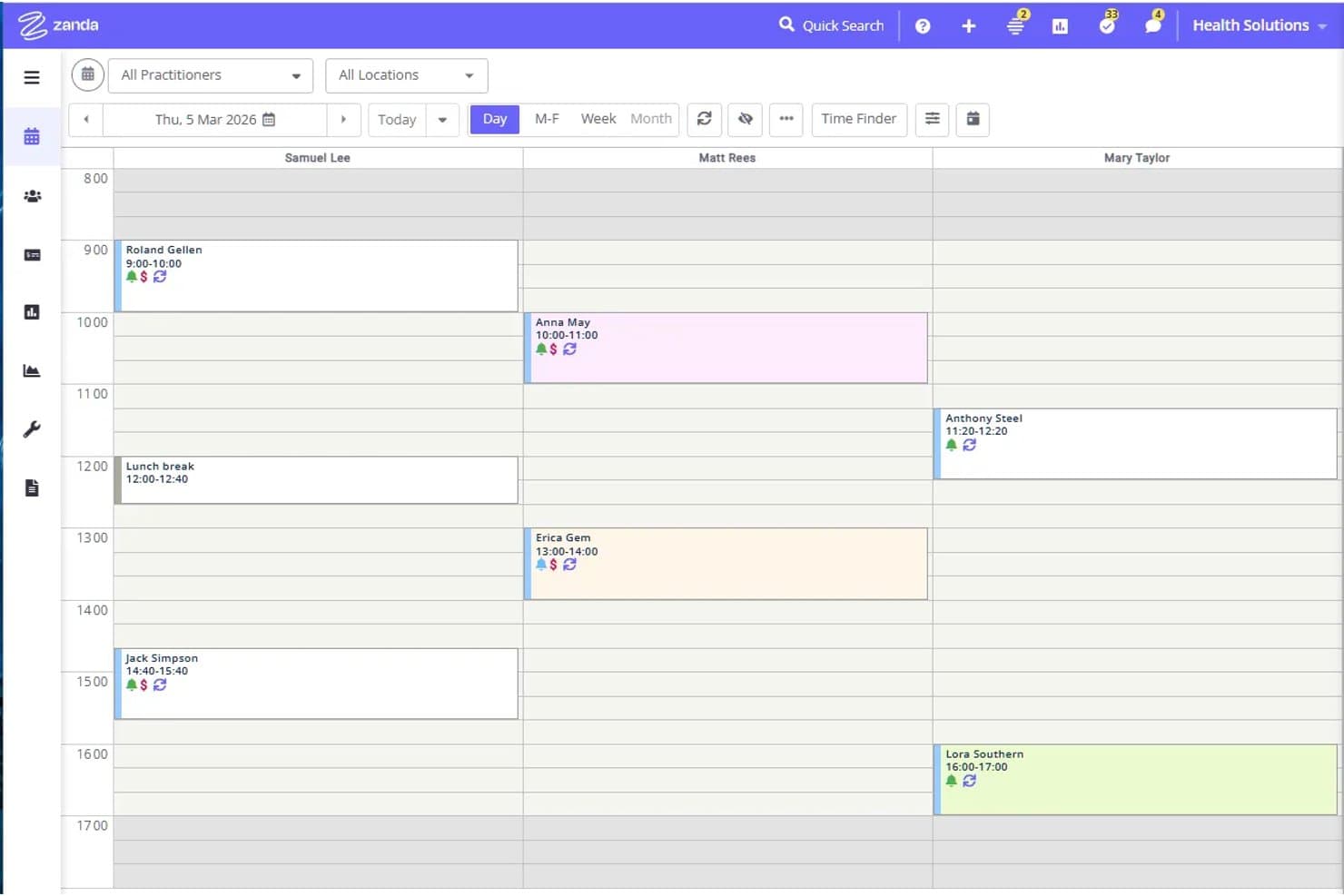
Here's where you can view a clinic's daily schedule across practitioners in Zanda. Zanda is an allied health practice management platform—formerly Power Diary—that combines scheduling with room and equipment booking, customizable clinical notes, AI-assisted documentation, billing, insurance claims, and a client portal.
Who Is Zanda Best For?
Zanda suits allied health clinics—including physical therapy practices—that need to manage multiple rooms, equipment, and practitioners from a single scheduling system.
Why I Picked Zanda
Zanda earns its spot on my shortlist because of how it handles room and equipment booking alongside appointments. When you're running a clinic with treatment rooms, ultrasound machines, or hydrotherapy equipment, Zanda lets you assign those resources directly to appointments and blocks them from double-booking automatically. Required resource groups can even filter your online booking availability, so clients can only schedule when the right room or equipment is actually free.
Zanda Key Features
- AI clinical documentation scribe: BizzyAI transcribes live sessions or post-session dictation and drafts a clinical note using your selected template.
- Scored assessment forms with progress reports: Clients complete scored online forms, and Zanda charts their results over time to show individual score trends.
- US insurance eligibility checks: Run eligibility verification for individual clients or groups with upcoming appointments, with results saved to each client's eligibility history.
- Customizable clinical note templates: Build note templates from configurable fields including SOAP and DAP formats, body chart annotations, and digital signature collection.
Zanda Integrations
Zanda offers native integrations with Physitrack for exercise programs, APEX for US claims and eligibility, Zoom for telehealth, and Stripe and Xero for payments and accounting. Its public API is in beta, with read-oriented access and general release forthcoming.
Pros and Cons
Pros:
- Reviewers value reminders and online booking
- Recurring appointments support multi-therapist calendars
- Room and equipment bookings prevent scheduling conflicts
Cons:
- No automated Medicare visit-limit tracking
- No built-in physical therapy documentation templates
Learn more about Zanda: 2Best for integrated e-prescribing workflows
RXNT
- Free demo available
- From $335/month(billed annually)
Visit WebsiteCustomer Rating:4.3/5
RXNT provides physical therapy EMR tools for documenting patient visits, tracking treatment progress, and managing care records efficiently. RXNT is a cloud-based EHR and practice management platform built for specialty practices, combining electronic health records, e-prescribing, medical billing, scheduling, and an AI-powered ambient documentation tool in a single integrated system.
Who Is RXNT Best For?
RXNT is a good fit for independent and small-to-midsize specialty practices that need a unified clinical and billing platform without managing multiple disconnected systems.
Why I Picked RXNT
RXNT earns its spot on my shortlist because of how tightly its e-prescribing is woven into the broader clinical workflow. I like that prescribers get direct access to state Prescription Drug Monitoring Programs (PDMPs) through Bamboo Health without leaving the platform, which matters in a PT setting where co-management with physicians can involve controlled substances. The built-in drug interaction and allergy checks run automatically at the point of prescribing, and EPCS certification covers Schedule II–V medications.
RXNT Key Features
- AI ambient documentation: An AI scribe captures clinical conversations and auto-generates structured SOAP notes in real time.
- Specialty scheduling: The scheduling module supports resource allocation across treatment rooms, equipment, and staff in a single calendar view.
- Patient portal: Patients can request appointments, submit intake forms, view records, and pay bills directly through the portal.
- Integrated claims management: Built-in claim scrubbing checks for errors before submission to reduce denials and resubmissions.
RXNT Integrations
RXNT connects to Surescripts for certified electronic prescribing and Kno2 for TEFCA-based health information exchange. It also supports HL7 interfaces with clinical laboratories and radiology facilities. An API is also available for accessing patient clinical data.
Pros and Cons
Pros:
- Mobile apps support charge capture anywhere
- EPCS-certified and PDMP-integrated e-prescribing
- Smart Forms templates standardize PT charting
Cons:
- Limited customization for highly specialized PT workflows
- Occasional glitches and duplicate patient records
Learn more about RXNT: Best for multi-modality charting flexibility
- 15-day free trial
- From $99/month
Visit WebsiteCustomer Rating:4.8/5
OptiMantra lets providers document patient visits with customizable SOAP templates, questionnaires, and clinical notes in one place. OptiMantra lands on my list because it's uncommon to find a platform so well-suited to practices that blend different therapeutic methods. I suggest OptiMantra when teams need to support everything from traditional manual therapy and modalities to acupuncture and integrative medicine.
What stands out to me in using the tool is the template flexibility and how treatments across modalities are charted on one record. I appreciate how physical therapists can tailor templates, so you’re not boxed in by generic documentation.
OptiMantra’s Best For
- Practices combining physical therapy with other medical modalities
- Teams needing customizable, multi-modality charting templates
OptiMantra’s Not Great For
- Single-modality clinics with very basic charting needs
- Practices requiring highly specialized physical therapy workflows only
What Sets OptiMantra Apart
OptiMantra works differently from most EMRs because it expects clinics to handle a mix of physical therapy and integrative medicine day-to-day. Instead of confining everyone to one type of chart, it’s designed so you can build and use templates across specialties in a single patient record. This makes it stand apart from tools like WebPT that focus strictly on physical therapy documentation.
Tradeoffs with OptiMantra
OptiMantra optimizes for flexibility across modalities, but that comes at the cost of having fewer physical therapy-specific workflows out of the box. If you need deep PT automation and built-in protocols, you do extra setup to match what a PT-only system gives you.
Pros and Cons
Pros:
- Integrated payment and billing tools
- HIPAA-compliant telehealth included
- Customizable charting with SOAP templates
Cons:
- Caters mostly to US-based practices
- Limited advanced analytics for large networks
Learn more about OptiMantra: Best for customizable documentation templates
- Free demo available
- Pricing upon request
Visit WebsiteCustomer Rating:5/5
Athenahealth helps healthcare providers track and monitor patient vitals, health history, and symptoms. Athenahealth earns its spot thanks to its standout approach to customizing clinical documentation for physical therapy. I see this used most by organizations that want to tailor their note templates to unique therapy workflows and compliance rules.
What I like is how you can adapt fields, layouts, and forms in response to payer changes or specialty rehab processes, all without IT support. That flexibility makes it great for practices with evolving documentation needs.
Athenahealth’s Best For
- Physical therapy practices needing customizable documentation templates
- Clinics adapting therapy notes to specific payer or specialty requirements
Athenahealth’s Not Great For
- Solo providers seeking a lightweight, entry-level EMR
- Teams who want out-of-the-box, rigid documentation formats
What sets Athenahealth apart
Athenahealth focuses on letting clinics adapt their documentation processes to specific therapy, payer, and compliance needs. Instead of offering a one-size-fits-all approach like Practice Fusion, Athenahealth encourages you to customize templates and workflows to your organization. This works well when clinics have evolving protocol requirements or niche clinical specialties.
You get more flexibility to respond to insurance or regulatory changes than with most out-of-the-box EMRs.
Tradeoffs with Athenahealth
Athenahealth optimizes for customization and adaptability, but you give up fast onboarding and standardized note structures. In practice, teams that want rigid templates or plug-and-play use can find the flexibility adds extra setup time.
Pros and Cons
Pros:
- Customizable templates for various medical specialties
- Cloud-based system for remote access
- Wide range of features, including billing, practice management, and patient engagement tools
Cons:
- Limited customization options for certain workflows
- Due to its extensive features, new users may experience a learning curve
Learn more about Athenahealth: 5Best for AI-driven PT documentation and RCM
SPRY
- Free demo available
- Pricing upon request
Visit WebsiteCustomer Rating:4.8/5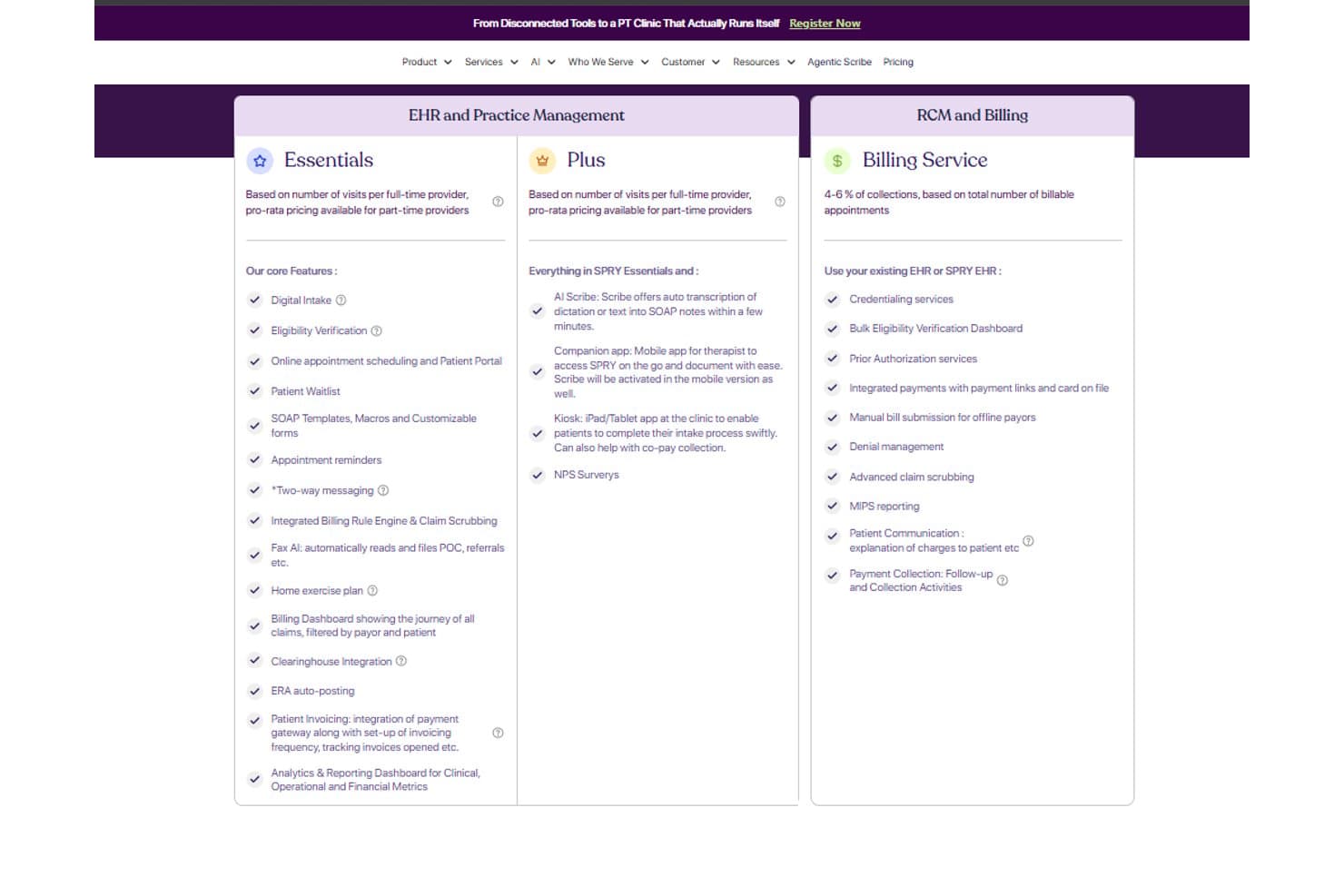
SPRY offers tiered pricing plans covering EHR, billing, and RCM features. SPRY is a physical therapy EMR platform that combines AI-driven documentation, scheduling, billing, RCM, prior authorization, and patient engagement tools built specifically for outpatient rehab clinics.
Who Is SPRY Best For?
SPRY fits outpatient rehab clinics that want AI-assisted documentation and billing tools built around the physical therapy workflow.
Why I Picked SPRY
I picked SPRY as one of the best because its AI-driven documentation and RCM tools are built specifically around the PT workflow, not retrofitted from a general EMR. The Agentic Scribe turns dictation into a complete SOAP note in under two minutes, and the billing rule engine checks CPT codes against documentation before a claim ever leaves the clinic, catching mismatches at the source rather than after a denial.
SPRY Key Features
- AI Scheduling Agent: Automatically books plan-of-care visits based on frequency, visit count, therapist availability, and authorization rules, and fills cancellations from the waitlist.
- Medicare compliance engine: Applies the 8-minute rule, tracks supervised percentage, manages the KX modifier, and prompts staff at the 10th visit.
- Home exercise program library: Assigns exercises from a 4,500+ library via patient mobile app, with AI form-check through the patient's camera and adherence tracking.
- Multi-location analytics dashboard: Covers therapist productivity, payer mix, denial trends, and cancellation rates across locations, queryable in plain language.
SPRY Integrations
SPRY integrations include Athena, Cerner, ModMed, Claim.MD, Wibbi, Google Calendar, Zocdoc, Emitrr, Healthmonix, and Patient360, plus HL7 FHIR and REST APIs for custom connections and Zapier.
Pros and Cons
Pros:
- Medicare rules support compliant therapy billing
- Billing checks catch coding mismatches early
- AI scribe speeds physical therapy documentation
Cons:
- Claim follow-up workflows remain limited
- AI notes can misidentify speakers
Learn more about SPRY: Best for outpatient rehab billing and compliance
- Free demo available
- From $79/user/month
Visit WebsiteCustomer Rating:4.4/5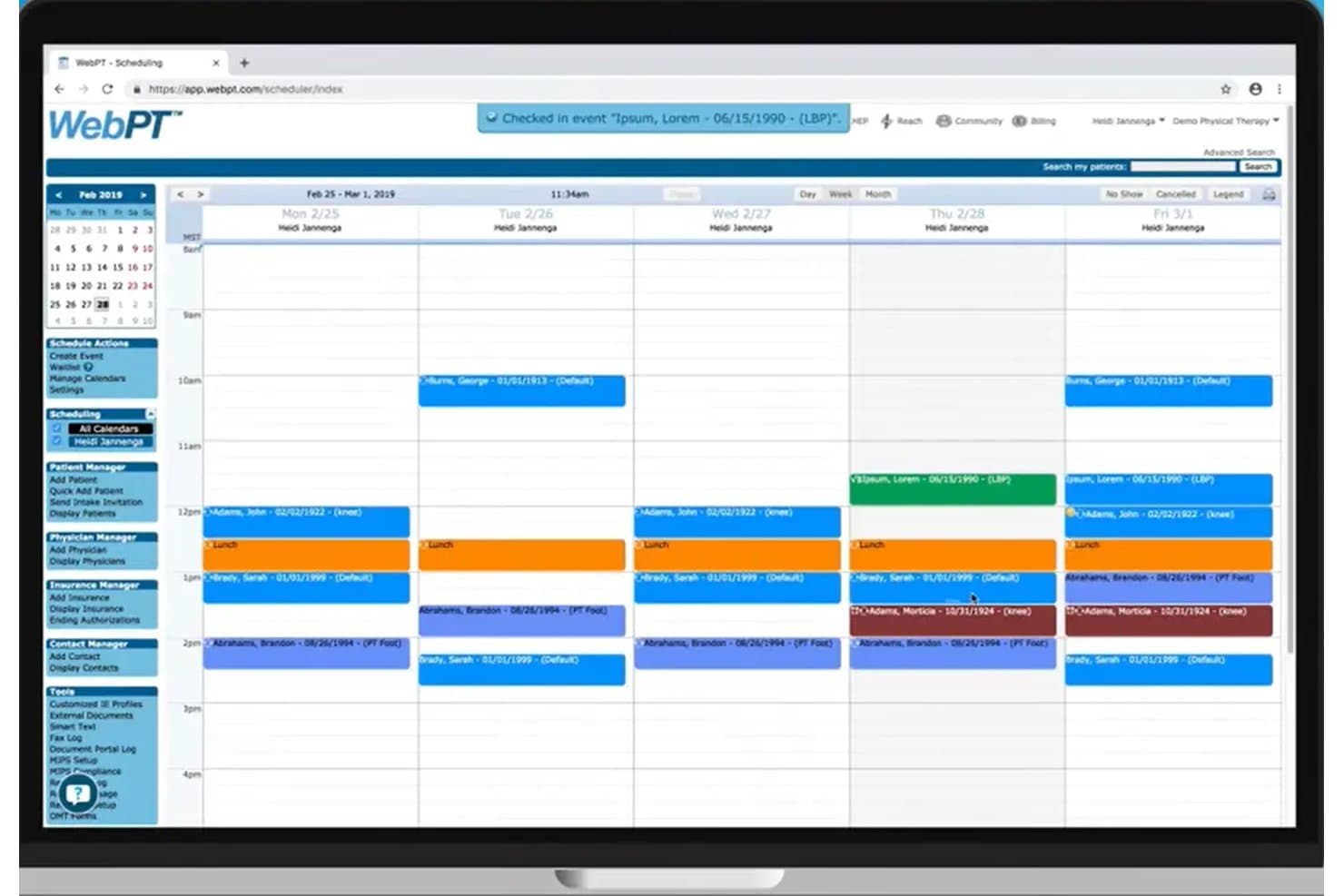
WebPT's scheduling calendar organizes weekly patient appointments by provider. WebPT is a rehab therapy-specific EMR that covers clinical documentation, scheduling, billing, home exercise programs, outcomes tracking, and telehealth for PT, OT, and speech therapy practices.
Who Is WebPT Best For?
WebPT fits outpatient rehab clinics that need airtight Medicare compliance and billing built directly into their documentation workflow.
Why I Picked WebPT
WebPT earns its spot on my shortlist because no other PT EMR I've reviewed embeds Medicare compliance so deeply into the billing workflow itself. I'm particularly impressed by the KX modifier threshold tracking and NCCI edit checks, which flag issues before a claim ever leaves the system. The AI-powered real-time note feedback also tells you whether your documentation actually justifies the billed units, catching underbilling mid-note rather than after a denial.
WebPT Key Features
- Specialty-specific templates: Twenty pre-built, customizable rehab templates cover PT, OT, speech therapy, and specialties like pelvic health, vestibular, and pediatrics.
- Outsourced RCM service: WebPT staff handle credentialing, claims, denials, appeals, and patient collections, with real-time KPI dashboards for visibility.
- Home exercise program library: A library of 5,500+ exercises with photos and video lets you build branded, phased programs patients access through the StriveHub app.
- MIPS registry integration: WebPT works exclusively with Patient360 to automate survey delivery and display a real-time estimated MIPS score on your dashboard.
WebPT Integrations
WebPT documents 60+ vendor integrations, including Therabill, PatientPay, Comprehend Health, Zoom for Healthcare, and Patient360. It also supports standard HL7 interfaces and custom integrations on request, though no public API documentation is listed.
Pros and Cons
Pros:
- StriveHub tracks home exercise adherence
- Therapy templates speed compliant daily documentation
- Medicare billing safeguards reduce preventable claim errors
Cons:
- Browser-based charting lacks native clinician app
- Reviewers report recurring note freezes
Learn more about WebPT: Best for PT, OT, and SLP in one chart
- Free demo available
- Pricing upon request
Visit WebsiteCustomer Rating:4.9/5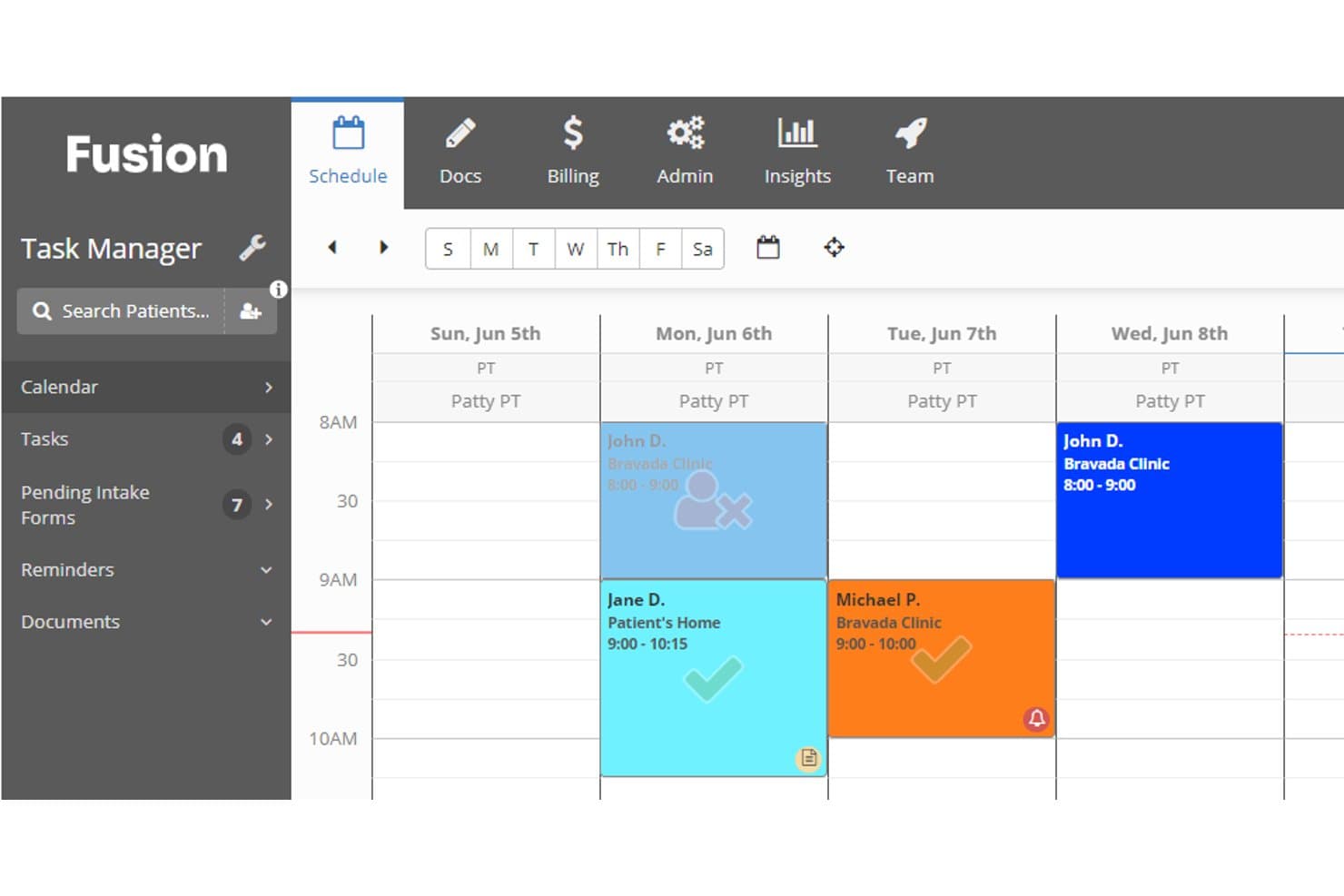
Fusion's weekly schedule view helps therapists manage patient appointments. Fusion is a multi-discipline physical therapy EMR by Ensora Health that covers PT, OT, and SLP documentation, billing, scheduling, and home exercise programs in a single platform.
Who Is Fusion Best For?
Fusion is a strong fit for multi-discipline outpatient therapy practices that treat PT, OT, and SLP patients and want one chart for all three.
Why I Picked Fusion
Fusion earns its spot on my shortlist because no other PT EMR I've reviewed keeps PT, OT, and SLP documentation in a single patient chart as cleanly. I love that flow sheets auto-fill CPT codes and CMS CO/CQ modifiers across disciplines, cutting the coding burden when a patient sees both a PT and an SLP in the same week. The built-in goal bank and 80+ discipline-specific templates mean clinicians aren't building documentation from scratch every time a new patient walks through the door.
Fusion Key Features
- Built-in telehealth: HIPAA-compliant video visits run directly in the platform, with no third-party app required.
- Client portal: Patients can book appointments, complete intake forms, make payments, and send secure messages 24/7.
- MIPS reporting: Captures Medicare quality data within the clinical workflow and flags missing measures before reporting deadlines.
- Ensai AI session assistant: Drafts notes from ambient listening or dictation, with clinician review required before finalizing.
Fusion Integrations
Fusion offers integrations with Wibbi for HEP and RTM, Ensora Clearinghouse for claims and remittance, and Ensora Payments for card processing. A public API, HL7, or FHIR connectivity isn’t documented.
Pros and Cons
Pros:
- Pediatric templates support faster evaluations
- Adult flow sheets reduce coding work
- PT, OT, and SLP share one chart
Cons:
- Owners report clunky operational reporting
- Adult PT features have limited track record
Learn more about Fusion: Best for multi-disciplinary AI-driven RCM
- Free demo available
- Pricing upon request
Visit WebsiteCustomer Rating:4.3/5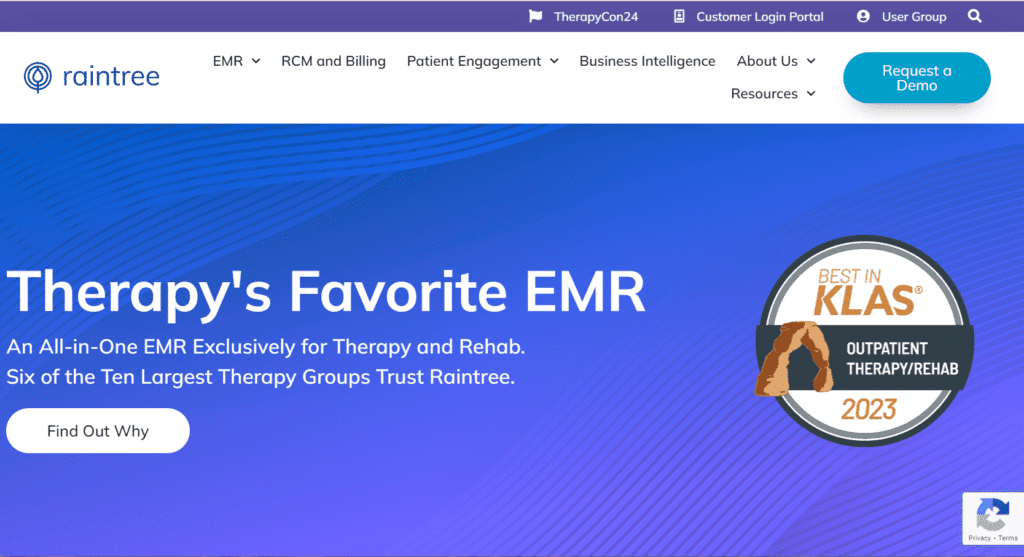
Here's the website screenshot of Raintree. Raintree is an AI-native EMR built for enterprise rehab therapy organizations that combines specialty-specific documentation, scheduling, billing, and RCM across PT, OT, SLP, pediatric, and ABA disciplines in a single platform.
Who Is Raintree Best For?
Raintree is built for enterprise rehab therapy organizations running PT, OT, SLP, pediatric, or ABA services across multiple locations.
Why I Picked Raintree
Raintree earns its spot on my shortlist because it's the only platform I've seen that runs PT, OT, SLP, pediatric, and ABA billing through one AI-native RCM engine. I'm particularly impressed by Agentic RCM, where an AI agent called Lucy handles eligibility verification by navigating payer phone menus and portals autonomously, cutting hands-on verification time by 91%. Pair that with ScribeIQ generating coded, payer-specific notes in under 90 seconds, and your billing team is working from cleaner documentation before a claim even enters the queue.
Raintree Key Features
- Multi-discipline specialty templates: Therapy-specific exam and note templates span PT, OT, SLP, pediatric, and ABA disciplines within a single patient record.
- SchedulerIQ™: An AI scheduling tool that books a full multi-appointment plan of care in roughly one minute, cutting front-desk clicks by around 10x.
- Business Intelligence dashboards: More than 10 role-based dashboards covering clinical performance, referral tracking, payer trends, and compliance alerts across multiple locations.
- Pathways™ referral management: Secure direct messaging that pulls hospital and health-system referrals directly into the EMR, with automated status updates sent back to the referring provider.
Raintree Integrations
Raintree integrates with Limber Health, Availity, Jopari, OccuPro, Zocdoc, and Rethink Behavioral Health. Its Gateways API platform and marketplace support custom connections, while Pathways supports referrals from hospitals and health systems.
Pros and Cons
Pros:
- Deep claim and denial controls
- AI scribes reduce after-hours documentation
- Multi-discipline records support complex organizations
Cons:
- Enterprise workflows overwhelm smaller practices
- Interface navigation frustrates some clinicians
Learn more about Raintree: Best for multi-discipline pediatric therapy EMR
- Free demo available
- From $25/month
Visit WebsiteCustomer Rating:3.1/5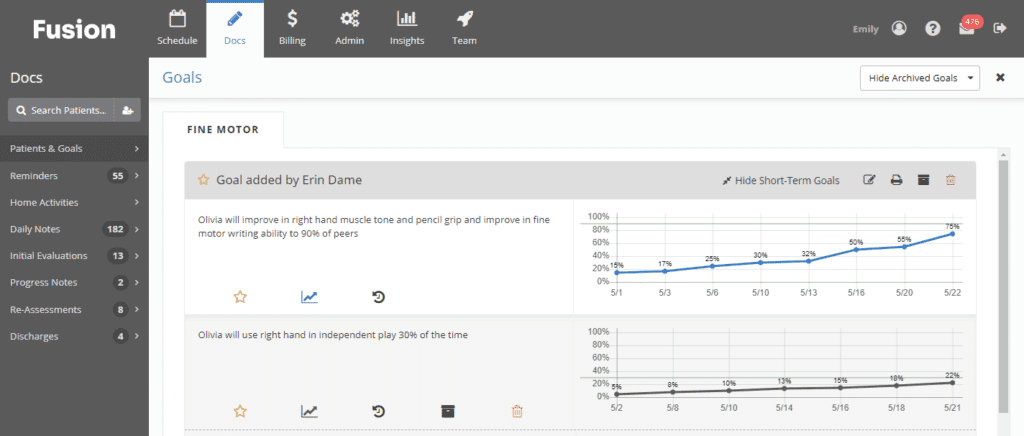
Here's the documentation feature in Fusion Web Clinic, which has goal-tracking capability. Fusion Web Clinic is a cloud-based physical therapy EMR and practice management system built for PT, OT, and SLP disciplines, offering therapy-specific documentation templates, automated billing and claims, scheduling, and home exercise program tools.
Who Is Fusion Web Clinic Best For?
Fusion Web Clinic is a strong fit for pediatric therapy clinics running PT, OT, and SLP under one roof.
Why I Picked Fusion Web Clinic
Fusion Web Clinic earns its spot on my list because of how deeply it's built around pediatric therapy, with over 80 pediatric evaluation templates, a built-in goal bank with mastery criteria, and automatic progress graphs that track milestone development over time. I picked it specifically for PT, OT, and SLP clinics treating pediatric patients under one roof, where having discipline-specific documentation that shares a single patient record genuinely changes how care is coordinated.
Fusion Web Clinic Key Features
- Automated claims generation: Claims are created automatically when a note is completed, with CPT codes, modifiers, and units applied based on each payer's rules.
- Authorization tracking: Staff can enter payer authorizations with visit limits and date ranges, and the system sends alerts before an authorization expires.
- Flow sheets with CQ/CO modifier support: Time-based documentation auto-fills CPT codes and flags CMS CQ/CO assistant modifiers for clinician review.
- MIPS reporting: Built-in Medicare quality reporting identifies incomplete measures before reporting deadlines.
Fusion Web Clinic Integrations
Fusion Web Clinic has native integrations with Wibbi and Ensora Clearinghouse (APEX EDI), plus connections to Ensora RCM, eRx, and Ensai. A public API, HL7, and FHIR support aren’t documented.
Pros and Cons
Pros:
- Claims generate directly from completed notes
- Shared records support PT, OT, and SLP
- Deep pediatric evaluation and goal-tracking tools
Cons:
- Exercise adherence requires a separate add-on
- Scheduling screens feel cluttered to reviewers
Learn more about Fusion Web Clinic: Best for its collaborative care coordination features
- Free demo available
- Pricing upon request
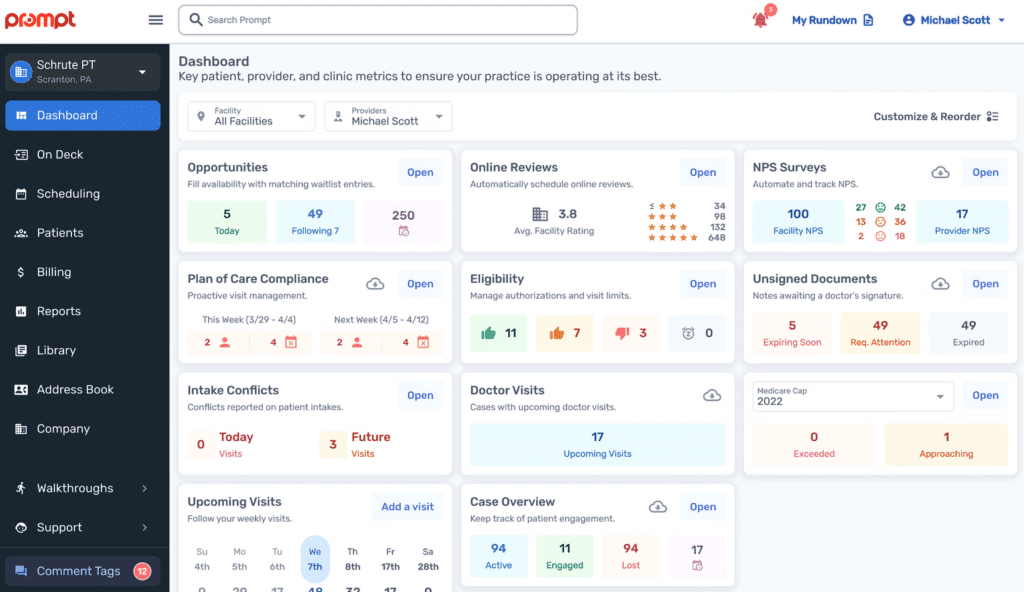
Here's Prompt EMR's dashboard screenshot. Prompt EMR is a cloud-based physical therapy EMR and practice management platform that combines AI-driven documentation, scheduling, billing, care coordination, and home exercise program tools for rehab therapy clinics of all sizes.
Who Is Prompt EMR Best For?
Prompt EMR is a strong fit for multi-location rehab therapy groups that need their clinical, front-office, and billing teams working in sync across sites.
Why I Picked Prompt EMR
I picked Prompt EMR as one of the best because its care coordination tools genuinely connect every role in a clinic. Patient-linked chat lets front desk staff, billers, and clinicians @-tag each other directly within a patient's record, cutting out the back-and-forth emails. I also like how physician signature tracking keeps referring provider workflows visible, so nothing gets lost after a note is faxed out.
Prompt EMR Key Features
- AI ambient documentation: AI listens during sessions and drafts SOAP notes, then suggests CPT codes for clinician review before submission.
- Claim scrubbing and denial tracker: Claims are scrubbed by AI before submission, and a denial tracker surfaces patterns with recommended fixes.
- Smart waitlist automation: An AI visit filler backfills cancellations from the waitlist, keeping schedules full with clinician approval.
- Kiosk check-in: Patients confirm insurance, pay copays, complete intake, and book future visits from a browser-based kiosk or their own phone.
Prompt EMR Integrations
Prompt EMR integrates with Weave, Go Card Connect, third-party HIPAA-compliant fax providers, and Exxat One. Enterprise customers can export data to their BI tools in real time, but no public API or HL7/FHIR documentation is available.
Pros and Cons
Pros:
- Billing tools catch denial risks early
- AI notes reduce same-day documentation burden
- Patient-linked chat keeps teams aligned
Cons:
- Useful workflows require separate add-ons
- Frequent updates can disrupt clinic access
Learn more about Prompt EMR:
Alte sisteme EMR pentru fizioterapie
Mai jos este o listă cu alte sisteme EMR pentru fizioterapie pe care le-am selectat, dar care nu au ajuns în primele 10. Merită cu siguranță să le verificați.
- 11HenoBest for marketing automation in PT clinics
- 12ClinicientBest for in-house or outsourced therapy billing
- 13StrataPTBest for its strong emphasis on compliance and auditing
- 14PtEverywhereBest for cash-pay and hybrid PT clinic billing
How I Evaluate Physical Therapy EMR
I split my evaluation into three parts, giving the most weight to core functions: chart evaluations and plans of care, and submit claims with correct therapy units and modifiers. Next, I look for standout features such as digital home exercise programs patients can follow at home. Finally, I consider support, onboarding, and pricing value beyond the feature set.
Core Functionality (Table Stakes For This List)
When I'm selecting tools for my list, I score each one on a scale from 0 (does not offer the functionality) to 5 (excels in this area) for each core functionality listed below. I then convert the total into a percentage to help assess each tool's overall fit, with extra weight on any functionalities I’ve deemed essential.
- Therapy Documentation (Essential): I look for templates for evaluations, SOAP notes, plans of care, and discharge summaries that fit therapy workflows.
- Billing and Claims (Essential): I check whether charge capture and claims support therapy units and modifiers, and help teams track reimbursement.
- Scheduling and Patient Flow: I assess recurring visits, multi-provider calendars, and room or equipment scheduling for coordinated clinic flow.
- Compliance and Progress: I look for tools to track plans of care, authorizations, visit limits, and outcome measures as treatment progresses.
- Home Exercise Programs: I consider whether therapists can customize and share exercise plans, and whether patients can access instructions and report adherence.
Once I have a list of tools that meet the criteria, I consider what sets each platform apart.
Differentiating Factors (What Sets Vendors Apart)
Here's how I compare and contrast different vendors:
Standout Features
I look for built-in telehealth so therapists can review home programs or check progress without bolting on a separate video platform. Multi-disciplinary template support matters just as much—a clinic adding OT or speech services shouldn't need a new EMR. I also evaluate patient engagement portals, checking whether self-scheduling, digital intake, and secure messaging actually reduce front-desk phone volume.
Beyond Features
I evaluate how each platform handles payer and regulatory updates—Medicare threshold changes and modifier rules should flow into the system automatically, not wait on manual patches. Onboarding support matters just as much: a vendor that offers role-based training for billers, therapists, and front-desk staff cuts months off adoption. I also check whether licensing scales from a single clinic to multi-location groups without forcing a re-platforming conversation every time you add a site.
Cum să alegeți un sistem EMR pentru fizioterapie
Este ușor să vă pierdeți în liste lungi de funcții și structuri de prețuri complexe. Pentru a vă ajuta să rămâneți concentrat în timp ce parcurgeți procesul unic de selectare a software-ului, iată o listă de verificare a factorilor de care trebuie să țineți cont:
| Factor | Aspecte de luat în considerare |
|---|---|
| FactorScalabilitate | Aspecte de luat în considerarePoate software-ul să se dezvolte odată cu cabinetul dumneavoastră? Verificați dacă acceptă un număr tot mai mare de utilizatori și pacienți fără probleme. Căutați instrumente cu opțiuni flexibile de scalare. |
| FactorIntegrări | Aspecte de luat în considerareSe conectează la sistemele pe care le utilizați deja? Asigurați-vă că se integrează cu software-ul pentru facturare, programări și gestionarea pacienților, pentru a evita întreruperile fluxului de lucru. |
| FactorPosibilități de personalizare | Aspecte de luat în considerareÎl puteți adapta nevoilor dumneavoastră? Verificați dacă instrumentul permite personalizarea șabloanelor și rapoartelor pentru a corespunde cerințelor specifice ale cabinetului. |
| FactorUșurință în utilizare | Aspecte de luat în considerareÎi va fi ușor echipei dumneavoastră să învețe să îl folosească? Căutați interfețe intuitive și o navigare simplă, pentru a reduce timpul de instruire și a crește rata de adoptare. |
| FactorImplementare și integrare inițială | Aspecte de luat în considerareCât de lină este tranziția? Evaluați asistența oferită de furnizor în timpul configurării, inclusiv resursele de instruire și sprijinul pentru integrarea inițială, pentru a asigura un început fără probleme. |
| FactorCost | Aspecte de luat în considerareSe încadrează în bugetul dumneavoastră? Comparați planurile tarifare, inclusiv taxele ascunse sau costurile suplimentare pentru funcții adiționale, pentru a vă asigura că se încadrează în limitele financiare. |
| FactorMăsuri de securitate | Aspecte de luat în considerareSunt protejate datele și confidențialitatea pacienților? Verificați conformitatea cu HIPAA și cu alte reglementări, pentru a vă asigura că există măsuri solide de securitate. |
| FactorCerințe de conformitate | Aspecte de luat în considerareRespectă standardele industriei? Asigurați-vă că software-ul respectă reglementările și standardele din domeniul sănătății, pentru a evita problemele juridice și a garanta siguranța pacienților. |
Ce este un sistem EMR pentru fizioterapie?
Sistemul EMR pentru fizioterapie este un software care gestionează notele clinice, planurile de exerciții și monitorizarea progresului pacienților pentru fizioterapeuți. Acesta contribuie la simplificarea documentării tratamentului și sprijină îngrijirea bazată pe rezultate.
Funcții
Atunci când alegeți un sistem EMR pentru fizioterapie, urmăriți următoarele funcții esențiale:
- Gestionarea pacienților: Centralizează dosarele și istoricul pacienților, facilitând accesarea și actualizarea rapidă a informațiilor de către terapeuți.
- Programări: Simplifică programarea consultațiilor și gestionarea calendarului, contribuind la reducerea absențelor și la optimizarea disponibilității terapeuților.
- Facturare și emiterea facturilor: Automatizează procesele de facturare și generează facturi, asigurând plăți corecte și efectuate la timp.
- Monitorizarea conformității: Asigură respectarea reglementărilor din domeniul sănătății, precum HIPAA, protejând confidențialitatea pacienților și securitatea datelor.
- Șabloane personalizabile: Le permite terapeuților să creeze planuri de tratament și documentație adaptate, îmbunătățind personalizarea și acuratețea tratamentului.
- Raportare și analiză: Oferă informații despre performanța clinicii și rezultatele pacienților, sprijinind luarea deciziilor pe baza datelor.
- Integrarea telemedicinei: Oferă ședințe de terapie la distanță, extinzând accesul la îngrijire pentru pacienții care nu se pot deplasa la clinică.
- Acces mobil: Le permite terapeuților să actualizeze dosarele și să gestioneze programările din mers, sporind flexibilitatea și eficiența.
- Instrumente de implicare a pacienților: Încurajează implicarea pacienților prin portaluri și funcții de comunicare, îmbunătățind respectarea tratamentului.
- Măsuri de securitate: Protejează informațiile sensibile prin criptare și controale de acces, asigurând integritatea și confidențialitatea datelor.
Beneficii
Implementarea unui EMR pentru fizioterapie oferă mai multe beneficii echipei și afacerii dumneavoastră. Iată câteva dintre avantajele de care vă puteți bucura:
- Eficiență îmbunătățită: Automatizează sarcini precum programarea și facturarea, eliberând timpul terapeuților pentru a se concentra asupra îngrijirii pacienților.
- Îngrijire îmbunătățită a pacienților: Centralizează dosarele pacienților și planurile de tratament, permițând acordarea unor îngrijiri mai personalizate și mai precise.
- Conformitate mai bună: Monitorizează cerințele de reglementare, asigurând respectarea standardelor din domeniul sănătății și protejarea datelor pacienților.
- Venituri mai mari: Reduce erorile de facturare și de emitere a facturilor, ceea ce duce la plăți mai corecte și mai rapide.
- Accesibilitate sporită: Oferă opțiuni de telemedicină și acces mobil, facilitând conectarea pacienților și terapeuților.
- Decizii bazate pe date: Oferă funcții de raportare și analiză, ajutându-vă să luați decizii informate cu privire la gestionarea cabinetului și rezultatele pacienților.
- Implicarea pacienților: Încurajează participarea activă la tratament prin instrumente de implicare, îmbunătățind respectarea tratamentului și satisfacția pacienților.
Costuri & prețuri
Alegerea unui EMR pentru fizioterapie necesită înțelegerea diferitelor modele și planuri tarifare disponibile. Costurile variază în funcție de funcții, dimensiunea echipei, suplimente și alți factori. Tabelul de mai jos prezintă un rezumat al planurilor obișnuite, al prețurilor medii ale acestora și al funcțiilor incluse de regulă în soluțiile EMR pentru fizioterapie:
Tabel comparativ al planurilor pentru EMR de fizioterapie
| Tipul planului | Preț mediu | Funcții obișnuite |
|---|---|---|
| Tipul planuluiPlan gratuit | Preț mediu$0 | Funcții obișnuiteProgramare de bază, dosare limitate ale pacienților și instrumente de bază pentru documentare. |
| Tipul planuluiPlan personal | Preț mediu$10-$30/utilizator/lună | Funcții obișnuiteProgramare avansată, gestionarea dosarelor pacienților și funcții de bază pentru facturare. |
| Tipul planuluiPlan pentru afaceri | Preț mediu$40-$70/utilizator/lună | Funcții obișnuiteDosare complete ale pacienților, facturare și emiterea facturilor, precum și șabloane personalizabile. |
| Tipul planuluiPlan pentru întreprinderi | Preț mediu$80-$150/utilizator/lună | Funcții obișnuiteAcces la toate funcțiile, raportare și analiză avansate, precum și asistență dedicată. |
Întrebări frecvente despre sistemele EMR pentru fizioterapie
Iată câteva răspunsuri la întrebările frecvente despre sistemele EMR pentru fizioterapie:
Pot schimba sistemul EMR fără întreruperi?
Da, mulți furnizori de sisteme EMR oferă soluții pentru schimbarea sistemelor fără a perturba activitatea cabinetului dumneavoastră. Căutați furnizori care oferă servicii de migrare a datelor și asigurați-vă că au un plan pentru gestionarea fără probleme a tranziției. Este important să întrebați despre procesul lor și despre eventualele riscuri implicate.
Cum simplifică EMR îngrijirea pacienților?
Sistemele EMR simplifică îngrijirea pacienților prin digitalizarea fișelor și automatizarea sarcinilor de rutină. Astfel, echipa dumneavoastră poate accesa rapid informațiile despre pacienți, reducând erorile și îmbunătățind eficiența. Cu formulare digitale și procese automatizate, vă puteți concentra mai mult asupra interacțiunilor cu pacienții și mai puțin asupra documentelor.
Cât de sigure sunt datele pacienților în sistemele EMR?
Securitatea datelor pacienților este esențială. Asigurați-vă că sistemul EMR utilizează criptarea și respectă reglementări precum HIPAA. Întrebați furnizorii despre măsurile lor de securitate, cum ar fi controalele de acces și auditurile periodice, pentru a proteja informațiile sensibile.
Ce opțiuni de asistență sunt disponibile pentru utilizatorii EMR?
Opțiunile de asistență variază, însă majoritatea furnizorilor oferă mai multe canale, precum telefonul, e-mailul și chatul. Verificați dacă asigură asistență non-stop și întrebați despre timpii de răspuns. Unele sisteme oferă, de asemenea, resurse online ample, inclusiv tutoriale și întrebări frecvente, pentru a ajuta utilizatorii.
Sunt disponibile opțiuni de personalizare în sistemele EMR?
Da, multe sisteme EMR oferă opțiuni de personalizare pentru a răspunde nevoilor specifice ale cabinetului dumneavoastră. Căutați sisteme care vă permit să adaptați șabloanele, fluxurile de lucru și rapoartele. Personalizarea poate spori eficiența și poate asigura alinierea sistemului la procesele dumneavoastră specifice.