

Gestionarea complexității neurologiei poate fi o provocare pentru cabinetul dumneavoastră. Aveți nevoie de instrumente care să facă îngrijirea pacienților mai eficientă și gestionarea datelor mai puțin complicată. Aici intervine software-ul EMR pentru neurologie.
Din experiența mea, găsirea software-ului potrivit poate transforma modul în care gestionați dosarele pacienților, eficientiza fluxurile de lucru și îmbunătăți eficiența generală. Am testat și analizat diverse opțiuni pentru a vă ajuta să luați o decizie informată.
În acest articol, voi prezenta principalele mele recomandări de software EMR pentru neurologie. Veți afla detalii despre caracteristicile unice ale fiecărui instrument și despre modul în care acestea vă pot ajuta echipa. Să facem gestionarea cabinetului puțin mai ușoară.
Why Trust Our Software Recommendations
6,700+
Reviews
20
Industry experts
16+
Evaluation factors
14
Years
Our team has been testing and reviewing software since 2012. As medical practice leaders ourselves, we know how difficult—and important—it is to choose the right software.
For this guide, we evaluated tools using hands-on testing and independent research, scoring tools using our selection criteria.
Our reviews reflect our human editorial judgment, not a sales pitch.
Tabel comparativ: software EMR pentru neurologie
Acest tabel comparativ sintetizează detaliile privind prețurile pentru principalele mele selecții de software EMR pentru neurologie.
Score legend (out of 5)
- Excellent4.5–5
- Good4–4.4
- Average3–3.9
- Below average2–2.9
- Poor1–1.9
Sorted by: Default
| Tool | Starting Price | Website | |||||||
|---|---|---|---|---|---|---|---|---|---|
Best for customizable neurology charting | 2.8 out of 5 | 3 | 3 | 3 | 4 | 3 | 1 | $99/month 15-day free trial | Website |
Best for AI note drafting and code suggestions | 3.7 out of 5 | 4 | 4 | 4 | 4 | 3 | 3 | Pricing upon request Free demo available | Website |
Best for prescribing controlled drugs nationwide | 3.5 out of 5 | 4 | 3 | 3 | 4 | 3 | 4 | $199/provider/month 14-day free trial + free demo available | Website |
Best for neurology-specific denial follow-up | 3.3 out of 5 | 3 | 4 | 4 | 4 | 2 | 3 | $130/user/month 30-day free trial + free demo available | Website |
Best for AI support across notes and claims | 3.3 out of 5 | 3 | 4 | 4 | 4 | 3 | 2 | Pricing upon request Free demo available | Website |
Best for neurology teams connecting EEG/EMG | 3.3 out of 5 | 3 | 3 | 4 | 4 | 2 | 4 | Pricing upon request Free demo available | Website |
Best for neurology telehealth follow-ups | Not rated | 3 | 4 | 4 | 4 | 3 | Not rated | $499/user/month Free demo available | Website |
Best for staff and equipment scheduling | 3.0 out of 5 | 3 | 3 | 4 | 4 | 2 | 2 | Pricing upon request Free demo available | Website |
Best for cash-pay practices adding claims | 3.2 out of 5 | 3 | 3 | 3 | 4 | 3 | 3 | $49/month Free demo available | Website |
Good for cloud-based neurology-specific features | 3.3 out of 5 | 3 | 3 | 3 | 4 | 3 | 4 | Contact for pricing No | Website |



Recenzii despre cel mai bun software EMR pentru neurologie
 Best for customizable neurology charting
- 15-day free trial
- From $99/month
Visit WebsiteCustomer Rating:4.8/5
OptiMantra’s customizable charting dashboard helps neurologists document detailed assessments, manage diagnostics, and streamline patient care in one view. OptiMantra is an integrated EMR and practice management platform designed to support healthcare providers across multiple specialties, including neurology. It combines customizable charting, telehealth, and billing tools to streamline patient documentation, diagnostic workflows, and administrative processes within one cloud-based system.
Why I Picked OptiMantra:
I picked OptiMantra for this list because of its flexible charting and intake form capabilities, which are ideal for documenting detailed neurological assessments and tracking patient progress. You can easily tailor forms to your workflow and ensure comprehensive exam records. I also like its telehealth feature, which helps neurologists conduct remote consultations securely — a practical addition for follow-up care and mobility-limited patients.
Standout features and integrations:
OptiMantra offers electronic prescriptions, secure patient portals, and integrated lab and imaging connections for streamlined diagnostics. Its practice management tools include scheduling, billing, and automated reminders, helping reduce administrative work. Integrations include Surescripts, LabCorp, Quest Diagnostics, Zoom, Wholescripts, Fiserv, Stripe, Authorize.net, Stax, Eligible, Office Ally, and Amazon Web Services, ensuring smooth interoperability across clinical and financial systems.
Pros and Cons
Pros:
- Comprehensive practice management tools
- Integrated telehealth and e-prescribing
- Customizable charting for neurology
Cons:
- Learning curve for new users
- Pricing not publicly listed
Learn more about OptiMantra: Best for AI note drafting and code suggestions
- Free demo available
- Pricing upon request
Visit WebsiteCustomer Rating:3.9/5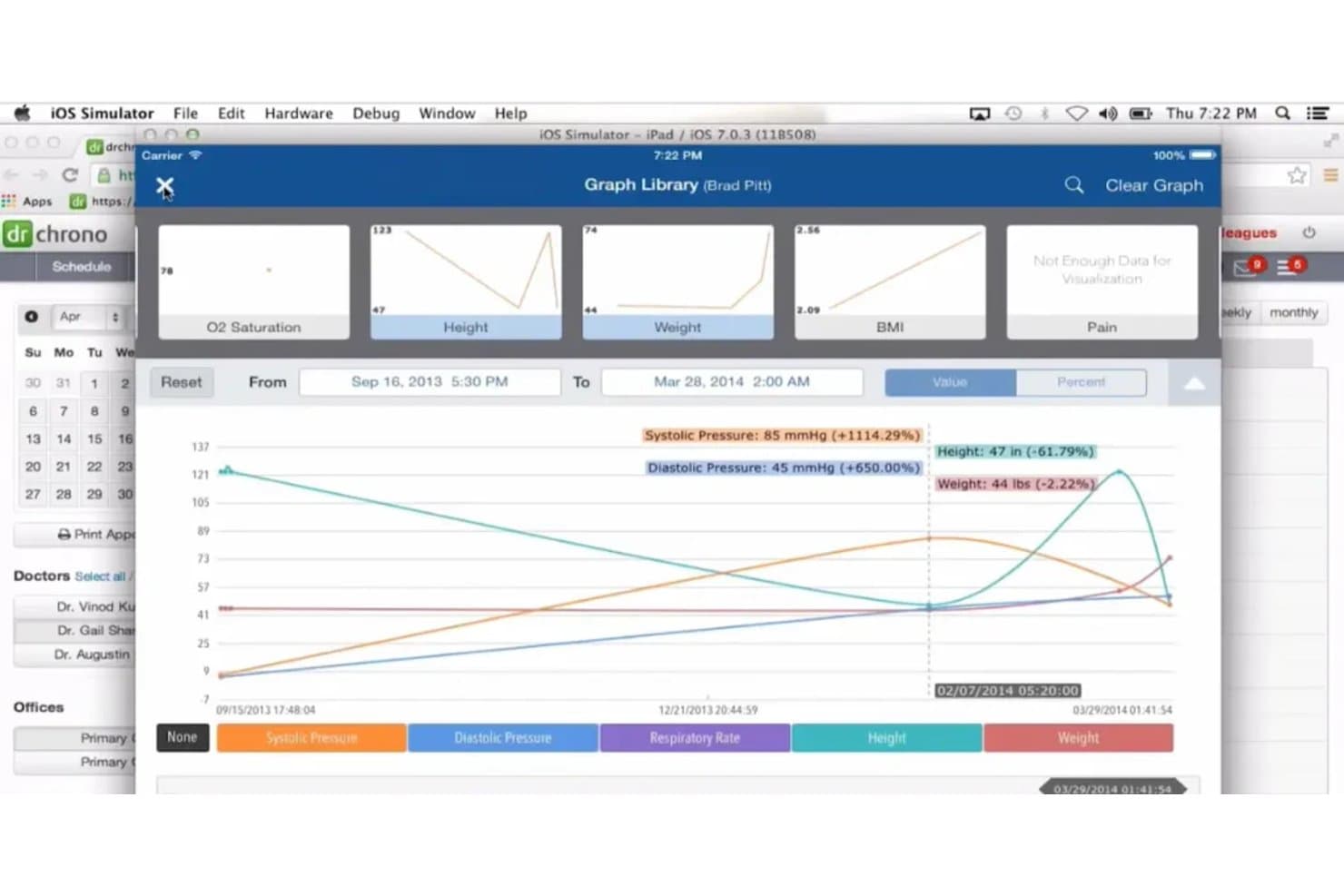
DrChrono visualizes patient vitals trends over time in its Graph Library. DrChrono is an all-in-one EHR platform by EverHealth that covers clinical charting, specialty templates, scheduling, billing, e-prescribing, and AI-assisted documentation for medical practices, including neurology.
Who Is DrChrono Best For?
DrChrono fits independent neurology practices that want AI-assisted note drafting and end-to-end billing in one platform, without managing separate tools for documentation and revenue cycle.
Why I Picked DrChrono
DrChrono earns its spot on my shortlist because of how well its AI documentation tools handle the note-heavy reality of neurology visits. EverHealth Scribe listens to a patient encounter and drafts a structured note, including HPI, Assessment, Plan, and ICD-10 codes, ready for the clinician to review before it touches the chart. On top of that, AI Billing Assist suggests CPT and ICD codes at the point of care, which cuts down on the back-and-forth between clinical and billing staff after complex neurology encounters.
DrChrono Key Features
- RecordSync record exchange: Retrieves prior encounters, diagnoses, lab results, medications, and immunizations from outside providers directly into the patient chart via Surescripts.
- OnPatient portal: Gives patients access to scheduling, secure messaging, health records, lab results, forms, and online bill payment from a single portal.
- Electronic prior authorization: Submits and tracks prior authorization requests through a CoverMyMeds-powered workflow built into the prescribing process.
- MIPS Assist: Guides providers through measure selection, performance tracking, and Medicare data submission to support regulatory reporting requirements.
DrChrono Integrations
DrChrono connects natively with Quest, LabCorp, Iron Bridge, Surescripts, and CoverMyMeds, and offers marketplace integrations including Ambra. It supports RESTful and OAuth-based APIs for custom integrations.
Pros and Cons
Pros:
- Scheduling and billing tools share one platform
- AI drafts notes and suggests billing codes
- Configurable templates support neurology documentation
Cons:
- No named stroke scales or seizure diaries
- Users report appointments disappearing and reminder failures
Learn more about DrChrono: Best for prescribing controlled drugs nationwide
- 14-day free trial + free demo available
- From $199/provider/month
Visit WebsiteCustomer Rating:3.7/5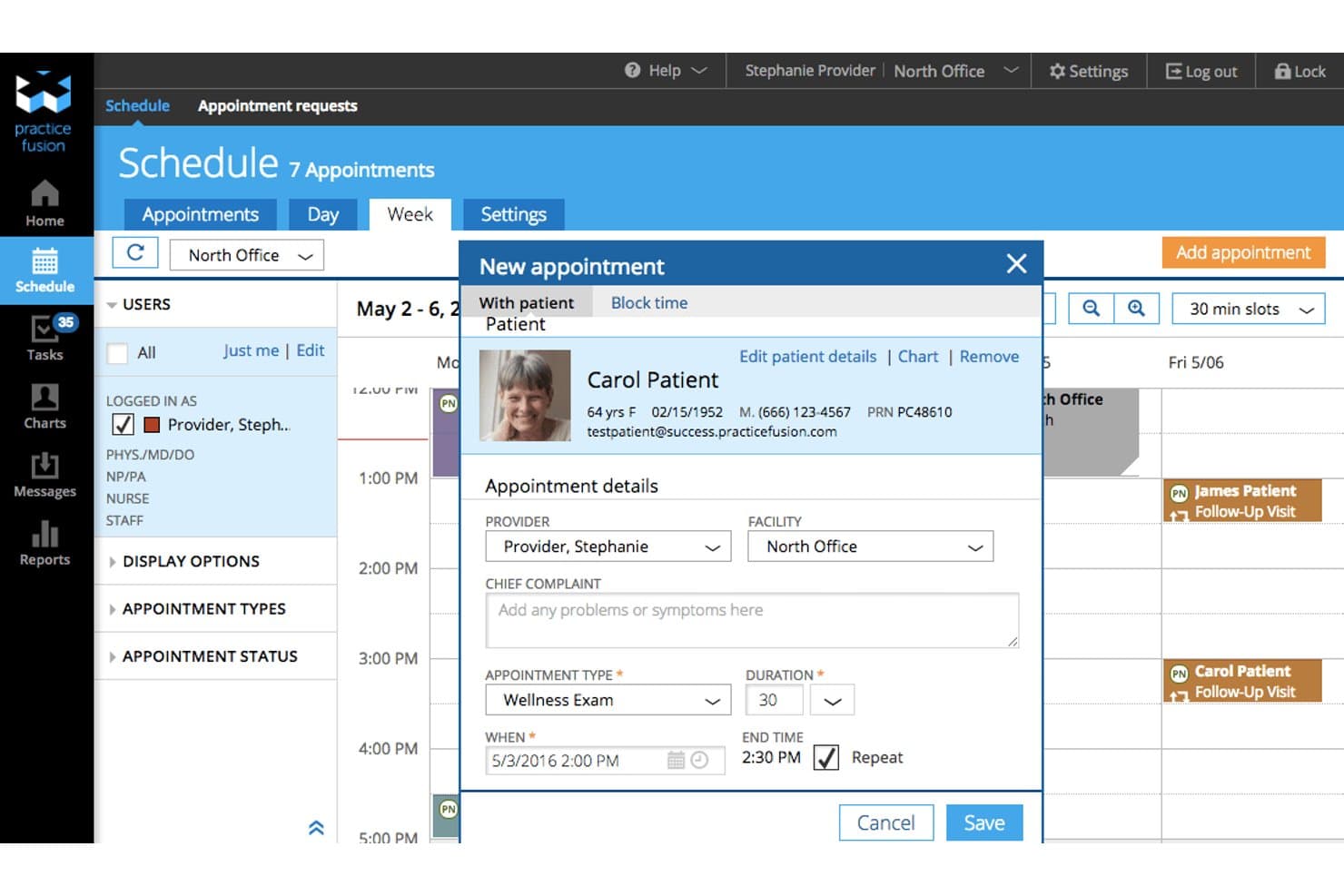
Practice Fusion lets users schedule and manage patient appointments with ease. Practice Fusion is a cloud-based EHR for independent medical practices that includes neurology-specific charting templates, e-prescribing with controlled-substance support, lab and imaging ordering, and billing workflows.
Who Is Practice Fusion Best For?
Practice Fusion is a strong fit for independent neurology practices that need full EPCS access across all 50 states alongside customizable charting templates for conditions like epilepsy, migraines, and Parkinson's disease.
Why I Picked Practice Fusion
Practice Fusion earns its spot on my shortlist because of its nationwide EPCS support, which is a real differentiator for neurology practices that regularly prescribe Schedule II controlled substances like opioids for pain or stimulants for attention-related conditions. I also like that the e-prescribing workflow includes built-in drug-interaction and allergy checks, plus formulary lookups, all from within the patient chart. On top of that, the neurology-specific template library covers epilepsy, migraines, Parkinson's disease, and seizure documentation, so you're not building your charting setup from scratch.
Practice Fusion Key Features
- Neurology-specific template library: Hundreds of pre-built templates cover epilepsy, headache, migraine, Parkinson's disease, seizures, and neurologic exams, with options to edit or build your own.
- Customizable flowsheets: Flowsheets let you track patient health data over time, flag care gaps, and review historical lab results directly during an encounter.
- ICD-10 diagnosis charting: Diagnosis search defaults to ICD-10 concepts and maps corresponding ICD-9 and SNOMED CT codes, with support for acuity, start and stop dates, and associated medications.
- Electronic lab and imaging ordering: You can place orders from within the patient chart, save frequently used panels as reorder templates, and receive structured results with abnormal values flagged automatically.
Practice Fusion Integrations
Practice Fusion integrates with FollowMyHealth, Labcorp, and Quest Diagnostics. It also offers proprietary partner APIs and HL7v2 APIs for lab, ordering, and radiology-result connectivity, supporting custom integrations.
Pros and Cons
Pros:
- E-prescribing includes medication interaction and allergy checks
- Editable charting templates help tailor encounter notes
- Neurology templates cover common conditions and exams
Cons:
- Treatment plans lack condition-specific longitudinal tracking
- No automated stroke scales or seizure diaries
Learn more about Practice Fusion: Best for neurology-specific denial follow-up
- 30-day free trial + free demo available
- From $130/user/month
Visit WebsiteCustomer Rating:3.6/5
Automate your practice with AdvancedMD Designed with modern healthcare practices in mind, AdvancedMD provides strong telemedicine capabilities and automates numerous practice management tasks. By focusing on remote healthcare delivery and process efficiency, AdvancedMD stands out as an excellent solution for contemporary neurology practice.
Why I Picked AdvancedMD:
I chose AdvancedMD for this list due to its impressive telemedicine capabilities and commitment to practice automation. As telemedicine becomes increasingly important in today's healthcare environment, AdvancedMD's focus on remote care delivery makes it a valuable tool. Moreover, its practice automation features help to streamline operations, making AdvancedMD an excellent choice for practices aiming to improve efficiency.
Standout features and integrations:
AdvancedMD offers a comprehensive feature set, including e-prescribing, charting, and a secure patient portal. Its telemedicine features support remote consultations, while its automation tools help manage tasks like appointment scheduling and reminders. In terms of integrations, AdvancedMD connects with numerous labs, pharmacies, and imaging centers for seamless data exchange.
Pros and Cons
Pros:
- Comprehensive integrations with labs and other services
- Strong practice automation features
- Robust telemedicine capabilities
Cons:
- Some users have reported minor issues with customer support
- The learning curve for new users
- High cost compared to other solutions
 Best for AI support across notes and claims
- Free demo available
- Pricing upon request
Visit WebsiteCustomer Rating:3.4/5
Athena Health makes documenting patient encounters and delivering exceptional care easier Designed as an innovative, cloud-based solution, athenahealth provides a robust EMR system equipped with rich analytics capabilities. Its adeptness at providing cloud-based management while delivering deep insights through analytics makes it a top pick for many neurology practices.
Why I Picked athenahealth:
athenahealth emerged as an obvious choice for this list, primarily because of its exceptional blend of cloud-based functionalities and analytical prowess. The software’s ability to run in the cloud gives practices flexibility and scalability, while its strong analytical capabilities enable data-driven decision-making. This combination makes athenahealth especially valuable for practices that prioritize flexibility and data insights.
Standout features and integrations:
athenahealth provides a comprehensive set of features that include electronic health records (EHR), medical billing, patient engagement, and telehealth services. The platform also delivers exceptional data analytics capabilities, allowing for real-time insights and trend analysis. Its robust integration features enable it to connect with numerous labs, pharmacies, imaging centers, and other healthcare facilities for data exchange.
Pros and Cons
Pros:
- Comprehensive suite of features
- Cloud-based platform allows for flexibility and scalability
- Extensive analytics capabilities
Cons:
- Higher cost compared to some other solutions
- Customer support could be improved
- User interface could be more intuitive
Learn more about athenahealth: Best for neurology teams connecting EEG/EMG
- Free demo available
- Pricing upon request
Visit WebsiteCustomer Rating:3.5/5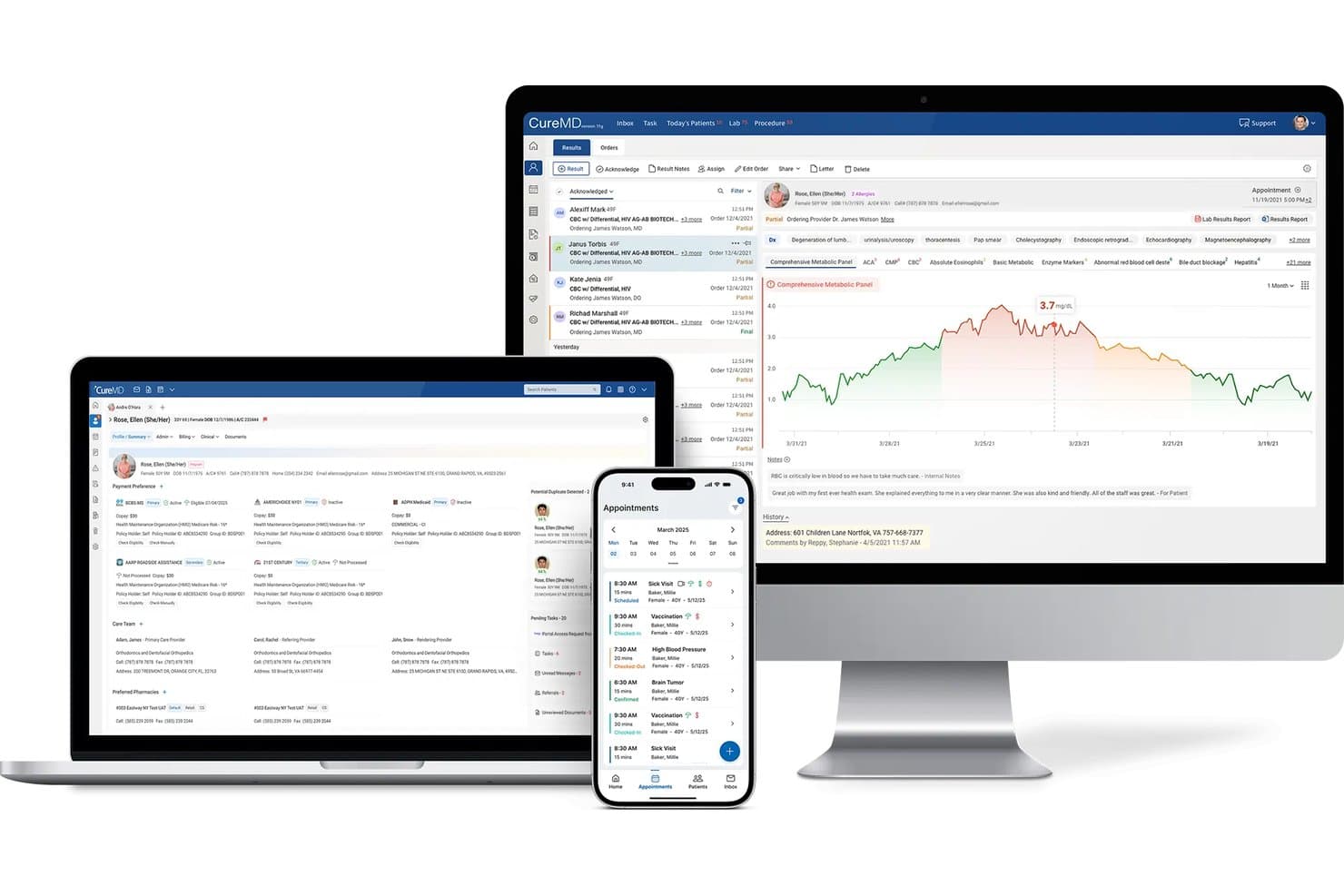
CureMD displays patient data across desktop, tablet, and mobile devices. CureMD is a cloud-based neurology EHR that combines specialty-specific clinical documentation, practice management, e-prescribing, and integrated billing with EEG/EMG connectivity.
Who Is CureMD Best For?
CureMD suits independent and mid-sized neurology practices that need specialty-specific clinical documentation alongside integrated scheduling, billing, and EEG/EMG connectivity in one platform.
Why I Picked CureMD
I've included CureMD in my top picks because it's one of the few neurology EHRs that explicitly connects EEG/EMG diagnostic data to the patient record, which matters when your clinical notes need to reference study results without switching systems. I also like its neurology-specific template library, covering neurological assessment/plan, physical exam, ROS, and HPI documentation built for how neurologists actually chart. Pair that with integrated billing that auto-updates ICD and CPT codes by specialty, and you get a tighter loop between documentation and claims.
CureMD Key Features
- AI medical scribe: Listens to patient-provider encounters and auto-generates specialty-specific clinical notes for provider review before signing.
- MIPS tracking and reporting: Captures quality measures directly from documentation, flags care gaps, and automates CMS submission across all four MIPS categories.
- Patient portal with telehealth: Lets patients schedule appointments, request refills, message their care team, and join video visits from one portal.
- AI-assisted medical coding: Generates ICD-10, CPT, HCPCS, and modifier code suggestions from clinical notes, with coding rationale linked back to the documentation.
CureMD Integrations
CureMD reports 400+ third-party connections, including Quest Diagnostics, LabCorp, Orchard Software, Surescripts, and Jersey Health Connect. It supports HL7, FHIR, HIE connections, and a FHIR API for custom integrations.
Pros and Cons
Pros:
- Reviewers value patient information kept together
- Reviewers praise smooth appointment scheduling
- Neurology templates cover exams and assessment plans
Cons:
- No documented seizure or disease tracking tools
- Reviewers report prescription and lab order problems
Learn more about CureMD: Best for neurology telehealth follow-ups
- Free demo available
- From $499/user/month
Visit WebsiteCustomer Rating:3.4/5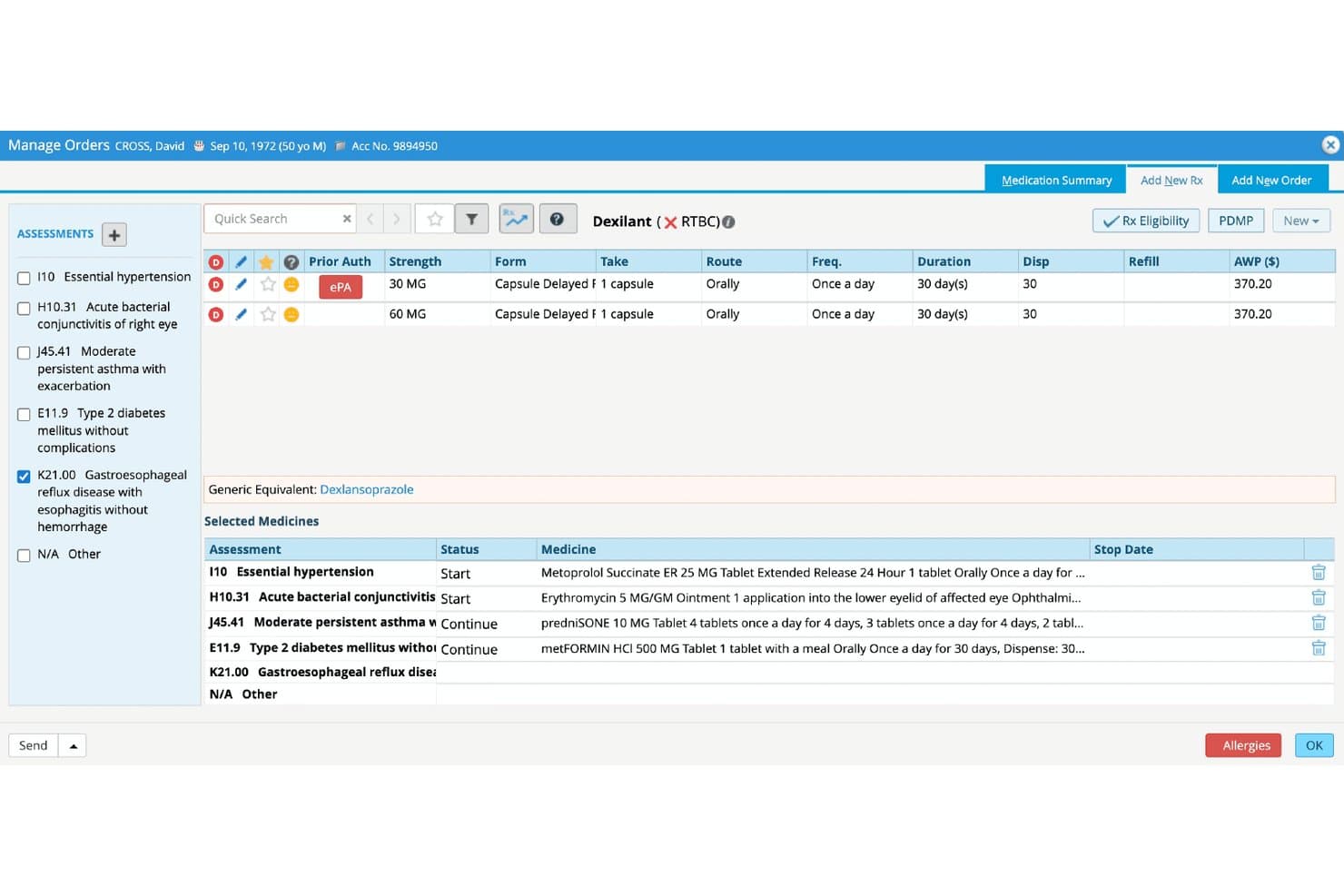
eClinicalWorks streamlines medication ordering with ePA and drug details. eClinicalWorks is a cloud-based EHR that covers clinical documentation, e-prescribing, telehealth, practice scheduling, and revenue cycle management for ambulatory practices, including neurology.
Who Is eClinicalWorks Best For?
eClinicalWorks suits neurology practices that prioritize telehealth follow-ups, with built-in audio/video visits, previsit questionnaires, and wearable-device data collection baked into the workflow.
Why I Picked eClinicalWorks
I've included eClinicalWorks in my top picks because its telehealth workflow is genuinely built for neurology follow-ups, not just bolted on. Through healow, your team can send patients a text or email link to join an audio/video visit without any app download, run previsit questionnaires ahead of the appointment, and pull in wearable-device data to review alongside labs and medications during the visit. The Sunoh.ai ambient scribe then captures the conversation and drafts the progress note automatically, which cuts documentation time after each remote encounter.
eClinicalWorks Key Features
- PRISMA health information search: Aggregates patient records from providers, clinics, urgent-care centers, and hospitals into a single searchable timeline.
- Integrated clearinghouse billing: Supports eligibility verification, claim scrubbing, remittance advice, and denial management within the same platform.
- Electronic prescribing with EPCS: Sends prescriptions electronically to pharmacies with formulary checking and controlled-substance prescribing via two-factor authentication.
- Sunoh.ai ambient scribe: Listens to visit conversations and generates draft clinical notes automatically after each encounter.
eClinicalWorks Integrations
eClinicalWorks offers native integrations with Surescripts, Carequality Framework, eClinicalDirect HISP, and HL7-compatible laboratory and radiology systems. It also connects with Dexcom, Fitbit, and other wearables, while FHIR APIs support custom integrations.
Pros and Cons
Pros:
- Billing and charting share one workflow
- Color-coded schedules help spot open appointments
- Remote follow-ups include questionnaires and note capture
Cons:
- No seizure or headache diary tools
- No documented neurology-specific exam templates or scales
Learn more about eClinicalWorks:
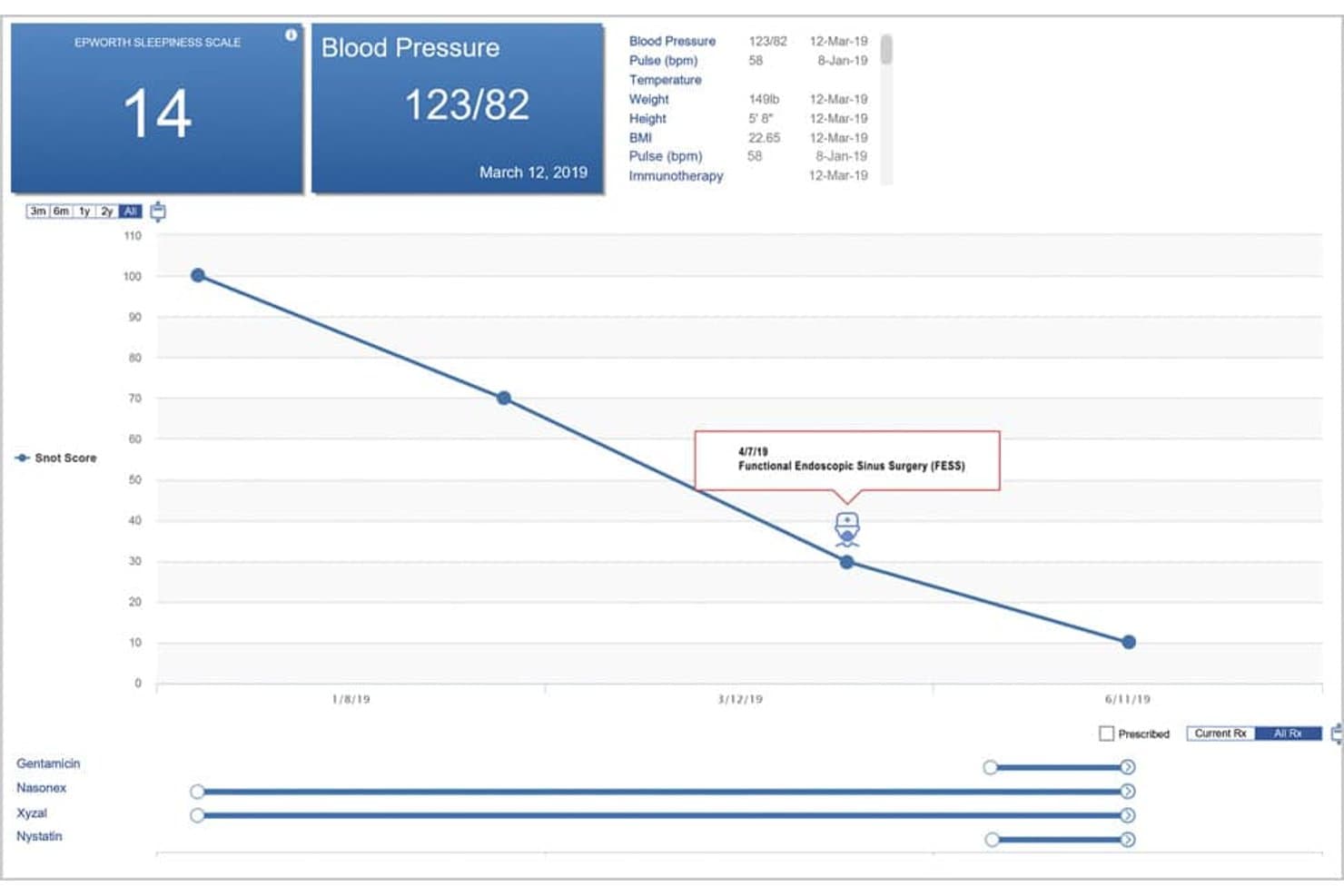
ENTChoice’s patient summary graphs vitals so providers can track trends. NeuroChoice by iSalus is a cloud-based neurosurgery EHR and practice management platform that integrates clinical charting, scheduling, medical billing, e-prescribing, and telehealth in one system.
Who Is iSalus Best For?
iSalus NeuroChoice is a good fit for neurosurgery and neurology practices that want scheduling, billing, and clinical charting handled in one cloud-based system.
Why I Picked iSalus
I picked iSalus as one of the best because its scheduler lets you organize resources by location, provider, device, or nursing staff, which is genuinely useful when you're coordinating equipment like EMG machines alongside provider availability. I also like that it includes a recall list for appointments not yet ready to be booked, plus open-slot search, so nothing falls through the cracks between visits. The billing module connects to 2,500+ payers with real-time eligibility checks built into the same workflow, cutting down the back-and-forth between scheduling and the front desk.
iSalus Key Features
- Patient timeline: Displays a customizable historical snapshot of patient information and medications in a single screen across encounters.
- Digital intake: Lets patients complete custom forms and upload insurance information before their visit, with chart merging handled in-system.
- Telehealth: Allows staff to launch virtual visits directly from within the patient chart without switching platforms.
- EverHealth Scribe: Uses AI to capture provider-patient conversations and draft structured clinical notes, including HPI, Assessment, Plan, and ICD-10 code suggestions.
iSalus Integrations
iSalus has documented integrations with Surescripts Record Locator & Exchange, Halfpenny Technologies, and CoverMyMeds for record retrieval, diagnostic interfaces, prescription prior authorization, and benefit checks. An API is available for custom integrations.
Pros and Cons
Pros:
- Reviewers praise scheduling and claims workflows
- Consolidates eligibility, claims, and financial dashboards
- Schedules providers, devices, locations, and nursing staff
Cons:
- Reviewers report charting across too many screens
- Neurology exams and scales aren’t confirmed
Learn more about iSalus: Best for cash-pay practices adding claims
- Free demo available
- From $49/month

Keep EMR familiar and flexible with One Touch As its name suggests, One Touch EMR streamlines EMR management through an intuitive touch-screen interface. This tool is designed to be mobile-friendly, making it a perfect companion for healthcare providers who value accessibility and convenience.
Why I Picked One Touch EMR:
One Touch EMR made it to this list because of its focus on an intuitive touch-screen interface and robust mobile capabilities.
I believe that accessibility and ease of use are crucial in today's fast-paced medical environment, and One Touch EMR stands out by prioritizing these aspects. Its touch-screen interface simplifies the process of navigating the EMR, and its robust mobile capabilities make it suitable for healthcare providers constantly on the go.
Standout features and integrations:
One Touch EMR offers a variety of features, including e-prescribing, charting, document management, and a robust patient portal. Its touch-friendly interface makes navigating these features a straightforward task. In terms of integrations, One Touch EMR smoothly connects with a wide range of labs, pharmacies, and billing services, further enhancing its versatility and convenience.
Pros and Cons
Pros:
- Wide range of integrations
- Robust mobile capabilities
- Intuitive touch-screen interface
Cons:
- More advanced features could be improved
- Some users may find the touch interface challenging at first
- Pricing is not transparent
Learn more about One Touch EMR:
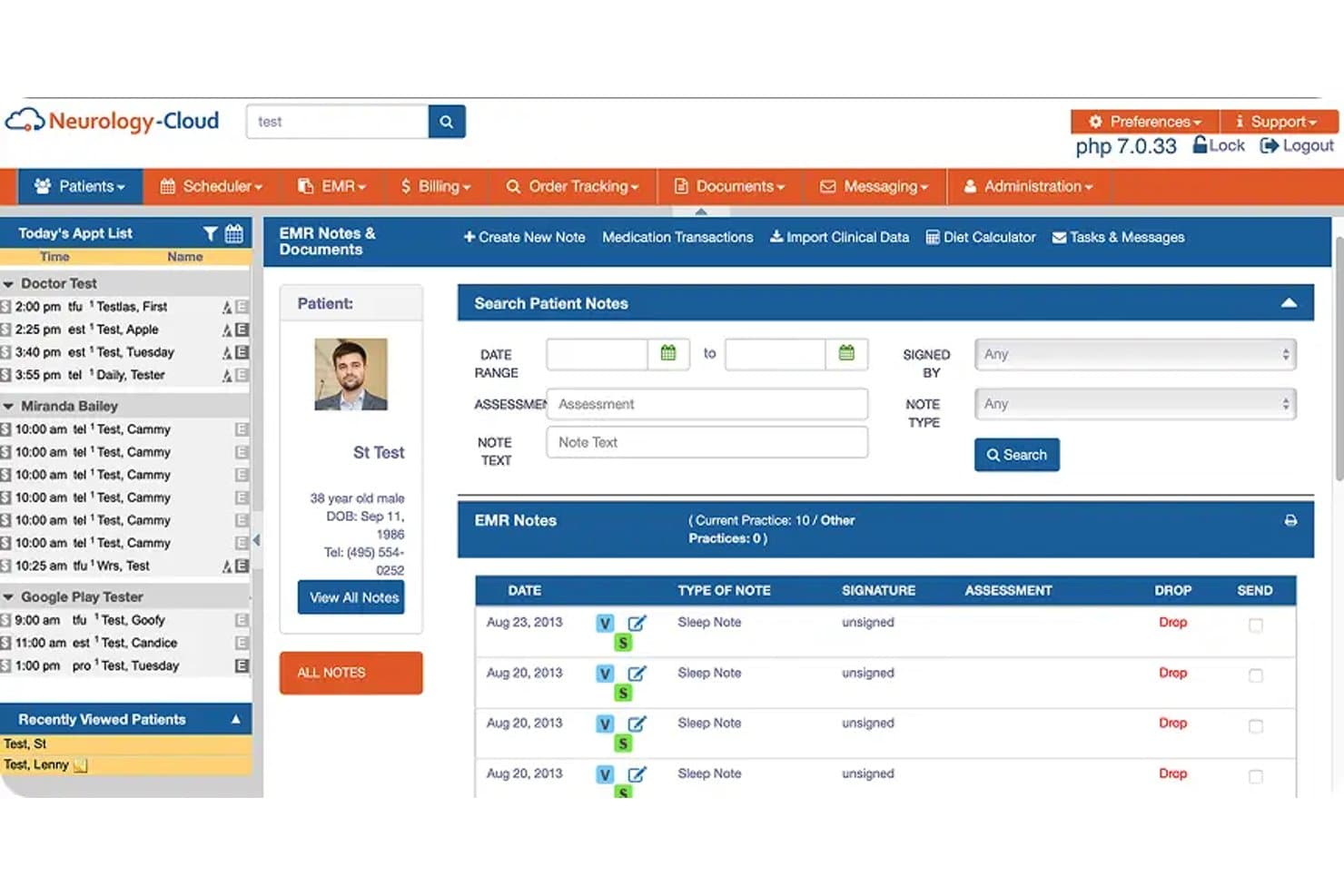
Neurology-Cloud centralizes patient EMR notes and documents in one view. Neurology-Cloud is a cloud-based EHR and practice management system built specifically for neurology practices, combining condition-specific clinical documentation, appointment scheduling, integrated billing, e-prescribing, and diagnostic data management.
Who Is Neurology-Cloud Best For?
Neurology-Cloud is a strong fit for neurology practices of any size—from solo neurologists to multi-location groups—that want a specialty-built EHR with condition-specific templates, integrated billing, and AI-assisted documentation built into one platform.
Why I Picked Neurology-Cloud
Neurology-Cloud earns its spot on my shortlist because it's built entirely around neurology, and that focus shows in the depth of its cloud-based clinical tools. I like that the template library covers everything from seizure and epilepsy visits to EMG and nerve-conduction study documentation, with AI Scribe drafting structured notes in real time during encounters. The Billing Rules Engine flags potential coding issues before claims go out, which pairs well with the AI E/M Coding Assistant that validates codes against CMS rules on the fly.
Neurology-Cloud Key Features
- Chronic condition management: Track long-term care for epilepsy, multiple sclerosis, Parkinson's disease, and migraines directly within the patient chart.
- Paperless Fax Queue: Receive and route referrals, EEG/EMG results, imaging reports, and operative notes into the EHR from a single queue.
- Surgical Workflow Queue: Organize neurological procedural cases from preauthorization through postoperative care and billing in one structured workflow.
- Patient portal with digital intake: Collect neurological symptom histories, insurance details, medical history, and digital consent forms before the visit.
Neurology-Cloud Integrations
Neurology-Cloud integrations include Medicity and OptumInsight for retrieving neuroimaging, EEG reports, and clinical summaries. It also connects with hospitals, HIEs, RHIOs, imaging centers, and other external systems.
Pros and Cons
Pros:
- AI-assisted notes complement condition-specific exam templates
- Reviewers found patient records organized and accessible
- Custom neurology templates drew reviewer praise
Cons:
- Setup took longer than expected; support sometimes lagged
- Reviewers reported peak-time lag and glitches
Learn more about Neurology-Cloud:
How I Evaluate Neurology EMR Software
I split my evaluation into three parts, weighting core functionality most: documenting neurological exams and history, supporting specialty coding, and prescribing controlled substances. Next, I look for standout features such as seizure tracking. Finally, I consider subspecialty fit, interoperability, onboarding, support, and pricing as practices grow.
Core Functionality (Table Stakes For This List)
When I'm selecting tools for my list, I score each one on a scale from 0 (does not offer the functionality) to 5 (excels in this area) for each core functionality listed below. I then convert the total into a percentage to help assess each tool's overall fit, with extra weight on any functionalities I’ve deemed essential.
- Neurology Templates (Essential): I look for configurable seizure, migraine, and movement-disorder templates, plus structured exam fields clinicians can adapt to each visit.
- Clinical Charting (Essential): I assess whether notes capture neurological exams, histories, and follow-up findings in retrievable charts that support longitudinal review.
- Diagnostic Test Links: I check how teams import, store, or link EEG, EMG, nerve conduction, and imaging results in patient records.
- Billing And Coding: I evaluate how neurology-related CPT and ICD codes fit into billing workflows, including claim review and correction.
- E-Prescribing: I look for prescribing workflows that support controlled substances, medication checks, and refills used in neurological care.
- Referral Coordination: I consider whether teams can log referral status and communicate with referring physicians and other specialists from patient records.
Once I have a list of tools that meet the criteria, I consider what sets each platform apart.
Differentiating Factors (What Sets Vendors Apart)
Here's how I compare and contrast different vendors:
Standout Features
I look for built-in stroke scale automation, especially NIHSS scoring that auto-calculates and drops results into the chart. This saves time during acute assessments and reduces manual entry errors. Seizure tracking is another priority—I check whether patients can log frequency, triggers, and medication response between visits, giving clinicians a fuller picture at follow-up. I also evaluate telehealth tools adapted for remote neurological exams, which matter for patients with mobility challenges or those in underserved areas.
Beyond Features
I check whether a vendor can exchange data with hospitals and labs via HL7 or FHIR, since a neurology practice that can't close the referral loop with imaging centers or EEG labs creates gaps in patient records. Subspecialty fit matters too—I evaluate whether templates and workflows match a practice's actual patient mix, like epilepsy monitoring versus headache management, rather than generic neurology coverage. I also consider how onboarding handles structured neuro data migration, because losing historical exam scales during a transition sets clinicians back months.
Cum să alegeți software-ul EMR pentru neurologie
Este ușor să vă pierdeți în liste lungi de funcții și structuri complexe de prețuri. Pentru a vă ajuta să rămâneți concentrat în timp ce parcurgeți procesul unic de selectare a software-ului, iată o listă de factori de care trebuie să țineți cont:
| Factor | Aspecte de luat în considerare |
|---|---|
| FactorScalabilitate | Aspecte de luat în considerarePoate software-ul să se dezvolte odată cu cabinetul dumneavoastră? Căutați opțiuni care acceptă mai mulți utilizatori și mai multe date pe măsură ce baza de pacienți se extinde. |
| FactorIntegrări | Aspecte de luat în considerareFuncționează cu sistemele existente, precum cele de facturare sau de rezultate de laborator? Verificați compatibilitatea pentru un flux de date fără probleme și pentru a evita erorile de introducere manuală. |
| FactorPosibilitate de personalizare | Aspecte de luat în considerareÎl puteți adapta la nevoile cabinetului dumneavoastră? Asigurați-vă că șabloanele și fluxurile de lucru corespund cerințelor specifice neurologiei, fără costuri excesive de personalizare. |
| FactorUșurință în utilizare | Aspecte de luat în considerareInterfața este intuitivă pentru echipa dumneavoastră? Evaluați curba de învățare și asigurați un timp minim de instruire pentru a menține personalul eficient și productiv. |
| FactorImplementare și integrare inițială | Aspecte de luat în considerareCât timp este necesar pentru a începe? Luați în considerare timpul și resursele necesare pentru configurare și întrebați despre asistența oferită în perioada de tranziție. |
| FactorCost | Aspecte de luat în considerareCare este costul total de proprietate? Comparați taxele de abonament, costurile de configurare și orice costuri ascunse pentru a vă menține bugetul sub control. |
| FactorMăsuri de securitate | Aspecte de luat în considerareSunt protejate dosarele pacienților? Asigurați-vă că software-ul respectă reglementările privind protecția datelor și oferă criptare și actualizări regulate de securitate. |
| FactorCerințe de conformitate | Aspecte de luat în considerareRespectă reglementările din domeniul sănătății? Verificați dacă software-ul este compatibil cu HIPAA și cu alte standarde necesare pentru a menține cabinetul în conformitate. |
Ce este software-ul EMR pentru neurologie?
Software-ul EMR pentru neurologie este un instrument digital conceput pentru gestionarea dosarelor și datelor pacienților specifice cabinetelor de neurologie. Neurologii, asistenții medicali și personalul administrativ utilizează de obicei aceste instrumente pentru a îmbunătăți îngrijirea pacienților și eficiența fluxului de lucru. Funcțiile de programare a consultațiilor, analiză a datelor și conformitate ajută la organizarea informațiilor pacienților, asigurarea respectării reglementărilor și optimizarea operațiunilor cabinetului. În general, aceste instrumente oferă valoare făcând cabinetele de neurologie mai eficiente și mai orientate către pacienți.
Caracteristici
Atunci când selectați software EMR pentru neurologie, urmăriți următoarele caracteristici esențiale:
- Gestionarea dosarelor pacienților: Organizează și stochează date detaliate despre pacienți pentru accesare și actualizare facilă.
- Programarea consultațiilor: Simplifică programarea și gestionarea consultațiilor pacienților pentru a reduce absențele.
- Facturarea și emiterea facturilor: Automatizează procesele financiare pentru a asigura plăți corecte și efectuate la timp.
- Analiza datelor: Oferă informații despre performanța cabinetului și rezultatele pacienților pentru luarea unor decizii informate.
- Asistență pentru conformitate: Asigură respectarea reglementărilor din domeniul sănătății, precum HIPAA, pentru protejarea informațiilor sensibile despre pacienți.
- Șabloane personalizabile: Oferă șabloane de documentare adaptate special neurologiei pentru gestionarea eficientă a evidențelor.
- Capacități de integrare: Se conectează la alte sisteme medicale pentru a permite partajarea fără probleme a datelor și a reduce introducerea manuală.
- Portal pentru pacienți: Permite pacienților să își acceseze informațiile medicale și să comunice online cu furnizorii de servicii medicale.
- Măsuri de securitate: Protejează datele pacienților prin criptare și actualizări regulate de securitate.
- Asistență pentru diagnosticare bazată pe IA: Ajută la analizarea datelor neurologice complexe pentru diagnostice mai precise.
Beneficii
Implementarea unui software EMR pentru neurologie oferă mai multe beneficii echipei și afacerii dumneavoastră. Iată câteva dintre beneficiile de care vă puteți bucura:
- Îngrijire îmbunătățită a pacienților: Accesul la dosare detaliate ale pacienților și la analize îi ajută pe furnizorii de servicii medicale să ia decizii informate.
- Eficiență sporită: Automatizarea programării și a facturării reduce sarcinile administrative și economisește timp.
- Conformitate îmbunătățită: Funcțiile integrate de asigurare a conformității ajută la menținerea respectării reglementărilor din domeniul sănătății.
- Implicarea sporită a pacienților: Portalurile pentru pacienți permit comunicarea facilă și accesul la informațiile medicale.
- Securitatea datelor: Măsurile de securitate protejează datele sensibile ale pacienților împotriva accesului neautorizat.
- Asistență pentru diagnosticare precisă: Instrumentele bazate pe IA ajută la analizarea datelor neurologice complexe pentru rezultate mai bune.
- Integrare fără probleme: Conectivitatea cu alte sisteme asigură un flux fluid al datelor și reduce erorile de introducere manuală.
Costuri și prețuri
Selectarea unui software EMR pentru neurologie necesită înțelegerea diferitelor modele și planuri de preț disponibile. Costurile variază în funcție de funcții, dimensiunea echipei, suplimente și alți factori. Tabelul de mai jos rezumă planurile comune, prețurile medii ale acestora și funcțiile incluse de obicei în soluțiile software EMR pentru neurologie:
Tabel comparativ al planurilor pentru software EMR de neurologie
| Tipul planului | Preț mediu | Funcții comune |
|---|---|---|
| Tipul planuluiPlan gratuit | Preț mediu$0 | Funcții comuneGestionarea de bază a dosarelor pacienților, programarea consultațiilor și conformitate de bază. |
| Tipul planuluiPlan personal | Preț mediu$10-$30/utilizator/lună | Funcții comuneDosare îmbunătățite ale pacienților, facturare și emiterea facturilor, precum și analiză de bază a datelor. |
| Tipul planuluiPlan pentru companii | Preț mediu$40-$70/utilizator/lună | Funcții comuneProgramare avansată, capacități de integrare și șabloane personalizabile. |
| Tipul planuluiPlan pentru întreprinderi | Preț mediu$80-$150/utilizator/lună | Funcții comuneAnaliză cuprinzătoare a datelor, diagnosticare bazată pe IA și asistență dedicată. |
Întrebări frecvente (FAQ)
Cum se integrează software-ul EMR pentru neurologie cu alte sisteme?
Software-ul EMR pentru neurologie se integrează adesea cu sisteme de laborator, software de facturare și instrumente de imagistică. Ar trebui să verificați dacă software-ul acceptă standardele HL7 sau FHIR pentru compatibilitate. Această integrare reduce introducerea manuală a datelor și asigură accesul la toate informațiile despre pacienți într-un singur loc.
Poate software-ul EMR pentru neurologie să gestioneze date complexe de imagistică?
Da, multe sisteme EMR de neurologie acceptă integrarea datelor provenite de la examinări RMN și CT. Atunci când alegeți un sistem, asigurați-vă că acesta poate gestiona fișiere mari și oferă funcții precum adnotarea imaginilor. Această capacitate poate îmbunătăți precizia diagnosticării și eficientiza fluxurile de lucru ale echipei dumneavoastră.
Cât de personalizabile sunt șabloanele din software-ul EMR pentru neurologie?
Multe sisteme EMR oferă șabloane personalizabile, adaptate cabinetelor de neurologie. Ar trebui să vă asigurați că software-ul vă permite să modificați șabloanele pentru a corespunde nevoilor specifice. Această flexibilitate poate economisi timp la documentare și poate îmbunătăți eficiența fluxului de lucru.
Este dificil procesul de învățare a utilizării software-ului EMR pentru neurologie?
Dificultatea procesului de învățare depinde de designul și interfața de utilizare ale software-ului. Ar trebui să căutați sisteme cu navigare intuitivă și să luați în considerare furnizorii care oferă sesiuni de instruire. O interfață ușor de utilizat poate minimiza întreruperile și accelera procesul de integrare a echipei dumneavoastră.