

Programele de facturare pentru podiatrie sunt tehnologii specializate care ajută clinicile de podiatrie să gestioneze facturarea, cererile de despăgubire către asigurări și urmărirea plăților pentru îngrijirea picioarelor și gleznelor. Dacă sunteți în căutarea celui mai bun program de facturare pentru podiatrie, probabil doriți să economisiți timp, să reduceți erorile costisitoare și să le ușurați munca angajaților.
Este dificil să țineți pasul cu regulile asigurărilor, codurile și soldurile pacienților atunci când vă concentrați și asupra îngrijirii acestora. Acest ghid elimină informațiile inutile, astfel încât să puteți compara soluțiile de top și să o găsiți pe cea care răspunde cu adevărat nevoilor cabinetului dumneavoastră — totul în doar câteva minute.
Why Trust Our Software Recommendations
6,700+
Reviews
20
Industry experts
16+
Evaluation factors
14
Years
Our team has been testing and reviewing software since 2012. As medical practice leaders ourselves, we know how difficult—and important—it is to choose the right software.
For this guide, we evaluated tools using hands-on testing and independent research, scoring tools using our selection criteria.
Our reviews reflect our human editorial judgment, not a sales pitch.
Tabel comparativ al programelor de facturare pentru podiatrie
Tabelul de mai jos compară detaliile privind prețurile pentru selecțiile mele de top de programe de facturare pentru podiatrie.
Sorted by: Default
| Tool | Starting Price | Website | |
|---|---|---|---|
Best for cross-location team coordination | 4.7 out of 5 | $29/user/month Free demo + 14-day free trial available | Website |
Best for independent podiatry practices | 3.9 out of 5 | Pricing upon request Free demo available | Website |
Best for mobile podiatry charting | 3.9 out of 5 | Pricing upon request Free demo available | Website |
Best for podiatry claims management | 4.3 out of 5 | Pricing upon request Free demo available | Website |
Best for small podiatry practices | 3.7 out of 5 | Pricing upon request Not available | Website |
Best for adaptive podiatry charting | 4.5 out of 5 | Pricing upon request Free demo available | Website |
Best for podiatry billing workflows | 4.1 out of 5 | Pricing upon request Free demo available | Website |
Best for cloud podiatry workflows | 3.6 out of 5 | Pricing upon request Free demo available | Website |
Best for integrated podiatry billing | 3.6 out of 5 | $130/user/month 30-day free trial + free demo available | Website |
Best for all-in-one podiatry management | 3.9 out of 5 | Pricing upon request Free demo available | Website |


Recenzii ale celor mai bune programe de facturare pentru podiatrie
Mai jos sunt rezumatele mele detaliate ale celor mai bune programe de facturare pentru podiatrie care au ajuns pe lista mea scurtă. Recenziile mele oferă o privire detaliată asupra caracteristicilor, celor mai potrivite cazuri de utilizare și integrărilor fiecărui program, pentru a vă ajuta să îl găsiți pe cel mai potrivit pentru dumneavoastră.
 Best for cross-location team coordination
- Free demo + 14-day free trial available
- From $29/user/month
Visit WebsiteCustomer Rating:4.7/5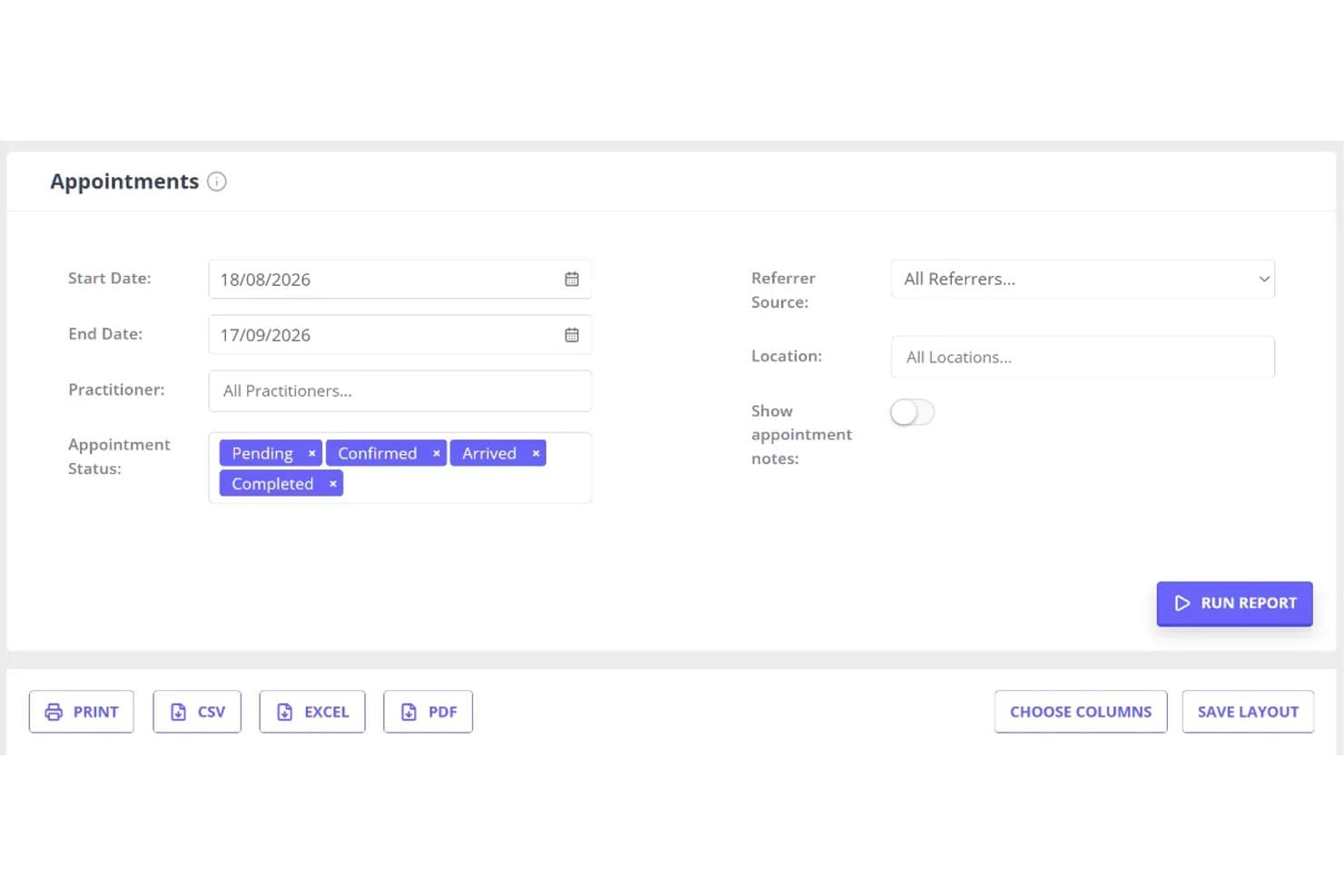
Zanda lets users filter and run appointment reports by date, status, and location. Zanda is an all-in-one practice management platform that combines scheduling, clinical notes, invoicing, insurance claims, eligibility checks, and financial reporting for health practices including podiatry.
Who Is Zanda Best For?
Zanda works well for multi-location podiatry practices that need a single platform to coordinate schedules, billing, and clinical administration across sites and practitioners.
Why I Picked Zanda
I've included Zanda in my top picks because it handles cross-location scheduling and billing in a single account, which matters when your podiatry practice runs across multiple sites. Each location can carry its own Insured Place of Service for US claims, and practitioner availability links directly to a location so appointments and billing inherit the right details automatically. Financial reports and the Practice Dashboard both filter by location and practitioner, so I can see revenue and receivables broken down by site without exporting anything manually.
Zanda Key Features
- Automated invoice follow-ups: Zanda triggers follow-up messages for paid or unpaid invoices based on invoice age and status, without manual intervention.
- US eligibility batch checking: Run eligibility checks for multiple clients with upcoming appointments in a single batch, with payer responses saved to each client's history.
- Superbill creation from invoices: Assemble US superbills from selected existing invoices and payments, with CPT codes entered per service and practitioner NPI auto-populated on CMS-1500 forms.
- Role-based user permissions: Control each team member's access to calendar, billing, clinical, reporting, and administrative functions at the user level.
Zanda Integrations
Zanda has native integrations with Ensora Clearinghouse, Stripe, Xero, Google Calendar, Apple Calendar, Outlook Calendar, Zoom, Physitrack, and Google Analytics. A public API is available in beta, with GET endpoints documented.
Pros and Cons
Pros:
- Scheduling and billing share one platform
- Location-filtered reports help compare site revenue
- Automated invoice reminders support collections
Cons:
- Appeal follow-up remains manual
- No documented Q7–Q9 or laterality guidance
Learn more about Zanda: Best for independent podiatry practices
- Free demo available
- Pricing upon request
Visit WebsiteCustomer Rating:3.9/5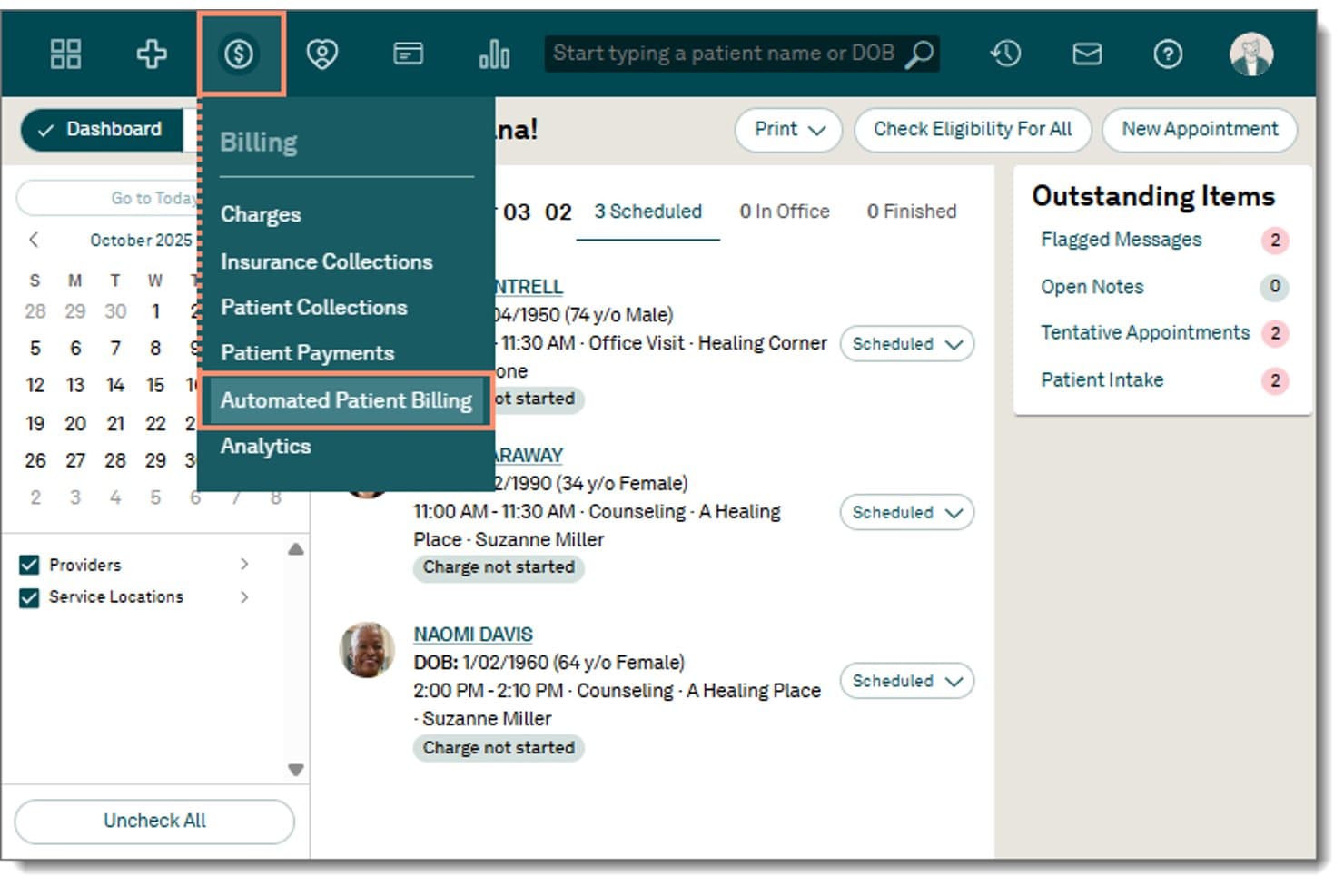
Tebra offers an Automated Patient Billing option within its Billing dropdown menu, accessible from the main navigation dashboard. Tebra is an all-in-one practice management platform that combines medical billing, EHR, claims management, and patient payment tools for independent specialty practices including podiatry.
Who Is Tebra Best For?
Tebra is a strong fit for independent podiatry practices that want billing, EHR, and patient engagement managed in a single platform without juggling multiple vendors.
Why I Picked Tebra
I picked Tebra as one of the best because it's built for the operational reality of independent practices running lean teams. I like that automated ERA posting via RPA handles payment reconciliation without manual intervention, and that charge capture ties directly into the native EHR so billing doesn't fall through the gaps between systems. The built-in patient billing tools, including QR-coded statements and text-to-pay links, let a small front desk team keep collections moving without a dedicated billing department.
Tebra Key Features
- Automated insurance eligibility checks: Instantly verifies coverage and benefits with over 2,700 payers.
- Batch electronic claim submission: Submits multiple claims at once with built-in error detection and payer-specific edits.
- Customizable specialty templates: Includes podiatry-focused charting and coding templates with ICD-10 and CPT support.
- Patient online payment portal: Lets patients pay balances through a secure, branded web portal linked to automated statements.
Tebra Integrations
Tebra offers native integrations with Quest Diagnostics, LabCorp, and eLabs via ELLKAY, as well as HL7 and FHIR integrations with over 60 EHR platforms. An API is available for custom integrations.
Pros and Cons
Pros:
- Denials worklist with customizable AR reporting
- Direct charge capture from EHR charting
- Robust patient billing and statement automation
Cons:
- No podiatry-specific LCD/NCD Medicare alerts
- Lacks preloaded podiatry modifier logic
Learn more about Tebra: Best for mobile podiatry charting
- Free demo available
- Pricing upon request
Visit WebsiteCustomer Rating:3.9/5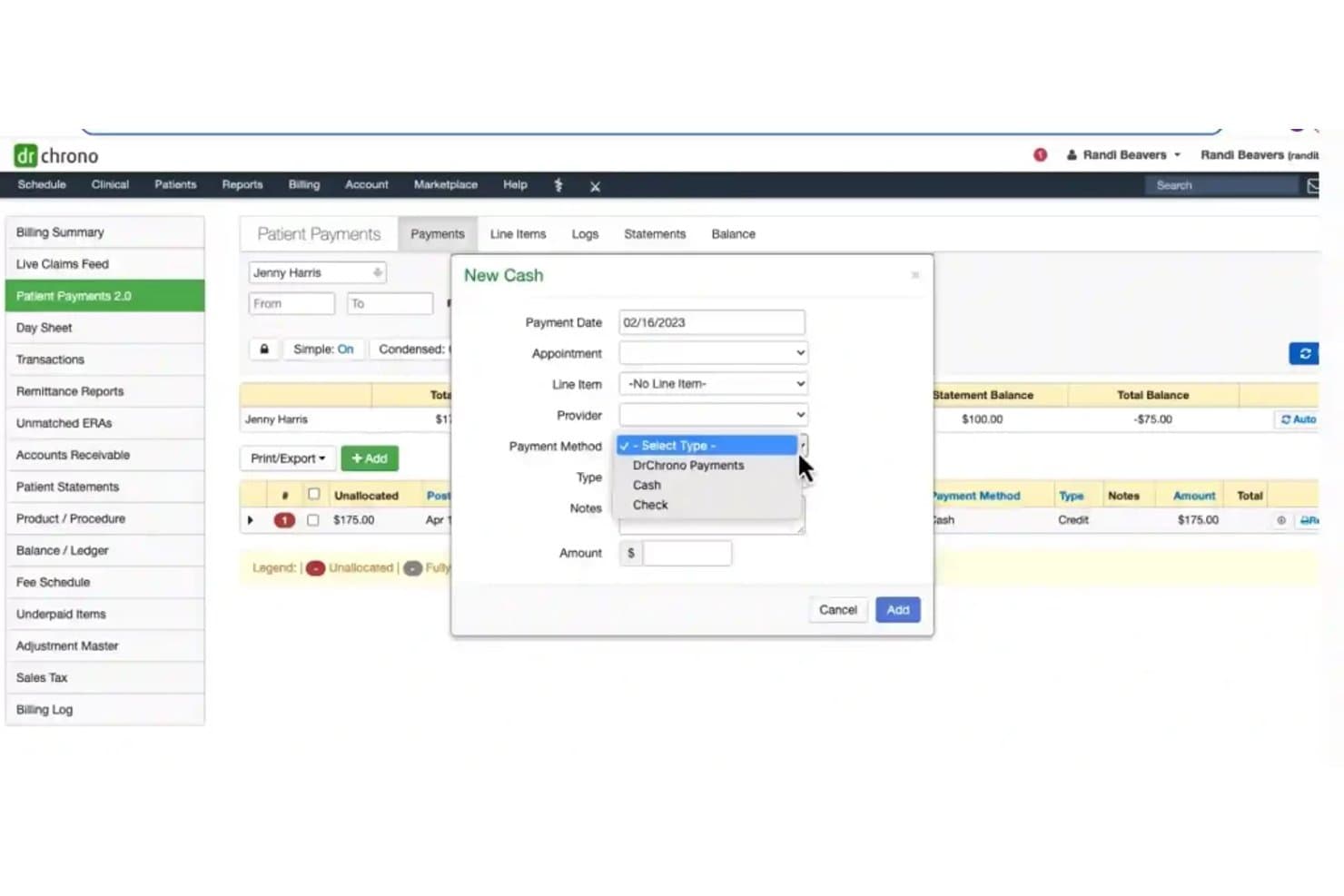
DrChrono offers a New Cash payment entry modal with fields for payment date, appointment, line item, provider, payment method, type, notes, and amount within its Patient Payments module. DrChrono is a mobile-first EHR and medical billing platform that combines podiatry-specific charting, integrated claims management, and revenue cycle tools in a single iPad-native system.
Who Is DrChrono Best For?
DrChrono is a good fit for small podiatry practices that chart on iPads and want EHR, scheduling, and billing managed in one place.
Why I Picked DrChrono
DrChrono earns its spot on my shortlist because of how tightly its mobile charting connects to billing. I like that I can annotate foot and ankle diagrams, photograph affected areas, and order X-rays or bone scans directly from the iPad, with results landing back in the patient record. The billing profile feature then picks up that visit data and feeds it straight into a claim, cutting duplicate entry between charting and coding.
DrChrono Key Features
- Integrated claims management: Track, submit, and follow up on claims within the same platform.
- DME and orthotics billing assistance: Access built-in workflows for diabetic shoes, orthotics, and podiatry-specific supplies.
- Automated insurance eligibility checks: Instantly verify insurance coverage from within the scheduling or billing workflow.
- Clearinghouse connectivity: Send electronic claims through built-in eProvider Solutions and iHCFA for workers’ comp and auto claims.
DrChrono Integrations
DrChrono offers native integrations with over 40,000 labs for electronic orders and results, eProvider Solutions for claims clearinghouse, iHCFA for workers’ comp and auto claims, Stripe for patient payments, and Physitrack for exercise programs. An API is available for custom integrations.
Pros and Cons
Pros:
- Built-in DME and orthotics billing workflows
- In-platform claims clearinghouse for direct billing
- Mobile charting on iPad with foot diagrams
Cons:
- Reported billing issues after clearinghouse migration
- Medicare LCD/NCD compliance tools are limited
Learn more about DrChrono: Best for podiatry claims management
- Free demo available
- Pricing upon request
Visit WebsiteCustomer Rating:4.3/5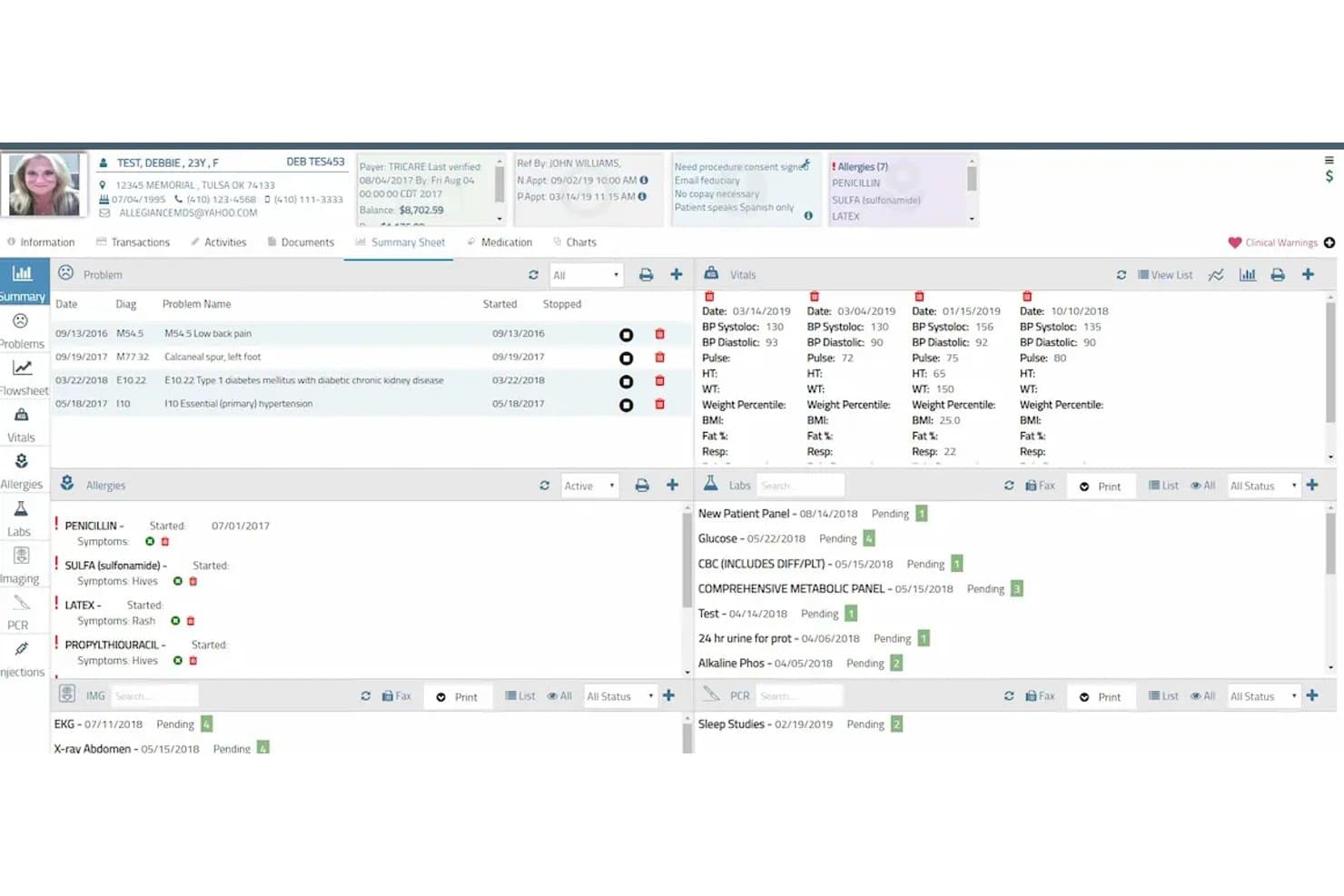
AllegianceMD offers a comprehensive patient summary sheet displaying problems, vitals, allergies, and pending labs within its EHR interface. AllegianceMD is a cloud-based podiatry EMR and practice management platform that combines specialty-specific clinical documentation, integrated claims management, and a built-in clearinghouse for end-to-end billing.
Who Is AllegianceMD Best For?
AllegianceMD is a strong fit for small to midsize podiatry practices that want a single all-in-one system covering clinical documentation, scheduling, and billing.
Why I Picked AllegianceMD
AllegianceMD earns its spot on my shortlist because of how it handles podiatry claims end to end. The built-in clearinghouse and intelligent claim scrubber mean my team can submit primary and secondary claims electronically without paying for a third-party service. I also like the AI-driven auto-billing, which flags and routes claims before they reach a payer, cutting down denial rates on common podiatry procedures.
AllegianceMD Key Features
- Podiatry-specific charting templates: Create encounter notes using templates designed for common podiatric procedures and diagnoses.
- Automated eligibility verification: Instantly check patient insurance eligibility before appointments or claim submission.
- Integrated patient portal: Offer patients secure access to statements, payment options, and appointment information.
- E-prescribing for controlled substances: Send prescriptions electronically, including medications regulated under DEA rules.
AllegianceMD Integrations
AllegianceMD offers native integrations with its built-in clearinghouse, e-prescription networks, e-fax system, lab interfaces, imaging systems, and immunization registries. An API is available for custom integrations.
Pros and Cons
Pros:
- Podiatry-focused chart templates and coding
- Built-in clearinghouse for electronic claims
- Includes AI-driven claim scrubber
Cons:
- Limited denial analytics and appeal templates
- Medicare LCD/NCD rule checks not automated
Learn more about AllegianceMD: Best for small podiatry practices
- Not available
- Pricing upon request
Visit WebsiteCustomer Rating:3.7/5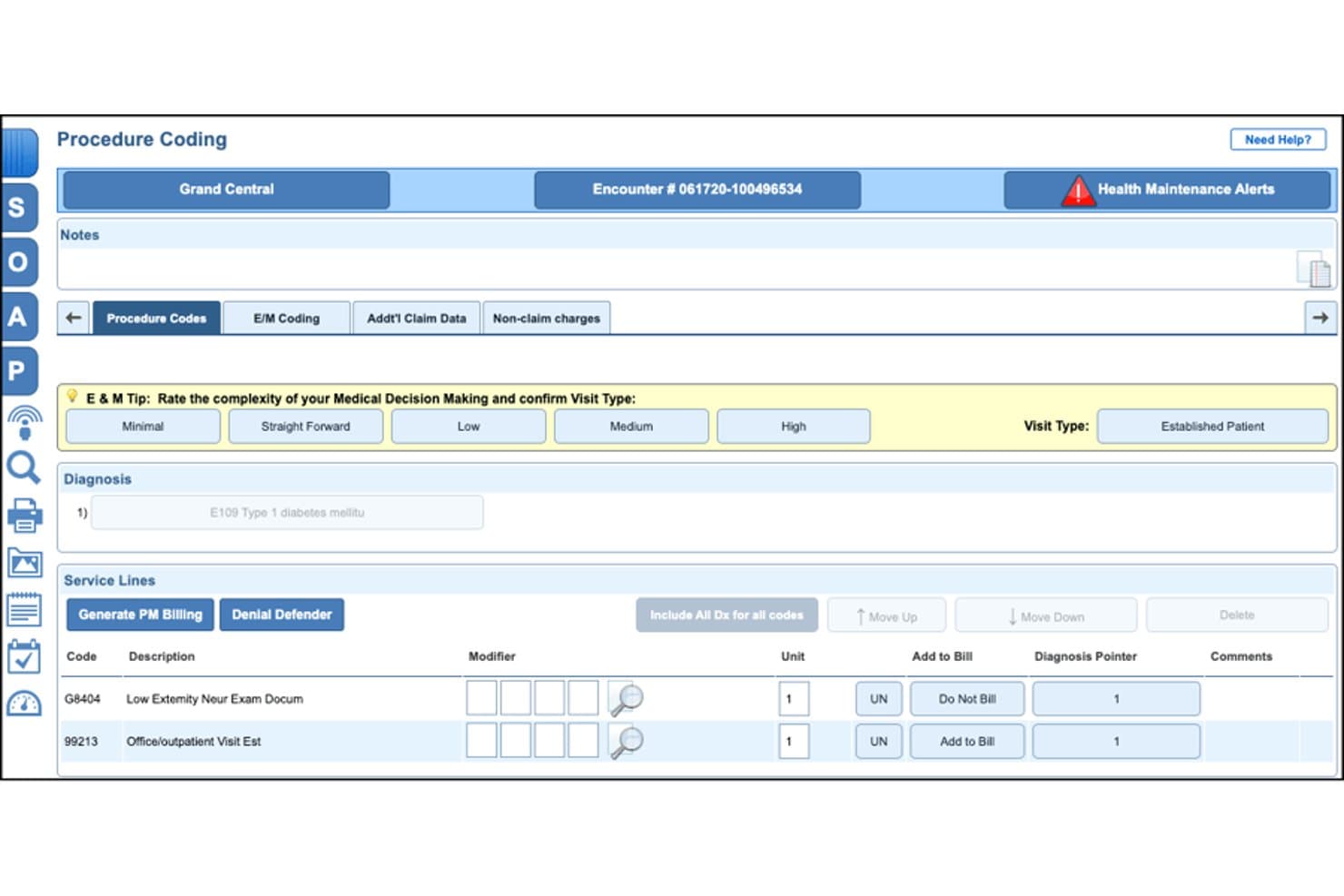
NextGen Office offers a Procedure Coding screen with E&M complexity rating, diagnosis entry, and service line billing codes tailored for podiatry workflows. NextGen Office is a cloud-based EHR and practice management platform built for small podiatry practices, combining podiatry-specific clinical workflows, integrated billing, claims management, and patient payment tools in a single system.
Who Is NextGen Office Best For?
NextGen Office is a strong fit for independent podiatry practices with 10 or fewer providers that need a single vendor to handle both clinical and billing workflows.
Why I Picked NextGen Office
I've included NextGen Office in my top picks because it's the only EHR directly partnered with the APMA, so the podiatry-specific code sets and clinical templates are shaped by practicing podiatrists rather than generic content teams. I also like the AI Ambient Assist, which turns patient-provider conversations into complete SOAP notes automatically, reducing the documentation burden that hits small practices hardest. The built-in clearinghouse submits claims within hours of a visit, with denial workflows tuned to podiatric billing patterns.
NextGen Office Key Features
- Podiatry-specific CPT and modifier library: Includes a built-in code library with toe and anatomical modifiers for accurate podiatric claim entry.
- Real-time eligibility verification: Instantly checks patient insurance eligibility for podiatry visits and procedures before submission.
- Integrated patient payment portal: Lets patients view, manage, and pay balances online following podiatry appointments and procedures.
- Denial management dashboard: Tracks and categorizes denied claims tied specifically to podiatry rules like Medicare LCD/NCDs and routine foot care.
NextGen Office Integrations
NextGen Office offers native integrations with the APMA Registry, Doctible for patient communications, InstaMed for payment processing, and includes a built-in claims clearinghouse. An API is available for custom integrations.
Pros and Cons
Pros:
- Built-in clearinghouse for fast claim submission
- Medicare LCD/NCD coverage prompts for foot care
- APMA-endorsed podiatry code libraries and templates
Cons:
- Routine updates may impact workflow reliability
- Reporting depth for AR and denials limited
Learn more about NextGen Office: Best for adaptive podiatry charting
- Free demo available
- Pricing upon request
Visit WebsiteCustomer Rating:4.5/5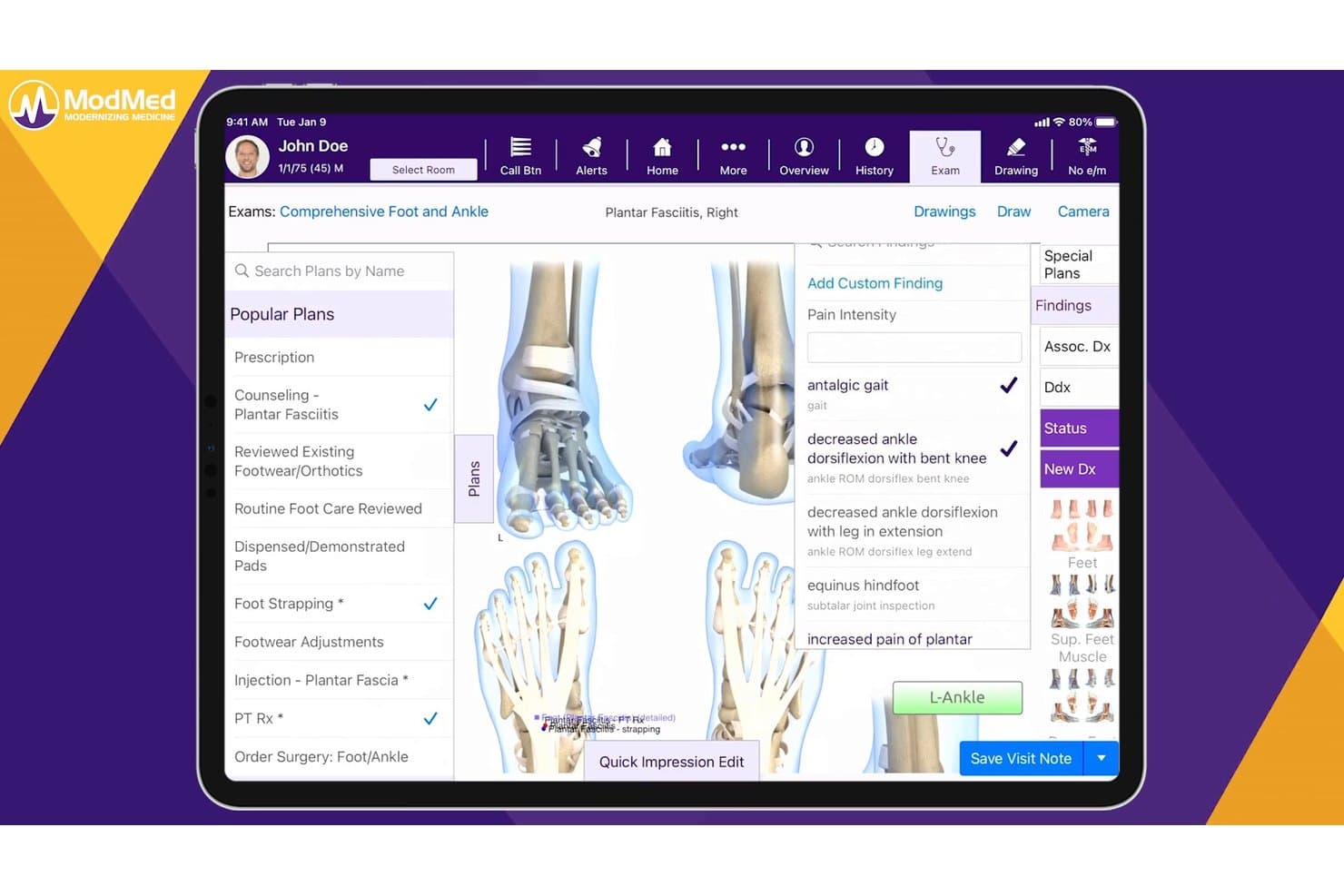
ModMed offers a comprehensive podiatry exam interface with condition-specific treatment plans, findings, and billing tools tailored for foot and ankle care. ModMed is a specialty-specific EHR, practice management, and billing platform built for podiatry practices, combining adaptive charting, podiatry-coded claim submission, denial management, and integrated payment processing in a single suite.
Who Is ModMed Best For?
ModMed is a strong fit for podiatry practices of any size that want a single platform covering clinical documentation, coding, and billing.
Why I Picked ModMed
I picked ModMed as one of the best because its EMA charting engine learns each podiatrist's documentation patterns and auto-suggests CPT, ICD-10, and Q-modifiers as notes are completed. What I really like is the Interactive Anatomical Atlas, where tapping a specific foot structure populates both the clinical note and the bill at the same time. On top of that, built-in NCCI edit checks catch podiatry-specific coding conflicts, like a matrixectomy and avulsion billed on the same toe, before the claim ever goes out.
ModMed Key Features
- MIPS and quality program dashboards: Track podiatry-relevant quality metrics and submit data directly to CMS.
- Integrated payment processing: Accept in-office and online payments using ModMed Pay without third-party gateways.
- Lab and imaging integrations: Connect directly with diagnostic labs and imaging centers to streamline order and result workflows.
- Automated patient reminders: Send appointment and balance reminders via text or email through built-in patient communication tools.
ModMed Integrations
ModMed offers native integrations with diagnostic labs, imaging centers, and pharmacy systems like GoodRx. It provides certified FHIR and HL7 APIs for custom integrations with other healthcare platforms.
Pros and Cons
Pros:
- At-risk foot modifier prompts reduce denials
- Medicare LCD/NCD compliance for foot care claims
- Adaptive charting suggests podiatry-specific codes
Cons:
- RCM team may require follow-up for denials
- Customer support response times can be slow
Learn more about ModMed: Best for podiatry billing workflows
- Free demo available
- Pricing upon request
Visit WebsiteCustomer Rating:4.1/5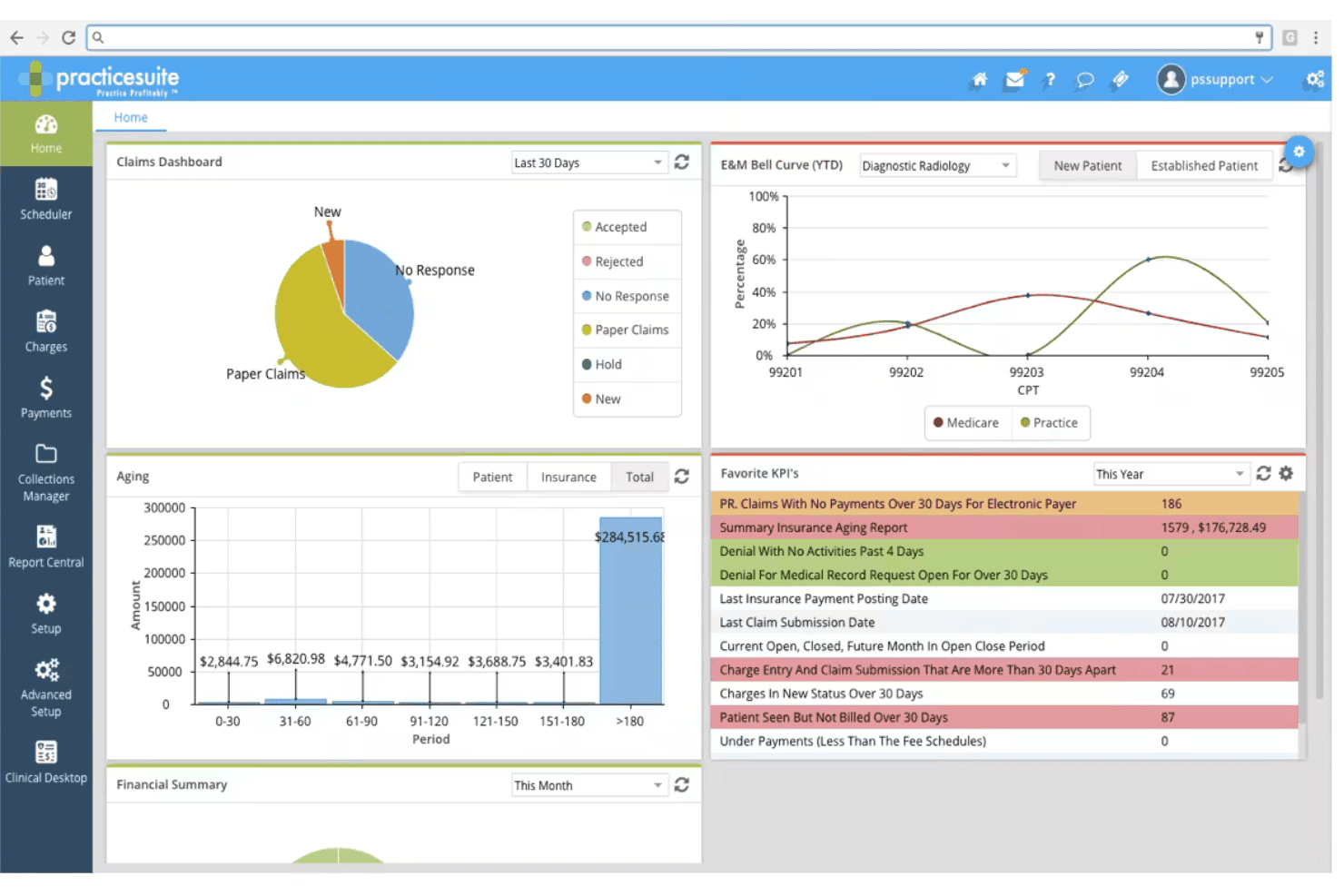
PracticeSuite spans claims, denials, ERA posting, eligibility, and billing. PracticeSuite is a cloud-based medical billing and practice management platform with a native podiatry module that covers end-to-end claims submission, EHR documentation, denial management, and patient billing in a single system.
Who Is PracticeSuite Best For?
PracticeSuite suits independent podiatry practices and medical billing companies that want practice management, EHR, and billing in one modular platform.
Why I Picked PracticeSuite
PracticeSuite earns its spot on my shortlist because the billing workflow is built around podiatry from the ground up. I like that podiatry-specific coding safeguards flag errors before submission, reducing denials on common foot and ankle procedure codes. The 3D foot and ankle diagram tool in the EHR feeds directly into charge capture, so documentation and billing stay in sync without manual re-entry.
PracticeSuite Key Features
- Batch insurance verification: Check insurance eligibility for multiple patients at once with automated payer connections.
- Patient engagement portal: Give patients access to their statements, payment options, and appointment schedules online.
- Analytics dashboard: Monitor revenue cycle metrics, aging accounts receivable, and claim statuses from a unified interface.
- Multi-location scheduling: Manage provider schedules, resource allocation, and patient appointments across several clinic sites.
PracticeSuite Integrations
PracticeSuite offers native integrations with PracticeFusion, major clearinghouses, labs, pharmacies, patient portals, and HIE networks. An API is available for custom integrations.
Pros and Cons
Pros:
- Multi-location scheduling for clinics and providers
- 3D foot and ankle diagram charge capture
- Podiatry coding safeguards reduce claim errors
Cons:
- Few podiatry EHR integration options
- Medicare LCD/NCD automation features limited
Learn more about PracticeSuite: Best for cloud podiatry workflows
- Free demo available
- Pricing upon request
Visit WebsiteCustomer Rating:3.6/5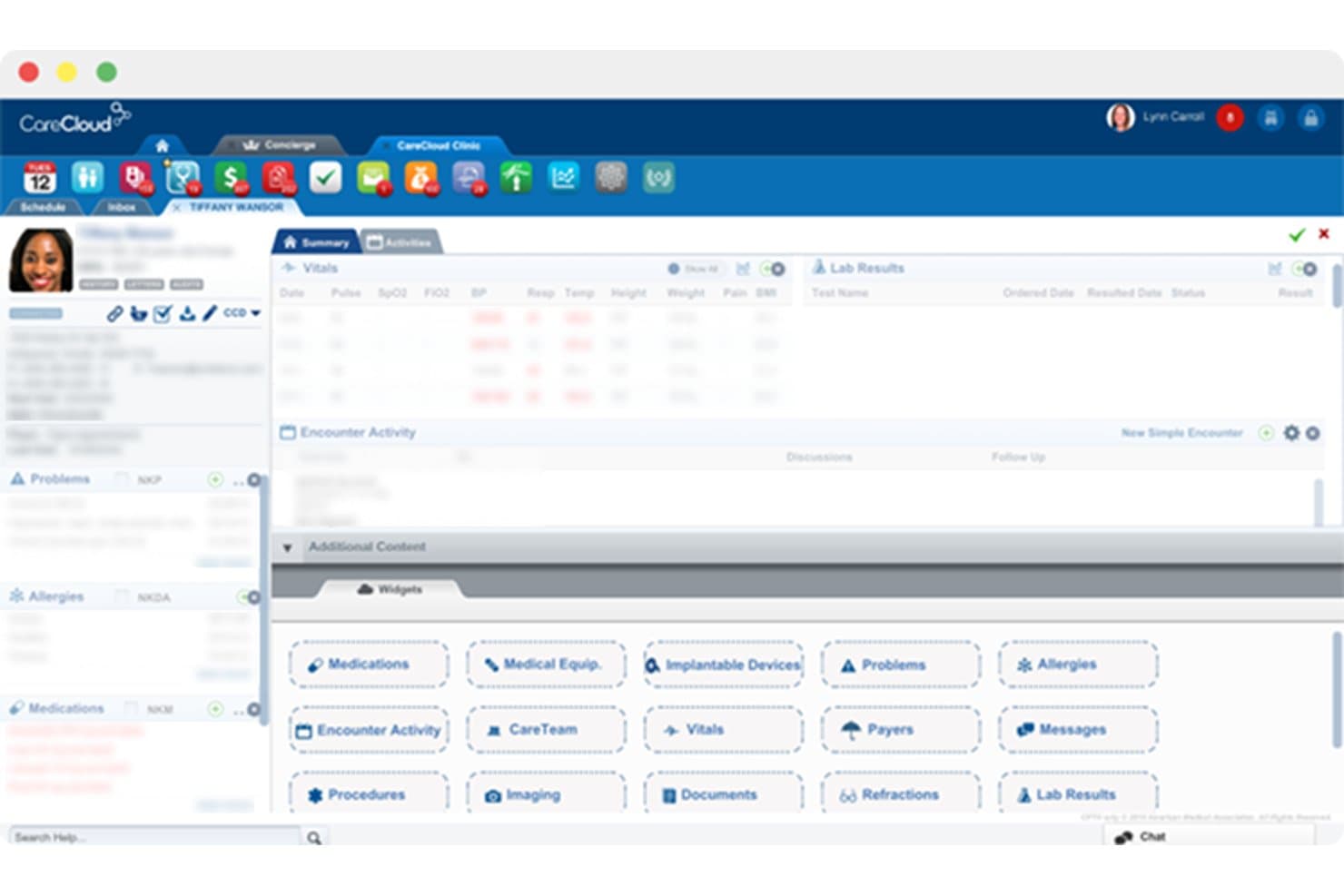
CareCloud offers a customizable patient chart interface with widgets for medications, vitals, lab results, allergies, and encounter activity management. CareCloud is a cloud-based EHR, practice management, and medical billing platform built for specialty practices, with dedicated podiatry workflows covering charge capture, claims scrubbing, denial management, and patient billing.
Who Is CareCloud Best For?
CareCloud suits small to mid-sized podiatry practices that want a single platform to handle clinical documentation, front-desk operations, and billing without managing separate systems.
Why I Picked CareCloud
CareCloud earns its spot on my shortlist because its billing workflows are built directly from podiatry-specific clinical templates, making charge capture a natural part of the encounter rather than a separate step. I like that the CollectiveIQ rules engine scrubs podiatry claims before submission, keeping first-pass rates above 94%. The platform also captures discrete foot-specific data like shoe sizes and abductions, so documentation feeds directly into billable codes.
CareCloud Key Features
- Centralized denial management dashboard: Review, categorize, and work podiatry-specific denials with built-in AR follow-up workflows.
- Configurable podiatry order sets: Build and use structured order sets that fit common foot and ankle procedures.
- Patient statement generation: Create and send detailed patient statements for each podiatry visit or procedure.
- Podiatry EHR/practice management integration: Sync patient demographics, scheduling, and billing across integrated clinical and administrative modules.
CareCloud Integrations
Native integrations are available with CareCloud’s own EHR and practice management modules. The platform supports integrations with third-party EHRs, and an API is available for custom integrations.
Pros and Cons
Pros:
- Built-in patient statement and payment tools
- Real-time claim tracking and denial reporting
- Specialty podiatry templates for coding and billing
Cons:
- Toe modifier automation not clearly documented
- Medicare LCD/NCD rules not always enforced
Learn more about CareCloud: Best for integrated podiatry billing
- 30-day free trial + free demo available
- From $130/user/month
Visit WebsiteCustomer Rating:3.6/5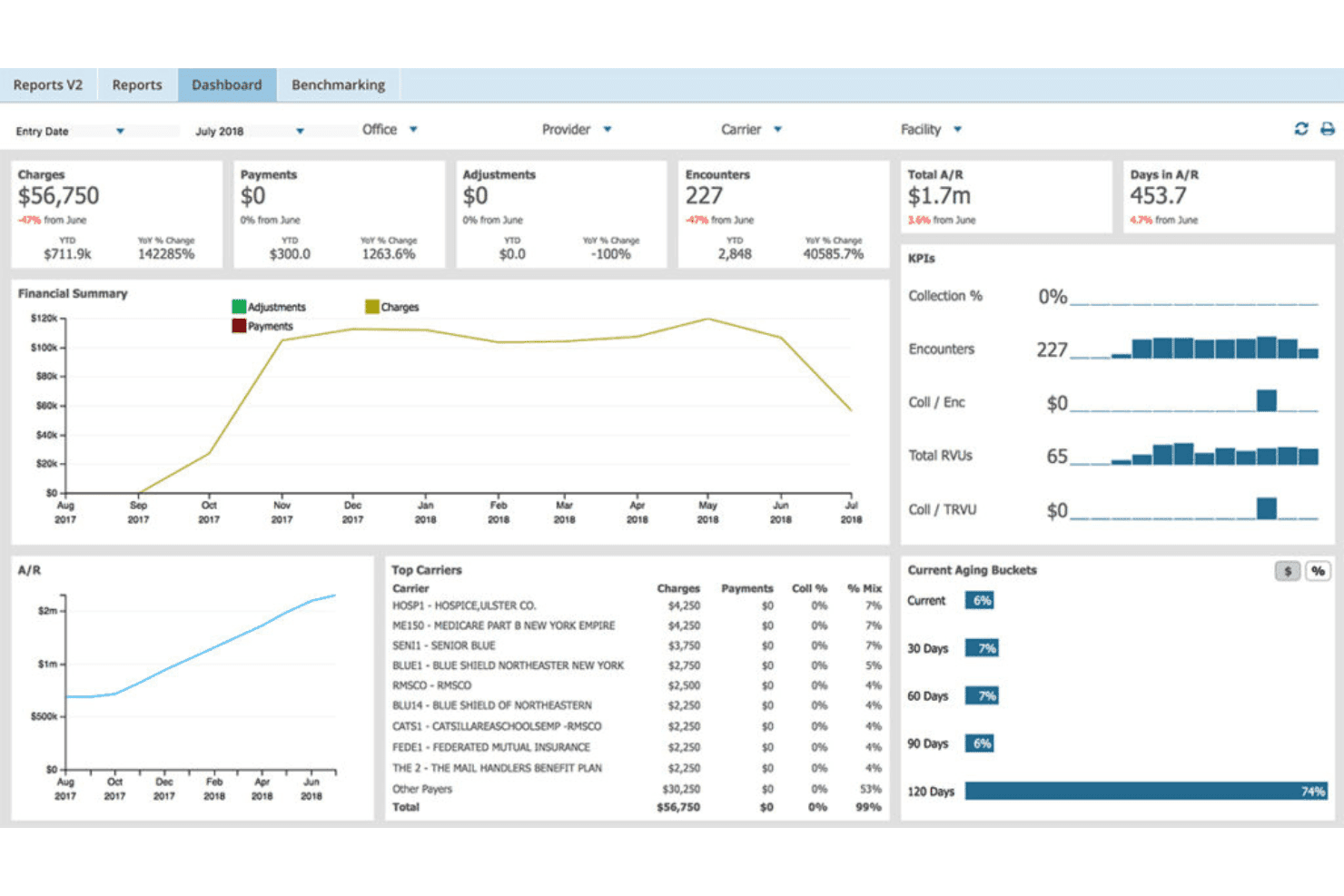
AdvancedMD unites EMR, documentation, billing, claims, eligibility, and RCM. AdvancedMD is an all-in-one cloud platform combining podiatry-specific EHR, practice management, medical billing, claims scrubbing, and patient payment tools in a single integrated system.
Who Is AdvancedMD Best For?
AdvancedMD suits independent podiatry practices that want to manage clinical documentation, scheduling, and billing from one platform rather than juggling separate systems.
Why I Picked AdvancedMD
AdvancedMD earns its spot on my shortlist because the billing module and EHR live in the same system, so charge capture flows directly from the clinical note to the claim without any manual handoff. I particularly like the claims scrubbing engine, which checks against more than 3.5 million known error patterns before a claim goes out. In practice, that means my team catches modifier issues and missing documentation at the source, not after a denial comes back.
AdvancedMD Key Features
- Automated modifier validation: Applies and verifies toe, laterality, and class findings modifiers for podiatry claims.
- Medicare LCD/NCD alerts: Flags claims missing required documentation for routine foot care and other podiatry Medicare rules.
- Advanced denial analytics: Categorizes and tracks denials by root cause, including podiatry-specific patterns and appeal automation.
- Patient payment portal: Lets patients pay balances online using credit, debit, FSA, or HSA through a branded portal.
AdvancedMD Integrations
AdvancedMD offers native integrations with ChartRequest, DAX Copilot, DeepScribe, Doctorsoft, InstaMed, LeadSquared, and NextPatient. An API is available for custom integrations, and its integration marketplace connects with additional healthcare IT providers.
Pros and Cons
Pros:
- Automated modifier validation for toe procedures
- Medicare LCD/NCD alerts for podiatry claims
- Integrated EHR, billing, and scheduling platform
Cons:
- Medicare compliance not fully podiatry-specific
- Limited built-in podiatry CPT code sets
 Best for all-in-one podiatry management
- Free demo available
- Pricing upon request
Visit WebsiteCustomer Rating:3.9/5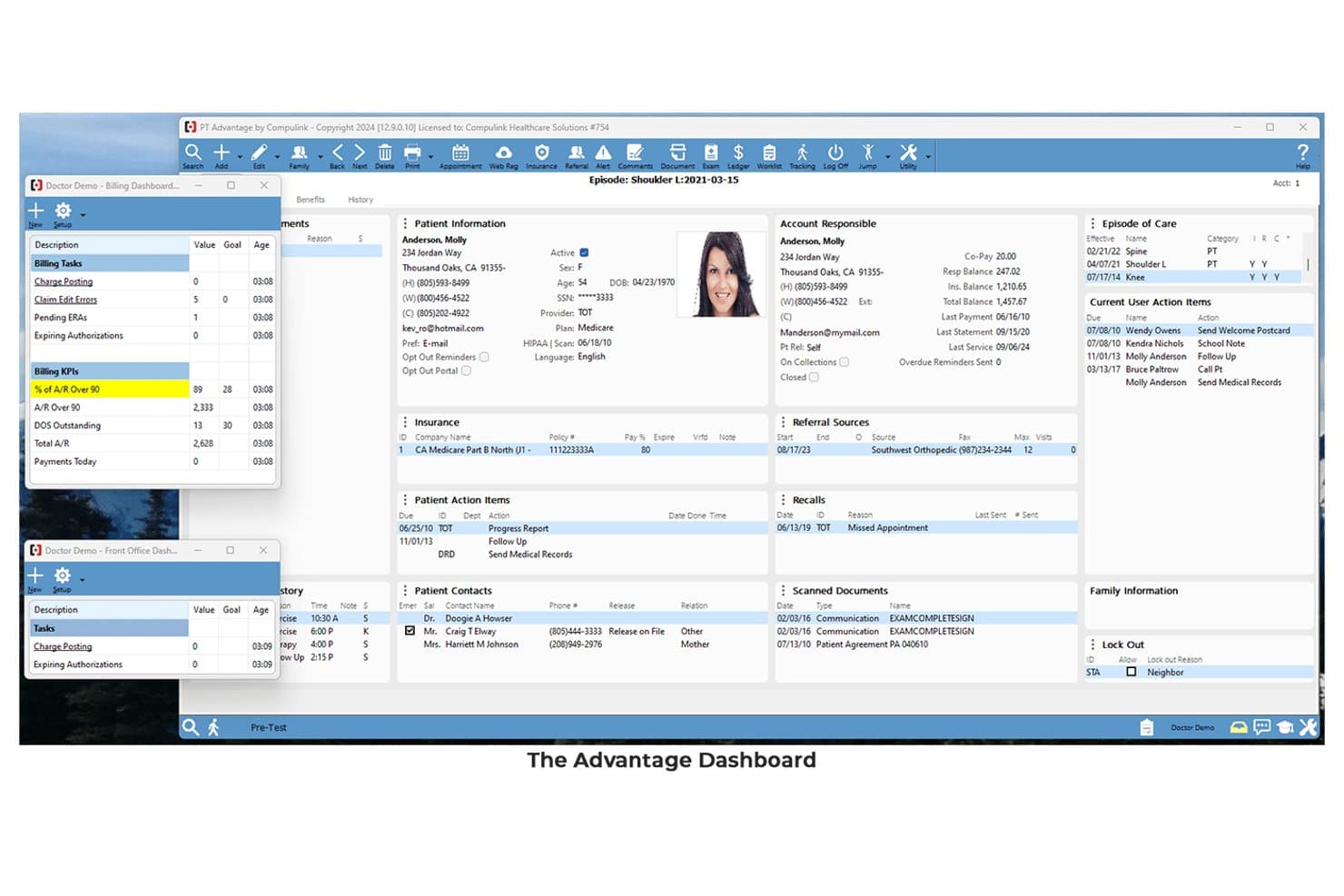
Compulink offers a comprehensive Advantage Dashboard displaying patient information, billing KPIs, episode of care, and action items in a single interface. Compulink is a specialty-specific EHR and practice management platform built for podiatry, combining AI-powered clinical documentation, insurance claims management, billing workflows, and patient payment tools in a single integrated system.
Who Is Compulink Best For?
Compulink is a strong fit for podiatry practice owners and administrators who want a single platform to handle clinical documentation, billing, and practice management without stitching together separate tools.
Why I Picked Compulink
I picked Compulink as one of the best because its EHR, practice management, and billing all run on the same native database. When a provider documents a diabetic foot ulcer using the built-in Wagner grading or UT Diabetic Foot Classification tools, the system auto-generates CPT and E&M codes ready for claim submission. I also like the built-in CCI edits by carrier, which catches coding conflicts before claims leave the practice.
Compulink Key Features
- Patient engagement portal: Lets patients schedule appointments, sign forms, and make payments online.
- Integrated eligibility verification: Automatically checks insurance coverage before visits and billing.
- ASC module: Connects podiatry clinics with ambulatory surgical center workflows for charge capture.
- Lab and imaging integration: Facilitates electronic ordering and receipt of podiatry-specific labs and imaging.
Compulink Integrations
Compulink offers native integrations with Waystar, Weave, Phreesia, MyEyeStore, QuickBooks, Great Plains, Peachtree, and supports lab and imaging system connections. An API is available for custom integrations.
Pros and Cons
Pros:
- Built-in rule checks for Medicare podiatry claims
- All-in-one EHR, PM, and billing platform
- Podiatry templates with automatic CPT code suggestions
Cons:
- System updates can disrupt existing clinical templates
- LCD/NCD compliance engine lacks explicit documentation
Learn more about Compulink:
Alte programe de facturare pentru podiatrie
Iată câteva opțiuni suplimentare de programe de facturare pentru podiatrie care nu au ajuns pe lista mea scurtă, dar care merită totuși verificate:
- 11CureMDBest for customizable podiatry EHR
- 12eClinicalWorksBest for connected podiatry care
- 13AthenahealthBest for podiatry billing automation
- 14DocVillaBest for cloud-based podiatry EHR
- 15EZClaimBest for simple podiatry billing
- 16Practice FusionBest for small-practice podiatry EHR
- 17Practice EHRBest for specialty podiatry workflows
- 181st Providers ChoiceBest for podiatry practice management
How I Evaluate Podiatry Billing Software
I evaluate podiatry billing tools in two layers: baseline claims and coding capabilities, then the differentiators—like modifier automation and LCD alerts—that separate good tools from great ones.
Core Functionality (Table Stakes For This List)
When I'm selecting tools for my list, I rank each one on a scale from 0 (does not offer the functionality) to 5 (excels in this area) for each core functionality listed below. Then, I calculate the tool's total score into a percentage. Each tool needs to achieve a minimum total score of 55% to be considered for inclusion.
- Podiatry-Specific Coding: I check whether the platform includes preloaded podiatry CPT, HCPCS, and ICD-10 code sets along with toe and anatomical modifiers like TA-T9 and Q7-Q9.
- Claims Management: End-to-end electronic claim submission matters here, from scrubbing and tracking to batch resubmission across multiple clearinghouses and payers.
- Medicare Compliance Rules: I look for automated LCD/NCD enforcement, especially around routine foot care classifications and at-risk foot documentation that trips up so many podiatry claims.
- Denial & AR Management: Tools should offer denial categorization, aging AR tracking, and appeal workflows—so your team can catch patterns like recurring routine foot care denials early.
- Patient Billing & Payments: I evaluate whether the platform supports automated statements, online payment portals, and flexible payment plans tied to podiatry visits and procedures.
- EHR/PM Integration: Native or API-based integration with podiatry EHR and practice management systems is key for charge capture and keeping demographic data in sync.
Once I have a list of tools that meet the criteria, I consider what sets each platform apart.
Differentiating Factors (What Sets Vendors Apart)
Here's how I compare and contrast different vendors:
Standout Features
LCD/NCD compliance alerts are a big differentiator. I look for platforms that flag missing routine foot care documentation or diabetic shoe program requirements before you hit submit. Modifier automation also matters, since tools that auto-apply Q7-Q9 class findings and TA-T9 toe modifiers save your team from preventable denials. I also evaluate denial analytics dashboards that categorize rejections by root cause, like bundling issues or routine foot care disputes, so you can spot trends and fix them fast.
Beyond Features
Practice size and setting fit is one of the first things I consider. A solo podiatrist doing house calls has very different needs than a multi-provider group with a wound care department. I check whether pricing scales per provider or as a percentage of collections. Billing service model options also vary widely. Some platforms offer pure software, while others include full-service RCM with podiatry-trained billers who can handle complex surgical or wound care claims. I also evaluate onboarding support, especially whether the vendor helps with chart conversion and podiatry fee schedule setup.
Cum să alegeți un program de facturare pentru podiatrie
Este ușor să vă pierdeți în liste lungi de funcții și structuri complexe de prețuri. Pentru a vă ajuta să rămâneți concentrat(ă) în timp ce parcurgeți procesul unic de selectare a programului, iată o listă de verificare a factorilor de care trebuie să țineți cont:
| Factor | Ce trebuie luat în considerare |
| Scalabilitate | Va putea programul să vă susțină cabinetul pe măsură ce adăugați noi furnizori, locații sau linii de servicii în viitor? Întrebați despre limite sau costuri suplimentare pentru extindere. |
| Integrări | Verificați dacă instrumentul se conectează la sistemele actuale pentru dosarele electronice ale pacienților, casele de compensare, programare sau raportare. Lipsa integrărilor adaugă muncă manuală și riscul de erori. |
| Posibilitatea de personalizare | Puteți adapta fluxurile de lucru pentru procesele dumneavoastră de facturare în podiatrie sau sunteți limitat(ă) la setări prestabilite care s-ar putea să nu se potrivească tiparelor și codurilor cererilor dumneavoastră? |
| Ușurința în utilizare | Sunt fluxurile de lucru pentru facturare, plăți și respingerea cererilor intuitive pentru personalul din prima linie? Solicitați demonstrații de la furnizori pentru a vedea dacă utilizarea zilnică corespunde nivelului de confort al echipei dumneavoastră. |
| Implementare și integrare inițială | Cât de mult sprijin oferă furnizorul pentru configurare, migrarea datelor și instruire? Trebuie să realizați singur(ă) implementarea sau vă oferă îndrumare specializată pentru podiatrie? |
| Cost | Pe lângă licențiere, întrebați despre taxele pentru transmiterea cererilor, integrări și asistență. Planificați costurile pe măsură ce crește volumul sau numărul furnizorilor. |
| Măsuri de securitate | Verificați documentația privind criptarea, jurnalele de audit, controalele de acces și conformitatea cu HIPAA. Asigurați-vă că măsurile de securitate respectă cele mai recente standarde ale clinicii și plătitorilor dumneavoastră. |
| Disponibilitatea asistenței | Puteți contacta rapid serviciul de asistență prin telefon sau e-mail atunci când cererile sunt blocate sau se modifică orientările privind acoperirea? Asigurați-vă că programul furnizorului corespunde orelor de lucru ale echipei dumneavoastră. |
Ce sunt programele de facturare pentru podiatrie?
Programele de facturare pentru podiatrie sunt platforme specializate pentru gestionarea cererilor de despăgubire către asigurări, a codificării și a plăților aferente îngrijirii picioarelor și gleznelor. Acestea ajută cabinetele să gestioneze codurile CPT, HCPCS și ICD-10 specifice podiatriei, să aplice regulile de conformitate Medicare, să urmărească cererile respinse și să automatizeze sarcinile de facturare a pacienților, pentru a menține un flux de numerar constant și a reduce la minimum sarcina administrativă.
Caracteristici
Atunci când alegeți un program de facturare pentru podiatrie, urmăriți următoarele caracteristici esențiale:
- Codificare specifică podiatriei: Permite introducerea precisă a codurilor CPT, HCPCS și ICD-10 specifice îngrijirii piciorului și gleznei, inclusiv acceptarea modificatorilor relevanți pentru cererile de plată din podiatrie.
- Transmiterea automată a cererilor de plată: Trimite cererile electronic către plătitori, reduce introducerea manuală a datelor și îmbunătățește urmărirea transmiterilor și răspunsurilor pentru o rambursare mai bună.
- Instrumente pentru conformitatea Medicare: Semnalează documentația lipsă și aplică regulile LCD/NCD, astfel încât să fie mai puțin probabil să întâmpinați întârzieri sau respingeri pentru îngrijirea obișnuită a piciorului și consultațiile pacienților cu risc.
- Gestionarea respingerilor: Identifică, clasifică și ajută la soluționarea cererilor respinse, urmărind în același timp creanțele restante pentru o soluționare mai rapidă și recuperarea veniturilor.
- Facturarea pacienților și gestionarea plăților: Generează extrase de cont, oferă portaluri online pentru plata facturilor și acceptă planuri de plată pentru a-i ajuta pe pacienți să își îndeplinească obligațiile și pentru a menține încasările constante.
- Integrarea cu sistemele EHR și PM: Sincronizează datele demografice ale pacienților, costurile și detaliile consultațiilor cu sistemele de gestionare a cabinetului și dosarul electronic de sănătate, pentru a elimina introducerea duplicată a datelor.
- Automatizarea modificatorilor: Aplică și validează automat modificatorii specifici podiatriei (precum Q7, Q8, Q9, TA-T9), reducând respingerile cererilor cauzate de erori de codificare.
- Verificarea eligibilității: Confirmă în timp real acoperirea și beneficiile de asigurare ale pacienților — aspect important pentru servicii precum DME, orteze sau proceduri chirurgicale.
- Rapoarte și analize personalizate: Oferă instrumente pentru urmărirea indicatorilor-cheie de performanță ai facturării, a tendințelor privind respingerile și a productivității, astfel încât administratorii și personalul de facturare să poată identifica domeniile care necesită atenție.
- Controale de acces securizate: Impune accesul conform HIPAA, criptarea datelor și jurnalele de audit detaliate pentru a proteja informațiile pacienților și a sprijini conformitatea.
Beneficii
Implementarea unui software de facturare pentru podiatrie oferă numeroase beneficii echipei și afacerii dumneavoastră. Iată câteva dintre avantajele pe care le puteți obține:
- Mai puține cereri de plată respinse: Verificările automate privind conformitatea Medicare și solicitările pentru modificatori contribuie la asigurarea faptului că cererile îndeplinesc cerințele plătitorilor înainte de transmitere.
- Rambursări mai rapide: Transmiterea electronică a cererilor și instrumentele de gestionare a respingerilor accelerează soluționarea, astfel încât cabinetul dumneavoastră să primească plățile mai repede.
- Precizie îmbunătățită a codificării: Bibliotecile de coduri pentru podiatrie și sugestiile inteligente de coduri reduc erorile frecvente de codificare asociate procedurilor pentru picior și gleznă.
- Reducerea sarcinii administrative: Integrarea cu sistemele EHR și PM elimină introducerea duplicată a datelor și eficientizează fluxurile de lucru pentru facturare ale personalului.
- Încasări mai bune de la pacienți: Portalurile de facturare ușor de utilizat și instrumentele pentru planuri de plată facilitează achitarea soldurilor de către pacienți.
- Transparență financiară mai bună: Tablourile de bord și analizele personalizate vă oferă vizibilitate asupra tendințelor privind respingerile, creanțelor și stării generale a veniturilor cabinetului.
- Securitate îmbunătățită a datelor: Controalele de acces conforme HIPAA și jurnalele de audit protejează informațiile sensibile ale pacienților pe tot parcursul procesului de facturare.
Costuri și prețuri
Alegerea unui software de facturare pentru podiatrie necesită înțelegerea diferitelor modele și planuri de tarifare disponibile. Costurile variază în funcție de funcționalități, dimensiunea echipei, suplimente și alți factori. Tabelul de mai jos prezintă planurile comune, prețurile lor medii și funcționalitățile incluse de obicei în soluțiile software de facturare pentru podiatrie:
Tabel comparativ al planurilor pentru software-ul de facturare în podiatrie
| Tipul planului | Preț mediu | Funcționalități comune |
| Plan gratuit | $0 | Introducerea de bază a cererilor, suport limitat pentru codurile de podiatrie, generarea manuală a extraselor de cont și lipsa integrării cu centrul de procesare a cererilor. |
| Plan personal | $50-$150/lună | Transmiterea electronică a cererilor, bibliotecă de coduri CPT/ICD-10 pentru podiatrie, alerte simple privind respingerile și acces limitat la asistență. |
| Plan pentru companii | $200-$450/lună | Gestionarea completă a cererilor, automatizarea modificatorilor, verificări ale conformității Medicare, integrare cu EHR/PM și tablouri de bord pentru creanțe. |
| Plan pentru întreprinderi | $500+/lună | Suport pentru mai multe locații, analize avansate, rapoarte personalizate, acces API, configurare inițială premium și asistență dedicată. |
Întrebări frecvente despre software-ul de facturare pentru podiatrie
Iată câteva răspunsuri la întrebările frecvente despre software-ul de facturare pentru podiatrie:
Cum contribuie software-ul de facturare pentru podiatrie la reducerea respingerilor cererilor de rambursare?
Software-ul de facturare pentru podiatrie contribuie la reducerea respingerilor cererilor de rambursare prin semnalarea documentației lipsă, asigurarea aplicării corecte a modificatorilor și impunerea regulilor de acoperire Medicare înainte de trimiterea cererilor. Această abordare proactivă reduce probabilitatea ca cererile să fie respinse din cauza îngrijirii de rutină a picioarelor sau a codificării incomplete.
Este software-ul de facturare pentru podiatrie compatibil cu sistemul meu EHR?
Da, majoritatea soluțiilor software de facturare pentru podiatrie se pot integra cu principalele sisteme EHR și PM. Acest lucru vă permite să sincronizați direct datele pacienților, informațiile despre servicii și notele consultațiilor, ceea ce ajută la prevenirea duplicării și accelerează procesul de facturare.
Poate software-ul de facturare pentru podiatrie să gestioneze facturarea pentru orteze personalizate și DME?
Da, multe soluții oferă fluxuri de lucru specifice pentru orteze personalizate, încălțăminte pentru diabetici și cereri DME. Acestea pot automatiza verificarea eligibilității, gestiona autorizările prealabile și urmări cerințele polițelor pentru aceste servicii complexe.
Ce opțiuni de asistență sunt disponibile dacă am întrebări despre facturare?
Vă puteți aștepta la asistență prin telefon, e-mail sau internet — unii furnizori oferă și chat live sau echipe din SUA instruite în facturarea specifică podiatriei. Căutați platforme care oferă integrare inițială dedicată și personal bine pregătit pentru problemele complexe legate de acoperire.
Cât de securizate sunt datele pacienților în software-ul de facturare pentru podiatrie?
Datele pacienților sunt protejate prin controale de acces conforme cu HIPAA, piste de audit și criptarea datelor. Confirmați întotdeauna că furnizorul ales oferă acorduri privind partenerii de afaceri și respectă standardele de securitate din industrie.
Se poate adapta software-ul la cabinetul meu pe măsură ce acesta se dezvoltă?
Da, platformele de facturare pentru podiatrie cu o reputație bună oferă prețuri scalabile și asistență pentru mai multe locații. Astfel, puteți adăuga furnizori, specializări sau sedii noi fără să pierdeți acuratețea facturării și fără să fiți nevoit să schimbați instrumentele.