

Programul de facturare medicală pentru Mac este un instrument digital conceput pentru gestionarea facturării pacienților, a solicitărilor de despăgubire și a finanțelor cabinetului, direct de pe computerul Apple. Dacă doriți soluții care se integrează fără probleme în fluxul de lucru de pe Mac, reduc la minimum problemele de compatibilitate și păstrează în siguranță datele medicale sensibile, ați ajuns în locul potrivit.
Am comparat cele mai bune programe create pentru echipe medicale care preferă dispozitivele Apple, evidențiind opțiunile care gestionează cel mai bine solicitările de despăgubire, plățile și rapoartele, astfel încât să puteți alege cu încredere soluția potrivită pentru nevoile cabinetului dumneavoastră.
Why Trust Our Software Recommendations
6,700+
Reviews
20
Industry experts
16+
Evaluation factors
14
Years
Our team has been testing and reviewing software since 2012. As medical practice leaders ourselves, we know how difficult—and important—it is to choose the right software.
For this guide, we evaluated tools using hands-on testing and independent research, scoring tools using our selection criteria.
Our reviews reflect our human editorial judgment, not a sales pitch.
Tabel comparativ: programe de facturare medicală pentru Mac
Acest tabel comparativ rezumă detaliile privind prețurile programelor mele de facturare medicală pentru Mac.
Sorted by: Default
| Tool | Starting Price | Website | |
|---|---|---|---|
Best for centralized multi-client billing | 4.2 out of 5 | $25/month Free plan + free demo available | Website |
Best flexible claims editing for Mac practices | 4.5 out of 5 | $199/user/month Free demo available | Website |
Best for cloud billing across multiple clinics | 3.7 out of 5 | Pricing upon request Not available | Website |
Best quick-start onboarding for Mac-based staff | 3.7 out of 5 | $199/provider/month 14-day free trial + free demo available | Website |
Best integration with Apple hardware for billing | 3.6 out of 5 | Pricing upon request Free demo available | Website |
Best fast claim submission workflow on Mac | 4.1 out of 5 | Pricing upon request Free demo available | Website |
Best automated claim tracking for small offices | 3.9 out of 5 | Pricing upon request Free demo available | Website |
Best integrated claims and EHR for Apple devices | 3.9 out of 5 | Pricing upon request Free demo available | Website |
Best customizable billing dashboards for Mac users | 3.6 out of 5 | $130/user/month 30-day free trial + free demo available | Website |
Best for specialty billing templates | 3.5 out of 5 | Pricing upon request Free demo available | Website |


Recenzii ale celor mai bune programe de facturare medicală pentru Mac
Mai jos sunt rezumatele mele detaliate ale celor mai bune programe de facturare medicală pentru Mac care au ajuns pe lista mea restrânsă. Recenziile mele oferă o analiză detaliată a funcțiilor, capacităților și integrărilor fiecărui program, pentru a vă ajuta să îl găsiți pe cel mai potrivit pentru dumneavoastră.
 Best for centralized multi-client billing
- Free plan + free demo available
- From $25/month
Visit WebsiteCustomer Rating:4.2/5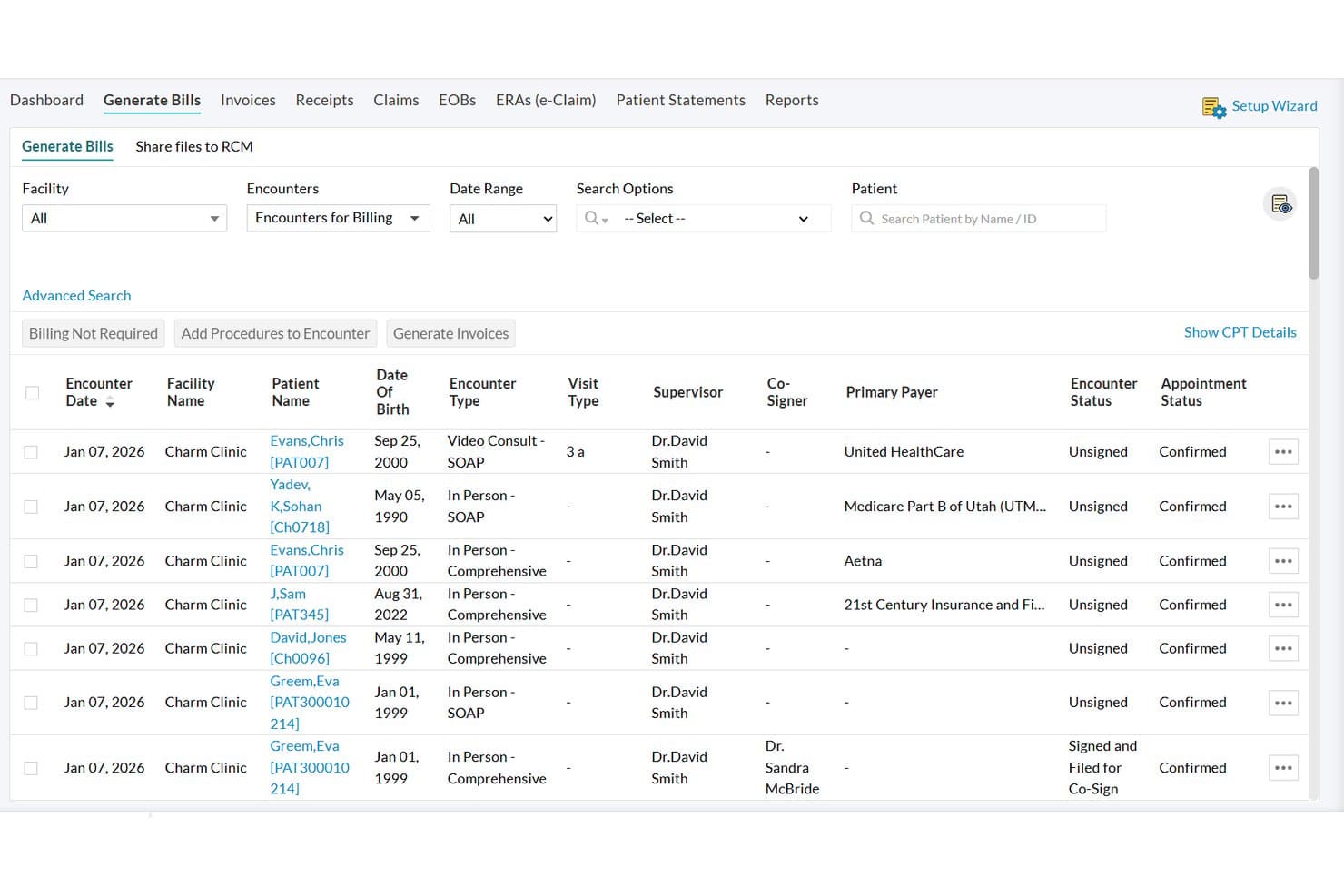
CharmHealth offers a Generate Bills screen displaying patient encounters with filtering options for facility, date range, and payer for streamlined medical billing. CharmBillerPro by CharmHealth is a cloud-based medical billing platform that handles claims submission, ERA auto-posting, patient billing, RCM reporting, and multi-EHR management from a single browser-accessible interface.
Who Is CharmHealth Best For?
CharmHealth suits medical billing companies and practice administrators managing claims across multiple providers or EHR systems from a Mac.
Why I Picked CharmHealth
CharmHealth earns its spot on my shortlist because CharmBillerPro is purpose-built for billing companies managing claims across multiple practices. I love that it automatically pulls patient demographics, insurance data, and procedure codes from chart notes in any connected EHR, not just Charm's own. On top of that, the AI-driven claim scrubbing runs custom rules per practice, so each client's rejection patterns get addressed individually.
CharmHealth Key Features
- Optum clearinghouse integration: Submit and track claims electronically to a broad network of payers without manual exports.
- Automated ERA posting: Match electronic remittance advice directly to patient accounts for faster reconciliation.
- Role-based access controls: Assign permissions for billing teams, administrators, and providers to manage data security.
- Customizable RCM analytics dashboards: Create real-time, HIPAA-compliant reports for revenue cycle and aging workflows.
CharmHealth Integrations
CharmHealth offers native integrations with Optum Clearinghouse, Bluefin, QuickBooks, PointClickCare, Surescripts, and Fullscript. An API is available for custom integrations.
Pros and Cons
Pros:
- ERA auto-posting handles multi-practice remittances simultaneously
- AI claim scrubbing customized per practice
- Runs natively on Mac without emulation
Cons:
- Customer support response times can be slow
- Mobile app lacks full billing functionality
Learn more about CharmHealth: Best flexible claims editing for Mac practices
- Free demo available
- From $199/user/month
Visit WebsiteCustomer Rating:4.5/5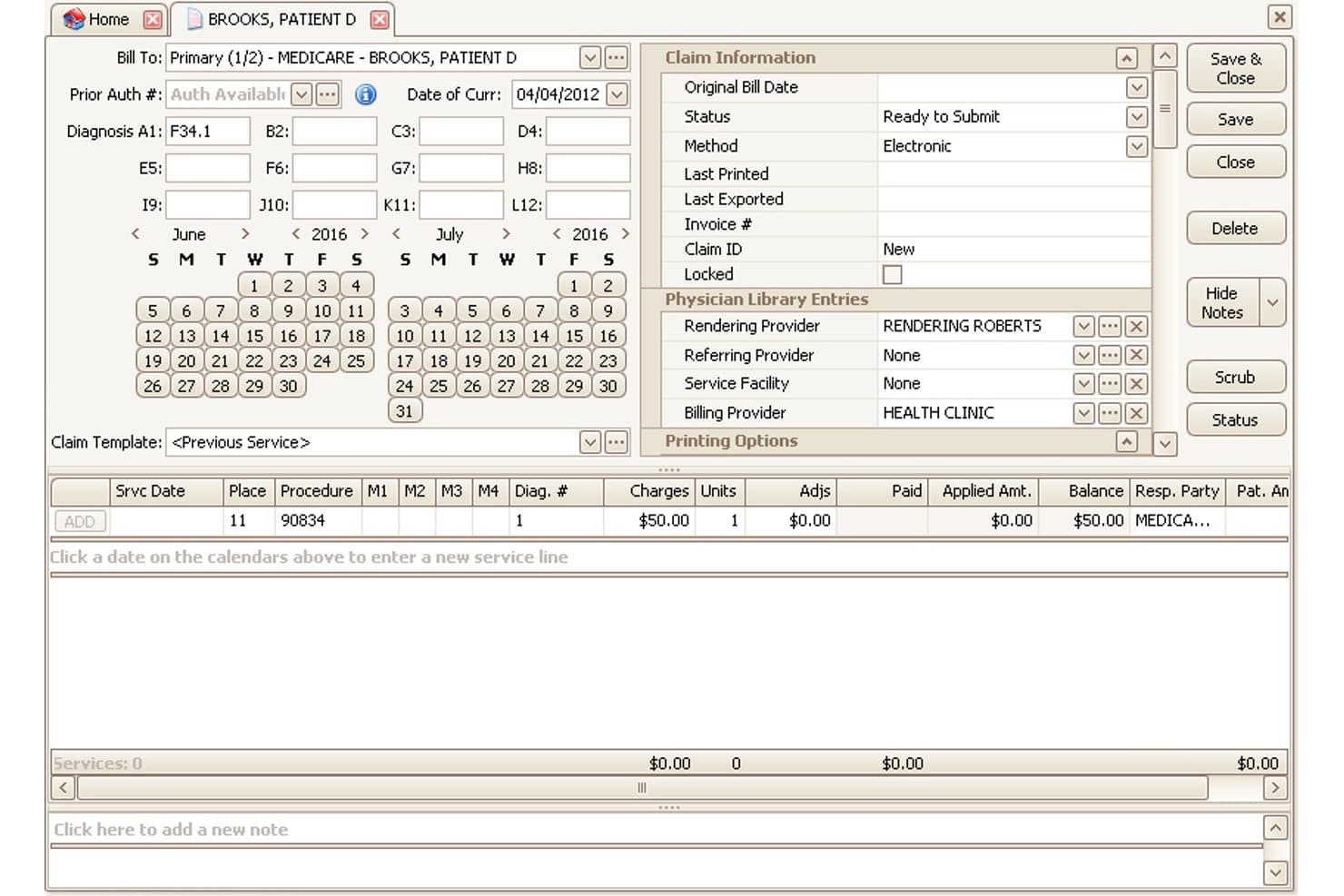
EZClaim offers a detailed claim entry interface with diagnosis codes, service lines, provider assignments, and billing status management. EZClaim is a cloud-based medical billing platform for small and mid-sized practices that handles electronic claims submission, ERA posting, eligibility verification, patient statements, and payment processing from Mac or PC devices.
Who Is EZClaim Best For?
EZClaim is a good fit for medical billing companies and independent billing specialists who manage claims across multiple provider accounts from a single platform.
Why I Picked EZClaim
I've included EZClaim in my top picks because of how flexibly it handles claim editing across multiple provider accounts on Mac. I particularly like the multi-EHR import, which lets billing companies pull claim data from systems like WebPT, Practice Fusion, and Amazing Charts without rebuilding claims from scratch. The unlimited customizable grids let you configure which data fields are visible, and the TriZetto clearinghouse connection catches errors before claims go out the door.
EZClaim Key Features
- Integrated payment processing: Accept credit card payments directly through EZClaimPay for quicker patient payment collection.
- HIPAA-compliant reporting: Access over 40 built-in reports and export customizable data grids in a secure, compliant environment.
- Multi-company file management: Manage separate billing data for multiple practices or clinics from a single EZClaim account.
- Real-time financial dashboards: View up-to-date revenue, claim status, and operational metrics in a single centralized dashboard.
EZClaim Integrations
EZClaim offers native integrations with TriZetto, Practice Fusion, Amazing Charts, QuickEMR, WebPT, HomeTrak, BillFlash, ElationHealth, and ReminderCall. An API is available for custom integrations.
Pros and Cons
Pros:
- Month-to-month contracts with no long-term commitment
- Real-time eligibility verification built in natively
- Manages multiple provider accounts in one login
Cons:
- No custom report builder for advanced reporting
- Mac access requires Azure Virtual Desktop setup
Learn more about EZClaim: Best for cloud billing across multiple clinics
- Not available
- Pricing upon request
Visit WebsiteCustomer Rating:3.7/5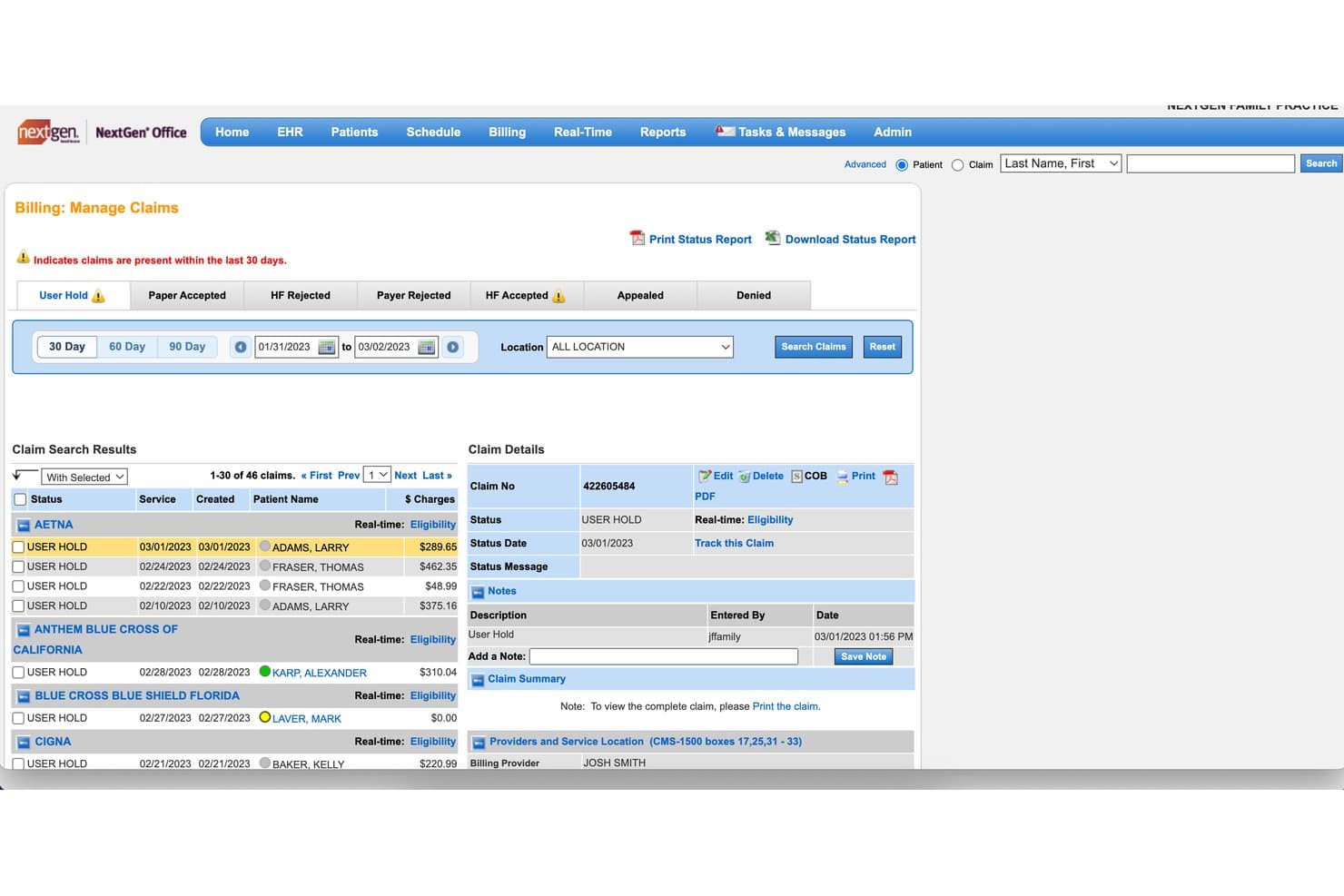
NextGen Office offers a Billing Manage Claims dashboard that displays claim statuses, patient names, charge amounts, and detailed claim information organized by insurance payer. NextGen Office is a cloud-based EHR and practice management platform with integrated medical billing, claims submission, insurance eligibility verification, and revenue cycle management, all browser-accessible on Mac.
Who Is NextGen Office Best For?
NextGen Office suits medical billing companies and practice administrators managing claims and revenue cycle workflows across multiple small to mid-sized clinic locations.
Why I Picked NextGen Office
I picked NextGen Office because its multi-practice management lets a billing team submit claims, track A/R, and post payments across several clinic locations from one cloud login. Since it runs natively in Safari or Chrome, there's no workaround needed on Mac. I especially like that real-time eligibility checks and NextGen Pay payment processing are built into the same platform, so billers aren't switching between tools to cover different clinics.
NextGen Office Key Features
- Cloud-based EHR integration: Access clinical charting, e-prescribing, and documentation directly within your billing workflow from any Mac browser.
- Embedded patient portal: Allow patients to schedule appointments, view statements, and submit payments online without logging into separate systems.
- Role-based access controls: Set permissions for users handling claims, billing, reporting, and patient data to maintain HIPAA compliance.
- Reporting dashboards: Generate accounts receivable, productivity, and aging reports with built-in analytics for financial monitoring.
NextGen Office Integrations
NextGen Office offers native integrations with Waystar, Clearwave, Doctible, Solutionreach, InstaMed, CoverMyMeds, OnBase, and supports Apple Health chart integration. An API is available for custom integrations.
Pros and Cons
Pros:
- Runs natively in Safari without emulation
- Real-time eligibility checks built into the platform
- Multi-clinic billing managed from one login
Cons:
- Report customization options are fairly limited
- Customer support response times are reportedly slow
Learn more about NextGen Office: Best quick-start onboarding for Mac-based staff
- 14-day free trial + free demo available
- From $199/provider/month
Visit WebsiteCustomer Rating:3.7/5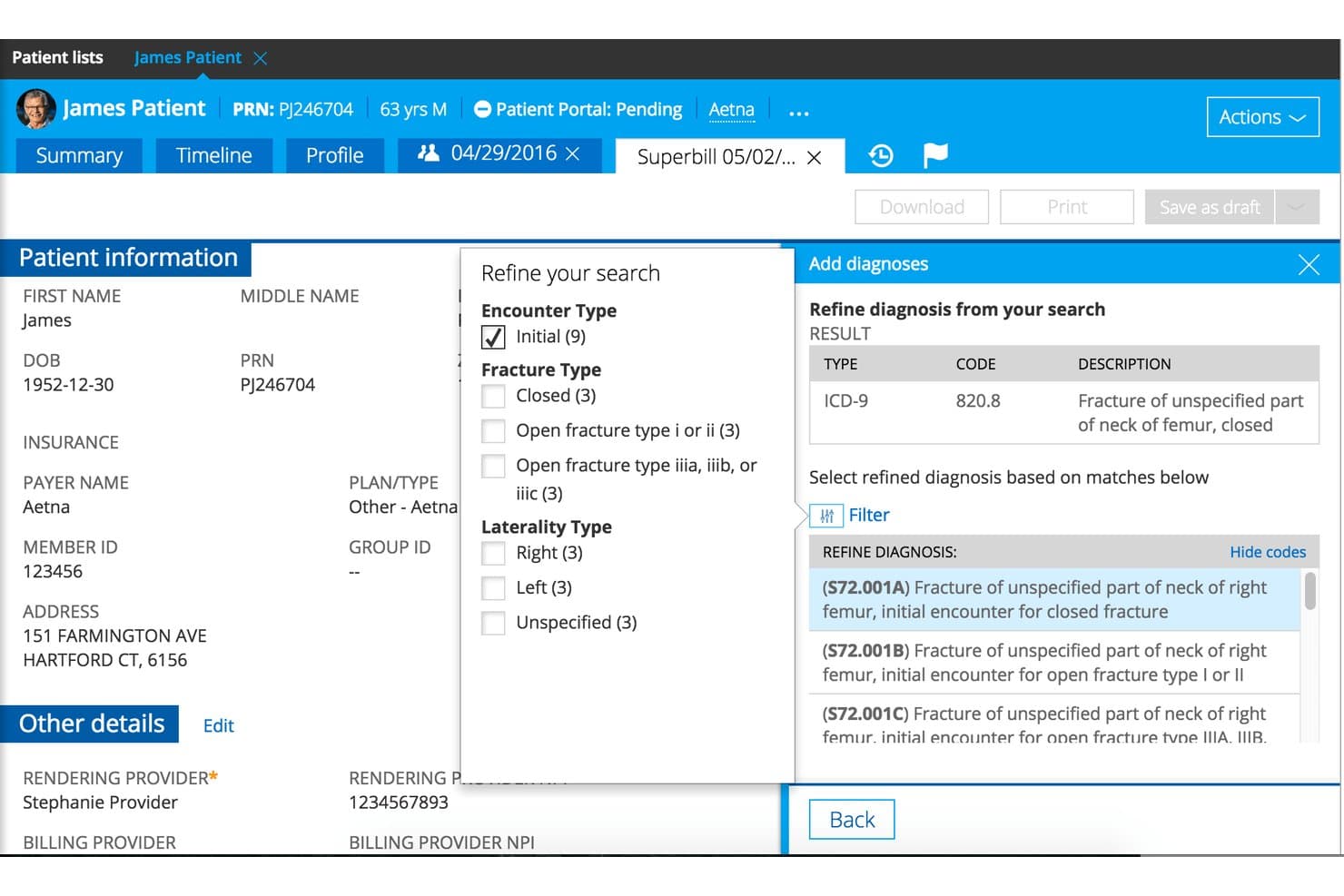
Practice Fusion offers ICD-9 to ICD-10 diagnosis refinement tools within its superbill workflow, helping providers select precise billing codes for Mac-based medical practices. Practice Fusion is a cloud-based EHR platform with an integrated billing suite that covers claims submission, payment posting, AR tracking, and financial reporting, all accessible via browser on macOS.
Who Is Practice Fusion Best For?
Practice Fusion fits independent and small practices that want a single platform for both clinical charting and billing without managing on-premise software.
Why I Picked Practice Fusion
Practice Fusion earns its spot on my shortlist because the onboarding experience is genuinely low-friction for Mac-based staff. Since it runs entirely in the browser, there's no software installation or OS configuration to worry about. The base plan includes 1-on-1 training sessions alongside a 24/7 knowledge base, so new billing staff can get up to speed without waiting on IT. I also like the free trial, which lets your team work through real billing workflows before committing.
Practice Fusion Key Features
- Integrated claims management: Create, scrub, and submit insurance claims directly from the platform without extra software.
- Electronic remittance advice (ERA) posting: Import and post ERA/835 files for payer reconciliation and payment tracking.
- Patient billing statements: Generate and deliver patient statements, both electronically and by mail, using built-in tools.
- HIPAA-compliant reporting: Access standard accounts receivable and revenue cycle reports in a secure, cloud-based environment.
Practice Fusion Integrations
Practice Fusion offers native integrations with Quest Diagnostics, LabCorp, CGM LABDAQ, Updox, Medsender, Avalon Laboratory System, OpenPM, DeepScribe, Service Center, and QuickSlot. It also integrates with billing platforms like AdvancedMD, NueMD, and CollaborateMD. An API is available for custom integrations.
Pros and Cons
Pros:
- Unlimited non-signing staff licenses included
- Includes claim scrubbing and denial management
- Fully browser-based, no macOS emulation needed
Cons:
- Customer support response times frequently criticized
- No card-on-file for recurring patient copays
Learn more about Practice Fusion: Best integration with Apple hardware for billing
- Free demo available
- Pricing upon request
Visit WebsiteCustomer Rating:3.6/5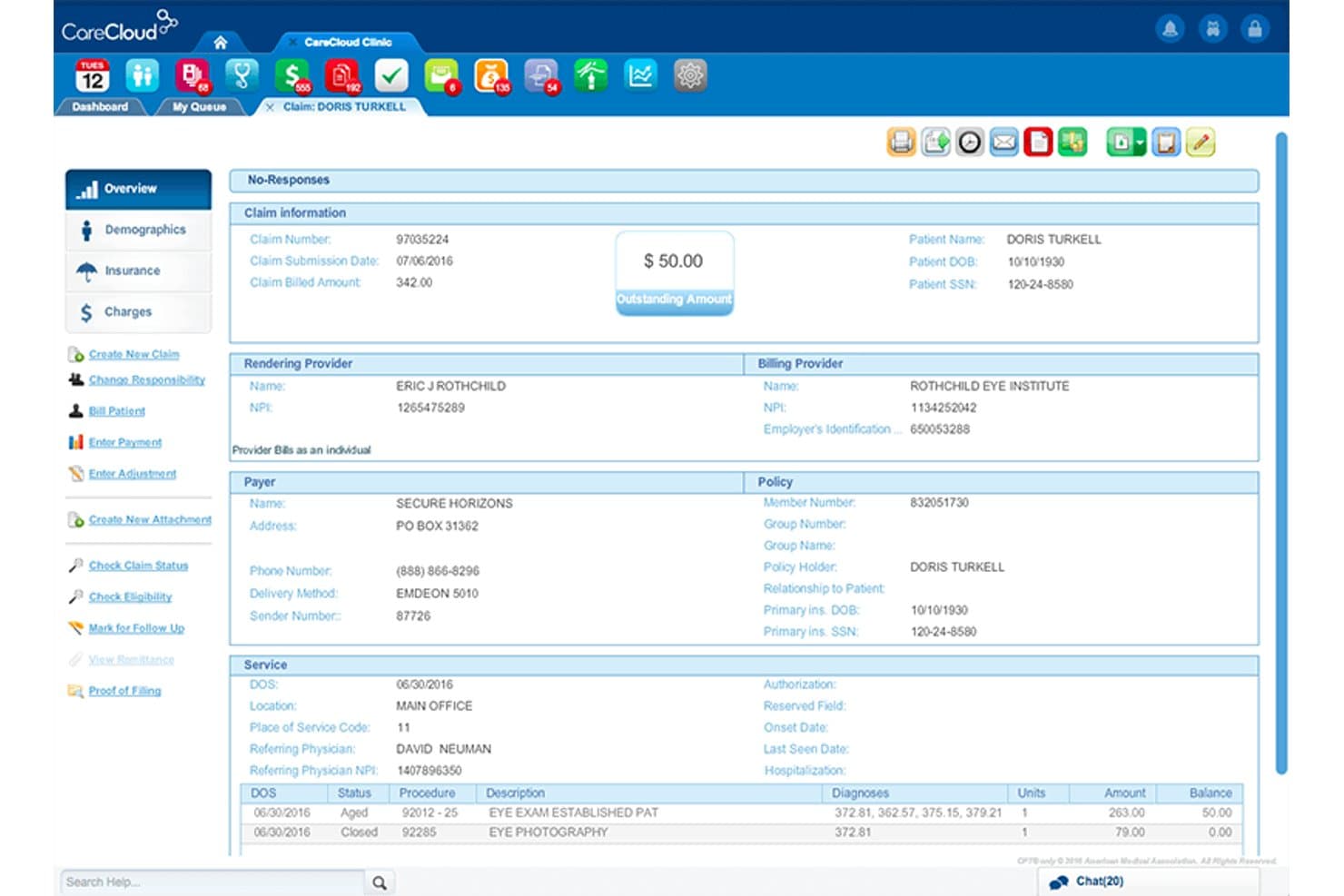
CareCloud displays a detailed claim overview screen with billing, provider, payer, and service information for patient collections management. CareCloud is a cloud-based RCM platform that covers end-to-end medical billing, from insurance eligibility verification and claims scrubbing to denial management, ERA posting, and patient payment collection—accessible via browser on Mac or native iOS apps.
Who Is CareCloud Best For?
CareCloud suits independent practices and small medical groups that run Apple hardware and want billing, claims, and patient payments managed in one cloud platform.
Why I Picked CareCloud
I picked CareCloud as one of the best because its Apple hardware integration goes well beyond browser access. The Breeze module runs natively on iOS devices, so front-desk staff can process patient payments, handle check-ins, and collect card-on-file information directly from an iPad. On the clinical and billing side, the CareCloud Companion iOS app gives billers and physicians access to patient records and billing queues without needing a desktop at all.
CareCloud Key Features
- CollectiveIQ rules engine: Automatic claim scrubbing flags coding errors and payer-specific issues before submission.
- Real-time insurance eligibility checks: Instantly verifies patient insurance coverage with major payers from within the platform.
- Automated denial management: Tracks, organizes, and prioritizes denied claims for quick resolution by your billing team.
- Customizable revenue cycle dashboards: Interactive dashboards let you track collections, A/R aging, and billing workflow analytics in a HIPAA-compliant environment.
CareCloud Integrations
CareCloud offers native integrations with EHRYourWay, CodoniX EHR, ICANotes, M*Modal, Dragon, and Clover devices for payment processing. It also provides an API for custom integrations and connects to major clearinghouses for electronic claims.
Pros and Cons
Pros:
- Concierge service manages billing end-to-end
- CollectiveIQ AI scrubbing lowers claim denial rates
- Breeze runs natively on iPad devices
Cons:
- Support quality is inconsistent across accounts
- Reporting customization options are limited
Learn more about CareCloud: Best fast claim submission workflow on Mac
- Free demo available
- Pricing upon request
Visit WebsiteCustomer Rating:4.1/5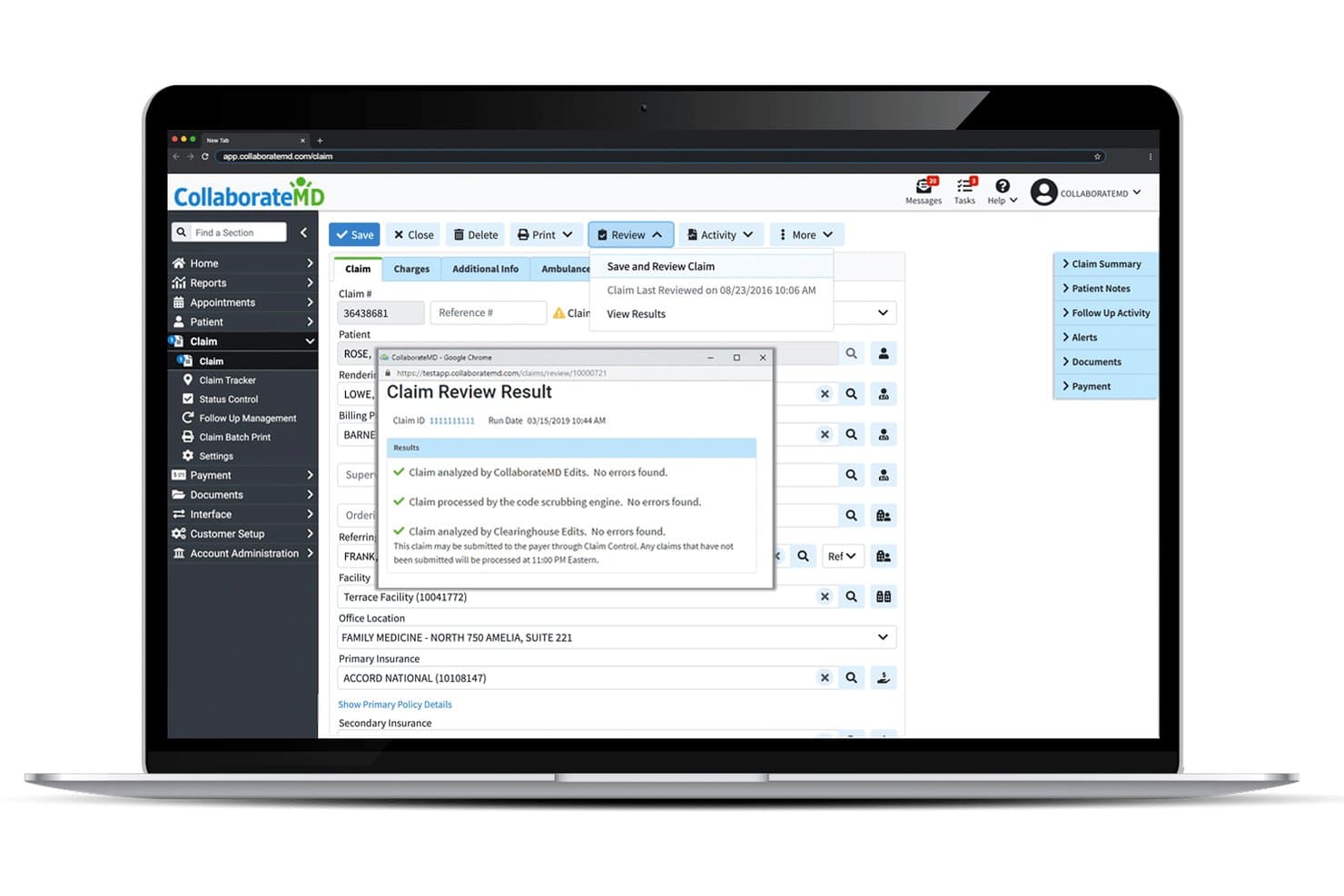
CollaborateMD offers a Claim Review Result popup that displays real-time claim validation checks, including CollaborateMD Edits, code scrubbing, and Clearinghouse Edits with no errors found. CollaborateMD is a cloud-based medical billing and practice management platform built for independent practices, combining electronic claim submission, insurance eligibility verification, ERA posting, patient billing, and revenue cycle reporting.
Who Is CollaborateMD Best For?
CollaborateMD is a strong fit for small to mid-sized independent practices and medical billing companies that prioritize a billing-focused platform over a full EHR suite.
Why I Picked CollaborateMD
CollaborateMD earns its spot on my shortlist because of how fast and clean the claim submission process is on macOS. Since it's fully browser-based, I can run the entire billing workflow in Safari without any Windows virtualization workarounds. What I appreciate most is the built-in clearinghouse with Level 2 claim scrubbing, which catches payer-specific errors before submission and helps my team maintain a near-99% first-pass acceptance rate.
CollaborateMD Key Features
- Insurance eligibility verification: Instantly check patient insurance coverage and receive real-time eligibility responses within the platform.
- Customizable reporting: Access over 125 pre-built financial and operational reports, or build custom reports with drag-and-drop tools.
- Integrated patient payment portal: Let patients pay balances securely online using a branded portal with card-on-file support.
- Specialty-specific code libraries: Use procedure and diagnosis code sets tailored for over 100 specialties to streamline claim data entry.
CollaborateMD Integrations
CollaborateMD offers native integrations with Practice Fusion, Elation, Amazing Charts, Hello Health, Kipu, Medical Mime, Praxis EMR, PrognoCIS, Ritten, Sevocity, WebPT, and Alleva, and provides an API for custom integrations.
Pros and Cons
Pros:
- 125+ pre-built revenue cycle reports included
- Built-in clearinghouse with Level 2 scrubbing
- Fully browser-based, no Mac workarounds needed
Cons:
- Occasional extra fees for storage and portal
- No native iOS or mobile companion app
Learn more about CollaborateMD: Best automated claim tracking for small offices
- Free demo available
- Pricing upon request
Visit WebsiteCustomer Rating:3.9/5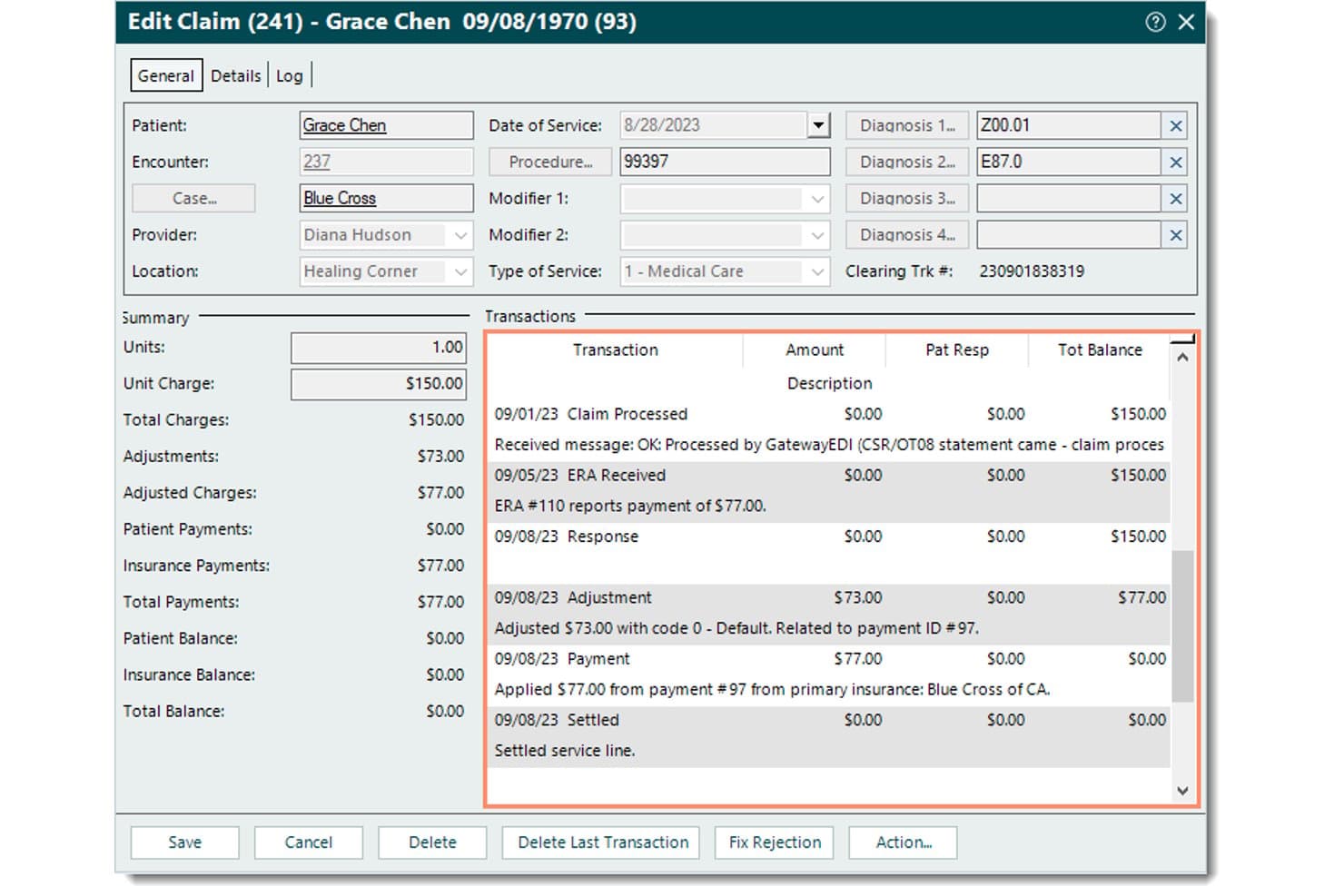
Tebra offers a detailed Edit Claim view showing transaction history, payment summaries, and diagnosis codes for streamlined medical billing on Mac. Tebra is a cloud-based medical billing and practice management platform for independent practices, combining electronic claims submission, real-time insurance eligibility verification, automated ERA posting, and patient payment collection.
Who Is Tebra Best For?
Tebra is a strong fit for solo physicians and small independent practices that handle their own billing in-house with a lean administrative team.
Why I Picked Tebra
I picked Tebra as one of the best because its claim tracking is purpose-built for small offices running lean billing operations. Color-coded status alerts show exactly where each claim sits, from charge submission to payment posting, without digging through separate reports. Payer-specific scrubbing rules auto-flag errors before claims leave your system, so rejections get caught before they cost you time on manual rework.
Tebra Key Features
- Real-time insurance eligibility checks: Instantly verifies coverage details for patients against thousands of payer databases.
- Automated patient statement batching: Combines paper and digital statement delivery with QR code and payment link options.
- Integrated payments processing: Supports card-on-file, text-to-pay, and mobile payments within patient workflows.
- HIPAA-compliant analytics dashboard: Provides access to standard A/R, aging, and revenue cycle reports in a secure environment.
Tebra Integrations
Tebra offers native integrations with Kareo Billing, Stripe, WebPT, Microsoft Excel, and QuickBooks Online Advanced, and it provides an API for custom integrations.
Pros and Cons
Pros:
- Color-coded claim status alerts built in
- Real-time eligibility checks across 2,700+ payers
- Automated ERA posting cuts manual payment entry
Cons:
- Reporting requires manual data exports to customize
- Desktop billing app is Windows-native only
Learn more about Tebra: Best integrated claims and EHR for Apple devices
- Free demo available
- Pricing upon request
Visit WebsiteCustomer Rating:3.9/5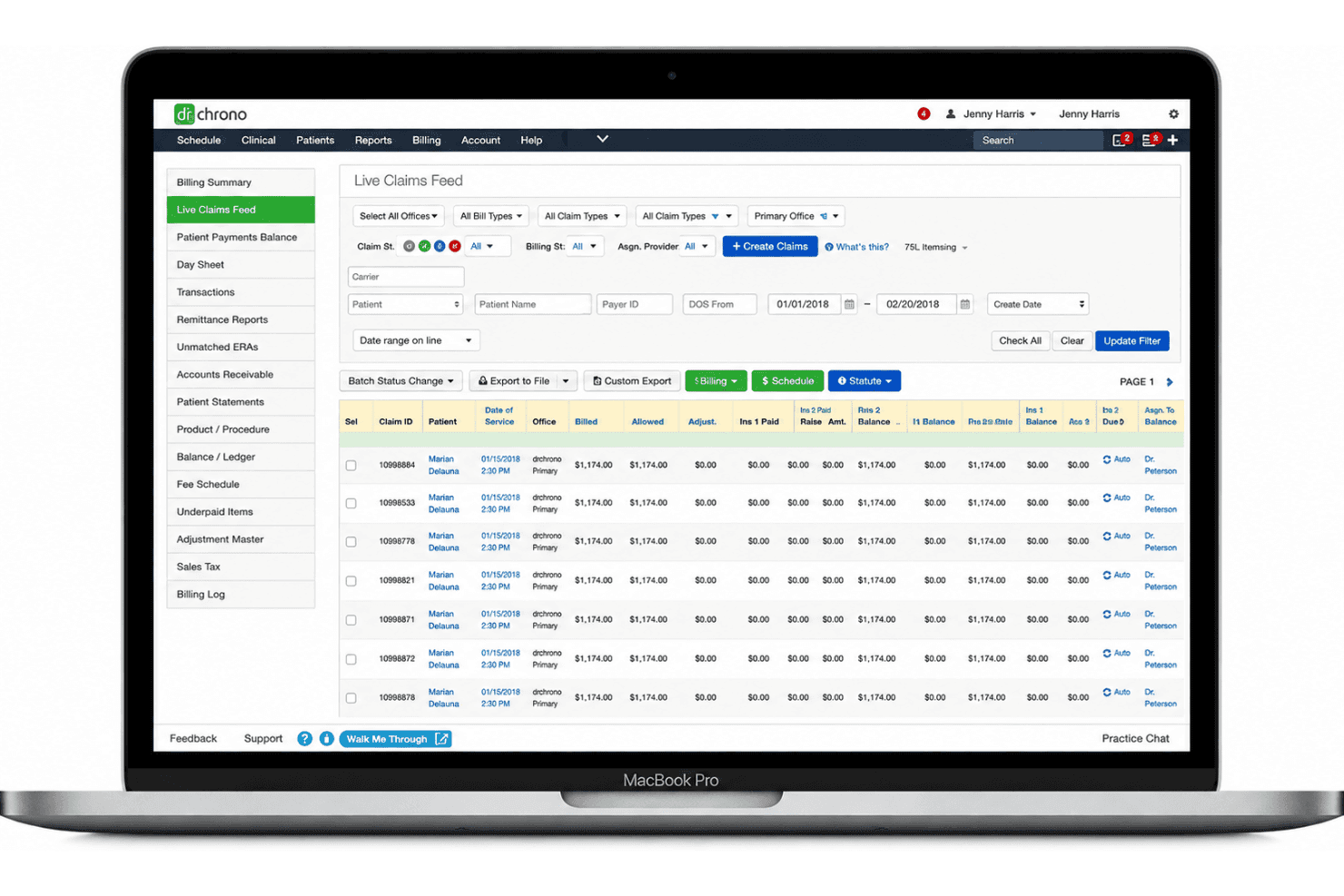
DrChrono offers a Live Claims Feed dashboard that displays billing claim statuses, amounts, and patient details in a structured table view on Mac. DrChrono is a cloud-based EHR and medical billing platform built natively for Apple devices, covering claims submission, insurance eligibility verification, ERA/EOB posting, and revenue cycle management.
Who Is DrChrono Best For?
DrChrono is a strong fit for independent practices and small clinics that have standardized on Apple hardware and want billing and EHR in one platform.
Why I Picked DrChrono
DrChrono earns its spot on my shortlist because it's the only billing platform I've come across that was built from the ground up for Apple hardware, not adapted to work on it. I love how the EHR and billing are genuinely one system: submitting a claim pulls directly from the encounter record, so I'm not re-entering codes I've already documented. The Live Claims Feed gives me real-time claim status visibility right from my iPad, and denied claims get automatically resubmitted within 48 hours.
DrChrono Key Features
- Batch insurance eligibility checks: Run real-time or scheduled eligibility verification for multiple patients at once.
- Custom medical billing profiles: Save and reuse code sets, modifiers, and diagnoses tailored for different services or specialties.
- Integrated patient payment portal: Offer patients branded online bill pay and statements accessible via email, text, or web.
- HIPAA-compliant financial reporting: Access accounts receivable, aging, and revenue cycle reports within a secure environment.
DrChrono Integrations
DrChrono offers native integrations with Quest Diagnostics, LabCorp, Square, and eProvider Solutions, supports Jamf for Apple device deployment, and provides an API for custom integrations.
Pros and Cons
Pros:
- Automated 48-hour denial resubmission included
- EHR and billing share one record
- Native iPad and iPhone billing app available
Cons:
- Managed billing requires using DrChrono's EHR
- Customer support response times reportedly slow
Learn more about DrChrono: Best customizable billing dashboards for Mac users
- 30-day free trial + free demo available
- From $130/user/month
Visit WebsiteCustomer Rating:3.6/5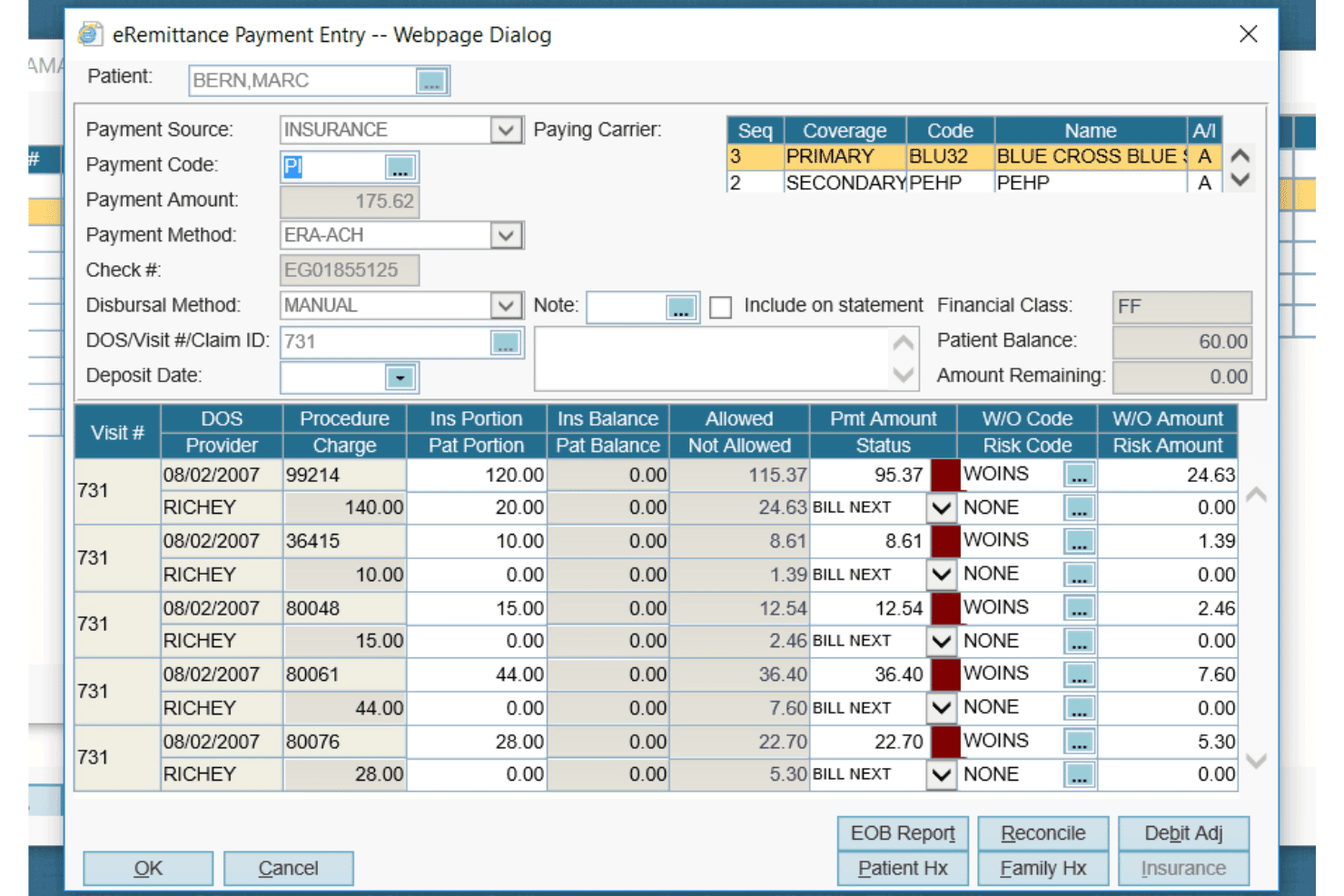
AdvancedMD offers a detailed eRemittance Payment Entry dialog for managing insurance billing, claim payments, and write-off codes per procedure. AdvancedMD is a cloud-based medical billing platform that handles claims submission, insurance eligibility verification, ERA posting, patient payment collection, and A/R reporting across independent and multi-provider practices.
Who Is AdvancedMD Best For?
AdvancedMD suits independent practice owners and medical billing specialists managing revenue cycle workflows across multiple providers or locations.
Why I Picked AdvancedMD
AdvancedMD earns its spot on my shortlist because of how much control it gives you over your A/R dashboards. I love that the A/R Control Center lets me configure worklists, track denials, and view MTD and YTD comparisons all from a browser on my Mac. The ClaimInspector scrubs claims against CCI and LCD rules before submission, so denial trends I'm seeing on the dashboard are already being addressed at the source.
AdvancedMD Key Features
- Central billing office: Manage billing for multiple providers and locations within a unified database and login.
- Integrated clearinghouse: Submit claims directly to payers and receive remittances without manual uploads or downloads.
- EHR integration: Automatically transfer clinical data and copay details from documentation to billing workflows.
- Batch insurance eligibility: Run eligibility verification for multiple patients at once, streamlining pre-visit checks.
AdvancedMD Integrations
AdvancedMD offers native integrations with ChartRequest, DAX Copilot, DeepScribe, Doctorsoft, InstaMed, LeadSquared, and NextPatient. An API is available for custom integrations, and additional marketplace integrations are supported.
Pros and Cons
Pros:
- Automated ERA posting with denial workflows
- ClaimInspector flags claim errors before submission
- Highly customizable A/R dashboard worklists
Cons:
- Windows recommended for optimal performance
- Paper claim printing broken on macOS
 10Best for specialty billing templates
CureMD
- Free demo available
- Pricing upon request
Visit WebsiteCustomer Rating:3.5/5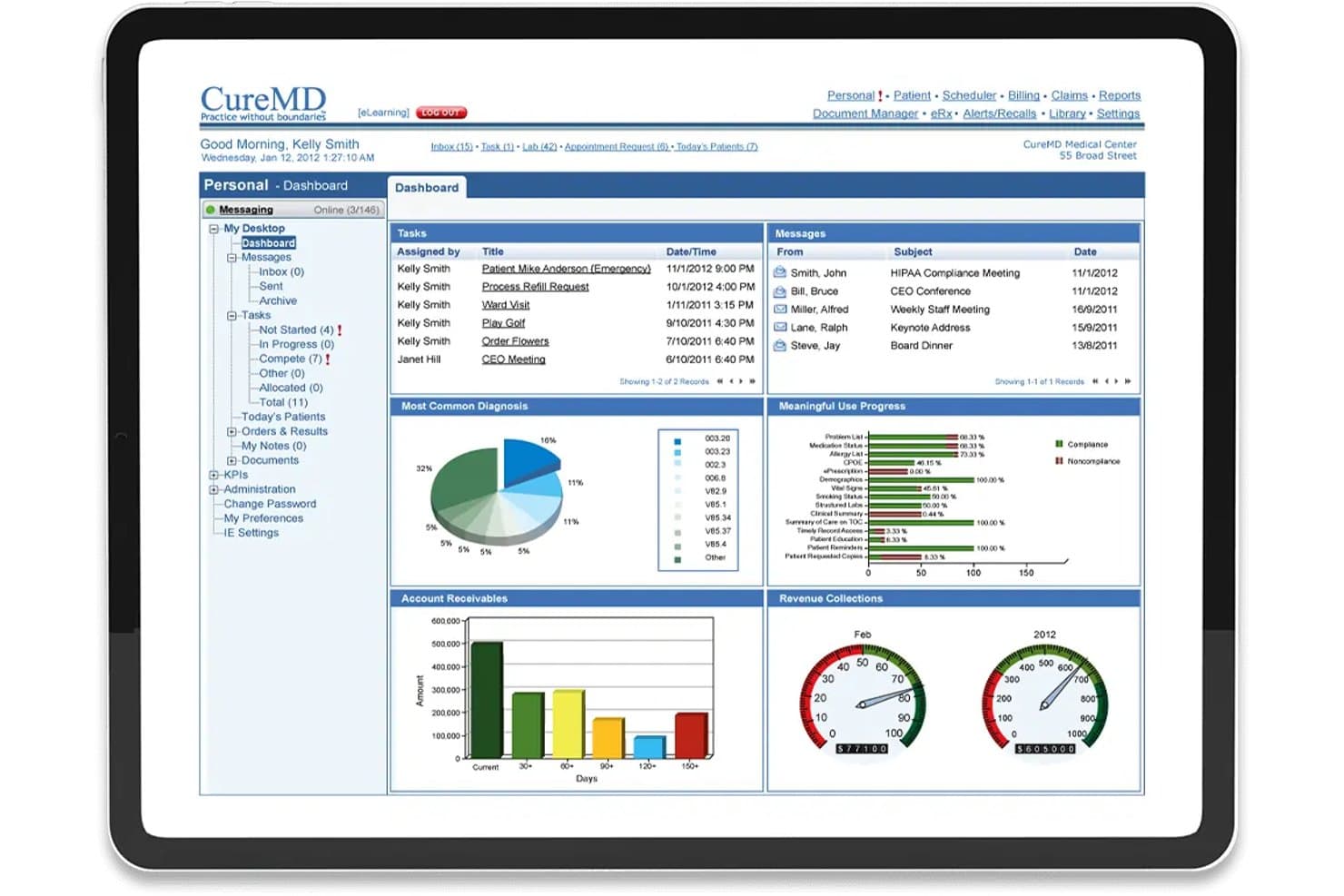
CureMD offers a comprehensive medical billing dashboard displaying account receivables, revenue collections, tasks, messages, and meaningful use progress for Mac-compatible practice management. CureMD is a cloud-based medical billing and EHR platform that combines electronic claims submission, specialty-specific billing templates, insurance eligibility verification, and revenue cycle management.
Who Is CureMD Best For?
CureMD is a strong fit for specialty medical practices—such as cardiology, neurology, or OB/GYN—that need billing workflows and templates built around their specific coding requirements.
Why I Picked CureMD
I picked CureMD as one of the best because its specialty-specific billing templates are genuinely built around how specialties like cardiology, neurology, and OB/GYN actually code. The e-Super Bill feature surfaces E&M code suggestions at the point of documentation, and the rules engine scrubs claims against 4 million+ rules before submission, catching specialty-specific errors upfront. Both features work through a cloud-based platform accessible via a Mac browser, no Windows emulation needed.
CureMD Key Features
- KPI dashboard: Real-time dashboards show revenue metrics, copays, AR by payer, and denial status in a HIPAA-compliant environment.
- Check-in validation: Instantly verifies patient insurance eligibility before visits using integrated clearinghouse connectivity.
- Advanced reporting: Offers preformatted and custom revenue cycle and AR reports accessible from a Mac browser.
- Integrated patient portal: Lets practices share billing statements, manage payments, and support communication with patients online.
CureMD Integrations
CureMD offers native integrations with LabCorp, Quest Diagnostics, BioReference, Enzo Clinical Labs, UPMC, HCA HealthCare, and state immunization registries. It also supports e-prescribing across 40,000+ pharmacies and offers an API for custom integrations.
Pros and Cons
Pros:
- First-pass claim acceptance rate reaches 96%
- Browser-based access works on Mac natively
- Specialty templates cover 30+ medical disciplines
Cons:
- Mobile app functionality lags desktop experience
- Legacy Windows and IE dependencies still exist
Learn more about CureMD:
Alte programe de facturare medicală pentru Mac
Iată câteva opțiuni suplimentare de programe de facturare medicală pentru Mac care nu au ajuns pe lista mea restrânsă, dar merită totuși analizate:
- 11athenahealthBest real-time eligibility checks for Mac users
- 12RXNTBest role-based controls for billing security
- 13CarepatronBest for simple invoicing and payment tracking
- 14PracticeSuiteBest for multi-location billing on Apple hardware
- 15SimplePracticeBest for integrated online client payments on Mac
- 16NueMDBest for streamlined claims from any Mac device
- 17eClinicalWorksBest for cloud-native billing with Mac access
- 18AllegianceMDBest AI-driven coding assistance for Mac practices
- 19TotalMDBest for electronic and paper claims
- 20Medisoft CloudBest legacy billing system now optimized for Mac
How I Evaluate Medical Billing Software for Mac
I evaluate each tool through two lenses: baseline capabilities—like ERA posting and macOS claims submission—and the differentiators that matter most to Mac-based practices.
Core Functionality (Table Stakes For This List)
When I'm selecting tools for my list, I rank each one on a scale from 0 (does not offer the functionality) to 5 (excels in this area) for each core functionality listed below. Then, I calculate the tool's total score into a percentage. Each tool needs to achieve a minimum total score of 65% to be considered for inclusion.
- macOS Compatibility: I check whether the platform runs in Safari or Chrome on Mac without needing Parallels, Boot Camp, or any Windows workaround.
- Electronic Claims Submission: Each tool should let you generate, scrub, and submit CMS-1500 claims electronically to payers or clearinghouses.
- Insurance Eligibility Verification: Real-time eligibility checks matter—I look for tools that verify coverage before a patient's visit to prevent claim rejections.
- ERA/Payment Posting: Automated posting of ERA/835 files saves billing staff hours of manual data entry and reduces reconciliation errors.
- Patient Billing & Statements: I evaluate whether the tool produces patient statements, tracks balances, and supports online payment collection options.
- HIPAA-Compliant Reporting: Standard A/R aging and revenue cycle reports should live within a HIPAA-compliant environment with proper access controls.
Once I have a list of tools that meet the criteria, I consider what sets each platform apart.
Differentiating Factors (What Sets Vendors Apart)
Here's how I compare and contrast different vendors:
Standout Features
Integrated claim scrubbing is a big differentiator—I look for tools that catch coding errors and missing modifiers before submission, which directly cuts denial rates. ERA auto-posting is another area I evaluate closely, since matching payments to claims without manual entry saves billing staff significant time each week. I also consider whether the platform offers a patient payment portal with options like text-to-pay or payment plans, making it easier to collect balances outside the front desk.
Beyond Features
Clearinghouse connectivity is a key differentiator—I check whether a platform integrates directly with major clearinghouses like Availity or Change Healthcare, since fewer intermediaries mean faster claim turnarounds. HIPAA compliance goes beyond a checkbox; I look for signed BAAs, audit logging, and role-based access controls that protect distributed Mac users. Practice size and specialty fit also matter, especially for clinics in areas like mental health or chiropractic that need specialty-specific code sets and templates.
Cum să alegeți un program de facturare medicală pentru Mac
Este ușor să vă pierdeți în liste lungi de funcții și structuri complexe de prețuri. Pentru a vă ajuta să rămâneți concentrat în timp ce parcurgeți procesul unic de selectare a programului, iată o listă de verificare a factorilor de care trebuie să țineți cont:
| Factor | Aspecte de luat în considerare |
|---|---|
| FactorScalabilitate | Aspecte de luat în considerarePoate platforma să susțină extinderea de la cabinete individuale la clinici cu mai mulți furnizori, fără migrări majore sau dificultăți suplimentare? |
| FactorIntegrări | Aspecte de luat în considerareSe conectează programul direct la EHR-ul dumneavoastră, la procesatorii de plăți sau la casele de compensare pentru a reduce introducerea duplicată a datelor? |
| FactorPosibilități de personalizare | Aspecte de luat în considerareCât de flexibil este sistemul în adaptarea șabloanelor, fluxurilor de lucru sau rapoartelor pentru a răspunde cerințelor unice ale cabinetului dumneavoastră? |
| FactorUșurință în utilizare | Aspecte de luat în considerareVa considera echipa dumneavoastră interfața intuitivă sau este probabil ca perioada de învățare să încetinească operațiunile zilnice? |
| FactorImplementare și integrare inițială | Aspecte de luat în considerareCe asistență sau instruire este disponibilă pentru migrarea conturilor, configurarea utilizatorilor și configurarea plătitorilor pe dispozitivele Mac? |
| FactorCost | Aspecte de luat în considerareExistă taxe de configurare, lunare și pentru fiecare solicitare de despăgubire? Sunt prețurile clare și previzibile pe măsură ce cabinetul dumneavoastră se extinde sau își reduce activitatea? |
| FactorMăsuri de securitate | Aspecte de luat în considerareFurnizorul oferă detalii clare despre criptare, disponibilitatea BAA și controlul accesului pentru a răspunde cerințelor HIPAA? |
| FactorDisponibilitatea asistenței | Aspecte de luat în considerareSunt resursele de ajutor și asistența tehnică cu adevărat familiarizate cu Mac și disponibile prompt în timpul programului dumneavoastră de lucru? |
Ce este un program de facturare medicală pentru Mac?
Programul de facturare medicală pentru Mac este o platformă digitală care permite echipelor medicale să gestioneze solicitările de despăgubire către asigurări, facturarea pacienților și urmărirea veniturilor direct de pe dispozitivele cu macOS. Aceste sisteme sunt concepute să funcționeze fără probleme pe hardware Apple, oferind suport pentru fluxuri de lucru conforme cu HIPAA, solicitări electronice de despăgubire, verificări ale eligibilității, înregistrarea plăților și gestionarea extraselor de cont ale pacienților, fără a fi nevoie de emularea Windows.
Funcțiile programelor de facturare medicală pentru Mac
Atunci când alegeți un program de facturare medicală pentru Mac, urmăriți următoarele funcții esențiale:
- Compatibilitate cu Mac: Rulează nativ pe macOS sau într-un browser fără emulare Windows, oferind o experiență fluidă pe hardware Apple.
- Transmiterea electronică a cererilor de plată: Vă permite să creați, să verificați și să trimiteți formulare CMS-1500 sau UB-04 direct către plătitori și case de compensare, pentru plăți mai rapide.
- Verificarea eligibilității pentru asigurare: Verifică instantaneu acoperirea pacientului înaintea consultațiilor, reducând respingerile cererilor de plată și îmbunătățind eficiența programărilor.
- Înregistrarea automată a ERA și EOB: Acceptă fișierele de remitere și corelează plățile cu cererile, reducând introducerea manuală a datelor și pașii de reconciliere.
- Facturarea pacienților și extrasele de cont: Generează și trimite extrase de cont, urmărește soldurile conturilor și gestionează fluxurile de plată ale pacienților din sistem.
- Portal de plăți online: Oferă pacienților un spațiu securizat și personalizat pentru vizualizarea și achitarea facturilor, configurarea planurilor de plată și utilizarea unor opțiuni precum Apple Pay.
- Rapoarte personalizabile: Oferă acces la rapoarte privind creanțele, vechimea acestora și productivitatea, conforme cu HIPAA, cu filtre și opțiuni pentru tablouri de bord care permit urmărirea situației financiare.
- Programare integrată: Sincronizează programările direct cu fluxurile de facturare, asigurând asocierea fiecărei consultații cu o cerere de plată sau o factură pentru înregistrarea corectă a costurilor.
- Controale de acces bazate pe roluri: Restricționează accesul membrilor echipei în funcție de responsabilități, sprijinind securitatea datelor și conformitatea cu HIPAA.
- Suport pentru mai multe locații și specialități: Se adaptează cabinetelor individuale sau de grup, inclusiv codurilor și fluxurilor de lucru specifice specialităților, pentru o gestionare flexibilă și scalabilă a facturării.
Beneficiile software-ului de facturare medicală pentru Mac
Implementarea unui software de facturare medicală pentru Mac oferă mai multe beneficii pentru echipa și afacerea dumneavoastră. Iată câteva dintre acestea:
- Experiență Mac nativă: Accesați întreaga platformă de pe dispozitive macOS fără emulare Windows, accelerând facturarea de pe orice computer Apple.
- Procesare mai rapidă a cererilor de plată: Transmiterea electronică a cererilor și instrumentele integrate de verificare vă ajută să reduceți respingerile și erorile și să primiți plățile mai rapid.
- Colectarea simplificată a plăților: Portalurile pentru pacienți și funcțiile de plată online facilitează achitarea plăților de către pacienți și urmărirea soldurilor de către echipa dumneavoastră.
- Reducerea introducerii manuale a datelor: Înregistrarea automată a ERA/EOB corelează plățile cu cererile, economisind ore de muncă repetitivă pentru reconciliere.
- Supraveghere financiară mai bună: Rapoartele personalizabile, conforme cu HIPAA, vă permit să monitorizați tendințele ciclului veniturilor și să abordați problemele din timp.
- Satisfacție îmbunătățită a pacienților: Extrasele de cont online, planurile de plată și fluxurile clare de facturare le oferă pacienților o experiență mai simplă și mai transparentă.
- Securitate îmbunătățită a datelor: Controalele de acces bazate pe roluri și mediile criptate contribuie la asigurarea conformității cu HIPAA și la protejarea informațiilor sensibile.
Costurile și prețurile software-ului de facturare medicală pentru Mac
Alegerea unui software de facturare medicală pentru Mac necesită înțelegerea diferitelor modele și planuri tarifare disponibile. Costurile variază în funcție de funcții, dimensiunea echipei, suplimente și multe altele. Tabelul de mai jos rezumă planurile comune, prețurile medii ale acestora și funcțiile incluse de obicei în soluțiile software de facturare medicală pentru Mac:
Tabel comparativ al planurilor pentru software-ul de facturare medicală pentru Mac
| Tipul planului | Preț mediu | Funcții comune |
|---|---|---|
| Tipul planuluiPlan gratuit | Preț mediu$0 | Funcții comuneUrmărirea de bază a cererilor, rapoarte simple, asistență limitată și extrase de cont manuale pentru pacienți. |
| Tipul planuluiPlan personal | Preț mediu$30-$80/utilizator/lună | Funcții comuneTransmiterea electronică a cererilor, verificarea eligibilității, extrase de cont online și asistență prin e-mail. |
| Tipul planuluiPlan pentru companii | Preț mediu$100-$250/utilizator/lună | Funcții comuneÎnregistrarea automată a ERA, portal de plăți, programare integrată, verificarea cererilor, asistență telefonică și rapoarte personalizate. |
| Tipul planuluiPlan pentru întreprinderi | Preț mediu$300+/utilizator/lună | Funcții comuneSuport pentru mai multe locații, șabloane pentru specialități, analize avansate, gestionarea dedicată a contului și integrări API. |
Software medical de facturare pentru Mac – întrebări frecvente
Iată câteva răspunsuri la întrebările frecvente despre software-ul medical de facturare pentru Mac:
Pot folosi software medical de facturare pentru Mac fără să instalez Windows sau Parallels?
Da, majoritatea soluțiilor moderne rulează nativ pe macOS sau în browser, astfel încât nu aveți nevoie de emulare Windows sau de software suplimentar pentru a gestiona eficient facturarea.
Ce ar trebui să verific pentru conformitatea cu HIPAA în software-ul de facturare pentru Mac?
Ar trebui să căutați funcții precum acorduri semnate cu partenerii de afaceri (BAA), criptare, jurnale de audit și controale de acces bazate pe roluri — toate esențiale pentru protejarea datelor pacienților pe sistemele Mac.
Funcționează software-ul de facturare pentru Mac cu sistemul meu EHR și cu casa de compensare?
Majoritatea platformelor oferă integrări cu sisteme EHR populare și case de compensare importante, dar verificați întotdeauna dacă sistemele pe care le utilizați în prezent sunt compatibile, pentru a evita munca manuală suplimentară.
Cât de dificil este să migrez datele de facturare din software-ul pentru Windows pe o platformă pentru Mac?
Migrarea datelor poate varia, dar mulți furnizori oferă asistență la configurare, instrumente de import și instruire pentru a transfera conturile și cererile dumneavoastră din sistemele mai vechi în noua soluție pentru Mac.
Există opțiuni pentru cabinete cu mai multe locații sau pentru cabinete de specialitate?
Da, mai multe platforme de facturare compatibile cu Mac acceptă mai multe locații și oferă șabloane, seturi de coduri și rapoarte specifice specialității, adaptate nevoilor unice ale cabinetului dumneavoastră.