

Gestionarea activității din domeniul otorinolaringologiei poate fi dificilă, mai ales când vine vorba despre administrarea dosarelor pacienților. Este posibil să vă confruntați cu o mulțime de documente și să vă doriți o modalitate mai simplă de a gestiona totul. Aici intervine software-ul EMR pentru otorinolaringologie. Acesta este conceput pentru a vă ajuta pe dumneavoastră și echipa dumneavoastră să gestionați mai eficient datele pacienților, astfel încât să vă puteți concentra asupra lucrului care contează cu adevărat — oferirea unor îngrijiri excelente.
În acest articol, voi prezenta principalele mele recomandări de software EMR pentru otorinolaringologie. Am testat și analizat independent fiecare soluție pentru a vă oferi o perspectivă imparțială. Veți găsi informații despre funcții, ușurința de utilizare și modul în care fiecare soluție se poate potrivi cabinetului dumneavoastră. Să începem și să găsim instrumentul potrivit pentru nevoile dumneavoastră.
Why Trust Our Software Recommendations
6,700+
Reviews
20
Industry experts
16+
Evaluation factors
14
Years
Our team has been testing and reviewing software since 2012. As medical practice leaders ourselves, we know how difficult—and important—it is to choose the right software.
For this guide, we evaluated tools using hands-on testing and independent research, scoring tools using our selection criteria.
Our reviews reflect our human editorial judgment, not a sales pitch.
Tabel comparativ: software EMR pentru otorinolaringologie
Acest tabel comparativ rezumă detaliile privind prețurile pentru selecțiile mele de top de software EMR pentru otorinolaringologie.
Score legend (out of 5)
- Excellent4.5–5
- Good4–4.4
- Average3–3.9
- Below average2–2.9
- Poor1–1.9
Sorted by: Default
| Tool | Starting Price | Website | |||||||
|---|---|---|---|---|---|---|---|---|---|
Best for allergy and immunotherapy workflows | 3.2 out of 5 | 3 | 4 | 1 | 4 | 3 | 4 | Pricing upon request Free demo available | Website |
Best for visual ENT encounter documentation | 3.0 out of 5 | 3 | 3 | 3 | 3 | 2 | 4 | Pricing upon request Free demo available | Website |
Best for predicting appointment no-shows | 2.7 out of 5 | 3 | 2 | 2 | 4 | 1 | 4 | Pricing upon request Free demo available | Website |
Best for intuitive patient charting and robust EHR | Not rated | 3 | 3 | 2 | 3 | Not rated | 4 | Pricing upon request Free demo available | Website |
Best for ENT billing across ASC and hospitals | 3.5 out of 5 | 4 | 4 | 3 | 4 | 2 | 4 | $130/user/month 30-day free trial + free demo available | Website |
Best for collections-based pricing | 2.8 out of 5 | 3 | 2 | 3 | 4 | 1 | 4 | Pricing upon request Free demo available | Website |
Best for ENT practices also running an ASC | 3.2 out of 5 | 4 | 3 | 3 | 4 | 1 | 4 | Pricing upon request Free demo available | Website |
Best for ENT surgery order tracking | 2.8 out of 5 | 3 | 3 | 3 | 3 | 2 | 3 | Pricing upon request Free demo available | Website |
Good for its tailored approach to specialty practices | 3.2 out of 5 | 4 | 4 | 3 | 4 | 2 | 2 | Pricing upon request Free demo available | Website |
Best for ENT specialty-focused EMR features | 4.2 out of 5 | 4 | 5 | 5 | 4 | 3 | 4 | Pricing upon request Free demo available | Website |


Recenzii ale celor mai bune software-uri EMR de otorinolaringologie
 Best for allergy and immunotherapy workflows
- Free demo available
- Pricing upon request
Visit WebsiteCustomer Rating:4.5/5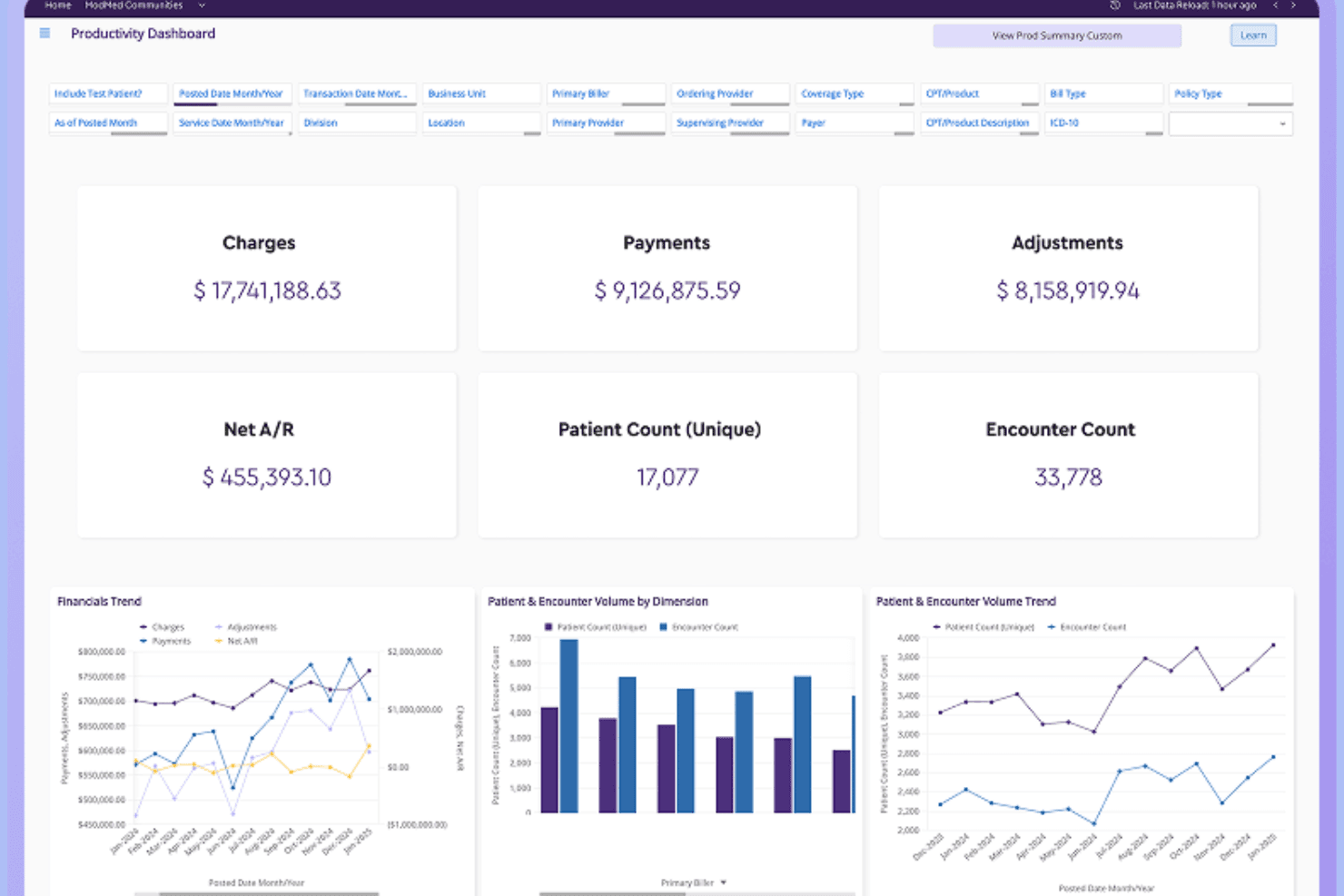
ModMed offers a comprehensive podiatry exam interface with condition-specific treatment plans, findings, and billing tools tailored for foot and ankle care. ModMed's EMA® is a specialty-specific EHR built for otolaryngology practices, offering adaptive ENT charting, master-visit protocols for common conditions, e-prescribing, allergy and immunotherapy workflow tools, and lab and diagnostic integrations.
Who Is ModMed Best For?
ModMed's EMA® is a strong fit for otolaryngology physicians who want a specialty-built EHR with deep allergy and immunotherapy workflow support built in from day one.
Why I Picked ModMed
I picked ModMed as one of the best because its Xtract allergy and immunotherapy tools are purpose-built in a way I haven't seen in other ENT EHRs. Xtract handles the full immunotherapy cycle: antigen testing, serum mixing, predictive dosing, injection tracking, and real-time inventory management with before-use-date alerts. Paired with master-visit protocols for conditions like sinusitis and otitis media, EMA keeps specialty documentation tight and clinically specific.
ModMed Key Features
- Touch-based charting: An iPad-compatible touchscreen interface lets clinicians document exams and access patient information through taps and touch inputs.
- Surescripts-certified e-prescribing: EMA creates and queues prescriptions from visit documentation, checks drug-to-drug and drug-to-allergy interactions, and routes prescriptions to a patient's preferred pharmacy.
- Image capture and annotation: Clinicians can photograph findings, annotate anatomical diagrams, and save images directly to the patient chart.
- MIPS data tracking: EMA collects MIPS data within the clinical workflow and supports specialty-specific performance tracking and reporting.
ModMed Integrations
ModMed connects with over 1,200 lab entities through Change Healthcare, including Quest Diagnostics, BioReference Laboratories, and Labcorp. It also supports HL7 connections and a certified FHIR REST API with OAuth 2.0 for custom connectivity.
Pros and Cons
Pros:
- Reviewers praise faster specialty-focused charting
- Xtract tracks immunotherapy dosing and inventory
- ENT master visits cover common diagnoses
Cons:
- Some reviewers report click-heavy workflows
- Surgical case and postoperative tracking undocumented
Learn more about ModMed: Best for visual ENT encounter documentation
- Free demo available
- Pricing upon request
Visit WebsiteCustomer Rating:4/5
A screenshot of patient records in PrognoCIS PrognoCIS Electronic Medical Records (EMR) software by Bizmatics Inc. is an ICD-10 compliant, Meaningful Use (MU), and MACRA-certified EMR software that offers an incredible platform for technology solutions that help medical practices. Its flexibility and digitization of prescription management align with its distinctive appeal for customization and advanced e-prescription features.
Why I Picked PrognoCIS: In my judgment, PrognoCIS stands out because of its high degree of customization and its unique e-prescription capabilities. It is ONC 2015 certified EHR and was eligible to attest for MIPS and became eligible for incentives.
I chose this tool for the list due to the freedom it provides users to tailor the platform to their specific needs. Additionally, the e-prescription feature significantly simplifies the medication ordering process, aligning with its excellence in this aspect.
Standout features & integrations:
Key features of PrognoCIS include its highly customizable interface and robust e-prescription capabilities, including electronic faxing of prescriptions directly to pharmacies. The tool also integrates well with billing and practice management software, further expanding its functional breadth.
Pros and Cons
Pros:
- Integrates well with billing and practice management software
- Strong e-prescription capabilities for streamlined medication management
- Extensive customization options to fit specific user needs
Cons:
- Starting price is higher than some other EHR tools on the market
- The high degree of customization may require a learning curve for users
- No free version or trial available, limiting pre-purchase evaluation
Learn more about PrognoCIS Psychiatry EHR: Best for predicting appointment no-shows
- Free demo available
- Pricing upon request
Visit WebsiteCustomer Rating:3.9/5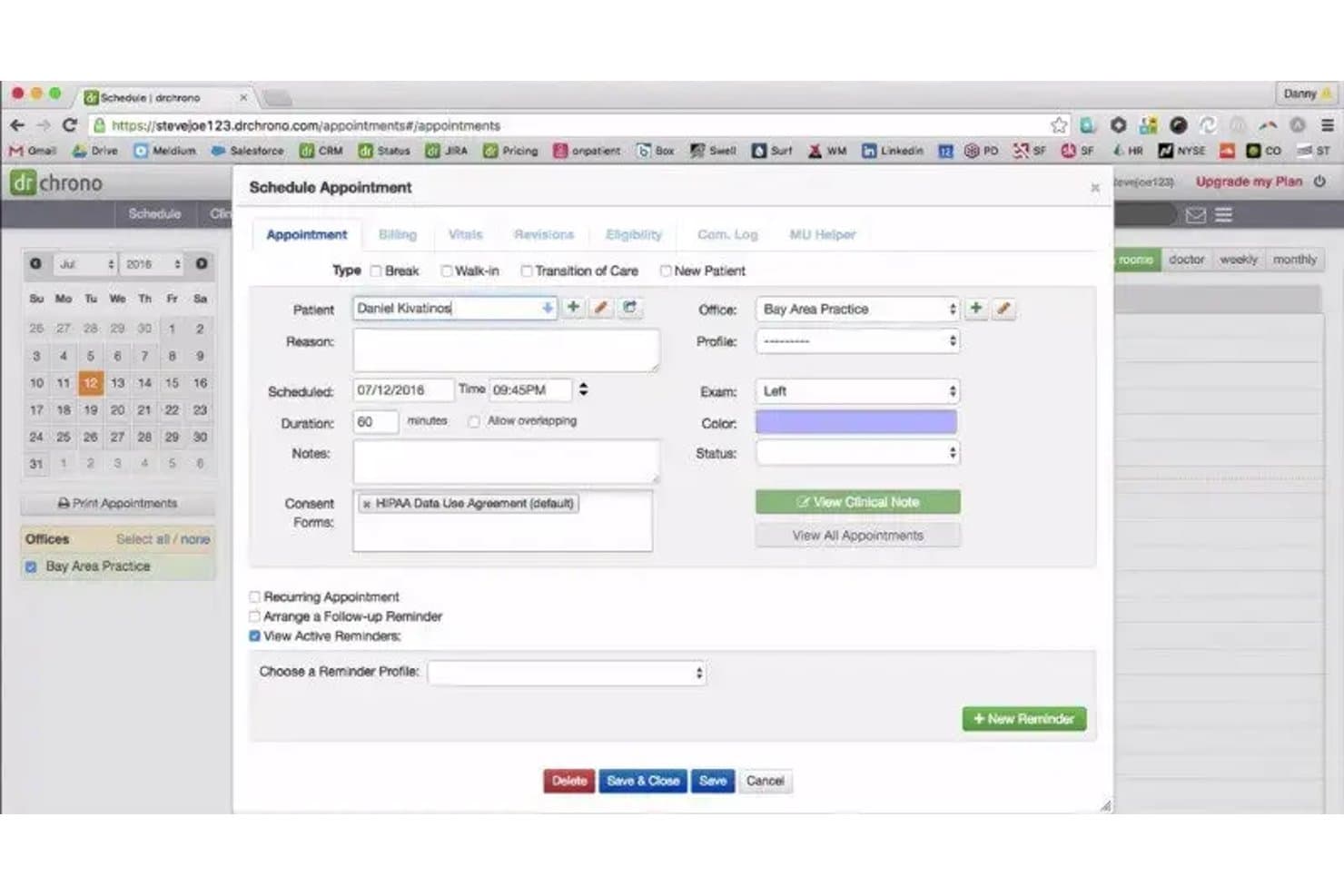
DrChrono lets users schedule appointments with reminders and consent forms. DrChrono is a general-purpose EHR platform that combines clinical charting, scheduling, billing, e-prescribing, and practice management tools, with a specialty form library that includes an ENT category.
Who Is DrChrono Best For?
DrChrono suits independent medical practices that need an integrated EHR, scheduling, and billing platform and can adapt general-purpose tools to their specialty workflow.
Why I Picked DrChrono
I've included DrChrono in my top picks because it covers the full practice management lifecycle in one place, which matters when your front desk, clinical staff, and billing team all need to work from the same system. I particularly like its customizable form library, which includes an ENT specialty category you can tailor to your documentation needs. Its billing tools handle eligibility checks, claim submission, and ERA auto-posting without requiring a separate platform.
DrChrono Key Features
- Customizable form builder: Practices can create, edit, and reuse clinical forms and fields for patient onboarding and encounter documentation.
- Electronic prior authorization: Users can submit and track prior authorizations directly from the prescribing workflow via CoverMyMeds.
- Real-time insurance eligibility checks: The platform verifies patient insurance coverage in real time before appointments and claim submission.
- EverHealth Scribe: An ambient AI tool that drafts structured clinical notes—including HPI, assessment, plan, and ICD-10 codes—for clinician review before saving to the chart.
DrChrono Integrations
DrChrono has native integrations with Quest Diagnostics, LabCorp, Iron Bridge, Surescripts, and CoverMyMeds, plus 40,000+ lab connections. Its REST and FHIR API supports custom integrations with Epic, eClinicalWorks, and Allscripts.
Pros and Cons
Pros:
- Convenient e-prescribing supports medication workflows
- Mobile charting supports clinic-side documentation
- Custom forms can capture ENT exam details
Cons:
- No documented surgical-case or post-op tracking
- No documented audiogram display or trending
Learn more about DrChrono: Best for intuitive patient charting and robust EHR
- Free demo available
- Pricing upon request
Visit WebsiteCustomer Rating:3.7/5
NextGen Healthcare's dashboard NextGen Healthcare's robust EHR software offers a comprehensive solution that revolutionizes the charting process, empowering healthcare providers with enhanced efficiency and improved clinical workflows. With its advanced features and user-friendly interface, NextGen Healthcare's EHR solution is designed to streamline tasks, optimize documentation accuracy, and elevate overall patient care.
Why I Picked NextGen Healthcare: As I delved into the world of otolaryngology EMR systems, NextGen Healthcare emerged as a beacon of reliability and efficiency. It effortlessly tackles the intricate task of patient charting with an interface that's intuitive and easy to navigate. In my judgment, what sets it apart is its robust specialty-specific EHR system that adeptly manages all aspects of a patient's health record. Hence, I deemed it best for those who require a system focused on intuitive patient charting and robust otolaryngology EHR.
Standout features & integrations:
NextGen Healthcare has many features, but a few standouts include integrated practice management for simplified administrative tasks and advanced clinical automation that helps reduce manual input. Additionally, the tool's connectivity features deserve special mention, with options for lab integration, ePrescribing, and patient portals to provide comprehensive patient care.
Pros and Cons
Pros:
- Comprehensive connectivity features for well-rounded patient care
- Enhanced clinical automation reduces manual input
- Streamlines administrative tasks with integrated practice management
Cons:
- Some users may find the system complex to navigate initially
- Quote-based pricing model may not suit all budget ranges
- No free version or trial available
Learn more about NextGen Healthcare: Best for ENT billing across ASC and hospitals
- 30-day free trial + free demo available
- From $130/user/month
Visit WebsiteCustomer Rating:3.6/5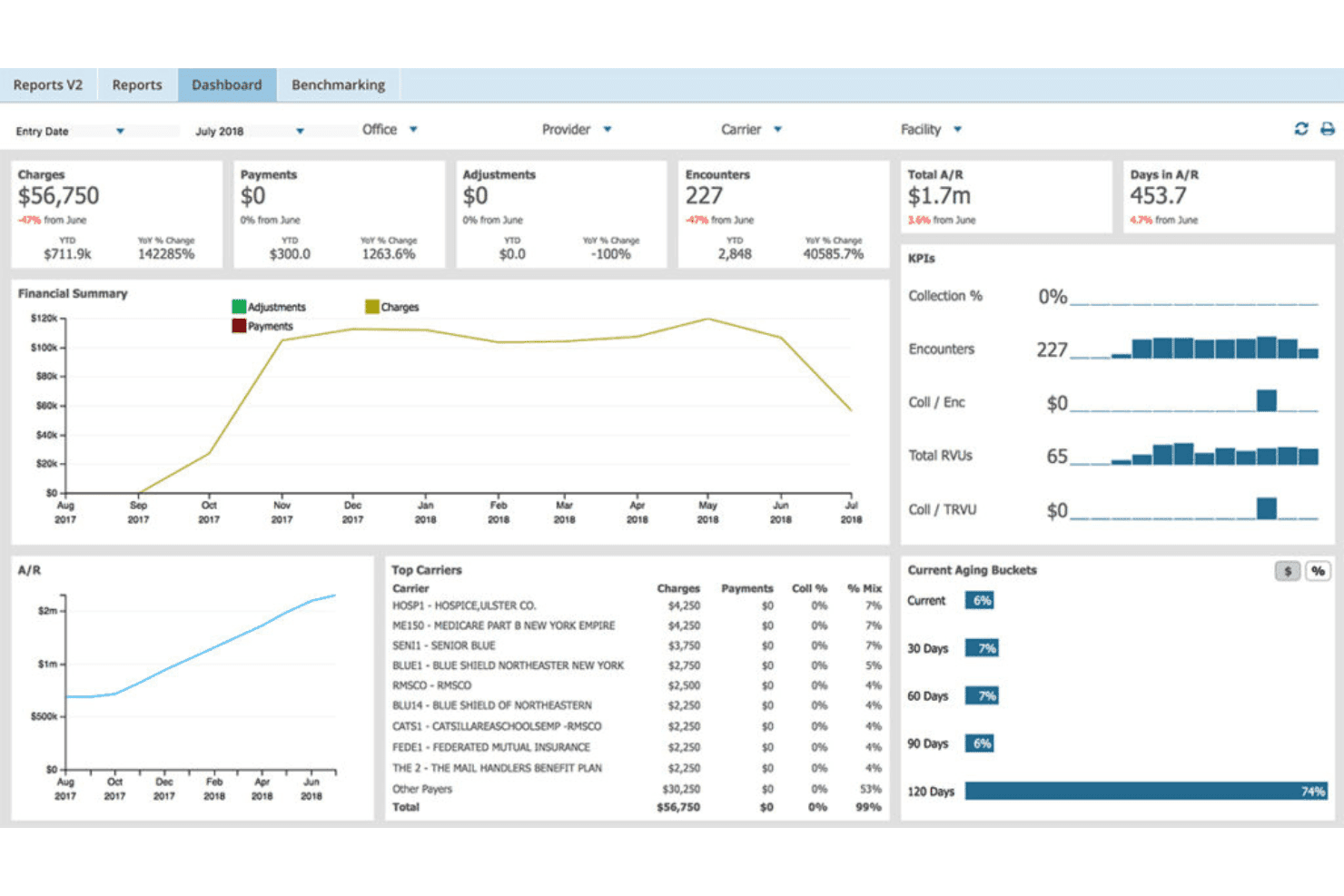
AdvancedMD unites EMR, documentation, billing, claims, eligibility, and RCM. AdvancedMD is a cloud-based ENT EHR platform that combines specialty-specific charting templates, surgical workflow configuration, medical billing, and practice management tools built for independent and small-group otolaryngology practices.
Who Is AdvancedMD Best For?
AdvancedMD fits independent and small-group ENT practices that bill across multiple care settings, including ASCs and hospitals, and need one platform to manage that complexity.
Why I Picked AdvancedMD
I've included AdvancedMD in my top picks because it's one of the few ENT platforms that explicitly handles billing across both ASCs and hospitals, with dedicated coordination tools built to prevent duplicate or conflicting claims when a procedure spans care settings. I also like that it pairs this with real-time insurance eligibility checks and continually updated CPT and ICD-10 codes, so claims go out clean the first time. The predesigned ENT templates covering conditions like pediatric ear infections and hearing loss round out a genuinely specialty-aware package.
AdvancedMD Key Features
- AI clinical assistant: Uses ambient listening and transcription to generate visit notes in five formats and surface suggested chart action items.
- External device connectivity: Connects otoscopes, laryngoscopes, and imaging studies directly to patient charts for in-visit documentation.
- Customizable ENT templates: Provides predesigned templates for conditions like pediatric ear infections and hearing loss, with options to build from scratch.
- Patient portal messaging: Lets patients send secure messages to clinical or billing staff, request prescription renewals, and view statements online.
AdvancedMD Integrations
AdvancedMD offers integrations with Ellkay and Falkon Data for laboratory and imaging orders and results. Its XML-RPC and REST Connect APIs, FHIR R4 APIs, and ODBC access support custom interoperability.
Pros and Cons
Pros:
- Reviewers praise customizable appointment scheduling
- Coordinates billing across surgical settings
- Custom ENT templates cover hearing loss
Cons:
- Reviewers report billing and claims issues
- Audiogram trending remains undocumented
 Best for collections-based pricing
- Free demo available
- Pricing upon request
Visit WebsiteCustomer Rating:3.4/5
Athenahealth's EMR dashboard Athenahealth presents itself as an all-in-one solution for managing all aspects of medical practice, from patient records to billing and beyond. It was named 2022 Best in KLAS for both Small Practice Ambulatory EMR and Practice Management (PM). It aligns particularly well with the need for comprehensive practice management and enhanced patient engagement, which is paramount in today's patient-centric healthcare landscape.
Why I Picked Athenahealth: The reason I selected Athenahealth is that it provides a comprehensive set of tools that streamline both administrative and clinical workflows, promoting a seamless practice management experience. Furthermore, it champions patient engagement with a robust patient portal and communication tools. Given these capabilities, I believe Athenahealth is best suited for practices seeking a comprehensive solution for practice management and patient engagement.
Standout features & integrations:
Athenahealth brings a wide array of features to the table, including cloud-based access, integrated billing, and scheduling, as well as real-time reporting and analytics tools that provide valuable insights into practice performance. The system also integrates with numerous third-party applications and systems, ensuring a cohesive and interconnected healthcare IT ecosystem.
Pros and Cons
Pros:
- Robust reporting and analytics tools provide key insights into practice performance
- Integrated billing and scheduling simplify administrative tasks
- Cloud-based access allows for flexibility and ease of use
Cons:
- Some users may find the system complex at first
- Pricing model might not be suitable for small practices
- No free trial or free version available
Learn more about athenahealth: Best for ENT practices also running an ASC
- Free demo available
- Pricing upon request
Visit WebsiteCustomer Rating:3.5/5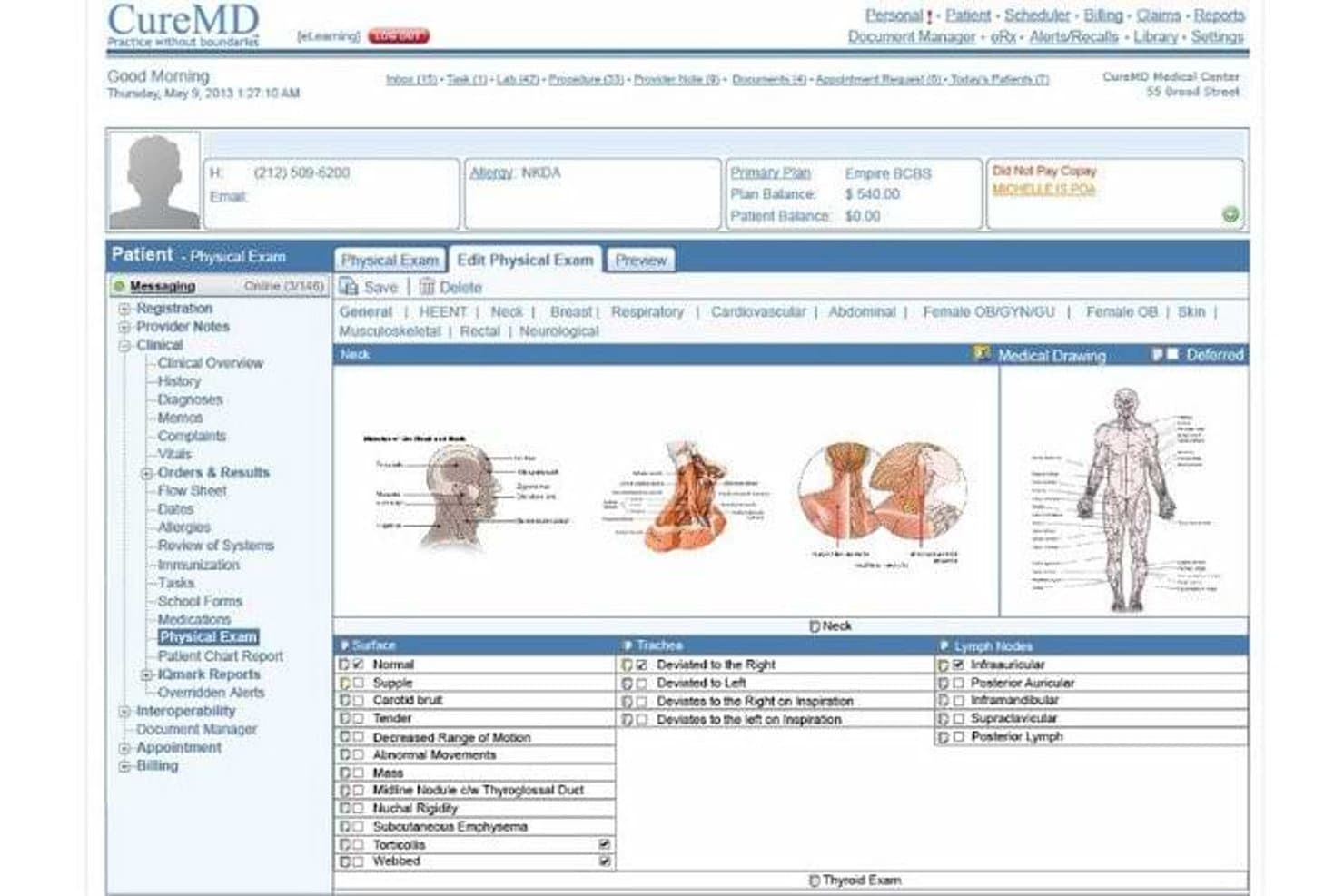
CureMD's physical exam module supports detailed neck assessments. CureMD is a multi-specialty EHR platform that offers otolaryngology-specific templates, ENT clinical documentation, practice management, e-prescribing, and an integrated ambulatory surgery module.
Who Is CureMD Best For?
CureMD suits ENT practices that also operate an ambulatory surgery center and want scheduling, documentation, and billing managed within one platform.
Why I Picked CureMD
I've included CureMD in my top picks because it's one of the few ENT platforms that also ships a dedicated ambulatory surgery module, covering pre-op, intra-op, and post-op workflows alongside the core ENT-specific templates for complaints, physical exams, and assessments. I like that ENT-coded ICD and CPT support runs through both the clinic and ASC sides, so billing doesn't break down when a patient moves from the office to the surgical suite.
CureMD Key Features
- ENT-specific ICD and CPT coding: Includes otolaryngology-specific diagnosis and procedure codes to support electronic claim submission and spot charge tracking.
- E-prescribing with drug interaction checks: Connects to 40,000+ pharmacies through Surescripts with drug-drug, drug-allergy, and drug-diagnosis safety checks built in.
- AI ambient medical scribe: Listens to patient-provider encounters and auto-generates specialty-adapted clinical notes, coding, and orders for provider review.
- Role-based access control with audit trails: Lets administrators assign permissions by role and monitor all system activity through a detailed audit log.
CureMD Integrations
CureMD documents integrations with Quest, LabCorp, Surescripts, and 500+ regional labs, plus DICOM-compliant imaging connectivity. FHIR APIs support custom integrations.
Pros and Cons
Pros:
- Reviewers praise integrated billing and claims workflows
- ASC workflows cover pre-op through post-op care
- ENT templates support complaint and exam charting
Cons:
- Users report freezes and workflow-disrupting errors
- No documented audiogram import or display
Learn more about CureMD:
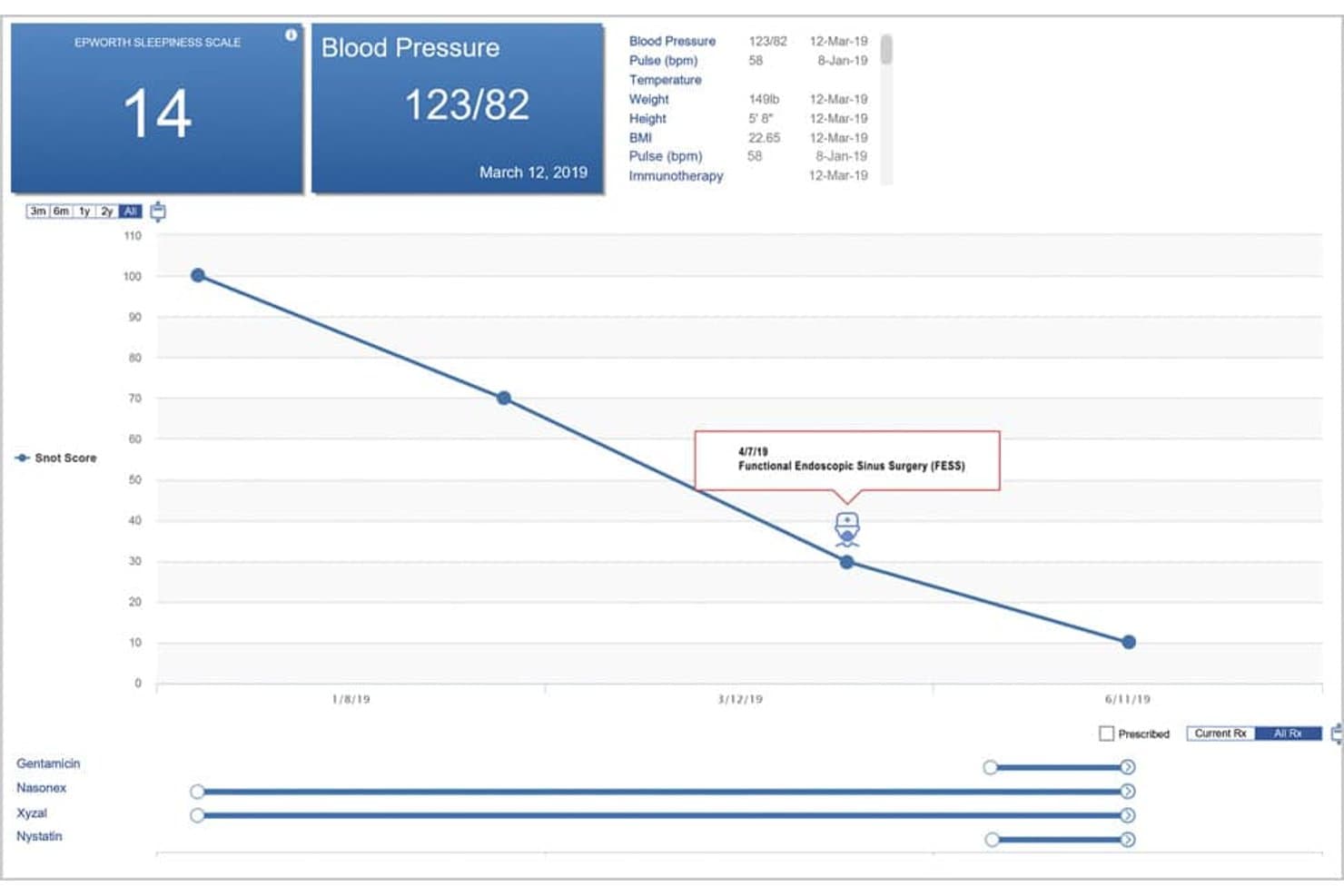
ENTChoice’s patient summary graphs vitals so providers can track trends. iSalus is an otolaryngology EHR platform that unifies clinical documentation, practice management, billing, and telehealth under a single login for ENT practices.
Who Is iSalus Best For?
iSalus suits ENT physicians and practice administrators who want scheduling, clinical documentation, and billing managed from a single login.
Why I Picked iSalus
I've included iSalus in my top picks because its telehealth module, AnywhereCare, is built directly into the EHR, so ENT providers can run virtual visits without switching platforms or losing documentation context. I also like that its customizable templates cover ENT-specific procedures like nasal endoscopy and adenoidectomy, letting each provider shape documentation around their own order-set preferences. The EverHealth Scribe AI tool captures those conversations in real time and drafts structured notes directly into those templates.
iSalus Key Features
- RecordSync record retrieval: Pulls outside patient records from hospitals and other providers via Surescripts' Record Locator & Exchange using FHIR transactions, so you can merge or save them directly to the chart.
- Surgery order processing: Tracks surgery orders through the My Task Orders list with fields for priority, provider, ICD codes, insurance and authorization, and scheduling details.
- Integrated patient portal: Lets patients manage appointments, complete intake forms, and pay balances through the MyMedicalLocker portal.
- Electronic prior authorization: Uses a CoverMyMeds integration to surface real-time prescription benefit checks and submit prior authorization requests within the prescribing workflow.
iSalus Integrations
iSalus has four documented native integrations: CoverMyMeds, Surescripts, PaySimple, and Halfpenny Technologies. It also offers a C-CDA API for custom integrations.
Pros and Cons
Pros:
- Patient charts keep notes and records together
- Integrated billing supports claim management
- Custom ENT forms support procedure documentation
Cons:
- Some users report delayed technical support
- Chart-building can require too many screens
Learn more about iSalus: Good for its tailored approach to specialty practices
- Free demo available
- Pricing upon request
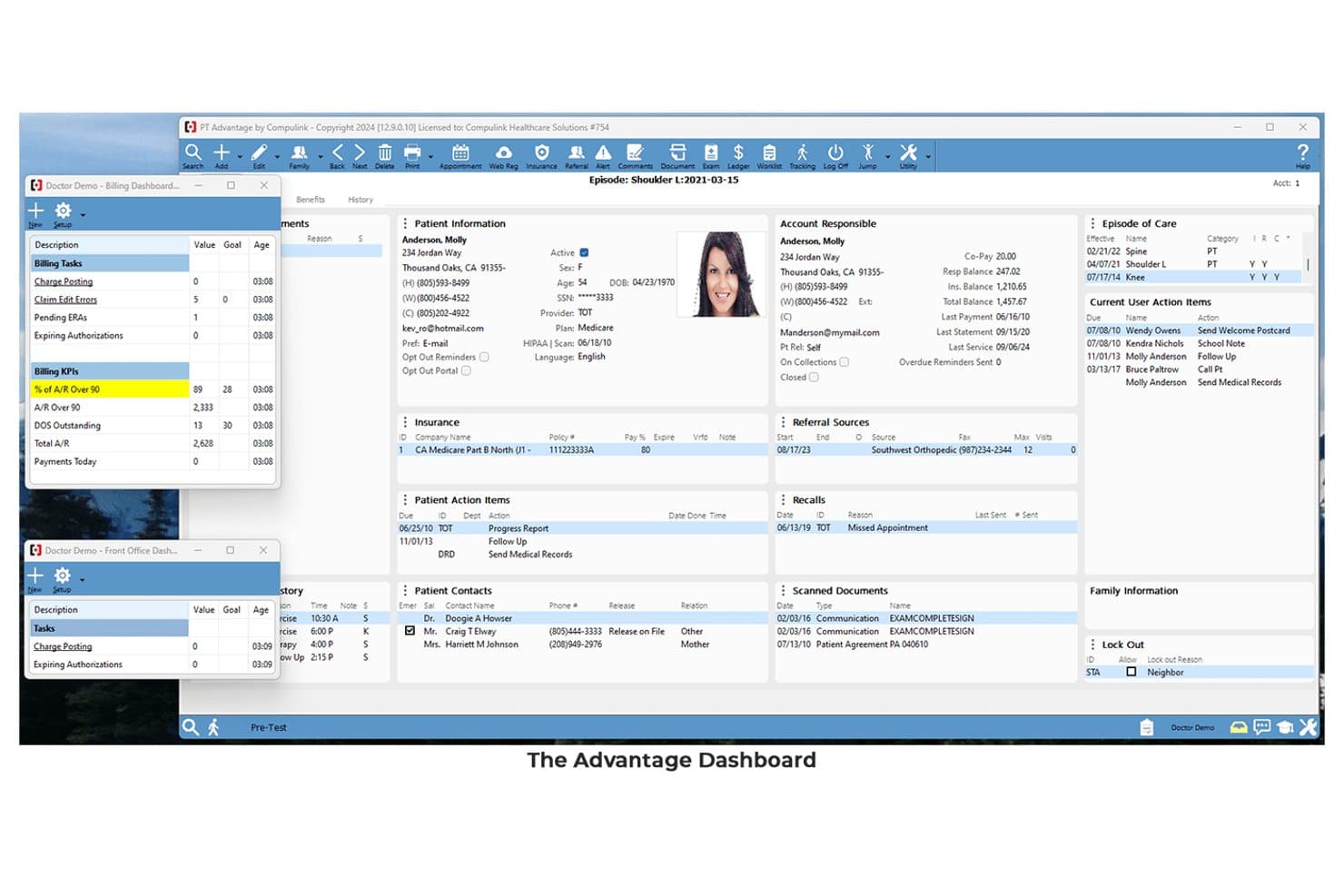
Compulink’s Analytics dashboard tracks ENT practice performance in one view. Compulink Advantage EHR is an otolaryngology-specific EHR and practice management platform that combines ENT-focused clinical documentation, adaptive charting, procedure and ASC scheduling, integrated billing, and patient engagement tools.
Who Is Compulink Healthcare Best For?
Compulink Advantage EHR fits ENT practices of any size that want a purpose-built system covering clinical documentation, ASC scheduling, and billing in one place.
Why I Picked Compulink Healthcare
I've included Compulink Healthcare in my top picks because its tailored approach to specialty practices is genuinely built into the product, not just marketed as a feature. The ENT-specific exam database puts otolaryngology diagnoses, treatment plans, and surgical procedures directly inside the charting workflow, and OneTab's single-screen layout means clinical staff can work through most of a visit without toggling between screens. Adaptive Learning Technology goes further by adjusting the system to each provider's individual charting patterns over time.
Compulink Healthcare Key Features
- ASC scheduling integration: Connects clinical, scheduling, and billing workflows for ENT practices that perform procedures in an ambulatory surgery center.
- DICOM image management: Lets providers view, manipulate, and interpret diagnostic images directly within the EHR during a patient encounter.
- Electronic claims and coding suggestions: Suggests ICD-10, CPT, and modifier codes and runs built-in claim audits that check coding against clinical documentation.
- Patient self-scheduling: Lets patients book appointments online using real-time availability and insurance-plan scheduling rules.
Compulink Healthcare Integrations
Documented integrations include Updox for Direct messaging and transitions of care and Surescripts for e-prescribing. A read-only HL7 FHIR R4 API supports custom connections.
Pros and Cons
Pros:
- Custom reports support practice oversight
- Nurses document most visits on one screen
- Specialty-specific exam content supports ENT visits
Cons:
- Chart and ledger tasks require extra navigation
- Template setup can take substantial time
Learn more about Compulink Healthcare: Best for ENT specialty-focused EMR features
- Free demo available
- Pricing upon request
The ENT-Cloud website homepage ENT-Cloud is an otolaryngology-specific EHR and practice management system that covers clinical documentation, ENT-specific templates, surgical workflow, audiology integration, allergy and immunotherapy tracking, e-prescribing, scheduling, and billing.
Who Is ENT-Cloud Best For?
ENT-Cloud is a strong fit for otolaryngology practices of any size that want a purpose-built EHR designed around ENT clinical workflows rather than a generic system adapted for specialty use.
Why I Picked ENT-Cloud
ENT-Cloud earns its spot on my shortlist because it's the only system here built from the ground up by an ENT physician specifically for otolaryngology practice. I particularly like the depth of its specialty template library, which covers everything from sinusitis and otitis media to tympanostomy tube follow-ups and postoperative thyroidectomy notes, with CPT and ICD-10 codes ready on first login. The surgical workflow is also a standout for me, tracking cases from preauthorization through global-period alerts without needing a workaround.
ENT-Cloud Key Features
- Allergy and immunotherapy tracking: Manages skin-prick testing, intradermal testing, vial tracking, build-up and maintenance dosing, reaction documentation, and compliance monitoring in one workflow.
- AI scribe: Captures ambient audio during ENT encounters and generates structured notes saved directly to the patient chart.
- Patient portal with ENT intake questionnaires: Collects specialty-specific symptom histories for sinus, ear and hearing, vertigo, allergy, and sleep conditions before the visit.
- Role-based permissions: Lets administrators set staff access by role, location, patient, and time of workday.
ENT-Cloud Integrations
ENT-Cloud integrates with Surescripts, EMR Direct phiMail, MDToolBox, Medicity, and OptumInsight. It also connects with hospitals, HIEs, RHIOs, and imaging centers; API availability isn’t documented.
Pros and Cons
Pros:
- Surgical cases link through postoperative tracking
- Integrated billing supports simpler coding workflows
- ENT templates adapt to specialty visits
Cons:
- Reports can be difficult or inaccurate
- Referral letters can require manual handling
Learn more about ENT-Cloud:
How I Evaluate Otolaryngology EMR Software
I split my evaluation into three parts, with the most weight on core functions: document ENT exams and keep searchable charts with audiograms. Next, I look for differentiators such as in-visit scope-image capture. Finally, I consider ENT-specific onboarding, support, and pricing as practices grow.
Core Functionality (Table Stakes For This List)
When I'm selecting tools for my list, I score each one on a scale from 0 (does not offer the functionality) to 5 (excels in this area) for each core functionality listed below. I then convert the total into a percentage to help assess each tool's overall fit, with extra weight on any functionalities I’ve deemed essential.
- ENT Templates (Essential): I look for customizable templates for common ENT exams, procedures, and diagnoses, from routine ear visits to laryngology follow-ups.
- Clinical Charting (Essential): I assess structured, searchable records that connect patient history, exam findings, and treatment plans across visits.
- Audiograms & Diagnostics: I check whether staff can import, store, and view audiograms and other diagnostic results in the patient record.
- Procedure Scheduling: I consider how the system schedules and tracks office procedures and surgical cases alongside pre- and post-op care.
- E-Prescribing & Medications: I look for electronic prescribing and medication lists that support prescription management within the patient record.
- Billing & Coding: I assess support for common ENT CPT and ICD-10 coding, claims submission, and tracking.
Once I have a list of tools that meet the criteria, I consider what sets each platform apart.
Differentiating Factors (What Sets Vendors Apart)
Here's how I compare and contrast different vendors:
Standout Features
I look for in-visit scope capture that lets clinicians annotate endoscopy or laryngoscopy images right inside the encounter note. A rhinologist reviewing sinus anatomy mid-visit needs that image tied to the chart instantly, not uploaded later. I also evaluate allergy testing and immunotherapy tracking modules, since many ENT practices manage serum mixing and injection schedules in-house. Dedicated tools here replace error-prone spreadsheets. Finally, I check for multi-location and ambulatory surgery coordination so one system handles clinic and ASC scheduling together.
Beyond Features
I evaluate how well each platform connects with ENT-specific diagnostic hardware like audiometers and tympanometers, since a system that can't pull results directly into the chart creates manual work and data-entry errors. Vendor specialization depth matters too—I check whether ENT content updates come from practicing clinicians or are generic add-ons. Finally, I look at per-provider licensing and add-on module costs relative to multi-location growth, because a system that fits a two-physician clinic can become expensive fast when you expand into an ambulatory surgery center.
Cum să alegeți software-ul EMR pentru otorinolaringologie
Este ușor să vă pierdeți în liste lungi de funcții și structuri complexe de prețuri. Pentru a vă ajuta să rămâneți concentrat în timp ce parcurgeți procesul unic de selectare a software-ului, iată o listă de verificare cu factorii de care trebuie să țineți cont:
| Factor | Aspecte de luat în considerare |
|---|---|
| FactorScalabilitate | Aspecte de luat în considerareVa evolua software-ul odată cu cabinetul dumneavoastră? Gândiți-vă la extinderea viitoare. Căutați modele de prețuri flexibile și funcții care pot acomoda mai mulți utilizatori sau mai multe locații. |
| FactorIntegrări | Aspecte de luat în considerareSe conectează la instrumentele existente? Asigurați compatibilitatea cu echipamentele de audiologie, sistemele de facturare și alte software-uri pe care le utilizați zilnic. |
| FactorPosibilitate de personalizare | Aspecte de luat în considerareÎl puteți adapta pentru a corespunde fluxurilor dumneavoastră de lucru? Verificați dacă puteți ajusta șabloanele și setările pentru a răspunde nevoilor specifice ale cabinetului dumneavoastră. |
| FactorUșurință în utilizare | Aspecte de luat în considerareEste ușor de utilizat pentru echipa dumneavoastră? Evaluați designul interfeței și navigarea. O curbă de învățare abruptă poate încetini adoptarea. |
| FactorImplementare și integrare inițială | Aspecte de luat în considerareCât timp va dura să începeți? Căutați termene clare, resurse de instruire și asistență pentru o tranziție fără probleme la noul sistem. |
| FactorCost | Aspecte de luat în considerareSe încadrează în bugetul dumneavoastră? Comparați planurile tarifare și fiți atenți la taxele ascunse. Luați în considerare costul total de deținere în timp. |
| FactorMăsuri de securitate | Aspecte de luat în considerareCum protejează datele pacienților? Verificați conformitatea cu HIPAA și cu alte reglementări. Căutați criptare, controale ale accesului și piste de audit. |
Ce este software-ul EMR pentru otorinolaringologie?
Software-ul EMR pentru otorinolaringologie este conceput pentru a gestiona dosarele pacienților și a eficientiza operațiunile din cabinetele ORL. Acesta este utilizat de medicii otorinolaringologi și de personalul acestora pentru a organiza datele pacienților, a programa consultații și a gestiona eficient facturarea. Funcții precum gestionarea dosarelor pacienților, programarea și asistența pentru facturare susțin fluxurile zilnice de lucru și îmbunătățesc eficiența cabinetului. În ansamblu, aceste instrumente simplifică sarcinile administrative și îmbunătățesc îngrijirea pacienților.
Funcții
Când selectați un software EMR pentru otorinolaringologie, urmăriți următoarele funcții esențiale:
- Gestionarea dosarelor pacienților: Organizează și stochează în siguranță informațiile pacienților, facilitând accesarea și actualizarea dosarelor.
- Integrarea programărilor: Se conectează la calendare pentru a gestiona eficient programările, reducând absențele și optimizând timpul.
- Facturarea și emiterea facturilor: Automatizează procesele de facturare, asigurând emiterea corectă a facturilor și efectuarea la timp a plăților.
- Prescrierea electronică: Permite gestionarea electronică a rețetelor, îmbunătățind administrarea medicamentelor și reducând erorile.
- Șabloane personalizabile: Oferă șabloane adaptate procedurilor ORL, economisind timp și asigurând consecvența documentației.
- Funcționalități de telemedicină: Permite consultații la distanță, extinzând accesul pacienților și sporind confortul acestora.
- Integrarea cu echipamentele de audiologie: Se conectează perfect la instrumentele de diagnostic pentru o evaluare mai cuprinzătoare a pacientului.
- Rapoarte și analize: Oferă informații utile prin analiza datelor, contribuind la monitorizarea performanței și la îmbunătățirea procesului decizional.
- Măsuri de securitate: Asigură protecția datelor pacienților prin respectarea unor reglementări precum HIPAA.
- Suport pentru mai multe locații: Facilitează operațiunile în diferite locații ale cabinetului, menținând consecvența și eficiența.
Beneficii
Implementarea unui software EMR pentru otolaringologie oferă numeroase beneficii echipei și afacerii dumneavoastră. Iată câteva dintre avantajele de care vă puteți bucura:
- Eficiență îmbunătățită: Automatizează sarcinile de rutină, precum programarea și facturarea, eliberând timp pentru îngrijirea pacienților.
- Îngrijire îmbunătățită a pacienților: Oferă acces rapid la dosarele și istoricul pacienților, sprijinind deciziile informate și tratamentul personalizat.
- Reducerea erorilor: Prescrierea electronică și sistemele integrate contribuie la minimizarea greșelilor în gestionarea medicamentelor și a datelor pacienților.
- Securitate mai bună a datelor: Asigură respectarea unor reglementări precum HIPAA, protejând informațiile pacienților.
- Accesibilitate sporită: Funcțiile de telemedicină permit consultații la distanță, făcând îngrijirea medicală mai accesibilă pacienților.
- Soluții scalabile: Sprijină dezvoltarea prin funcții care se pot adapta unui număr mai mare de utilizatori sau unor locații suplimentare ale cabinetului.
- Analize relevante: Oferă informații bazate pe date despre performanța cabinetului, contribuind la deciziile strategice și la îmbunătățiri.
Costuri & prețuri
Alegerea unui software EMR pentru otolaringologie necesită înțelegerea diferitelor modele și planuri de tarifare disponibile. Costurile variază în funcție de funcții, dimensiunea echipei, modulele suplimentare și alți factori. Tabelul de mai jos sintetizează planurile uzuale, prețurile lor medii și funcțiile incluse de obicei în soluțiile software EMR pentru otolaringologie:
Tabel comparativ al planurilor pentru software EMR de otolaringologie
| Tipul planului | Preț mediu | Funcții comune |
|---|---|---|
| Tipul planuluiPlan gratuit | Preț mediu$0 | Funcții comuneGestionarea de bază a dosarelor pacienților, programare și asistență limitată. |
| Tipul planuluiPlan personal | Preț mediu$30-$50/utilizator/lună | Funcții comuneGestionarea dosarelor pacienților, prescriere electronică, programare și raportare de bază. |
| Tipul planuluiPlan pentru afaceri | Preț mediu$75-$150/utilizator/lună | Funcții comuneRaportare avansată, facturare și emiterea facturilor, șabloane personalizate și integrări. |
| Tipul planuluiPlan pentru întreprinderi | Preț mediu$200-$300/utilizator/lună | Funcții comuneSuport pentru mai multe locații, funcționalități de telemedicină, asistență dedicată și personalizare completă. |
Cele mai frecvente întrebări despre software-ul EMR pentru otolaringologie
Cum îmbunătățește software-ul EMR pentru otolaringologie eficiența cabinetului?
Software-ul EMR pentru otolaringologie îmbunătățește eficiența prin automatizarea sarcinilor de rutină, precum programarea, facturarea și prescrierea electronică. Acesta vă permite să accesați rapid dosarele pacienților, reducând timpul petrecut cu sarcinile administrative. Instrumentele personalizabile pentru întocmirea fișelor și șabloanele ORL predefinite simplifică suplimentar procesele de documentare.
Ce capacități de integrare ar trebui să caut într-un sistem EMR pentru otolaringologie?
Căutați integrarea cu echipamentele de audiologie, sistemele de facturare și portalurile pentru pacienți. Aceste integrări asigură un flux de date uniform între platforme, îmbunătățind comunicarea și reducând erorile. Funcțiile de prescriere electronică și monitorizare a testelor îmbunătățesc, de asemenea, îngrijirea pacienților și gestionarea cabinetului.
Cum sunt securizate datele pacienților în software-ul EMR pentru otolaringologie?
Datele pacienților sunt securizate prin respectarea unor reglementări precum HIPAA. Software-ul include de obicei criptare, controale de acces și piste de audit pentru protejarea informațiilor sensibile. Verificați întotdeauna măsurile de securitate implementate pentru a vă asigura că datele pacienților sunt în siguranță.