

Gestionarea unui cabinet medical presupune să jonglați între îngrijirea pacienților și sarcinile administrative – găsirea unui echilibru este dificilă. Programările supraîncărcate, consultațiile ratate, anulările de ultim moment și o simplă confuzie între orele pacienților reprezintă mereu o provocare.
Programele de programare a pacienților vă pot ajuta prin automatizarea și eficientizarea programării consultațiilor, eliberându-vă timpul pentru a vă concentra mai mult asupra îngrijirii pacienților. Acestea sunt excelente pentru eficiența operațională și automatizarea fluxurilor de lucru pentru programări, reducând în același timp erorile umane din cabinetul dumneavoastră.
Am trecut prin asta, m-am confruntat cu haosul și am găsit o soluție. Așadar, haideți să explorăm opțiunile pentru programe de programare a pacienților pe care le-am evaluat cu atenție; cabinetul dumneavoastră vă va mulțumi!
Why Trust Our Software Recommendations
6,700+
Reviews
20
Industry experts
16+
Evaluation factors
14
Years
Our team has been testing and reviewing software since 2012. As medical practice leaders ourselves, we know how difficult—and important—it is to choose the right software.
For this guide, we evaluated tools using hands-on testing and independent research, scoring tools using our selection criteria.
Our reviews reflect our human editorial judgment, not a sales pitch.
Tabel comparativ al programelor de programare a pacienților
Acest tabel comparativ rezumă detaliile privind prețurile pentru principalele mele selecții de programe de programare a pacienților:
Sorted by: Default
| Tool | Starting Price | Website | |
|---|---|---|---|
Best for group telehealth and class bookings | 4.7 out of 5 | $29/user/month Free demo + 14-day free trial available | Website |
Best for practices seeking robust e-prescribing features | 4.3 out of 5 | $335/month Free demo available | Book Demo |
Best for practices offering wellness services | 4.7 out of 5 | $30/month 30-day free trial + free demo available | Website |
Best for its impressive automation and patient communication tools | 4.8 out of 5 | Pricing upon request Free demo available | Website |
Best for patient intake and pre-visit planning | 4.2 out of 5 | Pricing upon request Free demo available | Website |
Best for managing multi-location schedules | 4.4 out of 5 | Pricing upon request Free demo available | Website |
Best for EHR integration and customizability | 3.9 out of 5 | Pricing upon request Free demo available | Website |
Best for integrated care management with intuitive features | 3.8 out of 5 | Pricing upon request Free demo available | Website |
Best for secure online intake forms and practice management | Not rated | $49.90/user/month. | Website |
Best for integrating HR and benefits with patient management | Not rated | Pricing upon request Free demo available | Website |


Recenzii ale celor mai bune programe de programare a pacienților
Mai jos sunt prezentate rezumatele mele detaliate ale celor mai bune programe de programare a pacienților care au ajuns pe lista scurtă. Recenziile mele oferă o privire detaliată asupra funcțiilor principale, avantajelor & dezavantajelor, integrărilor și cazurilor de utilizare ideale ale fiecărui instrument, pentru a vă ajuta să îl găsiți pe cel mai potrivit pentru dumneavoastră.
 Best for group telehealth and class bookings
- Free demo + 14-day free trial available
- From $29/user/month
Visit WebsiteCustomer Rating:4.7/5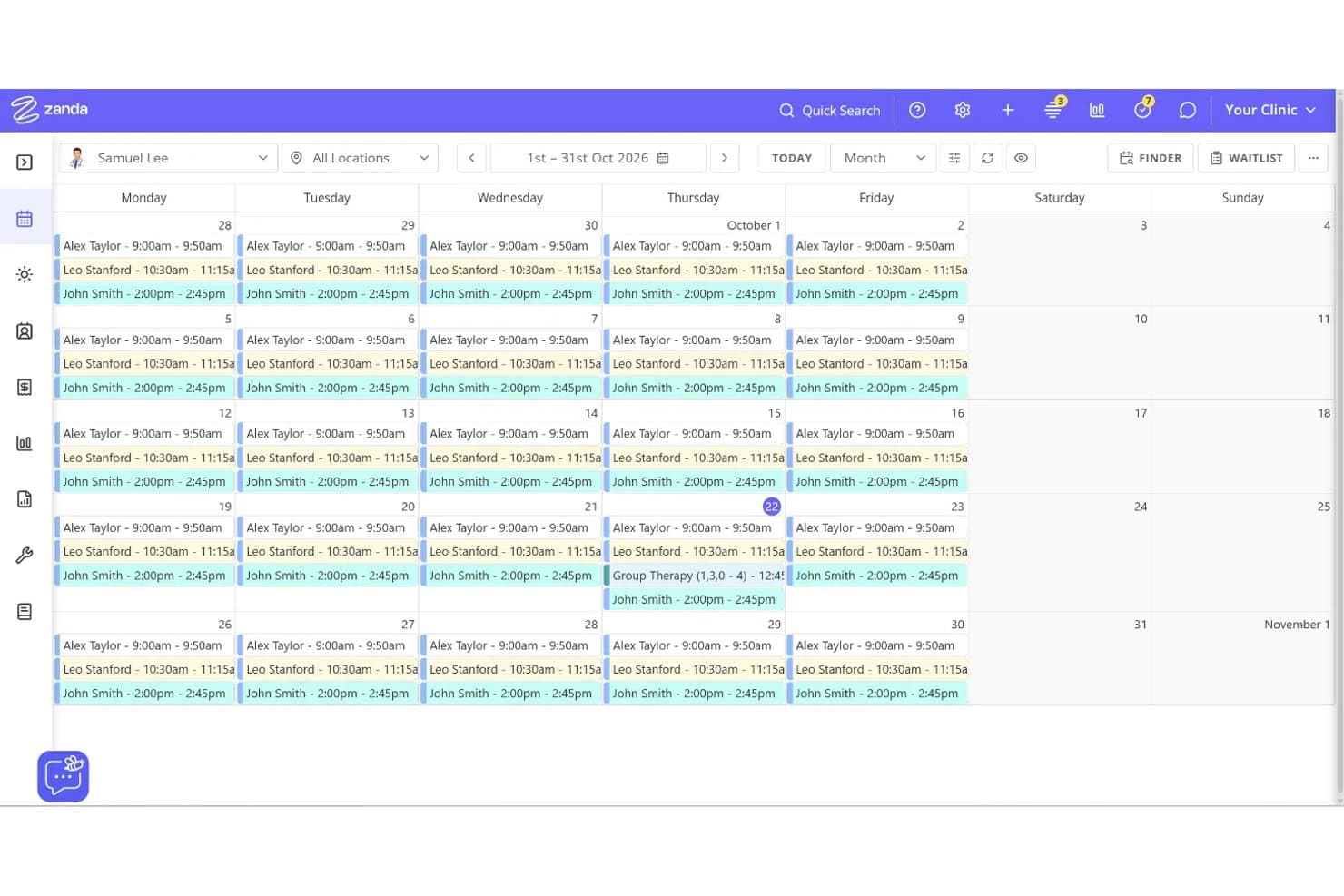
Zanda displays a full monthly calendar with recurring patient appointments. Zanda is an all-in-one practice management platform for health practices that combines appointment scheduling, client records, billing, telehealth, and group booking tools.
Who Is Zanda Best For?
Zanda is a strong fit for allied health practices—think physiotherapy, psychology, and speech therapy—that run group sessions or telehealth classes alongside individual appointments.
Why I Picked Zanda
I picked Zanda as one of the best because it handles group telehealth and class bookings in a way most scheduling tools simply don't. You can run a group physiotherapy session or psychology class with individual participant reminders, separate unique telehealth links per attendee, and prepayment enabled at booking. Clients can also self-book into group sessions through the portal, which cuts down on the back-and-forth your front desk would otherwise manage manually.
Zanda Key Features
- Automated appointment reminders: Zanda sends SMS and email reminders up to three times per appointment, with client replies updating appointment status using confirmation or cancellation keywords.
- Waitlist management: Staff can record client availability preferences, match waitlisted clients to newly opened slots, and send SMS notifications when a cancellation creates a fit.
- Two-way SMS messaging: Practitioners and admin staff can exchange SMS messages with clients directly inside Zanda, with all messages linked to the client's record.
- Role-based user permissions: Administrators can configure each team member's access to clinical, billing, reporting, communication, and export functions individually.
Zanda Integrations
Zanda offers native integrations with Google Calendar, Outlook Calendar, Apple Calendar, Zoom, Stripe, Xero, Physitrack, Mailchimp, and Google Analytics. Its public API is coming soon, with beta enrollment closed and documented access limited to read-oriented data.
Pros and Cons
Pros:
- Clients can book appointments through the portal
- SMS confirmations update appointment status automatically
- Group sessions provide individual reminders and telehealth links
Cons:
- Waitlist matches require staff to contact clients manually
- Google Calendar changes don’t reliably sync back
Learn more about Zanda: 2Best for practices seeking robust e-prescribing features
RXNT
- Free demo available
- From $335/month(billed annually)
Visit WebsiteCustomer Rating:4.3/5
RXNT Patient Scheduling Software Interface RXNT is a healthcare software provider offering an integrated suite of products, including electronic health records (EHR), practice management (PM), and a particularly robust e-prescribing system. With a primary focus on delivering efficient e-prescribing capabilities, RXNT stands out as a fitting choice for practices that value this feature.
Why I Picked RXNT: I chose RXNT for this list due to its high-level focus on e-prescribing, a feature that I found to be of great value in today's digital healthcare space. The tool stands out for its comprehensive e-prescribing functionality, enabling providers to send prescriptions directly to pharmacies, reducing wait times, and enhancing patient convenience. This dedication to optimizing e-prescribing processes is why I've determined RXNT as the "Best for" practices seeking robust e-prescribing features.
Standout features & integrations:
One of RXNT's key features is its extensive e-prescribing capabilities, which provide secure, immediate transmission of prescriptions to any retail or mail-order pharmacy. Additionally, RXNT's system offers medication history tracking and drug-drug and drug-allergy interaction checks. RXNT also integrates smoothly with other systems, including EHR and PM, for a more streamlined workflow.
Pros and Cons
Pros:
- Smooth integration with EHR and PM systems
- Direct transmission of prescriptions to pharmacies
- Comprehensive e-prescribing features
Cons:
- Occasional lag reported during peak usage times
- Some users reported difficulties in customizing certain features
- The user interface could be more intuitive
Learn more about RXNT: Best for practices offering wellness services
- 30-day free trial + free demo available
- From $30/month
Visit WebsiteCustomer Rating:4.7/5
Vagaro Patient Scheduling Software Interface Vagaro is a cloud-based platform designed for wellness practices. It not only handles appointment scheduling, but also offers a suite of marketing and POS solutions, making it an excellent choice for businesses focused on health and wellness services.
Why I Picked Vagaro: I picked Vagaro for its holistic approach towards the needs of wellness practices. What sets it apart is its specialized marketing and POS features that perfectly complement its scheduling capabilities, providing a comprehensive solution for wellness businesses. Hence, I concluded that Vagaro is best for practices offering wellness services, where it addresses the unique challenges and needs of such businesses.
Standout features & integrations:
Vagaro's main features include not only an intuitive appointment scheduling system but also marketing tools, such as email marketing and promotion management, and a built-in point-of-sale system. This platform integrates with popular payment processors and social media platforms, enabling online booking through these channels, which aids in boosting practice visibility and convenience.
Pros and Cons
Pros:
- Tiered pricing model suited to growing practices
- Integration with social media platforms for increased visibility
- Specialized marketing and POS tools
Cons:
- Limited EHR capabilities
- Learning curve for using the entire suite effectively
- May include more features than required for some practices
Learn more about Vagaro: Best for its impressive automation and patient communication tools
- Free demo available
- Pricing upon request
Visit WebsiteCustomer Rating:4.8/5
NexHealth Patient Scheduling Software Interface NexHealth is a patient experience management platform offering a suite of tools for effective patient communication and process automation. The software's robust automation capabilities and comprehensive communication features contribute to its suitability for healthcare practices aiming to enhance patient engagement and streamline administrative tasks.
Why I Picked NexHealth: In making my selection, I chose NexHealth due to its exceptional automation and patient communication tools. This platform stands out with its blend of automated workflows and wide-ranging communication options, which differentiate it from others. I, therefore, believe that NexHealth is best for practices looking for robust automation and communication solutions.
Standout features & integrations:
NexHealth offers a broad range of features such as automated appointment scheduling, reminders, and follow-ups, as well as comprehensive patient communication tools including email, text, and voice messaging. In terms of integrations, NexHealth plays well with various Electronic Health Record (EHR) systems and billing platforms, making it an adaptable choice for different healthcare practices.
Pros and Cons
Pros:
- Integrates with many EHR systems and billing platforms
- Comprehensive patient communication tools including email, text, and voice messaging
- Robust automation capabilities for appointment scheduling and reminders
Cons:
- Requires a learning curve to utilize all features efficiently
- Customer support is basic at the lower-priced tier
- Higher level features are available only in more expensive plans
Learn more about NexHealth: Best for patient intake and pre-visit planning
- Free demo available
- Pricing upon request
Visit WebsiteCustomer Rating:4.2/5
Phreesia Patient Scheduling Software Interface Phreesia offers a comprehensive patient intake solution that helps healthcare providers streamline patient registration, billing, and clinical workflows. Its strength lies in facilitating pre-visit planning, which sets it apart as a tool that enhances patient engagement and staff efficiency.
Why I Picked Phreesia: I chose Phreesia for this list for its robust patient intake features and its unique approach to pre-visit planning. This software stood out in how it streamlines the entire patient intake process, ensuring smooth clinic workflows and improved patient experiences. In my judgment, Phreesia is best for patient intake and pre-visit planning due to its functionality and its dedication to patient engagement and efficient clinical operations.
Standout features & integrations:
Phreesia boasts a suite of impressive features, including online registration, pre-visit planning, patient check-in, and patient tracking. These tools greatly reduce administrative burdens and allow clinics to focus more on patient care. Phreesia also integrates seamlessly with leading EHR and PM systems, offering a more connected and comprehensive healthcare experience.
Pros and Cons
Pros:
- Effective in enhancing patient engagement
- Seamless integration with leading EHR and PM systems
- Comprehensive pre-visit planning tools
Cons:
- Limited customization options for certain workflows
- Potential over-complexity for smaller practices
- No publically available pricing
Learn more about Phreesia: Best for managing multi-location schedules
- Free demo available
- Pricing upon request
Visit WebsiteCustomer Rating:4.4/5
Elation Health provides a robust patient scheduling interface. Elation Health is an Electronic Health Record (EHR) software tailored for small to medium-sized primary care practices, focusing on a clinical-first approach to improve patient care.
Why I Picked Elation Health: One standout feature is its enhanced scheduling capabilities, which allow you to manage provider availability across multiple locations and time zones. This flexibility ensures that your practice can accommodate diverse patient needs without compromising efficiency. By clearly displaying clinician availability, both your staff and patients can easily find and book suitable appointment times.
Standout features & integrations:
Other features include clinical reminders that help you stay on top of patient care tasks, ensuring timely follow-ups and adherence to treatment plans. Additionally, secure patient messaging facilitates direct communication between you and your patients. Elation Health integrates with various third-party systems.
Pros and Cons
Pros:
- Effectively manages billing and documentation
- Efficient patient engagement tools
- Real-time updates to patient records enhance accuracy.
Cons:
- Data migration can be complex
- Not ideal for larger medical practices
Learn more about Elation Health: Best for EHR integration and customizability
- Free demo available
- Pricing upon request
Visit WebsiteCustomer Rating:3.9/5
DrChrono Patient Scheduling Software Interface DrChrono is a comprehensive healthcare platform that offers an EHR system, practice management, and revenue cycle management services. Its forte lies in the level of EHR integration it provides, and the customizability that allows practices to tailor the system according to their unique needs.
Why I Picked DrChrono: The reason I selected DrChrono for this list is its strong emphasis on integrating Electronic Health Records (EHR) with all aspects of a medical practice. This platform stands out for the customizability it offers, allowing practices to adjust its functionalities according to their specific requirements. I determined that DrChrono is "best for" EHR integration and customizability because of its flexible and comprehensive approach to managing healthcare records and practice operations.
Standout features & integrations:
Among its many features, DrChrono provides EHR management, appointment scheduling, billing, and a patient portal. These features are designed to improve clinical efficiency and patient care. The system integrates well with numerous third-party apps and services, which extends the functionality of DrChrono and enables practices to have a fully connected operation.
Pros and Cons
Pros:
- Robust third-party integrations
- High level of customizability
- Excellent EHR integration
Cons:
- Some users have reported customer service issues
- Might require a steep learning curve for non-tech savvy users
- High starting price may be prohibitive for small practices
Learn more about DrChrono: Best for integrated care management with intuitive features
- Free demo available
- Pricing upon request
Visit WebsiteCustomer Rating:3.8/5
AthenaOne Patient Scheduling Software Interface athenaOne offers a patient scheduling solution designed to simplify the complex world of healthcare. The system unifies electronic health records, revenue cycle management, self-scheduling, patient engagement, and care coordination into one accessible platform.
Why I Picked athenaOne: In the process of selecting a top-tier appointment scheduling software, athenaOne stood out due to its intuitive features and integrated approach to care management. I found that it goes beyond basic scheduling and ventures into a unified health record system that encompasses a broader care management landscape. It's the best for integrated care management primarily because it doesn't isolate patient scheduling from other elements of a healthcare practice, which I believe is vital in our interconnected medical world today.
Standout features & integrations:
athenaOne's standout features include real-time patient check-ins, automated appointment reminders, and intelligent scheduling that reduces no-shows. Its integrated suite connects scheduling to electronic health records, revenue management, and patient communication seamlessly. The system also offers direct integrations with major EHR systems, third-party billing, and insurance verification platforms.
Pros and Cons
Pros:
- Robust EHR integration
- Intelligent scheduling reduces missed appointments
- Comprehensive, integrated patient management solution
Cons:
- Billed annually, which might not fit all budget structures
- Requires a learning curve due to its extensive features
- Might be pricy for small practices
Learn more about athenaOne: Best for secure online intake forms and practice management
- From $49.90/user/month.

IntakeQ Patient Scheduling Software Interface IntakeQ is a practice management platform that specializes in creating secure, customizable patient intake forms. This software tool allows healthcare practices to streamline the patient admission process, thus making it a preferred choice for practices seeking secure and efficient online intake form solutions.
Why I Picked IntakeQ: I selected IntakeQ for this list based on its ability to deliver secure online intake forms effectively. Its standout feature of providing customizable forms that integrate seamlessly into a practice's workflow aligns well with its purpose. Thus, I have determined IntakeQ as the best for practices that are seeking an efficient method for managing patient intake through secure online forms.
Standout features & integrations:
IntakeQ's standout feature is its customizable and HIPAA compliant online intake forms that can be sent to patients before their appointment. In addition, the tool has a built-in online booking system and a practice management module that enhances its functionality. Integrations include popular EHRs and billing systems, which are crucial for maintaining a comprehensive record and smooth operations.
Pricing:
The pricing for IntakeQ starts from $49.90/user/month. This price is for their Solo plan, which caters to individual practitioners.
Pros and Cons
Pros:
- Integrates with EHRs and billing systems
- Customizable forms that suit the needs of different practices
- HIPAA-compliant online intake forms
Cons:
- Limited integrations with other software compared to some competitors
- Users may need some time to familiarize themselves with form customization
- More advanced features require higher-tiered plans
Learn more about IntakeQ: Best for integrating HR and benefits with patient management
- Free demo available
- Pricing upon request

Rise People Patient Scheduling Software Interface Rise People is a comprehensive platform that offers a blend of patient management along with Human Resources (HR) and benefits administration. This tool ensures smooth interplay between patient handling, employee management, and benefits administration, making it particularly suitable for practices that need to seamlessly integrate these functionalities.
Why I Picked Rise People: Choosing Rise People was a natural choice, given its unique combination of patient management with HR and benefits. This dual capability sets it apart from many other tools on the market. Thus, in my judgment, Rise People is best for practices that require the integration of HR and benefits with patient management.
Standout features & integrations:
Rise People's unique feature is its ability to seamlessly integrate HR and benefits administration with patient management. It comes with a comprehensive benefits management system and a sophisticated HR module, all working alongside its patient management module. The tool also integrates with various payroll systems, accounting tools, and time tracking software, further enhancing its utility.
Pros and Cons
Pros:
- Offers a user-friendly interface
- Integrates with payroll, accounting, and time-tracking tools
- Provides a seamless combination of HR, benefits, and patient management
Cons:
- The setup process may be complex and time-consuming for some practices
- Limited HR functionalities in the basic 'Essentials' plan
- Pricing could be more competitive compared to similar tools
Learn more about Rise People:
Alte instrumente software pentru programarea pacienților
Mai jos este o listă cu programe suplimentare de programare a pacienților pe care le-am inclus pe lista scurtă, dar care nu au ajuns în top 10. Merită cu siguranță să le analizați.
- 11VecnaBest for advanced self-service patient portals
- 12TebraBest for small practices seeking a comprehensive solution
- 13WebPTGood for physical therapists seeking streamlined appointment scheduling
- 14SolutionReachGood for its multifaceted patient relationship management features
- 15CentralReachGood for ABA therapists needing practice management and data collection tools
- 16Raintree SystemsGood for specialized practices with its customizable templates
- 17ChartLogic EHRGood for its intuitive user interface and navigation
- 18PatientPopGood for practices aiming to enhance online presence and patient experience
- 19PatientNowGood for aesthetic medical practices seeking comprehensive management tools
- 20MendGood for its powerful telemedicine and patient scheduling functionalities
- 21Centricity Practice SolutionGood for practices requiring robust reporting and analytics features
- 22PROSchedulerGood for robust scheduling in high-volume testing environments
How I Evaluate Patient Scheduling Software
I split my evaluation into baseline requirements—like HIPAA compliance and EHR integration—and differentiators that separate tools built for multi-provider clinics from solo practices.
Core Functionality (Table Stakes For This List)
When I'm selecting tools for my list, I rank each one on a scale from 0 (does not offer the functionality) to 5 (excels in this area) for each core functionality listed below. Then, I calculate the tool's total score into a percentage. Each tool needs to achieve a minimum total score of 65% to be considered for inclusion.
- Online Patient Self-Scheduling: I check whether patients can book, reschedule, or cancel on their own through a portal—and whether it reflects real-time provider availability.
- Automated Reminders & Confirmations: The best tools let you set up multi-channel reminders via SMS, email, and voice with two-way confirmation to reduce no-shows.
- Multi-Provider Calendar Management: I evaluate how each tool handles scheduling across multiple providers, locations, rooms, and appointment types in a single view.
- EHR/PMS Integration: Bidirectional sync with systems like Epic, athenahealth, or DrChrono matters here—I look for certified connections, not just one-way data pushes.
- HIPAA-Compliant Data Handling: Every tool I consider should offer encrypted data storage and transmission, role-based access controls, and a signed BAA.
- Patient Intake & Insurance Verification: I look for digital intake forms patients complete before arrival, paired with real-time insurance eligibility checks during booking.
Once I have a list of tools that meet this criteria, I consider what sets each platform apart.
Differentiating Factors (What Sets Vendors Apart)
Here's how I compare and contrast different vendors:
Standout Features
Waitlist automation is a big one—when a patient cancels a Thursday morning slot, the right tool fills it by auto-notifying the next person in line. I also evaluate telehealth scheduling, where the platform generates video links at the time of booking so virtual visits don't require extra steps. Recall and recare campaigns matter for practices that depend on recurring visits, like annual physicals or six-month dental cleanings, and I look for tools that trigger outreach automatically based on each patient's visit history.
Beyond Features
Healthcare specialty fit is something I always evaluate—a tool built for dental practices may handle operatory-based scheduling well but fall short for behavioral health providers who need recurring session blocks. Implementation support also matters, especially for multi-location groups migrating years of patient data. I look at whether a vendor offers dedicated onboarding and staff training for front-desk teams. Pricing transparency rounds out my assessment; per-provider models work for small clinics, but growing practices need to know how costs scale as they add locations and staff.
Cum să alegeți un program de programare a pacienților
Este ușor să vă pierdeți în liste lungi de funcții și structuri complexe de prețuri. Pentru a vă ajuta să rămâneți concentrat în timp ce parcurgeți procesul unic de selectare a programului, iată o listă de factori de care trebuie să țineți cont:
| Factor | Ce trebuie avut în vedere |
|---|---|
| FactorScalabilitate | Ce trebuie avut în vedereVa evolua programul odată cu cabinetul dumneavoastră? Verificați dacă poate gestiona mai mulți utilizatori sau mai multe locații pe măsură ce vă extindeți. |
| FactorIntegrări | Ce trebuie avut în vedereSe conectează la instrumentele existente, cum ar fi sistemele EHR sau aplicațiile de calendar? Verificați compatibilitatea pentru a evita izolarea datelor. |
| FactorPosibilități de personalizare | Ce trebuie avut în vedereÎl puteți adapta la fluxurile de lucru specifice? Căutați opțiuni pentru ajustarea setărilor și a permisiunilor utilizatorilor. |
| FactorUșurință în utilizare | Ce trebuie avut în vedereEste interfața intuitivă pentru echipa dumneavoastră? O curbă de învățare abruptă ar putea încetini activitatea cabinetului. |
| FactorImplementare și integrare inițială | Ce trebuie avut în vedereCât de repede puteți începe să îl utilizați? Evaluați asistența și resursele disponibile în timpul configurării. |
| FactorCost | Ce trebuie avut în vedereSe încadrează prețul în bugetul dumneavoastră? Comparați planurile și verificați existența unor taxe ascunse sau a contractelor pe termen lung. |
| FactorMăsuri de securitate | Ce trebuie avut în vedereCum protejează datele pacienților? Asigurați-vă că respectă standardele din domeniu, precum HIPAA. |
| FactorCerințe de conformitate | Ce trebuie avut în vedereRespectă standardele legale și de reglementare din zona dumneavoastră? Verificați dacă oferă suport pentru cerințele necesare de conformitate. |
Ce este un program de programare a pacienților?
Programul de programare a pacienților este un instrument care ajută cabinetele medicale să gestioneze și să organizeze consultațiile. Profesioniștii din domeniul sănătății, precum medicii, asistenții medicali și personalul administrativ, folosesc în general aceste instrumente pentru a îmbunătăți eficiența și satisfacția pacienților. Programarea consultațiilor, mementourile și sincronizarea calendarelor contribuie la reducerea absențelor și la optimizarea gestionării timpului. În general, aceste instrumente simplifică sarcinile de programare, permițând echipelor medicale să se concentreze mai mult asupra îngrijirii pacienților.
Funcții
Atunci când selectați un program de programare a pacienților, acordați atenție următoarelor funcții esențiale:
- Programarea consultațiilor: Permite pacienților să își programeze singuri consultațiile online, reducând volumul de muncă administrativă.
- Reamintiri automate: Trimite e-mailuri sau mesaje text pentru a le reaminti pacienților despre consultațiile viitoare, contribuind la reducerea absențelor.
- Sincronizarea calendarelor: Se integrează cu aplicațiile de calendar populare pentru a se asigura că toate consultațiile sunt actualizate pe toate platformele.
- Gestionarea datelor pacienților: Stochează și organizează în siguranță informațiile pacienților, făcându-le ușor accesibile furnizorilor de servicii medicale.
- Integrarea telemedicinei: Facilitează consultațiile virtuale, extinzând accesul la îngrijire pentru pacienții care nu se pot deplasa personal.
- Formulare de programare personalizabile: Permite cabinetelor să adapteze formularele de programare pentru a colecta în prealabil informații specifice despre pacienți.
- Asistență pentru mai multe locații: Gestionează programările în mai multe locații ale cabinetului, asigurând operațiuni consecvente.
- Analiză și raportare: Oferă informații despre tendințele consultațiilor și performanța cabinetului, sprijinind procesul decizional.
- Gestionarea listei de așteptare: Completează automat locurile anulate cu pacienți din lista de așteptare, maximizând disponibilitatea consultațiilor.
- Conformitatea HIPAA: Se asigură că datele pacienților sunt protejate conform reglementărilor din domeniu, menținând confidențialitatea.
Beneficii
Implementarea unui software de programare a consultațiilor oferă mai multe beneficii pentru echipa și afacerea dumneavoastră. Iată câteva dintre acestea:
- Eficiență îmbunătățită: Programările și reamintirile automate reduc sarcinile administrative, eliberând timp pentru personalul dumneavoastră.
- Reducerea absențelor: Funcțiile de reamintire contribuie la asigurarea faptului că pacienții își amintesc de consultații, reducând numărul vizitelor ratate.
- Satisfacție sporită a pacienților: Programarea online ușoară și opțiunile de telemedicină oferă comoditate, îmbunătățind experiența pacienților.
- Gestionare mai bună a datelor: Informațiile centralizate despre pacienți permit accesul rapid și o coordonare îmbunătățită a îngrijirii.
- Utilizarea sporită a consultațiilor: Gestionarea listei de așteptare completează eficient locurile anulate, maximizând programul dumneavoastră.
- Scalabilitate: Asistența pentru mai multe locații și funcțiile personalizabile se dezvoltă odată cu cabinetul dumneavoastră, adaptându-se nevoilor în schimbare.
- Asigurarea conformității: Funcțiile de conformitate HIPAA protejează datele pacienților, asigurând respectarea standardelor de reglementare de către cabinetul dumneavoastră.
Costuri și prețuri
Selectarea unui software de programare a consultațiilor necesită înțelegerea diverselor modele de preț și planuri disponibile. Costurile variază în funcție de funcții, dimensiunea echipei, suplimente și alți factori. Tabelul de mai jos rezumă planurile comune, prețurile medii ale acestora și funcțiile incluse de obicei în soluțiile software de programare a consultațiilor:
Tabel comparativ al planurilor pentru software-ul de programare a consultațiilor
| Tipul planului | Preț mediu | Funcții comune |
|---|---|---|
| Tipul planuluiPlan gratuit | Preț mediu$0 | Funcții comuneProgramare de bază a consultațiilor, reamintiri limitate și sincronizare de bază a calendarului. |
| Tipul planuluiPlan personal | Preț mediu$5-$25/utilizator/lună | Funcții comuneProgramarea consultațiilor, reamintiri prin e-mail, sincronizarea calendarului și raportare de bază. |
| Tipul planuluiPlan pentru afaceri | Preț mediu$30-$60/utilizator/lună | Funcții comuneProgramare avansată, reamintiri prin SMS, asistență pentru mai multe locații și formulare personalizabile. |
| Tipul planuluiPlan pentru întreprinderi | Preț mediu$100-$200/utilizator/lună | Funcții comuneOpțiuni complete de integrare, analize avansate, asistență dedicată și funcții de conformitate. |
Întrebări frecvente despre software-ul de programare a pacienților
Iată câteva răspunsuri la întrebările frecvente despre software-ul de programare a pacienților:
Poate software-ul de programare a pacienților să gestioneze mai multe locații?
Da, majoritatea soluțiilor software de programare a pacienților pot gestiona mai multe locații. Acestea vă permit să creați pagini de rezervare separate pentru fiecare locație, asigurând organizarea și accesibilitatea programărilor. Această funcție ajută cabinetele cu mai multe sedii să își mențină eficiența și consecvența în toate locațiile.
Cum îmbunătățește software-ul de programare a pacienților comunicarea cu pacienții?
Software-ul de programare a pacienților îmbunătățește comunicarea prin automatizarea confirmărilor și mementourilor privind programările, trimise prin e-mail sau SMS. Acest lucru reduce nevoia de urmărire manuală și asigură faptul că pacienții sunt informați cu privire la programările lor. De asemenea, permite reprogramarea mai ușoară, făcând procesul mai convenabil atât pentru pacienți, cât și pentru personal.
Sunt datele stocate în siguranță în software-ul de programare a pacienților?
Da, soluțiile software de încredere pentru programarea pacienților acordă prioritate securității datelor. Acestea implementează măsuri precum criptarea și respectarea standardelor din domeniu, cum ar fi HIPAA, pentru a proteja informațiile pacienților. Ar trebui să verificați practicile de securitate ale software-ului pentru a vă asigura că răspund cerințelor dumneavoastră privind confidențialitatea și reglementările.
Care este cel mai ieftin și cel mai scump software de programare a pacienților?
Costul software-ului de programare a pacienților poate varia considerabil. În partea inferioară a intervalului de preț, soluții precum SimplePractice oferă planuri începând de la aproximativ $39 pe lună. În partea superioară, software-ul precum athenahealth poate costa câteva sute de dolari per utilizator pe lună, în funcție de funcțiile incluse.