

Software-ul de facturare EHR este un instrument digital care permite echipei dumneavoastră să gestioneze facturarea, cererile de despăgubire către asigurări și plățile pacienților direct din sistemul de dosare medicale electronice. Dacă aveți nevoie de un software care să organizeze fluxurile financiare fără să creeze probleme suplimentare sau v-ați săturat să urmăriți plățile și să remediați erorile cererilor, găsirea sistemului potrivit este importantă.
În acest ghid, veți vedea ce opțiuni de software de facturare EHR apreciate consider că sunt cele mai fiabile, unde se potrivesc cel mai bine și cum vă poate ajuta fiecare să lucrați mai eficient în cabinet în acest an.
Why Trust Our Software Recommendations
6,700+
Reviews
20
Industry experts
16+
Evaluation factors
14
Years
Our team has been testing and reviewing software since 2012. As medical practice leaders ourselves, we know how difficult—and important—it is to choose the right software.
For this guide, we evaluated tools using hands-on testing and independent research, scoring tools using our selection criteria.
Our reviews reflect our human editorial judgment, not a sales pitch.
Tabel comparativ pentru software-ul de facturare EHR
Acest tabel comparativ rezumă detaliile de preț pentru software-ul meu de facturare EHR:
Sorted by: Default
| Tool | Starting Price | Website | |
|---|---|---|---|
Best for automated monthly patient statements | 4.7 out of 5 | $29/user/month Free demo + 14-day free trial available | Website |
Best for streamlined insurance claims management | 4.1 out of 5 | Pricing upon request Free demo available | Website |
Best for rural and community health organizations | 4.1 out of 5 | Pricing upon request Free demo available | Website |
Best cloud-based option for independent clinics | 3.7 out of 5 | $199/provider/month 14-day free trial + free demo available | Website |
Best for multispecialty practice integrations | 3.6 out of 5 | Pricing upon request Free demo available | Website |
Best all-in-one platform for front desk workflows | 3.9 out of 5 | Pricing upon request Free demo available | Website |
Best customizable scheduling and billing rules | 3.9 out of 5 | Pricing upon request Free demo available | Website |
Best for flexible appointment and claims handling | 3.8 out of 5 | Pricing upon request Free demo available | Website |
Best built-in analytics for small practices | 3.7 out of 5 | Pricing upon request Not available | Website |
Best customizable workflows for billing teams | 3.6 out of 5 | $130/user/month 30-day free trial + free demo available | Website |


Recenzii ale celor mai bune software-uri de facturare EHR
Mai jos sunt rezumatele mele detaliate ale celor mai bune software-uri de facturare EHR care au ajuns pe lista mea scurtă. Recenziile mele oferă o privire detaliată asupra funcțiilor, celor mai potrivite cazuri de utilizare și prețurilor fiecărui software, pentru a vă ajuta să îl găsiți pe cel mai potrivit pentru dumneavoastră.
 Best for automated monthly patient statements
- Free demo + 14-day free trial available
- From $29/user/month
Visit WebsiteCustomer Rating:4.7/5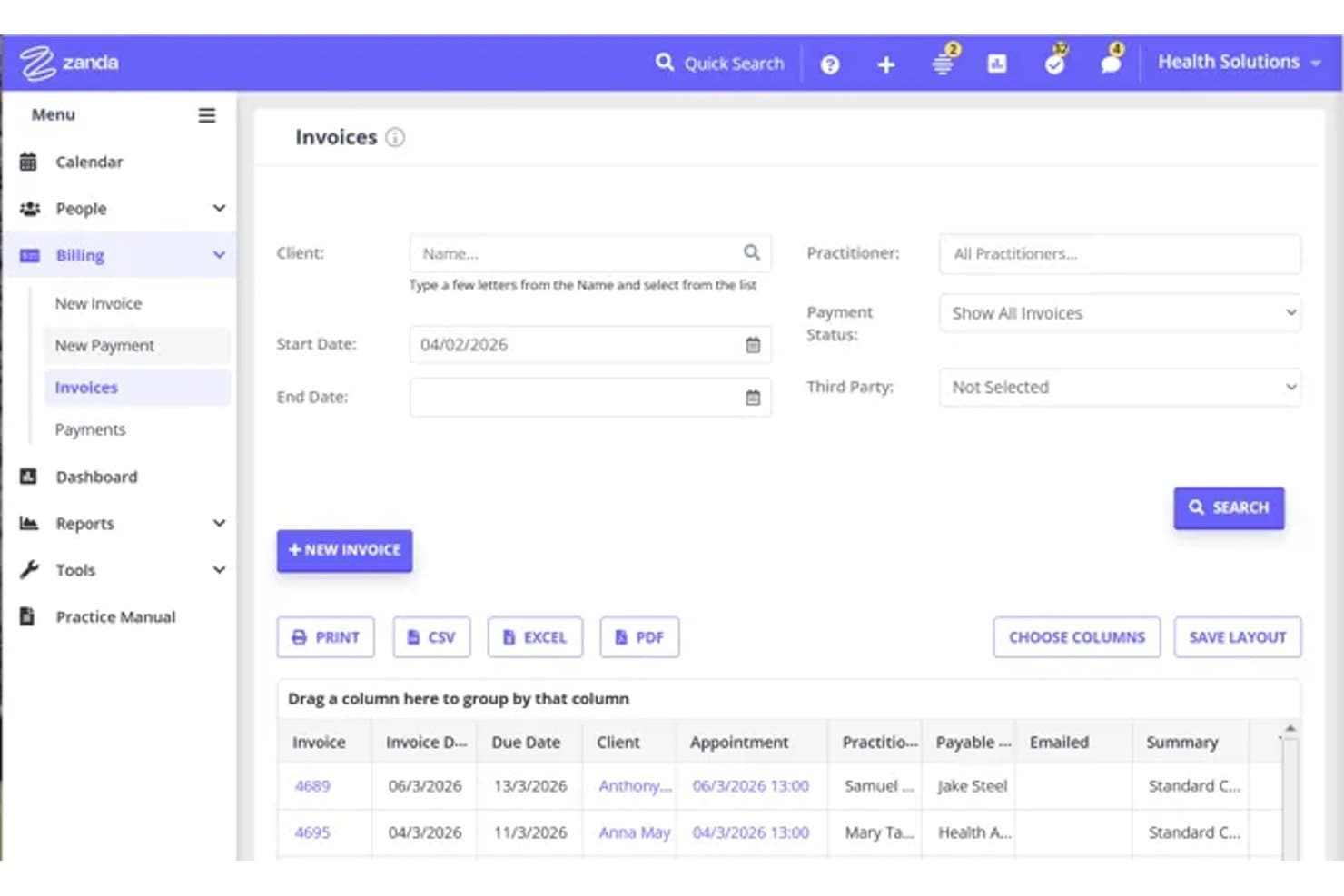
Here's where you can search, filter, and export client invoices in Zanda. Zanda is an all-in-one practice management platform for health practices that combines EHR, scheduling, clinical notes, insurance billing, and patient invoicing in a single system.
Who Is Zanda Best For?
Zanda fits independent practitioners and small practice owners who want scheduling, clinical notes, and patient billing in one place without managing multiple systems.
Why I Picked Zanda
I picked Zanda as one of the best because its automated monthly patient statements genuinely remove one of the most tedious recurring tasks in private practice billing. I like that you can schedule statement generation for any date between the 1st and 21st of the following month, and the system automatically sends each statement to the correct Bill To party on file. Paired with Stripe-based invoice payment links that stay active until the invoice is paid, Zanda keeps the full billing cycle moving without manual follow-up at every step.
Zanda Key Features
- Unified client and billing records: Client profiles centralize appointments, clinical notes, insurance details, and invoices in a single record.
- US insurance claims workflow: Practices can prepare, submit, and track electronic claims through the integrated Ensora Clearinghouse connection.
- Batch eligibility verification: Staff can run eligibility checks for multiple clients with upcoming appointments in one batch, filtered by today, tomorrow, or the next seven days.
- Stripe-based online payment collection: Clients can pay invoices online through a connected Stripe account via the client portal or a direct payment link.
Zanda Integrations
Zanda offers native integrations with Stripe, Xero, Google Calendar, Apple Calendar, Outlook Calendar, and Zoom. A beta public API supports custom connections.
Pros and Cons
Pros:
- EOB payments post against associated invoices
- Session invoices connect records and billing
- Automated monthly statements reduce follow-up work
Cons:
- Denial follow-up still requires manual handling
- Insurance claims remain limited to US accounts
Learn more about Zanda: Best for streamlined insurance claims management
- Free demo available
- Pricing upon request
Visit WebsiteCustomer Rating:4.1/5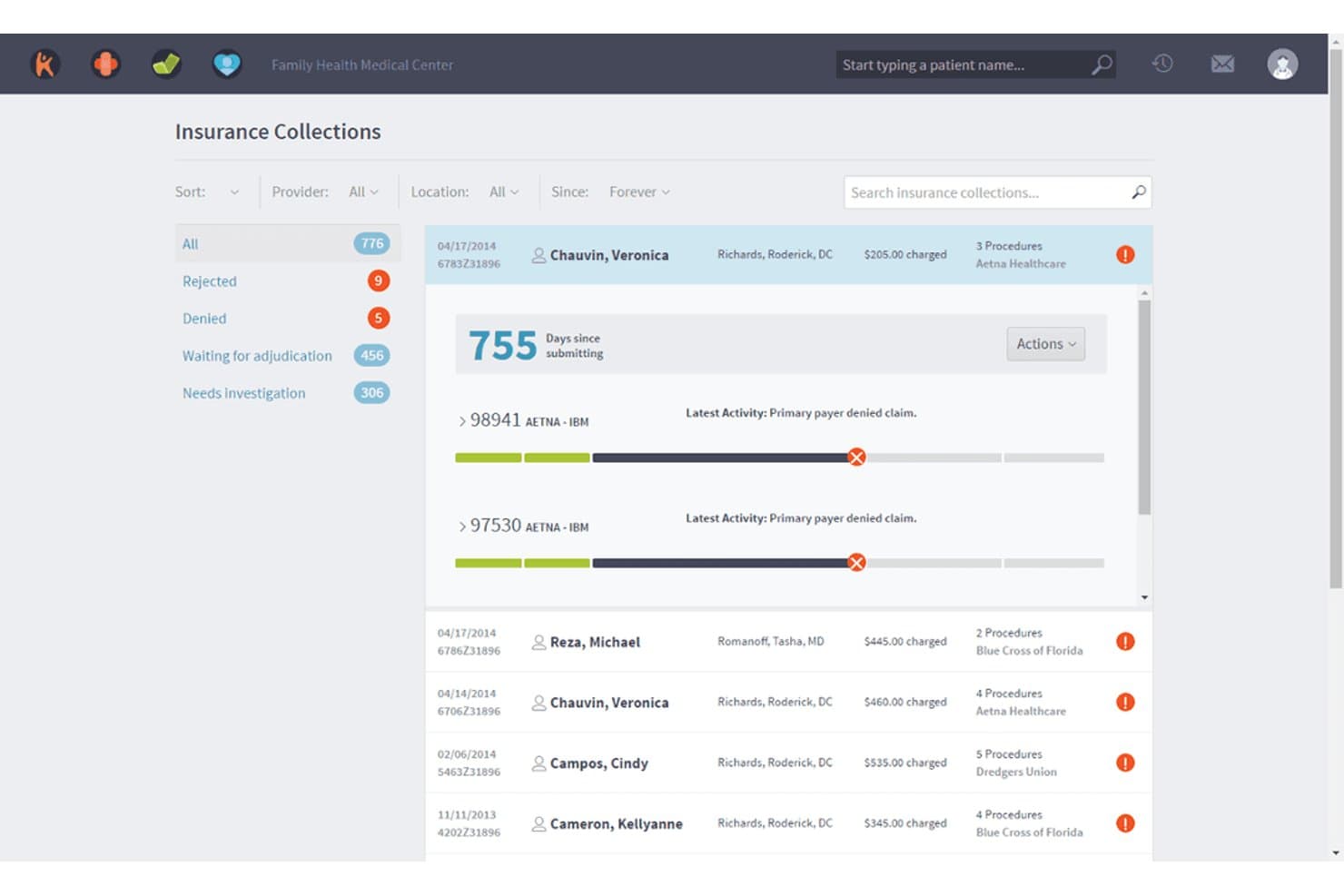
Kareo Billing offers an Insurance Collections dashboard that tracks claim statuses, rejected, denied, and pending adjudication cases with detailed patient and payer information. Kareo Billing is an EHR-integrated billing platform built for independent practices that combines electronic claims submission, insurance eligibility verification, automated payment posting, and patient billing in one system.
Who Is Kareo Billing Best For?
Solo practitioners and small independent practices that manage billing in-house will find Kareo Billing a practical fit.
Why I Picked Kareo Billing
I've included Kareo Billing in my top picks because its claims pipeline is built to reduce denials before they reach a payer. The automated claim scrubbing applies payer-specific rules pre-submission, and RPA-driven ERA auto-posting removes manual remittance work entirely. With connections to 2,700+ payers, my team can verify eligibility and submit 837 claims without toggling between platforms.
Kareo Billing Key Features
- Patient statements and online payments: Generate statements with QR codes and payment links for faster collections.
- Automated patient eligibility checks: Instantly verify insurance coverage details at intake and scheduling.
- Multi-client billing dashboard: Manage billing operations for multiple clients or providers in one view.
- Customizable financial and A/R reporting: Access and tailor revenue cycle dashboards and transaction reports for auditing and analysis.
Kareo Billing Integrations
Kareo Billing offers native integrations with Tebra EHR, Trizetto clearinghouse, and supports HL7 and FHIR connections to major external EHRs and labs. An API is available for custom integrations.
Pros and Cons
Pros:
- Detailed A/R and collections reporting tools
- Native integration with Trizetto clearinghouse workflows
- Automated insurance eligibility verification at intake
Cons:
- Multi-step navigation for correcting denied claims
- Inconsistent report customization feedback from users
Learn more about Kareo Billing: Best for rural and community health organizations
- Free demo available
- Pricing upon request
Visit WebsiteCustomer Rating:4.1/5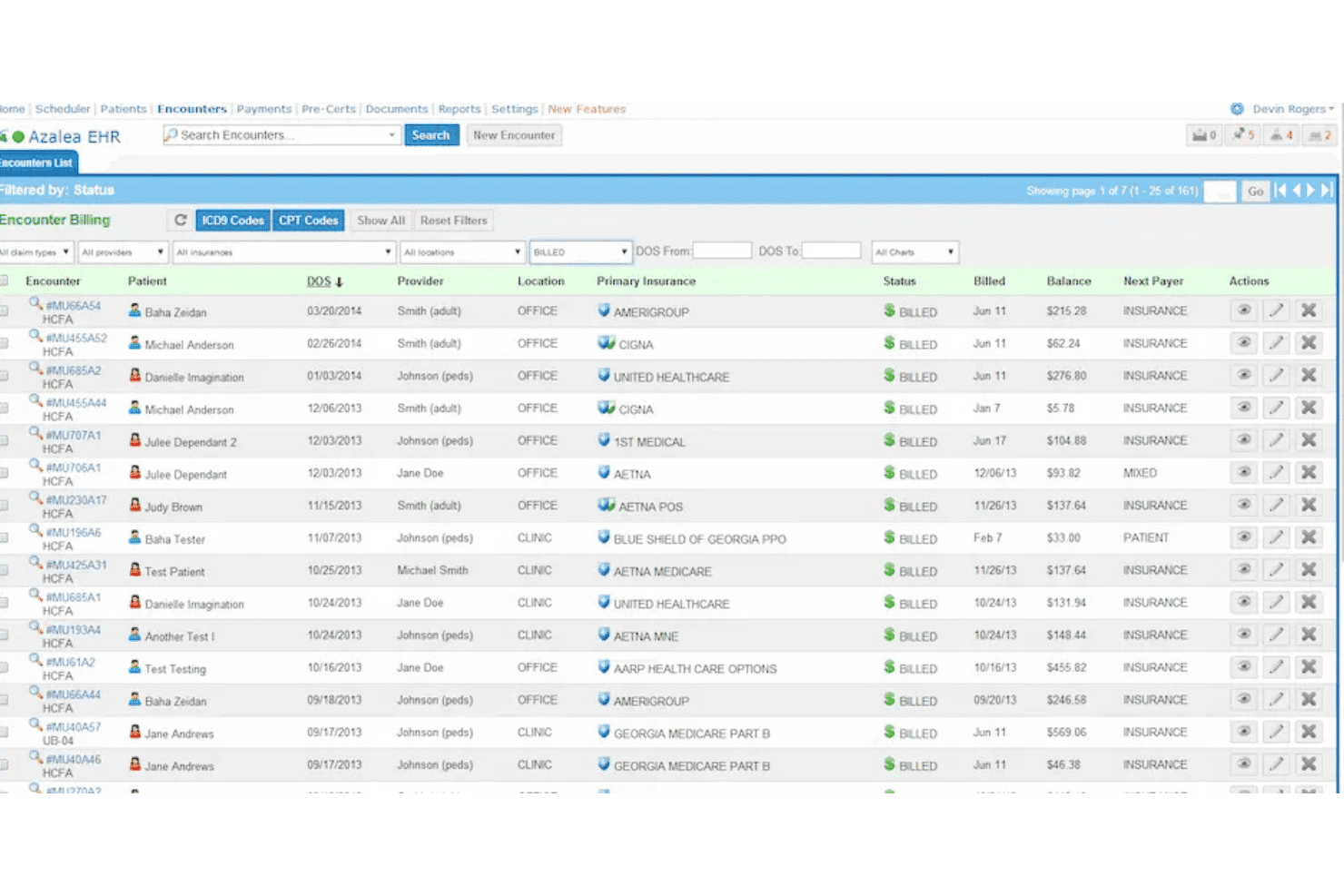
Azalea Health blends EHR, documentation, practice management, and AI claims. Azalea Health is a cloud-based EHR and billing platform that combines clinical documentation, practice management, and AI-assisted claims processing in a single system built for independent and rural ambulatory practices.
Who Is Azalea Health Best For?
Azalea Health is a strong fit for rural health clinics, Critical Access Hospitals, and multispecialty practices that need an integrated EHR and billing system built around their workflows.
Why I Picked Azalea Health
I picked Azalea Health as one of the best because it's one of the few EHR billing platforms purpose-built for CAHs, Rural Emergency Hospitals, and Rural Health Clinics. Its AI Billing Assistant automatically converts paper EOBs into 837 format for auto-posting, which is a real time-saver for small billing teams. I also like that an integrated clearinghouse comes standard in every package, so rural practices aren't paying extra to submit claims electronically.
Azalea Health Key Features
- Ambulatory EHR: Supports specialty and primary care clinical documentation directly linked to billing workflows.
- Patient engagement suite: Includes a patient portal, secure messaging, and online scheduling tools.
- Healthcare analytics dashboards: Gives billing teams access to real-time revenue cycle and financial reporting.
- AI Clinical Assistant: Offers ambient voice-enabled charting that helps speed up encounter documentation.
Azalea Health Integrations
Azalea Health includes a fully integrated clearinghouse in every package and offers FHIR API connections for labs, imaging, communications, and HIEs. It also provides an API for custom integrations and integrates natively with Dr. First for medication management.
Pros and Cons
Pros:
- AI assistant for coding and denial review
- Rural health and CAH billing workflows supported
- Built-in clearinghouse with auto-claim scrubbing
Cons:
- Complex contract terms for some RHCs
- No built-in prior authorization automation
Learn more about Azalea Health: Best cloud-based option for independent clinics
- 14-day free trial + free demo available
- From $199/provider/month
Visit WebsiteCustomer Rating:3.7/5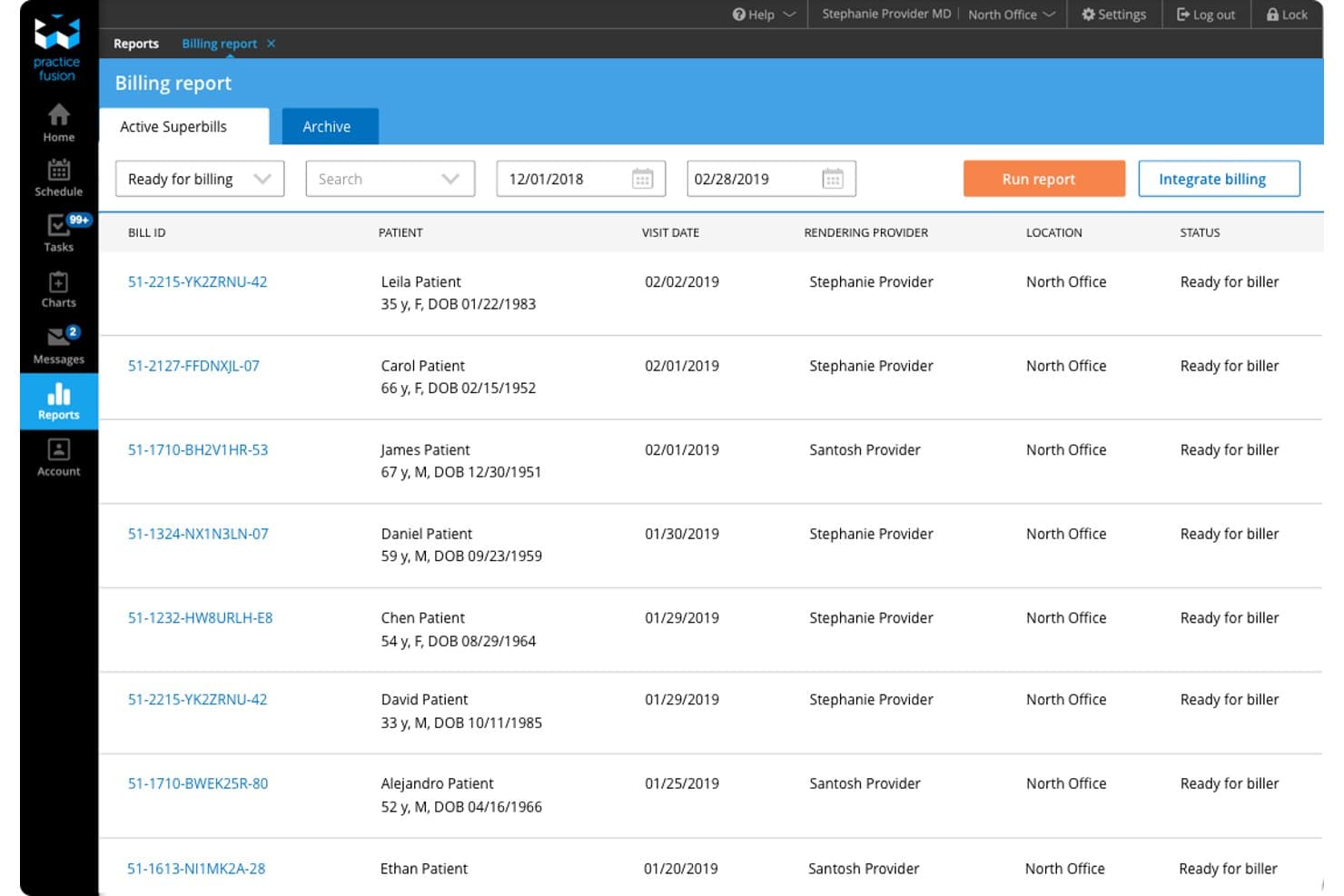
Practice Fusion offers a Billing Report screen displaying active superbills with patient details, visit dates, rendering providers, and billing statuses ready for submission. Practice Fusion is a cloud-based EHR platform that combines clinical charting, e-prescribing, and integrated billing services for independent medical practices.
Who Is Practice Fusion Best For?
Practice Fusion is a strong fit for solo physicians and small independent practices that need a fast-to-deploy, all-in-one EHR and billing solution without enterprise-level complexity.
Why I Picked Practice Fusion
Practice Fusion earns its spot on my shortlist because it's one of the few cloud-based EHRs built around the reality of running an independent clinic. I like that practices can be fully implemented in two weeks or less, and the bundled billing services, including claims scrubbing, same-day submission, and denial management, are handled by a dedicated billing team. The online check-in forms automatically populate chart notes, keeping clinical data connected to charge capture from the start.
Practice Fusion Key Features
- E-prescribing: Send prescriptions electronically to any pharmacy nationwide, including controlled substances, with integrated drug interaction checks.
- Lab and imaging integration: Connect directly to hundreds of diagnostic labs and imaging centers for seamless order and result management.
- Patient portal: Allow patients to access their health information, request refills, and communicate securely through a HIPAA-compliant portal.
- FHIR R4 HL7 API: Enable third-party apps or health systems to securely exchange patient data using modern, interoperable healthcare standards.
Practice Fusion Integrations
Practice Fusion offers native integrations with Zocdoc, Vaxcare, Veradigm Payer Insights, Updox, Fullscript, and Vytalize Health ACO. An API is available for custom integrations, and FHIR R4 HL7 API support allows secure data exchange with third-party applications.
Pros and Cons
Pros:
- Online check-in auto-populates patient chart notes
- Fast implementation for new independent clinics
- Billing services include dedicated follow-up team
Cons:
- Limited coding assistance inside the EHR
- No real-time eligibility checks for Medicaid
Learn more about Practice Fusion: Best for multispecialty practice integrations
- Free demo available
- Pricing upon request
Visit WebsiteCustomer Rating:3.6/5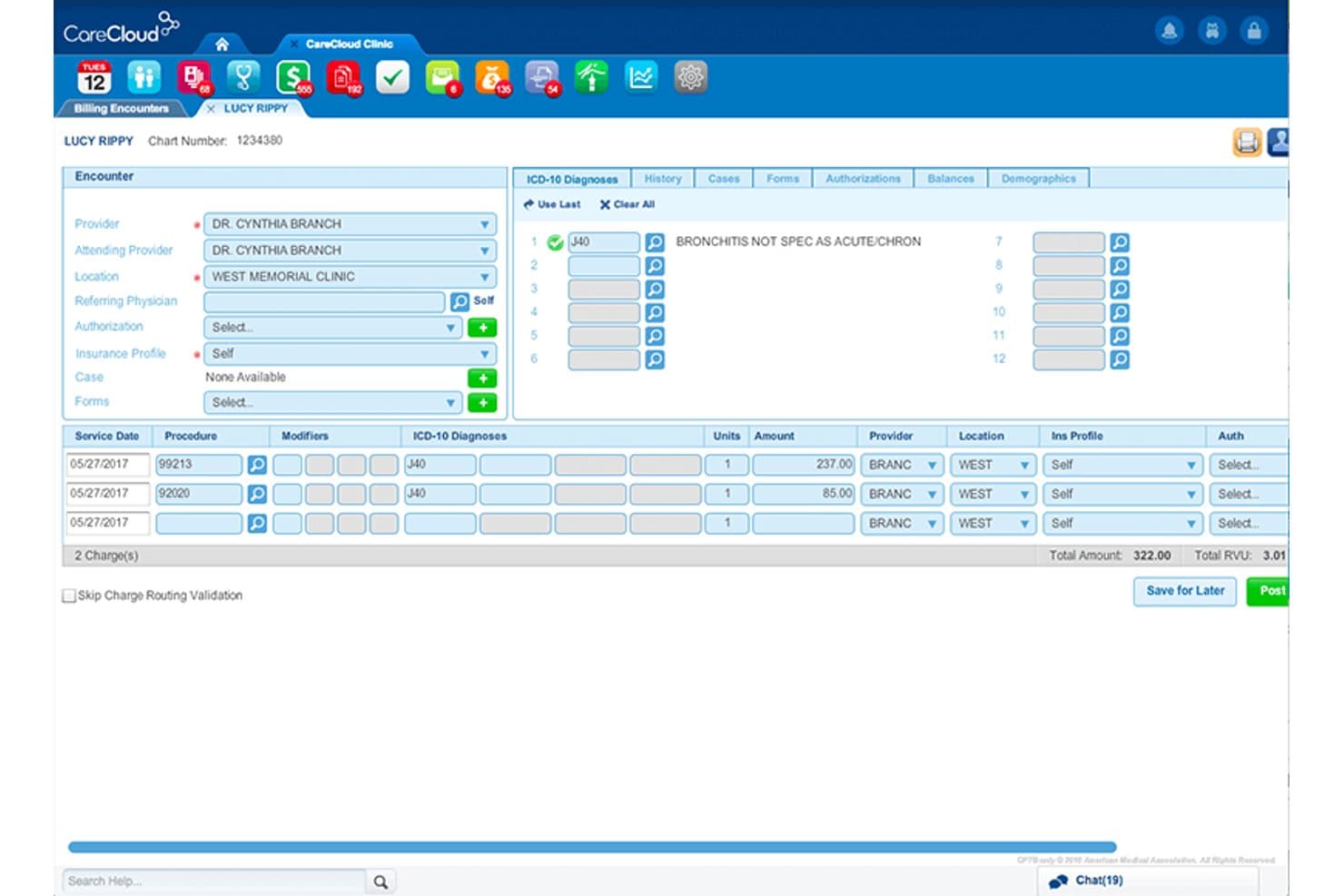
CareCloud offers a detailed billing encounter screen with ICD-10 diagnosis coding, procedure charges, and provider assignment for streamlined EHR billing. CareCloud is a cloud-based EHR and medical billing platform that combines clinical documentation, practice management, revenue cycle management, and AI-assisted coding and claims processing in a single system.
Who Is CareCloud Best For?
CareCloud is a strong fit for multispecialty medical practices that need a single platform to manage clinical workflows and billing across multiple provider types and departments.
Why I Picked CareCloud
CareCloud earns its spot on my shortlist because it handles billing across 70+ specialties without needing a separate system for each department. I like that the CollectiveIQ claims scrubber catches errors before submission. I find cirrusAI Appeals especially useful, too, as it auto-generates customized denial appeal letters based on individual claim details. In practice, a cardiology group and an orthopedic team can share the same billing pipeline, with specialty-specific coding applied at each step.
CareCloud Key Features
- Patient experience management: Breeze module offers digital check-in, appointment reminders, and online payment options.
- Integrated EHR and PM: Single platform unifies clinical documentation with scheduling and billing workflows.
- Telehealth module: HIPAA-compliant video visits are available directly from the platform.
- Business intelligence reporting: Custom dashboards display key revenue cycle and financial performance metrics.
CareCloud Integrations
CareCloud offers native integrations with pVerify for insurance eligibility verification and Modernizing Medicine. An API is available for custom integrations. Native integrations beyond these are not clearly documented.
Pros and Cons
Pros:
- AI-generated denial appeal letters
- Real-time claims scrubber for reduced denials
- Supports 70+ specialties with one system
Cons:
- Contract terms can limit flexibility
- Slow customer support response times
Learn more about CareCloud: Best all-in-one platform for front desk workflows
- Free demo available
- Pricing upon request
Visit WebsiteCustomer Rating:3.9/5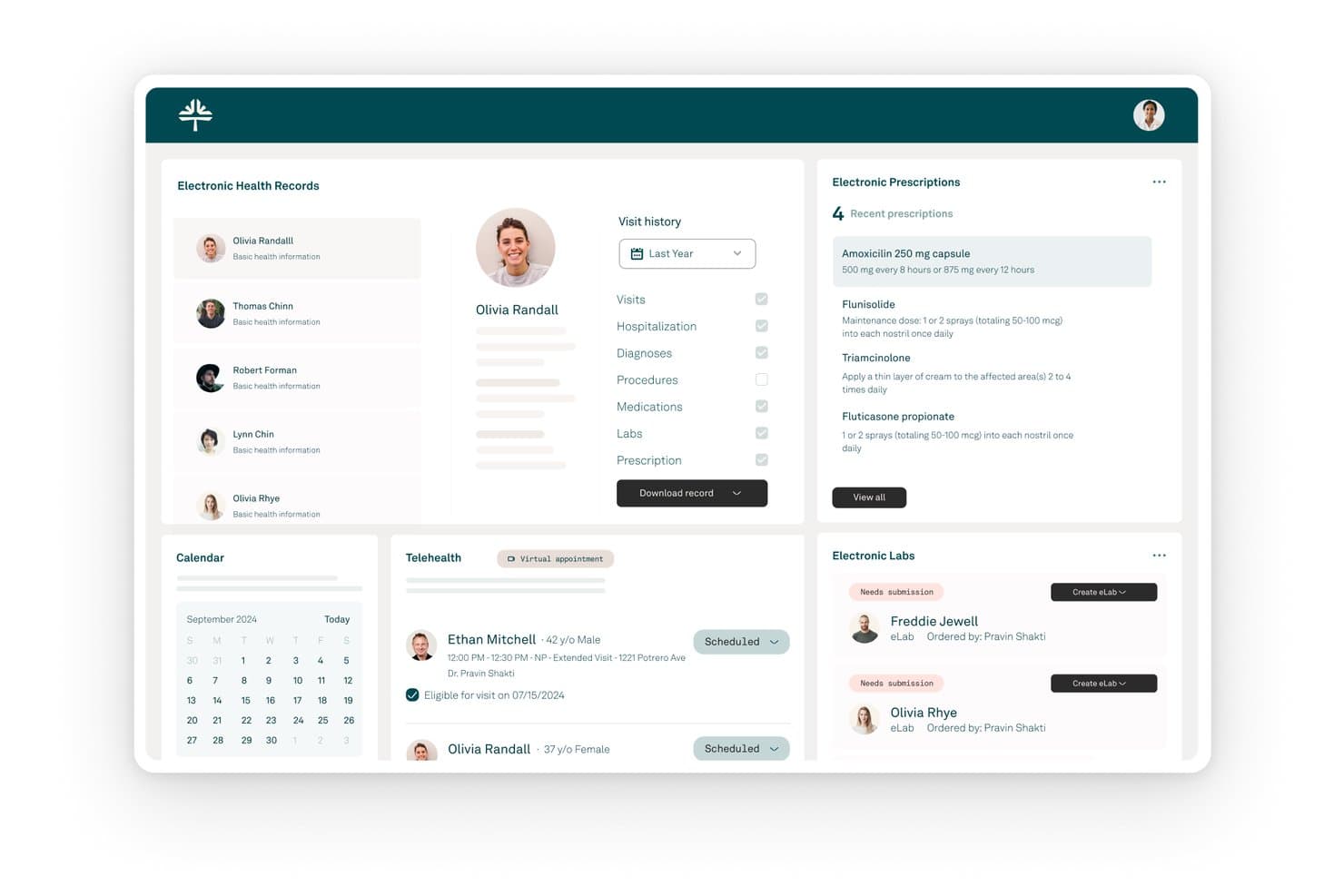
Tebra offers a comprehensive EHR dashboard featuring electronic health records, prescriptions, telehealth scheduling, electronic labs, and a patient visit history panel. Tebra is an all-in-one EHR and practice management platform that combines clinical documentation, medical billing, claims management, insurance eligibility verification, and patient payments in a single system built for independent medical practices.
Who Is Tebra Best For?
Tebra is a strong fit for small independent practices with up to 10 providers that need EHR and billing managed in one place.
Why I Picked Tebra
I've included Tebra in my top picks because of how tightly it connects front desk activity to the billing cycle. The automated insurance eligibility check runs at scheduling, sending ANSI-X12 270 inquiries to 2,700+ payers and returning coverage details in seconds. Digital patient intake then feeds directly into charge capture, so by the time a patient is seen, the billing workflow is already in motion.
Tebra Key Features
- AI-powered clinical documentation: Automatically generates clinical notes during patient encounters with AI Note Assist.
- Electronic prescription management: Supports e-prescribing and includes integrated PDMP and EPCS compliance.
- Automated claims scrubbing: Identifies billing errors and applies payer-specific edit rules before submission.
- Integrated patient payment tools: Enables card-on-file, text-to-pay, and in-person payment capture for outstanding balances.
Tebra Integrations
Tebra offers native integrations with Appriss Health for PDMP, EPCS for controlled substances, and supports HL7 and FHIR integrations with major EHRs. An API is available for custom integrations.
Pros and Cons
Pros:
- Patient payments fully integrated in one system
- Claims scrubbing applies payer-specific edit rules
- Automates eligibility checks during patient intake
Cons:
- Some legacy Kareo modules cause interface inconsistency
- Report customization options are limited
Learn more about Tebra: Best customizable scheduling and billing rules
- Free demo available
- Pricing upon request
Visit WebsiteCustomer Rating:3.9/5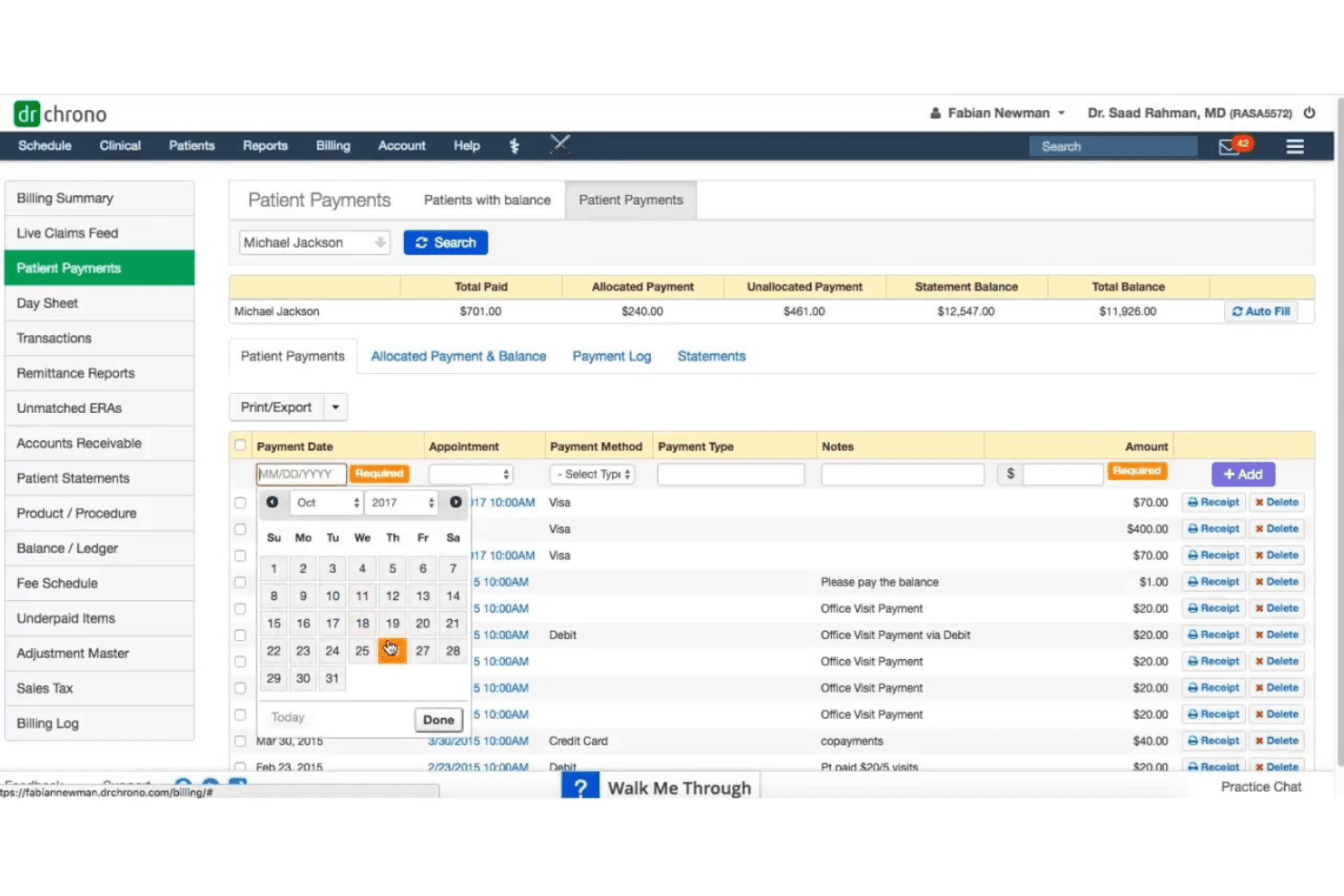
DrChrono unites EHR, documentation, coding, claims, practice tools, and RCM. DrChrono is a cloud-based EHR billing platform that unifies clinical documentation, practice management, medical coding, claims submission, and revenue cycle management in a single system built for independent medical practices.
Who Is DrChrono Best For?
DrChrono is a strong fit for independent practices and small-to-mid-size clinics that want a single platform to handle both clinical charting and billing.
Why I Picked DrChrono
DrChrono earns its spot on my shortlist because of how it handles billing profiles. I can build custom templates that store preferred CPT codes, diagnoses, and modifiers for specific encounter types, so charges generate consistently without manual re-entry each visit. Appointment profiles tie directly into charge capture, which means scheduling rules and billing rules work in tandem rather than as disconnected steps across two separate modules.
DrChrono Key Features
- Integrated telehealth: Schedule and conduct HIPAA-compliant video visits directly through the platform.
- Mobile EHR app: Access full EHR and billing functionality on iPad and iPhone, including clinical notes and order sets.
- Insurance eligibility verification: Run real-time or batch checks to confirm patient coverage before visits.
- OnPatient portal: Patients can self-schedule, complete intake forms, and pay bills online.
DrChrono Integrations
DrChrono offers native integrations with Quest Diagnostics, LabCorp, Surescripts, CoverMyMeds, Iron Bridge, and eProvider Solutions, and includes an open API for custom integrations.
Pros and Cons
Pros:
- Native mobile app supports clinical and billing work
- Real-time insurance eligibility verification workflows
- Customizable charge capture and billing profiles
Cons:
- Occasional claim batching and denial processing slowdowns
- Reporting requires mostly manual report generation
Learn more about DrChrono: Best for flexible appointment and claims handling
- Free demo available
- Pricing upon request
Visit WebsiteCustomer Rating:3.8/5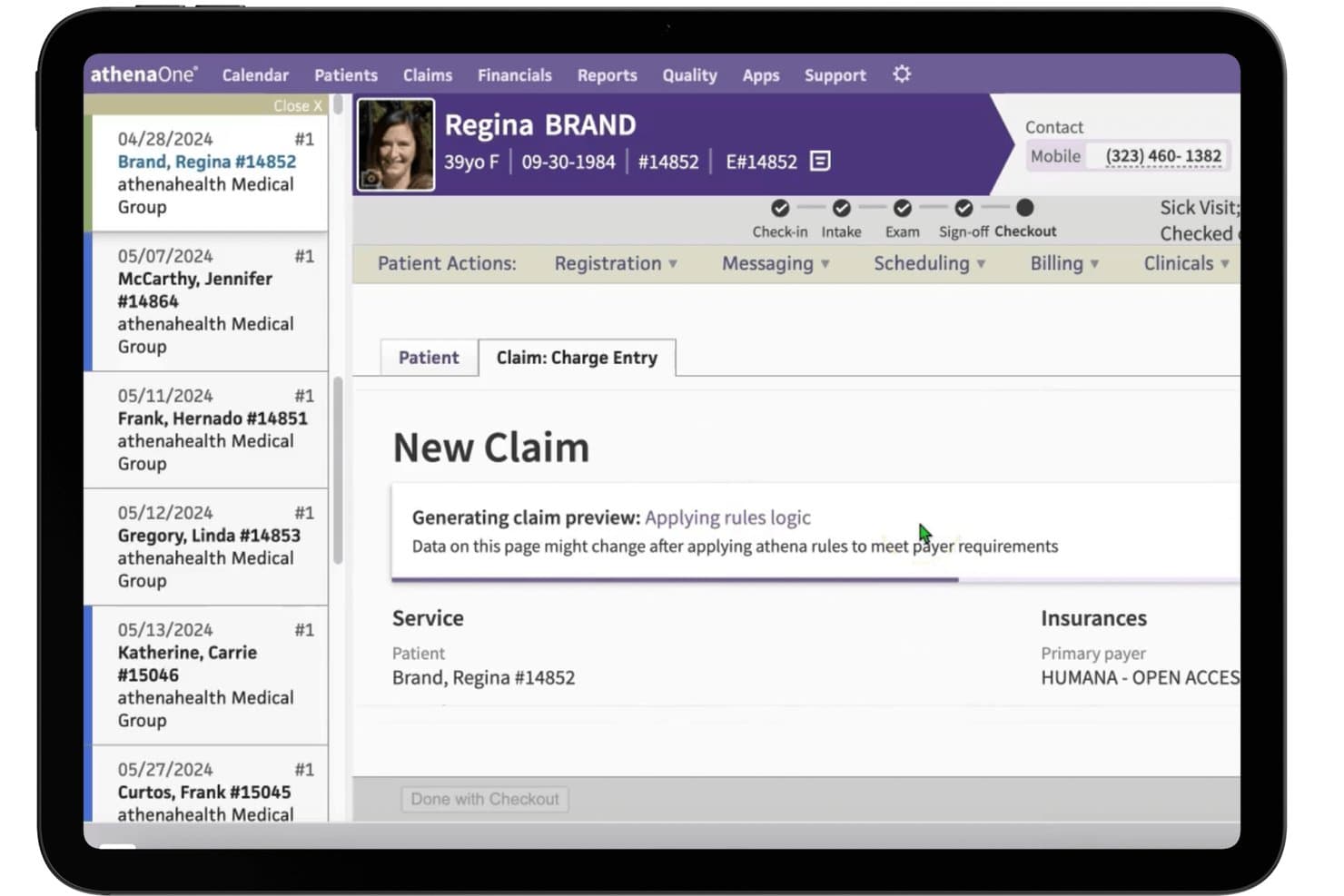
athenaOne offers an automated claim scrubbing workflow that applies rules logic during charge entry to meet payer requirements before submission. athenaOne is an all-in-one EHR, practice management, and medical billing platform that combines clinical documentation, claims management, revenue cycle automation, and patient engagement in a single system.
Who Is athenaOne Best For?
athenaOne is a strong fit for independent physician practices and small-to-mid-size medical groups managing their own revenue cycle.
Why I Picked athenaOne
I picked athenaOne as one of the best because its claims engine is genuinely hard to beat in this category. The platform runs every claim through 29,000+ rules before submission, catching coding errors and missing modifiers before they reach the payer. I also like how scheduling ties directly into real-time eligibility verification, so coverage is confirmed and prior authorization workflows are already moving before the patient even arrives.
athenaOne Key Features
- Customizable documentation templates: Create tailored clinical note and chart templates to fit your specialty’s workflows.
- Integrated telehealth visits: Schedule and conduct telehealth sessions within the same system as in-person appointments.
- Automated patient reminder system: Send automated appointment and payment reminders through email, text, or phone.
- Direct clinical integrations: Connect directly to labs, imaging centers, and pharmacies for seamless order entry and results.
athenaOne Integrations
athenaOne offers 250+ marketplace integrations, including Fullscript, Epion, DeepScribe, TimeDoc Health, LucidAct, Clearwave, and Epocrates. It supports direct clinical integrations with labs, pharmacies, and imaging centers. An API is available for custom integrations.
Pros and Cons
Pros:
- Direct connection to nationwide lab networks
- Real-time eligibility checks at scheduling step
- Proactive denial prevention with claims rules engine
Cons:
- Response time for support can be inconsistent
- Reporting module lacks detailed filtering options
Learn more about athenaOne: Best built-in analytics for small practices
- Not available
- Pricing upon request
Visit WebsiteCustomer Rating:3.7/5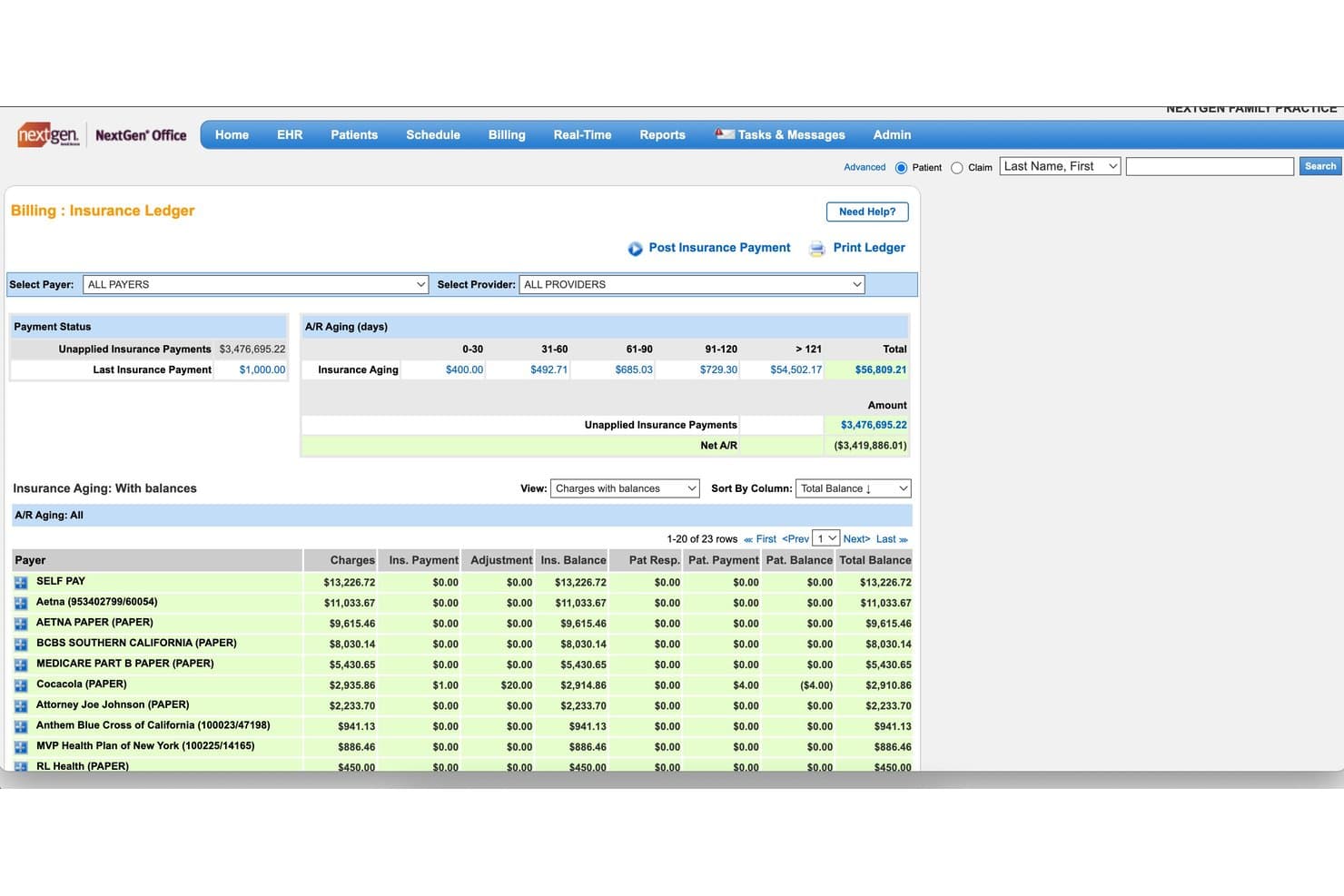
NextGen Office offers a detailed Insurance Ledger with A/R aging, unapplied insurance payments, and payer-level balance tracking for efficient billing management. NextGen Office is a cloud-based EHR and practice management platform for small independent practices that combines clinical documentation, medical coding, claims submission, eligibility verification, and patient billing in a single system.
Who Is NextGen Office Best For?
NextGen Office is built for independent physicians and practice administrators running small ambulatory practices with fewer than 10 providers.
Why I Picked NextGen Office
NextGen Office earns its spot on my shortlist because of how deeply its analytics are woven into the billing workflow. I particularly like that practice-wide financial reporting, including A/R aging and collections tracking, sits in the same system as clinical documentation. The MACRA/MIPS compliance reporting is also baked in, so I don't need to export data to a separate tool just to monitor revenue cycle performance.
NextGen Office Key Features
- Embedded practice management system: Access scheduling, patient intake, and denials tracking all in one platform.
- Integrated clearinghouse: Submit claims electronically and process 837/835 files from within the software.
- Real-time insurance eligibility checks: Verify patient benefits directly at check-in or scheduling.
- Specialty-specific charting templates: Use tailored forms and workflows for different medical specialties.
NextGen Office Integrations
NextGen Office offers marketplace integrations with tools like Demandforce, Forus, HST Price Transparency, Inbox Health, Clearwave, and Doctible. An API is available for custom integrations.
Pros and Cons
Pros:
- Embedded clearinghouse for electronic claims submission
- Practice-wide analytics and financial dashboards
- Unified platform for clinical and billing workflows
Cons:
- Payment posting workflow can be time-consuming
- Patient portal interface is cumbersome for users
Learn more about NextGen Office: Best customizable workflows for billing teams
- 30-day free trial + free demo available
- From $130/user/month
Visit WebsiteCustomer Rating:3.6/5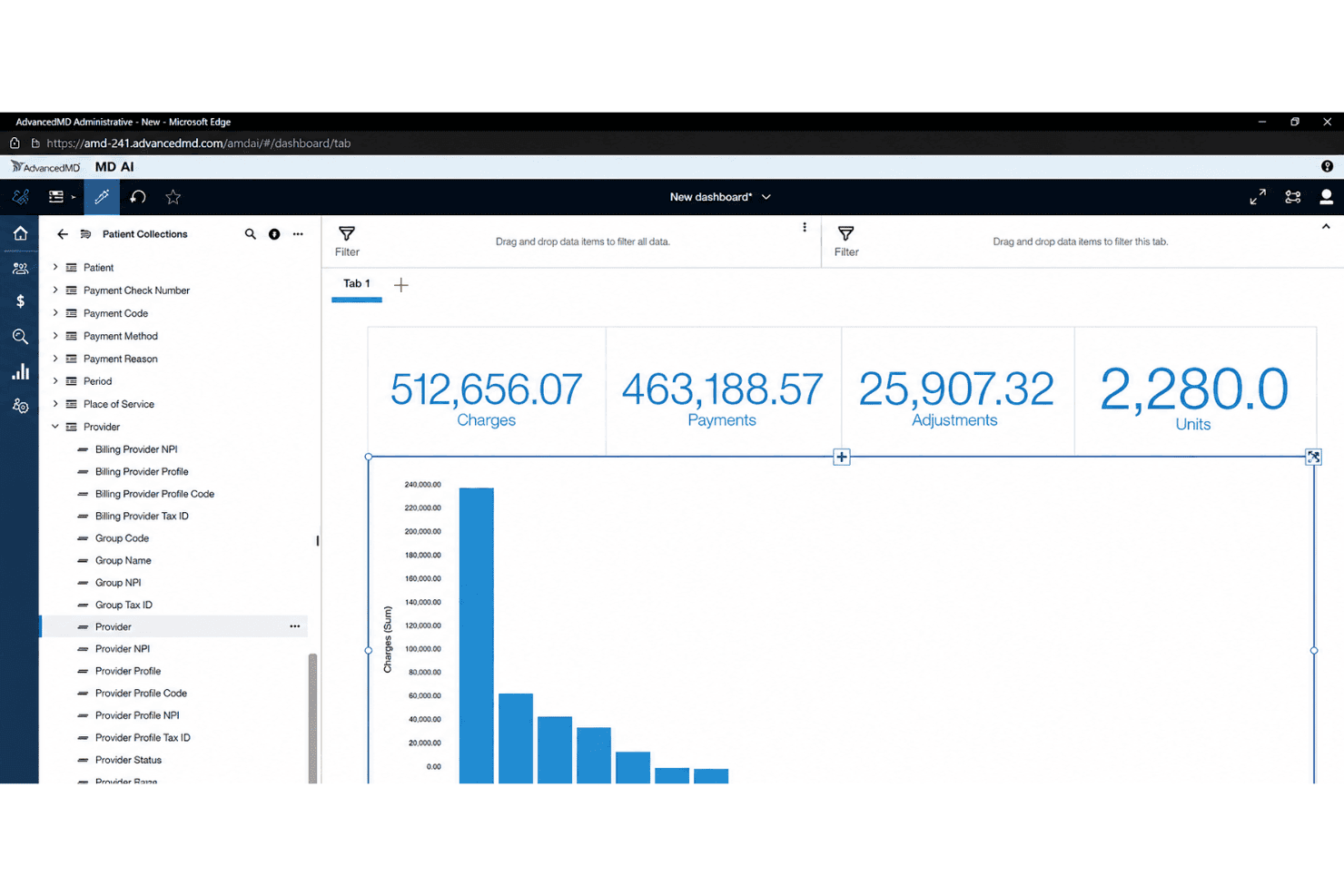
AdvancedMD centralizes EHR, billing, claims, eligibility, and patient payments. AdvancedMD is a cloud-based EHR and practice management platform that unifies clinical documentation, medical billing, claims management, insurance eligibility verification, and patient payments in a single system.
Who Is AdvancedMD Best For?
AdvancedMD is a strong fit for independent and multi-specialty practices with dedicated billing teams or billing service companies managing multiple client accounts.
Why I Picked AdvancedMD
AdvancedMD earns its spot as one of the best on my shortlist because of how deeply configurable the billing workflow actually is. I particularly like the Centralized Billing Office (CBO), which lets billing teams work across multiple client databases simultaneously without logging in and out. The Claim Inspector scrubs every claim through 3.5 million edits covering CCI, HIPAA, LCD, and carrier-specific rules. The denial module then auto-generates intelligent worklists, replacing paper-based tracking with structured queues.
AdvancedMD Key Features
- Integrated EHR and practice management: Connects clinical charting, scheduling, and billing within a single platform.
- Real-time insurance eligibility verification: Provides both batch and instant verification with payer benefit details.
- Patient payment portal: Lets patients pay bills online, view statements, and set up card-on-file payments.
- Open API and ODBC data access: Supports data exchange and direct access for custom reporting and analytics.
AdvancedMD Integrations
AdvancedMD offers integrations through its marketplace and open API, including native integrations with Health Information Exchanges (HIEs), PDMP registries, e-prescribing systems, digital faxing, and supporting EHR-agnostic billing workflows. An API is available for custom integrations.
Pros and Cons
Pros:
- Real-time insurance eligibility at scheduling
- Advanced claim scrubbing and edit engine
- Centralized billing office workspace for agencies
Cons:
- Coding AI is an extra paid add-on
- Reporting updates can be delayed after payer changes
Alte software-uri de facturare EHR
Iată câteva opțiuni suplimentare de software de facturare EHR care nu au ajuns pe lista mea scurtă, dar care merită totuși analizate:
- 11CureMDBest specialty-specific billing automation
- 12eClinicalWorksBest integrated telehealth and billing tools
- 13RXNTBest unified billing and e-prescribing platform
- 14CollaborateMDBest real-time insurance eligibility checks
- 15PracticeSuiteBest claim management automation tools
- 16ModMedBest specialty-driven billing workflows
- 17NueMDBest for speedy system onboarding
- 18Elation HealthBest clinical-first focus for small groups
- 19EZClaimBest desktop solution for insurance billing
- 20MicroMDBest modular add-ons for scaling practices
How I Evaluate Ehr Billing Software
I split my evaluation into baseline criteria—like native EHR-to-billing charge flow and 837/835 claims support—and the differentiators that separate a good tool from the right one for your practice.
Core Functionality (Table Stakes for This List)
When I'm selecting tools for my list, I rank each one on a scale from 0 (does not offer the functionality) to 5 (excels in this area) for each core functionality listed below. Then, I calculate the tool's total score into a percentage. Each tool needs to achieve a minimum total score of 65% to be considered for inclusion.
- Integrated EHR & billing: I check whether clinical encounter data flows directly into charge capture, so your providers aren't re-entering diagnoses and procedures on the billing side.
- Claims management: The tool should support 837/835 transactions and include claim scrubbing that catches coding mismatches before submission hits the clearinghouse.
- Medical coding support: I look for up-to-date ICD-10, CPT, and HCPCS libraries with validation tools that flag issues like bundling conflicts during encounter documentation.
- Eligibility verification: Real-time or batch insurance checks at scheduling or check-in help front desk staff catch lapsed coverage before the patient is in the exam room.
- Patient billing & payments: I evaluate whether the platform offers online payment portals, card-on-file options, and payment plans that make it easier for patients to pay balances.
- HIPAA-compliant reporting: A/R aging, denial tracking, and collections dashboards should live within a HIPAA-compliant environment with audit logs and access controls.
Once I have a list of tools that meet the criteria, I consider what sets each platform apart.
Differentiating Factors (What Sets Vendors Apart)
Here's how I compare and contrast different vendors:
Standout Features
Denial management workflows are a big differentiator. I look for tools that auto-categorize rejections by root cause and generate appeal letters, so your billing team spends less time tracking down why a claim was denied. An integrated clearinghouse also matters because it eliminates the need for a separate payer submission service and keeps claim status updates in one place. For specialty practices like behavioral health or cardiology, I evaluate whether the platform includes pre-loaded code sets and scrubbing rules tuned to specialty-specific payer edits.
Beyond Features
Practice size and specialty fit shape which platform works best. A solo clinic needs a turnkey setup, while a multi-location group should look for centralized reporting and multi-entity billing. I also consider whether a vendor offers optional RCM services, since practices without dedicated billers can offload denial follow-up and A/R management to the vendor's team. Pricing structure matters too—per-provider, per-encounter, and percentage-of-collections models all scale differently, so I evaluate total cost of ownership including implementation and clearinghouse fees.
Cum să alegeți software-ul de facturare EHR
Este ușor să vă pierdeți în liste lungi de funcții și structuri complexe de prețuri. Pentru a vă ajuta să rămâneți concentrat în timp ce parcurgeți procesul unic de selecție a software-ului, iată o listă de verificare a factorilor de care trebuie să țineți cont:
| Factor | Ce trebuie luat în considerare |
|---|---|
| FactorScalabilitate | Ce trebuie luat în considerareVa susține acest software dezvoltarea dumneavoastră — de la adăugarea de furnizori până la deschiderea unor locații noi — fără modificări majore sau costuri excesive? |
| FactorIntegrări | Ce trebuie luat în considerareSe poate conecta la casa de clearing, laboratoarele sau instrumentele de contabilitate existente? Întrebați despre compatibilitatea cu HL7/FHIR și cu API-urile deschise pentru conectarea sistemelor. |
| FactorPosibilități de personalizare | Ce trebuie luat în considerareVă permite platforma să adaptați fluxurile de lucru, rolurile utilizatorilor sau rapoartele pentru a se potrivi specializării și modului dumneavoastră de lucru? |
| FactorUșurință în utilizare | Ce trebuie luat în considerarePot învăța și utiliza personalul clinic și cel de facturare sistemul fără ajutor IT constant sau frustrare? Verificați interfața utilizatorului direct. |
| FactorImplementare și inițiere | Ce trebuie luat în considerareCât timp este necesar pentru migrarea datelor, instruirea echipei și lansarea sistemului? Căutați informații despre termenele de inițiere, instruire și asistență după lansare. |
| FactorCost | Ce trebuie luat în considerarePe lângă taxele de abonament, există costuri pentru casa de clearing, taxe de implementare sau costuri de instruire? Evaluați costul total real de deținere. |
| FactorMăsuri de securitate | Ce trebuie luat în considerareSunt datele criptate în timpul transferului și în repaus? Verificați conformitatea cu HIPAA, jurnalele de audit și controalele de acces bazate pe roluri. |
| FactorDisponibilitatea asistenței | Ce trebuie luat în considerareEste oferită asistență în timp real prin telefon sau chat și în ce interval? Luați în considerare cât de repede veți primi ajutor în cazul unei urgențe legate de o cerere sau de sistem. |
Ce este software-ul de facturare EHR?
Software-ul de facturare EHR este un sistem care integrează dosarele medicale electronice și instrumentele de facturare medicală într-o singură platformă. Aceste soluții permit echipei dumneavoastră să înregistreze documentația clinică, să atribuie coduri, să gestioneze cererile și să proceseze plățile pacienților — toate într-un singur flux de lucru. Utilizarea software-ului de facturare EHR ajută cabinetele să conecteze furnizarea îngrijirii cu ciclul veniturilor, să reducă introducerea manuală a datelor și să îmbunătățească acuratețea facturării.
Funcțiile software-ului de facturare EHR
Când selectați software-ul de facturare EHR, urmăriți următoarele funcții esențiale:
- EHR și facturare integrate: Conectează documentația clinică direct la fluxurile de facturare, minimizând introducerea duplicată a datelor și sporind acuratețea înregistrării serviciilor facturabile.
- Gestionarea cererilor de plată: Automatizează crearea, verificarea, transmiterea către plătitori și urmărirea cererilor de plată, astfel încât echipa să petreacă mai puțin timp cu procesarea manuală a acestora.
- Verificarea eligibilității asigurării: Verifică în timp real sau în lot detaliile asigurării pacientului înaintea programărilor, pentru a reduce respingerile cererilor de plată din cauza unei acoperiri neeligibile.
- Biblioteci de coduri medicale: Oferă acces facil la seturi de coduri ICD-10, CPT și HCPCS actualizate periodic, pentru a sprijini introducerea conformă și precisă a serviciilor facturabile.
- Extrase de cont și plăți pentru pacienți: Generează extrase de cont clare pentru pacienți, acceptă plata online a facturilor și permite planuri de plată, astfel încât să puteți încasa mai ușor soldurile restante.
- Gestionarea automată a respingerilor: Ajută la clasificarea, prioritizarea și direcționarea cererilor de plată respinse pentru urmărire promptă — adesea cu modele integrate de scrisori de contestație.
- Raportare financiară și privind conformitatea: Oferă tablouri de bord conforme cu HIPAA privind creanțele, încasările, ratele de respingere și alte valori-cheie ale ciclului veniturilor.
- Roluri de utilizator și controlul accesului: Vă permite să setați permisiuni astfel încât personalul să aibă acces doar la informațiile necesare, sprijinind atât cerințele de securitate, cât și pe cele de conformitate.
- Integrarea programărilor: Conectează calendarele programărilor de la recepție cu facturarea, permițând înregistrarea serviciilor facturabile pe baza vizitelor programate și efectuate.
- Urmărirea jurnalului de audit: Înregistrează fiecare acțiune a utilizatorilor în sistem pentru conformitatea cu HIPAA și sprijină pregătirea pentru audituri în cazul verificărilor sau disputelor.
Beneficiile software-ului de facturare EHR
Implementarea software-ului de facturare EHR oferă mai multe beneficii pentru echipa și afacerea dumneavoastră. Iată câteva dintre acestea:
- Acuratețe îmbunătățită a facturării: Conectarea directă a documentației clinice cu facturarea reduce erorile de codificare și respingerile cererilor de plată.
- Procesare mai rapidă a cererilor de plată: Verificarea automată a cererilor, verificările eligibilității și transmiterile electronice vă ajută să fiți plătit mai repede, cu mai puține întârzieri.
- Sprijin mai bun pentru conformitate: Jurnalele de audit integrate și controalele accesului bazate pe roluri ajută la menținerea conformității cu HIPAA și la pregătirea pentru audituri.
- Plăți simplificate pentru pacienți: Portalurile online și planurile de plată le facilitează pacienților achitarea soldurilor, îmbunătățind rata de încasare.
- Informații utile despre venituri: Tablourile de bord și rapoartele în timp real vă ajută să monitorizați creanțele, ratele de respingere și performanța cabinetului.
- Fluxuri de lucru optimizate: Conectarea programărilor, documentației și facturării într-un singur sistem reduce munca manuală și sprijină colaborarea eficientă a echipei.
- Scalabilitate pentru creștere: Sistemele centralizate simplifică adăugarea unor furnizori sau locații noi, fără perturbări majore.
Costurile și prețurile software-ului de facturare EHR
Selectarea software-ului de facturare EHR necesită înțelegerea diferitelor modele și planuri de preț disponibile. Costurile variază în funcție de funcții, dimensiunea echipei, extensii și alți factori. Tabelul de mai jos prezintă pe scurt planurile obișnuite, prețurile medii ale acestora și funcțiile incluse de obicei în soluțiile software de facturare EHR:
Tabel comparativ al planurilor pentru software-ul de facturare EHR
| Tipul planului | Preț mediu | Funcții obișnuite |
|---|---|---|
| Tipul planuluiPlan gratuit | Preț mediu$0 | Funcții obișnuiteGestionarea de bază a fișelor pacienților, transmiterea limitată a cererilor de plată, asistență de bază pentru codificare și asistență prin e-mail. |
| Tipul planuluiPlan personal | Preț mediu$59-$199/lună | Funcții obișnuiteAsistență pentru un singur furnizor, programări integrate, cereri de plată online, verificări ale eligibilității și raportare de bază. |
| Tipul planuluiPlan pentru companii | Preț mediu$199-$499/lună | Funcții obișnuiteAsistență pentru mai mulți furnizori, cereri de plată automatizate, rapoarte personalizabile, portal de plăți pentru pacienți și biblioteci de coduri. |
| Tipul planuluiPlan pentru întreprinderi | Preț mediu$500+/lună | Funcții obișnuiteGestionarea mai multor locații, analize avansate, integrare inițială dedicată, acces bazat pe roluri și API-uri de integrare. |
Întrebări frecvente despre software-ul de facturare EHR
Iată câteva răspunsuri la întrebările frecvente despre software-ul de facturare EHR:
Care este diferența dintre software-ul de facturare EHR și soluțiile de facturare autonome?
Software-ul de facturare EHR combină documentarea îngrijirii pacienților și fluxurile de lucru pentru facturare pe o singură platformă, astfel încât echipa dumneavoastră să poată înregistra direct costurile din notele clinice. Soluțiile de facturare autonome gestionează separat solicitările de plată și necesită, de obicei, introducerea duplicată a datelor.
Poate software-ul de facturare EHR să gestioneze mai multe specialități în cadrul unui singur cabinet?
Da, majoritatea soluțiilor moderne de software de facturare EHR pot susține mai multe specialități într-un singur sistem. Căutați instrumente de codificare specifice specialităților, șabloane și fluxuri de lucru personalizabile pentru a răspunde diverselor cerințe clinice și de facturare.
Cât timp durează implementarea software-ului de facturare EHR?
Durata implementării variază în funcție de dimensiunea cabinetului dumneavoastră și de necesitățile de migrare a datelor, dar de obicei variază de la câteva săptămâni la câteva luni. Includerea instruirii și a planificării lansării este esențială pentru o tranziție fără probleme.
Ce integrări ar trebui să caut într-un software de facturare EHR?
Ar trebui să căutați integrări cu case de compensare, laboratoare, software de contabilitate, instrumente de implicare a pacienților și alte platforme de tehnologie medicală. Compatibilitatea cu HL7 sau FHIR și API-urile deschise contribuie la asigurarea unui flux de date fluid între sisteme.
Este software-ul de facturare EHR sigur și conform cu HIPAA?
Da, software-ul de facturare EHR de la furnizori de încredere este conceput pentru a respecta cerințele HIPAA, utilizând criptarea, controale de acces și jurnale de audit pentru a proteja datele pacienților și datele financiare. Verificați întotdeauna certificările și practicile de securitate ale furnizorului.