

Todos já passámos por isto: consultas não realizadas, comunicação fragmentada e uma carga de trabalho administrativo avassaladora. É o suficiente para causar uma forte dor de cabeça até ao profissional de saúde mais experiente. O software de envolvimento dos doentes é a solução que as organizações de saúde devem adotar. Permite, automatiza e simplifica a comunicação entre os prestadores de cuidados de saúde e os doentes. Facilita o acesso dos seus doentes aos seus serviços, e o seu acesso aos doentes, melhorando, em última análise, a coordenação dos cuidados e a experiência dos doentes.
Disponibiliza uma solução escalável para a admissão de doentes, o registo, o contacto, a marcação de consultas, a marcação online, as mensagens seguras e a automatização de tarefas administrativas, deixando-lhe mais tempo e energia para se concentrar no que realmente importa – os seus doentes.
Why Trust Our Software Recommendations
6,700+
Reviews
20
Industry experts
16+
Evaluation factors
14
Years
Our team has been testing and reviewing software since 2012. As medical practice leaders ourselves, we know how difficult—and important—it is to choose the right software.
For this guide, we evaluated tools using hands-on testing and independent research, scoring tools using our selection criteria.
Our reviews reflect our human editorial judgment, not a sales pitch.
Tabela de comparação de software de envolvimento dos doentes
A tabela abaixo compara os detalhes de preços das minhas principais seleções de software de envolvimento dos doentes.
| Tool | Best For | Trial Info | Price | ||
|---|---|---|---|---|---|
| 1 | Best for real-time patient feedback analysis | Free demo available | Pricing upon request | Website | |
| 2 | Best for its streamlined scheduling and practice management tools | Free demo + free expert consultation available | Pricing upon request | Website | |
| 3 | Best for managing practice operations on a single platform | Free demo available | From $100/user/month (billed annually) | Website | |
| 4 | Best for specialty-specific EHR and practice management | Free demo available | Pricing upon request | Website | |
| 5 | Best for comprehensive EHR with telemedicine capabilities | Free demo available | Pricing upon request | Website | |
| 6 | Best for its network-enabled services for medical record, revenue cycle, patient engagement, care coordination | Free demo available | Pricing upon request | Website | |
| 7 | Best for ambulatory healthcare services with integrated EHR and billing | Not available | Pricing upon request | Website | |
| 8 | Best for its data-driven insights and advanced analytics in healthcare | Free demo available | Pricing upon request | Website | |
| 9 | Best for accelerating clinical trials with streamlined document workflows | Pricing upon request | Website | ||
| 10 | Best for automated patient communication and personalized reminders | From $99/user/month. | Website |


Avaliações do melhor software de envolvimento dos doentes
Abaixo encontram-se os meus resumos detalhados do melhor software de envolvimento dos doentes que integrou a minha lista restrita. As minhas avaliações apresentam uma análise detalhada das principais funcionalidades, vantagens e desvantagens, integrações e casos de utilização ideais de cada ferramenta, para o ajudar a encontrar a melhor opção para si.
 Best for real-time patient feedback analysis
- Free demo available
- Pricing upon request
Visit WebsiteCustomer Rating:4.5/5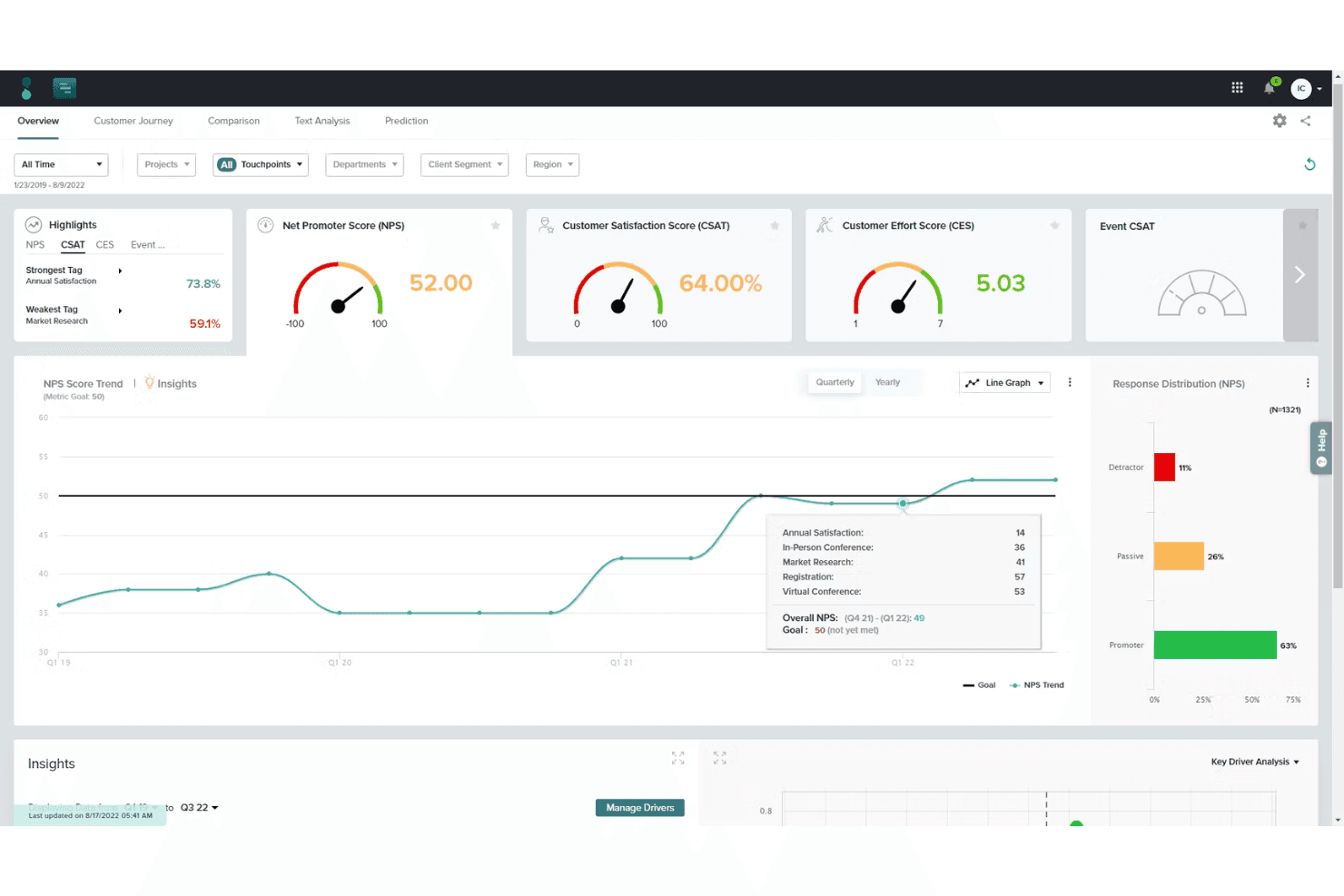
Sogolytics offers an analytics dashboard displaying an NPS score trend chart and response distribution insights. Sogolytics is an experience management platform with healthcare-specific modules for patient feedback collection, omnichannel survey distribution, AI-powered sentiment analysis, and real-time reporting dashboards.
Who Is Sogolytics Best For?
Patient experience managers at hospitals and health systems who need structured, data-driven insight into patient satisfaction across multiple care touchpoints.
Why I Picked Sogolytics
I picked Sogolytics as one of the best because its AI sentiment analysis processes thousands of open-ended patient responses in minutes, surfacing themes that would take a team weeks to identify manually. I also like how bedside tablets and SMS micro-surveys capture feedback while patients are still in care, not days later from a mailed form. That immediacy means staff can realistically address a concern before a patient is even discharged.
Sogolytics Key Features
- Omnichannel survey distribution: Deliver surveys via email, SMS, web links, and QR codes to reach patients across channels.
- Healthcare data compliance: Protect patient data with HIPAA, ISO 27001, SOC 2, and GDPR security standards.
- EHR and CRM integration: Connect with systems like Epic, Cerner, Salesforce, and other major healthcare platforms.
- Automated report generation: Create customizable dashboards and exportable reports with actionable analytics in real time.
Sogolytics Integrations
Sogolytics offers native integrations with Epic, Cerner, Salesforce, Microsoft Teams, HubSpot, ServiceNow, Zendesk, and Freshdesk, and connects with Zapier and Workato. An API is available for custom integrations.
Pros and Cons
Pros:
- Multilingual patient survey distribution options
- HIPAA-compliant for healthcare survey data
- Real-time sentiment and theme reporting
Cons:
- Lacks true two-way patient messaging
- No appointment reminder automation features
Learn more about Sogolytics: 2Best for its streamlined scheduling and practice management tools
RXNT
- Free demo + free expert consultation available
- Pricing upon request
Visit WebsiteCustomer Rating:4.3/5
RXNT Patient Engagement Software Interface RXNT is a versatile healthcare software offering electronic health records (EHR), practice management, and medical billing systems. Its standout feature is the streamlined scheduling and practice management tools, making it an excellent choice for healthcare providers looking for simplified scheduling.
Why I Picked RXNT: In making my selection, I gravitated towards RXNT due to its impressive scheduling and practice management tools. Compared to other software on this list, RXNT's scheduling tools seem to be the most comprehensive and intuitive, which solidifies my belief that it's "best for its streamlined scheduling and practice management tools".
Standout features & integrations:
Notable features of RXNT include a fully integrated EHR, medical billing, and practice management system. It also offers robust scheduling features that automate the process, making it more efficient.
As for integrations, RXNT connects seamlessly with various labs, pharmacies, and hospital systems for a smooth exchange of patient data.
Pros and Cons
Pros:
- Offers an all-in-one solution with EHR, practice management, and medical billing
- Robust integration capabilities
- Comprehensive scheduling and practice management tools
Cons:
- The system may occasionally run slower, as reported by some users
- The interface may seem complex for some users
- Pricing can be on the higher side compared to other solutions
Learn more about RXNT: Best for managing practice operations on a single platform
- Free demo available
- From $100/user/month (billed annually)
Visit WebsiteCustomer Rating:5/5
DocVilla Patient Engagement Software Interface DocVilla is a versatile and integrated platform providing a suite of services such as practice management, telemedicine, and electronic health records (EHR). Its unified approach to healthcare operations reinforces its position as the best tool for managing practice operations on a single platform.
Why I Picked DocVilla: I selected DocVilla due to its all-encompassing design, where all necessary tools for practice management are housed within one platform. This standout trait differentiates it from other similar solutions, providing a unique value proposition. I believe DocVilla is "best for managing practice operations on a single platform" due to its comprehensive approach that simplifies and streamlines operational workflows.
Standout features & integrations:
Key features of DocVilla include telemedicine, appointment scheduling, EHR, and patient portal. The platform also offers valuable integrations with billing systems, lab services, and a variety of EHR systems for seamless operations and data management.
Pros and Cons
Pros:
- Streamlines scheduling and patient communication
- Includes telemedicine capabilities
- Unified platform for multiple healthcare operations
Cons:
- Customer support responsiveness can be improved
- User interface could be more intuitive
- Pricing information not transparent
Learn more about DocVilla: Best for specialty-specific EHR and practice management
- Free demo available
- Pricing upon request
Visit WebsiteCustomer Rating:4.5/5
ModMed Patient Engagement Software Interface ModMed is a suite of healthcare management tools uniquely tailored to specific medical specialties. The system provides specialty-specific electronic health records (EHR) and practice management solutions, justifying its place as the best choice for specialty-specific EHR and practice management.
Why I Picked ModMed: I chose ModMed because of its distinctive approach to providing tailored solutions for various medical specialties. This key feature makes it stand out from the competition, as many other EHR systems offer generic solutions that may not fully cater to the unique needs of different specialties. I believe ModMed is "best for specialty-specific EHR and practice management" as it caters precisely to the individual requirements of each specialty, thereby enhancing efficiency and productivity.
Standout features & integrations:
ModMed's key features include a specialty-specific EHR, practice management solutions, and a patient portal. It also provides telehealth capabilities, which are increasingly important in today's healthcare landscape.
The platform integrates with popular billing systems, lab services, and other EHR systems to ensure a smooth workflow.
Pros and Cons
Pros:
- Includes telehealth capabilities
- Offers integrated practice management and EHR
- Tailored solutions for various medical specialties
Cons:
- Some users report the need for better customer support
- May have a learning curve for new users
- Pricing information is not transparent
Learn more about ModMed: Best for comprehensive EHR with telemedicine capabilities
- Free demo available
- Pricing upon request
Visit WebsiteCustomer Rating:4/5
PrognoCIS Patient Engagement Software Interface PrognoCIS is a fully-integrated, customizable electronic health record (EHR) solution designed to streamline the workflow of healthcare providers. It merges telemedicine, patient engagement, practice management, and EHR services, making it best for those seeking a holistic approach to patient care and healthcare management.
Why I Picked PrognoCIS: I chose PrognoCIS for its robust telemedicine features that seamlessly integrate with the EHR system, making it stand out from other healthcare software. It was my determination that PrognoCIS is best for comprehensive EHR with telemedicine capabilities due to its feature-rich platform that empowers healthcare providers to manage patient care remotely and efficiently.
Standout features & integrations:
PrognoCIS offers an array of impressive features such as a customizable EHR, telemedicine, patient portal, and e-prescriptions, that collectively enhance the healthcare delivery process.
Important integrations include integration with leading practice management and billing systems, lab integrations for seamless lab orders and results management, and interoperability with other EHR systems for improved data sharing.
Pros and Cons
Pros:
- Comprehensive patient portal for patient engagement
- Integrated telemedicine capabilities
- Robust EHR with customizable templates
Cons:
- Some users report customer service can be improved
- Learning curve can be steep for new users
- Pricing information not readily available
Learn more about PrognoCIS Psychiatry EHR: Best for its network-enabled services for medical record, revenue cycle, patient engagement, care coordination
- Free demo available
- Pricing upon request
Visit WebsiteCustomer Rating:3.8/5
AthenaOne Patient Engagement Software Interface athenaOne is a leading provider of network-enabled services for electronic health records (EHR), revenue cycle management, patient engagement, and care coordination. Given its comprehensive set of features, athenaOne is a highly suitable choice for healthcare providers who require a broad range of services, particularly in the areas of medical records, revenue cycle, patient engagement, and care coordination.
Why I Picked athenaOne: I picked athenaOne for this list due to its ability to offer network-enabled services that are robust and comprehensive. This versatility is what sets athenaOne apart, making it a preferred choice for healthcare providers. Its ability to provide services across multiple dimensions of healthcare practice further underscores its position as "Best for its network-enabled services for medical record, revenue cycle, patient engagement, care coordination."
Standout features & integrations:
athenaOne provides several standout features including a web-based EHR, patient portal, medical billing, and practice management solutions. It also comes with a mobile application that offers real-time access to patient records.
The platform integrates with multiple labs, pharmacies, and hospital systems, making it a very adaptable tool in the healthcare industry.
Pros and Cons
Pros:
- Integrates with multiple external systems
- Web-based and mobile app for accessibility
- Comprehensive network-enabled services in one platform
Cons:
- Some users have reported delays in customer service responses
- Pricing can be high compared to other solutions
- The user interface can be complex for first-time users
Learn more about athenaOne: Best for ambulatory healthcare services with integrated EHR and billing
- Not available
- Pricing upon request
Visit WebsiteCustomer Rating:3.7/5
Nextgen Office Patient Engagement Software Interface NextGen Office provides a cloud-based solution designed for ambulatory practices, offering integrated electronic health records (EHR) and billing features. It is equipped to meet the unique needs of ambulatory services, justifying its selection as the best tool for ambulatory healthcare services with integrated EHR and billing.
Why I Picked NextGen Office: I chose NextGen Office because it offers a comprehensive solution specifically designed for ambulatory services. This particular focus sets it apart from other software solutions, many of which don't provide such tailored functionality. The integration of EHR and billing features makes it an optimal tool for these settings, hence I decided it's "best for ambulatory healthcare services with integrated EHR and billing".
Standout features & integrations:
NextGen Office offers robust features including integrated EHR and billing, practice management, and patient engagement tools. It integrates with various third-party applications such as labs, pharmacies, and hospital systems, ensuring a seamless workflow for healthcare providers.
Pros and Cons
Pros:
- Robust patient engagement tools
- Integrated EHR and billing functionality
- Designed specifically for ambulatory practices
Cons:
- Some users have reported customer support could be improved
- May require a learning curve for new users
- Pricing information is not transparent
Learn more about NextGen Office: Best for its data-driven insights and advanced analytics in healthcare
- Free demo available
- Pricing upon request

IQVIA Patient Engagement Software Interface IQVIA is a health information technology and clinical research company. It specializes in offering data-driven insights and advanced analytics that help healthcare providers enhance their services. Its strength lies in its ability to harness data and analytics, which is why it's considered best for those who want to leverage these capabilities in healthcare.
Why I Picked IQVIA: I chose IQVIA for its advanced analytics and data-driven insights that stand out in the healthcare technology field. In the process of comparing different tools, I found that IQVIA's commitment to deriving actionable insights from data makes it unique. The choice for "Best for its data-driven insights and advanced analytics in healthcare" is based on this focus on data and analytics.
Standout features & integrations:
IQVIA features powerful tools for data management, analytics, and clinical research, offering insights that can enhance decision-making in healthcare. Its Orchestrated Clinical Trials platform streamlines clinical trial processes, making them more efficient.
Integrations are mostly focused on data sources, with capabilities to integrate a wide range of healthcare and patient data.
Pros and Cons
Pros:
- Can integrate a wide range of healthcare and patient data
- Streamlined clinical trial management through Orchestrated Clinical Trials platform
- Offers powerful analytics and data-driven insights
Cons:
- Some customers have reported challenges with customer service
- Could be complex for users with limited experience in data analytics
- Customized pricing model may be unclear for some users
Learn more about IQVIA: Best for accelerating clinical trials with streamlined document workflows
- Pricing upon request

Florence Healthcare Patient Engagement Software Interface Florence Healthcare offers an eBinder Suite that primarily aims at simplifying and speeding up clinical trials. The solution streamlines document workflows, allowing investigators, study coordinators, and other staff members to collaborate more efficiently. This direct alignment with accelerating clinical trials makes it a suitable tool for this specific need.
Why I Picked Florence Healthcare: When choosing Florence Healthcare, I looked at its potential to transform the traditional document management process in clinical trials. Its standout quality is its focus on streamlining document workflows, which is crucial for speeding up clinical trial timelines. This unique focus makes it the "Best for accelerating clinical trials with streamlined document workflows."
Standout features & integrations:
Florence Healthcare's eBinder Suite includes important features like remote monitoring, eISF (Investigator Site File), and centralized trial management. These features ensure that the clinical trial document workflow is as efficient as possible.
Florence integrates with other common EHR systems, improving data sharing and communication in a trial setup.
Pros and Cons
Pros:
- Supports integration with common EHR systems
- Facilitates remote monitoring of trials
- Streamlines clinical trial document workflows
Cons:
- Not all features may be useful for small-scale studies or trials
- Learning curve may be steep due to its diverse functionality
- Lack of transparent pricing information
Learn more about Florence Healthcare:

Intiveo Patient Engagement Software Interface Intiveo is a healthcare communication platform that specializes in patient engagement through automated communication and personalized reminders. The software provides a practical and efficient solution for healthcare providers looking to improve patient compliance, engagement, and satisfaction, making it the ideal choice for its specific benefits.
Why I Picked Intiveo: I picked Intiveo because of its primary focus on patient communication, which stood out from other tools. It excels in automating reminders, which are customizable and designed to increase patient adherence to appointments and care routines. This capacity to improve communication and deliver personalized patient reminders positions it as the "Best for automated patient communication and personalized reminders."
Standout features & integrations:
Intiveo's key features include automated patient communication, personalized reminders, and patient engagement tracking. The tool’s ability to customize communication based on patient profiles is notable.
It integrates with various practice management systems, which supports data synchronization and reduces the need for manual data entry.
Pros and Cons
Pros:
- Seamless integration with practice management systems
- Personalized reminders enhance patient engagement
- Effective automated patient communication
Cons:
- Limited utility if your practice doesn't rely heavily on patient communication and reminders
- Requires time investment to customize and implement effectively
- Pricing can be high for small practices
Learn more about Intiveo:
Outro software de envolvimento dos doentes
Abaixo encontra-se uma lista de software adicional de envolvimento dos doentes que incluímos na lista restrita, mas que não chegou aos 10 primeiros. Vale definitivamente a pena conhecê-lo.
- 11Smartpatient MyTherapy OSBest for patient engagement and medication adherence
- 12Creatio AI CRMBest for customizable engagement processes
- 13TebraGood for streamlined medical billing and practice management
- 14MoxoGood for cognitive assessments and personalized treatment plans
- 15PabauGood for patient tracking and record management in aesthetic clinics
- 16Salesforce Agentforce HealthGood for comprehensive patient management with a 360-degree view
- 17WeaveGood for unifying patient communication and front office operations
- 18Luma HealthGood for automated patient appointment reminders and scheduling
- 19CareCloudGood for cloud-based EHR and medical practice management
- 20Veradigm Inc.Good for its integrated patient engagement platform
- 21Epic SystemsGood for its robust electronic health record system
- 22GetWellNetworkGood for personalized patient education and engagement
- 23MyChartGood for patient access to their health records and online appointment booking
- 24OhMDGood for secure text-based patient communication
- 25VecnaGood for its patient self-service portals and automated check-ins
How I Evaluate Patient Engagement Software
I split my evaluation into two layers: core requirements every tool must meet—like HIPAA-compliant messaging and EHR sync—and the differentiators that separate good from great.
Core Functionality (Table Stakes For This List)
When I'm selecting tools for my list, I rank each one on a scale from 0 (does not offer the functionality) to 5 (excels in this area) for each core functionality listed below. Then, I calculate the tool's total score into a percentage. Each tool needs to achieve a minimum total score of 65% to be considered for inclusion.
- Automated Appointment Reminders: I check whether a tool supports multi-channel reminders across SMS, email, and voice, plus how much control you get over timing, cadence, and confirmation replies.
- Secure Patient Messaging: Two-way, HIPAA-compliant messaging is what I look for here, including threading, team routing, and support for attachments like lab results or care instructions.
- Digital Intake & Forms: I evaluate whether patients can complete registration, consent, and insurance forms on their own devices before a visit, and how that data flows into the clinical record.
- Online Scheduling & Self-Service: Real-time booking, rescheduling, and cancellation options matter here, along with broader self-service access like bill pay or balance viewing.
- Patient Feedback & Surveys: Post-visit satisfaction surveys, NPS collection, and review request workflows are what I look for, especially automated triggers tied to appointment completion.
- EHR/PM System Integration: I evaluate how well each tool connects with widely used EHRs like Epic, athenahealth, and NextGen, focusing on bi-directional sync for demographics, scheduling, and records.
Once I have a list of tools that meet this criteria, I consider what sets each platform apart.
Differentiating Factors (What Sets Vendors Apart)
Here's how I compare and contrast different vendors:
Standout Features
Automated recall campaigns are a major differentiator. I look for tools that identify overdue patients and trigger outreach for annual exams or follow-ups without staff involvement. Reputation management matters too, especially when a platform routes satisfied patients toward leaving reviews on Google or Healthgrades. For practices serving diverse communities, multilingual support across reminders, forms, and messages can meaningfully improve response rates and reduce missed appointments.
Beyond Features
HIPAA compliance is a baseline expectation, but I look deeper at whether a vendor provides signed BAAs, SOC 2 Type II certification, and role-based access controls with audit logging. Practice size and specialty fit also matter. A solo dermatology office has very different workflow needs than a multi-location primary care group, so I evaluate whether pricing scales with provider count and whether specialty-specific templates are available. I also consider onboarding support, since a rough go-live can stall adoption across an entire practice.
Como escolher um software de envolvimento dos doentes
É fácil ficar perdido entre longas listas de funcionalidades e estruturas de preços complexas. Para o ajudar a manter o foco enquanto analisa o seu processo específico de seleção de software, apresentamos uma lista de verificação dos fatores a ter em conta:
| Fator | O que deve considerar |
|---|---|
| FatorEscalabilidade | O que deve considerarO software consegue acompanhar o crescimento da sua prática? Procure ferramentas que suportem um número crescente de doentes sem sacrificar o desempenho ou a facilidade de utilização. |
| FatorIntegrações | O que deve considerarFunciona com as ferramentas que já utiliza? Verifique a compatibilidade com sistemas EHR, software de faturação e plataformas de comunicação. |
| FatorPersonalização | O que deve considerarPode adaptá-lo aos seus fluxos de trabalho? Considere a facilidade com que pode ajustar as definições e funcionalidades às suas necessidades específicas. |
| FatorFacilidade de utilização | O que deve considerarA interface é intuitiva para a sua equipa? Teste a experiência do utilizador para garantir uma adoção rápida e um tempo de formação mínimo. |
| FatorImplementação e integração inicial | O que deve considerarCom que rapidez pode começar? Avalie o processo de configuração, os recursos disponíveis e o apoio para garantir uma transição sem problemas. |
| FatorCusto | O que deve considerarEncaixa-se no seu orçamento? Compare os planos de preços, as taxas ocultas e o valor global disponibilizado pela ferramenta. |
| FatorMedidas de segurança | O que deve considerarOs dados e as comunicações dos doentes estão protegidos? Verifique a conformidade com a HIPAA e outras normas relevantes de proteção de dados. |
| FatorDisponibilidade do apoio | O que deve considerarPode obter ajuda quando precisa? Avalie os canais de apoio do fornecedor, os tempos de resposta e a disponibilidade para apoiar a sua equipa. |
O que é um software de envolvimento dos doentes?
O software de envolvimento dos doentes é uma ferramenta que ajuda os prestadores de cuidados de saúde a comunicar e interagir com os doentes de forma mais eficaz. Os médicos, enfermeiros e funcionários administrativos utilizam geralmente estas ferramentas para melhorar a satisfação dos doentes e simplificar as operações. Os lembretes de consultas, as mensagens seguras e a recolha de opiniões ajudam na comunicação, no agendamento e no envolvimento dos doentes. Estas ferramentas melhoram a experiência geral dos doentes e aumentam a eficiência das práticas de cuidados de saúde.
Funcionalidades
Ao selecionar um software de envolvimento dos doentes, procure as seguintes funcionalidades principais:
- Agendamento de consultas: Automatiza o processo de marcação, reduzindo as faltas e aliviando a carga de trabalho administrativo.
- Mensagens seguras: Permite a comunicação privada entre os doentes e os prestadores, garantindo a confidencialidade e o cumprimento dos regulamentos.
- Lembretes automatizados: Envia notificações atempadas aos doentes sobre as próximas consultas, ajudando a reduzir as faltas.
- Recolha de opiniões dos doentes: Recolhe informações dos doentes para melhorar a qualidade do serviço e a satisfação dos doentes.
- Portais dos doentes personalizáveis: Permite aos doentes aceder às suas informações de saúde e gerir as suas consultas online.
- Integração de telessaúde: Permite consultas virtuais, alargando o acesso aos cuidados e a conveniência para os doentes.
- Suporte por chat em tempo real: Presta assistência imediata aos doentes, melhorando a sua experiência e o seu envolvimento.
- Análise de dados e relatórios: Fornece informações sobre as interações com os doentes e o desempenho da prática, para apoiar a tomada de decisões informadas.
- Suporte multilingue: Garante a acessibilidade para os doentes que falam línguas diferentes, melhorando a comunicação.
- Recursos de formação: Inclui tutoriais e guias para ajudar os funcionários a aprender rapidamente a utilizar o software de forma eficaz.
Vantagens
A implementação de um software de envolvimento dos doentes proporciona várias vantagens à sua equipa e à sua empresa. Eis algumas das vantagens que pode esperar:
- Melhoria da comunicação: As mensagens seguras e o suporte por chat em tempo real promovem uma melhor interação entre os doentes e os prestadores.
- Aumento da satisfação dos doentes: Os lembretes automatizados e a recolha de opiniões ajudam a garantir que os doentes se sentem ouvidos e valorizados.
- Eficiência operacional: O agendamento de consultas e os portais dos doentes personalizáveis reduzem as tarefas administrativas e melhoram o fluxo de trabalho.
- Melhoria do acesso aos cuidados: A integração de telessaúde permite aos doentes receber cuidados à distância, aumentando a conveniência e a acessibilidade.
- Informações baseadas em dados: A análise de dados e os relatórios fornecem informações valiosas para tomar decisões informadas e otimizar o desempenho da prática.
- Inclusão cultural: O suporte multilingue garante que as barreiras linguísticas não dificultam a comunicação e os cuidados prestados aos doentes.
- Adaptação rápida: Os recursos de formação e as interfaces intuitivas facilitam a aprendizagem e a utilização eficaz do software pelos funcionários.
Custos e preços
A seleção de um software de envolvimento dos doentes requer uma compreensão dos vários modelos de preços e planos disponíveis. Os custos variam consoante as funcionalidades, o tamanho da equipa, os complementos, entre outros fatores. A tabela abaixo resume os planos comuns, os seus preços médios e as funcionalidades normalmente incluídas nas soluções de software de envolvimento dos doentes:
Tabela de comparação de planos de software de envolvimento dos doentes
| Tipo de plano | Preço médio | Funcionalidades comuns |
|---|---|---|
| Tipo de planoPlano gratuito | Preço médio$0 | Funcionalidades comunsAgendamento básico de consultas, mensagens seguras limitadas e recolha básica de opiniões. |
| Tipo de planoPlano pessoal | Preço médio$5-$25/utilizador/mês | Funcionalidades comunsAgendamento de consultas, mensagens seguras, lembretes automatizados e portais dos doentes. |
| Tipo de planoPlano empresarial | Preço médio$30-$60/utilizador/mês | Funcionalidades comunsAgendamento avançado, mensagens melhoradas, funcionalidades de telessaúde, análise de dados e suporte multilingue. |
| Tipo de planoPlano empresarial avançado | Preço médio$70-$100/utilizador/mês | Funcionalidades comunsIntegrações personalizadas, análise abrangente de dados, suporte dedicado, segurança avançada e personalização completa. |
Perguntas frequentes sobre software de envolvimento do doente
Eis algumas respostas a perguntas frequentes sobre software de envolvimento do doente:
Como é que o software de envolvimento do doente se integra com os sistemas EHR?
O software de envolvimento do doente integra-se frequentemente com sistemas EHR para garantir a exatidão dos dados e simplificar a coordenação dos cuidados. Ao selecionar uma solução, verifique se esta permite a sincronização de dados em tempo real e um fluxo contínuo de informações entre plataformas. Esta integração ajuda a sua equipa a manter uma visão abrangente do estado de saúde do doente.
Como funcionam as consultas de vídeo com doentes no software de envolvimento do doente?
As consultas por vídeo permitem reuniões virtuais entre doentes e profissionais de saúde. O processo envolve normalmente o agendamento, a preparação do doente, a realização da sessão e o registo da consulta. Esta funcionalidade é valiosa para alargar o acesso aos cuidados de saúde e melhorar a satisfação dos doentes.
Como pode o software de envolvimento do doente melhorar a gestão dos cuidados prestados aos doentes?
Estas ferramentas simplificam os cuidados prestados a doentes com doenças crónicas, facilitando a comunicação, acompanhando indicadores de saúde e apoiando o cumprimento dos planos de tratamento. Ajudam a coordenar os cuidados entre profissionais, melhorando os resultados e reduzindo os custos. Avalie de que forma o software apoia estas atividades na sua prática clínica.