

Os sistemas de EMR gratuitos (registo médico eletrónico) são ferramentas digitais que permitem ao seu consultório gerir registos de pacientes, marcações, registos clínicos, faturação e mensagens seguras sem custos iniciais — estes fornecedores oferecem um plano ou período de teste gratuito. Se está à procura do melhor EMR gratuito, é provável que precise de melhorar a documentação, a comunicação ou a conformidade sem criar novas pressões orçamentais. Escolher o EMR certo pode proporcionar à sua equipa mais tempo clínico, uma integração mais rápida e menos distrações administrativas. Abaixo, encontrará uma lista selecionada das opções de EMR gratuitos mais bem avaliadas para 2026, com as principais funcionalidades e detalhes, para que possa escolher a solução mais adequada às suas necessidades clínicas e operacionais.
Why Trust Our Software Recommendations
6,700+
Reviews
20
Industry experts
16+
Evaluation factors
14
Years
Our team has been testing and reviewing software since 2012. As medical practice leaders ourselves, we know how difficult—and important—it is to choose the right software.
For this guide, we evaluated tools using hands-on testing and independent research, scoring tools using our selection criteria.
Our reviews reflect our human editorial judgment, not a sales pitch.
Tabela de comparação de EMR gratuitos
Embora todos os EMR da minha lista tenham ofertas gratuitas, também dispõem de planos pagos caso pretenda fazer uma atualização:
| Tool | Best For | Trial Info | Price | ||
|---|---|---|---|---|---|
| 1 | Best freemium EMR for notes and telehealth | Free plan + 14-day free trial + free demo available | From $31/user/month | Website | |
| 2 | Best for behavioral health charting and compliance | 30-day free trial + free demo available | From $69/user/month | Website | |
| 3 | Best free-plan EMR for solo providers | Free plan available | From $25/month | Website | |
| 4 | Best for independent practices trialing before buying | Free demo available | Pricing upon request | Website | |
| 5 | Best for trialing a mature e-prescribing EMR | Free demo available | From $199/user/month | Website | |
| 6 | Best for low-cost behavioral health trial charting | 30-day free trial | From $59/month | Website | |
| 7 | Best for independent NP-led practice charting | Free demo available | Pricing upon request | Website | |
| 8 | Best for free, self-hosted clinical workflows | Free demo available | Pricing upon request | Website | |
| 9 | Best open-source EMR for global health programs | Free demo available | Free | Website | |
| 10 | Best free EMR for low-resource global clinics | Free demo available | Free | Website |


Análises dos melhores EMR gratuitos
Abaixo encontram-se os meus resumos detalhados dos sistemas de EMR gratuitos que foram incluídos na minha lista selecionada. As minhas análises apresentam uma análise detalhada das funcionalidades, dos preços e dos casos de utilização mais adequados de cada sistema, para o ajudar a encontrar a melhor opção para si.
 Best freemium EMR for notes and telehealth
- Free plan + 14-day free trial + free demo available
- From $31/user/month
Visit WebsiteCustomer Rating:4.4/5
Carepatron helps practices manage client records, personal details, contact information, provider details, staff assignments, tags, and custom client record sections. Carepatron is a freemium EHR platform for healthcare practitioners that combines clinical documentation, appointment scheduling, telehealth, billing, and a client portal in a single workspace.
Who Is Carepatron Best For?
Carepatron is a good fit for solo practitioners and small multidisciplinary clinics that need an all-in-one free EHR without committing to a paid plan upfront.
Why I Picked Carepatron
I picked Carepatron as one of the best because its free plan doesn't gate the three features that matter most to a solo clinician: telehealth, clinical notes, and appointment scheduling. What I find genuinely useful is the AI scribe, which drafts notes during a session and saves them directly to the client record. The telehealth window also keeps the client chart and past session notes open alongside the video call, so there's no switching between tabs mid-session.
Carepatron Key Features
- Client portal: Clients can self-book appointments, complete intake forms, and access shared documents from a dedicated portal.
- Treatment plan builder: Create structured treatment plans from templates and track progress across multiple sessions in a single client record.
- Online invoicing and payments: Generate invoices directly from completed appointments and collect payments online without leaving the platform.
- Insurance claims management: Submit insurance claims with built-in validation that checks for errors before sending.
Carepatron Integrations
Carepatron integrates with Zoom, Google Meet, Microsoft Teams, and Stripe for payments. It also connects with Google Calendar, Google Analytics, Xero, and Mailchimp. The integration library is more limited than some competing platforms, but it connects with Zapier, and an API is available for custom integrations.
Pros and Cons
Pros:
- Free plan includes telehealth and scheduling
- Large community-shared template library included
- AI scribe drafts notes during sessions
Cons:
- No e-prescribing on the free plan
- Telehealth video calls have reliability issues
Learn more about Carepatron: Best for behavioral health charting and compliance
- 30-day free trial + free demo available
- From $69/user/month
Visit WebsiteCustomer Rating:4.4/5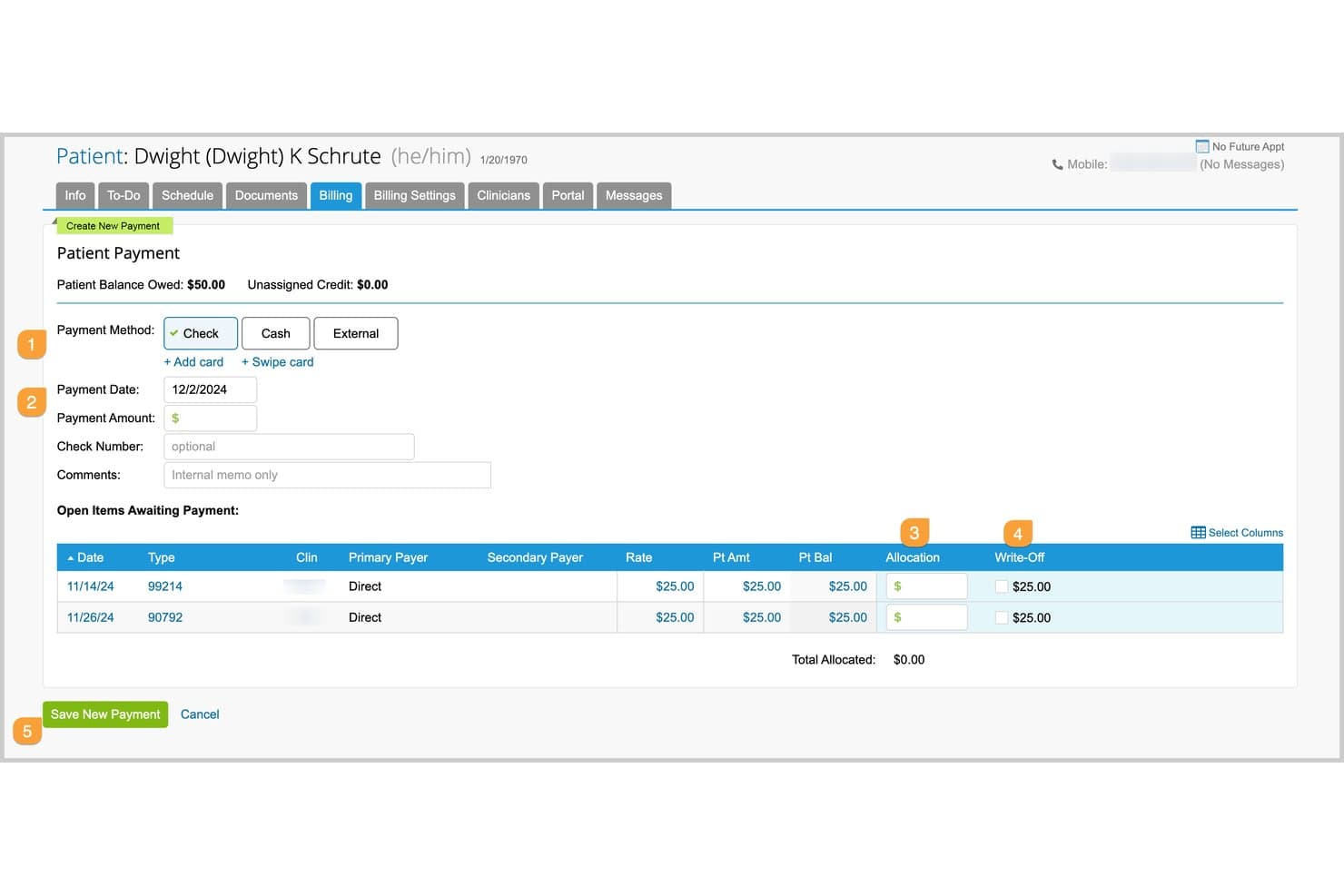
TherapyNotes lets users record and allocate patient payments to open invoices. For clinicians comparing free EMRs, TherapyNotes is a paid behavioral health EHR with charting, scheduling, billing, a client portal, and optional e-prescribing; it offers a 30-day trial rather than a free-forever plan.
Who Is TherapyNotes Best For?
TherapyNotes fits behavioral health clinicians who need specialized clinical workflows; its stated focus is “Best for behavioral health charting and compliance.”
Why I Picked TherapyNotes
I picked TherapyNotes for its specialty focus: Best for behavioral health charting and compliance. Structured SOAP-style notes and treatment-plan templates support therapy documentation, while audit logs help track chart activity. It has no free-forever plan, only a 30-day trial, so it’s a paid option to evaluate rather than a free EMR.
TherapyNotes Key Features
- Client portal: TherapyPortal supports paperless intake, self-scheduling, secure messaging, and online bill pay.
- Appointment scheduling: Create recurring sessions, group appointments, and automated reminders.
- Claims management: Submit electronic claims, receive ERAs, check eligibility, and create superbills.
- Telehealth: Basic video visits support two participants; Premium adds HD, screen sharing, and up to 16 participants.
TherapyNotes Integrations
TherapyNotes integrates with Google Calendar, Microsoft Outlook, iCloud, and Surescripts; calendar sync is one-way, and e-prescribing is a paid add-on.
What's Free?
TherapyNotes has no free-forever plan, but it offers a 30-day free trial. After the trial, it’s a paid service starting at $69 per month.
Pros and Cons
Pros:
- Audit logs support supervision and co-signing
- Reviewers praise responsive 24/7 human support
- Structured SOAP notes carry details forward
Cons:
- Behavioral-health focus excludes general practices
- No free-forever plan
Learn more about TherapyNotes: Best free-plan EMR for solo providers
- Free plan available
- From $25/month
Visit WebsiteCustomer Rating:4.2/5
CharmHealth helps practices manage invoices, receipts, refunds, claims, patient statements, billing reports, and net collection tracking. CharmHealth is a cloud-based EHR, practice management, and medical billing platform built around a free-tier model that makes it accessible to solo providers and small practices without upfront commitment.
Who Is CharmHealth Best For?
CharmHealth is a strong fit for independent ambulatory practices and solo providers who need a full EHR without the overhead of an enterprise system.
Why I Picked CharmHealth
CharmHealth earns its spot as one of the best on my shortlist because the free plan isn't a stripped-down teaser. Solo providers get real clinical tools, including SOAP note templates, a flowsheet for tracking vitals across visits, and e-prescribing connected to 70,000+ pharmacies. I also like that the AI Scribe is available as an add-on even on the free tier, so small practices can adopt ambient documentation without committing to a paid plan first.
CharmHealth Key Features
- Referral management: Track and manage patient referrals directly within the EHR without a separate tool.
- Role-based access control: Assign different permission levels to staff members based on their role in the practice.
- Pre-screening forms: Send customizable intake and pre-screening forms to patients before their appointment through the patient portal.
- Inventory management: Track and manage in-practice product inventory from within CharmHealth.
CharmHealth Integrations
CharmHealth integrates with major labs using the standard HL7 interface, routing lab orders directly and pushing results back into the EHR. Verified lab partners include LabCorp and Quest. It also integrates with Fullscript for supplement prescribing and fulfillment, Surescripts for e-prescribing, and marketplace partners like CrossTx, Dialog One, Docere Systems (DRIP), DocHelp, and DoctorConnect. Interoperability is supported through HL7 and FHIR standards for data sharing with third-party applications, laboratories, pharmacies, and medical devices. An API program is available for custom integrations.
Pros and Cons
Pros:
- Built-in patient portal and kiosk check-in
- Free plan includes real clinical tools
- Customizable charting templates and macros
Cons:
- Billing features require paid add-ons
- Customer support response times vary widely
Learn more about CharmHealth: Best for independent practices trialing before buying
- Free demo available
- Pricing upon request
Visit WebsiteCustomer Rating:4.4/5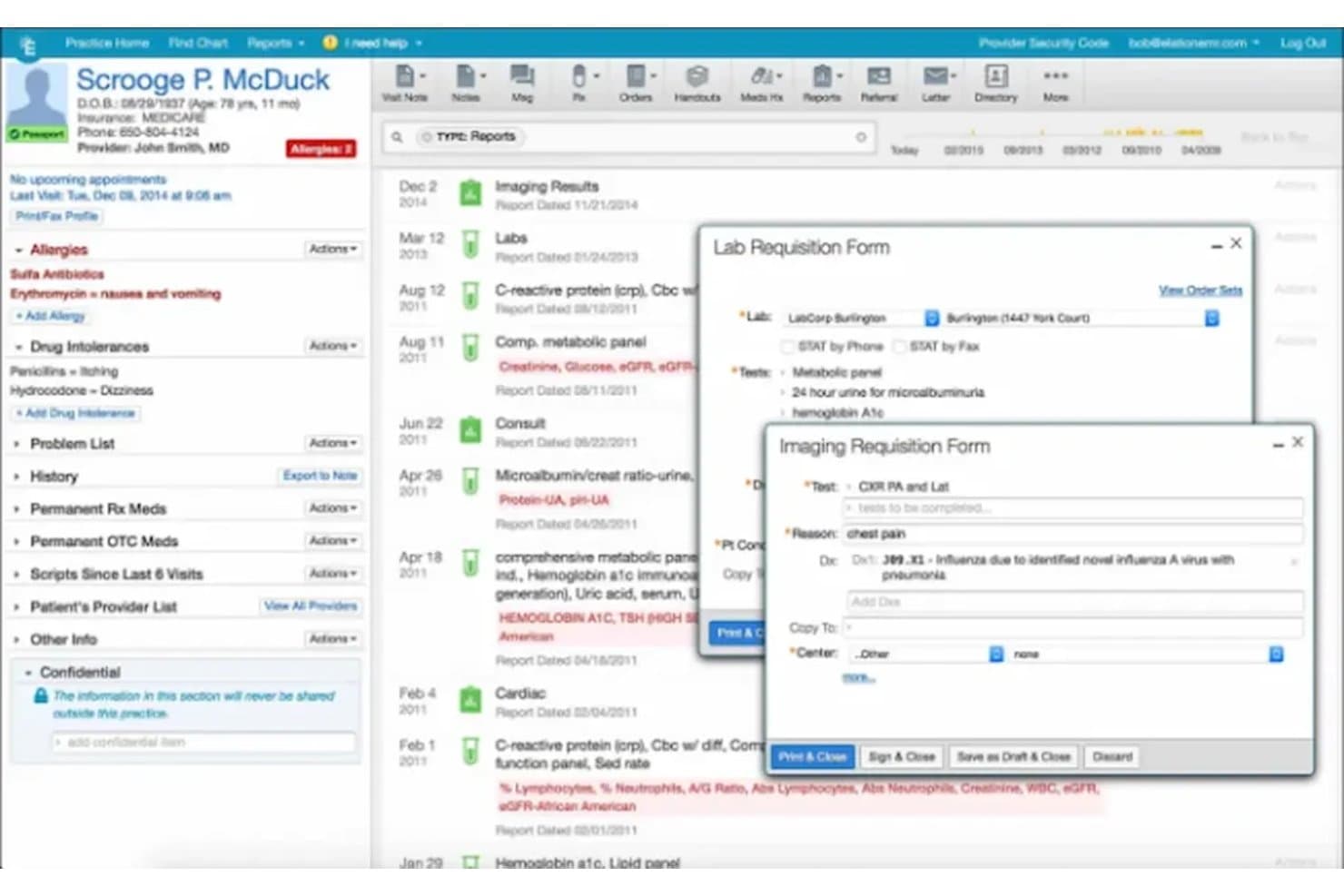
Elation Health streamlines lab and imaging orders from the patient chart. Elation Health is a cloud-based EMR for independent practices with structured patient charting, AI-assisted notes, e-prescribing, appointment scheduling, automated reminders, and a patient portal.
Who Is Elation Health Best For?
Elation Health is Best for independent practices trialing before buying, with demos and free trials available but no permanent free plan.
Why I Picked Elation Health
Elation Health fits “Best for independent practices trialing before buying” because its free trial lets me assess structured chart timelines and visit-note templates in practice. I can also test appointment scheduling and automated reminders within the same workflow. There’s no free-forever plan, so I consider it a trial option, not an ongoing free EMR.
Elation Health Key Features
- Free trial and demo: Elation offers demos and trials, but no permanent free plan; trial terms aren’t stated.
- E-prescribing: Send prescriptions through Surescripts, with controlled-substance prescribing available through MDToolbox.
- Patient portal: Elation Passport supports secure messaging, appointment management, and patient access to visit summaries.
- Telehealth: Built-in Zoom video appears within Elation’s clinical workspace.
Elation Health Integrations
Elation’s Partner Hub lists 300+ integrations, including Zocdoc, Fullscript, Zus, and Nsight Health. Built-in partners include Surescripts, MDToolbox, Medispan, Zoom, and Ribbon, and API access is available to existing customers and partners.
What's Free?
Elation Health has no free-forever plan, but it offers a free demo and trial; trial duration and restrictions aren’t stated.
Pros and Cons
Pros:
- Scheduling includes reminders and patient booking
- AI scribe drafts structured visit notes
- Reviewers praise intuitive, fast charting
Cons:
- Support response times draw complaints
- No free-forever plan
Learn more about Elation Health: Best for trialing a mature e-prescribing EMR
- Free demo available
- From $199/user/month
Visit WebsiteCustomer Rating:3.7/5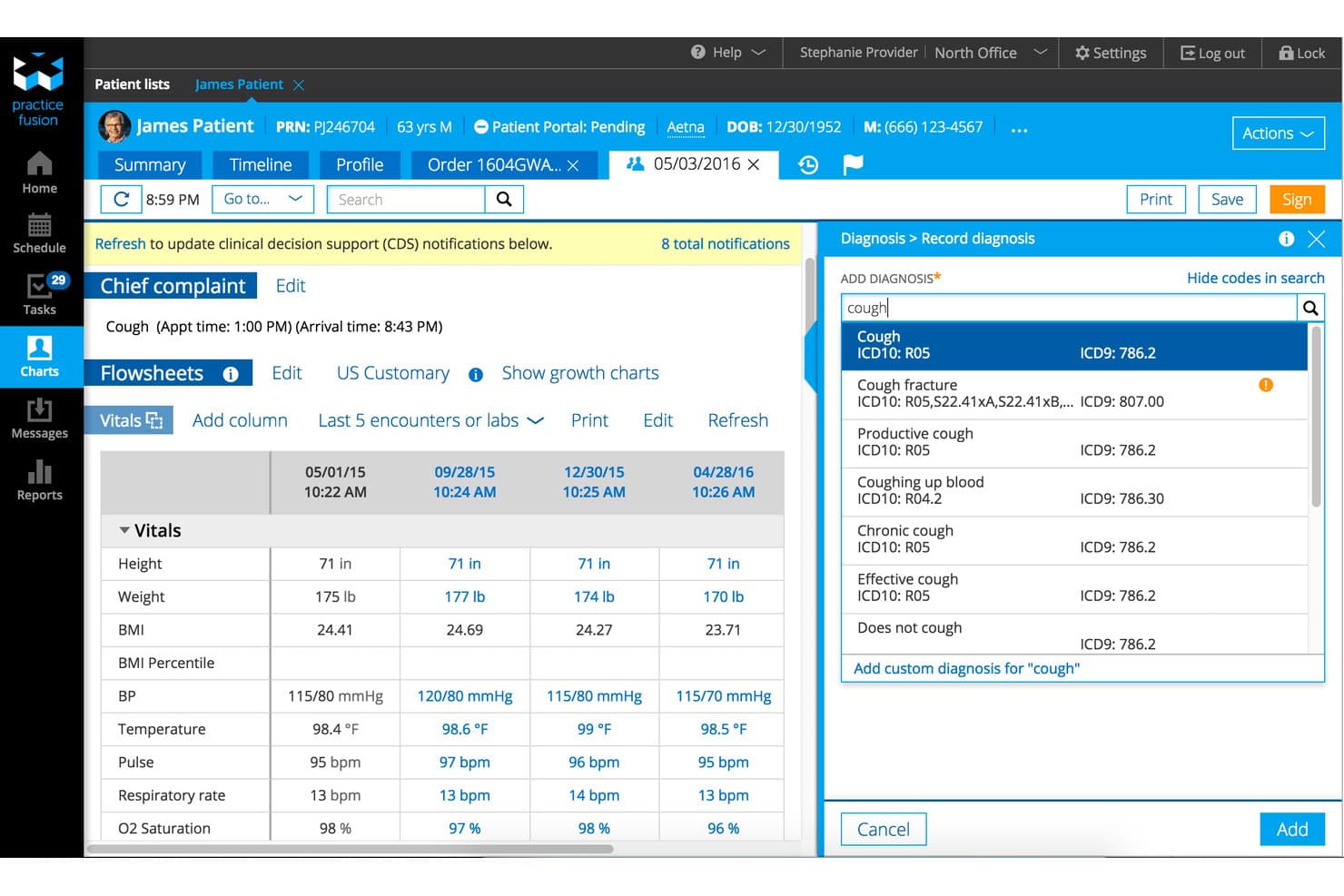
Practice Fusion streamlines diagnosis coding with ICD-10 search during visits. Practice Fusion is a cloud-based EMR with patient charting, e-prescribing, appointment scheduling, lab and imaging connections, and a patient portal; it offers a 14-day trial, not a free-forever plan.
Who Is Practice Fusion Best For?
Practice Fusion suits small practices comparing EMRs before purchase, with a 14-day trial; its positioning is “Best for evaluating EMR options before buying.”
Why I Picked Practice Fusion
I picked Practice Fusion as a comparison entry because its fit is “Best for evaluating EMR options before buying,” not free-forever use. Its 14-day trial and free demo let you assess specialty chart templates and e-prescribing workflows. I also look at its bulk CCD/C-CDA export option when evaluating how patient records can move to another system.
Practice Fusion Key Features
- Appointment scheduling : Schedule recurring visits and send email, text, or voice reminders.
- Patient portal : FollowMyHealth lets patients book appointments, check in, view instructions, and message the practice.
- Lab and imaging connections : Order tests and receive structured results from connected centers.
- Audit reports : Review account activity and track user actions.
Practice Fusion Integrations
Practice Fusion supports daily patient-record imports from athenahealth, NextGen, Amazing Charts, and eClinicalWorks, plus connections to pharmacy, health information exchange, immunization registry, lab, and imaging services.
What's Free?
Practice Fusion offers a 14-day free trial, not a free-forever plan; a free demo is also available. After the trial, plans start at $199 per user per month.
Pros and Cons
Pros:
- Bulk record exports support future transitions
- E-prescribing supports controlled-substance workflows
- Custom templates help organize patient charts
Cons:
- Annual commitment limits low-volume practices
- No free tier beyond evaluation
Learn more about Practice Fusion: Best for low-cost behavioral health trial charting
- 30-day free trial
- From $59/month
Visit WebsiteCustomer Rating:4.2/5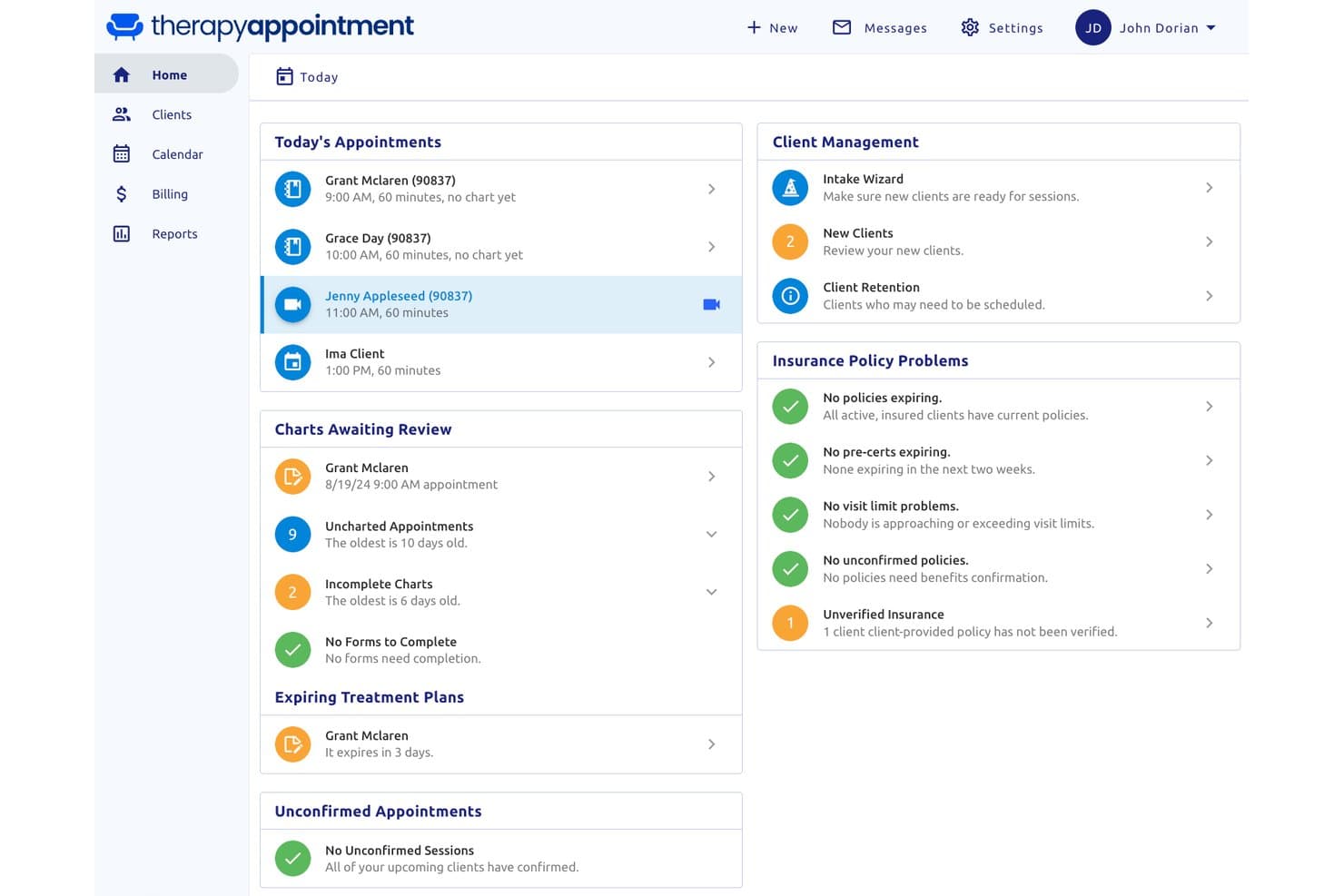
TherapyAppointment centralizes daily appointments, charts, and insurance status. For clinicians comparing free EMRs, TherapyAppointment is a behavioral health EMR and practice-management platform for session notes, treatment plans, intake, scheduling, and billing; it offers a 30-day trial, not a permanent free plan.
Who Is TherapyAppointment Best For?
TherapyAppointment—Best for low-cost behavioral health trial charting—fits solo and group practices focused on psychotherapy and related clinical care.
Why I Picked TherapyAppointment
I picked TherapyAppointment for low-cost behavioral health trial charting because its session notes, treatment plans, and 70+ intake and assessment templates support therapists’ day-to-day documentation. Supervisors can review and sign clinicians’ notes, a useful workflow for training practices. It has no permanent free plan, and the 30-day trial requires a credit card and converts to a paid plan.
TherapyAppointment Key Features
- Automated reminders: Sends appointment reminders by text, email, or phone.
- Client portal: Supports intake forms, e-signatures, self-scheduling, secure messaging, and invoice payments.
- Electronic claims: Connects to Office Ally for claims submission and automatic ERA posting.
- Security controls: Includes AES-256 encryption, two-factor authentication, role-based permissions, and audit trails.
TherapyAppointment Integrations
TherapyAppointment integrates with DoseSpot for e-prescribing, Office Ally for electronic claims, Zoom for Healthcare, and Google Calendar, iCal, and Outlook. State HIE connections are available in Connecticut, North Carolina, and Oklahoma; the vendor doesn’t document an API.
What’s Free?
TherapyAppointment offers a 30-day free trial, not a free-forever plan. The trial requires a credit card and converts to a paid plan when it ends.
Pros and Cons
Pros:
- Automated reminders and self-scheduling ease appointment coordination
- Session notes support supervisor review and sign-off
- Therapists praise responsive customer support
Cons:
- Mental-health-only charting excludes general medical workflows
- Trial requires a card and converts automatically
Learn more about TherapyAppointment: Best for independent NP-led practice charting
- Free demo available
- Pricing upon request
Visit WebsiteCustomer Rating:3.9/5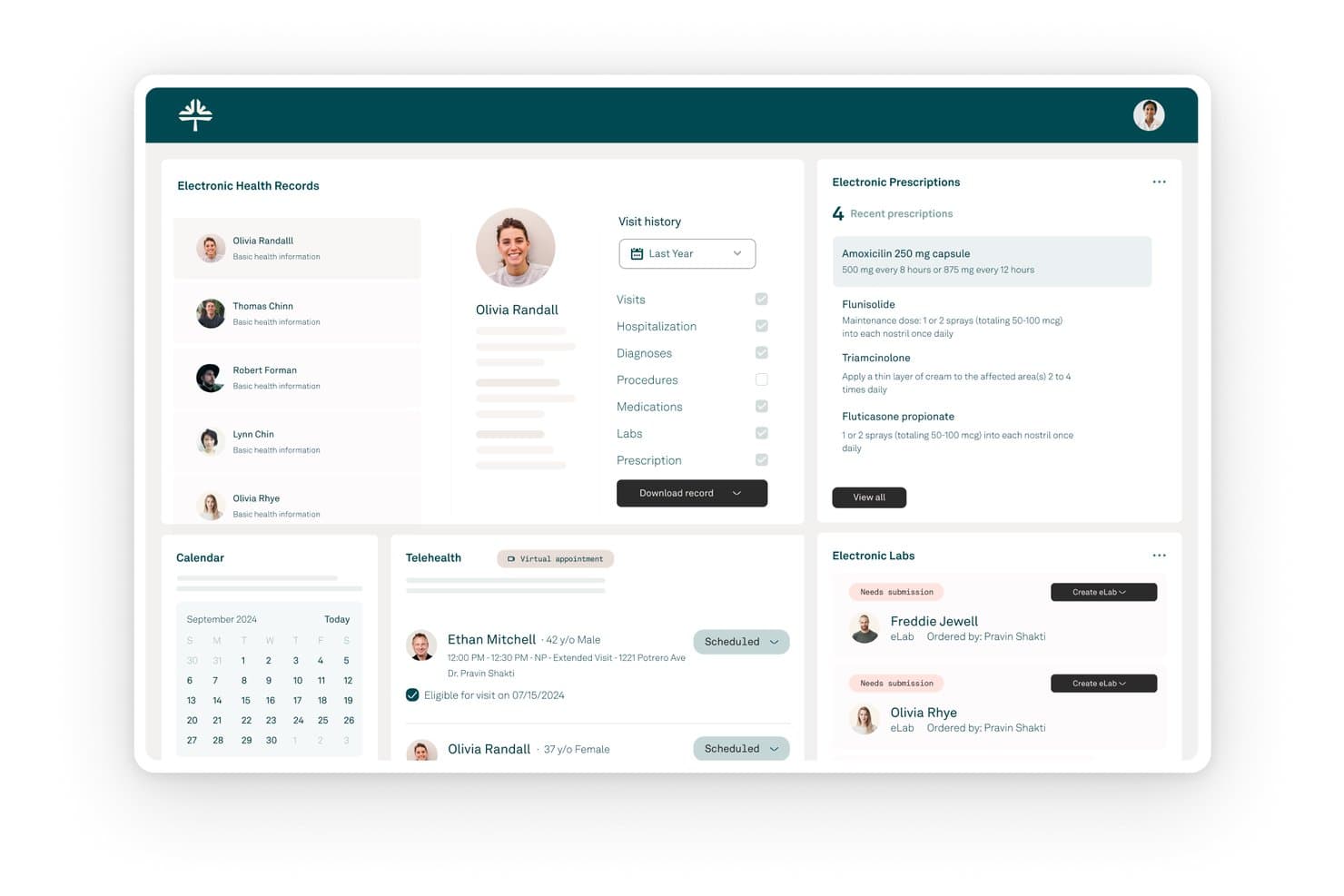
Kareo (Tebra) centralizes patient records, prescriptions, and lab orders in one dashboard. Kareo (Tebra) is a paid, cloud-based EMR and practice management platform with patient charting, e-prescribing, scheduling, billing, telehealth, and patient engagement; it has no free-forever plan.
Who Is Kareo (Tebra) Best For?
Kareo (Tebra): Best for independent NP-led practice charting, with integrated scheduling and billing on a paid subscription.
Why I Picked Kareo (Tebra)
I include Kareo (Tebra) as best for independent NP-led practice charting, with SOAP templates and co-signature tools for supervised visits. AI Note Assist can draft visit notes, which clinicians can review and complete. It has no free-forever plan, so it suits practices willing to consider a paid EMR, not buyers who require ongoing free access.
Kareo (Tebra) Key Features
- Patient portal: Patients can view visit summaries and test results, send secure messages, request appointments, and pay online.
- Lab and imaging orders: Send orders electronically from the chart and receive results in the patient record.
- Mobile charting: The iOS app supports clinical notes, medications, vitals, and patient history.
- Appointment reminders: Send reminders by text, email, or phone, with two-way confirmations.
Kareo (Tebra) Integrations
Tebra connects with Appriss Health for PDMP checks and GoodRx; reviewers also mention TriZetto and Practice Fusion integrations. It offers API access and HL7/FHIR connections for linking Tebra Billing with outside EHRs.
What’s Free?
Kareo (Tebra) has no free-forever plan, but it offers a 14-day free trial and a free demo. The platform is paid after the trial; confirm any trial terms with Tebra before signing up.
Pros and Cons
Pros:
- Scheduling and records share one system
- SOAP templates support structured visit notes
- NPs praise simple prescriber workflows
Cons:
- Billing reports frustrate some reviewers
- No ongoing free access for practices
Learn more about Kareo (Tebra): Best for free, self-hosted clinical workflows
- Free demo available
- Pricing upon request
Visit WebsiteCustomer Rating:3.9/5
OpenEMR patient dashboard showing billing, insurance eligibility, clinical reminders, appointments, and prescriptions. OpenEMR is a free, open-source electronic health records and practice management system that covers scheduling, clinical charting, e-prescribing, medical billing, lab integration, and clinical decision support across 30+ languages.
Who Is OpenEMR Best For?
OpenEMR is a strong fit for independent clinics, community health centers, and multi-specialty practices that need a fully featured EMR without licensing costs.
Why I Picked OpenEMR
OpenEMR is one of my top picks because I love that it covers both clinical and practice workflows without splitting those into paid tiers. The clinical decision rules engine is genuinely useful, letting your team navigate complex patient care algorithms directly within a chart encounter. I also like that lab orders can be sent automatically to a lab and results pulled back into the patient's record, which cuts out the manual data entry that bogs down clinical staff. On top of that, OpenEMR is ONC Certified, so you're not trading compliance credibility for cost savings.
OpenEMR Key Features
- Advanced scheduling: Create repeating events, automated workflows triggered by patient check-in, and patient appointment reminders.
- e-Prescribing: Enter a prescription during an encounter and send it directly to the patient's pharmacy.
- Medical billing: Built-in billing module supports HIPAA ASC X12 Version 5010 Transaction and Code Set Standards.
- Advanced security: HIPAA-friendly access control with fine-grained permissions and industry-standard password hashing to protect patient data.
OpenEMR Integrations
OpenEMR provides REST and FHIR R4 APIs for external system integration, along with SMART on FHIR app launch support for connecting third-party clinical apps. It also offers installable modules for WENO Exchange (e-prescribing), Comlink (telehealth), ClaimRev (billing clearinghouse), and Sphere (payment processing), plus HL7 v2 messaging for lab orders, results, and ADT events via middleware like Mirth Connect.
Pros and Cons
Pros:
- Full source code access for customization
- ONC certified for regulatory compliance
- Supports 30+ languages for global use
Cons:
- Dated interface compared to newer EMRs
- Requires technical skill for self-hosting
Learn more about OpenEMR: Best open-source EMR for global health programs
- Free demo available
- Free
Visit WebsiteCustomer Rating:4.8/5
OpenMRS helps healthcare teams manage patient visits, appointments, service queues, active visits, check-ins, laboratory workflows, and billing in one open-source EMR platform. OpenMRS is an open-source EMR for global health programs, with configurable patient charts and forms, medication and test-result records, appointment management, and FHIR and REST APIs.
Who Is OpenMRS Best For?
OpenMRS fits global health programs, NGOs, and public health organizations with technical teams to configure and maintain an open-source EMR.
Why I Picked OpenMRS
I picked OpenMRS because its open-source EMR is designed for global health programs, not just small private practices. An NGO clinic can configure patient forms and track vitals, conditions, medications, and program enrollment in structured charts. FHIR and REST APIs support sharing records with other health systems, while implementation and ongoing maintenance require technical support.
OpenMRS Key Features
- Appointment statuses: Track appointments as requested, scheduled, checked in, completed, cancelled, or missed.
- Test results viewer: Review test results with trend displays.
- Clinical attachments: Add PDF, JPG, and PNG files or capture images with a webcam.
- Service queues: Manage patient queues, active visits, wards, and beds.
OpenMRS Integrations
OpenMRS supports integrations with DHIS2, while the OpenMRS HIS/Ozone distribution connects to Odoo, OpenELIS Global, and Apache Superset. FHIR and REST APIs support custom integrations, and OHDSI tools support OMOP data mapping.
What's Free?
OpenMRS is free open-source software with no license fees, not a time-limited trial. No user or integration limits are specified, but your organization should plan for hosting, implementation, configuration, and ongoing technical support.
Pros and Cons
Pros:
- Data ownership supports future system changes
- Frequent releases add clinical workflow updates
- Users praise flexible, configurable clinical records
Cons:
- No US e-prescribing or insurance claims
- Self-hosting demands dedicated technical support
Learn more about OpenMRS:
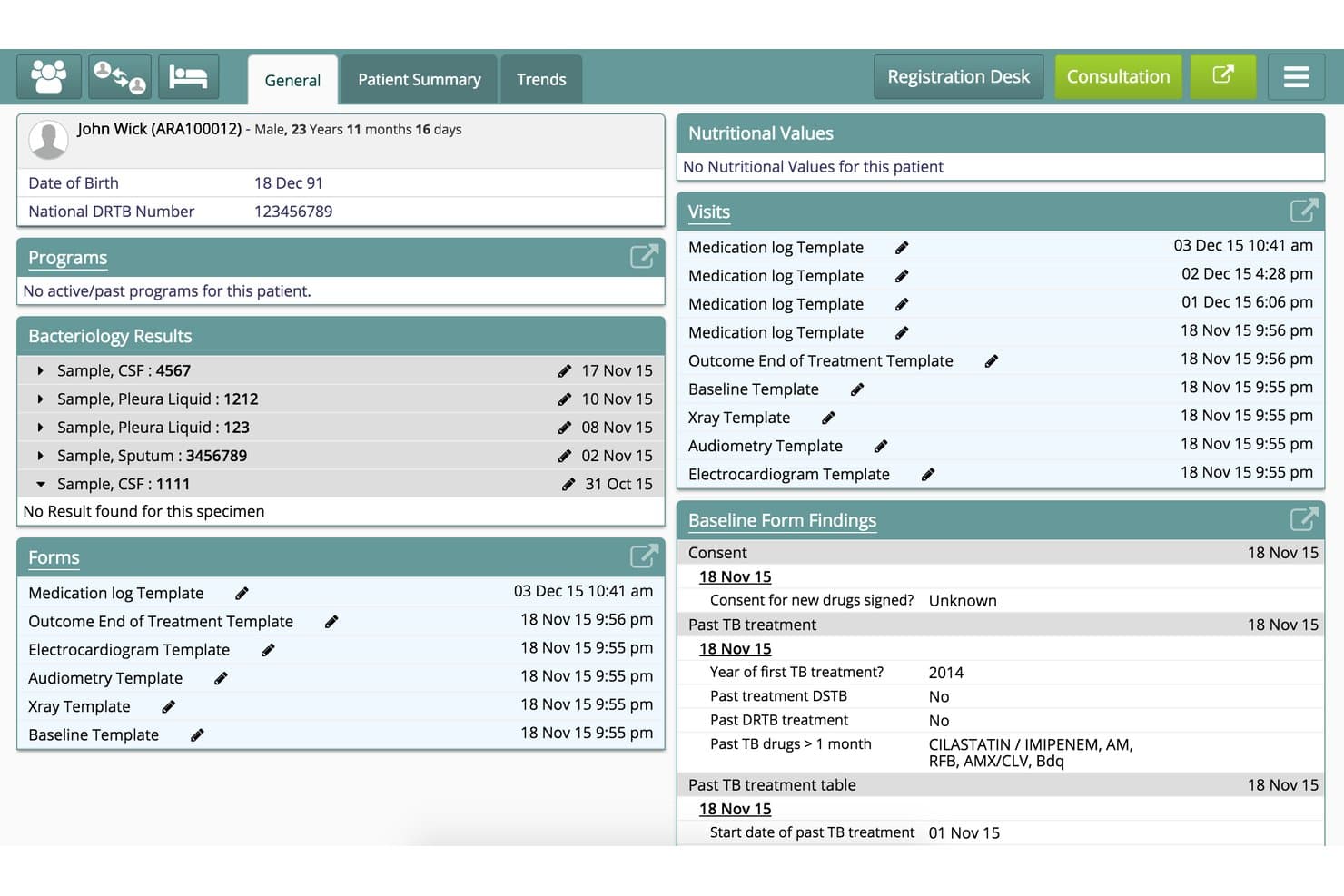
Bahmni centralizes patient history, lab results, and visits in one dashboard. Bahmni is an open-source EMR and hospital system that combines patient registration, configurable clinical charting, appointments, prescribing, laboratory, imaging, inpatient, billing, and reporting modules in a self-hosted platform.
Who Is Bahmni Best For?
Bahmni suits clinics and hospitals in low-resource settings that need a free, configurable, self-hosted EMR and have the technical capacity to run it.
Why I Picked Bahmni
I picked Bahmni as “Best free EMR for low-resource global clinics” because its on-site setup can keep working without internet. Configurable clinical forms and patient dashboards support structured charting, while its lab and inpatient modules cover workflows beyond the exam room. Self-hosting does require technical capacity.
Bahmni Key Features
- Patient registration: Records demographics, contacts, identifiers, and patient photos.
- Appointment management: Schedules visits across providers and supports SMS, WhatsApp, and email notifications.
- Audit logs: Tracks logins, access to clinical data, visits, and other system activity.
- Record exports: Exports reports as PDF or CSV and supports FHIR and HL7 data exchange.
Bahmni Integrations
Bahmni has documented integrations with OpenMRS, Odoo, OpenELIS, DCM4chee/Oviyam, Crater, Metabase, Jasper Reports, and Jitsi; available components depend on the version. It supports FHIR/HL7 and REST/HTTP APIs for custom connections.
What’s Free?
Bahmni is free, open-source software, not a time-limited trial. You’ll need to manage hosting and setup, and implementation or support services may cost extra.
Pros and Cons
Pros:
- Proven across large public health deployments
- Configurable clinical forms and dashboards
- Works without reliable internet
Cons:
- No US pharmacy e-prescribing or claims workflows
- Self-hosting demands dedicated technical support
Learn more about Bahmni:
How I Evaluate Free EMR
I look at free EMR options in two layers—baseline must-haves like HIPAA-compliant charting and eRx for a solo practice, and differentiators that reveal which tools hold up in real clinical use.
Core Functionality (Table Stakes For This List)
When I'm selecting tools for my list, I rank each one on a scale from 0 (does not offer the functionality) to 5 (excels in this area) for each core functionality listed below. Then, I calculate the tool's total score into a percentage. Each tool needs to achieve a minimum total score of 65% to be considered for inclusion.
- Electronic Charting: I check whether the EMR supports structured SOAP notes, problem lists, and allergy tracking—not just a blank text field where clinicians dump visit notes.
- Genuinely Free Access Tier: Each tool's free offering gets scrutinized for what's actually usable—some platforms like Practice Fusion and OpenEMR take very different approaches to delivering free access.
- E-Prescribing (eRx): I look for Surescripts-connected eRx so prescriptions route directly to the patient's pharmacy, including whether drug interaction alerts fire during ordering.
- HIPAA-Compliant Data Handling: Encryption, audit logs, role-based access, and a signed BAA all factor in—especially for cloud-hosted platforms where PHI lives on vendor servers.
- Clinical Coding & Billing: I evaluate whether the system includes ICD-10 and CPT code lookup at the point of documentation and can generate superbills or export claims for submission.
- Patient Scheduling & Demographics: A functional appointment calendar tied to patient demographics matters—clinicians need to book visits and pull up insurance or contact details in the same workflow.
Once I have a list of tools that meet this criteria, I consider what sets each platform apart.
Differentiating Factors (What Sets Vendors Apart)
Here's how I compare and contrast different vendors:
Standout Features
Telehealth is a big one—I look for built-in video visits so behavioral health and primary care providers aren't juggling a separate platform. A patient portal also makes a real difference when a small practice wants patients to handle intake forms and refill requests on their own. I evaluate lab integrations too, since direct connections to reference labs like Quest or LabCorp mean results flow back into the chart without manual entry.
Beyond Features
"Free" doesn't always mean free in practice, so I check for hidden costs like eRx surcharges or paid support tiers that can catch a solo provider off guard. Regulatory certifications matter just as much—ONC Health IT Certification determines whether a platform qualifies for Promoting Interoperability incentives. I also evaluate the deployment model, since open-source options like OpenEMR require self-hosting and IT overhead, while cloud platforms handle updates automatically but introduce vendor dependency.
Como escolher um EMR gratuito
É fácil ficar preso a longas listas de funcionalidades e estruturas de preços complexas. Para o ajudar a manter o foco enquanto analisa o seu processo específico de seleção de software, apresentamos uma lista de fatores a ter em conta:
| Fator | O que deve considerar |
| Escalabilidade | A ferramenta conseguirá acompanhar o crescimento futuro — mais pacientes, profissionais de saúde ou localizações — sem grandes interrupções? |
| Integrações | Estabelece ligação aos seus laboratórios, sistemas de faturação, serviços de telemedicina ou sistemas existentes, diretamente ou através de uma API? |
| Personalização | Pode adaptar os fluxos de trabalho, os modelos ou os esquemas dos registos clínicos à forma como a sua equipa trabalha atualmente? |
| Facilidade de utilização | Com que rapidez pode a equipa aprender a utilizar o sistema e este irá criar obstáculos aos fluxos de trabalho clínicos rápidos? |
| Implementação e integração inicial | Que recursos, apoio à migração de dados e formação estão incluídos — precisa de assistência informática externa? |
| Custo | Para além do nível "gratuito", existem custos de configuração, suporte ou funcionalidades adicionais que possam surpreendê-lo mais tarde? |
| Medidas de segurança | A encriptação, os registos de auditoria e os controlos de acesso são claros e suficientes para cumprir a HIPAA e garantir a segurança dos pacientes? |
| Disponibilidade do suporte | Existe ajuda disponível quando precisa — através da comunidade, por e-mail ou suporte em direto — e isso varia consoante o plano? |
O que é um EMR gratuito?
Os EMR gratuitos são sistemas de registo médico eletrónico que oferecem ferramentas essenciais de documentação clínica, prescrição eletrónica e gestão de marcações sem custos contínuos de software. Estas plataformas fornecem a pequenos consultórios e clínicas capacidades essenciais de registo clínico digital através de licenças de código aberto ou níveis gratuitos com muitas funcionalidades, ajudando-os a gerir as informações dos pacientes sem investimento inicial.
Funcionalidades dos EMR gratuitos
Vamos analisar as funcionalidades normalmente encontradas nos sistemas de registo médico eletrónico e quais são geralmente incluídas nos planos gratuitos e pagos.
Funcionalidades de registo médico eletrónico normalmente gratuitas
- Registo clínico dos doentes: Permite aos profissionais de saúde criar, organizar e consultar notas de consultas, históricos, alergias e diagnósticos dos doentes num registo digital seguro.
- Agendamento de consultas: Disponibiliza um calendário integrado para marcar, consultar e atualizar consultas dos doentes, facilitando a gestão dos fluxos de trabalho diários.
- Prescrição eletrónica básica: Permite criar e imprimir receitas, por vezes com transmissão digital limitada para farmácias de medicamentos comuns.
- Dados demográficos dos doentes: Armazena e atualiza os dados de contacto dos doentes, as informações do seguro e os dados básicos de admissão, mantendo os registos completos e atualizados.
- Acesso baseado em funções: Permite gerir as autorizações dos utilizadores, para que apenas o pessoal autorizado possa consultar, editar ou eliminar diferentes tipos de dados clínicos e dos doentes.
- Consulta de ICD-10/CPT: Simplifica a codificação ao disponibilizar listas pesquisáveis de códigos de diagnóstico e procedimentos, ajudando os prestadores a preparar pedidos de reembolso ou faturas detalhadas.
- Registos de auditoria: Regista os acessos dos utilizadores e as alterações aos registos dos doentes, reforçando a responsabilização e apoiando os requisitos básicos de conformidade.
EMR normalmente pago
- Prescrição eletrónica avançada (EPCS): Permite a prescrição eletrónica de substâncias controladas e inclui verificações do formulário, históricos de medicação e alertas de interações medicamentosas.
- Modelos personalizáveis: Permite aos utilizadores criar ou modificar modelos de registo clínico para fluxos de trabalho especializados, documentação clínica específica ou preferências da organização.
- Faturação integrada: Automatiza o envio de pedidos de reembolso, a integração com câmaras de compensação, o acompanhamento de pagamentos e suporta vários tipos de entidades pagadoras para a gestão do ciclo de receitas.
- Portal do doente: Permite aos doentes aceder online aos resultados laboratoriais, solicitar renovações de receitas, enviar mensagens aos prestadores e gerir os seus próprios registos e informações.
- Integração de telessaúde: Integra funcionalidades seguras de consultas por vídeo diretamente no EMR, para apoiar consultas à distância e a prestação de cuidados virtuais.
- Interfaces de análises e imagiologia: Liga-se diretamente a laboratórios ou centros de imagiologia para automatizar pedidos, receber resultados e arquivar relatórios no processo clínico.
- Lembretes automatizados: Envia confirmações e lembretes de consultas por e-mail, SMS ou telefone, ajudando a reduzir as faltas e a melhorar a assiduidade às consultas.
- Ferramentas de migração de dados: Disponibiliza suporte para importar registos de EMR antigos, processos em papel ou sistemas externos durante a transição para a nova plataforma.
- Análises e relatórios avançados: Disponibiliza painéis e relatórios configuráveis para programas de qualidade, acompanhamento do desempenho ou relatórios regulamentares, como o MIPS.
- Gestão de vários locais: Permite a administração, o agendamento e a elaboração de relatórios centralizados para grupos ou organizações que operam em mais do que um local.
Vantagens
A implementação de um EMR gratuito proporciona várias vantagens à sua equipa e à sua empresa. Eis algumas das vantagens que pode esperar:
- Poupança de custos: A ausência de taxas de licenciamento de software e as opções de código aberto ajudam os pequenos consultórios a digitalizar os registos sem o peso de custos iniciais ou recorrentes.
- Documentação sem papel: O registo clínico eletrónico, o agendamento e a prescrição eletrónica eliminam as notas manuscritas e reduzem o trabalho em papel ao longo dos fluxos de trabalho clínicos.
- Conformidade regulamentar facilitada: Funcionalidades como registos de auditoria, controlos de acesso e armazenamento encriptado apoiam a conformidade com a HIPAA, facilitando a proteção dos dados dos doentes.
- Gestão simplificada dos doentes: O agendamento, o acompanhamento dos dados demográficos e o acesso aos processos num único sistema melhoram a gestão das consultas e a precisão dos registos dos doentes.
- Flexibilidade para crescer: Muitos planos gratuitos e plataformas de código aberto expandem-se à medida que adiciona utilizadores ou locais, permitindo que o seu fluxo de trabalho se adapte ao crescimento do consultório.
- Acesso e portabilidade dos dados: A possibilidade de exportar ou migrar dados apoia a interoperabilidade e reduz o risco de dependência do fornecedor caso seja necessário mudar de sistema.
- Implementação rápida: Muitas soluções de EMR gratuitas oferecem uma configuração simples, documentação online e modelos integrados que ajudam as clínicas a entrar em funcionamento com um período de inatividade mínimo.
Custos e preços
Compreendo que chegou a este artigo à procura das melhores opções de sistemas de registo clínico eletrónico disponíveis gratuitamente. No entanto, uma vez que os planos gratuitos oferecem apenas funcionalidades limitadas, é bastante provável que precise de atualizar o seu plano no futuro.
A tabela abaixo resume os planos comuns, os respetivos preços médios e as funcionalidades normalmente incluídas nos sistemas de registo clínico eletrónico:
Tabela de comparação de planos para EMR
| Tipo de plano | Preço médio | Funcionalidades comuns |
| Plano gratuito | $0 | Gráficos básicos, agendamento de consultas, dados demográficos dos pacientes, prescrição eletrónica básica e suporte limitado. |
| Plano pessoal | $10–$40/utilizador/mês | Modelos de registos clínicos melhorados, prescrição eletrónica expandida, acesso ao portal do paciente, relatórios básicos e suporte por e-mail. |
| Plano empresarial | $30–$80/utilizador/mês | Faturação integrada, telessaúde, interfaces para laboratórios e imagiologia, fluxos de trabalho personalizáveis e suporte em direto. |
| Plano empresarial de grande dimensão | $80–$150/utilizador/mês | Análises avançadas, gestão de vários locais, integrações robustas, suporte premium e integração inicial dedicada. |
Perguntas frequentes sobre EMR gratuitos
Eis algumas respostas a perguntas frequentes sobre EMR gratuitos:
Os sistemas EMR gratuitos cumprem realmente a HIPAA?
Sim, alguns sistemas EMR gratuitos disponibilizam alojamento em conformidade com a HIPAA, registos de auditoria e controlos de acesso, mas deve confirmar sempre se está disponível um acordo de parceiro comercial (BAA) e consultar a respetiva documentação de segurança antes de armazenar dados dos pacientes.
Posso migrar os dados de um EMR gratuito se atualizar o plano ou mudar de fornecedor?
Sim, a maioria das plataformas EMR gratuitas permite exportar dados dos pacientes em formatos padrão, como CSV ou CCD, mas as ferramentas de migração de dados podem ser limitadas ou exigir processos manuais; por isso, planeie com antecedência antes de efetuar a mudança.
Que opções de suporte estão disponíveis para utilizadores de EMR gratuitos?
O suporte para EMR gratuitos inclui normalmente fóruns de utilizadores, bases de conhecimento ou canais da comunidade, em vez de suporte dedicado em direto ou por telefone; à medida que cresce, poderão estar disponíveis planos de suporte pagos.
A prescrição eletrónica e a telessaúde estão incluídas nos planos EMR gratuitos?
Algumas plataformas incluem prescrição eletrónica básica e ferramentas de telessaúde limitadas nos planos gratuitos, mas as funcionalidades mais avançadas — como EPCS ou vídeo integrado — estão normalmente sujeitas a pagamento.
É difícil implementar um EMR gratuito num consultório individual ou de pequena dimensão?
Não, a maioria dos sistemas EMR gratuitos foi concebida para uma implementação simples, com guias de configuração online e modelos básicos, mas as ferramentas de código aberto podem exigir uma configuração técnica adicional.