

Gerir uma clínica de dermatologia implica um conjunto próprio de desafios. Tem de gerir registos de doentes, marcações e conformidade, ao mesmo tempo que procura prestar cuidados de excelência. É aqui que uma EMR de dermatologia pode fazer a diferença.
Na minha experiência, uma boa EMR ajuda a organizar eficazmente as informações dos doentes e garante o cumprimento dos requisitos regulamentares sem complicações. Testei e analisei de forma independente várias soluções de EMR para encontrar as melhores opções para as suas necessidades.
Neste artigo, partilharei as minhas principais escolhas, com foco naquilo que cada software faz melhor. Encontrará informações sobre funcionalidades, preços e os aspetos que distinguem cada opção. O meu objetivo é orientá-lo na escolha da EMR certa para a sua clínica.
Why Trust Our Software Recommendations
6,700+
Reviews
20
Industry experts
16+
Evaluation factors
14
Years
Our team has been testing and reviewing software since 2012. As medical practice leaders ourselves, we know how difficult—and important—it is to choose the right software.
For this guide, we evaluated tools using hands-on testing and independent research, scoring tools using our selection criteria.
Our reviews reflect our human editorial judgment, not a sales pitch.
Tabela de comparação de EMR de dermatologia
Esta tabela de comparação resume os detalhes de preços das minhas principais escolhas de EMR de dermatologia:
| Tool | Best For | Trial Info | Price | ||
|---|---|---|---|---|---|
| 1 | Best for customizable charting | 15-day free trial | From $99/month | Website | |
| 2 | Best for comprehensive health record management | Free demo available | Pricing upon request | Website | |
| 3 | Best for adaptive learning and predictive analytics | Free demo available | Pricing upon request | Website | |
| 4 | Best for dermatologist-founded body mapping and Mohs | Free demo available | Pricing upon request | Website | |
| 5 | Best for Mohs and procedure-based billing coding | Free demo available | Pricing upon request | Website | |
| 6 | Good for multi-specialty billing with derm templates | Free demo available | Pricing upon request | Website | |
| 7 | Best for pathology-integrated dermatology charting | Free demo available | Pricing upon request | Website | |
| 8 | Best for advanced practice management features | Free demo available | Pricing upon request | Website | |
| 9 | Best for high-volume procedural billing automation | Free demo available | Pricing upon request | Website | |
| 10 | Best for a holistic approach to patient care | Free demo available | Pricing upon request | Website |





Análises das melhores EMR de dermatologia


OptiMantra’s interface for custom formulations helps dermatology practices document and manage treatment ingredients directly within patient records. OptiMantra is an adaptable dermatology EMR built to streamline both clinical documentation and patient management. It combines robust charting customization with telehealth, e-prescribing, and integrated lab workflows—ideal for practices balancing medical dermatology and cosmetic services. Its flexibility makes it particularly useful for clinics that need to tailor patient records to diverse skin conditions and treatment types.
Why I Picked OptiMantra: I picked OptiMantra for its extensive chart customization capabilities that let you build dermatology-specific templates for intakes, progress notes, and follow-ups. This level of personalization can help you document complex or unique dermatologic cases more accurately. I also value how OptiMantra integrates telehealth and lab ordering, enabling you to consult remotely and receive diagnostic results directly within patient charts. Combined with its built-in billing and patient portal, it’s a solid all-in-one system for dermatology practices seeking adaptable workflows.
Standout Features & Integrations:
Standout features include customizable charting templates, a patient portal for secure messaging and online forms, and integrated telehealth tools that support HIPAA-compliant video visits. OptiMantra also supports insurance billing, inventory management for skincare products, and e-prescribing through Surescripts.
Integrations include LabCorp, Quest Diagnostics, Rupa Health, SimonMed, Boston Heart Diagnostics, Fullscript, and Clinical Pathology Laboratories (CPL).
Pros and Cons
Pros:
- Direct lab result integration
- Built-in telehealth functionality
- Customizable dermatology chart templates
Cons:
- Reporting tools can be complex
- Interface feels somewhat dated
Learn more about OptiMantra: Best for comprehensive health record management
- Free demo available
- Pricing upon request
Visit WebsiteCustomer Rating:5/5
AthenaHealth'S Interface Athena Health is a healthcare practice management EHR software solution known for its strong health record management capabilities. This tool facilitates robust patient data management and streamlines healthcare service delivery, making it best for its comprehensive health record management features.
Why I Picked Athena Health: Athena Health made it to my list due to its comprehensive health record management feature, a critical aspect of any healthcare practice. In comparison to other software in the market, it distinguishes itself with a feature-rich system that handles patient health records meticulously. I believe it is best for comprehensive health record management because of its robust capabilities in storing, retrieving, and managing patient data effectively.
Standout Features & Integrations:
One of the main features of Athena Health is its electronic health records (EHR) system that allows healthcare providers to manage patient data efficiently. The software also offers other notable tools such as appointment scheduling, billing and revenue cycle management, and reporting.
In terms of integrations, Athena Health can sync with several third-party applications and services. These include other EHR systems, billing software, and CRM tools, enhancing its versatility and compatibility.
Pros and Cons
Pros:
- Feature-rich, covering all aspects of healthcare practice management
- Integration capabilities with multiple third-party applications
- Robust and comprehensive health record management
Cons:
- Some users report that customer service could be improved
- The interface could be more intuitive
- More expensive than some similar software
Learn more about Athenahealth: Best for adaptive learning and predictive analytics
- Free demo available
- Pricing upon request
Visit WebsiteCustomer Rating:4.5/5
ModMed'S Interface ModMed stands out in the dermatology EMR market with its powerful adaptive learning and predictive analytics capabilities. This software intuitively learns and adapts to your practice, improving efficiency and enhancing patient outcomes.
Why I Picked ModMed: I chose ModMed for its innovative use of machine learning and predictive analytics. This cutting-edge approach sets ModMed apart and makes it particularly powerful for practices that want to leverage data for improved patient care. If you're keen to tap into the power of adaptive learning and predictive analytics, ModMed offers an ideal solution.
Standout Features & Integrations:
Among its standout features, ModMed offers a user-friendly interface, customizable templates, and a data-driven approach to patient care.
ModMed also boasts a range of valuable integrations, syncing effortlessly with scheduling software, billing systems, and other essential medical applications to streamline your workflows.
Pros and Cons
Pros:
- Extensive integration options
- Adaptive learning capabilities
- Powerful predictive analytics tools
Cons:
- It may take time to fully leverage adaptive learning features
- Some users report complex setup
- Slightly high price point
Learn more about ModMed: Best for dermatologist-founded body mapping and Mohs
- Free demo available
- Pricing upon request
Visit WebsiteCustomer Rating:5/5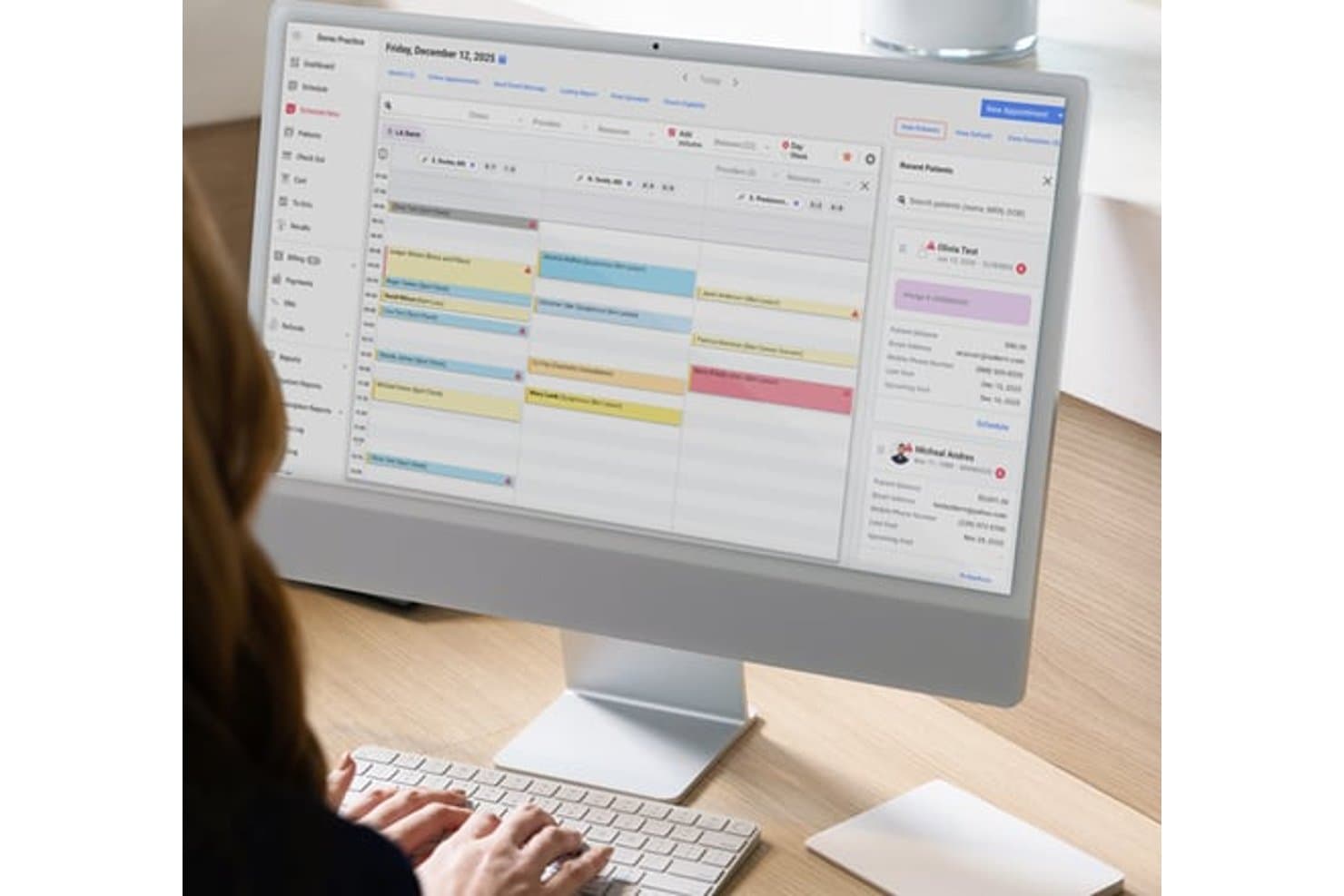
Ezderm's scheduling view organizes daily appointments across providers. Ezderm is a dermatology-only EHR, practice management, and RCM platform built by a practicing dermatologist, offering 3D body mapping, Mohs surgery documentation, biopsy tracking, automated coding, and integrated billing.
Who Is Ezderm Best For?
Ezderm is a strong fit for U.S. dermatology practices—from solo providers to multi-location groups—that prioritize surgical documentation, body mapping, and integrated billing in a single system.
Why I Picked Ezderm
Ezderm earns its spot on my shortlist because it's the only EHR on this list built by a practicing dermatologist, and that origin shows up in every corner of the product. I especially like its 3D body map, which plots lesions across 3,000+ anatomical locations and automatically generates location-specific ICD-10 and CPT codes from that documentation. The dedicated Mohs module handles multi-stage cases with digital margin mapping and surgical summaries, keeping everything in one chart rather than scattered across workarounds.
Ezderm Key Features
- Isotretinoin management: Tracks iPLEDGE documentation, dose calculations, lab monitoring, and patient recalls within the chart.
- Malignancy log: Maintains a photo timeline for each lesion to support longitudinal tracking of changes over time.
- Automated claim scrubbing: Catches missing IDs, inactive insurance, and invalid codes before claims are submitted through the Availity clearinghouse.
- Co-charting: Lets providers, scribes, and staff chart the same note simultaneously during a patient encounter.
Ezderm Integrations
Ezderm offers native integrations with Surescripts, Availity, Healthmonix, Square, EMR Direct, Exostar, and integrated pathology labs. It has a closed API for custom integrations and does not integrate with outside EHR or practice management systems.
Pros and Cons
Pros:
- Links biopsies, photos, pathology, and treatment history
- Documents Mohs stages with digital margin mapping
- Maps lesions across 3,000+ anatomical locations
Cons:
- EHR charting requires Apple devices
- Clinical photos lack built-in annotation
Learn more about Ezderm: Best for Mohs and procedure-based billing coding
- Free demo available
- Pricing upon request
Visit WebsiteCustomer Rating:4.4/5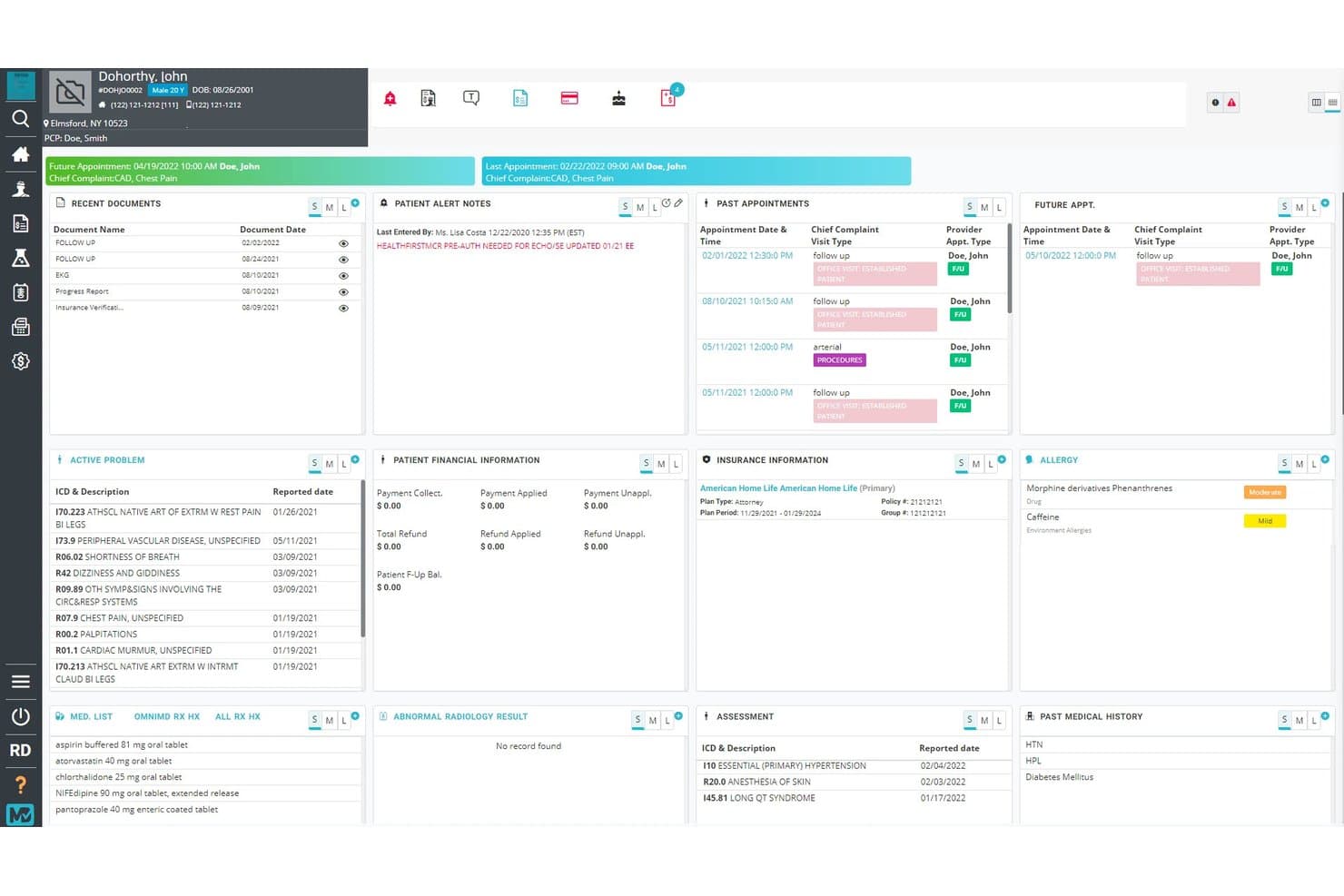
OmniMD centralizes patient health data in a single dashboard view. OmniMD is a cloud-based, multi-specialty EHR platform that combines charting, practice management, billing, e-prescribing, and AI-assisted coding tools, with a dermatology module covering lesion tracking, Mohs surgery documentation, and procedure-based CPT coding.
Who Is OmniMD Best For?
OmniMD fits billing and coding staff at dermatology practices that handle high volumes of procedure-based and Mohs surgery claims.
Why I Picked OmniMD
I picked OmniMD as one of the best because its billing and coding depth for procedure-heavy dermatology work is genuinely hard to match. It auto-fills Mohs CPT codes (17311–17315) based on stage count and maps codes across biopsies, excisions, and destruction in real time. The AI coder also scores denial risk by payer pattern before claims go out, which matters when your revenue depends on getting complex Mohs and excision claims right the first time.
OmniMD Key Features
- AI Medical Scribe: Converts visit conversations into specialty-specific notes, with ABCDE lesion criteria, body site, and prior-visit comparisons captured automatically.
- Customizable dermatology templates: Pre-built templates for acne, eczema, psoriasis, surgical, and cosmetic cases include Fitzpatrick skin type and sun-damage index fields.
- Patient skin journal: A patient-facing portal feature where patients log flare triggers and upload photos, which link back to lesion records in the chart.
- AI Front Desk: Automates insurance eligibility checks, appointment scheduling, and patient reminders before the visit.
OmniMD Integrations
OmniMD integrates with 50+ EHRs, including Epic, Cerner, athenahealth, eClinicalWorks, Allscripts, Nextech, and ModMed EMA. It connects with LabCorp, Quest, and regional labs through HL7, with FHIR 4.0.1 and custom APIs available for integrations.
Pros and Cons
Pros:
- Specialty templates support dermatology procedure notes
- Documentation connects directly with billing workflows
- Mohs stage-based CPT coding supports procedure billing
Cons:
- Dermatology image workflows lack user validation
- Users report loading delays during busy periods
Learn more about OmniMD: Good for multi-specialty billing with derm templates
- Free demo available
- Pricing upon request
Visit WebsiteCustomer Rating:4/5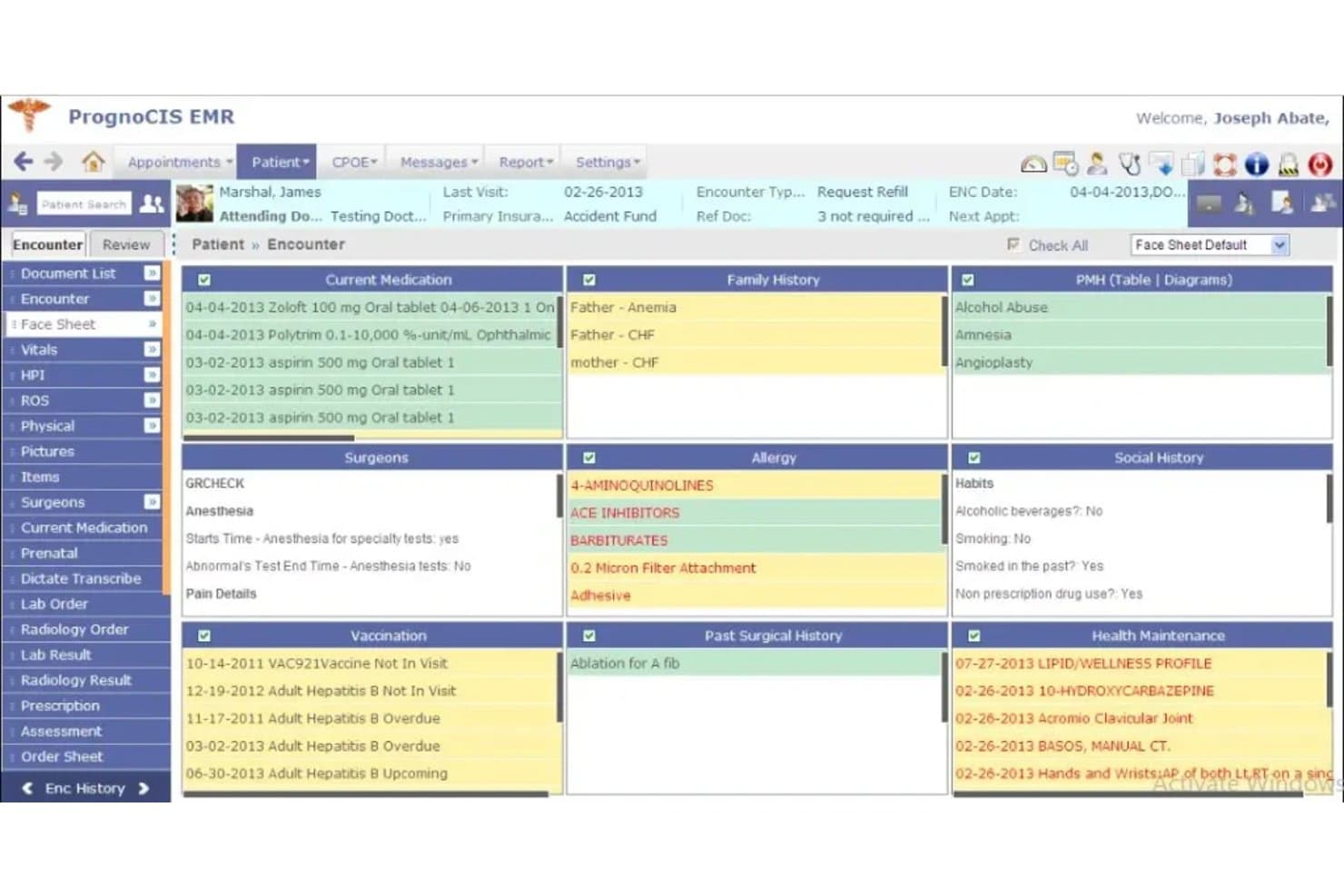
PrognoCIS centralizes patient health data in one encounter view. PrognoCIS is a cloud-based EHR that covers charting, e-prescribing, procedure and biopsy documentation, and integrated billing across multiple specialties, including a dedicated dermatology template library.
Who Is PrognoCIS Best For?
PrognoCIS is a strong fit for multi-specialty practices that need dermatology charting and billing in a single, scalable system.
Why I Picked PrognoCIS
I've included PrognoCIS in my top picks because it handles multi-specialty billing and dermatology charting within one system, which matters when your practice runs both medical derm and cosmetic derm under the same roof. I like that biopsy and surgery templates automatically generate CPT and ICD codes directly from the documentation, cutting manual entry when you're running high-volume procedure days. The built-in claim scrubbing and denial management tools also mean billing staff aren't bouncing between separate platforms to resolve rejections.
PrognoCIS Key Features
- E-prescribing with PDMP integration: PrognoCIS connects directly to state prescription drug monitoring programs, with real-time formulary checks and drug interaction alerts built into the prescribing workflow.
- AI visit summary: A one-click AI tool condenses the last five visit notes into a single summary, giving providers quick access to patient history at the start of a visit.
- Anatomical draw tool: Providers can mark problem areas and injection sites directly on body diagrams within the chart, which are embedded across exam and specialty documentation sections.
- Denial management dashboard: The built-in billing module includes tools for tracking, managing, and resolving claim denials without leaving the platform.
PrognoCIS Integrations
PrognoCIS has documented integrations with LabCorp, Pathology Inc., TriCore, Surescripts, DrFirst, OptimizeRx, Zoom, ProMeet, and Nuance Dragon Medical SpeechKit. It supports HL7, portal-side FHIR, third-party APIs, and custom API work.
Pros and Cons
Pros:
- E-prescribing handles complex medication workflows
- Integrated billing links documentation to coding
- Dermatology templates support biopsy documentation
Cons:
- Reviewers report modifier and claim errors
- No lesion-level photo tracking
Learn more about PrognoCIS Psychiatry EHR: 7Best for pathology-integrated dermatology charting
EMA
- Free demo available
- Pricing upon request
Visit WebsiteCustomer Rating:4.5/5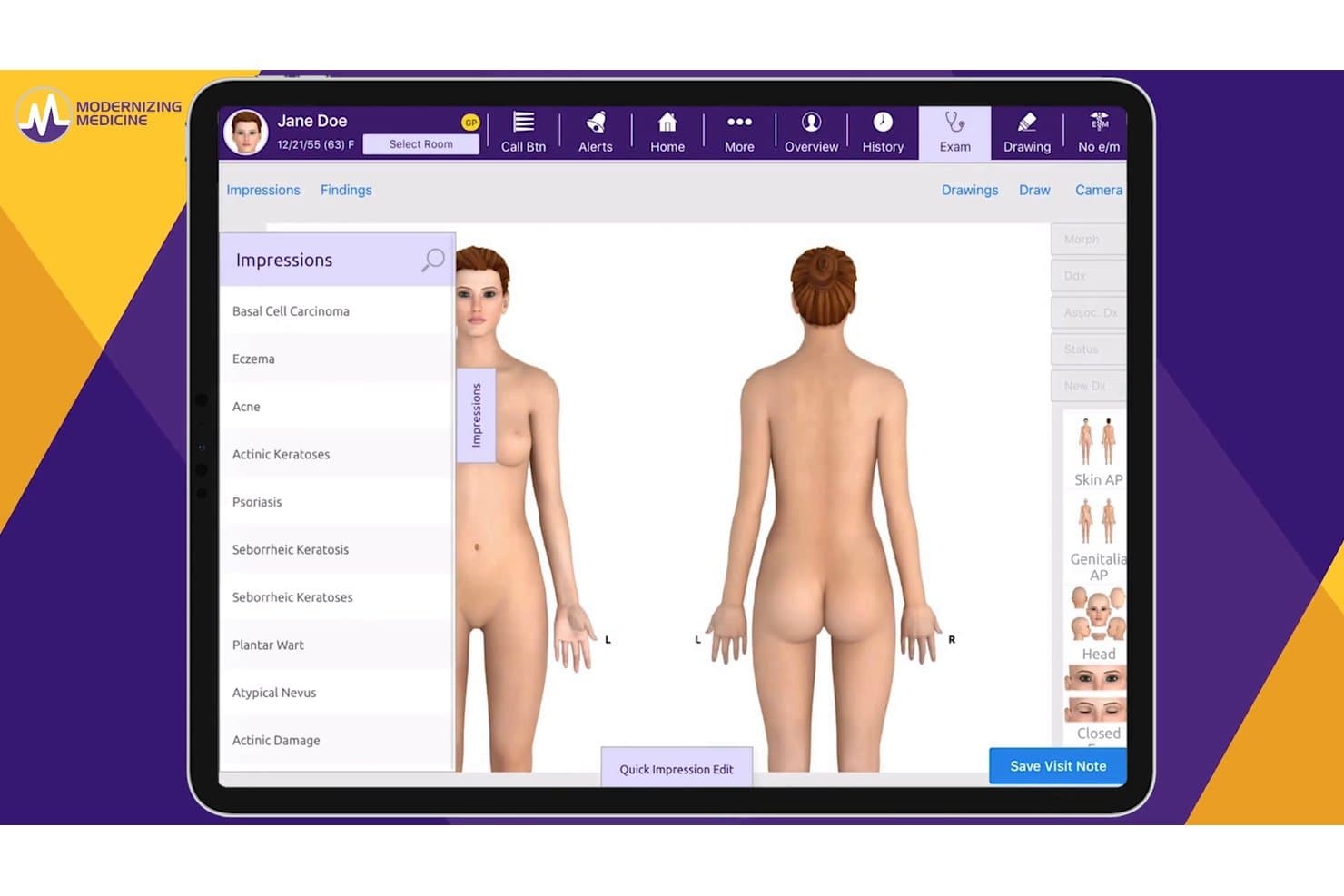
EMA lets users document skin conditions on an interactive body map. ModMed EMA is a dermatology-specific EMR that combines touch-based charting, an interactive anatomical atlas, e-prescribing, procedure documentation, and an integrated pathology module into a single iPad-first platform.
Who Is EMA Best For?
EMA is a strong fit for dermatology practices that handle in-house biopsies and need pathology results flowing directly into the clinical chart without manual data entry.
Why I Picked EMA
I picked EMA as one of the best because its built-in pathology module is the kind of feature that genuinely changes how biopsy-heavy practices work. When a dermatopathologist reads a specimen, results flow directly into the EMA chart automatically, no manual entry, no chasing down reports. I also love that EMA remembers each provider's biopsy tray setup and anesthesia preferences, so procedure documentation stays consistent without rebuilding it every time.
EMA Key Features
- AI scribe integration: ModMed Scribe 2.0 transcribes visit conversations into structured notes and automatically suggests billing codes, prescription queues, and lab orders for provider review.
- PocketEMA mobile app: A companion app for iPhone and Android lets providers e-prescribe, capture patient photos, view schedules, and send secure messages from outside the exam room.
- Automated claim denial flagging: Built-in AI reviews claims before submission and flags those likely to be denied, giving billing staff a chance to correct errors proactively.
- MIPS quality data capture: EMA captures quality data during the exam and supports direct submission to CMS through ModMed's qualified registry.
EMA Integrations
EMA integrates with Canfield through synapSYS, Surescripts, Appriss Health, GoodRx, Dragon Medical SpeechKit, and connected outside labs. Its FHIR R4 API supports OAuth 2.0 and SMART App Launch, while HL7 connections support custom interoperability.
Pros and Cons
Pros:
- Denial flags support procedural billing accuracy
- Provider-specific biopsy settings reduce rework
- Pathology results enter charts automatically
Cons:
- New staff need months to acclimate
- Reporting tools limit managerial oversight
Learn more about EMA: Best for advanced practice management features
- Free demo available
- Pricing upon request
Visit WebsiteCustomer Rating:4.3/5
Nextech's Interface Nextech is a well-structured and comprehensive electronic medical record (EMR) software that excels in practice management features. Designed specifically for specialties, including dermatology, it provides a sophisticated platform that aligns well with practices that need advanced management options.
Why I Picked Nextech: In determining my selections, I chose Nextech because it’s an advanced practice management solution. Its diverse range of features, from scheduling to billing and reporting, helps healthcare professionals streamline operations. Furthermore, its specialty-specific approach distinguishes it from generic EMR solutions, which is why I believe Nextech is "Best for advanced practice management features."
Standout Features & Integrations:
Nextech delivers a robust array of features, including specialty-specific templates, efficient billing tools, and advanced reporting capabilities. These features combined make it a powerful tool for managing practices more efficiently and effectively.
It integrates seamlessly with various third-party applications, including lab systems, pharmacy databases, and telemedicine tools, thus improving workflow and enabling a more coordinated healthcare approach.
Pros and Cons
Pros:
- Seamless integration with third-party applications
- Specialty-specific templates
- Advanced practice management features
Cons:
- Initial setup can be time-consuming
- Costly compared to other solutions
- Interface may be overwhelming to new users
Learn more about Nextech: Best for high-volume procedural billing automation
- Free demo available
- Pricing upon request
Visit WebsiteCustomer Rating:3.4/5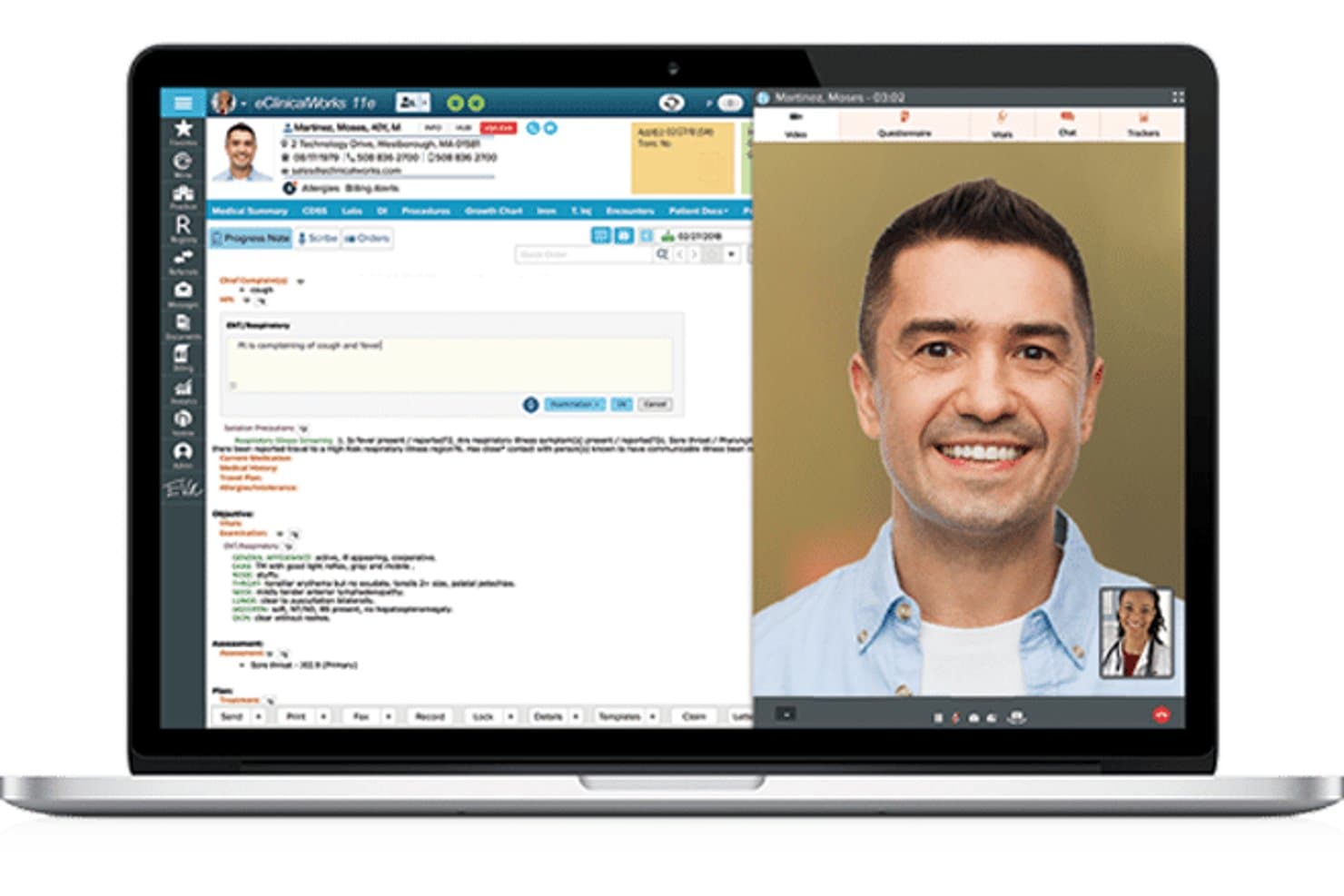
eClinicalWorks supports telehealth visits with integrated progress note documentation. eClinicalWorks is a cloud-based EHR and practice management platform that combines dermatology-specific charting, 3D body mapping, lesion tracking, procedure documentation, e-prescribing, and built-in billing and coding tools.
Who Is eClinicalWorks Best For?
eClinicalWorks fits high-volume dermatology practices and multi-location groups where billing accuracy, procedural coding, and revenue cycle performance are top priorities.
Why I Picked eClinicalWorks
I picked eClinicalWorks because its billing infrastructure is genuinely built for the coding complexity that high-volume dermatology practices deal with daily. The built-in E&M coder, one-click CPT and ICD-10 coding, and a pathology log that ties directly to biopsy documentation mean claims go out accurately the first time. I've seen the RCM service report a 98%+ first-pass claim acceptance rate, and a 120-provider dermatology group using it saw 33% fewer payer rejections after optimizing their workflow on the platform.
eClinicalWorks Key Features
- 3D body mapping: A clickable 3D body model lets providers select lesion locations directly, automatically populating the observation list in the chart.
- Lesion watch list: Flagged areas of concern are tracked over time, supporting mole monitoring and changes across visits.
- Sunoh.ai ambient documentation: An AI scribe captures dictated exam findings—including lesion size, color, and location—directly within the dermatology module.
- PRISMA patient record search: A cross-EHR search tool pulls outside records into a searchable, AI-summarized timeline inside the patient chart.
eClinicalWorks Integrations
eClinicalWorks integrates with Surescripts, HL7-compatible labs and radiology vendors, and NCPDP-compatible in-house pharmacies. It also offers FHIR APIs, TEFCA connectivity through PRISMANet, and device integrations with Midmark, Welch Allyn, Topcon, and Seca.
Pros and Cons
Pros:
- Supports billing teams with pathology workflows
- Tracks lesions across longitudinal dermatology visits
- Handles high-volume procedural coding accurately
Cons:
- Prescription workflows require too many clicks
- Support tickets can remain unresolved too long
Learn more about eClinicalWorks: Best for a holistic approach to patient care
- Free demo available
- Pricing upon request
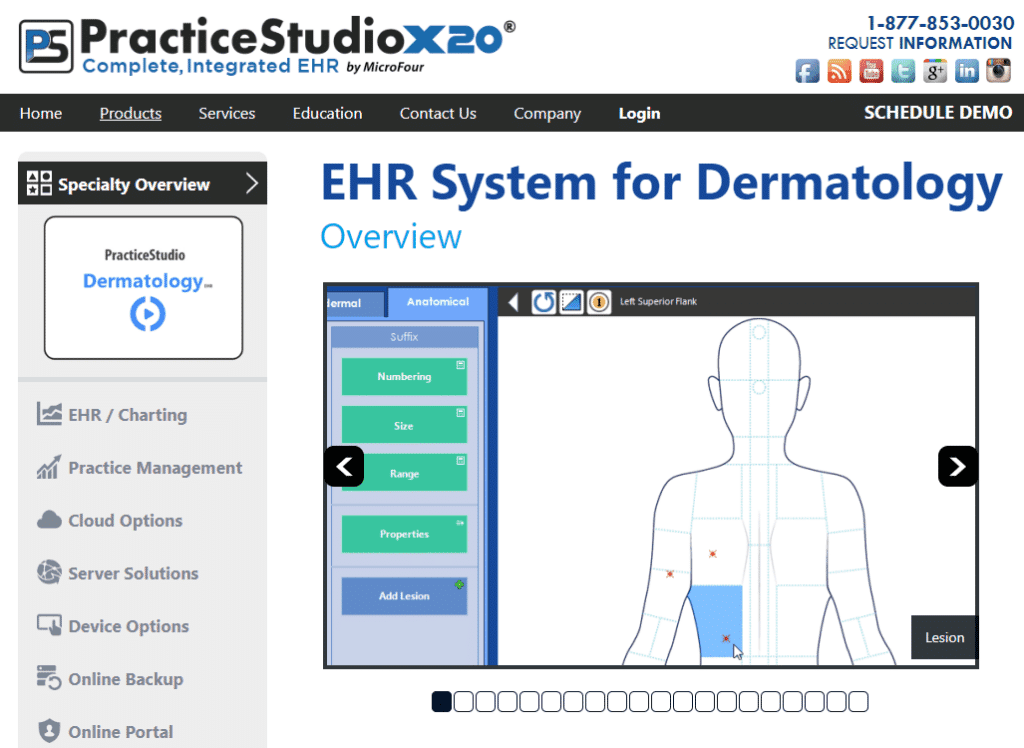
PracticeStudio X20's Interface PracticeStudio X20 is a dermatology EMR built by MicroFour that combines body-diagram skin exams, serial-numbered lesion tracking, a cancer log, injection mapping, e-prescribing, billing, and an in-house AI documentation assistant in one self-hosted system.
Who Is PracticeStudio X20 Best For?
PracticeStudio X20 is a strong fit for dermatology practices that want one vendor handling charting, billing, AI documentation, and prescribing without stitching together third-party tools.
Why I Picked PracticeStudio X20
PracticeStudio X20 earns its spot on my shortlist because it keeps medical, cosmetic, and surgical dermatology workflows in one chart, with no mode-switching between visit types. I especially like the serial-numbered lesion tracking paired with a dedicated cancer log, which means every biopsy date, lesion classification, and follow-up status is visible from anywhere in the patient record. The built-in Alma AI also structures ambient documentation into SNOMED-coded chart sections, so nothing gets buried in free text.
PracticeStudio X20 Key Features
- Surescripts-certified e-prescribing: RxWriter handles new prescriptions, renewals, formulary checks, and Schedule II–V controlled substances with two-factor authentication.
- Injection mapping for cosmetic procedures: Units of neuromodulators and fillers are placed on a face diagram, and the procedure note is generated automatically.
- Four-file side-by-side image comparison: The built-in DICOM viewer lets you view, annotate, and compare up to four clinical images or files simultaneously.
- Real-time E/M coding: E/M codes update as encounter complexity changes, with Alma AI suggesting a coding level based on medical decision-making and time.
PracticeStudio X20 Integrations
Documented integrations include Surescripts for e-prescribing and phiMail Server for Direct secure messaging. No public API or dermatopathology integration is clearly documented.
Pros and Cons
Pros:
- Responsive support from knowledgeable long-serving staff
- Alma AI structures notes into SNOMED sections
- Serial-numbered lesion tracking supports longitudinal follow-up
Cons:
- Procedure coding lacks documented biopsy linkage
- Dated screens complicate staff training
Learn more about PracticeStudio X20:
How I Evaluate Dermatology EMR
I split my evaluation into three parts, with the most weight on core functionality: map lesions, link annotated photos to visits, and document procedures with codes. Next, I consider standout features such as dermoscopy-device integration. Finally, I weigh beyond-feature factors, including specialty onboarding, scalability, and total cost.
Core Functionality (Table Stakes For This List)
When I'm selecting tools for my list, I score each one on a scale from 0 (does not offer the functionality) to 5 (excels in this area) for each core functionality listed below. I then convert the total into a percentage to help assess each tool's overall fit, with extra weight on any functionalities I’ve deemed essential.
- Dermatology Charting (Essential): I check for skin-exam templates, body maps, and lesion tracking that support full-body exams and repeat visits without generic SOAP notes.
- Clinical Image Management (Essential): Look for chart-linked photo capture, lesion annotations, and historical comparisons to follow a changing spot across visits.
- E-Prescribing: I assess electronic prescribing, including controlled-substance workflows and medication safety checks for complex regimens.
- Procedure Documentation: Check whether biopsies, excisions, and cryotherapy have structured notes that connect procedure details to appropriate codes.
- Billing and Coding: I assess CPT and ICD-10 support for visits that combine evaluation, biopsies, cryotherapy, and other procedures.
- Patient Records: Longitudinal records should make problem lists, medication history, prior visits, and lesion-related follow-up easy to find.
Once I have a list of tools that meet the criteria, I consider what sets each platform apart.
Differentiating Factors (What Sets Vendors Apart)
Here's how I compare and contrast different vendors:
Standout Features
I look for direct dermoscopy device integration so captured images land in the chart without manual uploads—a real time-saver during high-volume skin-check days. Pathology lab connectivity matters just as much; I check whether biopsy results auto-import into the visit record, closing the loop between procedure and diagnosis. I also evaluate patient-facing photo portals, which let patients with conditions like psoriasis or acne share progress images between visits for remote monitoring.
Beyond Features
I evaluate whether a vendor offers dermatology-specific onboarding that covers body-mapping workflows and procedure coding, not just generic EHR training. Scalability matters too: a platform should support a solo practice and a multi-location group without forcing a migration as you grow or add cosmetic service lines. I also check for HL7/FHIR support and connections to practice management or pathology lab systems, since duplicate data entry across disconnected tools burns staff time fast.
Como escolher uma EMR de dermatologia
É fácil perder-se em listas extensas de funcionalidades e estruturas de preços complexas. Para o ajudar a manter o foco enquanto conduz o seu processo específico de seleção de software, apresentamos uma lista de verificação dos fatores a ter em conta:
| Fator | O que deve considerar |
|---|---|
| FatorEscalabilidade | O que deve considerarA EMR consegue acompanhar o crescimento da sua clínica? Procure soluções que suportem mais doentes e dados à medida que a sua clínica se expande. |
| FatorIntegrações | O que deve considerarFunciona com as ferramentas que já utiliza? Verifique a compatibilidade com o seu software de gestão da clínica e outros sistemas essenciais. |
| FatorPersonalização | O que deve considerarPode adaptar a EMR aos seus fluxos de trabalho? Considere opções que lhe permitam ajustar modelos e processos de acordo com as necessidades da sua clínica. |
| FatorFacilidade de utilização | O que deve considerarO sistema é intuitivo para a sua equipa? Escolha uma interface fácil de utilizar que minimize o tempo de formação e os erros. |
| FatorImplementação e integração inicial | O que deve considerarCom que rapidez pode começar? Procure soluções com planos claros de integração inicial e suporte para ajudar a sua equipa a efetuar a transição sem problemas. |
| FatorCusto | O que deve considerarEstá dentro do seu orçamento? Compare os modelos de preços, incluindo taxas ocultas ou planos por níveis, para encontrar uma solução que ofereça a melhor relação qualidade-preço. |
| FatorMedidas de segurança | O que deve considerarComo protege os dados dos doentes? Certifique-se de que a EMR cumpre regulamentações como a HIPAA e utiliza encriptação para proteger informações sensíveis. |
| FatorRequisitos de conformidade | O que deve considerarCumpre as normas legais? Verifique se a EMR respeita as regulamentações locais e nacionais aplicáveis aos cuidados de saúde, de modo a evitar problemas de conformidade. |
O que é uma EMR de dermatologia?
O EMR de dermatologia é um software concebido para gerir registos de pacientes, marcações e faturação especificamente para clínicas de dermatologia. Os dermatologistas e as suas equipas utilizam estas ferramentas para melhorar os cuidados prestados aos pacientes e aumentar a eficiência da clínica. Funcionalidades como a gestão de dados dos pacientes, o agendamento de marcações e o apoio à faturação permitem operações eficientes, conformidade e comunicação com os pacientes. De um modo geral, estas ferramentas ajudam as clínicas de dermatologia a funcionar sem problemas e a proporcionar melhores resultados aos pacientes.
Funcionalidades
Ao selecionar um EMR de dermatologia, esteja atento às seguintes funcionalidades essenciais:
- Gestão de dados dos pacientes: Ajuda a organizar e armazenar os registos dos pacientes de forma segura, para um acesso fácil e em conformidade com os requisitos aplicáveis.
- Agendamento de marcações: Simplifica os processos de marcação para reduzir as faltas e otimizar o tempo da clínica.
- Faturação e emissão de faturas: Automatiza as tarefas de faturação para garantir pagamentos exatos e atempados.
- Conformidade regulamentar: Garante que a clínica cumpre as leis e regulamentações relativas aos cuidados de saúde, como a HIPAA.
- Funcionalidades de telemedicina: Permite consultas à distância para ampliar o acesso e a conveniência dos pacientes.
- Modelos personalizáveis: Oferece flexibilidade para adaptar a documentação às necessidades específicas da clínica.
- Resultados laboratoriais integrados: Facilita o acesso contínuo aos dados laboratoriais nos registos dos pacientes.
- Análise avançada: Fornece informações sobre o desempenho da clínica para apoiar a tomada de decisões.
- Interface intuitiva: Garante facilidade de utilização para minimizar a formação necessária e aumentar a produtividade.
- Medidas de proteção da segurança: Protege as informações sensíveis dos pacientes através de encriptação e controlos de acesso seguros.
Benefícios
A implementação de um EMR de dermatologia proporciona vários benefícios para a sua equipa e para a sua empresa. Eis alguns dos benefícios que pode esperar:
- Maior eficiência: Automatiza tarefas de rotina, como o agendamento e a faturação, libertando tempo para os cuidados aos pacientes.
- Maior conformidade: Mantém a sua clínica alinhada com as regulamentações relativas aos cuidados de saúde através de funcionalidades de conformidade integradas.
- Melhores cuidados aos pacientes: Facilita o acesso rápido aos registos dos pacientes, ajudando-o a tomar decisões de tratamento informadas.
- Maior acessibilidade: Disponibiliza opções de telemedicina, permitindo que os pacientes consultem o profissional a partir de qualquer lugar.
- Informações baseadas em dados: Fornece análises para ajudar a compreender as tendências da clínica e a tomar melhores decisões.
- Poupança de custos: Reduz a documentação em papel e os encargos administrativos, conduzindo a custos operacionais mais baixos.
- Gestão segura dos dados: Protege as informações dos pacientes através de encriptação e acesso seguro, garantindo privacidade e confiança.
Custos e preços
A seleção de um EMR de dermatologia exige uma compreensão dos vários modelos de preços e planos disponíveis. Os custos variam consoante as funcionalidades, o tamanho da equipa, os complementos e outros fatores. A tabela abaixo resume os planos comuns, os seus preços médios e as funcionalidades normalmente incluídas nas soluções de EMR de dermatologia:
Tabela de comparação de planos para EMR de dermatologia
| Tipo de plano | Preço médio | Funcionalidades comuns |
|---|---|---|
| Tipo de planoPlano gratuito | Preço médio$0 | Funcionalidades comunsGestão básica de pacientes, agendamento de marcações e apoio limitado. |
| Tipo de planoPlano pessoal | Preço médio$30-$50/utilizador/mês | Funcionalidades comunsRegistos dos pacientes, agendamento, faturação e apoio por e-mail. |
| Tipo de planoPlano empresarial | Preço médio$100-$200/utilizador/mês | Funcionalidades comunsAnálise avançada, modelos personalizáveis, opções de integração e apoio prioritário. |
| Tipo de planoPlano empresarial de grande dimensão | Preço médio$300-$500/utilizador/mês | Funcionalidades comunsPersonalização completa, gestor de conta dedicado, telemedicina e funcionalidades de segurança reforçadas. |
Perguntas mais frequentes sobre o registo médico eletrónico de dermatologia (FAQ)
Com que rapidez posso começar a utilizar um registo médico eletrónico de dermatologia?
O tempo de configuração varia consoante o fornecedor e as necessidades da sua clínica. Alguns sistemas disponibilizam uma integração rápida, com modelos e vídeos de formação, para que possa começar em poucos dias. Outros podem exigir mais personalização e demorar algumas semanas. Certifique-se de que dispõe de apoio dedicado durante este período.
O registo médico eletrónico de dermatologia está em conformidade com a HIPAA?
Sim, a maioria dos sistemas de registo médico eletrónico de dermatologia foi concebida para cumprir os regulamentos da HIPAA, garantindo que os dados dos pacientes são tratados de forma segura. Ao avaliar as opções, verifique as medidas de segurança do sistema, como a encriptação e os controlos de acesso, para proteger informações sensíveis.
O registo médico eletrónico pode ser integrado com outras ferramentas?
As capacidades de integração dependem do sistema de registo médico eletrónico. Muitas soluções disponibilizam APIs ou integrações incorporadas com software de gestão de clínicas, sistemas de faturação e serviços laboratoriais populares. Certifique-se de que o registo médico eletrónico escolhido consegue ligar-se às ferramentas que já utiliza, para manter a eficiência do fluxo de trabalho.