

Waarom u onze softwareaanbevelingen kunt vertrouwen
6,700+
Reviews
20
Industry experts
16+
Evaluation factors
14
Years
Ons team test en beoordeelt software sinds 2012. Als leiders van medische praktijken weten we zelf hoe moeilijk — en belangrijk — het is om de juiste software te kiezen.
Voor deze gids hebben we tools geëvalueerd met behulp van praktijktests en onafhankelijk onderzoek, waarbij we tools beoordeelden aan de hand van onze selectiecriteria.
Onze reviews weerspiegelen ons menselijke redactionele oordeel, geen verkooppraatje.
Vergelijkingstabel voor software voor EMR-patiëntenportalen
Deze vergelijkingstabel geeft een overzicht van de prijsgegevens van mijn beste keuzes voor software voor EMR-patiëntenportalen:
| Tool | Best For | Trial Info | Price | ||
|---|---|---|---|---|---|
| 1 | Het meest geschikt voor communicatie binnen de eerstelijnszorg | Gratis demo beschikbaar | Prijs op aanvraag | Website | |
| 2 | Beste voor tools voor patiëntbetrokkenheid | Gratis demo beschikbaar | Prijzen op aanvraag | Website | |
| 3 | Het meest geschikt voor het verbinden van mobiele planning | Gratis demo beschikbaar | Prijs op aanvraag | Website | |
| 4 | Beste voor geïntegreerde workflows voor intake en betalingen | Gratis proefperiode van 30 dagen | Prijs op aanvraag | Website | |
| 5 | Het beste voor digitale incheck- en servicewerkstromen | Gratis demo beschikbaar | Prijzen op aanvraag | Website | |
| 6 | Het beste voor het verbinden van patiënten met hun dossiers | Nee | Prijs op aanvraag | Website | |
| 7 | Beste keuze voor betaalbare portaaltoegang | Gratis demo + gratis deskundig advies beschikbaar | Vanaf $126/maand (jaarlijks gefactureerd) | Website | |
| 8 | Het beste voor betrokkenheid in landelijke gezondheidszorg | Gratis demo beschikbaar | Prijzen op aanvraag | Website | |
| 9 | Het beste voor aanpasbare patiëntbetrokkenheid | Gratis demo beschikbaar | Prijs op aanvraag | Website | |
| 10 | Ideaal voor patiëntbetrokkenheid per specialisme | Gratis demo beschikbaar | Prijzen op aanvraag | Website |


Beoordelingen van de beste software voor EMR-patiëntenportalen
Hieronder vind je mijn uitgebreide samenvattingen van de beste software voor EMR-patiëntenportalen die op mijn shortlist terechtkwam. In mijn beoordelingen bespreek ik de functies, de beste toepassingsmogelijkheden en de integraties van elke software uitgebreid, zodat je de beste optie voor jouw situatie kunt vinden.
 Het meest geschikt voor communicatie binnen de eerstelijnszorg
- Gratis demo beschikbaar
- Prijs op aanvraag
Visit WebsiteCustomer Rating:4.4/5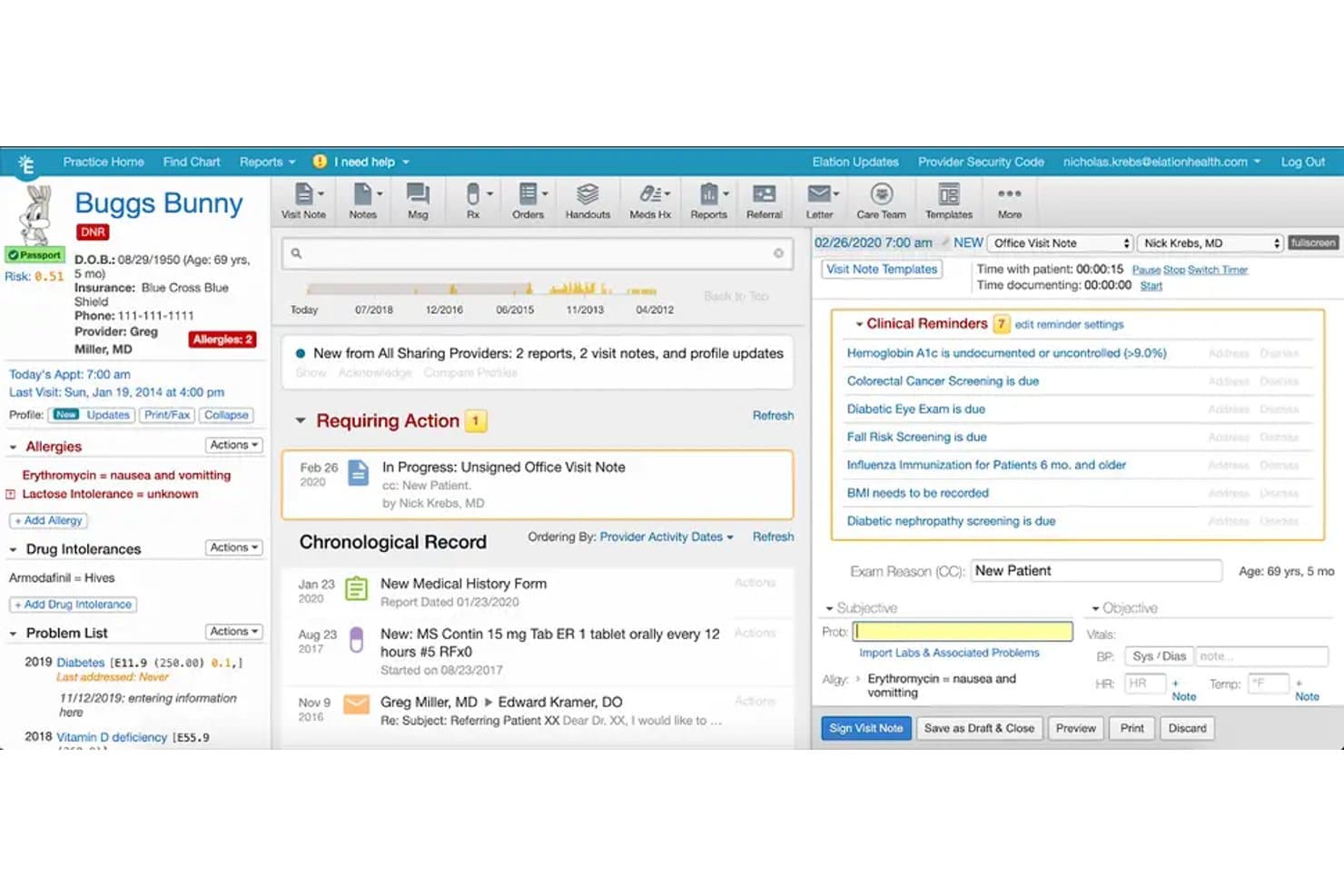
Elation Health biedt in zijn EMR-platform een uitgebreid patiëntdossieroverzicht met klinische herinneringen, allergieënregistratie, probleemlijsten en documentatie van bezoeknotities. Elation Health is een ingebouwd patiëntenportaal waarmee patiënten toegang krijgen tot medische dossiers, beveiligde berichtenuitwisseling, zelfbediening voor afspraken, verzoeken om recepten te vernieuwen en online facturen te betalen.
Voor wie is Elation Health het meest geschikt?
Onafhankelijke huisartsenpraktijken die op zoek zijn naar een patiëntenportaal dat ingebouwd in hun EPD is geïntegreerd, in plaats van als een externe uitbreiding te zijn toegevoegd.
Waarom ik voor Elation Health heb gekozen
Ik heb voor Elation Health gekozen vanwege de nauwe verwevenheid van de beveiligde berichtenuitwisseling met het klinische dossier. Wanneer een patiënt een bericht met een bijgevoegd laboratoriumrapport of een afbeelding verstuurt, ziet het zorgteam dit rechtstreeks in hetzelfde EPD-dossier, zonder tussen verschillende contexten te hoeven schakelen. Het meertalige portaal (beschikbaar in zeven talen) zorgt ervoor dat huisartsteams geen communicatielijnen verliezen door taalbarrières. Ik vind het ook prettig dat verzoeken om recepten te vernieuwen via dezelfde berichtenlaag rechtstreeks naar de zorgverlener worden doorgestuurd.
Belangrijkste functies van Elation Health
- Toegang via mobiele app: Patiënten kunnen de Elation Passport-app op iOS of Android gebruiken om dossiers, afspraken en berichten te beheren.
- Tabblad voor zelf afspraken inplannen: Hiermee kunnen patiënten rechtstreeks afspraken inplannen en annuleren wanneer de zorgverlener deze functie heeft ingeschakeld.
- Accountbeheer voor familieleden en mantelzorgers: Gebruikers kunnen de gezondheidsinformatie van meerdere naasten beheren met één aanmelding.
- Digitale toestemmings- en registratieprocessen: De registratie van nieuwe patiënten en de toestemming worden elektronisch in het portaal voltooid en opgeslagen.
Integraties van Elation Health
Elation Health biedt ingebouwde integraties met Zocdoc, Surescripts, Dock Health, Fullscript, Zus, Nsight Health en Carequality. Er is een API beschikbaar voor aangepaste integraties.
Pros and Cons
Pros:
- Meertalig portaal ondersteunt diversiteit onder patiënten
- Ingebouwde EPD-integratie voor realtime updates
- Patiënten beheren dossiers van meerdere familieleden
Cons:
- Beperkte functionaliteit voor wachtlijsten voor afspraken
- Voor online facturen betalen kan configuratie nodig zijn
Learn more about Elation Health: Beste voor tools voor patiëntbetrokkenheid
- Gratis demo beschikbaar
- Prijzen op aanvraag
Visit WebsiteCustomer Rating:3.9/5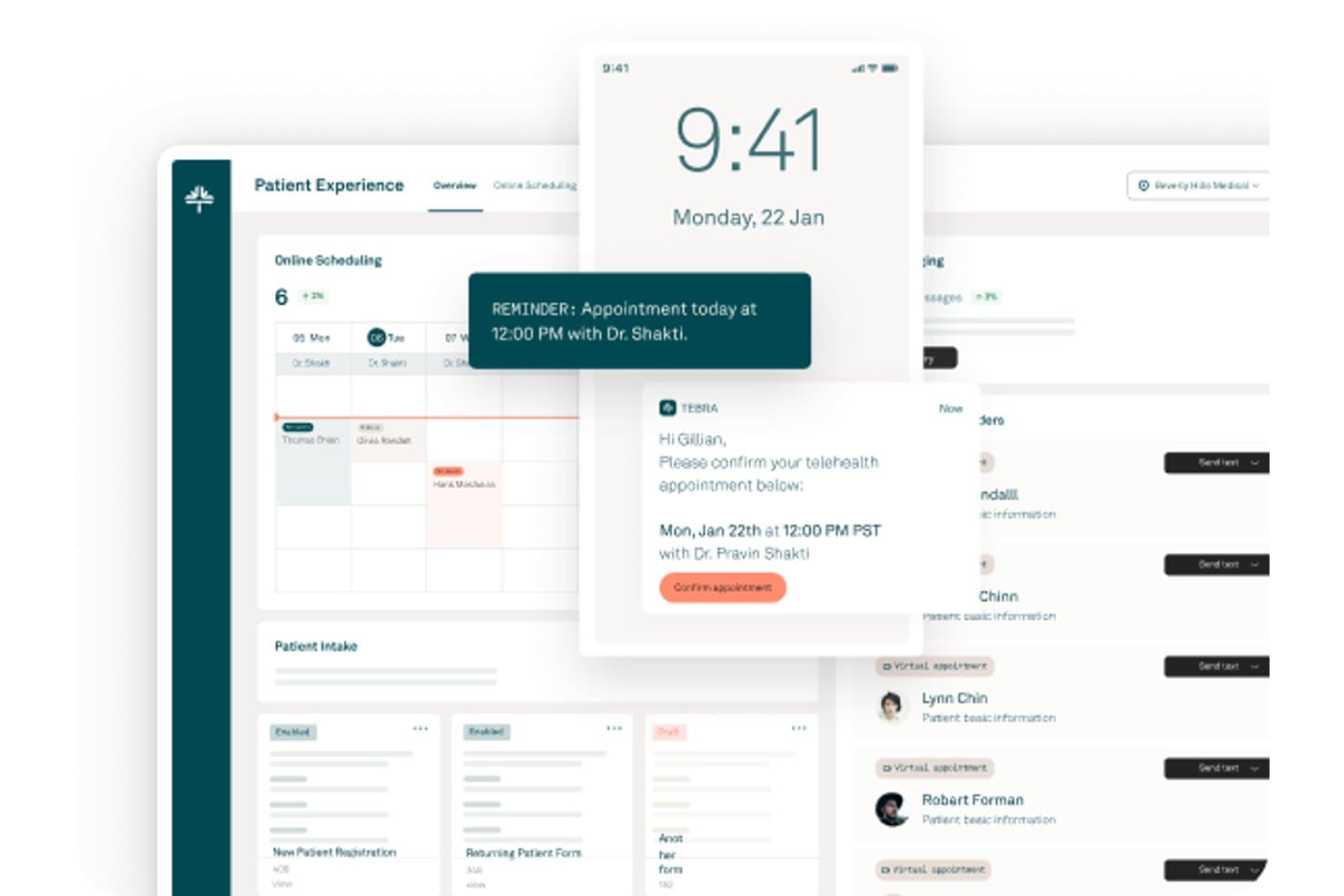
Tebra biedt een dashboard voor de patiëntervaring met online afspraken plannen, afspraakherinneringen, bevestigingen voor telezorg en beheer van patiëntintake. Tebra is een cloudgebaseerd EPD en praktijkmanagementplatform met een ingebouwd patiëntenportaal voor online afspraken plannen, digitale intake, beveiligde berichtenuitwisseling, online factuurbetaling en tools voor patiëntbetrokkenheid in één systeem.
Voor wie is Tebra het meest geschikt?
Tebra is zeer geschikt voor zelfstandige medische praktijken die één platform willen gebruiken om zowel klinische werkprocessen als patiëntgerichte tools voor betrokkenheid te beheren.
Waarom ik Tebra heb gekozen
Tebra verdient een plek als een van de beste opties op mijn shortlist, omdat de toolkit voor patiëntbetrokkenheid veel verder gaat dan een standaardportaal. Ik ben vooral enthousiast over de functie voor patiëntenuitzendingen, waarmee mijn team bulkberichten naar gerichte patiëntsegmenten kan sturen, en over de geautomatiseerde enquêtes na een bezoek, die openbare beoordelingsprofielen in meer dan 80 gidsen vullen. Het systeem automatiseert ook verjaardagsberichten, een niveau van detail in patiëntcommunicatie dat ik in de meeste aan een EPD gekoppelde portalen niet zie.
Belangrijkste functies van Tebra
- Online afspraken plannen voor patiënten: Hiermee kunnen patiënten rechtstreeks via het portaal afspraken boeken, verzetten of annuleren.
- Digitale intakeformulieren: Hiermee kunnen patiënten registratie-, medische anamnese- en toestemmingsformulieren online invullen.
- Betalen van facturen in het portaal: Hiermee kunnen patiënten veilig overzichten bekijken en betalingen uitvoeren vanuit hun portaal.
- HIPAA-conforme beveiligde berichtenuitwisseling: Maakt tweerichtingsversleutelde berichtenuitwisseling tussen patiënten en zorgverleners binnen het portaal mogelijk.
Tebra-integraties
Tebra biedt standaardintegraties met TriZetto en Appriss Health (PDMP), en ondersteunt elektronisch voorschrijven via EPCS. Er is een API beschikbaar voor aangepaste integraties.
Pros and Cons
Pros:
- Bulkberichten naar gesegmenteerde patiëntengroepen
- Enquêtes na een bezoek worden automatisch gepubliceerd in gidsen
- Geautomatiseerde verjaardagsberichten voor patiëntcommunicatie
Cons:
- Voor beveiligde berichtenuitwisseling moet eerst een portaaluitnodiging worden ingesteld
- Intakeformulieren hebben beperkte aanpassingsmogelijkheden
Learn more about Tebra: Het meest geschikt voor het verbinden van mobiele planning
- Gratis demo beschikbaar
- Prijs op aanvraag
Visit WebsiteCustomer Rating:3.9/5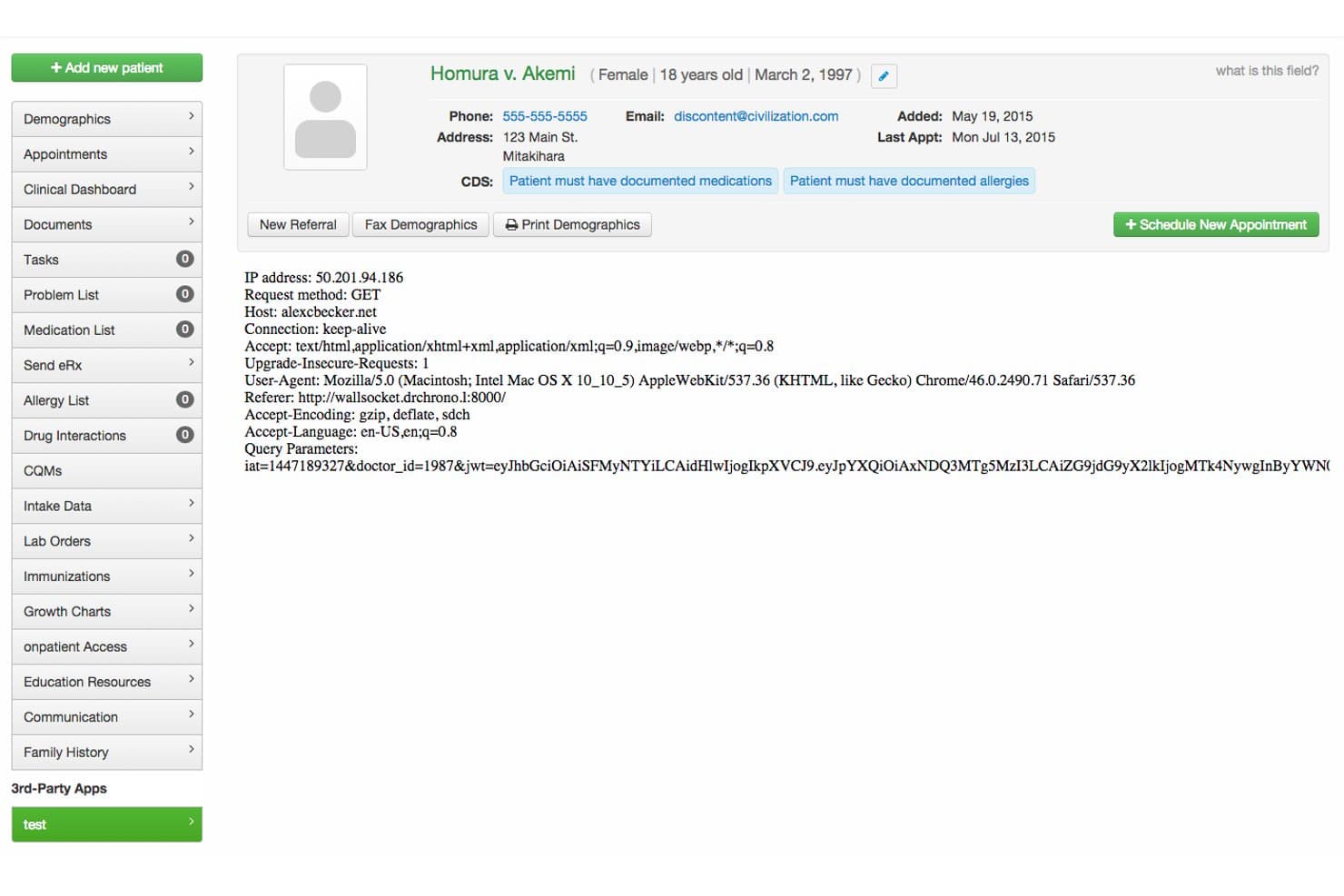
DrChrono biedt een interface van een patiëntenportaal met patiëntdemografische gegevens, CDS-waarschuwingen, HTTP-aanvraagmetadata en navigatietools voor het beheren van medische dossiers. DrChrono is een cloudgebaseerd EPD-platform met een ingebouwd patiëntenportaal dat klinische documentatie, mobiele planning, digitale intakeformulieren, beveiligde berichtenuitwisseling, online factuurbetalingen en elektronisch voorschrijven in één verbonden systeem omvat.
Voor wie is DrChrono het meest geschikt?
DrChrono is zeer geschikt voor zelfstandige en kleine tot middelgrote praktijken die hun klinische werkprocessen op Apple-apparaten uitvoeren.
Waarom ik voor DrChrono heb gekozen
DrChrono staat op mijn shortlist omdat de planning en het patiëntenportaal op een manier samenwerken die echt voor Apple is ontworpen. Ik vind het prettig dat wanneer een patiënt via OnPatient een afspraak boekt, het systeem automatisch de juiste intakeformulieren voor dat afspraaktype verstuurt, zodat patiënten aankomen met hun documentatie al ingevuld. De AI-voorspeller voor no-shows is nog een functie die ik waardevol vind: deze markeert afspraken met een verhoogd risico voordat ze gaten in de planning veroorzaken.
Belangrijkste functies van DrChrono
- HIPAA-conform patiëntenportaal: Patiënten kunnen veilig inloggen om dossiers en berichten te bekijken en afspraken te beheren.
- Aanpasbare digitale intakeformulieren: Praktijken kunnen e-formulieren voor specifieke specialismen maken die rechtstreeks in patiëntendossiers worden opgenomen.
- Geïntegreerde online factuurbetaling: Patiënten kunnen saldi betalen en rechtstreeks via het portaal terugkerende betalingsregelingen instellen.
- Elektronisch voorschrijven en medicatiebeheer: Zorgverleners kunnen elektronisch medicijnen voorschrijven en patiënten kunnen online om herhaalrecepten vragen.
Integraties van DrChrono
DrChrono biedt ingebouwde integraties met Labcorp, Quest Diagnostics, Health Gorilla, Lifepoint en Square POS. Er zijn een API en een appcatalogus voor ontwikkelaars beschikbaar voor aangepaste integraties.
Pros and Cons
Pros:
- Het patiëntenportaal ondersteunt digitale intakeformulieren
- Ingebouwde planningservaring voor iPad en iPhone
- Geautomatiseerde afspraakherinneringen verminderen de handmatige werklast
Cons:
- De interface van het patiëntenportaal is verouderd
- Beperkte aanpassingsmogelijkheden voor de huisstijl van het patiëntenportaal
Learn more about DrChrono: Beste voor geïntegreerde workflows voor intake en betalingen
- Gratis proefperiode van 30 dagen
- Prijs op aanvraag
Visit WebsiteCustomer Rating:3.6/5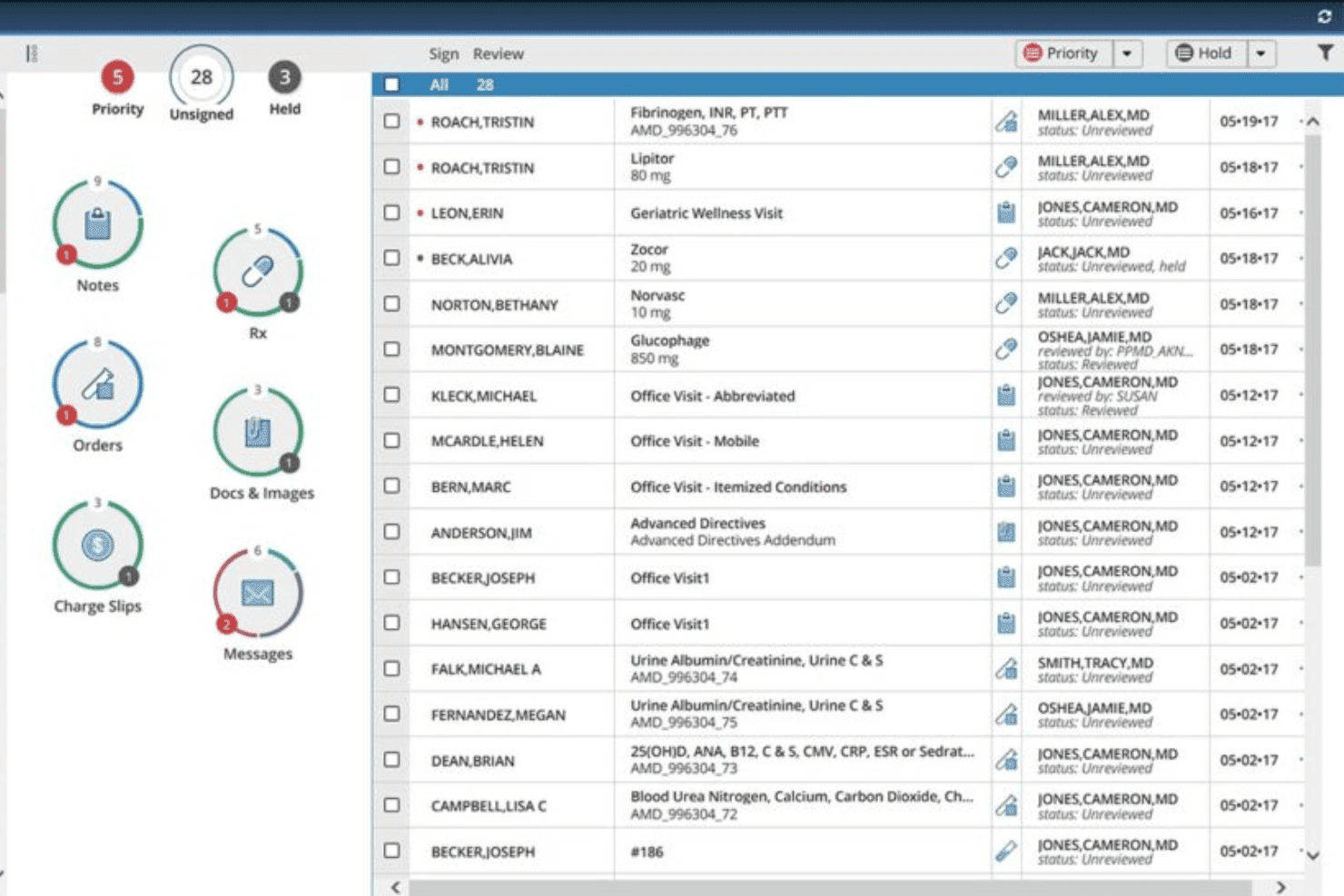
AdvancedMD-dashboard voor het beoordelen van patiëntnotities, recepten, opdrachten, documenten en berichten AdvancedMD EMR is een cloudgebaseerd, ONC-gecertificeerd elektronisch patiëntendossier en platform voor praktijkbeheer met een ingebouwd patiëntenportaal voor zelfroostering, digitale intakeformulieren, beveiligde berichten, online factuurbetaling en elektronisch voorschrijven.
Voor wie is AdvancedMD EMR het meest geschikt?
AdvancedMD EMR is zeer geschikt voor zelfstandige praktijken met meerdere specialismen die één platform nodig hebben voor klinische documentatie, planning en facturering aan verzekeraars.
Waarom ik voor AdvancedMD EMR heb gekozen
Ik heb AdvancedMD EMR opgenomen in mijn topkeuzes omdat het intake en betalingen als ingebouwde onderdelen van de klinische workflow afhandelt, en niet als uitbreidingen. Met de patiëntenkiosk kunnen patiënten zich bij het inchecken op een iPad registreren en toestemmingsformulieren invullen, waarbij de gegevens rechtstreeks naar hun dossier worden overgebracht. Factuurbetaling via het portaal wordt gekoppeld aan geïntegreerde creditcardverwerking, zodat het saldo van een patiënt bij het inchecken of na een bezoek kan worden geïnd zonder het platform te verlaten.
Belangrijkste functies van AdvancedMD EMR
- Zelfroostering via het patiëntenportaal: Patiënten kunnen rechtstreeks online afspraken maken, verzetten of annuleren.
- HIPAA-conforme beveiligde berichten: Hiermee kunnen patiënten en zorgverleners beveiligde berichten uitwisselen, inclusief klinische documenten.
- Aanpasbare digitale intakeformulieren: Intakeformulieren met voorwaardelijke logica vullen dossiers automatisch aan en worden elektronisch ingevuld.
- Elektronisch voorschrijven en beheer van herhaalrecepten: Patiënten kunnen hun medicijnen bekijken en via het portaal herhaalrecepten aanvragen.
Integraties van AdvancedMD EMR
AdvancedMD EMR biedt standaardintegraties met Phreesia en ondersteunt HIE- en HL7-connectiviteit. Er is een API beschikbaar voor aangepaste integraties.
Pros and Cons
Pros:
- Intakeformulieren worden rechtstreeks in het patiëntendossier geïntegreerd
- Zelfbedieningsworkflows voor het maken van afspraken en betalingen
- ONC-gecertificeerd EPD ondersteunt gedetailleerde klinische dossiers
Cons:
- De functionaliteit voor betalingsregelingen voor patiënten is beperkt
- De interface van het patiëntenportaal kan verwarrend zijn
Learn more about AdvancedMD EMR: Het beste voor digitale incheck- en servicewerkstromen
- Gratis demo beschikbaar
- Prijzen op aanvraag
Visit WebsiteCustomer Rating:3.6/5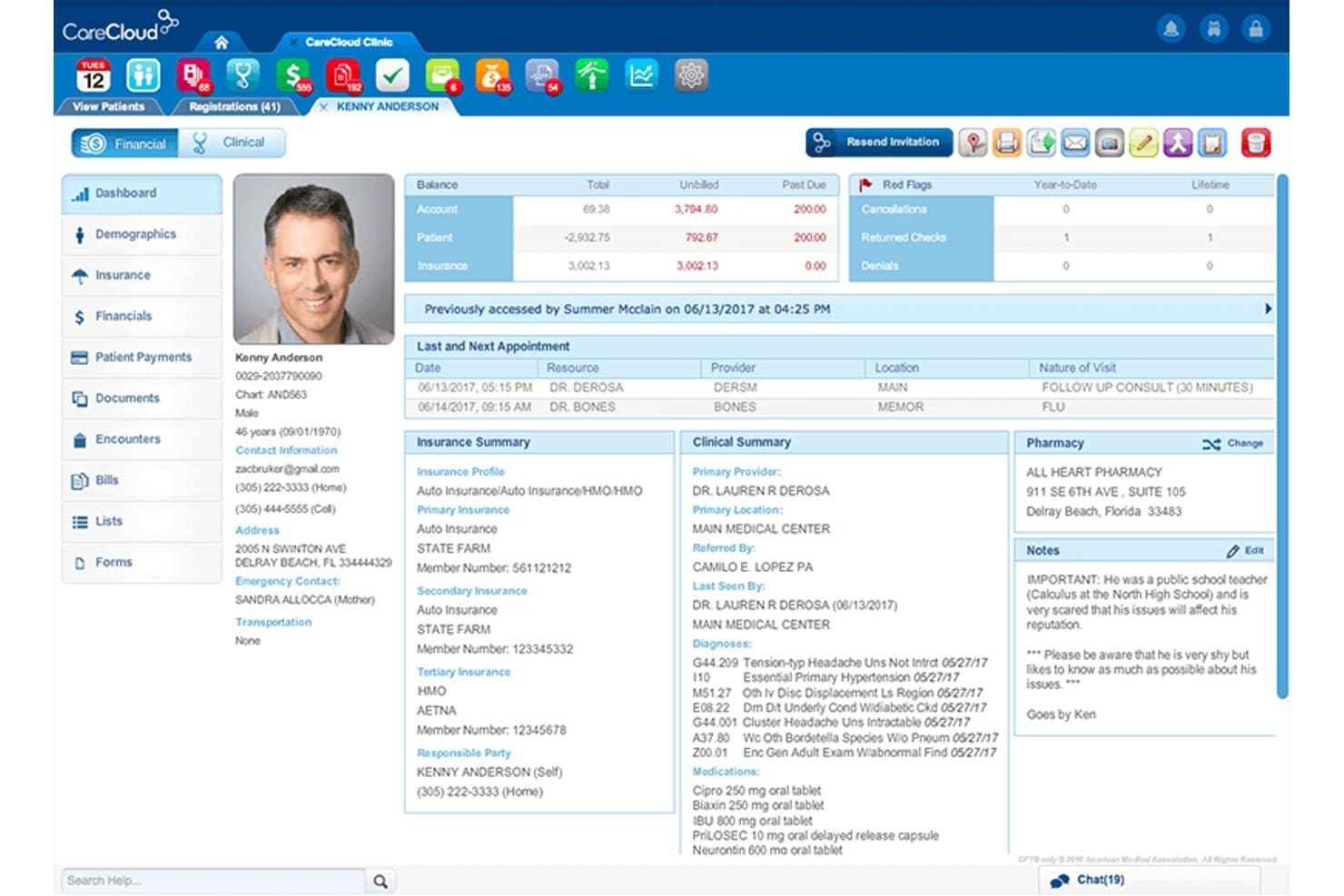
CareCloud biedt een uitgebreid overzicht voor het patiëntenportaal met financiële overzichten, verzekeringsgegevens, klinische notities en afspraakgeschiedenis in één uniform overzicht. CareCloud is een platform voor patiëntervaring dat digitale intakeformulieren, online planning, beveiligde portaalberichten en factuurbetalingen binnen het portaal combineert, nauw geïntegreerd met de EPD- en praktijkbeheersystemen van CareCloud.
Voor wie is CareCloud het meest geschikt?
CareCloud Breeze is zeer geschikt voor zelfstandige en kleine tot middelgrote praktijken die papieren werkstromen aan de receptie willen vervangen door een volledig digitale patiëntervaring.
Waarom ik voor CareCloud heb gekozen
CareCloud Breeze staat op mijn selectie omdat het de digitale incheckervaring zo nauw verbindt met klinische gegevens aan de achterkant. Ik vind het geweldig dat patiënten vóór hun bezoek aanpasbare intakeformulieren kunnen invullen, waarbij de antwoorden automatisch rechtstreeks worden ingevuld in CareCloud Charts en het praktijkbeheersysteem. Ook vind ik de integratie met de Clover-kiosk bijzonder nuttig, omdat patiënten zich ter plaatse kunnen aanmelden via een zelfbedieningskiosk zonder tussenkomst van de receptie.
Belangrijkste functies van CareCloud
- Aanvragen voor telezorgafspraken: Patiënten kunnen met één klik virtuele afspraken aanvragen en eraan deelnemen.
- Geautomatiseerde afspraakherinneringen: Het systeem verstuurt herinneringen per e-mail of sms om het aantal gemiste afspraken te verminderen.
- Portaalberichten: Praktijken kunnen belangrijke communicatie vóór het bezoek rechtstreeks via het portaal naar patiënten sturen.
- Meerdere betaalopties: Het platform ondersteunt verschillende betaalmethoden en aanpasbare betalingsregelingen.
Integraties van CareCloud
CareCloud Breeze biedt ingebouwde integraties met CareCloud Central (praktijkbeheer), CareCloud Charts (EPD) en Clover POS-kiosken. Er is een API beschikbaar voor aangepaste integraties.
Pros and Cons
Pros:
- Voorregistratieformulieren vullen klinische gegevens automatisch in
- Ondersteunt het inchecken van patiënten via een kiosk op locatie
- Geautomatiseerde betalingsherinneringen met betaling met een opgeslagen kaart
Cons:
- De berichtfuncties zijn basaal in vergelijking met die van concurrenten
- Werkt alleen met het eigen EPD van CareCloud
Learn more about CareCloud: Het beste voor het verbinden van patiënten met hun dossiers
- Nee
- Prijs op aanvraag
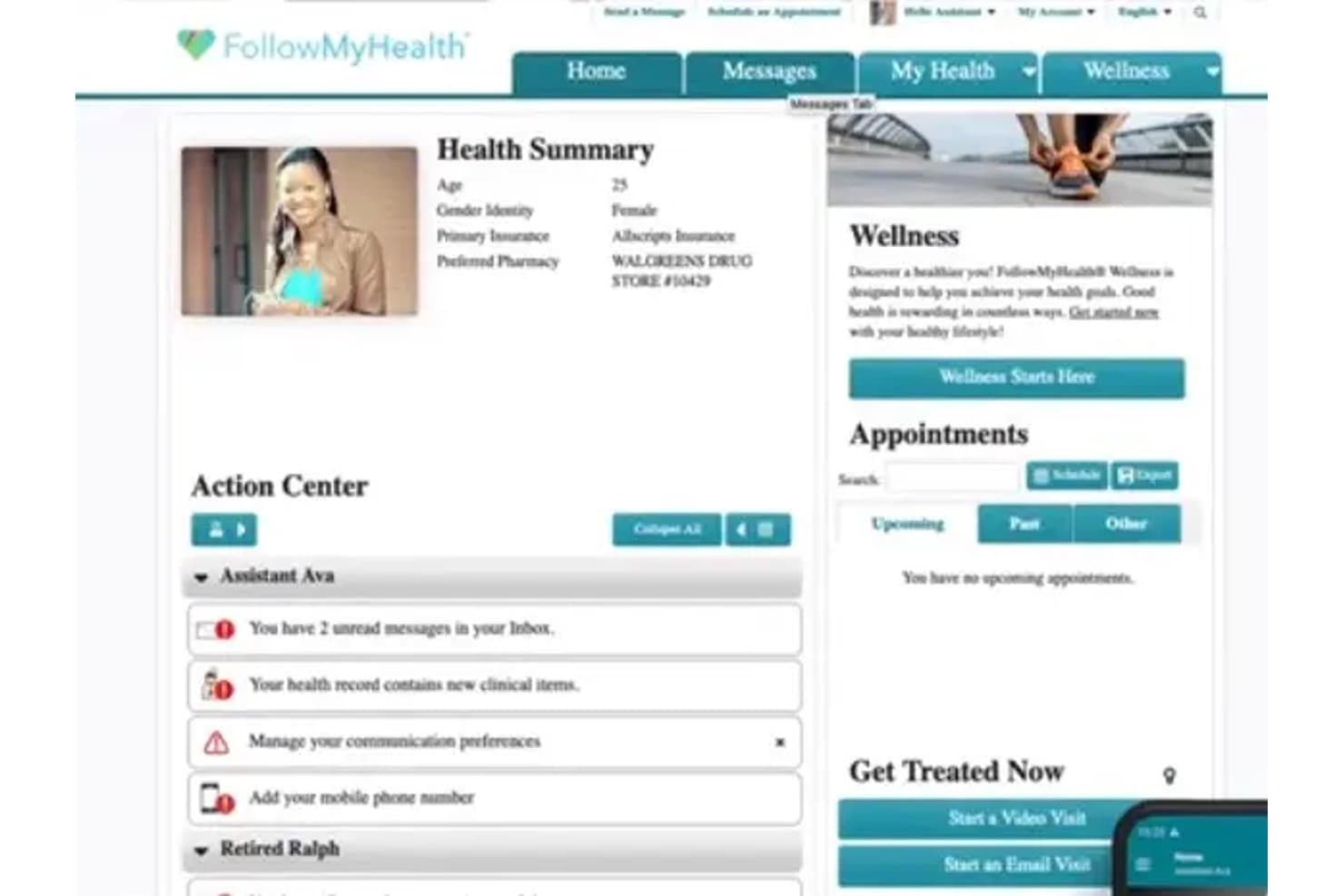
FollowMyHealth biedt een dashboard met een gezondheidsoverzicht met patiëntdemografische gegevens, een actiecentrum met meldingen, komende afspraken en welzijnstools in het patiëntenportaal. FollowMyHealth is een EHR-agnostisch patiëntenportaalplatform van Veradigm dat patiënten één centraal toegangspunt biedt tot hun medische dossiers, beveiligde berichten, het maken van afspraken en medicatiebeheer bij meerdere zorgaanbiedersystemen.
Voor wie is FollowMyHealth het meest geschikt?
FollowMyHealth is zeer geschikt voor zorgsystemen met meerdere locaties en grote groepspraktijken die één patiëntenportaal nodig hebben dat met verschillende EHR-systemen werkt.
Waarom ik FollowMyHealth heb gekozen
FollowMyHealth verdient een plek als een van de beste opties op mijn shortlist, omdat de EHR-agnostische architectuur in deze sector echt zeldzaam is. Ik vind het prettig dat door patiënten gegenereerde gegevens automatisch in beide richtingen terugvloeien naar het klinische dossier, zodat zorgverleners portalinzendingen niet handmatig met hun EMR hoeven af te stemmen. In de praktijk betekent dit dat een patiënt die door meerdere zorgverleners wordt behandeld, nog steeds één uniforme weergave van het dossier ziet, ongeacht welk onderliggend systeem elke kliniek gebruikt.
Belangrijkste functies van FollowMyHealth
- Beveiligde berichten tussen patiënten en zorgverleners: Patiënten kunnen rechtstreeks vanuit het portaal HIPAA-conforme berichten naar zorgverleners sturen.
- Integratie van telezorg: Virtuele bezoeken zijn toegankelijk via het platform zonder dat er video-oplossingen van derden nodig zijn.
- Elektronische afsprakenplanning: Patiënten kunnen op elk moment online afspraken maken, bevestigen of wijzigen.
- Aanpasbare digitale intakeformulieren: Praktijken kunnen vóór afspraken elektronisch registratiegegevens, toestemmingen en medische voorgeschiedenis van patiënten verzamelen.
Integraties van FollowMyHealth
FollowMyHealth biedt ingebouwde integraties met belangrijke EHR-platforms, maakt verbinding met externe praktijkbeheersystemen en biedt een API voor aangepaste integraties.
Pros and Cons
Pros:
- Uniforme toegang tot dossiers via meerdere EHR-systemen
- Telezorg rechtstreeks ingebouwd in het patiëntenportaal
- Ondersteunt digitale check-in en aangepaste intakeformulieren
Cons:
- Sommige gebruikers melden vertraagde bezorging van berichten
- Functies voor het betalen van rekeningen kunnen ontbreken of beperkt zijn
Learn more about FollowMyHealth: 7Beste keuze voor betaalbare portaaltoegang
RXNT
- Gratis demo + gratis deskundig advies beschikbaar
- Vanaf $126/maand (jaarlijks gefactureerd)
Visit WebsiteCustomer Rating:4.3/5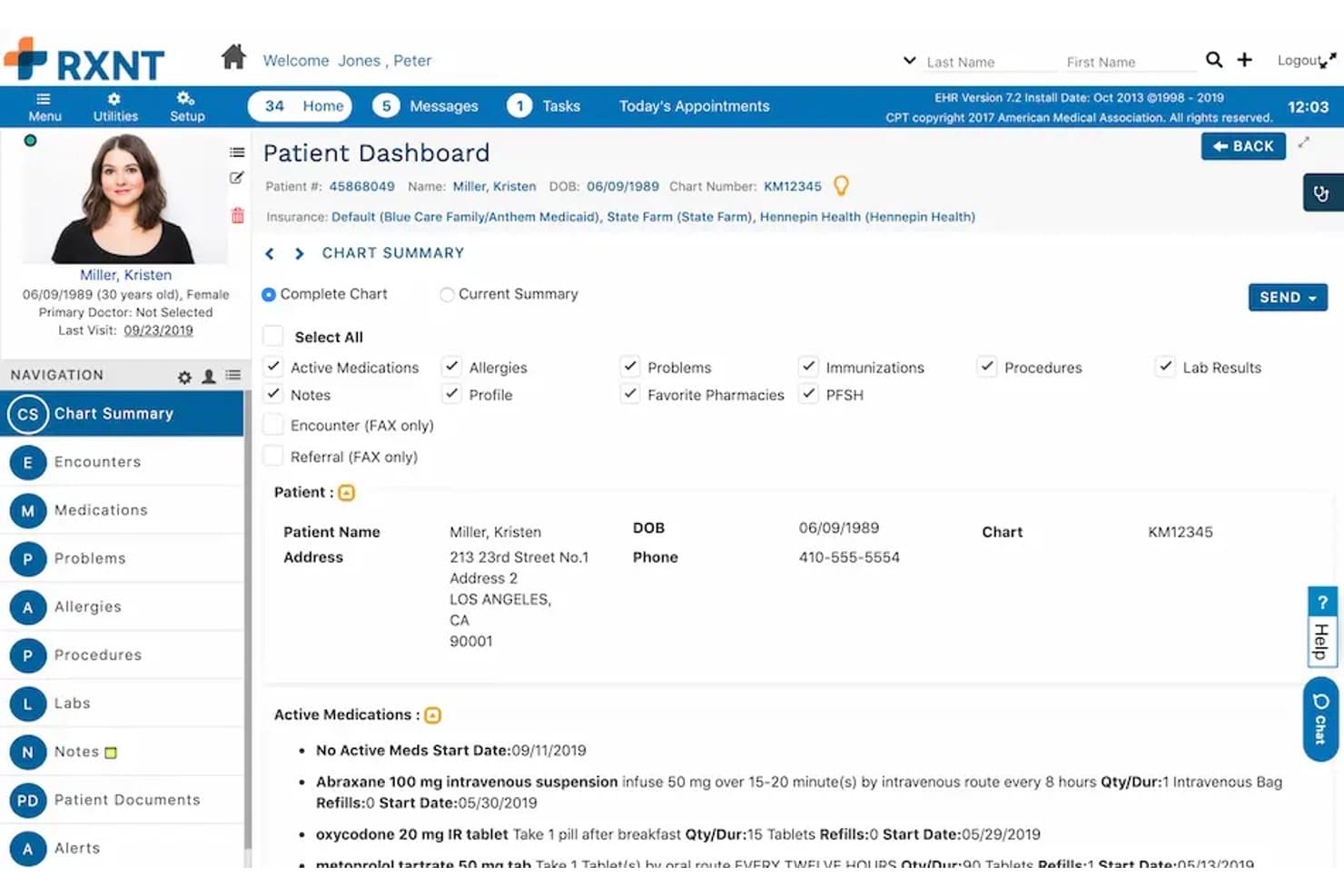
RXNT biedt een gedetailleerd patiëntendashboard met actieve medicatie, verzekeringsinformatie, een samenvatting van het dossier en patiëntgegevens in het EPD-portaal. RXNT is een ONC-gecertificeerd EPD en patiëntenportaalplatform dat ingebouwde elektronische voorschrijving, praktijkbeheer, beveiligde patiëntberichten, afspraakplanning, digitale intakeformulieren en online factuurbetaling combineert in één geïntegreerde suite.
Voor wie is RXNT het meest geschikt?
RXNT is zeer geschikt voor zelfstandige en kleine groepspraktijken in de ambulante zorg die behoefte hebben aan een volledig geïntegreerd klinisch en administratief platform tegen een lagere prijs.
Waarom ik voor RXNT heb gekozen
Ik heb RXNT als een van de beste opties geselecteerd omdat het patiëntenportaal (MyRXNT) is inbegrepen bij de EPD- en elektronische voorschrijvingssuite, in plaats van als afzonderlijke uitbreiding te worden verkocht. Aanvragen voor herhaalrecepten, online factuurbetaling en beveiligde berichten zijn allemaal inbegrepen tegen dezelfde vanafprijs als de klinische hulpmiddelen. Ik vind het vooral prettig dat door patiënten ingediende aanvragen voor herhaalrecepten rechtstreeks naar zorgverleners worden doorgestuurd, waarbij controles op geneesmiddelinteracties en geneesmiddelallergieën worden uitgevoerd via de EPCS-gecertificeerde module voor elektronische voorschrijving van RXNT.
Belangrijkste functies van RXNT
- Geïntegreerde consultsjablonen: Pas gestructureerde sjablonen voor verschillende soorten bezoeken rechtstreeks binnen het EPD aan en gebruik ze.
- Zelf afspraken plannen: Stel patiënten in staat om via het portaal zelf afspraken te boeken, te verzetten en te annuleren.
- Beveiligd delen van documenten: Deel laboratoriumresultaten, klinische notities en beeldvorming online veilig met patiënten.
- Toegang via mobiele app: Patiënten en zorgverleners hebben op iOS- en Android-apparaten toegang tot portaalfuncties.
Integraties van RXNT
RXNT biedt ingebouwde integraties met RevolutionEHR, MatrixCare Home Health & Hospice, Centricity, CodoniX EHR, EMR-Bear, Consolo Hospice Software, MDClaim en Exym. Laboratoriuminterfaces, Surescripts, PDMP en agendasynchronisatie met Gmail en Outlook worden ook ondersteund. Er is een API beschikbaar voor aangepaste integraties.
Pros and Cons
Pros:
- Geïntegreerde suite voor klinische en administratieve behoeften
- Ingebouwde elektronische voorschrijving met EPCS-certificering
- Afspraken plannen en intake in hetzelfde portaal
Cons:
- Meldingen van het patiëntenportaal zijn niet consistent
- Af en toe vertraging in de interface tijdens drukke periodes
Learn more about RXNT: Het beste voor betrokkenheid in landelijke gezondheidszorg
- Gratis demo beschikbaar
- Prijzen op aanvraag
Visit WebsiteCustomer Rating:4.1/5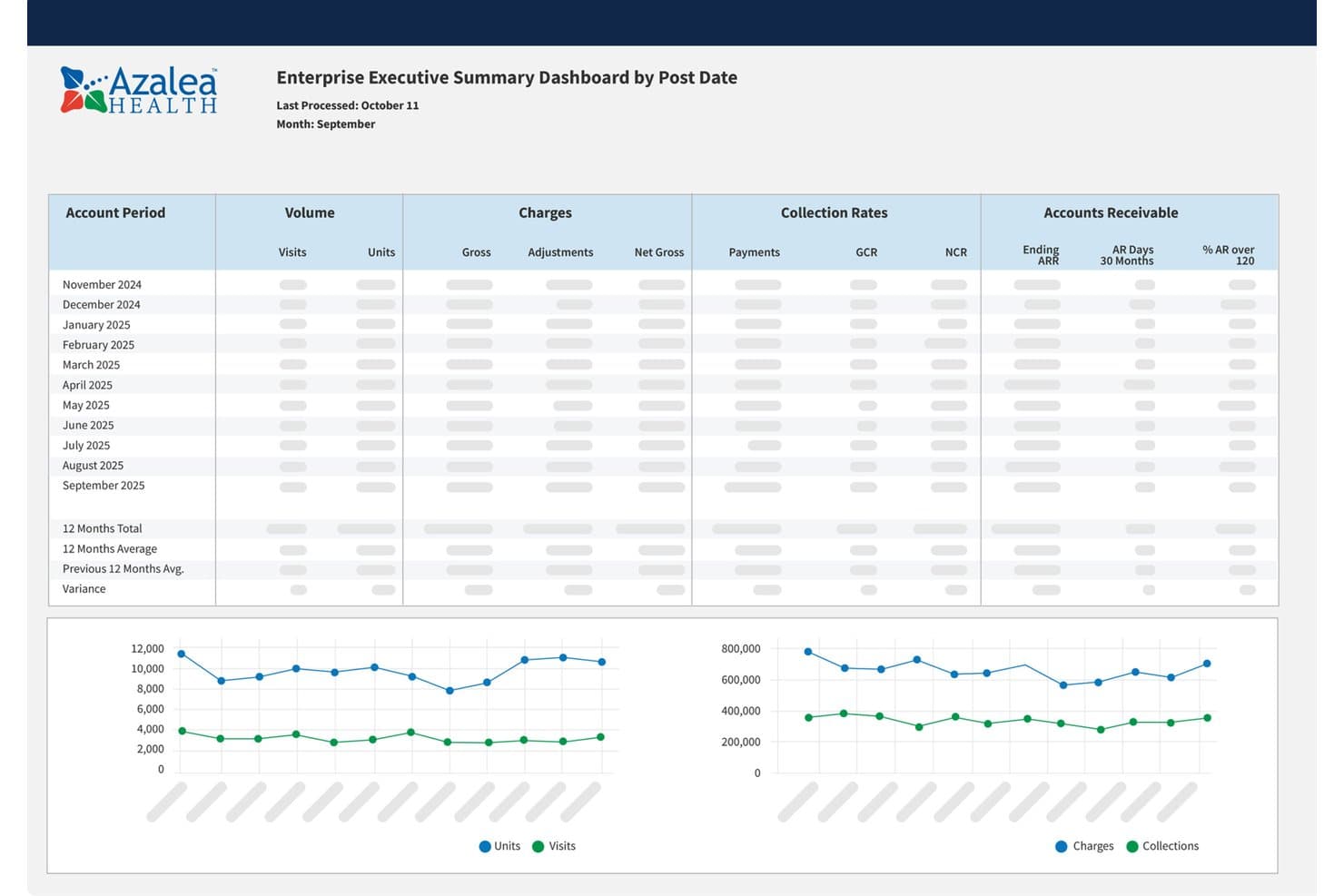
Managementdashboard van Azalea Health met trends in bezoeken, kosten, incasso's en openstaande vorderingen Azalea Health is een cloudgebaseerd EHR- en patiëntenportaalplatform dat klinische documentatie, praktijkbeheer, medische facturering, telezorg, planning en hulpmiddelen voor patiëntbetrokkenheid in één systeem combineert.
Voor wie is Azalea Health het meest geschikt?
Azalea Health is geschikt voor landelijke ziekenhuizen, landelijke gezondheidsklinieken, zelfstandige ambulante praktijken en gespecialiseerde zorgverleners die een geïntegreerd EHR en patiëntenportaal nodig hebben zonder de complexiteit van een bedrijfsoplossing.
Waarom ik voor Azalea Health heb gekozen
Ik heb voor Azalea Health gekozen omdat het myHealthspot-patiëntenportaal hulpmiddelen voor zelfservice door patiënten rechtstreeks koppelt aan het EHR- en factureringsplatform. Patiënten kunnen afspraken beheren, laboratoriumresultaten en medicatie bekijken, herhaalrecepten aanvragen, beveiligde berichten versturen, deelnemen aan telezorgafspraken en rekeningen online betalen. Ik vind het vooral prettig dat portaalverzoeken in een speciaal dashboard worden georganiseerd, zodat medewerkers afspraken, registratie en demografische updates vanuit één locatie kunnen beheren.
Belangrijkste functies van Azalea Health
- Online toegang tot gezondheidsgegevens: Laat patiënten laboratoriumresultaten, medicatie, allergieën, medische voorgeschiedenis en gedeelde documenten via het portaal bekijken.
- Afsprakenbeheer: Stel patiënten in staat om afspraken aan te vragen en te beheren, terwijl medewerkers agenda's coördineren via aanpasbare planningstools.
- Beveiligde berichten: Stel patiënten en zorgverleners in staat om beveiligde berichten uit te wisselen die gekoppeld blijven aan het permanente gezondheidsdossier.
- Online facturering en telezorg: Laat patiënten afschriften bekijken, openstaande bedragen betalen, verzekeringsgegevens bijwerken en via myHealthspot deelnemen aan virtuele afspraken.
Integraties van Azalea Health
Azalea Health ondersteunt klinische, financiële en administratieve toepassingen van derden via de API-marktplaats en SMART on FHIR-connectiviteit. Beschikbare integratiecategorieën zijn onder meer laboratoria, elektronisch voorschrijven, medicatiebeheer, afspraakherinneringen, directe berichten, beheer van de inkomstencyclus, analyses en patiëntbetrokkenheid.
Pros and Cons
Pros:
- Combineert EHR, patiëntenportaal, facturering, telezorg en planning
- Sterke oplossing voor landelijke ziekenhuizen en zelfstandige praktijken
- Ondersteunt beveiligde berichten, online betalingen en toegang tot gezondheidsgegevens
Cons:
- Voor de implementatie zijn mogelijk configuratie van werkprocessen en training van medewerkers nodig
- Prijzen worden niet duidelijk openbaar vermeld
Learn more about Azalea Health: Het beste voor aanpasbare patiëntbetrokkenheid
- Gratis demo beschikbaar
- Prijs op aanvraag
Visit WebsiteCustomer Rating:4.2/5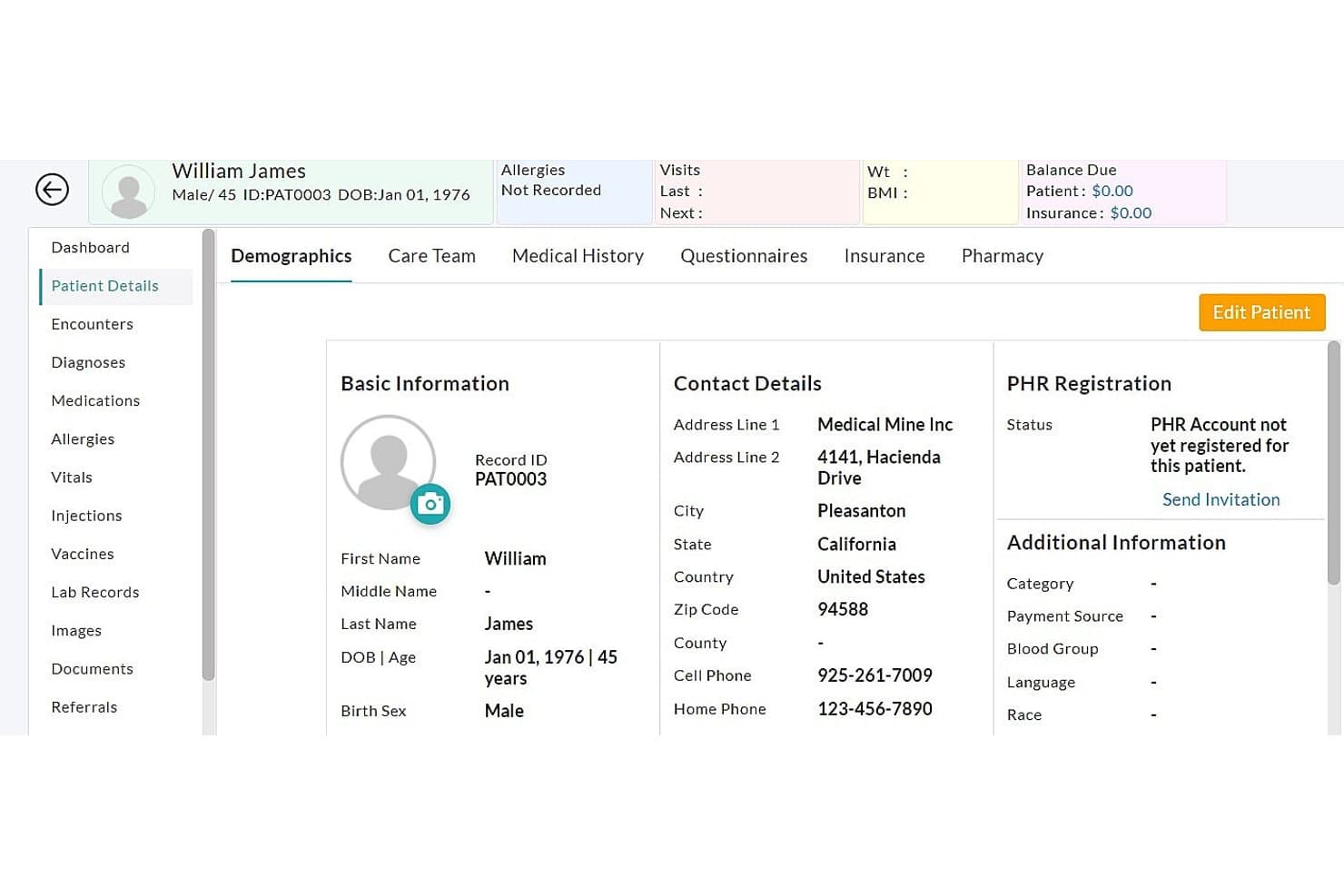
CharmHealth-overzichtsscherm met patiëntdemografische gegevens, medische voorgeschiedenis, verzekering, apotheek en registratiegegevens voor PHR CharmHealth is een cloudgebaseerd EHR- en patiëntenportaalplatform dat medische dossiers, online planning, beveiligde berichten, digitale formulieren, betalingen, telezorg en elektronisch voorschrijven combineert in één verbonden systeem.
Voor wie is CharmHealth het meest geschikt?
CharmHealth werkt goed voor kleine tot middelgrote ambulante praktijken die behoefte hebben aan een betaalbaar, flexibel EHR met geïntegreerde zelfbediening en betrokkenheidstools voor patiënten.
Waarom ik voor CharmHealth heb gekozen
Ik heb voor CharmHealth gekozen omdat het patiëntenportaal rechtstreeks is gekoppeld aan planning, klinische documentatie, facturering en voorschrijfprocessen. Patiënten kunnen afspraken boeken, vragenlijsten voorafgaand aan een bezoek invullen, gedeelde gezondheidsinformatie bekijken, beveiligde berichten versturen en openstaande facturen online betalen. Ook de mobiele Charm mPHR-app bevalt me, omdat patiënten hiermee gemakkelijk toegang hebben tot afspraken, samenvattingen van bezoeken en communicatie met zorgverleners wanneer ze niet achter een desktop zitten.
Belangrijkste functies van CharmHealth
- Online afspraken plannen: Laat patiënten afspraken boeken via de website van de praktijk of het patiëntenportaal, op basis van de beschikbare agenda's van zorgverleners.
- Beveiligde berichten voor patiënten: Geef patiënten en zorgverleners de mogelijkheid om versleutelde berichten uit te wisselen en gezondheidsinformatie te delen via het portaal.
- Geïntegreerd elektronisch voorschrijven: Verstuur recepten elektronisch naar apotheken, verwerk verzoeken om herhaalrecepten en ondersteun het voorschrijven van gereguleerde stoffen via EPCS.
- Online facturen betalen: Deel facturen en rekeningoverzichten via het patiëntenportaal en accepteer online betalingen via de integratie met de Bluefin-betaalgateway.
Integraties van CharmHealth
CharmHealth maakt verbinding met Labcorp, Quest Diagnostics, Surescripts, apotheken, betaalgateways, immunisatieregisters en andere zorgsystemen. Het ondersteunt ook HL7-laboratoriuminterfaces en FHIR-API's voor de uitwisseling van klinische gegevens en aangepaste integraties met externe systemen.
Pros and Cons
Pros:
- Combineert EHR, patiëntenportaal, planning, telezorg en factureringstools
- Biedt beveiligde berichten, online betalingen en mobiele toegang voor patiënten
- Ondersteunt FHIR-, HL7-, laboratorium-, apotheek- en betalingsintegraties
Cons:
- Voor sommige geavanceerde mogelijkheden zijn betaalde uitbreidingen vereist
- De installatie en aanpassing kunnen tijd kosten voor groeiende praktijken
Learn more about CharmHealth: 10Ideaal voor patiëntbetrokkenheid per specialisme
ModMed
- Gratis demo beschikbaar
- Prijzen op aanvraag
Visit WebsiteCustomer Rating:4.5/5 Learn more about ModMed:
Andere software voor EMR-patiëntenportalen
Hier zijn enkele andere opties voor software voor EMR-patiëntenportalen die mijn shortlist niet hebben gehaald, maar die toch de moeite waard zijn om te bekijken:
- 11NextechBeste keuze voor gespecialiseerde patiëntenportalen in de dermatologie
- 12CureMDIdeaal voor het combineren van portaaltoegang
- 13NextGen OfficeIdeaal voor patiëntentoegang bij kleine praktijken
Hoe ik software voor EMR-patiëntenportalen beoordeel
Ik splits mijn beoordeling op in kernfunctionaliteit die elk portaal moet bieden—zoals bidirectionele EMR-synchronisatie en HIPAA-conforme berichtgeving—en onderscheidende factoren die goede hulpmiddelen van uitstekende hulpmiddelen onderscheiden.
Kernfunctionaliteit (basisvereisten voor deze lijst)
Bij het selecteren van hulpmiddelen voor mijn lijst beoordeel ik elk hulpmiddel op een schaal van 0 (biedt de functionaliteit niet) tot 5 (blink uit op dit gebied) voor elke hieronder genoemde kernfunctionaliteit. Vervolgens bereken ik de totaalscore van het hulpmiddel als percentage. Elk hulpmiddel moet een minimale totaalscore van 65% behalen om in aanmerking te komen voor opname.
- EMR/EHR-integratie: Ik controleer of door patiënten ingediende gegevens bidirectioneel met het dossier worden gesynchroniseerd, zodat laboratoriumresultaten en notities van bezoeken worden bijgewerkt zonder handmatige afstemming.
- Veilige patiëntcommunicatie: HIPAA-conforme berichtgeving met ondersteuning voor bijlagen en routering naar zorgverleners is hierbij belangrijk, bijvoorbeeld voor het delen van foto's van wonden of instructies na een operatie.
- Zelfbediening voor afspraken: Patiënten moeten zelf afspraken kunnen boeken, verzetten of annuleren, idealiter met realtime beschikbaarheid en geautomatiseerde herinneringen.
- Digitale intakeformulieren: Ik beoordeel of registratie- en toestemmingsformulieren automatisch in het patiëntendossier worden ingevuld, zodat werkstromen met klembord en scanner bij het inchecken overbodig worden.
- Online facturen betalen: Elk portaal moet betaling binnen het portaal met meerdere methoden en betalingsplannen aanbieden, en niet alleen doorverwijzen naar een externe betalingsverwerker.
- Verzoeken om recepten en herhaalrecepten: Ik zoek naar een specifieke werkstroom voor herhaalrecepten die verzoeken rechtstreeks naar de zorgverlener doorstuurt in plaats van te vertrouwen op een algemene berichtenreeks.
Als ik een lijst heb met hulpmiddelen die aan de criteria voldoen, bekijk ik wat elk platform onderscheidt.
Onderscheidende factoren (waarin leveranciers zich onderscheiden)
Zo vergelijk ik verschillende leveranciers met elkaar:
Opvallende functies
Telezorgintegratie is een belangrijke onderscheidende factor—ik zoek naar portalen waar patiënten rechtstreeks een videogesprek kunnen starten zonder een afzonderlijke app of aanmelding. Toegang via een mobiele app met pushmeldingen is ook belangrijk, omdat patiënten veel vaker laboratoriumresultaten bekijken of op berichten reageren wanneer meldingen hun telefoon bereiken. Toegang voor familieleden en gemachtigden is een andere functie die ik nauwlettend beoordeel, vooral voor pediatrische praktijken of ouderenzorg, waar een mantelzorger dossiers moet kunnen beheren voor personen ten laste, met de juiste HIPAA-controles.
Meer dan functies
EMR/EHR-interoperabiliteit is waar ik begin—ik controleer of een portaal rechtstreeks verbinding maakt met het bestaande systeem van de praktijk of HL7/FHIR-koppelingen vereist die extra complexiteit met zich meebrengen. Naleving van regelgeving weegt ook zwaar mee, vooral ONC-certificering voor gezondheidsinformatietechnologie voor praktijken die deelnemen aan programma's voor het bevorderen van interoperabiliteit. De omvang en het specialisme van de praktijk completeren mijn beoordeling. Een zelfstandige dermatologiepraktijk heeft een gebruiksklare configuratie nodig, terwijl een zorgsysteem met meerdere locaties behoefte heeft aan uniform beheer van patiëntidentiteiten voor alle locaties en zorgverleners.