

Faktureringsprogramvare for podiatri er spesialisert teknologi som hjelper podatriklinikker med å håndtere fakturering, forsikringskrav og betalingsoppfølging for behandling av føtter og ankler. Hvis du ser etter den beste faktureringsprogramvaren for podiatri, ønsker du sannsynligvis å spare tid, redusere kostbare feil og gjøre hverdagen enklere for de ansatte.
Det kan føles umulig å holde oversikt over forsikringsregler, koder og pasientbetalinger når du samtidig fokuserer på pasientbehandling. Denne veiledningen rydder opp i alt det kompliserte, slik at du kan sammenligne de beste løsningene og finne den som faktisk dekker behovene til praksisen din – på bare noen få minutter.
Why Trust Our Software Recommendations
6,700+
Reviews
20
Industry experts
16+
Evaluation factors
14
Years
Our team has been testing and reviewing software since 2012. As medical practice leaders ourselves, we know how difficult—and important—it is to choose the right software.
For this guide, we evaluated tools using hands-on testing and independent research, scoring tools using our selection criteria.
Our reviews reflect our human editorial judgment, not a sales pitch.
Sammenligningstabell for faktureringsprogramvare for podiatri
Tabellen nedenfor sammenligner prisopplysningene for mine beste utvalgte løsninger for faktureringsprogramvare for podiatri.
| Tool | Best For | Trial Info | Price | ||
|---|---|---|---|---|---|
| 1 | Best for independent podiatry practices | Free demo available | Pricing upon request | Website | |
| 2 | Best for mobile podiatry charting | Free demo available | Pricing upon request | Website | |
| 3 | Best for podiatry claims management | Free demo available | Pricing upon request | Website | |
| 4 | Best for small podiatry practices | Not available | Pricing upon request | Website | |
| 5 | Best for customizable podiatry EHR | Free demo available | Pricing upon request | Website | |
| 6 | Best for adaptive podiatry charting | Free demo available | Pricing upon request | Website | |
| 7 | Best for podiatry billing workflows | Free demo available | Pricing upon request | Website | |
| 8 | Best for cloud podiatry workflows | Free demo available | Pricing upon request | Website | |
| 9 | Best for integrated podiatry billing | Free demo available | Pricing upon request | Website | |
| 10 | Best for all-in-one podiatry management | Free demo available | Pricing upon request | Website |


Anmeldelser av den beste faktureringsprogramvaren for podiatri
\u003cspan style=\u0022font-weight: 400;\u0022\u003eNedenfor finner du mine detaljerte sammendrag av den beste faktureringsprogramvaren for podiatri som kom med på kortlisten min. Anmeldelsene mine gir et detaljert innblikk i funksjonene, de beste bruksområdene og integrasjonene for hver programvare, slik at du kan finne den beste løsningen for deg.\u003c/span\u003e
 Best for independent podiatry practices
- Free demo available
- Pricing upon request
Visit WebsiteCustomer Rating:3.9/5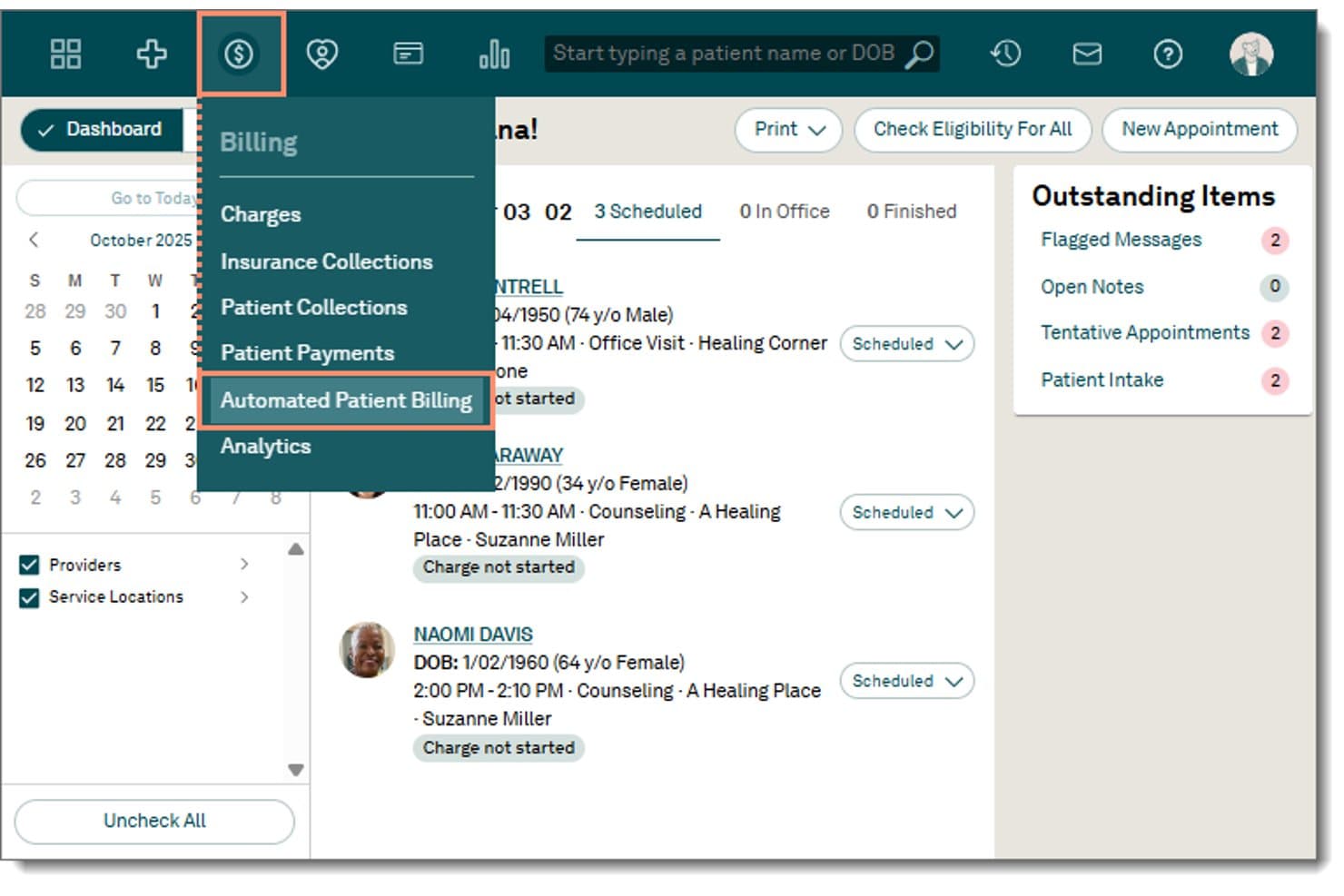
Tebra offers an Automated Patient Billing option within its Billing dropdown menu, accessible from the main navigation dashboard. Tebra is an all-in-one practice management platform that combines medical billing, EHR, claims management, and patient payment tools for independent specialty practices including podiatry.
Who Is Tebra Best For?
Tebra is a strong fit for independent podiatry practices that want billing, EHR, and patient engagement managed in a single platform without juggling multiple vendors.
Why I Picked Tebra
I picked Tebra as one of the best because it's built for the operational reality of independent practices running lean teams. I like that automated ERA posting via RPA handles payment reconciliation without manual intervention, and that charge capture ties directly into the native EHR so billing doesn't fall through the gaps between systems. The built-in patient billing tools, including QR-coded statements and text-to-pay links, let a small front desk team keep collections moving without a dedicated billing department.
Tebra Key Features
- Automated insurance eligibility checks: Instantly verifies coverage and benefits with over 2,700 payers.
- Batch electronic claim submission: Submits multiple claims at once with built-in error detection and payer-specific edits.
- Customizable specialty templates: Includes podiatry-focused charting and coding templates with ICD-10 and CPT support.
- Patient online payment portal: Lets patients pay balances through a secure, branded web portal linked to automated statements.
Tebra Integrations
Tebra offers native integrations with Quest Diagnostics, LabCorp, and eLabs via ELLKAY, as well as HL7 and FHIR integrations with over 60 EHR platforms. An API is available for custom integrations.
Pros and Cons
Pros:
- Denials worklist with customizable AR reporting
- Direct charge capture from EHR charting
- Robust patient billing and statement automation
Cons:
- No podiatry-specific LCD/NCD Medicare alerts
- Lacks preloaded podiatry modifier logic
Learn more about Tebra: Best for mobile podiatry charting
- Free demo available
- Pricing upon request
Visit WebsiteCustomer Rating:3.9/5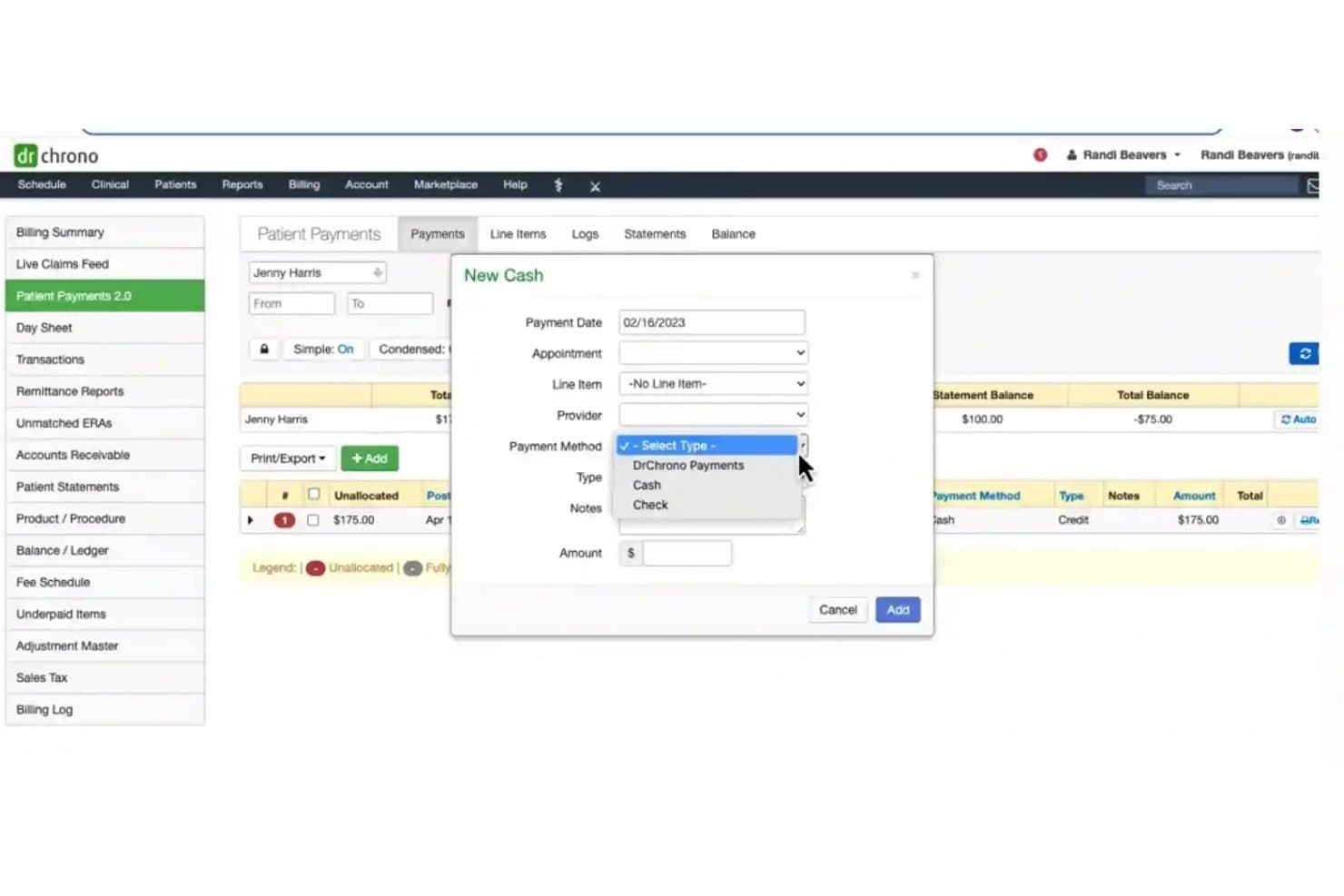
DrChrono offers a New Cash payment entry modal with fields for payment date, appointment, line item, provider, payment method, type, notes, and amount within its Patient Payments module. DrChrono is a mobile-first EHR and medical billing platform that combines podiatry-specific charting, integrated claims management, and revenue cycle tools in a single iPad-native system.
Who Is DrChrono Best For?
DrChrono is a good fit for small podiatry practices that chart on iPads and want EHR, scheduling, and billing managed in one place.
Why I Picked DrChrono
DrChrono earns its spot on my shortlist because of how tightly its mobile charting connects to billing. I like that I can annotate foot and ankle diagrams, photograph affected areas, and order X-rays or bone scans directly from the iPad, with results landing back in the patient record. The billing profile feature then picks up that visit data and feeds it straight into a claim, cutting duplicate entry between charting and coding.
DrChrono Key Features
- Integrated claims management: Track, submit, and follow up on claims within the same platform.
- DME and orthotics billing assistance: Access built-in workflows for diabetic shoes, orthotics, and podiatry-specific supplies.
- Automated insurance eligibility checks: Instantly verify insurance coverage from within the scheduling or billing workflow.
- Clearinghouse connectivity: Send electronic claims through built-in eProvider Solutions and iHCFA for workers’ comp and auto claims.
DrChrono Integrations
DrChrono offers native integrations with over 40,000 labs for electronic orders and results, eProvider Solutions for claims clearinghouse, iHCFA for workers’ comp and auto claims, Stripe for patient payments, and Physitrack for exercise programs. An API is available for custom integrations.
Pros and Cons
Pros:
- Built-in DME and orthotics billing workflows
- In-platform claims clearinghouse for direct billing
- Mobile charting on iPad with foot diagrams
Cons:
- Reported billing issues after clearinghouse migration
- Medicare LCD/NCD compliance tools are limited
Learn more about DrChrono: Best for podiatry claims management
- Free demo available
- Pricing upon request
Visit WebsiteCustomer Rating:4.3/5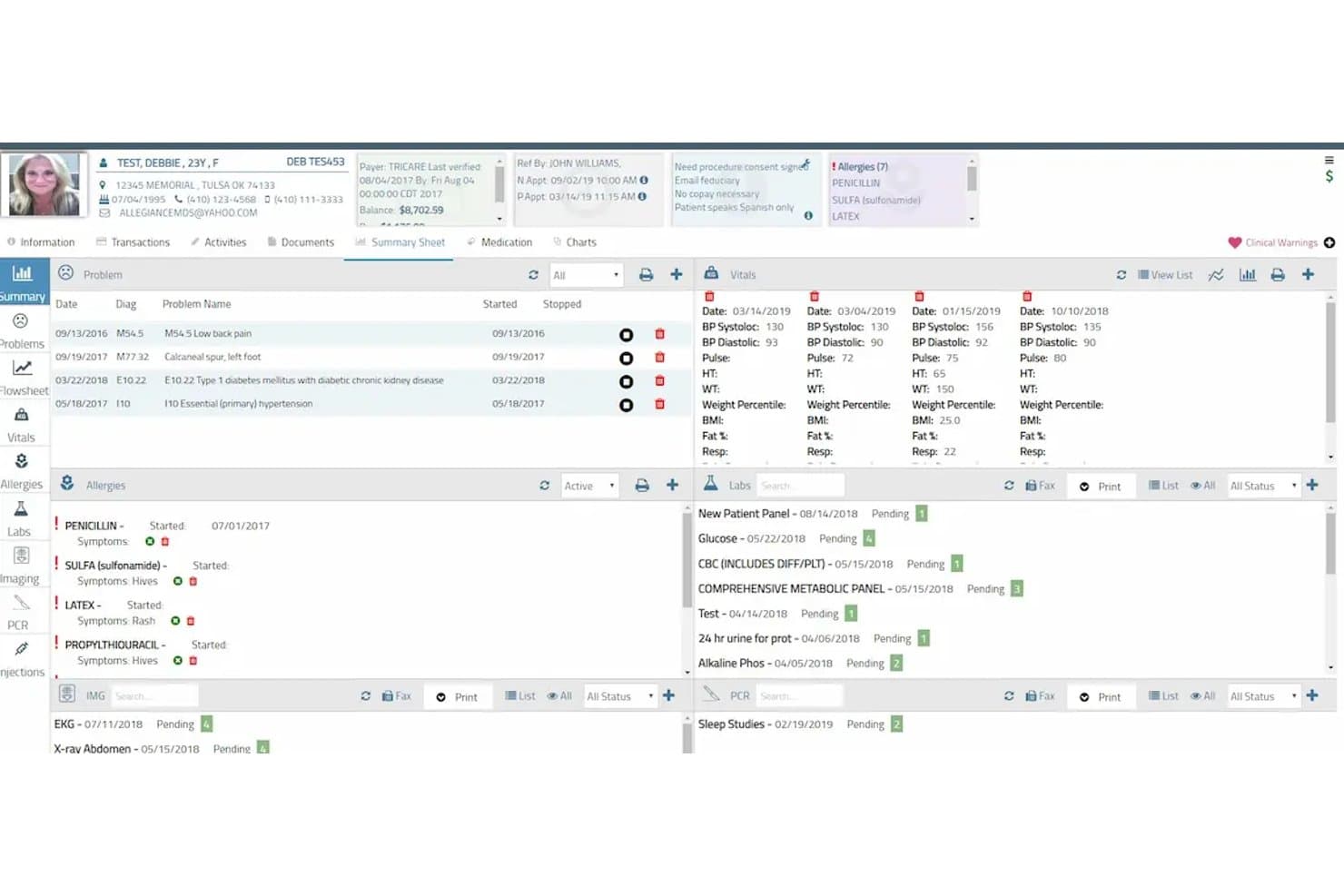
AllegianceMD offers a comprehensive patient summary sheet displaying problems, vitals, allergies, and pending labs within its EHR interface. AllegianceMD is a cloud-based podiatry EMR and practice management platform that combines specialty-specific clinical documentation, integrated claims management, and a built-in clearinghouse for end-to-end billing.
Who Is AllegianceMD Best For?
AllegianceMD is a strong fit for small to midsize podiatry practices that want a single all-in-one system covering clinical documentation, scheduling, and billing.
Why I Picked AllegianceMD
AllegianceMD earns its spot on my shortlist because of how it handles podiatry claims end to end. The built-in clearinghouse and intelligent claim scrubber mean my team can submit primary and secondary claims electronically without paying for a third-party service. I also like the AI-driven auto-billing, which flags and routes claims before they reach a payer, cutting down denial rates on common podiatry procedures.
AllegianceMD Key Features
- Podiatry-specific charting templates: Create encounter notes using templates designed for common podiatric procedures and diagnoses.
- Automated eligibility verification: Instantly check patient insurance eligibility before appointments or claim submission.
- Integrated patient portal: Offer patients secure access to statements, payment options, and appointment information.
- E-prescribing for controlled substances: Send prescriptions electronically, including medications regulated under DEA rules.
AllegianceMD Integrations
AllegianceMD offers native integrations with its built-in clearinghouse, e-prescription networks, e-fax system, lab interfaces, imaging systems, and immunization registries. An API is available for custom integrations.
Pros and Cons
Pros:
- Podiatry-focused chart templates and coding
- Built-in clearinghouse for electronic claims
- Includes AI-driven claim scrubber
Cons:
- Limited denial analytics and appeal templates
- Medicare LCD/NCD rule checks not automated
Learn more about AllegianceMD: Best for small podiatry practices
- Not available
- Pricing upon request
Visit WebsiteCustomer Rating:3.7/5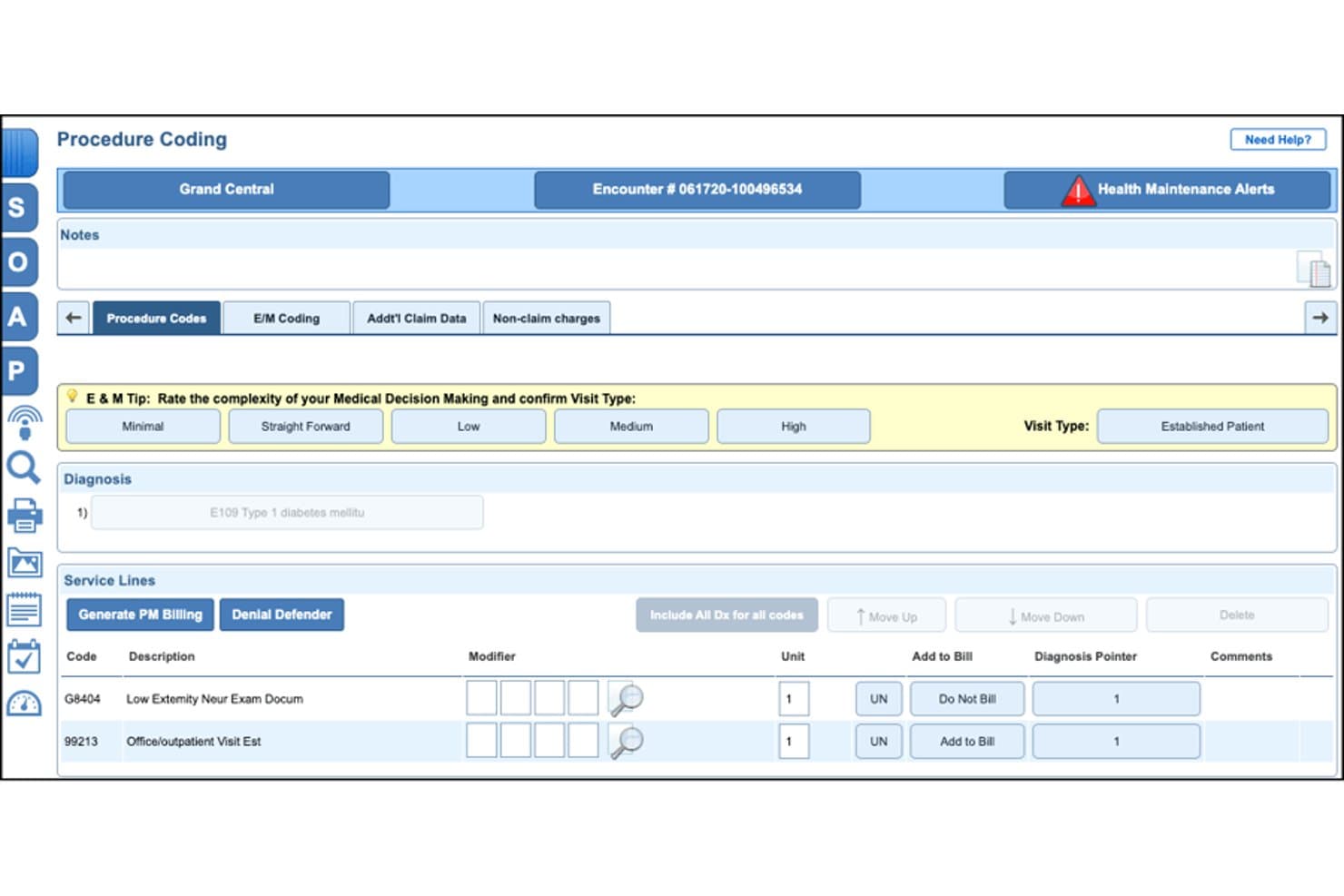
NextGen Office offers a Procedure Coding screen with E&M complexity rating, diagnosis entry, and service line billing codes tailored for podiatry workflows. NextGen Office is a cloud-based EHR and practice management platform built for small podiatry practices, combining podiatry-specific clinical workflows, integrated billing, claims management, and patient payment tools in a single system.
Who Is NextGen Office Best For?
NextGen Office is a strong fit for independent podiatry practices with 10 or fewer providers that need a single vendor to handle both clinical and billing workflows.
Why I Picked NextGen Office
I've included NextGen Office in my top picks because it's the only EHR directly partnered with the APMA, so the podiatry-specific code sets and clinical templates are shaped by practicing podiatrists rather than generic content teams. I also like the AI Ambient Assist, which turns patient-provider conversations into complete SOAP notes automatically, reducing the documentation burden that hits small practices hardest. The built-in clearinghouse submits claims within hours of a visit, with denial workflows tuned to podiatric billing patterns.
NextGen Office Key Features
- Podiatry-specific CPT and modifier library: Includes a built-in code library with toe and anatomical modifiers for accurate podiatric claim entry.
- Real-time eligibility verification: Instantly checks patient insurance eligibility for podiatry visits and procedures before submission.
- Integrated patient payment portal: Lets patients view, manage, and pay balances online following podiatry appointments and procedures.
- Denial management dashboard: Tracks and categorizes denied claims tied specifically to podiatry rules like Medicare LCD/NCDs and routine foot care.
NextGen Office Integrations
NextGen Office offers native integrations with the APMA Registry, Doctible for patient communications, InstaMed for payment processing, and includes a built-in claims clearinghouse. An API is available for custom integrations.
Pros and Cons
Pros:
- Built-in clearinghouse for fast claim submission
- Medicare LCD/NCD coverage prompts for foot care
- APMA-endorsed podiatry code libraries and templates
Cons:
- Routine updates may impact workflow reliability
- Reporting depth for AR and denials limited
Learn more about NextGen Office: Best for customizable podiatry EHR
- Free demo available
- Pricing upon request
Visit WebsiteCustomer Rating:3.5/5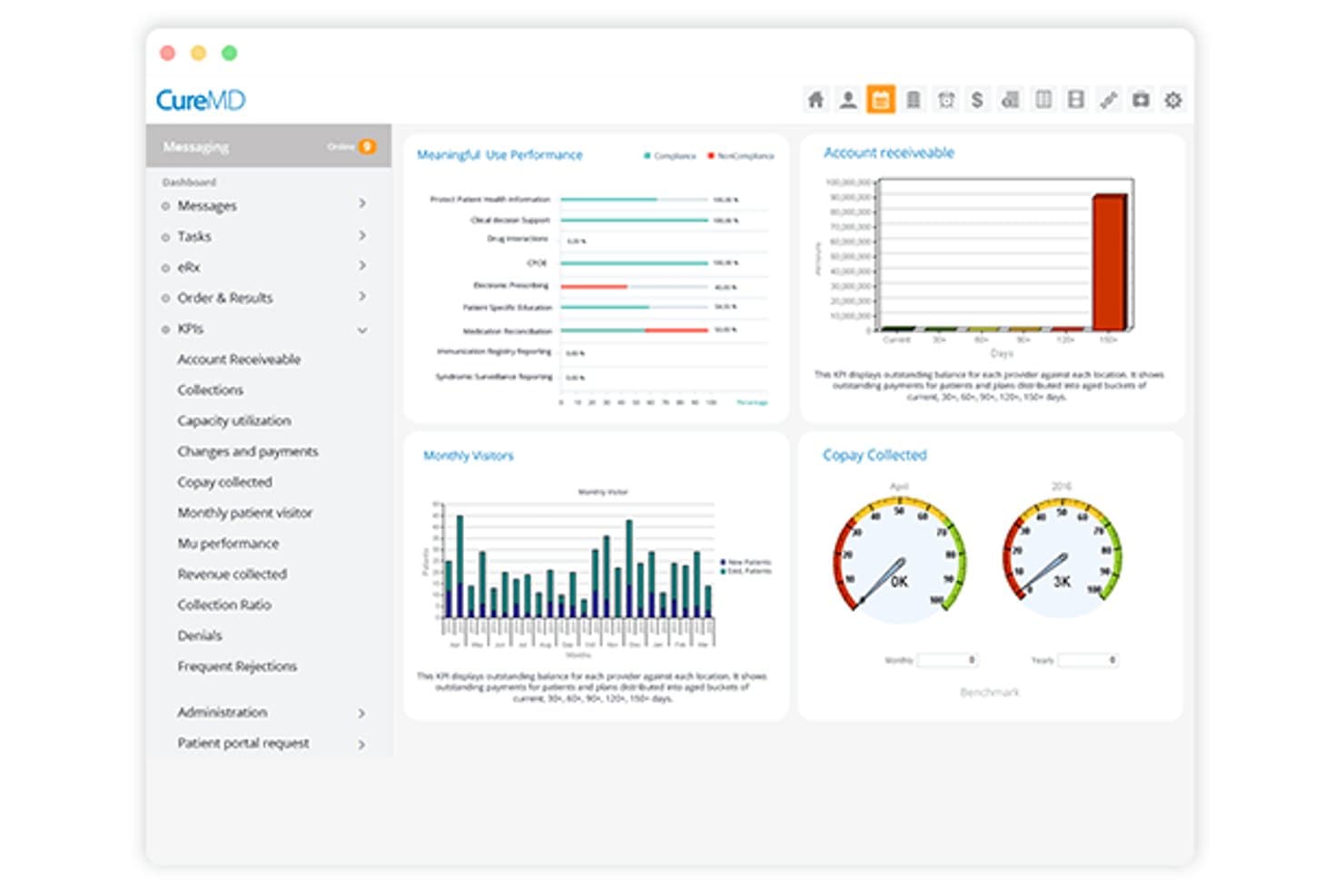
CureMD offers a KPI dashboard with billing metrics including accounts receivable, copay collected, monthly visitors, and Meaningful Use performance charts. CureMD is a cloud-based EHR, practice management, and medical billing platform with podiatry-specific coding support, claims scrubbing, Medicare compliance tools, denial management, and outsourced RCM services.
Who Is CureMD Best For?
CureMD suits podiatry practices that want clinical documentation, scheduling, and billing managed within a single integrated platform rather than separate tools.
Why I Picked CureMD
I picked CureMD because the EHR templates are genuinely built around podiatry from the ground up. I can customize charting for wound care, diabetic foot assessments, and foot/ankle procedures without adapting a generic clinical form. What I like most is how that documentation links directly to podiatry-specific CPT and HCPCS codes, so by the time a claim is generated, the clinical record already supports the billing.
CureMD Key Features
- Denial analytics dashboard: Offers visual tracking and classification of podiatry claim denials and appeals.
- Real-time eligibility verification: Checks insurance coverage and benefits before submitting podiatry claims.
- Integrated lab and imaging connections: Syncs with diagnostic labs and imaging systems commonly used in podiatry practices.
- Automated patient statements and payments: Generates patient statements and enables online payment through the patient portal.
CureMD Integrations
CureMD offers native integrations with over 9,000 diagnostic labs and 40,000 pharmacies, plus built-in connections for imaging devices and electronic prescribing. An API is available for custom integrations.
Pros and Cons
Pros:
- End-to-end claims scrubbing for podiatry codes
- Automated LCD/NCD compliance alerts
- Customizable podiatry EHR workflow templates
Cons:
- Limited modifier auto-suggestion for complex claims
- Occasional delays in customer support response
Learn more about CureMD: Best for adaptive podiatry charting
- Free demo available
- Pricing upon request
Visit WebsiteCustomer Rating:4.5/5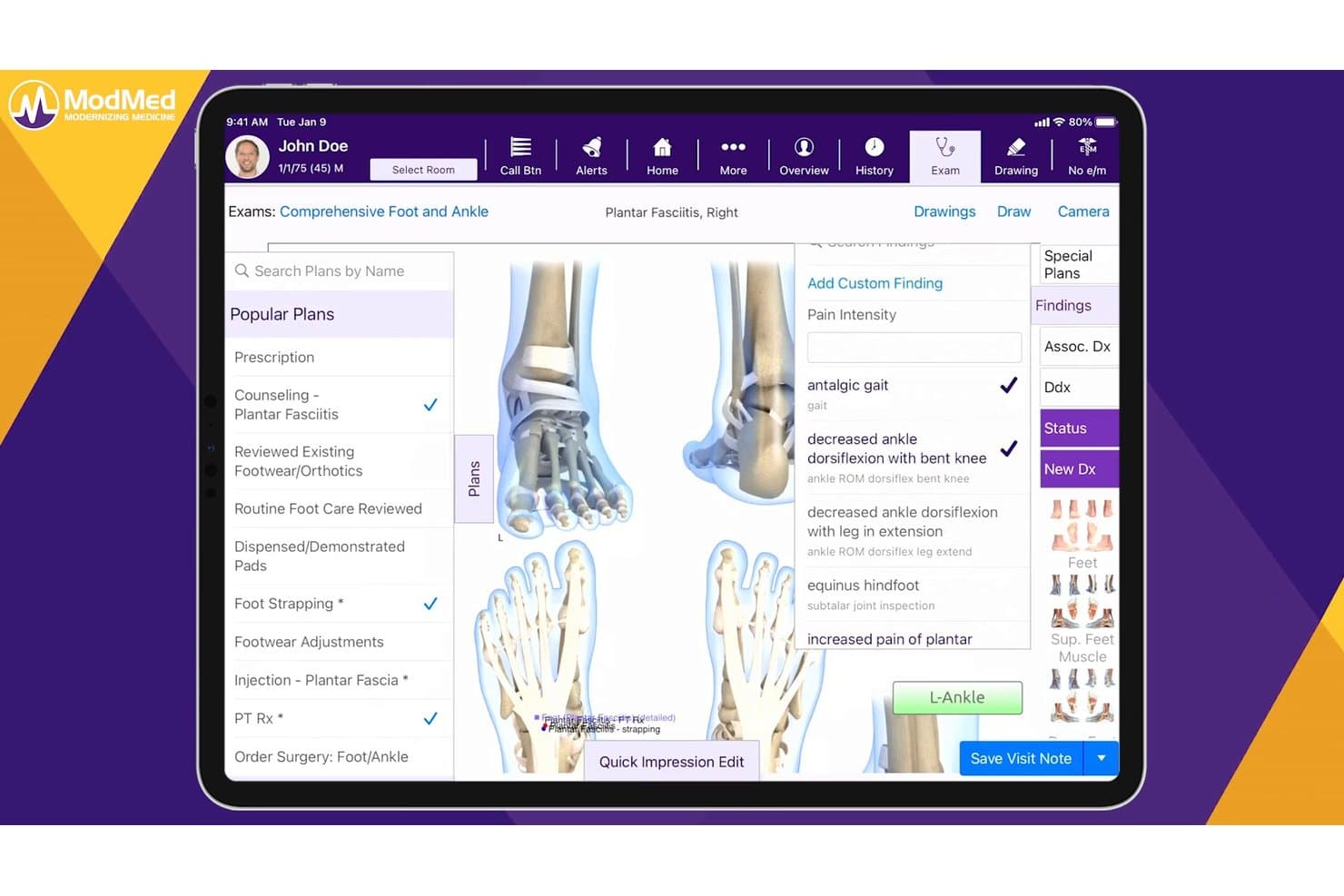
ModMed offers a comprehensive podiatry exam interface with condition-specific treatment plans, findings, and billing tools tailored for foot and ankle care. ModMed is a specialty-specific EHR, practice management, and billing platform built for podiatry practices, combining adaptive charting, podiatry-coded claim submission, denial management, and integrated payment processing in a single suite.
Who Is ModMed Best For?
ModMed is a strong fit for podiatry practices of any size that want a single platform covering clinical documentation, coding, and billing.
Why I Picked ModMed
I picked ModMed as one of the best because its EMA charting engine learns each podiatrist's documentation patterns and auto-suggests CPT, ICD-10, and Q-modifiers as notes are completed. What I really like is the Interactive Anatomical Atlas, where tapping a specific foot structure populates both the clinical note and the bill at the same time. On top of that, built-in NCCI edit checks catch podiatry-specific coding conflicts, like a matrixectomy and avulsion billed on the same toe, before the claim ever goes out.
ModMed Key Features
- MIPS and quality program dashboards: Track podiatry-relevant quality metrics and submit data directly to CMS.
- Integrated payment processing: Accept in-office and online payments using ModMed Pay without third-party gateways.
- Lab and imaging integrations: Connect directly with diagnostic labs and imaging centers to streamline order and result workflows.
- Automated patient reminders: Send appointment and balance reminders via text or email through built-in patient communication tools.
ModMed Integrations
ModMed offers native integrations with diagnostic labs, imaging centers, and pharmacy systems like GoodRx. It provides certified FHIR and HL7 APIs for custom integrations with other healthcare platforms.
Pros and Cons
Pros:
- At-risk foot modifier prompts reduce denials
- Medicare LCD/NCD compliance for foot care claims
- Adaptive charting suggests podiatry-specific codes
Cons:
- RCM team may require follow-up for denials
- Customer support response times can be slow
Learn more about ModMed: Best for podiatry billing workflows
- Free demo available
- Pricing upon request
Visit WebsiteCustomer Rating:4.1/5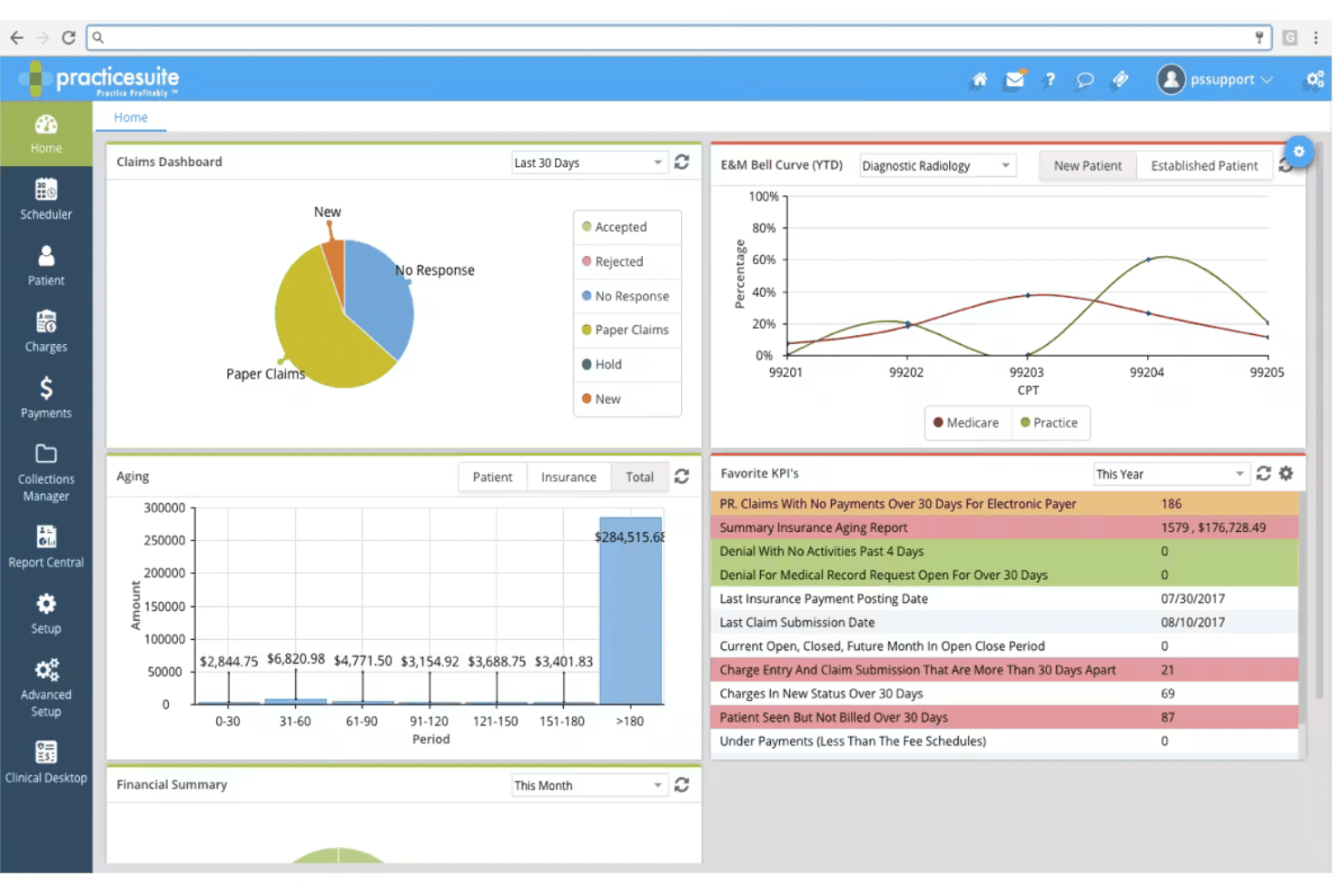
PracticeSuite spans claims, denials, ERA posting, eligibility, and billing. PracticeSuite is a cloud-based medical billing and practice management platform with a native podiatry module that covers end-to-end claims submission, EHR documentation, denial management, and patient billing in a single system.
Who Is PracticeSuite Best For?
PracticeSuite suits independent podiatry practices and medical billing companies that want practice management, EHR, and billing in one modular platform.
Why I Picked PracticeSuite
PracticeSuite earns its spot on my shortlist because the billing workflow is built around podiatry from the ground up. I like that podiatry-specific coding safeguards flag errors before submission, reducing denials on common foot and ankle procedure codes. The 3D foot and ankle diagram tool in the EHR feeds directly into charge capture, so documentation and billing stay in sync without manual re-entry.
PracticeSuite Key Features
- Batch insurance verification: Check insurance eligibility for multiple patients at once with automated payer connections.
- Patient engagement portal: Give patients access to their statements, payment options, and appointment schedules online.
- Analytics dashboard: Monitor revenue cycle metrics, aging accounts receivable, and claim statuses from a unified interface.
- Multi-location scheduling: Manage provider schedules, resource allocation, and patient appointments across several clinic sites.
PracticeSuite Integrations
PracticeSuite offers native integrations with PracticeFusion, major clearinghouses, labs, pharmacies, patient portals, and HIE networks. An API is available for custom integrations.
Pros and Cons
Pros:
- Multi-location scheduling for clinics and providers
- 3D foot and ankle diagram charge capture
- Podiatry coding safeguards reduce claim errors
Cons:
- Few podiatry EHR integration options
- Medicare LCD/NCD automation features limited
Learn more about PracticeSuite: Best for cloud podiatry workflows
- Free demo available
- Pricing upon request
Visit WebsiteCustomer Rating:3.6/5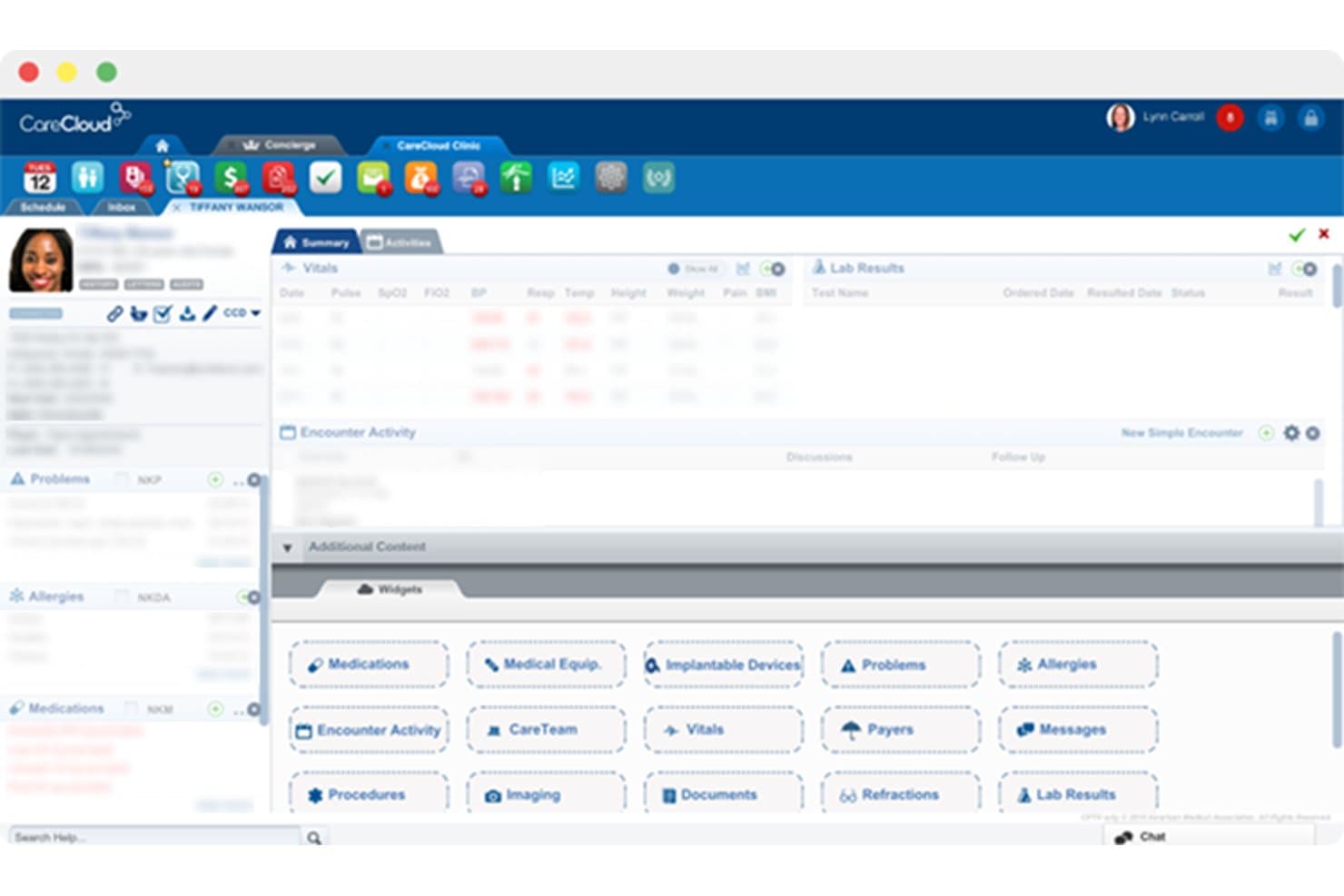
CareCloud offers a customizable patient chart interface with widgets for medications, vitals, lab results, allergies, and encounter activity management. CareCloud is a cloud-based EHR, practice management, and medical billing platform built for specialty practices, with dedicated podiatry workflows covering charge capture, claims scrubbing, denial management, and patient billing.
Who Is CareCloud Best For?
CareCloud suits small to mid-sized podiatry practices that want a single platform to handle clinical documentation, front-desk operations, and billing without managing separate systems.
Why I Picked CareCloud
CareCloud earns its spot on my shortlist because its billing workflows are built directly from podiatry-specific clinical templates, making charge capture a natural part of the encounter rather than a separate step. I like that the CollectiveIQ rules engine scrubs podiatry claims before submission, keeping first-pass rates above 94%. The platform also captures discrete foot-specific data like shoe sizes and abductions, so documentation feeds directly into billable codes.
CareCloud Key Features
- Centralized denial management dashboard: Review, categorize, and work podiatry-specific denials with built-in AR follow-up workflows.
- Configurable podiatry order sets: Build and use structured order sets that fit common foot and ankle procedures.
- Patient statement generation: Create and send detailed patient statements for each podiatry visit or procedure.
- Podiatry EHR/practice management integration: Sync patient demographics, scheduling, and billing across integrated clinical and administrative modules.
CareCloud Integrations
Native integrations are available with CareCloud’s own EHR and practice management modules. The platform supports integrations with third-party EHRs, and an API is available for custom integrations.
Pros and Cons
Pros:
- Built-in patient statement and payment tools
- Real-time claim tracking and denial reporting
- Specialty podiatry templates for coding and billing
Cons:
- Toe modifier automation not clearly documented
- Medicare LCD/NCD rules not always enforced
Learn more about CareCloud: Best for integrated podiatry billing
- Free demo available
- Pricing upon request
Visit WebsiteCustomer Rating:3.6/5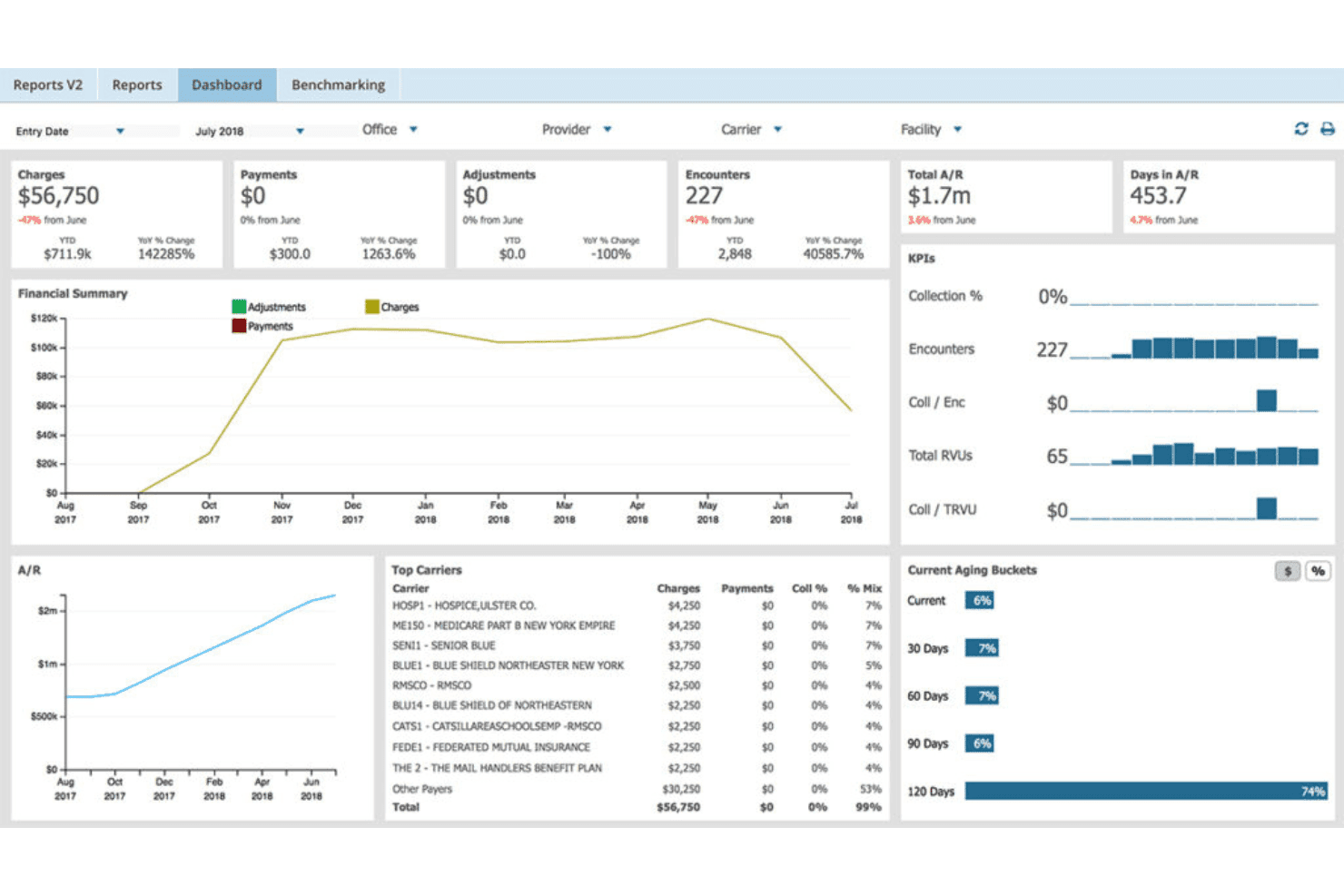
AdvancedMD unites EMR, documentation, billing, claims, eligibility, and RCM. AdvancedMD is an all-in-one cloud platform combining podiatry-specific EHR, practice management, medical billing, claims scrubbing, and patient payment tools in a single integrated system.
Who Is AdvancedMD Best For?
AdvancedMD suits independent podiatry practices that want to manage clinical documentation, scheduling, and billing from one platform rather than juggling separate systems.
Why I Picked AdvancedMD
AdvancedMD earns its spot on my shortlist because the billing module and EHR live in the same system, so charge capture flows directly from the clinical note to the claim without any manual handoff. I particularly like the claims scrubbing engine, which checks against more than 3.5 million known error patterns before a claim goes out. In practice, that means my team catches modifier issues and missing documentation at the source, not after a denial comes back.
AdvancedMD Key Features
- Automated modifier validation: Applies and verifies toe, laterality, and class findings modifiers for podiatry claims.
- Medicare LCD/NCD alerts: Flags claims missing required documentation for routine foot care and other podiatry Medicare rules.
- Advanced denial analytics: Categorizes and tracks denials by root cause, including podiatry-specific patterns and appeal automation.
- Patient payment portal: Lets patients pay balances online using credit, debit, FSA, or HSA through a branded portal.
AdvancedMD Integrations
AdvancedMD offers native integrations with ChartRequest, DAX Copilot, DeepScribe, Doctorsoft, InstaMed, LeadSquared, and NextPatient. An API is available for custom integrations, and its integration marketplace connects with additional healthcare IT providers.
Pros and Cons
Pros:
- Automated modifier validation for toe procedures
- Medicare LCD/NCD alerts for podiatry claims
- Integrated EHR, billing, and scheduling platform
Cons:
- Medicare compliance not fully podiatry-specific
- Limited built-in podiatry CPT code sets
 Best for all-in-one podiatry management
- Free demo available
- Pricing upon request
Visit WebsiteCustomer Rating:3.9/5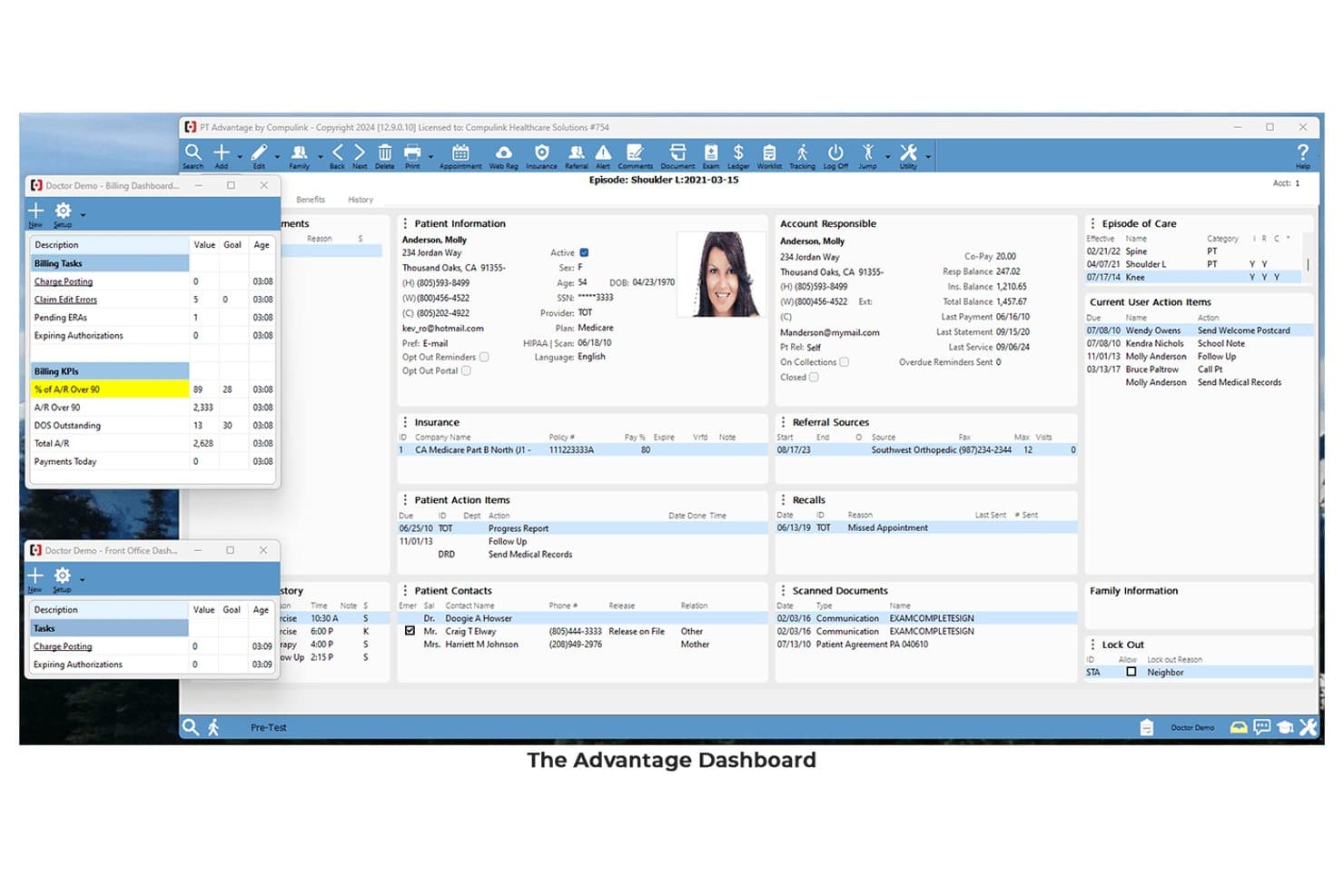
Compulink offers a comprehensive Advantage Dashboard displaying patient information, billing KPIs, episode of care, and action items in a single interface. Compulink is a specialty-specific EHR and practice management platform built for podiatry, combining AI-powered clinical documentation, insurance claims management, billing workflows, and patient payment tools in a single integrated system.
Who Is Compulink Best For?
Compulink is a strong fit for podiatry practice owners and administrators who want a single platform to handle clinical documentation, billing, and practice management without stitching together separate tools.
Why I Picked Compulink
I picked Compulink as one of the best because its EHR, practice management, and billing all run on the same native database. When a provider documents a diabetic foot ulcer using the built-in Wagner grading or UT Diabetic Foot Classification tools, the system auto-generates CPT and E&M codes ready for claim submission. I also like the built-in CCI edits by carrier, which catches coding conflicts before claims leave the practice.
Compulink Key Features
- Patient engagement portal: Lets patients schedule appointments, sign forms, and make payments online.
- Integrated eligibility verification: Automatically checks insurance coverage before visits and billing.
- ASC module: Connects podiatry clinics with ambulatory surgical center workflows for charge capture.
- Lab and imaging integration: Facilitates electronic ordering and receipt of podiatry-specific labs and imaging.
Compulink Integrations
Compulink offers native integrations with Waystar, Weave, Phreesia, MyEyeStore, QuickBooks, Great Plains, Peachtree, and supports lab and imaging system connections. An API is available for custom integrations.
Pros and Cons
Pros:
- Built-in rule checks for Medicare podiatry claims
- All-in-one EHR, PM, and billing platform
- Podiatry templates with automatic CPT code suggestions
Cons:
- System updates can disrupt existing clinical templates
- LCD/NCD compliance engine lacks explicit documentation
Learn more about Compulink:
Annen faktureringsprogramvare for podiatri
\u003cspan style=\u0022font-weight: 400;\u0022\u003eHer er noen flere alternativer for faktureringsprogramvare for podiatri som ikke kom med på kortlisten min, men som likevel er verdt å undersøke:\u003c/span\u003e
- 11eClinicalWorksBest for connected podiatry care
- 12AthenahealthBest for podiatry billing automation
- 13DocVillaBest for cloud-based podiatry EHR
- 14EZClaimBest for simple podiatry billing
- 15Practice FusionBest for small-practice podiatry EHR
- 16Practice EHRBest for specialty podiatry workflows
- 171st Providers ChoiceBest for podiatry practice management
How I Evaluate Podiatry Billing Software
I evaluate podiatry billing tools in two layers: baseline claims and coding capabilities, then the differentiators—like modifier automation and LCD alerts—that separate good tools from great ones.
Core Functionality (Table Stakes For This List)
When I'm selecting tools for my list, I rank each one on a scale from 0 (does not offer the functionality) to 5 (excels in this area) for each core functionality listed below. Then, I calculate the tool's total score into a percentage. Each tool needs to achieve a minimum total score of 55% to be considered for inclusion.
- Podiatry-Specific Coding: I check whether the platform includes preloaded podiatry CPT, HCPCS, and ICD-10 code sets along with toe and anatomical modifiers like TA-T9 and Q7-Q9.
- Claims Management: End-to-end electronic claim submission matters here, from scrubbing and tracking to batch resubmission across multiple clearinghouses and payers.
- Medicare Compliance Rules: I look for automated LCD/NCD enforcement, especially around routine foot care classifications and at-risk foot documentation that trips up so many podiatry claims.
- Denial & AR Management: Tools should offer denial categorization, aging AR tracking, and appeal workflows—so your team can catch patterns like recurring routine foot care denials early.
- Patient Billing & Payments: I evaluate whether the platform supports automated statements, online payment portals, and flexible payment plans tied to podiatry visits and procedures.
- EHR/PM Integration: Native or API-based integration with podiatry EHR and practice management systems is key for charge capture and keeping demographic data in sync.
Once I have a list of tools that meet the criteria, I consider what sets each platform apart.
Differentiating Factors (What Sets Vendors Apart)
Here's how I compare and contrast different vendors:
Standout Features
LCD/NCD compliance alerts are a big differentiator. I look for platforms that flag missing routine foot care documentation or diabetic shoe program requirements before you hit submit. Modifier automation also matters, since tools that auto-apply Q7-Q9 class findings and TA-T9 toe modifiers save your team from preventable denials. I also evaluate denial analytics dashboards that categorize rejections by root cause, like bundling issues or routine foot care disputes, so you can spot trends and fix them fast.
Beyond Features
Practice size and setting fit is one of the first things I consider. A solo podiatrist doing house calls has very different needs than a multi-provider group with a wound care department. I check whether pricing scales per provider or as a percentage of collections. Billing service model options also vary widely. Some platforms offer pure software, while others include full-service RCM with podiatry-trained billers who can handle complex surgical or wound care claims. I also evaluate onboarding support, especially whether the vendor helps with chart conversion and podiatry fee schedule setup.
Slik velger du faktureringsprogramvare for podiatri
Det er lett å gå seg vill i lange funksjonslister og kompliserte prismodeller. For å hjelpe deg med å holde fokus mens du går gjennom den unike prosessen med å velge programvare, har vi laget en sjekkliste over faktorer du bør ha i tankene:
| Faktor | Hva du bør vurdere |
| Skalerbarhet | Vil programvaren støtte praksisen din når du legger til nye behandlere, lokasjoner eller tjenesteområder i fremtiden? Spør om begrensninger eller ekstra kostnader knyttet til vekst. |
| Integrasjoner | Kontroller om verktøyet kobles til ditt nåværende EHR-system, oppgjørssentral, planleggingssystem eller rapporteringssystem. Manglende integrasjoner fører til mer manuelt arbeid og økt risiko for feil. |
| Tilpasningsmuligheter | Kan du tilpasse arbeidsflytene til faktureringsprosessene for podiatri, eller er du bundet til forhåndsinnstillinger som kanskje ikke passer kravmønstrene og kodene dine? |
| Brukervennlighet | Er arbeidsflytene for fakturering, betaling og avviste krav intuitive for de ansatte som jobber direkte med pasientene? Be leverandørene om demonstrasjoner for å se om den daglige bruken samsvarer med teamets komfortnivå. |
| Implementering og oppstart | Hvor mye støtte tilbyr leverandøren ved konfigurering, datamigrering og opplæring? Må du implementere løsningen selv, eller får du veiledning med hjelp som er spesifikk for podiatri? |
| Kostnad | I tillegg til lisensiering bør du spørre om gebyrer for innsending av krav, integrasjoner og brukerstøtte. Planlegg for kostnader når volumet eller antallet behandlere øker. |
| Sikkerhetstiltak | Se gjennom kryptering, revisjonslogger, tilgangskontroller og dokumentasjon på HIPAA-samsvar. Kontroller om sikkerhetstiltakene oppfyller de nyeste standardene til klinikken og betalerne. |
| Tilgjengelig brukerstøtte | Kan du raskt få kontakt med brukerstøtten på telefon eller e-post når krav stopper opp eller retningslinjene for dekning endres? Sørg for at leverandørens åpningstider samsvarer med teamets arbeidstid. |
Hva er faktureringsprogramvare for podiatri?
Faktureringsprogramvare for podiatri er en spesialisert plattform for håndtering av forsikringskrav, koding og betalinger knyttet til behandling av føtter og ankler. Den hjelper praksiser med å håndtere CPT-, HCPCS- og ICD-10-koding som er spesifikk for podiatri, håndheve regler for Medicare-samsvar, følge opp avviste krav og automatisere pasientfakturering, slik at kontantstrømmen forblir stabil og den administrative belastningen reduseres.
Funksjoner
Når du velger faktureringsprogramvare for fotterapi, bør du se etter følgende nøkkelfunksjoner:
- Spesifikk koding for fotterapi: Gjør det mulig å registrere CPT-, HCPCS- og ICD-10-koder som er unike for behandling av fot og ankel, inkludert støtte for modifikatorer som er relevante for fotterapikrav.
- Automatisert innsending av krav: Sender krav elektronisk til betalere, reduserer manuell registrering og forbedrer sporing av innsendinger og svar for bedre refusjon.
- Verktøy for Medicare-samsvar: Marker manglende dokumentasjon og bruker LCD/NCD-regler, slik at det er mindre sannsynlig at du opplever forsinkelser eller avslag på rutinemessig fotpleie og besøk for risikoutsatte føtter.
- Håndtering av avslag: Identifiserer, kategoriserer og bidrar til å løse avviste krav, samtidig som utestående fordringer overvåkes for raskere løsning og tilbakeføring av inntekter.
- Pasientfakturering og betalingshåndtering: Genererer kontoutskrifter, tilbyr nettbaserte portaler for betaling av regninger og støtter betalingsplaner for å hjelpe pasientene med å oppfylle sine betalingsforpliktelser og holde innbetalingene stabile.
- Integrasjon med EHR- og PM-systemer: Synkroniserer pasientdemografi, kostnader og opplysninger om konsultasjoner med systemene for praksisadministrasjon og elektroniske pasientjournaler for å eliminere dobbeltregistrering.
- Automatisering av modifikatorer: Bruker og validerer automatisk fotterapispesifikke modifikatorer (som Q7, Q8, Q9, TA-T9), noe som reduserer avvisning av krav på grunn av kodefeil.
- Verifisering av kvalifisering: Bekrefter pasientenes forsikringsdekning og ytelser i sanntid – noe som er viktig for tjenester som DME, ortoser eller kirurgiske inngrep.
- Tilpasset rapportering og analyse: Tilbyr verktøy for sporing av nøkkelindikatorer for fakturering, trender i avslag og produktivitet, slik at administratorer og fakturamedarbeidere kan oppdage områder som trenger oppfølging.
- Sikker tilgangskontroll: Håndhever HIPAA-kompatibel tilgang, datakryptering og detaljerte revisjonslogger for å beskytte pasientopplysninger og støtte samsvar.
Fordeler
Implementering av faktureringsprogramvare for fotterapi gir flere fordeler for teamet og virksomheten din. Her er noen av fordelene du kan se frem til:
- Færre avviste krav: Automatiserte kontroller av Medicare-samsvar og varsler om modifikatorer bidrar til å sikre at kravene oppfyller betalernes krav før innsending.
- Raskere refusjoner: Elektronisk innsending av krav og verktøy for håndtering av avslag fremskynder løsningen, slik at praksisen din mottar betalinger tidligere.
- Bedre kodingsnøyaktighet: Innebygde kodebiblioteker for fotterapi og intelligente kodeforslag reduserer vanlige kodefeil knyttet til inngrep på fot og ankel.
- Redusert administrativ belastning: Integrasjon med EHR- og PM-systemer eliminerer dobbeltregistrering av data og effektiviserer faktureringsarbeidsflytene for personalet.
- Bedre innbetalinger fra pasienter: Pasientvennlige faktureringsportaler og verktøy for betalingsplaner gjør det enklere for pasientene å betale utestående beløp.
- Bedre økonomisk oversikt: Tilpassede dashbord og analyser gir innsikt i trender i avslag, utestående fordringer og den generelle økonomiske helsen til praksisen.
- Forbedret datasikkerhet: HIPAA-kompatibel tilgangskontroll og revisjonslogger beskytter sensitive pasientopplysninger gjennom hele faktureringsprosessen.
Kostnader og priser
Valg av faktureringsprogramvare for fotterapi krever en forståelse av de ulike prismodellene og abonnementene som er tilgjengelige. Kostnadene varierer basert på funksjoner, teamstørrelse, tillegg og mer. Tabellen nedenfor oppsummerer vanlige abonnementer, gjennomsnittsprisene deres og typiske funksjoner som er inkludert i løsninger for faktureringsprogramvare for fotterapi:
Sammenligningstabell for abonnementer for faktureringsprogramvare for fotterapi
| Abonnementstype | Gjennomsnittspris | Vanlige funksjoner |
| Gratisabonnement | $0 | Grunnleggende registrering av krav, begrenset støtte for fotterapikoder, manuell generering av kontoutskrifter og ingen integrasjon med oppgjørssentral. |
| Personlig abonnement | $50-$150/måned | Elektronisk innsending av krav, bibliotek med podiatriske CPT/ICD-10-koder, enkle varsler om avslag og begrenset tilgang til kundestøtte. |
| Bedriftsabonnement | $200-$450/måned | Fullstendig kravhåndtering, automatisering av modifikatorer, kontroller av Medicare-samsvar, integrasjon med EHR/PM og dashbord for utestående fordringer. |
| Abonnement for store virksomheter | $500+/måned | Støtte for flere lokasjoner, avanserte analyser, tilpasset rapportering, API-tilgang, førsteklasses oppstart og dedikert kundestøtte. |
Vanlige spørsmål om faktureringsprogramvare for podiatri
\u003cspan style=\u0022font-weight: 400;\u0022\u003eHer er noen svar på vanlige spørsmål om faktureringsprogramvare for podiatri:\u003c/span\u003e
Hvordan bidrar faktureringsprogramvare for podiatri til å redusere avslag på krav?
\u003cspan style=\u0022font-weight: 400;\u0022\u003eFaktureringsprogramvare for podiatri bidrar til å redusere avslag på krav ved å flagge manglende dokumentasjon, sikre at riktige modifikatorer brukes og håndheve Medicares dekningsregler før krav sendes inn. Denne proaktive tilnærmingen reduserer risikoen for at krav blir avvist på grunn av rutinemessig fotpleie eller ufullstendig koding.\u003c/span\u003e
Er faktureringsprogramvare for podiatri kompatibel med mitt EHR?
\u003cspan style=\u0022font-weight: 400;\u0022\u003eJa, de fleste faktureringsprogrammer for podiatri kan integreres med ledende EHR- og PM-systemer. Dette gjør det mulig å synkronisere pasientdata, gebyropplysninger og konsultasjonsnotater direkte, noe som bidrar til å forhindre duplisering og fremskynder faktureringsprosessen.\u003c/span\u003e
Kan faktureringsprogramvare for podiatri håndtere fakturering for spesialtilpassede ortoser og DME?
\u003cspan style=\u0022font-weight: 400;\u0022\u003eJa, mange løsninger tilbyr egne arbeidsflyter for spesialtilpassede ortoser, diabetessko og DME-krav. De kan automatisere kontroll av kvalifisering, håndtere forhåndsgodkjenninger og spore krav i regelverket for disse komplekse tjenestene.\u003c/span\u003e
Hvilke støttealternativer er tilgjengelige hvis jeg har spørsmål om fakturering?
\u003cspan style=\u0022font-weight: 400;\u0022\u003eDu kan forvente tilgang til støtte via telefon, e-post eller nettbaserte kanaler – noen leverandører tilbyr også direktechat eller USA-baserte team som er opplært i fakturering spesielt for podiatri. Se etter plattformer som tilbyr dedikert oppstartsstøtte og kunnskapsrike medarbeidere for vanskelige spørsmål om dekning.\u003c/span\u003e
Hvor sikre er pasientdata i faktureringsprogramvare for podiatri?
\u003cspan style=\u0022font-weight: 400;\u0022\u003ePasientdata beskyttes gjennom HIPAA-kompatible tilgangskontroller, revisjonsspor og datakryptering. Bekreft alltid at den valgte leverandøren tilbyr avtaler med forretningspartnere og oppfyller bransjens sikkerhetsstandarder.\u003c/span\u003e
Kan programvaren skaleres i takt med at praksisen min vokser?
\u003cspan style=\u0022font-weight: 400;\u0022\u003eJa, anerkjente faktureringsplattformer for podiatri tilbyr skalerbare priser og støtte for flere lokasjoner. Det betyr at du kan legge til behandlere, spesialområder eller nye kontorer uten å miste nøyaktigheten i faktureringen eller måtte bytte verktøy.\u003c/span\u003e