

EMR-programvare for ortopedi (elektronisk pasientjournal) effektiviserer håndteringen av pasientdata, medisinsk historikk og arbeidsflyter for ortopediske klinikker. Det sparer deg for tid på papirarbeid og forbedrer pasientbehandlingen. Ved å bruke riktig EMR-system kan du redusere administrative belastninger og lukke kommunikasjonsgap med pasientene dine.
Jeg har gått gjennom de best vurderte alternativene, slik at du enkelt kan finne et EMR-system for ortopedi som passer til klinikken din og hjelper deg med å gi bedre behandling uten unødvendige problemer.
Hvorfor du kan stole på våre programvareanbefalinger
6,700+
Reviews
20
Industry experts
16+
Evaluation factors
14
Years
Teamet vårt har testet og anmeldt programvare siden 2012. Vi leder selv legekontorer, så vi vet hvor vanskelig og hvor viktig det er å velge riktig programvare.
I denne guiden har vi vurdert verktøyene gjennom praktisk testing og uavhengig research og gitt dem poeng ut fra våre utvelgelseskriterier.
Anmeldelsene våre bygger på vår egen redaksjonelle vurdering. De er ikke et salgsargument.
Sammenligningstabell for EMR-systemer for ortopedi
| Tool | Best For | Trial Info | Price | ||
|---|---|---|---|---|---|
| 1 | Best for integrated diagnostics and telehealth | 15-day free trial | From $99/month | Website | |
| 2 | Best for specialized orthopedic workflows | Free demo available | Pricing upon request | Website | |
| 3 | Best for specialty-built charting and PACS imaging | Free demo available | Pricing upon request | Website | |
| 4 | Best for customizability and interoperability | Free demo available | Pricing upon request | Website | |
| 5 | Best for orthopedic billing automation | Free demo available | Pricing upon request | Website | |
| 6 | Best for workers' comp and injury billing | Free demo available | Pricing upon request | Website | |
| 7 | Best for small to medium-sized orthopedic practices | Free demo available | From $229/user/month | Website | |
| 8 | Best for its full-suite practice management system | Free demo + free expert consultation available | Pricing upon request | Website |


Anmeldelser av de beste EMR-systemene for ortopedi
 Best for integrated diagnostics and telehealth
- 15-day free trial
- From $99/month
Visit WebsiteCustomer Rating:4.8/5
OptiMantra’s booking interface confirms appointments and telehealth sessions, helping orthopedic practices streamline virtual and in-person patient scheduling. OptiMantra is a cloud-based EMR platform built to support orthopedic clinics with integrated diagnostics, telehealth, and practice management capabilities. The system combines patient charting, lab connectivity, and secure video consultations—helping orthopedic providers manage both in-office and remote patient care efficiently.
Why I Picked OptiMantra: I chose OptiMantra for its strong diagnostic and telehealth integration, which makes it ideal for orthopedic specialists managing both in-person and remote consultations. You can order imaging or lab tests directly from the platform, with results automatically attached to patient charts. I also like how its HIPAA-compliant telehealth feature allows you to hold virtual follow-ups, making postoperative care and patient check-ins more accessible. Combined with customizable templates and automated patient engagement, it’s a flexible solution for orthopedic workflows.
Standout Features & Integrations:
Features include customizable orthopedic charting templates, integrated telehealth, electronic prescriptions, and secure document sharing. OptiMantra connects with major labs like LabCorp, Quest Diagnostics, and Rupa Health, as well as payment and communication tools including Stripe, Zoom, and SendGrid. The platform also supports e-faxing and integrates with AWS and Box for secure data storage.
Pros and Cons
Pros:
- Secure document and lab sharing
- Customizable orthopedic charting
- Integrated telehealth and diagnostics
Cons:
- Learning curve for new users
- Reports section can feel complex
Learn more about OptiMantra: Best for specialized orthopedic workflows
- Free demo available
- Pricing upon request
Visit WebsiteCustomer Rating:5/5
NextGen Healthcare dashboard displaying recent activity summaries and financial reporting tools. NextGen Healthcare is an enterprise-grade orthopedic EMR and practice management platform designed for mid-sized to large practices. It combines AI-assisted documentation, mobile charting, and specialty-specific workflows to enhance orthopedic care and operational performance.
Why I Picked NextGen: I chose NextGen because it delivers orthopedic-specific clinical content and charting tools while also offering mobile documentation, which is a must-have for busy ortho practices. The Ambient Assist tool can generate SOAP notes from patient conversations, saving time and reducing the burden of manual documentation. Its broad marketplace of integrations—like surgical scheduling, remote monitoring, and patient engagement tools—adds a layer of flexibility that’s hard to beat.
Standout Features & Integrations:
Features include orthopedic-specific templates, AI-powered note-taking, telehealth, patient portals, and revenue cycle management. NextGen also provides analytics and regulatory reporting tools. Integrations include Relaymed, Medsender, Klara, Surgimate, Transform9, CallMyDoc, rater8, Arcadia, and more.
Pros and Cons
Pros:
- Built-in templates for various specialties
- Broad third-party integration marketplace
- AI-generated SOAP notes via mobile
Cons:
- Learning curve with more advanced capabilities
- Some features are iOS-optimized; Android support varies
Learn more about NextGEN: Best for specialty-built charting and PACS imaging
- Free demo available
- Pricing upon request
Visit WebsiteCustomer Rating:4.5/5
Image 2: ModMed Orthopedic EMR Interface ModMed, also known as Modernizing Medicine, is a robust EHR system designed with specialty-specific workflows, including orthopedics. Its intuitive and customizable platform is geared towards streamlining processes within orthopedic practices, offering seamless workflow integration that allows for efficient patient management.
Why I Picked ModMed: In my selection process, I focused on the ability of a tool to integrate seamlessly into an orthopedic practice's workflow. ModMed distinguished itself with its specialty-specific approach to workflow design, with a layout and functionality that aligns well with the unique needs of orthopedic practices. This integration efficiency is why I picked ModMed as the best choice for seamless workflow integration.
Standout features & integrations:
ModMed offers key features such as intuitive orthopedic-specific templates, built-in telehealth capabilities, and an efficient patient portal. Additionally, ModMed's EMA® interactive anatomical atlas allows for precise documentation of orthopedic examinations and treatments. The tool integrates with practice management systems, medical billing services, and patient engagement tools, providing a well-rounded solution for orthopedic clinics.
Pros and Cons
Pros:
- Comes with built-in orthopedic-specific billing
- Simplifies workflow with smart integrations
- Designed specifically for specialty practices including orthopedics
Cons:
- Learning curve may exist for some users due to its wide range of features
- May not be as comprehensive as some other EMRs on the market
- Pricing information not readily accessible
Learn more about ModMed: Best for customizability and interoperability
- Free demo available
- Pricing upon request
Visit WebsiteCustomer Rating:4.1/5
Image 4: PrognoCIS Orthopedic EMR Interface PrognoCIS is an award-winning cloud-based EMR solution that offers a highly customizable experience, enabling orthopedic practices to tailor the software to their specific needs. Notably, it emphasizes interoperability, facilitating easy sharing of data between different healthcare systems.
Why I Picked PrognoCIS: I selected PrognoCIS for this list mainly due to its high degree of customizability and impressive interoperability. Many EMR solutions come with a one-size-fits-all approach, but PrognoCIS stands out with its ability to adapt to unique practice requirements. Its commitment to interoperability means it can exchange data seamlessly with various systems, making it perfect for integrated healthcare networks.
Standout features & integrations:
PrognoCIS offers numerous features such as e-prescriptions, patient portals, appointment scheduling, and customizable templates specific to orthopedics. It also boasts a robust telemedicine module, a feature gaining importance in the current healthcare landscape. When it comes to integrations, PrognoCIS is compatible with several medical billing software and practice management systems, enhancing its versatility.
Pros and Cons
Pros:
- Includes features like e-prescribing, patient portal, and telemedicine
- Seamless interoperability with other systems
- High degree of customizability
Cons:
- Interface may seem complex to some users
- May require technical knowledge for customization
- Pricing information is not directly available
Learn more about PrognoCIS: Best for orthopedic billing automation
- Free demo available
- Pricing upon request
Visit WebsiteCustomer Rating:3.6/5
Image 10: AdvancedMD Orthopedic EMR Interface AdvancedMD is a comprehensive medical software suite offering EHR, practice management, telemedicine, and patient engagement tools. This platform stands out for its robust automation features that simplify administrative tasks, making it particularly beneficial for orthopedic practices that desire streamlined operations.
Why I Picked AdvancedMD: I chose AdvancedMD because it offers powerful automation capabilities for administrative tasks. This feature is not commonplace among EHR providers and makes AdvancedMD distinguishable. I determined it to be the best option for orthopedic practices that are seeking ways to automate routine tasks and optimize their workflows.
Standout features & integrations:
AdvancedMD provides a range of features like automated appointment reminders, insurance eligibility verification, and claim management. These functionalities aim to reduce manual tasks and enhance practice efficiency. In terms of integrations, it offers seamless connectivity with major labs and radiology systems, improving care coordination.
Pros and Cons
Pros:
- Seamless connectivity with major labs and radiology systems
- Integrated suite of medical software tools
- Strong automation capabilities for administrative tasks
Cons:
- Annual billing could be a barrier for some practices
- The platform may be complex for new users
- High starting price point
 Best for workers' comp and injury billing
- Free demo available
- Pricing upon request
Visit WebsiteCustomer Rating:3.4/5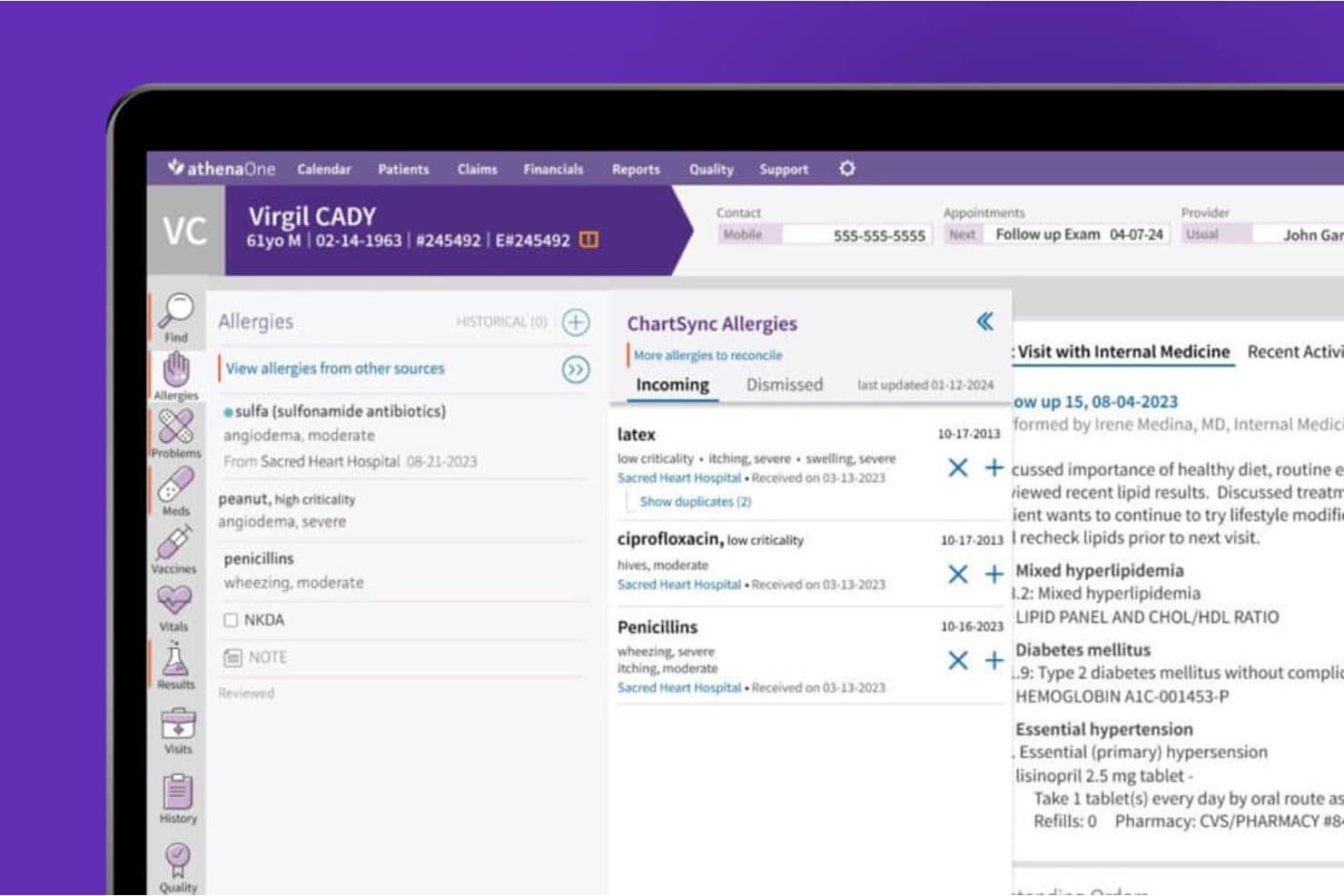
athenahealth syncs allergy data across sources for accurate patient records. athenaOne is an integrated EHR, practice management, and patient engagement platform from athenahealth that supports orthopedic practices with specialty-specific charting macros, surgical scheduling, ASC workflows, and revenue cycle management.
Who Is athenahealth Best For?
athenaOne is a strong fit for mid-sized orthopedic practices that want a single platform covering scheduling, billing, and patient engagement without managing multiple disconnected systems.
Why I Picked athenahealth
athenahealth earns its spot on my shortlist because its KLAS top-ranked ambulatory EHR status for medium-sized organizations reflects real-world performance that practice administrators and physician partners can trust. I like that athenaOne combines orthopedic-specific charting macros, surgical scheduling with linked procedure-room block time, and ASC pre-op and post-op documentation in one platform, so your team isn't bouncing between systems to manage a full surgical episode. The percentage-of-collections pricing model and no long-term contract also make it a lower-risk commitment for growing orthopedic groups.
athenahealth Key Features
- Patient self-scheduling and self check-in: Patients can book appointments online and complete check-in tasks, screeners, and consent forms before arriving at the clinic.
- Ambient documentation: Voice-driven ambient notes capture encounter details hands-free, reducing manual documentation time for orthopedic providers.
- Workers' compensation and personal-injury billing workflows: Built-in support for complex reimbursement scenarios common in orthopedic practices, including workers' comp and personal-injury cases.
- PROM screener automation: Practices can configure rules to automatically send digital outcome screeners to patients after qualifying appointments.
athenahealth Integrations
Native integrations include CommonWell Health Alliance, Carequality, and Surescripts. athenaOne connects with Tricefy through API or HL7 and supports Appriss Health and Logicoy for prescription monitoring; APIs are available for custom integrations.
Pros and Cons
Pros:
- Patient scheduling and reminders support daily clinic work
- Customizable chart templates and macros support routine visits
- Scheduling, records, and billing share one system
Cons:
- Imaging and surgical workflows lack orthopedic-specific depth
- iPad workflows can require too many clicks
Learn more about athenahealth: Best for small to medium-sized orthopedic practices
- Free demo available
- From $229/user/month

Image 6: PracticeEHR Orthopedic EMR Interface Practice EHR is an Electronic Health Record (EHR) solution designed specifically to meet the unique needs of small to medium-sized orthopedic practices. By offering streamlined scheduling, charting, and billing processes, Practice EHR simplifies practice management for these specific healthcare settings.
Why I Picked Practice EHR: I selected Practice EHR for this list due to its niche focus on small to medium-sized orthopedic practices. By understanding the specific needs and workflow of these healthcare setups, the tool stands apart from others that provide more generic solutions. I believe Practice EHR is best for these practices due to its user-friendly interface, tailored functionalities, and affordable pricing.
Standout features & integrations:
Practice EHR comes with a variety of useful features like digital charting, e-prescribing, and patient portals, all of which are particularly valuable in an orthopedic setting. As for integrations, Practice EHR syncs with multiple lab and imaging centers, enabling a more streamlined patient treatment process.
Pros and Cons
Pros:
- Variety of essential features for orthopedic practice
- User-friendly interface
- Tailored to the needs of small to medium-sized orthopedic practices
Cons:
- Limited customization capabilities
- May lack some advanced features present in more comprehensive systems
- Only offers annual billing, which may not be suitable for all practices
Learn more about Practice EHR: 8Best for its full-suite practice management system
RXNT
- Free demo + free expert consultation available
- Pricing upon request
Visit WebsiteCustomer Rating:4.3/5
Image 12: RXNT Orthopedic EMR Interface RXNT offers a comprehensive and integrated EHR solution, combining functionalities like medical billing, practice management, and patient scheduling. It stands out for its full-suite practice management system, providing a wide array of tools that cater to the diverse administrative and clinical needs of orthopedic practices.
Why I Picked RXNT: I chose RXNT for its comprehensive practice management system. It distinguishes itself from other tools with its ability to offer a wide range of features within a single platform. After considering other options, I concluded that RXNT is the most suitable for practices requiring a fully integrated solution for managing different aspects of their operations.
Standout features & integrations:
Notable features of RXNT include automated reminders, electronic prescriptions, and real-time insurance eligibility checks. The platform is also designed to integrate smoothly with a wide array of medical billing and other healthcare systems, making it a versatile tool for many practices.
Pros and Cons
Pros:
- Real-time insurance eligibility checks simplify administrative tasks
- Integrates well with other healthcare systems
- Offers a wide range of features within a single platform
Cons:
- Annual billing may be a deterrent for some practices
- The interface could be improved for a better user experience
- The extensive suite of features may have a learning curve for some users
Learn more about RXNT:
How I Evaluate Orthopedic EMR
I split my evaluation into three parts, giving the most weight to core needs: document musculoskeletal exams and injuries, and access X-rays and MRIs in the patient record. Next, I consider differentiators such as PROM tracking. Finally, I assess specialty-specific onboarding, support, and pricing value beyond the feature set.
Core Functionality (Table Stakes For This List)
When I'm selecting tools for my list, I score each one on a scale from 0 (does not offer the functionality) to 5 (excels in this area) for each core functionality listed below. I then convert the total into a percentage to help assess each tool's overall fit, with extra weight on any functionalities I’ve deemed essential.
- Orthopedic Charting (Essential): I look for musculoskeletal exam and injury templates that capture joint-specific findings without relying on generic notes.
- Imaging Integration (Essential): I check whether clinicians can access X-rays and MRI results from the patient record and connect them to treatment decisions.
- Surgical Workflows: I assess how scheduling connects pre-op planning, procedure documentation, and post-op follow-up for each surgical episode.
- Coding & Billing: I look for coding support tied to fracture care, joint replacement, and DME claims, including relevant injury billing workflows.
- E-Prescribing: I consider support for routine prescriptions and controlled substances, along with medication safety checks for post-surgical care.
- Patient Portal: I evaluate patient access to visit summaries, records, appointment requests, and secure communication with the practice.
Once I have a list of tools that meet the criteria, I consider what sets each platform apart.
Differentiating Factors (What Sets Vendors Apart)
Here's how I compare and contrast different vendors:
Standout Features
I evaluate whether a platform automates PROMs collection for procedures like knee and hip replacements, since tracking patient-reported outcomes over time is key to demonstrating treatment value. DME and orthotics tracking also matters—practices that dispense braces or casting supplies in-office need inventory and billing tied directly to the patient encounter. I also check for mobile-optimized charting that lets surgeons document rounds or review records in the OR without switching devices.
Beyond Features
I check whether a platform supports HL7/FHIR data exchange with hospital and ASC systems, since surgeons splitting time between clinic and OR need shared surgical records without redundant documentation. Specialty-specific onboarding matters too—vendors that ship orthopedic templates and train billing staff on injury coding workflows cut time-to-value compared to generic build-outs. I also evaluate total cost of ownership against billing ROI, looking at how orthopedic-specific coding tools reduce claim denials for fracture care and joint replacement episodes.
Slik velger du EMR-systemer for ortopedi
Det er lett å gå seg vill i lange funksjonslister og kompliserte prismodeller. For å hjelpe deg med å holde fokus mens du går gjennom den unike prosessen med å velge programvare, får du her en sjekkliste over faktorer du bør ha i bakhodet:
| Faktor | Hva du bør vurdere |
|---|---|
| FaktorSkalerbarhet | Hva du bør vurdereKan programvaren vokse sammen med klinikken din? Vurder fremtidig utvidelse og om verktøyet kan håndtere flere pasienter eller lokasjoner uten problemer. |
| FaktorIntegrasjoner | Hva du bør vurdereFungerer den med systemene du bruker i dag? Kontroller kompatibiliteten med annen programvare du bruker, for eksempel verktøy for fakturering eller timeplanlegging. |
| FaktorTilpasningsmuligheter | Hva du bør vurdereKan du tilpasse den til arbeidsflyten din? Se etter muligheter til å endre maler og rapporter slik at de samsvarer med behovene til klinikken din. |
| FaktorBrukervennlighet | Hva du bør vurdereEr den brukervennlig for teamet ditt? Vurder læringskurven og om de ansatte enkelt kan navigere i systemet uten frustrasjon. |
| FaktorImplementering og opplæring | Hva du bør vurdereHvor smidig er overgangen? Evaluer støtten som tilbys under oppsettet, og ressursene som er tilgjengelige for å lære opp teamet ditt effektivt. |
| FaktorKostnad | Hva du bør vurderePasser den til budsjettet ditt? Sammenlign prisplanene og sørg for at du forstår hvilke funksjoner som er inkludert i grunnprisen, og hvilke som er tillegg. |
| FaktorSikkerhetstiltak | Hva du bør vurdereEr pasientjournalene beskyttet? Sørg for at programvaren overholder lovgivningen om databeskyttelse og har sterk kryptering og tilgangskontroller. |
| FaktorEtterlevelseskrav | Hva du bør vurdereOppfyller den helsestandardene? Kontroller at programvaren støtter nødvendig etterlevelse for klinikken din, for eksempel HIPAA-regelverket. |
Hva er EMR-systemer for ortopedi?
EMR for ortopedi er programvare som er utviklet for å håndtere elektroniske pasientjournaler spesielt for ortopediske klinikker. Ortopediske kirurger, fysioterapeuter og annet helsepersonell bruker disse verktøyene til å forbedre pasientbehandlingen og effektivisere administrative oppgaver.
Funksjoner for timeplanlegging, fakturering og pasientoppfølging bidrar til effektiv klinikkdrift og etterlevelse av regelverket. Alt i alt forbedrer disse verktøyene arbeidsflyten og nøyaktigheten til pasientdata i ortopediske miljøer.
Funksjoner
Ved valg av ortopedisk EMR bør du se etter følgende viktige funksjoner:
- Håndtering av pasientjournaler: Organiserer og vedlikeholder detaljert pasientinformasjon for enkel tilgang og oppdatering.
- Timeplanlegging: Tilrettelegger for bestilling og administrasjon av avtaler for å optimalisere pasientflyten og redusere antallet pasienter som ikke møter opp.
- Fakturering og fakturautstedelse: Automatiserer faktureringsprosesser og genererer fakturaer for å forenkle økonomiske oppgaver.
- Datasikkerhet: Sikrer at pasientdata beskyttes gjennom kryptering og tilgangskontroller, i samsvar med kravene til regelverksetterlevelse.
- Tilpassbare maler: Gjør det mulig for praksiser å tilpasse skjemaer og rapporter etter spesifikke behov i arbeidsflyten.
- Muligheter for telemedisin: Støtter fjernkonsultasjoner for å utvide tilgangen til helsehjelp og forbedre fleksibiliteten.
- Analyse og rapportering: Gir innsikt i praksisens resultater og pasientutfall gjennom detaljerte rapporter.
- Integrasjon med enheter: Kobler seg til bærbare enheter for å spore pasientenes helsemålinger og forbedre behandlingsplaner.
- Talegjenkjenning: Muliggjør effektiv dokumentasjon av pasientnotater gjennom tale-til-tekst-funksjonalitet.
- Opplæringsressurser: Tilbyr videoer, webinarer og veiledninger som hjelper personalet med å lære og bruke programvaren effektivt.
Fordeler
Implementering av ortopedisk EMR gir flere fordeler for teamet og virksomheten din. Her er noen av fordelene du kan se frem til:
- Forbedret effektivitet: Automatiserer oppgaver som fakturering og timeplanlegging, slik at mer tid frigjøres til pasientbehandling.
- Bedre pasientbehandling: Gir rask tilgang til detaljerte pasientjournaler, noe som støtter bedre diagnostisering og behandlingsplanlegging.
- Datasikkerhet: Beskytter sensitiv pasientinformasjon med sterk kryptering og tilgangskontroller, og sikrer samsvar med regelverket.
- Økt fleksibilitet: Tilbyr muligheter for telemedisin, slik at teamet kan gjennomføre fjernkonsultasjoner og nå en større pasientgruppe.
- Innsiktsfulle analyser: Leverer rapporter om praksisens resultater og pasientutfall, slik at du kan ta velinformerte beslutninger.
- Tilpasning: Tilpasser seg praksisens unike behov med tilpassbare maler og skjemaer, noe som forbedrer samsvaret med arbeidsflyten.
Kostnader og priser
Valg av ortopedisk EMR krever en forståelse av de ulike prismodellene og abonnementene som er tilgjengelige. Kostnadene varierer basert på funksjoner, teamstørrelse, tillegg og mer. Tabellen nedenfor oppsummerer vanlige abonnementer, gjennomsnittsprisene deres og typiske funksjoner som er inkludert i ortopediske EMR-løsninger:
Sammenligningstabell for abonnementer for ortopedisk EMR
| Abonnementstype | Gjennomsnittspris | Vanlige funksjoner |
|---|---|---|
| AbonnementstypeGratisabonnement | Gjennomsnittspris$0 | Vanlige funksjonerGrunnleggende pasientjournaler, begrenset timeplanlegging og grunnleggende brukerstøtte. |
| AbonnementstypePersonlig abonnement | Gjennomsnittspris$20-$50/bruker/måned | Vanlige funksjonerHåndtering av pasientjournaler, timebestilling og grunnleggende rapportering. |
| AbonnementstypeBedriftsabonnement | Gjennomsnittspris$50-$100/bruker/måned | Vanlige funksjonerAvansert timeplanlegging, fakturering og fakturautstedelse samt tilpassbare maler. |
| AbonnementstypeVirksomhetsabonnement | Gjennomsnittspris$100-$200/bruker/måned | Vanlige funksjonerFullstendig rapportering og analyse, muligheter for telemedisin og dedikert brukerstøtte. |
Vanlige spørsmål om ortopediske EMR-systemer
Her er noen svar på vanlige spørsmål om ortopedisk EMR:
Kan ortopedisk EMR integreres med andre helsesystemer?
Ja, mange ortopediske EMR-løsninger tilbyr integrasjonsmuligheter med andre helsesystemer, som programvare for fakturering, laboratorier og apoteker. Dette sikrer sømløs dataflyt og reduserer feil ved manuell registrering. Kontakt leverandøren for å få informasjon om tilgjengelige integrasjoner og sikre kompatibilitet med de eksisterende systemene dine.
Hvordan sikrer jeg datasikkerheten med ortopediske EMR-verktøy?
Sikre datasikkerheten ved å velge et EMR-system som overholder standarder for databeskyttelse, som HIPAA. Se etter funksjoner som kryptering, tilgangskontroller for brukere og regelmessige sikkerhetsoppdateringer. Diskuter sikkerhetstiltakene med leverandøren for å forstå hvordan pasientinformasjonen beskyttes.
Har ortopediske EMR-systemer vanligvis innebygd støtte for arbeidsflyter knyttet til bildediagnostikk?
Ja, mange ortopediske plattformer er utviklet for å håndtere bildediagnostikk som en del av den kliniske arbeidsflyten. De støtter ofte integrasjon med PACS-systemer for tilgang til og lagring av røntgenbilder, MR- eller CT-undersøkelser. Oppsett og kompatibilitet varierer mellom plattformene.
Kreves det opplæring for å bruke ortopediske EMR-verktøy?
Ja, det kreves ofte opplæring for å gjøre teamet kjent med programvarens grensesnitt og funksjoner. De fleste leverandører tilbyr opplæringsressurser som veiledninger, nettseminarer og kundestøtte. Tid investert i opplæring kan forbedre brukertilpasningen og effektiviteten i praksisen din.
Kan disse systemene brukes både på sykehus og i privat praksis?
Ja, selv om noen plattformer er bedre egnet for den ene innstillingen enn den andre. Systemer som er utviklet for sykehus, kan ha mer komplekse integrasjoner og støtte miljøer med flere behandlere. Andre er strømlinjeformet for poliklinikker med mindre team og enklere arbeidsflyter.