

Som ekspert på administrasjon av legepraksiser og teknologi har jeg selv erfart utfordringen med å finne riktig EMR-programvare for smertebehandling. Jeg forstår hvilken avgjørende rolle et slikt verktøy spiller for å forbedre arbeidsflyten, effektivisere pasientinformasjonen og legge til rette for effektive behandlingsstrategier. Derfor har jeg grundig undersøkt, vurdert og satt sammen denne listen over de 12 beste EMR-programvarene for smertebehandling, som jeg mener vil forvandle praksisen din.
Alle disse verktøyene tilbyr unike funksjoner og fordeler som er tilpasset smertebehandling. Ta deg tid til å utforske disse alternativene og se hvordan de samsvarer med behovene dine.
Why Trust Our Software Recommendations
6,700+
Reviews
20
Industry experts
16+
Evaluation factors
14
Years
Our team has been testing and reviewing software since 2012. As medical practice leaders ourselves, we know how difficult—and important—it is to choose the right software.
For this guide, we evaluated tools using hands-on testing and independent research, scoring tools using our selection criteria.
Our reviews reflect our human editorial judgment, not a sales pitch.
Sammenligningstabell for EMR-programvare for smertebehandling
Sammenlign prisopplysninger for mine beste utvalgte EMR-programvarer for smertebehandling i tabellen nedenfor.
| Tool | Best For | Trial Info | Price | ||
|---|---|---|---|---|---|
| 1 | Best for seamless medical billing features | Free demo + free expert consultation available | Pricing upon request | Website | |
| 2 | Best for telehealth consultations | 15-day free trial | From $99/month | Website | |
| 3 | Best for opioid risk tracking and PDMP compliance | Free demo available, 7-day free trial for the standalone AI scribe | From $249/user/month | Website | |
| 4 | Best for robust E-prescribing functionality | Free demo available | Pricing upon request | Website | |
| 5 | Best for comprehensive cloud-based solutions | Free demo available | Pricing upon request | Website | |
| 6 | Best for outsourced pain billing and PDMP checks | Free demo available | Pricing upon request | Website | |
| 7 | Best for comprehensive revenue cycle management | Free demo available | From $250/month | Website | |
| 8 | Best for multi-site ASC and clinic EHR scaling | Free demo available | Pricing upon request | Website | |
| 9 | Good for customizable pain management EHR templates | Not available | Pricing upon request | Website | |
| 10 | Best for AI-driven pain charting and consent tools | Free demo available | Pricing upon request | Website |



Anmeldelser av den beste EMR-programvaren for smertebehandling
Nedenfor finner du mine detaljerte sammendrag av den beste EMR-programvaren for smertebehandling som kom med på kortlisten. Anmeldelsene mine gir et detaljert innblikk i de viktigste funksjonene, fordeler & ulemper, integrasjonene og ideelle bruksområder for hvert verktøy, slik at du kan finne det beste alternativet for deg.
 1Best for seamless medical billing features
RXNT
- Free demo + free expert consultation available
- Pricing upon request
Visit WebsiteCustomer Rating:4.3/5
RXNT's Interface RXNT is a versatile EMR software that offers a powerful suite of features including electronic prescribing, appointment scheduling, and patient charting. Yet, it particularly shines in its robust medical billing and financial reporting functions, making it a hit among pain management practices that prioritize efficient revenue cycles.
Why I Picked RXNT: RXNT stood out to me due to its comprehensive and user-friendly medical billing features. It excels in providing a smooth workflow for billing, with an intuitive dashboard that simplifies tracking and managing revenue cycles. Thus, it wins my vote as "Best for seamless medical billing features," helping practices optimize their financial processes and focus more on patient care.
Standout Features & Integrations:
One of RXNT's key features is its full-service billing, which provides claim scrubbing, denial management, and patient payment tools. Furthermore, its cloud-based EHR allows seamless access to patient data, real-time insurance eligibility checks (like medicare), and a patient portal for appointment scheduling and bill payments. When it comes to integrations, RXNT works well with popular healthcare platforms, enhancing its utility in a multidisciplinary environment.
Pros and Cons
Pros:
- Competitive pricing
- Comprehensive feature set
- Integrated billing and financial management
Cons:
- Limited customization capabilities
- Occasional lagging reported
- A learning curve for new users
Learn more about RXNT:

OptiMantra’s interface enables secure patient communication and consent management, supporting efficient telehealth and pain management workflows. OptiMantra is an electronic medical records (EMR) and practice management platform built for integrative and pain management practices. It combines customizable charting, patient engagement tools, and secure telehealth capabilities to help practitioners manage every aspect of care from one system. As a pain management EMR, it supports efficient documentation, medication management, and patient communication across in-person and remote settings.
Why I Picked OptiMantra: I picked OptiMantra for its strong telehealth functionality, which lets you conduct HIPAA-compliant video consultations and securely share records and treatment plans online. This feature helps you maintain continuity of care for patients who need follow-up consultations or live in remote areas. I also value how OptiMantra integrates e-prescribing, including controlled substances, and patient charting within the same interface, giving you everything you need to manage ongoing pain treatment efficiently.
Standout Features & Integrations:
OptiMantra offers customizable charting templates and telehealth tools that make it easy to tailor documentation and conduct remote sessions without compromising compliance. Its patient portal allows individuals to access medical records, view invoices, and manage appointments online. The platform’s diagnostic integrations with labs and imaging centers streamline test ordering and result tracking. Integrations include Surescripts, LabCorp, Quest Diagnostics, Rupa Health, Boston Heart Diagnostics, Fullscript, and Zoom, among others.
Pros and Cons
Pros:
- Robust diagnostics and lab integrations
- Customizable intake and charting templates
- Secure HIPAA-compliant telehealth sessions
Cons:
- Interface may feel complex initially
- Pricing details require direct inquiry
Learn more about OptiMantra: Best for opioid risk tracking and PDMP compliance
- Free demo available, 7-day free trial for the standalone AI scribe
- From $249/user/month
Visit WebsiteCustomer Rating:4.4/5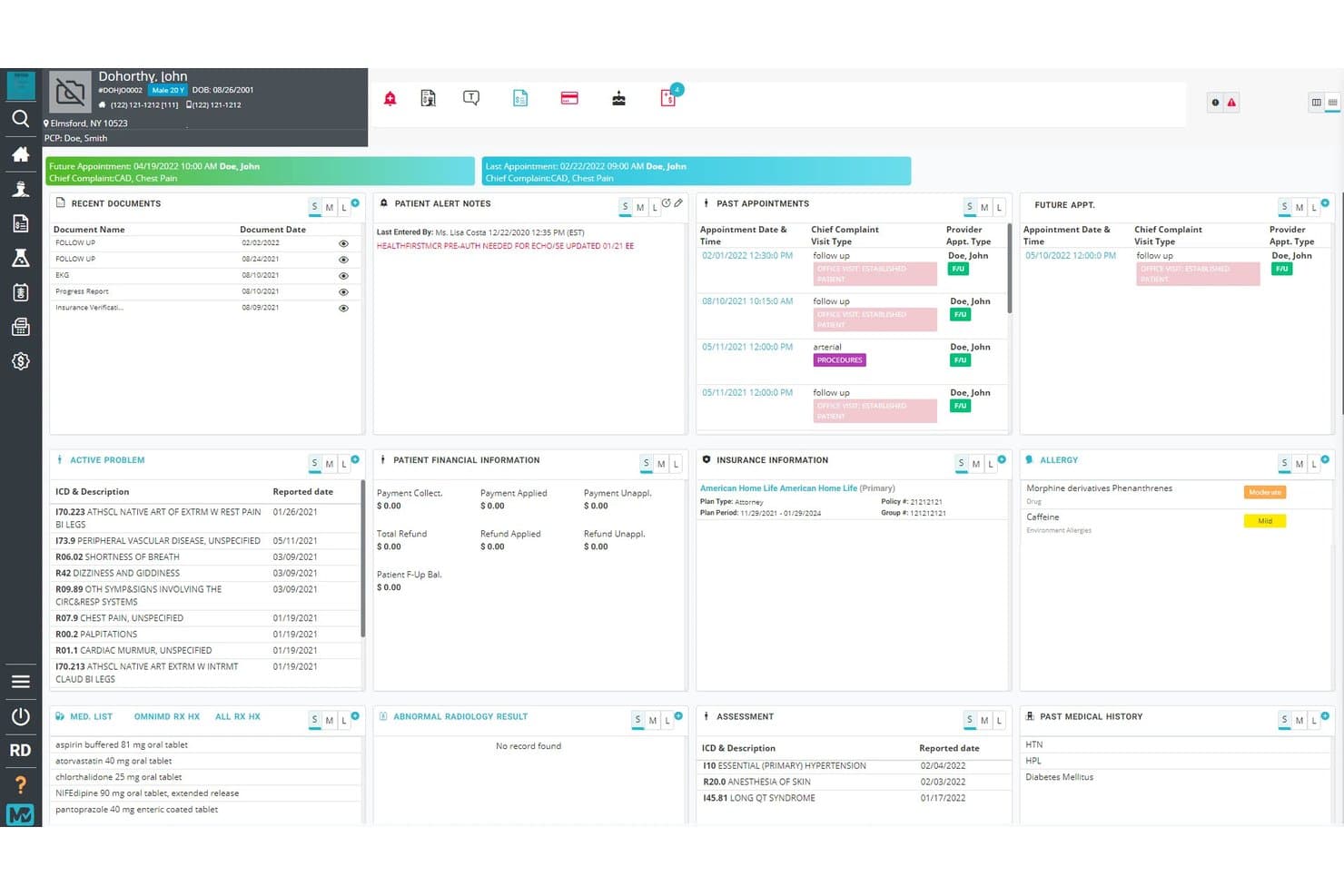
OmniMD centralizes patient pain history, alerts, and meds in one dashboard. OmniMD is a pain management EMR that combines AI-assisted clinical documentation, PDMP integration, opioid risk scoring, controlled substance e-prescribing, and procedure-specific billing tools.
Who Is OmniMD Best For?
OmniMD is a strong fit for pain management practices that handle high volumes of controlled substance prescribing and need automated PDMP compliance built into their daily clinical workflow.
Why I Picked OmniMD
OmniMD earns its spot on my shortlist because of how deeply its PDMP compliance and opioid risk tools are woven into the clinical workflow. I particularly like that PDMP queries run automatically when a chart opens, with results feeding directly into an opioid-safety dashboard with a timestamped audit trail. The MME tracking is just as tight: the system recalculates daily MME using CDC conversion factors in real time and blocks controlled-substance prescriptions the moment an opioid agreement lapses.
OmniMD Key Features
- AI medical scribe: Captures pain-specific terminology, carries forward pain scores and medication changes, and flags missing LCD compliance items before note sign-off.
- RFA and SCS prior authorization tools: Pulls block dates, relief percentages, spinal levels, and imaging directly into authorization requests for radiofrequency ablation and spinal cord stimulator procedures.
- Opioid Risk Tool (ORT) scoring: Scores patient opioid risk within the chart and triggers a high-risk alert, UDS scheduling, and treatment plan review when ORT and MME thresholds are crossed.
- Pain management billing support: Handles add-on codes for multi-level and bilateral procedures, tracks SCS trial-to-implant billing, and uses AI to flag undercoding and predict denial risk.
OmniMD Integrations
OmniMD integrates with DrFirst Rcopia, Surescripts, LabCorp, Quest, Epic, Cerner, athenahealth, eClinicalWorks, and Allscripts. It supports HL7, FHIR 4.0.1, and enhanced API access for custom connectivity.
Pros and Cons
Pros:
- Pain templates capture procedure documentation
- Opioid safeguards support safer prescribing workflows
- Responsive support helps resolve billing questions
Cons:
- Peak-hour lag and occasional glitches
- Reports can require custom configuration
Learn more about OmniMD: Best for robust E-prescribing functionality
- Free demo available
- Pricing upon request
Visit WebsiteCustomer Rating:4.1/5
PrognoCIS' Interface PrognoCIS is an EMR solution that offers an array of features to enhance the operations of healthcare organizations. Among its functionalities, it shines particularly for its robust E-prescribing system, facilitating secure and efficient prescription management.
Why I Picked PrognoCIS: In the process of choosing this list, my emphasis was on distinctive features, and PrognoCIS was a clear choice due to its strong E-prescribing feature. It's this impressive functionality that sets it apart from the rest. I picked PrognoCIS as the "Best for robust E-prescribing functionality" since its system offers a comprehensive, secure, and efficient solution to managing prescriptions.
Standout Features & Integrations:
PrognoCIS offers features like patient portal, EHR customization, and practice management along with its standout E-prescribing system. It has meaningful integrations with labs, pharmacies, and radiology centers which enhance the efficiency and reach of its E-prescribing feature.
Pros and Cons
Pros:
- Extensive customization options
- Meaningful integrations with labs, pharmacies, and radiology centers
- Robust E-prescribing system
Cons:
- Interface may feel outdated to some users
- Customer service feedback varies
- Higher price point compared to some competitors
Learn more about PrognoCIS: Best for comprehensive cloud-based solutions
- Free demo available
- Pricing upon request
Visit WebsiteCustomer Rating:3.6/5
AdvancedMD's Interface AdvancedMD is a top-tier EMR software that offers cloud-based solutions for pain management specialists. It provides an all-in-one platform to manage clinical, administrative, and financial aspects of your practice. Its prowess in web-based solutions makes it an optimal choice for practices seeking extensive online functionality.
Why I Picked AdvancedMD: I selected AdvancedMD for its robustness and its excellent track record in providing a full suite of online solutions. Its strength lies in its comprehensive approach - offering features that manage everything from patient engagement to billing and reporting, making it a standout among other tools. The reason I tagged it as the "Best for comprehensive cloud-based solutions" is its unparalleled functionality and accessibility from anywhere, enabling healthcare providers to manage their practice efficiently and effectively.
Standout Features & Integrations:
Among the features that make AdvancedMD shine are e-prescribing, customizable templates, a patient portal, and telemedicine capabilities. Its practice management tool integrates patient demographics and insurance details, while its financial suite takes care of billing, claims management, and reporting. For integrations, it works well with various medical billing services, labs, imaging centers, and hospitals.
Pros and Cons
Pros:
- Customizable to practice needs
- Integrated suite of practice management tools
- Extensive cloud-based functionality
Cons:
- Customer service feedback is mixed
- Complex interface may require a learning curve
- Expensive starting price
 Best for outsourced pain billing and PDMP checks
- Free demo available
- Pricing upon request
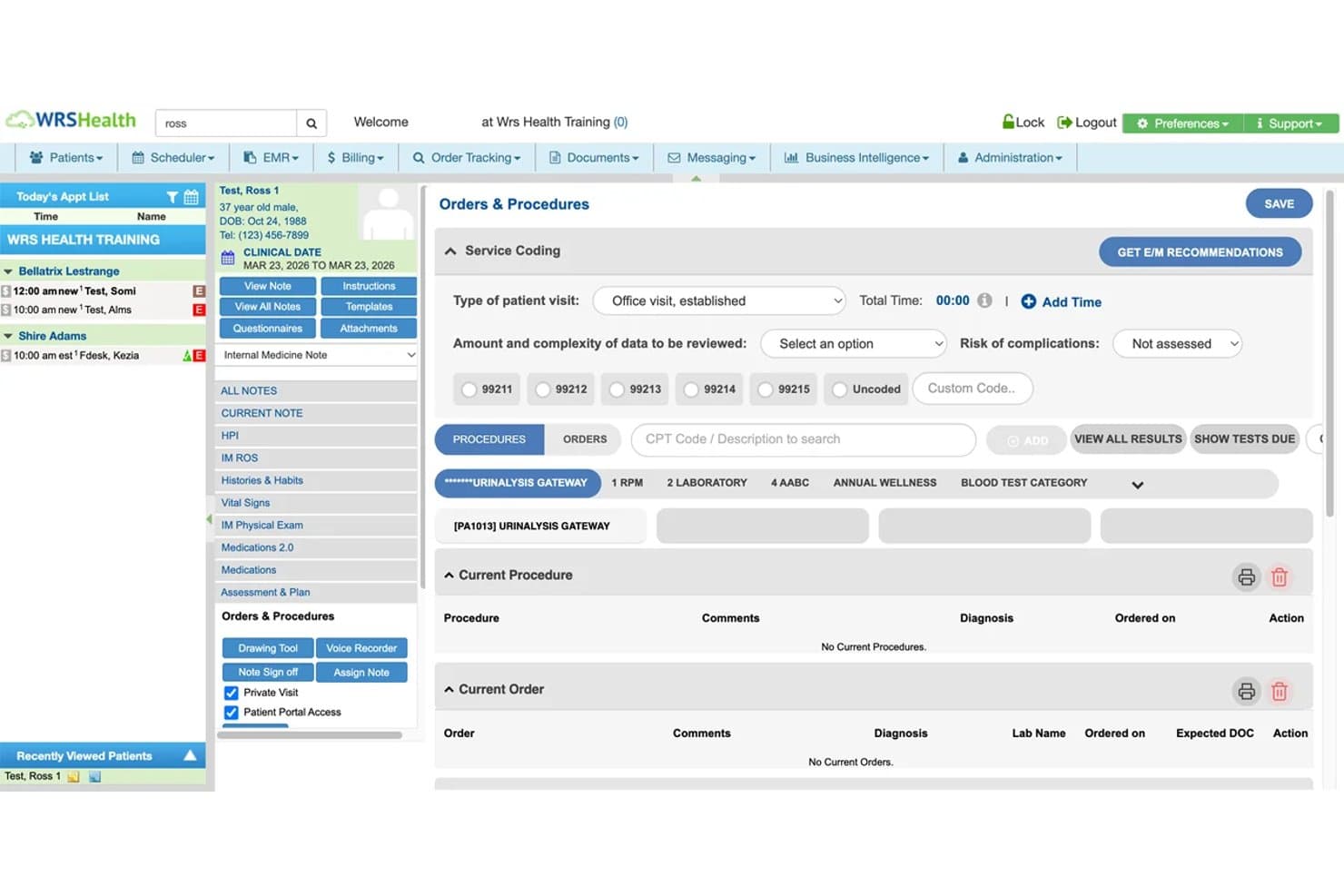
WRS Health streamlines pain visit orders and procedure tracking. WRS Health is a cloud-based pain management EMR that combines clinical documentation, e-prescribing with built-in PDMP monitoring, procedure workflow tracking, and outsourced revenue cycle management.
Who Is WRS Health Best For?
WRS Health is a strong fit for pain management practices that want to offload billing to specialists while keeping PDMP compliance built directly into their prescribing workflow.
Why I Picked WRS Health
I've included WRS Health in my top picks because its PDMP workflow is genuinely built into the prescribing moment, not bolted on as an afterthought. Every time a controlled substance is prescribed, the system automatically queries the PMP database and surfaces NarxCare risk scores for opioids, stimulants, and sedatives before the prescriber signs. Pair that with a dedicated outsourced billing team that specializes in pain-specific coding like nerve blocks, spinal injections, and RFA, and you get serious compliance and revenue support in one platform.
WRS Health Key Features
- Pain management templates: Pre-loaded clinical note templates for acute pain, osteoarthritis, rheumatoid arthritis, and procedure types like nerve blocks and trigger point injections.
- Surgical workflow engine: Tracks in-office procedures from pre-op authorization and consent through intraoperative notes to post-procedure billing timelines.
- Risk mitigation module: Monitors follow-through on referrals, treatment plans, and patient communications, with built-in coding risk checks to flag billing inconsistencies before claims go out.
- AI Scribe (WRS MobileMD): Generates AI-assisted documentation for evaluations, procedures, and post-op visits, including AI summaries of outside clinical records via CCDA Insights.
WRS Health Integrations
WRS Health integrates with PMP Gateway, Bamboo Health NarxCare, Surescripts, MDToolBox, and EMR Direct phiMail for prescribing, PDMP checks, EPCS, and secure messaging. It also supports FHIR APIs, CCDA Insights, lab connections, imaging links, and custom interoperability.
Pros and Cons
Pros:
- Reviewers praise customizable clinical templates
- PDMP checks support prescribing compliance
- Outsourced billing covers pain procedures
Cons:
- No built-in opioid risk assessments
- No pain-score trend tracking
Learn more about WRS Health: Best for comprehensive revenue cycle management
- Free demo available
- From $250/month

RevenueXL's Interface RevenueXL is a pain management EMR and practice management platform that pairs EHR clinical documentation—including pain assessment templates, anatomical diagrams, and controlled substance prescribing—with integrated billing and revenue cycle services.
Who Is RevenueXL Best For?
RevenueXL is a strong fit for pain management practices where the billing and administrative team needs a single vendor handling both the EHR and revenue cycle operations.
Why I Picked RevenueXL
I picked RevenueXL as one of the best because it's the only option on my list that bundles EHR software with fully outsourced billing, which matters when a pain practice can't afford to split focus between clinical documentation and collections. I like that its billing services include denial follow-up at 30 days and coding audits, keeping pain-specific CPT codes clean from submission to payment. The EPCS and PDMP connectivity through PrognoCIS also give prescribers a controlled-substance workflow that's built into the same system handling claims.
RevenueXL Key Features
- Anatomical body diagrams: Mark injection sites and symptoms directly on anatomical diagrams within the clinical chart.
- EPCS with two-factor authentication: Send controlled-substance prescriptions electronically using IdenTrust's two-factor login, with no extra hardware required.
- Patient portal with health record access: Patients can view medications, results, and treatment plans, and submit forms or messages between visits.
- Prior authorization tracking: Request, track, appeal, and document payer approvals for procedures, with approvals linked directly to orders and claims.
RevenueXL Integrations
RevenueXL integrates with Surescripts, First Databank, OptimizeRx, Office Ally, Gateway, TriZetto Provider Solutions, and Amazon Web Services. It also supports HL7, PACS connections, and an open API for custom integrations.
Pros and Cons
Pros:
- Outsourced billing includes denial follow-up
- Reviewers praise configurable pain workflows
- Pain templates support injection-site documentation
Cons:
- Reviewers report too many claim-submission steps
- No documented procedure-room scheduling workflows
Learn more about RevenueXL: Best for multi-site ASC and clinic EHR scaling
- Free demo available
- Pricing upon request
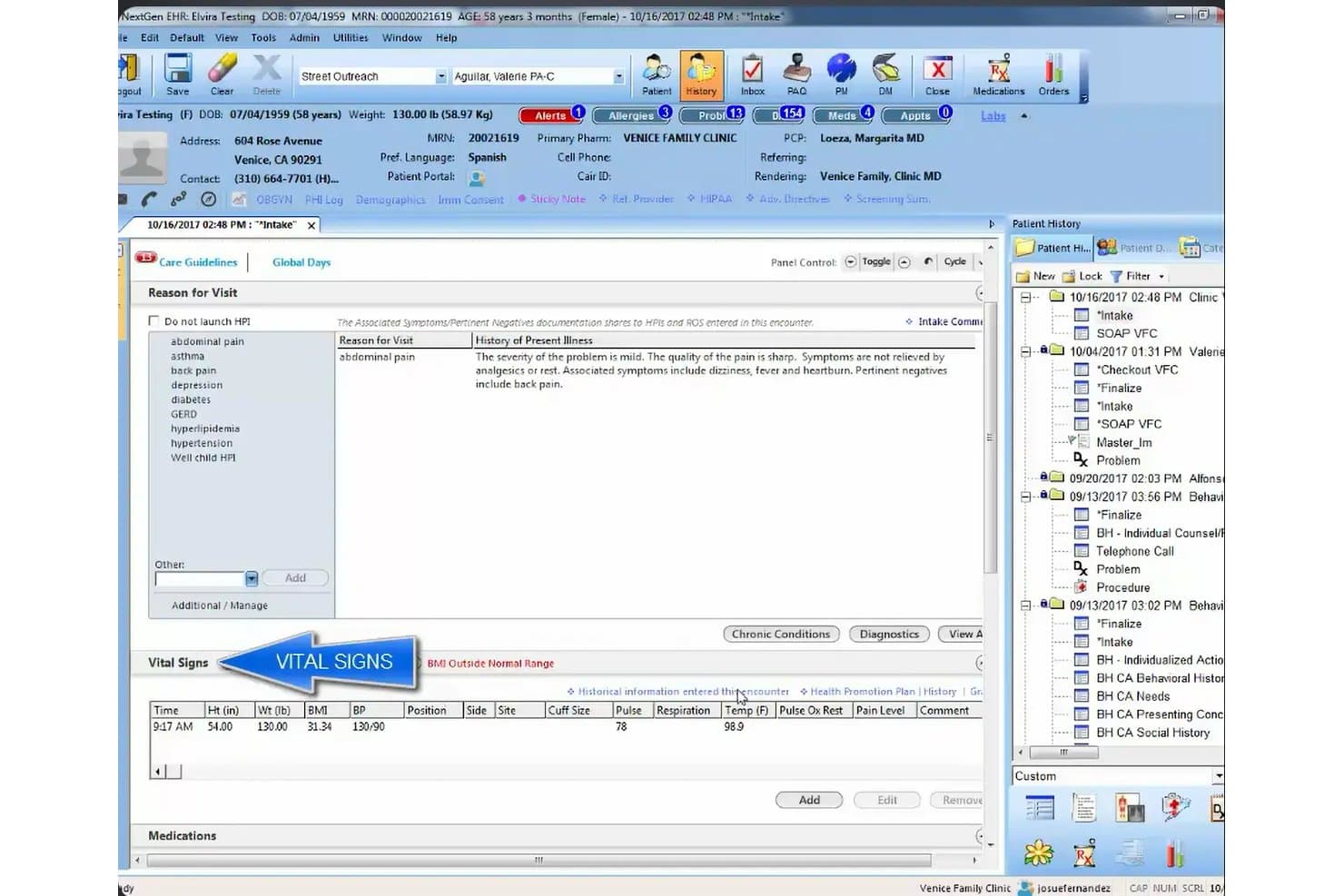
NextGen tracks vitals and pain history for streamlined patient intake. NextGen is a cloud-based EHR and practice management platform that combines clinical documentation, controlled substance prescribing, PDMP integration, procedure scheduling, and billing tools for ambulatory and multi-site pain management practices.
Who Is NextGen Best For?
NextGen fits multi-site pain practices and ambulatory surgery centers that need centralized controlled substance oversight across locations, from PDMP checks to MME threshold alerts.
Why I Picked NextGen
I picked NextGen as one of the best because its controlled substance compliance tooling is genuinely built for multi-site operations. I particularly like that administrators can enforce PDMP checks as a required step before any refill goes through, pulling NarxCare scores directly from Bamboo Health's PMP Gateway without leaving the prescribing workflow. On top of that, the MME calculation runs automatically across all active opioids and fires an alert when a patient crosses the CDC risk threshold, which matters when your prescribers are spread across multiple clinic locations.
NextGen Key Features
- Joint aspiration and injection template: Documents injections, aspirations, and trigger point injections, including consent, medication setup, and patient-response fields that feed directly into billing.
- Ambient Assist AI documentation: Converts the provider-patient conversation into a structured SOAP note for review, reducing manual charting time after each visit.
- Ambulatory surgery center scheduling: Books rooms, resources, and multi-provider procedure blocks with real-time wait-listing and prior-authorization tools built into the scheduling workflow.
- Charge Review Rules Engine: Applies specialty-specific billing rules between the EHR and practice management system, automatically passing or correcting roughly 75% of charges before claim submission.
NextGen Integrations
NextGen has native integrations with Bamboo Health PMP Gateway and Surescripts, plus Waystar connectivity for clearinghouse workflows. It supports HIE exchange, FHIR APIs, and 800+ JSON REST routes for custom integrations.
Pros and Cons
Pros:
- Ambient Assist earns positive reviewer feedback
- Charge rules automate many billing corrections
- Centralized scheduling supports multi-site ASCs
Cons:
- Reviewers report slow, click-heavy navigation
- Pain workflows rely on general templates
Learn more about NextGen: Good for customizable pain management EHR templates
- Not available
- Pricing upon request
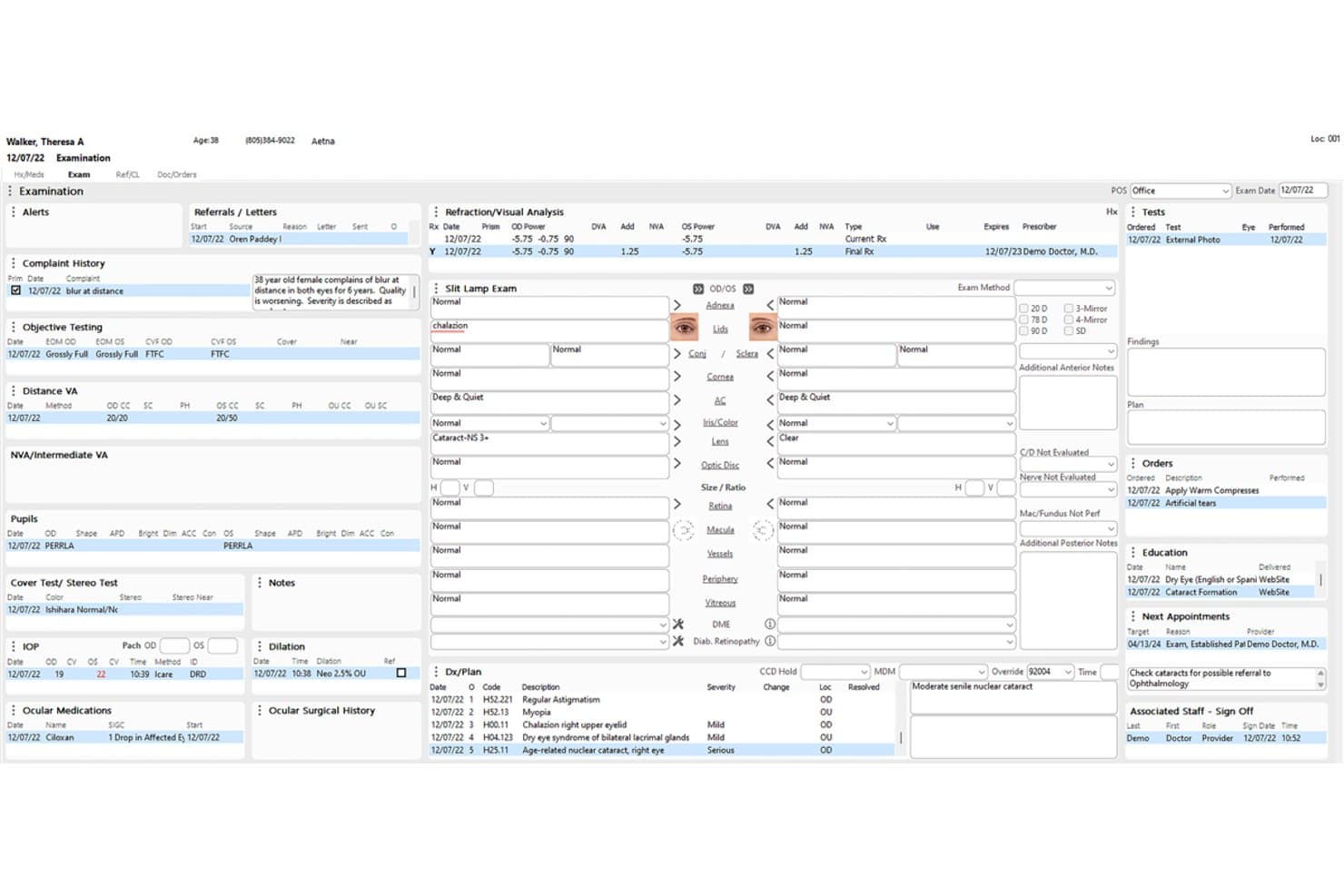
Compulink Pain Management Advantage displays a full ophthalmology patient exam record. Compulink Pain Management Advantage is a specialty EHR and practice management platform that combines customizable clinical documentation, scheduling, billing, and ASC workflow tools for pain management practices.
Who Is Compulink Pain Management Advantage Best For?
Pain management practices that also operate an ambulatory surgery center will get the most from Compulink, since it connects office and ASC workflows in a single database.
Why I Picked Compulink Pain Management Advantage
I picked Compulink Pain Management Advantage as one of the best because its customizable templates cover the full range of pain procedures, from epidural steroid injections and medial branch blocks to radiofrequency ablation and trigger point injections. The OneTab single-screen charting lets providers document an entire procedure visit without jumping between screens. I also like that the pain module and ASC Advantage share one database, so practices running an in-office surgery center don't need to reconcile records across separate systems.
Compulink Pain Management Advantage Key Features
- Standard of Care Engine: Automatically builds a pre-visit checklist of required, recommended, and optional items based on appointment type and tracks care gaps across visits.
- ASC Advantage integration: Links office and ambulatory surgery center workflows in a single database, including case scheduling, physician preference cards, and inventory management.
- AdvantageRCM outsourced billing: Assigns a dedicated U.S.-based billing team to handle claims, denials, and appeals for practices that want to offload revenue cycle work.
- Automated eligibility verification: Checks patient insurance eligibility automatically before appointments and flags issues before the visit occurs.
Compulink Pain Management Advantage Integrations
Compulink Pain Management Advantage connects with Surescripts and First Databank through AdvantageERx, plus Bamboo Health for PDMP access. It also supports HL7 connections and interfaces with labs, imaging providers, and referring providers.
Pros and Cons
Pros:
- Office and ASC records share one database
- Single-screen charting reduces duplicate documentation
- Reviewers praise configurable templates
Cons:
- Pain-specific risk and outcome tracking remain unconfirmed
- Post-update slowdowns disrupt clinic workflows
Learn more about Compulink Pain Management Advantage: Best for AI-driven pain charting and consent tools
- Free demo available
- Pricing upon request
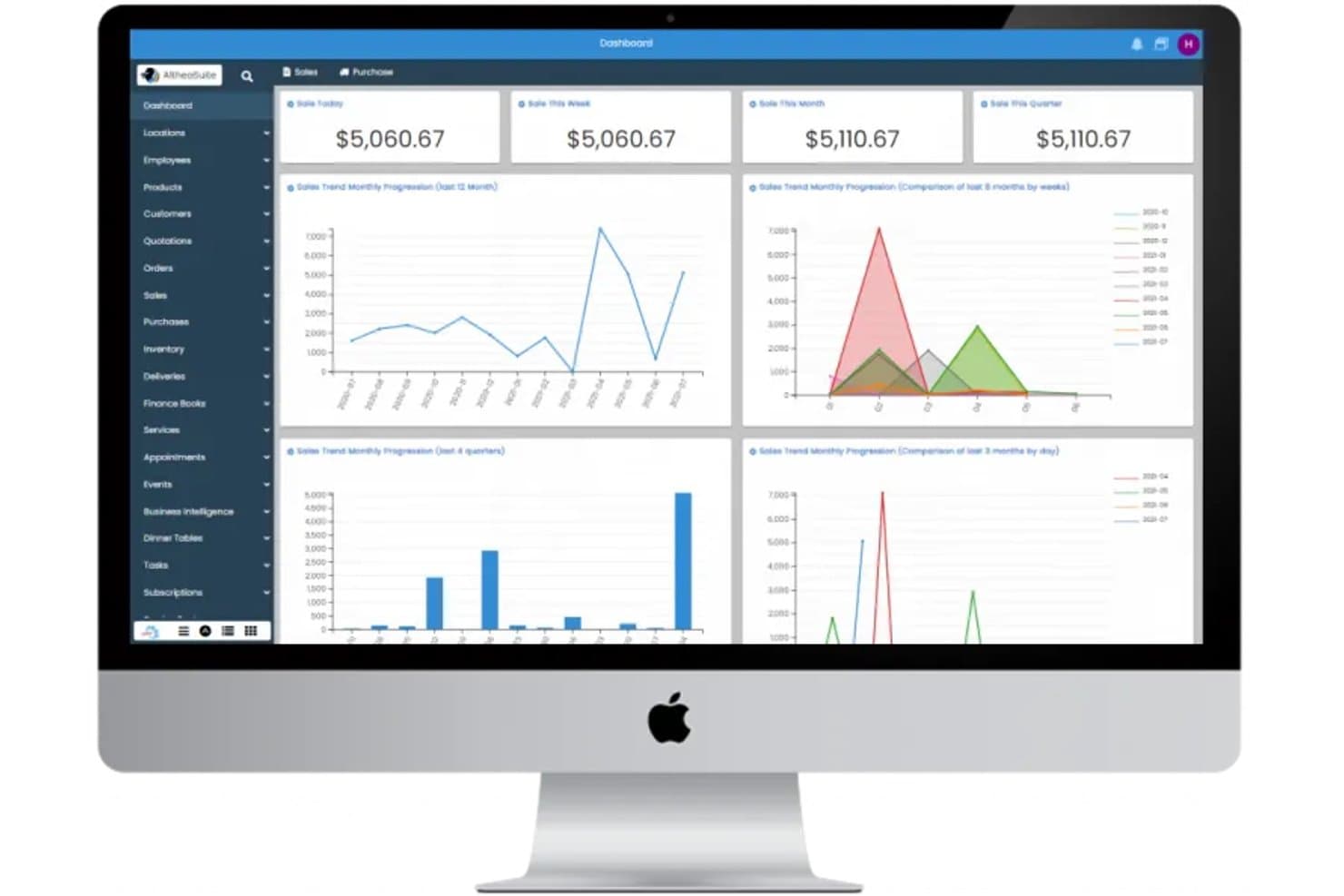
AltheaSuite is a modular, cloud-based ERP solution that will work on your PC/MAC and smartphone with all its features. AltheaSuite is an AI-powered pain management EHR that combines clinical documentation, controlled substance monitoring, opioid risk screening, EPCS, and pain-specific procedure coding into a single platform.
Who Is AltheaSuite Best For?
AltheaSuite is a strong fit for pain management physicians who need AI-assisted documentation, built-in opioid risk screening, and controlled substance compliance tools in one place.
Why I Picked AltheaSuite
AltheaSuite earns its spot on my shortlist because its AI ambient charting goes beyond generic note-taking: it actively listens to pain visits and generates structured SOAP notes with inline ICD-10 and CPT code suggestions for procedures like RFA and epidural steroid injections. I also like how built-in opioid consent forms tie directly into the ORT and SOAPP-R risk screeners, so a provider can complete a risk assessment and capture a signed opioid agreement in one workflow.
AltheaSuite Key Features
- Real-time PDMP checks: Pulls state prescription drug monitoring data automatically when a controlled substance is prescribed and records the check directly in the chart.
- MME calculator and taper planning: Tracks morphine milligram equivalents per patient and supports dose tapering so providers can manage opioid prescribing within safe thresholds.
- Pain-specific procedure note templates: Pre-built templates cover epidural steroid injections, RFA, nerve blocks, spinal cord stimulator trials, and trigger-point injections.
- Urine drug screen tracking: Manages order intervals, logs results, and flags discrepancies between test results and a patient's prescribed medications.
AltheaSuite Integrations
AltheaSuite reports 56+ partners across eight categories, including Surescripts, NewCrop, Mednet, Quest, LabCorp, Change Healthcare, Waystar, Nuance/Dragon, and Apple Health. It supports HL7, FHIR, and IHE-XCA connections, plus custom interfaces.
Pros and Cons
Pros:
- Reviewers praised responsive support and migration
- AI charting suggests ICD-10 and CPT codes
- Pain templates cover common intervention notes
Cons:
- AI billing availability remains inconsistently labeled
- No confirmed procedure-specific room or equipment scheduling
Learn more about AltheaSuite:
How I Evaluate Pain Management Software
I split my evaluation into three parts, with core functionality carrying the most weight: track controlled prescriptions and PDMP checks, and document pain assessments and procedure notes. Next, I look for differentiators such as patient-reported outcome portals. Finally, I consider beyond-feature factors, including specialty-aware onboarding, ongoing support, and regulatory updates.
Core Functionality (Table Stakes For This List)
When I'm selecting tools for my list, I score each one on a scale from 0 (does not offer the functionality) to 5 (excels in this area) for each core functionality listed below. I then convert the total into a percentage to help assess each tool's overall fit, with extra weight on any functionalities I’ve deemed essential.
- Controlled Substance Monitoring (Essential): I check for prescription tracking, PDMP access or documented checks, prescribing alerts, and review records that support compliance.
- Pain-Specific Documentation (Essential): Look for structured pain assessments, treatment histories, and procedure notes for injections or nerve blocks—not just generic clinical notes.
- Treatment & Outcome Tracking: Check whether plans carry across visits and capture patient-reported measures, so clinicians can compare pain and function over time.
- Procedure Scheduling: I assess distinct workflows for injections and nerve blocks, including room or equipment needs and pre- and post-procedure steps.
- Billing & Coding Support: Check for pain-related CPT and HCPCS codes, coding guidance, claim edits, and denial workflows tied to services provided.
- Opioid Risk Assessment: Look for scored tools such as ORT or SOAPP in patient records, with results visible during prescribing decisions.
Once I have a list of tools that meet the criteria, I consider what sets each platform apart.
Differentiating Factors (What Sets Vendors Apart)
Here's how I compare and contrast different vendors:
Standout Features
I look for patient-reported outcome portals that let patients log pain levels and functional status between visits. When a clinician opens a chart, that data should already be there—not buried in a separate system. Anatomical charting tools matter just as much; I check whether body maps let you mark injection sites and pain locations visually, which speeds up procedure documentation. I also evaluate ASC workflow support, including pre-op and post-op documentation tied to scheduling and resource tracking.
Beyond Features
I evaluate how quickly vendors push regulatory updates when prescribing laws change, since a missed PDMP mandate can expose your practice to audit risk. Interoperability matters just as much—I check for bidirectional connections with major EHRs, imaging systems, and EPCS platforms, because duplicate data entry increases the chance of missing a risk indicator. I also look at onboarding support from teams with specialty experience, especially around procedure documentation and controlled substance workflows.
Slik velger du EMR-programvare for smertebehandling
Det er lett å gå seg vill i lange funksjonslister og komplekse prisstrukturer. For å hjelpe deg med å holde fokus mens du arbeider deg gjennom den unike prosessen med å velge programvare, har vi laget en sjekkliste over faktorer du bør ha i tankene:
| Faktor | Hva du bør vurdere |
|---|---|
| FaktorSkalerbarhet | Hva du bør vurdereVil programvaren vokse sammen med praksisen din? Vurder fremtidig ekspansjon og et økende antall pasienter. Se etter verktøy som tilbyr fleksible priser og skalerbarhet for brukere. |
| FaktorIntegrasjoner | Hva du bør vurdereFungerer den sammen med de nåværende systemene dine? Kontroller kompatibilitet med eksisterende maskinvare, fakturerings- og timebestillingsprogramvare. |
| FaktorTilpasningsmuligheter | Hva du bør vurdereKan du tilpasse programvaren til behovene dine? Se etter muligheter for å tilpasse skjemaer, arbeidsflyter og rapporter slik at de passer til praksisens unike krav. |
| FaktorBrukervennlighet | Hva du bør vurdereEr grensesnittet intuitivt for teamet ditt? Sørg for at det kreves minimalt med opplæring, og at utformingen støtter effektiv oppgavehåndtering. |
| FaktorImplementering og introduksjon | Hva du bør vurdereHvor lang tid vil det ta å komme i gang? Vurder tiden som kreves for datamigrering og opplæring av ansatte. Se etter leverandører med gode støtteressurser. |
| FaktorKostnad | Hva du bør vurdereEr prisene transparente og innenfor budsjettet? Vurder de totale kostnadene, inkludert oppstartsgebyrer, månedlige avgifter og eventuelle skjulte kostnader. |
| FaktorSikkerhetstiltak | Hva du bør vurdereHvordan beskytter den pasientdata? Se etter samsvar med HIPAA og andre relevante forskrifter, og undersøk praksisen for kryptering og sikkerhetskopiering av data. |
Hva er EMR-programvare for smertebehandling?
EMR-programvare for smertebehandling er utviklet for å hjelpe helsepersonell med å administrere pasientjournaler, behandlingsplaner og fakturering i smertebehandlingspraksiser. Den brukes vanligvis av leger, terapeuter og administrativt personale, og skaper verdi ved å forbedre effektiviteten og pasientbehandlingen.
Timeplanlegging, datasikkerhet og tilpassbare maler støtter effektiv praksisadministrasjon og etterlevelse av regelverk. Samlet sett forbedrer disse verktøyene organisasjonens evne til å levere effektive smertebehandlingstjenester.
Funksjoner
Når du velger EMR-programvare for smertebehandling, bør du se etter følgende viktige funksjoner:
- Administrasjon av pasientjournaler: Organiser og få effektiv tilgang til pasientinformasjon for å forbedre koordineringen av behandlingen.
- Timeplanlegging og avtaler: Effektiviser bestillingsprosesser og reduser antallet pasienter som ikke møter opp, med automatiske påminnelser.
- Fakturering og fakturautstedelse: Forenkle økonomiske transaksjoner og sørg for nøyaktig fakturering med integrerte verktøy.
- Datasikkerhet: Beskytt sensitiv pasientinformasjon med kryptering og overholdelse av regelverk som HIPAA.
- Tilpassbare maler: Tilpass skjemaer og rapporter slik at de dekker de spesifikke behovene i praksisen din.
- Mobil tilgang: Gjør det mulig for helsepersonell å få tilgang til informasjon og håndtere oppgaver mens de er på farten.
- Analyse og rapportering: Generer innsikt med sanntidsdata for å støtte beslutningstaking og følge med på resultater.
- Integrasjonsmuligheter: Koble til eksisterende systemer og enheter for en helhetlig arbeidsflyt.
- Verktøy for smertevurdering: Bruk spesialiserte verktøy til å evaluere og dokumentere pasientens smertenivå nøyaktig.
- Opplærings- og støtteressurser: Få tilgang til veiledninger, webinarer og støtte for å sikre en problemfri innføring og bruk.
Fordeler
Implementering av EMR-programvare for smertebehandling gir flere fordeler for teamet og virksomheten din. Her er noen av fordelene du kan se frem til:
- Forbedret effektivitet: Automatiser oppgaver knyttet til timeplanlegging og fakturering for å spare tid og redusere den administrative arbeidsbelastningen.
- Bedre pasientbehandling: Få rask tilgang til omfattende pasientjournaler, noe som legger til rette for bedre behandlingsbeslutninger og kontinuitet i behandlingen.
- Datadrevet innsikt: Bruk analyse og rapportering til å ta informerte beslutninger og optimalisere praksisens resultater.
- Økt etterlevelse: Sørg for datasikkerhet og overholdelse av regelverk med innebygde sikkerhetstiltak og kryptering.
- Tilpassbare arbeidsflyter: Tilpass maler og prosesser slik at de dekker praksisens unike krav, og forbedre produktiviteten.
- Fjerntilgang: Få tilgang til pasientinformasjon og håndter oppgaver hvor som helst med mobile funksjoner.
- Bedre pasientinvolvering: Bruk påminnelser og kommunikasjonsverktøy for å holde pasientene informert og involvert i egen behandling.
Kostnader og priser
Ved valg av EMR-programvare for smertebehandling er det nødvendig å forstå de ulike prismodellene og abonnementene som er tilgjengelige. Kostnadene varierer basert på funksjoner, teamstørrelse, tillegg og mer. Tabellen nedenfor oppsummerer vanlige abonnementer, gjennomsnittsprisene deres og typiske funksjoner som er inkludert i EMR-programvareløsninger for smertebehandling:
Sammenligningstabell for abonnementer for EMR-programvare for smertebehandling
| Abonnementstype | Gjennomsnittspris | Vanlige funksjoner |
|---|---|---|
| AbonnementstypeGratisabonnement | Gjennomsnittspris$0 | Vanlige funksjonerGrunnleggende administrasjon av pasientjournaler, timeplanlegging og begrenset støtte. |
| AbonnementstypePersonlig abonnement | Gjennomsnittspris$20-$50/bruker/måned | Vanlige funksjonerAdministrasjon av pasientjournaler, timeplanlegging, faktureringsfunksjoner og støtte via e-post. |
| AbonnementstypeBedriftsabonnement | Gjennomsnittspris$50-$100/bruker/måned | Vanlige funksjonerAvansert rapportering, tilpassbare maler, datasikkerhetsfunksjoner og telefonstøtte. |
| AbonnementstypeVirksomhetsabonnement | Gjennomsnittspris$100+/bruker/måned | Vanlige funksjonerFullstendige integrasjonsmuligheter, avansert analyse, etterlevelsesadministrasjon og dedikert kontostøtte. |
Vanlige spørsmål om EMR-programvare for smertebehandling
Her er noen svar på vanlige spørsmål om EMR-programvare for smertebehandling:
Hvordan forbedrer EMR-programvare for smertebehandling pasientutfall?
EMR-programvare for smertebehandling forbedrer pasientutfall ved å gi helsepersonell omfattende pasientdata som bidrar til å tilpasse behandlingsplaner. Den sikrer nøyaktig sporing av pasientens fremgang og legger til rette for sømløs kommunikasjon mellom behandlingsteam, noe som fører til bedre informerte beslutninger og effektive behandlingsstrategier.
Kan EMR-programvare for smertebehandling integreres med eksisterende systemer?
Ja, det meste av EMR-programvaren for smertebehandling kan integreres med eksisterende helsesystemer, for eksempel systemer for fakturering, timeplanlegging og laboratoriearbeid. Integrasjon sikrer en helhetlig arbeidsflyt, reduserer manuell dataregistrering og minimerer feil, noe som er avgjørende for å opprettholde effektivitet og nøyaktighet i driften av medisinsk praksis.
Hva bør jeg vite om datasikkerhet i EMR-programvare for smertebehandling?
Når du vurderer datasikkerhet, bør du sikre at programvaren overholder HIPAA-regelverket og tilbyr kryptering av lagrede og overførte data. Vurder leverandørens historikk når det gjelder datainnbrudd, samt rutinene deres for håndtering av sensitiv informasjon. Sikkerhetstiltak beskytter pasientenes personvern og bygger tillit hos pasientene dine.
Hvor brukervennlig er EMR-programvare for smertebehandling?
Brukervennligheten varierer, men se etter programvare med et intuitivt grensesnitt og minimale opplæringskrav. Et brukervennlig system bør gi rask tilgang til pasientinformasjon og enkel navigering mellom funksjonene, noe som bidrar til å redusere læringskurven og forbedre de ansattes effektivitet.
Hvilke brukerstøttealternativer er tilgjengelige for EMR-programvare for smertebehandling?
Brukerstøttealternativene omfatter vanligvis støtte via telefon, e-post og direktechat. Noen leverandører tilbyr dedikerte kundeansvarlige eller brukerstøtte døgnet rundt. Vurder hvor raskt og tilgjengelig brukerstøtteteamet er, ettersom pålitelig støtte er avgjørende for å løse problemer raskt og minimere nedetid.
Finnes det gratis alternativer for EMR-programvare for smertebehandling?
Selv om det finnes enkelte gratis alternativer for EMR-programvare, er de vanligvis svært grunnleggende og tilbyr kanskje ikke de spesifikke funksjonene som trengs i en smertebehandlingspraksis. Gratisversjoner brukes ofte som et utgangspunkt av små praksiser, med planer om å oppgradere til en betalingsversjon etter hvert som praksisen vokser. Det anbefales å undersøke all gratis EMR-programvare grundig for å sikre at den dekker praksisens behov på en tilstrekkelig måte.