

Jane App dekker timeplanlegging, journalføring, fakturering og pasientkommunikasjon, men funksjonene dekker kanskje ikke behovene til alle klinikker, særlig når det gjelder håndtering av forsikringskrav, spesifikke dokumentasjonskrav for ulike fagområder eller hjemmebesøk. Etter å ha utviklet Symphony Health MD fra en enkeltmannspraksis til et team på 15 leger har jeg sett hvordan de administrative kravene endrer seg når en praksis vokser.
I denne veiledningen sammenligner jeg alternativer til Jane App basert på kliniske arbeidsflyter, faktureringsmuligheter, verktøy for pasienthåndtering og støtte for ulike behandlingsmodeller, slik at du kan finne ut hvilken plattform som dekker klinikkens spesifikke behov.
Hva er Jane App?
Jane er en nettbasert plattform for praksisadministrasjon og et elektronisk pasientjournalsystem (EMR) for helse- og velværeklinikker. Den kombinerer timeplanlegging og nettbasert bestilling med journalføring, inntaksskjemaer, pasientkommunikasjon, fakturering, betalinger og telehelse. Praksiser kan bruke systemet til å håndtere behandlings- og administrative arbeidsflyter på ett sted, med funksjoner som er utviklet for alt fra enkeltpraktiserende behandlere til klinikker med flere lokasjoner.
Sammenligningstabell: alternativer til Jane App
Sammenlign priser og spesifikasjoner side om side for alternativene til Jane App på kortlisten min.
| Tool | Best For | Trial Info | Price | ||
|---|---|---|---|---|---|
| 1 | Best for home visits with travel buffers | 14-day free trial | From $28.05/month (billed annually) | Website | |
| 2 | Best for aesthetic treatment documentation | Free demo available | Pricing upon request | Website | |
| 3 | Best for virtual care between visits | 14-day free trial | From $19.99/month | Website | |
| 4 | Best for Canadian and US insurance billing | Free demo available | From $55/month | Website | |
| 5 | Best for behavioral health practices | Free demo available | Pricing upon request | Website | |
| 6 | Best for chiropractic insurance billing | Free demo available | Pricing upon request | Website | |
| 7 | Best for insurance billing and charting | Free demo available | Pricing upon request | Website | |
| 8 | Best for insurance billing and clinical care | Free demo available | Pricing upon request | Website | |
| 9 | Best for group sessions with linked client notes | 30-day free trial | From $24.95/user/month | Website | |
| 10 | Best for insurance-based practice billing | Free demo available | Pricing upon request | Website |


Hvorfor du kan stole på våre programvareanbefalinger
6,700+
Reviews
20
Industry experts
16+
Evaluation factors
14
Years
Teamet vårt har testet og anmeldt programvare siden 2012. Vi leder selv legekontorer, så vi vet hvor vanskelig og hvor viktig det er å velge riktig programvare.
I denne guiden har vi vurdert verktøyene gjennom praktisk testing og uavhengig research og gitt dem poeng ut fra våre utvelgelseskriterier.
Anmeldelsene våre bygger på vår egen redaksjonelle vurdering. De er ikke et salgsargument.
Anmeldelser av alternativer til Jane App
Nedenfor finner du mine anmeldelser av alternativene til Jane App på kortlisten min. Jeg gjennomgår funksjonene til hver plattform, støtte for fakturering og hvor godt de passer til ulike behandlingsmodeller, slik at du kan velge det riktige alternativet for praksisen din.
 Best for home visits with travel buffers
- 14-day free trial
- From $28.05/month (billed annually)
Visit WebsiteCustomer Rating:4.8/5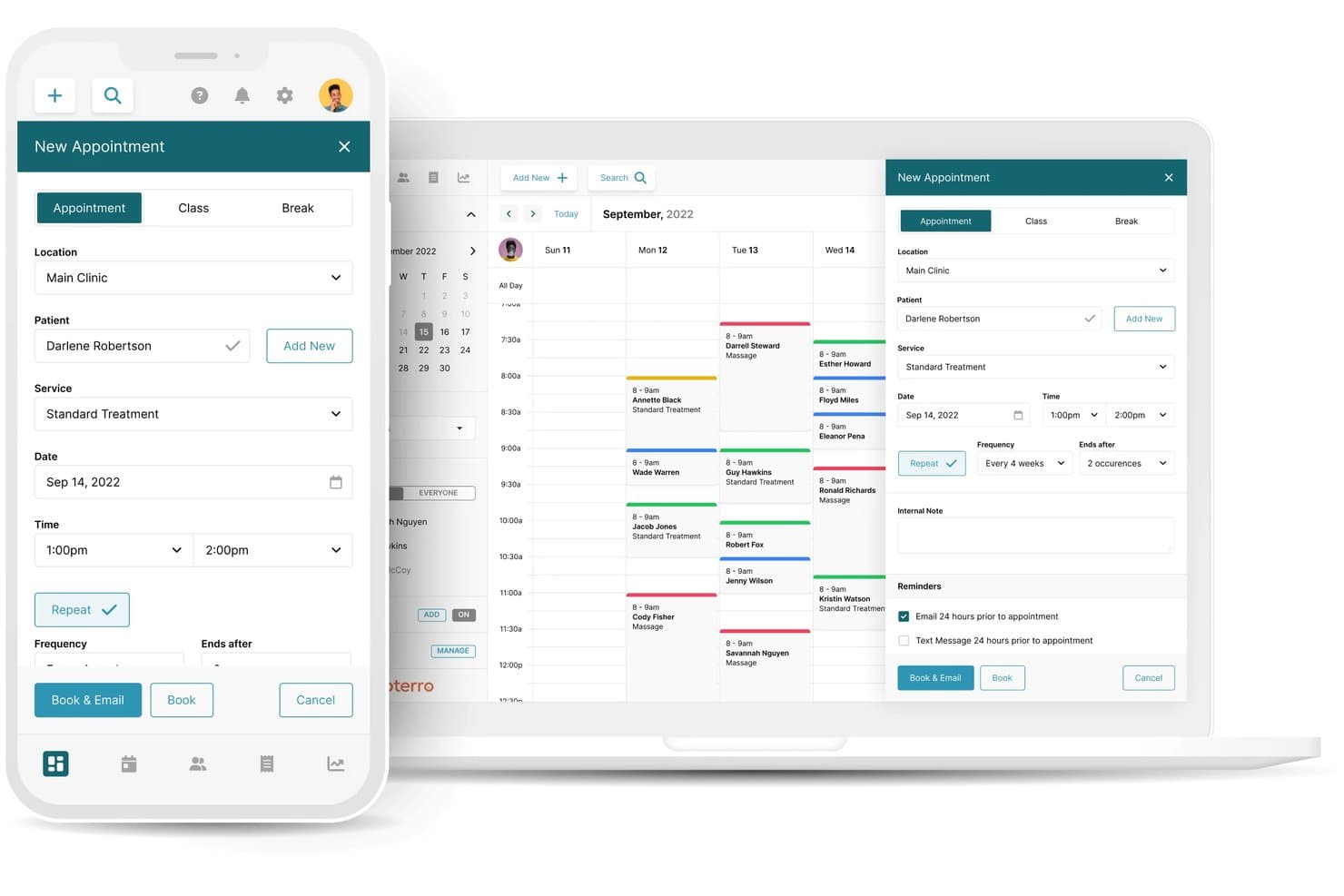
Noterro handles allied health scheduling, SOAP charting, billing, online booking, and mobile visits. Noterro is a cloud-based practice management platform for allied health clinics and independent practitioners that provides appointment scheduling, SOAP charting, billing, online booking, and mobile practice management tools.
Who Is Noterro Best For?
Noterro fits mobile allied health practitioners who conduct home visits and need to manage travel time, service areas, and patient appointments across different locations.
Why Noterro Is a Good Jane App Alternative
I picked Noterro because its Noterro GO features address the scheduling challenges of practitioners who travel between patient appointments. I like that you can define service areas, establish distance limits, and allocate travel time between visits to prevent scheduling conflicts. Its mobile interface also provides appointment details, route navigation, and patient communication options while you're on the move. These capabilities make Noterro a strong Jane App alternative for practitioners managing home visits alongside their regular clinical work.
Noterro Key Features
- Charting templates: Create SOAP notes using reusable templates and orthopedic assessment forms.
- Digital intake forms: Collect patient information and medical histories through customizable online forms.
- Insurance billing: Submit electronic insurance claims through TELUS eClaims or Availity.
- Patient portal: Give patients access to online booking, intake forms, clinical notes, invoices, and receipts.
Noterro Integrations
Noterro connects with Mailchimp, Google Calendar, Google Translate, Square, Shift4, TELUS eClaims, and Availity. TELUS eClaims is available for Canadian practitioners, while Availity supports insurance claims in the United States. Noterro does not currently advertise native Zapier or Make connections or a public API for custom integrations.
Pros and Cons
Pros:
- SOAP templates support clinical documentation
- Mobile service areas restrict booking geography
- Travel buffers fit home-visit schedules
Cons:
- Users report browser lag and duplicate invoices
- Reporting gaps limit receivables and return-visit tracking
Learn more about Noterro: Best for aesthetic treatment documentation
- Free demo available
- Pricing upon request
Visit WebsiteCustomer Rating:4.7/5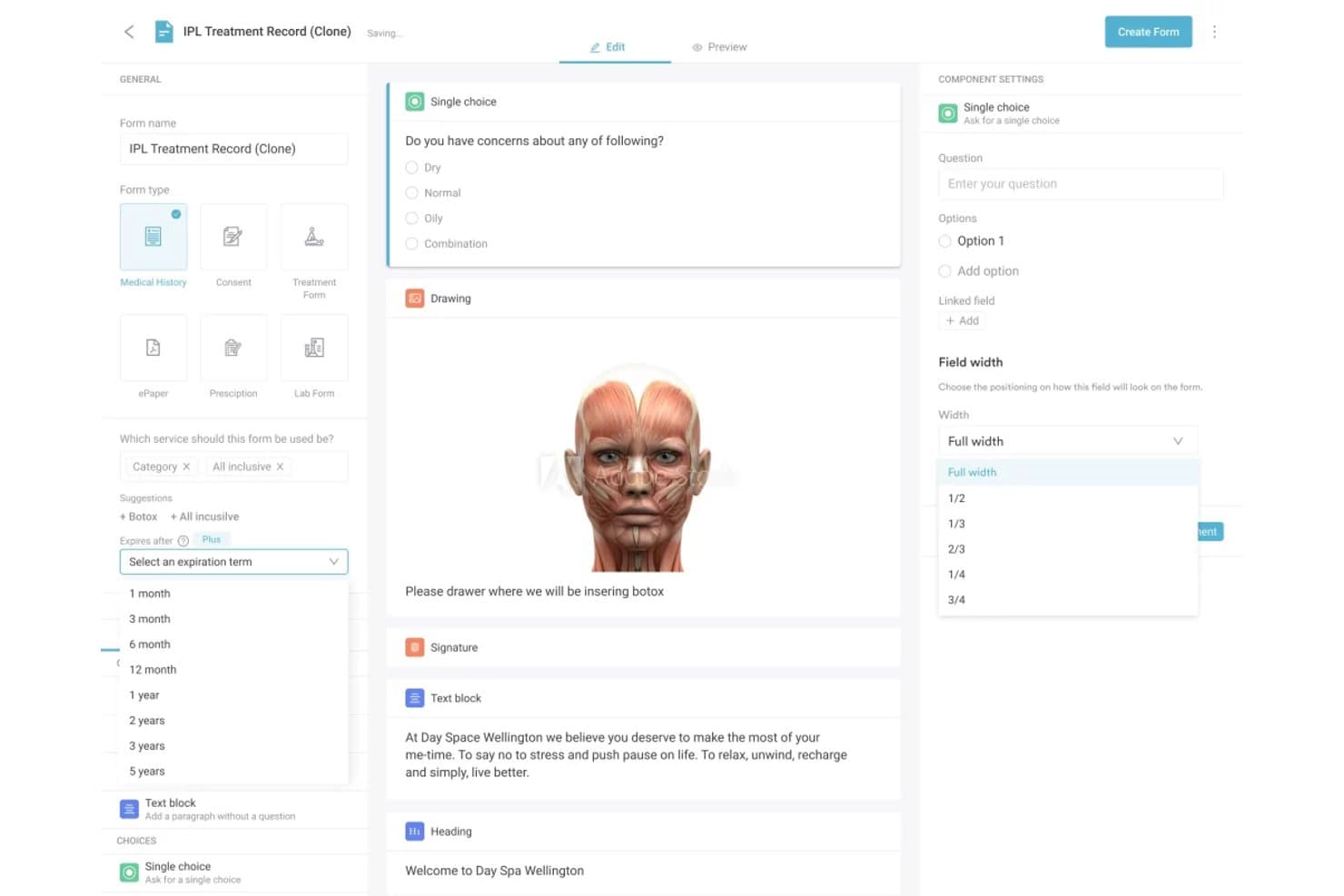
Pabau equips aesthetic clinics with clinical charting, scheduling, patient records, custom medical forms, digital consent forms, billing, and patient messaging. Pabau is a practice management platform for aesthetic clinics and medical spas that covers clinical documentation, appointment scheduling, patient records, consent management, billing, and patient communication.
Who Is Pabau Best For?
Pabau fits aesthetic clinics and medical spas that need to document cosmetic treatments, collect patient consent, and maintain detailed clinical records.
Why Pabau Is a Good Jane App Alternative
I picked Pabau because its clinical documentation features accommodate the specific requirements of aesthetic treatments. I like that practitioners can create structured treatment notes, record consultation details, and collect digitally signed consent forms before procedures. These documents are stored within each patient's clinical record, alongside treatment histories and before-and-after photographs. This makes Pabau a strong Jane App alternative for aesthetic clinics that need to maintain organized treatment documentation and patient consent records.
Pabau Key Features
- Online booking: Allow patients to book, reschedule, or cancel appointments through the online booking system and patient portal.
- Waitlist management: Identify available appointments after cancellations and notify waitlisted patients when matching time slots become available.
- Staff scheduling: Organize employee rotas, monitor working hours through timesheets, and calculate staff commissions.
- Memberships and packages: Create recurring memberships and prepaid treatment packages with configurable services and benefits.
Pabau Integrations
Pabau connects with Stripe for payments, Xero for accounting, HubSpot for CRM, and Google Calendar and Outlook Calendar for scheduling. Other supported connections include Google Analytics, Google Tag Manager, CloudRx, Reserve with Google, and Shopify. It also offers open APIs, webhooks, Zapier, and Make for custom integrations and workflow automation.
Pros and Cons
Pros:
- Automated aftercare supports treatment follow-up
- Before-and-after photo tracking links treatment records
- Aesthetic treatment notes support structured documentation
Cons:
- Reviewers report page refreshes and occasional outages
- Forms and service setup can take time
Learn more about Pabau: Best for virtual care between visits
- 14-day free trial
- From $19.99/month
Visit WebsiteCustomer Rating:4.4/5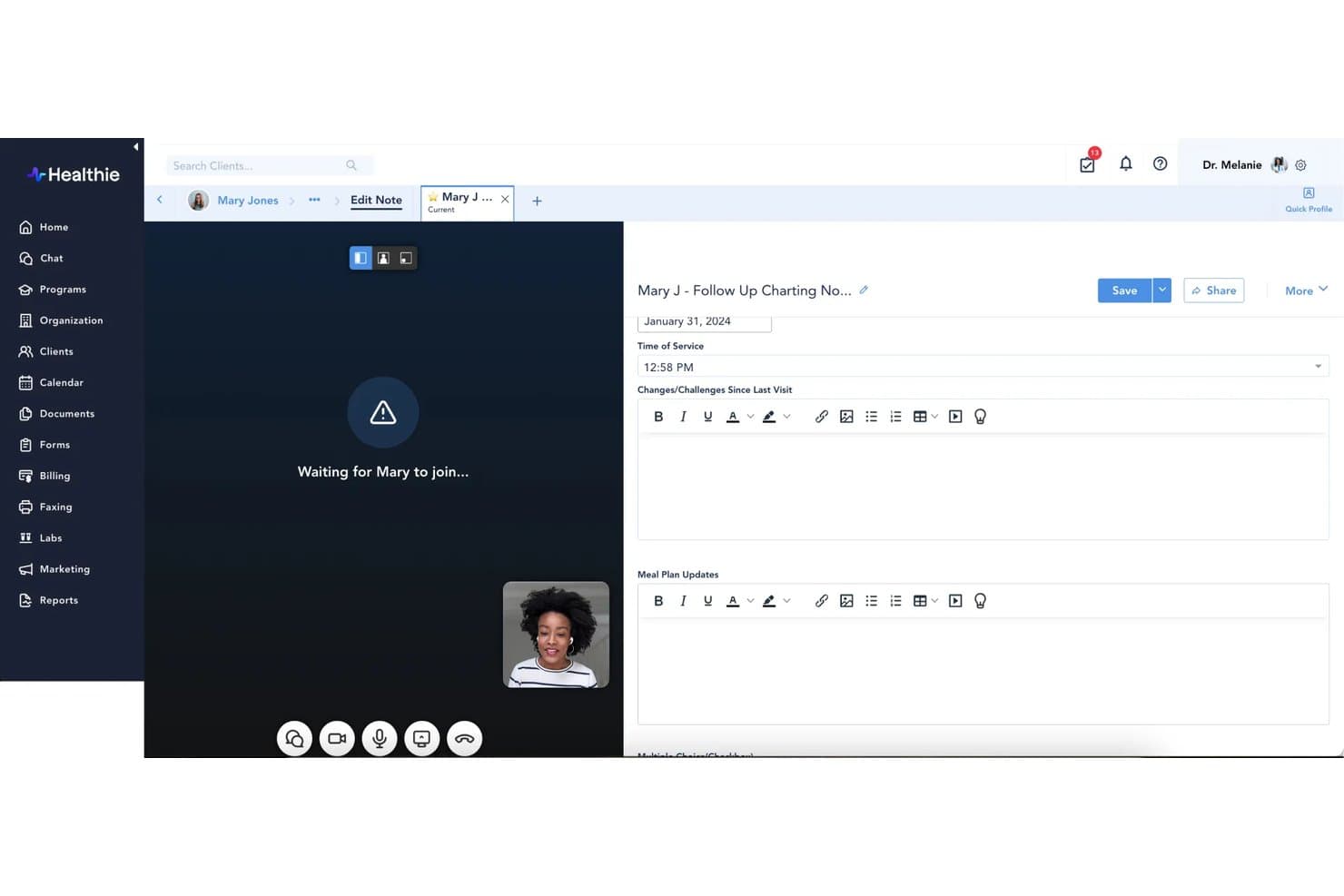
Healthie offers a split-screen telehealth interface that allows providers to conduct video visits and complete clinical charting notes simultaneously in real time. Healthie is a practice management and EHR platform for health and wellness providers that offers appointment scheduling, clinical charting, billing, telehealth, patient communication, and care plan management.
Who Is Healthie Best For?
Healthie fits health and wellness providers who need to deliver virtual consultations, monitor patient progress, and maintain communication between appointments.
Why Healthie Is a Good Jane App Alternative
I picked Healthie because its virtual care features extend beyond video appointments to ongoing patient engagement. I like that practitioners can conduct telehealth sessions while accessing patient records and clinical documentation within the same platform. Its secure messaging tools also allow patients to communicate with their care team through the portal or mobile app. Meanwhile, customizable care plans enable patients to follow treatment recommendations, record health metrics, and monitor personal goals between visits. These capabilities make Healthie a strong Jane App alternative for practices delivering ongoing virtual care.
Healthie Key Features
- Customizable intake forms: Create digital forms, automate their delivery based on appointment types, and transfer responses into patient records.
- Billing workflows: Set up recurring subscriptions, schedule payments, and collect charges for completed appointments.
- Insurance claims: Verify patient eligibility, submit claims through Claim.MD, and monitor claim rejections and denials.
- Reporting and analytics: Review billing activity, patient demographics, and program participation through reporting tools.
Healthie Integrations
Healthie connects with Fullscript for supplement recommendations, Claim.MD for insurance claims, and Change Healthcare E-Labs for laboratory ordering and results. It also supports Apple Health, Fitbit, and Google Health Connect for health data tracking. Additional connections are available through its Healthie Harbor partner ecosystem, while its public GraphQL API enables custom integrations with third-party applications.
Pros and Cons
Pros:
- Shared calendars support multi-provider scheduling
- Care plans support between-visit goal tracking
- Telehealth sessions connect with charts and scheduling
Cons:
- Team messages lack individual routing controls
- Support access and response times vary
Learn more about Healthie: Best for Canadian and US insurance billing
- Free demo available
- From $55/month
Visit WebsiteCustomer Rating:4.6/5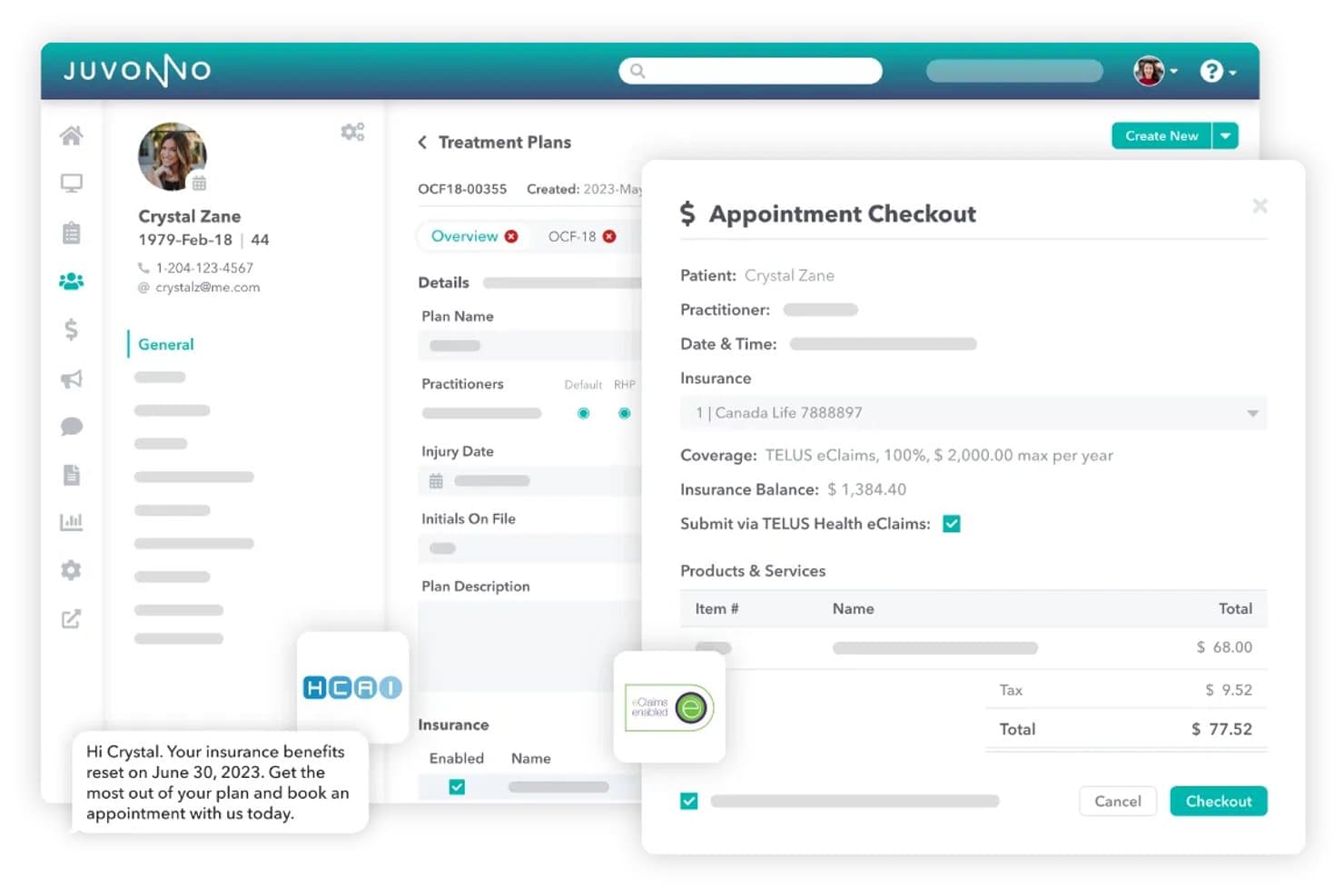
Juvonno streamlines insurance billing with TELUS eClaims integration. Juvonno is a cloud-based practice management platform for allied health clinics that provides appointment scheduling, clinical charting, patient booking, insurance billing, telehealth, and multi-location management.
Who Is Juvonno Best For?
Juvonno fits allied health clinics that need to manage private insurance claims, provincial health billing, and patient benefit coverage alongside clinical operations.
Why Juvonno Is a Good Jane App Alternative
I picked Juvonno because its insurance billing capabilities accommodate both Canadian and US healthcare practices. I like that clinics can review patient benefit coverage, monitor remaining insurance balances, and track treatment plan approvals before submitting claims. Its connections with Claim.MD, TELUS Health eClaims, and HCAI also support different insurance billing requirements, from electronic medical claims to automobile injury coverage. These capabilities make Juvonno a strong Jane App alternative for allied health clinics handling multiple insurance providers and reimbursement processes.
Juvonno Key Features
- Appointment scheduling: Organize practitioner availability and patient appointments across multiple clinic locations.
- Customizable charting: Create SOAP notes, clinical assessments, treatment plans, and digital intake forms.
- Patient portal: Allow patients to book appointments, complete intake forms, and access invoices.
- Telehealth: Conduct individual or group consultations with video, audio, and screen-sharing capabilities.
Juvonno Integrations
Juvonno supports insurance and provincial billing connections with Claim.MD, TELUS Health eClaims, HCAI, OHIP, Manitoba Health, eHealth Saskatchewan, Alberta Health, and Teleplan. It also connects with Stripe for payment processing and provides an open API for custom integrations with third-party applications.
Pros and Cons
Pros:
- Reviewers praise responsive onboarding and support
- Clinical notes and scheduling share one chart
- Insurance balances tracked alongside patient records
Cons:
- Form-building and dictation options feel limited
- Users report unsaved notes and duplicate entries
Learn more about Juvonno: Best for behavioral health practices
- Free demo available
- Pricing upon request
Visit WebsiteCustomer Rating:4.1/5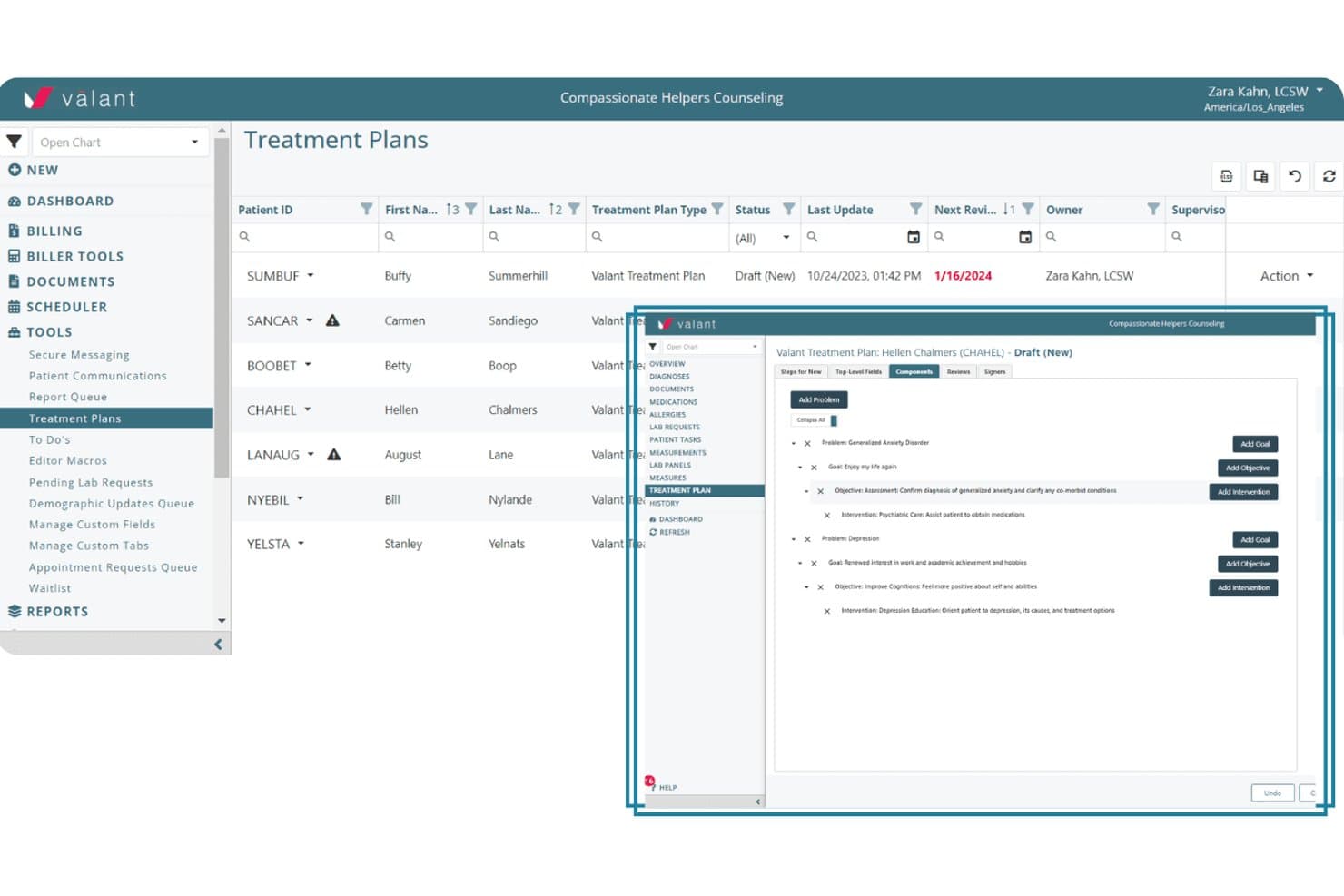
Valant lets users build structured treatment plans with goals and interventions. Valant is a behavioral health EHR and practice management platform for therapy and psychiatry practices, offering clinical documentation, treatment planning, scheduling, billing, and patient outcome tracking.
Who Is Valant Best For?
Valant fits behavioral health clinicians and practice administrators who need specialized documentation, treatment planning, and outcome tracking for therapy and psychiatric care.
Why Valant Is a Good Jane App Alternative
I picked Valant because its clinical features are designed specifically for behavioral health practices. Its documentation tools support psychiatry and therapy workflows, while customizable treatment plans and standardized outcome measures allow clinicians to monitor patient progress over time. I also like that Valant accommodates group therapy sessions and electronic prescribing, including controlled substances. These capabilities make Valant a strong Jane App alternative for practices that require behavioral health-specific clinical workflows alongside scheduling and billing.
Valant Key Features
- Scheduling: Organize individual and group appointments, manage recurring visits, and monitor clinician availability.
- Billing: Submit insurance claims, track reimbursements, and manage billing activities within the platform.
- Telehealth: Conduct virtual therapy and psychiatry appointments directly through Valant.
- Consent and intake: Collect registration details, consent forms, and other clinical information through digital intake workflows.
Valant Integrations
Valant connects with Waystar and Optum for insurance claims processing and electronic remittance, and partners with Elavon for credit card payments. It also supports Prescription Drug Monitoring Program (PDMP) connections across 43 states and Washington, D.C. Its API management capabilities allow inbound, outbound, and bidirectional data exchange with external billing, scheduling, and reporting systems.
Pros and Cons
Pros:
- Psychiatry workflows include ePrescribing
- Group therapy and outcome tracking are supported
- Behavioral-health EHR combines clinical and practice workflows
Cons:
- Some reviewers cite slow support-ticket responses
- Reviewers report patient portal login problems
Learn more about Valant: Best for chiropractic insurance billing
- Free demo available
- Pricing upon request
Visit WebsiteCustomer Rating:4.1/5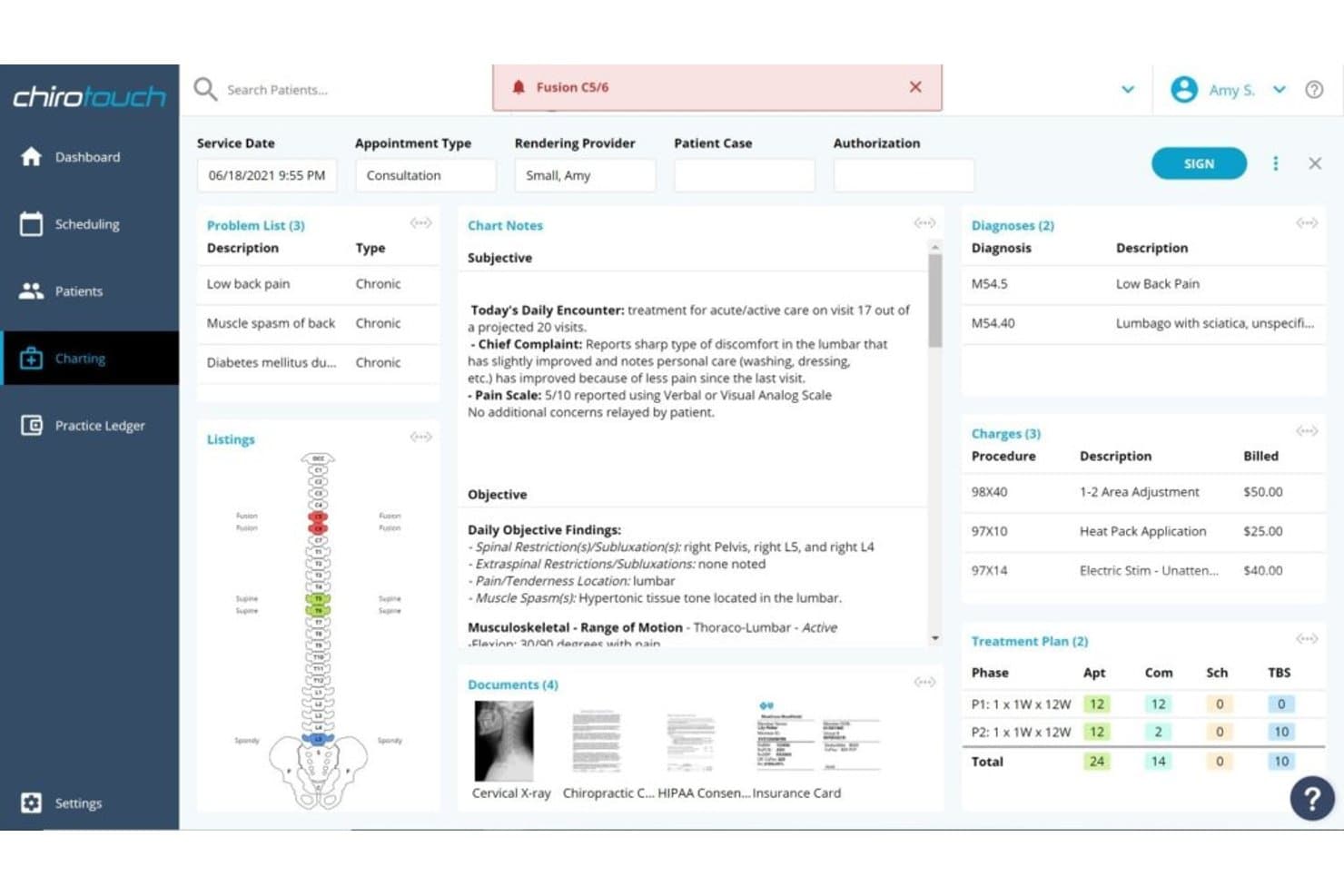
ChiroTouch delivers chiropractic EHR charting, scheduling, patient intake, insurance billing, payments, and reporting. ChiroTouch is a chiropractic EHR and practice management platform that covers clinical documentation, appointment scheduling, patient intake, insurance billing, payments, and practice reporting.
Who Is ChiroTouch Best For?
ChiroTouch fits chiropractic practices that need to manage insurance claims, verify patient coverage, and coordinate billing with clinical documentation.
Why ChiroTouch Is a Good Jane App Alternative
I picked ChiroTouch because its insurance billing tools are designed specifically for chiropractic practices. Its CT ProClear service connects with the TriZetto clearinghouse to automate claim submissions, identify billing errors, and post electronic remittance advice (ERA). I also like that its Claims Worklist allows billing teams to monitor claim statuses, while CT Verify checks insurance eligibility before appointments or during patient check-in. These capabilities make ChiroTouch a strong Jane App alternative for chiropractic clinics managing insurance reimbursements and patient billing.
ChiroTouch Key Features
- Scheduling: Create, modify, and reschedule patient appointments using natural-language instructions.
- Digital intake: Collect patient information through online forms and automatically populate relevant details into SOAP notes.
- Integrated payments: Accept patient payments, securely store card information, and arrange recurring payments through CT Payments.
- Practice reports: Generate clinical, financial, operational, and patient visit reports to monitor practice performance.
ChiroTouch Integrations
ChiroTouch connects with Fullscript for supplement recommendations and laboratory ordering. Its insurance billing connections include TriZetto through CT ProClear and Change Healthcare through CT MaxClear. Both clearinghouse services support electronic claims processing and automated ERA posting, although availability depends on the ChiroTouch plan.
Pros and Cons
Pros:
- Eligibility checks fit insurance-heavy practices
- Custom SOAP macros support detailed charting
- Chiropractic-specific claims and billing workflows
Cons:
- Analytics reports can be slow or incomplete
- Interface can feel slow and click-heavy
Learn more about ChiroTouch: Best for insurance billing and charting
- Free demo available
- Pricing upon request
Visit WebsiteCustomer Rating:3.9/5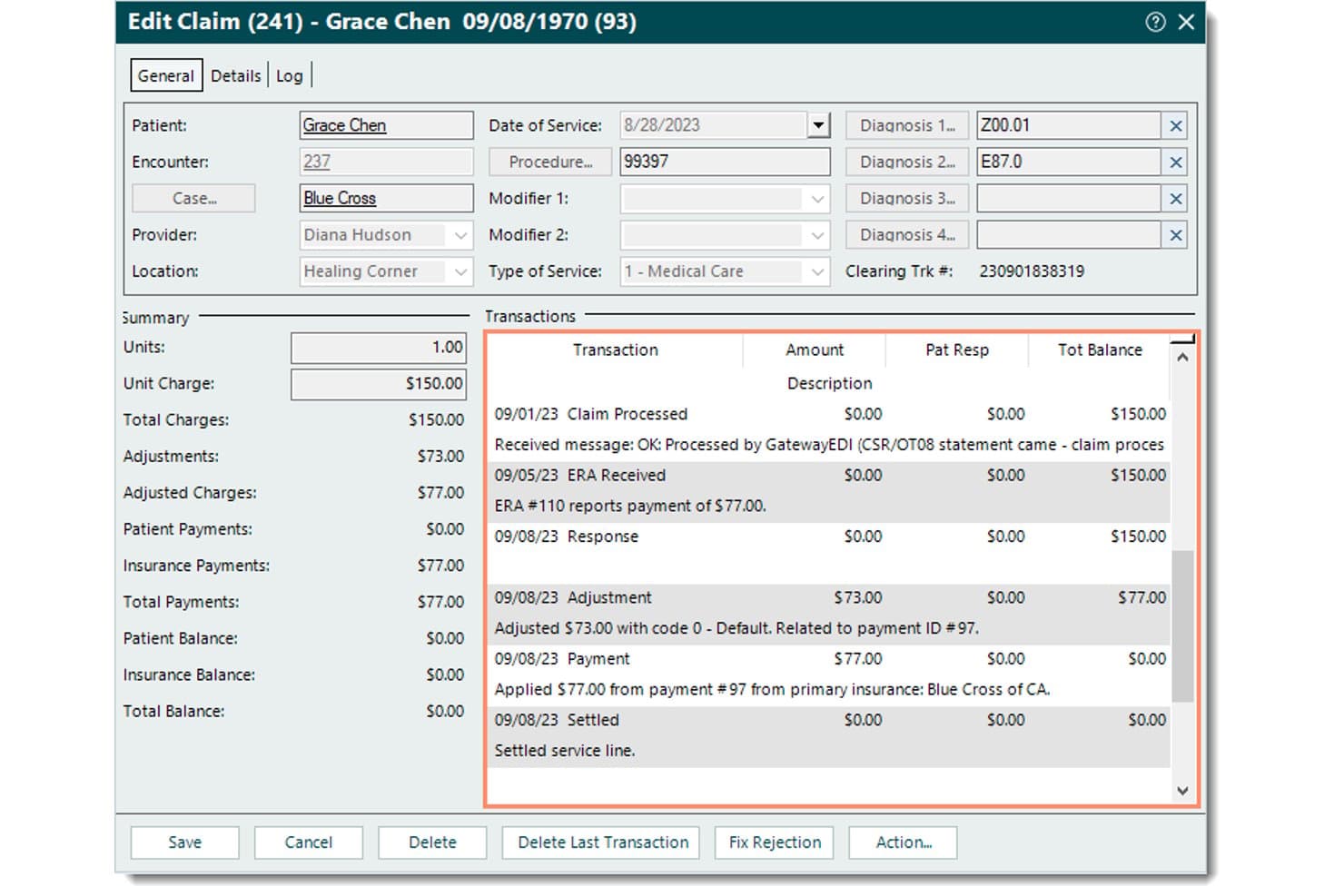
Tebra connects EHR charting, scheduling, medical billing, claim and denial tracking, patient messaging, and marketing tools. Tebra is a cloud-based EHR and practice management platform for independent medical practices that covers clinical documentation, appointment scheduling, insurance billing, patient communication, and practice marketing.
Who Is Tebra Best For?
Tebra fits independent healthcare practices that need to manage electronic health records, verify insurance coverage, and process medical claims within the same platform.
Why Tebra Is a Good Jane App Alternative
I picked Tebra because its insurance billing capabilities work alongside clinical documentation and patient records. I like that practices can verify insurance eligibility before appointments, submit electronic claims, and monitor claim statuses to identify billing issues. Its EHR also stores patient histories, diagnoses, and clinical notes, allowing practitioners to access documentation while managing reimbursement workflows. These capabilities make Tebra a strong Jane App alternative for medical practices that handle insurance billing alongside patient care.
Tebra Key Features
- Appointment reminders: Send automated reminders to notify patients about upcoming visits and reduce missed appointments.
- Digital intake: Collect registration details, insurance information, and medical histories through electronic forms.
- Two-way messaging: Exchange text messages with patients regarding appointments, billing questions, and other practice-related matters.
- Online profiles: Manage online listings and maintain practice information across Google and other healthcare directories.
Tebra Integrations
Tebra offers SOAP APIs for connecting third-party applications with its practice management system. Its API documentation covers access to patient records, appointments, encounters, charges, and payment information, supporting custom data exchange and administrative workflows. A complete public directory of native integrations is not clearly documented.
Pros and Cons
Pros:
- Scheduling, intake, and reminders support care
- Clinical notes sit beside billing workflows
- Insurance eligibility and claims tools together
Cons:
- Support response varies on complex issues
- Billing reports can be difficult to navigate
Learn more about Tebra: Best for insurance billing and clinical care
- Free demo available
- Pricing upon request
Visit WebsiteCustomer Rating:3.9/5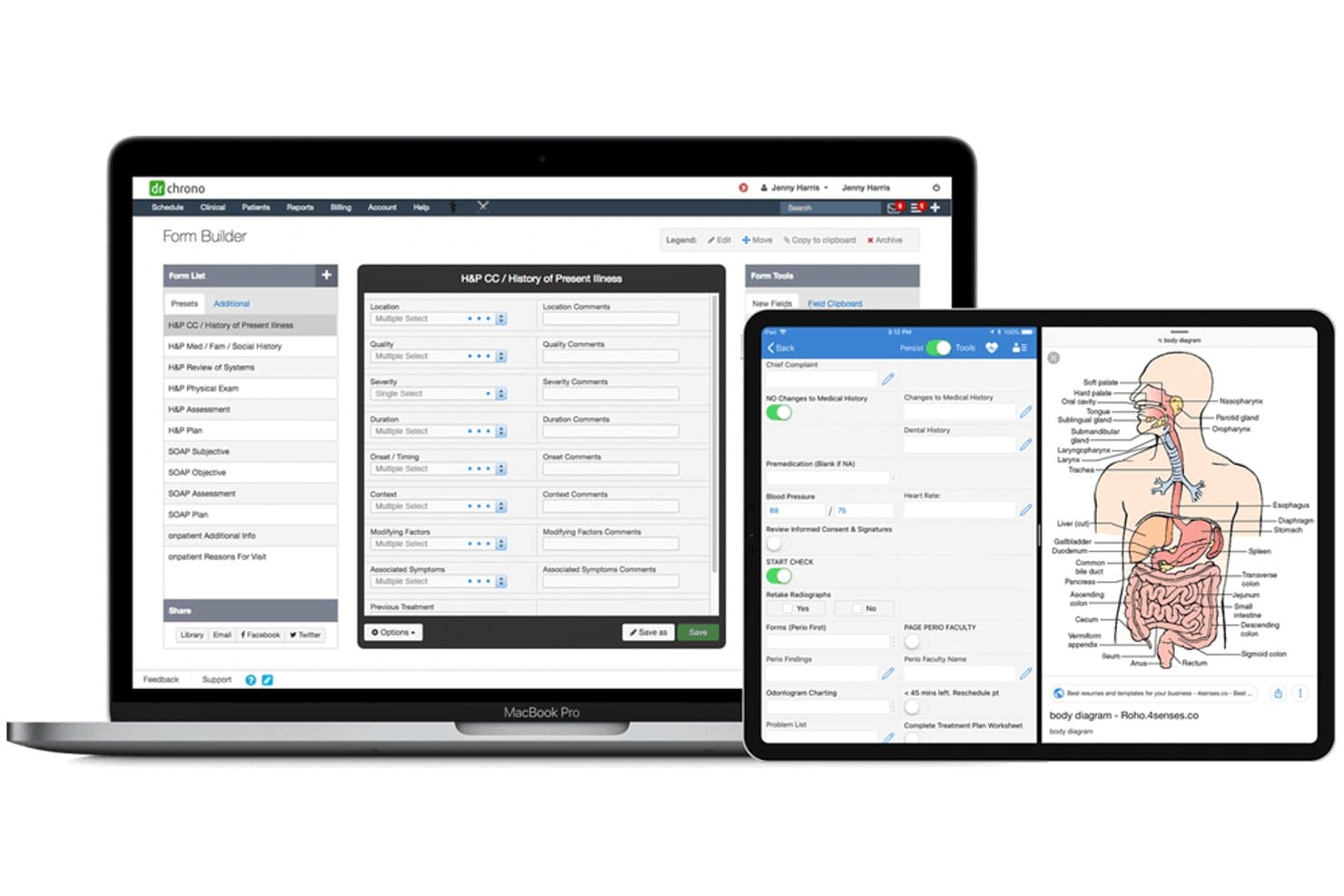
DrChrono features EHR charting, appointment scheduling, insurance billing, telehealth, and specialty-specific workflows. DrChrono is a cloud-based EHR and practice management platform for independent medical practices that provides appointment scheduling, clinical documentation, insurance billing, telehealth, and specialty-specific workflows.
Who Is DrChrono Best For?
DrChrono fits medical practices that need to coordinate clinical documentation with insurance eligibility verification, claims processing, and denial management.
Why DrChrono Is a Good Jane App Alternative
I picked DrChrono because its insurance billing capabilities extend beyond basic appointment and payment management. I like that practices can verify patient insurance eligibility before appointments, submit electronic claims, and monitor their progress through the Live Claims Feed. Its billing tools also allow teams to identify rejected or denied claims and address issues that delay reimbursement. With clinical records and billing activity accessible within the same platform, DrChrono is a strong Jane App alternative for practices handling complex insurance workflows.
DrChrono Key Features
- Appointment scheduling: Organize patient appointments using customizable calendar views and scheduling preferences.
- Telehealth: Conduct virtual consultations with screen-sharing and document-sharing capabilities.
- Patient portal: Allow patients to schedule appointments, exchange secure messages, and access visit summaries.
- Specialty templates: Customize clinical documentation templates for specialties such as behavioral health and podiatry.
DrChrono Integrations
DrChrono connects with Labcorp and Quest Diagnostics for laboratory services, while Health Gorilla expands access to additional laboratory networks. It also provides a third-party application marketplace, REST API access, and FHIR-based interoperability capabilities for exchanging clinical and administrative data.
Pros and Cons
Pros:
- iPad charting with patient photo capture
- Customizable specialty notes and chart templates
- Insurance eligibility and claims in one workflow
Cons:
- Slow support and recurring system outages
- Reviewers report claims and billing glitches
Learn more about DrChrono: Best for group sessions with linked client notes
- 30-day free trial
- From $24.95/user/month
Visit WebsiteCustomer Rating:4.6/5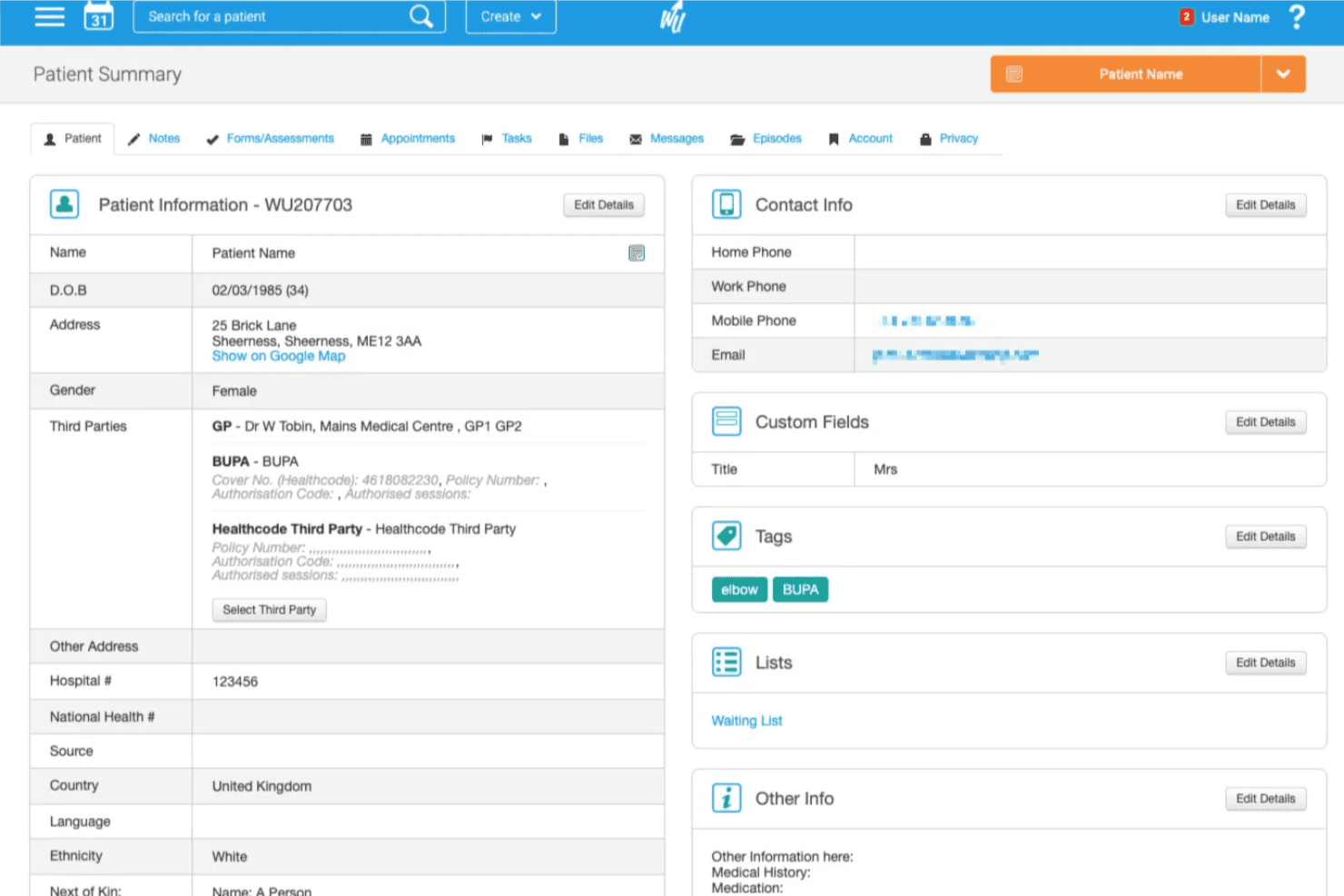
WriteUpp organizes client records, appointment scheduling, online booking, clinical notes, invoicing, and payments. WriteUpp is a practice management platform for therapists and healthcare providers that offers client records, appointment scheduling, online booking, clinical documentation, invoicing, and payment processing.
Who Is WriteUpp Best For?
WriteUpp fits therapists and healthcare practices that conduct group sessions and need to manage shared appointments while maintaining individual client records.
Why WriteUpp Is a Good Jane App Alternative
I picked WriteUpp because its group booking capabilities allow therapists to manage multiple clients within a single appointment. I like that practitioners can create one clinical note for a group session and automatically save it to each attendee's individual record. The platform also supports attendance tracking, group invoicing, and payment collection without requiring separate appointments for every participant. These features make WriteUpp a strong Jane App alternative for practices managing group therapy sessions and shared treatment documentation.
WriteUpp Key Features
- Customizable intake forms: Create digital forms to collect client information, medical histories, and consent details before appointments.
- Online booking: Allow clients to schedule appointments through a branded booking page available around the clock.
- Appointment reminders: Send automated SMS and email reminders to notify clients about upcoming sessions.
- Invoicing and payments: Generate invoices, collect online payments, and track outstanding client balances.
WriteUpp Integrations
WriteUpp connects with Mailchimp for email marketing, Xero for accounting, Stripe and Square for payment processing, and CloudRx for electronic prescribing. It also supports Physitrack and Wibbi for exercise prescription and rehabilitation programs. Square integration is currently limited to UK-based WriteUpp accounts.
Pros and Cons
Pros:
- Reviewers praise reminders and organized client records
- Customizable templates support discipline-specific clinical notes
- Group bookings keep related client notes linked
Cons:
- Standard reports offer limited customization
- Reviewers describe billing and reconciliation as clunky
Learn more about WriteUpp: Best for insurance-based practice billing
- Free demo available
- Pricing upon request
Visit WebsiteCustomer Rating:3.6/5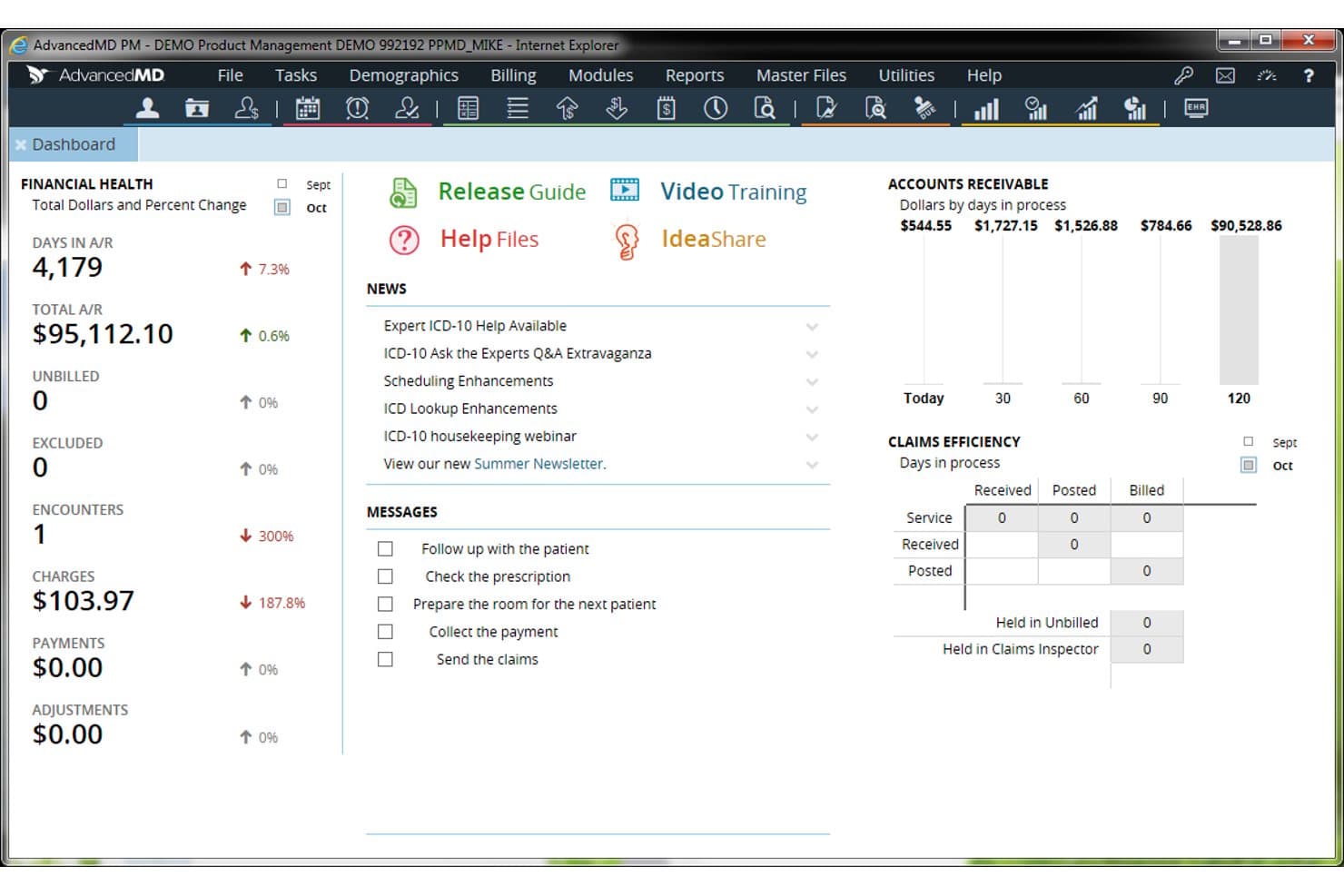
AdvancedMD provides specialty-specific EHR charting, scheduling, insurance billing, claims management, and patient engagement. AdvancedMD is a cloud-based EHR and practice management platform for independent medical practices that provides specialty-specific clinical documentation, appointment scheduling, insurance billing, claims management, and patient engagement tools.
Who Is AdvancedMD Best For?
AdvancedMD fits independent medical practices and billing teams that need to verify insurance coverage, identify claim errors, and manage payer reimbursements.
Why AdvancedMD Is a Good Jane App Alternative
I picked AdvancedMD because its medical billing capabilities address the insurance reimbursement requirements of independent practices. I like that its real-time eligibility verification allows staff to confirm patient coverage before appointments, while automated claim scrubbing identifies coding errors and missing information before submission. Its clearinghouse also enables billing teams to submit electronic claims, monitor their status, and review payer responses. These capabilities make AdvancedMD a strong Jane App alternative for practices that need detailed insurance billing workflows alongside clinical documentation.
AdvancedMD Key Features
- Specialty-configurable workflows: Customize clinical documentation templates and administrative processes to match specialty requirements.
- Intelligent scheduling: Organize provider calendars and appointment availability according to individual scheduling preferences.
- Self-service intake: Allow patients to complete registration details, medical histories, and intake forms online before appointments.
- Patient portal: Give patients access to secure messaging, medical information, and online payment options.
AdvancedMD Integrations
AdvancedMD supports laboratory and radiology connections through Ellkay and Falkon Data, allowing practices to exchange diagnostic orders and results with external providers. It also offers FHIR R4 APIs for accessing clinical information, including medications, allergies, and vital signs. Its Connect APIs support custom healthcare integrations for clinical documentation, patient records, appointment scheduling, and revenue cycle management.
Pros and Cons
Pros:
- EHR integration speeds charge creation and submission
- Eligibility checks support insurance-based workflows
- Claim scrubbing checks errors before submission
Cons:
- Some reports need add-ons or workarounds
- Correcting claims can become cumbersome
Andre alternativer til Jane App
Her er noen flere alternativer som ikke kom med på kortlisten min, men som likevel er verdt å undersøke:
- 11Practice BetterBest for wellness care beyond appointments
- 12OptiMantraBest for medical care and supplement sales
- 13WellnessLivingBest for branded client retention
- 14CarepatronBest free plan for AI notes and telehealth
- 15SimplePracticeBest for therapy treatment plans and notes
- 16TherapyNotesBest for group practices with free admin users
- 17ClinikoBest for pricing without admin-seat fees
- 18Ensora Health TheraNestBest for solo therapists with unlimited admins
- 19ZandaBest for clinic operations beyond scheduling
- 20PracticeQBest for intake-to-chart workflows
How I Evaluate Jane App Alternatives
I split my evaluation into three parts: core functionality (booking and managing client records), standout features (insurance billing, telehealth), and beyond-feature factors like onboarding support and pricing fit for growing teams. Core functionality carries the most weight.
Core Functionality (Table Stakes For This List)
When I'm selecting tools for my list, I score each one on a scale from 0 (does not offer the functionality) to 5 (excels in this area) for each core functionality listed below. I then convert the total into a percentage to help assess each tool’s overall fit, with extra weight on any functionalities I’ve deemed essential.
- Appointment Scheduling (Essential): I look for provider calendars, recurring bookings, and conflict checks that support busy schedules across services or locations.
- Client Records (Essential): I assess whether teams can find structured histories, notes, and documents while controlling who can access sensitive records.
- Online Booking: I check whether clients can view current availability and book, reschedule, or cancel without staff handling each request.
- Billing & Payments: I evaluate how the platform handles invoices, payment collection, and balance tracking within day-to-day client workflows.
- Automated Reminders: I look for configurable email or text reminders that keep clients informed about upcoming appointments and changes.
- Charting & Documentation: I assess whether providers can use structured or customizable note templates tied directly to client records.
Once I have a list of tools that meet the criteria, I consider what sets each platform apart.
Differentiating Factors (What Sets Vendors Apart)
Here's how I compare and contrast different vendors:
Standout Features
I check whether a platform handles insurance claims natively, including superbill generation and EDI submissions, since practices billing third-party payers need this built in rather than bolted on. Built-in telehealth is another factor I evaluate, because a HIPAA-compliant video option inside the same system where you chart and bill removes the cost and friction of a separate vendor. I also look at inventory and retail tracking for clinics that sell supplements or retail products alongside clinical services.
Beyond Features
I check whether a vendor's pricing model charges per provider or uses a flat rate, since that gap widens fast when you add clinicians or open a second location. HIPAA compliance and a signed BAA are non-negotiable, but I also look for role-based access controls and audit trails that let clinic owners track who viewed or edited a record. Integration depth matters too—a platform that connects to QuickBooks or your existing payment processor saves hours of manual reconciliation each week.
Hvorfor se etter alternativer til Jane App?
Jane er et godt valg for praksisadministrasjon, men noen klinikker trenger andre alternativer for fakturering, dokumentasjon eller priser. Det kan hende du ser etter et alternativ til Jane App fordi:
- Du trenger forsikringsfakturering uten et ekstra månedlig tillegg
- Fagområdet ditt krever fakturerings- eller dokumentasjonsarbeidsflyter som er spesifikke for betaleren
- Lisensiering per behandler passer ikke lenger med budsjettet til teamet ditt i vekst
- Hver lokasjon trenger sin egen profilering og e-postadresse for svar
Hvis noe av dette høres kjent ut, har du kommet til rett sted. Listen min inneholder alternativer for praksisadministrasjon som passer bedre for team som møter disse utfordringene med Jane og ser etter et alternativ.
De viktigste funksjonene i Jane App
Her er de viktigste funksjonene i Jane App, slik at du kan sammenligne løsningen med ulike alternativer:
- Avtaleplanlegging: Administrer behandlernes kalendere, gjentakende besøk og avtaler på tvers av lokasjoner. Klienter kan bestille tilgjengelige timer på nettet, mens konfigurerbare påminnelser hjelper med å holde dem informert om kommende besøk.
- Klientjournaler: Samle klientopplysninger, dokumenter og kliniske historikker i individuelle journaler. Tilgangsnivåer for ansatte hjelper klinikker med å kontrollere hvem som kan se eller administrere sensitiv informasjon.
- Journalføring og dokumentasjon: Bruk egendefinerte journalmaler, behandlingsplaner og spørreundersøkelser om resultater til å dokumentere behandlingen. AI Scribe kan opprette notater fra opptak av økter eller diktering, med begrensninger i abonnementet eller tilleggsalternativer som gjelder.
- Inntaksskjemaer: Samle inn klientopplysninger før avtaler gjennom digitale skjemaer. Svarene kan lagres sammen med klientens journal, slik at behandlere får relevante opplysninger de kan gjennomgå når de forbereder behandlingen.
- Fakturering og betalinger: Opprett fakturaer og kvitteringer, be om betaling via e-post eller SMS, og følg med på betalingsaktivitet. Klienter kan også bruke lagrede kort der dette støttes.
- Forsikringsfakturering: Administrer forsikringsprosesser som omfatter opplasting av forsikringspoliser, kontroll av dekning, primær- og sekundærkrav samt elektroniske oppgjørsmeldinger. Sjekk abonnements- og tilleggsdetaljene for å bekrefte hva som er inkludert for klinikken din.
- Fjernhelse: Arranger virtuelle avtaler én til én direkte i Jane, uten en separat videoplattform. Fjernhelse er inkludert i alle Jane-abonnementer; fjernhelse i grupper er tilgjengelig som et tillegg.
- Kommunikasjon med klienter: Send sikre meldinger og avtalepåminnelser via e-post eller SMS. Disse verktøyene lar teamet ditt dele oppdateringer om besøk og holde avtalekommunikasjonen innenfor praksisplattformen.
Priser
Prisene varierer etter funksjoner, teamstørrelse, tillegg og faktureringsmodell. Her er typiske prisintervaller for alternativer til Jane App:
Sammenligningstabell for alternativer til Jane App
| Plantype | Gjennomsnittspris | Vanlige funksjoner |
|---|---|---|
| PlantypeGratisplan | Gjennomsnittspris$0 | Vanlige funksjonerGrunnleggende avtaleplanlegging, klientjournaler, fjernhelse og begrenset fakturering. |
| PlantypePersonlig plan | Gjennomsnittspris$15-$99/behandler/måned | Vanlige funksjonerAvtaleplanlegging, klientjournaler, nettbestilling, påminnelser og betalingsbehandling. |
| PlantypeForretningsplan | Gjennomsnittspris$69-$350/måned | Vanlige funksjonerKalendere for flere behandlere, teamtillatelser, forsikringskrav, fjernhelse og rapportering. |
| PlantypePlan for større virksomheter | Gjennomsnittspris$100-$500+/måned eller tilpasset pristilbud | Vanlige funksjonerAdministrasjon av flere lokasjoner, avanserte tilgangskontroller, egendefinerte integrasjoner og dedikert brukerstøtte. |