

Programvare for medisinsk fakturering for Mac er et digitalt verktøy som er utviklet for å håndtere pasientfakturering, krav og økonomien i praksisen direkte fra Apple-datamaskinen din. Hvis du ønsker løsninger som passer sømløst inn i Mac-arbeidsflyten din, minimerer kompatibilitetsproblemer og holder sensitive helsedata sikre, har du kommet til rett sted.
Jeg har sammenlignet den beste programvaren for medisinske team som foretrekker Apple-enheter, og fremhevet hvilke alternativer som håndterer krav, betalinger og rapportering best – slik at du trygt kan velge den som passer behovene i praksisen din.
Why Trust Our Software Recommendations
6,700+
Reviews
20
Industry experts
16+
Evaluation factors
14
Years
Our team has been testing and reviewing software since 2012. As medical practice leaders ourselves, we know how difficult—and important—it is to choose the right software.
For this guide, we evaluated tools using hands-on testing and independent research, scoring tools using our selection criteria.
Our reviews reflect our human editorial judgment, not a sales pitch.
Sammenligningstabell: Programvare for medisinsk fakturering for Mac
Denne sammenligningstabellen oppsummerer prisopplysningene for programvaren for medisinsk fakturering for Mac.
| Tool | Best For | Trial Info | Price | ||
|---|---|---|---|---|---|
| 1 | Best for centralized multi-client billing | Free plan available | From $25/month | Website | |
| 2 | Best flexible claims editing for Mac practices | Free demo available | From $199/user/month | Website | |
| 3 | Best for cloud billing across multiple clinics | Not available | Pricing upon request | Website | |
| 4 | Best quick-start onboarding for Mac-based staff | Free demo available | From $199/user/month | Website | |
| 5 | Best integration with Apple hardware for billing | Free demo available | Pricing upon request | Website | |
| 6 | Best fast claim submission workflow on Mac | Free demo available | Pricing upon request | Website | |
| 7 | Best automated claim tracking for small offices | Free demo available | Pricing upon request | Website | |
| 8 | Best integrated claims and EHR for Apple devices | Free demo available | Pricing upon request | Website | |
| 9 | Best customizable billing dashboards for Mac users | Free demo available | Pricing upon request | Website | |
| 10 | Best for specialty billing templates | Free demo available | Pricing upon request | Website |


Anmeldelser av den beste programvaren for medisinsk fakturering for Mac
Nedenfor finner du mine detaljerte sammendrag av den beste programvaren for medisinsk fakturering for Mac som kom med på kortlisten. Anmeldelsene mine gir et detaljert innblikk i funksjonene, egenskapene og integrasjonene til hver programvare, slik at du kan finne den beste løsningen for deg.
 Best for centralized multi-client billing
- Free plan available
- From $25/month
Visit WebsiteCustomer Rating:4.2/5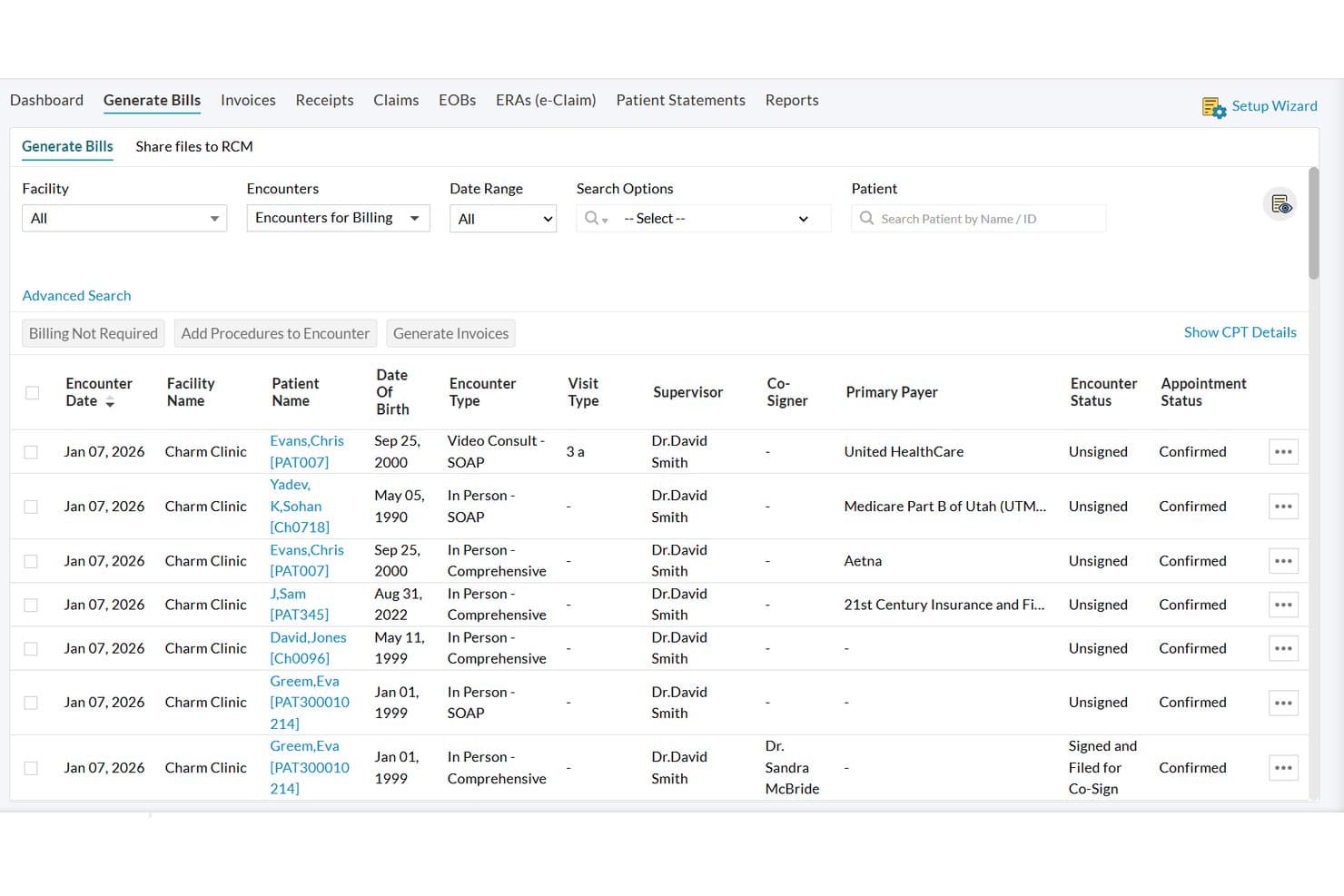
CharmHealth offers a Generate Bills screen displaying patient encounters with filtering options for facility, date range, and payer for streamlined medical billing. CharmBillerPro by CharmHealth is a cloud-based medical billing platform that handles claims submission, ERA auto-posting, patient billing, RCM reporting, and multi-EHR management from a single browser-accessible interface.
Who Is CharmHealth Best For?
CharmHealth suits medical billing companies and practice administrators managing claims across multiple providers or EHR systems from a Mac.
Why I Picked CharmHealth
CharmHealth earns its spot on my shortlist because CharmBillerPro is purpose-built for billing companies managing claims across multiple practices. I love that it automatically pulls patient demographics, insurance data, and procedure codes from chart notes in any connected EHR, not just Charm's own. On top of that, the AI-driven claim scrubbing runs custom rules per practice, so each client's rejection patterns get addressed individually.
CharmHealth Key Features
- Optum clearinghouse integration: Submit and track claims electronically to a broad network of payers without manual exports.
- Automated ERA posting: Match electronic remittance advice directly to patient accounts for faster reconciliation.
- Role-based access controls: Assign permissions for billing teams, administrators, and providers to manage data security.
- Customizable RCM analytics dashboards: Create real-time, HIPAA-compliant reports for revenue cycle and aging workflows.
CharmHealth Integrations
CharmHealth offers native integrations with Optum Clearinghouse, Bluefin, QuickBooks, PointClickCare, Surescripts, and Fullscript. An API is available for custom integrations.
Pros and Cons
Pros:
- ERA auto-posting handles multi-practice remittances simultaneously
- AI claim scrubbing customized per practice
- Runs natively on Mac without emulation
Cons:
- Customer support response times can be slow
- Mobile app lacks full billing functionality
Learn more about CharmHealth: Best flexible claims editing for Mac practices
- Free demo available
- From $199/user/month
Visit WebsiteCustomer Rating:4.5/5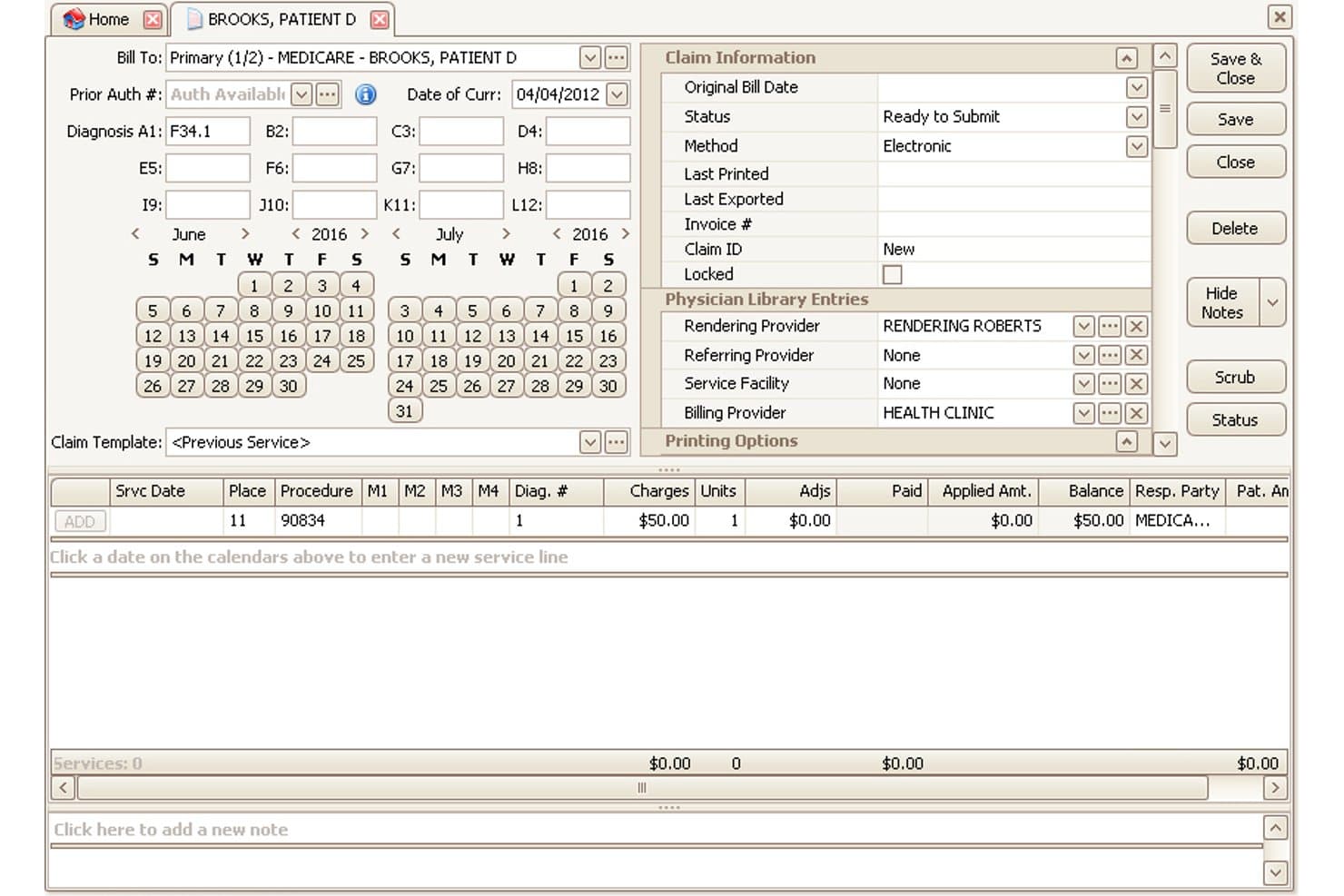
EZClaim offers a detailed claim entry interface with diagnosis codes, service lines, provider assignments, and billing status management. EZClaim is a cloud-based medical billing platform for small and mid-sized practices that handles electronic claims submission, ERA posting, eligibility verification, patient statements, and payment processing from Mac or PC devices.
Who Is EZClaim Best For?
EZClaim is a good fit for medical billing companies and independent billing specialists who manage claims across multiple provider accounts from a single platform.
Why I Picked EZClaim
I've included EZClaim in my top picks because of how flexibly it handles claim editing across multiple provider accounts on Mac. I particularly like the multi-EHR import, which lets billing companies pull claim data from systems like WebPT, Practice Fusion, and Amazing Charts without rebuilding claims from scratch. The unlimited customizable grids let you configure which data fields are visible, and the TriZetto clearinghouse connection catches errors before claims go out the door.
EZClaim Key Features
- Integrated payment processing: Accept credit card payments directly through EZClaimPay for quicker patient payment collection.
- HIPAA-compliant reporting: Access over 40 built-in reports and export customizable data grids in a secure, compliant environment.
- Multi-company file management: Manage separate billing data for multiple practices or clinics from a single EZClaim account.
- Real-time financial dashboards: View up-to-date revenue, claim status, and operational metrics in a single centralized dashboard.
EZClaim Integrations
EZClaim offers native integrations with TriZetto, Practice Fusion, Amazing Charts, QuickEMR, WebPT, HomeTrak, BillFlash, ElationHealth, and ReminderCall. An API is available for custom integrations.
Pros and Cons
Pros:
- Month-to-month contracts with no long-term commitment
- Real-time eligibility verification built in natively
- Manages multiple provider accounts in one login
Cons:
- No custom report builder for advanced reporting
- Mac access requires Azure Virtual Desktop setup
Learn more about EZClaim: Best for cloud billing across multiple clinics
- Not available
- Pricing upon request
Visit WebsiteCustomer Rating:3.7/5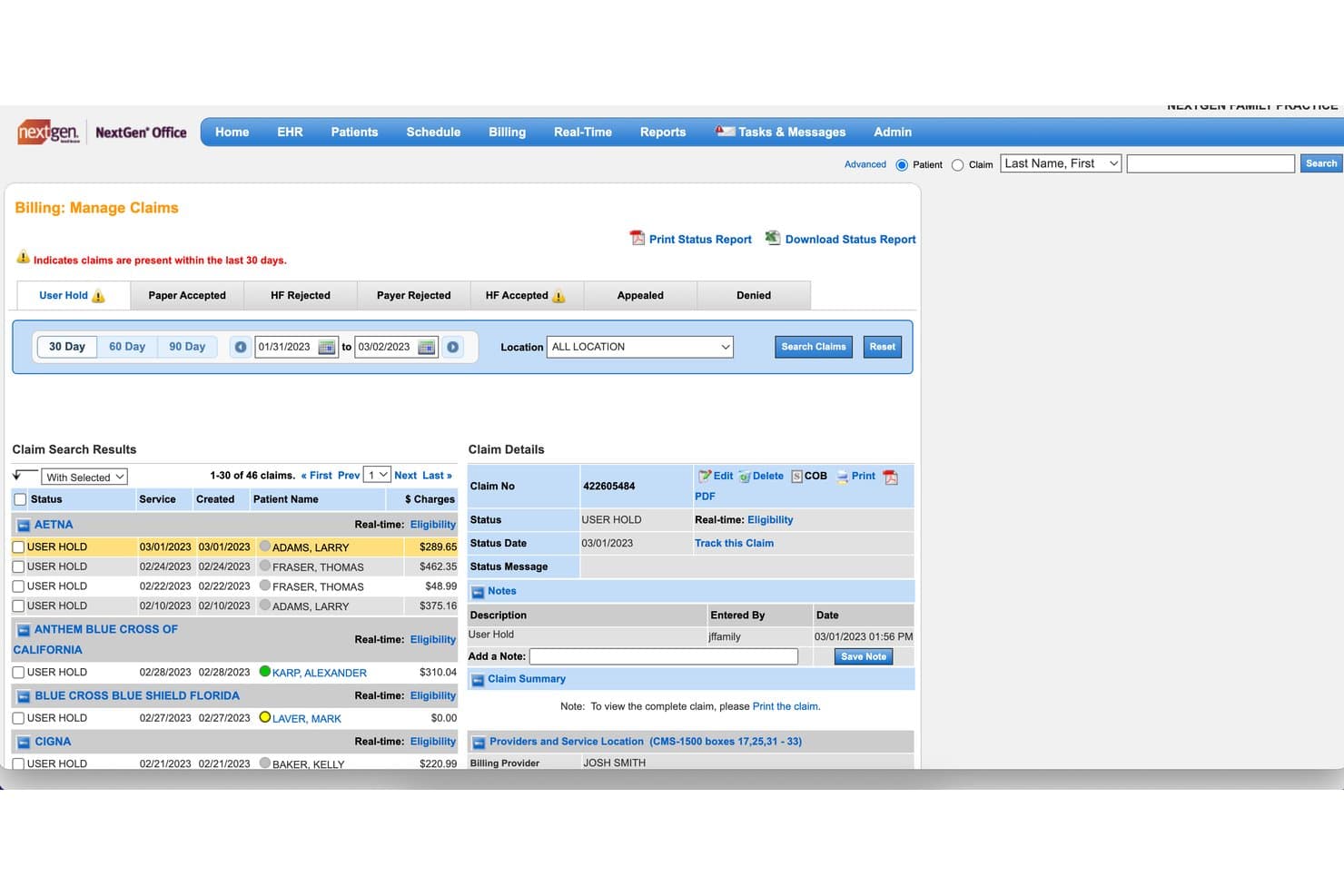
NextGen Office offers a Billing Manage Claims dashboard that displays claim statuses, patient names, charge amounts, and detailed claim information organized by insurance payer. NextGen Office is a cloud-based EHR and practice management platform with integrated medical billing, claims submission, insurance eligibility verification, and revenue cycle management, all browser-accessible on Mac.
Who Is NextGen Office Best For?
NextGen Office suits medical billing companies and practice administrators managing claims and revenue cycle workflows across multiple small to mid-sized clinic locations.
Why I Picked NextGen Office
I picked NextGen Office because its multi-practice management lets a billing team submit claims, track A/R, and post payments across several clinic locations from one cloud login. Since it runs natively in Safari or Chrome, there's no workaround needed on Mac. I especially like that real-time eligibility checks and NextGen Pay payment processing are built into the same platform, so billers aren't switching between tools to cover different clinics.
NextGen Office Key Features
- Cloud-based EHR integration: Access clinical charting, e-prescribing, and documentation directly within your billing workflow from any Mac browser.
- Embedded patient portal: Allow patients to schedule appointments, view statements, and submit payments online without logging into separate systems.
- Role-based access controls: Set permissions for users handling claims, billing, reporting, and patient data to maintain HIPAA compliance.
- Reporting dashboards: Generate accounts receivable, productivity, and aging reports with built-in analytics for financial monitoring.
NextGen Office Integrations
NextGen Office offers native integrations with Waystar, Clearwave, Doctible, Solutionreach, InstaMed, CoverMyMeds, OnBase, and supports Apple Health chart integration. An API is available for custom integrations.
Pros and Cons
Pros:
- Runs natively in Safari without emulation
- Real-time eligibility checks built into the platform
- Multi-clinic billing managed from one login
Cons:
- Report customization options are fairly limited
- Customer support response times are reportedly slow
Learn more about NextGen Office: Best quick-start onboarding for Mac-based staff
- Free demo available
- From $199/user/month
Visit WebsiteCustomer Rating:3.7/5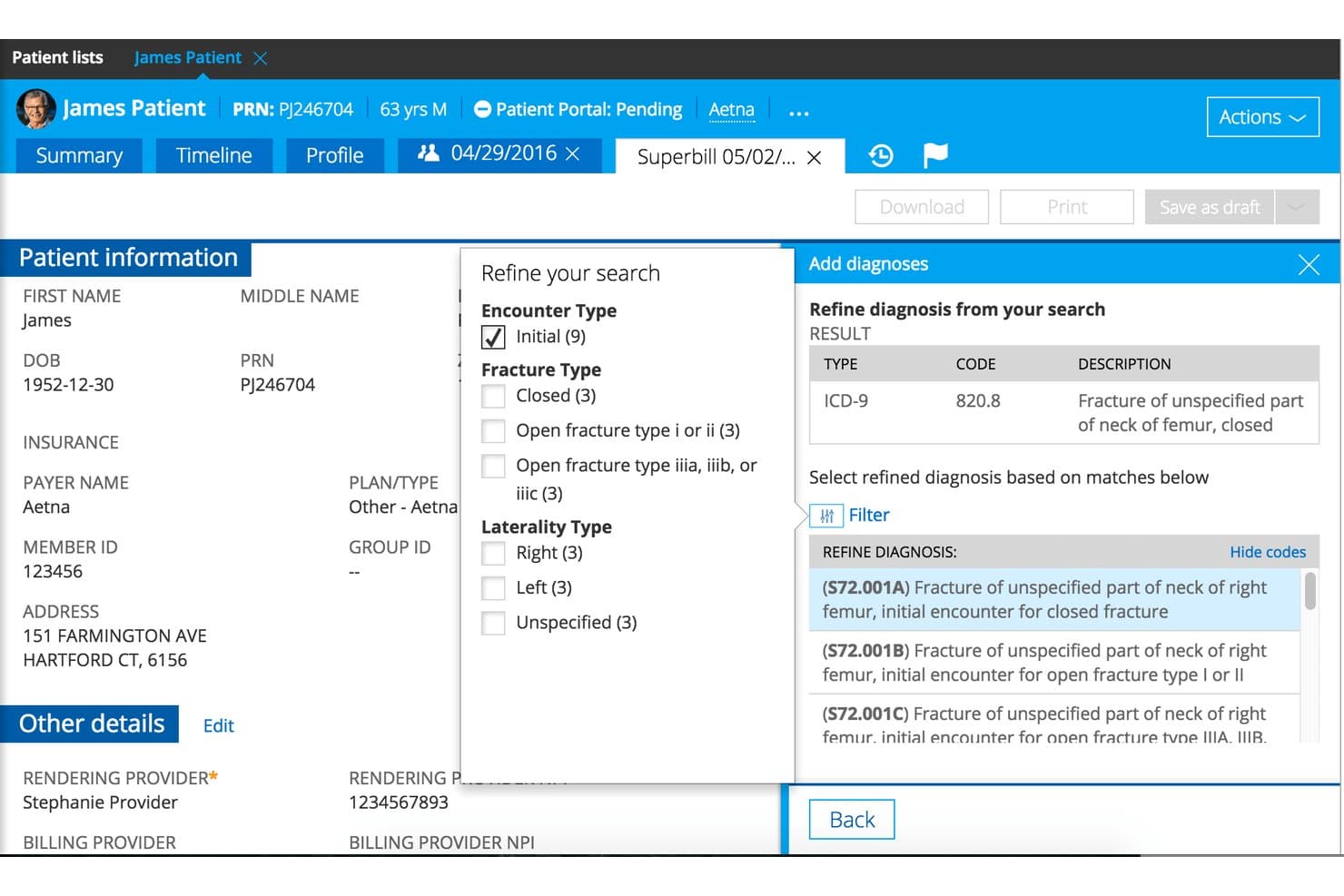
Practice Fusion offers ICD-9 to ICD-10 diagnosis refinement tools within its superbill workflow, helping providers select precise billing codes for Mac-based medical practices. Practice Fusion is a cloud-based EHR platform with an integrated billing suite that covers claims submission, payment posting, AR tracking, and financial reporting, all accessible via browser on macOS.
Who Is Practice Fusion Best For?
Practice Fusion fits independent and small practices that want a single platform for both clinical charting and billing without managing on-premise software.
Why I Picked Practice Fusion
Practice Fusion earns its spot on my shortlist because the onboarding experience is genuinely low-friction for Mac-based staff. Since it runs entirely in the browser, there's no software installation or OS configuration to worry about. The base plan includes 1-on-1 training sessions alongside a 24/7 knowledge base, so new billing staff can get up to speed without waiting on IT. I also like the free trial, which lets your team work through real billing workflows before committing.
Practice Fusion Key Features
- Integrated claims management: Create, scrub, and submit insurance claims directly from the platform without extra software.
- Electronic remittance advice (ERA) posting: Import and post ERA/835 files for payer reconciliation and payment tracking.
- Patient billing statements: Generate and deliver patient statements, both electronically and by mail, using built-in tools.
- HIPAA-compliant reporting: Access standard accounts receivable and revenue cycle reports in a secure, cloud-based environment.
Practice Fusion Integrations
Practice Fusion offers native integrations with Quest Diagnostics, LabCorp, CGM LABDAQ, Updox, Medsender, Avalon Laboratory System, OpenPM, DeepScribe, Service Center, and QuickSlot. It also integrates with billing platforms like AdvancedMD, NueMD, and CollaborateMD. An API is available for custom integrations.
Pros and Cons
Pros:
- Unlimited non-signing staff licenses included
- Includes claim scrubbing and denial management
- Fully browser-based, no macOS emulation needed
Cons:
- Customer support response times frequently criticized
- No card-on-file for recurring patient copays
Learn more about Practice Fusion: Best integration with Apple hardware for billing
- Free demo available
- Pricing upon request
Visit WebsiteCustomer Rating:3.6/5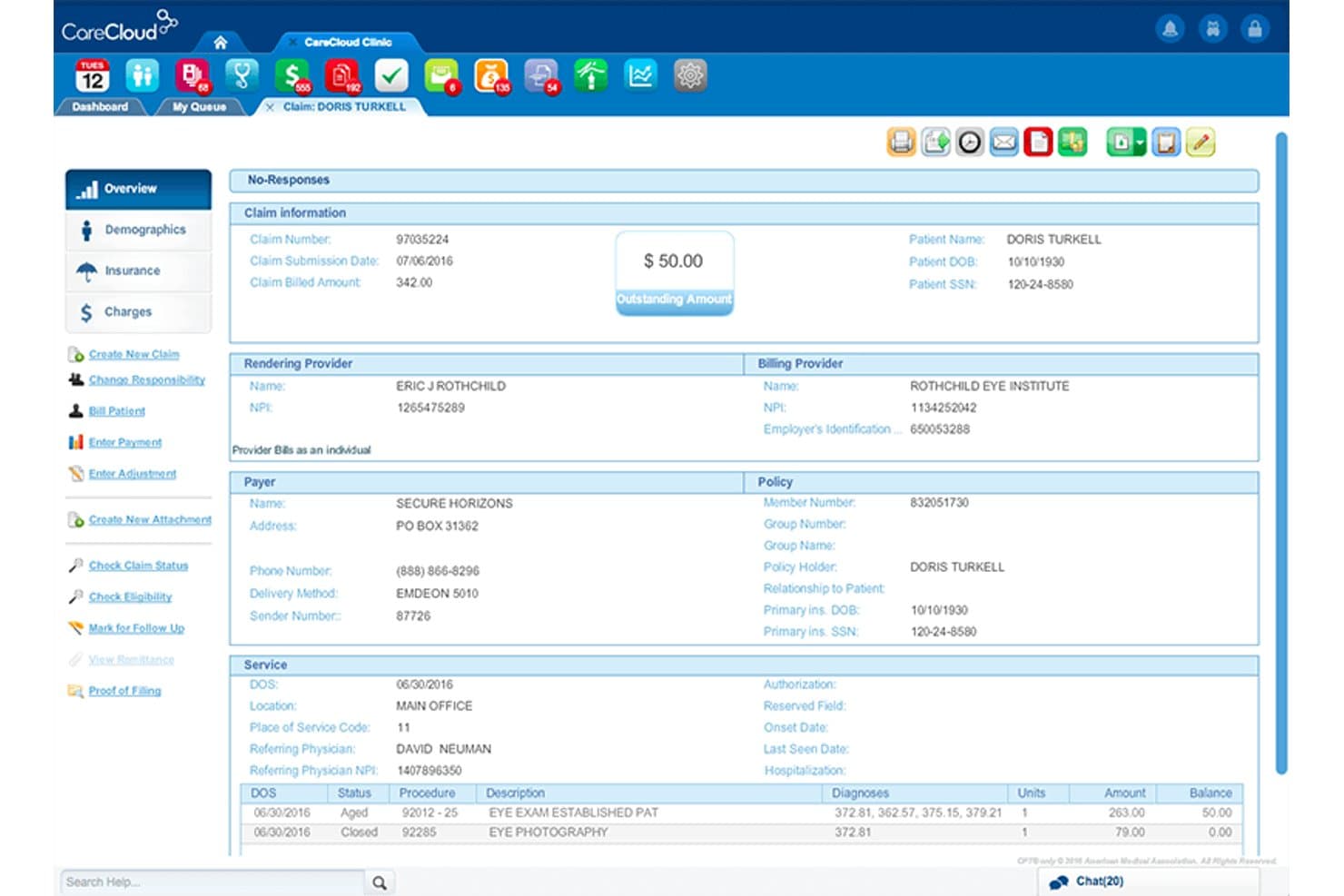
CareCloud displays a detailed claim overview screen with billing, provider, payer, and service information for patient collections management. CareCloud is a cloud-based RCM platform that covers end-to-end medical billing, from insurance eligibility verification and claims scrubbing to denial management, ERA posting, and patient payment collection—accessible via browser on Mac or native iOS apps.
Who Is CareCloud Best For?
CareCloud suits independent practices and small medical groups that run Apple hardware and want billing, claims, and patient payments managed in one cloud platform.
Why I Picked CareCloud
I picked CareCloud as one of the best because its Apple hardware integration goes well beyond browser access. The Breeze module runs natively on iOS devices, so front-desk staff can process patient payments, handle check-ins, and collect card-on-file information directly from an iPad. On the clinical and billing side, the CareCloud Companion iOS app gives billers and physicians access to patient records and billing queues without needing a desktop at all.
CareCloud Key Features
- CollectiveIQ rules engine: Automatic claim scrubbing flags coding errors and payer-specific issues before submission.
- Real-time insurance eligibility checks: Instantly verifies patient insurance coverage with major payers from within the platform.
- Automated denial management: Tracks, organizes, and prioritizes denied claims for quick resolution by your billing team.
- Customizable revenue cycle dashboards: Interactive dashboards let you track collections, A/R aging, and billing workflow analytics in a HIPAA-compliant environment.
CareCloud Integrations
CareCloud offers native integrations with EHRYourWay, CodoniX EHR, ICANotes, M*Modal, Dragon, and Clover devices for payment processing. It also provides an API for custom integrations and connects to major clearinghouses for electronic claims.
Pros and Cons
Pros:
- Concierge service manages billing end-to-end
- CollectiveIQ AI scrubbing lowers claim denial rates
- Breeze runs natively on iPad devices
Cons:
- Support quality is inconsistent across accounts
- Reporting customization options are limited
Learn more about CareCloud: Best fast claim submission workflow on Mac
- Free demo available
- Pricing upon request
Visit WebsiteCustomer Rating:4.1/5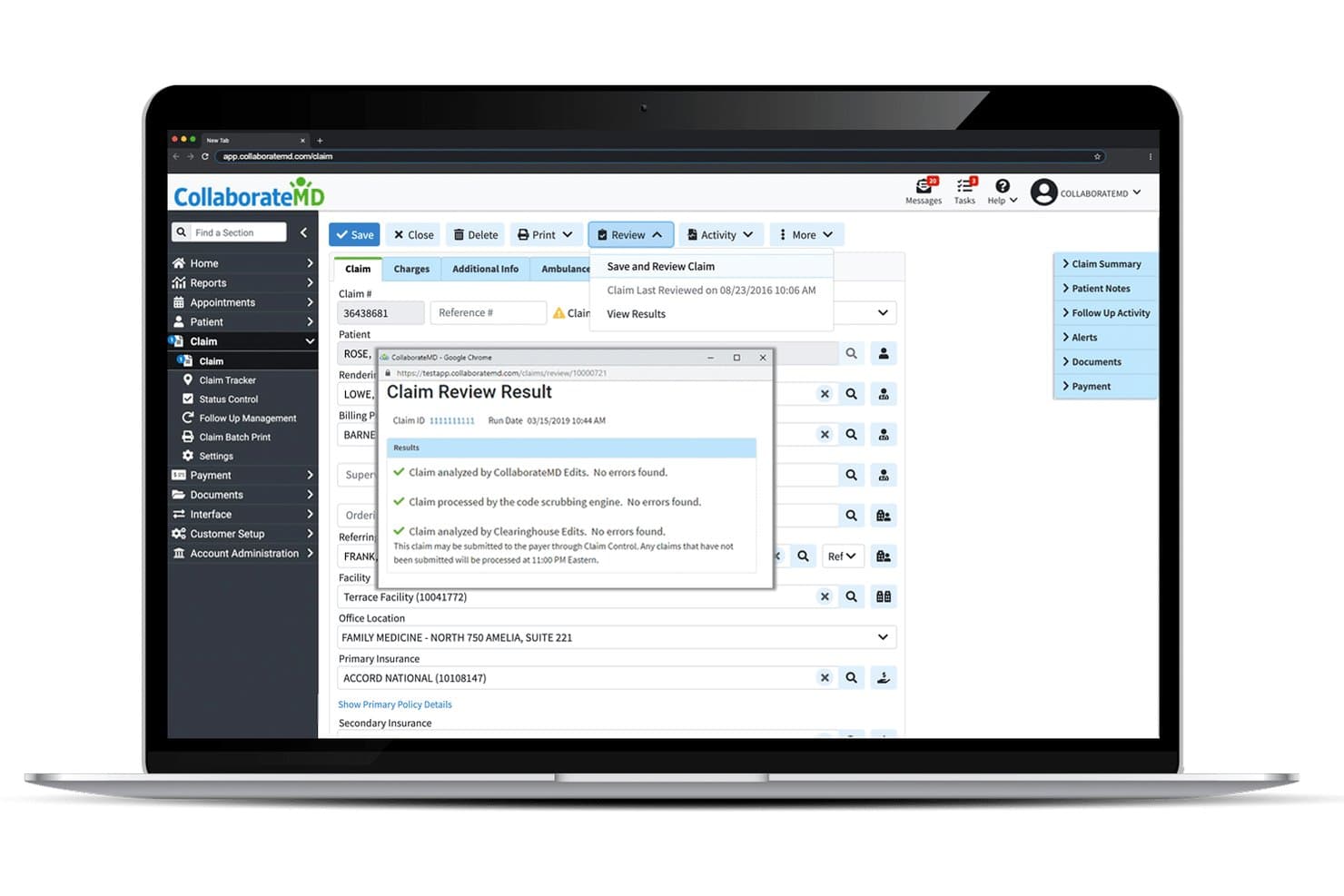
CollaborateMD offers a Claim Review Result popup that displays real-time claim validation checks, including CollaborateMD Edits, code scrubbing, and Clearinghouse Edits with no errors found. CollaborateMD is a cloud-based medical billing and practice management platform built for independent practices, combining electronic claim submission, insurance eligibility verification, ERA posting, patient billing, and revenue cycle reporting.
Who Is CollaborateMD Best For?
CollaborateMD is a strong fit for small to mid-sized independent practices and medical billing companies that prioritize a billing-focused platform over a full EHR suite.
Why I Picked CollaborateMD
CollaborateMD earns its spot on my shortlist because of how fast and clean the claim submission process is on macOS. Since it's fully browser-based, I can run the entire billing workflow in Safari without any Windows virtualization workarounds. What I appreciate most is the built-in clearinghouse with Level 2 claim scrubbing, which catches payer-specific errors before submission and helps my team maintain a near-99% first-pass acceptance rate.
CollaborateMD Key Features
- Insurance eligibility verification: Instantly check patient insurance coverage and receive real-time eligibility responses within the platform.
- Customizable reporting: Access over 125 pre-built financial and operational reports, or build custom reports with drag-and-drop tools.
- Integrated patient payment portal: Let patients pay balances securely online using a branded portal with card-on-file support.
- Specialty-specific code libraries: Use procedure and diagnosis code sets tailored for over 100 specialties to streamline claim data entry.
CollaborateMD Integrations
CollaborateMD offers native integrations with Practice Fusion, Elation, Amazing Charts, Hello Health, Kipu, Medical Mime, Praxis EMR, PrognoCIS, Ritten, Sevocity, WebPT, and Alleva, and provides an API for custom integrations.
Pros and Cons
Pros:
- 125+ pre-built revenue cycle reports included
- Built-in clearinghouse with Level 2 scrubbing
- Fully browser-based, no Mac workarounds needed
Cons:
- Occasional extra fees for storage and portal
- No native iOS or mobile companion app
Learn more about CollaborateMD: Best automated claim tracking for small offices
- Free demo available
- Pricing upon request
Visit WebsiteCustomer Rating:3.9/5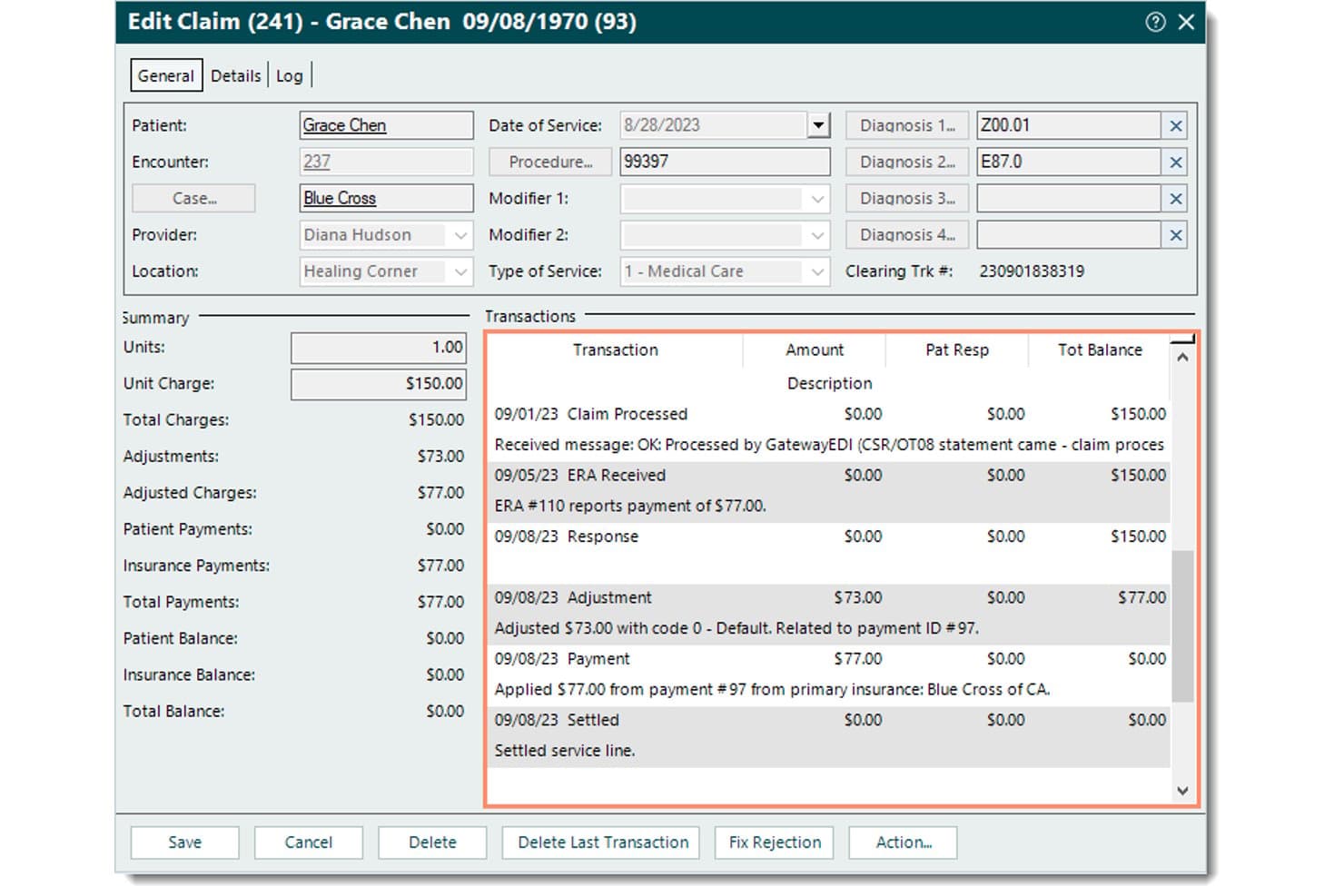
Tebra offers a detailed Edit Claim view showing transaction history, payment summaries, and diagnosis codes for streamlined medical billing on Mac. Tebra is a cloud-based medical billing and practice management platform for independent practices, combining electronic claims submission, real-time insurance eligibility verification, automated ERA posting, and patient payment collection.
Who Is Tebra Best For?
Tebra is a strong fit for solo physicians and small independent practices that handle their own billing in-house with a lean administrative team.
Why I Picked Tebra
I picked Tebra as one of the best because its claim tracking is purpose-built for small offices running lean billing operations. Color-coded status alerts show exactly where each claim sits, from charge submission to payment posting, without digging through separate reports. Payer-specific scrubbing rules auto-flag errors before claims leave your system, so rejections get caught before they cost you time on manual rework.
Tebra Key Features
- Real-time insurance eligibility checks: Instantly verifies coverage details for patients against thousands of payer databases.
- Automated patient statement batching: Combines paper and digital statement delivery with QR code and payment link options.
- Integrated payments processing: Supports card-on-file, text-to-pay, and mobile payments within patient workflows.
- HIPAA-compliant analytics dashboard: Provides access to standard A/R, aging, and revenue cycle reports in a secure environment.
Tebra Integrations
Tebra offers native integrations with Kareo Billing, Stripe, WebPT, Microsoft Excel, and QuickBooks Online Advanced, and it provides an API for custom integrations.
Pros and Cons
Pros:
- Color-coded claim status alerts built in
- Real-time eligibility checks across 2,700+ payers
- Automated ERA posting cuts manual payment entry
Cons:
- Reporting requires manual data exports to customize
- Desktop billing app is Windows-native only
Learn more about Tebra: Best integrated claims and EHR for Apple devices
- Free demo available
- Pricing upon request
Visit WebsiteCustomer Rating:3.9/5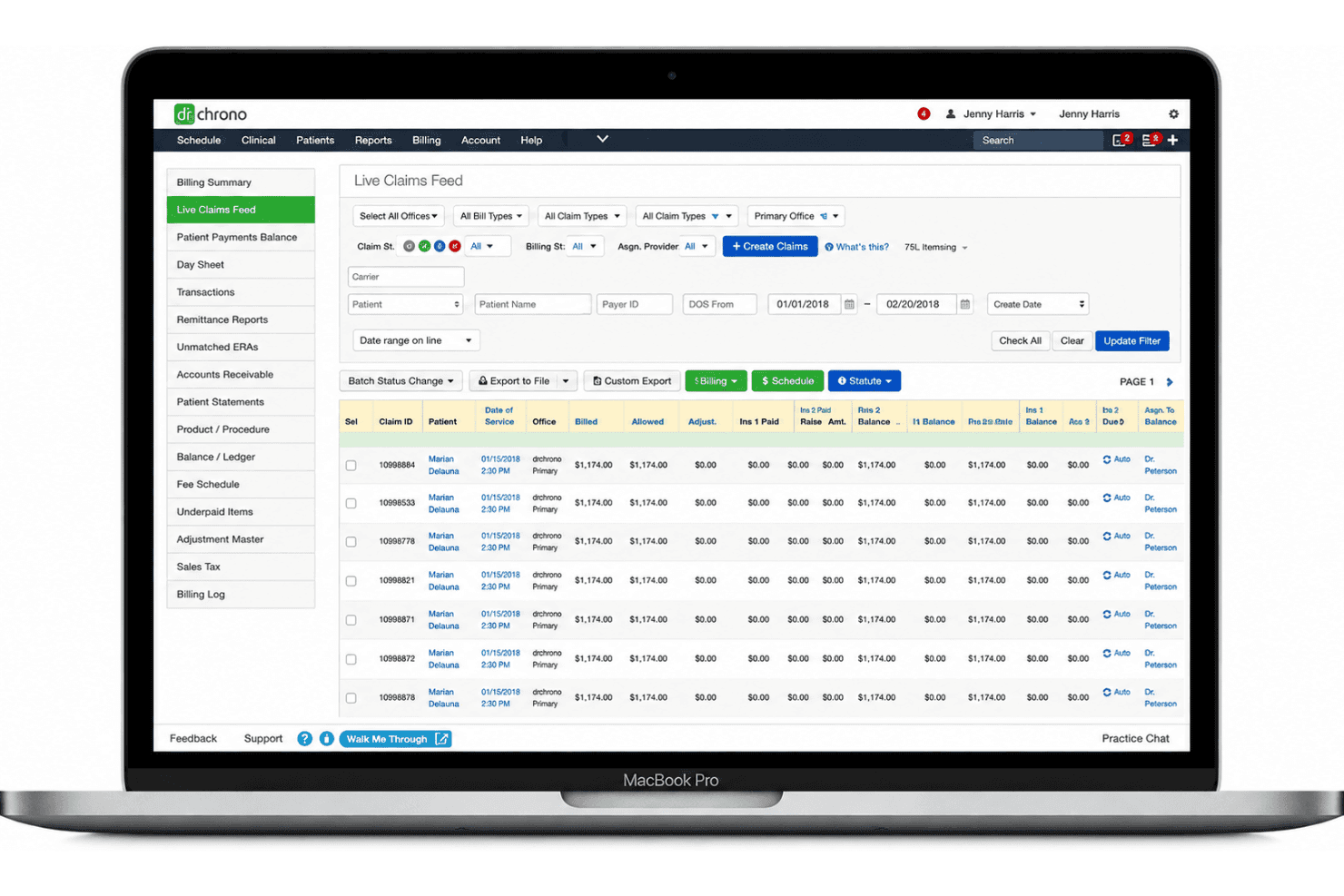
DrChrono offers a Live Claims Feed dashboard that displays billing claim statuses, amounts, and patient details in a structured table view on Mac. DrChrono is a cloud-based EHR and medical billing platform built natively for Apple devices, covering claims submission, insurance eligibility verification, ERA/EOB posting, and revenue cycle management.
Who Is DrChrono Best For?
DrChrono is a strong fit for independent practices and small clinics that have standardized on Apple hardware and want billing and EHR in one platform.
Why I Picked DrChrono
DrChrono earns its spot on my shortlist because it's the only billing platform I've come across that was built from the ground up for Apple hardware, not adapted to work on it. I love how the EHR and billing are genuinely one system: submitting a claim pulls directly from the encounter record, so I'm not re-entering codes I've already documented. The Live Claims Feed gives me real-time claim status visibility right from my iPad, and denied claims get automatically resubmitted within 48 hours.
DrChrono Key Features
- Batch insurance eligibility checks: Run real-time or scheduled eligibility verification for multiple patients at once.
- Custom medical billing profiles: Save and reuse code sets, modifiers, and diagnoses tailored for different services or specialties.
- Integrated patient payment portal: Offer patients branded online bill pay and statements accessible via email, text, or web.
- HIPAA-compliant financial reporting: Access accounts receivable, aging, and revenue cycle reports within a secure environment.
DrChrono Integrations
DrChrono offers native integrations with Quest Diagnostics, LabCorp, Square, and eProvider Solutions, supports Jamf for Apple device deployment, and provides an API for custom integrations.
Pros and Cons
Pros:
- Automated 48-hour denial resubmission included
- EHR and billing share one record
- Native iPad and iPhone billing app available
Cons:
- Managed billing requires using DrChrono's EHR
- Customer support response times reportedly slow
Learn more about DrChrono: Best customizable billing dashboards for Mac users
- Free demo available
- Pricing upon request
Visit WebsiteCustomer Rating:3.6/5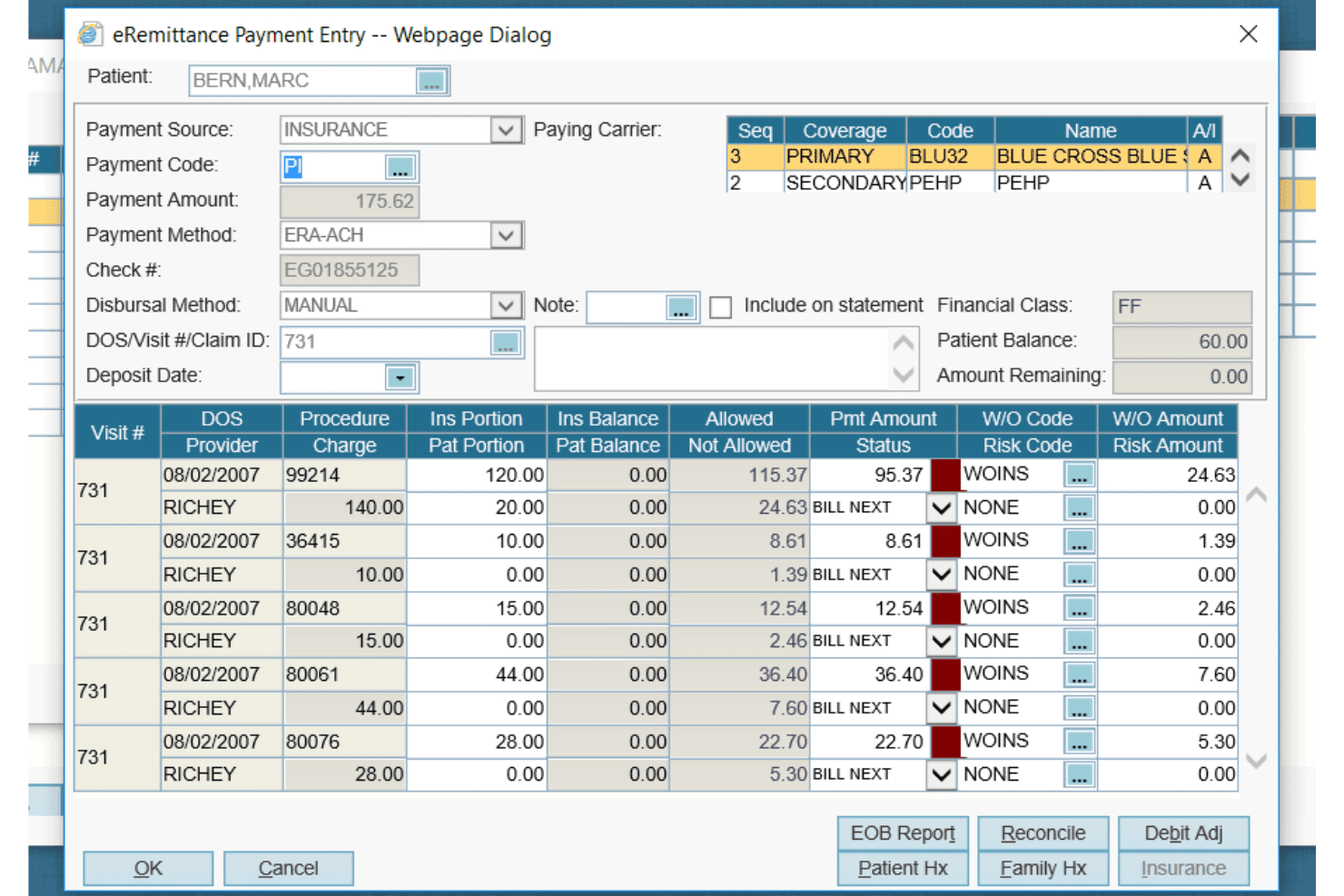
AdvancedMD offers a detailed eRemittance Payment Entry dialog for managing insurance billing, claim payments, and write-off codes per procedure. AdvancedMD is a cloud-based medical billing platform that handles claims submission, insurance eligibility verification, ERA posting, patient payment collection, and A/R reporting across independent and multi-provider practices.
Who Is AdvancedMD Best For?
AdvancedMD suits independent practice owners and medical billing specialists managing revenue cycle workflows across multiple providers or locations.
Why I Picked AdvancedMD
AdvancedMD earns its spot on my shortlist because of how much control it gives you over your A/R dashboards. I love that the A/R Control Center lets me configure worklists, track denials, and view MTD and YTD comparisons all from a browser on my Mac. The ClaimInspector scrubs claims against CCI and LCD rules before submission, so denial trends I'm seeing on the dashboard are already being addressed at the source.
AdvancedMD Key Features
- Central billing office: Manage billing for multiple providers and locations within a unified database and login.
- Integrated clearinghouse: Submit claims directly to payers and receive remittances without manual uploads or downloads.
- EHR integration: Automatically transfer clinical data and copay details from documentation to billing workflows.
- Batch insurance eligibility: Run eligibility verification for multiple patients at once, streamlining pre-visit checks.
AdvancedMD Integrations
AdvancedMD offers native integrations with ChartRequest, DAX Copilot, DeepScribe, Doctorsoft, InstaMed, LeadSquared, and NextPatient. An API is available for custom integrations, and additional marketplace integrations are supported.
Pros and Cons
Pros:
- Automated ERA posting with denial workflows
- ClaimInspector flags claim errors before submission
- Highly customizable A/R dashboard worklists
Cons:
- Windows recommended for optimal performance
- Paper claim printing broken on macOS
 10Best for specialty billing templates
CureMD
- Free demo available
- Pricing upon request
Visit WebsiteCustomer Rating:3.5/5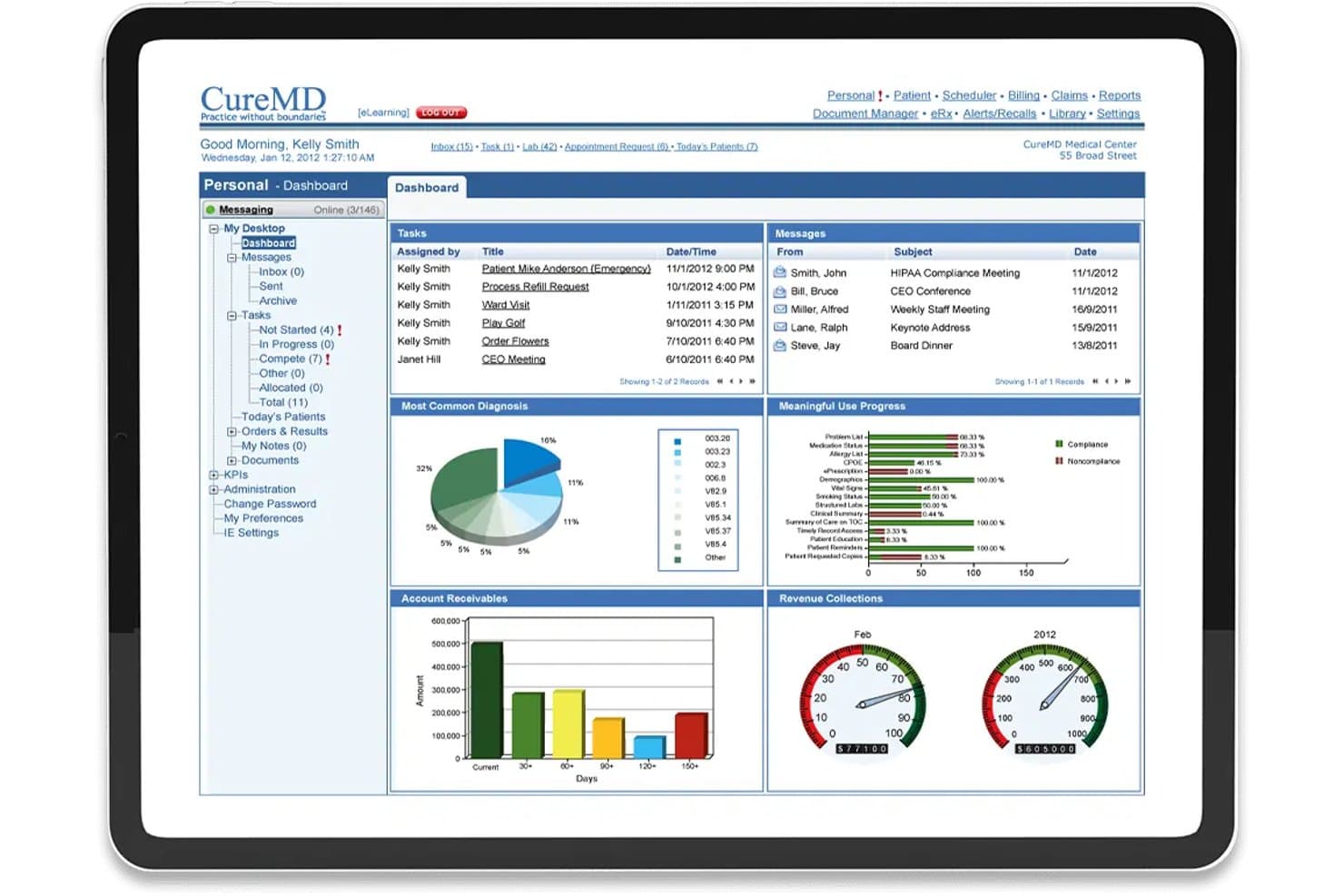
CureMD offers a comprehensive medical billing dashboard displaying account receivables, revenue collections, tasks, messages, and meaningful use progress for Mac-compatible practice management. CureMD is a cloud-based medical billing and EHR platform that combines electronic claims submission, specialty-specific billing templates, insurance eligibility verification, and revenue cycle management.
Who Is CureMD Best For?
CureMD is a strong fit for specialty medical practices—such as cardiology, neurology, or OB/GYN—that need billing workflows and templates built around their specific coding requirements.
Why I Picked CureMD
I picked CureMD as one of the best because its specialty-specific billing templates are genuinely built around how specialties like cardiology, neurology, and OB/GYN actually code. The e-Super Bill feature surfaces E&M code suggestions at the point of documentation, and the rules engine scrubs claims against 4 million+ rules before submission, catching specialty-specific errors upfront. Both features work through a cloud-based platform accessible via a Mac browser, no Windows emulation needed.
CureMD Key Features
- KPI dashboard: Real-time dashboards show revenue metrics, copays, AR by payer, and denial status in a HIPAA-compliant environment.
- Check-in validation: Instantly verifies patient insurance eligibility before visits using integrated clearinghouse connectivity.
- Advanced reporting: Offers preformatted and custom revenue cycle and AR reports accessible from a Mac browser.
- Integrated patient portal: Lets practices share billing statements, manage payments, and support communication with patients online.
CureMD Integrations
CureMD offers native integrations with LabCorp, Quest Diagnostics, BioReference, Enzo Clinical Labs, UPMC, HCA HealthCare, and state immunization registries. It also supports e-prescribing across 40,000+ pharmacies and offers an API for custom integrations.
Pros and Cons
Pros:
- First-pass claim acceptance rate reaches 96%
- Browser-based access works on Mac natively
- Specialty templates cover 30+ medical disciplines
Cons:
- Mobile app functionality lags desktop experience
- Legacy Windows and IE dependencies still exist
Learn more about CureMD:
Annen programvare for medisinsk fakturering for Mac
Her er noen flere alternativer innen programvare for medisinsk fakturering for Mac som ikke kom med på kortlisten, men som likevel er verdt å undersøke:
- 11athenahealthBest real-time eligibility checks for Mac users
- 12RXNTBest role-based controls for billing security
- 13CarepatronBest for simple invoicing and payment tracking
- 14PracticeSuiteBest for multi-location billing on Apple hardware
- 15SimplePracticeBest for integrated online client payments on Mac
- 16NueMDBest for streamlined claims from any Mac device
- 17eClinicalWorksBest for cloud-native billing with Mac access
- 18AllegianceMDBest AI-driven coding assistance for Mac practices
- 19TotalMDBest for electronic and paper claims
- 20Medisoft CloudBest legacy billing system now optimized for Mac
How I Evaluate Medical Billing Software for Mac
I evaluate each tool through two lenses: baseline capabilities—like ERA posting and macOS claims submission—and the differentiators that matter most to Mac-based practices.
Core Functionality (Table Stakes For This List)
When I'm selecting tools for my list, I rank each one on a scale from 0 (does not offer the functionality) to 5 (excels in this area) for each core functionality listed below. Then, I calculate the tool's total score into a percentage. Each tool needs to achieve a minimum total score of 65% to be considered for inclusion.
- macOS Compatibility: I check whether the platform runs in Safari or Chrome on Mac without needing Parallels, Boot Camp, or any Windows workaround.
- Electronic Claims Submission: Each tool should let you generate, scrub, and submit CMS-1500 claims electronically to payers or clearinghouses.
- Insurance Eligibility Verification: Real-time eligibility checks matter—I look for tools that verify coverage before a patient's visit to prevent claim rejections.
- ERA/Payment Posting: Automated posting of ERA/835 files saves billing staff hours of manual data entry and reduces reconciliation errors.
- Patient Billing & Statements: I evaluate whether the tool produces patient statements, tracks balances, and supports online payment collection options.
- HIPAA-Compliant Reporting: Standard A/R aging and revenue cycle reports should live within a HIPAA-compliant environment with proper access controls.
Once I have a list of tools that meet the criteria, I consider what sets each platform apart.
Differentiating Factors (What Sets Vendors Apart)
Here's how I compare and contrast different vendors:
Standout Features
Integrated claim scrubbing is a big differentiator—I look for tools that catch coding errors and missing modifiers before submission, which directly cuts denial rates. ERA auto-posting is another area I evaluate closely, since matching payments to claims without manual entry saves billing staff significant time each week. I also consider whether the platform offers a patient payment portal with options like text-to-pay or payment plans, making it easier to collect balances outside the front desk.
Beyond Features
Clearinghouse connectivity is a key differentiator—I check whether a platform integrates directly with major clearinghouses like Availity or Change Healthcare, since fewer intermediaries mean faster claim turnarounds. HIPAA compliance goes beyond a checkbox; I look for signed BAAs, audit logging, and role-based access controls that protect distributed Mac users. Practice size and specialty fit also matter, especially for clinics in areas like mental health or chiropractic that need specialty-specific code sets and templates.
Slik velger du programvare for medisinsk fakturering for Mac
Det er lett å gå seg vill i lange funksjonslister og komplekse prisstrukturer. For å hjelpe deg med å holde fokus mens du går gjennom den unike prosessen med å velge programvare, har jeg laget en sjekkliste over faktorer du bør ha i bakhodet:
| Faktor | Hva du bør vurdere |
|---|---|
| FaktorSkalerbarhet | Hva du bør vurdereKan plattformen håndtere vekst fra solopraksiser til klinikker med flere behandlere uten omfattende migreringer eller ekstra friksjon? |
| FaktorIntegrasjoner | Hva du bør vurdereKobler programvaren seg direkte til EPJ-systemet, betalingsformidlere eller oppgjørssentraler for å redusere dobbeltregistrering? |
| FaktorTilpasningsmuligheter | Hva du bør vurdereHvor fleksibelt er systemet når det gjelder å tilpasse maler, arbeidsflyter eller rapporter til praksisens unike behov? |
| FaktorBrukervennlighet | Hva du bør vurdereVil teamet ditt oppleve grensesnittet som intuitivt, eller vil læringskurven sannsynligvis bremse den daglige driften? |
| FaktorImplementering og innføring | Hva du bør vurdereHvilken støtte eller opplæring er tilgjengelig for å migrere kontoer, konfigurere brukere og sette opp betalere på Mac-enheter? |
| FaktorKostnad | Hva du bør vurdereFinnes det oppstarts-, måneds- og gebyrer per krav? Er prisene tydelige og forutsigbare når praksisen din vokser eller krymper? |
| FaktorSikkerhetstiltak | Hva du bør vurdereGir leverandøren tydelig informasjon om kryptering, tilgjengelighet av BAA og tilgangskontroll for å oppfylle HIPAA-kravene? |
| FaktorTilgjengelig kundestøtte | Hva du bør vurdereEr hjelperessurser og teknisk støtte faktisk Mac-kompetente og raske til å svare i arbeidstiden din? |
Hva er programvare for medisinsk fakturering for Mac?
Programvare for medisinsk fakturering for Mac er en digital plattform som lar helseteam håndtere forsikringskrav, pasientfakturering og inntektsoppfølging direkte fra macOS-enheter. Disse systemene er utviklet for å fungere sømløst på Apple-maskinvare og støtter HIPAA-kompatible arbeidsflyter, elektroniske krav, kontroller av forsikringsberettigelse, registrering av betalinger og håndtering av pasientoppgjør – uten behov for Windows-emulering.
Funksjoner i programvare for medisinsk fakturering for Mac
Vær oppmerksom på følgende viktige funksjoner når du velger medisinsk faktureringsprogramvare for Mac:
- Mac-kompatibilitet: Kjører opprinnelig på macOS eller i en nettleser uten Windows-emulering, noe som gir en smidig opplevelse på Apple-maskinvare.
- Elektronisk innsending av krav: Lar deg opprette, kontrollere og sende CMS-1500- eller UB-04-krav direkte til betalere og oppgjørssentraler for raskere betaling.
- Verifisering av forsikringsberettigelse: Kontrollerer pasientens dekning umiddelbart før konsultasjoner, noe som reduserer avviste krav og forbedrer effektiviteten ved timeavtaler.
- Automatisk bokføring av ERA og EOB: Mottar oppgjørsfiler og kobler betalinger til krav, noe som reduserer behovet for manuell registrering og avstemming.
- Pasientfakturering og kontoutskrifter: Genererer og sender kontoutskrifter, følger opp kontosaldoer og håndterer arbeidsflyter for pasientbetalinger fra systemet.
- Nettbasert betalingsportal: Tilbyr pasienter et sikkert område med virksomhetens profilering, der de kan se og betale regninger, opprette betalingsplaner og bruke alternativer som Apple Pay.
- Tilpassbar rapportering: Gir tilgang til HIPAA-kompatible rapporter om fordringer, forfalte beløp og produktivitet, med filtre og dashbordalternativer for å følge den økonomiske helsen.
- Integrert timeplanlegging: Synkroniserer avtaler direkte med faktureringsarbeidsflyter og sikrer at hvert besøk er knyttet til et krav eller en faktura for nøyaktig registrering av kostnader.
- Tilgangskontroller basert på roller: Begrenses teammedlemmenes tilgang etter ansvarsområde, noe som støtter datasikkerhet og HIPAA-samsvar.
- Støtte for flere lokasjoner og spesialiteter: Tilpasses enkeltstående praksiser eller gruppepraksiser, inkludert spesifikke koder og arbeidsflyter for ulike spesialiteter, for fleksibel og skalerbar faktureringshåndtering.
Fordeler med medisinsk faktureringsprogramvare for Mac
Implementering av medisinsk faktureringsprogramvare for Mac gir flere fordeler for teamet og virksomheten din. Her er noen av fordelene du kan se frem til:
- Opprinnelig Mac-opplevelse: Få tilgang til hele plattformen på macOS-enheter uten Windows-emulering, slik at faktureringen går raskere fra alle Apple-datamaskiner.
- Raskere behandling av krav: Elektronisk innsending av krav og integrerte kontrollverktøy hjelper deg med å redusere avvisninger, begrense feil og få betalt raskere.
- Effektivisert innkreving av betalinger: Pasientportaler og nettbaserte betalingsfunksjoner gjør det enklere for pasienter å betale og for teamet å følge opp saldoer.
- Mindre manuell registrering: Automatisk bokføring av ERA/EOB kobler betalinger til krav og sparer flere timer med repetitivt avstemmingsarbeid.
- Bedre økonomisk oversikt: Tilpassbar, HIPAA-kompatibel rapportering lar deg overvåke trender i inntektssyklusen og håndtere problemer på et tidlig tidspunkt.
- Økt pasienttilfredshet: Nettbaserte kontoutskrifter, betalingsplaner og tydelige faktureringsarbeidsflyter gir pasientene en smidigere og mer transparent opplevelse.
- Forbedret datasikkerhet: Rollebaserte tilgangskontroller og krypterte miljøer bidrar til å sikre HIPAA-samsvar og beskytte sensitiv informasjon.
Kostnader og priser for medisinsk faktureringsprogramvare for Mac
Når du velger medisinsk faktureringsprogramvare for Mac, må du forstå de ulike prismodellene og abonnementene som er tilgjengelige. Kostnadene varierer basert på funksjoner, teamstørrelse, tillegg og mer. Tabellen nedenfor oppsummerer vanlige abonnementer, gjennomsnittsprisene deres og typiske funksjoner som er inkludert i løsninger for medisinsk faktureringsprogramvare for Mac:
Sammenligningstabell for abonnementer for medisinsk faktureringsprogramvare for Mac
| Abonnementstype | Gjennomsnittspris | Vanlige funksjoner |
|---|---|---|
| AbonnementstypeGratisabonnement | Gjennomsnittspris$0 | Vanlige funksjonerGrunnleggende oppfølging av krav, enkel rapportering, begrenset kundestøtte og manuelle pasientkontoutskrifter. |
| AbonnementstypePersonlig abonnement | Gjennomsnittspris$30-$80/bruker/måned | Vanlige funksjonerElektronisk innsending av krav, verifisering av berettigelse, nettbaserte kontoutskrifter og støtte via e-post. |
| AbonnementstypeForretningsabonnement | Gjennomsnittspris$100-$250/bruker/måned | Vanlige funksjonerAutomatisk bokføring av ERA, betalingsportal, integrert timeplanlegging, kontroll av krav, telefonstøtte og tilpasset rapportering. |
| AbonnementstypeForetaksabonnement | Gjennomsnittspris$300+/bruker/måned | Vanlige funksjonerStøtte for flere lokasjoner, spesialitetsmaler, avansert analyse, dedikert kontoadministrasjon og API-integrasjoner. |
Medisinsk faktureringsprogramvare for Mac – vanlige spørsmål
Her er svar på vanlige spørsmål om medisinsk faktureringsprogramvare for Mac:
Kan jeg bruke medisinsk faktureringsprogramvare for Mac uten å installere Windows eller Parallels?
Ja, de fleste moderne løsninger kjører direkte på macOS eller i nettleseren, slik at du ikke trenger Windows-emulering eller ekstra programvare for å håndtere faktureringen effektivt.
Hva bør jeg se etter når det gjelder HIPAA-samsvar i Mac-basert faktureringsprogramvare?
Du bør se etter funksjoner som signerte avtaler med forretningsforbindelser (BAAs), kryptering, revisjonslogger og rollebaserte tilgangskontroller – alt dette er viktig for å beskytte pasientdata på Mac-systemer.
Fungerer faktureringsprogramvare for Mac med mitt elektroniske pasientjournalsystem og min oppgjørssentral?
De fleste plattformer tilbyr integrasjoner med populære elektroniske pasientjournalsystemer og større oppgjørssentraler, men sjekk alltid om dine nåværende systemer støttes, slik at du unngår ekstra manuelt arbeid.
Hvor vanskelig er det å migrere faktureringsdata fra Windows-programvare til en Mac-plattform?
Datamigrering kan variere, men mange leverandører tilbyr hjelp med oppstart, importverktøy og opplæring for å flytte kontoene og kravene dine fra eldre systemer til den nye Mac-løsningen.
Finnes det alternativer for praksiser med flere lokasjoner eller spesialiserte praksiser?
Ja, flere Mac-kompatible faktureringsplattformer støtter flere lokasjoner og tilbyr spesialitetstilpassede maler, kodesett og rapportering som dekker praksisens unike behov.