

Pediatriske EMR-systemer dekker de unike behovene innen behandling av barn og oppfølging av vekst, slik at teamet ditt kan konsentrere seg om overvåking av utviklingsmilepæler og involvering av familien. Det kan være utfordrende å håndtere arbeidsflyter som er spesifikke for pediatri, men riktig støtte kan forenkle journalføringen og redusere dokumentasjonsfeil.
I denne artikkelen sammenligner og vurderer jeg de beste pediatriske EMR-verktøyene for å støtte kjøpsbeslutningen din.
Hvorfor du kan stole på våre programvareanbefalinger
6,700+
Reviews
20
Industry experts
16+
Evaluation factors
14
Years
Teamet vårt har testet og anmeldt programvare siden 2012. Vi leder selv legekontorer, så vi vet hvor vanskelig og hvor viktig det er å velge riktig programvare.
I denne guiden har vi vurdert verktøyene gjennom praktisk testing og uavhengig research og gitt dem poeng ut fra våre utvelgelseskriterier.
Anmeldelsene våre bygger på vår egen redaksjonelle vurdering. De er ikke et salgsargument.
Sammenligningstabell for pediatriske EMR-systemer
Denne sammenligningstabellen oppsummerer prisopplysningene for mine beste utvalgte pediatriske EMR-systemer:
| Tool | Best For | Trial Info | Price | ||
|---|---|---|---|---|---|
| 1 | Best for customizable pediatric charting | 15-day free trial | From $99/month | Website | |
| 2 | Best for sibling and family appointment booking | Free demo available | From $100/user/month (billed annually) | Website | |
| 3 | Best for all-50-state immunization registry sync | Free demo available, 7-day free trial for the standalone AI scribe | From $249/user/month | Website | |
| 4 | Best for robust security and privacy features | Free demo available | Pricing upon request | Website | |
| 5 | Best for pediatric-specific workflows | Free demo available | Price upon request | Website | |
| 6 | Best for collaborative care coordination | Free plan available | From $25/month | Website | |
| 7 | Best for scaling multi-site pediatric billing | Free demo available | Pricing upon request | Website | |
| 8 | Best for iPad-based pediatric charting and billing | Free demo available | Pricing upon request | Website | |
| 9 | Best for customizable charting and reporting | Free demo available | Pricing upon request | Website | |
| 10 | Best for seamless patient documentation and tracking | Free demo available | Pricing upon request | Website |


Vurderinger av de beste pediatriske EMR-systemene
Nedenfor finner du mine detaljerte sammendrag av de beste pediatriske EMR-systemene som kom med på kortlisten. Vurderingene mine gir en detaljert gjennomgang av de viktigste funksjonene, fordelene og ulempene, integrasjonene og ideelle bruksområdene for hvert verktøy, slik at du kan finne det som passer best for deg.
 Best for customizable pediatric charting
- 15-day free trial
- From $99/month
Visit WebsiteCustomer Rating:4.8/5
OptiMantra’s patient portal enables families to update profiles, complete intake forms, and securely message practitioners—all from one place. OptiMantra is an electronic medical record (EMR) and practice management platform that helps healthcare providers streamline clinical and administrative workflows. While it was originally designed for integrative and wellness practices, its flexibility and customization options make it a strong fit for pediatric care, allowing clinicians to adapt templates and workflows to meet the needs of young patients.
Why I Picked OptiMantra: I picked OptiMantra because its customizable charting templates let you tailor documentation for different age groups and pediatric specialties. This flexibility helps you capture the right developmental and health data for each child, ensuring that visits are well-documented and compliant with pediatric standards. I also appreciate its telehealth functionality, which enables secure virtual consultations — something many pediatric practices now rely on for convenience and continuity of care.
Standout Features & Integrations:
OptiMantra includes features like customizable charting, electronic prescriptions, and a secure patient portal that allows parents to access their child’s health records and communicate directly with the practice. Its scheduling and reminder tools help you stay on top of routine pediatric check-ups and vaccination appointments. Insurance billing and reporting modules are built in, supporting the financial side of your pediatric operations. Integrations include Surescripts, LabCorp, Quest Diagnostics, Fullscript, Zoom, Stripe, Amazon Web Services (AWS), Box.com, SFax, Google Apps, SendGrid, and Fitbit.
Pros and Cons
Pros:
- Secure parent communication portal
- Integrated telehealth video consultations
- Customizable templates for pediatric needs
Cons:
- No native growth chart tracking
- Limited pediatric dosage calculator tools
Learn more about OptiMantra: Best for sibling and family appointment booking
- Free demo available
- From $100/user/month (billed annually)
Visit WebsiteCustomer Rating:5/5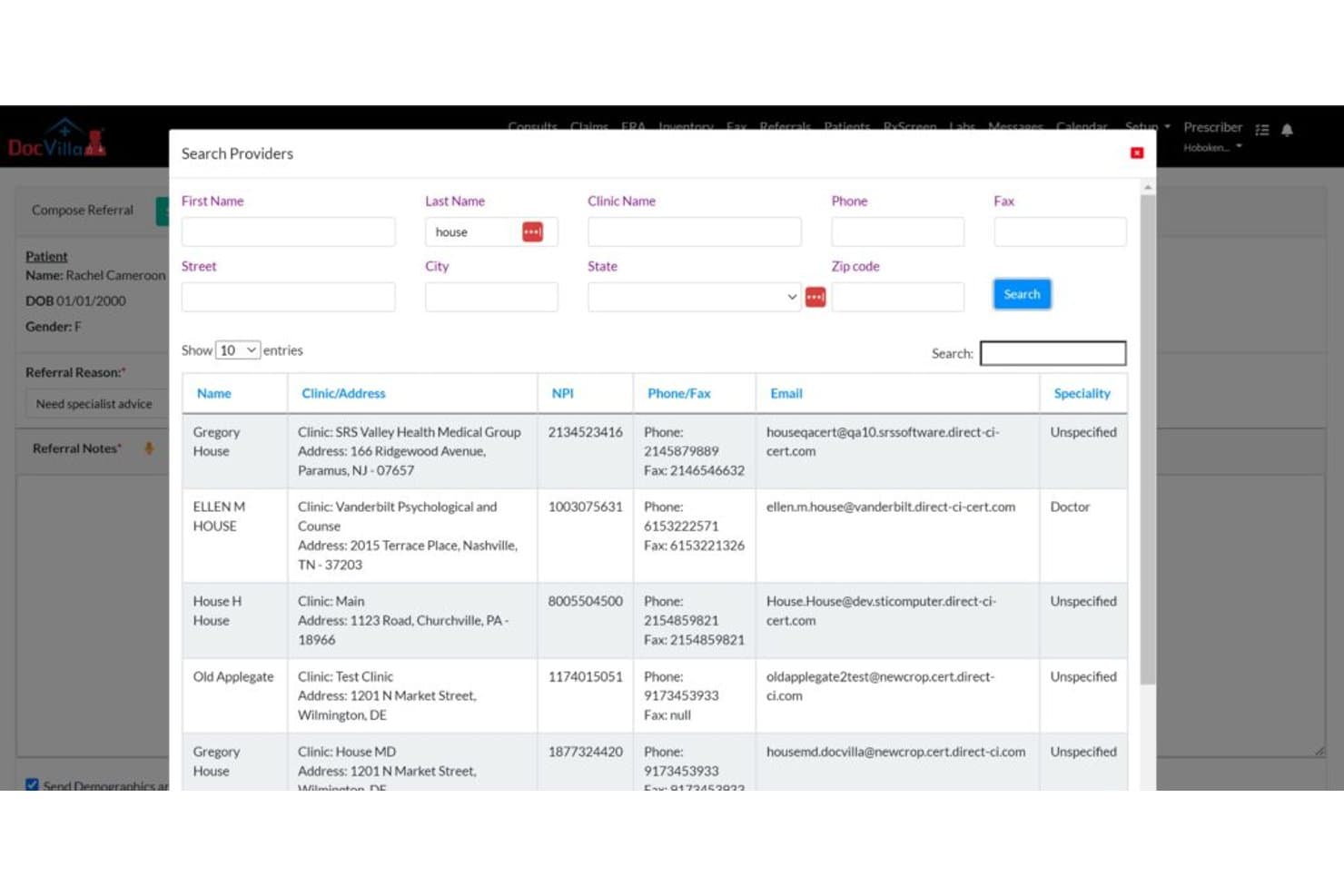
DocVilla lets users search and select referral providers by name or clinic. DocVilla is a cloud-based pediatric EHR platform that combines clinical documentation, growth charting, immunization tracking, e-prescribing, billing, and a parent-facing patient portal in a single system.
Who Is DocVilla Best For?
DocVilla is a strong fit for small to mid-sized pediatric practices that manage multiple siblings or family members and need scheduling, documentation, and billing in one place.
Why I Picked DocVilla
I've included DocVilla in my top picks because its sibling and family appointment booking sets it apart from most pediatric EMR platforms. I love that you can schedule a sibling pair back-to-back in a single workflow, with the parent portal letting one account manage multiple children's appointments, records, and messages simultaneously. Its vaccine-to-claim workflow, which tracks administration from inventory through CPT coding directly into the claim, keeps the clinical and billing sides tightly connected.
DocVilla Key Features
- CDC growth chart plotting: Height, weight, and BMI are automatically plotted against CDC growth charts, eliminating manual data entry for clinicians.
- Weight-based dosage alerts: The e-prescribing workflow fires automatic alerts when a prescribed dose falls outside age- or weight-appropriate ranges.
- Customizable pediatric templates: Over 50 specialty templates cover well-child visits, developmental milestones, sports physicals, and age-specific screenings.
- Two-way lab integration: Results from Quest Diagnostics and Labcorp flow directly into the patient chart and can be shared with parents through the portal.
DocVilla Integrations
DocVilla integrates with Quest Diagnostics, Labcorp, AccuReference, Vibrant Wellness, Surescripts, Bamboo, and supported state immunization registries. It also supports Direct Secure Messaging through DirectTrust and offers an HL7 FHIR API for custom integrations.
Pros and Cons
Pros:
- Vaccine administration connects directly to claims
- Pediatric templates support well-child documentation
- Sibling appointments fit one booking workflow
Cons:
- Growth charts omit head circumference and WHO curves
- Immunization forecasting and catch-up logic remain absent
Learn more about DocVilla: Best for all-50-state immunization registry sync
- Free demo available, 7-day free trial for the standalone AI scribe
- From $249/user/month
Visit WebsiteCustomer Rating:4.4/5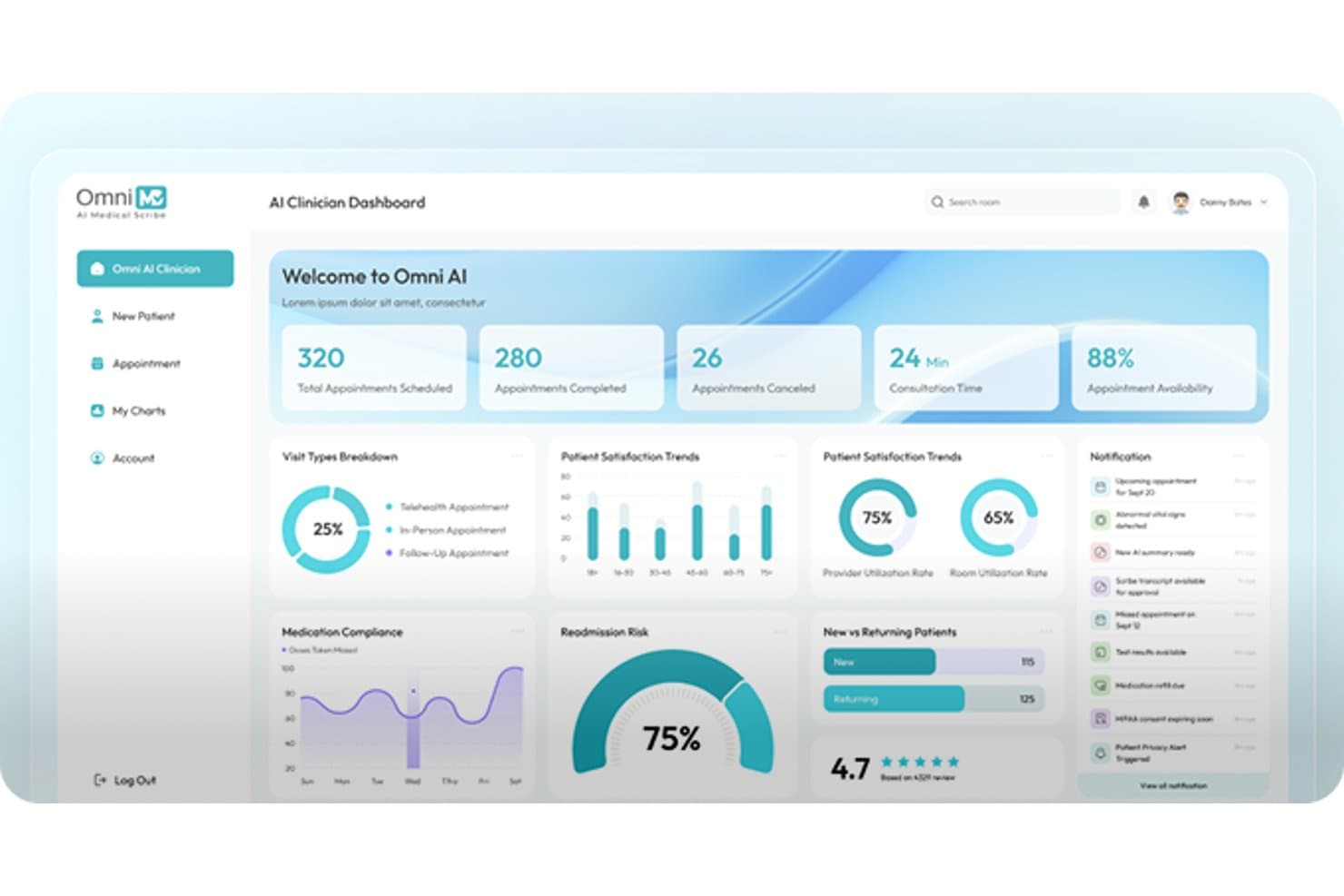
OmniMD centralizes appointment stats and patient trends in one dashboard. OmniMD is a pediatric EMR platform that integrates clinical charting, immunization tracking, developmental screenings, billing automation, and telehealth into a single system built for pediatric practices.
Who Is OmniMD Best For?
OmniMD is a strong fit for pediatric practices that need real-time, bidirectional immunization registry connections across all 50 states.
Why I Picked OmniMD
I picked OmniMD as one of the best because its bidirectional immunization registry connection across all 50 states is something I rarely see done this completely. When you open a child's chart, the system automatically queries the state registry and pulls in their full vaccine history, including doses given at CVS or Walgreens. It also tracks VFC and privately purchased vaccines in separate inventories and auto-calculates 90460/90461 units for combination vaccines, which removes a lot of manual billing work.
OmniMD Key Features
- Bright Futures-aligned well-child templates: Age-specific visit templates from 2 weeks through adolescence follow Bright Futures guidelines and include anticipatory guidance built into the workflow.
- Built-in developmental and behavioral screenings: Tools like M-CHAT-R/F, ASQ-3, Vanderbilt ADHD scales, PHQ-A, and CRAFFT auto-score and link results directly to billing codes 96110 and 96127.
- AI medical scribe trained on pediatric encounters: The scribe captures caregiver concerns during visits and generates documentation with an average note sign-off time of 18 seconds.
- Pediatric-specific billing rule engine: The system automatically applies preventive visit codes, newborn care codes, EPSDT billing, and modifier 25 flags for same-day sick and well visits.
OmniMD Integrations
OmniMD integrates with all 50 state immunization registries, LabCorp, Quest, HIEs, specialists, and hospitals through HL7 and FHIR. It can also pull vaccine histories from pharmacies such as CVS and Walgreens.
Pros and Cons
Pros:
- Support teams receive positive user reviews
- Validated developmental screenings score themselves
- Automated pediatric billing and screening codes
Cons:
- Charting workflows require too many saves
- Early-morning maintenance can slow server performance
Learn more about OmniMD: Best for robust security and privacy features
- Free demo available
- Pricing upon request
Visit WebsiteCustomer Rating:4.5/5
Sevocity's Interface Sevocity is a cloud-based electronic health record (EHR) system that puts a premium on security and privacy. Designed with compliance in mind, it provides robust safety measures to protect sensitive patient information, making it ideal for practices that prioritize privacy.
Why I Picked Sevocity: I selected Sevocity because of its exceptional focus on security and privacy. In the current landscape of healthcare, where patient information privacy is paramount, Sevocity sets itself apart with its stringent security metrics. For this reason, I find it best for robust security and privacy features.
Standout features & integrations:
Sevocity offers advanced user access controls and an audit trail to monitor data access. Its HIPAA compliant communication platform is another key feature that assures secure patient-practice interactions. It integrates seamlessly with popular practice management systems and billing tools, streamlining various administrative tasks.
Pros and Cons
Pros:
- HIPAA compliant communication platform
- Robust audit trails
- Advanced user access controls
Cons:
- Customization options might require some technical skills
- The interface could be more intuitive
- Steep pricing for small practices
Learn more about Sevocity: Best for pediatric-specific workflows
- Free demo available
- Price upon request
Visit WebsiteCustomer Rating:4.2/5
Office Practicum's Interface Office Practicum is a comprehensive EMR solution, specifically tailored to address the unique workflows of pediatric practices. This tool is committed to supporting child health providers, enabling them to manage patient health records efficiently.
Why I Picked Office Practicum: Office Practicum joined my list for its strong emphasis on pediatric-focused workflows. What sets it apart is its dedication to the unique needs of pediatric practices, providing a more focused and specialty-specific toolset compared to others. It's safe to say, it's "Best for pediatric-specific workflows", thanks to its comprehensive yet specialized tools that truly understand the pediatric landscape.
Standout Features & Integrations:
Office Practicum shines with its pediatric-specific features like growth charts, immunization tracking, and developmental screening tools. Not only this, but it also offers an integrated patient portal to foster better communication between families and providers. The system integrates with a variety of labs, pharmacies, and immunization registries, ensuring smooth data flow across the platform.
Pros and Cons
Pros:
- Robust integration with various labs, pharmacies, and registries
- Integrated patient portal for better family communication
- Pediatric-specific workflows and tools
Cons:
- The user interface might appear outdated to some users
- Learning curve may be steep for some users
- Pricing information is not readily available
Learn more about Office Practicum: Best for collaborative care coordination
- Free plan available
- From $25/month
Visit WebsiteCustomer Rating:4.2/5
CharmHealth's Interface CharmHealth is a cloud-based, comprehensive EMR solution built with the complexities of pediatric care in mind. It fosters seamless collaboration between healthcare professionals, patients, and their families.
Why I Picked CharmHealth: CharmHealth made the list for its exceptional capacity to facilitate collaborative care. In comparison to other systems, CharmHealth offers a unique framework that allows the entire care team to work together seamlessly. I believe it stands out as the "Best for collaborative care coordination" because of its integrated approach to care, where the focus is on collaboration between all parties involved.
Standout Features & Integrations:
CharmHealth is enriched with features like immunization tracking, growth chart plotting, and an integrated patient portal for family access. It excels in supporting a collaborative model of care, as it allows seamless communication between healthcare providers, patients, and their families. CharmHealth integrates well with laboratory, pharmacy, and billing systems, providing an uninterrupted flow of data across various functions.
Pros and Cons
Pros:
- Seamless integration with multiple systems
- Integrated patient portal for increased family engagement
- Strong collaborative care capabilities
Cons:
- Some users may find the pricing structure complex
- The abundance of features may overwhelm new users
- User interface might require some familiarization
Learn more about CharmHealth: Best for scaling multi-site pediatric billing
- Free demo available
- Pricing upon request
Visit WebsiteCustomer Rating:4.1/5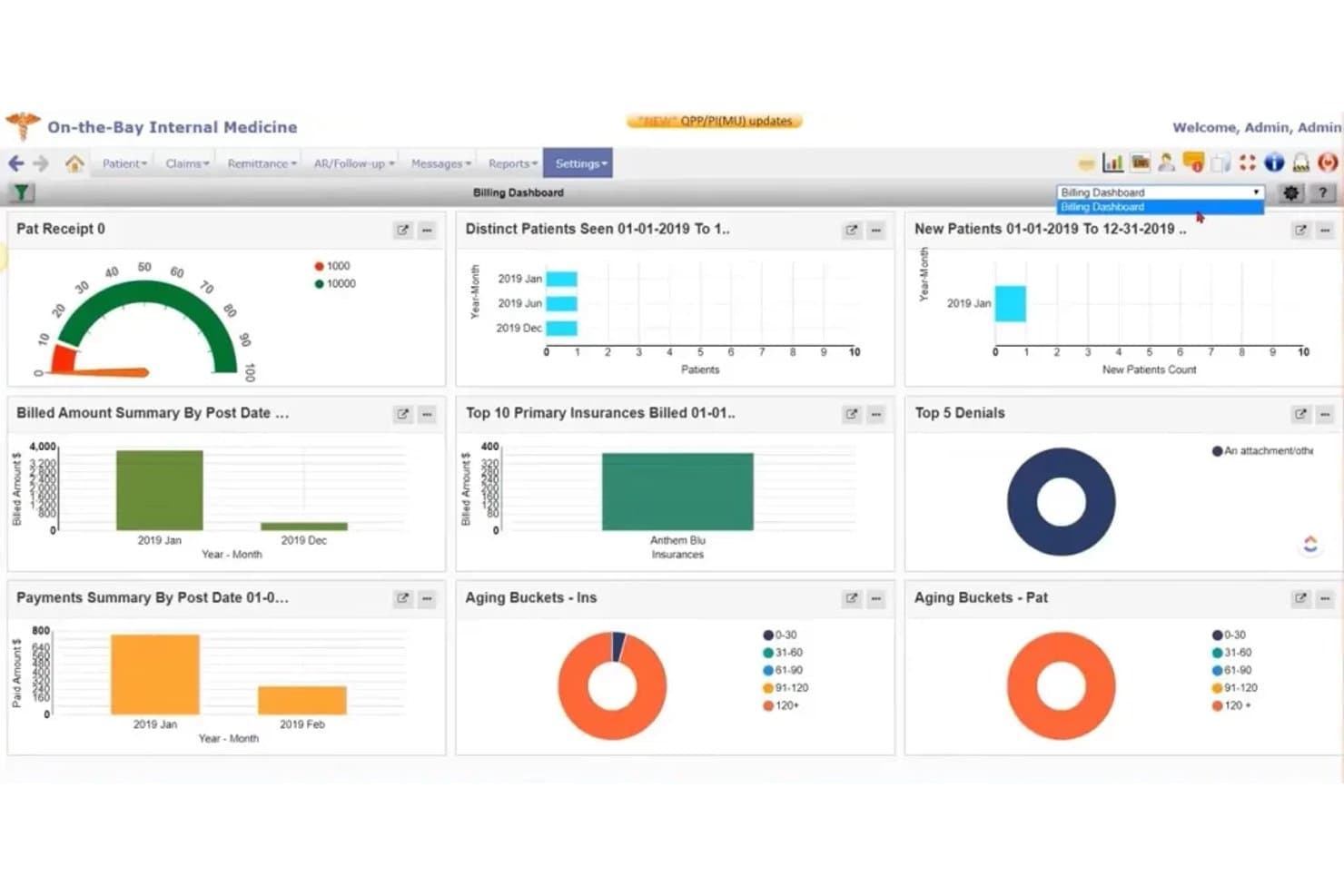
PrognoCIS billing dashboard showing payments, denials, insurance claims, and aging reports PrognoCIS is a cloud-based pediatric EMR platform that combines clinical charting, immunization tracking, growth charting, age-based documentation, billing, and a parent/guardian portal in a single integrated system.
Who Is PrognoCIS Best For?
PrognoCIS is a strong fit for growing pediatric practices managing billing across multiple locations or provider groups.
Why I Picked PrognoCIS
PrognoCIS earns its spot on my shortlist because of how well it handles billing across multiple locations without fragmenting the clinical side. I like that pediatric-specific code sets, AI-assisted claims scrubbing, and VFC-aware billing are all built into the same platform where charting happens. In practice, that means a practice running three or four sites can centralize reporting and catch claim errors before submission, without toggling between separate systems.
PrognoCIS Key Features
- CDC/WHO growth charting: Automatically plots height, weight, head circumference, and BMI on age- and gender-specific charts from birth to 20 years, including Down syndrome charts.
- Bidirectional immunization registry integration: Queries and imports vaccine history and forecasts from state registries using HL7 messaging, with overdue doses flagged on the patient facesheet.
- ASQ-3 and M-CHAT developmental screening forms: Includes 18 ASQ-3 forms covering ages 2–60 months, plus M-CHAT and Vanderbilt ADHD scales built directly into the encounter workflow.
- Sibling record linking: A popup connects sibling charts so staff can move between related patient records without leaving the current workflow.
PrognoCIS Integrations
PrognoCIS integrates with LabCorp, Pathology Inc., state immunization registries, Surescripts, Secure Connect, TriZetto, Waystar, Jopari, and Integrity/OpenEdge. It supports HL7, FHIR APIs, CCD/CCR exchange, and custom APIs for additional connectivity.
Pros and Cons
Pros:
- Centralized billing suits multi-site practices
- Two-way registry forecasting supports vaccine reconciliation
- Pediatric growth charts include Down syndrome
Cons:
- Portal lacks appointment cancellation and rescheduling
- Billing workflows can produce modifier rejections
Learn more about PrognoCIS: Best for iPad-based pediatric charting and billing
- Free demo available
- Pricing upon request
Visit WebsiteCustomer Rating:3.9/5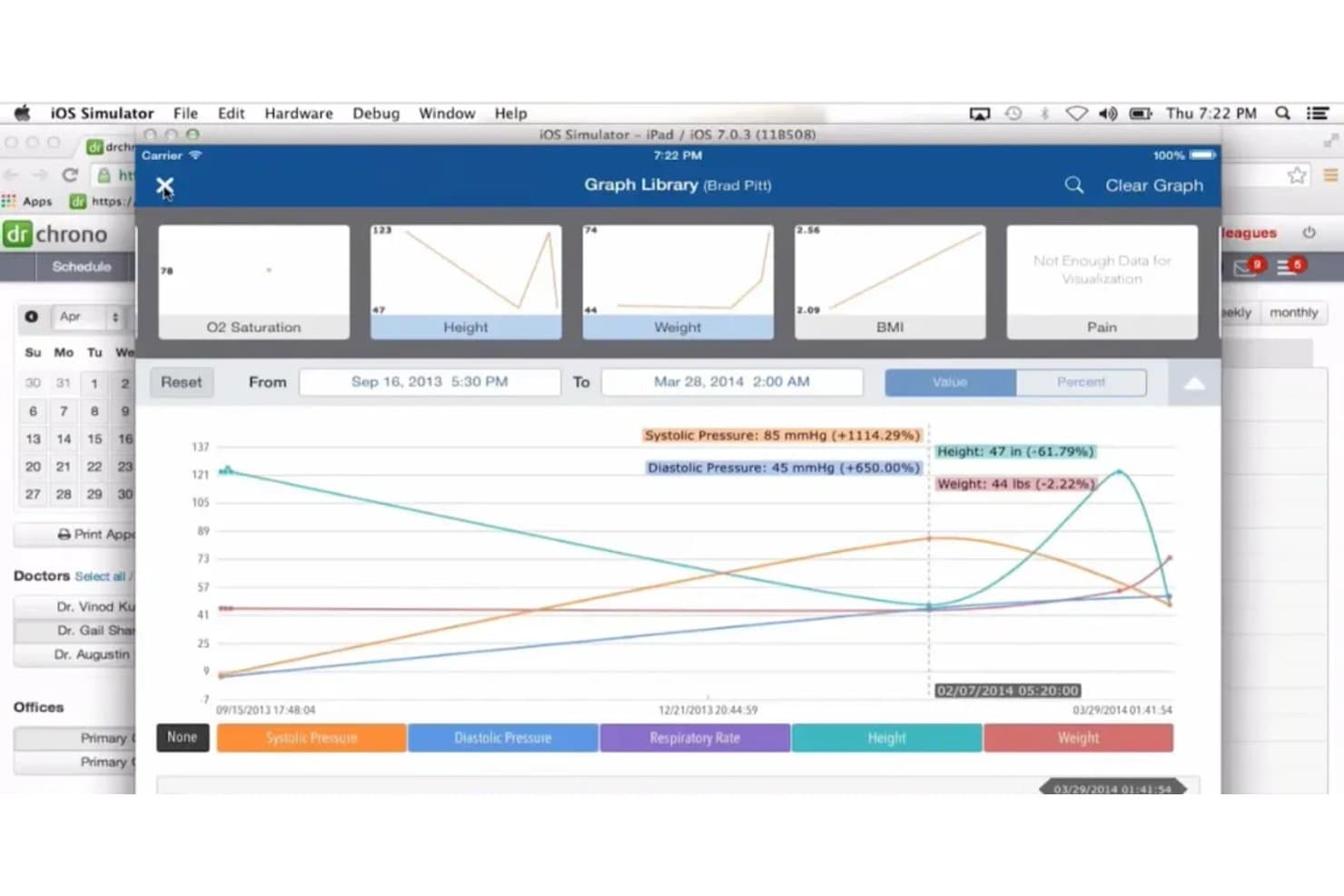
DrChrono tracks patient vitals like height, weight, and BMI over time. DrChrono is a mobile-first pediatric EMR platform that combines clinical charting, growth tracking, immunization management, e-prescribing, billing, telehealth, and a parent-facing patient portal in one system built to run natively on iPad, iPhone, and desktop.
Who Is DrChrono Best For?
DrChrono is a strong fit for independent pediatric practices that do most of their clinical work on iPad and want charting, billing, and the parent portal in one system.
Why I Picked DrChrono
DrChrono earns its spot on my shortlist because it's built to run natively on iPad, which makes it a natural fit for pediatric practices that chart at the bedside or between exam rooms. I particularly like that it includes WHO and CDC growth charts alongside Down Syndrome and Fenton preterm charts, so clinicians aren't manually tracking edge cases. The Iron Bridge registry integration also pulls vaccine history and forecasts from all state registries directly into the chart, which saves real time during well-child visits.
DrChrono Key Features
- Weight-based dosage calculator: Computes pediatric drug doses by body weight directly within the e-prescribing workflow on both web and iPad.
- VFC funding code support: Records Vaccines for Children funding eligibility and links it to vaccine inventory and billing codes on each immunization entry.
- OnPatient guardian portal: Gives parents secure messaging, online booking, digital intake forms, and access to visit summaries at no extra cost.
- EverHealth Scribe: An AI add-on that drafts clinical notes from the visit conversation, reducing manual documentation time after each appointment.
DrChrono Integrations
DrChrono integrates with Iron Bridge, Quest, LabCorp, Surescripts, CoverMyMeds, eProvider Solutions, and iHCFA. It also supports FHIR APIs, SMART on FHIR apps, and a partner marketplace for custom connectivity.
Pros and Cons
Pros:
- Vaccine documentation captures lots and funding eligibility
- Specialized growth charts support pediatric assessments
- Native iPad charting suits pediatric exam rooms
Cons:
- Separate child accounts complicate guardian access
- Users report slow support and service outages
Learn more about DrChrono:
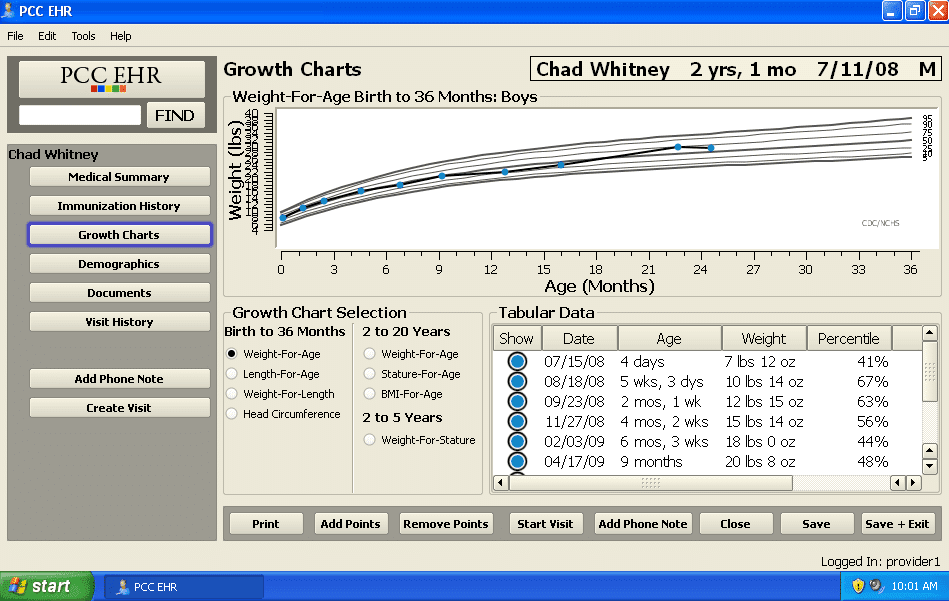
PCC's Interface PCC is a pediatrics-only EHR and practice management system that covers clinical charting, immunization tracking, e-prescribing, billing, and parent communication through a single platform built exclusively for pediatric practices.
Who Is PCC Best For?
PCC fits independent and group pediatric practices that need deep charting flexibility, from custom well-visit protocols to specialty growth charts for preterm or Trisomy 21 patients.
Why I Picked PCC
PCC earns its spot on my shortlist because no other pediatric EHR gives you this level of control over how chart notes are built and structured. Using the Protocol and Component Builder, I can create custom well-visit workflows from scratch, clone existing protocols, and map them to specific visit reasons or individual providers. I also love that specialty growth charts, like Fenton preterm and AAP Down syndrome charts, trigger automatically based on a patient's problem list.
PCC Key Features
- Immunization forecasting: IMMUCAST-based scheduling predicts each patient's next due dose, earliest allowed date, and past-due date at a glance.
- State registry integration: PCC connects bidirectionally with immunization registries in over 40 U.S. jurisdictions, letting you retrieve and submit records in real time.
- VFC inventory management: The Vaccine Lot Manager tracks private and VFC stock separately, auto-decrements counts with each dose given, and generates reconciliation reports.
- Practice Vitals Dashboard: Benchmarks your practice against other PCC clients on daily-updated metrics like A/R days, clean-claim rate, and well-visit rates.
PCC Integrations
PCC has documented integrations with immunization registries, Surescripts, Updox, CHADIS, Televox/Intrado, LabCorp, Quest, and PDMP links. No public FHIR or API program is documented for custom integrations.
Pros and Cons
Pros:
- Specialty growth charts support complex pediatric cases
- Vaccine forecasting supports overdue immunization outreach
- Custom chart protocols fit pediatric workflows
Cons:
- Patient portal tools remain relatively basic
- Legacy workflows slow billing and reporting
Learn more about PCC:
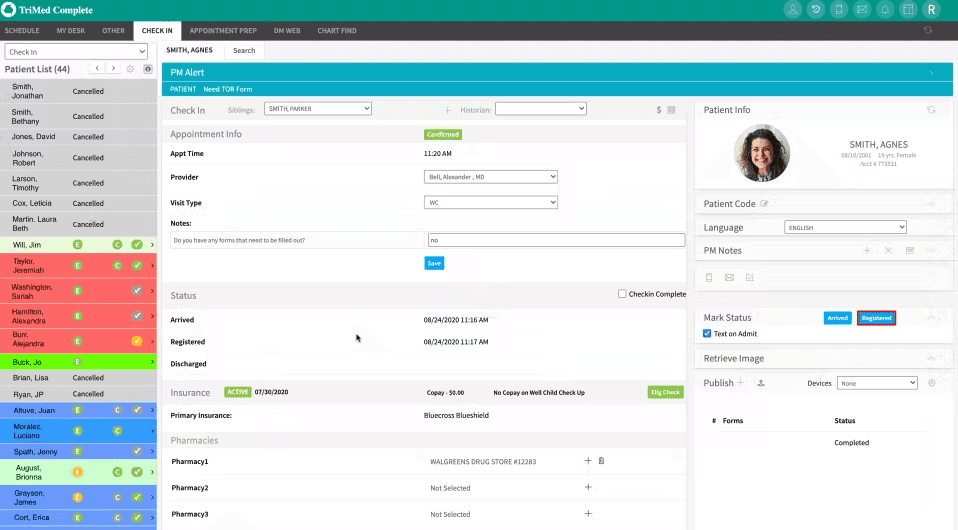
Trimed's Interface TriMed is a pediatric EMR platform that combines clinical documentation, growth charting, immunization tracking, weight-based dosing, family billing, and an integrated patient portal into a single system built specifically for pediatric practices.
Who Is TriMed Best For?
TriMed is a strong fit for independent pediatric practices of any size that need a single platform to handle clinical documentation, immunization tracking, and family billing without juggling multiple systems.
Why I Picked TriMed
I picked TriMed as one of the best because it's built from the ground up for pediatric documentation, and that focus shows in the details. Growth chart data plots the moment vitals are entered, percentiles appear directly in the visit note, and well-visit templates automatically age patients out of visits they no longer need. I also love how sibling history updates carry across all family charts at once, which cuts real documentation time on busy clinic days.
TriMed Key Features
- Weight-based dosing calculator: Computes doses from the patient's current weight, applies maximum daily dose limits, and rounds to standard units like teaspoons.
- Ambient AI documentation: Amazon HealthScribe listens during the visit and drafts the history, assessment, and plan for the provider to review and finalize.
- Family guarantor billing: Links every patient to a guarantor so staff can view family balances and switch between sibling accounts from one billing screen.
- State immunization registry reporting: Sends automated updates to state registries and selects the correct administration billing codes based on the patient's coverage type.
TriMed Integrations
TriMed integrates with Waystar, state immunization registries, Labcorp, Quest Diagnostics, VaxCare, InstaMed, Zocdoc, Surescripts, and Amazon HealthScribe. It also supports C-CDA, Direct messaging, patient and FHIR APIs for custom connectivity.
Pros and Cons
Pros:
- Reviewers praise responsive support and training
- Custom pediatric templates support age-specific visits
- Family charting connects siblings and guarantors
Cons:
- Custom reports require significant setup
- Billing workflows can feel cumbersome
Learn more about Trimed:
Andre pediatriske EMR-verktøy
Nedenfor finner du en liste over flere pediatriske EMR-verktøy som vi satte på kortlisten, men som ikke kom med blant de ti beste. Det er absolutt verdt å ta en nærmere titt på dem.
How I Evaluate Pediatric EMR
I split my evaluation into three parts, with core functionality carrying the most weight: tools should plot growth, forecast vaccines, and support age-based visit notes. Next, I consider features such as sibling scheduling and immunization registry links. Finally, I weigh pediatric data migration, staff onboarding, and pricing that scales with practice growth.
Core Functionality (Table Stakes For This List)
When I'm selecting tools for my list, I score each one on a scale from 0 (does not offer the functionality) to 5 (excels in this area) for each core functionality listed below. I then convert the total into a percentage to help assess each tool's overall fit, with extra weight on any functionalities I’ve deemed essential.
- Growth Charting (Essential): I look for age-based curves for height, weight, head circumference, and BMI, with percentiles and trend flags to review at well visits.
- Immunization Tracking (Essential): I assess whether vaccine histories drive due and overdue forecasts, reminders, and records, including catch-up needs after missed visits.
- Pediatric Documentation: I check for well-child templates, developmental milestone tracking, and age-specific screening prompts that fit routine visits.
- Weight-Based Dosing: I look for prescribing calculations tied to current weight and safety alerts, especially when a child’s weight changes between visits.
- Guardian Portal: I assess secure guardian access to a minor’s records, messages, and appointments, with permissions for multiple caregivers.
- Pediatric Billing: I check for pediatric visit and immunization coding, claim workflows, and coding validation for routine well-child care.
Once I have a list of tools that meet the criteria, I consider what sets each platform apart.
Differentiating Factors (What Sets Vendors Apart)
Here's how I compare and contrast different vendors:
Standout Features
I look for bidirectional state immunization registry connections that push and pull records in real time, cutting duplicate entry during busy vaccine clinic days. Sibling and family scheduling matters too—I check whether a platform lets front desk staff book back-to-back well visits for three kids in one action. I also evaluate adolescent confidentiality controls, since practices need configurable age thresholds that automatically mask sensitive visit data from the guardian portal.
Beyond Features
I check whether a platform scales from a solo pediatric office to a multi-site group without forcing a migration midgrowth. Pricing tied to provider count rather than flat per-user fees keeps costs predictable as you add clinicians. Interoperability matters just as much—I look for HL7/FHIR support and live connections to labs, specialists, and health information exchanges so referrals don't stall in a fax queue. I also evaluate onboarding resources for pediatric-specific data like growth histories and immunization records, since a generic migration can drop years of vaccine data.
Slik velger du et pediatrisk EMR-system
Det er lett å gå seg vill i lange funksjonslister og kompliserte prisstrukturer. For å hjelpe deg med å holde fokus mens du går gjennom den unike programvarevalgsprosessen din, får du her en sjekkliste over faktorer du bør ha i bakhodet:
| Faktor | Hva du bør vurdere |
|---|---|
| FaktorSkalerbarhet | Hva du bør vurdereKan EMR-systemet vokse sammen med praksisen din? Ta hensyn til fremtidig pasientvolum og om verktøyet støtter større team ved behov. |
| FaktorIntegrasjoner | Hva du bør vurdereKontroller om EMR-systemet kan integreres med eksisterende systemer, for eksempel programvare for fakturering eller laboratorier. Unngå verktøy som krever at du endrer hele teknologistakken din. |
| FaktorTilpasningsmuligheter | Hva du bør vurdereHvor fleksibelt er EMR-systemet når det gjelder å tilpasses arbeidsflyten din? Se etter verktøy som lar deg justere maler eller dashbord etter behovene dine. |
| FaktorBrukervennlighet | Hva du bør vurdereVil teamet ditt oppleve EMR-systemet som intuitivt? Test grensesnittet og be om tilbakemeldinger fra de ansatte for å sikre at det ikke bremser den daglige driften. |
| FaktorImplementering og innføring | Hva du bør vurdereVurder tiden og ressursene som kreves for å komme i gang. Se etter leverandører som tilbyr opplæring og støtte under overgangen. |
| FaktorKostnad | Hva du bør vurderePasser prisen inn i budsjettet ditt? Sammenlign kostnadene hos ulike leverandører, og vær oppmerksom på skjulte gebyrer eller kostnader for ekstra funksjoner. |
| FaktorSikkerhetstiltak | Hva du bør vurdereOverholder EMR-systemet reglene for databeskyttelse? Sørg for at det har kryptering og tilgangskontroller for å beskytte pasientopplysninger. |
| FaktorOverholdelseskrav | Hva du bør vurdereKontroller at EMR-systemet oppfyller helseforskrifter som HIPAA. Manglende overholdelse kan føre til sanksjoner, så velg en leverandør med dokumenterte resultater. |
Hva er pediatriske EMR-systemer?
Pediatriske EMR-systemer er elektroniske pasientjournaler tilpasset barns helsetjenester. Barneleger bruker denne programvaren for barnehelsetjenester til å følge med på vekstkurver, vaksinasjoner og aldersspesifikke pleiebehov. De håndterer utfordringer som feilberegning av doser, kompleks håndtering av foreldre-/foresattdata og sporing av utviklingsmilepæler.
Funksjoner
Når du velger et pediatrisk EMR-system, bør du se etter følgende viktige funksjoner:
- Håndtering av pasientjournaler: Oppbevarer omfattende digitale journaler med pasientinformasjon, slik at dataene er enkle å få tilgang til og oppdatere.
- Timebestilling: Gjør det mulig å bestille, endre og administrere timer effektivt, noe som reduserer antall uteblivelser og forbedrer pasientflyten.
- Sporing av vekstkurver: Tilbyr verktøy for å overvåke og plotte barns vekst opp mot standardiserte referanseverdier, noe som støtter nøyaktige vurderinger.
- Håndtering av vaksinasjoner: Følger vaksinasjonsplaner og varsler om kommende eller overskredne vaksinasjoner, slik at retningslinjer for helseoppfølging overholdes.
- Dosiskalkulatorer for barn: Tilbyr beregninger av legemiddeldoser som er spesielt tilpasset barn, noe som øker sikkerheten.
- Fakturering og betalingskrav: Forenkler faktureringsprosessen ved å generere fakturaer og administrere betalinger, noe som reduserer den administrative belastningen.
- Kommunikasjonsportaler for foreldre: Legger til rette for sikker kommunikasjon mellom helsepersonell og foreldre, noe som forbedrer engasjement og tydelighet.
- Muligheter for telemedisin: Gjør fjernkonsultasjoner mulig og gir fleksibilitet i leveringen av helsetjenester.
- Tilpassbare maler: Lar deg tilpasse maler for ulike typer konsultasjoner eller tilstander, noe som forbedrer effektiviteten i arbeidsflyten.
- Samsvar med regelverk: Sikrer at systemet oppfyller helsekrav som HIPAA, beskytter pasientdata og forebygger juridiske problemer.
Fordeler
Implementering av et pediatrisk EMR-system gir flere fordeler for teamet og virksomheten din. Her er noen av fordelene du kan se frem til:
- Bedre pasientbehandling: Tilgang til komplette og nøyaktige pasientjournaler bidrar til informerte kliniske beslutninger og forbedrer den samlede kvaliteten på behandlingen.
- Effektiv drift: Funksjoner som timebestilling og automatisert fakturering reduserer administrative oppgaver, slik at teamet kan konsentrere seg mer om pasientbehandling.
- Forbedret kommunikasjon: Kommunikasjonsportaler for foreldre sikrer tydelig og sikker samhandling med familier, noe som bygger tillit og engasjement.
- Samsvar med regelverk: Innebygde funksjoner for regelverksetterlevelse hjelper deg med å oppfylle helsekrav og reduserer risikoen for juridiske problemer.
- Nøyaktig dosering av legemidler: Dosiskalkulatorer for barn sikrer trygg og presis administrering av legemidler og minimerer feil.
- Overvåking av vekst: Sporing av vekstkurver bidrar til å vurdere og overvåke barns utvikling, og gir verdifull innsikt for planlegging av behandlingen.
- Levering av helsetjenester på avstand: Muligheter for telemedisin gir fleksibilitet i behandlingen og gjør den praktisk både for helsepersonell og pasienter.
Kostnader & priser
Valg av et pediatrisk EMR-system krever en forståelse av de ulike prismodellene og abonnementene som er tilgjengelige. Kostnadene varierer basert på funksjoner, teamstørrelse, tillegg og mer. Tabellen nedenfor oppsummerer vanlige abonnementer, gjennomsnittsprisene deres og typiske funksjoner som er inkludert i pediatriske EMR-løsninger:
Sammenligningstabell for pediatriske EMR-abonnementer
| Abonnementstype | Gjennomsnittspris | Vanlige funksjoner |
|---|---|---|
| AbonnementstypeGratisabonnement | Gjennomsnittspris$0 | Vanlige funksjonerGrunnleggende håndtering av pasientjournaler, begrenset timebestilling og minimale rapporteringsmuligheter. |
| AbonnementstypePersonlig abonnement | Gjennomsnittspris$10-$30/user/month | Vanlige funksjonerHåndtering av pasientjournaler, timebestilling, grunnleggende fakturering og e-poststøtte. |
| AbonnementstypeBedriftsabonnement | Gjennomsnittspris$40-$70/user/month | Vanlige funksjonerAvansert fakturering og betalingskrav, sporing av vekstkurver, håndtering av vaksinasjoner og telefonstøtte. |
| AbonnementstypeForetaksabonnement | Gjennomsnittspris$80-$150/user/month | Vanlige funksjonerTilpassbare maler, dosiskalkulatorer for barn, muligheter for telemedisin og dedikert brukerstøtte. |
Vanlige spørsmål om pediatrisk EMR
Her er noen svar på vanlige spørsmål om pediatrisk EMR:
Hva er forskjellen mellom pediatrisk EMR og generell EMR?
Pediatriske EMR-systemer er spesielt utviklet for å møte behovene til pediatriske praksiser. De omfatter funksjoner som vaksinasjonsoppfølging og registrering av utviklingsmilepæler, som vanligvis ikke finnes i generelle EMR-systemer. Disse spesialiserte verktøyene hjelper deg med å håndtere arbeidsflyter som er spesifikke for pediatri, og forbedre pasientbehandlingen.
Hvor sikre er pasientdata i pediatriske EMR-systemer?
Pediatriske EMR-systemer prioriterer sikkerheten til pasientdata. De omfatter ofte funksjoner som kryptering og tilgangskontroller for å beskytte sensitiv informasjon. Sørg for at EMR-systemet du vurderer, overholder regelverk som HIPAA, som regulerer sikkerheten og personvernet for pasientdata i helsetjenesten.
Kreves det opplæring for å bruke pediatriske EMR-systemer?
Ja, det kreves vanligvis opplæring for å bruke pediatriske EMR-systemer effektivt. Mange leverandører tilbyr opplæringsressurser som videoer, webinarer og veiledninger for å hjelpe teamet ditt med å komme i gang. Ved å investere tid i opplæring sikrer du at dere får maksimalt utbytte av systemet og forbedrer praksisens effektivitet.