

Gode ModMed-alternativer er plattformer for praksisadministrasjon som passer arbeidsflytene i spesialiteten din, støtter faktureringsmodellen din og kan vokse sammen med praksisen din.
Jeg utviklet Symphony Health MD fra en solopraksis til 15 leger, så jeg vet hvordan programvarevalg påvirker den daglige driften. Denne veiledningen sammenligner alternativer basert på hvor godt de passer spesialiteten, journalføring, pasientrettede verktøy, støtte for inntektssyklusen og skalerbarhet, slik at du kan velge et system som passer praksisen din.
Hva er ModMed?
ModMed er et helseteknologiselskap som tilbyr spesialitetsspesifikke EHR-systemer, verktøy og tjenester for praksisadministrasjon, pasientengasjement og inntektssyklusen. Produktene støtter blant annet spesialiteter som dermatologi, gastroenterologi, oftalmologi og ortopedi.
Plattformen omfatter også AI-funksjoner, for eksempel støtte for klinisk dokumentasjon i EMA EHR. Praksiser kan vurdere om de spesialitetsfokuserte arbeidsflytene og de kombinerte kliniske og administrative verktøyene dekker behovene deres.
Sammenligningstabell: ModMed-alternativer
Sammenlign priser og spesifikasjoner side ved side for ModMed-alternativene som kom med på kortlisten min.
| Tool | Best For | Trial Info | Price | ||
|---|---|---|---|---|---|
| 1 | Best for surgical specialty charting and RCM | Free demo available | Pricing upon request | Website | |
| 2 | Best for surgical and procedural specialty billing | Free demo available | Pricing upon request | Website | |
| 3 | Best for collections-based billing with bundled RCM | Free demo available | Pricing upon request | Website | |
| 4 | Best for multi-site PM and RCM in one database | Free demo available | Pricing upon request | Website | |
| 5 | Best for AI scribing across 80-plus specialties | Free demo available | Pricing upon request | Website | |
| 6 | Best for multi-location billing and RCM depth | Free demo available | Pricing upon request | Website | |
| 7 | Best for eye care and ASC surgical workflows | Free demo available | Pricing upon request | Website | |
| 8 | Best for outsourced billing with built-in EHR | Free demo available | Pricing upon request | Website | |
| 9 | Best for broad ambulatory EHR with AI scribing | Free demo available | Pricing upon request | Website | |
| 10 | Best for health systems scaling across care settings | Not available | Pricing upon request | Website |


Hvorfor du kan stole på våre programvareanbefalinger
6,700+
Reviews
20
Industry experts
16+
Evaluation factors
14
Years
Teamet vårt har testet og anmeldt programvare siden 2012. Vi leder selv legekontorer, så vi vet hvor vanskelig og hvor viktig det er å velge riktig programvare.
I denne guiden har vi vurdert verktøyene gjennom praktisk testing og uavhengig research og gitt dem poeng ut fra våre utvelgelseskriterier.
Anmeldelsene våre bygger på vår egen redaksjonelle vurdering. De er ikke et salgsargument.
Anmeldelser av ModMed-alternativer
Nedenfor finner du mine detaljerte sammendrag av de beste ModMed-alternativene som kom med på kortlisten min. I anmeldelsene ser jeg på funksjonene til hver plattform, hvor godt den passer spesialiteten, og støtten for inntektssyklusen, slik at du kan finne det beste alternativet for praksisen din.
 Best for surgical specialty charting and RCM
- Free demo available
- Pricing upon request
Visit WebsiteCustomer Rating:4.3/5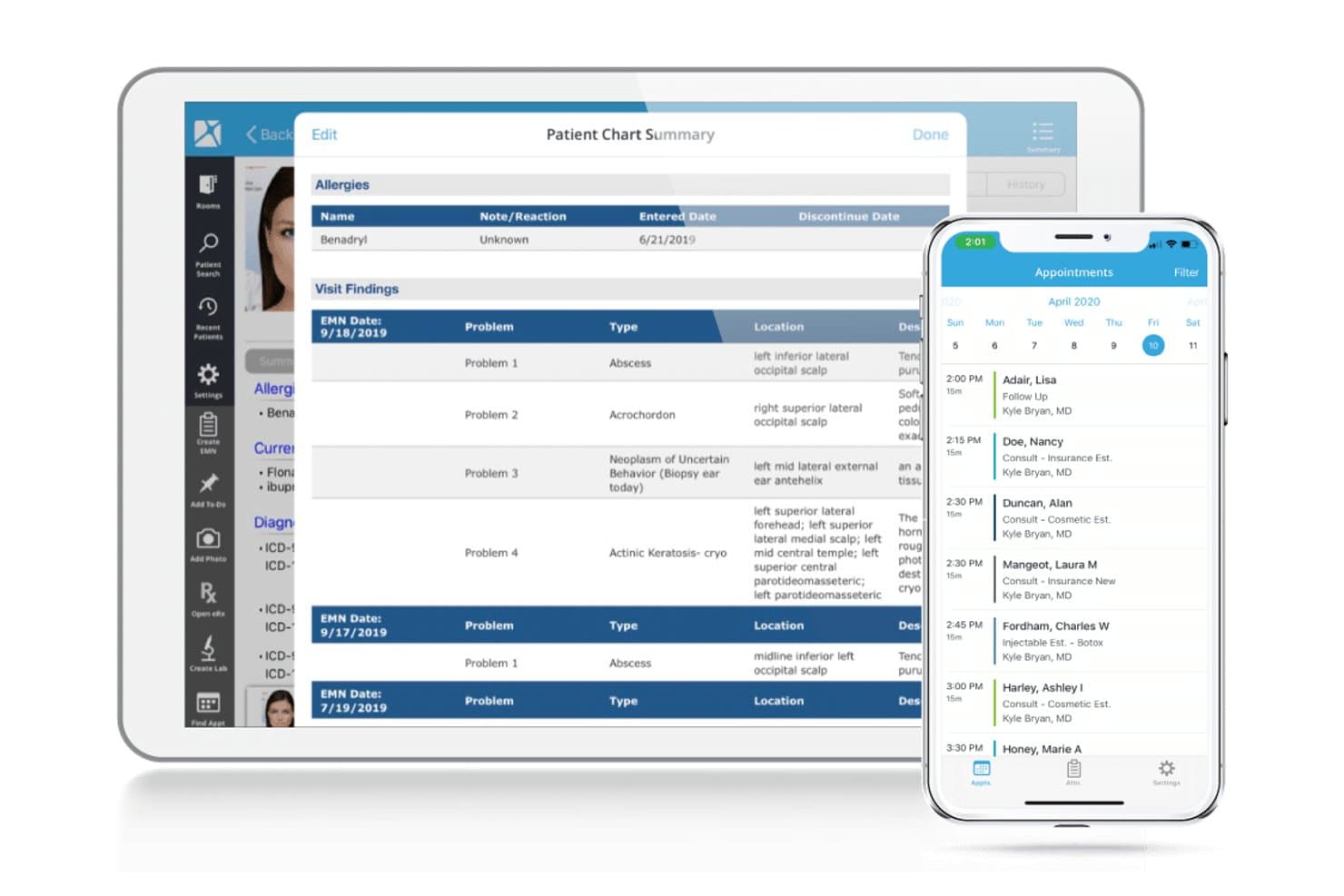
Nextech unifies specialty EHR, practice management, and medical billing tools. Nextech combines EHR, practice management, and billing tools for specialty medical practices in fields such as ophthalmology, dermatology, plastic surgery, and orthopedics, helping teams manage clinical and administrative workflows in one platform.
Who Is Nextech Best For?
Nextech fits ophthalmology, dermatology, plastic surgery, and orthopedic practices that need specialty-specific surgical charting and revenue cycle management.
Why I Picked Nextech
I chose Nextech for its specialty-specific EHR capabilities and revenue cycle management services for surgical practices. Its configurable charting tools accommodate the documentation needs of specialties such as ophthalmology and plastic surgery, while its RCM services provide visibility into claims from submission through payment. I appreciate how this combination supports specialty-specific clinical workflows and makes it easier to track surgical claims that require follow-up.
Nextech Key Features
- Appointment scheduling: Manage patient appointments through Nextech Practice Management.
- Patient portal: Let patients access appointments, records, and billing.
- Patient payments: Offer flexible payment options and automated reconciliation.
- Practice analytics: Review consolidated data to identify risks and trends.
Nextech Integrations
Nextech documents integrations with TriZetto Provider Solutions, Solutionreach, Zocdoc, IBRA Treatment Planner, and Pulse; available connections vary by product and workflow. Nextech also offers FHIR APIs for connecting apps and building custom integrations.
Pros and Cons
Pros:
- Customizable notes support dermatology and plastic surgery
- Clinical workflows connect with revenue cycle
- Specialty-specific charting for surgical practices
Cons:
- Users report glitches and update downtime
- Finding and configuring reports can be difficult
Learn more about Nextech: Best for surgical and procedural specialty billing
- Free demo available
- Pricing upon request
Visit WebsiteCustomer Rating:4/5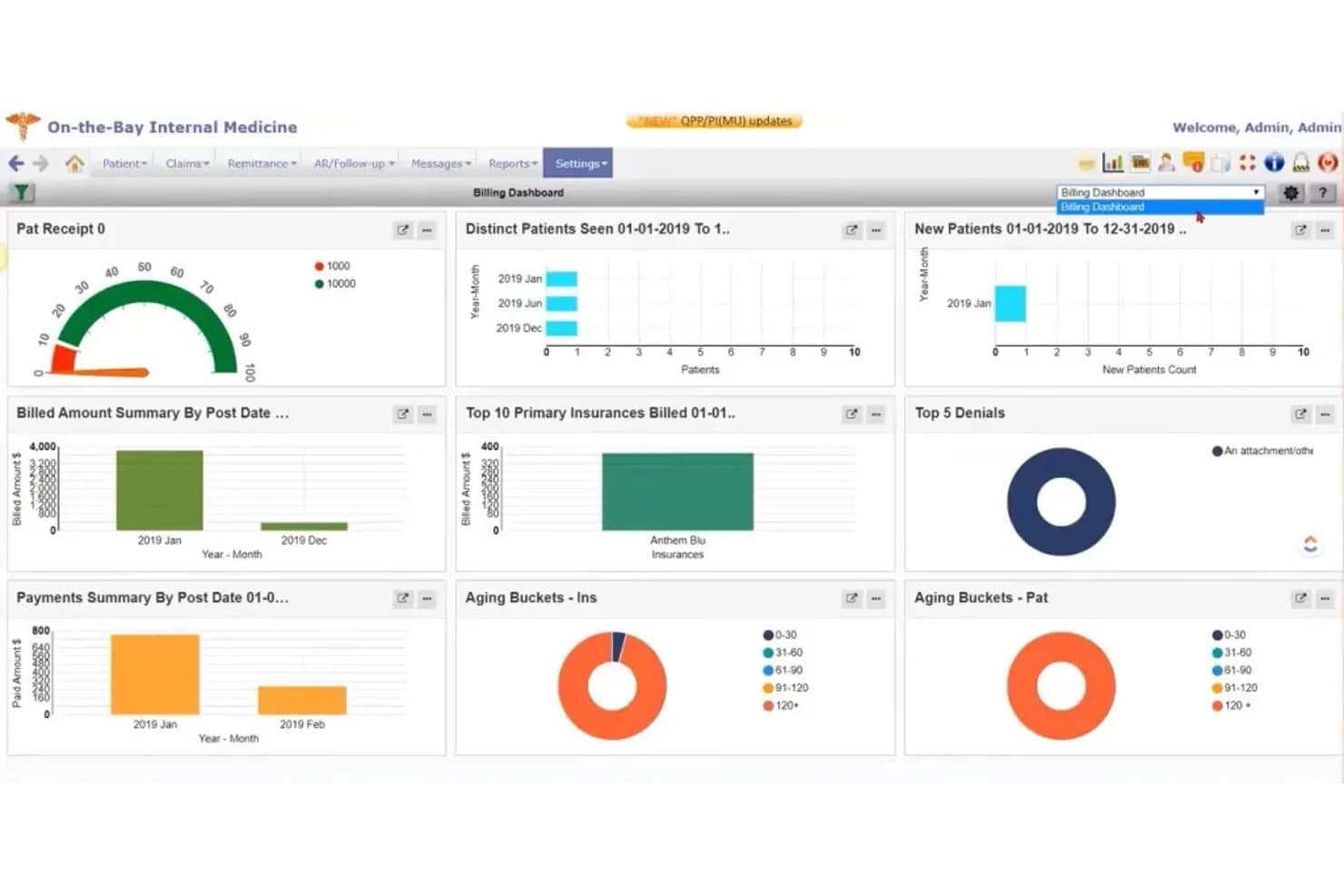
PrognoCIS combines EHR, scheduling, clinical documentation, and billing. PrognoCIS combines cloud-based EHR and practice management tools for specialty and ambulatory practices, bringing scheduling, clinical documentation, and revenue-cycle workflows into one system.
Who Is PrognoCIS Best For?
PrognoCIS suits surgical and procedural specialty practices that need billing and revenue-cycle workflows connected to clinical documentation and practice management.
Why I Picked PrognoCIS
I picked PrognoCIS as a ModMed alternative because it’s a strong fit for surgical and procedural specialty billing. Its EHR connects encounter documentation with charge capture and claims, while claim scrubbing flags missing or inconsistent data before submission. Denial management gives billing staff a way to review claims that need follow-up.
PrognoCIS Key Features
- Appointment scheduling: Schedule visits and manage appointment workflows.
- Patient portal: Let patients complete forms, pay balances, and message providers.
- E-prescribing: Send prescriptions electronically through the platform.
- Referral tracking: Track referrals and prior-authorization requests.
PrognoCIS Integrations
PrognoCIS documents interfaces with LabCorp, Quest, Cerner, SimonMed, and Zocdoc, plus financial connections for clearinghouses, payment imports, and payment processing. It supports third-party API connectivity, including charge exports and patient and insurance imports; custom connections require a feasibility assessment.
Pros and Cons
Pros:
- Pain-management users praise billing workflows
- Claim scrubbing and denial tools support RCM
- Specialty templates connect documentation with billing
Cons:
- Mobile app receives poor usability reviews
- Claim submission can require many clicks
Learn more about PrognoCIS Psychiatry EHR: Best for collections-based billing with bundled RCM
- Free demo available
- Pricing upon request
Visit WebsiteCustomer Rating:3.8/5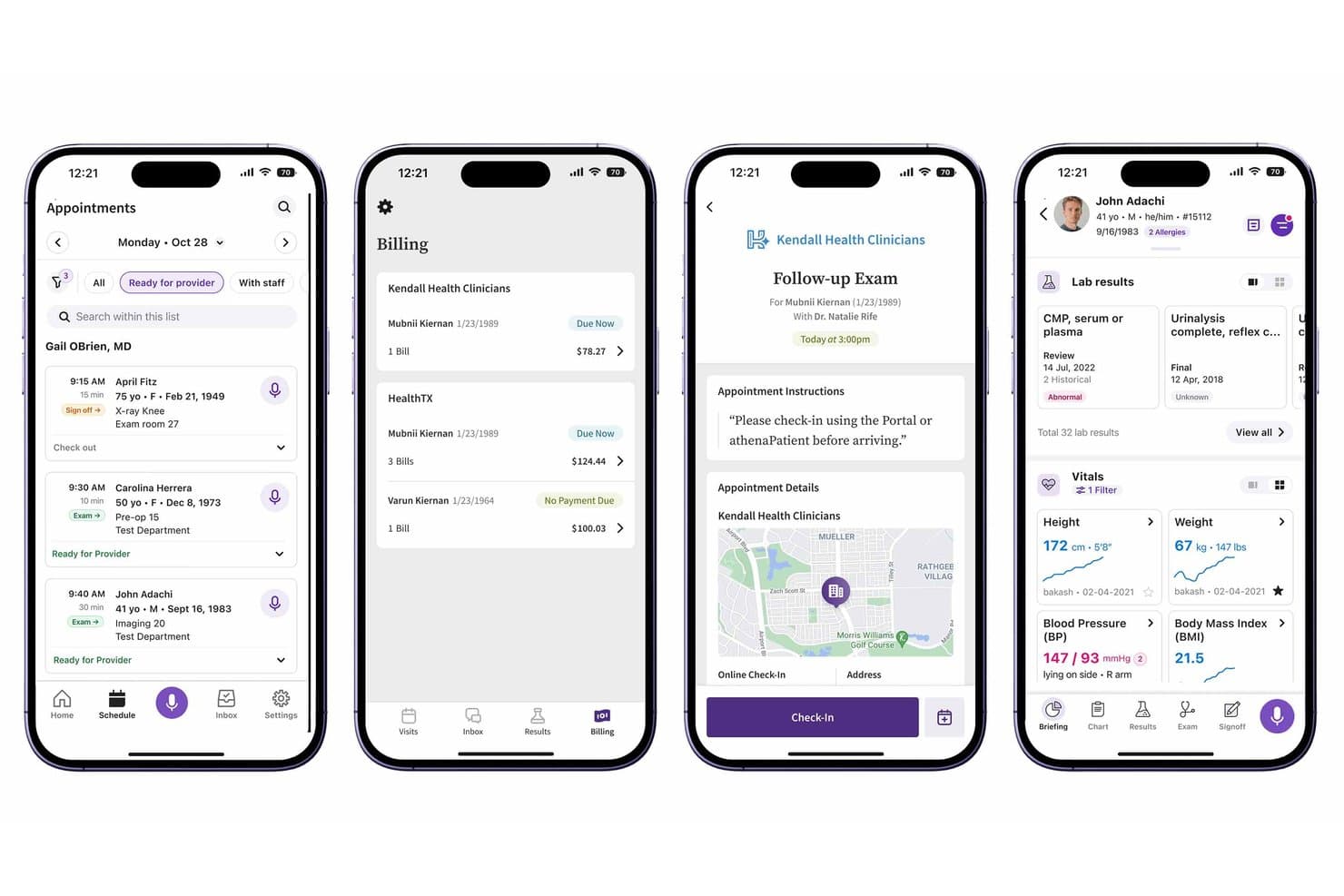
athenaOne combines patient care, clinical workflows, and practice management. athenaOne is an all-in-one platform for medical practices, bringing clinical and administrative workflows together so care teams and practice administrators can manage patient care and daily operations in one system.
Who Is athenaOne Best For?
athenaOne suits medical practices that want collections-based billing with revenue cycle management bundled into their practice platform.
Why I Picked athenaOne
I picked athenaOne as a ModMed alternative for collections-based billing with bundled RCM. Its rules engine and billing experts identify claim errors before submission, while Enhanced Claim Resolution lets athenahealth billing teams rework denials on your practice’s behalf.
athenaOne Key Features
- Patient self-scheduling: Patients can book and manage appointments online.
- Self check-in: Patients can complete check-in tasks, screeners, and consent forms before arrival.
- Mobile patient app: Patients can manage appointments, message your team, and view health information on their phones.
- Online records access: Patients can securely view test results, visit summaries, and appointment details through the portal.
athenaOne Integrations
athenaOne offers marketplace integrations with partners including OhMD, Relatient, and Salesforce Connect. It also provides 800+ API endpoints for custom integrations.
Pros and Cons
Pros:
- Patient portal supports self-service scheduling
- Automated billing and claims workflows
- Bundled RCM supports claims follow-through
Cons:
- Charting can involve excessive clicks
- Support response times can lag
Learn more about athenaOne: Best for multi-site PM and RCM in one database
- Free demo available
- Pricing upon request
Visit WebsiteCustomer Rating:3.7/5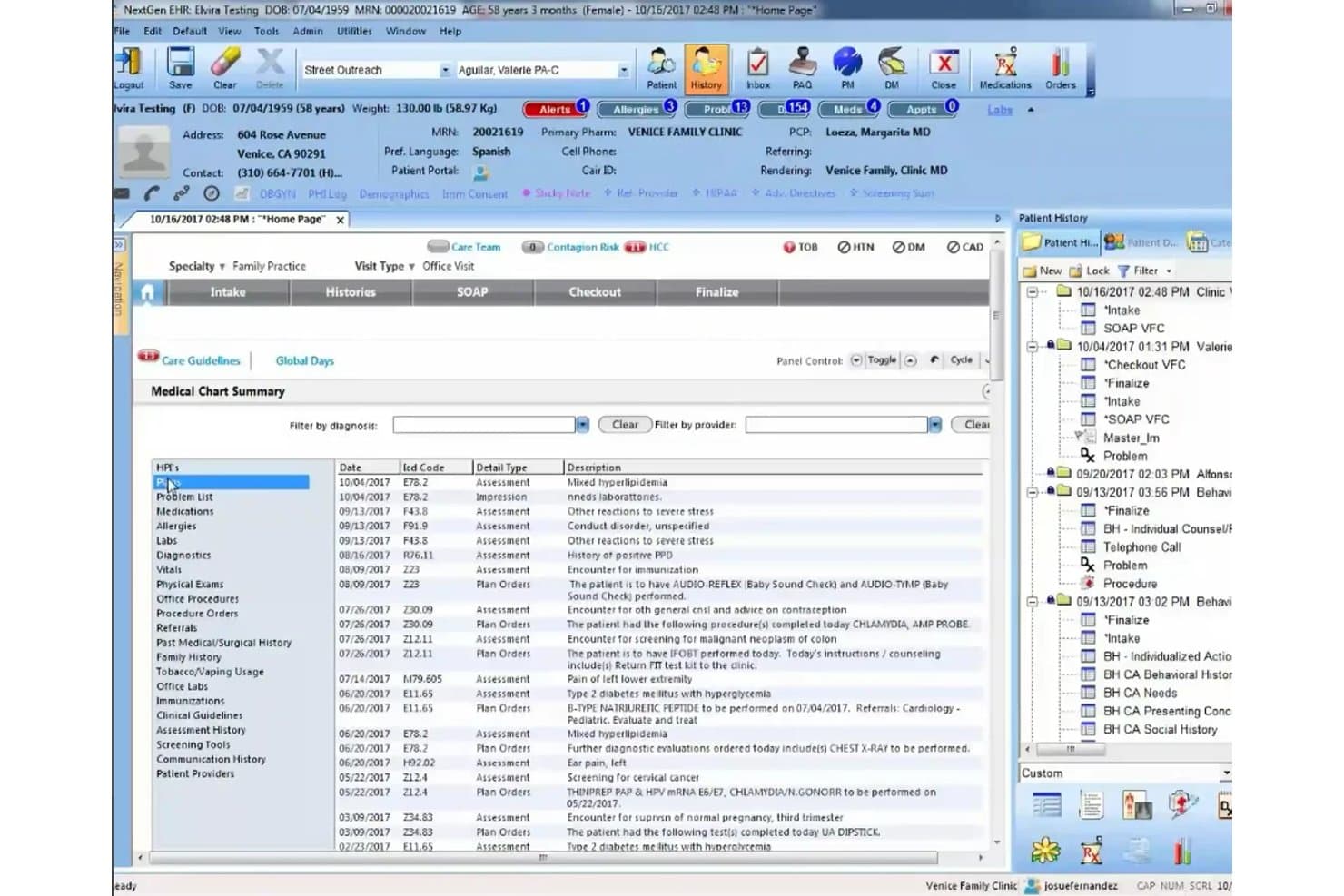
NextGen Healthcare supports EHR, practice management, billing, and patient care. NextGen Healthcare combines EHR, practice management, patient experience, and revenue-cycle tools for medical practices that need connected clinical and administrative workflows across specialties and practice sizes.
Who Is NextGen Healthcare Best For?
NextGen Healthcare suits practice administrators and revenue cycle leaders at mid-size to enterprise medical groups managing operations across multiple locations.
Why I Picked NextGen Healthcare
I picked NextGen Healthcare because it combines multi-site practice management and revenue cycle management within a shared database. Its NextGen Enterprise platform provides visibility into operations and billing across multiple locations, while customizable EHR and practice management workflows accommodate specialty-specific requirements. I appreciate how these capabilities support centralized oversight and coordination across different practice locations.
NextGen Healthcare Key Features
- Self-scheduling: Patients can book appointments through an online scheduling tool.
- Appointment reminders: Send reminders in more than 33 languages and manage cancellations.
- Patient portal: Patients can access results, education, and electronic bill payment.
- Population health: Identify care gaps and patient risk levels, then plan outreach.
NextGen Healthcare Integrations
NextGen’s API Marketplace includes third-party practice management and revenue-cycle apps such as Inbox Health, LinkMD AI, and revBot. NextGen Enterprise also provides 800+ REST API routes for custom integrations.
Pros and Cons
Pros:
- Claims tracking and payment auto-posting
- Configurable specialty templates support varied workflows
- Unified EHR, PM, and RCM across locations
Cons:
- Upgrades can trigger glitches and downtime
- Click-heavy screens slow routine charting
Learn more about NextGen Healthcare: Best for AI scribing across 80-plus specialties
- Free demo available
- Pricing upon request
Visit WebsiteCustomer Rating:3.6/5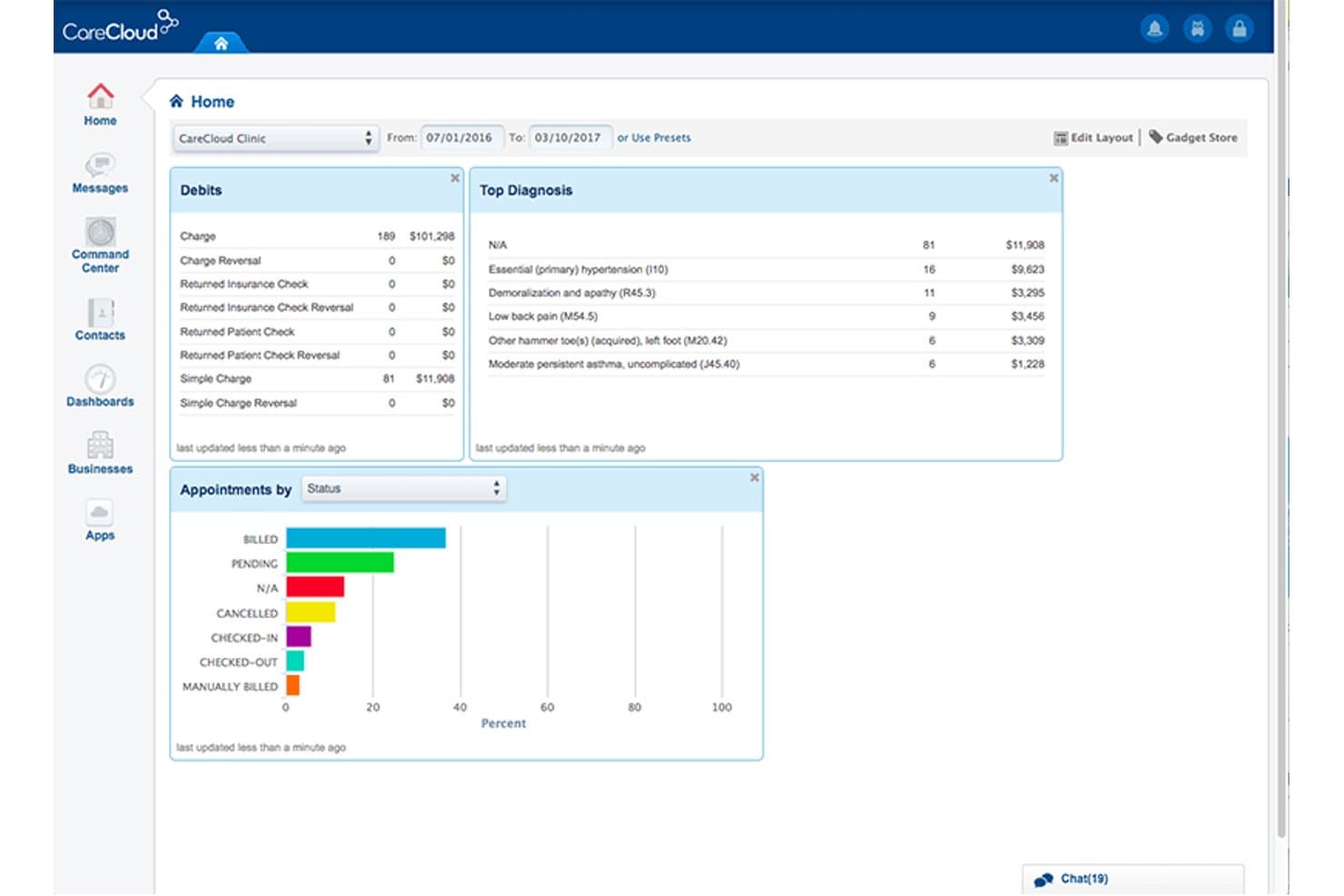
CareCloud's dashboard centralizes billing, diagnoses, and appointment data. For medical groups that want practice management tied to clinical and financial workflows, CareCloud combines appointment and staff scheduling with EHR, billing, and patient engagement tools in one cloud-based healthcare platform.
Who Is CareCloud Best For?
CareCloud is a fit for clinicians in multispecialty practices who want ambient AI scribing tailored to more than 80 specialties and notes saved to the EHR.
Why I Picked CareCloud
I picked CareCloud because of its AI-powered clinical documentation capabilities across more than 80 medical specialties. Its cirrusAI Notes captures patient-provider conversations, generates clinical notes, and saves them directly to the EHR. I like how this reduces manual documentation while keeping clinical records within the existing charting workflow.
CareCloud Key Features
- Appointment scheduling: Manage appointments within CareCloud’s practice management tools.
- Staff scheduling: Organize staff schedules and practice resources.
- Patient engagement: Use Breeze for patient experience and engagement tools.
- KPI dashboards: View customizable analytics for financial and revenue-cycle metrics.
CareCloud Integrations
CareCloud provides a REST API for custom integrations, subject to application approval. CareCloud Connector offers integration libraries for lab systems, EHR and other software, and immunization data, with FHIR and CCDA support.
Pros and Cons
Pros:
- Reviewers praise customizable charts and reporting
- Scheduling, charting, and billing share one platform
- Ambient AI notes cover 80-plus specialties
Cons:
- Support delays complicate issue resolution
- Some users report slow screens and outages
Learn more about CareCloud: Best for multi-location billing and RCM depth
- Free demo available
- Pricing upon request
Visit WebsiteCustomer Rating:3.6/5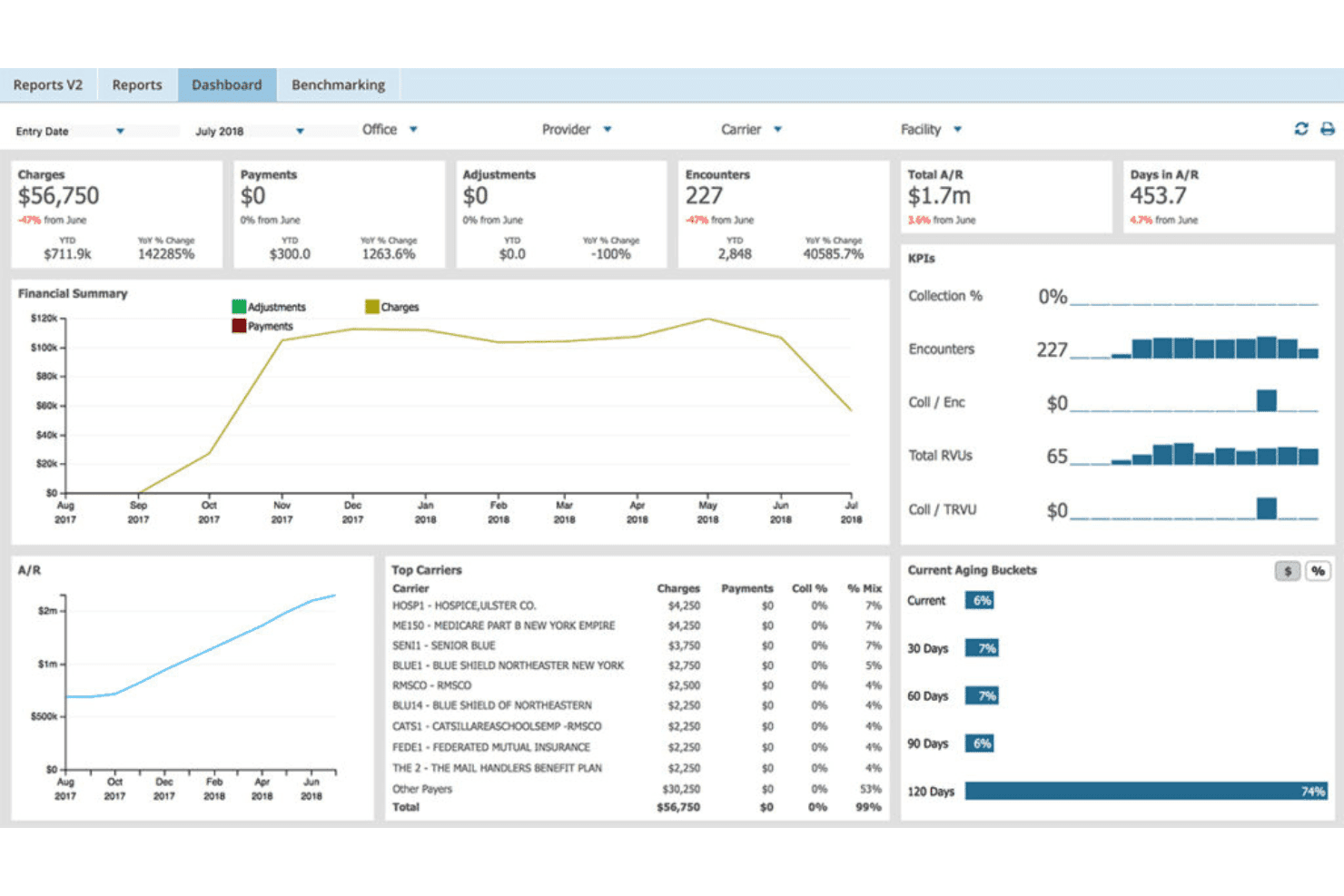
AdvancedMD unites EMR, documentation, billing, claims, eligibility, and RCM. AdvancedMD is a cloud-based EHR, practice management, and patient engagement platform for independent medical practices that want to connect clinical and administrative workflows and manage documentation, scheduling, and patient communication in one system.
Who Is AdvancedMD Best For?
AdvancedMD suits billing leaders and practice administrators at multi-location medical groups who need revenue cycle oversight and financial reporting across sites.
Why I Picked AdvancedMD
I chose AdvancedMD for its centralized billing and revenue cycle management tools for multi-location practices. Its Central Billing Office manages providers and locations through a single database and login, while financial dashboards provide visibility into billing performance across sites. I also appreciate its claim-scrubbing functionality, which identifies potential errors before submission and reduces the need for manual claim reviews.
AdvancedMD Key Features
- Online appointment requests: Patients can request an appointment day and time through the portal.
- Prescription renewals: Patients submit renewal requests online for staff review and digital sign-off.
- Online bill pay: Patients can view and pay bills securely by credit card.
- Patient messaging: Patients can message clinical or billing staff with questions.
AdvancedMD Integrations
AdvancedMD’s partner marketplace lists 1,400+ app and technology integrations, including Apollo CRM, LeadSquared, LunaJoy, Salesforce (custom per instance), Suite CRM, WebVehicle, and Zoho. Connect APIs are available in XML-RPC and REST, alongside read-only FHIR R4 APIs and ODBC access for custom data exchange.
Pros and Cons
Pros:
- Users praise charge entry and code lookup
- Cross-location financial dashboards support RCM oversight
- Central billing office consolidates providers and locations
Cons:
- Billing workflows can feel time-consuming
- Users report uneven support handoffs
 Best for eye care and ASC surgical workflows
- Free demo available
- Pricing upon request
Visit WebsiteCustomer Rating:3.9/5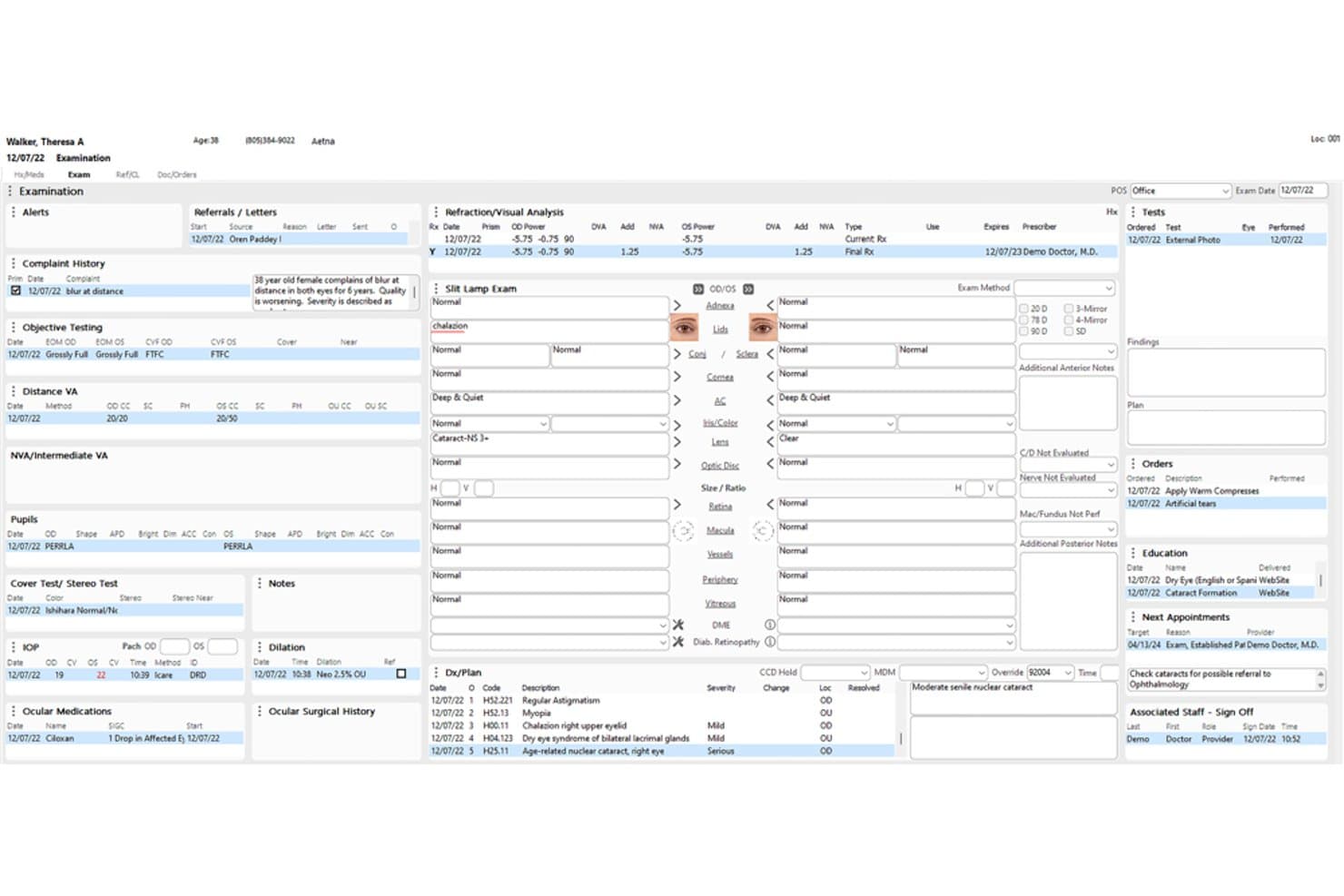
Compulink Advantage combines eye care EHR, billing, and optical operations. Compulink Advantage (Eyecare Advantage) is a practice management and EHR platform for eye care practices that need to coordinate clinical records, billing, optical operations, and patient administration within specialty workflows.
Who Is Compulink Advantage (Eyecare Advantage) Best For?
Compulink Advantage is a good fit for eye care practices and ambulatory surgery centers managing clinical and surgical workflows.
Why I Picked Compulink Advantage (Eyecare Advantage)
I picked Compulink Advantage as a ModMed alternative because it’s best for eye care and ASC surgical workflows. ASC Advantage covers surgery-center workflows from EHR through case costing, while Optical POS manages lens catalogs, inventory, lab orders, and job costing. I like that these tools address surgical and optical operations alongside practice records.
Compulink Advantage (Eyecare Advantage) Key Features
- Eligibility verification: Verify patient eligibility as part of practice management.
- Online scheduling: Let patients book appointments online.
- Digital check-in: Support preregistration, consent signing, and check-in by phone, tablet, or kiosk.
- Interactive reports: Filter clinical, financial, and operational reports, with drill-downs to patient level.
Compulink Advantage (Eyecare Advantage) Integrations
Compulink documents API connections with dozens of partners, including ABB, VisionWeb, EdgePro, Clearwave, and Relatient, as well as integrations with Weave, Updox, and Surescripts; it also interfaces with more than 400 ophthalmic devices. Compulink provides APIs for partner connections and accepts requests from prospective API partners.
Pros and Cons
Pros:
- Users praise responsive support and reporting
- Customizable exam templates and specialty charting
- Integrated ophthalmology, optical, and ASC workflows
Cons:
- Customization and setup can take substantial effort
- Updates can trigger glitches or freezes
Learn more about Compulink Advantage (Eyecare Advantage): Best for outsourced billing with built-in EHR
- Free demo available
- Pricing upon request
Visit WebsiteCustomer Rating:3.5/5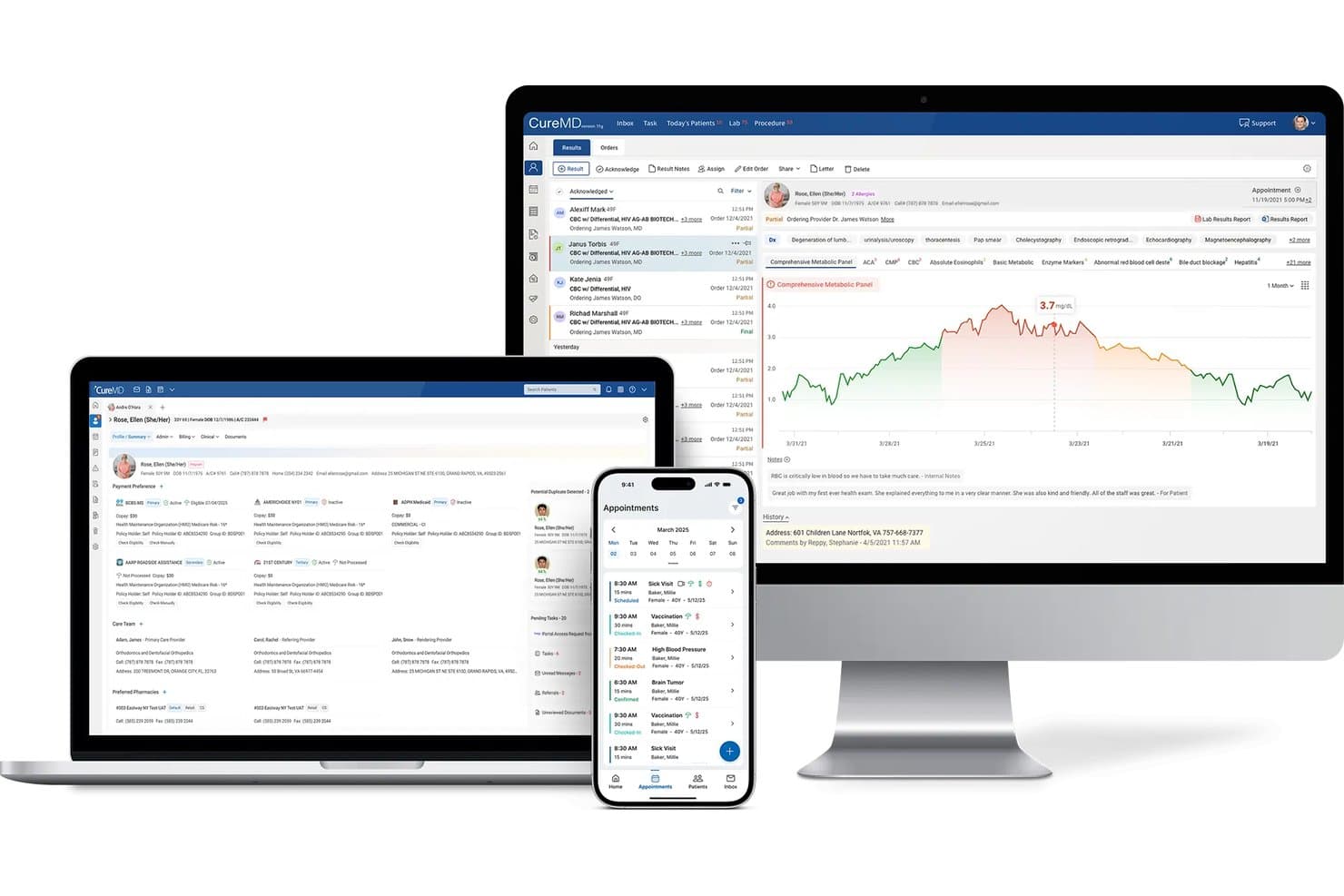
CureMD delivers EHR, scheduling, and lab results across devices. CureMD is an integrated EHR and practice management platform for independent and specialty medical practices, combining specialty-focused charting, scheduling, patient engagement, and administrative workflows in one system.
Who Is CureMD Best For?
CureMD suits independent and growing medical practices that want to outsource billing and revenue cycle work while keeping clinical records in an integrated EHR.
Why I Picked CureMD
I picked CureMD because it combines outsourced revenue cycle management with specialty-focused EHR capabilities. Its billing services cover claims processing, denial management, and reimbursement tracking, while its EHR keeps clinical documentation connected to daily practice workflows. I like this approach for practices that want external billing support without managing separate systems for clinical and financial operations.
CureMD Key Features
- Appointment scheduling: Manage practice appointments through the integrated scheduling tools.
- Eligibility checks: Check patient eligibility in real time.
- Patient portal: Give patients access to a portal for practice interactions.
- Digital intake: Collect patient intake information digitally.
CureMD Integrations
CureMD lists pre-built integrations with Allscripts, eClinicalWorks, Practice Fusion, Oracle Health, NextGen, and Cerner. It also provides a FHIR API for custom integrations.
Pros and Cons
Pros:
- Specialty-specific charting and templates
- Billing and EHR share workflows
- Outsourced claims and denial management
Cons:
- Implementation and support experiences vary
- Users report slow screens and freezes
Learn more about CureMD: Best for broad ambulatory EHR with AI scribing
- Free demo available
- Pricing upon request
Visit WebsiteCustomer Rating:3.4/5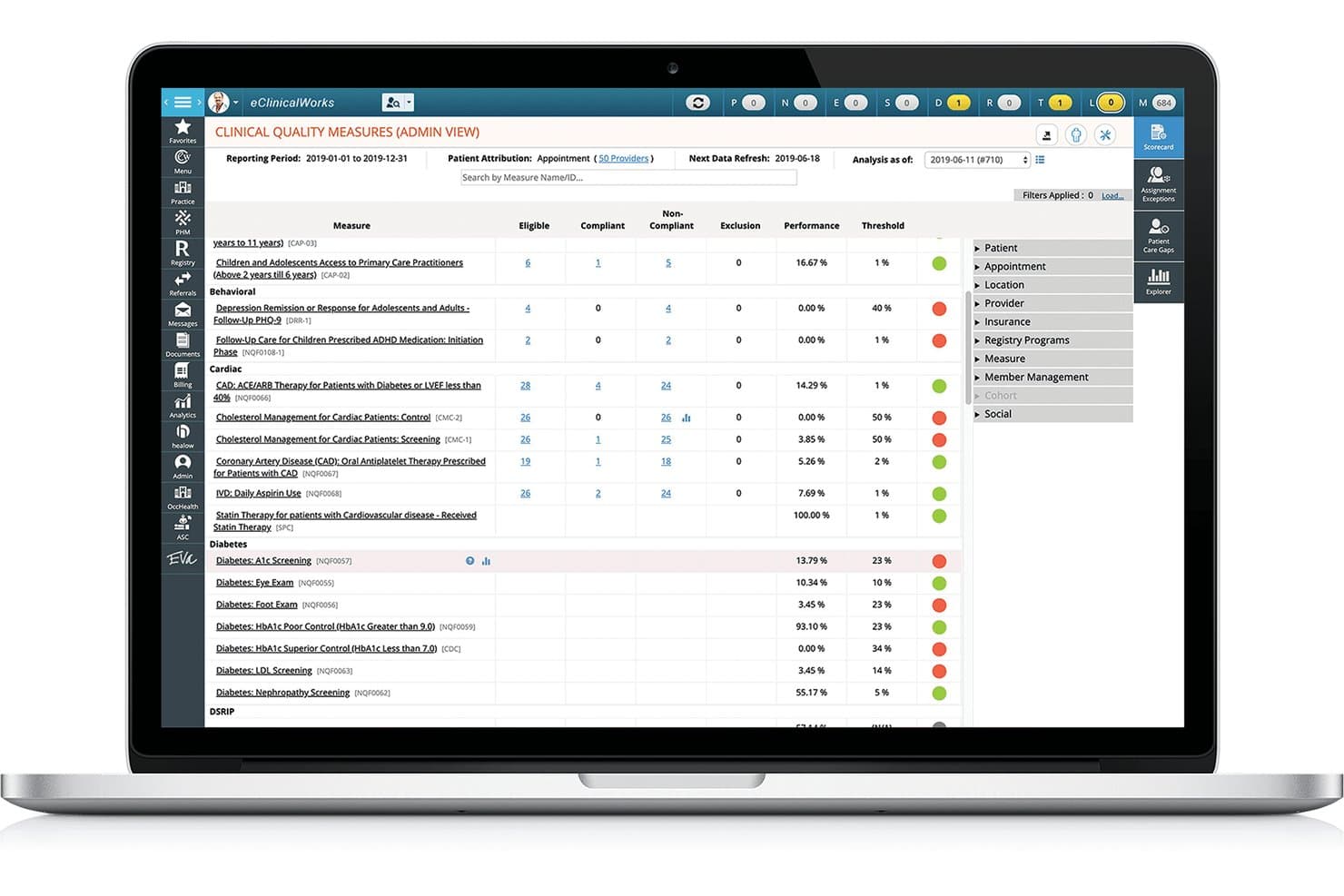
eClinicalWorks offers ambulatory EHR, AI scribing, billing, and patient engagement. eClinicalWorks is a broad ambulatory EHR with AI scribing and practice management tools for clinics that need support with clinical documentation, patient engagement, care coordination, and revenue cycle workflows.
Who Is eClinicalWorks Best For?
eClinicalWorks fits outpatient clinicians and practice administrators who need clinical records, practice workflows, and AI-assisted note creation in one platform.
Why I Picked eClinicalWorks
I picked eClinicalWorks because it combines ambulatory EHR capabilities with AI-powered clinical documentation and practice management tools. Its Sunoh.ai technology converts provider-patient conversations into draft clinical notes, while its AI Assistant supports scheduling, documentation, and chart searches. I like how these capabilities reduce manual documentation and keep clinical and administrative workflows connected within one platform.
eClinicalWorks Key Features
- Claims and denial management: Scrubs claims, tracks rejections, and supports appeals.
- Digital patient check-in: Lets patients review insurance details, complete forms, and pay balances.
- Patient portal: Gives patients access to visit summaries, lab results, medications, and secure provider messaging.
- E-prescribing: Sends prescriptions to pharmacies and supports eligibility and formulary checks.
eClinicalWorks Integrations
eClinicalWorks documents integrations with Waystar, TriZetto, Optum RPA, TSI, IC System, USPS, Dexcom, Fitbit, Glooko, and Surescripts. It supports FHIR APIs for third-party applications and HL7 interfaces for exchanging clinical, scheduling, and financial data.
Pros and Cons
Pros:
- Sunoh.ai adds AI-assisted visit documentation
- Integrated EHR, scheduling, and billing workflows
- Custom Smart Forms fit varied clinic workflows
Cons:
- Support tickets can take time to resolve
- Chart navigation often takes too many clicks
Learn more about eClinicalWorks: Best for health systems scaling across care settings
- Not available
- Pricing upon request
Visit WebsiteCustomer Rating:3.1/5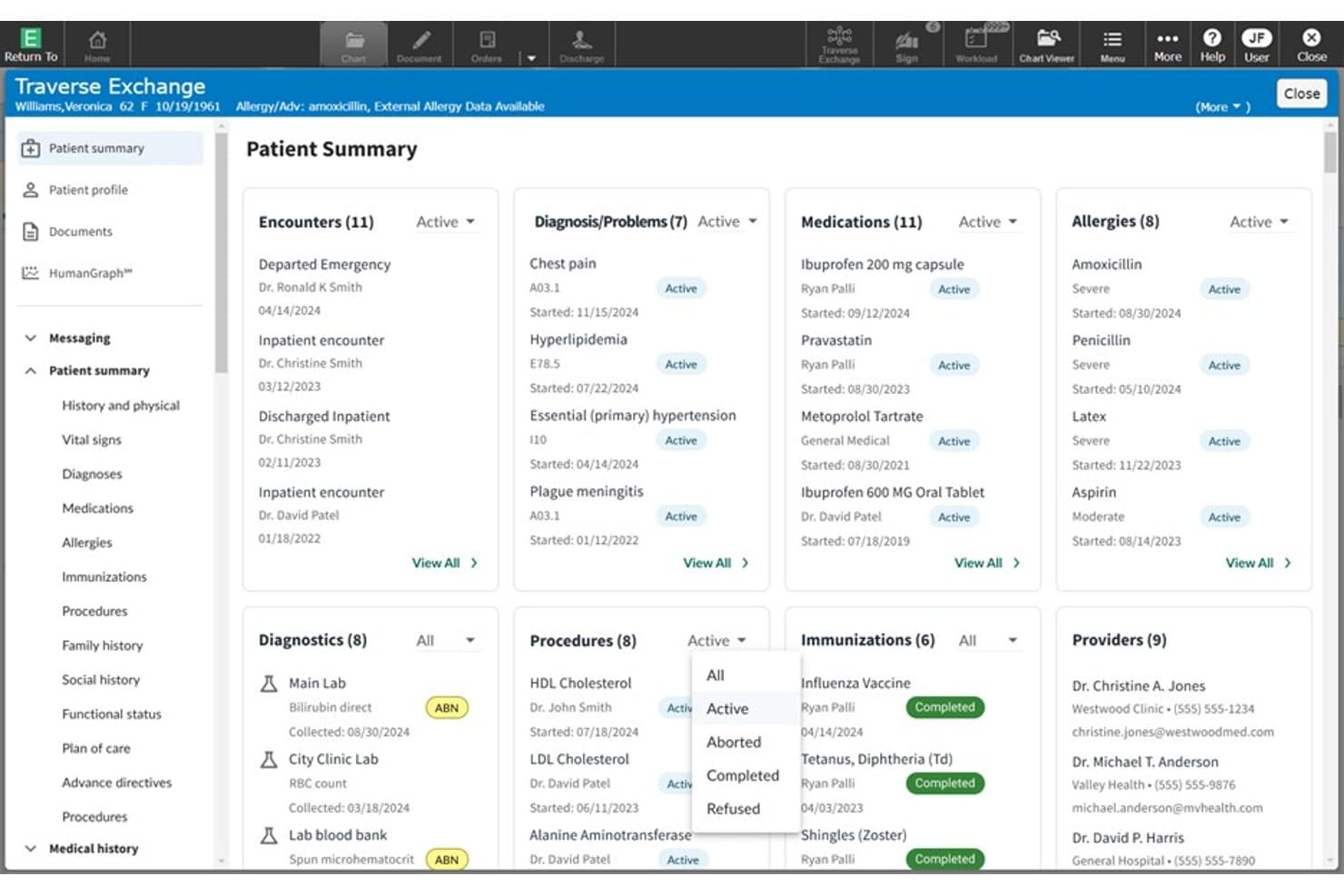
MEDITECH Expanse displays a unified patient summary across key clinical domains. MEDITECH Expanse is a cloud-native, mobile-first EHR for hospitals and health systems that need shared patient records and connected clinical and revenue-cycle workflows across inpatient and outpatient care.
Who Is MEDITECH Expanse Best For?
MEDITECH Expanse is a good fit for health systems coordinating clinical and administrative workflows across hospitals, outpatient clinics, and other care settings.
Why I Picked MEDITECH Expanse
I picked MEDITECH Expanse as a ModMed alternative because it’s Best for health systems scaling across care settings. Its longitudinal patient view gives clinicians a shared record across hospitals and outpatient clinics, while its unified revenue-cycle solution connects financial workflows. When a patient moves between care settings, teams can access their record in their clinical workflows.
MEDITECH Expanse Key Features
- Ambient intelligence: Captures and summarizes patient conversations within clinical workflows.
- Clinical decision support: Provides decision-support tools within the EHR.
- Integrated genomics: Makes genomic information available in the EHR.
- Virtual care: Includes self-service and virtual care tools.
MEDITECH Expanse Integrations
MEDITECH has documented Expanse partner integrations with Google Cloud, Microsoft, Commure, DrFirst, Health Gorilla, and Suki. Its Greenfield Workspace provides US Core FHIR R4 and FHIR Scheduling APIs for developers to test applications against Expanse.
Pros and Cons
Pros:
- Patient portal and mobile access support care
- Unified clinical and revenue-cycle workflows
- Shared records span inpatient and ambulatory workflows
Cons:
- Upgrade outages can disrupt record access
- Complex needs may outgrow customization
Learn more about MEDITECH Expanse:
Andre ModMed-alternativer
Her er noen flere alternativer som ikke kom med på kortlisten min, men som likevel er verdt å undersøke:
- 11MeditabBest for allergy and multi-specialty charting
- 12RXNTBest for transparent pricing and built-in AI scribing
- 13TebraBest for independent practice EHR and billing
- 14DrChronoBest for mobile-first charting and built-in RCM
- 15CharmHealthBest for free-tier EHR with usage-based billing
- 16Elation HealthBest for primary care over surgical workflows
- 17Greenway HealthBest for FQHC and OB-GYN clinical-financial workflows
- 18Practice FusionBest for solo practices with outsourced billing
- 19Oracle HealthBest for enterprise-wide EHR interoperability
- 20EzdermBest for dermatology lesion-to-claim workflows
How I Evaluate ModMed Alternatives
I split my evaluation into three parts. First, core functionality: I look for platforms that document patient encounters and integrate scheduling with claims—these carry the most weight. Then I check for standout features like specialty-specific workflows or AI-assisted documentation. Finally, I consider implementation support and total cost of ownership.
Core Functionality (Table Stakes For This List)
When I'm selecting tools for my list, I score each one on a scale from 0 (does not offer the functionality) to 5 (excels in this area) for each core functionality listed below. I then convert the total into a percentage to help assess each tool's overall fit, with extra weight on any functionalities I’ve deemed essential.
- EHR & Charting (Essential): I look for structured encounter notes, adaptable templates, and clear access to patient histories for routine visits and specialty-specific documentation.
- Practice Management & Billing (Essential): I assess how scheduling, claims, and billing connect to clinical records, including the steps from documenting a visit to following up on a claim.
- Patient Engagement: I check for practical patient-facing tools such as appointment reminders, online scheduling, intake forms, and secure messaging.
- Specialty Templates: I evaluate whether templates and workflows fit the practice’s clinical needs, from specialty-specific exams to procedure documentation.
- Interoperability & Exchange: I look for data exchange with labs, pharmacies, payers, and other care systems that limits repeated manual entry.
- Reporting & Analytics: I consider whether reports help teams review clinical, operational, and financial measures, such as appointment patterns and claims status.
Once I have a list of tools that meet the criteria, I consider what sets each platform apart.
Differentiating Factors (What Sets Vendors Apart)
Here's how I compare and contrast different vendors:
Standout Features
I look for surgical workflow support that covers pre-op, intra-op, and post-op documentation natively. An orthopedic practice tracking implants through surgery needs that documentation tied to billing codes automatically, not stitched together with workarounds. I also evaluate whether a vendor bundles actual RCM services or just billing software, since practices without dedicated billing staff need hands-on claims follow-up. AI ambient documentation is another factor I check—tools like eClinicalWorks and CareCloud approach this differently, and I want to see how notes generate from real encounters, not just demos.
Beyond Features
I evaluate how each vendor handles implementation support, since migrating from a legacy EHR involves data conversion, staff retraining, and workflow redesign. Vendors like NextGen and athenaOne offer dedicated implementation teams, while others lean on self-service onboarding that can stall a go-live. Total cost of ownership matters just as much—percentage-of-collections billing models look different from flat per-provider fees once you factor in interface charges and add-on modules. I also check whether a platform supports MIPS/MACRA reporting and holds ONC certification, especially for ASC-heavy practices where compliance gaps carry real financial risk.
Hvorfor se etter ModMed-alternativer?
Selv om ModMed er et godt valg for spesialitetsfokusert programvare for praksisadministrasjon, ser noen team etter alternativer når behovene, budsjettet eller behandlingsmiljøet deres er annerledes. Du ser kanskje etter et alternativ til ModMed fordi …
- Spesialiteten din er ikke blant ModMeds oppførte kliniske fokusområder
- Du trenger offentliggjorte priser for å sammenligne kostnader før en produktdemonstrasjon
- Gruppen din med flere praksissteder trenger verktøy på tvers av et bredere spekter av behandlingsmiljøer
- Teamet ditt ønsker å velge EHR-, fakturerings- og engasjementsverktøy separat
Hvis noe av dette høres kjent ut, har du kommet til rett sted. Listen min omfatter alternativer for programvare for praksisadministrasjon som passer bedre for team som møter disse utfordringene med ModMed og ser etter et alternativ.
Viktige funksjoner i ModMed
Her er de viktigste funksjonene i ModMed, slik at du kan sammenligne løsningen med andre alternativer:
- Integrert EHR og praksisadministrasjon: ModMed kobler praksisadministrasjonssystemet sitt sammen med EMA og deler kliniske og administrative data. Dette knytter dokumentasjon fra konsultasjoner sammen med arbeidsflyter for timeplanlegging, fakturering og utsjekking.
- Timebestilling: Personalet kan kontrollere rettigheter før avtaler, bruke avtalefinneren og administrere automatiske ventelister. Pasienter kan også bestille timer selv, med påminnelser til pasientene.
- Innsjekking og utsjekking for pasienter: ModMed Kiosk og mobil innsjekking støtter papirløs registrering, mens personalet kan se pasientstatus og romplassering. Ved utsjekking kan teamene vise anbefalinger for oppfølging og synkronisere betalinger.
- Kostnadsoverslag for pasienter: Kostnadsoverslagsverktøyet oppretter overslag over kostnader pasienten må betale selv, pristilbud til pasienter og regninger. Praksiser kan også spore pakkede produkter og tjenester, slik at personalet kan forklare forventede kostnader før behandlingen.
- Fakturering og kravhåndtering: Systemet inkluderer et grensesnitt mot et oppgjørssentral, tilpassbar kontroll av krav, automatisert innsending av krav, påminnelser om frister for innsending og bokføring av remitteringer. Teamene kan gjennomgå rapporter over avvisninger og avslag mens kravene beveger seg gjennom faktureringsarbeidsflyten.
- Tjenester for inntektssyklusen: ModMed RCM tilbyr ekstra støtte for inntektssyklusen i tillegg til programvaren, inkludert oppfølging av krav. Tilgjengeligheten varierer etter spesialområde, så bekreft hvilken tjenestedekning som gjelder for praksisen din.
- Betalingsbehandling: ModMed Pay bokfører og avstemmer betalinger i praksisadministrasjonssystemet. Plattformen støtter også automatisk betaling og betaling via tekstmelding, noe som gir personalet flere alternativer for innkreving av pasienters utestående beløp.
- Finansiell rapportering og analyse: Innebygde instrumentbord og rapporter dekker mål for inntektssyklusen og praksisens KPI-er. Premium-analyse gir tilpassbare rapporter og interaktive visninger av kliniske, operative og økonomiske resultater.
Kostnader og priser
Kostnadene varierer etter funksjoner, praksisens størrelse, tillegg og prismodell. Her er typiske prisintervaller for alternativer til ModMed.
Sammenligningstabell for abonnementer for alternativer til ModMed
| Abonnementstype | Gjennomsnittspris | Vanlige funksjoner |
|---|---|---|
| AbonnementstypeGratisabonnement | Gjennomsnittspris$0/leverandør/måned | Vanlige funksjonerGrunnleggende journalføring, timebestilling, pasientregistrering og begrensede faktureringsverktøy. |
| AbonnementstypePersonlig abonnement | Gjennomsnittspris$50-$200/leverandør/måned | Vanlige funksjonerEHR-tilgang, timebestilling, pasientportal og grunnleggende faktureringsverktøy. |
| AbonnementstypeBedriftsabonnement | Gjennomsnittspris$200-$700/leverandør/måned | Vanlige funksjonerEHR og praksisadministrasjon, spesialtilpassede maler, kravhåndtering og rapportering. |
| AbonnementstypeStorkundeabonnement | Gjennomsnittspris$700-$1,500/leverandør/måned, ofte med tilpasset pristilbud | Vanlige funksjonerAdministrasjon av flere lokasjoner, avanserte integrasjoner, analyse og støtte ved implementering. |