

Por qué confiar en nuestras recomendaciones de software
6,700+
Reviews
20
Industry experts
16+
Evaluation factors
14
Years
Nuestro equipo lleva probando y evaluando software desde 2012. Como líderes de centros médicos, sabemos lo difícil —y lo importante— que es elegir el software adecuado.
Para esta guía, evaluamos las herramientas mediante pruebas prácticas e investigación independiente, puntuando las herramientas según nuestros criterios de selección.
Nuestras reseñas reflejan nuestro criterio editorial humano, no un discurso de ventas.
Tabla comparativa del software de portal del paciente EMR
Esta tabla comparativa resume los detalles de precios de mis principales selecciones de software de portal del paciente EMR:
| Tool | Best For | Trial Info | Price | ||
|---|---|---|---|---|---|
| 1 | La mejor opción para la participación de pacientes específica por especialidad | Demostración gratuita disponible | Precios disponibles previa solicitud | Website | |
| 2 | Ideal para la comunicación en atención primaria | Demo gratuita disponible | Precio a consultar | Website | |
| 3 | Mejor para herramientas de interacción con pacientes | Demo gratuita disponible | Precios a consultar | Website | |
| 4 | Ideal para conectar la programación móvil | Demostración gratuita disponible | Precio a consultar | Website | |
| 5 | Ideal para conectar aplicaciones personalizadas con datos clínicos | Prueba gratuita de 30 días + demostración gratuita disponible | Desde $130/mes | Website | |
| 6 | Lo mejor para registros de salud móviles | Demostración gratuita disponible | Desde $449/usuario/mes | Website | |
| 7 | Ideal para consultar los costes de la atención antes del tratamiento | No disponible | Precios bajo solicitud | Website | |
| 8 | Ideal para acceso asequible al portal | Demo gratuita disponible | Desde $126/mes (facturado anualmente) | Website | |
| 9 | Ideal para acceso móvil y registro digital previo a la cita | Demostración gratuita disponible | Precios a consultar | Website |


Reseñas del mejor software de portal del paciente EMR
A continuación encontrarás mis resúmenes detallados del mejor software de portal del paciente EMR que llegó a mi lista final. Mis reseñas ofrecen un análisis detallado de las funciones, los mejores casos de uso y las integraciones de cada software para ayudarte a encontrar el más adecuado para ti.
 La mejor opción para la participación de pacientes específica por especialidad
- Demostración gratuita disponible
- Precios disponibles previa solicitud
Visit WebsiteCustomer Rating:4.5/5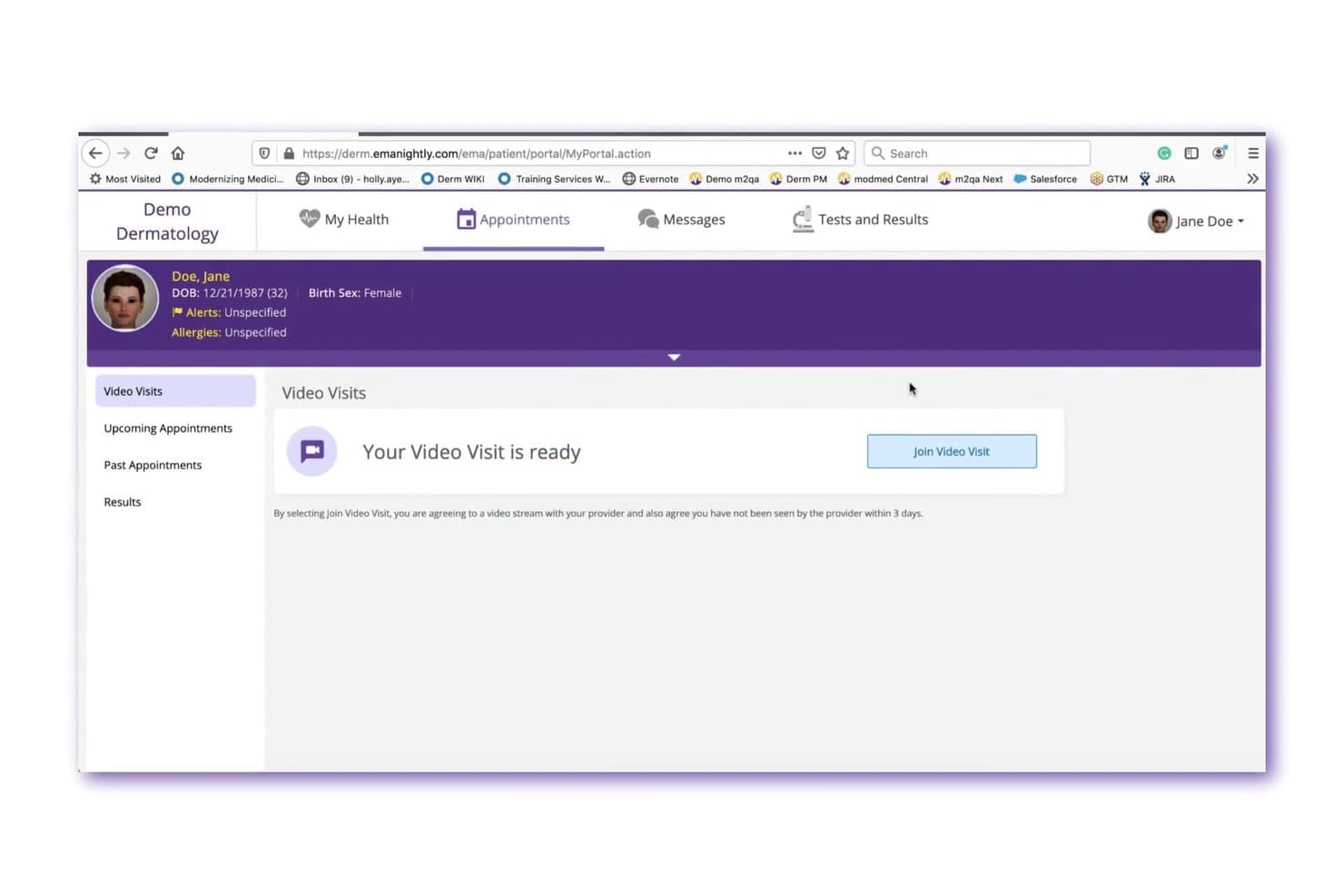
ModMed permite a los pacientes unirse a consultas de telesalud por video directamente desde el portal. ModMed Patient Engagement es una plataforma de comunicación con pacientes centrada en especialidades que combina mensajería bidireccional segura, programación en línea, admisión digital, recordatorios de citas y acceso al portal del paciente con integración nativa en los sistemas de HCE y gestión de consultas de ModMed.
¿Para quién es más adecuado ModMed?
ModMed Patient Engagement es una excelente opción para consultas especializadas —entre ellas, dermatología, otorrinolaringología, gastroenterología, podología y urología— que ya utilizan la HCE de ModMed y desean integrar la comunicación con los pacientes en el mismo ecosistema.
Por qué elegí ModMed
Elegí ModMed como una de las mejores opciones porque está diseñado específicamente para consultas especializadas, y eso se refleja en funciones que no encontrarás en portales genéricos. Me gusta que las instrucciones preoperatorias y posoperatorias automatizadas se puedan configurar según la especialidad, de modo que un paciente de otorrinolaringología reciba orientación específica sobre su afección sin que el personal tenga que enviarla manualmente. La mensajería de texto cifrada bidireccional también dirige los mensajes entrantes a un hilo centralizado, lo que evita que el personal de recepción de dermatología o gastroenterología se vea desbordado por comunicaciones de pacientes desorganizadas.
Funciones principales de ModMed
- Acceso a los registros mediante el portal del paciente: Los pacientes pueden consultar resultados de laboratorio, notas y materiales educativos, así como revisar o actualizar su información médica directamente en el portal.
- Aplicación móvil APPatient: Una aplicación nativa para iPhone y Android permite a los pacientes acceder a sus registros médicos, consultar citas, solicitar renovaciones de recetas y enviar mensajes al personal.
- Pago por mensaje de texto mediante ModMed Pay: Los pacientes reciben enlaces de pago por mensaje de texto para consultar y liquidar copagos y saldos desde sus dispositivos sin iniciar sesión en un portal.
- Registro mediante el quiosco de ModMed: Una aplicación para iPad recopila los datos de admisión solicitados por la consulta en la sala de espera y los almacena directamente en el registro médico del paciente.
Integraciones de ModMed
ModMed Patient Engagement cuenta con integraciones nativas con ModMed EMA, ModMed Practice Management, ModMed Pay y ModMed Telehealth. Las API certificadas FHIR, FHIR R4 propietario, HL7 y SMART on FHIR permiten establecer conexiones personalizadas, mientras que las integraciones más amplias con terceros no están claramente documentadas.
Pros and Cons
Pros:
- La mensajería bidireccional organizada permite compartir fotos de pacientes
- Los recordatorios de programación autónoma pueden reducir el volumen de llamadas a recepción
- Las instrucciones específicas por especialidad reducen el trabajo de seguimiento manual
Cons:
- Los pacientes pueden confundir las solicitudes con citas confirmadas
- Las dificultades para iniciar sesión y los fallos interrumpen el acceso de los pacientes
Learn more about ModMed: Ideal para la comunicación en atención primaria
- Demo gratuita disponible
- Precio a consultar
Visit WebsiteCustomer Rating:4.4/5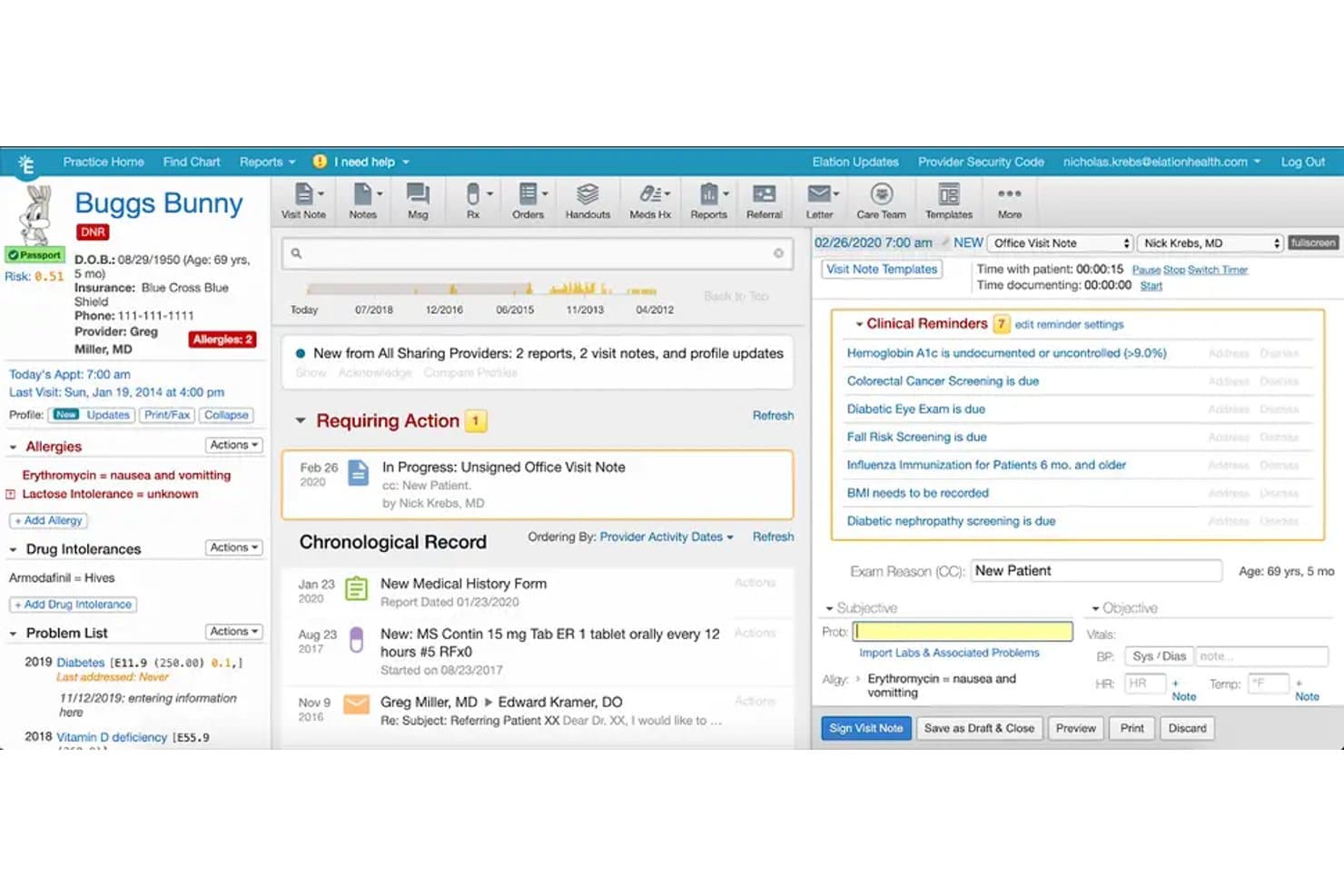
Elation Health ofrece una vista integral de la historia clínica del paciente, con recordatorios clínicos, seguimiento de alergias, listas de problemas y documentación de notas de visita en su plataforma EMR. Elation Health es un portal para pacientes nativo, que brinda a los pacientes acceso a sus registros de salud, mensajería segura, autoservicio de citas, solicitudes de renovación de recetas y pago de facturas en línea.
¿Para quién es mejor Elation Health?
Consultorios independientes de atención primaria que buscan un portal de pacientes que esté integrado de forma nativa en su EHR, en lugar de ser un complemento de terceros añadido.
Por qué elegí Elation Health
Elegí Elation Health por lo bien integrada que está su mensajería segura en el registro clínico. Cuando un paciente envía un mensaje con un informe de laboratorio o una imagen adjunta, el equipo de atención lo ve directamente en la misma ficha del EHR, sin cambiar de contexto. El portal multilingüe (disponible en siete idiomas) asegura que los equipos de atención primaria no pierdan hilos de comunicación debido a barreras idiomáticas. También me gusta que las solicitudes de renovación lleguen directamente al proveedor a través de la misma capa de mensajería.
Funciones clave de Elation Health
- Acceso a la aplicación móvil: Los pacientes pueden usar la app Elation Passport en iOS o Android para gestionar registros, citas y mensajes.
- Pestaña de autoprogramación de citas: Permite que los pacientes programen y cancelen citas directamente cuando la función está habilitada por el proveedor.
- Gestión de cuentas de familiares y cuidadores: Los usuarios pueden administrar la información de salud de varios seres queridos con un solo acceso.
- Flujos de trabajo digitales de consentimiento y registro: El registro y el consentimiento de nuevos pacientes se completan y almacenan electrónicamente dentro del portal.
Integraciones de Elation Health
Elation Health ofrece integraciones nativas con Zocdoc, Surescripts, Dock Health, Fullscript, Zus, Nsight Health y Carequality. Hay una API disponible para integraciones personalizadas.
Pros and Cons
Pros:
- Portal multilingüe que apoya la diversidad de pacientes
- Integración nativa con EHR para actualizaciones en tiempo real
- Los pacientes gestionan los registros de varios familiares
Cons:
- Funcionalidad de lista de espera para citas limitada
- Las funciones de pago en línea pueden requerir configuración
Learn more about Elation Health: Mejor para herramientas de interacción con pacientes
- Demo gratuita disponible
- Precios a consultar
Visit WebsiteCustomer Rating:3.9/5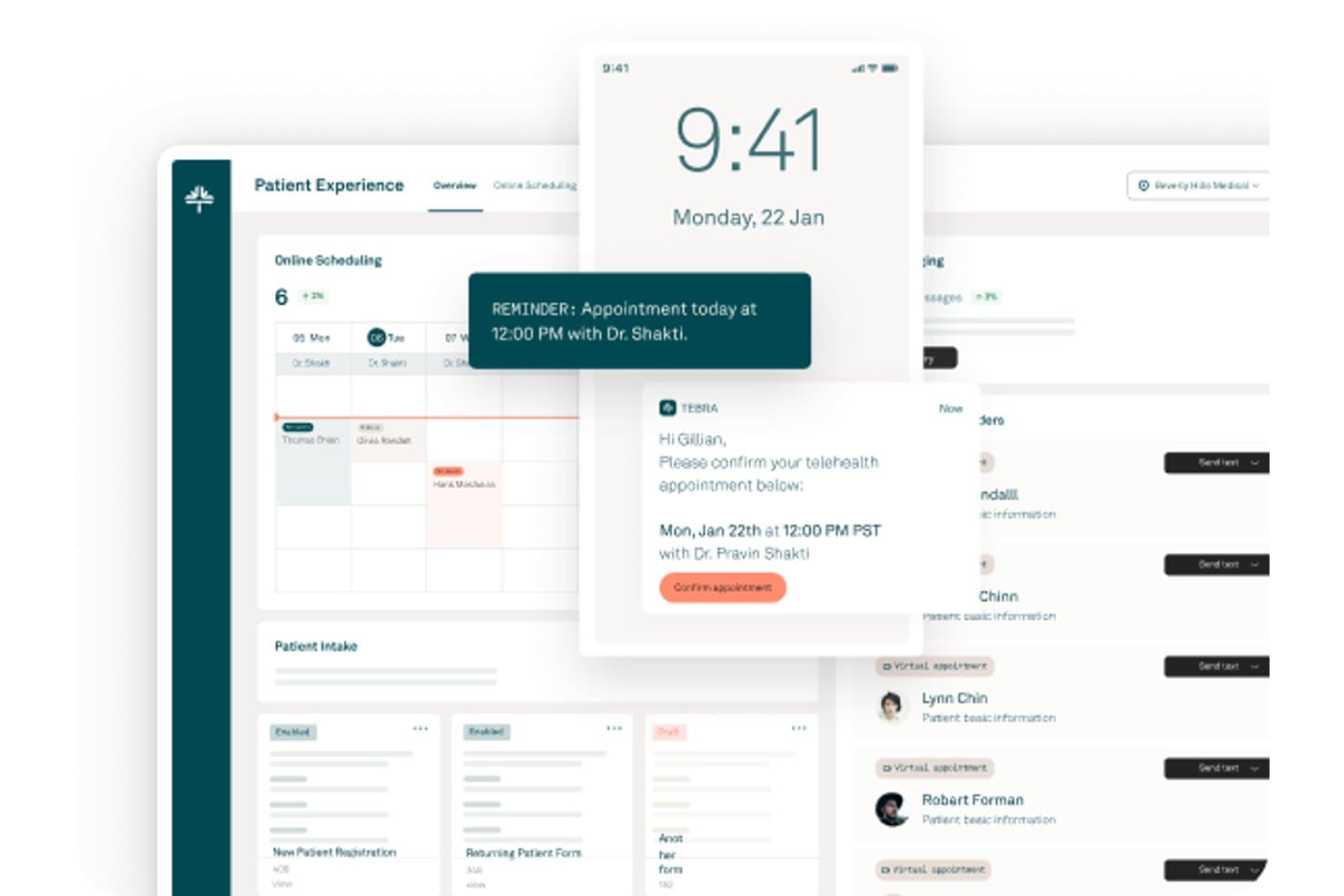
Tebra ofrece un panel de experiencia del paciente con programación en línea, recordatorios de citas, confirmaciones de telemedicina y gestión de admisión de pacientes. Tebra es una plataforma en la nube para la gestión de consultorios y registros médicos electrónicos (EHR) con un portal integrado para pacientes, que incluye programación de citas en línea, admisión digital, mensajería segura, pagos de facturas en línea y herramientas de interacción con pacientes en un solo sistema.
¿Para quién es mejor Tebra?
Tebra es una excelente opción para consultorios médicos independientes que desean una única plataforma para gestionar tanto los flujos de trabajo clínicos como las herramientas de interacción con los pacientes.
Por qué elegí Tebra
Tebra se gana su lugar entre los mejores de mi lista porque su conjunto de herramientas para la interacción con pacientes va mucho más allá de un portal estándar. Me gusta especialmente la función Patient Broadcast, que permite a mi equipo enviar mensajes masivos a segmentos específicos de pacientes, y las encuestas automatizadas posteriores a la visita que se publican automáticamente en perfiles de reseñas en más de 80 directorios. El sistema también automatiza los mensajes de cumpleaños, un nivel de comunicación con el paciente que no veo en la mayoría de portales vinculados a EMR.
Características clave de Tebra
- Programación de citas en línea: Permite a los pacientes reservar, reprogramar o cancelar citas directamente desde el portal.
- Formularios de admisión digital: Permite a los pacientes completar en línea el registro, historial médico y formularios de consentimiento.
- Pago de facturas desde el portal: Da a los pacientes la capacidad de ver estados de cuenta y realizar pagos de manera segura desde su portal.
- Mensajería segura compatible con HIPAA: Habilita la mensajería bidireccional y cifrada entre pacientes y proveedores dentro del portal.
Integraciones de Tebra
Tebra ofrece integraciones nativas con TriZetto, Appriss Health (PDMP) y permite la prescripción electrónica mediante EPCS. Hay una API disponible para integraciones personalizadas.
Pros and Cons
Pros:
- Mensajes masivos a grupos segmentados de pacientes
- Encuestas posteriores a la visita se publican automáticamente en directorios
- Mensajes de cumpleaños automatizados para contactar a pacientes
Cons:
- La mensajería segura requiere configuración de invitación al portal
- Los formularios de admisión tienen opciones de personalización limitadas
Learn more about Tebra: Ideal para conectar la programación móvil
- Demostración gratuita disponible
- Precio a consultar
Visit WebsiteCustomer Rating:3.9/5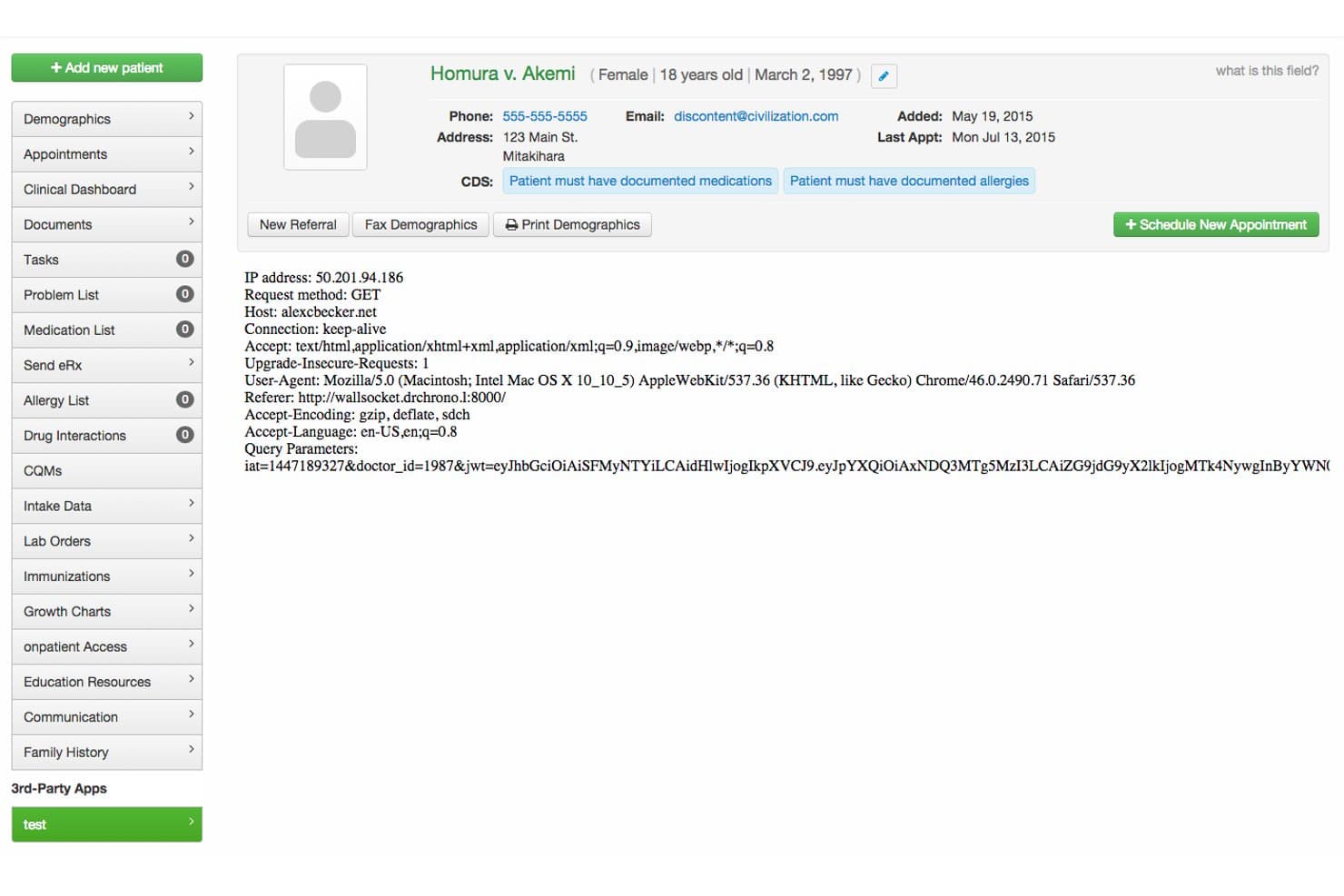
DrChrono ofrece una interfaz de portal de pacientes que muestra datos demográficos, alertas CDS, metadatos de solicitud HTTP y herramientas de navegación para la gestión de historiales médicos. DrChrono es una plataforma EHR basada en la nube con un portal para pacientes nativo que abarca documentación clínica, programación móvil, formularios digitales de admisión, mensajería segura, pagos de facturas en línea y prescripción electrónica, todo en un sistema conectado.
¿Para quién es mejor DrChrono?
DrChrono es una excelente opción para consultorios independientes y pequeños o medianos que gestionan flujos de trabajo clínicos en dispositivos Apple.
Por qué elegí DrChrono
DrChrono merece estar en mi lista porque tanto la programación como el portal de pacientes funcionan juntos de forma nativa para Apple. Me gusta que, cuando un paciente agenda a través de OnPatient, el sistema envía automáticamente los formularios de admisión correctos según el tipo de cita, para que los pacientes lleguen ya documentados. El predictor de ausencias que utiliza IA es otra funcionalidad valiosa, ya que identifica las citas en riesgo antes de que provoquen huecos en la agenda.
Funciones clave de DrChrono
- Portal de pacientes conforme con HIPAA: Los pacientes pueden iniciar sesión de manera segura para ver sus registros, mensajes y gestionar citas.
- Formularios digitales de admisión personalizables: Los consultorios pueden crear formularios electrónicos específicos para cada especialidad que se integran directamente en los historiales de los pacientes.
- Pago de facturas en línea integrado: Los pacientes pueden pagar saldos y establecer planes de pago recurrentes directamente a través del portal.
- Prescripción electrónica y gestión de medicamentos: Los profesionales pueden prescribir medicamentos electrónicamente y los pacientes pueden solicitar reposiciones en línea.
Integraciones de DrChrono
DrChrono ofrece integraciones nativas con Labcorp, Quest Diagnostics, Health Gorilla, Lifepoint y Square POS. Se dispone de una API y un Directorio de aplicaciones para desarrolladores para integraciones personalizadas.
Pros and Cons
Pros:
- El portal de pacientes admite formularios digitales de admisión
- Experiencia de programación nativa para iPad y iPhone
- Los recordatorios automáticos de citas reducen el trabajo manual
Cons:
- La interfaz del portal de pacientes está desactualizada
- Personalización limitada para la imagen de marca del portal de pacientes
Learn more about DrChrono: Ideal para conectar aplicaciones personalizadas con datos clínicos
- Prueba gratuita de 30 días + demostración gratuita disponible
- Desde $130/mes
Visit WebsiteCustomer Rating:3.6/5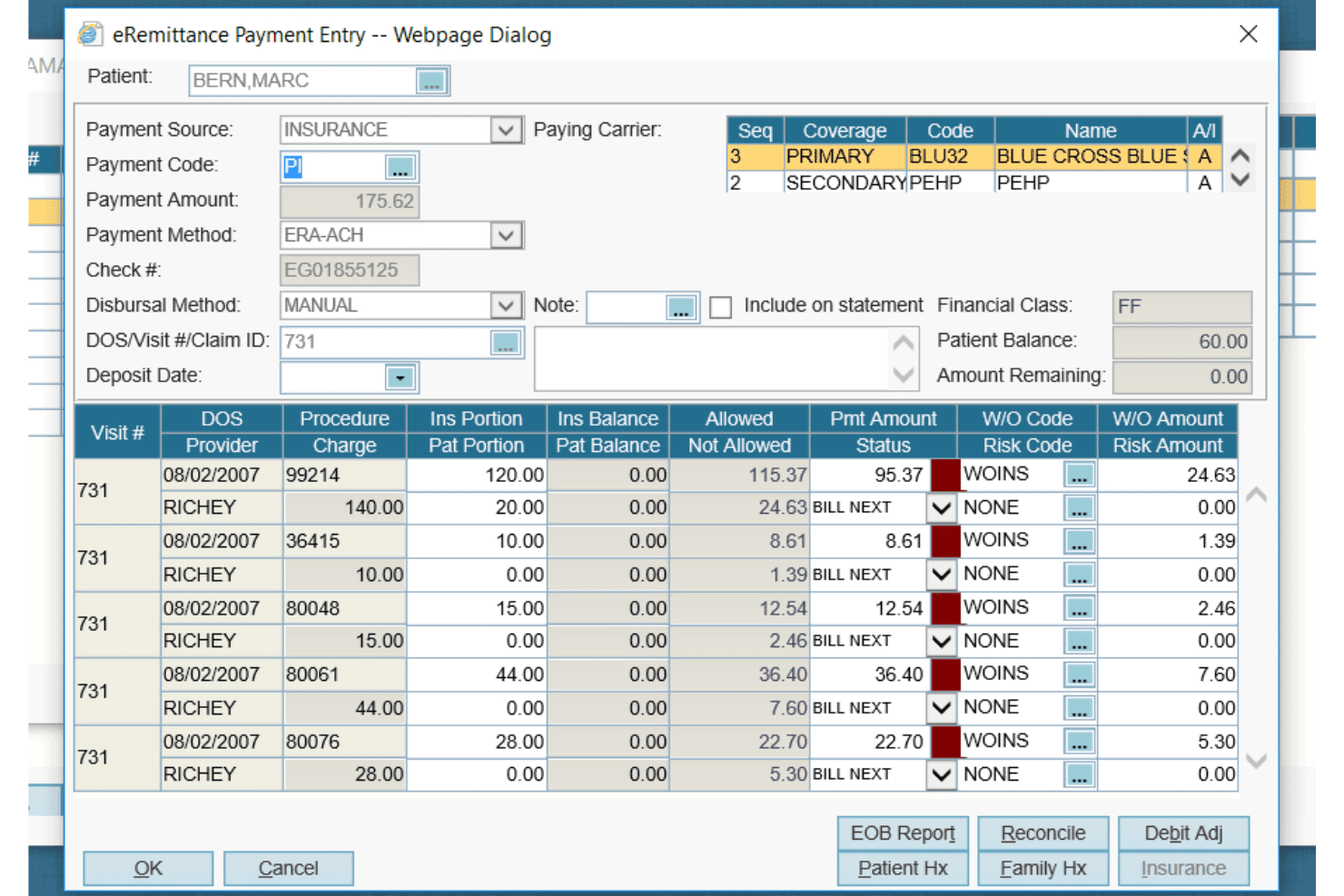
AdvancedMD ofrece un cuadro de diálogo detallado de entrada de pagos de eRemittance para gestionar la facturación de seguros, los pagos de reclamaciones y los códigos de ajustes por procedimiento. AdvancedMD es una solución de portal del paciente integrada en una plataforma unificada de historia clínica electrónica y gestión de consultas, que ofrece a los pacientes acceso a registros clínicos, mensajería segura, programación de citas, formularios de admisión y pago de facturas en línea.
¿Para quién es más adecuado AdvancedMD?
AdvancedMD es adecuado para consultas privadas de diversas especialidades—salud mental, medicina física y medicina de las adicciones—que desean un portal del paciente integrado en un sistema unificado de historia clínica electrónica y gestión de consultas.
Por qué elegí AdvancedMD
Elegí AdvancedMD como una de las mejores opciones porque sus API Connect y FHIR permiten crear aplicaciones personalizadas que leen y escriben directamente en la misma base de datos que comparten la historia clínica electrónica y el portal del paciente. En la práctica, esto significa que una aplicación personalizada de admisión para telesalud o una herramienta de flujo de trabajo específica para una especialidad puede consultar los medicamentos, las vacunas y los resultados de laboratorio de un paciente sin duplicar los registros. También me gusta que el portal admita FHIR R4 con SMART on FHIR OAuth 2.0, de modo que las aplicaciones personalizadas se autentican de forma segura con datos clínicos reales.
Características principales de AdvancedMD
- Pago de facturas en línea y planes de pago: Los pacientes pueden consultar saldos, descargar estados de cuenta, pagar el importe total o una parte y gestionar un plan de pago directamente a través del portal.
- Solicitudes de renovación de recetas: Los pacientes pueden enviar solicitudes de renovación de recetas en línea para que la consulta las revise y firme digitalmente.
- Formularios de consentimiento en iPad y en línea: Los pacientes pueden completar y enviar formularios de admisión y consentimiento antes de una cita en línea o en un iPad al llegar, y los formularios completados se cargan automáticamente en la historia clínica.
- Distribución de material educativo para pacientes: Los materiales educativos pueden enviarse electrónicamente a través del portal en inglés o español, con traducción automática al español, y el envío queda registrado en el expediente del paciente.
Integraciones de AdvancedMD
AdvancedMD cuenta con una integración en el mercado de aplicaciones con Zocdoc que sincroniza las reservas con el calendario de AdvancedMD. Sus API Connect son compatibles con XML-RPC y REST, mientras que las API FHIR R4 utilizan SMART on FHIR OAuth 2.0 para aplicaciones personalizadas de datos clínicos.
Pros and Cons
Pros:
- Formularios de admisión de pacientes personalizables
- Los pacientes pueden pagar a través del portal
- Los pacientes pueden consultar los medicamentos recetados
Cons:
- La programación autónoma de citas por parte de los pacientes puede frustrar a los usuarios
- La configuración y la capacitación generan quejas recurrentes
 Lo mejor para registros de salud móviles
- Demostración gratuita disponible
- Desde $449/usuario/mes
Visit WebsiteCustomer Rating:3.4/5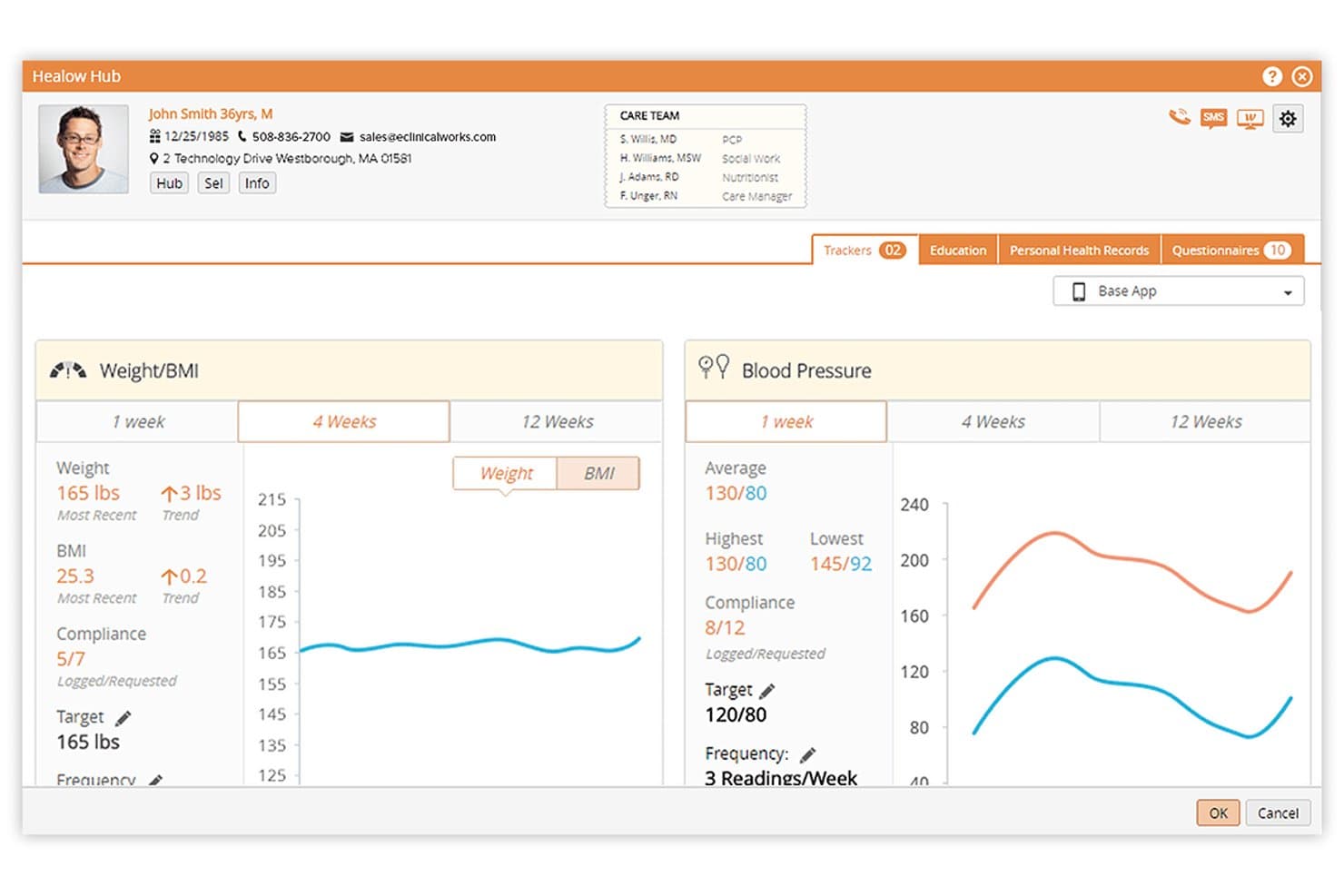
eClinicalWorks ofrece un portal de seguimiento de la salud del paciente llamado Healow Hub, que muestra rastreadores de peso/IMC y presión arterial, con gráficos de tendencias y datos de cumplimiento. eClinicalWorks es una plataforma EMR basada en la nube con una suite nativa de interacción con el paciente llamada healow, que abarca la autoprogramación, mensajería segura, registro digital, telesalud y acceso móvil a los expedientes médicos.
¿Para quién es mejor eClinicalWorks?
eClinicalWorks es una excelente opción para consultorios ambulatorios y centros de salud comunitarios que necesitan un EMR completamente integrado y un portal para pacientes en una sola plataforma.
Por qué elegí eClinicalWorks
Elegí eClinicalWorks como uno de los mejores porque la aplicación healow integra el expediente de salud completo del paciente, los medicamentos activos y las próximas citas en una única interfaz móvil. Los pacientes pueden iniciar una TeleConsulta o completar su registro previo a la visita, incluidos los formularios de consentimiento y el pago del copago, desde la misma aplicación. Muy pocos portales nativos de EMR ofrecen esa experiencia clínica y administrativa completa en el móvil sin requerir herramientas de terceros.
Características clave de eClinicalWorks
- Motor de búsqueda de información de salud PRISMA: Agrega expedientes de EHR externos y organiza los datos clínicos para su revisión por parte del proveedor.
- Centro de contacto AI healow Genie: Proporciona autoservicio automatizado para pacientes las 24 horas, por teléfono, SMS o chatbot.
- Formularios digitales de registro personalizables: Permite a los pacientes completar electrónicamente el registro, historial médico y consentimiento antes de la visita.
- Proceso de facturación en línea integrado: Los pacientes pueden ver los estados de cuenta y realizar pagos directamente a través del portal del paciente.
Integraciones de eClinicalWorks
eClinicalWorks ofrece integraciones nativas con LabCorp y es compatible con la sincronización de datos desde dispositivos como medidores de glucosa en sangre domésticos y Fitbit a través de la plataforma healow. Hay una API disponible para integraciones personalizadas.
Pros and Cons
Pros:
- La aplicación móvil ofrece acceso completo al expediente del paciente
- Herramientas sólidas de telesalud dentro del portal para pacientes
- Los formularios digitales previos a la visita se sincronizan con el EHR
Cons:
- La interfaz de usuario parece anticuada para muchos usuarios
- Las actualizaciones del portal se implementan lentamente en las consultas
Learn more about eClinicalWorks: Ideal para consultar los costes de la atención antes del tratamiento
- No disponible
- Precios bajo solicitud
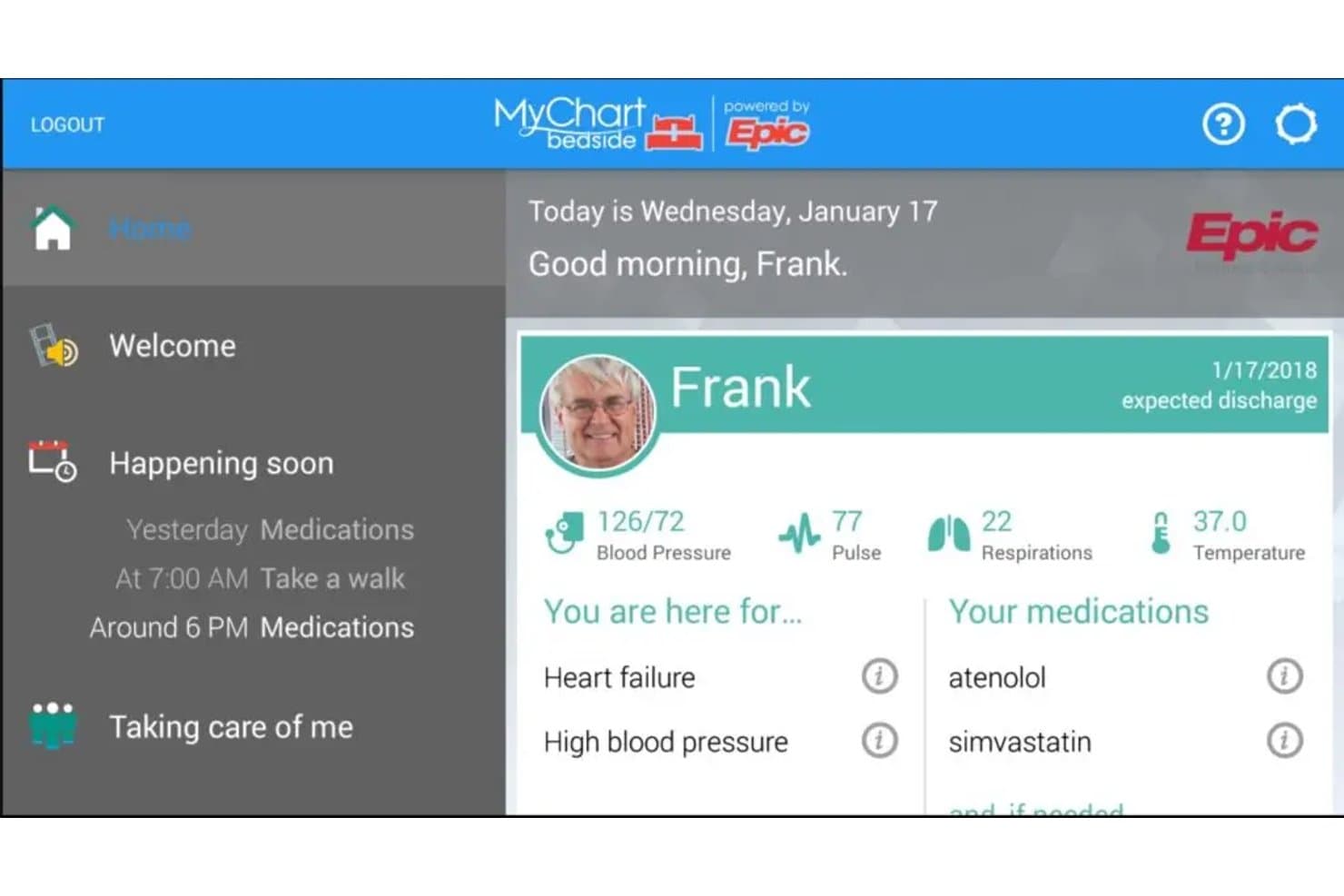
MyChart muestra las constantes vitales, los diagnósticos y los medicamentos en una sola pantalla de inicio. MyChart es el portal del paciente de Epic que brinda a los pacientes acceso a sus historiales médicos, resultados de pruebas, resúmenes de visitas, notas clínicas, mensajería segura con proveedores, programación de citas y facturación, todo en un mismo lugar.
¿Para quién es más adecuado MyChart?
MyChart es una opción ideal para organizaciones sanitarias que ya utilizan Epic y quieren que los pacientes gestionen su propio proceso de atención, desde la programación hasta la facturación, en un mismo lugar.
Por qué elegí MyChart
MyChart ocupa un lugar en mi lista de opciones gracias a lo bien que gestiona la transparencia de costes antes de que el paciente cruce la puerta. Me gusta especialmente la función de estimaciones, que permite a los pacientes seleccionar un procedimiento y una ubicación para consultar un desglose de las tarifas hospitalarias, los honorarios médicos, la cobertura del seguro y la parte que deberán pagar de su bolsillo, sin necesidad de tener una cuenta. Junto con eCheck-In para la verificación del seguro y el pago de facturas en línea, los pacientes pueden gestionar por sí mismos todos los aspectos económicos de una visita.
Características principales de MyChart
- Mensajería segura con pacientes: Los pacientes pueden enviar preguntas que no sean urgentes a su equipo de atención, seleccionar un destinatario específico y recibir respuestas en forma de hilo a través del Centro de mensajes.
- Notificaciones de la lista de espera Fast Pass: Los pacientes pueden unirse a una lista de espera y recibir alertas automáticas cuando se libere una cita más cercana.
- Acceso mediante proxy y a cuentas familiares: Los pacientes pueden invitar a un familiar o amigo a consultar y ayudar a gestionar su historial médico utilizando la propia cuenta de MyChart de esa persona.
- MyChart Bedside: Durante una estancia hospitalaria, los pacientes pueden consultar su agenda diaria, su equipo de atención, sus constantes vitales y resultados de laboratorio recientes, así como sus notas clínicas, y enviar mensajes directamente a su equipo de atención desde el portal.
Integraciones de MyChart
MyChart ofrece integraciones nativas con Google Fit y Apple Health para importar datos de salud. También admite API basadas en FHIR para el intercambio de datos dirigido por el paciente e integraciones personalizadas con Epic.
Pros and Cons
Pros:
- Acceso anticipado a los resultados de las pruebas
- La mensajería con el equipo de atención puede sustituir las llamadas telefónicas
- Las estimaciones de procedimientos aclaran los costes previstos que deberá pagar el paciente
Cons:
- La programación autónoma varía según el tipo de cita
- Los problemas de inicio de sesión y de la aplicación frustran a los pacientes
Learn more about MyChart: 8Ideal para acceso asequible al portal
RXNT
- Demo gratuita disponible
- Desde $126/mes (facturado anualmente)
Visit WebsiteCustomer Rating:4.3/5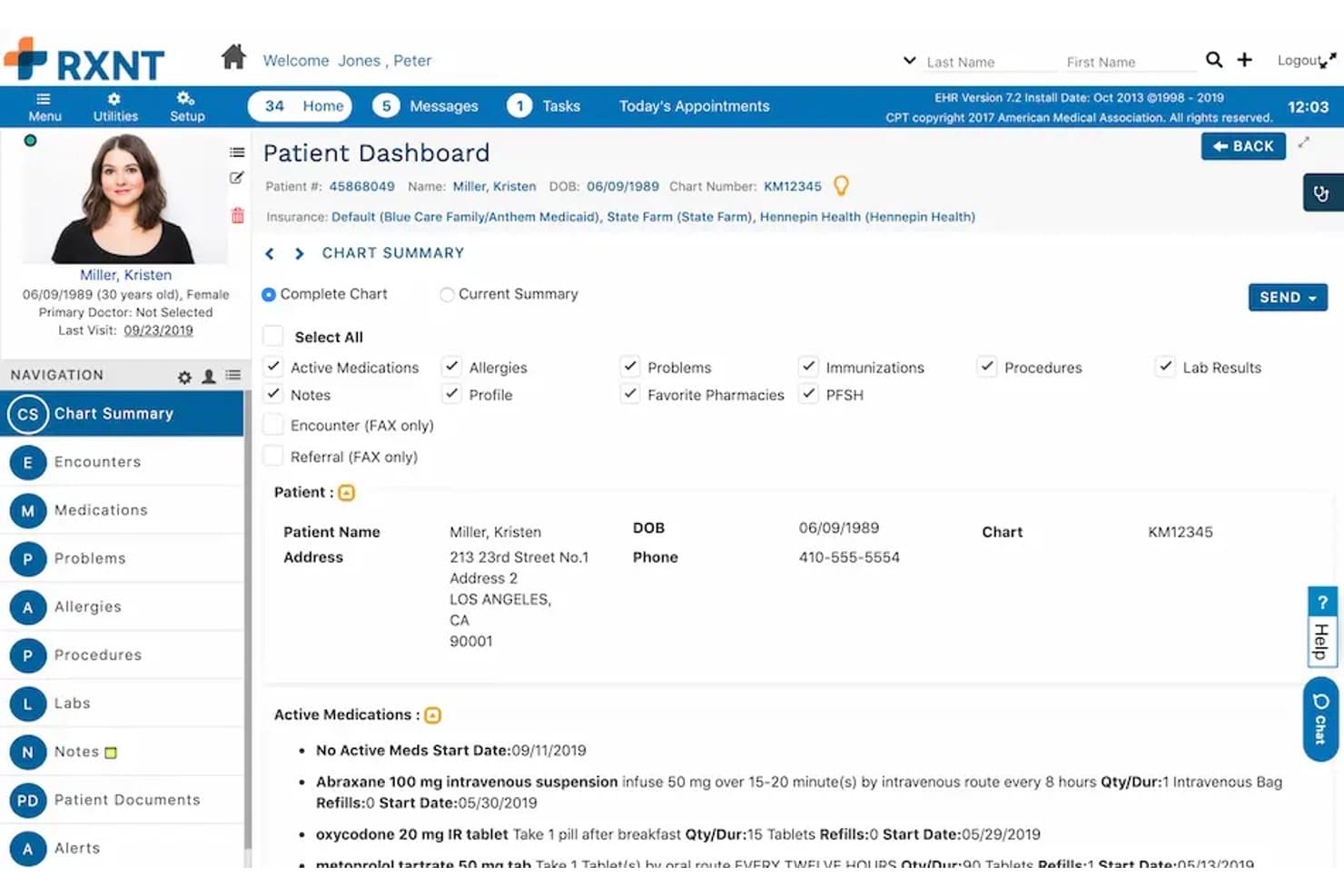
RXNT ofrece un Panel de Pacientes detallado con medicamentos activos, información de seguros, resumen de la historia clínica y datos demográficos del paciente en su portal EHR. RXNT es una plataforma de historia clínica electrónica (EHR) certificada por la ONC y portal para pacientes que combina recetas electrónicas nativas, gestión de consultorios, mensajería segura con pacientes, programación de citas, formularios digitales de ingreso y pagos de facturas en línea en una sola suite integrada.
¿Para Quién Es Mejor RXNT?
RXNT es ideal para consultorios ambulatorios independientes y pequeños grupos médicos que buscan una plataforma clínica y administrativa completamente integrada y a un precio más accesible.
Por Qué Elegí RXNT
Elegí RXNT como uno de los mejores porque su portal para pacientes (MyRXNT) viene incluido en la suite de EHR y recetas electrónicas, en lugar de venderse como un complemento por separado. Las solicitudes de resurtido de recetas, el pago de facturas en línea y la mensajería segura están incluidos desde el precio inicial junto con las herramientas clínicas. Me gusta especialmente que las solicitudes de resurtido enviadas por los pacientes llegan directamente a los proveedores y se verifican posibles interacciones medicamentosas y alergias mediante el módulo de recetas electrónicas certificado por EPCS de RXNT.
Funciones Clave de RXNT
- Plantillas de consulta integradas: Personaliza y utiliza plantillas estructuradas para diferentes tipos de visitas directamente dentro del EHR.
- Auto-programación de citas para pacientes: Permite a los pacientes reservar, reprogramar y cancelar sus propias citas a través del portal.
- Intercambio seguro de documentos: Comparte en línea resultados de laboratorio, notas clínicas e imágenes de manera segura con los pacientes.
- Acceso mediante app móvil: Pacientes y proveedores pueden acceder a las funciones del portal desde dispositivos iOS y Android.
Integraciones RXNT
RXNT ofrece integraciones nativas con RevolutionEHR, MatrixCare Home Health & Hospice, Centricity, CodoniX EHR, EMR-Bear, Consolo Hospice Software, MDClaim y Exym. También se soportan interfaces de laboratorio, Surescripts, PDMP y la sincronización de calendarios con Gmail y Outlook. Hay una API disponible para integraciones personalizadas.
Pros and Cons
Pros:
- Suite integrada para necesidades clínicas y administrativas
- Recetas electrónicas integradas con certificación EPCS
- Programación y admisión de pacientes en el mismo portal
Cons:
- Las notificaciones del portal de pacientes son inconsistentes
- Retraso ocasional de la interfaz durante periodos de alta demanda
Learn more about RXNT: Ideal para acceso móvil y registro digital previo a la cita
- Demostración gratuita disponible
- Precios a consultar
Visit WebsiteCustomer Rating:5/5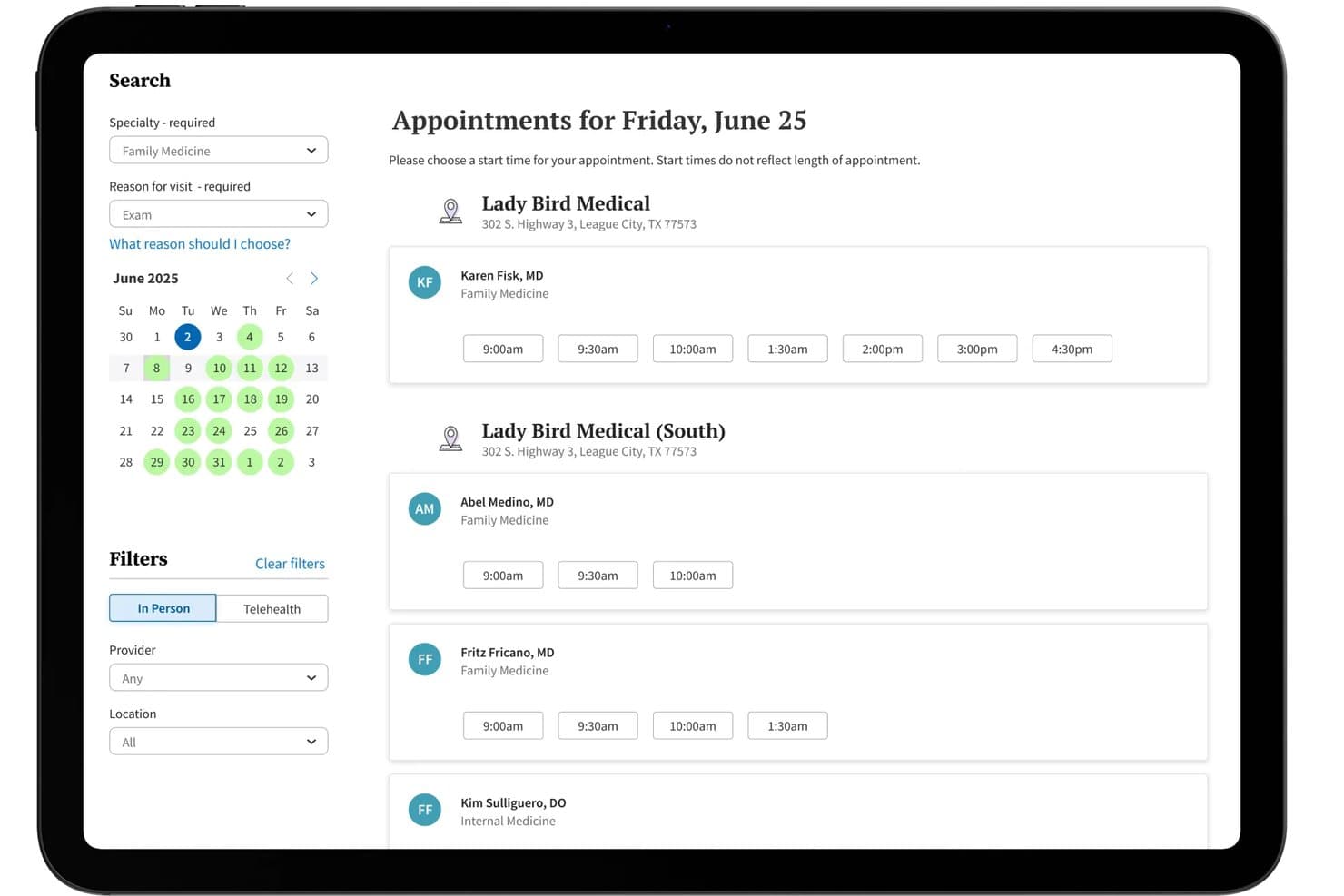
Athenahealth ofrece un portal para pacientes con autoprogramación donde los pacientes pueden revisar los horarios de citas disponibles por especialidad, ubicación y proveedor directamente desde una interfaz de calendario. Athenahealth es una plataforma de historia clínica electrónica (EHR) y portal para pacientes basada en la nube que combina registros clínicos, mensajería segura, autoprogramación de citas, registro digital, pagos en línea y e-prescripción en un solo sistema conectado.
¿Para quién es mejor Athenahealth?
Athenahealth funciona bien para consultas independientes y ambulatorias que desean una EHR y un portal para pacientes integrados sin depender de múltiples herramientas desconectadas.
Por qué elegí Athenahealth
Elegí Athenahealth porque la aplicación móvil AthenaPatient brinda a los pacientes acceso directo a sus registros médicos, resultados de exámenes, citas, mensajes e información de facturación desde sus teléfonos. Me gustan especialmente sus herramientas de registro digital previo a la visita, que permiten a los pacientes completar formularios de ingreso, cuestionarios de evaluación y documentos de consentimiento antes de llegar. Esto puede reducir el papeleo en la recepción y ayudar al personal a prepararse más eficientemente para las visitas.
Características clave de Athenahealth
- Mensajería segura compatible con HIPAA: Permite que pacientes y proveedores intercambien mensajes y documentos protegidos a través del portal o la aplicación móvil.
- e-prescripción integrada: Permite a los pacientes revisar los medicamentos actuales y enviar solicitudes de resurtido directamente a su equipo de atención.
- Notificaciones automáticas de lista de espera: Notifica a los pacientes cuando hay horarios de cita disponibles antes y les permite reservar esos espacios en línea.
- Portal para pacientes personalizado con la marca: Añade el logotipo y la identidad visual del consultorio para crear una experiencia más coherente para el paciente.
Integraciones de Athenahealth
Athenahealth se conecta con laboratorios, farmacias, centros de imágenes, aseguradoras y otras organizaciones de atención médica. También admite el intercambio de datos a través de Carequality y CommonWell, ofrece un mercado de aplicaciones asociadas verificadas y proporciona acceso API para integraciones personalizadas.
Pros and Cons
Pros:
- Aplicación móvil para pacientes con acceso completo a registros
- Flujo de registro digital previo a la visita incluido
- Autoprogramación de citas en tiempo real
Cons:
- Las notificaciones del portal para pacientes pueden ser inconsistentes
- La personalización de los informes es limitada para algunas métricas
Learn more about Athenahealth:
Cómo evalúo el software de portales de pacientes para EMR
Divido mi evaluación en tres partes y doy más peso a la funcionalidad principal: mostrar a los pacientes los resultados de laboratorio actuales y los resúmenes de las visitas, y sincronizarlos con el EMR de la consulta. Después, considero el acceso delegado, como el acceso de un cuidador a las citas de un menor. Por último, evalúo el proceso de implementación, el soporte al personal y la adecuación del precio.
Funcionalidad principal (requisitos básicos para esta lista)
Al seleccionar herramientas para mi lista, puntúo cada una en una escala de 0 (no ofrece la funcionalidad) a 5 (sobresale en esta área) para cada una de las funcionalidades principales que se indican a continuación. Después convierto el total en un porcentaje para ayudar a evaluar la adecuación general de cada herramienta, con peso adicional para las funcionalidades que he considerado esenciales.
- Acceso al expediente del paciente (esencial): Busco que los pacientes tengan acceso seguro a los resultados de laboratorio actuales, los resúmenes de las visitas, los medicamentos y otros detalles de su historia clínica, no solo a un documento estático.
- Integración con el EMR (esencial): Evalúo si el portal se conecta al EMR de la consulta y sincroniza los datos de los pacientes, reduciendo la conciliación manual entre visitas.
- Mensajería segura: Compruebo si los pacientes pueden intercambiar mensajes seguros con el personal o los proveedores y seguir las conversaciones en el portal.
- Programación de citas: Busco opciones para reservar, reprogramar o cancelar citas en línea, incluida la forma en que los pacientes encuentran horarios disponibles entre los distintos proveedores.
- Formularios digitales de admisión: Evalúo si los pacientes pueden completar y enviar sus antecedentes, consentimientos y formularios de admisión antes de una visita, y si los datos llegan a la historia clínica.
- Facturación y pagos: Compruebo si los pacientes pueden consultar sus estados de cuenta y pagar los saldos a través del portal, en lugar de cambiar a un sistema externo.
Una vez que tengo una lista de herramientas que cumplen los criterios, considero qué distingue a cada plataforma.
Factores diferenciadores (lo que distingue a los proveedores)
Así comparo y contrasto los distintos proveedores:
Funciones destacadas
Busco controles de acceso familiar y delegado que permitan a un padre o cuidador reservar citas y consultar los expedientes de las personas a su cargo sin compartir las credenciales de inicio de sesión. Esto es esencial en una consulta con gran volumen de pacientes pediátricos. También evalúo la compatibilidad con varios idiomas y el cumplimiento de ADA/WCAG, ya que un portal que los pacientes no pueden leer o utilizar no se usará. Una aplicación móvil específica también es importante: los portales basados en navegador en un teléfono generan dificultades que reducen la adopción.
Más allá de las funciones
Compruebo si un portal ofrece interoperabilidad certificada con el EMR específico de la consulta, y no solo afirmaciones genéricas sobre FHIR. Un portal que solo sincroniza en una dirección significa que el personal todavía debe conciliar los datos manualmente. También evalúo la flexibilidad del contrato: las tarifas de configuración, los precios por proveedor y las condiciones de portabilidad de los datos influyen en el costo a largo plazo. Las consultas que superan las capacidades de un proveedor a mitad del contrato necesitan una vía de salida clara sin perder los datos de los pacientes.