

Güçlü Kareo alternatifleri, gereksiz idari işler eklemeden dokümantasyon, faturalandırma ve hasta erişimi iş akışlarınıza uyum sağlayan EMR platformlarıdır. Tek başına çalışan bir kliniğe uygun bir sistemin, personel ve bakım koordinasyonu ihtiyaçları değiştikçe nasıl uyumsuz hâle gelebildiğini gördüm. Bu kılavuz, geçiş yapmadan önce göz önünde bulundurulması gereken iş akışı uyumu, faturalandırma gereksinimleri ve ödünleşmelere odaklanarak farklı muayenehane büyüklükleri ve uzmanlık alanları için seçenekleri karşılaştırır.
Kareo Nedir?
Kareo, bağımsız tıbbi muayenehaneler için klinik dokümantasyon, randevu planlama, faturalandırma ve hasta etkileşimi araçları sunan bulut tabanlı bir EHR ve muayenehane yönetimi platformudur. Klinik ve idari iş akışlarını tek bir sistemde bir araya getirir. Kareo artık, mevcut platformu EHR, faturalandırma, randevu planlama ve hasta iletişimi özelliklerini birleştiren Tebra'nın bir parçasıdır.
Karşılaştırma Tablosu: Kareo Alternatifleri
Kısa listeme giren Kareo alternatiflerinin fiyatlarını ve teknik özelliklerini yan yana karşılaştırın.
Score legend (out of 5)
- Excellent4.5–5
- Good4–4.4
- Average3–3.9
- Below average2–2.9
- Poor1–1.9
Sorted by: Default
| Tool | Starting Price | Website | |||||||
|---|---|---|---|---|---|---|---|---|---|
Best for specialty-specific adaptive charting | 3.7 out of 5 | 4 | 4 | 3 | 3 | 4 | 4 | Pricing upon request Free demo available | Website |
Best for linking EHR and health system operations | 3.7 out of 5 | 3 | 4 | 4 | 4 | 3 | 4 | Pricing upon request Free demo available | Website |
Best for AI across care, front desk, and billing | 3.8 out of 5 | 4 | 4 | 4 | 4 | 3 | 4 | Pricing upon request Free demo available | Website |
Best for Kareo switch with free open A/R | 3.8 out of 5 | 4 | 4 | 4 | 4 | 3 | 4 | Pricing upon request Free demo available | Website |
Best for rural clinic and hospital workflows | 3.7 out of 5 | 3 | 4 | 4 | 4 | 3 | 4 | Pricing upon request Free demo available | Website |
Best for iPad-first clinical charting | 3.8 out of 5 | 3 | 4 | 4 | 4 | 4 | 4 | Pricing upon request Free demo available | Website |
Best for specialty-specific charting | 3.7 out of 5 | 4 | 4 | 3 | 4 | 3 | 4 | Pricing upon request Free demo available | Website |
Best for choosing how much billing to outsource | 4.0 out of 5 | 4 | 4 | 5 | 4 | 3 | 4 | $130/user/month 30-day free trial + free demo available | Website |
Best for cross-setting care coordination | 3.8 out of 5 | 4 | 4 | 3 | 4 | 4 | 4 | Pricing upon request Not available | Website |
Best for custom clinical data analytics | 3.8 out of 5 | 4 | 4 | 4 | 3 | 4 | 4 | Pricing upon request Free demo available | Website |


Why Trust Our Software Recommendations
6,700+
Reviews
20
Industry experts
16+
Evaluation factors
14
Years
Our team has been testing and reviewing software since 2012. As medical practice leaders ourselves, we know how difficult—and important—it is to choose the right software.
For this guide, we evaluated tools using hands-on testing and independent research, scoring tools using our selection criteria.
Our reviews reflect our human editorial judgment, not a sales pitch.
Kareo Alternatifleri İncelemeleri
Aşağıda kısa listemde yer alan en iyi Kareo alternatifleri hakkındaki incelemelerimi bulabilirsiniz. Doğru seçeneği bulmanıza yardımcı olmak için her EHR platformunun özelliklerini ve iş akışlarını ele alıyorlar.
 Best for specialty-specific adaptive charting
- Free demo available
- Pricing upon request
Visit WebsiteCustomer Rating:4.5/5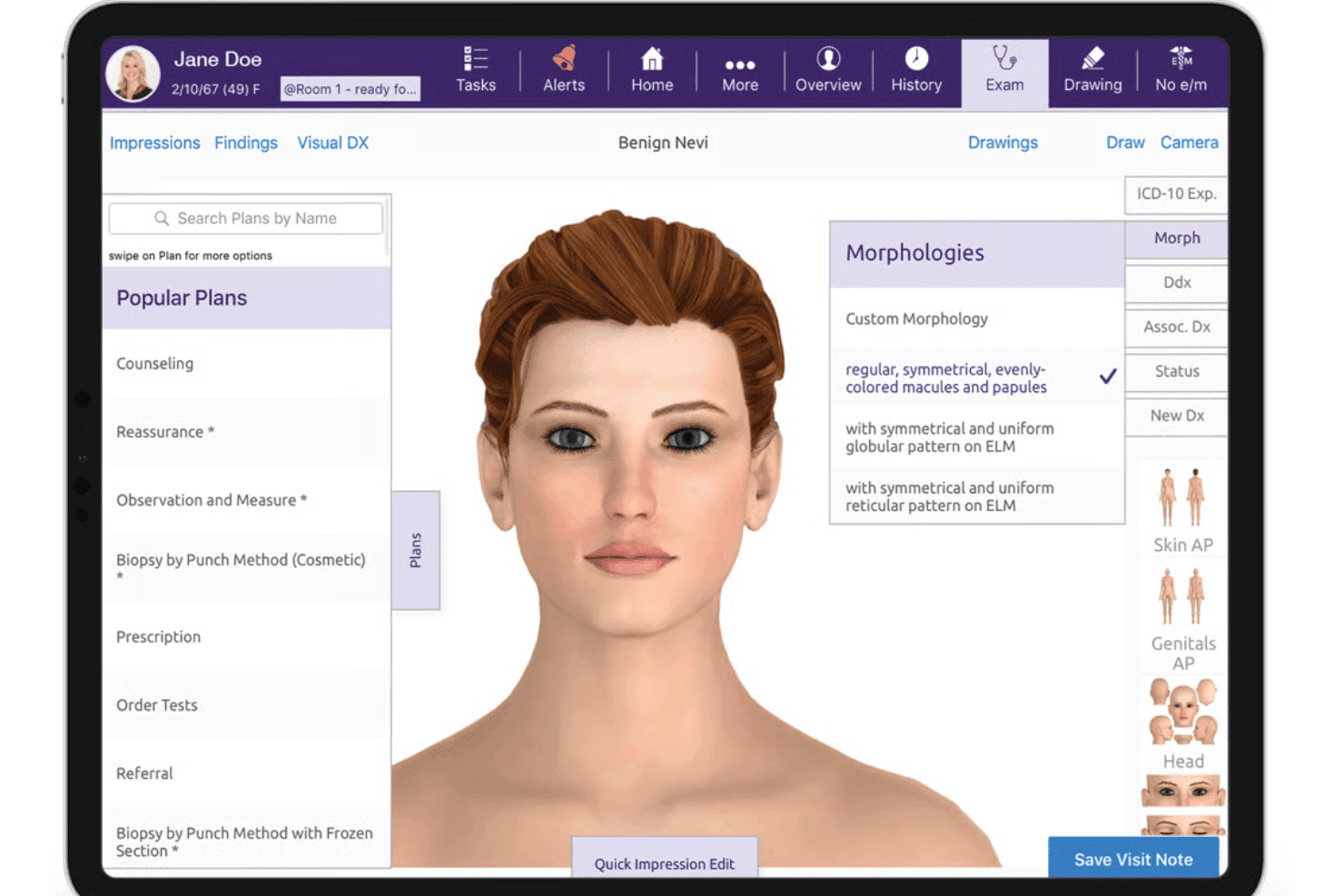
ModMed EMA provides dermatology-specific examination and charting tools. ModMed is a cloud-based EHR and practice management platform built for specialty medical practices, covering everything from adaptive clinical documentation and e-prescribing to scheduling, billing, and patient engagement in one connected system.
Who Is ModMed Best For?
ModMed is a strong fit for specialty medical practices that need an EHR built around their specific clinical workflows, covering more than 12 specialties from dermatology to urology.
Why I Picked ModMed
I picked ModMed as one of the best Kareo alternatives because its EMA charting system genuinely learns how individual providers document, adapting to their preferred diagnoses, procedures, and exam descriptions across 12-plus specialties like dermatology, ophthalmology, and podiatry. I especially like ModMed Scribe, which turns ambient patient-provider conversations into suggested visit note content, cutting manual entry during the encounter itself. The gGastro EHR adds specialty-specific depth, with dedicated GI workflows and endoscopy documentation through gGastro ERW.
ModMed Key Features
- Real-Time Prescription Benefit: Displays a patient's likely out-of-pocket drug cost and compares up to five alternative medications and three delivery options during the prescribing workflow.
- Patient self-scheduling: Lets patients request or reschedule appointments directly, without requiring staff to manage the booking manually.
- AI Analytics platform: Provides near-real-time practice insights with custom report building, anomaly detection, scheduled report delivery, and peer benchmarking.
- synapSYS connectivity: Connects the EHR to labs, hospitals, and health information exchanges, supporting HL7 data exchange for demographics, visit notes, lab results, and discharge summaries.
ModMed Integrations
ModMed connects with over 1,200 lab entities through Change Healthcare. It also supports certified FHIR, proprietary FHIR R4, HL7, SMART on FHIR, and synapSYS connectivity with hospitals and health information exchanges.
Pros and Cons
Pros:
- Mobile charting supports care across settings
- Connected scheduling supports coordinated office workflows
- Adaptive charting fits specialty workflows
Cons:
- Users report freezes during clinic hours
- Billing reports can arrive late
Learn more about ModMed: Best for linking EHR and health system operations
- Free demo available
- Pricing upon request
Visit WebsiteCustomer Rating:4.4/5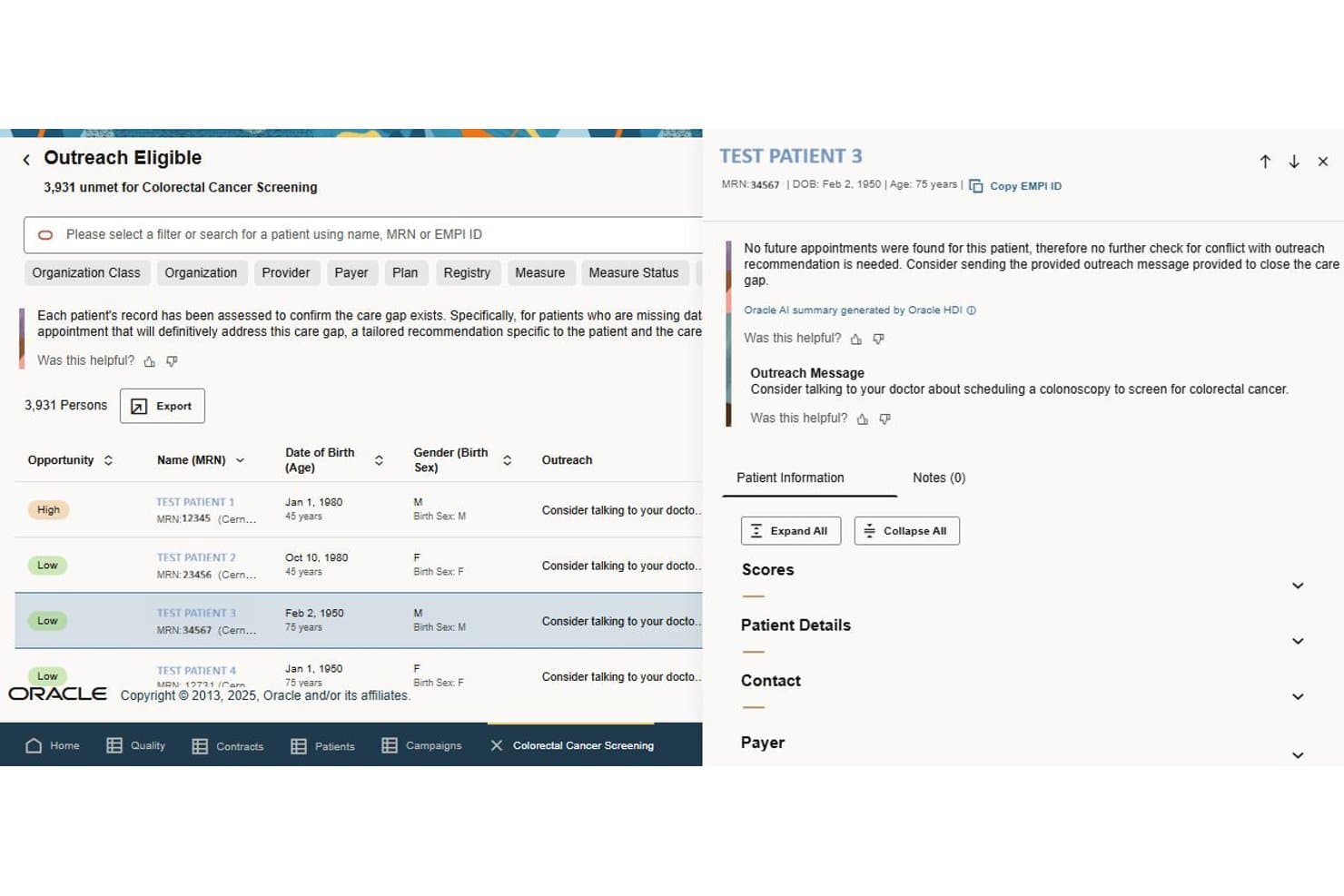
Oracle Health tracks patient outreach and clinical care gaps. Oracle Health is an enterprise-grade EHR platform built for health systems and large ambulatory practices that need to connect clinical documentation, revenue cycle management, patient administration, and care coordination across complex, multi-department environments.
Who Is Oracle Health Best For?
Oracle Health is built for large health systems and multi-department organizations that need a single platform connecting clinical documentation, revenue cycle, and care operations across the enterprise.
Why I Picked Oracle Health
I've included Oracle Health in my top picks because it's the only platform here that genuinely bridges clinical documentation and health system operations in a single environment. The Foundation EHR connects patient records, care coordination, and referral workflows directly to revenue cycle tools like Patient Accounting, so charge capture and denial management happen within the same system where clinicians document care. I also appreciate that the AI Agents layer drafts notes and summarizes charts at the point of care, cutting the documentation time that tends to pile up across multi-department settings.
Oracle Health Key Features
- Patient portal: Gives patients self-service access to health records, appointment scheduling, check-in, registration, and online bill pay from a single cloud-based interface.
- Scheduled video visits: Lets patients book, register for, and join video appointments directly through the Oracle Health Patient Portal on web, iOS, or Android.
- Denial management workflow: Automatically analyzes claims denials, drafts appeal packets for appealable cases, and routes them to a staff review queue for editing or approval.
- FHIR and EHR APIs: Provide cloud-native R4 APIs using HTTPS and JSON for connecting custom applications and third-party tools to core EHR workflows.
Oracle Health Integrations
Oracle Health has a documented native integration with CommonWell Health Alliance, plus marketplace integrations with CERTIFY Health and Linus Health. It also offers FHIR and cloud-native EHR APIs for custom connections.
Pros and Cons
Pros:
- Clinical and billing workflows share one platform
- Organized charts keep records easy to locate
- AI-assisted note drafting supports clinical workflows
Cons:
- Some reviewers report slow, unresponsive support
- E-prescribing draws complaints about extra clicks
Learn more about Oracle Health: Best for AI across care, front desk, and billing
- Free demo available
- Pricing upon request
Visit WebsiteCustomer Rating:4.4/5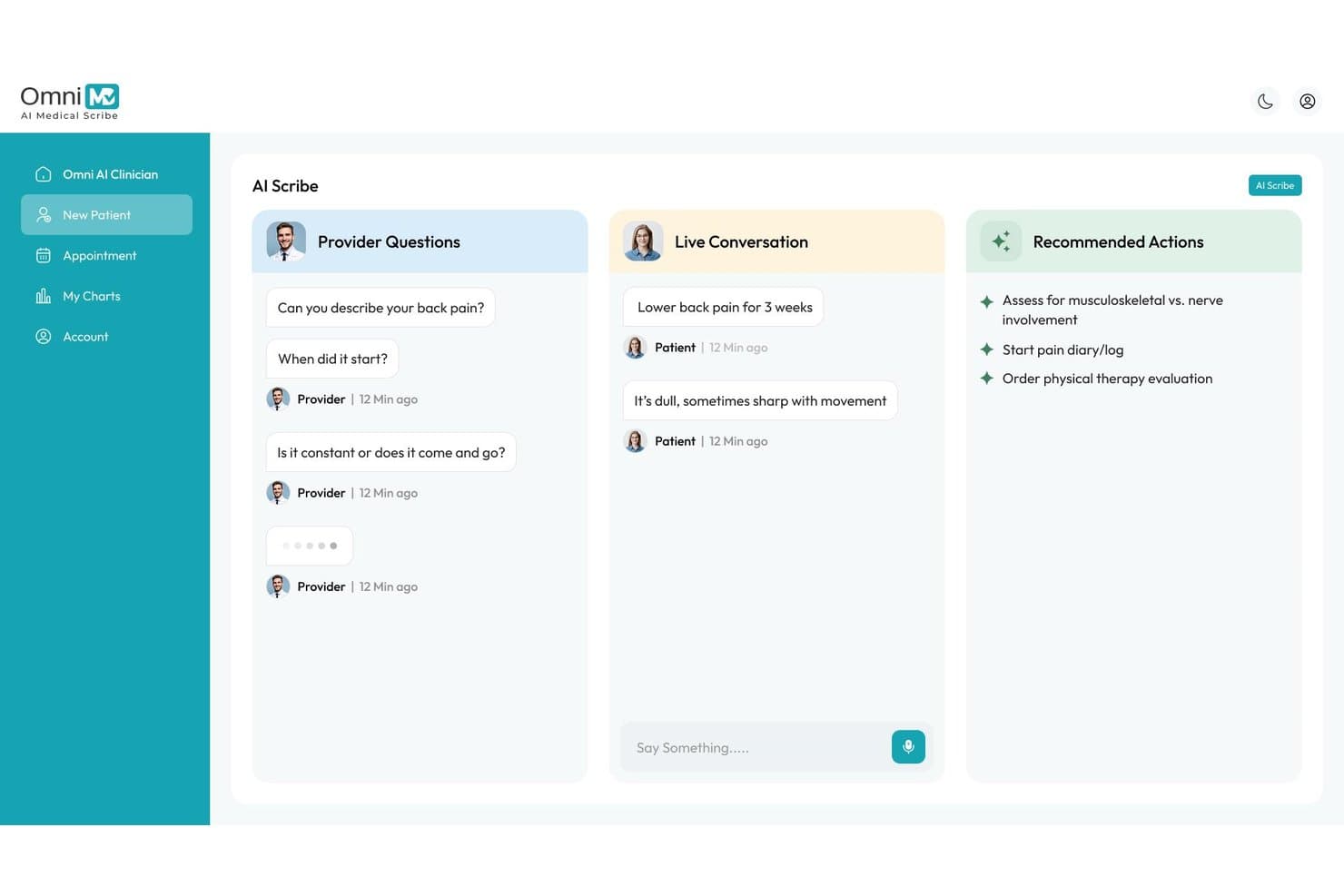
OmniMD provides AI-assisted patient conversations and clinical suggestions. OmniMD is an AI-native EHR built for independent and growing medical practices that need clinical documentation, front desk operations, and billing managed in one connected system across 20+ specialties.
Who Is OmniMD Best For?
OmniMD is a strong fit for independent and multi-specialty practices that want AI-driven documentation, front desk automation, and billing managed within a single connected system.
Why I Picked OmniMD
I picked OmniMD because it's one of the few platforms that runs AI across every layer of a practice, not just charting. The AI Medical Scribe captures visit conversations and generates structured SOAP notes for clinician review, while the AI Front Desk handles inbound patient calls, insurance verification, and online scheduling without front-office staff involvement. I especially like that the AI Medical Coder then pulls ICD, CPT, and HCPCS codes directly from those notes and flags denial risks before claims ever leave the system.
OmniMD Key Features
- Specialty-specific templates: Choose from documentation workflows built for 20+ specialties, including cardiology, mental health, OB/GYN, orthopedics, and urgent care.
- OmniXchange lab interface: Send electronic lab orders to Labcorp and Quest Diagnostics and receive structured results directly in the patient chart.
- Telehealth with integrated billing: Run HIPAA-compliant video visits from within the EHR, with visit documentation connected to claim generation and payer-specific billing logic.
- Patient portal: Patients can schedule appointments, request prescription refills, view released lab results, and exchange secure messages through a browser-based portal.
OmniMD Integrations
OmniMD offers two native integrations with Labcorp and Quest Diagnostics, plus AI Medical Scribe integrations with athenahealth, Epic, Cerner, eClinicalWorks, and Allscripts. It supports FHIR, SMART-on-FHIR, HL7, secure API bridges, and SOAP web services.
Pros and Cons
Pros:
- Reviewers praise responsive onboarding and support
- Clinical, scheduling, and billing workflows connect
- Specialty-specific templates support diverse practices
Cons:
- Some users report charting navigation challenges
- Reports can require extra steps
Learn more about OmniMD: Best for Kareo switch with free open A/R
- Free demo available
- Pricing upon request
Visit WebsiteCustomer Rating:4.1/5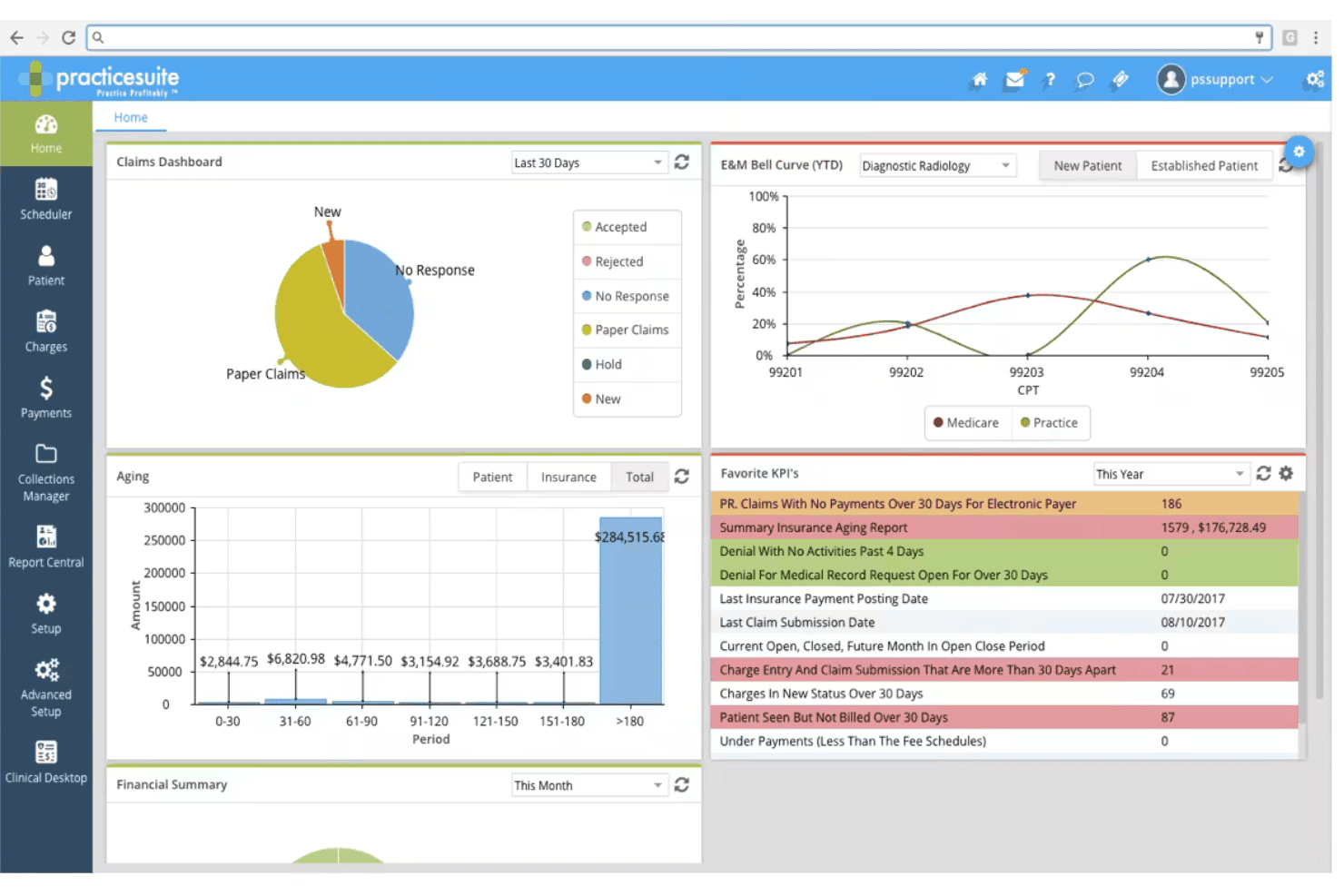
PracticeSuite spans claims, denials, ERA posting, eligibility, and billing. PracticeSuite is a cloud-based practice management platform that brings EHR charting, medical billing, scheduling, and patient engagement into one system for independent practices and billing companies looking to consolidate clinical and revenue cycle workflows.
Who Is PracticeSuite Best For?
PracticeSuite is a strong fit for independent practices and billing companies that want a single system for scheduling, EHR, and revenue cycle management—especially those moving off Kareo.
Why I Picked PracticeSuite
I've included PracticeSuite in my top picks because it's one of the few platforms that actively builds its migration offer around Kareo switchers, converting your open A/R into the system at no cost and ramping fees gradually over 90 days so you're not paying two platforms at full price simultaneously. I also appreciate that the denial workbench and RCM work queues let billing staff triage rejections by payer and dollar impact, then route appeals without leaving the platform.
PracticeSuite Key Features
- Multi-provider scheduling: Manage appointments across multiple providers and locations from one calendar, with color-coded appointment types, recurring bookings, and room and equipment reservations.
- Patient portal: Give patients self-service access to health records, online appointment scheduling, digital check-in, secure messaging, and payment options.
- ATLAS AI remittance analysis: Analyze remittance data and payer patterns, flag at-risk claims, auto-post ERAs, and surface underpayments for follow-up.
- Built-in telehealth: Conduct and document patient encounters via secure video chat, phone, or two-way messaging without leaving the platform.
PracticeSuite Integrations
PracticeSuite lists 94 marketplace integration results, including Quest Diagnostics, Labcorp, NewCropRx, TriZetto, and RelayHealth. It also offers a read-only RESTful FHIR API using SMART on FHIR and OAuth 2.0 for custom integrations.
Pros and Cons
Pros:
- Reviewers praise appointment scheduling
- Denial worklists support payer-focused follow-up
- Kareo migration covers open A/R
Cons:
- Users report crashes and slowdowns
- Reviewers report cumbersome Medicare coding
Learn more about PracticeSuite: Best for rural clinic and hospital workflows
- Free demo available
- Pricing upon request
Visit WebsiteCustomer Rating:4.1/5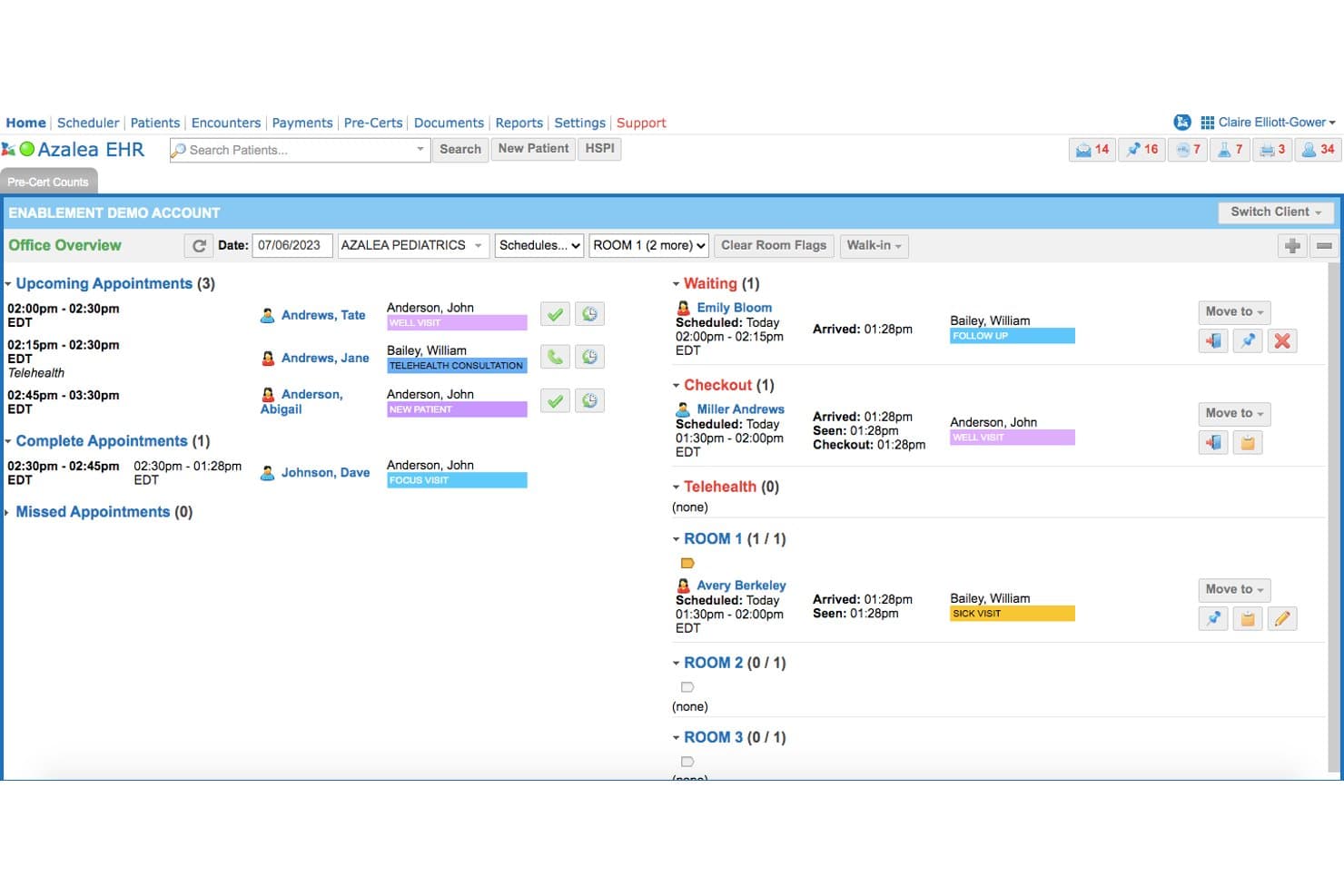
Azalea Health tracks patient appointments, check-ins, and room assignments. Azalea Health is a cloud-based EHR and billing platform built for independent ambulatory practices and rural hospitals that need clinical documentation, scheduling, claims management, and telehealth in a single system.
Who Is Azalea Health Best For?
Azalea Health is a strong fit for independent rural clinics and critical access hospitals that need a single system to handle clinical documentation, billing, and telehealth across inpatient and ambulatory settings.
Why I Picked Azalea Health
I picked Azalea Health because it's one of the few platforms built specifically for rural clinics and critical access hospitals, covering inpatient, emergency, and ambulatory workflows in a single system. I especially appreciate the Nurse Board View for real-time patient status and handoffs alongside a one-screen hospital chart that connects orders, prescriptions, and discharge documentation to billing without manual re-entry. The hospital EHR's support for swing-bed workflows is something you won't find in most ambulatory-first alternatives.
Azalea Health Key Features
- myHealthspot patient portal: Lets patients view lab results, request appointments and refills, update insurance information, and pay bills without calling the front desk.
- AI clinical documentation assistant: Captures provider-patient conversations and transcribes them into structured SOAP notes with diagnosis-code suggestions for provider review.
- Drag-and-drop scheduling calendar: Provides a customizable appointment calendar with eligibility verification and multi-provider coordination built into the same workflow.
- AI billing assistant: Reviews claims in real time, flags potential issues before submission, and supports EOB conversion for payment posting and payer claim-status inquiries.
Azalea Health Integrations
Documented integrations include Surescripts Interconnect, RevUp, Rcopia by DrFirst, and CardConnect. Azalea Health also offers a partner API Marketplace with SMART on FHIR connectivity for custom integrations.
Pros and Cons
Pros:
- Users praise appointment booking and rescheduling
- Connected charting and billing support practice workflows
- Rural clinics and hospitals share clinical workflows
Cons:
- Prescribing workflows require repetitive clicks
- Claim filing and payment posting draw complaints
Learn more about Azalea Health: Best for iPad-first clinical charting
- Free demo available
- Pricing upon request
Visit WebsiteCustomer Rating:3.9/5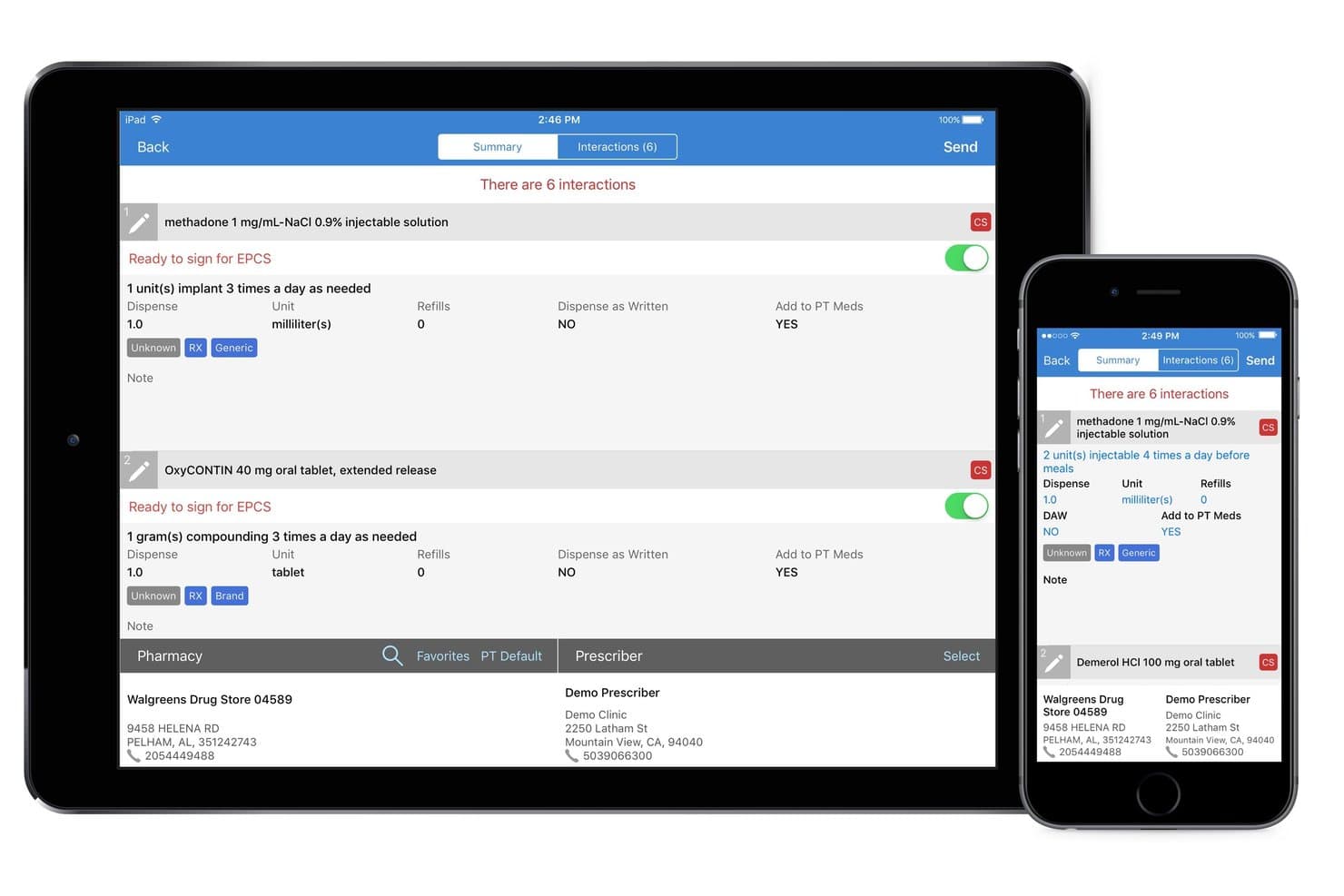
DrChrono supports clinical charting on iPad with customizable templates. DrChrono is a mobile-first EHR platform built for independent practices that need clinical charting, scheduling, billing, and patient engagement in one connected system.
Who Is DrChrono Best For?
DrChrono is a strong fit for independent practices where physicians do most of their charting on an iPad and need scheduling, billing, and patient engagement in one connected platform.
Why I Picked DrChrono
I picked DrChrono as one of the best because it's built from the ground up for iPad-first charting, letting providers complete a full encounter, including templates with text, switches, and toggles, sign and lock the note, and have it sync to the cloud instantly. I love that it pairs this with specialty-specific templates across more than 20 medical fields, so a chiropractic or dermatology practice isn't adapting a generic form. The EverHealth Scribe ambient AI, which drafts structured notes including HPI, Assessment, and ICD-10 codes from live conversations, makes it even more compelling for clinicians who want to stay heads-up during visits.
DrChrono Key Features
- OnPatient portal: Patients can book appointments, complete intake forms, message their provider, view lab results, and pay balances through a web portal or native iOS and Android app.
- Live Claims Feed: Displays real-time claim rejections from DrChrono's billing system, clearinghouse, or payer, so billing staff can inspect rejection details, correct errors, and resubmit claims.
- Denial Analysis Report: Filters and groups denials by primary, secondary, and tertiary reasons, showing denied dollar amounts, aging, and downloadable report data with saveable filter views.
- Extended lab integration: Connects to more than 40,000 labs and imaging services, with structured HL7 results routed directly into patient charts from Quest, Labcorp, Lifepoint, and Health Gorilla.
DrChrono Integrations
DrChrono offers native integrations with Quest Diagnostics, Labcorp, Surescripts, CoverMyMeds, Iron Bridge, iHCFA, eProvider Solutions, and OnPatient, plus marketplace integrations. It supports REST, FHIR, OAuth-based APIs, and webhooks for custom connectivity.
Pros and Cons
Pros:
- Patient records and scheduling stay connected
- Custom templates suit specialty workflows
- iPad charting supports point-of-care documentation
Cons:
- Support delays complicate unresolved issues
- Billing entries can require manual correction
Learn more about DrChrono: Best for specialty-specific charting
- Free demo available
- Pricing upon request
Visit WebsiteCustomer Rating:3.6/5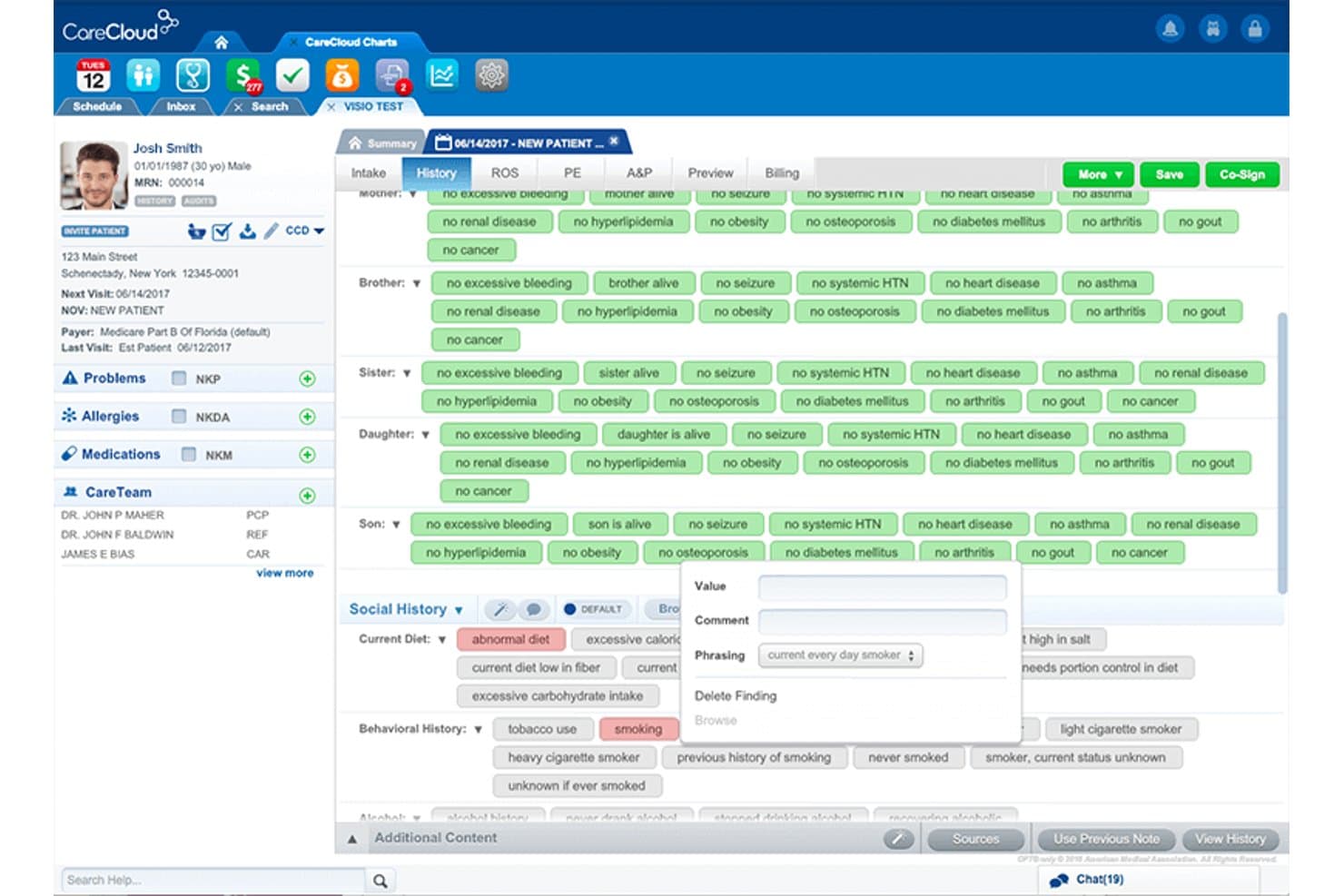
CareCloud provides customizable templates for patient history documentation. CareCloud is a cloud-based EHR and practice management platform built for specialty-driven practices that need customizable clinical documentation, integrated billing, and revenue cycle management in a single system.
Who Is CareCloud Best For?
CareCloud is a strong fit for specialty practices that need charting templates and clinical documentation built around their specific discipline.
Why I Picked CareCloud
I picked CareCloud as one of the best because its specialty-specific charting goes deeper than a generic template library. CareCloud's EHR supports more than 80 specialties, with documentation formats built around each discipline, such as SOAP, DAP, and BIRP notes for behavioral health, or preconfigured order sets for cardiology and orthopedics. I also like that cirrusAI Notes captures the patient-provider conversation in real time and generates structured SOAP notes directly in the chart, which cuts post-visit documentation considerably.
CareCloud Key Features
- Breeze patient engagement suite: Lets patients self-schedule appointments, complete digital intake forms, make online payments, and send secure messages through a patient portal.
- Revenue cycle management: Covers eligibility verification, claims scrubbing, denial management, payment posting, and accounts receivable follow-up in one connected workflow.
- Telehealth: Supports secure video and audio visits with up to five attendees, screen sharing, and integration with EHR and billing workflows.
- CollectiveIQ billing rules engine: Applies payer-specific and coding validations to flag potential claim errors before submission.
CareCloud Integrations
CareCloud lists nine marketplace integrations, including Chiron Health and state immunization systems such as AL – ImmPrint and VA – VIIS. Its Connector API supports FHIR R4, CCDA, and CDA for custom integrations, but access is read-only and requires approval.
Pros and Cons
Pros:
- Claim-status reporting clarifies billing work
- Scheduling and office-flow visibility earn praise
- Specialty templates fit diverse clinical workflows
Cons:
- Support follow-up remains inconsistent across reviews
- Billing appeals can stall or go unresolved
Learn more about CareCloud: Best for choosing how much billing to outsource
- 30-day free trial + free demo available
- From $130/user/month
Visit WebsiteCustomer Rating:3.6/5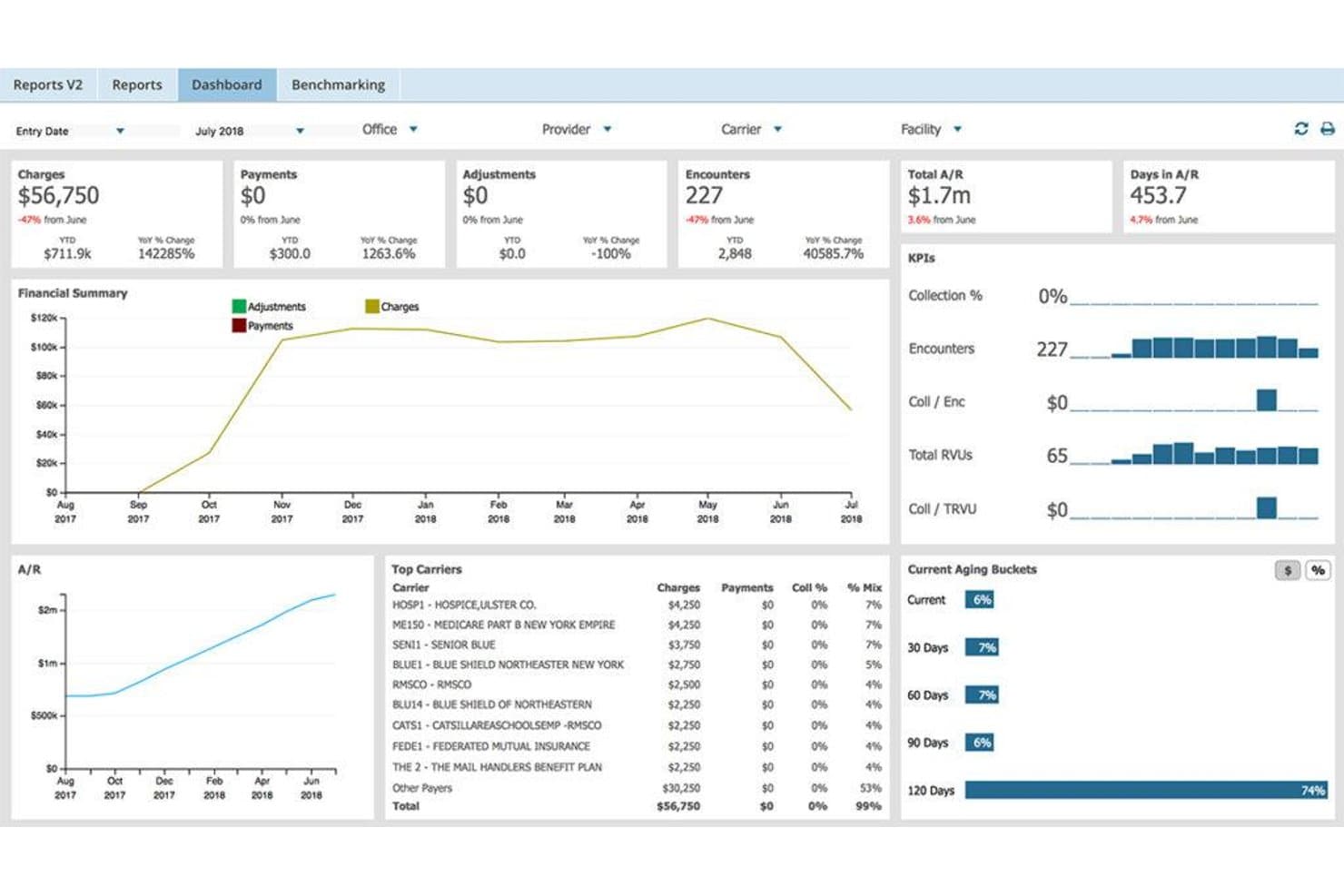
AdvancedMD provides clinical note templates for psychiatric assessments. AdvancedMD is a cloud-based EHR, practice management, and patient engagement platform built for independent practices that need clinical charting, billing, scheduling, and telehealth under one roof.
Who Is AdvancedMD Best For?
AdvancedMD is a strong fit for independent practices that want to manage clinical documentation, scheduling, and billing in one place while deciding how much of the billing workload to handle in-house versus outsourcing to a full-service RCM team.
Why I Picked AdvancedMD
I picked AdvancedMD because it gives independent practices genuine flexibility in how they handle billing, which is rare in this category. You can run billing fully in-house using its claims scrubbing, A/R worklists, and denial management tools, or hand the whole operation to AdvancedMD's RCM team at 4–8% of collections with the software included. I especially like that the RCM option isn't a separate product: it's the same platform, just with a different level of hands-on support behind it.
AdvancedMD Key Features
- ONC-certified EHR compliance: AdvancedMD's certified Health IT Module meets 2015 Edition criteria, including CPOE, transitions of care, and secure messaging, with CHPL product numbers for both AdvancedMD and AdvancedMD Mobile.
- Telehealth with virtual waiting room: Patients join visits by phone, tablet, or computer via a web link, with identity verification, optional copay collection, and a virtual waiting room before the clinician joins.
- AI ambient listening and note generation: The AI clinical assistant captures visit conversations and converts transcripts into SOAP notes, psychiatric evaluations, medication management notes, or treatment plans.
- Insurance eligibility verification: The system verifies patient coverage before appointments and updates patient files with current information automatically.
AdvancedMD Integrations
AdvancedMD lists 1,400+ integration offerings and 50+ billing partner offerings, including marketplace integration with Weave and integrations with Salesforce, Zoho, LeadSquared, and SuiteCRM. Its Open API and Connect APIs support XML-RPC and REST custom integrations.
Pros and Cons
Pros:
- Billing can stay in-house or outsourced
- Scheduling and portal workflows stay connected
- Customizable chart templates suit varied workflows
Cons:
- Claim status can be hard to track
- Prescribing workflows require repeated clicks
 9Best for cross-setting care coordination
Epic
- Not available
- Pricing upon request
Visit WebsiteCustomer Rating:3.9/5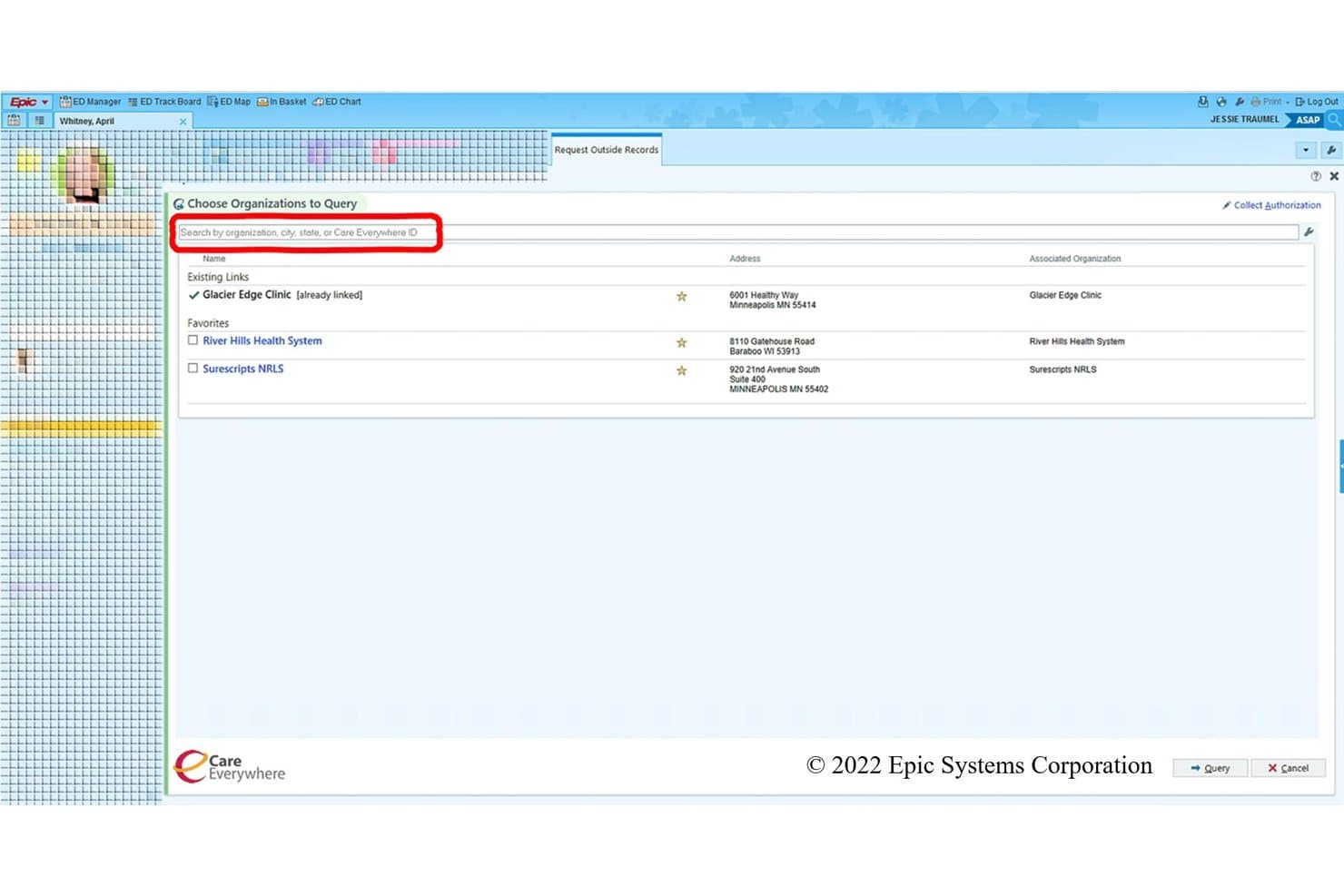
Epic Care Everywhere lets clinicians request records from other care providers. Epic is an enterprise-grade EHR built for health systems, hospital networks, and large multi-specialty organizations that need a single, unified record connecting clinical documentation, scheduling, billing, and patient engagement across care settings.
Who Is Epic Best For?
Epic is a strong fit for large health systems, hospital networks, and multi-specialty organizations that need a single record connecting care across inpatient, outpatient, and post-acute settings.
Why I Picked Epic
I've included Epic in my top picks because no other EHR on this list connects inpatient, outpatient, post-acute, and health plan records into a single patient timeline the way Epic does. Care Everywhere exchanges over 30 million patient record documents daily, so a hospitalist can pull outpatient notes from a referring clinic without a separate records request. I also appreciate that Community Connect extends that same unified record to independent providers outside a health system, keeping care coordination intact across organizational boundaries.
Epic Key Features
- MyChart patient portal: Patients can schedule appointments, complete eCheck-In, message their care team, pay bills, and access test results directly through MyChart.
- Art for Clinicians AI documentation: Drafts outpatient and inpatient notes from visit conversations, including care-plan notes and patient summaries.
- SlicerDicer self-service reporting: Lets users build reports on clinical and operational data without a report writer, with an AI assistant that generates reports from plain-language questions.
- Electronic claims processing: Submits institutional, professional, and dental claims via ANSI ASC X12N 837 transactions, with claim scrubbing, adjudication, and automated payment posting.
Epic Integrations
Epic documents connections with Availity, Change Healthcare, Optum, TriZetto Provider Solutions, Waystar, Surescripts, DrFirst, and ScriptPro. It supports FHIR APIs, web services, and more than 1,000 API and interface specifications, with 3,491 live apps using open.epic web services.
Pros and Cons
Pros:
- Clinical and billing work share one system
- Specialty workflows accommodate varied clinical practices
- Unified records support cross-setting care coordination
Cons:
- Workflows vary by organization
- Charting can require navigating many menus
Learn more about Epic: Best for custom clinical data analytics
- Free demo available
- Pricing upon request
Visit WebsiteCustomer Rating:4/5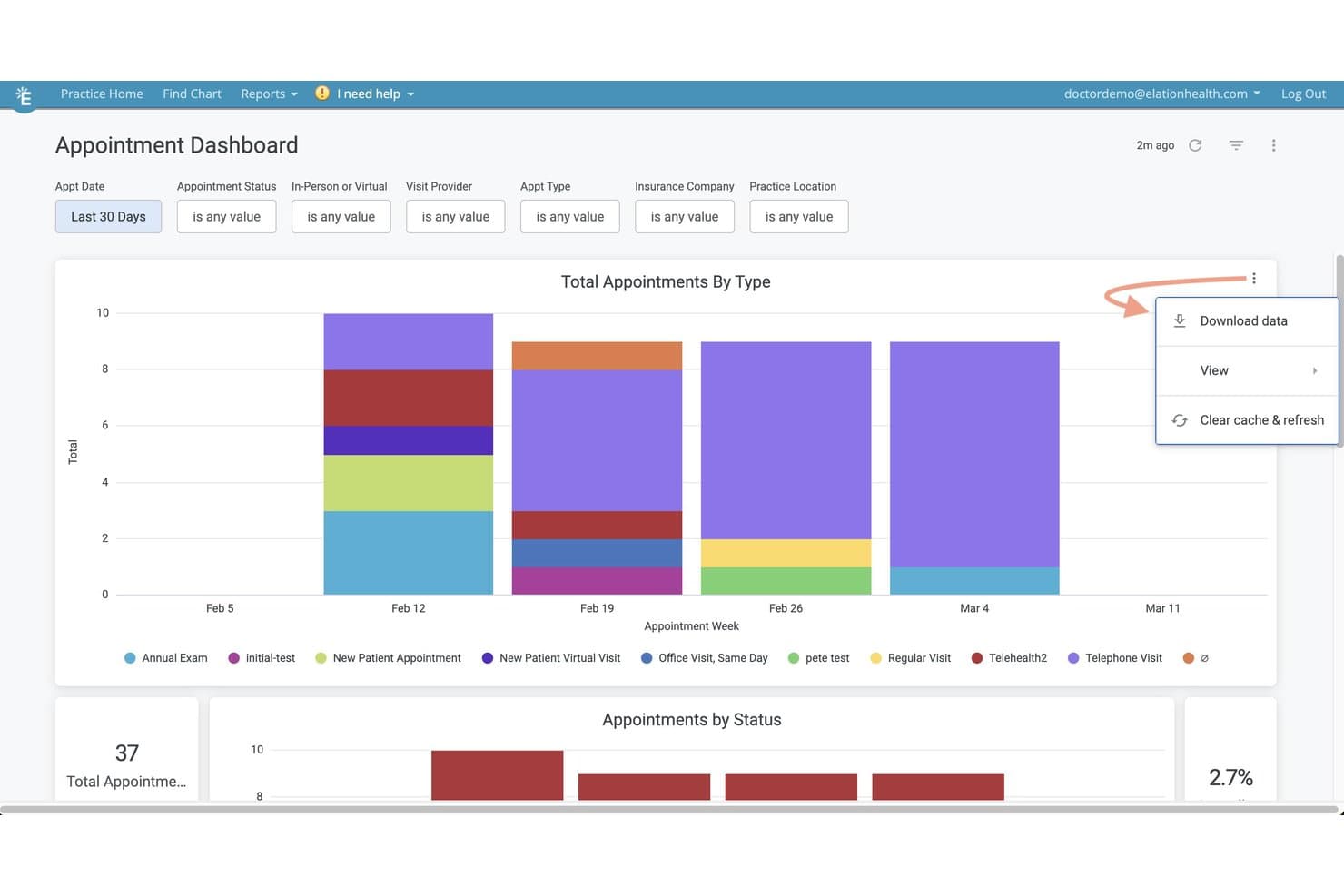
Elation Health provides reporting tools for tracking clinical activity. Elation Health is a primary care EHR built for independent practices that need clinical charting, e-prescribing, scheduling, and billing in one connected platform.
Who Is Elation Health Best For?
Elation Health is a strong fit for independent primary care physicians who want clinical charting, prescribing, scheduling, and data analytics in a single ONC-certified platform.
Why I Picked Elation Health
I've included Elation Health in my top picks because its hosted data solution genuinely sets it apart for clinical data analytics. I can connect Tableau or Power BI directly to Elation's cloud-hosted EHR data, run SQL queries, and combine EHR records with external claims data for custom reporting. That's a level of analytical depth you don't get with most primary care EHRs, and for independent practices tracking population health or value-based payment performance, it's a real differentiator.
Elation Health Key Features
- Three-panel clinical console: View and manage scheduling, charting, and patient details from a single screen without switching between tabs.
- Note Assist with Actions: AI-powered ambient capture identifies clinical intent and queues follow-up tasks like prescriptions, lab orders, and referrals.
- Patient Passport portal: Patients access appointments, secure messages, and health records via browser or iOS and Android apps in seven languages.
- ONC-certified CEHRT compliance: The EHR carries a documented CMS ID and CHPL product number for practices tracking regulatory certification requirements.
Elation Health Integrations
Elation Health lists 300+ integrations, including native Zoom, Ribbon, and Google Calendar integrations. REST, FHIR, and webhook APIs support custom connections, while Tableau and Power BI connect to hosted EHR data for analytics.
Pros and Cons
Pros:
- Configurable templates for common visit documentation
- Connected scheduling, charting, and billing workflows
- Straightforward notes and readable patient records
Cons:
- Online booking lacks recurring visits and waitlists
- Claim generation and denial workflows frustrate teams
Learn more about Elation Health:
Diğer Kareo Alternatifleri
Kısa listeme girmeyen ancak yine de göz atmaya değer birkaç ek seçenek şunlardır:
- 11athenahealthBest for connecting across clinical systems
- 12PrognoCIS (Bizmatics)Best for AI across clinical and billing workflows
- 13RXNTBest for choosing billing, EHR, or both
- 14SimplePracticeBest for specialty-specific clinical charting
- 15OptiMantraBest for integrative lab-to-supplement care
- 16eClinicalWorksBest for searching records beyond your EHR
- 17MEDITECHBest for multilingual patient outreach
- 18Practice FusionBest for practices needing hands-on billing
- 19NextGen OfficeBest for patient engagement beyond the visit
- 20Compulink Advantage (Eyecare Advantage)Best for linking eye exams to optical sales
How I Evaluate Kareo Alternatives
I split my evaluation into three parts. First, core functionality: any alternative must handle electronic patient charting and certified claims submission—these carry the most weight. Second, I look for standout features like telehealth integration or specialty-specific content libraries. Third, I consider migration support and pricing transparency.
Core Functionality (Table Stakes For This List)
When I'm selecting tools for my list, I score each one on a scale from 0 (does not offer the functionality) to 5 (excels in this area) for each core functionality listed below. I then convert the total into a percentage to help assess each tool's overall fit, with extra weight on any functionalities I’ve deemed essential.
- Clinical Documentation (Essential): I look for structured notes and adaptable templates that let providers document visits and review patient history across common care workflows.
- Certified EHR Compliance (Essential): I check for recognized certification, secure information handling, and interoperability that supports exchanging patient records with other care settings.
- E-Prescribing: I assess whether clinicians can send prescriptions electronically, including controlled medications, and review relevant safety alerts during prescribing.
- Scheduling & Patient Management: I look for appointment tools linked to patient records, with support for reminders and schedules across providers or locations.
- Billing & Claims: I evaluate encounter-linked claims, submission tracking, and tools for catching errors or managing denials.
- Lab & Diagnostic Integration: I check whether teams can order tests electronically and route results into the right patient chart for follow-up.
Once I have a list of tools that meet the criteria, I consider what sets each platform apart.
Differentiating Factors (What Sets Vendors Apart)
Here's how I compare and contrast different vendors:
Standout Features
I look for built-in telehealth that works inside the same charting workflow, so providers don't toggle between platforms mid-visit. Revenue cycle analytics matter just as much—I check whether dashboards surface denial patterns and claim aging, since catching a payer trend early can recover weeks of lost revenue. I also evaluate specialty-specific content libraries, because a dermatology practice reusing generic templates wastes time that pre-built order sets eliminate.
Beyond Features
I check whether a vendor offers dedicated migration support, including data conversion for patient records and billing history, since a botched cutover can stall revenue for weeks. Pricing transparency matters just as much—I look for clear per-provider models and flexibility to add modules as your specialty mix grows. I also evaluate interoperability, especially HL7/FHIR support and API access, because a system that can't connect to your clearinghouse or state health information exchange creates manual work that defeats the purpose of switching.
Neden Kareo Alternatifleri Aramalısınız?
Kareo bağımsız muayenehaneler için iyi bir EMR yazılımı seçeneği olsa da bazı kullanıcılar, iş akışları veya büyüme planları farklı bir uyum gerektirdiğinde alternatif arar. Şu nedenlerle bir Kareo alternatifi arıyor olabilirsiniz…
- Kliniğiniz daha büyük bir sağlık sistemi için oluşturulmuş iş akışlarına ihtiyaç duyuyor
- Hangi faturalandırma görevlerini dış kaynak olarak kullanacağınız üzerinde daha fazla kontrol istiyorsunuz
- Uzmanlık alanınız, sunduğunuz bakıma göre uyarlanmış klinik şablonlara ihtiyaç duyuyor
- Hizmet veya modül eklemeden önce daha anlaşılır fiyatlandırmaya ihtiyaç duyuyorsunuz
Bunlardan biri size uyuyorsa doğru yere geldiniz. Listemde, Kareo ile ilgili bu zorluklarla karşılaşan ve alternatif arayan ekipler için daha uygun birkaç EMR yazılımı seçeneği bulunuyor.
Kareo'nun Temel Özellikleri
Alternatif seçeneklerle karşılaştırmanıza yardımcı olmak için artık Tebra'nın bir parçası olan Kareo'nun temel özellikleri şunlardır:
- Klinik dokümantasyon: EHR, hasta geçmişlerini ve muayene notlarını dijital bir dosyada saklar. Özelleştirilebilir şablonlar ve çizelgeleme araçları, klinisyenlerin muayeneleri belgelemesine ve ilgili bilgileri tek bir yerde incelemesine yardımcı olur.
- Randevu planlama ve hasta yönetimi: Randevu planlama araçları, randevuları hasta kayıtları ve sağlık hizmeti sağlayıcılarının takvimleriyle ilişkilendirir. Çevrim içi rezervasyon, dijital hasta kabul formları ve randevu hatırlatıcıları, ziyaret öncesinde hasta erişimini destekler.
- Tıbbi faturalandırma ve talepler: Faturalandırma araçları, klinik dokümantasyonu talep gönderimi ve takibiyle ilişkilendirir. Uygunluk kontrolleri ve talep temizleme araçları, faturalandırma personelinin sorunları belirlemesine yardımcı olurken panolar, taleplerin ve retlerin takibini destekler.
- Hasta iletişimi: Hasta portalı, muayene özetlerine, test sonuçlarına ve güvenli mesajlara erişim sağlar. Otomatik hatırlatıcılar ve çift yönlü mesajlaşma, muayenehanelere randevu bilgilerini hastalarla paylaşma olanağı sunar.
- Elektronik reçete yazma: Klinisyenler reçeteleri eczanelere elektronik olarak gönderebilir ve yenileme taleplerini yönetebilir. Platform ayrıca reçete güvenliği kontrollerini destekler; kontrollü maddeler için reçete yazma özelliği etkinleştirildiği yerlerde kullanılabilir.
- Laboratuvar ve görüntüleme talepleri: Elektronik talep araçları, klinisyenlerin laboratuvar veya görüntüleme talepleri göndermesine ve sonuçları hasta dosyasında incelemesine olanak tanır. Bu, yalnızca ayrı kâğıt iş akışlarına bağlı kalmadan takibi destekler.
- Uzaktan sağlık hizmeti: Entegre video görüşmeleri, randevu planlama ve klinik dokümantasyonla bağlantı kurar. Sağlık hizmeti sağlayıcıları hasta kaydından bir görüşme başlatabilir ve muayeneyi aynı sistemde belgeleyebilir.
- Ödemeler: Hastalar çevrim içi ödeme seçenekleriyle ödeme yapabilirken muayenehaneler ofis içi ödemeleri ve ödeme hatırlatıcılarını yönetebilir. Bu araçlar, hasta bakiyelerinin yönetilmesi için faturalandırma iş akışlarının yanında yer alır.
Kareo Alternatiflerinin Maliyetleri ve Fiyatlandırması
Fiyatlandırma; özelliklere, muayenehane büyüklüğüne ve eklentilere göre değişir. Kareo alternatiflerinde göreceğiniz tipik fiyat aralıkları ve özellikler şunlardır.
Kareo Alternatifleri İçin Plan Karşılaştırma Tablosu
| Plan Türü | Ortalama Fiyat | Yaygın Özellikler |
|---|---|---|
| Plan TürüÜcretsiz Plan | Ortalama Fiyat$0 | Yaygın ÖzelliklerTemel planlama, sınırlı grafik oluşturma ve ücretli özelliklere deneme erişimi. |
| Plan TürüKişisel Plan | Ortalama Fiyat$10-$100/klinikisyen/ay | Yaygın ÖzelliklerHasta kayıtları, randevu planlama, temel grafik oluşturma ve güvenli mesajlaşma. |
| Plan Türüİşletme Planı | Ortalama Fiyat$100-$600/sağlayıcı/ay | Yaygın ÖzelliklerKlinik dokümantasyon, elektronik reçete yazma, faturalandırma araçları ve hasta iletişimi. |
| Plan TürüKurumsal Plan | Ortalama Fiyat$500-$1,100/sağlayıcı/ay veya özel fiyatlandırma | Yaygın ÖzelliklerBirden fazla konumun yönetimi, gelişmiş raporlama, veri taşıma desteği ve özel entegrasyonlar. |
Bunlar standartlaştırılmış kademeler değil, genel tahminlerdir. Birçok tedarikçi teklif tabanlı fiyatlandırma kullanır ve maliyetler uzmanlık alanına, sağlayıcı sayısına ve seçilen hizmetlere göre değişir.