

Oracle Health Review: Pros, Cons, Features and Pricing
I look past Oracle Health’s feature list to weigh its EHR pros, cons and pricing—and ask whether its capabilities justify the investment for your organization.

We review tools independently, and commissions help fund our testing. See our transparency policy, our methodology, or suggest a tool.
Oracle Health is EHR software for hospitals and health systems that need AI-assisted chart review and patient-specific clinical insights. If clinicians want voice-based access to those insights during chart review, Oracle Health is worth considering. Compared with Epic, I’d choose Oracle Health when embedded AI and voice-first workflows are priorities, since they’re part of its EHR offering.
Oracle Health Evaluation Summary
4/5
- Pricing upon request
- Free demo available
Why Trust Our Software Recommendations
6,700+
Reviews
20
Industry experts
16+
Evaluation factors
14
Years
Our team has been testing and reviewing software since 2012. As medical practice leaders ourselves, we know how difficult—and important—it is to choose the right software.
For this guide, we evaluated tools using hands-on testing and independent research, scoring tools using our selection criteria.
Our reviews reflect our human editorial judgment, not a sales pitch.
Oracle Health Overview
Oracle Health is a strong EHR choice for hospitals and health systems that value AI-assisted chart review and voice access to patient-specific insights. Compared with EHRs that lack these embedded workflows, it can give clinicians a more direct way to review relevant information; for example, they can request insights during chart review by voice. I’d judge it less favorably for smaller organizations if the investment and rollout outweigh that need. Before selecting it, compare total pricing, onboarding plans, support terms, interface usability, and required integrations in a live evaluation.
Pros
- AI-generated patient summaries and voice queries surface chart-specific insights.
- Clinicians can review longitudinal patient histories, results, and orders.
- Configurable templates and workflows support department-specific charting.
Cons
- Finding longitudinal lab data can require many chart-review clicks.
- Users report repetitive charting and duplicated documentation across screens.
- Slow support and occasional freezing can disrupt clinical workflows.


How We Test & Score Tools
We’ve spent years building, refining, and improving our software testing and scoring system. The rubric is designed to capture the nuances of software selection and what makes a tool effective, focusing on critical aspects of the decision-making process.
Below, you can see exactly how our testing and scoring works across seven criteria. It allows us to provide an unbiased evaluation of the software based on core functionality, standout features, ease of use, onboarding, customer support, integrations, customer reviews, and value for money.
Core Functionality (25% of final scoring)
The starting point of our evaluation is always the core functionality of the tool. Does it have the basic features and functions that a user would expect to see? Are any of those core features locked to higher-tiered pricing plans? At its core, we expect a tool to stand up against the baseline capabilities of its competitors.
Standout Features (25% of final scoring)
Next, we evaluate uncommon standout features that go above and beyond the core functionality typically found in tools of its kind. A high score reflects specialized or unique features that make the product faster, more efficient, or offer additional value to the user.
We also evaluate how easy it is to integrate with other tools typically found in the tech stack to expand the functionality and utility of the software. Tools offering plentiful native integrations, 3rd party connections, and API access to build custom integrations score best.
Ease of Use (10% of final scoring)
We consider how quick and easy it is to execute the tasks defined in the core functionality using the tool. High scoring software is well designed, intuitive to use, offers mobile apps, provides templates, and makes relatively complex tasks seem simple.
Onboarding (10% of final scoring)
We know how important rapid team adoption is for a new platform, so we evaluate how easy it is to learn and use a tool with minimal training. We evaluate how quickly a team member can get set up and start using the tool with no experience. High scoring solutions indicate little or no support is required.
Customer Support (10% of final scoring)
We review how quick and easy it is to get unstuck and find help by phone, live chat, or knowledge base. Tools and companies that provide real-time support score best, while chatbots score worst.
Customer Reviews (10% of final scoring)
Beyond our own testing and evaluation, we consider the net promoter score from current and past customers. We review their likelihood, given the option, to choose the tool again for the core functionality. A high scoring software reflects a high net promoter score from current or past customers.
Value for Money (10% of final scoring)
Lastly, in consideration of all the other criteria, we review the average price of entry level plans against the core features and consider the value of the other evaluation criteria. Software that delivers more, for less, will score higher.
Core Features
Pre-Visit Summaries
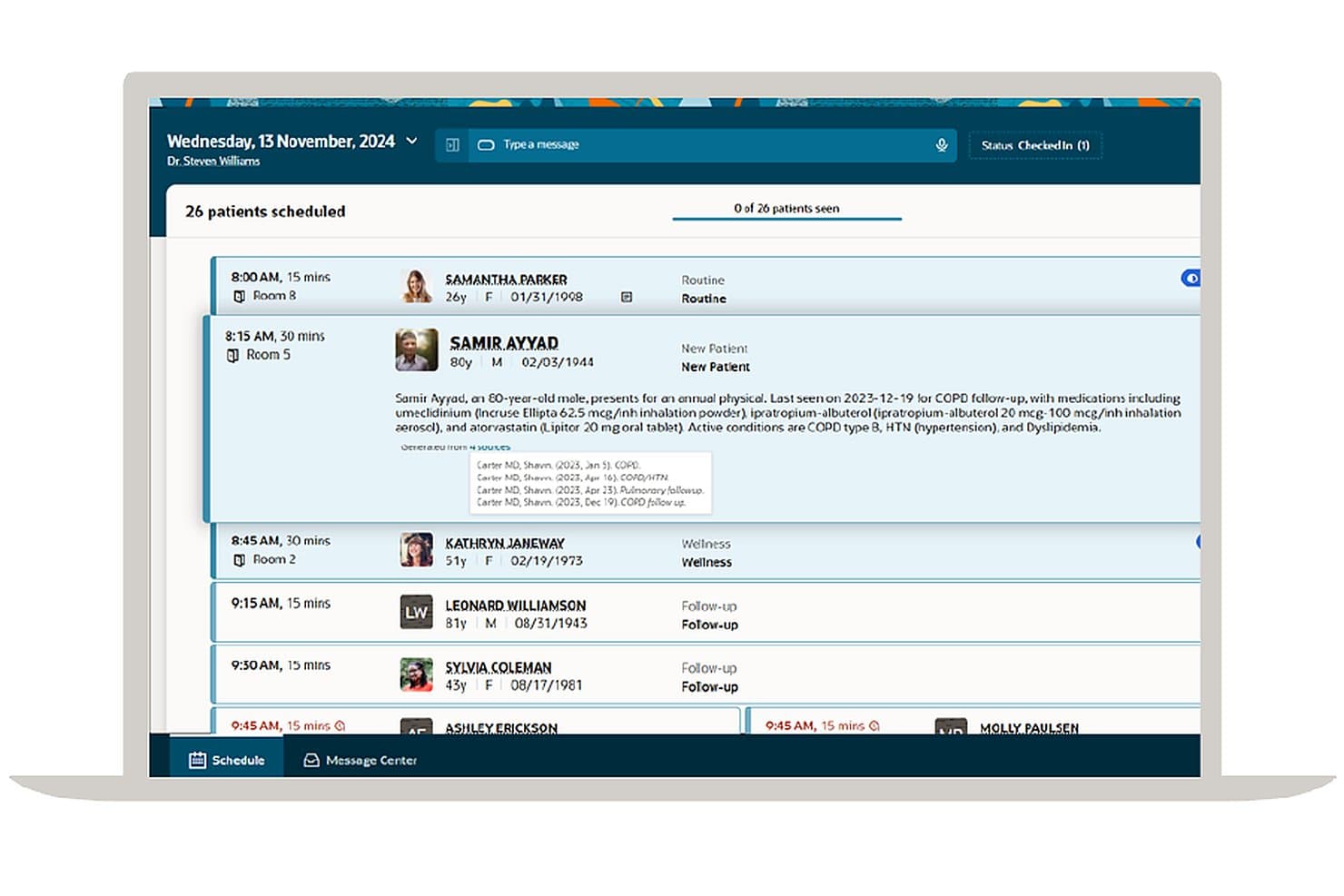
Oracle Health generates patient summaries within the daily appointment schedule, highlighting medical conditions, medication history, and previous encounters. Clinicians can review relevant patient information before consultations without opening individual clinical records.
Clinical Information Retrieval
Oracle Health provides conversational AI capabilities for retrieving medication information within the EHR. Clinicians can ask clinical questions, review AI-generated responses, and access supporting references while working in the patient chart.
Care Gap Management
Oracle Health identifies patient care gaps related to preventive screenings and chronic disease management. Care teams can review outstanding care needs, monitor program enrollment, and access patient summaries to coordinate follow-up activities.
Patient Encounter Tracking
Oracle Health displays historical patient encounters through a visual timeline organized by date and care setting. Clinicians can review previous visits alongside medical histories, medications, diagnoses, and vital signs to understand a patient's care history.
Electronic Prescribing
Oracle Health provides medication ordering tools that allow clinicians to search for prescriptions and select medications directly within the patient chart. The interface presents drug suggestions alongside patient information and documented allergies during prescribing.
Care Team Management
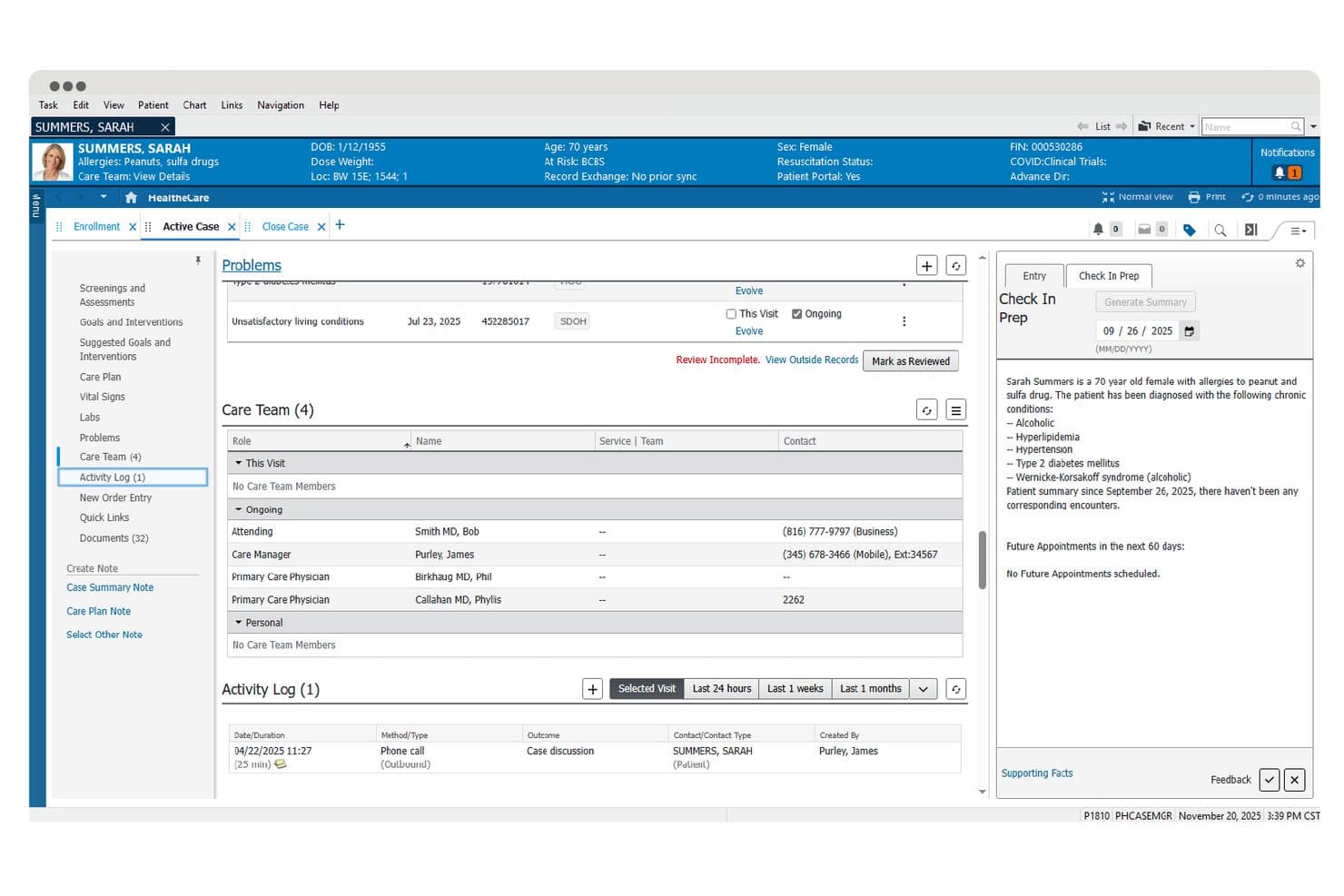
Oracle Health organizes assigned care team members, patient activity, and clinical information within the medical record. Clinicians can review provider responsibilities, examine previous interactions, and access patient summaries when preparing for visits.
Ease of Use
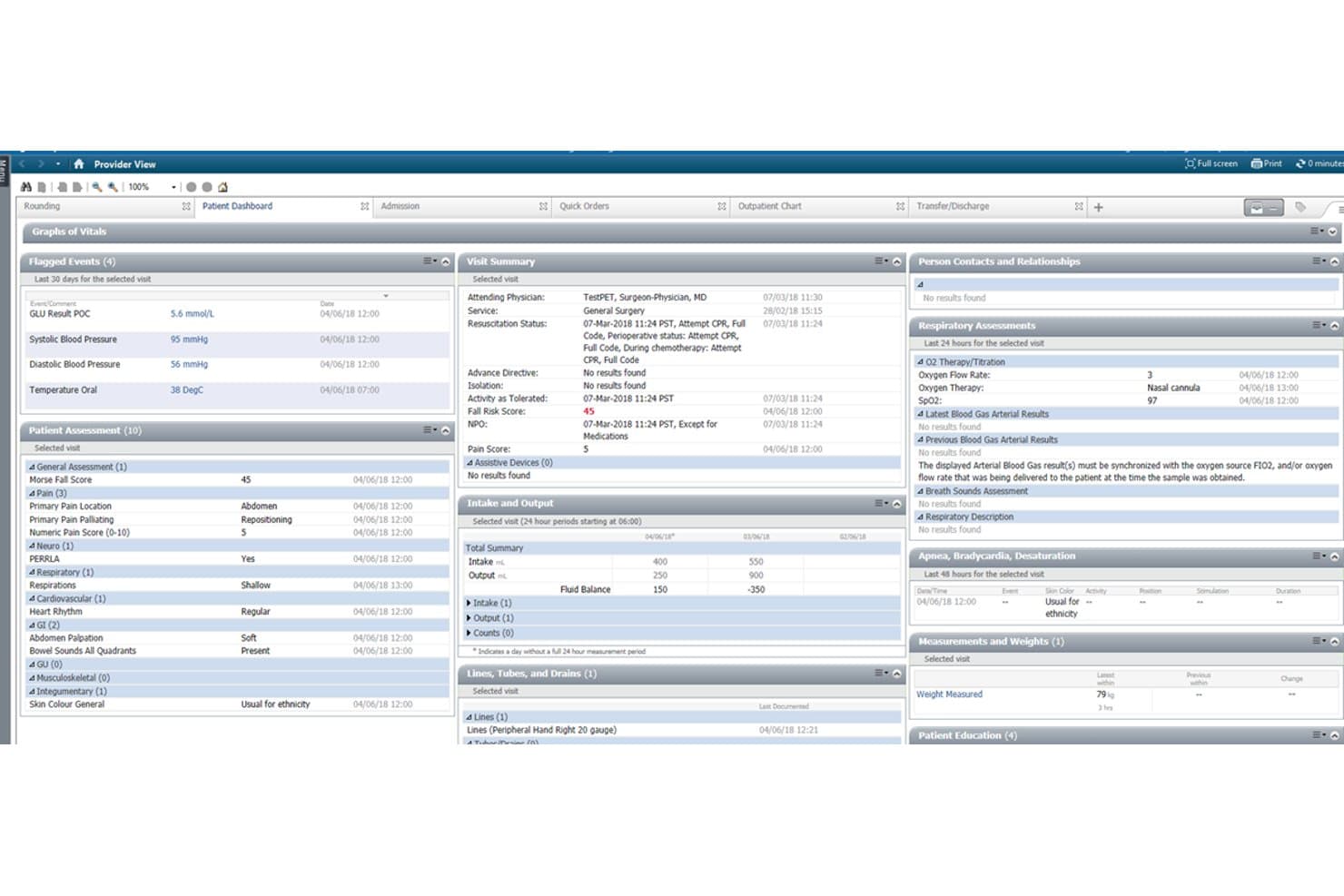
Oracle Health offers AI-assisted chart review, voice commands, and patient timelines that provide quicker access to clinical information. Its AI-generated summaries organize medical histories, medications, and previous encounters, reducing the need to search through individual records.
However, usability feedback is mixed, with some users appreciating its organized patient information and others reporting excessive clicks, repetitive charting, and a steep learning curve. I'd recommend testing common documentation and chart review tasks to assess how well its interface fits your team's clinical workflows.
Integrations
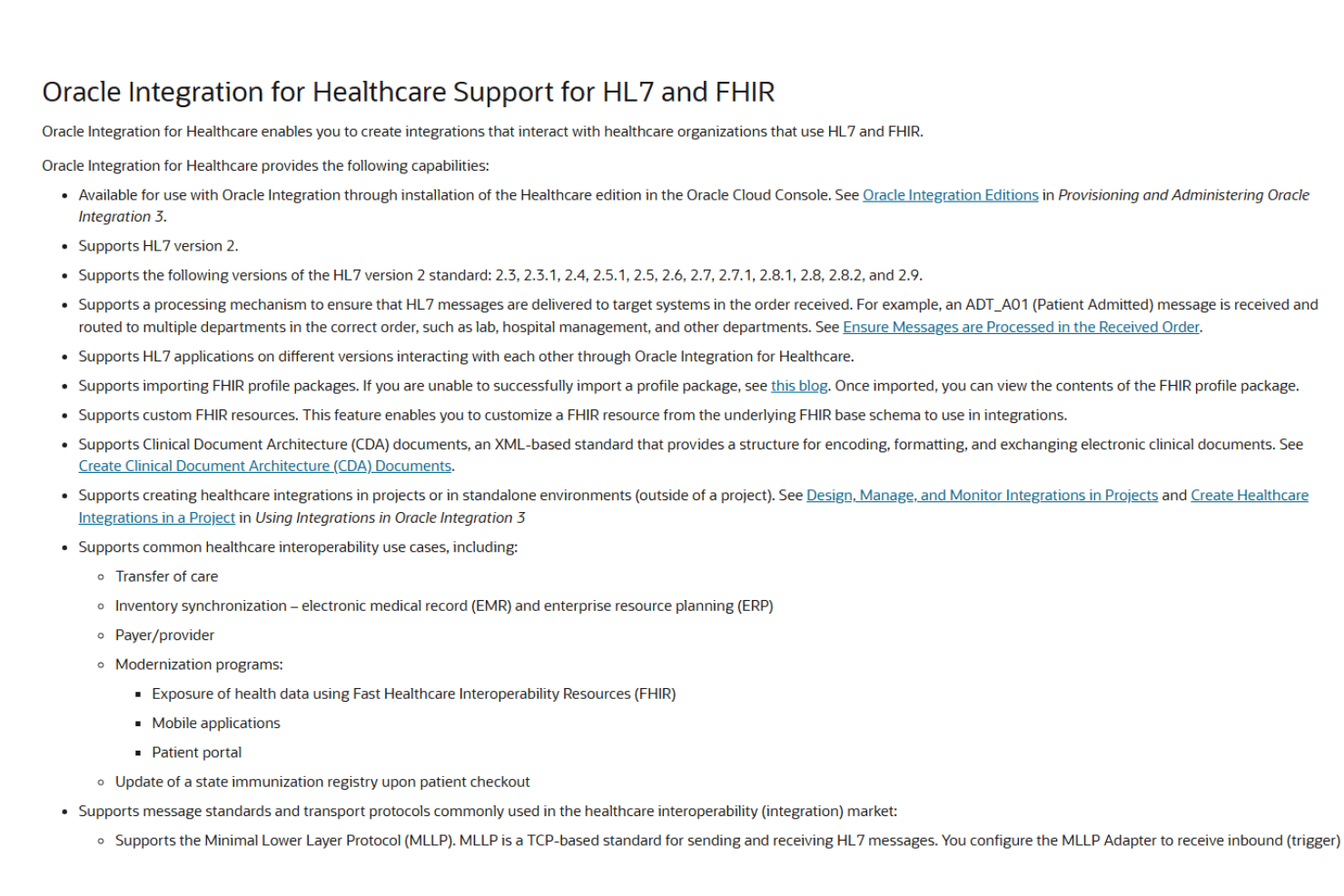
Oracle Health connects with Oracle Health Information Network, HIE, CommonWell, Electronic Prescription Interoperability, Orders and Results, Care Notifications, and Reference Lab Network. It also offers EHR and FHIR APIs and third-party applications through Oracle Healthcare Marketplace. Separately, Oracle Integration for Healthcare supports HL7 v2, FHIR, CDA documents, MLLP messaging, and custom FHIR resources for healthcare data exchange.
Oracle Health Specs
- API: Yes
- Appointment Scheduling: Yes
- Athlete Management: No
- Audit Management: Yes
- Calendar Management: Yes
- Compliance Tracking: Yes
- Customer Management: Yes
- Dashboard: Yes
- Data Export: Yes
- Data Import: Yes
- Data Visualization: Yes
- Electronic Prescribing: Yes
- External Integrations: Yes
- File Sharing: Yes
- File Transfer: Yes
- Health Management: Yes
- HIPAA Compliance: Yes
- Inventory Tracking: Yes
- Multi-User: Yes
- Notifications: Yes
- Organization Management: Yes
- Patient Management: Yes
- Project Management: No
- Regulatory Alerts: No
- Risk Assessment: Yes
- Scheduling: Yes
- Supplier Management: No


