
MaxiDent Review: Pros, Cons, Features, and Pricing
MaxiDent isn’t just another dental software—it streamlines patient management with standout customization, but is it flexible enough for your unique clinic needs? I dig deep in this review.

We review tools independently, and commissions help fund our testing. See our transparency policy, our methodology, or suggest a tool.
MaxiDent is a dental software designed for dental practices that need clinical charting, appointment scheduling, and insurance billing managed in one place. It's built with Canadian provincial billing in mind from day one. That puts it ahead of tools like Dentrix for Canadian practices, where out-of-the-box provincial insurance support is a real priority.
MaxiDent Evaluation Summary
4.2/5
- From $225/month
- Free consultation available
Why Trust Our Software Recommendations
6,700+
Reviews
20
Industry experts
16+
Evaluation factors
14
Years
Our team has been testing and reviewing software since 2012. As medical practice leaders ourselves, we know how difficult—and important—it is to choose the right software.
For this guide, we evaluated tools using hands-on testing and independent research, scoring tools using our selection criteria.
Our reviews reflect our human editorial judgment, not a sales pitch.
MaxiDent Overview
In my experience, MaxiDent excels at custom workflows and Canadian compliance, making it a strong pick for clinics that need detailed control. While onboarding and support feel approachable, the interface can take some getting used to, and integrations are less abundant than some alternatives.
Still, if you’re comparing practice management options and want feature depth, picker-friendly modules, and transparent pricing, MaxiDent is a smart choice—especially for practices prioritizing patient intake, recall management, and insurance claim handling.
Pros
- Patient recall and reminders boost retention and attendance.
- Canadian insurance forms and billing are built-in natively.
- Appointment scheduler is customizable for multi-provider clinics.
Cons
- Interface looks outdated compared to newer competitors.
- Limited mobile accessibility for staff offsite or remote. Reporting options lack advanced filtering and visualization.
- Reporting options lack advanced filtering and visualization.
Is MaxiDent Right For Your Needs?
Who Would be a Good Fit for MaxiDent?
MaxiDent is a strong choice for clinics that need thorough patient charting, built-in Canadian compliance, and easy recall management. If your team values personalized support and works mostly from desktop environments, you’ll find its workflow and insurance forms especially helpful.
It’s best suited to offices looking for a friendly, locally-focused system over cutting-edge tech or extensive mobile features.
- Solo Dental PracticesYou get all the basics—charting, billing, and scheduling—without paying for features designed for large teams.
- Multi-Provider ClinicsCustomizable appointment scheduling and support for multiple providers help you coordinate busy group practices efficiently.
- Canadian Clinics Natively handles PHIPA compliance and Canadian insurance claims, saving critical time on local regulations and paperwork.MaxiDent’s scheduling capabilities support the complex appointment needs of orthodontic practices.
- Office AdministratorsAutomation of reminders, billing, and document management reduces busywork, letting you focus on the front desk flow.
- Dental Groups or DSOsThe enterprise tier manages multiple locations and centralizes reporting for organizations scaling operations.
- Practices With Frequent Recalls Robust patient recall and reminder systems help keep preventive care visits consistent and revenue steady.Robust patient recall and reminder systems help keep preventive care visits consistent and revenue steady.
Who Would be a Bad Fit for MaxiDent?
Clinics or teams wanting the latest mobile solutions, high-volume automation, or deep third-party integrations will likely find MaxiDent limiting. The desktop-based interface and traditional navigation may not suit those who expect web-first, fully digital experiences or work outside Canada. If constant innovation or advanced reporting are must-haves, other software will better meet those needs.
- Mobile-Focused TeamsMaxiDent’s interface is desktop-first and lacks comprehensive mobile support for providers on the go.
- U.S.-Based ClinicsThe platform is tailored to Canadian billing, insurance, and privacy regulations, so U.S. offices will struggle with fit.
- Tech-Forward StartupsIf you want modern, web-native UI and rapid feature updates, MaxiDent’s more traditional approach feels dated.
- Large Multi-Specialty OrganizationsThe feature set primarily targets general dentistry and may fall short for complex, multi-specialty workflows.
- Clinics Needing After-Hours HelpMaxiDent’s live support works best during Canadian business hours, so night and weekend users have fewer options.
- Practices Relying On IntegrationsThere’s no API or marketplace, so adding new third-party tools and automations isn’t possible beyond basic native integrations.
How We Test & Score Tools
We’ve spent years building, refining, and improving our software testing and scoring system. The rubric is designed to capture the nuances of software selection and what makes a tool effective, focusing on critical aspects of the decision-making process.
Below, you can see exactly how our testing and scoring works across seven criteria. It allows us to provide an unbiased evaluation of the software based on core functionality, standout features, ease of use, onboarding, customer support, integrations, customer reviews, and value for money.
Core Functionality (25% of final scoring)
The starting point of our evaluation is always the core functionality of the tool. Does it have the basic features and functions that a user would expect to see? Are any of those core features locked to higher-tiered pricing plans? At its core, we expect a tool to stand up against the baseline capabilities of its competitors.
Standout Features (25% of final scoring)
Next, we evaluate uncommon standout features that go above and beyond the core functionality typically found in tools of its kind. A high score reflects specialized or unique features that make the product faster, more efficient, or offer additional value to the user.
We also evaluate how easy it is to integrate with other tools typically found in the tech stack to expand the functionality and utility of the software. Tools offering plentiful native integrations, 3rd party connections, and API access to build custom integrations score best.
Ease of Use (10% of final scoring)
We consider how quick and easy it is to execute the tasks defined in the core functionality using the tool. High scoring software is well designed, intuitive to use, offers mobile apps, provides templates, and makes relatively complex tasks seem simple.
Onboarding (10% of final scoring)
We know how important rapid team adoption is for a new platform, so we evaluate how easy it is to learn and use a tool with minimal training. We evaluate how quickly a team member can get set up and start using the tool with no experience. High scoring solutions indicate little or no support is required.
Customer Support (10% of final scoring)
We review how quick and easy it is to get unstuck and find help by phone, live chat, or knowledge base. Tools and companies that provide real-time support score best, while chatbots score worst.
Customer Reviews (10% of final scoring)
Beyond our own testing and evaluation, we consider the net promoter score from current and past customers. We review their likelihood, given the option, to choose the tool again for the core functionality. A high scoring software reflects a high net promoter score from current or past customers.
Value for Money (10% of final scoring)
Lastly, in consideration of all the other criteria, we review the average price of entry level plans against the core features and consider the value of the other evaluation criteria. Software that delivers more, for less, will score higher.
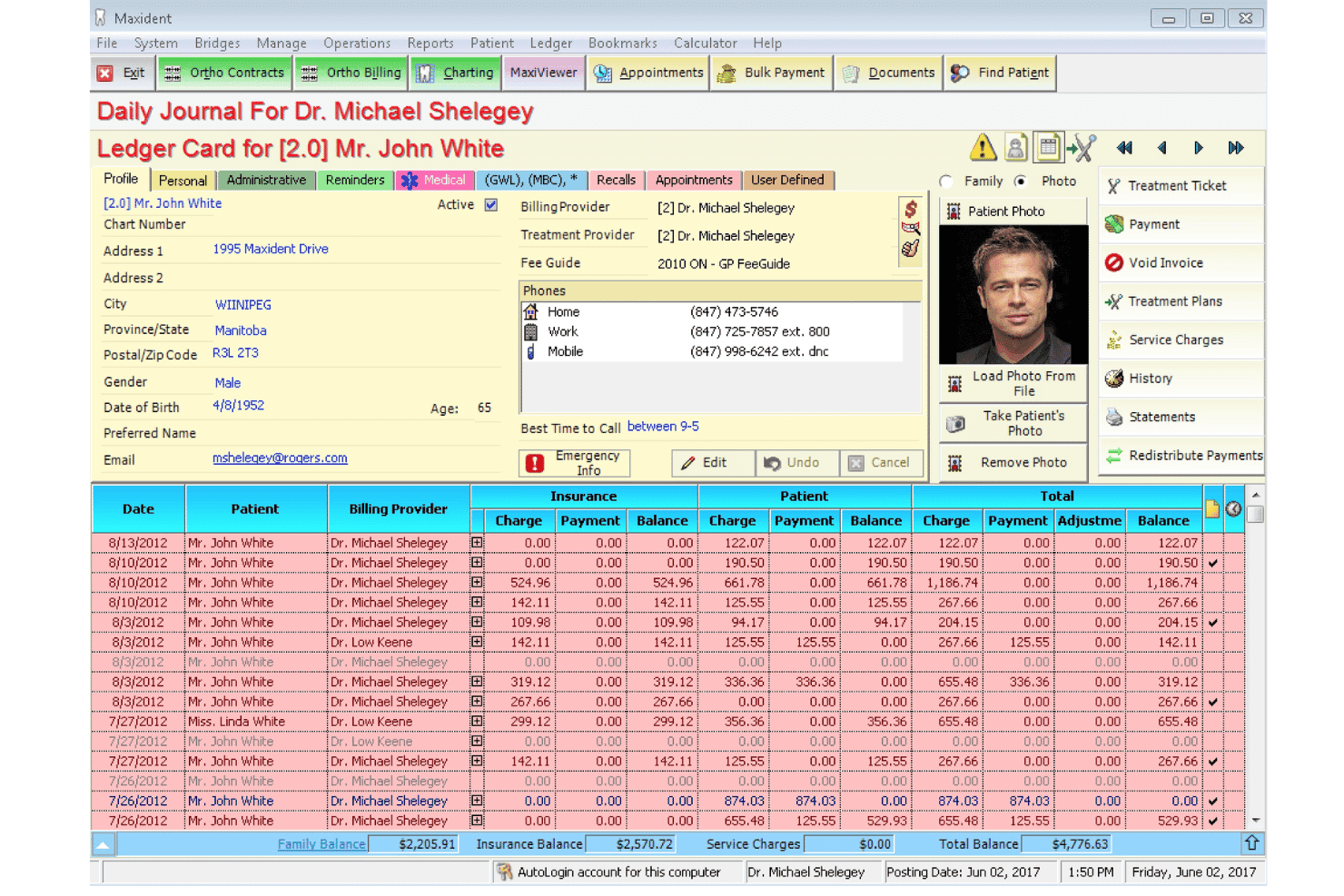
Core Features
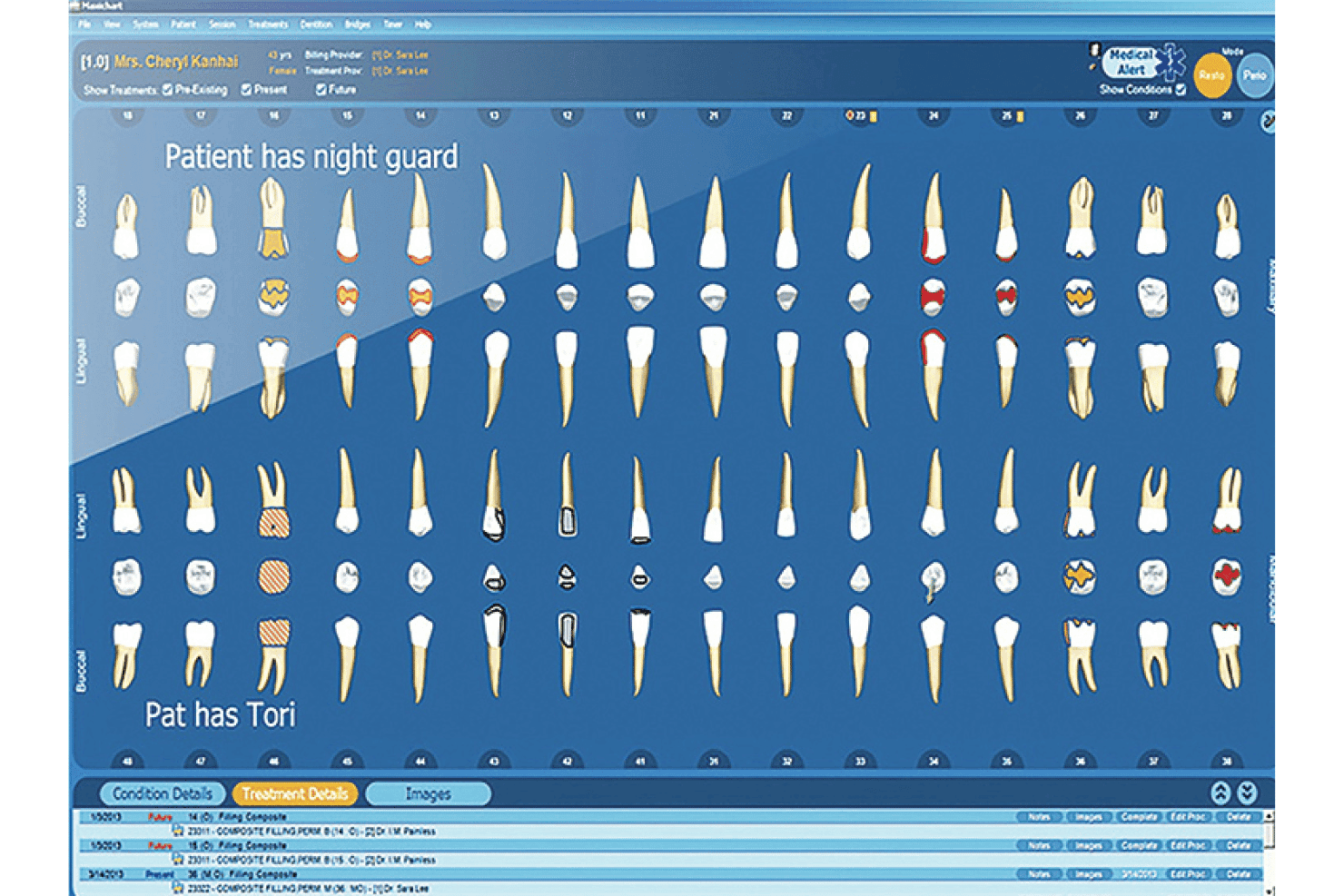
Patient Charting
Track medical histories, treatment notes, and X-rays in a single digital record. Everything is organized for quick reference during appointments.
Appointment Scheduling
Book, modify, and view appointments across multiple providers or operatories. Color-coded calendars help you catch overlaps or gaps at a glance.
Treatment Planning
Build out proposed treatments with automated fee calculations and progress tracking. Plans link directly to patient charts for smooth follow-through.
Billing and Insurance Management
Generate invoices, process payments, and manage Canadian dental insurance submissions. Built-in claim forms reduce errors and speed up reimbursements.
Document Management
Digitally store signed consent forms, scanned documents, and images. Quick file retrieval means less time searching and more time with patients.
eForms for Patient Intake
Let patients complete personalized intake forms online before their visit. This cuts down waiting room time and eliminates manual data entry.
Standout Features
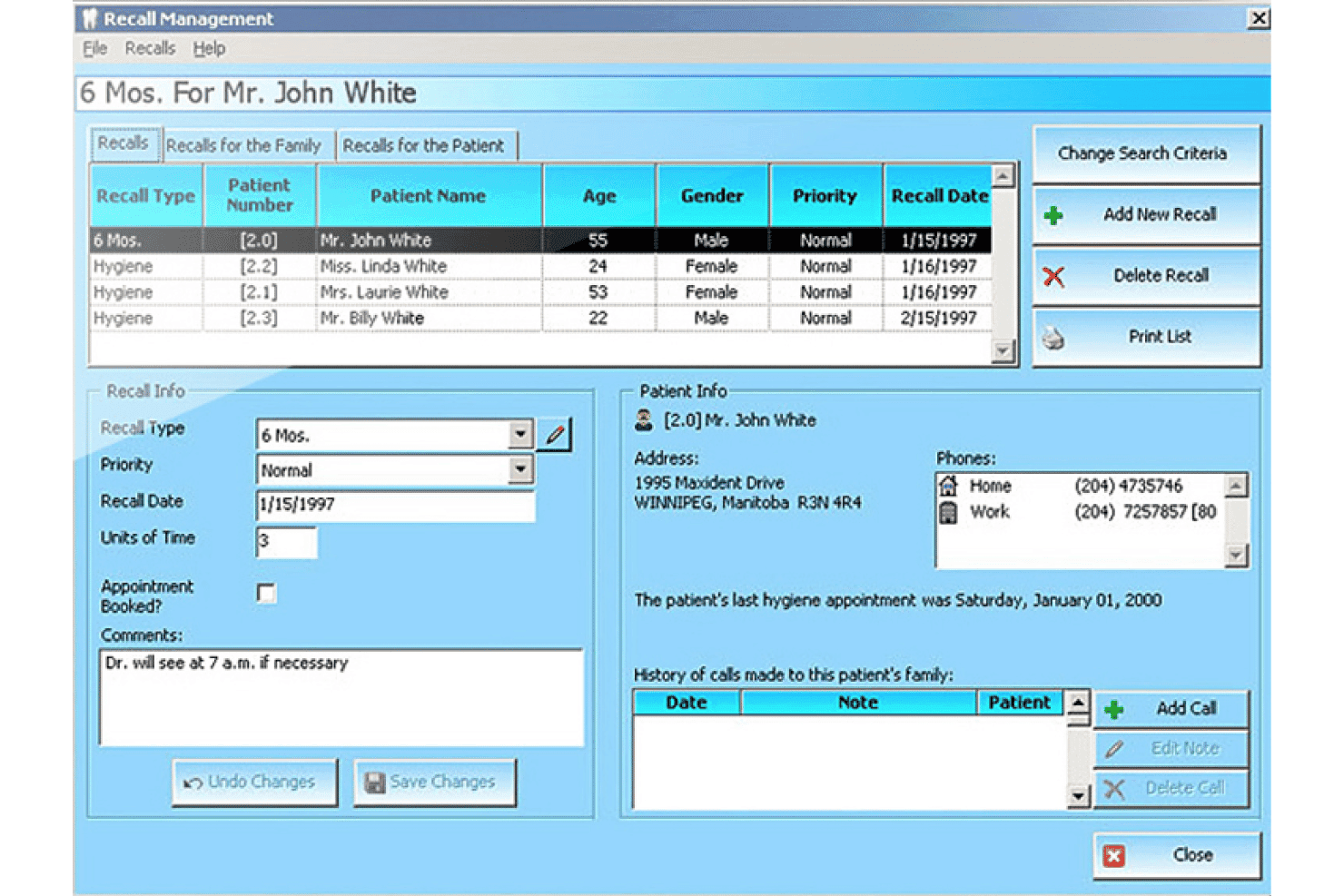
Patient Recall and Reminders
Automate appointment reminders and continuing care recalls by text or email. These notifications help clinics maintain consistent visit schedules.
Canadian Compliance Management
Stay compliant with Canadian PHIPA privacy standards and dental regulations. Updates and records management are structured specifically for Canadian practices.
Ease of Use
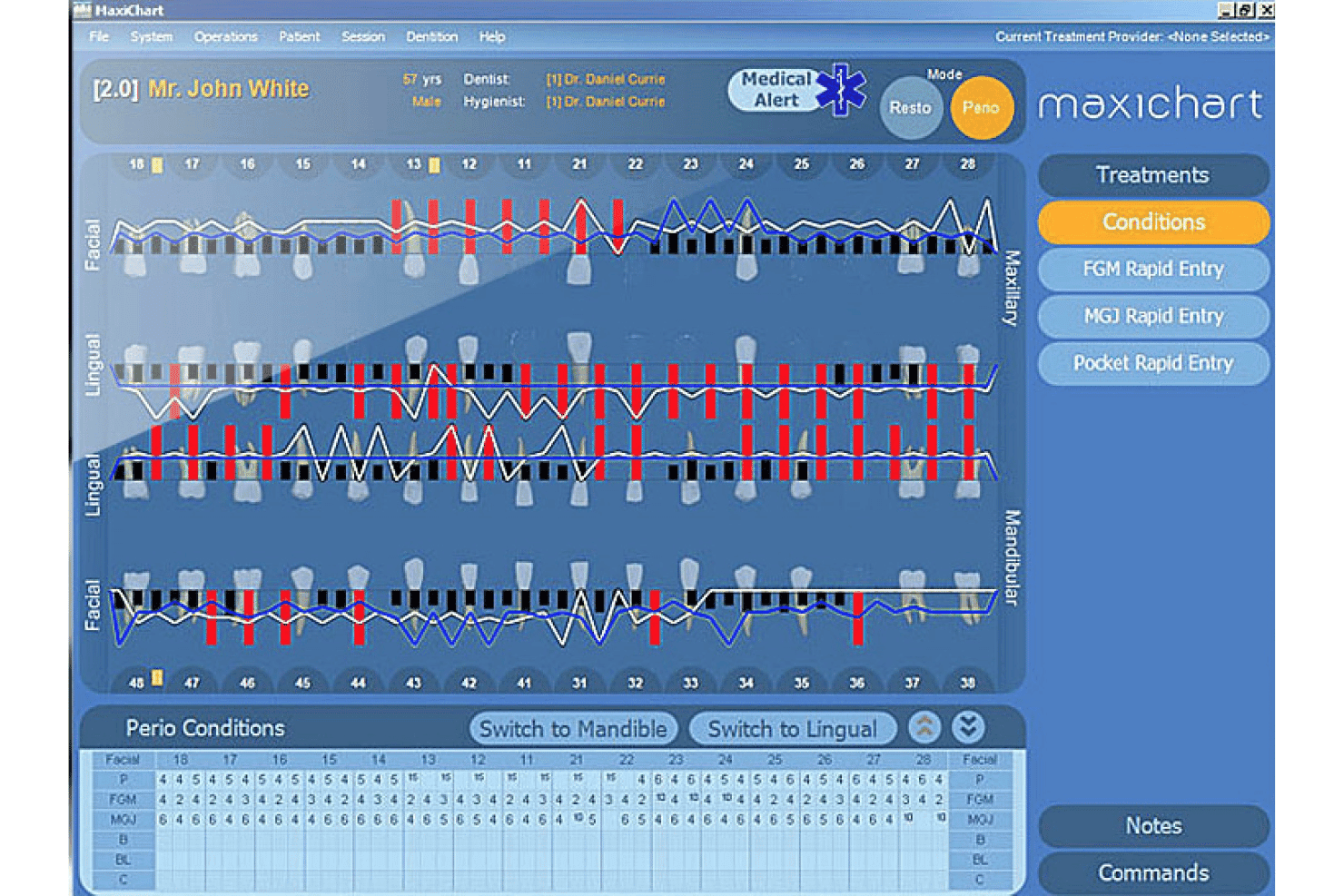
MaxiDent offers robust tools but isn’t the smoothest to navigate, especially with its traditional interface and menu structure. I’ve seen users appreciate clear workflow steps, yet some wish it felt more modern and intuitive.
Once you’re used to it, daily tasks like charting and billing become straightforward, but first-time users may need extra guidance.
Onboarding
MaxiDent’s onboarding stands out for its personalized live training and local phone support, which helps clinics get up to speed quickly.
While the documentation is a bit limited and some users want more online resources, real-time help means questions don’t pile up, and most clinics report steady progress within their first month.
Customer Support
MaxiDent earns high marks for accessible customer support—especially the responsive Canadian-based phone assistance.
I notice users mention quick solutions to technical issues and friendly staff. Support is strong during business hours, but clinics needing after-hours help may find resources limited.
Integrations
MaxiDent integrates with eClaims, RecallMax, Dental Card, iTrans, Moneris, Payfirma, Label printers, X-ray imaging software, HealthWatch, and Microsoft Excel.
MaxiDent does not currently offer an open API or third-party integration platform connections.
Value for Money
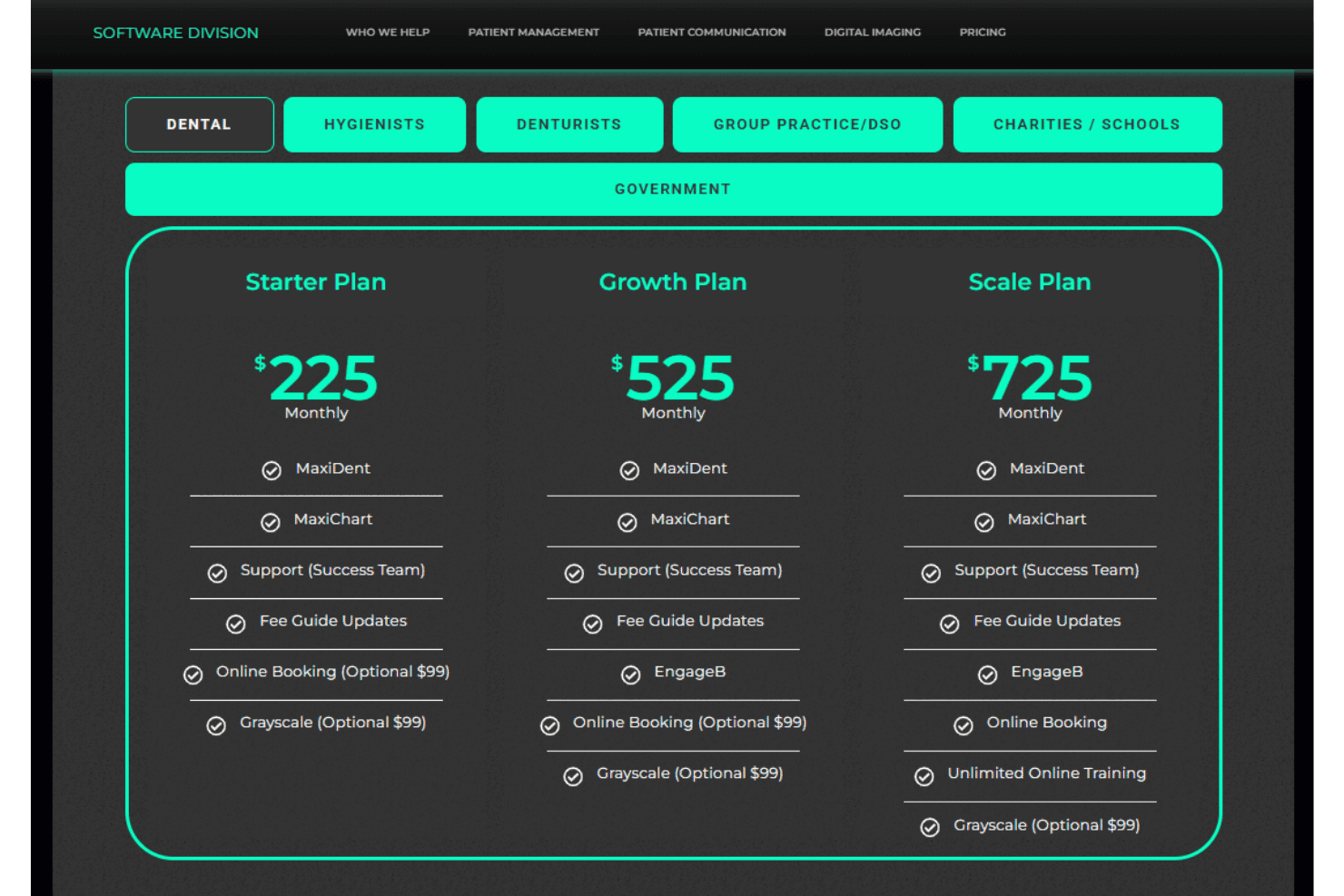
Mint Ops offers flexible and scalable dental software pricing for clinics of different sizes and specialties. The platform combines practice management, charting, support, patient engagement, and optional imaging tools into bundled plans, allowing clinics to choose a package that fits their operational needs while keeping pricing predictable through monthly or annual subscription options.
Many clinics mention feeling confident about long-term affordability since support and upgrades are included in predictable monthly rates.
- Starter Plan: Basic package for smaller practices with MaxiDent, MaxiChart, support, and fee guide updates.
- Growth Plan: Mid-tier package that adds EngageB patient communication tools to the core management features.
- Scale Plan: Advanced package for growing clinics with unlimited training and included online booking tools.
MaxiDent Specs
- API: No
- Appointment Scheduling: Yes
- Athlete Management: No
- Audit Management: No
- Calendar Management: Yes
- Compliance Tracking: No
- Customer Management: Yes
- Dashboard: No
- Data Export: No
- Data Import: No
- Data Visualization: No
- Electronic Prescribing: No
- External Integrations: Yes
- File Sharing: No
- File Transfer: No
- Health Management: Yes
- HIPAA Compliance: No
- Inventory Tracking: Yes
- Multi-User: Yes
- Notifications: Yes
- Organization Management: Yes
- Patient Management: Yes
- Project Management: No
- Regulatory Alerts: No
- Risk Assessment: No
- Scheduling: Yes
- Supplier Management: No
MaxiDent FAQs
MaxiDent Company Overview & History
Mint Ops powers MaxiDent as part of a broader dental operations ecosystem serving clinics across Canada. Originally developed by Maxim Software Systems, MaxiDent has been providing dental practice management software for decades, focusing on scheduling, billing, charting, imaging integration, patient communication, and clinic workflow efficiency.
Over time, MaxiDent evolved from a standalone practice management system into a more integrated dental operations platform designed to help clinics improve coordination, streamline administrative work, and manage patient care more efficiently across growing practices.
MaxiDent Major Milestones
- 1980: MaxiDent founded in Winnipeg, Canada.
- 1984: Launch of MaxiDent software for Canadian dental clinics
- 1990s: Expansion of insurance processing, scheduling, and compliance tools for Canadian practices
- 2000s: Introduction of integrated eClaims, digital charting, and imaging compatibility
- 2024: Official launch of Mint Ops as the parent ecosystem brand powering MaxiDent and related dental services across Canada