

Free EHR software gives your practice access to essential electronic health record features at no cost—either through unlimited free plans or full-access free trials. If you’re looking for reliable platforms to handle patient charting, scheduling, billing, and telehealth without a hefty price tag, you’re not alone. The right choice helps you manage daily clinical and administrative work while keeping costs as low as possible. This list highlights free EHR options that support small practices, solo providers, and larger teams who want to explore modern software tools without financial risk. Here’s what you need to know about your top free EHR choices this year.
Why Trust Our Software Recommendations
6,700+
Reviews
20
Industry experts
16+
Evaluation factors
14
Years
Our team has been testing and reviewing software since 2012. As medical practice leaders ourselves, we know how difficult—and important—it is to choose the right software.
For this guide, we evaluated tools using hands-on testing and independent research, scoring tools using our selection criteria.
Our reviews reflect our human editorial judgment, not a sales pitch.
Free EHR Software Comparison Table
This comparison table summarizes pricing details for my top free EHR selections:
| Tool | Best For | Trial Info | Price | ||
|---|---|---|---|---|---|
| 1 | Best for integrated electronic prescribing tools | Free demo + free expert consultation available | Pricing upon request | Website | |
| 2 | Best for integrative and medspa care management | 15-day free trial | From $99/month | Website | |
| 3 | Best for allied health scheduling and AI notes | 14-day free trial | From $19/month | Website | |
| 4 | Best for customizable behavioral health workflows | Free demo available | Pricing upon request | Website | |
| 5 | Best for ambulatory care settings | Free demo available | Pricing upon request | Website | |
| 6 | Best for end-to-end network-enabled services | Free demo available | Pricing upon request | Website | |
| 7 | Best for customization options to practice needs | Free demo available | Pricing upon request | Website | |
| 8 | Best for patient self-service access | Free demo available | From $65/user/month (billed annually) | Website | |
| 9 | Best for telemedicine integration enhancing care | Free demo available | From $100/user/month (billed annually) | Website | |
| 10 | Best for comprehensive practice management | Free demo available | Pricing upon request | Website |


Free EHR Software Reviews
Below are my detailed summaries of the free EHR software that made it onto my shortlist. My reviews offer a detailed look at the features, best use cases, and pricing of each platform to help you find the best one for you.
 1Best for integrated electronic prescribing tools
RXNT
- Free demo + free expert consultation available
- Pricing upon request
Visit WebsiteCustomer Rating:4.3/5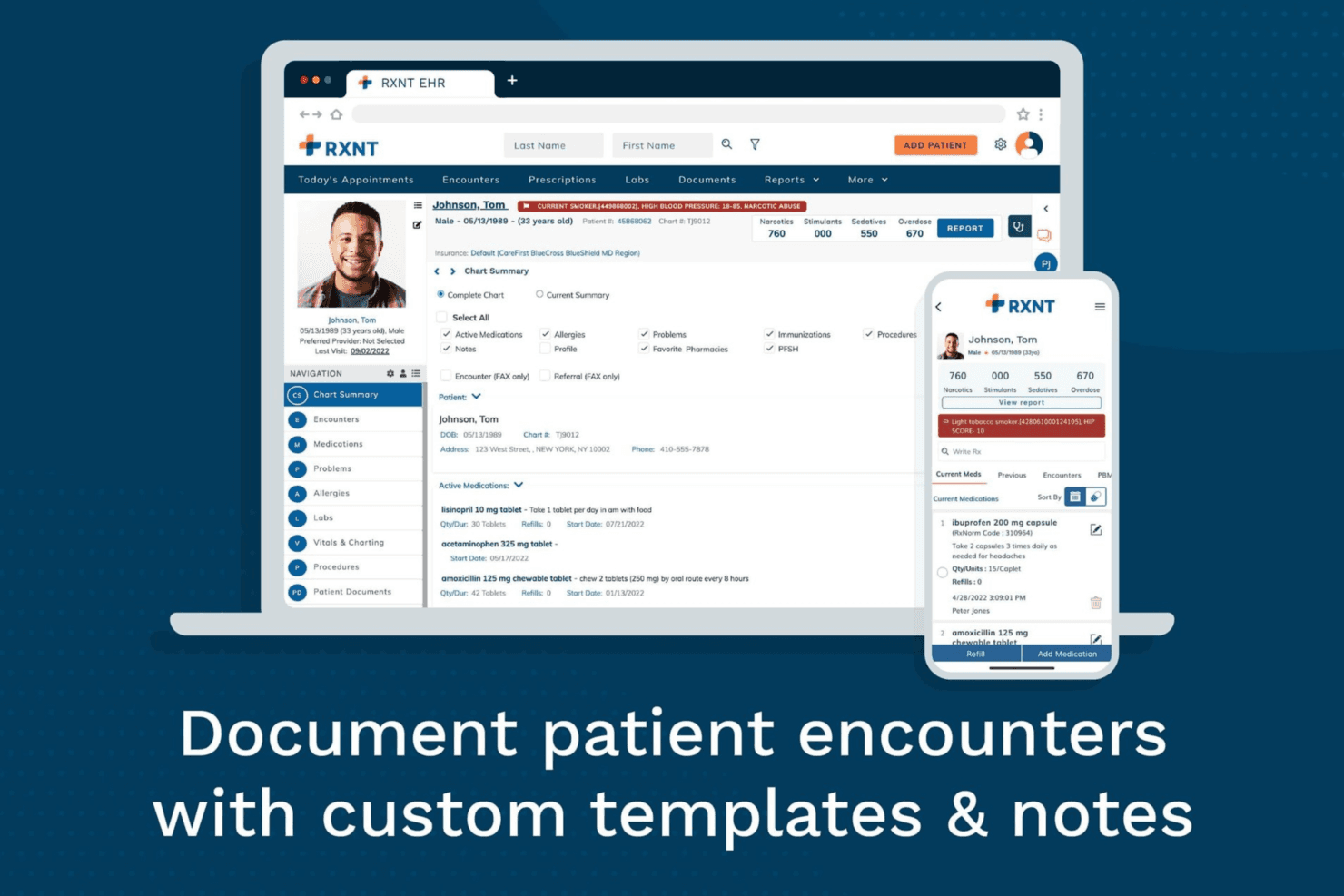
RXNT enables healthcare providers to document patient encounters using customizable charting templates, integrated clinical records, and mobile access. RXNT is a cloud-based EHR platform that combines clinical documentation, electronic prescribing, practice management, medical billing, scheduling, and patient engagement tools for ambulatory practices.
Who Is RXNT Best For?
RXNT works well for small to mid-sized ambulatory practices, independent physicians, and multi-specialty groups that need integrated clinical, prescribing, and billing workflows.
Why I Picked RXNT
I picked RXNT because its electronic prescribing capabilities are built directly into the EHR rather than offered as a separate tool. Its EPCS functionality allows authorized prescribers to manage Schedule II–V controlled substance prescriptions from the same platform used for clinical documentation. RXNT also supports direct access to state Prescription Drug Monitoring Programs through Bamboo Health, helping providers review controlled substance histories without leaving their usual workflow.
RXNT Key Features
- Customizable clinical templates: Create and reuse specialty-specific SOAP note templates that match the practice’s documentation requirements.
- Integrated lab and radiology ordering: Send electronic orders to connected facilities and receive results within the patient chart.
- Claims scrubbing and medical billing: Check claims for errors before submission, track their status, and manage billing activity through a centralized dashboard.
- Patient portal: Let patients view visit summaries, request appointments, send messages, and pay outstanding balances online.
RXNT Integrations
RXNT connects with Surescripts for electronic prescribing, Bamboo Health and state PDMP databases for controlled substance history, Change Healthcare and Relay Exchange for clearinghouse services, and Kno2 for TEFCA and QHIN connectivity. It also supports HL7 laboratory interfaces, certified registries, and API-based custom integrations.
Pros and Cons
Pros:
- Comprehensive suite covers scheduling, documentation, and billing
- Free setup, training, and data migration
- EPCS-certified e-prescribing built into the EHR
Cons:
- Billing reporting options are limited
- Users report system lag during peak usage
Learn more about RXNT: Best for integrative and medspa care management
- 15-day free trial
- From $99/month
Visit WebsiteCustomer Rating:4.8/5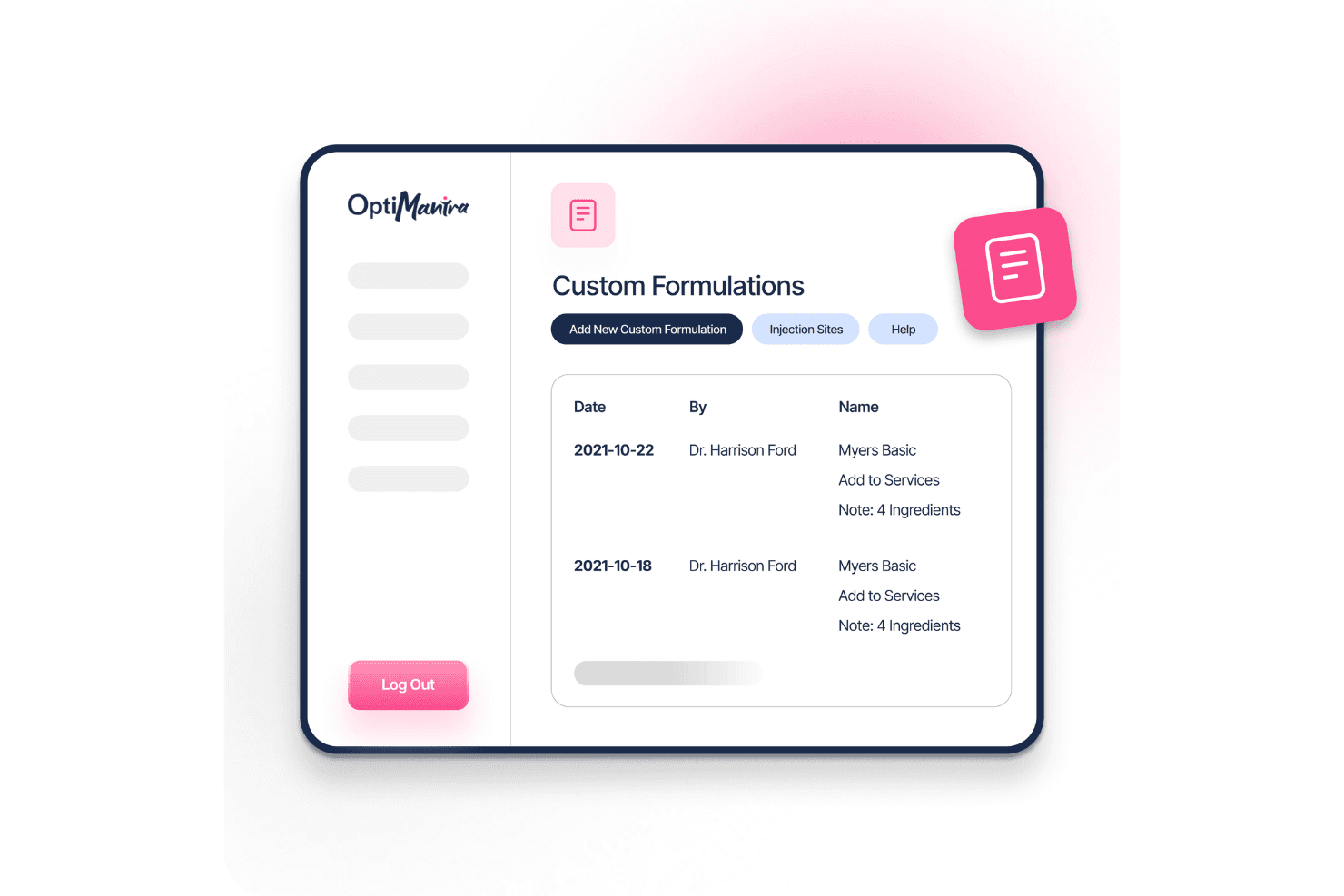
OptiMantra’s medspa dashboard displays appointments, client data, and key metrics for streamlined care management. OptiMantra is an EMR and practice management platform designed for integrative, functional, and multidisciplinary clinics. It combines clinical documentation, scheduling, billing, telehealth, inventory management, and patient engagement tools in one system.
Who Is OptiMantra Best For?
OptiMantra works well for naturopathic, chiropractic, acupuncture, functional medicine, and holistic health practices that need workflows tailored to integrative care.
Why I Picked OptiMantra
I picked OptiMantra because it is purpose-built for integrative and multidisciplinary clinics rather than adapted from a conventional medical EHR. Its modality-specific SOAP templates support naturopathic, chiropractic, acupuncture, and functional medicine workflows, while custom intake questionnaires can flow directly into patient charts. Built-in IV therapy and e-prescribing tools also make it a strong option for practices managing complex treatment protocols.
OptiMantra Key Features
- Online booking and automated reminders: Let patients self-schedule appointments and receive SMS or email reminders to help reduce no-shows.
- Secure patient portal: Give patients access to records, documents, forms, and two-way messaging through a HIPAA-compliant portal.
- Inventory and purchase order management: Track supplements and products, manage purchase orders, and connect sales with patient checkout workflows.
- Insurance billing and claims filing: Submit electronic claims, manage EOBs, and post payments without leaving the platform.
OptiMantra Integrations
OptiMantra connects with Surescripts, Quest Diagnostics, Labcorp, Rupa Health, Fullscript, Change Healthcare, Stripe, Fiserv, Office Ally, and Google services. It also supports webhooks and API-based custom integrations for additional clinical, billing, and CRM workflows.
Pros and Cons
Pros:
- Direct integration with major labs
- Built-in telehealth and e-prescribing
- Customizable forms for specialized care
Cons:
- Occasional interface slowdowns
- Learning curve for new users
Learn more about OptiMantra: Best for allied health scheduling and AI notes
- 14-day free trial
- From $19/month
Visit WebsiteCustomer Rating:4.7/5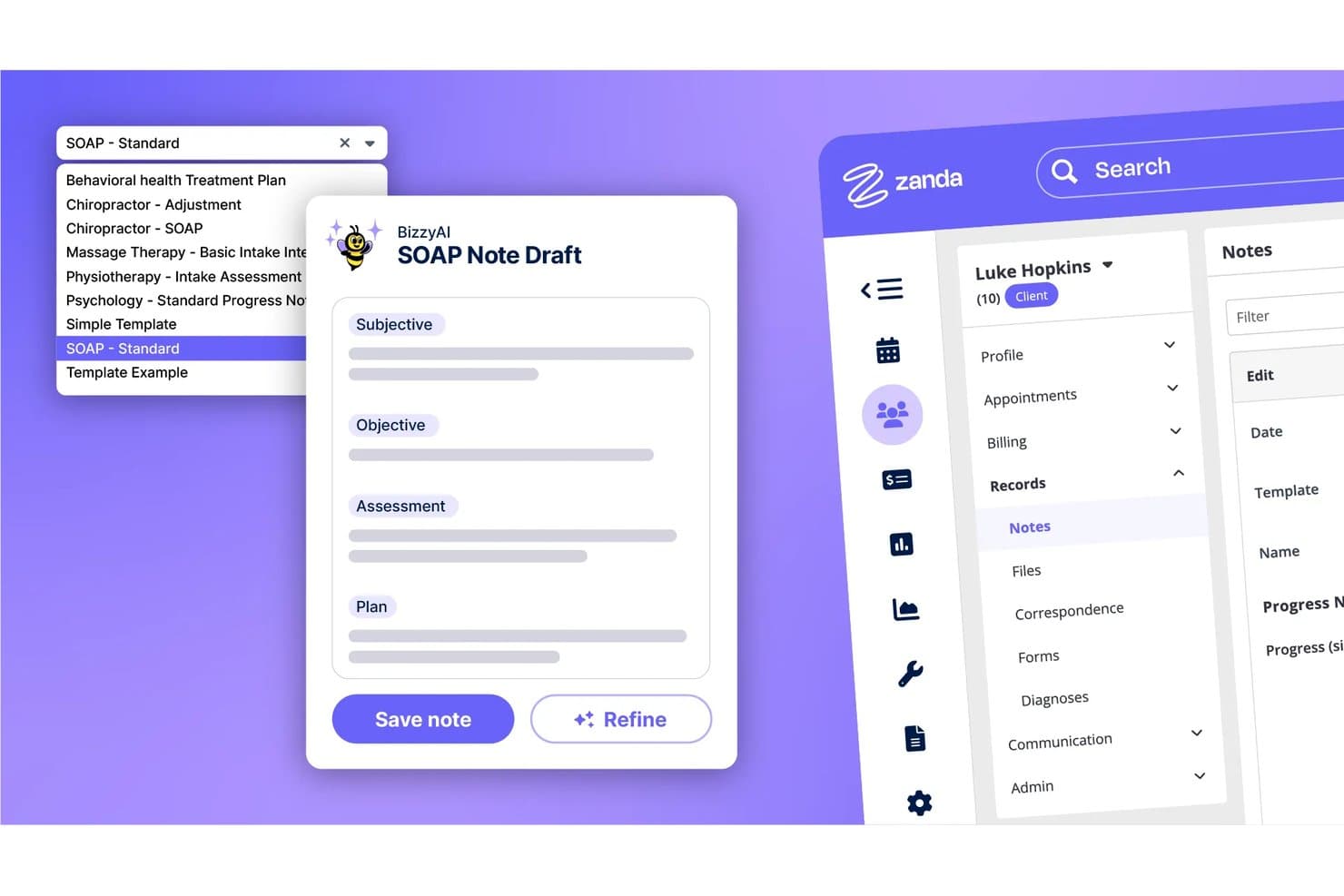
Zanda auto-generates SOAP notes using AI across multiple clinical templates. Zanda is a practice management platform built for allied health and mental health clinicians that combines appointment scheduling, clinical notes, AI-assisted documentation, invoicing, telehealth, and a client booking portal.
Who Is Zanda Best For?
Zanda is a strong fit for allied health and mental health clinicians—think psychologists, physiotherapists, and occupational therapists—who need scheduling and AI-assisted notes in one place.
Why I Picked Zanda
I've included Zanda in my top picks because it's purpose-built for allied health and mental health clinicians who need scheduling and AI-assisted notes working together. BizzyAI Scribe transcribes live sessions and auto-fills your note template, saving around 56 minutes per day based on beta user data. The multi-provider calendar also handles waitlists, automated reminders, and 24/7 client self-booking in one place.
Zanda Key Features
- BizzyAI Refine and Write: AI tools that rewrite draft notes on instruction and generate letters or emails directly from client session data.
- Scored assessment forms: Online forms that calculate scores automatically and feed into progress reports to track client outcomes over time.
- Built-in telehealth: HIPAA-compliant video sessions hosted in Zanda, with group calls supporting up to 20 participants and no app download required for clients.
- Role-based access controls: Permissions restrict which practitioners can view or edit notes and client records based on their assigned role.
Zanda Integrations
Documented integrations include Stripe, Xero, Zoom, Google Calendar, Outlook, Apple Calendar, Physitrack, Parchment, and Ensora.
Pros and Cons
Pros:
- Outcome scoring supports progress tracking
- Automated reminders help reduce missed appointments
- AI scribe reduces daily documentation time
Cons:
- No lab ordering or care coordination
- Missing structured problem lists and medication reconciliation
Learn more about Zanda: Best for customizable behavioral health workflows
- Free demo available
- Pricing upon request
Visit WebsiteCustomer Rating:4.3/5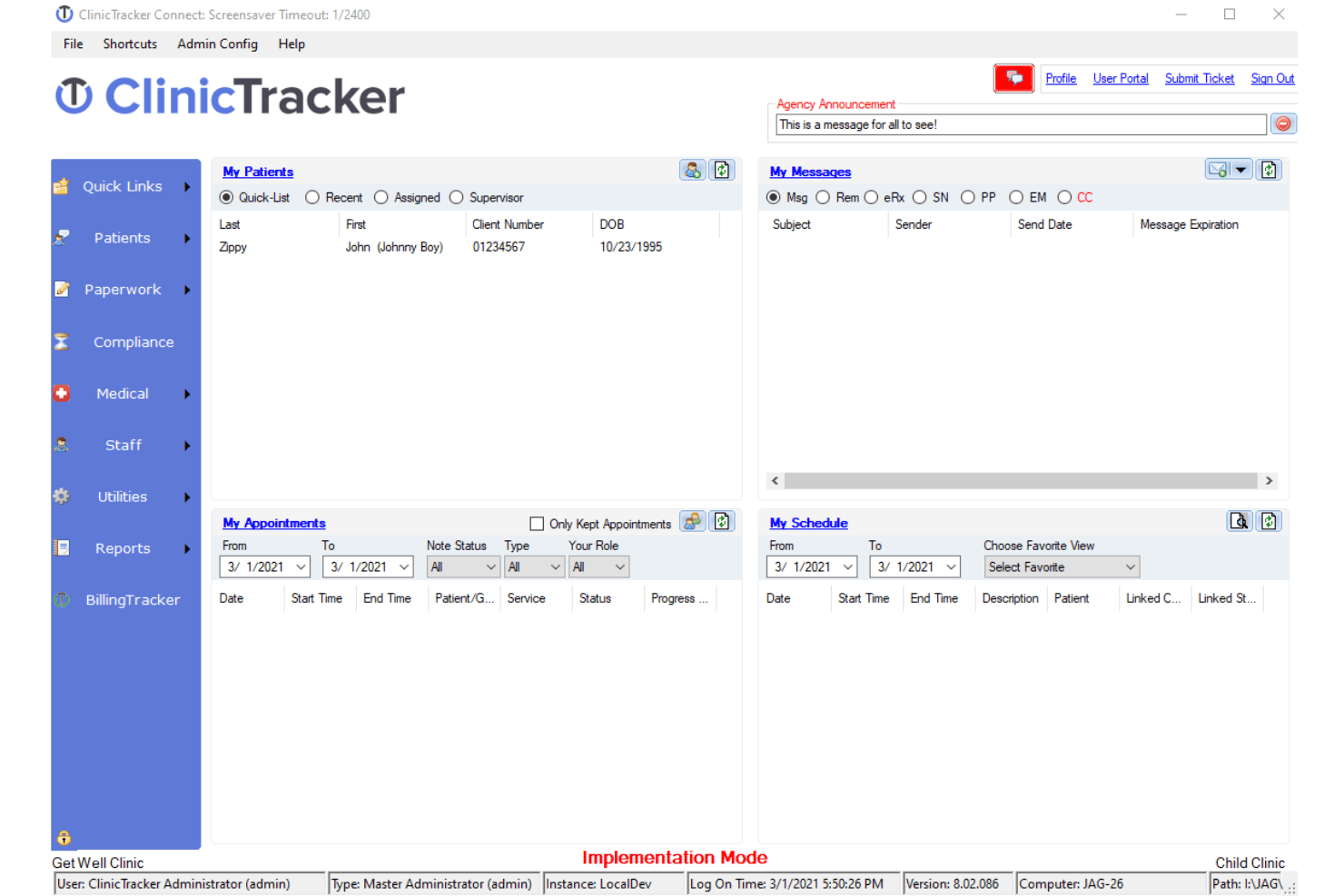
ClinicTracker offers a comprehensive dashboard for managing clinical workflows. ClinicTracker is an integrated EHR, billing, and practice management platform designed for behavioral health, mental health, substance use treatment, and community-based care organizations.
Who Is ClinicTracker Best For?
ClinicTracker works well for therapy practices, addiction treatment centers, social service organizations, and community health programs that need clinical, financial, and compliance workflows in one system.
Why I Picked ClinicTracker
I picked ClinicTracker because it combines EHR, scheduling, billing, and practice management within a platform built around behavioral health workflows. Its integrated approach helps reduce duplicate data entry between appointments, clinical records, and claims processing. I also like its customizable forms and workflow tools, which allow organizations to adapt documentation and administrative processes to the needs of mental health and substance use treatment programs.
ClinicTracker Key Features
- Patient portal: Give patients secure access to medical records, appointment schedules, billing information, and practice communication.
- Telehealth connector: Support virtual consultations and remote care through integrated telehealth functionality.
- Clinical decision support: Use alerts and reminders to support preventive care, safety monitoring, and clinical decision-making.
- Secure messaging: Enable confidential communication between providers, staff, and patients while supporting privacy requirements.
ClinicTracker Integrations
ClinicTracker supports integrations with Azure, Clinicom, AMBIR, Microsoft, Topaz, Soft Trac, and Zoom. These connections can extend hosting, communication, document capture, payment, and telehealth workflows.
Pros and Cons
Pros:
- Offers customizable forms, workflows, and compliance features
- Combines EHR, billing, scheduling, and practice management tools
- Built specifically for behavioral health and substance use treatment
Cons:
- May be too specialized for general medical practices
- Setup and customization may require training and implementation support
Learn more about ClinicTracker: Best for ambulatory care settings
- Free demo available
- Pricing upon request
Visit WebsiteCustomer Rating:5/5
Nextech EHR Software Interface NextGEN Healthcare is an EHR and practice management platform for ambulatory care that combines clinical documentation, scheduling, revenue cycle management, population health, telehealth, and patient engagement tools.
Who Is NextGEN Healthcare Best For?
NextGEN Healthcare works well for independent and multi-specialty ambulatory practices that need specialty-specific clinical workflows within one connected platform.
Why I Picked NextGEN Healthcare
I picked NextGEN Healthcare because of the depth of its specialty-specific customization. The platform supports more than 40 ambulatory specialties with tailored templates and workflows, helping different types of practices avoid using the same generic documentation structure. I also like that NextGEN Office and NextGEN Enterprise serve practices at different stages of growth, while ambient documentation tools help reduce charting time across both environments.
NextGEN Healthcare Key Features
- Patient portal: Let patients request appointments, review visit summaries, complete intake forms, and message their care teams.
- Revenue cycle management: Support claim scrubbing, denial tracking, payment posting, and other billing workflows alongside the clinical record.
- Population health dashboard: Identify care gaps and monitor chronic disease measures across patient populations.
- Telehealth module: Launch virtual visits directly from the EHR while keeping documentation connected to the patient chart.
NextGEN Healthcare Integrations
NextGEN Healthcare offers an API Marketplace with partners such as Labcorp, Commure, Birdeye, Clearwave, Weave, Innovaccer, Physiotec, Rectangle Health, SamaCare, and Unite Us. It also supports RESTful and FHIR APIs for custom integrations, while Mirth Connect helps connect the platform with external clinical and administrative systems.
Pros and Cons
Pros:
- Multi-location scheduling from one platform
- Native ambient AI documentation built in
- Specialty-specific clinical templates for 26+ specialties
Cons:
- Only one user can edit a SOAP note
- Interface feels dated compared to newer EHRs
Learn more about NextGEN: Best for end-to-end network-enabled services
- Free demo available
- Pricing upon request
Visit WebsiteCustomer Rating:5/5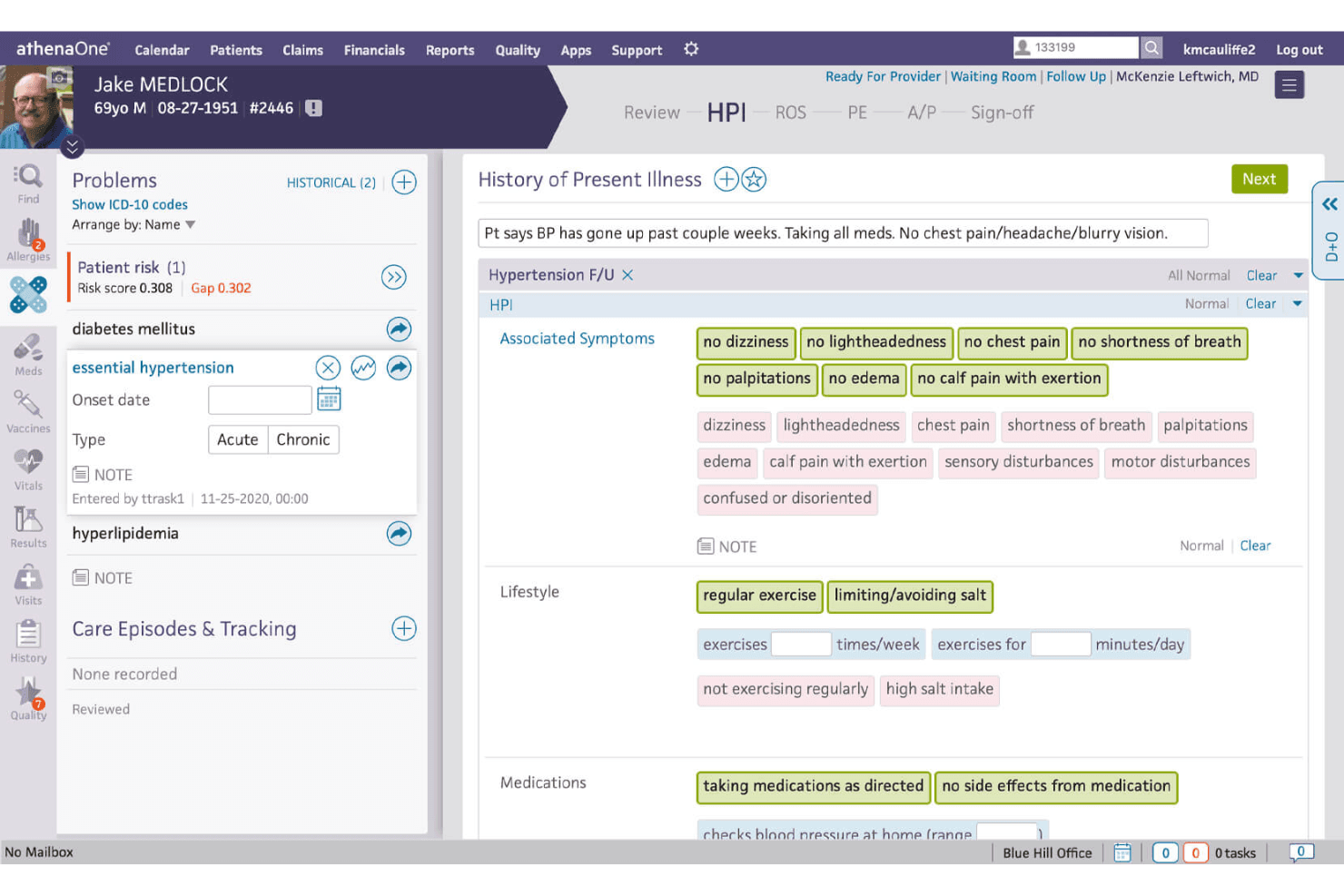
Athenahealth's platform provides a centralized place for patient data management, including for medical history and other records. Athenahealth is a cloud-based EHR and practice management platform that combines clinical documentation, medical billing, patient engagement, and interoperability tools for ambulatory practices.
Who Is Athenahealth Best For?
Athenahealthworks well for ambulatory practices of all sizes that want clinical and revenue cycle workflows managed within the same cloud-based platform.
Why I Picked Athenahealth
I picked Athenahealth because its billing workflows are closely connected to clinical documentation. When providers complete notes in athenaOne, relevant information can flow into claims workflows, helping reduce duplicate data entry and improve billing accuracy. Its large interoperability network also helps practices exchange information with laboratories, hospitals, pharmacies, payers, and other healthcare organizations. This makes Athenahealth a strong option for practices that prioritize integrated billing and broad data connectivity.
Athenahealth Key Features
- Patient portal: Let patients schedule appointments, complete intake forms, review information, and message their care teams online.
- Mobile access: Allow providers to review charts, check results, place orders, and manage selected clinical tasks from the athenaOne mobile app.
- Automated appointment reminders: Send text, email, and phone notifications to help reduce missed visits.
- Clinical and financial dashboards: Track quality measures, payer performance, operational trends, and practice-level financial metrics.
Athenahealth Integrations
Athenahealth supports integrations with applications such as Zoom, Qure4u, SOAP Health, Podium, Wellsheet, Upfront Healthcare, and Assort Health. It also provides API access and supports HL7, C-CDA, and other healthcare data standards for connecting with external clinical and administrative systems.
Pros and Cons
Pros:
- Cloud-based system for remote access
- Robust patient engagement tools
- Broad range of integrations with other healthcare systems and devices
Cons:
- Limited customization options for certain workflows
- Complexity of the system may result in a learning curve
Learn more about Athenahealth: Best for customization options to practice needs
- Free demo available
- Pricing upon request
Visit WebsiteCustomer Rating:4.8/5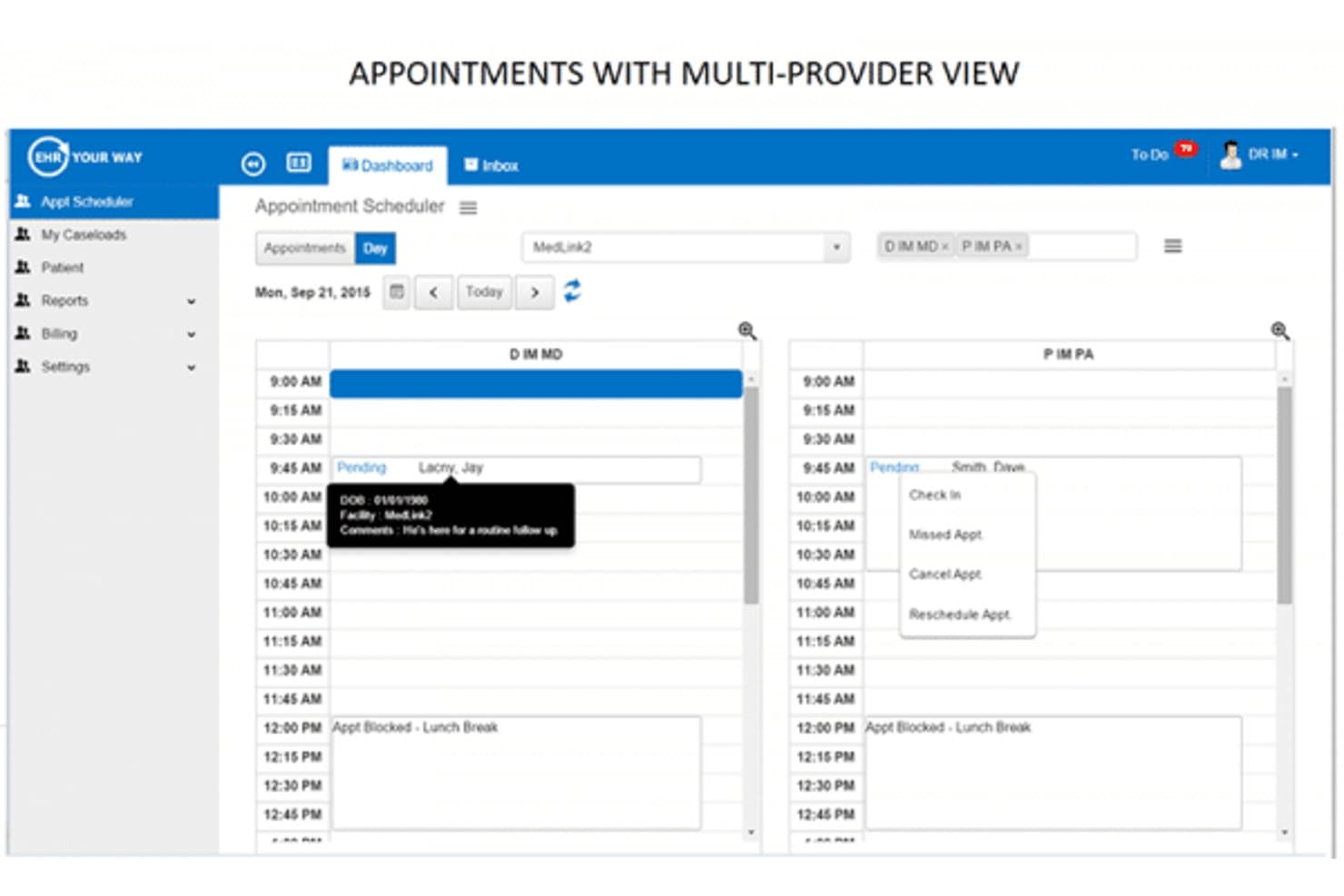
EHR Your Way EHR software Interface EHR Your Way is a cloud-based EHR and practice management platform designed for behavioral health and addiction treatment organizations. It combines clinical documentation, scheduling, billing, medication management, and compliance tools across outpatient, inpatient, and residential settings.
Who Is EHR Your Way Best For?
EHR Your Way works well for small to mid-sized behavioral health and addiction treatment practices that need configurable clinical, billing, and compliance workflows tailored to their programs.
Why I Picked EHR Your Way
I picked EHR Your Way because it offers extensive configurability for behavioral health and addiction treatment settings. Organizations can build custom clinical forms, billing rules, compliance holds, and documentation workflows instead of adapting their processes to a generic system. Its golden thread documentation and built-in screenings, including PHQ-9 and GAD-7, can also support treatment planning by automatically scoring assessments and connecting results to patient records. EPCS-certified prescribing with automated PDMP checks further supports providers managing controlled substances.
EHR Your Way Key Features
- Revenue cycle management: Manage charge capture, claims submission, denial workflows, payment posting, and CCBHC billing across outpatient and inpatient settings.
- Real-time eligibility verification: Check insurance eligibility from the scheduling workflow before appointments to help reduce claim rejections.
- eMAR and medication management: Track medication administration, bed checks, shift notes, laboratory orders, imaging requests, and referrals for residential and inpatient programs.
- Custom reporting: Build reports using any form field in the system and access preconfigured clinical, operational, and financial reports.
EHR Your Way Integrations
EHR Your Way supports integrations with Zoom, Microsoft Teams, Google Meet, eClinicalWorks, PointClickCare, and Inbox Health. It also connects with selected state and county behavioral health systems through ADT and SIU interfaces. FHIR and C-CDA support enable clinical data exchange with hospitals, specialists, and health information exchanges, while an Azure-hosted FHIR server provides API access for custom integrations.
Pros and Cons
Pros:
- Every form field is reportable
- Built for behavioral health specialty workflows
- Verbatim electronic copies of paper forms
Cons:
- Patient portal emails often land in spam
- Mobile experience lacks full desktop functionality
Learn more about EHR Your Way: Best for patient self-service access
- Free demo available
- From $65/user/month (billed annually)
Visit WebsiteCustomer Rating:4.7/5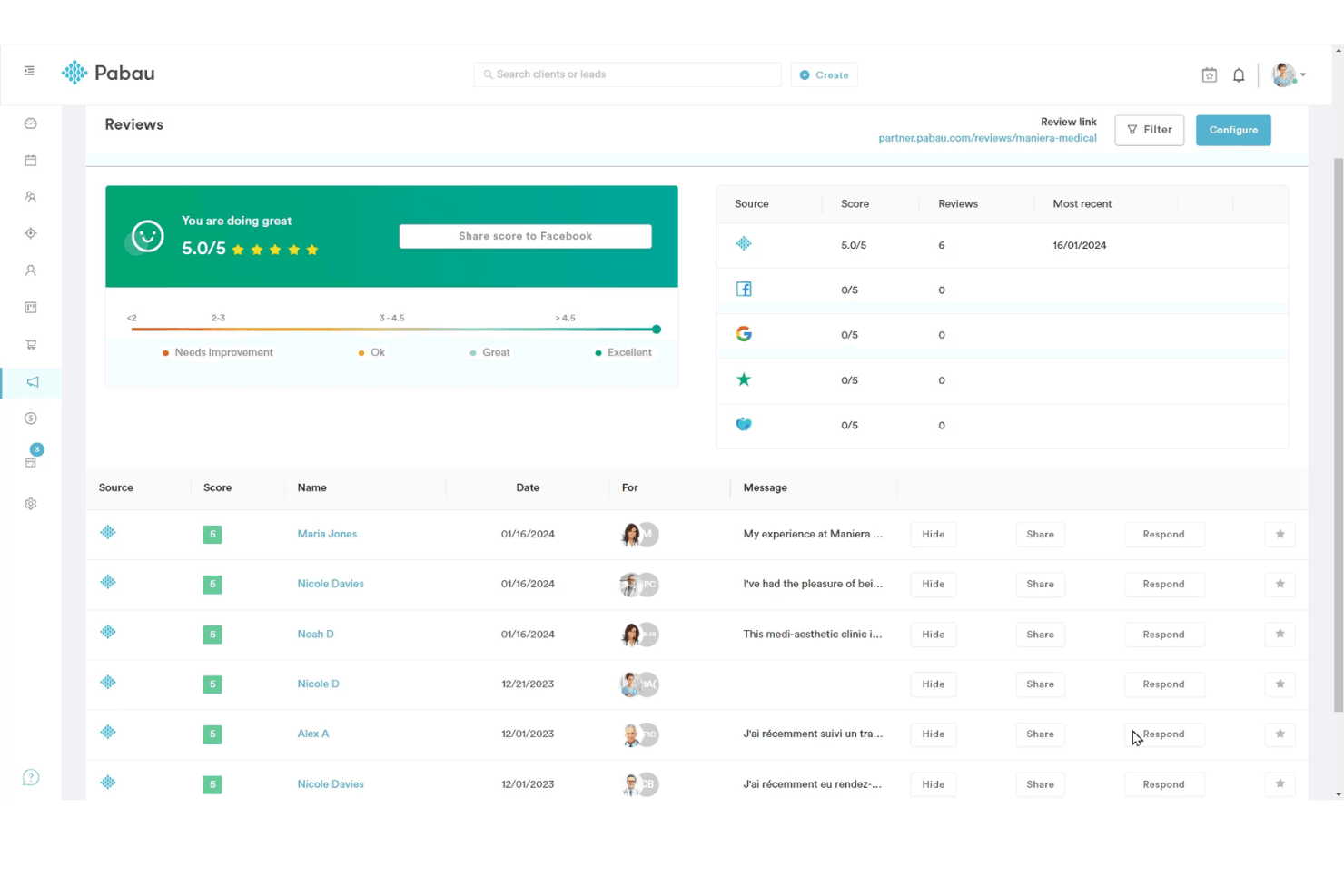
Pabau offers an organized and user-friendly homepage interface. Pabau is a cloud-based practice management and EHR platform for private practices and specialty clinics. It combines clinical documentation, patient records, online booking, digital forms, payments, and business management tools in one system.
Who Is Pabau Best For?
Pabau works well for clinic owners and practice managers who oversee both clinical and business operations, particularly in aesthetics, dermatology, wellness, and other private-pay specialties.
Why I Picked Pabau
I picked Pabau because it includes a branded client app that gives patients direct access to treatment history, upcoming appointments, and before-and-after photos. Its built-in membership management is another standout feature, allowing practices to run loyalty and recurring-revenue programs without relying on a separate platform. This makes Pabau a strong option for clinics that want to combine patient engagement with day-to-day practice management.
Pabau Key Features
- Digital consent forms: Send, collect, and store signed patient consent documents electronically before appointments.
- Automated appointment reminders: Schedule SMS and email notifications to help reduce no-shows.
- Staff rota management: Build practitioner schedules and manage availability, working hours, and clinic coverage.
- Financial reporting: Track revenue by treatment, practitioner, or location to monitor practice performance.
Pabau Integrations
Pabau integrates with Stripe, Xero, Klarna, Healthcode, Google Calendar, Outlook Calendar, Google Analytics, Google Tag Manager, Meta Pixel, Reserve with Google, and Linda AI. These connections extend payments, accounting, scheduling, marketing, insurance, and patient communication workflows.
Pros and Cons
Pros:
- Combines booking, payments, memberships, and patient records
- Includes a branded client app and digital consent tools
- Strong fit for aesthetics, dermatology, and wellness clinics
Cons:
- Advanced features may increase overall subscription costs
- May be too specialized for general medical practices
Learn more about Pabau: Best for telemedicine integration enhancing care
- Free demo available
- From $100/user/month (billed annually)
Visit WebsiteCustomer Rating:5/5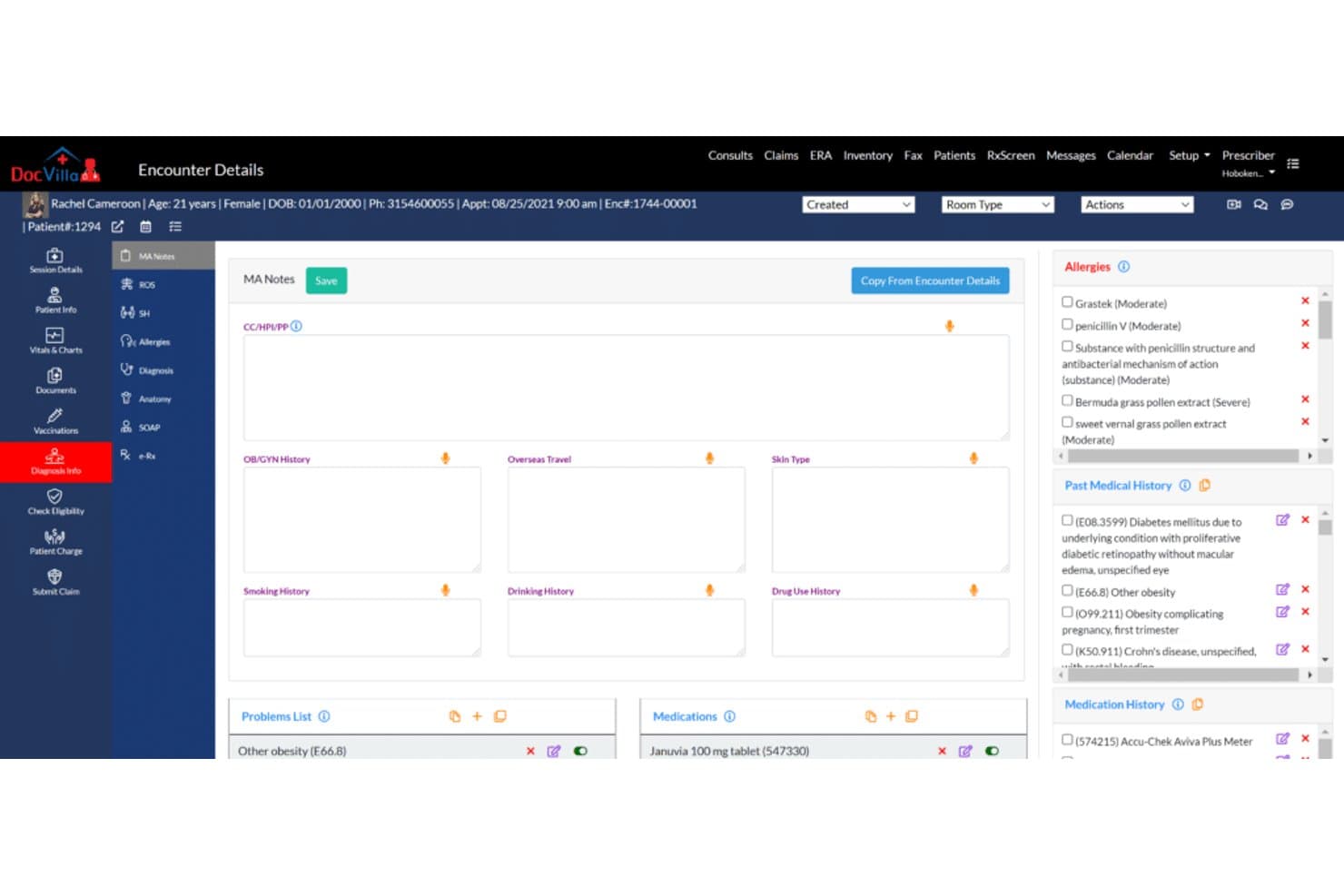
DocVilla EHR software Interface DocVilla is a cloud-based healthcare platform that combines electronic health records, telemedicine, patient engagement, scheduling, billing, and practice management tools.
Who Is DocVilla Best For?
DocVilla works well for healthcare practices that want to expand remote patient care while managing clinical and administrative workflows from one platform.
Why I Picked DocVilla
I picked DocVilla because its telemedicine capabilities are integrated with the broader patient record and practice workflow. Providers can conduct video consultations, communicate securely with patients, manage appointments, and access clinical information without switching between disconnected tools. This makes DocVilla a strong option for practices that want to improve access to care while keeping virtual visits connected to their existing operations.
DocVilla Key Features
- Real-time video consultations: Conduct remote appointments through integrated video visit tools.
- Patient portal: Give patients online access to appointments, records, documents, billing information, and practice communication.
- Secure messaging: Allow providers, staff, and patients to exchange protected healthcare information.
- Online appointment scheduling: Let patients request or book appointments through a digital scheduling interface.
DocVilla Integrations
DocVilla supports payment gateway connections for online patient payments and can connect with selected third-party scheduling and healthcare systems. Integration availability depends on the practice’s existing software and implementation requirements.
Pros and Cons
Pros:
- Affordable starting price
- Seamless third-party integrations
- Comprehensive telemedicine capabilities
Cons:
- Could have more advanced analytics
- Does not offer a free trial
Learn more about DocVilla: Best for comprehensive practice management
- Free demo available
- Pricing upon request
Visit WebsiteCustomer Rating:4.1/5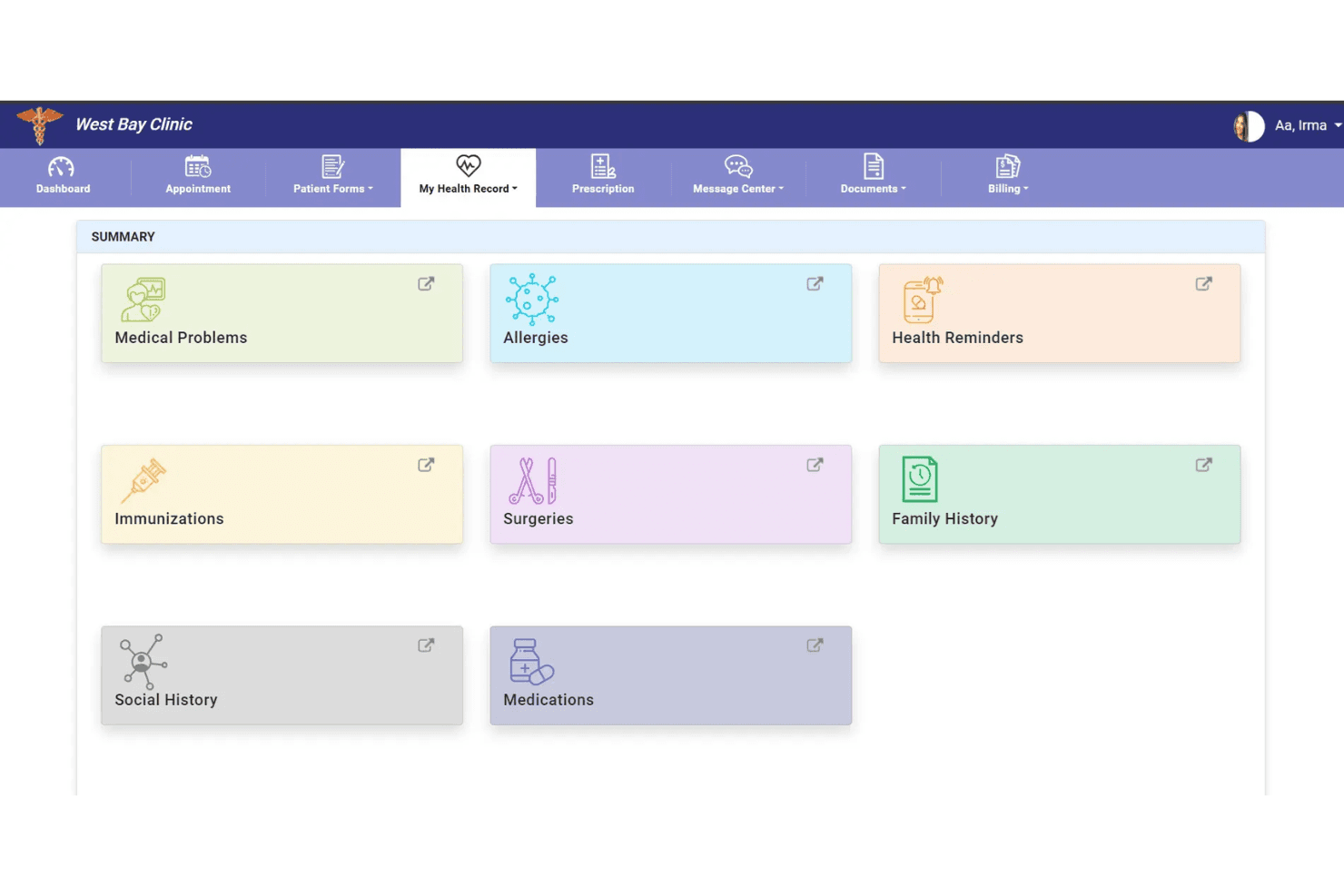
PrognoCIS provides a patient portal for accessing health summaries and managing appointments. PrognoCIS is a cloud-based EHR platform for ambulatory care that combines clinical documentation, telemedicine, e-prescribing, medical billing, scheduling, and patient engagement tools.
Who Is PrognoCIS Best For?
PrognoCIS works well for independent and group practices that manage high documentation volumes and need customizable, specialty-specific clinical workflows.
Why I Picked PrognoCIS
I picked PrognoCIS because its PrognoAI documentation tools can generate clinical notes directly within the patient chart. Its built-in specialty templates are also customizable, helping practices such as podiatry and OB-GYN adapt the system without building workflows from scratch. The preauthorization tracking tool is another useful feature, as it can create authorization requests when orders are placed and connect payer responses to the original request.
PrognoCIS Key Features
- Telemedicine: Conduct video visits through a built-in tool that keeps virtual encounter documentation connected to the patient chart.
- Electronic prescribing: Send prescriptions electronically, including controlled substances through EPCS and prior authorization requests through EPA workflows.
- Patient portal: Let patients complete intake forms, schedule appointments, review information, and send secure messages.
- Appointment scheduling: Book, reschedule, and manage patient visits through the platform’s calendar.
PrognoCIS Integrations
PrognoCIS supports connections with laboratories, radiology providers, pharmacies, health information exchanges, payment processors, transcription services, and state immunization registries. It also supports HL7 and FHIR standards and offers API access for custom integrations.
Pros and Cons
Pros:
- Supports HL7, FHIR, APIs, and broad healthcare integrations
- Includes AI-assisted documentation and specialty-specific templates
- Combines EHR, telemedicine, billing, and e-prescribing tools
Cons:
- The platform can feel complex for very small practices
- Advanced configuration may require implementation support
Learn more about PrognoCIS:
Other Free EHR Software Tools
Here are some additional free EHR software options that didn’t make it onto my shortlist but are still worth checking out:
- 11ValantBest for behavioral health practices
- 12Azalea HealthBest for rural practices and outpatient clinics
- 13EpicBest for comprehensive patient data management
- 14Practice FusionBest for cloud-based integrated solutions for patient-centered care
- 15AdvancedMDBest for customizable EHR templates
- 16CernerBest for advanced analytics and population health management
- 17eClinicalWorksBest for comprehensive telehealth solutions
- 18MEDITECH ExpanseBest for a comprehensive suite offering from the emergency department to home health
- 19Kareo ClinicalBest for independent medical practices seeking streamlined workflows
- 20CampDocBest for medication administration
How I Evaluate EHR Software
I split my evaluation into two layers: the baseline clinical and billing capabilities a platform must cover, and the differentiators that separate one vendor from another.
Core Functionality (Table Stakes For This List)
When I'm selecting tools for my list, I rank each one on a scale from 0 (does not offer the functionality) to 5 (excels in this area) for each core functionality listed below. I then calculate the tool's total score into a percentage, using 65% as a benchmark to help assess its overall fit for the list.
- Electronic Charting: I check whether the platform offers structured clinical notes, problem lists, and medication histories rather than just free-text fields. A provider documenting a follow-up visit should be able to pull up a SOAP note template tied to that patient's chart.
- Practice Scheduling: Scheduling should connect directly to the patient record so front-desk staff can book, confirm, and check in patients without toggling between systems. I look for provider calendars with automated reminders at a minimum.
- Medical Billing & Claims: I evaluate whether encounter-level coding and claims generation are included or paywalled. At baseline, a practice should be able to attach CPT and ICD-10 codes to a visit and generate a claim from within the chart.
- E-Prescribing & Orders: The ability to transmit prescriptions electronically matters, especially for routine medications. I look for at least basic e-prescribing tied to the patient record, along with any support for lab or imaging order workflows.
- HIPAA Compliance & Security: Every platform I consider needs to demonstrate HIPAA-compliant data handling. That means audit logs, role-based access controls, and encrypted storage—so a medical assistant and a billing lead aren't seeing the same data by default.
- Patient Portal & Interoperability: Patients should be able to view records, request appointments, or message their provider through a portal. I also evaluate whether the platform supports standards like HL7 or FHIR for exchanging records with labs and pharmacies.
Once I have a list of tools that meet the criteria, I consider what sets each platform apart.
Differentiating Factors (What Sets Vendors Apart)
Here's how I compare and contrast different vendors:
Standout Features
Telehealth integration is a major differentiator. When a platform embeds HIPAA-compliant video visits directly into the patient chart, a provider can launch a session from the scheduling screen without switching to a separate tool. I also look at specialty-specific templates. A pediatrician and a behavioral health counselor have very different documentation needs, so I check whether the platform includes configurable note templates beyond a generic SOAP format.
Beyond Features
Deployment model matters a lot with free EHR platforms. Some are cloud-based SaaS with zero setup, while others like OpenEMR and GNU Health are self-hosted and require your own server infrastructure and IT resources. I evaluate whether a platform's integration ecosystem connects to lab networks, pharmacies, and clearinghouses—a free EHR that can't transmit a prescription or receive lab results creates manual workarounds your team doesn't need. Practice size fit is another factor I check, since some free tiers limit the number of providers or locations you can support.
How to Choose Free EHR Software
It’s easy to get bogged down in long feature lists and complex pricing structures. To help you stay focused as you work through your unique software selection process, here’s a checklist of factors to keep in mind:
| Factor | What to Consider |
| Scalability | Can the platform handle your practice’s future growth—new providers, locations, or specialties—without forcing a costly upgrade or migration later? |
| Integrations | Do you need connections to lab networks, pharmacies, billing systems, or other platforms, and is the EHR capable of supporting secure, standards-based data exchange? |
| Customizability | Can you tailor the EHR’s templates, workflows, and reporting tools to suit your specialty or clinic needs, or is the experience rigid and one-size-fits-all? |
| Ease of use | Will staff and clinicians pick up the system quickly? Check for intuitive workflows, clear documentation, and minimal training overhead. |
| Implementation and onboarding | How much time, IT expertise, or support is required to get up and running? Cloud-based tools are usually faster, while self-hosted options need more setup. |
| Cost | Does the free plan cover your needs, or will you face costly surprise upgrades for core modules, user counts, or storage? Review all limitations carefully. |
| Security safeguards | Which data protection measures are in place? Look for encryption, access controls, audit logs, and evidence of HIPAA or relevant healthcare compliance. |
| Support availability | What level of support—help center resources, live chat, or ticketing—is available without upgrading, especially if you plan to rely on the free plan long-term? |
What Is Free EHR Software?
Free EHR software refers to electronic health record systems that offer essential clinical and administrative tools at no cost through an unlimited free plan or a time-limited free trial. You can expect core functions like patient charting, scheduling, and billing for your practice. These options make it easier for clinics and independent providers to digitize records and improve workflow without upfront financial commitment.
Features of Free EHR Software
Let’s go over the features commonly found in EHR software, and which ones are usually included in free vs. paid plans.
Typically Free EHR Software Features
- Basic charting: Structured digital templates for patient encounters, allowing for easy documentation and retrieval of clinical notes, diagnoses, and treatment plans.
- Appointment scheduling: Simple calendar tools for booking, viewing, and managing patient visits, sometimes with automated reminders or provider-specific views.
- Patient database: Centralized storage of basic demographic details, histories, and contact information, helping practices keep records organized and searchable.
- Prescription management: Ability to record and print prescriptions for patients, with medication histories captured for reference during future visits.
- Role-based access control: Tools for giving the right team members access to the right information, boosting privacy and reducing errors in busy environments.
- Basic analytics: Simple reporting features to generate lists of patients by diagnosis or procedure, track visits, or view appointment volumes across time periods.
- Manual billing tools: Creation and printing of basic invoices or superbills tied to each encounter, supporting straightforward revenue tracking for smaller practices.
- Document upload: Option to attach scanned forms, lab results, or insurance documents to the patient chart for unified file management.
- Template customization: Ability to adjust visit and note templates for different clinical workflows or preferences, though usually with limited flexibility.
Typically Paid EHR Software Features
- Integrated e-prescribing: Tools for sending prescriptions directly to pharmacies, including controlled substances, often with real-time medication interaction and formulary checks.
- Automated insurance claims: Built-in coding engines and clearinghouse connections for electronic claim submission, denial management, and payment posting within the system.
- Patient portal access: Secure online area for patients to view records, request appointments, complete forms, and message their provider, improving engagement and communication.
- Telehealth visits: Embedded HIPAA-compliant video appointments with one-click launch from the schedule or chart, and integrated note-taking during virtual visits.
- Advanced interoperability: Support for exchanging health data with external labs, imaging centers, HIEs, or referring providers using FHIR, HL7, or CCD/CCDA standards.
- Quality reporting: Automated generation of reports for MIPS/MACRA or other regulatory programs, with tracking dashboards to monitor compliance and performance trends.
- Revenue cycle analytics: Visual dashboards for analyzing collections, denials, payer mix, and aging receivables to drive better financial decision-making.
- Custom workflow automation: Advanced tools for building rules-driven workflows for front-desk check-in, prior authorization, and referral tracking.
- Dedicated implementation support: Hands-on setup help, training resources, and priority support channels beyond what’s available for free plan users.
Benefits of Free EHR Software
Implementing free ehr software provides several benefits for your team and your business. Here are a few you can look forward to:
- Lower operational costs: Digitize and manage patient records, appointments, and billing without adding to your monthly expenses.
- Faster practice digitization: Get up and running quickly with core EHR features—no need to wait for budget approvals or long procurement cycles.
- Streamlined patient workflows: Access integrated scheduling, charting, and documentation tools that reduce manual work and improve day-to-day efficiency.
- Ease of access and collaboration: Centralized patient records support better coordination between clinicians, office staff, and billing teams.
- Flexible platform evaluation: Try essential EHR functions risk-free, allowing you to assess usability and fit for your practice before upgrading.
- Compliance support: Rely on built-in HIPAA safeguards like access controls and audit logs that help protect patient data from day one.
- Documented care history: Simplify follow-up care and audits with consistently organized, legible, and easily retrieved digital records.
Costs and Pricing of EHR Software
I realize you came to this article looking for the best EHR software options that are available for free. However, since free plans only offer limited features, there's a good chance you'll need to scale your plan up in the future.
The table below summarizes common plans, their average prices, and typical features included in EHR software:
Plan Comparison Table for EHR Software
| Plan Type | Average Price | Common Features |
| Free Plan | $0 | Basic charting, appointment scheduling, patient database, prescription management, and limited billing capabilities. |
| Personal Plan | $20-$75/user/month | Integrated e-prescribing, basic claims submission, patient portal access, analytics, and template customization. |
| Business Plan | $75-$200/user/month | Automated insurance claims, telehealth visits, quality reporting, workflow automation, and advanced interoperability. |
| Enterprise Plan | $200+/user/month | Custom integrations, advanced analytics, onboarding support, prioritized support, and multi-location management. |
Free EHR Software FAQs
Here are some answers to common questions about free ehr software:
Is free EHR software actually secure and HIPAA-compliant?
Yes, many free EHR platforms follow strict data security standards and provide HIPAA-compliant features like encryption, audit logs, and role-based user controls. Always review each vendor’s security documentation to confirm compliance before entering real patient information.
Can I migrate my data if I outgrow a free EHR plan?
Yes, most reputable free EHR solutions support data export or migration tools, but the process may vary in complexity. Check whether the platform offers standardized formats—like CSV or CCD—for exporting charts when you need to upgrade or switch systems.
What are common limitations of free EHR software?
Free plans often restrict features like automated claims, e-prescribing, telehealth, or custom integrations. You may also see user, location, or storage limits. Review the vendor’s feature matrix to be sure the free tier covers your core workflow needs.
Can a small multi-provider clinic use free EHR software long term?
Yes, some free EHR solutions allow more than one provider and multi-location use, but you should carefully check for user limits or feature restrictions. If your clinic grows, it’s important to verify upgrade paths and associated costs early on.
What kind of customer support is available with free EHR software?
Free EHR plans typically include help center articles, community forums, or email-based support. Real-time chat and phone support are usually reserved for paid plans, so consider your comfort level with self-service resources before choosing a vendor.