

US medical billing software is a digital tool that manages patient billing, insurance claims, and revenue cycle tasks for healthcare providers in the United States. If you’re searching for a way to handle claims accurately, speed up reimbursements, and cut down on manual entry, you’re in the right place.
Choosing the right platform can help your practice reduce denials, keep payments on track, and ease documentation burdens—freeing you to focus on patient care. This list includes my most trusted options, so you can compare features, pricing, and specialties to find a fit that actually works for your team.
Why Trust Our Software Recommendations
6,700+
Reviews
20
Industry experts
16+
Evaluation factors
14
Years
Our team has been testing and reviewing software since 2012. As medical practice leaders ourselves, we know how difficult—and important—it is to choose the right software.
For this guide, we evaluated tools using hands-on testing and independent research, scoring tools using our selection criteria.
Our reviews reflect our human editorial judgment, not a sales pitch.
US Medical Billing Software Comparison Table
This comparison table outlines pricing for my top US medical billing software picks:
| Tool | Best For | Trial Info | Price | ||
|---|---|---|---|---|---|
| 1 | Best for claims, denials, and payment automation | Free demo available | Pricing upon request | Website | |
| 2 | Best for simple claims and billing management | Free demo available | From $199/user/month | Website | |
| 3 | Best for cloud-based medical billing | Free demo available | Pricing upon request | Website | |
| 4 | Best for multi-specialty practices | Free demo available | Pricing upon request | Website | |
| 5 | Best for enterprise revenue cycle management | Free demo available | Pricing upon request | Website | |
| 6 | Best for independent practice billing | 14-day free trial; Free demo available | Pricing upon request | Website | |
| 7 | Best for mobile billing and RCM workflows | Free demo available | Pricing upon request | Website | |
| 8 | Best for outsourced billing and revenue cycle | Free demo available | Pricing upon request | Website | |
| 9 | Best for automated billing and claims workflows | Free demo available | Pricing upon request | Website | |
| 10 | Best for network-driven billing and collections | Free demo available | Pricing upon request | Website |


Best US Medical Billing Software Reviews
Below are my detailed summaries of the best US medical billing software that made it onto my shortlist. My reviews offer a detailed look at the features, pricing, and integrations of each platform to help you find the best one for you.
 Best for claims, denials, and payment automation
- Free demo available
- Pricing upon request
Visit WebsiteCustomer Rating:4.4/5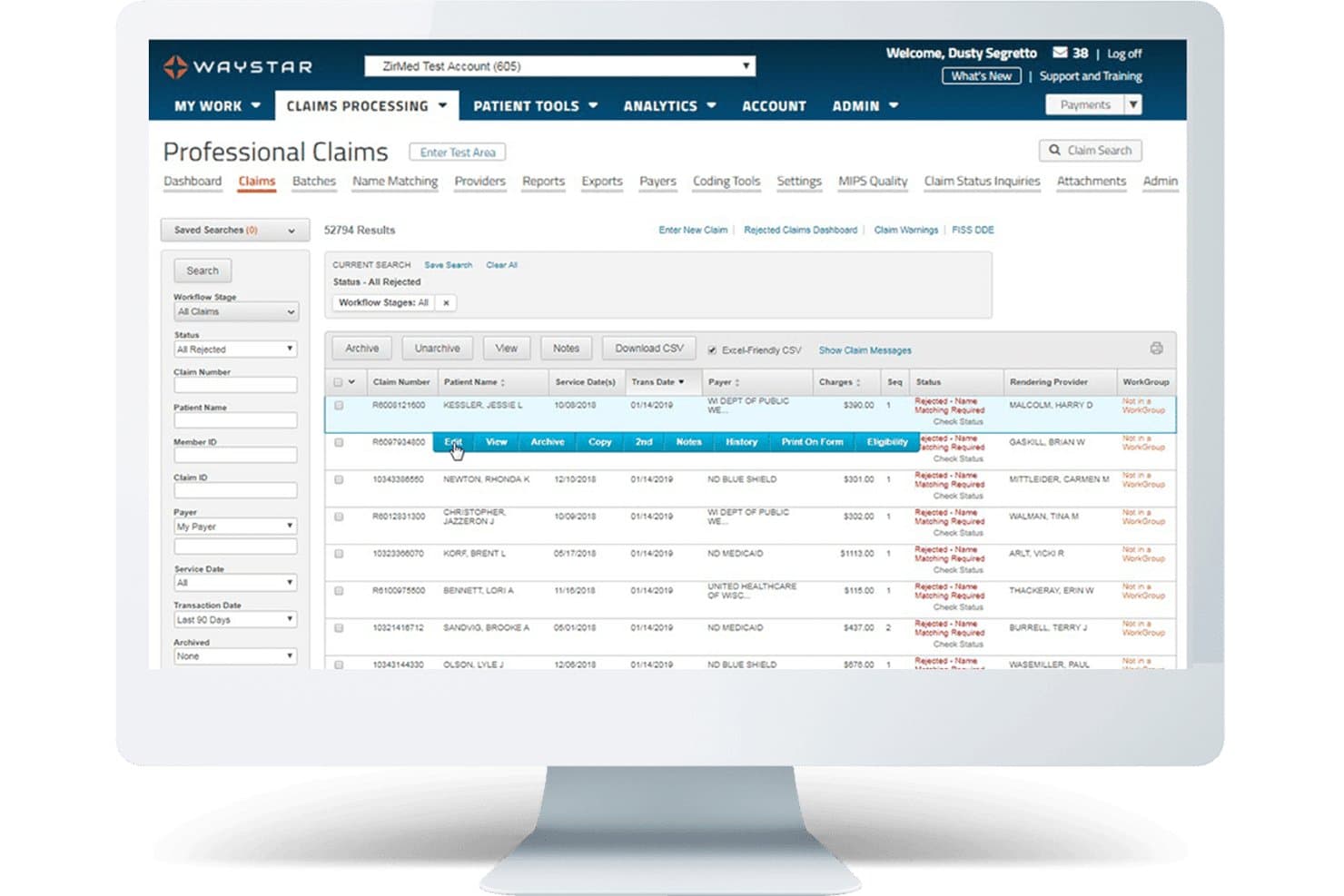
Waystar offers a Professional Claims dashboard that displays rejected claims with filtering options, claim details, and inline action menus for efficient medical billing management. Waystar is a cloud-based revenue cycle management platform built for US healthcare providers that handles claims processing, denial management, eligibility verification, patient billing, and payment automation across the full billing lifecycle.
Who Is Waystar Best For?
Waystar is a strong fit for mid-sized to large healthcare organizations with dedicated billing or revenue cycle teams managing high claim volumes.
Why I Picked Waystar
I picked Waystar as one of the best because its Appeals Wizard makes paperless denial recovery genuinely practical. My team can generate payer-specific appeal letters from 1,100+ pre-populated templates, then batch up to 100 similar appeals to the same payer in one action. I also like the root cause reporting, which identifies recurring denial patterns so the billing team can address upstream issues rather than just resubmitting the same claims.
Waystar Key Features
- Automated eligibility verification: Verify patient insurance status in real time using 270/271 transactions before care is provided.
- Patient payment portal: Let patients pay bills, manage payment plans, and access digital statements online.
- ERA and EFT auto-posting: Automatically post electronic remittance and EFT payments directly to patient accounts.
- Configurable analytics dashboards: Track revenue cycle KPIs, denial rates, and payer performance with customizable visual dashboards.
Waystar Integrations
Waystar offers native integrations with leading EHR and practice management platforms such as Epic, eClinicalWorks, and athenahealth, supports connectivity with 5,000+ payers, and provides an API for custom integrations.
Pros and Cons
Pros:
- Batch claims processing for large volumes
- Real-time eligibility and benefits checking
- Efficient denial and appeal workflow automation
Cons:
- May be complex for solo practices
- Limited transparency on contract terms
Learn more about Waystar: Best for simple claims and billing management
- Free demo available
- From $199/user/month
Visit WebsiteCustomer Rating:4.5/5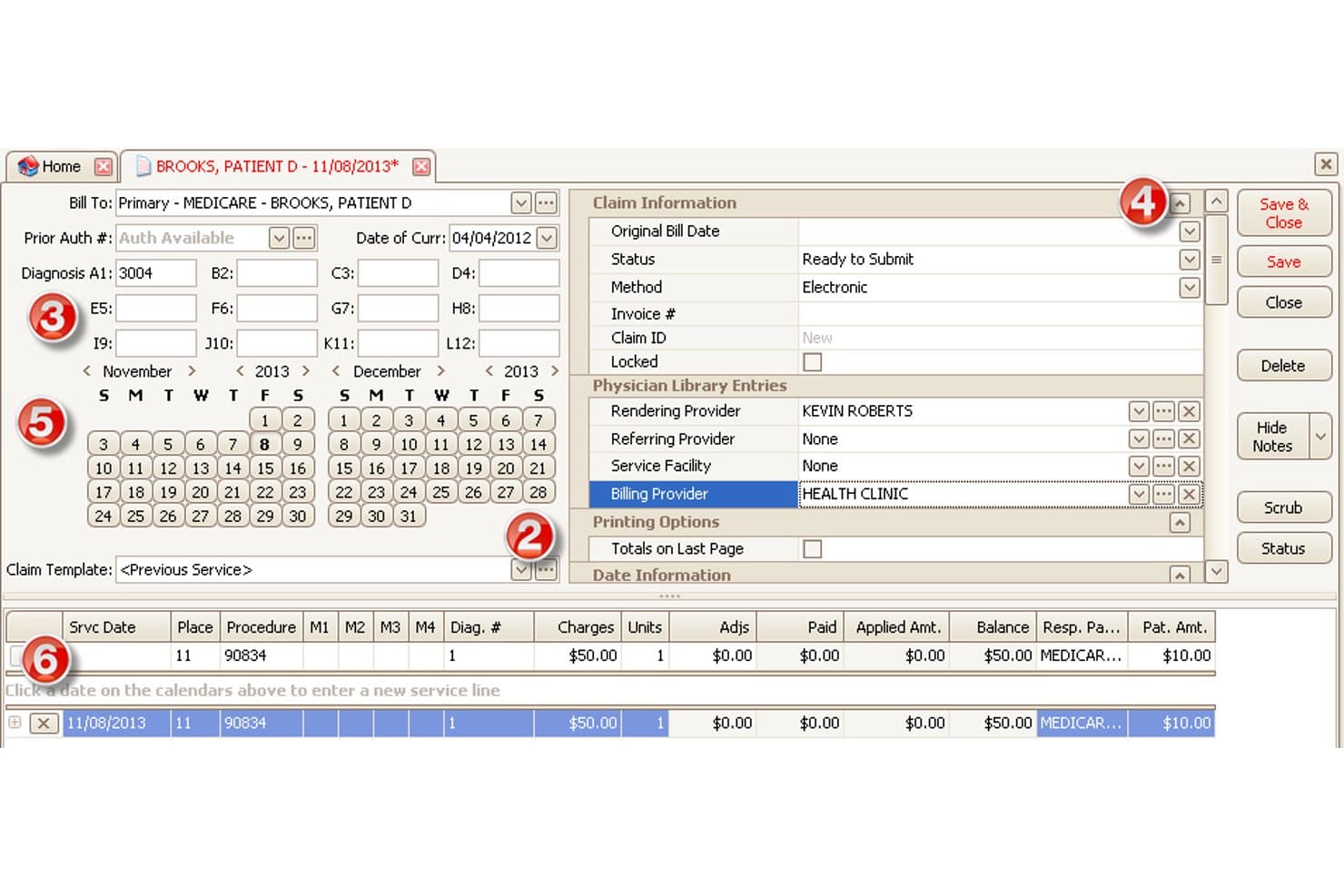
EZClaim offers a detailed claim entry screen with diagnosis codes, billing provider fields, service line charges, and calendar-based date selection for medical billing. EZClaim is a cloud-based medical billing and scheduling software for small-to-mid-sized practices that handles electronic claim submission, real-time eligibility verification, patient statements, and payment processing for US payers.
Who Is EZClaim Best For?
EZClaim is a strong fit for independent practices and outsourced billing companies that need straightforward US claims management without the complexity of enterprise RCM platforms.
Why I Picked EZClaim
EZClaim earns its spot on my shortlist because it keeps the claims process genuinely straightforward without stripping out the features that matter. I particularly like the built-in claim scrubbing, which catches coding and formatting errors before submission rather than after a payer rejection. The task management system is also something I use to flag and follow up on outstanding claims directly within the platform, which keeps accounts receivable from slipping through the cracks.
EZClaim Key Features
- Real-time eligibility verification: Instantly checks patient insurance eligibility and coverage through direct payer connections.
- HIPAA-compliant patient statements: Generates branded, compliant statements with integrated payment processing and audit tracking.
- Customizable reporting dashboards: Creates, filters, and exports over 40 financial and billing reports for operational insights.
- EHR and clearinghouse integrations: Connects with partner EHRs and supports direct claim submission via TriZetto and other clearinghouses.
EZClaim Integrations
EZClaim offers native integrations with TriZetto, Practice Fusion, WebPT, QuickEMR, HomeTrak, BillFlash, and ReminderCall. An API is available for custom integrations.
Pros and Cons
Pros:
- Useful reporting suite for billing staff
- Real-time insurance eligibility checks included
- Claim scrubbing flags errors before submission
Cons:
- Reporting interface looks dated
- Denial management is mostly manual
Learn more about EZClaim: Best for cloud-based medical billing
- Free demo available
- Pricing upon request
Visit WebsiteCustomer Rating:4.1/5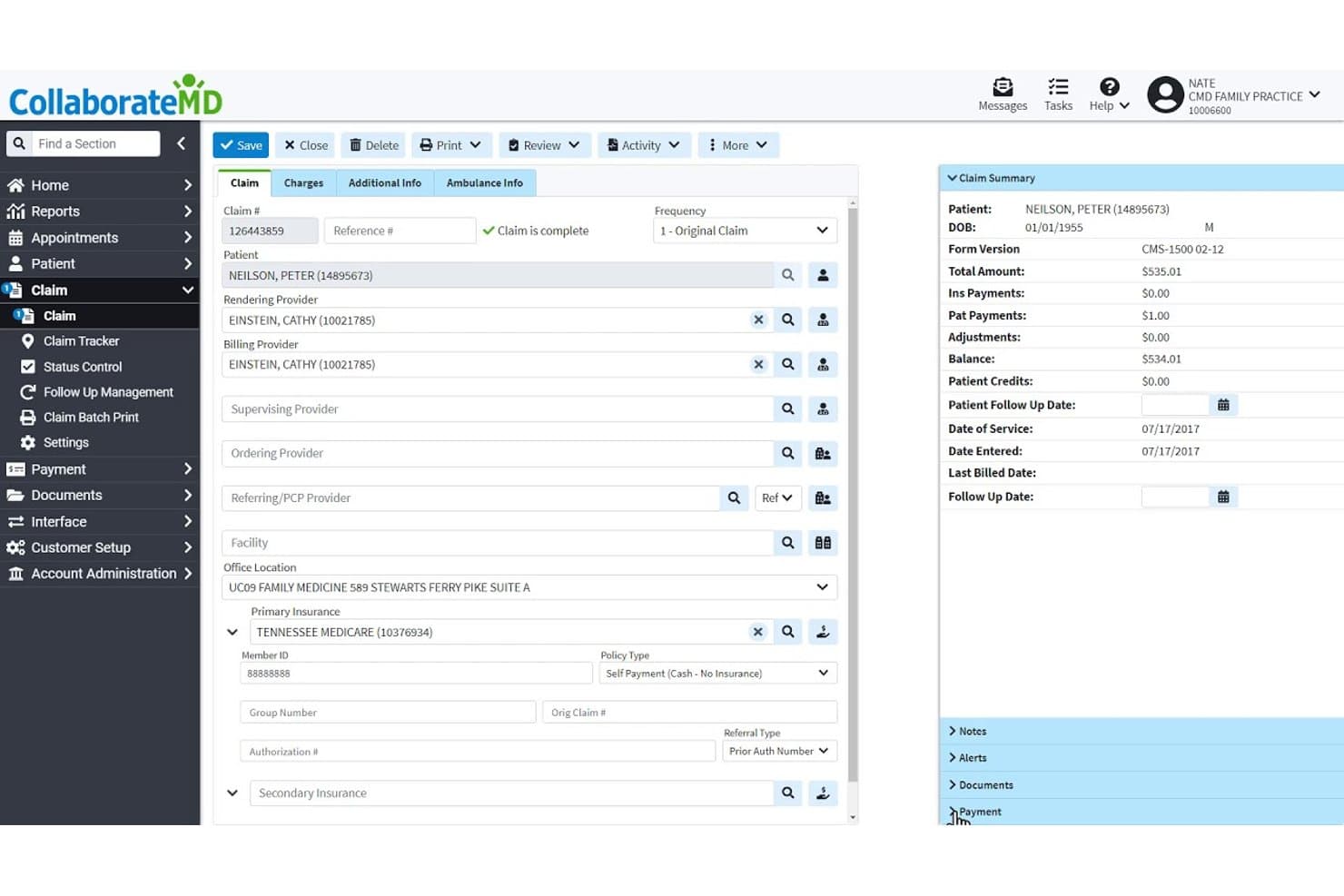
CollaborateMD offers a detailed claim management screen with patient info, provider fields, insurance details, and a real-time claim summary panel. CollaborateMD is a cloud-based medical billing and practice management platform with a built-in clearinghouse, real-time eligibility verification, AI-powered claim rejection support, and revenue cycle analytics for US practices and billing companies.
Who Is CollaborateMD Best For?
CollaborateMD is a strong fit for small to mid-sized US practices and independent medical billing companies that want a dedicated billing platform without a built-in EHR.
Why I Picked CollaborateMD
CollaborateMD earns its spot on my shortlist because it's purpose-built as a cloud-native billing platform with real-time claim submission and no server infrastructure to manage. I particularly like the AI-powered Universal Import, which maps EHR exports from virtually any system directly into claims, cutting manual data re-entry. The Intelligent Claim Rejection Support then translates payer rejection codes into plain-language next steps inside the claim workflow itself.
CollaborateMD Key Features
- Real-time eligibility verification: Instantly checks patient insurance coverage through 270/271 transactions with US payers.
- Built-in clearinghouse: Processes electronic claims, ERAs, and paper claims directly within the software.
- Customizable reporting tools: Offers over 125 configurable reports for tracking AR, denial reasons, and practice KPIs.
- Patient payment portal: Supports secure online payments, payment plans, and digital patient statements in one interface.
CollaborateMD Integrations
CollaborateMD offers native interfaces with preferred EHR partners and lab systems including Quest Diagnostics and LabCorp, and provides a WebAPI for custom EHR, mobile, and billing integrations.
Pros and Cons
Pros:
- Detailed AR and denial management reports
- Real-time eligibility and benefits checking
- Built-in clearinghouse for claim submissions
Cons:
- Limited clearinghouse flexibility compared to competitors
- No built-in electronic health record
Learn more about CollaborateMD: Best for multi-specialty practices
- Free demo available
- Pricing upon request
Visit WebsiteCustomer Rating:4.1/5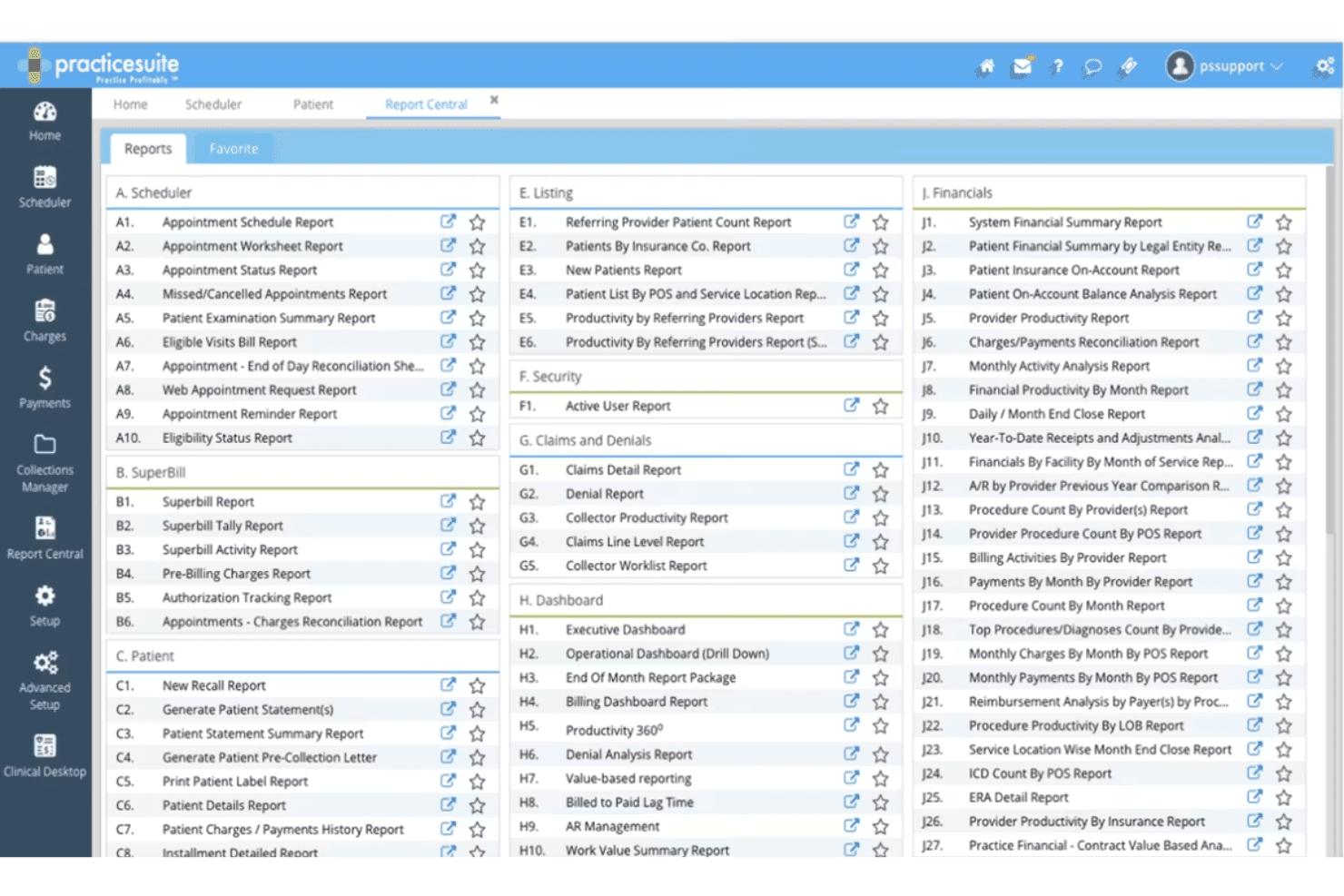
PracticeSuite Report Center highlights service location reports. PracticeSuite is a cloud-based medical billing platform covering claims submission, eligibility verification, coding validation, denial management, and RCM across 150+ billing specialties for both physician practices and billing companies.
Who Is PracticeSuite Best For?
PracticeSuite is a strong fit for multi-specialty group practices and medical billing companies that manage claims across multiple clients or provider types from a single platform.
Why I Picked PracticeSuite
PracticeSuite earns its spot on my shortlist because it supports 150+ billing specialties natively, so I'm not building workarounds when a practice adds a new specialty. I particularly like the Enterprise Claims Management dashboard, which lets my team track denials, payment posting, and AR across every specialty from one view. The AI-driven pre-submission denial intelligence also catches payer-specific issues before claims go out, which matters when managing multiple billing workflows at once.
PracticeSuite Key Features
- Automated claim scrubbing: Runs claims through error and compliance checks before submission to reduce rejections.
- Era/eft auto-posting: Posts remittances and payments electronically, reconciling contractual adjustments automatically.
- Real-time eligibility verification: Checks patient insurance benefits with payers during scheduling or at the point of service.
- Patient payment portal: Lets patients pay online, set up payment plans, and access digital statements through a secure branded portal.
PracticeSuite Integrations
PracticeSuite offers native integrations with Practice Fusion, Elation Health, Opus EHR, and clearinghouse partners including Change Healthcare, Trizetto, and Availity. Lab and pharmacy connections, e-prescribing, and an API for custom integrations are also available.
Pros and Cons
Pros:
- Central billing office dashboard for groups
- Bulk claim editing and batch processing
- Supports 150+ billing specialties and subspecialties
Cons:
- Contract disputes occasionally reported by users
- Reporting setup can be time-intensive
Learn more about PracticeSuite: Best for enterprise revenue cycle management
- Free demo available
- Pricing upon request
Visit WebsiteCustomer Rating:3.7/5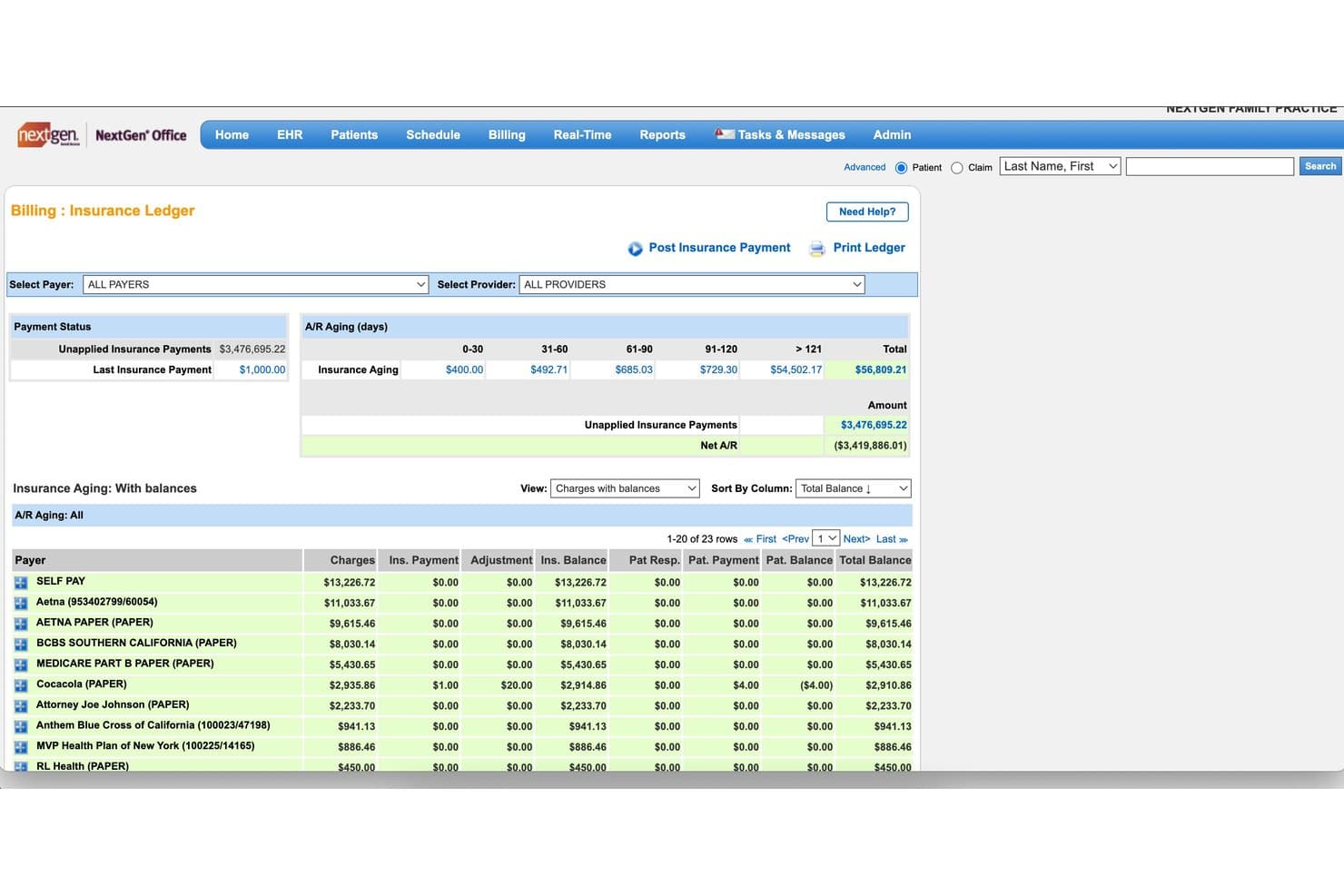
NextGen Healthcare offers a detailed Insurance Ledger with A/R aging buckets, payer balances, and unapplied payment tracking for medical billing management. NextGen Healthcare is an ambulatory-focused medical billing and RCM platform that handles claims submission, eligibility verification, denial management, coding services, and payment posting for mid-size to enterprise US practices.
Who Is NextGen Healthcare Best For?
It's a strong fit for multi-specialty ambulatory practices and medical billing teams managing high claim volumes across complex payer mixes.
Why I Picked NextGen Healthcare
NextGen Healthcare earns its spot on my shortlist because of how it handles enterprise-scale RCM without sacrificing specialty-specific nuance. I especially like the AI Rules Engine, which scrubs claims before submission using payer-specific edits to reduce rejections before they reach the clearinghouse. I also appreciate the dedicated A/R Recovery service, where a professional recovery team follows outstanding balances, paired with monthly consultative analytics reviews from RCM subject-matter experts assigned to your specialty.
NextGen Healthcare Key Features
- Integrated clearinghouse connectivity: Connects directly to major US clearinghouses for real-time claim routing and remittance processing.
- Real-time eligibility verification: Performs instant insurance eligibility checks with US payers through automated 270/271 transactions.
- Patient payment portal: Offers a branded online portal for bill pay, payment planning, text-to-pay, and digital statement delivery.
- ERA and EFT auto-posting: Automates electronic remittance advice and electronic funds transfer posting, including contractual adjustment reconciliation.
NextGen Healthcare Integrations
NextGen Healthcare offers native integrations with NextGen Enterprise EHR, NextGen Practice Management, Mirth Connect Integration Engine, and NextGen Share for lab connectivity. An API is available for custom integrations.
Pros and Cons
Pros:
- Real-time insurance eligibility verification
- Dedicated A/R specialists monitor aged claims
- Claim scrubbing reduces payer rejections
Cons:
- Reporting customization can be limited
- Steep onboarding process for new staff
Learn more about NextGen Healthcare: Best for independent practice billing
- 14-day free trial; Free demo available
- Pricing upon request
Visit WebsiteCustomer Rating:3.9/5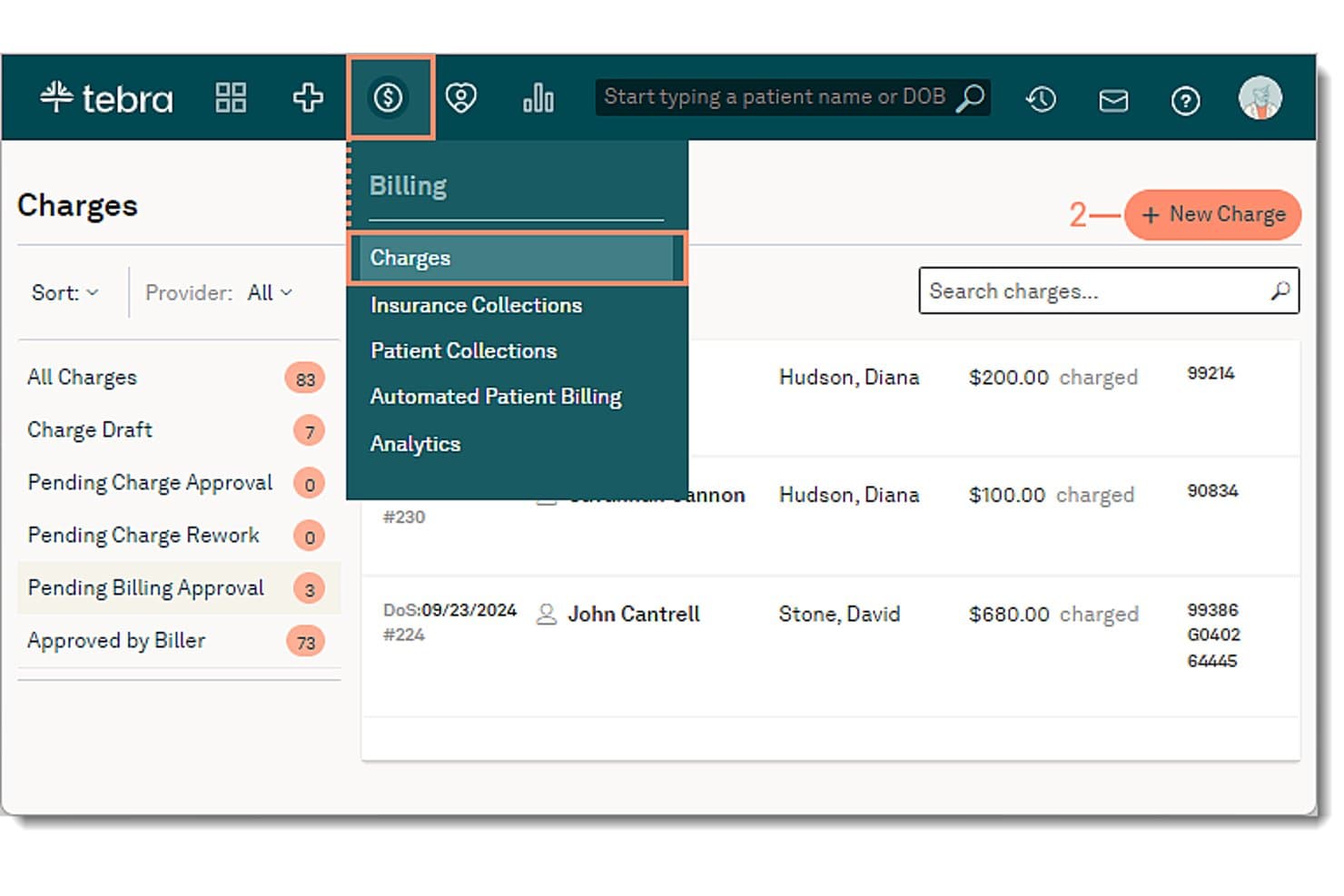
Tebra offers a Charges billing dashboard where users can create new charges, filter by provider, and view patient billing details with procedure codes. Tebra is an EHR+ platform built for independent medical practices that combines clinical charting, insurance claims processing, eligibility verification, denial management, and patient billing in a single system.
Who Is Tebra Best For?
Tebra fits small independent practices—particularly those with one to a few providers—that want one platform to handle both clinical and billing workflows.
Why I Picked Tebra
I picked Tebra as one of the best because it keeps billing tightly connected to clinical workflows from the very start. The scheduling calendar runs real-time 270/271 eligibility checks before a patient is ever seen, which cuts denials before a claim is created. Claims then pass through TriZetto scrubbing for coding errors, and ERAs post back automatically via RPA. I like that billers can track every outstanding claim from a single dashboard without switching between systems.
Tebra Key Features
- ICD-10 and CPT code lookup: Search and validate codes using updated US coding standards within claims and encounters.
- Patient payment portal: Allow patients to review statements and make payments securely online.
- ERA auto-posting: Automatically post electronic remittance advice to patient accounts without manual data entry.
- Configurable KPI dashboards: Display key revenue and claims metrics for at-a-glance financial reporting and workflow monitoring.
Tebra Integrations
Tebra offers native integrations with TriZetto for claim scrubbing, Appriss Health for PDMP, and supports HL7 and FHIR API bridges for interoperability with many major EHR systems. An API is available for custom integrations.
Pros and Cons
Pros:
- Patient payment portal with online billing
- Automated claim scrubbing reduces payer denials
- Real-time insurance eligibility at appointment scheduling
Cons:
- Occasional delays with electronic remittance posting
- Claims reporting is less customizable than competitors
Learn more about Tebra: Best for mobile billing and RCM workflows
- Free demo available
- Pricing upon request
Visit WebsiteCustomer Rating:3.9/5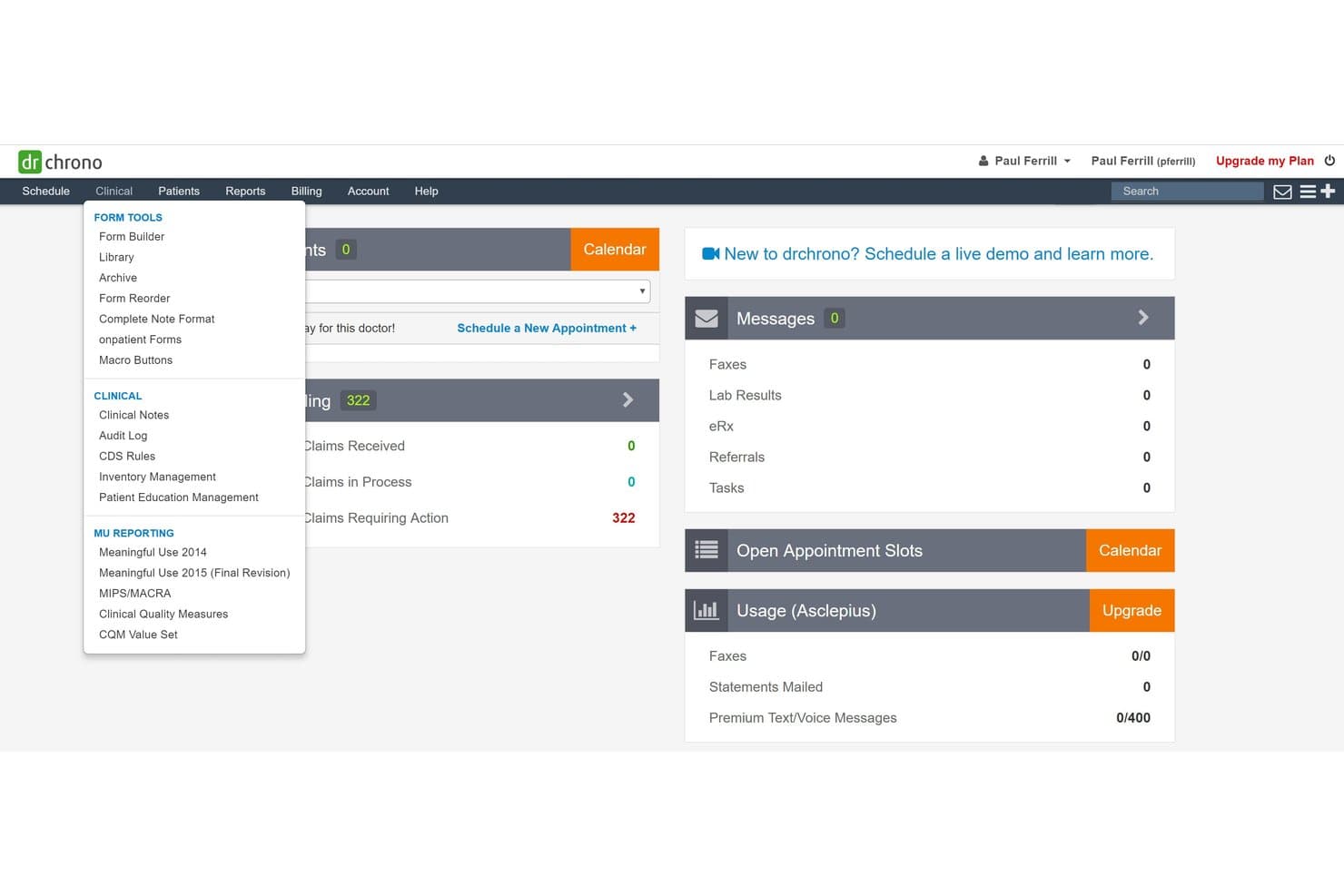
DrChrono offers a Clinical dropdown menu with form tools, clinical notes, and MU reporting options within its medical billing dashboard. DrChrono is a cloud-based EHR and medical billing platform that combines claim submission, RCM, eligibility verification, denial management, and patient billing in a single system built for independent US medical practices.
Who Is DrChrono Best For?
DrChrono is a strong fit for small independent practices that need a mobile-first billing and clinical workflow, particularly those operating across multiple locations or on the go.
Why I Picked DrChrono
I've included DrChrono in my top picks because its native iOS app lets providers complete a full clinical encounter and submit claims without switching to a desktop. The Live Claims Feed gives real-time visibility into claim status directly from an iPad, which I find genuinely useful for mobile or multi-site billing workflows. The integrated EHR-to-billing pipeline also means diagnoses and procedure codes flow directly into claim generation, cutting out manual data re-entry.
DrChrono Key Features
- Integrated clearinghouse connection: Submit and manage claims directly through a built-in integration with eProvider Solutions.
- Real-time insurance eligibility verification: Check patient eligibility and benefits instantly using automated 270/271 transactions before appointments.
- Customizable billing profiles: Store and apply specialty-specific coding templates and charge structures for different visit types.
- Electronic remittance auto-posting: Automatically post ERA and EOB data to patient accounts to speed up payment reconciliation.
DrChrono Integrations
DrChrono offers native integrations with Quest Diagnostics, LabCorp, Fullscript, Collectly, eProvider Solutions, Square, and Medsender. An API is available for custom integrations, and additional apps can be accessed through the DrChrono Marketplace.
Pros and Cons
Pros:
- Built-in automated eligibility and payment posting
- Real-time claims feed on iPad and web
- Mobile app supports full billing cycle
Cons:
- No institutional UB-04 billing support
- Single clearinghouse limits payer options
Learn more about DrChrono: Best for outsourced billing and revenue cycle
- Free demo available
- Pricing upon request
Visit WebsiteCustomer Rating:3.6/5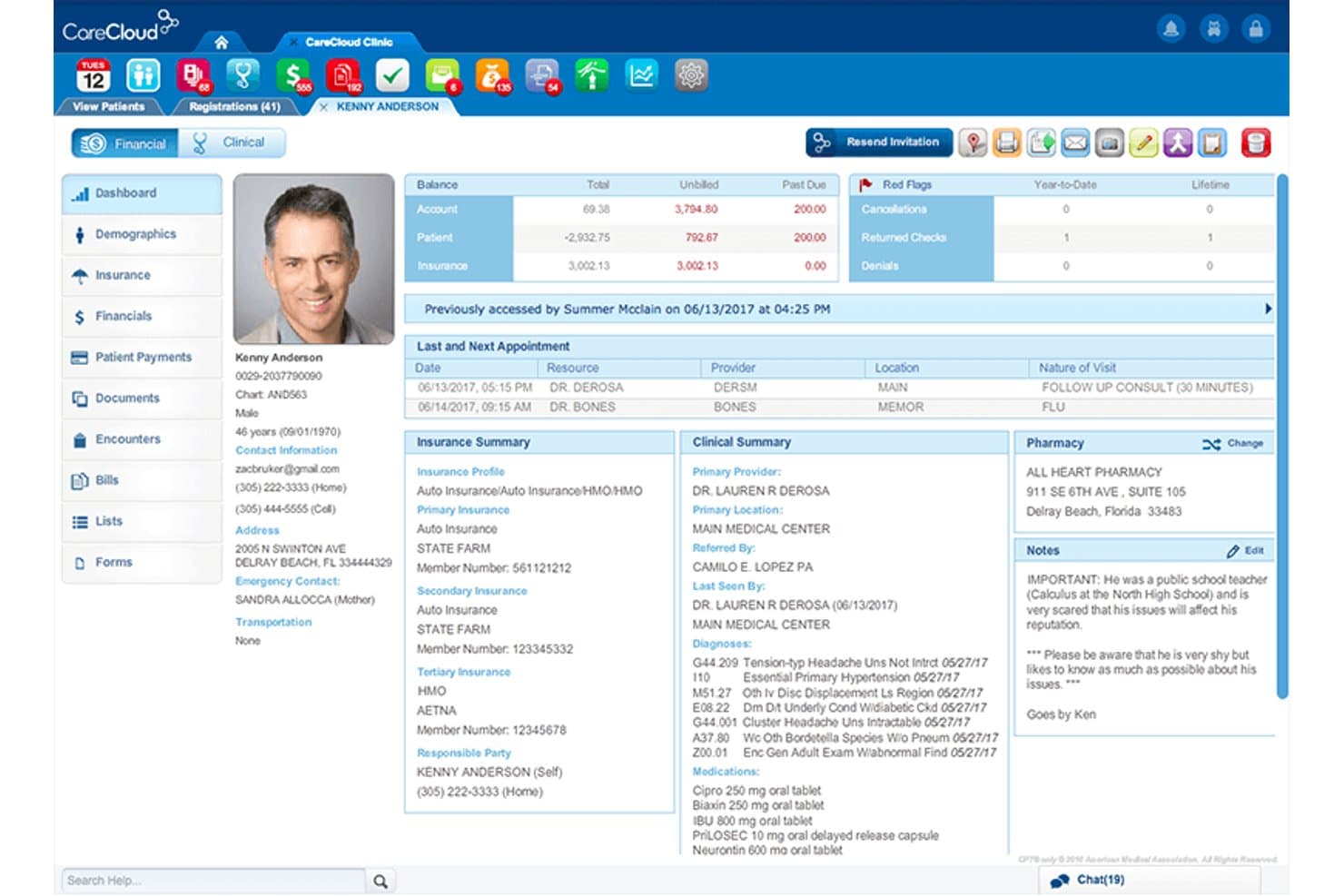
CareCloud offers a comprehensive patient profile dashboard displaying billing balances, insurance summaries, clinical notes, and appointment history in one unified view. CareCloud is a cloud-based RCM platform that combines AI-powered claims scrubbing, medical coding, denial management, and eligibility verification with an optional fully outsourced billing service.
Who Is CareCloud Best For?
CareCloud suits independent and group practices that want to outsource their revenue cycle without replacing their existing practice management system.
Why I Picked CareCloud
CareCloud earns its spot on my shortlist because of the CareCloud Concierge service, which pairs the RCM platform with a dedicated back-office billing team. What I like most is the PM-agnostic setup: you don't have to replace your existing practice management system to outsource your billing. The CollectiveIQ billing rules engine scrubs every claim before submission, which is what drives first-pass rates above 94%.
CareCloud Key Features
- Real-time eligibility checks: Instantly verifies patient insurance details with US payers using 270/271 transactions.
- Integrated patient payment portal: Lets patients pay bills online, enroll in payment plans, and view digital statements.
- Advanced denial analytics: Tracks denial reasons, payer performance, and exposes trends using dashboard reporting.
- ERA/EOB auto-posting: Automatically posts electronic remittance advices and explanations of benefits for faster reconciliation.
CareCloud Integrations
CareCloud offers native integrations with CareCloud Central, Charts-EHR, Breeze, and Community. It is EHR and practice management system agnostic and provides an API for custom integrations.
Pros and Cons
Pros:
- Detailed denial and AR analytics dashboards
- CollectiveIQ engine boosts first-pass claim rates
- Outsourced billing available for any PM system
Cons:
- Some users report slow billing support responses
- Opaque contract terms and early termination fees
Learn more about CareCloud: Best for automated billing and claims workflows
- Free demo available
- Pricing upon request
Visit WebsiteCustomer Rating:3.6/5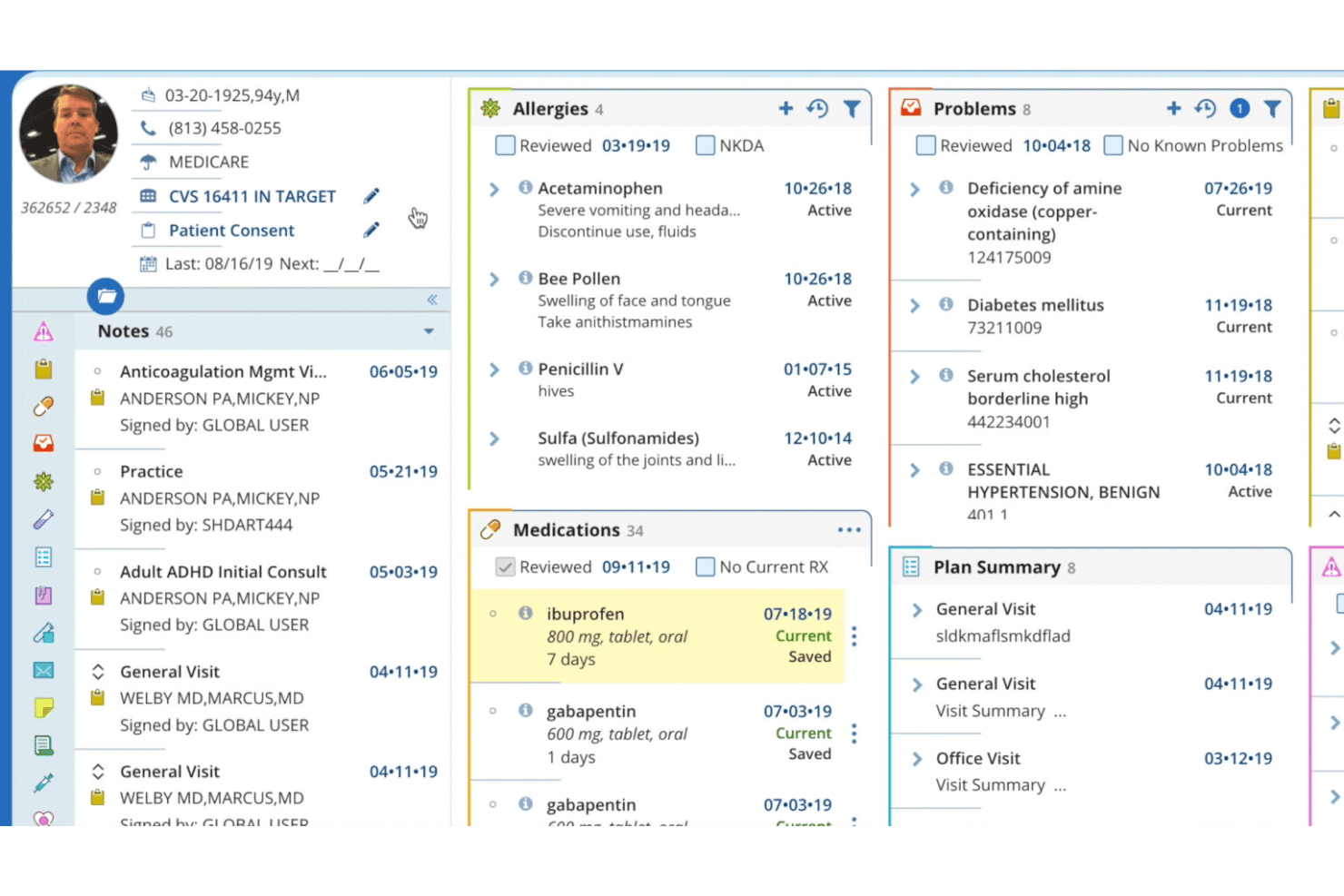
AdvancedMD patient record view with allergies, medications, and care plans. AdvancedMD is a cloud-based medical billing and practice management platform built for independent practices, offering claims management, clearinghouse integration, eligibility verification, denial tracking, and patient payment processing.
Who Is AdvancedMD Best For?
AdvancedMD is a strong fit for high-volume independent practices and third-party billing companies managing claims across multiple providers or locations.
Why I Picked AdvancedMD
I picked AdvancedMD as one of the best because its ClaimInspector engine runs 3.5 million pre-submission edits, catching CCI conflicts, LCD errors, and HIPAA issues before a claim ever reaches a payer. That level of automated scrubbing is what backs its 95% first-pass acceptance rate. I also rely on the A/R Control Center, which organizes denial reason codes into actionable worklists so my billing team can prioritize resubmissions without manually combing through payer portals.
AdvancedMD Key Features
- Integrated clearinghouse: Connects directly with 1,800+ US payers for ERA/835 remittance downloads and real-time claim status.
- Real-time eligibility verification: Performs instant eligibility and benefits checks using 270/271 transactions at check-in or scheduling.
- Patient payment portal: Offers a branded online portal for bill pay, payment plans, and digital statements.
- Role-based access controls: Lets you customize user permissions by provider, location, or role across multi-site practices.
AdvancedMD Integrations
AdvancedMD offers native integrations with Waystar Clearinghouse, Inbox Health, ChartRequest, DAX Copilot, DeepScribe, Doctorsoft, InstaMed, LeadSquared, NextPatient, and QuickBooks. An API is available for custom integrations.
Pros and Cons
Pros:
- Detailed denial tracking with actionable worklists
- Batch eligibility checks for multiple patients
- Claims scrubbing detects payer-specific errors pre-submission
Cons:
- Clearinghouse enrollment process is sometimes slow
- Reporting customization can require vendor assistance
 Best for network-driven billing and collections
- Free demo available
- Pricing upon request
Visit WebsiteCustomer Rating:5/5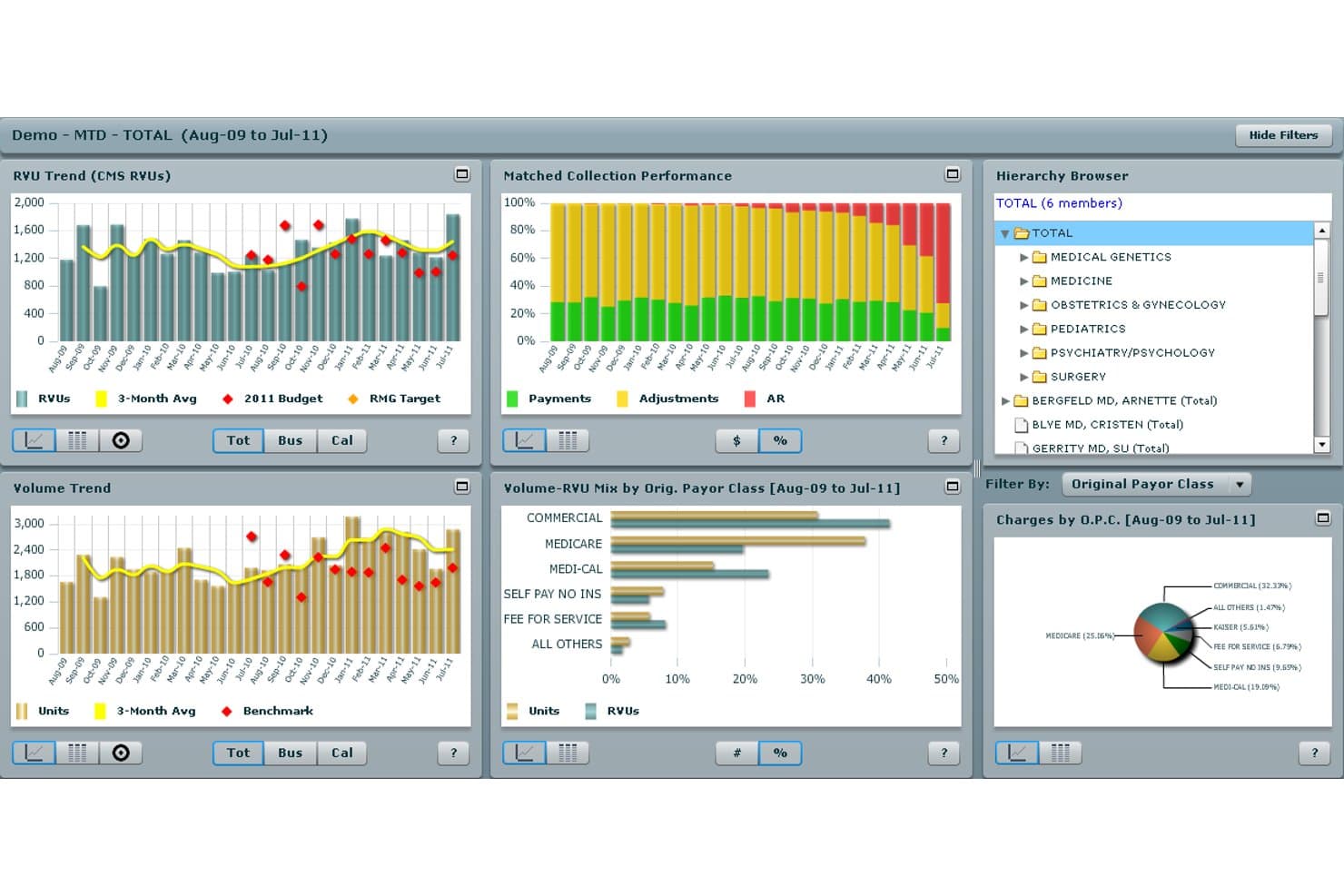
Athenahealth offers a comprehensive medical billing dashboard with RVU trends, matched collection performance, volume trends, and payor class breakdowns for practice analytics. athenaOne is a cloud-based EHR and revenue cycle management platform that combines claims processing, coding, eligibility verification, denial management, and patient billing within a network-connected system shared across 100,000+ providers.
Who Is Athenahealth Best For?
Athenahealth is a strong fit for independent and small-to-mid-sized practices that want a fully managed billing operation without building a large in-house RCM team.
Why I Picked Athenahealth
I picked Athenahealth as one of the best because its billing rules engine draws on real claims data from over 100,000 providers across its network. Before a single claim leaves my practice, the system runs it through 30,000+ payer-specific rules built from that collective experience. I also like the AI-powered denial advice, which gives plain-language guidance on why a claim was flagged rather than leaving my billing team to decode reason codes manually.
Athenahealth Key Features
- AI-powered express coding: Suggests E&M and CPT codes based on documentation and practice guidance to expedite accurate coding.
- Real-time eligibility verification: Instantly checks patient insurance eligibility using 270/271 transactions for US payers.
- Patient payment portal: Supports online bill pay, payment plans, and secure patient statements with HIPAA safeguards.
- ERA and EFT auto-posting: Automatically posts remittance advices and electronic funds transfers with exception management queues.
Athenahealth Integrations
Athenahealth offers native integrations with over 277,000 clinical endpoints, including labs, pharmacies, diagnostic centers, and clearinghouses such as Change Healthcare, Availity, and Trizetto. An API is available for custom integrations.
Pros and Cons
Pros:
- High clean-claim rates across payer types
- Robust medical coding assistance with AI suggestions
- Network-driven denial intelligence updates continuously
Cons:
- Reporting customization can be limited
- Some denials not managed by billing service
Learn more about Athenahealth:
Other US Medical Billing Software
Here are some additional US medical billing software options that didn’t make it onto my shortlist, but are still worth checking out:
- 11CureMDBest for practice management
- 12eClinicalWorksBest for integrated EHR and billing workflows
- 13RXNTBest for affordable integrated medical billing
- 14PrognoCISBest for customizable billing workflows
- 15ModMedBest for specialty billing and practice management
- 16MEDISOFTBest for established billing offices
- 17Greenway HealthBest for specialty billing and RCM
- 18AllegianceMDBest for automated claims and payment posting
- 19AvailityBest for payer connectivity and eligibility checks
How to Choose US Medical Billing Software
It’s easy to get bogged down in long feature lists and complex pricing structures. To help you stay focused as you work through your unique software selection process, here’s a checklist of factors to keep in mind:
| Factor | What to Consider |
| Scalability | Will this software grow with your practice if you add locations, providers, or specialties? Consider future expansion and multi-tax-ID or multi-location support. |
| Integrations | Does it sync with your EHR, practice management, and clearinghouse? Avoid manual entry and check for HL7 or FHIR API compatibility with your current systems. |
| Customizability | How easily can you configure coding rules, billing workflows, or user permissions to match your specialty or organizational processes? |
| Ease of use | Can your team learn the system quickly? Look for clear navigation, simple claim workflows, and strong user training resources to avoid adoption friction. |
| Implementation and onboarding | What’s the typical timeline for setup, training, and data migration? Ask about vendor onboarding support and any client-responsible tasks. |
| Cost | Are fees per claim, per provider, or a percent of collections? Account for hidden costs like clearinghouse fees, add-ons, support, and long-term price increases. |
| Security safeguards | Does the platform provide HIPAA compliance, encrypted data storage, audit trails, and a signed BAA? Confirm its approach to PHI security and incident response. |
| Support availability | How fast can you reach live support for urgent issues? Confirm if support is US-based and what hours or channels are available for technical or billing questions. |
What Is US Medical Billing Software?
US medical billing software is a digital platform that automates the process of preparing, submitting, and tracking insurance claims and patient billing for healthcare providers in the United States. These systems handle insurance coding, compliance, payment posting, and collections while supporting HIPAA data privacy standards to help practices manage revenue and administrative tasks efficiently.
Features of US Medical Billing Software
When selecting US medical billing software, keep an eye out for the following key features:
- Electronic claims submission: Automates the generation and electronic delivery of CMS-1500 and UB-04 claims to commercial, Medicare, and Medicaid payers.
- Claim scrubbing: Reviews claims for coding errors, missing information, or payer-specific rules before submission to help lower denial rates.
- Eligibility verification: Performs real-time insurance eligibility and benefits checks at scheduling or check-in, reducing claim rejections due to coverage issues.
- ICD-10 and CPT code support: Includes code lookup tools and validation for current medical coding standards, improving coding accuracy and compliance.
- Denial management: Tracks denied claims, flags reason codes, and provides workflows for appeals or resubmissions to speed up reimbursement.
- ERA and payment posting: Automatically posts electronic remittance advice and payments from payers, reconciling patient balances and reducing manual data entry.
- Patient billing and payment portal: Generates statements and offers a secure online portal for patients to pay bills, set up payment plans, or manage balances.
- Reporting and analytics: Provides dashboards and reports on claim status, days in A/R, denials, and collections so you can monitor financial performance.
- HIPAA compliance: Protects patient health information with encryption, role-based access, and legal safeguards to align with US healthcare privacy laws.
- Practice management integration: Syncs with EHR, scheduling, and front-office systems to reduce duplicate data entry and streamline workflows.
Benefits of US Medical Billing Software
Implementing US medical billing software provides several benefits for your team and your business. Here are a few you can look forward to:
- Faster reimbursement cycles: Automated claims submission and electronic payment posting help speed up payments from insurers and patients.
- Lower denial rates: Built-in claim scrubbing and real-time eligibility checks catch errors and coverage issues before claims go out.
- Improved billing accuracy: ICD-10 and CPT code validation reduces coding errors and keeps your practice up to date with evolving compliance requirements.
- Reduced administrative workload: Tools for denial management, reporting, and patient billing portal minimize manual tasks and help your staff focus on higher-value work.
- Greater financial visibility: Dashboards and analytics provide real-time insight into accounts receivable, claim status, and revenue trends for informed decision-making.
- Stronger data security: HIPAA-compliant encryption, access controls, and audit trails help safeguard protected health information and support privacy compliance.
- Better patient experience: Secure payment portals and clear online statements make it easier for patients to manage and pay their bills, improving satisfaction.
Costs and Pricing of US Medical Billing Software
Selecting US medical billing software requires an understanding of the various pricing models and plans available. Costs vary based on features, team size, add-ons, and more. The table below summarizes common plans, their average prices, and typical features included in US medical billing software solutions:
Plan Comparison Table for US Medical Billing Software
| Plan Type | Average Price | Common Features |
| Free Plan | $0 | Basic electronic claims submission, manual eligibility checks, limited reporting, and community support. |
| Personal Plan | $50-$100/month | Electronic claims filing, basic claim scrubbing, manual payment posting, HIPAA compliance tools, and standard user support. |
| Business Plan | $200-$500/month | Real-time eligibility verification, automated payment posting, advanced analytics, patient billing portal, and role management. |
| Enterprise Plan | $800-$2000+/month | Full EHR and PM integrations, multi-site management, dedicated onboarding, custom reporting, and priority customer support. |
How I Evaluate US Medical Billing Software
I evaluate these tools in two layers: baseline billing requirements like 837 claim submission and denial tracking, and the differentiators that separate one platform from another.
Core Functionality (Table Stakes for This List)
When I'm selecting tools for my list, I rank each one on a scale from 0 (does not offer the functionality) to 5 (excels in this area) for each core functionality listed below. Then, I calculate the tool's total score into a percentage. Each tool needs to achieve a minimum total score of 65% to be considered for inclusion.
- US Claims Processing: I check whether the platform handles electronic CMS-1500 and UB-04 submission via 837P/I formats, including claim scrubbing that catches errors before they reach the payer.
- Clearinghouse Integration: The tool should connect to major US clearinghouses like Change Healthcare, Availity, or Trizetto for claim routing and ERA/835 remittance retrieval.
- Eligibility Verification: I look for real-time 270/271 eligibility checks that pull benefits, copays, and coverage details at scheduling or check-in to prevent denials downstream.
- ICD-10 and CPT Coding: Built-in code lookup and validation for ICD-10-CM, CPT, and HCPCS matters here, especially modifier support and NCCI edit checks that flag bundling issues.
- Denial and AR Management: I evaluate how each platform tracks claim status, surfaces denial reason codes, and supports appeal workflows with aging reports to keep receivables moving.
- HIPAA-Compliant Patient Billing: Each tool should generate patient statements and process payments within HIPAA safeguards, ideally with online payment options and BAA-backed compliance.
Once I have a list of tools that meet the criteria, I consider what sets each platform apart.
Differentiating Factors (What Sets Vendors Apart)
Here's how I compare and contrast different vendors:
Standout Features
Analytics dashboards are where I see the biggest gap between vendors. I look for configurable reporting on days in A/R, clean claim rate, and denial reasons so you can spot revenue leakage fast. ERA/EFT auto-posting is another major differentiator—platforms that reconcile contractual adjustments and flag underpayments save billing teams hours of manual work. I also evaluate patient payment portals, especially features like text-to-pay, payment plans, and card-on-file that make it easier to collect patient balances.
Beyond Features
Clearinghouse and payer connectivity is a big one—I check whether a platform supports Medicare, Medicaid, Tricare, and Workers' Comp alongside commercial payers, since gaps here mean manual workarounds. EHR integration matters just as much. Bidirectional syncing of demographics, charges, and encounters via HL7 or FHIR APIs prevents double entry and keeps billing data accurate. I also evaluate specialty and practice size fit, especially configurable coding rules for areas like behavioral health, anesthesia, or DME, and multi-location, multi-tax-ID support for growing groups.
US Medical Billing Software FAQs
Here are some answers to common questions about US medical billing software:
How does medical billing software support insurance compliance?
US medical billing software stays current with HIPAA, ICD-10, CMS, and other payer rules, helping your team submit claims using the right formats and codes. Most platforms also provide built-in compliance tools and regular updates to keep practices aligned with regulations.
Can I use medical billing software with my existing EHR system?
Yes, most leading US medical billing software offers integrations with common EHR platforms via HL7 or FHIR APIs. This lets you sync patient data, charges, and clinical documentation, which helps reduce double entry and improve billing accuracy.
What should I check before choosing a billing software vendor?
Ask about clearinghouse connections, payer network support, contract terms, customer service response times, and the onboarding process. Make sure the tool matches the scale of your operation and can support any specialties or billing scenarios unique to your practice.
Do these solutions handle patient billing and payments?
Yes, most US medical billing software includes features for sending patient statements and online payment collection. Look for systems with branded patient portals, text-to-pay, or payment plans if you want to improve your collections process.
How long does it take to implement medical billing software?
Implementation timelines can vary widely. For smaller practices, setup may take a few days to a couple of weeks; for larger or multi-location groups, expect several weeks or more, especially if complex data migration or custom integrations are needed.