

EMR scheduling software lets you book, manage, and track patient appointments within your electronic medical record system. If you’re researching the best EMR scheduling software, you likely need a way to make scheduling less time-consuming and more accurate for your team. From preventing double-booked slots to enabling quicker patient access and keeping records organized, the right tool can take a lot of frustration off your plate. In this guide, you’ll find clear options tailored to different practice sizes, workflows, and specialties so you can choose the system that actually fits how your team delivers care.
Why Trust Our Software Recommendations
6,700+
Reviews
20
Industry experts
16+
Evaluation factors
14
Years
Our team has been testing and reviewing software since 2012. As medical practice leaders ourselves, we know how difficult—and important—it is to choose the right software.
For this guide, we evaluated tools using hands-on testing and independent research, scoring tools using our selection criteria.
Our reviews reflect our human editorial judgment, not a sales pitch.
EMR Scheduling Software Comparison Table
This comparison table outlines pricing for my top EMR scheduling software picks:
| Tool | Best For | Trial Info | Price | ||
|---|---|---|---|---|---|
| 1 | Best for allied health scheduling and charting | Free demo available | From $59/month | Website | |
| 2 | Best for scheduling backed by 60-plus EHR syncs | Free demo available | Pricing upon request | Website | |
| 3 | Best for automating patient access | Free demo available | Pricing upon request | Website | |
| 4 | Best for scheduling tied to kiosk check-in | Free plan available | From $25/month | Website | |
| 5 | Best for intake-linked scheduling and charting | Free trial available. | $59.90/month | Website | |
| 6 | Best for independent practice scheduling and intake | Free demo available | Pricing upon request | Website | |
| 7 | Best for AI-driven waitlist and slot recovery | Free demo available | Pricing upon request | Website | |
| 8 | Best for health record-native scheduling at scale | Not available | Pricing upon request | Website |


Best EMR Scheduling Software Reviews
Below are my detailed summaries of the free EMR scheduling softwares that made it onto my shortlist. My reviews offer a detailed look at the features, best use cases, and pricing of each platform to help you find the best one for you.
 1Best for allied health scheduling and charting
Jane
- Free demo available
- From $59/month
Visit WebsiteCustomer Rating:4.8/5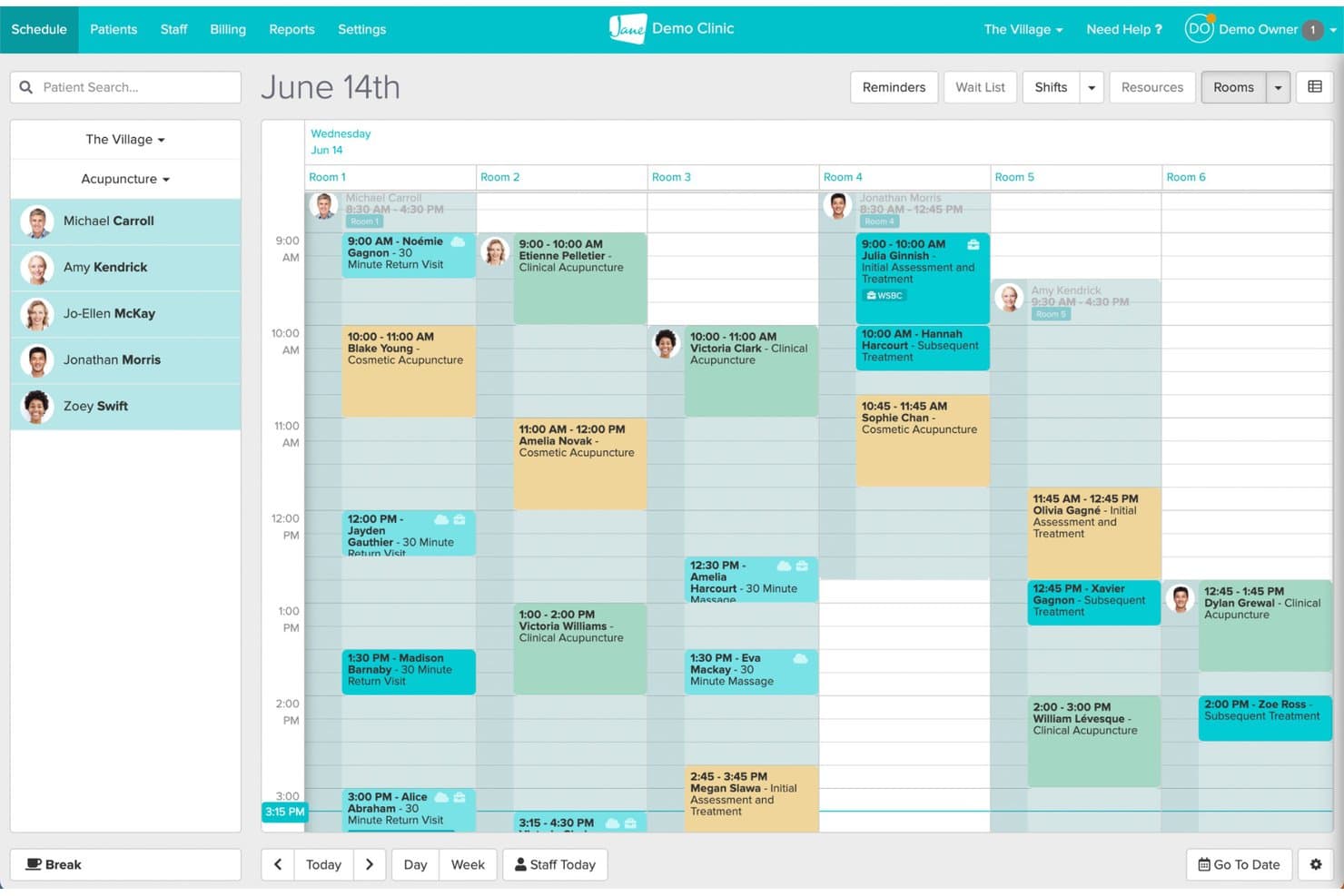
Jane's room-based scheduling view organizes daily appointments across multiple rooms. Jane is a clinic management platform that brings together online booking, scheduling, clinical charting, billing, and patient communication in one connected system built for allied health practices.
Who Is Jane Best For?
Jane fits allied health clinics—chiropractic, physiotherapy, occupational therapy—that want scheduling, charting, and billing managed in one place without juggling separate tools.
Why I Picked Jane
I picked Jane as one of the best because it's built specifically for allied health workflows, keeping scheduling and clinical charting genuinely connected in one system. I like how chart status (No Chart, Draft, Signed, Pending Review) surfaces directly in the Appointments Report, so nothing slips through after a visit. Jane's AI Scribe also lets practitioners generate draft notes from session recordings, which cuts documentation time without breaking the clinical workflow.
Jane Key Features
- Online patient booking: Patients can book appointments in real time through a custom-branded booking site with configurable practitioner, treatment, and location options.
- Intake form assignment: Forms can be automatically assigned by clinic, discipline, practitioner, or appointment type and sent at the time of booking.
- Telehealth scheduling: 1:1 virtual appointments can be scheduled and offered through online booking, with a waiting room, screen sharing, and secure joining links included.
- Activity log: Every user action—including chart access and changes—is recorded with timestamps and filterable by staff member, action type, and date range.
Jane Integrations
Jane lists 20 marketplace integrations, including Claim.MD, TELUS eClaims, Teleplan, Healthcode, Reserve With Google, and Google Analytics. Google Calendar sync is also documented, but Jane doesn't provide an open API or API keys for custom integrations.
Pros and Cons
Pros:
- Reminders support busy clinic workflows
- Patients praise straightforward online booking
- Appointments connect to chart statuses
Cons:
- Chart templates can take time to adapt
- Reports offer limited filtering and saved views
Learn more about Jane: Best for scheduling backed by 60-plus EHR syncs
- Free demo available
- Pricing upon request
Visit WebsiteCustomer Rating:4.8/5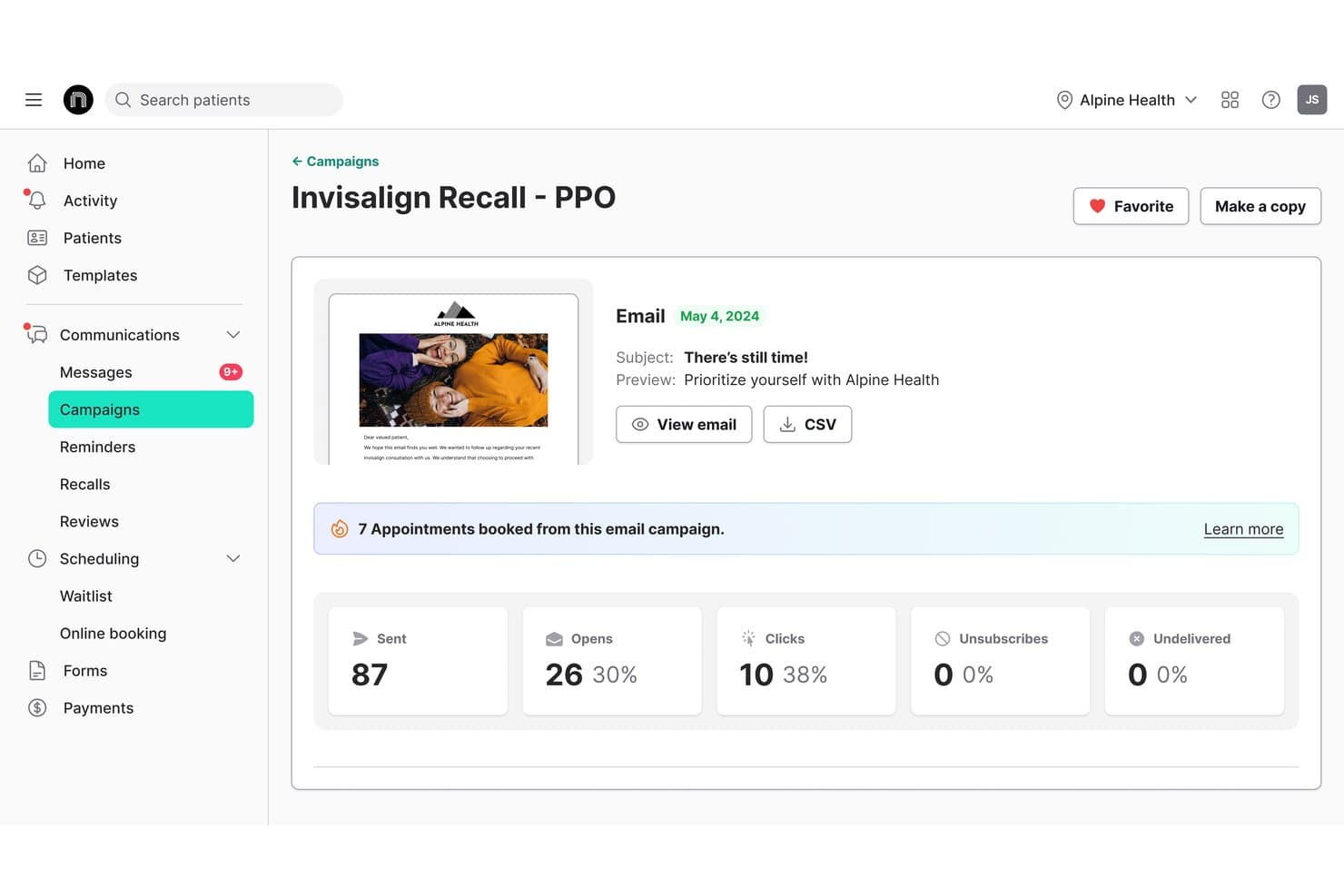
NexHealth offers campaign analytics tracking for email campaigns, showing appointments booked, open rates, clicks, and unsubscribes directly within the platform. NexHealth is an EMR scheduling software that connects patient self-scheduling, waitlist management, automated reminders, and one-click recalls directly to your practice management system.
Who Is NexHealth Best For?
NexHealth is a strong fit for multi-provider medical and dental practices that need online booking, waitlist management, and reminders tightly connected to an existing EHR or practice management system.
Why I Picked NexHealth
I picked NexHealth as one of the best because no other tool on my list matches its breadth of EHR connections, with over 60 supported systems spanning dental, medical, and specialty practices. What I find especially compelling is the waitlist feature: when a slot opens, NexHealth texts eligible patients a one-click booking link, and the confirmed appointment writes directly back to the EHR calendar within minutes. The one-click recall tool works the same way, pulling due dates and procedure codes from the EHR to trigger personalized outreach automatically.
NexHealth Key Features
- Multi-channel online booking: Patients can schedule appointments through your website, Google, social media, email, text, or QR codes, around the clock.
- Appointment-type insertion rules: When a patient books online or claims a waitlist slot, NexHealth can write specified procedure codes or visit types directly to the health record.
- Configurable reminder sequences: Staff can set up branching SMS and email reminder chains, with timing and messaging that adjusts based on whether a patient has confirmed.
- iPhone app for scheduling staff: Front-office staff can view the day's appointments, filter by provider or operatory, create bookings, and update confirmation status from their phone.
NexHealth Integrations
NexHealth supports 60-plus EHR syncs, including Epic Systems, athenaClinicals, eClinicalWorks, Dentrix, Eaglesoft, Open Dental, and Cerner PowerChart. Its REST API and webhooks support custom integrations.
Pros and Cons
Pros:
- Automated reminders cut follow-up work
- Waitlist helps fill canceled openings
- Online booking reduces front-desk calls
Cons:
- Rescheduled visits may lack patient notice
- Online slots can misstate availability
Learn more about NexHealth: Best for automating patient access
- Free demo available
- Pricing upon request
Visit WebsiteCustomer Rating:4.7/5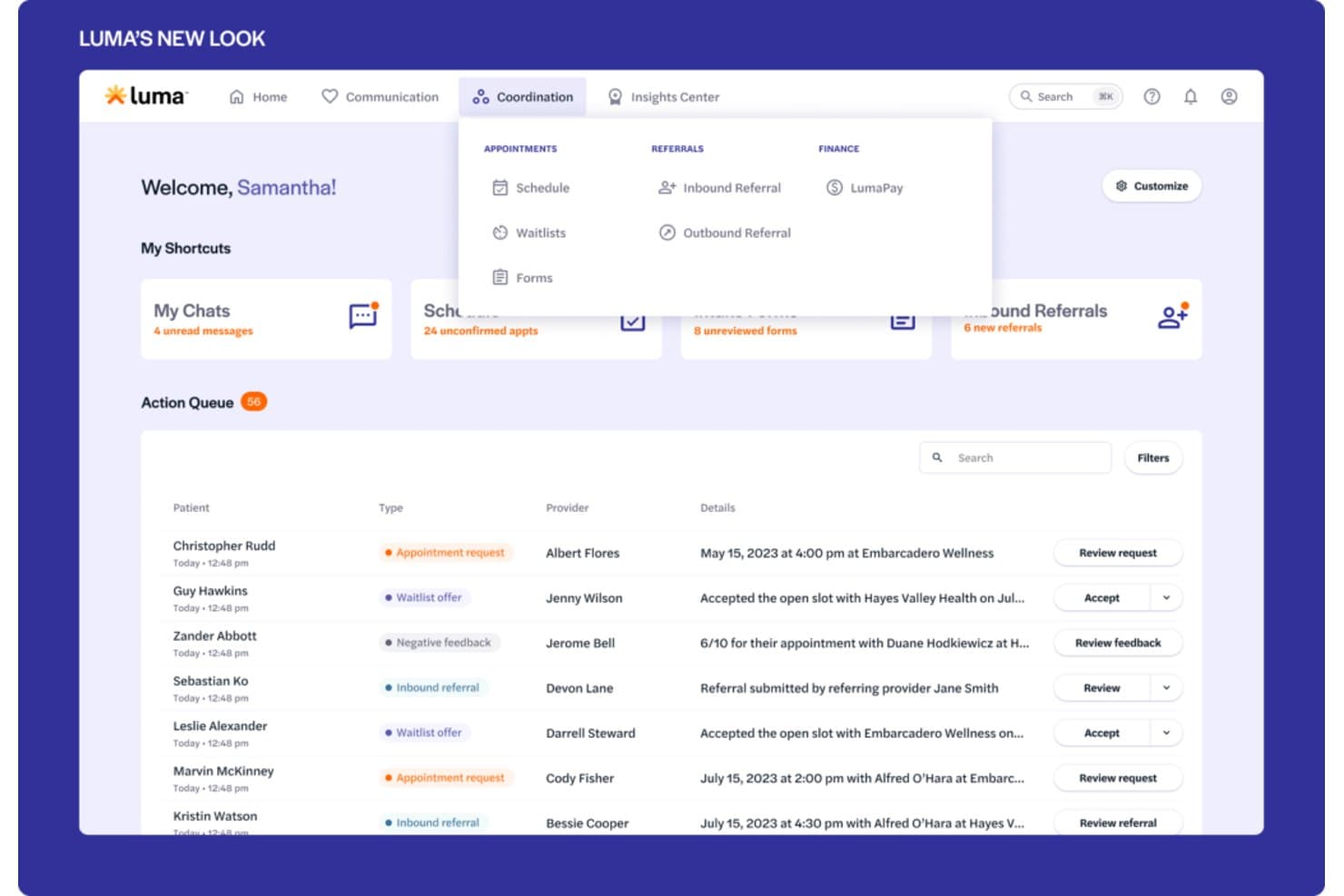
Luma Health offers a coordination dashboard with an action queue displaying appointment requests, waitlist offers, inbound referrals, and scheduling details for multiple patients. Luma Health is an AI-powered patient scheduling platform that handles self-scheduling, smart waitlist management, referral coordination, and EHR-integrated appointment management across text, web, phone, and Google.
Who Is Luma Health Best For?
Luma Health is a strong fit for medical groups and health systems that want to reduce front-office call volume by letting patients self-schedule, reschedule, and manage appointments across text, web, and Google.
Why I Picked Luma Health
I picked Luma Health as one of the best because it's purpose-built to automate patient access end-to-end, not just surface-level self-scheduling. I love that its smart waitlist automatically matches newly opened slots to patients by appointment type and books directly into the EHR, no staff intervention needed. Its AI-driven outbound outreach also contacts no-shows and late cancellations until they rebook, which is where most scheduling tools fall short.
Luma Health Key Features
- Referral fax coordination: Luma's AI parses incoming referral faxes, contacts the patient to schedule, and closes the referral in the EHR automatically.
- Insurance eligibility verification: Luma checks eligibility in real time or in bulk, matched to the appointment's service type, with a dashboard showing coverage details, payer alerts, and verification history.
- Multilingual patient reminders: Automated appointment reminders are sent in more than 20 languages across text, email, and phone, with patient responses writing back to the EHR.
- Capacity Intelligence reporting: Slot-level availability is reported by provider, specialty, visit type, location, and department, including open slots and earliest available dates.
Luma Health Integrations
Luma Health has six documented native EHR integrations: MEDITECH, Oracle Health, eClinicalWorks, Epic, athenahealth, and ModMed. It also connects with Google and Google Ads and offers an API for custom integrations.
Pros and Cons
Pros:
- Automated reminders reduce manual no-show outreach
- Waitlists help refill newly opened appointment slots
- Online booking reduces front-desk phone traffic
Cons:
- Custom workflow configuration can require extended setup
- Some reminders fail to reach patients
Learn more about Luma Health: Best for scheduling tied to kiosk check-in
- Free plan available
- From $25/month
Visit WebsiteCustomer Rating:4.2/5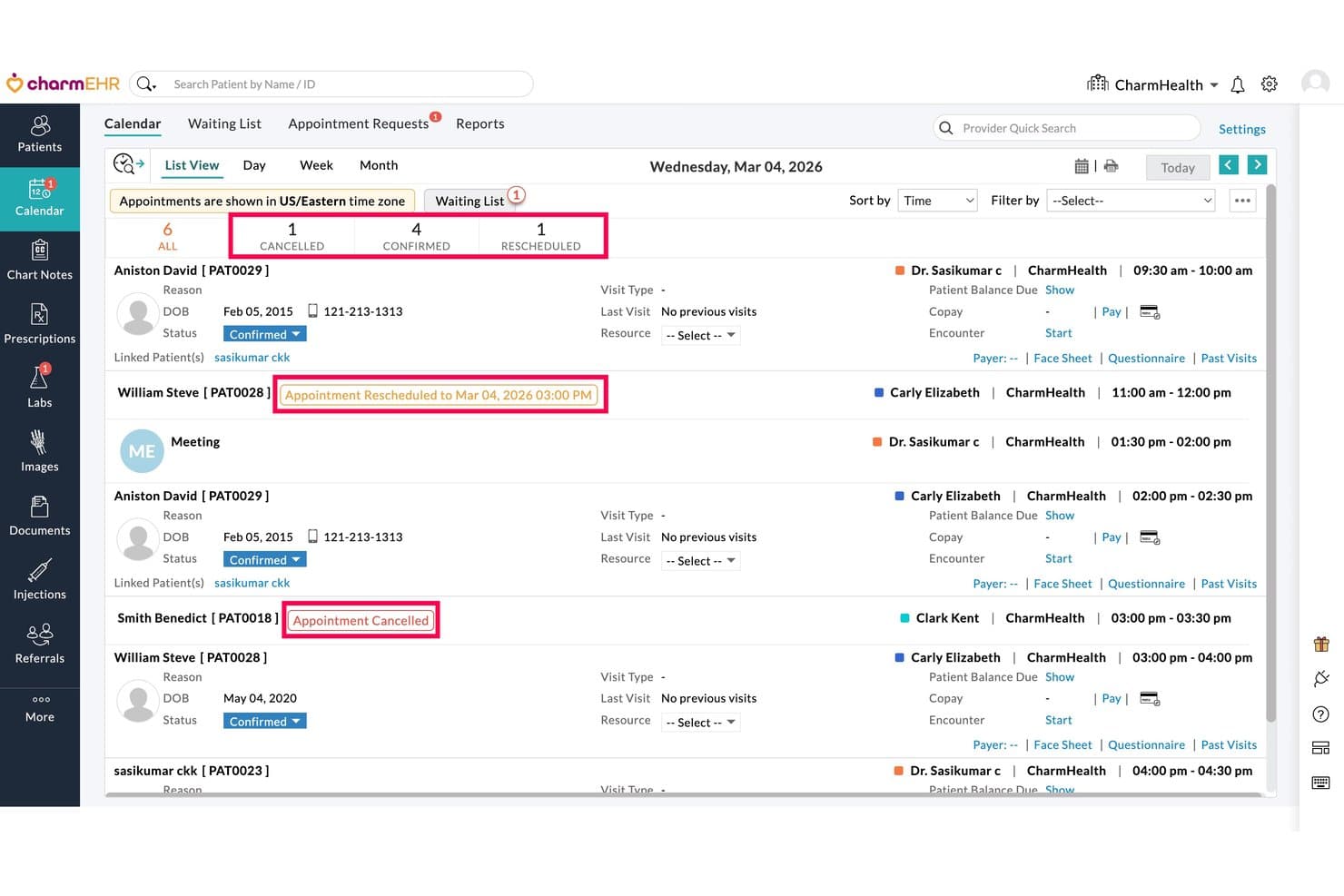
CharmHealth displays daily appointments with cancel and reschedule status indicators. CharmHealth is a browser-based EHR platform that combines appointment scheduling, clinical charting, patient intake, multi-facility calendar management, and telehealth booking in a single system.
Who Is CharmHealth Best For?
CharmHealth is a strong fit for small to mid-sized practices that need scheduling, charting, and patient check-in managed within a single browser-based system.
Why I Picked CharmHealth
I've included CharmHealth in my top picks because the kiosk check-in workflow is genuinely built into the scheduling layer, not bolted on as an afterthought. When a patient arrives, the kiosk app collects demographics, insurance details, and consent forms tied directly to that booked appointment, with questionnaires automatically assigned by visit type or provider. I also like that the Virtual Appointment Bot pre-screens patients before they even arrive, pulling from the same scheduling configuration used across the EHR calendar.
CharmHealth Key Features
- Multi-facility calendar management: View and manage appointment schedules across all practice locations from a single calendar, with filters for provider, resource, and visit type.
- Automated Booking Assistant: Lets patients confirm, cancel, or reschedule appointments by replying to reminder texts, and sends rescheduling links to patients marked as no-shows.
- Configurable appointment notifications: Set up email, SMS, and voice reminders for confirmations, reschedules, cancellations, and upcoming appointments, with editable message templates.
- Real-time insurance eligibility inquiry: Automatically runs eligibility checks a set number of days before appointments and displays policy, copay, and deductible details directly in the calendar.
CharmHealth Integrations
CharmHealth offers native integrations with Surescripts, LabCorp, Quest, QuickBooks, and Bluefin, plus HL7-based data exchange. REST APIs, FHIR documentation, and an SDK support custom integrations.
Pros and Cons
Pros:
- Patient reminders reduce manual follow-up
- Kiosk intake collects forms for booked visits
- Appointment-to-encounter workflow keeps charting connected
Cons:
- Support delays can leave scheduling issues unresolved
- CAPTCHA can interrupt online booking
Learn more about CharmHealth: Best for intake-linked scheduling and charting
- Free trial available.
- $59.90/month
Visit WebsiteCustomer Rating:4.5/5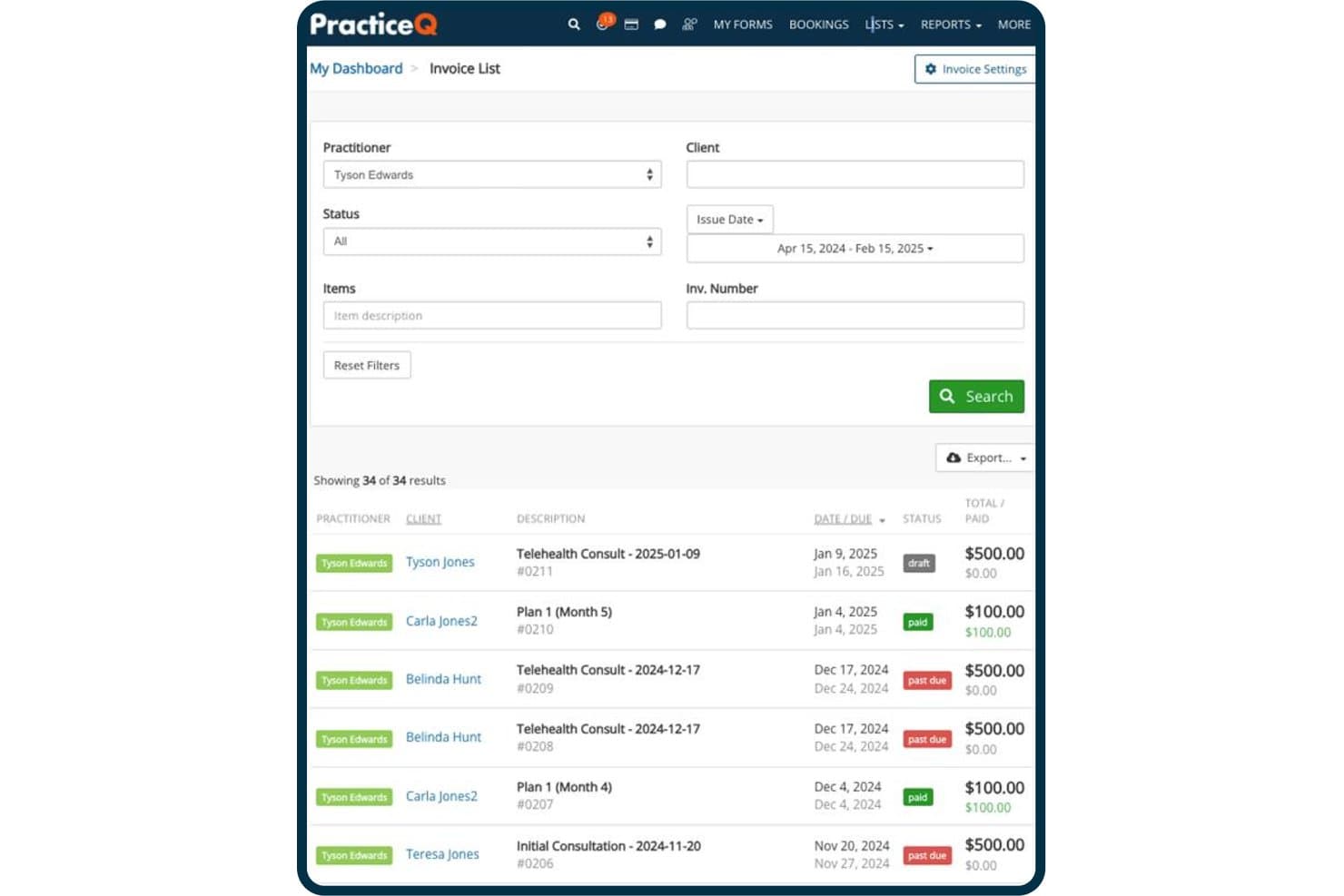
PracticeQ tracks invoice statuses, amounts, and due dates in one view. PracticeQ is an EHR and practice management platform that combines scheduling, patient records, digital intake forms, SOAP charting, billing, and automated patient communication in one system.
Who Is PracticeQ Best For?
PracticeQ suits small to mid-sized allied health and chiropractic practices that want intake forms, scheduling, and clinical charting managed in a single system.
Why I Picked PracticeQ
I picked PracticeQ as one of the best because it's built around the idea that intake and scheduling should never be separate workflows. When a patient books an appointment, their intake forms go out automatically, and submitted data pulls directly into charting notes, so your front desk isn't re-entering information before the visit. I also like the chiropractic-specific SOAP templates, including a spine-chart question type, which means clinical documentation is ready to use without building everything from scratch.
PracticeQ Key Features
- Multi-channel appointment reminders: Send automated SMS, email, or voice reminders with built-in confirm-or-cancel prompts that update appointment status in your calendar.
- EasyFill waitlist: Detects cancellations within five minutes and texts selected waitlisted patients so they can claim the open slot.
- Multi-provider, multi-location calendar: Each practitioner gets a separate calendar with individual availability rules, time zones, and location-specific hours.
- Patient portal: Patients book appointments, complete forms, pay invoices, and message your practice through a single branded online portal.
PracticeQ Integrations
PracticeQ offers native integrations with Google Calendar, Outlook Calendar, Google Meet, Zoom, and Google Drive. It also provides an open REST API and supports integrations with TriZetto, Office Ally, athenahealth, and Zapier.
Pros and Cons
Pros:
- Separate provider calendars include resource checks
- Submitted intake data carries into charting notes
- Chiropractic SOAP templates include spine charts
Cons:
- Time-zone errors can distort appointments and reminders
- Some self-bookings create duplicate patient charts
Learn more about PracticeQ: Best for independent practice scheduling and intake
- Free demo available
- Pricing upon request
Visit WebsiteCustomer Rating:3.9/5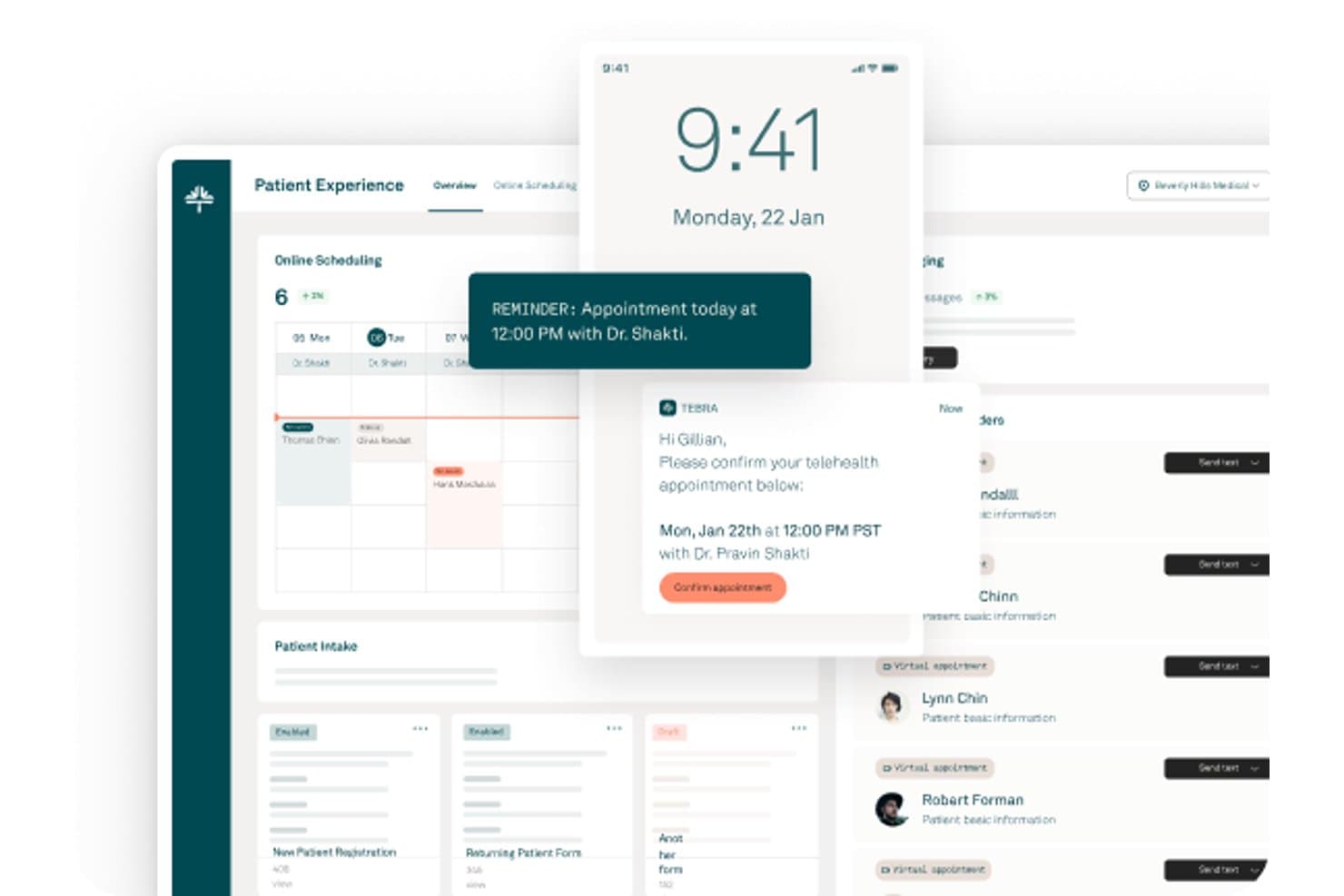
Tebra offers a patient experience dashboard with online scheduling, appointment reminders, telehealth confirmations, and patient intake management. Tebra is a cloud-based EHR platform built for independent healthcare practices that connects appointment scheduling, clinical charting, patient intake, electronic prescriptions, lab ordering, and integrated telehealth in a single workflow.
Who Is Tebra Best For?
Tebra is a strong fit for independent practices—solo providers, small groups, and specialty clinics—that want scheduling, intake, and clinical documentation in one place.
Why I Picked Tebra
I picked Tebra as one of the best because it's purpose-built for independent practices that need scheduling and clinical workflows in one place. I particularly like how appointment notes automatically populate the chief complaint in the clinical chart, so providers aren't re-entering context before a visit. Online booking ties directly to each provider's calendar, and patients can reschedule or cancel from their reminder texts without calling the front desk.
Tebra Key Features
- Multi-channel appointment reminders: Sends automated reminders by email, text, or phone call, with configurable timing from one to six days before the appointment.
- Real-time insurance eligibility checks: Verifies patient coverage from the Dashboard, Calendar, or Appointment page and saves results directly to the patient's insurance record.
- Multi-resource scheduling: Lets staff assign providers, rooms, and equipment to appointments with live availability and conflict indicators.
- All Appointments report: Tracks each provider's appointment volume alongside cancellation, reschedule, and no-show rates, with CSV or Excel export.
Tebra Integrations
Tebra offers native integrations with GoodRx, Google Business Profile, and Tebra Care Connect. It also provides SOAP APIs for custom integrations.
Pros and Cons
Pros:
- Patients can book outside office hours
- Text, email, and phone reminders
- Appointment notes populate clinical chief complaints
Cons:
- Support responses can be slow
- Calendar updates occasionally appear incorrectly
Learn more about Tebra: Best for AI-driven waitlist and slot recovery
- Free demo available
- Pricing upon request
Visit WebsiteCustomer Rating:3.4/5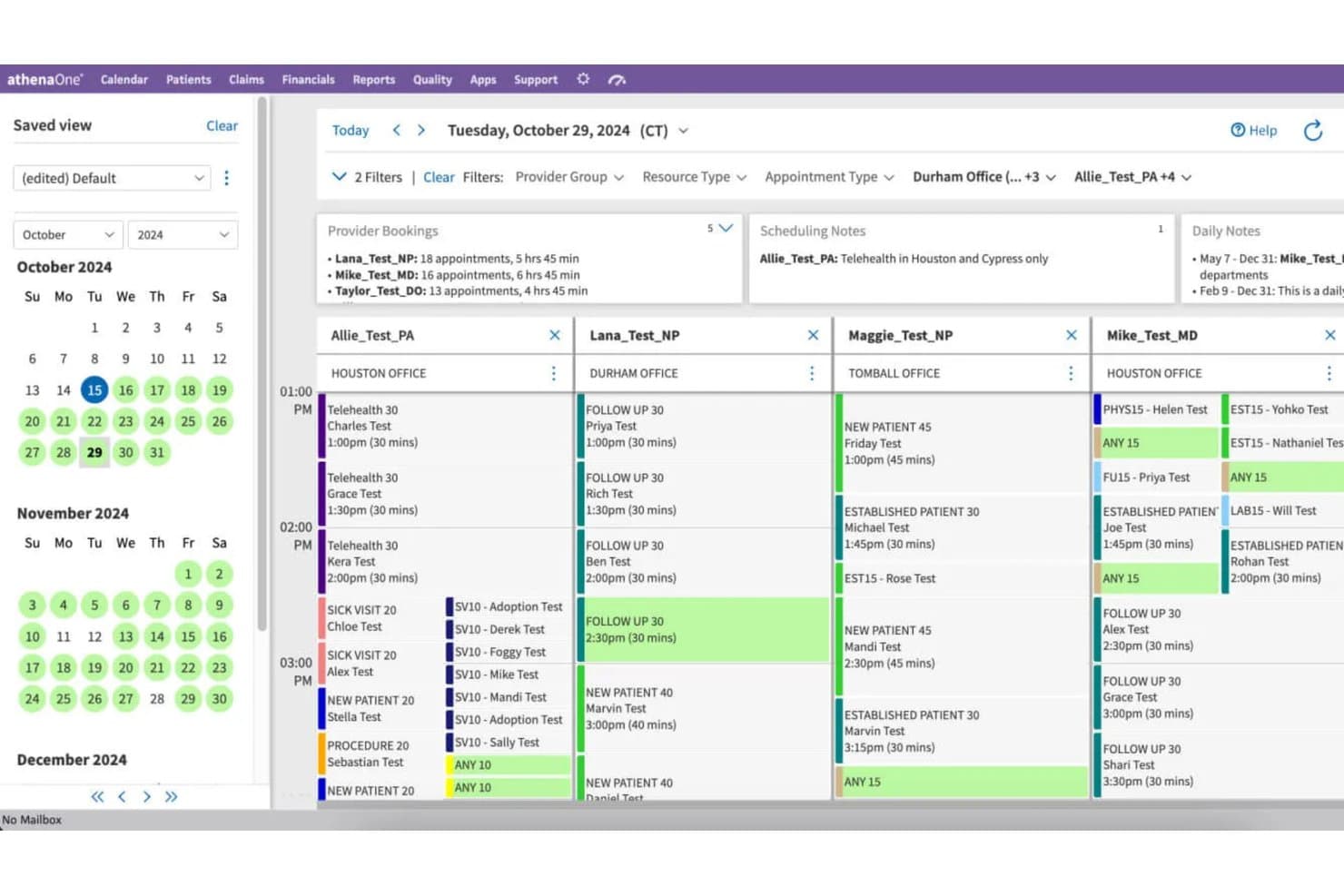
athenahealth offers a multi-provider calendar scheduling view with appointment details, office locations, and scheduling notes across providers. athenaOne is an integrated EHR, practice management, and patient engagement platform that combines native scheduling, clinical documentation, medical billing, and AI-powered waitlist and reminder tools in a single system.
Who Is athenaOne Best For?
athenaOne suits ambulatory practices that want scheduling, clinical documentation, billing, and AI-driven waitlist recovery built into a single system rather than stitched together from separate tools.
Why I Picked athenahealth
athenaOne earns its spot on my shortlist because its AI-driven waitlist tools actively recover lost appointment slots rather than leaving gaps unfilled. When a cancellation comes in, athenaOne's Waitlist Scheduling scans the waitlist and automatically contacts patients to fill the opening, including same-day slots. I also like that its proactive waitlist feature sends outbound notifications to patients about available appointments before a slot goes to waste.
athenaOne Key Features
- Schedule Builder: Create, preview, and apply scheduling templates for individual providers, departments, or provider groups, with configurable appointment types, times, and date ranges.
- Self check-in: Let patients confirm appointment details, update demographics, upload insurance cards, and complete consent forms before arrival.
- Multi-resource scheduling: Book multiple providers, rooms, or equipment resources for the same or different days and times, including surgical room schedules and provider block time.
- ReminderCall: Send automated appointment reminders by phone, email, or text, with delivery and confirmation outcome tracking reported directly in athenaOne.
athenahealth Integrations
athenaOne advertises 277K+ direct clinical integrations, including Labcorp Diagnostic Assistant, Zio by iRhythm, and Fullscript. It also supports Marketplace integrations and REST and FHIR APIs with 700+ endpoints for custom connectivity.
Pros and Cons
Pros:
- Reminder tracking reports confirmations and delivery
- Calendar templates cover providers and departments
- AI waitlists refill canceled appointments
Cons:
- Guest self-scheduling cannot reschedule or cancel
- Routine scheduling can require many clicks
Learn more about athenahealth: 8Best for health record-native scheduling at scale
EPIC
- Not available
- Pricing upon request
Visit WebsiteCustomer Rating:4.5/5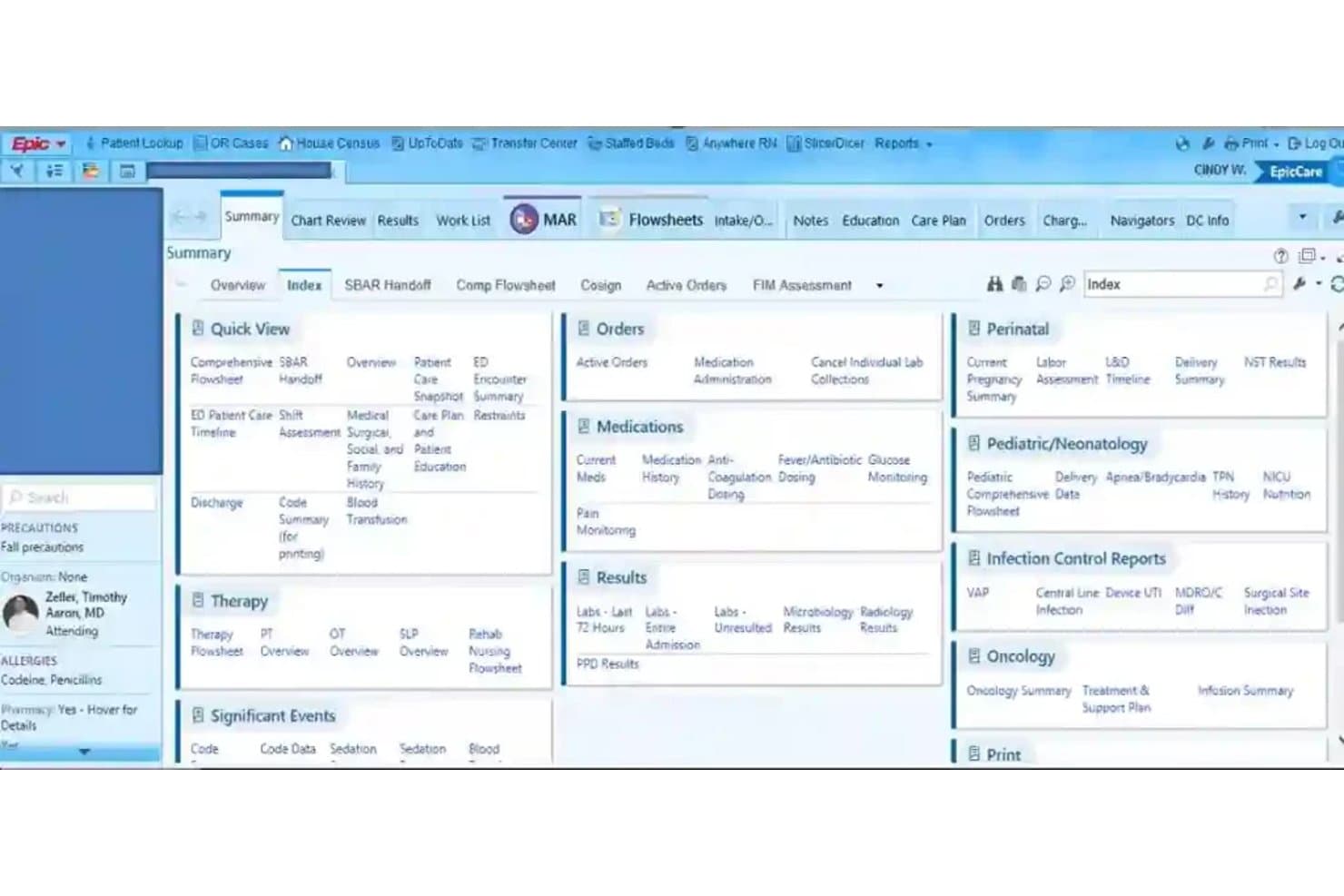
EPIC organizes patient data into a tabbed clinical dashboard for quick access. Epic is an EMR platform that brings together health records and appointment scheduling, including patient self-scheduling, centralized multi-specialty booking, automated reminders, and waitlist management across large healthcare organizations.
Who Is Epic Best For?
Epic is a strong fit for large health systems and multi-specialty organizations that need scheduling embedded directly within a unified patient record.
Why I Picked Epic
I picked Epic as one of the best because scheduling lives inside the same patient record your clinical team already works in, which means no syncing between separate systems. I like how Fast Pass automatically surfaces open slots to waitlisted patients, and how Hello World sends multi-channel reminders via SMS and voice, drawing each patient's preferred contact method directly from their chart. Epic reported more than 3.4 million no-shows prevented across U.S. health systems in a single year, which reflects the scale this platform is built to handle.
Epic Key Features
- Centralized scheduling: Lets scheduling staff book appointments across an organization using built-in decision support for specialty-specific and complex appointment needs.
- Patient self-scheduling: Allows new and existing patients to schedule online with or without a MyChart account, including sequential appointments like imaging before a visit.
- Digital check-in: Gives patients a way to complete check-in digitally before their appointment through Epic's patient experience tools.
- Insurance eligibility verification: Checks patient coverage electronically without requiring staff to log into separate payer portals.
Epic Integrations
Epic reports 3,294 live apps using open.epic web services. Native vendor integrations aren’t clearly documented, but Epic supports custom connections through FHIR, REST APIs, and HL7v2 interfaces.
Pros and Cons
Pros:
- Specialty-aware booking supports complex appointments
- Automated reminders and waitlists fill openings
- Patient records stay alongside scheduling
Cons:
- External appointments can’t be checked in or charted from the clinical schedule
- Booking can take multiple selections
Learn more about EPIC:
How I Evaluate EMR Scheduling Software
I split my evaluation into three parts, giving the most weight to core functions: syncing appointments with patient records and managing provider calendars and bookings. Next, I look for differentiators such as specialty-specific templates or automated waitlists. Finally, I consider onboarding, support, interoperability, and total cost.
Core Functionality (Table Stakes For This List)
When I'm selecting tools for my list, I score each one on a scale from 0 (does not offer the functionality) to 5 (excels in this area) for each core functionality listed below. I then convert the total into a percentage to help assess each tool's overall fit, with extra weight on any functionalities I’ve deemed essential.
- EMR Integration (Essential): I look for appointments to update patient records reliably, so staff aren’t entering visit details twice or reconciling mismatched records.
- Appointment Calendar (Essential): I assess whether staff can manage providers, locations, and rooms in one calendar and spot scheduling conflicts.
- Patient Reminders: I check which channels send reminders and whether patients can confirm or cancel without calling the clinic.
- Self-Scheduling: I look for real-time availability and options for patients to book, reschedule, or cancel the appointment types your clinic offers.
- Availability Rules: I assess how precisely teams can set provider hours, visit types, durations, and resource availability to prevent conflicts.
- Waitlists And Recall: I check how the system matches patients to canceled slots and supports follow-up scheduling from recall lists.
Once I have a list of tools that meet the criteria, I consider what sets each platform apart.
Differentiating Factors (What Sets Vendors Apart)
Here's how I compare and contrast different vendors:
Standout Features
I look for specialty-specific templates that match a clinic's actual visit types and durations—a behavioral health practice needs intake slots that look nothing like a dental hygiene appointment. Real-time eligibility verification at booking is another priority, since catching coverage gaps before a patient arrives saves front-desk staff from last-minute scrambles and reduces claim denials. I also evaluate analytics dashboards that track no-show rates and provider utilization, because those numbers directly shape staffing and scheduling decisions as a practice grows.
Beyond Features
I check whether vendors support HL7 or FHIR standards, since proprietary integrations can lock you into one EMR long after it stops fitting your practice. Implementation support matters just as much—a vendor that offers dedicated migration specialists and staff training reduces the real clinical risk of scheduling downtime during a cutover. I also evaluate total cost of ownership, looking past the base subscription to per-provider licensing, SMS reminder fees, and integration surcharges that add up fast in a multi-physician clinic.
How to Choose EMR Scheduling Software
It’s easy to get bogged down in long feature lists and complex pricing structures. To help you stay focused as you work through your unique software selection process, here’s a checklist of factors to keep in mind:
| Factor | What to Consider |
| Scalability | Can the software handle more locations, providers, and patient volume as your practice grows? |
| Integrations | Does it connect smoothly with your existing EMR, billing, telehealth, and communication tools? |
| Customizability | Are you able to configure appointment types, scheduling rules, and access controls for your workflows? |
| Ease of use | Will your admin and clinical teams learn the system quickly, or does it require extensive training? |
| Implementation and onboarding | How much support will you get during rollout? Ask about migration, setup timelines, and available training resources. |
| Cost | What’s the true total cost including setup, add-ons, maintenance, and per-provider fees? |
| Security safeguards | Does the product meet your HIPAA, audit, and data access needs out of the box? |
| Support availability | Is live support offered during the hours you operate, or just business hours in another time zone? |
What Is EMR Scheduling Software?
EMR scheduling software is a digital tool that lets your team book, manage, and track patient appointments directly within your electronic medical record system. It connects scheduling with patient charts, centralizes calendars for multiple providers and locations, and automates reminders to reduce no-shows. This software helps practices customize appointment types, manage waitlists, and improve the flow of information across clinical and administrative teams.
Features of EMR Scheduling Software
When selecting EMR scheduling software, keep an eye out for the following key features:
- EMR/EHR integration: Schedules update patient charts in real time so clinical and admin teams always use the same data set.
- Multi-provider scheduling: Manage calendars for multiple providers, rooms, and locations with conflict and overlap alerts.
- Appointment types and rules: Set customizable visit types and durations that match provider specialties, payer requirements, and clinical workflows.
- Patient reminders: Send automated SMS, email, or voice reminders to patients with confirmations to help reduce the risk of no-shows.
- Online self-scheduling: Let patients book, reschedule, or cancel appointments from a portal or widget that shows real-time availability.
- Waitlist management: Holds lists of patients requesting sooner appointments and fills cancellations quickly by matching them with open slots.
- Resource and room assignment: Book necessary resources alongside appointments, coordinating use of exam rooms, equipment, or nurses.
- Recurring appointment support: Schedule series of visits—like therapy, procedures, or multi-step care plans—based on set patterns or dependencies.
- Access controls and permissions: Limit who can view or edit appointment data, ensuring sensitive workflows are protected by role or department.
- Reporting and analytics: Generate detailed data on appointment trends, no-show rates, provider utilization, and workflow bottlenecks to guide improvements.
Common EMR Scheduling Software AI Features
Beyond the standard EMR scheduling software features listed above, many of these solutions are incorporating AI with features like:
- Predictive no-show analysis: Uses historical appointment data and patient behavior to forecast which patients are most likely to miss appointments, allowing staff to intervene proactively.
- Smart waitlist optimization: AI matches cancellations with the most suitable patients on the waitlist based on urgency, provider preference, and scheduling patterns.
- Automated schedule optimization: Continuously analyzes provider calendars and patient demand to suggest ideal appointment slots, reducing gaps and maximizing utilization.
- Natural language scheduling assistants: Lets staff or patients book appointments using conversational language, with AI interpreting requests and handling scheduling logic.
- Demand forecasting: Predicts future appointment volume and staffing needs by analyzing trends, seasonality, and external factors, helping practices plan resources more accurately.
Benefits of EMR Scheduling Software
Implementing EMR scheduling software provides several benefits for your team and your business. Here are a few you can look forward to:
- Fewer no-shows: Automated reminders and smart waitlist features keep appointment slots filled and reduce gaps in your schedule.
- Streamlined workflows: Direct EMR integration saves staff time by updating patient charts and appointment details instantly across systems.
- Improved patient access: Online self-scheduling and real-time availability help patients find and book the care they need without phone tag.
- Greater resource utilization: Room, provider, and equipment management features reduce double-bookings and maximize use of your space and staff.
- Better insights for decision-making: Reporting and analytics tools surface trends, bottlenecks, and opportunities for process improvement at a glance.
- Enhanced compliance and security: Built-in access controls and audit trails help you maintain HIPAA compliance and protect sensitive scheduling data.
- Custom fit for your specialty: Customizable appointment types and workflows support the unique needs of various medical specialties and group practice sizes.
Costs and Pricing of EMR Scheduling Software
Selecting EMR scheduling software requires an understanding of the various pricing models and plans available. Costs vary based on features, team size, add-ons, and more. The table below summarizes common plans, their average prices, and typical features included in EMR scheduling software solutions:
Plan Comparison Table for EMR Scheduling Software
| Plan Type | Average Price | Common Features |
| Free Plan | $0 | Includes limited appointment scheduling, basic calendar sync, and minimal support. |
| Personal Plan | $10-$30/user/month | Offers individual provider scheduling, patient reminders, online booking, and basic reporting. |
| Business Plan | $35-$80/user/month | Adds multi-provider support, EMR/EHR integration, custom appointment types, group calendars, and enhanced analytics. |
| Enterprise Plan | $100-$200+/user/month | Supports multi-location management, advanced integrations, resource allocation, dedicated support, and compliance tools. |
EMR Scheduling Software FAQs
Here are some answers to common questions about EMR scheduling software:
How does EMR scheduling software improve patient experience?
These tools let patients book, cancel, or reschedule appointments online, receive automated reminders, and complete intake forms in advance. This reduces wait times and keeps patients better informed about their care.
Can EMR scheduling software work with my existing EHR system?
Yes, most solutions offer integration options with leading EHR platforms. Look for native integrations or strong API/HL7 support to ensure patient data, appointment details, and clinical notes sync smoothly between systems.
What security safeguards should I expect from EMR scheduling software?
Expect HIPAA-compliant data handling, audit logs, role-based access controls, and encrypted data storage. Some vendors also provide SOC 2 certification and tools for managing user permissions to meet compliance requirements.
Is it possible to manage recurring or group appointments?
Yes, many platforms allow you to set up repeating appointments for therapies or infusions and coordinate multi-provider or group sessions, so you can handle complex scheduling patterns without manual tracking.
What onboarding and support resources are usually available?
Vendors may offer personalized onboarding, data migration, and training. Ask about dedicated customer success contacts, 24/7 support, and online knowledge bases to help your team transition smoothly and resolve issues quickly.