

Easy medical billing software is software designed to automate and simplify tasks like claims, payments, and insurance eligibility checks for healthcare organizations. If you’re juggling billing with patient care and want a solution that’s quick to learn and simple to use, you’re not alone. Many teams are searching for ways to cut down on administrative headaches and avoid errors that can delay reimbursements.
This guide spotlights the best easy medical billing software in 2026 so you can quickly compare top tools, see what stands out about each, and pick the right fit for your workflow and needs.
Why Trust Our Software Recommendations
6,700+
Reviews
20
Industry experts
16+
Evaluation factors
14
Years
Our team has been testing and reviewing software since 2012. As medical practice leaders ourselves, we know how difficult—and important—it is to choose the right software.
For this guide, we evaluated tools using hands-on testing and independent research, scoring tools using our selection criteria.
Our reviews reflect our human editorial judgment, not a sales pitch.
Easy Medical Billing Software Comparison Table
The table below compares pricing details for my top easy medical billing software selections.
| Tool | Best For | Trial Info | Price | ||
|---|---|---|---|---|---|
| 1 | Best for direct clearinghouse integration | Free demo available | Pricing upon request | Website | |
| 2 | Best for multi-location management tools | Free demo available | Pricing upon request | Website | |
| 3 | Best for quick staff onboarding features | Not available | Pricing upon request | Website | |
| 4 | Best for small practice scalability | Not available | Pricing upon request | Website | |
| 5 | Best for frequent payer rule updates | Free demo available | Pricing upon request | Website | |
| 6 | Best for custom claim form configurability | Free demo available | From $199/user/month | Website | |
| 7 | Best for automated insurance eligibility checks | Free demo available | Pricing upon request | Website | |
| 8 | Best with AI-powered billing workflow automation | Free demo available | Pricing upon request | Website | |
| 9 | Best for real-time claim tracking | Free demo available | Pricing upon request | Website | |
| 10 | Best for robust reporting and analytics | Free demo available | Pricing upon request | Website |


Best Easy Medical Billing Software Reviews
Below are my detailed summaries of the best easy medical billing software that made it onto my shortlist. My reviews offer a detailed look at the features, best use cases, and pricing of each software to help you find the best one for you.
 Best for direct clearinghouse integration
- Free demo available
- Pricing upon request
Visit WebsiteCustomer Rating:4.1/5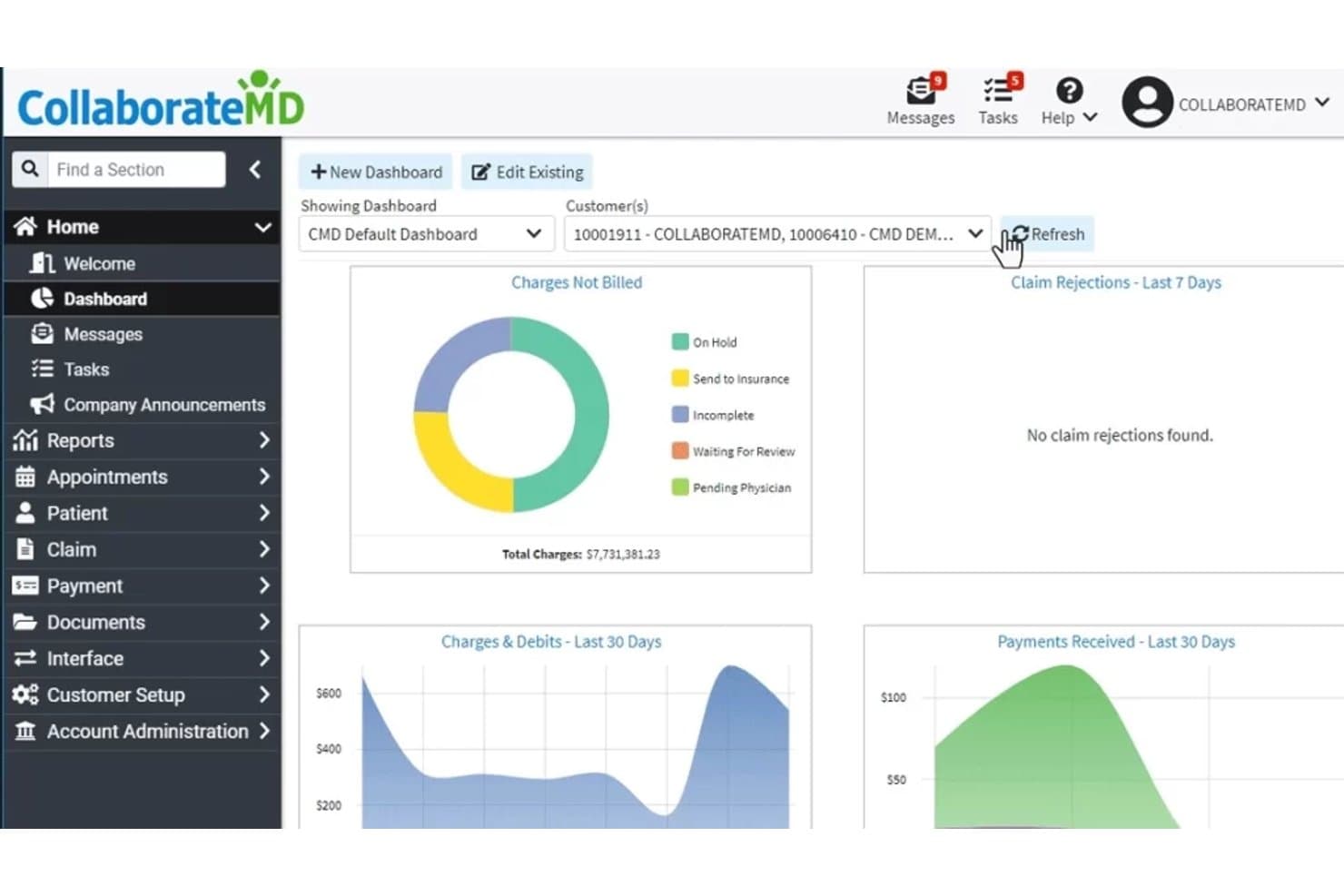
CollaborateMD offers an intuitive dashboard displaying charges not billed, claim rejections, charges and debits, and payments received over the last 30 days. CollaborateMD is a cloud-based medical billing and practice management platform that combines real-time claim submission, AI-powered denial management, eligibility verification, and patient billing tools for small to mid-size practices and independent billing services.
Who Is CollaborateMD Best For?
It's a strong fit for independent medical billers and small practice office managers who handle revenue cycle work without a dedicated billing team.
Why I Picked CollaborateMD
CollaborateMD earns its spot on my shortlist because of its built-in clearinghouse, which submits claims in real time without routing through a third-party service. I like that Level 2 Claim Edits (CCI, NCD/LCD, and LMRP rules) run automatically before submission, catching errors that typically cause denials. When a payer does reject a claim, the AI-powered rejection support translates the denial code into plain language, so I can act on it right away rather than decoding payer-specific terminology.
CollaborateMD Key Features
- Real-time eligibility verification: Check patient insurance coverage instantly before appointments or claims submission.
- Customizable reporting dashboards: Access and tailor over 125 detailed billing and practice management reports.
- Integrated patient payment portal: Let patients pay bills online through a secure web portal linked to their account.
- Appointment scheduling and check-in: Schedule patient visits and manage digital check-ins directly within the platform.
CollaborateMD Integrations
CollaborateMD offers native integrations with Practice Fusion, Elation, Amazing Charts, Hello Health, Kipu, Medical Mime, Praxis EMR, PrognoCIS, Ritten, Sevocity, WebPT, and Alleva. An API is available for custom EHR and billing integrations.
Pros and Cons
Pros:
- Convenient online patient balance payment portal
- AI-powered rejection explanation and suggestions
- Direct clearinghouse claim submission and tracking
Cons:
- No 24/7 live customer support
- Storage fees for large document uploads
Learn more about CollaborateMD: Best for multi-location management tools
- Free demo available
- Pricing upon request
Visit WebsiteCustomer Rating:4.1/5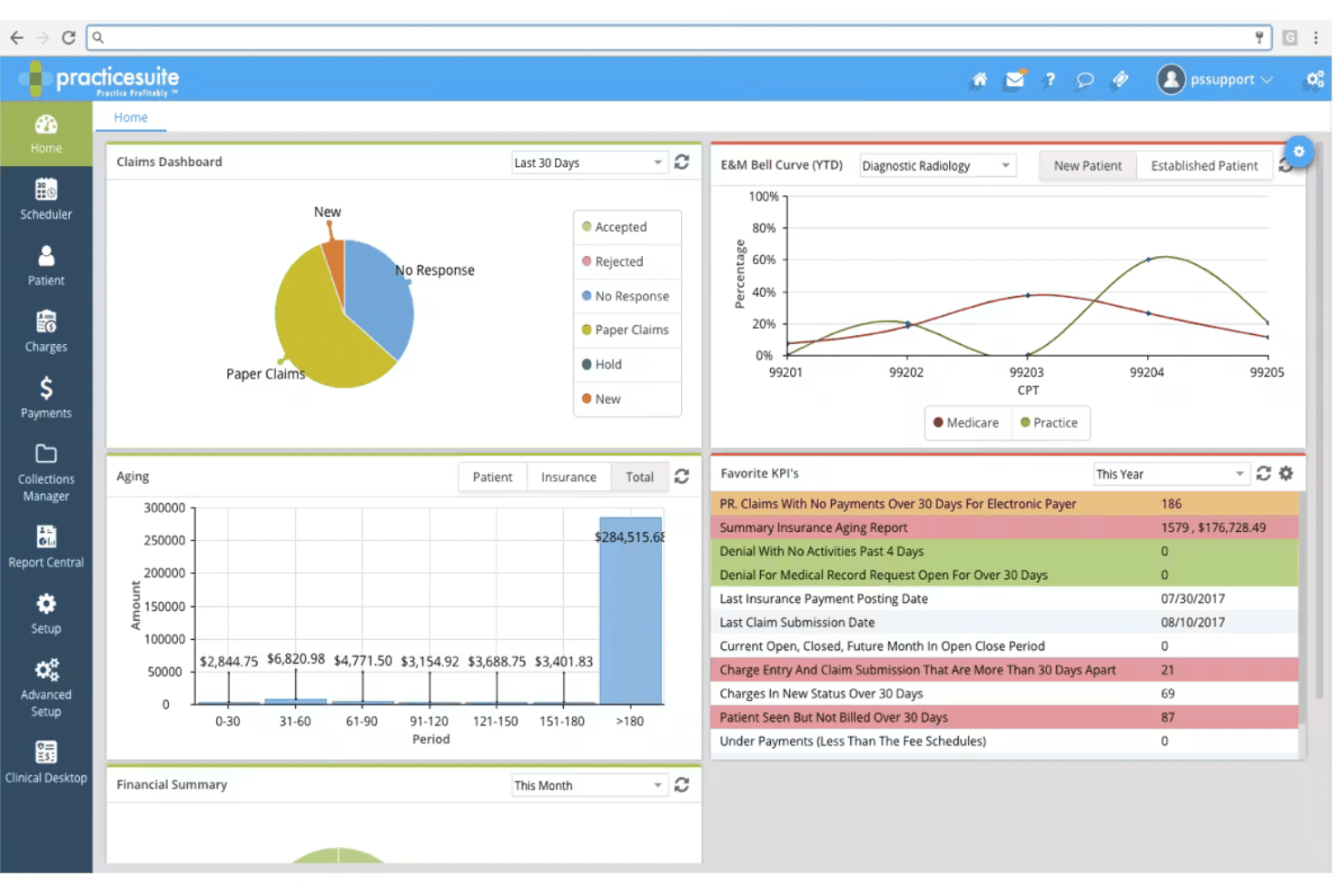
PracticeSuite spans claims, denials, ERA posting, eligibility, and billing. PracticeSuite is a cloud-based medical billing platform that covers claims submission, denial management, ERA posting, eligibility verification, and patient billing across solo practices, group practices, and medical billing companies.
Who Is PracticeSuite Best For?
It's a strong fit for independent medical billing companies and multi-location group practices managing claims, denials, and AR across multiple client accounts.
Why I Picked PracticeSuite
I've included PracticeSuite in my top picks because the Central Billing Office is genuinely built for managing multiple locations. With a single sign-on, I can navigate claims, ERAs, denials, and mass claim corrections across all client accounts from one dashboard. The multi-practice KPI reporting also lets me monitor each location's financial performance independently, which most billing tools don't support at this level.
PracticeSuite Key Features
- Patient portal: Lets patients view statements, pay bills, and communicate requests online.
- AI-driven denial intelligence: Flags potential claim issues before submission for cleaner billing.
- Automated eligibility verification: Confirms patient insurance eligibility in real time or in batch mode.
- Report Central: Offers more than 140 built-in reports for financial and operational tracking.
PracticeSuite Integrations
PracticeSuite offers native integrations with Practice Fusion, Elation, Relay Health, and Dragon dictation. Lab and pharmacy integrations are built in, and an API is available for custom integrations.
Pros and Cons
Pros:
- Built-in denial intelligence and analytics
- Automated ERA and payment posting workflows
- Centralized dashboard for multiple locations
Cons:
- Dashboard navigation can feel cluttered
- Initial onboarding requires frequent vendor support
Learn more about PracticeSuite: Best for quick staff onboarding features
- Not available
- Pricing upon request
Visit WebsiteCustomer Rating:3.9/5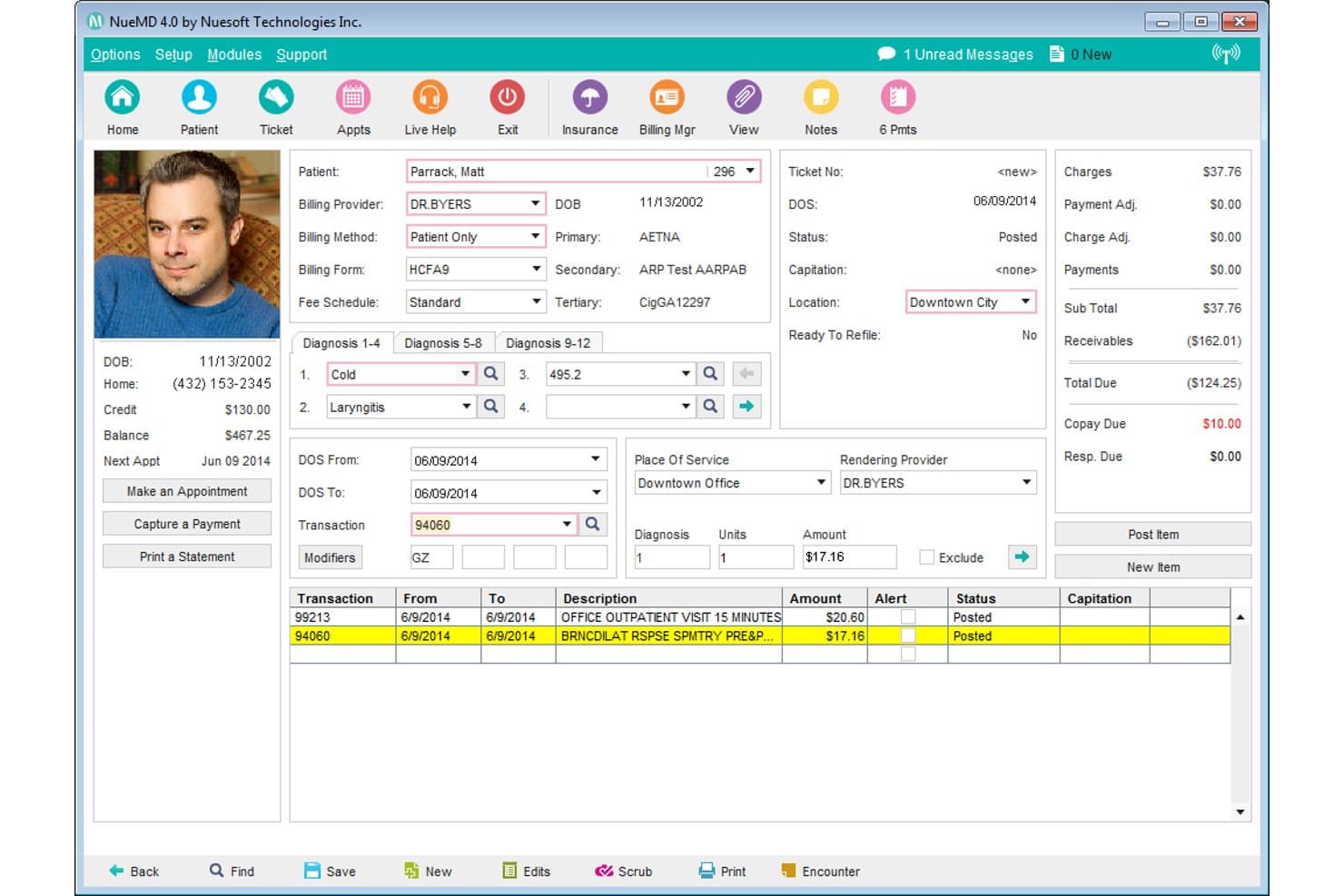
NueMD offers a detailed patient billing ticket screen with diagnosis codes, transactions, and payment summaries for streamlined medical billing. NueMD is a cloud-based medical billing and practice management platform for small practices that covers claims submission, ERA posting, patient billing, scheduling, and EHR documentation.
Who Is NueMD Best For?
NueMD suits independent medical billers and small practice billing staff who need to get up and running on a billing platform without a long learning curve.
Why I Picked NueMD
NueMD earns its spot on my shortlist because the learning curve for new billing staff is genuinely short. I've seen reviewers describe being fully independent by day one and self-sufficient by day three, which is rare. The interface keeps claim entry and ERA posting straightforward, without burying staff in unnecessary screens. NueMD's own clearinghouse handles submission, so new users aren't juggling a separate clearinghouse login on top of learning the platform.
NueMD Key Features
- Real-time claim tracking: View claim statuses and updates as they move through the billing process.
- Customizable appointment scheduling: Schedule patient visits with multi-day and multi-location support.
- Patient statement generation: Produce and send statements directly from the billing system.
- Mobile app access: Manage schedules, billing, and records from iOS and Android devices.
NueMD Integrations
Native integrations are not clearly documented. An API is available for custom integrations.
Pros and Cons
Pros:
- Fast onboarding for staff with minimal downtime
- Patient statements generated directly from platform
- Reliable in-house claims clearinghouse streamlines billing
Cons:
- Limited options for patient payment automation
- Robust AR and denial reports are lacking
Learn more about NueMD: Best for small practice scalability
- Not available
- Pricing upon request
Visit WebsiteCustomer Rating:3.7/5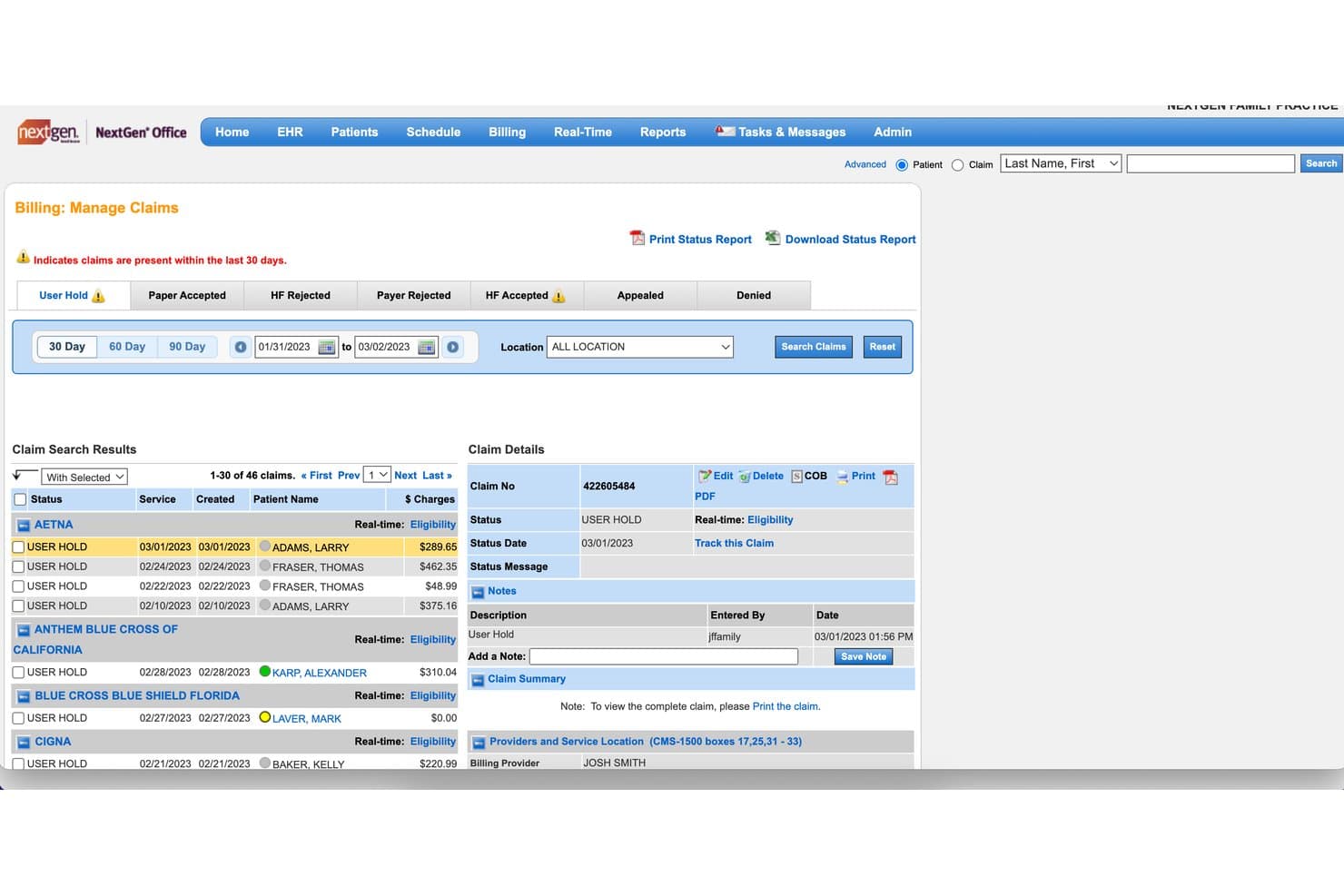
NextGen Office offers a Billing: Manage Claims dashboard that allows users to track, filter, and manage patient claims by status, payer, and date range. NextGen Office is a cloud-based EHR and practice management platform for small practices that integrates electronic claims submission, eligibility verification, patient billing, payment posting, and denial tracking.
Who Is NextGen Office Best For?
NextGen Office is a good fit for independent physicians and small practice administrators managing billing, scheduling, and clinical documentation through a single platform.
Why I Picked NextGen Office
NextGen Office earns its spot on my shortlist because it's built to scale with your practice, not just serve you at your current headcount. I like that EHR, practice management, and billing all run on a single cloud platform, so adding providers doesn't require layering in new tools. The built-in RCM services option sets it apart: when billing volume outgrows in-house capacity, you can move to managed revenue cycle services without switching platforms.
NextGen Office Key Features
- Electronic claims submission: Send CMS-1500 claims directly to clearinghouses from the integrated platform.
- Automated claim scrubbing: Validate claims for errors and compliance before submission.
- ERA payment posting: Import and auto-post electronic remittance advice to patient accounts.
- Real-time eligibility verification: Check insurance eligibility instantly within the scheduling workflow.
NextGen Office Integrations
NextGen Office offers native integrations with major labs and e-prescribing networks, supports Apple Health data import, and provides a native medical billing clearinghouse. An API for custom integrations is not available.
Pros and Cons
Pros:
- Centralized billing for multiple practice locations
- Real-time insurance eligibility checking
- End-to-end billing with EHR integration
Cons:
- Portal design can be confusing for patients
- Click-heavy workflows for routine billing tasks
Learn more about NextGen Office: Best for frequent payer rule updates
- Free demo available
- Pricing upon request
Visit WebsiteCustomer Rating:3.4/5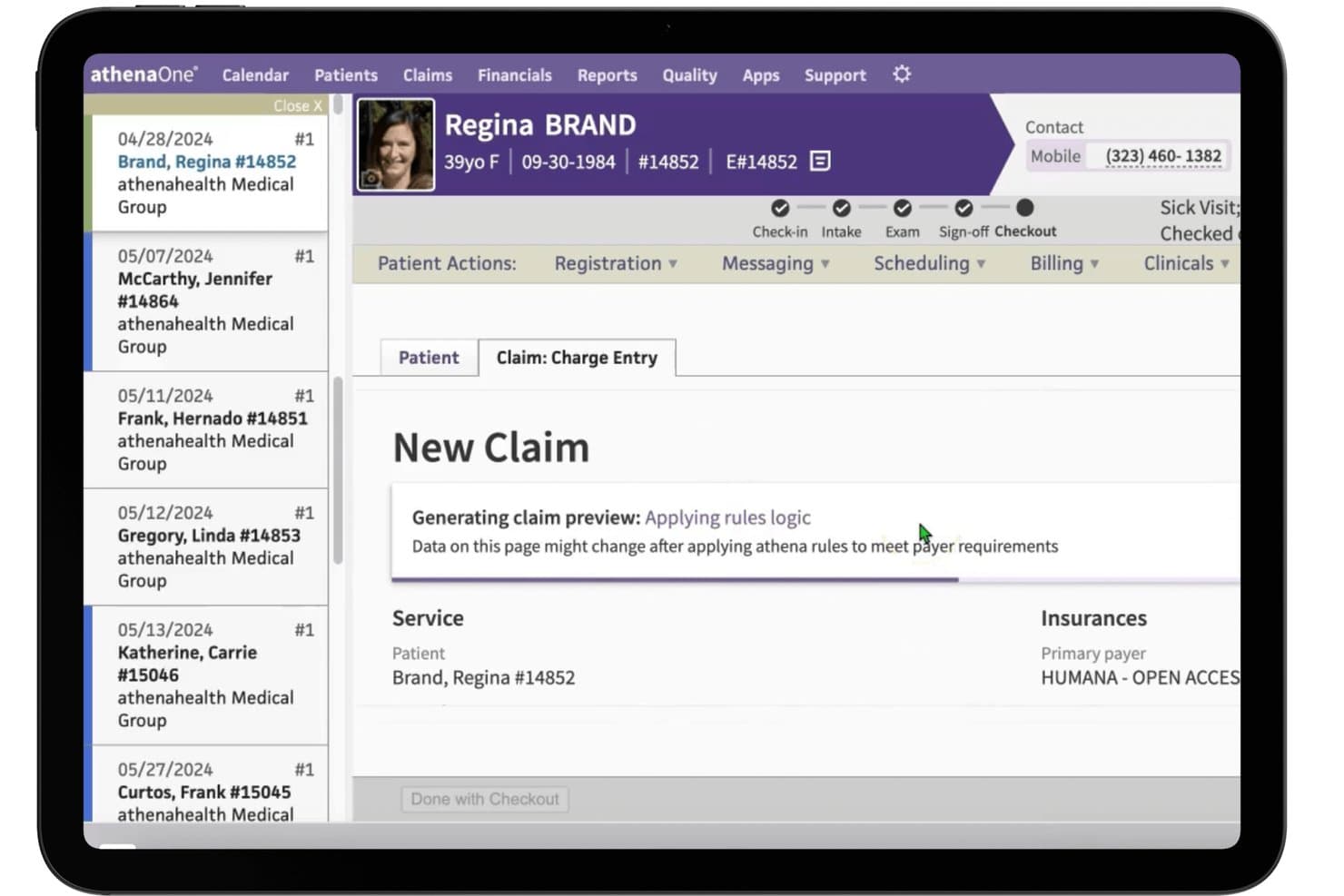
athenahealth offers an automated claim charge entry screen that applies rules logic to meet payer requirements during patient checkout. athenaOne is a cloud-based medical billing and EHR platform that combines claims submission, automated claim scrubbing, ERA posting, eligibility verification, and denial management in a single system built for independent and small practices.
Who Is athenahealth Best For?
athenaOne is a strong fit for independent physicians and small-to-mid-size ambulatory practices that handle billing in-house and need a system that keeps pace with payer policy changes.
Why I Picked athenahealth
athenahealth earns its spot on my shortlist because of its billing rules engine, which I think is genuinely unmatched for keeping pace with payer policy changes. It runs roughly 29,000 rules against every claim before submission, and those rules update continuously based on denial patterns across more than 150,000 providers in the network. The result is a 99% first-pass acceptance rate, which means far fewer claims cycling back for rework.
athenahealth Key Features
- Automated payment posting: Payments from electronic remittance advice are posted directly to patient accounts without manual data entry.
- Patient statement generation: The system produces statements for outstanding balances and delivers them through multiple formats.
- Eligibility verification: Real-time and batch checks allow you to confirm insurance coverage and benefits prior to visits.
- Denial worklist dashboard: A dashboard tracks claim denials and aging accounts receivable, organizing follow-up and appeal tasks.
athenahealth Integrations
athenahealth offers dozens of marketplace integrations through the athenahealth Marketplace, including GetWell Practice, Experian Health Patient Estimates, and Healthjump. An API is available for custom integrations.
Pros and Cons
Pros:
- Patient portal offers online bill payment
- Denial insights dashboard for ongoing AR tracking
- Claims scrubbing engine updates daily from network trends
Cons:
- No built-in claims coding assistance
- Percentage-of-collections pricing model only
Learn more about athenahealth: Best for custom claim form configurability
- Free demo available
- From $199/user/month
Visit WebsiteCustomer Rating:4.5/5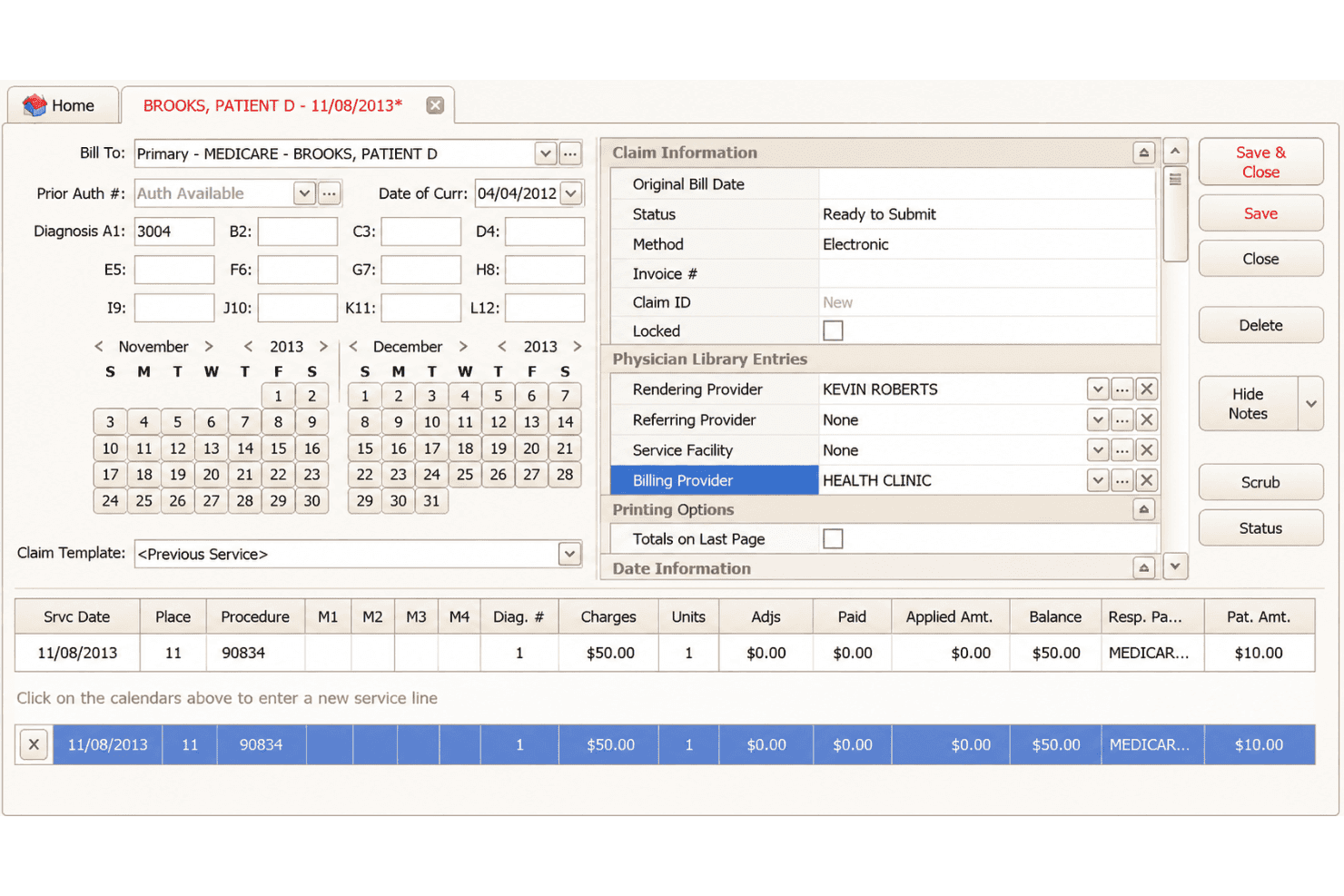
EZClaim supports claims, ERA posting, eligibility checks, forms, and scheduling. EZClaim is a cloud-based medical billing and scheduling platform that supports CMS-1500 and UB-04 claim submission, ERA auto-posting, real-time eligibility verification, and configurable claim forms for small practices and billing services.
Who Is EZClaim Best For?
EZClaim is a solid fit for independent medical billers and small practice administrators who manage claims across multiple payers and specialty types.
Why I Picked EZClaim
EZClaim earns its spot on my shortlist because it gives billing teams more control over claim form configuration than most tools at this price point. I can configure payor-specific settings across Medicare, Medicaid, Tricare, auto insurance, and worker compensation groups from a single platform. What I especially like is the support for both CMS-1500 and UB-04 forms, which means my team isn't locked into one claim type when the practice mix changes.
EZClaim Key Features
- ERA auto-posting: Import electronic remittance advice and apply payments automatically to patient accounts.
- Real-time eligibility checks: Verify patient insurance eligibility directly from the billing or scheduling interface.
- Integrated credit card processing: Collect payments using EZClaimPay, with support for major credit cards.
- Task list and follow-up management: Track unpaid claims, authorizations, and required actions with customizable reminders.
EZClaim Integrations
EZClaim offers native integrations with TriZetto, Carisk, Change Healthcare, AxisCare, BestNotes, NextStep Solutions, Nexus Clinical, Practice Fusion, Sevocity, WebPT, and BillFlash. An API is available for custom integrations.
Pros and Cons
Pros:
- Automated ERA posting and electronic statements
- Extensive payor and claim configuration options
- Supports both CMS-1500 and UB-04 claims
Cons:
- No built-in patient payment portal
- Scrubbing requires separate Alpha II add-on
Learn more about EZClaim: Best for automated insurance eligibility checks
- Free demo available
- Pricing upon request
Visit WebsiteCustomer Rating:3.9/5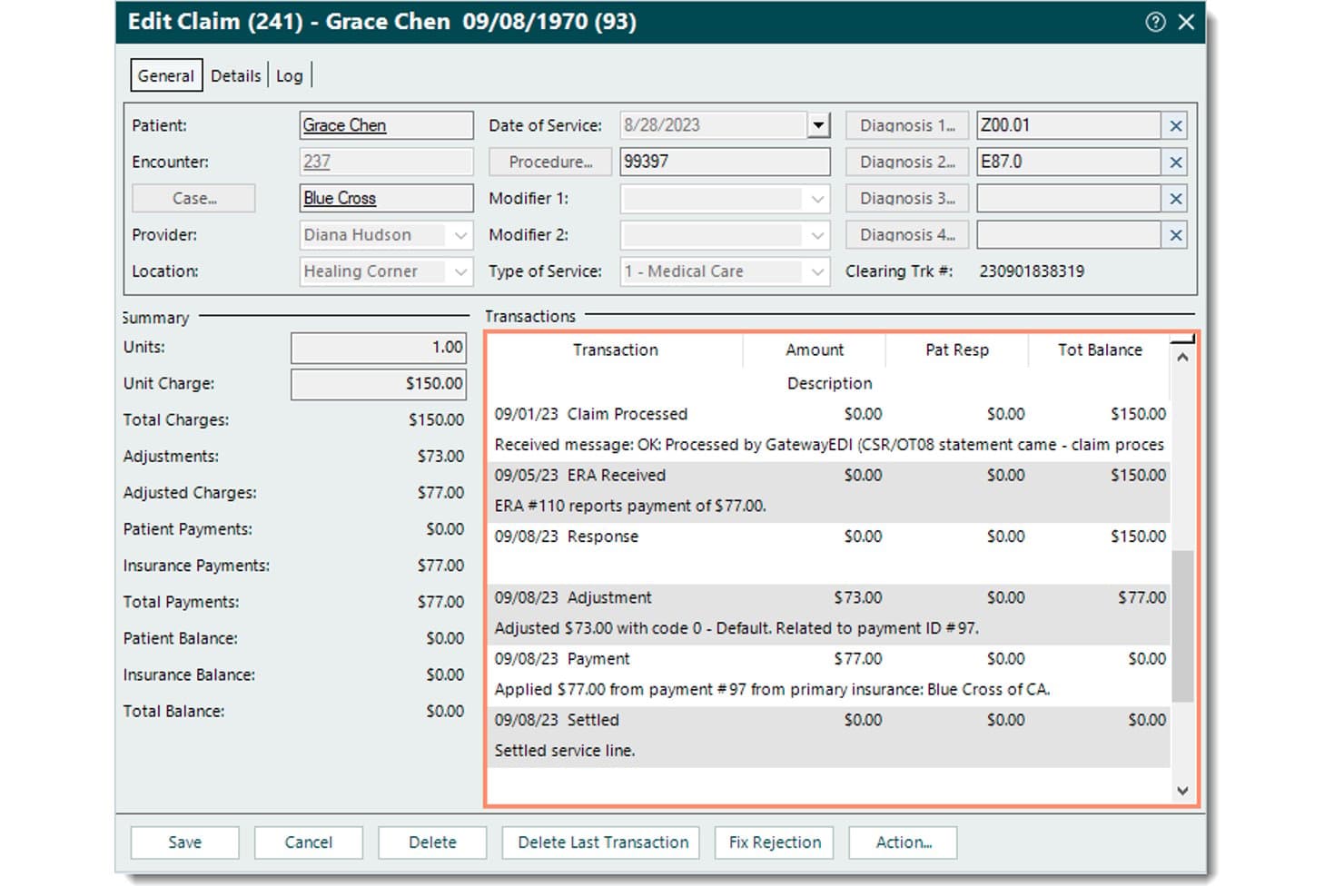
Tebra offers a detailed Edit Claim view that displays transaction history, payment breakdowns, adjustments, and insurance payments for streamlined medical billing management. Tebra is a medical billing and practice management platform for independent practices that combines electronic claim submission, automated eligibility verification, ERA posting, patient statements, and denial tracking in one system.
Who Is Tebra Best For?
Tebra is a strong fit for small independent practices with up to 10 providers that handle billing in-house and want automation without enterprise-level complexity.
Why I Picked Tebra
I picked Tebra as one of the best because its eligibility verification goes beyond a basic coverage check. It sends an ANSI-X12 270 inquiry to 2,700+ payers and returns a 271 response in seconds, surfacing active coverage, copay, deductible, and coinsurance details before the patient ever walks in. I also like the rules engine, which catches coding errors against payer-specific edits before claims go out, cutting down on the back-and-forth that typically follows a denial.
Tebra Key Features
- Automated patient statements: Generate branded statements with QR codes and direct payment links sent by email or text.
- Batch electronic claim submission: Submit claims to multiple payers simultaneously for faster processing and reduced manual entry.
- Robotic process automation for payment posting: Auto-post ERAs with speed and precision using customizable business rules.
- Unlimited non-clinical staff access: Allow front desk, billers, and office admins full use of scheduling, charting, and claims modules at no extra cost.
Tebra Integrations
Tebra offers native integrations with Kareo Billing, WebPT, Stripe, QuickBooks Online Advanced, Microsoft Excel, DocSpera, QuickEMR, Relatient, NextPatient, and PayPal. An API is available for custom integrations, and it supports HL7 and FHIR connectivity with most major EHRs.
Pros and Cons
Pros:
- Unlimited office staff seats included on all plans
- ERA payment posting uses robotic process automation
- Automated eligibility checks update in real time
Cons:
- Claim correction workflows can be confusing
- Denial reporting and analytics are limited
Learn more about Tebra: Best with AI-powered billing workflow automation
- Free demo available
- Pricing upon request
Visit WebsiteCustomer Rating:3.9/5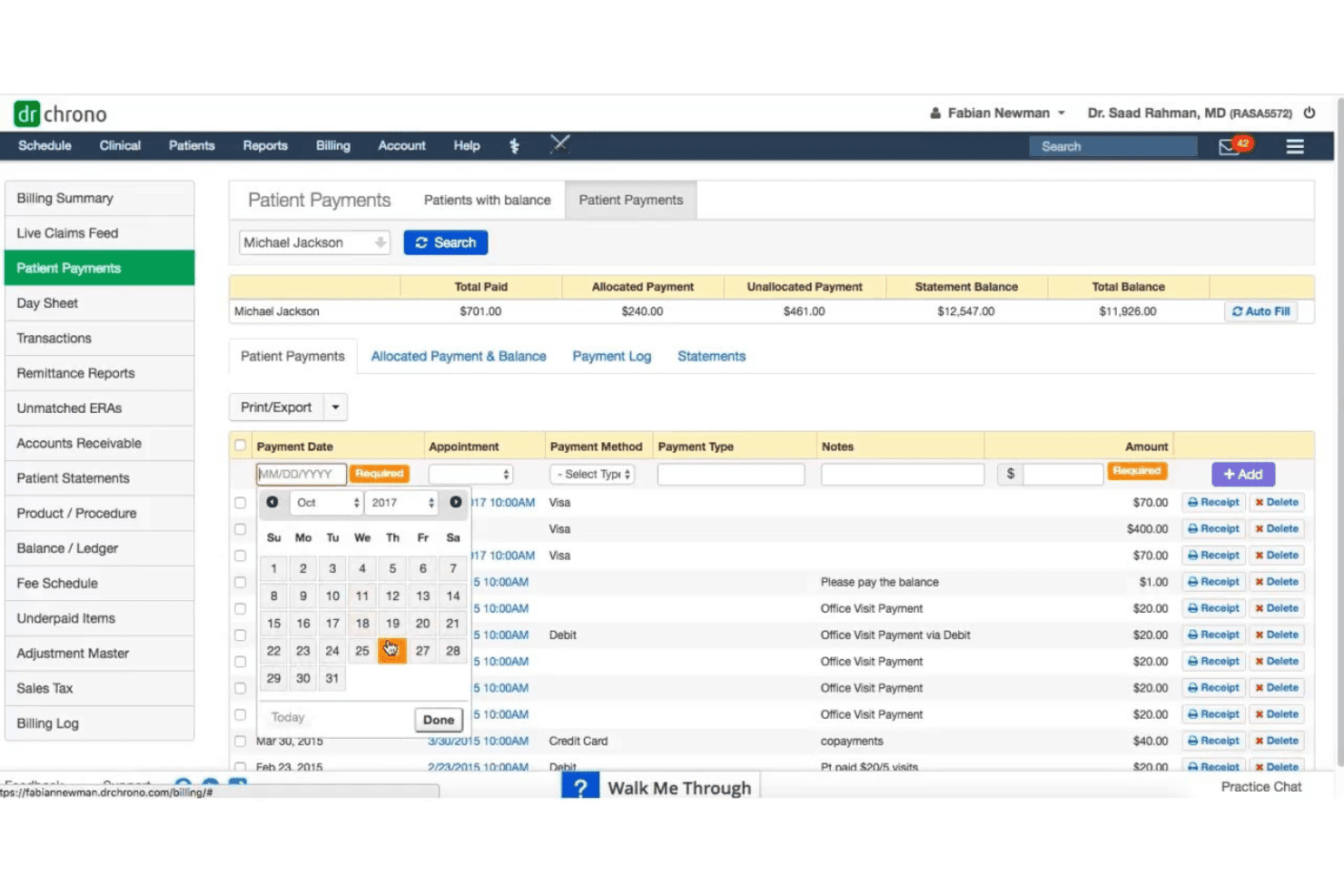
DrChrono links mobile EHR, claims, scrubbing, denials, eligibility, and billing. DrChrono is a cloud-based medical billing and EHR platform that combines claims submission, automated scrubbing, denial management, eligibility verification, and patient billing in a single, mobile-native system built for independent practices.
Who Is DrChrono Best For?
DrChrono is a strong fit for solo physicians and small independent practices that run on Apple devices and want EHR, scheduling, and billing managed in one place.
Why I Picked DrChrono
DrChrono earns its spot on my shortlist because its AI automation goes beyond documentation. EverHealth Scribe captures clinical notes automatically, and that coded data flows directly into claim generation, cutting the gap between the exam room and the clearinghouse. I also like the live-claims feed, which lets me catch rejections the moment they hit rather than discovering a denial weeks later.
DrChrono Key Features
- Customizable billing profiles: Save common codes and diagnoses to speed up charge entry and improve consistency.
- Integrated real-time eligibility checks: Verify patient insurance eligibility instantly with automated pre-visit workflows.
- HIPAA-compliant patient portal: Give patients secure access to statements, balances, and medical documents online.
- Mobile-native EHR and billing: Access and manage all billing and clinical tools on iPad, iPhone, and web.
DrChrono Integrations
DrChrono offers native integrations with Labcorp, Quest Diagnostics, Health Gorilla, Lifepoint, Curogram, Square, Birdeye, and Updox. An API is available for custom integrations.
Pros and Cons
Pros:
- Integrated electronic and paper patient statements
- Mobile-native design for iPad and iPhone
- Clean claims rate exceeds 98 percent
Cons:
- Support quality has declined post-acquisition
- Occasional system slowdowns and glitches
Learn more about DrChrono: Best for real-time claim tracking
- Free demo available
- Pricing upon request
Visit WebsiteCustomer Rating:3.6/5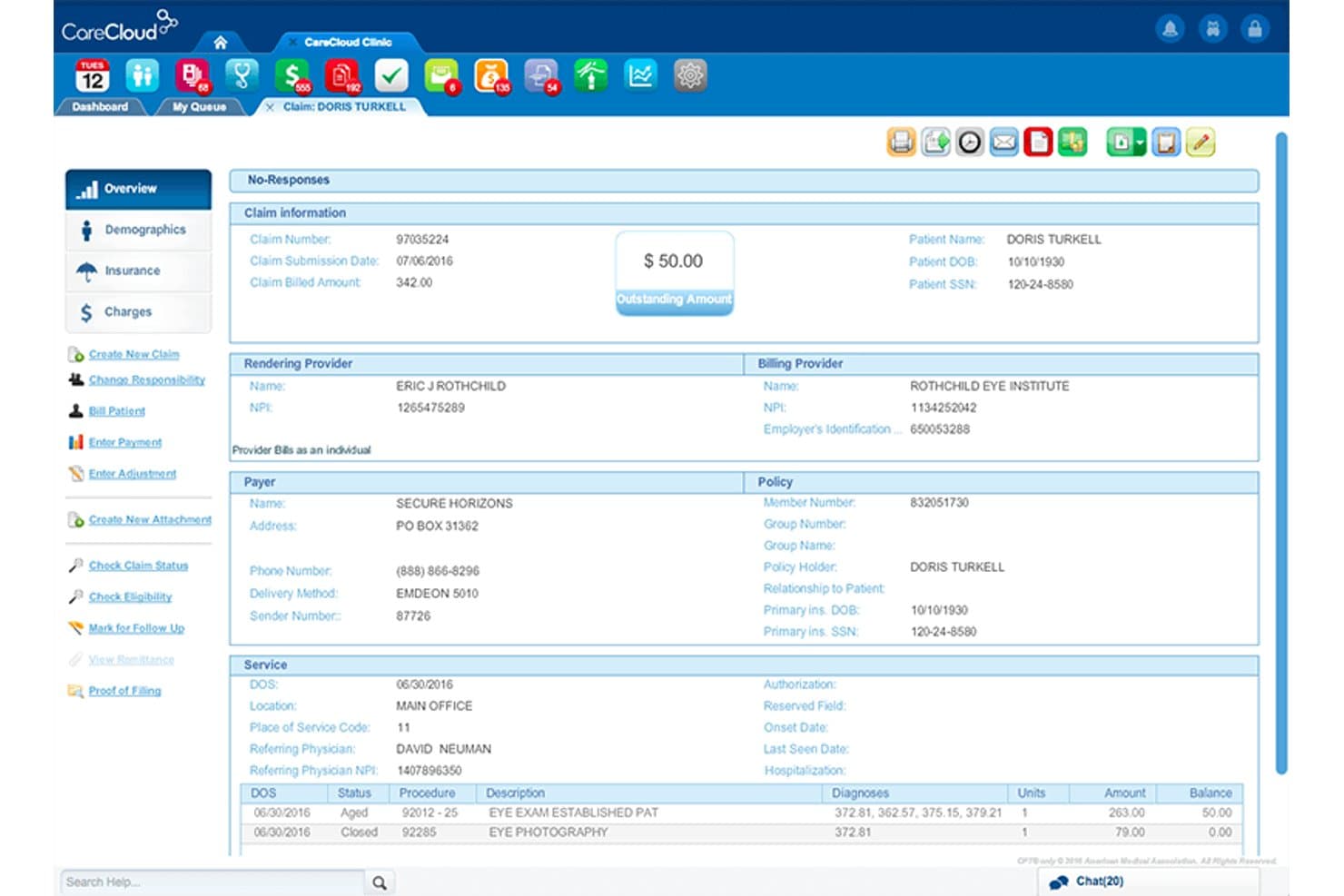
CareCloud offers a detailed claim overview screen displaying patient billing information, provider details, payer policy, and service line items with balances. CareCloud is a cloud-based medical billing platform that combines an integrated clearinghouse, AI-powered claim scrubbing, ERA posting, eligibility verification, and denial and AR tracking.
Who Is CareCloud Best For?
CareCloud is a good fit for independent and small-to-mid-size practices across 70+ specialties that need a fully integrated billing and RCM solution.
Why I Picked CareCloud
I picked CareCloud as one of the best because of how it handles real-time claim visibility across every stage of the billing cycle. Every claim sits in a fully transparent queue, so I can see exactly where it stands in the submission and adjudication process at any point. The CollectiveIQ rules engine scrubs claims against 180 million billing rules before submission, catching payer-specific errors before they trigger a denial.
CareCloud Key Features
- Integrated clearinghouse: Submit claims directly from the platform to payers with built-in clearinghouse functionality.
- ERA auto-posting: Automatically process electronic remittance advice and post payments to patient accounts.
- Batch insurance eligibility: Run bulk insurance verification checks for upcoming appointments to confirm patient coverage.
- Patient statement automation: Generate and send statements in batches and accept credit card payments through the Breeze module.
CareCloud Integrations
CareCloud offers native integrations with pVerify for batch insurance eligibility and connects directly with its own EHR, practice management, and patient portal modules. An API is available for custom integrations.
Pros and Cons
Pros:
- Batch eligibility verification with detailed payer response
- Automated ERA payment posting and reconciliation
- Real-time claim tracking across all billing stages
Cons:
- Per-provider onboarding fees can be high
- Requires multi-year commitment for most plans
Learn more about CareCloud: Best for robust reporting and analytics
- Free demo available
- Pricing upon request
Visit WebsiteCustomer Rating:3.6/5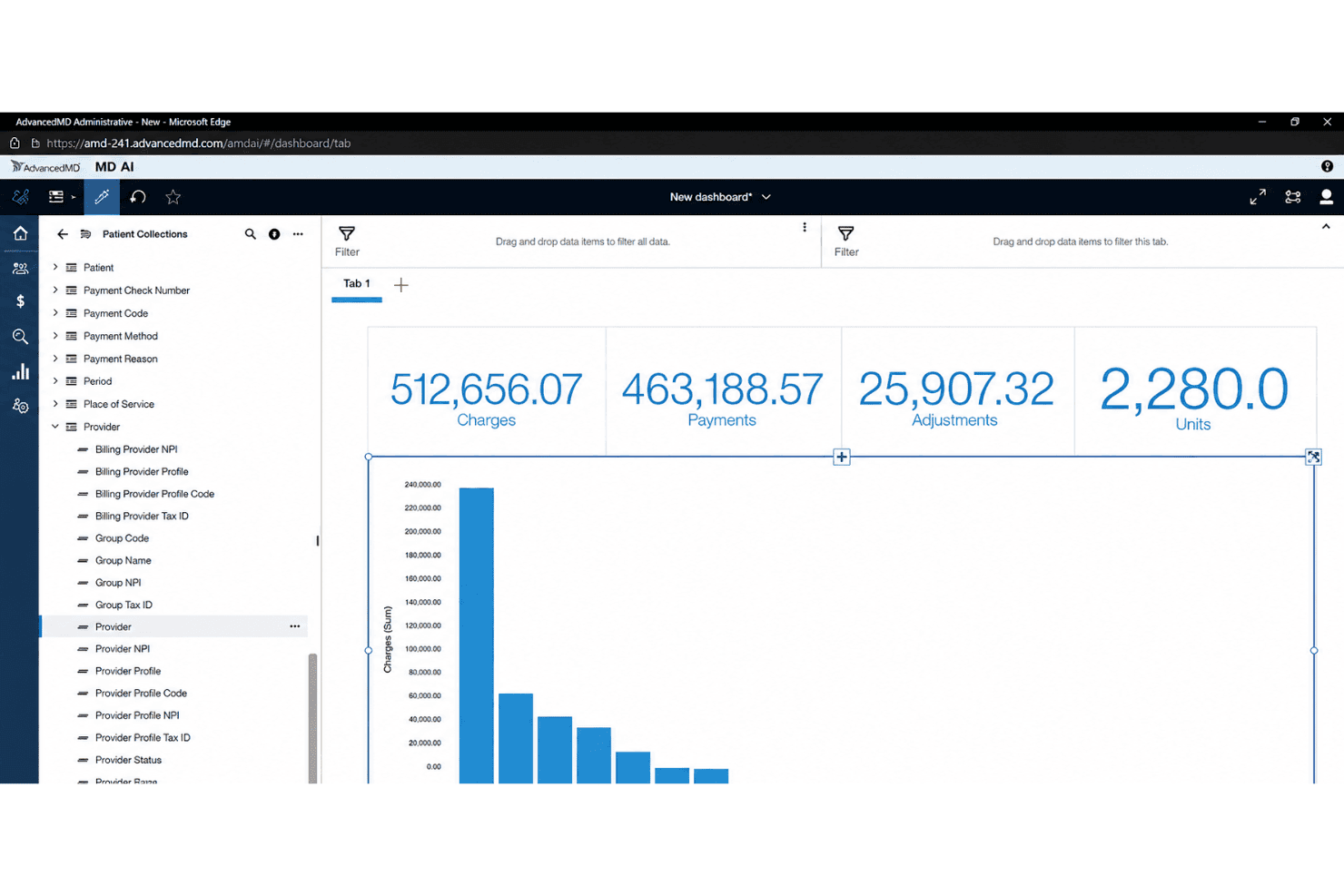
AdvancedMD tracks billing trends, denial causes, and revenue gaps in real time. AdvancedMD is a cloud-based medical billing platform that covers claims submission, automated claim scrubbing, ERA processing, eligibility verification, patient statements, and denial and A/R management for small to mid-sized practices.
Who Is AdvancedMD Best For?
AdvancedMD suits independent billing companies and small-to-mid-sized practices that need a full claims lifecycle platform with detailed revenue reporting.
Why I Picked AdvancedMD
AdvancedMD earns its spot on my shortlist because of the depth its reporting tools bring to day-to-day billing. I especially like the AdvancedInsight module, which lets me build customized reports that go well beyond standard aging summaries. The real-time dashboards surface MTD and YTD comparisons alongside denial root-cause data, so I can pinpoint exactly where revenue is leaking before it compounds.
AdvancedMD Key Features
- ClaimInspector automated scrubbing: Flags coding and eligibility errors before submission to help prevent denials.
- A/R Control Center: Tracks denials, outstanding claims, and collections worklists in one place.
- Patient payment processing: Lets patients pay online and supports customizable statements and copay collection.
- Integrated clearinghouse: Submits claims directly and manages remittances without manual transfers.
AdvancedMD Integrations
AdvancedMD offers native integrations with Waystar, QuickBooks (via qbSolutioneers), InstaMed, 3M M*Modal Fluency Direct, and Healthix HIE, with additional marketplace integrations and an open API for building custom integrations.
Pros and Cons
Pros:
- Detailed patient billing and statement tools
- Claims lifecycle tracked from submission to payment
- Highly customizable revenue analytics dashboards
Cons:
- Training and onboarding support can be limited
- Navigation is complex for new users
Other Easy Medical Billing Software
Here are some additional easy medical billing software options that didn’t make it onto my shortlist, but are still worth checking out:
- 11CureMDBest for specialty-specific billing modules
- 12RXNTBest for unlimited user access
- 13SimplePracticeBest for intuitive claim submission interface
- 14TherapyNotesBest for behavioral health progress tracking
- 15Elation HealthBest for care team collaboration support
- 16Ensora Health TheraNestBest for mental health insurance billing tools
- 17eClinicalWorksBest for integrated patient portal billing
- 18MEDISOFTBest for customizable patient payment plans
- 19Greenway HealthBest for compliance with industry standards
- 20Practice FusionBest for EHR-integrated claims processing
How I Evaluate Easy Medical Billing Software
I split my evaluation into the core functionality a tool must cover—clean claim submission, ERA posting, eligibility checks—and the differentiators that separate a genuinely easy tool from the rest.
Core Functionality (Table Stakes For This List)
When I'm selecting tools for my list, I rank each one on a scale from 0 (does not offer the functionality) to 5 (excels in this area) for each core functionality listed below. Then, I calculate the tool's total score into a percentage. Each tool needs to achieve a minimum total score of 65% to be considered for inclusion.
- Claims Submission: I check whether the tool supports electronic 837P submission to multiple clearinghouses and look for UB-04 support for practices that handle facility billing.
- Claim Scrubbing: Before a claim goes out, the software should flag coding mismatches, missing modifiers, and payer-specific formatting issues to reduce rework after submission.
- ERA/EOB Posting: I evaluate how each tool handles electronic remittance advice—specifically whether it auto-posts payments or requires staff to manually reconcile every line item.
- Patient Billing & Statements: Generating and sending patient statements should take minimal clicks, and I look for built-in options like online payments and automated balance reminders.
- Eligibility Verification: Real-time 270/271 eligibility checks at scheduling or check-in help front desk staff catch expired coverage before the patient is seen, so I look for both single and batch verification.
- Denial & AR Management: I evaluate whether the tool provides a clear worklist or dashboard that surfaces denied claims, groups aging receivables, and guides follow-up steps for rebilling or appeals.
Once I have a list of tools that meet the criteria, I consider what sets each platform apart.
Differentiating Factors (What Sets Vendors Apart)
Here's how I compare and contrast different vendors:
Standout Features
A built-in clearinghouse is a big differentiator—it means your team can submit and track claims without juggling a separate vendor relationship. I also look for patient payment portals that offer text-to-pay and card-on-file options, since chasing balances manually eats up staff time. Pre-loaded CPT, ICD-10, and HCPCS code libraries with smart search help billers code accurately without memorizing every modifier.
Beyond Features
Ease of onboarding matters a lot here. A solo physician shouldn't need weeks of training or an IT consultant to go live, so I look for guided setup, data migration help, and role-based tutorials. Pricing transparency is equally important—hidden per-claim or clearinghouse fees can quietly inflate costs for small practices. I also evaluate how well each tool connects to existing EHR/EMR systems and accounting software, since billing rarely lives in isolation.
How to Choose Easy Medical Billing Software
It’s easy to get bogged down in long feature lists and complex pricing structures. To help you stay focused as you work through your unique software selection process, here’s a checklist of factors to keep in mind:
| Factor | What to Consider |
|---|---|
| FactorEase of use | What to ConsiderWill you or your staff feel comfortable navigating the system within a week? Get demos and ask about the typical learning curve. |
| FactorImplementation and onboarding | What to ConsiderHow much support is available during setup? Look for onboarding help, data migration options, and the types of training provided. |
| FactorCost | What to ConsiderAre there hidden fees for claims, users, or clearinghouse access? Confirm monthly costs and ask about paid add-ons before signing up. |
| FactorScalability | What to ConsiderWill the platform still fit if your practice doubles? Consider if the tool supports more providers, services, or locations as you grow. |
| FactorIntegrations | What to ConsiderWill it connect with your EHR, accounting, or appointment scheduling? Confirm supported integrations and ask about future development plans. |
| FactorCustomizability | What to ConsiderCan you tailor workflows, forms, and reports to fit your specialty or billing needs? Ask for real-world examples during your demo. |
| FactorSecurity safeguards | What to ConsiderDoes the vendor offer a current BAA, data encryption, and audit trails? Verify compliance standards and how updates are communicated. |
| FactorSupport availability | What to ConsiderIs help accessible when you need it most? Check hours, communication channels, and expected response times for urgent billing issues. |
What Is Easy Medical Billing Software?
Easy medical billing software is billing software designed so solo and small practices can manage claims, payments, and patient billing with minimal training. These platforms automate key steps like claims submission, payment posting, and eligibility checks, helping teams avoid errors, save time, and focus more energy on patient care. Most options emphasize intuitive workflows and straightforward onboarding for faster adoption.
Features of Easy Medical Billing Software
When selecting easy medical billing software, keep an eye out for the following key features:
- Claims submission: Create and send electronic claims directly to payers or clearinghouses, eliminating manual paperwork and speeding up reimbursement cycles.
- Claim scrubbing: Automatically review claims for coding, eligibility, or formatting errors before submission to reduce denials and rework.
- Electronic remittance posting: Import and auto-post payment details from payers, minimizing manual data entry and improving reconciliation.
- Patient statements: Generate and deliver professional statements to patients for outstanding balances, making follow-up and collections more efficient.
- Eligibility verification: Perform real-time or batch checks on patient insurance coverage and benefits to catch issues before the patient visit.
- Denial management: Track denied claims, flag root causes, and organize follow-up in a user-friendly dashboard to recover revenue promptly.
- Online payment processing: Accept patient payments via credit card or e-payments, often with a portal for self-service and recurring plan options.
- Pre-loaded code libraries: Search and select up-to-date CPT, ICD, and HCPCS codes with built-in guidance, reducing coding mistakes and saving time.
- Role-based access: Control data visibility and permissions based on user roles, supporting compliance and data security across your team.
- Automated reporting: Generate financial, operational, and A/R reports on demand to track revenue cycles, identify problem areas, and guide decision-making.
Benefits of Easy Medical Billing Software
Implementing easy medical billing software provides several benefits for your team and your business. Here are a few you can look forward to:
- Faster reimbursements: Automated claims submission and payment posting reduce delays between services rendered and money in your account.
- Fewer claim denials: Integrated claim scrubbing and eligibility checks catch errors up front, cutting down on rejected or denied claims.
- Lower administrative burden: Intuitive dashboards and built-in workflows mean even small teams can handle billing without hiring specialists.
- Improved cash collections: Online payment portals and patient statement automation make it easier for patients to pay, supporting a healthier revenue cycle.
- Greater billing accuracy: Pre-loaded code libraries and systematic validation tools help prevent costly coding mistakes and compliance issues.
- Simpler onboarding: User-friendly interfaces and guided setup let your team get up to speed quickly with minimal disruption to daily operations.
- Better financial visibility: Automated reporting and A/R tracking give you real-time insights into your practice’s billing health and trends.
Costs and Pricing of Easy Medical Billing Software
Selecting easy medical billing software requires an understanding of the various pricing models and plans available. Costs vary based on features, team size, add-ons, and more. The table below summarizes common plans, their average prices, and typical features included in easy medical billing software solutions:
Plan Comparison Table for Easy Medical Billing Software
| Plan Type | Average Price | Common Features |
|---|---|---|
| Plan TypeFree Plan | Average Price$0 | Common FeaturesBasic claims entry, essential reporting, manual patient statements, and limited support. |
| Plan TypePersonal Plan | Average Price$30-$60/month | Common FeaturesElectronic claims submission, claim scrubbing, standard reports, eligibility checks, and email support. |
| Plan TypeBusiness Plan | Average Price$80-$200/month | Common FeaturesERA auto-posting, patient payment portal, denial tracking, online payments, custom reports, and live support. |
| Plan TypeEnterprise Plan | Average Price$250+/month | Common FeaturesFull integration options, advanced compliance, workflow automation, dedicated onboarding, and premium support. |
Easy Medical Billing Software FAQs
Here are some answers to common questions about easy medical billing software:
How quickly can most teams get started with easy medical billing software?
Most teams can get started within a few days thanks to cloud-based access, step-by-step onboarding, and pre-configured templates. Look for options that offer data migration help and live training for a smoother launch.
Do these platforms work for specialty practices or only for general clinics?
Yes, many easy medical billing software options support specialty practices such as mental health, chiropractic, and physical therapy. Always review whether the platform offers specialty-specific modifiers, templates, and reporting.
Can these tools handle both insurance and patient payments?
Yes, easy medical billing software is designed to process both insurance reimbursements and direct patient payments. Most tools offer online payment portals, credit card processing, and automated statement generation.
Is there a risk of hidden fees with budget-friendly options?
Yes, some plans advertise low rates but may charge extra for claims, users, or clearinghouse access. Always ask for a detailed fee breakdown and read the contract before committing.
What level of customer support should I expect?
You should expect standard support via email or chat in lower-cost plans, with options for phone support, live training, or a dedicated account manager in higher-tier or enterprise plans. Check support hours and turnaround times before purchasing.