

AI EMR software uses artificial intelligence to automate clinical documentation, streamline charting, and help you manage patient records faster. If you’re overwhelmed by notes, compliance demands, and complex EHR interfaces, the right AI-EHR software can free up more time for care. Below, I’ll help you compare the top options so you can find a solution that fits the way you practice, meets your documentation needs, and supports better outcomes for your patients.
Why Trust Our Software Recommendations
6,700+
Reviews
20
Industry experts
16+
Evaluation factors
14
Years
Our team has been testing and reviewing software since 2012. As medical practice leaders ourselves, we know how difficult—and important—it is to choose the right software.
For this guide, we evaluated tools using hands-on testing and independent research, scoring tools using our selection criteria.
Our reviews reflect our human editorial judgment, not a sales pitch.
AI EMR Software Comparison Table
This comparison table summarizes pricing details for my top AI EMR software.
| Tool | Best For | Trial Info | Price | ||
|---|---|---|---|---|---|
| 1 | Best for specialty-specific AI documentation | Free demo available | Pricing upon request | Website | |
| 2 | Best for EHR-compatible, trained scribing | Free demo available, 7-day free trial for the standalone AI scribe | From $249/user/month | Website | |
| 3 | Best for AI-generated SOAP notes | Free demo available | Pricing upon request | Website | |
| 4 | Best for ambient charting and automated workflows | 30-day free trial + free demo available | From $130/month | Website | |
| 5 | Best for AI charting, coding, and insights | Free demo available | Pricing upon request | Website | |
| 6 | Best for AI scribing and 24/7 communication | Free demo available | Pricing upon request | Website | |
| 7 | Best for SMS-based no-show outreach | Not available | Pricing upon request | Website | |
| 8 | Best for self-learning clinical documentation | Free demo available | Pricing upon request | Website | |
| 9 | Best for mobile ambient clinical notes | Free demo available | Pricing upon request | Website | |
| 10 | Best for enterprise healthcare systems | Free demo available | Pricing upon request | Website |


 Best for specialty-specific AI documentation
- Free demo available
- Pricing upon request
Visit WebsiteCustomer Rating:4.5/5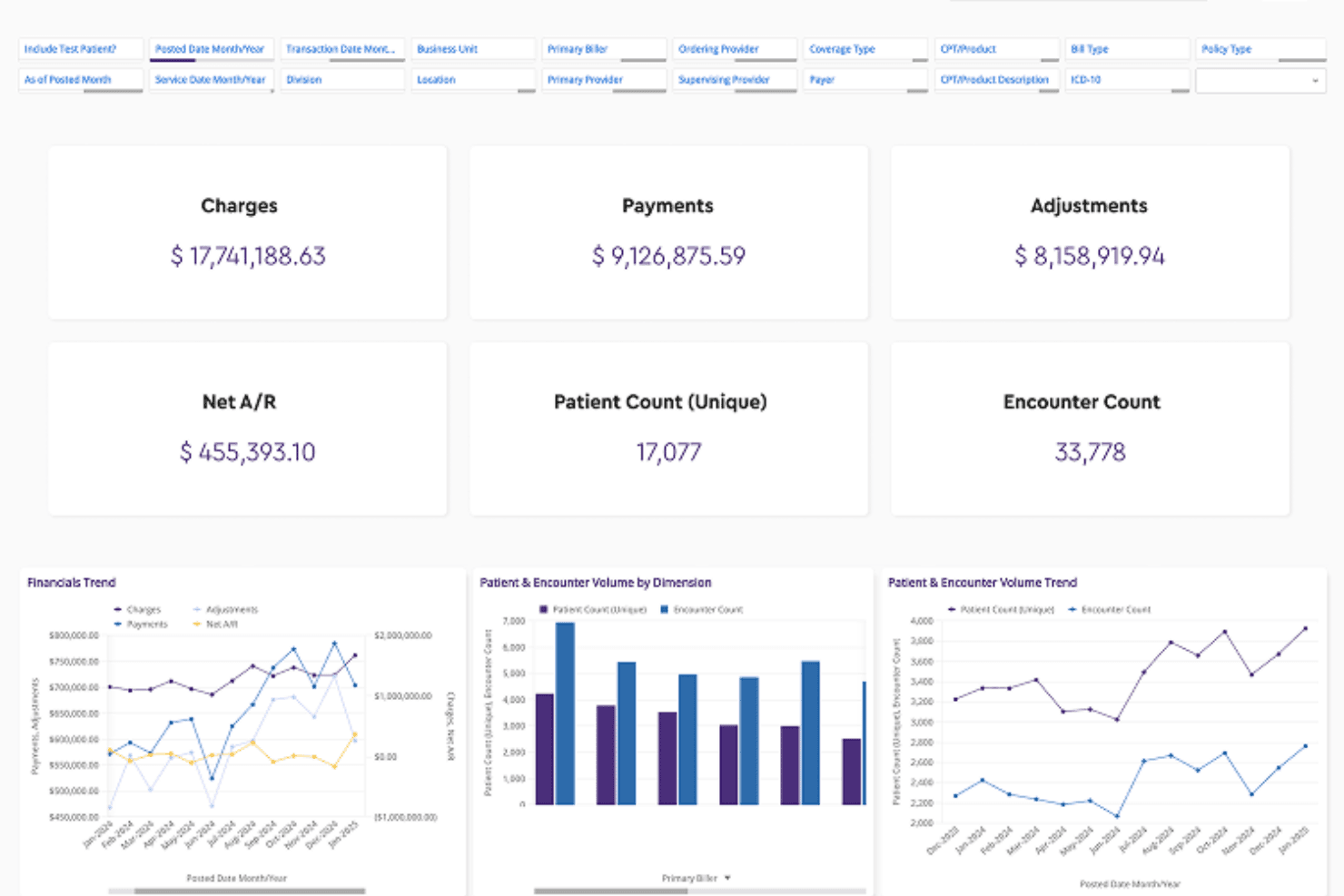
ModMed productivity dashboard showing charges, payments, adjustments, patient counts, encounter totals, and financial trends ModMed is a specialty-focused AI EMR platform built around EMA® and gGastro®, combining ambient clinical documentation, e-prescribing, practice management, and AI-assisted coding across 11 medical specialties.
Who Is ModMed Best For?
ModMed is a strong fit for specialty ambulatory practices in fields like dermatology, podiatry, OBGYN, and gastroenterology that need an EMR built around their specific clinical workflows.
Why I Picked ModMed
ModMed earns its spot as one of the best on my shortlist because its AI documentation is built specifically for each specialty, not retrofitted onto a generic framework. ModMed Scribe 2.0 listens to the patient-provider conversation and auto-populates the chart with structured notes, suggested ICD-10 codes, and lab orders. For GI practices, gScribe goes even further, trained on gastroenterology-specific language to suggest HPIs and care plans that actually reflect how GI physicians document.
ModMed Key Features
- Integrated practice management: Offers scheduling, billing, claims, and reporting all within the same platform as the EMR.
- Customizable specialty templates: Provides structured templates tailored to workflows for 11 distinct medical specialties.
- Certified ePrescribing with drug interaction checks: Supports secure transmission of prescriptions along with real-time medication safety alerts.
- Extensive lab and pathology interfaces: Connects to over 150 pathology labs and major clinical labs for order entry and result retrieval.
ModMed Integrations
ModMed offers native integrations with Labcorp, Quest Diagnostics, and over 150 pathology labs, supports HL7/FHIR interfaces with practice management systems, and provides an API for custom integrations.
Pros and Cons
Pros:
- Customizable structured charting templates
- Ambient scribe captures multi-provider encounters
- AI notes tuned for 11 specialties
Cons:
- Training and onboarding can be time-intensive
- Specialty focus limits use outside supported fields
Learn more about ModMed: Best for EHR-compatible, trained scribing
- Free demo available, 7-day free trial for the standalone AI scribe
- From $249/user/month
Visit WebsiteCustomer Rating:4.4/5
OmniMD offers an AI Medical Scribe interface that lets clinicians create clinical encounter notes with dictation, audio upload, and patient appointment management. OmniMD is an ONC-certified, AI-powered EMR platform built for ambulatory care practices, combining ambient clinical documentation, AI medical coding, RCM, and remote patient monitoring in a single system.
Who Is OmniMD Best For?
OmniMD fits independent and multi-specialty ambulatory practices looking for a single-vendor system that handles charting, coding, and billing without third-party add-ons.
Why I Picked OmniMD
I've included OmniMD in my top picks because its AI Medical Scribe isn't bolted on after the fact. It's natively built into the EHR, so ambient recordings auto-populate directly into the patient chart without any third-party middleware. I especially like the specialty-trained templates: a cardiology encounter produces a different structured SOAP note than a wound care visit, and the speaker identification feature keeps documentation clean when multiple providers are in the room.
OmniMD Key Features
- AI front desk automation: Handles appointment scheduling, insurance verification, and phone interactions using artificial intelligence.
- AI medical coder: Suggests ICD, CPT, and HCPCS codes in real time based on chart content.
- Remote patient monitoring module: Captures and organizes patient vitals and biometric data from integrated devices.
- Customizable specialty templates: Offers templates for over 20 specialties, supporting various workflows and structured documentation requirements.
OmniMD Integrations
OmniMD offers native integrations with Multum Drug Database, HAPI FHIR Server, HL7 lab systems, and e-Prescribing networks like DirectTrust. FHIR API access is available for custom integrations.
Pros and Cons
Pros:
- Supports remote patient monitoring device data
- Real-time specialty-specific AI coding suggestions
- Charting and scribing are native and unified
Cons:
- Some users report lag during peak hours
- Reporting customization options are somewhat limited
Learn more about OmniMD: Best for AI-generated SOAP notes
- Free demo available
- Pricing upon request
Visit WebsiteCustomer Rating:3.7/5
NextGen Healthcare offers a clinical note interface displaying patient history, problem list, and visit documentation within its EHR system. NextGen Healthcare is an AI-powered EMR platform covering clinical documentation, e-prescribing, revenue cycle management, and patient engagement across both small practices and mid-size to enterprise healthcare organizations.
Who Is NextGen Healthcare Best For?
NextGen Healthcare is a strong fit for independent and specialty practices that need a full EMR with built-in AI documentation tools.
Why I Picked NextGen Healthcare
I picked NextGen Healthcare as one of the best because its Ambient Assist feature genuinely stands out for clinical documentation. It listens to live patient-physician conversations and auto-generates structured SOAP notes in real time, populating them directly into the chart. I also like the NextGen Intelligent Agent, which lets providers pull up patient charts or surface clinical data using voice commands mid-visit, keeping physicians focused on the patient rather than the screen.
NextGen Healthcare Key Features
- Customizable specialty templates: Offers over 2,000 templates tuned for specific medical specialties and workflows.
- ONC-certified interoperability: Supports HL7 and FHIR standards for data exchange across health systems.
- Integrated e-prescribing and CPOE: Enables electronic prescribing, drug interaction checks, and direct order entry in the platform.
- Revenue cycle management tools: Includes automated claims processing, eligibility checks, and reporting for billing staff.
NextGen Healthcare Integrations
NextGen Healthcare offers native integrations with Labcorp Diagnostic Assistant, Innovaccer, Arcadia, Clearwave, Assort Health Voice AI, RemetricHealth, Medsien, and ActX Genomic Decision Support. An API is available for custom integrations.
Pros and Cons
Pros:
- Integrated EHR, practice management, and revenue cycle tools
- Supports specialty-specific workflows across more than 40 markets
- AI-generated clinical notes help reduce manual charting
Cons:
- Pricing is not publicly available and may vary by practice size
- Extensive features may require more training and onboarding
Learn more about NextGen Healthcare: Best for ambient charting and automated workflows
- 30-day free trial + free demo available
- From $130/month
Visit WebsiteCustomer Rating:3.6/5
AdvancedMD dashboard for managing appointments, clinical notes, prescriptions, orders, charge slips, and messages AdvancedMD is a cloud-based AI EMR platform that combines ambient clinical documentation, practice management, medical billing, and patient engagement tools in a unified suite built for independent medical practices.
Who Is AdvancedMD Best For?
It's a strong fit for independent practices and small-to-mid-size medical groups that need a single platform to handle clinical, billing, and administrative workflows.
Why I Picked AdvancedMD
AdvancedMD earns its spot on my shortlist because of how tightly its ambient AI connects to actual charting. I love that the AI Clinical Assistant generates notes in five formats, including SOAP and Psychiatric Evaluation, not just a raw transcript. It also auto-populates action items like lab orders, medication updates, and allergy changes directly into the patient record after each visit, which is a level of downstream automation you don't get from a standalone scribe tool.
AdvancedMD Key Features
- Customizable physician dashboard: Gives clinicians a centralized view for managing notes, prescriptions, lab results, and encounter documentation.
- Integrated patient portal: Lets patients schedule, message, complete intake forms, and view documents securely online.
- Automated insurance eligibility verification: Checks coverage automatically ahead of scheduled appointments and flags issues for staff.
- Built-in telehealth: Supports HIPAA-compliant video visits and includes tools for scheduling, documentation, and ePrescribing within one workflow.
AdvancedMD Integrations
AdvancedMD offers marketplace integrations with over 1,400 healthcare solutions, including Surescripts for ePrescribing, and provides an API, HL7, and ODBC support for custom integrations and data access.
Pros and Cons
Pros:
- Built-in telehealth and patient engagement features reduce reliance on separate tools
- Integrated billing and eligibility tools streamline administrative workflows
- Customizable dashboard centralizes notes, prescriptions, orders, and messages
Cons:
- Pricing may increase with add-ons and advanced features
- The interface can feel complex for new users
 Best for AI charting, coding, and insights
- Free demo available
- Pricing upon request
Visit WebsiteCustomer Rating:3.5/5
CureMD offers an AI Contact Center Dashboard with real-time call analytics, distribution charts, and agent performance metrics for urgent care practices. CureMD is an AI-powered EMR platform that integrates ambient scribing, automated ICD-10 and CPT coding, practice management, and revenue cycle tools across 30+ clinical specialties.
Who Is CureMD Best For?
CureMD fits independent and multi-provider practices that need a single platform covering clinical documentation, coding, and billing across specialty workflows.
Why I Picked CureMD
CureMD earns its spot on my shortlist because the AI Medical Scribe listens to patient conversations in real time and generates structured SOAP notes auto-coded with ICD-10 and CPT codes before the encounter even closes. I also like the AI Coder's payer-specific rule enforcement, which flags code combinations that typically trigger denials before claims go out. The AI Disease Prediction layer adds another dimension by surfacing elevated chronic condition risk flags directly inside the chart during the visit.
CureMD Key Features
- Workflow editor: Build and adapt clinical workflows using a drag-and-drop visual tool.
- Practice management dashboard: Access real-time scheduling, task management, and eligibility checks from one screen.
- Mobile EHR app: Chart encounters and check patient records on iPad or iPhone devices.
- Patient portal integration: Let patients request refills, view results, and send secure messages online.
CureMD Integrations
CureMD offers native integrations with Surescripts for e-prescribing, clearing houses for claims processing, and lab and imaging systems for orders and results. Device connectivity is available for EEG/EMG, spirometry, and EKG imports. An API is available for custom integrations.
Pros and Cons
Pros:
- Includes EHR, practice management, billing, and patient engagement tools
- Supports coding suggestions for ICD-10 and CPT workflows
- AI-assisted scribing helps generate structured clinical notes
Cons:
- Interface and support updates may feel inconsistent to some users
- Pricing is not publicly available
Learn more about CureMD: Best for AI scribing and 24/7 communication
- Free demo available
- Pricing upon request
Visit WebsiteCustomer Rating:3.4/5
eClinicalWorks offers a mobile tablet interface with patient encounter details, hub navigation, and telephone/web encounter management for streamlined clinical workflows. eClinicalWorks is an AI-powered EHR platform that combines ambient clinical documentation, practice management, e-prescribing, revenue cycle management, and patient engagement tools across a single cloud-based system.
Who Is eClinicalWorks Best For?
It's a strong fit for independent and multi-specialty practices that want a fully integrated EHR, billing, and AI documentation system without stitching together separate tools.
Why I Picked eClinicalWorks
I picked eClinicalWorks as one of the best because Sunoh.ai, its native ambient scribe, listens to live patient encounters and auto-populates structured SOAP notes across ten-plus specialties without any post-visit cleanup. On the communication side, healow Genie handles inbound patient calls around the clock using AI, freeing front desk staff from after-hours phone coverage. I also like that both tools run natively inside the EHR, so there's no toggling between separate apps.
eClinicalWorks Key Features
- In-place editing: Edit patient notes, orders, and documentation directly within the encounter screen.
- Customizable specialty templates: Build and modify chart templates to match different specialty workflows.
- Integrated e-prescribing with formulary checks: Manage new prescriptions, refills, EPCS, and drug interactions from within the patient chart.
- Value-based care analytics dashboard: Track MIPS, HEDIS, and risk adjustment metrics in real time for ongoing compliance.
eClinicalWorks Integrations
eClinicalWorks offers native integrations with Sunoh.ai for AI ambient scribing and the healow suite of patient engagement tools. It supports national interoperability networks through PRISMA, and provides an API for custom integrations.
Pros and Cons
Pros:
- 24/7 AI-powered patient communication tools
- Built-in value-based care analytics dashboard
- Native ambient AI clinical documentation
Cons:
- Custom report design can require vendor support
- Limited third-party app marketplace options
Learn more about eClinicalWorks: Best for SMS-based no-show outreach
- Not available
- Pricing upon request
Visit WebsiteCustomer Rating:3.1/5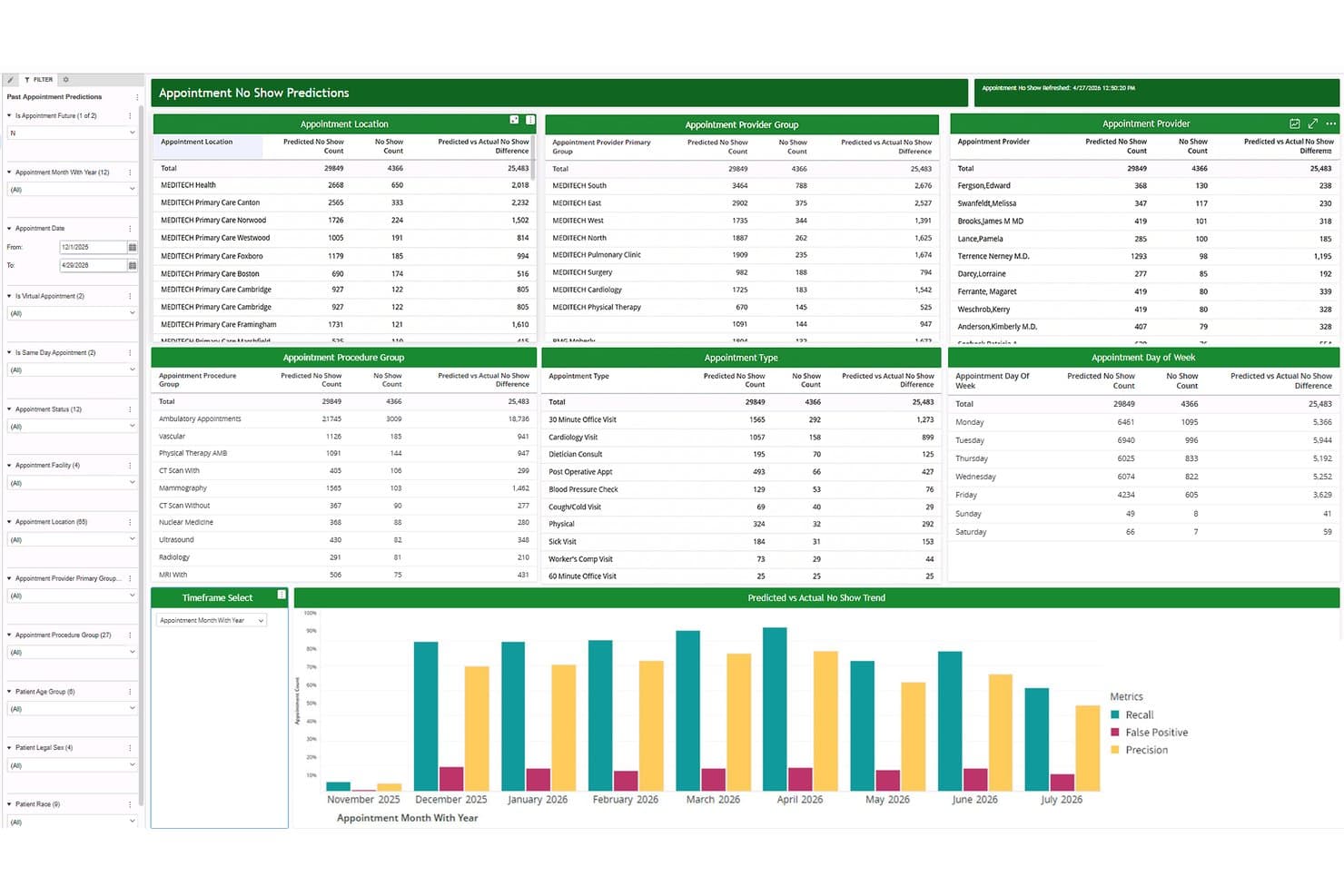
MEDITECH Expanse predicts appointment no-shows using AI-driven analytics. MEDITECH Expanse is a cloud-native EHR platform that combines a longitudinal patient record with AI tools for ambient documentation, clinical decision support, patient communication automation, and revenue cycle management.
Who Is MEDITECH Expanse Best For?
MEDITECH Expanse is a strong fit for community hospitals and mid-size health systems that need a mature, full-featured EHR with built-in patient communication automation.
Why I Picked MEDITECH Expanse
I picked MEDITECH Expanse as one of the best because its no-show prediction model does something most EHRs leave to manual follow-up: it scores each appointment by risk level and automatically triggers SMS outreach through Patient Connect before the slot is lost. I like that confirmations and cancellations flow directly back into Expanse, so staff aren't reconciling two systems. The multilingual support across 100+ languages and the built-in staff copilot for message translation make that outreach practical across diverse patient populations.
MEDITECH Expanse Key Features
- Expanse Navigator: Searches structured and unstructured patient data and surfaces organized summaries directly within the clinical workflow.
- Ambient listening integration: Captures provider-patient conversations and generates draft visit notes for clinician review, editing, and approval.
- Clinical decision support rules and registries: Delivers preloaded alerts, condition registries, and surveillance tools during ordering and documentation.
- Claims denial agents: Automatically tracks claim denials and generates an appeal action plan, including cross-referencing payer guidelines and drafting appeals.
MEDITECH Expanse Integrations
MEDITECH Expanse connects with Google Cloud and names partners including DrFirst, First Databank, Intelligent Medical Objects, and Zynx Health. Greenfield Workspace provides FHIR US Core R4 patient-facing and FHIR Scheduling APIs for custom integrations.
Pros and Cons
Pros:
- Clinical alerts cover conditions and quality measures
- No-show risk scores trigger targeted outreach
- Patient records remain accessible across departments
Cons:
- Users report slow loading and extra clicks
- Ambient notes require clinician review and editing
Learn more about MEDITECH Expanse: Best for self-learning clinical documentation
- Free demo available
- Pricing upon request
Visit WebsiteCustomer Rating:5/5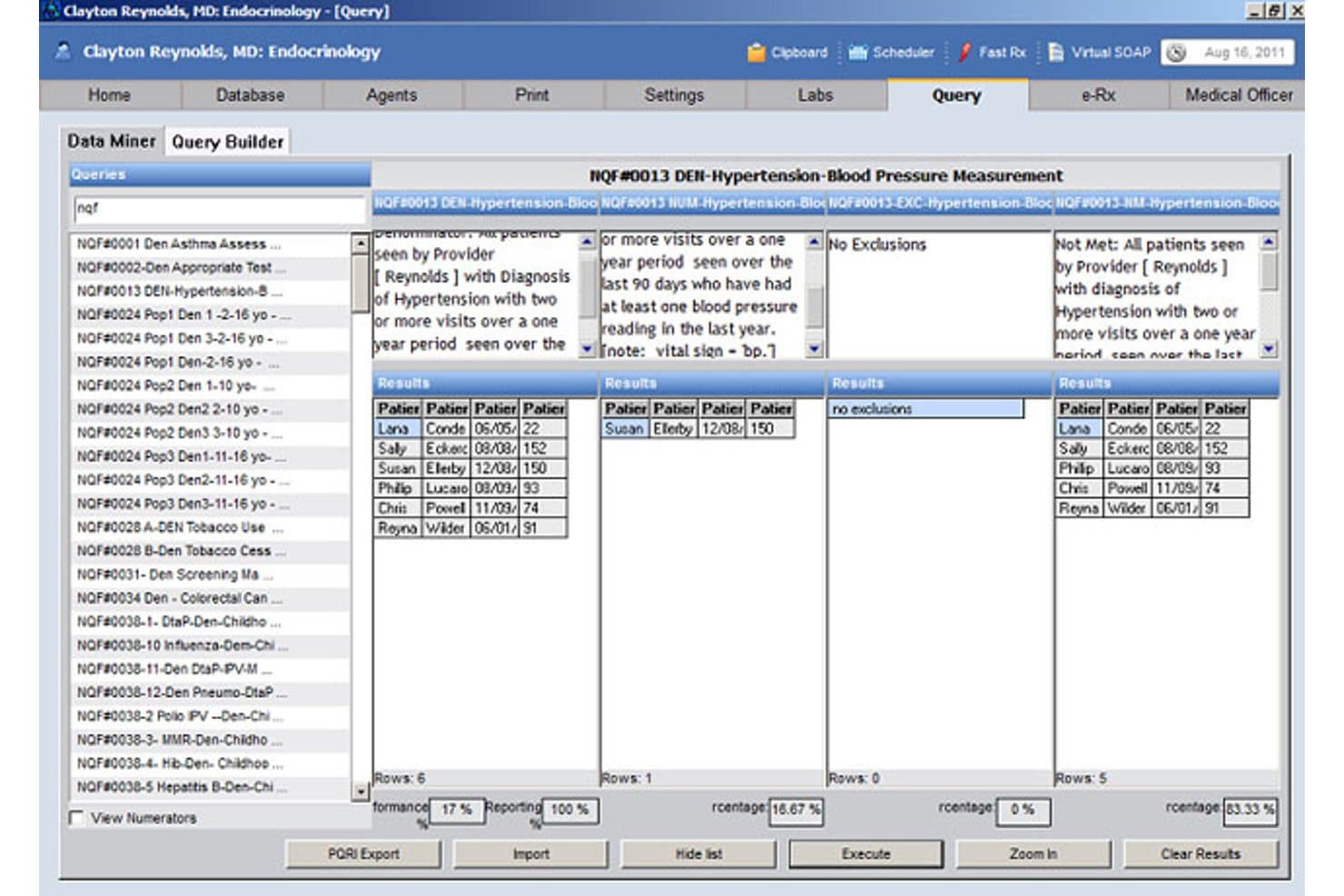
Praxis EMR offers a Query Builder with Data Miner tools to track hypertension and blood pressure measurement metrics across patient populations. Praxis EMR is an AI-powered electronic medical record system built around a proprietary Concept Processor that learns each physician's individual charting style to generate clinical notes without relying on templates.
Who Is Praxis EMR Best For?
Praxis EMR is a strong fit for independent and small-group physicians who find template-based EHRs limiting and want a documentation system that adapts to how they practice.
Why I Picked Praxis EMR
Praxis EMR earns its spot on my shortlist because its Concept Processor AI builds a personalized library from every note you write. Charting a diabetic follow-up visit takes seconds once Praxis has learned how you document that encounter. I also like that Praxis Reflective Ambient Intelligence reconciles ambient voice capture with that learned knowledge base, producing notes in your own clinical language rather than a generic template.
Praxis EMR Key Features
- Datum+ discrete data extraction: Capture structured reporting and compliance data from your free-text notes as you chart.
- PraxDocs document management: Scan and archive documents, images, and files directly into patient records.
- Knowledge Exchanger for specialty content: Import clinical knowledge shared by other Praxis users within your specialty.
- Integrated e-Prescribing with EPCS: Manage electronic prescriptions, including controlled substances, within the system.
Praxis EMR Integrations
Praxis EMR offers native integrations with Allscripts, Athena Health, CollaborateMD, Kareo (Tebra), OpenPM, Labcorp, Quest Diagnostics, Sunquest, Surescripts, and MDToolbox. An API is available for custom integrations.
Pros and Cons
Pros:
- Fast note generation after initial customization
- No reliance on rigid templates for charting
- Learns and adapts to each clinician’s style
Cons:
- Not optimized for large multi-specialty organizations
- Requires physician time to “train” the system
Learn more about Praxis EMR: Best for mobile ambient clinical notes
- Free demo available
- Pricing upon request

AthenaOne offers a structured patient encounter workflow with dropdown reason-for-visit selection, follow-up condition tracking, and a comprehensive clinical checklist. AthenaOne is an AI-native EHR platform that combines ambient clinical documentation, medical billing, revenue cycle management, and patient engagement in a single cloud-based system built for independent and specialty practices.
Who Is AthenaOne Best For?
AthenaOne is a strong fit for independent physicians and small-to-mid-size practices that need a fully integrated clinical and billing platform without managing separate systems.
Why I Picked AthenaOne
AthenaOne earns its spot on my shortlist because its Ambient Notes feature is built directly into the athenaOne Mobile app, not tethered to a desktop. I can record an entire patient visit, and generative AI drafts a structured note and populates it straight into the encounter. What I also like is the ability to choose from multiple ambient AI models to match my specialty and documentation style.
AthenaOne Key Features
- AI-powered chart review: Automatically gathers and summarizes key patient data before each encounter.
- Integrated billing workflows: Captures charges and manages claims with a built-in authorization determination engine.
- ONC-certified specialty workflows: Customizable clinical templates and protocols are available for different specialties, including behavioral health.
- Direct clinical integrations: Connects instantly with labs, pharmacies, other EHRs, and the Carequality and CommonWell networks.
AthenaOne Integrations
AthenaOne offers more than 277,000 native clinical integrations, including labs, pharmacies, imaging centers, and other EHRs through CommonWell and Carequality. An API is available for custom integrations, and a marketplace provides additional partner app connections.
Pros and Cons
Pros:
- Built-in RCM with automated real-time claim edits
- AI chart assistant summarizes patient history quickly
- Mobile-native ambient note capture on iOS and Android
Cons:
- Occasional AI note errors require manual correction
- Limited template flexibility for specialty workflows
Learn more about AthenaOne:
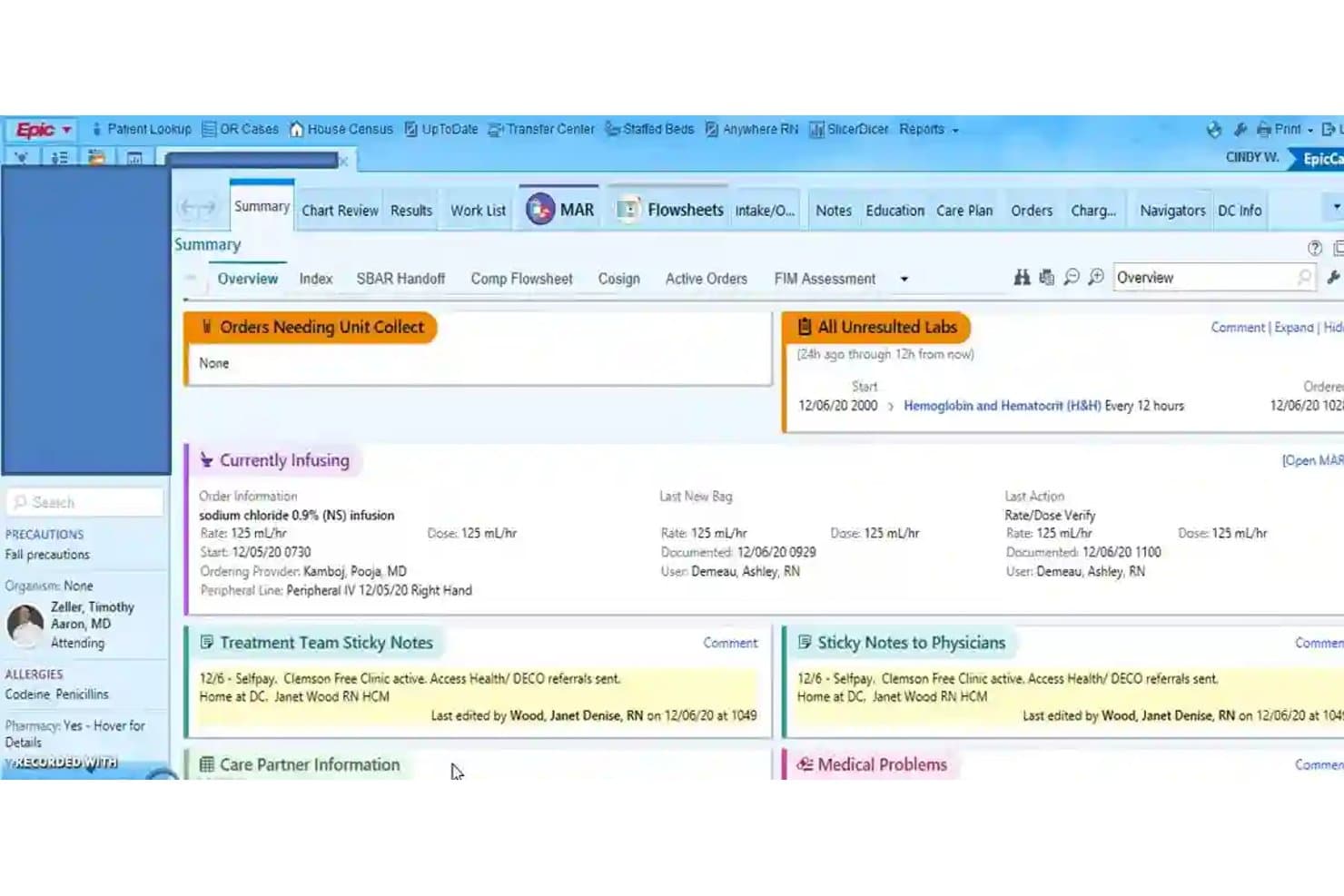
Epic EHR surfaces patient vitals, labs, and active infusions at a glance. Epic is an AI EMR platform built for large health systems, combining a longitudinal electronic health record with AI-powered clinical documentation, ambient visit recording, revenue cycle automation, and patient-facing conversational tools.
Who Is Epic EHR Best For?
Epic is built for large health systems and hospital networks that need a deeply integrated EHR spanning clinical documentation, revenue cycle, patient engagement, and cross-organization data exchange.
Why I Picked Epic EHR
Epic earns its spot on my shortlist because no other platform I've reviewed matches its scale of native AI embedded directly into enterprise clinical workflows. I'm particularly impressed by AI Charting, which listens during patient visits and drafts the clinician's note while queuing orders from the conversation, and by Art's Insights feature, which pulls together chart history into a concise pre-visit summary used over 16 million times monthly. Penny adds another layer by generating coding suggestions and drafting denial appeal letters directly from chart documentation.
Epic EHR Key Features
- Care Everywhere record exchange: Shares patient charts across providers and platforms in real time, with Epic reporting 32 million charts exchanged daily across 11 countries.
- Emmie patient AI assistant: Lets patients schedule appointments, ask billing questions, and get chart answers through conversational AI via MyChart or text message.
- Penny denial appeal drafting: Pulls clinical documentation from patient charts to draft appeal letters for denied professional-billing, outpatient, and inpatient claims.
- Configurable clinical decision-support alerts: Lets organizations set workflow hooks and evaluation criteria to trigger chart-level alerts at specific points in the care process.
Epic EHR Integrations
Native integrations are not clearly documented. Epic supports custom connectivity through FHIR APIs, HL7v2 interfaces, SMART on FHIR with OAuth 2.0, and CDS Hooks, while Care Everywhere enables cross-provider record exchange.
Pros and Cons
Pros:
- Patient, scheduling, and billing workflows share one platform
- AI Charting drafts notes and queues orders
- Cross-provider records help teams coordinate care
Cons:
- AI Charting accuracy and editing needs remain unspecified
- Routine tasks can take many clicks
Learn more about Epic EHR:
How I Evaluate AI EMR Software
To make this list, a tool's AI needs to handle real clinical work, like drafting visit notes and extracting data from unstructured records. From there, I evaluate three things. Core functionality carries the most weight, like maintaining longitudinal records and organizing diagnoses, medications, and labs. Then I look at standout features, like ambient visit recording, and beyond-feature factors, like onboarding support.
Core Functionality (Table Stakes For This List)
When I'm selecting tools for my list, I score each one on a scale from 0 (does not offer the functionality) to 5 (excels in this area) for each core functionality listed below. I then convert the total into a percentage to help assess each tool's overall fit, with extra weight on any functionalities I’ve deemed essential.
- AI Documentation (Essential): I look for structured visit notes from ambient audio or dictation that clinicians can review and edit before adding them to the chart.
- Longitudinal Record (Essential): I check that the chart organizes history, diagnoses, medications, and labs across encounters for a clear view of patient care.
- Coding And Billing: I assess whether encounter notes prompt relevant diagnosis or procedure codes for staff and clinicians to review.
- Clinical Alerts: I look for patient-specific alerts, such as medication interactions, allergies, or overdue care, tied to record data.
- Unstructured Data Extraction: I evaluate how the system extracts usable clinical details from sources like faxes and external records.
- Workflow Automation: I consider whether patient data can trigger practical tasks, such as pre-charting, follow-up scheduling, or task routing.
Once I have a list of tools that meet the criteria, I consider what sets each platform apart.
Differentiating Factors (What Sets Vendors Apart)
Here's how I compare and contrast different vendors:
Standout Features
Ambient visit recording is the first thing I evaluate. I check whether the tool captures conversations from a phone, tablet, or room mic and generates editable notes without manual dictation. In a busy multi-physician clinic, that gap between listening and charting adds up fast. I also look at payer-specific denial prediction, since flagging likely denials before submission saves billing staff from rework cycles. Patient-facing AI chat matters too; I consider whether it handles scheduling and intake questions so front-desk staff can focus on in-person needs.
Beyond Features
I check whether AI documentation and coding tools are bundled into the base price or sold as add-ons, since a per-provider subscription that caps transcription volume can quietly inflate costs as you scale. Vendor stability matters too. A practice that migrates records to a newer EMR company risks a painful re-migration if that vendor folds or pivots. I also look at how patient voice recordings and transcripts are stored and whether the vendor lets you opt out of AI model training with your data.
How to Choose AI EMR Software
It’s easy to get bogged down in long feature lists and complex pricing structures. To help you stay focused as you work through your unique software selection process, here’s a checklist of factors to keep in mind:
| Factor | What to Consider |
| Scalability | Will the platform grow with your practice size, add locations, or support provider turnover as your team evolves? |
| Integrations | Does the software connect with your billing, labs, payers, or other EMRs? Can it maintain existing workflows? |
| Customizability | Can templates, workflows, and notes be tailored for your specialty, provider preferences, and regulatory needs? |
| Ease of use | How steep is the learning curve? Would even the least tech-savvy user on your team adapt quickly? |
| Implementation and onboarding | What support exists during migration and training? Are there resources for both superusers and less-experienced staff? |
| Cost | Is pricing transparent and predictable? Understand what’s included, what’s an add-on, and if there are minimums. |
| Security safeguards | Are there up-to-date certifications, ongoing monitoring practices, and workflows to respond to suspected breaches? |
| Vendor transparency | How open is the vendor about data use, model training, downtime alerts, and future roadmap plans? |
What Is AI EMR Software?
AI EMR software are electronic medical record platforms that use artificial intelligence to automate clinical note-taking, coding, and documentation tasks. These systems capture patient encounters, suggest billing codes, and generate structured notes to cut down on manual charting. By integrating with e-prescribing, lab orders, and practice management, AI EMR tools help streamline patient care and administrative workflows for healthcare teams.
Features of AI EMR Software
When selecting AI EMR software, keep an eye out for the following key features:
- Patient charting: Enables comprehensive documentation of a patient’s medical history, exams, treatments, allergies, and encounter notes in one organized record.
- E-prescribing: Allows clinicians to submit prescriptions electronically to pharmacies, check for drug interactions, and manage medication histories directly from the platform.
- Lab and imaging order management: Facilitates electronic ordering of diagnostic tests and tracks results, creating a streamlined workflow for follow-ups and chart updates.
- Patient portal: Gives patients secure access to their medical records, lab results, appointment scheduling, and direct communication with providers online.
- Appointment scheduling: Offers tools for managing provider calendars, sending appointment reminders, reserving blocks, and reducing scheduling conflicts.
- Task and workflow management: Supports creating, assigning, and tracking clinical and administrative tasks to ensure nothing slips through the cracks.
- Billing and coding tools: Helps manage medical billing, insurance claim submission, and reconciliation within the EMR, improving front- and back-office efficiency.
- Interoperability standards: Supports connections with other EMRs, labs, and health systems through HL7 or FHIR to enable smooth data exchange and care coordination.
- Compliance management: Provides features that help practices comply with healthcare regulations, maintain audit logs, and manage user permissions and access controls.
- Customizable templates: Lets users tailor clinical forms, notes, and workflows to match specific specialties, visit types, and provider preferences.
Common AI EMR Software AI Features
Beyond the standard AI EMR software features listed above, many of these solutions are incorporating AI with features like:
- Ambient scribe capability: Uses AI to capture and transcribe in-room conversations, automatically generating structured clinical notes without manual typing or dictation.
- AI coding assistance: Analyzes encounter documentation to suggest or assign ICD-10, CPT, and E/M codes, helping improve billing accuracy and reduce claim denials.
- Predictive clinical insights: Surfaces real-time risk scores, care gap alerts, and HCC coding suggestions at the point of care to support proactive decision-making.
- Agentic task automation: Employs AI agents to draft referrals, prior authorizations, and patient messages based on encounter context, reducing administrative workload.
- Specialty-specific note generation: Leverages AI models trained on specialty workflows to produce notes that reflect domain-specific terminology and clinical structures.
- Multilingual documentation: Translates patient-provider conversations and clinical notes in real time, supporting care delivery across multiple languages.
Benefits of AI EMR Software
Implementing AI EMR software provides several benefits for your team and your business. Here are a few you can look forward to:
- Faster clinical documentation: AI-powered scribing and note generation minimize manual charting time, letting clinicians focus more on patient care.
- Improved billing accuracy: AI coding assistance suggests the right codes and supports proper reimbursement, reducing denied claims and revenue leakage.
- Streamlined workflows: Agentic AI automates repetitive tasks like referrals and authorizations, helping staff manage workloads more efficiently.
- Enhanced patient engagement: Patient portals, multilingual tools, and automated follow-ups keep patients informed and involved in their care journey.
- Better compliance and security: Built-in regulatory safeguards and audit controls help maintain HIPAA and regional privacy requirements.
- Scalable practice operations: Cloud-based and mobile-friendly features let practices expand, add sites, and support care delivery in different settings.
- Actionable clinical insights: Predictive AI analytics surface risks, care gaps, and recommendations at the point of care to support better clinical decisions.
Costs and Pricing of AI EMR Software
Selecting AI EMR software requires an understanding of the various pricing models and plans available. Costs vary based on features, team size, add-ons, and more. The table below summarizes common plans, their average prices, and typical features included in AI EMR software solutions:
Plan Comparison Table for AI EMR Software
| Plan Type | Average Price | Common Features |
| Free Plan | $0 | Basic charting, limited document storage, and access for a single provider. |
| Personal Plan | $30-$80/user/month | Full patient charting, e-prescribing, scheduling, and basic billing and coding support. |
| Business Plan | $100-$250/user/month | Integration with labs, billing systems, team collaboration tools, and HIPAA compliance features. |
| Enterprise Plan | $300+/user/month | Advanced AI features, customization, API access, dedicated support, analytics, and audit controls. |
AI EMR Software FAQs
Here are some answers to common questions about AI EMR software: