

Affordable medical billing software gives your practice the core billing features you need—like claim submission, payment posting, and insurance verification—without high monthly costs or sneaky add-ons. If you’re comparing options to keep costs down while staying on top of regulatory demands and reimbursement cycles, you’re in the right place.
Below, you’ll find my top picks for affordable billing software that suit teams balancing patient care, efficiency, and tight budgets. Use this guide to quickly spot the right fit, understand where the savings really come in, and avoid costly headaches down the road.
Why Trust Our Software Recommendations
6,700+
Reviews
20
Industry experts
16+
Evaluation factors
14
Years
Our team has been testing and reviewing software since 2012. As medical practice leaders ourselves, we know how difficult—and important—it is to choose the right software.
For this guide, we evaluated tools using hands-on testing and independent research, scoring tools using our selection criteria.
Our reviews reflect our human editorial judgment, not a sales pitch.
Affordable Medical Billing Software Comparison Table
This comparison table summarizes pricing details for my affordable medical billing software.
| Tool | Best For | Trial Info | Price | ||
|---|---|---|---|---|---|
| 1 | Best for integrated scheduling and billing | Not available | Pricing upon request | Website | |
| 2 | Best for mobile device billing access | Free demo available | Pricing upon request | Website | |
| 3 | Best for desktop-based billing solutions | Free consultation available | Pricing upon request | Website | |
| 4 | Best for analytics-driven billing insights | Free demo available | Pricing upon request | Website | |
| 5 | Best for large practice automation features | Free demo available | Pricing upon request | Website | |
| 6 | Best for simple claim submission workflows | Free demo available | From $199/user/month | Website | |
| 7 | Best for real-time claim tracking tools | Free demo available | Pricing upon request | Website | |
| 8 | Best for combining billing with patient engagement | Free demo available | Pricing upon request | Website | |
| 9 | Best for multi-location practice management | Free demo available | Pricing upon request | Website | |
| 10 | Best for built-in clearinghouse at no extra cost | Free plan available | Free | Website |


Best Affordable Medical Billing Software Reviews
Below are my detailed summaries of the best affordable medical billing software that made it onto my shortlist. My reviews offer a detailed look at the features, pricing, and best use cases of each software to help you find the best one for you.
 Best for integrated scheduling and billing
- Not available
- Pricing upon request
Visit WebsiteCustomer Rating:3.9/5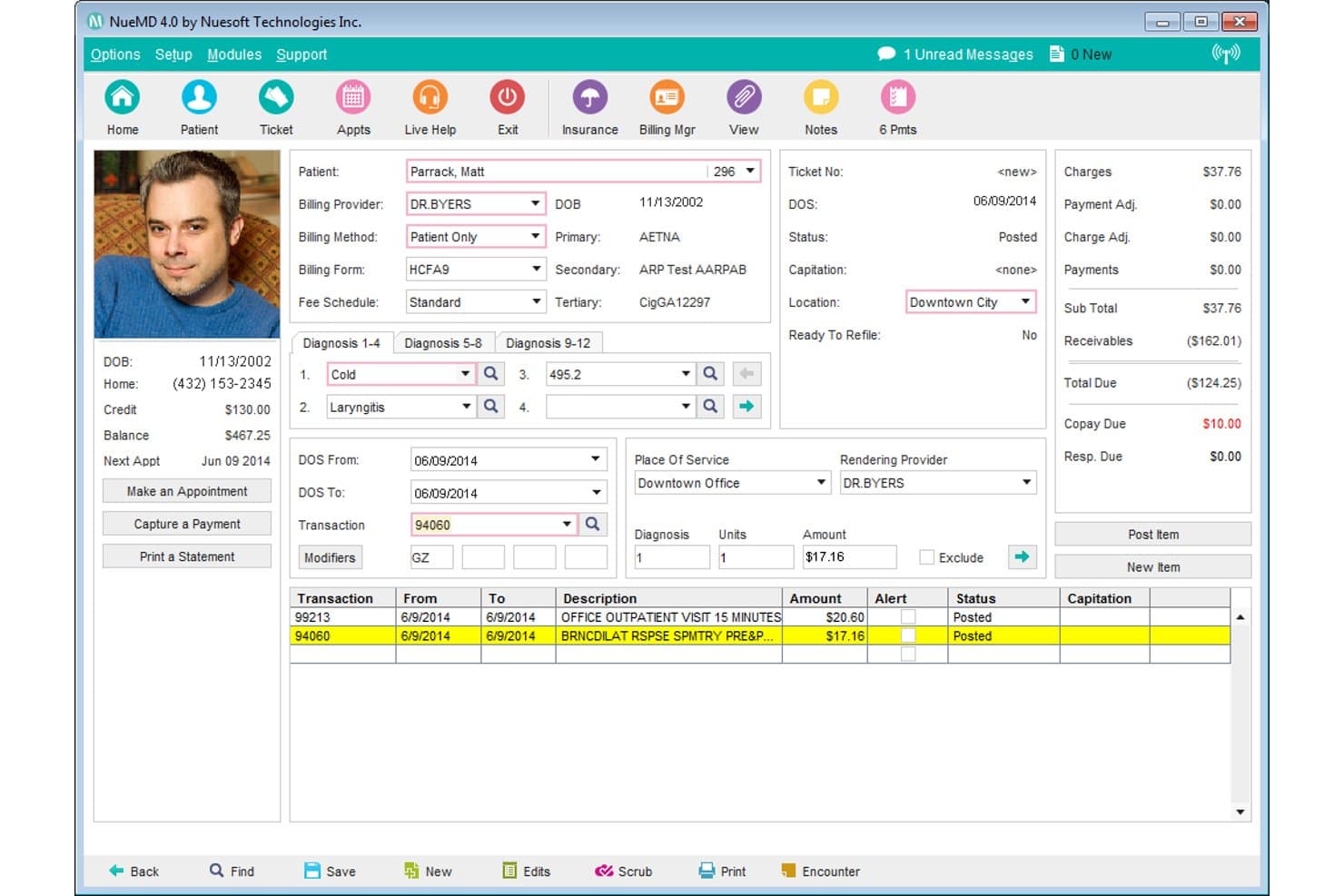
NueMD offers a detailed patient billing ticket screen displaying diagnoses, transactions, charges, and payment summaries in one view. NueMD is a cloud-based medical billing and practice management platform that combines electronic claims submission, appointment scheduling, EHR, and patient billing tools for small and independent practices.
Who Is NueMD Best For?
NueMD is a good fit for solo physicians and small independent practices that need scheduling and billing managed within a single platform.
Why I Picked NueMD
NueMD earns its spot on my shortlist because scheduling and billing genuinely operate as one system, not two tools bolted together. I like that appointment data flows directly into the billing workflow, so claims are tied to patient visits without manual re-entry. NueMD also runs its own HIPAA-compliant clearinghouse, processing unlimited claims with built-in scrubbing against a database of over 10 million federal and commercial claims.
NueMD Key Features
- Customizable templates: Create specialty-specific documentation and billing forms for over 100 medical specialties.
- ONC-ATCB certified EHR: Access integrated electronic health records with e-prescribing and lab results management built in.
- Patient portal: Allow patients to view statements, securely message your office, and view or pay balances online.
- Mobile app access: Manage schedules, records, and billing tasks from iOS or Android devices.
NueMD Integrations
Native integrations are not clearly documented. The tool supports data exports and API access for custom integrations.
Pros and Cons
Pros:
- Patient portal for statements and payments
- Unlimited electronic claims through built-in clearinghouse
- Scheduling integrated directly with billing workflow
Cons:
- Product scheduled for end-of-life December 2026
- No transparent or current pricing listed
Learn more about NueMD: Best for mobile device billing access
- Free demo available
- Pricing upon request
Visit WebsiteCustomer Rating:3.9/5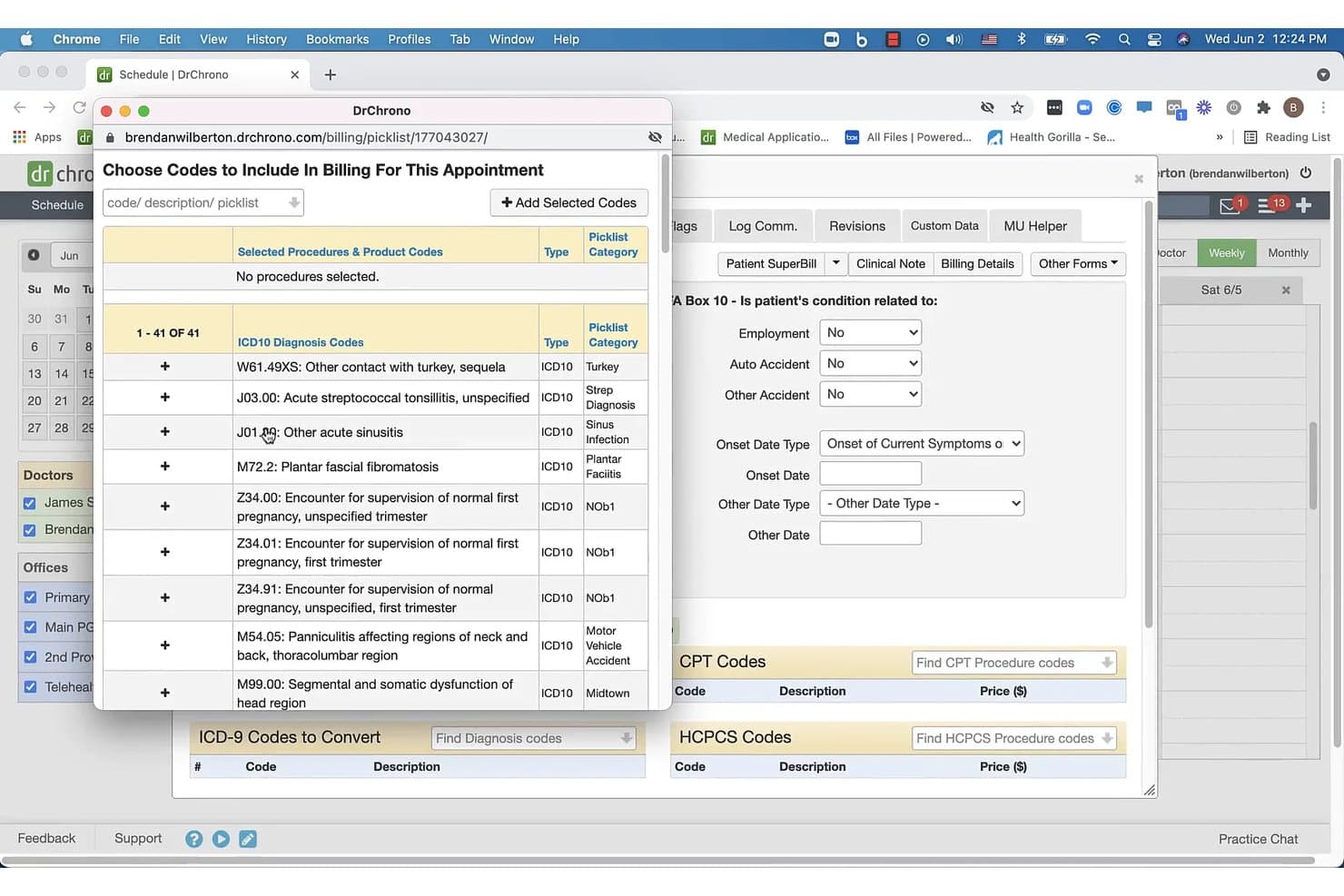
DrChrono offers a billing picklist interface where users can select ICD-10 diagnosis codes to include in patient appointment billing. DrChrono is an EHR-integrated medical billing platform that combines claims submission, coding support, ERA auto-posting, denial management, and patient billing in a single system built for independent practices.
Who Is DrChrono Best For?
DrChrono is a strong fit for independent physicians and small practice administrators who run their workflows primarily on Apple devices.
Why I Picked DrChrono
DrChrono earns its spot on my shortlist because it's the only billing platform in this space built natively for Apple hardware from the ground up. I can pull up the live claims feed, review denial statuses, and post ERA payments directly from an iPhone or iPad between patient visits. Because the billing and EHR modules share the same data layer, a completed encounter on my iPad flows directly into a claim without any re-entry.
DrChrono Key Features
- Integrated coding libraries: Access and search updated ICD-10, CPT, and HCPCS codes directly within the billing module.
- Automated ERA payment posting: Automatically post payments and adjustments from electronic remittance advice files to patient accounts.
- Custom billing profiles: Set up profiles for common procedures and payer requirements to speed up charge entry.
- Electronic patient statements: Generate and send electronic or printed statements to patients, with patient portal balance viewing.
DrChrono Integrations
DrChrono offers over 20 native integrations, including Box, Square Point of Sale, Ambra, ClearGage, Collectly, Curogram, DeepScribe, Demandforce, Quest, and LabCorp, and provides an API for custom integrations.
Pros and Cons
Pros:
- Automated patient statement generation
- Robust mobile apps for iPhone and iPad
- Full billing and EHR data integration
Cons:
- No public base pricing for billing plans
- Billing module requires full EHR subscription
Learn more about DrChrono: Best for desktop-based billing solutions
- Free consultation available
- Pricing upon request
Visit WebsiteCustomer Rating:4.4/5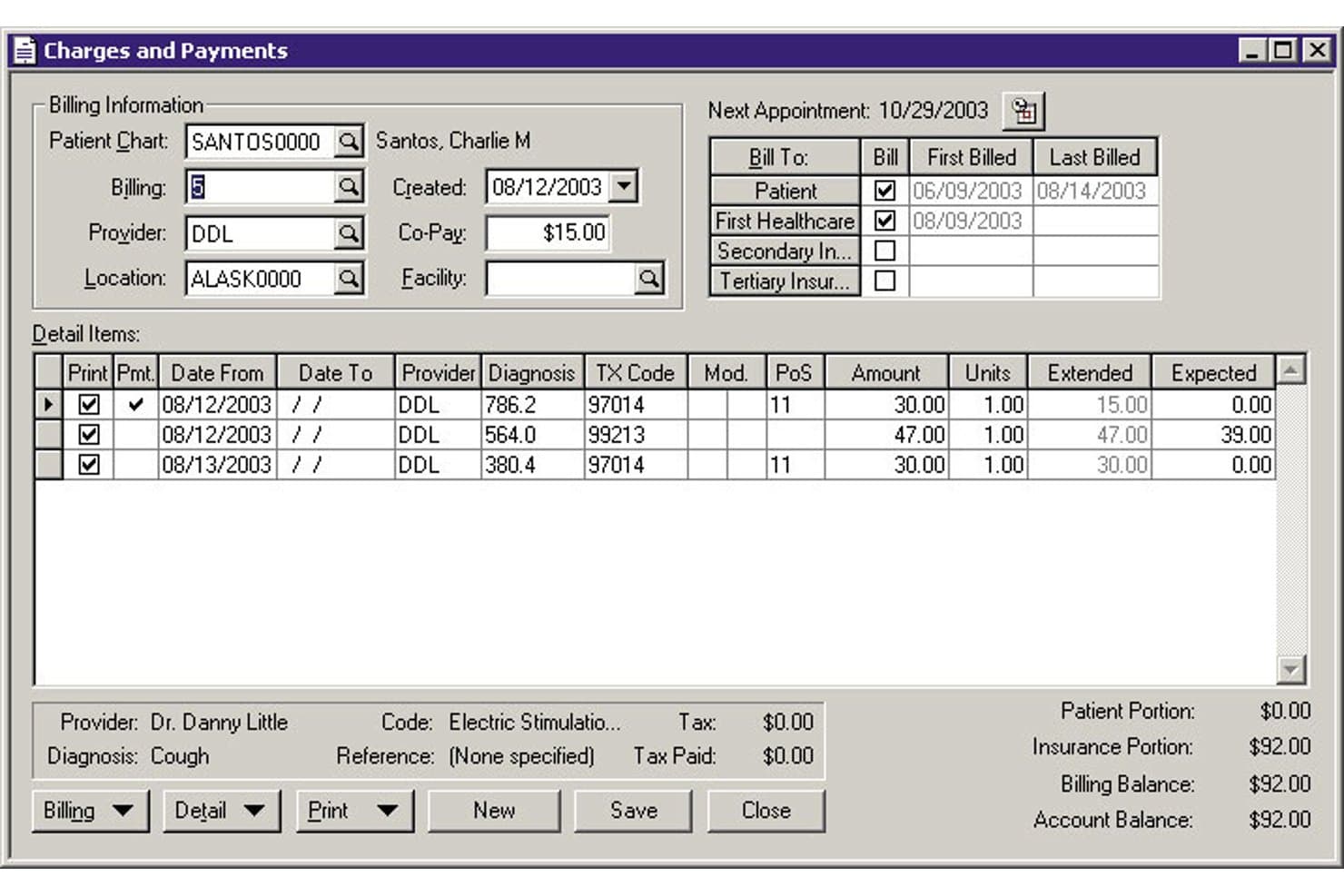
MEDISOFT offers a detailed Charges and Payments screen for managing patient billing, insurance portions, and itemized service entries. MEDISOFT is a medical billing and practice management software that handles claims submission, payment posting, patient scheduling, and coding — available as either a one-time perpetual desktop license or a monthly cloud subscription.
Who Is MEDISOFT Best For?
MEDISOFT is a strong fit for independent billing specialists and small practices that prefer owning their software outright rather than paying ongoing subscription fees.
Why I Picked MEDISOFT
MEDISOFT earns its spot on my shortlist because it's one of the few billing platforms that still offers a true perpetual desktop license, starting at $675 one-time for solo providers. I particularly like the built-in Office Hours scheduler and the 200+ pre-configured reports, which cover financial, managed care, and chiropractic billing without requiring separate add-ons. Version 30's Enhanced Patient Responsibility Estimates also let practices generate upfront cost breakdowns before a claim is even submitted.
MEDISOFT Key Features
- Mobile patient kiosk: Patients can check in and update information using a mobile app in your office.
- Final Draft word processor: Write and customize medical documents with built-in templates and spell check.
- Integrated payment processing: Collect card and ACH payments directly through CGM PAY integration.
- Electronic claims add-on: Submit claims electronically to payers and clearinghouses from within MEDISOFT.
MEDISOFT Integrations
MEDISOFT offers native integrations with eMEDIX for electronic claims, Review Wave and AutoReminder for patient reminders, Vosita for online appointments, and CGM PAY for payment processing. An API is available for custom integrations.
Pros and Cons
Pros:
- Reliable offline use for billing operations
- Includes industry-specific workflow templates
- Offers perpetual desktop and cloud versions
Cons:
- Slow report generation with large datasets
- Limited modern coding assistance built in
Learn more about MEDISOFT: Best for analytics-driven billing insights
- Free demo available
- Pricing upon request
Visit WebsiteCustomer Rating:3.6/5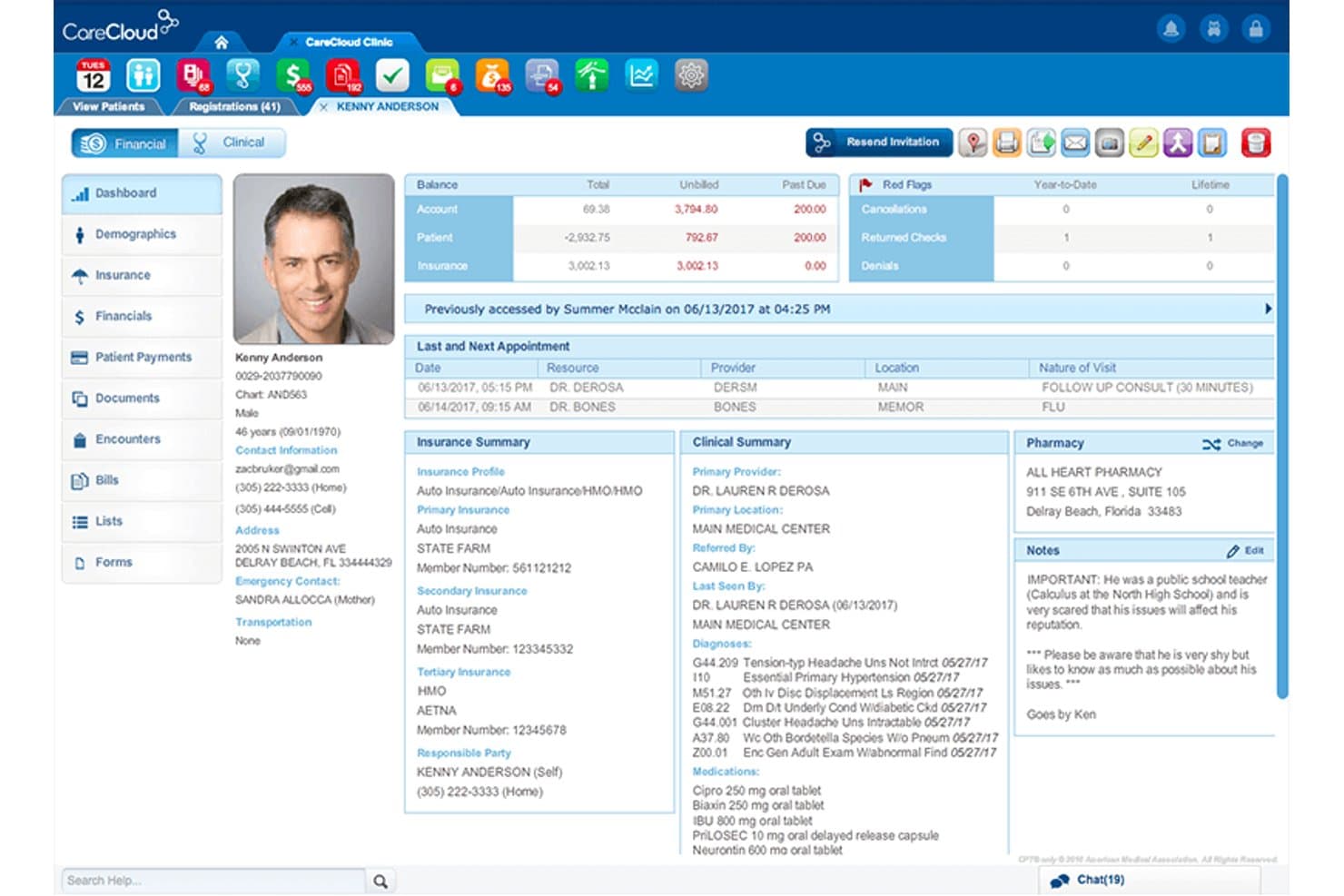
CareCloud offers a comprehensive patient profile dashboard displaying billing balances, insurance summaries, clinical notes, and appointment history in one view. CareCloud is a cloud-based medical billing platform that combines claims submission, denial management, ERA auto-posting, and analytics-driven reporting for small and mid-size practices.
Who Is CareCloud Best For?
CareCloud is a good fit for small group practices and practice administrators who need billing analytics and RCM oversight without building a dedicated in-house billing team.
Why I Picked CareCloud
CareCloud earns its spot on my shortlist because of how it turns billing data into actionable insight. The Advanced Analytics dashboard lets me segment performance by payer, provider, and location, pinpointing exactly where denials are clustering. I also rely on the CollectiveIQ rules engine, which catches payer-specific coding errors before claims go out, keeping the first-pass rate consistently high.
CareCloud Key Features
- Built-in clearinghouse: Submit claims directly to multiple payers without relying on an external clearinghouse.
- Centralized billing dashboard: Manage billing for all providers or locations in a single interface.
- ERA auto-posting: Automatically posts electronic remittance advice to patient accounts for easy reconciliation.
- Batch payment processing: Record payments across multiple claims or patients in one step.
CareCloud Integrations
CareCloud offers native integrations with CodoniX EHR, EHRYourWay, ICANotes, MD Logic, Optivate, Praxis EMR, Sevocity, TeleVox, and Vital Interaction. An API is available for custom integrations. The platform also integrates with clearinghouses like Change Healthcare, TriZetto, and Availity.
Pros and Cons
Pros:
- Automated denial resolution process
- CollectiveIQ rules engine for claim scrubbing
- Advanced analytics dashboard for billing insights
Cons:
- Three-year contract commitments commonly required
- Quote-based pricing, not transparent
Learn more about CareCloud: Best for large practice automation features
- Free demo available
- Pricing upon request
Visit WebsiteCustomer Rating:3.6/5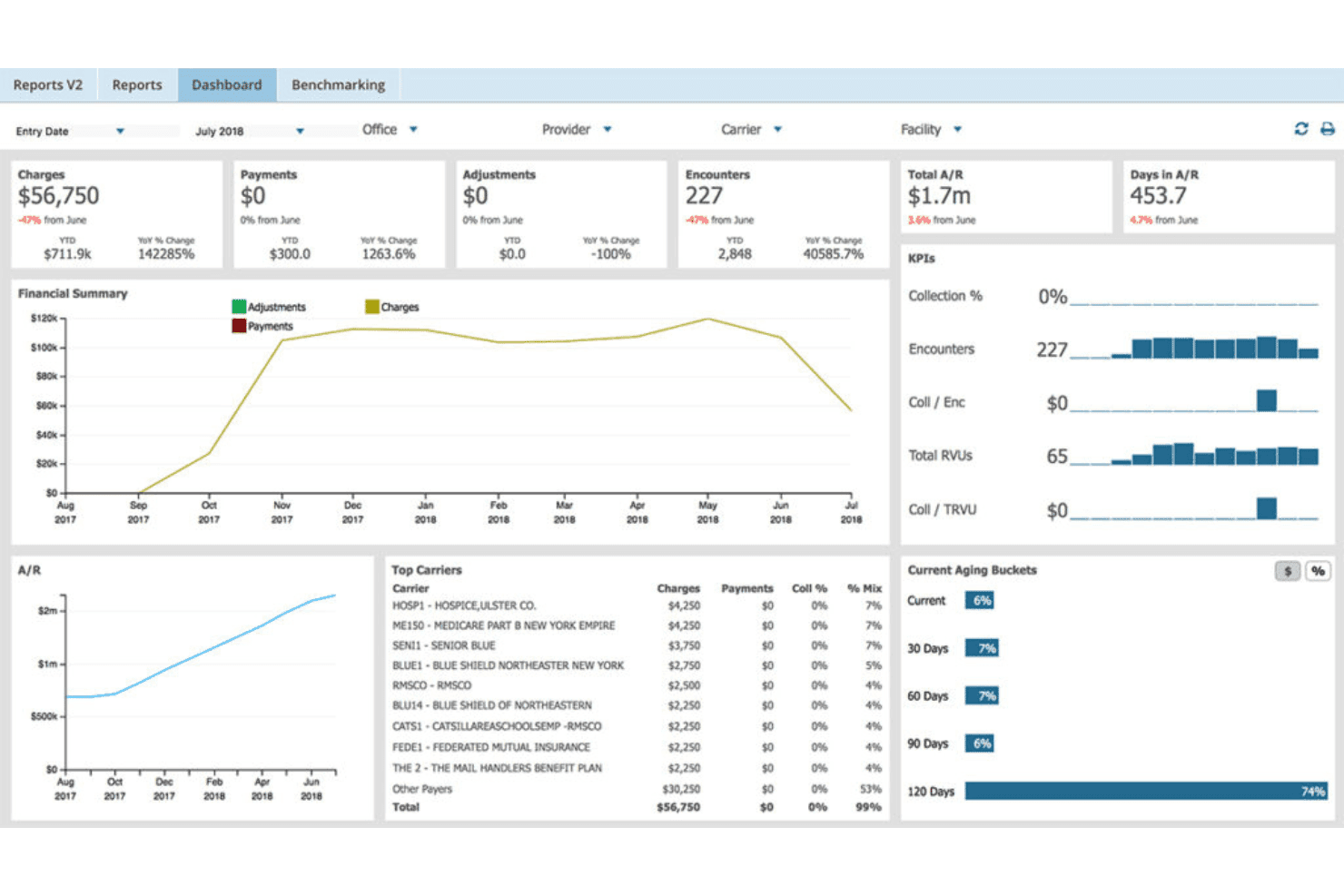
AdvancedMD unites EMR, documentation, billing, claims, eligibility, and RCM. AdvancedMD is a cloud-based medical billing platform that combines claims scrubbing, ERA processing, denial management, patient billing, and a built-in clearinghouse into a unified system for independent and multi-provider practices.
Who Is AdvancedMD Best For?
AdvancedMD is a strong fit for growing group practices and independent billing specialists managing claims across multiple providers or locations.
Why I Picked AdvancedMD
AdvancedMD earns its spot on my shortlist because of how far its automation goes at the claims level. I particularly like ClaimInspector, which runs nearly 3.5 million edits per claim against HIPAA, CCI, and payer-specific rules before a claim ever leaves the system. The Central Billing Office (CBO) module is also something I rely on for multi-provider work, letting me toggle across client databases under one login without re-authenticating each time.
AdvancedMD Key Features
- Integrated ERA and EOB processing: Automatically ingests and posts electronic remittance advice for smoother payment reconciliation.
- Patient payment portal: Lets patients view balances and pay online through a dedicated portal.
- Insurance eligibility verification: Checks patient coverage before appointments to reduce rejections.
- Customizable patient statements: Generates branded, detailed statements for individual or batch printing.
AdvancedMD Integrations
AdvancedMD offers native integrations with OpenEdge for payment processing and provides a marketplace of partner integrations. An open API is available for custom integrations.
Pros and Cons
Pros:
- Built-in patient payment portal
- Automated ERA and denial management workflows
- Advanced claims scrubbing and batch edits
Cons:
- Training and setup require notable time investment
- Pricing is not transparent for most users
 Best for simple claim submission workflows
- Free demo available
- From $199/user/month
Visit WebsiteCustomer Rating:4.5/5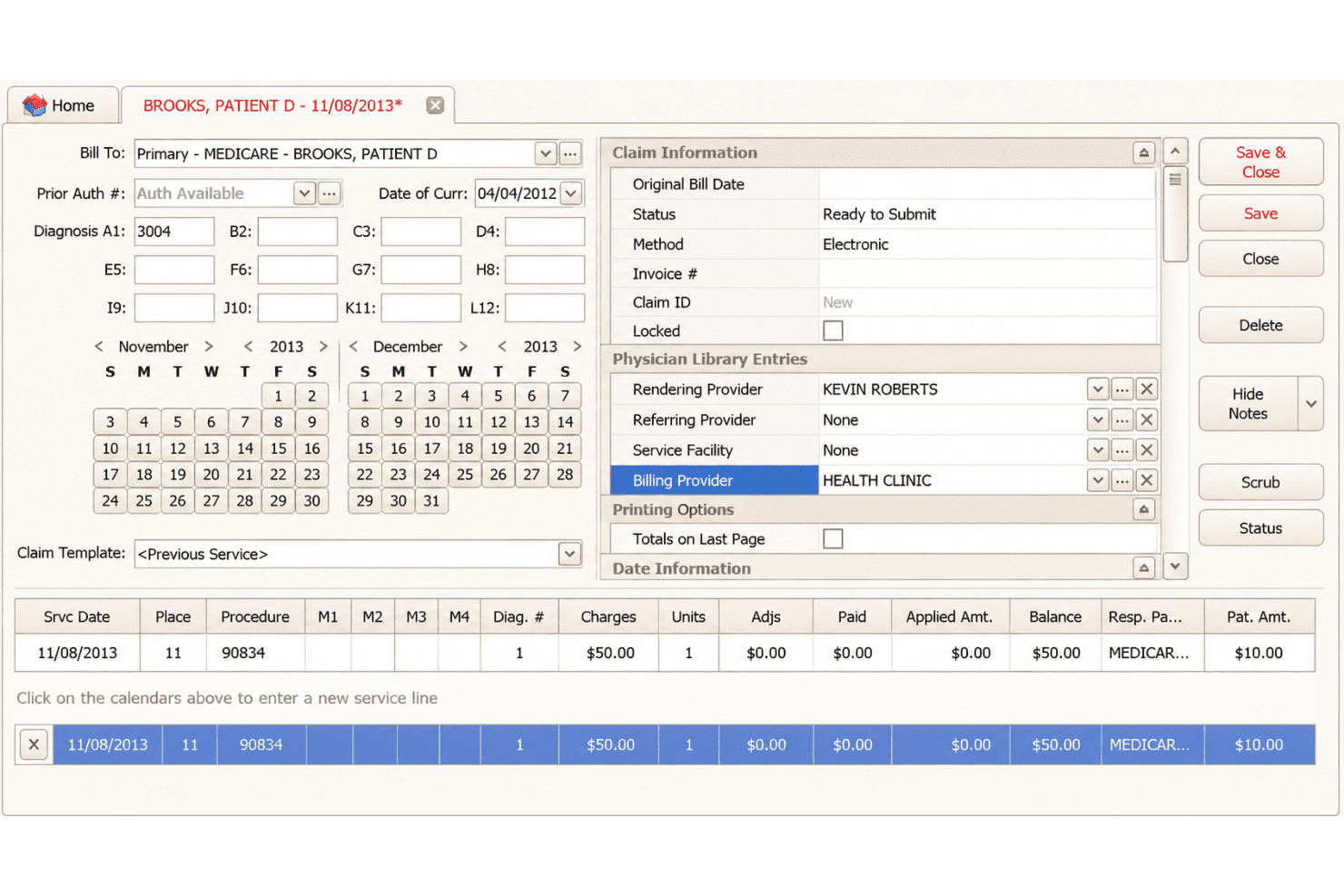
EZClaim covers claims, ERA posting, eligibility, statements and online payments. EZClaim is a cloud-based medical billing platform for small-to-mid-sized practices that covers electronic claim submission, ERA auto-posting, eligibility verification, patient statements, and integrated payment processing.
Who Is EZClaim Best For?
EZClaim is a strong fit for independent billing specialists and small practice administrators who need a no-frills claims management tool without enterprise-level pricing.
Why I Picked EZClaim
EZClaim earns its spot on my shortlist because its end-to-end claim submission workflow is genuinely self-contained. I like that Alpha II claim scrubbing catches coding errors before submission, cutting down on rework before claims even reach the clearinghouse. From there, ANSI 837 files route to payers through TriZetto, Change Healthcare, or Availity, and ERA auto-posting handles remittances on the back end without manual entry.
EZClaim Key Features
- EZClaimPay payment processing: Collect patient payments and store cards securely within the billing workflow.
- Integrated scheduling calendar: Drag-and-drop scheduling links appointments directly to claims.
- Customizable built-in reports: Access and modify over 40 preloaded reports for billing insights.
- HIPAA-compliant portal: Offer read-only, branded access for patients and external users.
EZClaim Integrations
EZClaim offers native integrations with TriZetto, Change Healthcare, Availity, Practice Fusion, WebPT, Amazing Charts, QuickEMR, BillFlash, ReminderCall, and Alpha II. An API is available for custom integrations.
Pros and Cons
Pros:
- Patient payment portal with cards on file
- Reliable ERA auto-posting saves manual work
- Claim scrubbing catches errors before submission
Cons:
- No AI-assisted coding or suggestions
- No built-in payer contract management
Learn more about EZClaim: Best for real-time claim tracking tools
- Free demo available
- Pricing upon request
Visit WebsiteCustomer Rating:4.1/5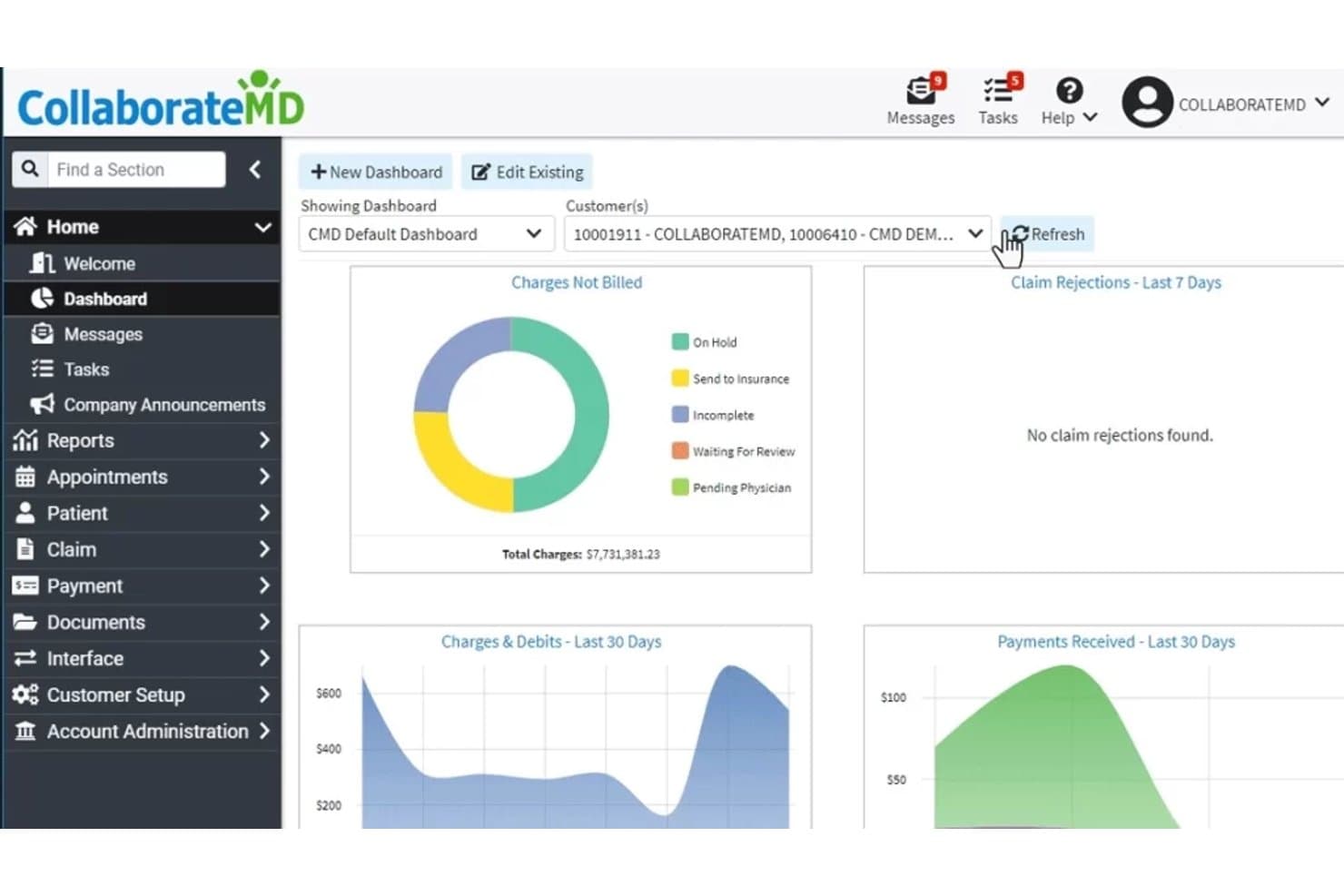
CollaborateMD offers an intuitive dashboard displaying charges not billed, claim rejections, charges and debits, and payments received over the last 30 days. CollaborateMD is a cloud-based medical billing platform that combines real-time claim submission, built-in clearinghouse processing, denial management, ERA auto-posting, and patient payment collection for independent practices and billing companies.
Who Is CollaborateMD Best For?
CollaborateMD is a strong fit for independent billing companies and small private practices that manage claims across multiple payers and specialties.
Why I Picked CollaborateMD
CollaborateMD earns its spot on my shortlist because of how it handles claim visibility from submission through payment. I particularly like that real-time claim submission runs through a built-in clearinghouse, so I can see exactly where a claim stands the moment it's transmitted. The Intelligent Claim Rejection Support feature translates payer rejection codes into plain language with suggested corrective steps, so my team spends less time decoding denials and more time fixing them.
CollaborateMD Key Features
- Automated eligibility verification: Quickly checks patient insurance eligibility before services are rendered.
- Customizable reporting dashboard: Lets you generate and filter financial, operational, and workflow reports across your practice.
- Integrated patient payment portal: Patients can make online payments directly through a secure interface.
- Appointment scheduler: Allows users to book, modify, and track appointments from within the billing platform.
CollaborateMD Integrations
CollaborateMD offers 12 native integrations, including Practice Fusion, Elation, Amazing Charts, Hello Health, Kipu, Medical Mime, Praxis EMR, PrognoCIS, Ritten, Sevocity, WebPT, and Alleva. Native diagnostic integrations include Quest Diagnostics, LabCorp, and LabDAQ. An API is available for custom integrations.
Pros and Cons
Pros:
- Patient payment portal with card-on-file option
- Automated ERA posting and claim scrubbing
- Real-time claim status updates with tracking
Cons:
- Occasional downtime reported during system updates
- Pricing is not published on the website
Learn more about CollaborateMD: Best for combining billing with patient engagement
- Free demo available
- Pricing upon request
Visit WebsiteCustomer Rating:3.9/5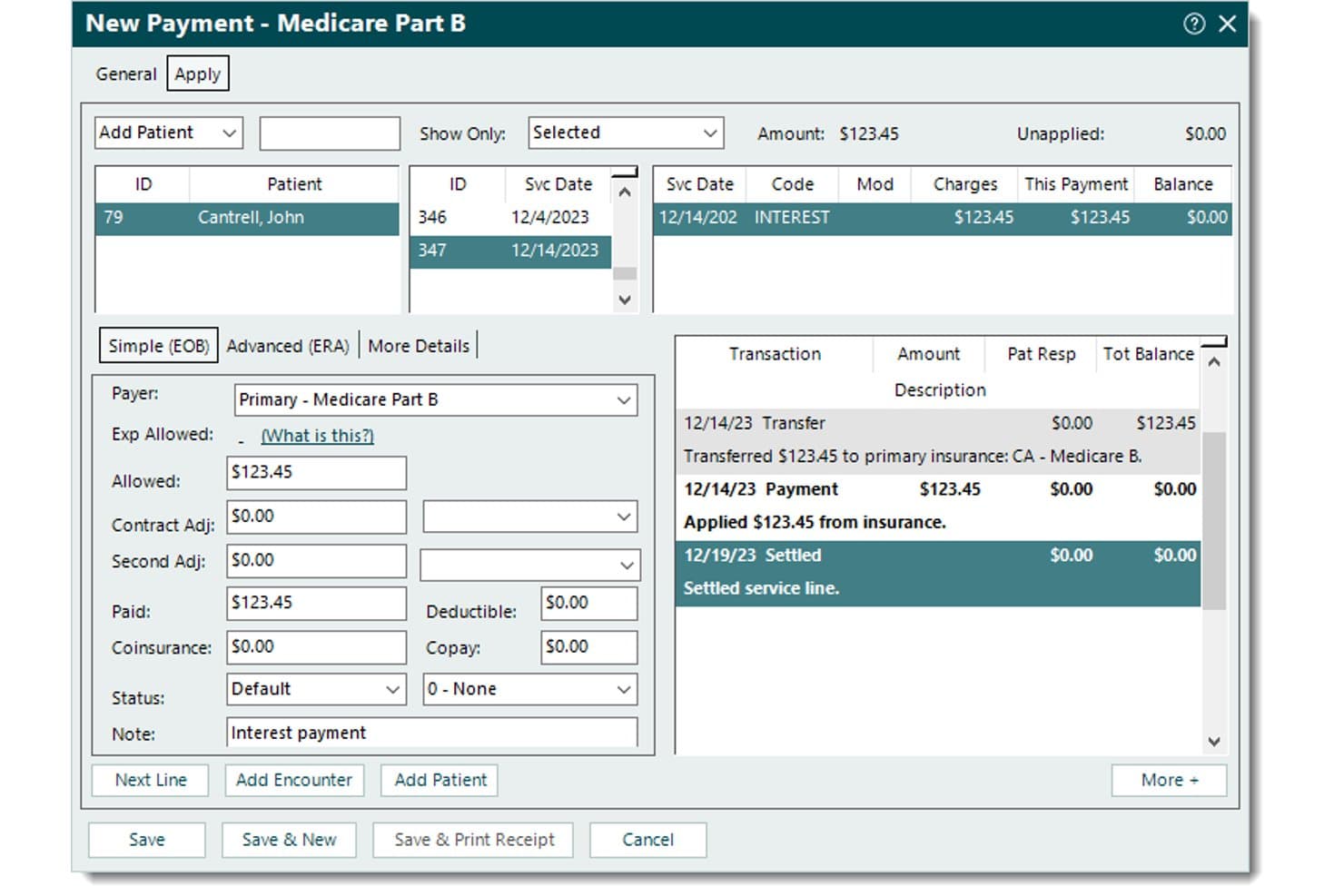
Tebra records Medicare payments, applied amounts, patient balances, adjustments, and transaction history. Tebra is a billing and practice management platform designed for independent practices that pairs electronic claims submission, ERA auto-posting, and denial management with built-in patient engagement tools.
Who Is Tebra Best For?
Tebra is a strong fit for independent practices with up to 10 providers that want billing and patient engagement managed within a single platform.
Why I Picked Tebra
I picked Tebra as one of the best because it's the only platform I've used that connects billing directly to patient engagement without switching tools. I like that it sends automated statements with QR codes and embedded payment links via text or email, so patients can pay from their phones. Card-on-file and in-person payment options sit in the same workflow as insurance claim submission, which keeps the full payment cycle in one place.
Tebra Key Features
- Automated insurance eligibility checks: Instantly verifies coverage, copays, and deductibles through integrated payer connections.
- Rules engine for real-time claim scrubbing: Identifies and flags coding errors before electronic claim submission.
- RPA-based ERA auto-posting: Automatically posts electronic remittance advice and reconciles insurance payments.
- Provider-based licensing model: Includes unlimited non-clinical staff access at no extra cost for each subscribing provider.
Tebra Integrations
Tebra offers native integrations with WebPT, QuickEMR, Relatient, NextPatient, PayPal, Stripe Terminal, DocSpera, Kareo Billing, Stripe, Microsoft Excel, and QuickBooks Online Advanced. It also provides an API for custom integrations.
Pros and Cons
Pros:
- Patient payment links via QR and email
- Automated denial management and claim scrubbing included
- Combines billing and patient engagement features
Cons:
- Clearinghouse issues can delay claim acceptance
- Custom pricing only, no public tiers
Learn more about Tebra: Best for multi-location practice management
- Free demo available
- Pricing upon request
Visit WebsiteCustomer Rating:4.1/5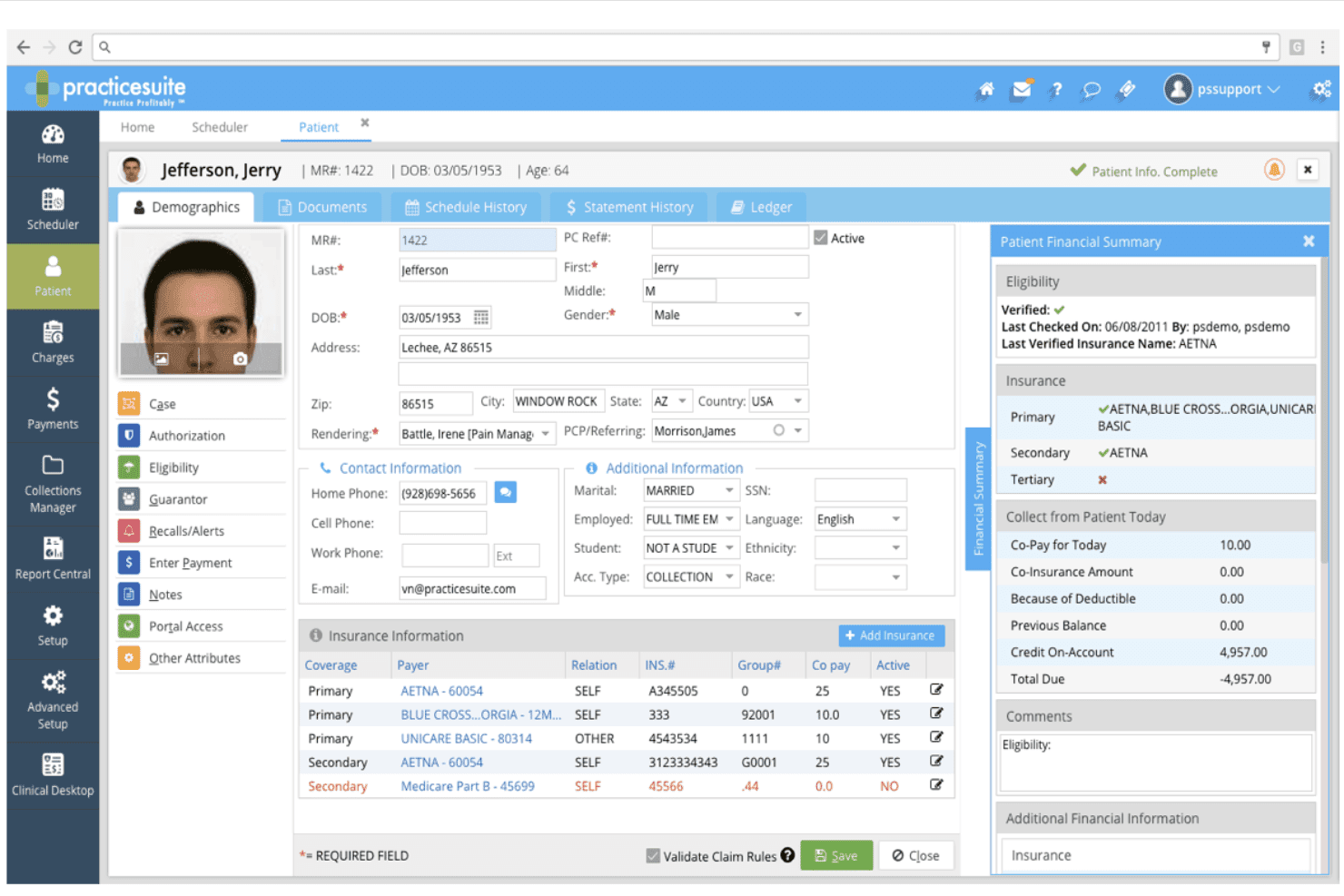
PracticeSuite supports claims, billing, payments, denials, eligibility, and ARs. PracticeSuite is a cloud-based medical billing platform that handles electronic claims submission, denial management, payment posting, patient billing, and coding validation across solo practices, small groups, and multi-location clinics.
Who Is PracticeSuite Best For?
PracticeSuite suits independent billing companies and practice administrators who manage billing workflows across multiple provider accounts or clinic locations.
Why I Picked PracticeSuite
PracticeSuite earns its spot on my shortlist because of how it centralizes billing across multiple locations. I like that mass claim corrections can be applied across all provider accounts at once, instead of working through each location separately. The granular security settings also let me control access by location, hours, and days, which is genuinely useful when staff responsibilities differ across sites.
PracticeSuite Key Features
- AI-powered denial intelligence: Flags potential claim issues before submission to reduce rejections.
- Integrated coding validation module: Checks diagnosis and procedure codes for errors and compliance.
- Patient portal with statement delivery: Lets patients view and download billing statements securely online.
- Automated payment posting from ERA files: Matches payments to claims and updates balances automatically.
PracticeSuite Integrations
PracticeSuite offers native integrations with Practice Fusion and Elation, and supports payer and clearinghouse networks. An API is available for custom integrations.
Pros and Cons
Pros:
- Payment posting and corrections are streamlined
- Claim denial prevention with AI review rules
- Handles multi-location billing from one platform
Cons:
- Complaints about unexpected per-encounter charges
- No public pricing or free trial listed
Learn more about PracticeSuite: Best for built-in clearinghouse at no extra cost
- Free plan available
- Free
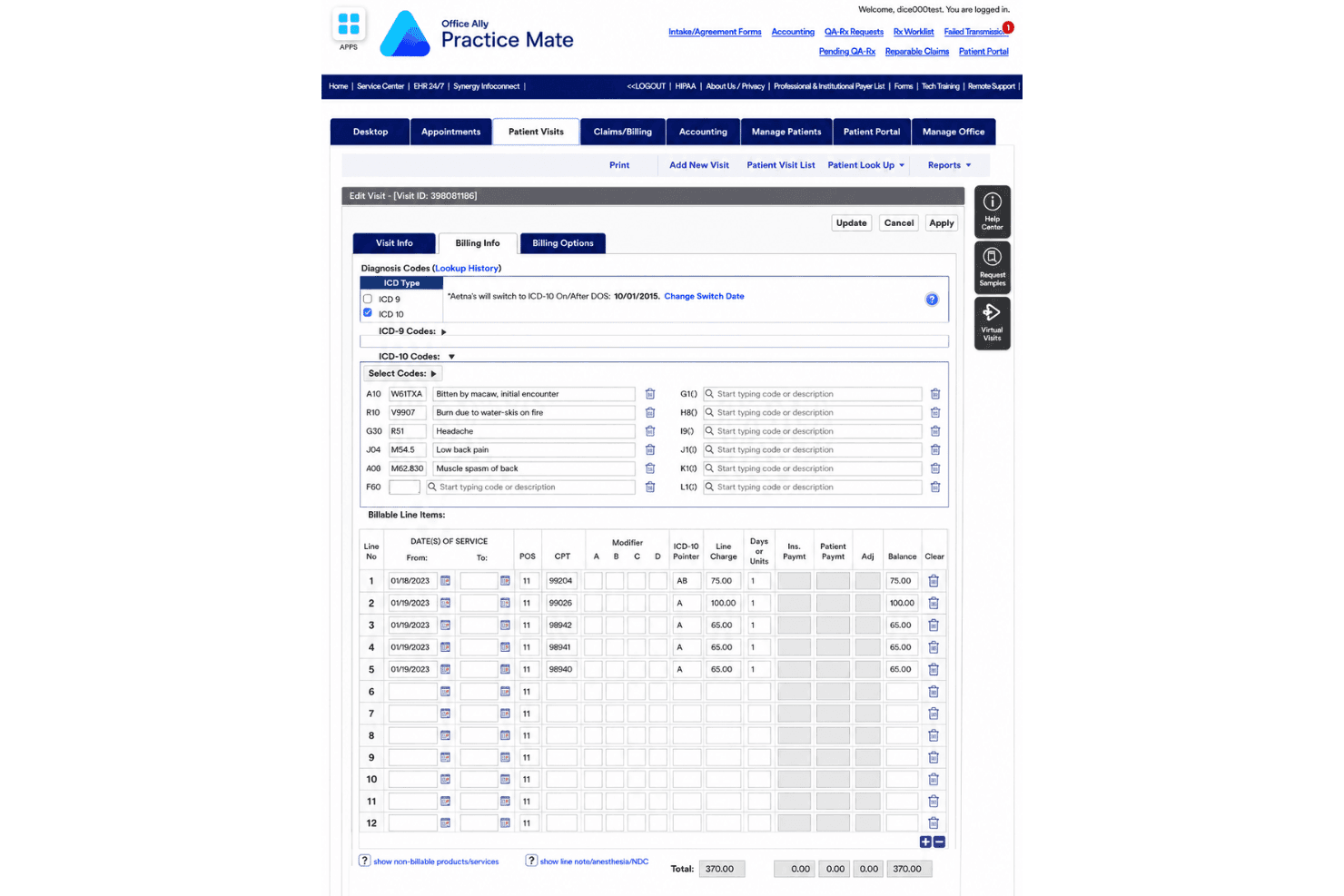
Office Ally Practice Mate joins scheduling, billing, superbills, and e-claims. Office Ally Practice Mate is a free practice management and medical billing platform that combines appointment scheduling, patient billing, superbill configuration, and electronic claims submission through a built-in clearinghouse.
Who Is Office Ally Practice Mate Best For?
Practice Mate is a strong fit for solo practitioners and small independent practices that need a functional billing and scheduling system without a monthly software budget.
Why I Picked Office Ally Practice Mate
Practice Mate earns its spot on my shortlist because the built-in Service Center clearinghouse connects to 5,000+ payers at no monthly cost. I like that claim creation, 837 submission, ERA/835 auto-posting, and real-time eligibility verification are all included without add-on fees. Most billing platforms charge separately for clearinghouse access, so having it bundled into a $0/month platform is genuinely rare.
Office Ally Practice Mate Key Features
- Appointment scheduling: Manage provider calendars with custom views and handle patient scheduling from a web-based dashboard.
- Configurable superbills: Customize charge entry templates to fit your specialty’s coding and billing needs.
- Patient ledger: Track patient balances, charges, adjustments, and payment history within each patient profile.
- Integrated patient portal: Offer patients secure, no-cost access to view billing statements and update demographic information online.
Office Ally Practice Mate Integrations
Practice Mate offers native integrations with Office Ally EHR 24/7, Patient Ally, Reminder Mate, and Patient Payments (Stripe). An API is available for custom integrations.
Pros and Cons
Pros:
- Integrated patient portal and statement mailing
- Unlimited claim volume for solo and group practices
- No-cost multi-payer electronic claims submission
Cons:
- Interface appears outdated and unintuitive
- Denial management features are limited
Learn more about Office Ally Practice Mate:
Other Affordable Medical Billing Software
Here are some additional affordable medical billing software options that didn’t make it onto my shortlist, but are still worth checking out:
- 11athenahealthBest for hands-on billing support services
- 12CureMDBest for customizable billing reports
- 13MedeskBest for international practice compatibility
- 14SimplePracticeBest for integrated client invoicing options
- 15CharmHealthBest for multi-specialty billing capabilities
- 16TherapyNotesBest for automatic payment posting
- 17DocVillaBest for quick superbill generation
- 18Ensora Health TheraNestBest for mental health insurance billing needs
- 19OpenEMRBest for open-source customization flexibility
- 20ClaimocityBest for hospitalist group workflow support
How I Evaluate Affordable Medical Billing Software
I evaluate these tools in two layers: baseline billing requirements like 837 submission and ERA processing, and the differentiators that show which tools are actually built for small-practice budgets.
Core Functionality (Table Stakes For This List)
When I'm selecting tools for my list, I rank each one on a scale from 0 (does not offer the functionality) to 5 (excels in this area) for each core functionality listed below. Then, I calculate the tool's total score into a percentage. Each tool needs to achieve a minimum total score of 65% to be considered for inclusion.
- Claims Submission: I check whether the tool can generate, scrub, and submit 837 files to clearinghouses with built-in error detection before claims go out.
- Coding Support: Full ICD-10, CPT, and HCPCS code sets with searchable lookup matter—especially for practices handling diverse visit types without a dedicated coder.
- ERA/EOB Processing: I look for automated 835 ingestion and payment posting so your team isn't manually keying in every remittance from each payer.
- Denial Management: Rejected claims need a clear queue with reason codes and resubmission workflows, so nothing slips through the cracks during follow-up.
- Patient Billing: I evaluate how the tool handles patient statements, balance tracking, and payment collection—like offering an online portal for card payments.
- Affordable Pricing: Transparent pricing tiers accessible to solo and small practices are key, whether the model is per-provider, per-claim, or flat monthly.
Once I have a list of tools that meet the criteria, I consider what sets each platform apart.
Differentiating Factors (What Sets Vendors Apart)
Here's how I compare and contrast different vendors:
Standout Features
Claim scrubbing is a big differentiator—I look for tools that validate claims against payer-specific rules before submission, which directly cuts down denial rates and rework. Real-time eligibility verification matters just as much because catching a lapsed policy at check-in saves your team from chasing a denied claim weeks later. I also evaluate patient payment portals, since letting patients view balances and pay online via card or ACH helps practices collect faster without extra phone calls.
Beyond Features
Total cost of ownership is where I spend the most time. I look at whether clearinghouse fees, patient statement charges, and setup costs are bundled or billed separately—those extras add up fast for a small practice. Specialty fit also matters; a mental health practice needs different code sets and payer rules than a primary care office. I also check for native EHR/EMR integrations, since a billing tool that can't sync with your clinical system creates duplicate data entry your team doesn't have time for.
How to Choose Affordable Medical Billing Software
It’s easy to get bogged down in long feature lists and complex pricing structures. To help you stay focused as you work through your unique software selection process, here’s a checklist of factors to keep in mind:
| Factor | What to Consider |
|---|---|
| FactorCost | What to ConsiderCan you predict your monthly bill with all users, claims, and clearinghouse connections? Watch for add-on fees that can push costs higher. |
| FactorScalability | What to ConsiderWill the software grow with your practice? Consider if adding providers, locations, or claim volume will require a plan switch or new training. |
| FactorIntegrations | What to ConsiderDoes it connect easily with your EHR/EMR and scheduling systems? Ask whether integrations are included or need an extra module. |
| FactorEase of use | What to ConsiderIs the system intuitive for clinicians or staff without billing expertise? Look for clear dashboards, minimal clicks, and simple navigation. |
| FactorImplementation and onboarding | What to ConsiderHow quickly can you go live? Ask if set-up, payer enrollment, and training are included, and what typical transition times look like. |
| FactorSecurity safeguards | What to ConsiderIs the tool HIPAA-compliant? Look for details on data encryption, access logs, and whether a business associate agreement (BAA) is provided. |
| FactorCustomizability | What to ConsiderCan you adapt statements, rules, or reports for your specialty or practice style? Some tools restrict changes unless you pay more. |
| FactorSupport availability | What to ConsiderCan you get real help when an error halts your claims? Check hours, response times, and whether support is US-based or outsourced. |
What Is Affordable Medical Billing Software?
Affordable medical billing software is a category of digital tools designed to help small practices and independent billing specialists manage claims, payments, and patient statements without high licensing costs.
These solutions focus on core billing functionality with transparent pricing, making them accessible to users who need reliable revenue management on a limited budget.
Features of Affordable Medical Billing Software
When selecting affordable medical billing software, keep an eye out for the following key features:
- Claims submission: Enables electronic claim creation, scrubbing, and submission to payers, helping practices get paid faster and reduce manual paperwork.
- Coding support: Provides searchable ICD-10, CPT, and HCPCS code libraries, allowing accurate code selection for every encounter or procedure.
- ERA/EOB processing: Automates receiving and posting electronic remittance advice, eliminating manual payment entry and simplifying reconciliation workflows.
- Denial management: Flags rejected or denied claims and guides users through correction, appeal, and automated resubmission processes.
- Patient billing: Generates and tracks statements for patient responsibility balances and supports multiple payment collection options.
- Patient payment portal: Offers patients online access to pay statements by card, ACH, or digital wallet, improving speed and convenience of collections.
- Custom reporting: Delivers configurable reports and dashboards for claims, payments, and accounts receivable, surfacing essential billing insights.
- Insurance eligibility checks: Confirms patient insurance status and benefits at or before check-in, reducing downstream rejected claims.
- Security safeguards: Protects sensitive health and billing data with encryption, access controls, and compliance with HIPAA or other regulations.
- Integrations: Connects directly to EHRs, practice management tools, and clearinghouses to minimize duplicate data entry and ensure information flows smoothly.
Benefits of Affordable Medical Billing Software
Implementing affordable medical billing software provides several benefits for your team and your business. Here are a few you can look forward to:
- Lower administrative costs: Automated claims processing and payment posting cut down on manual work, helping you avoid hiring extra billing staff.
- Faster payments: Electronic claim submission and patient payment portals accelerate insurance reimbursements and patient collections.
- Fewer denials and errors: Built-in claim scrubbing, code lookups, and denial management workflows help you submit clean claims and correct issues swiftly.
- Simplified compliance: Security safeguards and coding updates support regulatory compliance without constant manual monitoring by your team.
- Greater transparency: Custom dashboards and transparent pricing models provide clarity on both your practice’s finances and ongoing software expenses.
- Better patient experience: Self-service payment portals and clear statements make it easier for patients to understand and resolve their balances.
- Easy scaling as you grow: Affordable, flexible pricing tiers and scalable infrastructure support the needs of solo practices and growing clinics alike.
Costs and Pricing of Affordable Medical Billing Software
Selecting affordable medical billing software requires an understanding of the various pricing models and plans available. These can range from no-cost medical billing tools to paid plans with broader functionality. Costs vary based on features, team size, add-ons, and more. The table below summarizes common plans, their average prices, and typical features included in affordable medical billing software solutions:
Plan Comparison Table for Affordable Medical Billing Software
| Plan Type | Average Price | Common Features |
|---|---|---|
| Plan TypeFree Plan | Average Price$0 | Common FeaturesBasic claim submission, limited support, patient statements, and manual ERA posting. |
| Plan TypePersonal Plan | Average Price$20-$50/user/month | Common FeaturesElectronic claims, coding libraries, simple denial tracking, and email support. |
| Plan TypeBusiness Plan | Average Price$50-$150/user/month | Common FeaturesIntegrated clearinghouse, ERA auto-posting, online patient payments, reporting dashboards, and phone or chat support. |
| Plan TypeEnterprise Plan | Average Price$150+/user/month | Common FeaturesCustom integrations, advanced analytics, eligibility checks, role-based controls, priority support, and data migration. |
Affordable Medical Billing Software FAQs
Here are some answers to common questions about affordable medical billing software:
What kinds of practices are a good fit for affordable medical billing software?
Affordable medical billing software is ideal for small and midsize practices, independent providers, and billing services that need core billing functions without costly enterprise extras.
Can affordable billing systems handle specialty-specific codes and payer rules?
Yes, most affordable solutions include up-to-date ICD-10, CPT, and HCPCS code libraries and support specialty-specific templates or custom rules for diverse practice types.
Do these platforms include patient payment portals?
Yes, many affordable billing platforms offer integrated patient payment portals, allowing patients to view statements and pay balances online using cards or bank transfers.
Is patient data secure on budget-friendly billing platforms?
Yes, reputable affordable billing systems use HIPAA-compliant security, with encryption and role-based access, to help keep patient and financial data protected.
How hard is it to switch from manual billing or another software?
Most platforms provide setup and onboarding support, including data imports and guidance for payer enrollment, so practices can switch with minimal downtime.
Are there hidden costs to watch out for?
You should always review pricing for clearinghouse fees, support packages, and statement delivery, as some budget plans may not bundle these extras in the base rate.