

Gestionarea unui cabinet medical în prezent vine cu partea sa de provocări. Trebuie să mențineți pacienții mulțumiți, gestionând în același timp complexitatea sistemului medical. Aici intervine programul pentru experiența pacienților. Acesta vă ajută să îmbunătățiți comunicarea, să reduceți timpii de așteptare și să colectați feedback valoros.
Din experiența mea, alegerea programului potrivit vă poate face cabinetul mai eficient și mai concentrat pe pacienți. Am testat și evaluat în mod independent diverse opțiuni, iar acum sunt aici să vă prezint principalele mele recomandări.
Acest articol vă va ghida prin cele mai bune soluții disponibile, evidențiind funcțiile importante pentru echipa dumneavoastră. Să găsim soluția potrivită pentru cabinetul dumneavoastră, astfel încât să le oferiți pacienților îngrijirea pe care o merită.
Why Trust Our Software Recommendations
6,700+
Reviews
20
Industry experts
16+
Evaluation factors
14
Years
Our team has been testing and reviewing software since 2012. As medical practice leaders ourselves, we know how difficult—and important—it is to choose the right software.
For this guide, we evaluated tools using hands-on testing and independent research, scoring tools using our selection criteria.
Our reviews reflect our human editorial judgment, not a sales pitch.
Tabel comparativ: programe pentru experiența pacienților
Acest tabel comparativ sintetizează detaliile de preț pentru principalele mele selecții de programe pentru experiența pacienților.
Sorted by: Default
| Tool | Starting Price | Website | |
|---|---|---|---|
Best for unifying surveys, tickets and reviews | 4.7 out of 5 | Pricing upon request 14-day free trial available | Website |
Best for allied-health client journeys | 4.7 out of 5 | $29/user/month Free demo + 14-day free trial available | Website |
Best for integrated telehealth visit management | 4.3 out of 5 | $335/month Free demo available | Book Demo |
Best for streamlining scheduling and billing processes for a frictionless experience | 4.8 out of 5 | Pricing upon request Free demo available | Website |
Best for integrating clinical, administrative, and financial data in one place | 4.7 out of 5 | Pricing upon request Free demo available | Website |
Best for enhancing patient engagement with seamless communication | 4.7 out of 5 | Pricing upon request Free demo available | Website |
Best for boosting office productivity with innovative communication tools | 4.5 out of 5 | $199/month Free demo available | Website |
Best for optimizing patient-provider relationships through automated messaging | 4.0 out of 5 | Pricing upon request Free demo available | Website |
Best for navigating and comparing healthcare providers with ease | Not rated | $69/user/month | Website |
Best for consolidating healthcare services with real-time patient interaction | Not rated | $20/user/month | Website |


Recenzii ale celor mai bune programe pentru experiența pacienților
Mai jos sunt prezentate rezumatele mele detaliate ale celor mai bune programe pentru experiența pacienților care au ajuns pe lista mea scurtă. Recenziile mele oferă o privire detaliată asupra funcțiilor principale, avantajelor și dezavantajelor, integrărilor și cazurilor de utilizare ideale ale fiecărui instrument, pentru a vă ajuta să îl găsiți pe cel mai potrivit pentru dumneavoastră.
 Best for unifying surveys, tickets and reviews
- 14-day free trial available
- Pricing upon request
Visit WebsiteCustomer Rating:4.7/5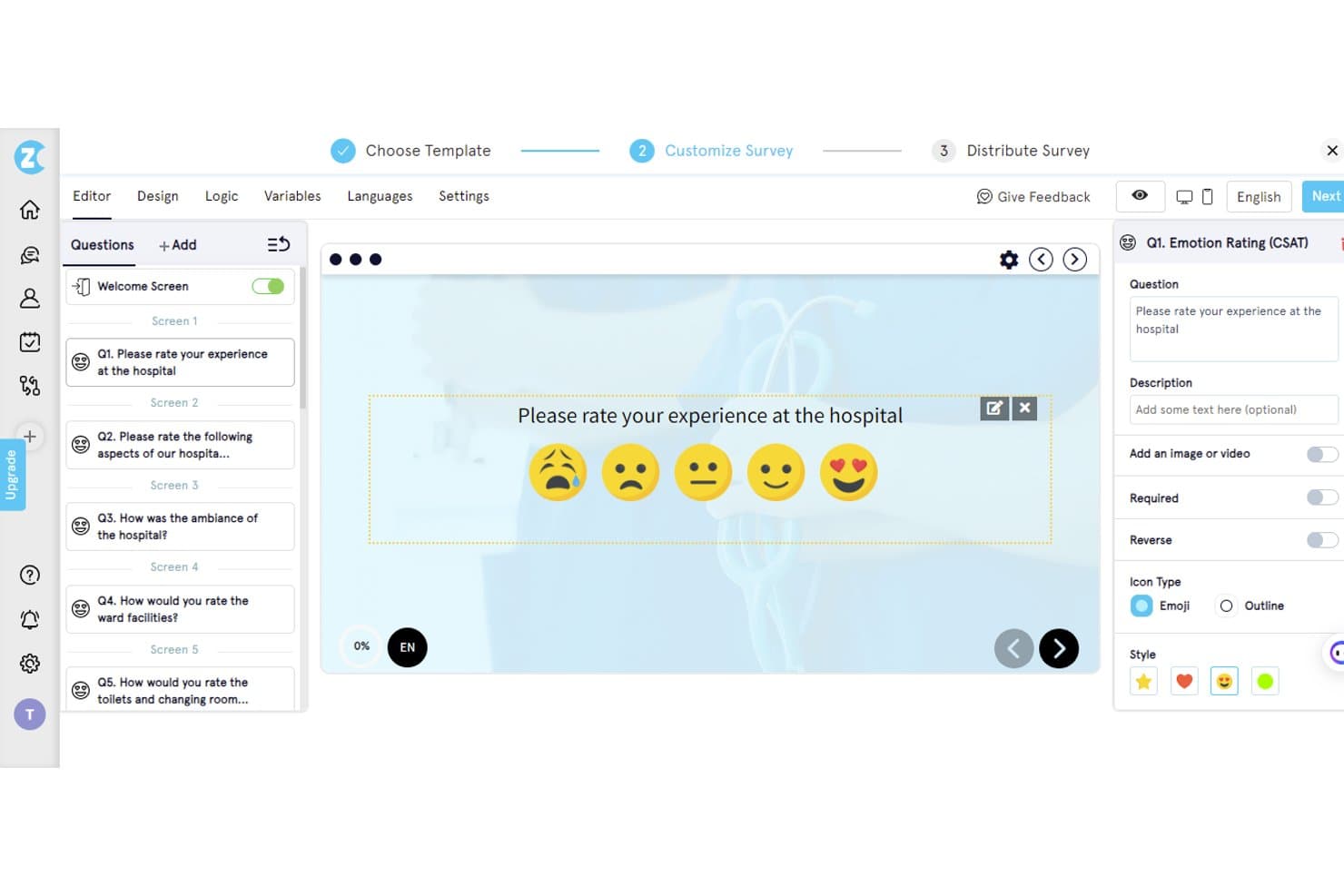
Zonka Feedback lets users build emoji-based patient experience surveys. Zonka Feedback is a customer experience platform that collects patient feedback across email, SMS, WhatsApp, kiosks, and web channels, then analyzes responses with AI-driven sentiment analysis, theme extraction, and reporting dashboards.
Who Is Zonka Feedback Best For?
Zonka Feedback is a strong fit for healthcare organizations that want to unify patient feedback from multiple channels—surveys, support tickets, and reviews—into a single analytics hub.
Why I Picked Zonka Feedback
I've included Zonka Feedback in my top picks because it pulls patient surveys, support tickets, and online reviews into one analytics hub, which is genuinely hard to manage when those data streams live in separate tools. I especially like its AI-driven sentiment and emotion analysis, which flags urgency and intent in open-text responses so your team can prioritize follow-up without manually reading every comment. Its omnichannel reach across email, SMS, WhatsApp, and kiosk channels means you can capture feedback at every patient touchpoint, then compare results across locations through a single reporting dashboard.
Zonka Feedback Key Features
- Drag-and-drop survey builder: Build custom patient surveys using more than 20 question types and 100+ templates without any coding.
- NPS, CSAT, and CES measurement: Collect standardized patient satisfaction metrics across survey touchpoints to track experience trends over time.
- Case management: Log, assign, and resolve patient feedback issues directly within the platform to close the feedback loop.
- Role-based access controls: Restrict data access by user role to support HIPAA-compliant handling of patient feedback across your team.
Zonka Feedback Integrations
Zonka Feedback offers over 20 native integrations, including Zendesk, Freshdesk, Salesforce, HubSpot, and Help Scout. It also supports APIs, webhooks, and Zapier for custom or indirect connections.
Pros and Cons
Pros:
- Multiple channels reach patients at touchpoints
- Dashboards surface trends across locations
- Flexible surveys capture patient feedback
Cons:
- Review monitoring details remain limited
- No appointment reminders or scheduling tools
Learn more about Zonka Feedback: Best for allied-health client journeys
- Free demo + 14-day free trial available
- From $29/user/month
Visit WebsiteCustomer Rating:4.7/5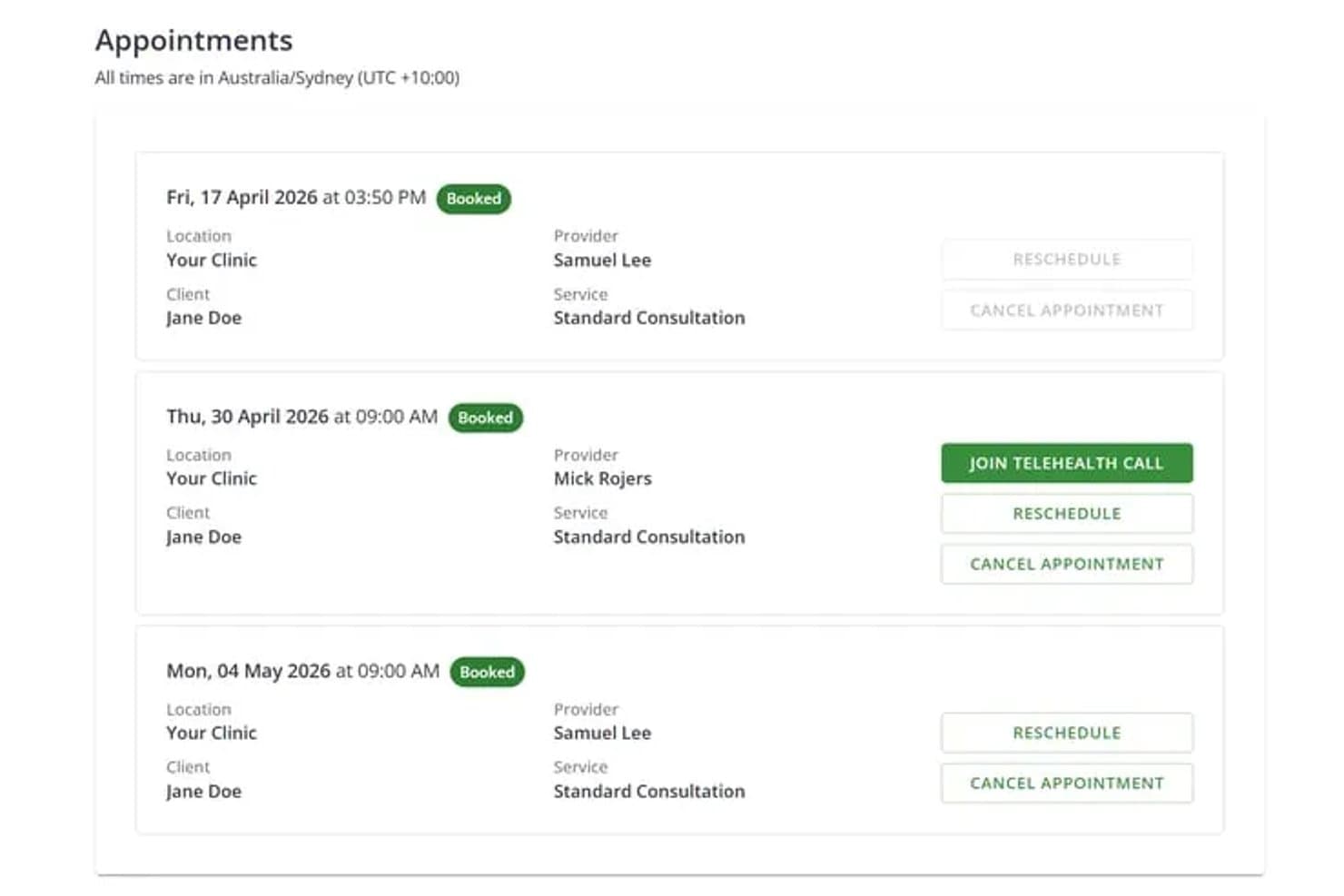
Zanda lets patients view and manage upcoming appointments online. Zanda is an all-in-one practice management platform for allied health practices that covers appointment scheduling, automated client communications, digital intake forms, a client portal, billing, clinical notes, and telehealth—all within a single system.
Who Is Zanda Best For?
Zanda suits allied health practices—physiotherapy, psychology, occupational therapy, and similar disciplines—that need one platform to manage the full client journey from first booking to final invoice.
Why I Picked Zanda
Zanda earns its spot on my shortlist because it tracks the full allied health client journey from the first online booking through to the final invoice, all in one place. I particularly like how post-appointment automations let practices send targeted follow-up messages, including satisfaction survey requests, based on specific conditions like service type, practitioner, or appointment location. The client portal ties it together, letting clients book, complete digital intake forms, join telehealth sessions, and pay invoices without the practice having to chase them at every step.
Zanda Key Features
- Digital intake forms: Clients can complete custom intake, consent, and assessment forms online, with responses automatically saved to their client profile.
- Two-way SMS messaging: Practices can send and receive SMS messages with clients, with all correspondence stored directly in client records.
- Telehealth video sessions: Practitioners can run individual, couples, or group video appointments through Zoom, accessible to clients via the client portal.
- BizzyAI clinical documentation: An AI scribe transcribes live sessions or dictation and drafts clinical notes using the practitioner's chosen template.
Zanda Integrations
Zanda offers native integrations with Stripe, Zoom, Mailchimp, Google Analytics, Physitrack, Google Calendar, Apple Calendar, and Microsoft Outlook. Its public API is in beta, with GET endpoints available and POST endpoints forthcoming.
Pros and Cons
Pros:
- Post-appointment messages can request feedback
- Client portal connects booking, forms, and payments
- Reviewers praise reminders that reduce admin work
Cons:
- Review requests lack monitoring and response tools
- No satisfaction-score analytics or trend reporting
Learn more about Zanda: 3Best for integrated telehealth visit management
RXNT
- Free demo available
- From $335/month(billed annually)
Visit WebsiteCustomer Rating:4.3/5
RXNT’s patient portal gives patients secure access to appointments, medical records, billing information, and provider communications from any device. RXNT is a cloud-based EHR and practice management platform with patient engagement tools such as a patient portal, telehealth, self-scheduling, secure messaging, and e-prescribing.
Who Is RXNT Best For?
RXNT works well for independent medical practices and small-to-mid-sized clinics that need an all-in-one EHR, billing, and patient engagement system.
Why I Picked RXNT
I picked RXNT as one of the best for integrated telehealth visit management because it doesn't treat telehealth as a bolt-on feature—it's woven directly into the same EHR, scheduling, and prescribing workflow your team already uses. The VideoBridge integration is a highlight here: rather than locking you into a single video platform, RXNT lets providers connect their preferred HIPAA-compliant video tool—Zoom, Doxy.me, or any platform that provides a waiting room URL—directly to the scheduling module. With this approach, a virtual visit lives in the same window as your clinical documentation, so there's no toggling between apps mid-appointment. RXNT also surfaces telehealth alongside in-person scheduling, messaging, prescriptions, and lab management in one interface, making it possible for your care team to manage the full virtual encounter without leaving the platform.
RXNT Key Features
- MyRXNT patient portal: Patients log in to self-schedule appointments, view lab results, complete intake forms, and access visit history from one portal.
- Automated appointment reminders: RXNT sends patients reminders via text or email to reduce no-shows and keep your schedule on track.
- Secure provider-patient messaging: Providers and patients exchange HIPAA-compliant messages directly within the platform, without using outside email or phone.
- Online bill pay: Patients review and pay balances through the portal, reducing front-desk billing calls.
RXNT Integrations
RXNT integrates with Kno2 for TEFCA-based health information exchange, connecting providers to over 10,000 participating organizations for bi-directional patient data sharing. It also integrates with Bamboo Health for direct access to state Prescription Drug Monitoring Programs (PDMPs) and with Change Healthcare (Relay Exchange) for claims clearinghouse connectivity. RXNT supports HL7 lab and radiology interfaces with national and regional diagnostic facilities, and connects with third-party telehealth platforms like Zoom and Doxy.me. Documentation for Zapier support is limited, and API details are not highlighted.
Pros and Cons
Pros:
- Patient check-in apps available for both iOS and Android
- Prescription templates can be tailored for different specialties
- Mobile app allows prescriptions from phone
Cons:
- Server lag occurs during peak usage hours
- Duplicate patient records are common
Learn more about RXNT: Best for streamlining scheduling and billing processes for a frictionless experience
- Free demo available
- Pricing upon request
Visit WebsiteCustomer Rating:4.8/5
NexHealth all devices dashboard NexHealth is a patient experience platform designed to simplify key administrative tasks. Its exceptional ability to streamline scheduling and billing processes ties in directly with its ability to provide a frictionless patient experience.
Why I Picked NexHealth: Choosing NexHealth was a clear decision because of its integrated approach toward administrative tasks. The way it centralizes scheduling and billing processes sets it apart from its peers. This unique attribute justifies my opinion that it's 'best for streamlining scheduling and billing processes for a frictionless experience'.
Standout Features & Integrations:
NexHealth comes with essential features like online appointment booking, automated reminders, and a unified billing system. These features integrate well with various Electronic Health Record (EHR) systems, Practice Management software, and even virtual consultation platforms.
Pros and Cons
Pros:
- Unified billing system enhances efficiency
- Integrates well with numerous EHR systems
- Simplifies administrative tasks
Cons:
- Extra costs may apply for additional features
- Yearly billing might not suit all budgets
- Pricing can be high for smaller practices
Learn more about NexHealth: Best for integrating clinical, administrative, and financial data in one place
- Free demo available
- Pricing upon request
Visit WebsiteCustomer Rating:4.7/5
Pabau patient experience software Pabau is a comprehensive clinic management platform designed for healthcare practices of all sizes. It integrates clinical, administrative, and financial data in one place, offering a unified solution for practice management.
Why I Picked Pabau: Pabau caught my attention due to its all-encompassing approach to clinic management. The ability to integrate different types of data into a singular system distinguishes it from other tools. I believe it is "Best for integrating clinical, administrative, and financial data in one place" due to this comprehensive integration, which can significantly simplify the management of a healthcare practice.
Standout features & integrations:
Pabau offers features like appointment scheduling, electronic medical records (EMR), billing, and reporting. Moreover, it integrates well with various third-party applications such as Mailchimp for email marketing and Xero for accounting, adding to its versatility.
Pros and Cons
Pros:
- Compatibility with a range of third-party applications
- Wide array of features for clinic management
- Integration of clinical, administrative, and financial data
Cons:
- Complexity of features might pose a learning challenge for some users
- Requires a minimum of 5 seats, may not be suitable for smaller practices
- Higher starting price compared to some competitors
Learn more about Pabau: Best for enhancing patient engagement with seamless communication
- Free demo available
- Pricing upon request
Visit WebsiteCustomer Rating:4.7/5
Luma Health's appointment reminder feature Luma Health is a patient engagement platform offering comprehensive communication solutions. Its focus on seamless connectivity makes it an excellent tool for healthcare providers seeking to improve their patient engagement.
Why I Picked Luma Health: In the vast sea of patient experience software, I chose Luma Health for its exceptional capability to bridge the communication gap between patients and providers. Its robust, user-friendly interface enhances patient engagement, underscoring my selection of it as 'best for enhancing patient engagement with seamless communication'.
Standout Features & Integrations:
Luma Health brings to the table a host of salient features. Key among them is automated appointment reminders, waitlist management, and telehealth capabilities. Its integration with numerous Electronic Health Record systems, such as athenahealth and Epic, makes it a versatile tool for many practices.
Pros and Cons
Pros:
- User-friendly interface
- Integrates with various EHR systems
- Comprehensive communication solution
Cons:
- Conversion from annual billing can make cost assessment tricky for some practices
- Telehealth feature might not suit all types of medical consultations
- Pricing can be high for small practices
Learn more about Luma Health: Best for boosting office productivity with innovative communication tools
- Free demo available
- From $199/month
Visit WebsiteCustomer Rating:4.5/5
Weave's reminder system Weave is a software platform that enhances communication within healthcare practices. It brings together various communication tools such as phone, texting, and email in one place, facilitating streamlined operations. Given its focus on enhancing efficiency and productivity, Weave stands out as the best for boosting office productivity with innovative communication tools.
Why I Picked Weave: In choosing Weave, I focused on its multifaceted approach to communication. It sets itself apart by offering an all-in-one platform that integrates different forms of communication. This makes it ideal for boosting productivity as it reduces the need for multiple platforms and promotes efficient interaction with patients.
Standout features & integrations:
One of Weave's main features is its unified inbox that merges all communication channels, enabling staff to manage phone calls, texts, and emails from one place. Weave's appointment reminder system is another key feature, reducing no-shows and helping manage schedules more efficiently. The platform integrates well with many leading practice management systems, providing seamless coordination between different operational aspects.
Pros and Cons
Pros:
- Provides integration with multiple practice management systems
- Reduces no-shows with automated appointment reminders
- Streamlines communication through a unified platform
Cons:
- Relies heavily on Internet connectivity, posing challenges in areas with unstable internet connections
- Pricing can be steep for smaller practices
- May require a learning curve to maximize its benefits
Learn more about Weave: Best for optimizing patient-provider relationships through automated messaging
- Free demo available
- Pricing upon request
Visit WebsiteCustomer Rating:4/5
SolutionReach's dashboard SolutionReach is a robust platform providing advanced patient communication solutions. Its focus on automation and relationship-building coincides with its core strength in optimizing patient-provider interactions.
Why I Picked SolutionReach: Among the multitude of patient experience platforms, SolutionReach caught my attention due to its outstanding automated messaging capabilities. It truly stands apart with its focus on nurturing patient-provider relationships, reinforcing my rationale for tagging it as 'best for optimizing patient-provider relationships through automated messaging'.
Standout Features & Integrations:
Key features of SolutionReach include automated reminders, a two-way text messaging system, and patient satisfaction surveys. The platform integrates effectively with numerous Electronic Health Records (EHRs) and Practice Management systems, providing broad usability across various medical practices.
Pros and Cons
Pros:
- Comprehensive toolset for patient-provider communication
- Seamless integration with multiple EHR systems
- Automated messaging enhances efficiency
Cons:
- Advanced features may require higher-tier plans
- Yearly billing might not be suitable for all practices
- Setup fee might deter some potential users
Learn more about SolutionReach: Best for navigating and comparing healthcare providers with ease
- From $69/user/month

Doctify's calendar feature Doctify is an online platform that aims to improve the process of finding a healthcare provider. Its focus is to offer transparent information and real patient reviews, aiding patients in making informed decisions when choosing a healthcare provider.
Why I Picked Doctify: I selected Doctify due to its unique approach in focusing on the patient's journey to find the right healthcare provider. The platform's emphasis on transparency and patient empowerment sets it apart. I believe it fits perfectly as the "Best for navigating and comparing healthcare providers with ease" due to its intuitive search and unique functionalities.
Standout features & integrations:
Doctify provides a detailed profile of healthcare professionals, their specialties, locations, and patient reviews. This gives an extensive understanding of what to expect from each provider. It integrates with healthcare providers' booking systems, enabling patients to schedule appointments directly through the platform.
Pros and Cons
Pros:
- Enables direct appointment scheduling
- Provides real patient reviews
- Simplifies the process of finding a healthcare provider
Cons:
- Patient reviews might be subject to personal bias
- Pricing may be high for solo practitioners
- Limited to providers listed on the platform
Learn more about Doctify: Best for consolidating healthcare services with real-time patient interaction
- From $20/user/month

Bamboo Health's dashboard Bamboo Health provides a patient experience platform that brings together various healthcare services under one umbrella. With a focus on real-time patient interaction, it strengthens the patient-provider relationship.
Why I Picked Bamboo Health: I chose Bamboo Health for its holistic approach to healthcare service management. Its ability to unify diverse services while enabling real-time patient engagement makes it stand out from the crowd. I believe it's 'best for consolidating healthcare services with real-time patient interaction' due to this unique approach.
Standout Features & Integrations:
Bamboo Health boasts an array of features, including secure messaging, appointment scheduling, and a patient portal. Its robust API allows integration with a broad range of EMR systems and healthcare applications, making it a versatile solution for diverse healthcare settings.
Pros and Cons
Pros:
- Wide range of integrations available
- Supports real-time patient interaction
- All-in-one platform for healthcare services
Cons:
- The interface might require a learning curve for some users
- May be overwhelming for small practices due to its comprehensive nature
- Additional costs for advanced features
Learn more about Bamboo Health:
Alte programe pentru experiența pacienților
Iată câteva opțiuni suplimentare de programe pentru experiența pacienților care nu au ajuns pe lista mea scurtă, dar merită totuși analizate:
- 11OhMDBest for secure, HIPAA-compliant patient communication on-the-go
- 12ArteraBest for streamlining patient engagement in chronic disease management
- 13HST PathwaysBest for enhancing patient engagement in ambulatory surgical centers
- 14CemplicityBest for capturing patient feedback for evidence-based improvements
- 15MedMetrixBest for leveraging data-driven insights for quality patient care
- 16Creatio AI CRMBest for automated patient experience workflows
- 17athenahealthGood for comprehensive patient experience management with intuitive software
- 18CernerGood for enhancing patient experience with data-driven health solutions
- 19VeradigmGood for boosting patient engagement with a comprehensive health platform
- 20LeagueGood for healthcare providers looking to modernize patient engagement
How I Evaluate Patient Experience Software
I evaluate these tools in two layers: the baseline capabilities a practice needs to move off paper intake forms and phone-tag reminders, and the differentiators that make one platform the right fit.
Core Functionality (Table Stakes For This List)
When I'm selecting tools for my list, I rank each one on a scale from 0 (does not offer the functionality) to 5 (excels in this area) for each core functionality listed below. Then, I calculate the tool's total score into a percentage. Each tool needs to achieve a minimum total score of 65% to be considered for inclusion.
- Patient Communication Tools: I check whether a platform supports two-way messaging across SMS, email, and voice—so your front desk can confirm details or answer questions without playing phone tag.
- Digital Intake & Scheduling: Online booking paired with digital forms matters here, especially the ability to capture insurance cards, IDs, and consent signatures before a patient walks in.
- Automated Appointment Reminders: I look for configurable reminder cadences across multiple channels, including the option to let patients confirm or reschedule directly from the notification.
- Feedback & Reputation Management: Post-visit survey distribution and automated review requests are what I evaluate, along with tools to monitor and respond to reviews across Google and other public sites.
- HIPAA-Compliant Infrastructure: Every platform I consider needs documented HIPAA compliance with a signed BAA, data encryption, and role-based access controls to protect patient information.
- EHR/PMS Integration: I look at which EHR and practice management systems a tool connects with natively—platforms like athenahealth, Epic, or Dentrix—and whether data syncs bi-directionally in real time.
Once I have a list of tools that meet this criteria, I consider what sets each platform apart.
Differentiating Factors (What Sets Vendors Apart)
Here's how I compare and contrast different vendors:
Standout Features
Telehealth is a big differentiator—I look for platforms where a patient can book, check in, and join a video visit without leaving the app. Care gap outreach also matters. Tools that flag overdue patients for screenings or follow-ups help practices stay proactive instead of reactive. Integrated payment features like digital bill pay, cost estimates, and payment plans reduce front-desk workload and give patients more control over the financial side of their visit.
Beyond Features
Specialty and practice size fit is something I always evaluate. A platform built for a five-provider dental office has very different workflows than one designed for a multi-location health system. Implementation support weighs heavily too—I check whether a vendor offers dedicated onboarding specialists who understand clinical front-desk workflows, since adoption often stalls without hands-on staff training. I also look at whether platforms provide reporting tied to measurable outcomes like no-show rate reduction and review volume growth.
Cum să alegeți un program pentru experiența pacienților
Este ușor să vă pierdeți în liste lungi de funcții și structuri complexe de prețuri. Pentru a vă ajuta să rămâneți concentrat în timp ce parcurgeți procesul unic de selectare a programului potrivit, iată o listă de factori pe care trebuie să îi aveți în vedere:
| Factor | Ce trebuie avut în vedere |
|---|---|
| FactorScalabilitate | Ce trebuie avut în vederePoate programul să se dezvolte odată cu cabinetul dumneavoastră? Căutați instrumente care pot gestiona un număr mai mare de pacienți fără pierderi de performanță. Luați în considerare planurile de dezvoltare viitoare. |
| FactorIntegrări | Ce trebuie avut în vedereFuncționează cu sistemele pe care le utilizați deja? Asigurați compatibilitatea cu EMR și cu celelalte instrumente pentru a evita silozurile de date și introducerea manuală a datelor. |
| FactorPosibilități de personalizare | Ce trebuie avut în vedereÎl puteți adapta nevoilor dumneavoastră? Verificați dacă puteți ajusta setările și fluxurile de lucru pentru a se potrivi proceselor specifice ale cabinetului. |
| FactorUșurința utilizării | Ce trebuie avut în vedereÎl va considera echipa dumneavoastră intuitiv? Evitați instrumentele cu o curbă de învățare abruptă. Solicitați demonstrații pentru a evalua ușurința în utilizare. |
| FactorImplementare și integrare inițială | Ce trebuie avut în vedereCât de repede puteți începe? Căutați soluții cu procese clare de integrare inițială și resurse pentru instruirea eficientă a echipei. |
| FactorCost | Ce trebuie avut în vedereSe încadrează în bugetul dumneavoastră? Comparați planurile tarifare și fiți atenți la taxele ascunse. Luați în considerare atât costurile pe termen scurt, cât și pe cele pe termen lung. |
| FactorMăsuri de securitate | Ce trebuie avut în vedereSunt protejate datele pacienților? Verificați conformitatea cu reglementările din domeniul medical, precum HIPAA, și verificați existența funcțiilor de criptare. |
| FactorDisponibilitatea asistenței | Ce trebuie avut în vederePuteți primi ajutor atunci când aveți nevoie? Asigurați-vă că furnizorul oferă canale de asistență fiabile și timpi de răspuns care corespund nevoilor cabinetului dumneavoastră. |
Ce este programul pentru experiența pacienților?
Programul pentru experiența pacienților este un instrument conceput pentru a îmbunătăți interacțiunea dintre furnizorii de servicii medicale și pacienți. Profesioniștii din domeniul medical, inclusiv medicii, asistentele medicale și personalul administrativ, utilizează în general aceste instrumente pentru a îmbunătăți satisfacția și comunicarea cu pacienții. Funcțiile de programare a consultațiilor, de gestionare a feedbackului și de comunicare cu pacienții contribuie la menținerea unor fluxuri de lucru eficiente și la îmbunătățirea îngrijirii pacienților. În ansamblu, aceste instrumente oferă o valoare semnificativă prin consolidarea relațiilor și îmbunătățirea calității îngrijirii.
Funcții
Atunci când selectați un program pentru experiența pacienților, urmăriți următoarele funcții principale:
- Programarea consultațiilor: Permite programarea și gestionarea cu ușurință a consultațiilor pacienților, reducând volumul de muncă administrativă și minimizând conflictele de programare.
- Gestionarea feedbackului: Colectează și analizează feedbackul pacienților pentru a identifica domeniile care necesită îmbunătățiri și pentru a spori satisfacția generală a pacienților.
- Comunicarea cu pacienții: Facilitează comunicarea directă dintre pacienți și furnizorii de servicii medicale, îmbunătățind implicarea și schimbul de informații.
- Analize și raportare: Oferă informații despre satisfacția pacienților și eficiența operațională, contribuind la luarea deciziilor bazate pe date.
- Sondaje personalizabile: Permite crearea unor sondaje adaptate pentru colectarea feedbackului specific al pacienților, relevant pentru nevoile cabinetului dumneavoastră.
- Capacități de telemedicină: Oferă asistență pentru consultații la distanță, extinzând accesul la îngrijire și răspunzând preferințelor pacienților pentru consultații virtuale.
- Asistență multilingvă: Oferă servicii în mai multe limbi, asigurând accesibilitatea pentru diverse categorii de pacienți.
- Măsuri de securitate: Protejează datele pacienților prin criptare și conformitate cu reglementări precum HIPAA, asigurând confidențialitatea și securitatea.
- Integrarea cu dosarele medicale: Se conectează fără probleme la dosarele medicale electronice pentru a asigura informații exacte și actualizate despre pacienți.
- Mementouri automate pentru urmărirea pacienților: Trimite pacienților mementouri la timp cu privire la consultațiile viitoare și îngrijirea ulterioară, îmbunătățind respectarea planurilor de tratament.
Beneficii
Implementarea unui software pentru experiența pacientului oferă mai multe beneficii pentru echipa și afacerea dumneavoastră. Iată câteva dintre acestea:
- Satisfacție îmbunătățită a pacienților: Prin îmbunătățirea comunicării și a gestionării feedbackului, vă puteți asigura că pacienții se simt ascultați și apreciați.
- Eficiență sporită: Funcții precum programarea consultațiilor și mementourile automate pentru urmărirea pacienților contribuie la reducerea sarcinilor administrative și eliberează timp pentru activități axate mai mult pe pacienți.
- Informații mai bune pe baza datelor: Analizele și rapoartele vă oferă informații utile despre tendințele pacienților și nivelurile de satisfacție, sprijinind luarea unor decizii informate.
- Accesibilitate îmbunătățită: Capacitățile de telemedicină și asistența multilingvă fac serviciile medicale mai accesibile pentru o gamă mai largă de pacienți.
- Relații mai solide cu pacienții: Instrumentele de comunicare directă favorizează o implicare mai bună și încrederea între furnizorii de servicii medicale și pacienți.
- Conformitate cu reglementările: Măsurile de securitate asigură protejarea datelor pacienților și conformitatea cu reglementările, oferindu-vă liniște sufletească.
- Operațiuni simplificate: Integrarea cu dosarele medicale asigură accesul permanent la informații exacte despre pacienți, îmbunătățind fluxul de informații din cabinetul dumneavoastră.
Costuri & prețuri
Alegerea unui software pentru experiența pacientului necesită înțelegerea diferitelor modele și planuri de preț disponibile. Costurile variază în funcție de funcții, dimensiunea echipei, suplimente și alți factori. Tabelul de mai jos prezintă pe scurt planurile obișnuite, prețurile medii ale acestora și funcțiile incluse de regulă în soluțiile software pentru experiența pacientului:
Tabel comparativ al planurilor pentru software-ul destinat experienței pacientului
| Tipul planului | Preț mediu | Funcții comune |
|---|---|---|
| Tipul planuluiPlan gratuit | Preț mediu$0 | Funcții comuneProgramare de bază a consultațiilor, gestionarea limitată a feedbackului și instrumente de bază pentru comunicare. |
| Tipul planuluiPlan personal | Preț mediu$5-$25/utilizator/lună | Funcții comuneInstrumente de comunicare îmbunătățite, sondaje personalizabile și analize de bază. |
| Tipul planuluiPlan pentru afaceri | Preț mediu$30-$60/utilizator/lună | Funcții comuneAnalize avansate, integrare cu dosarele medicale și asistență multilingvă. |
| Tipul planuluiPlan pentru întreprinderi | Preț mediu$70-$150/utilizator/lună | Funcții comuneCapacități complete de telemedicină, opțiuni extinse de personalizare și asistență dedicată. |
Întrebări frecvente despre software-ul pentru experiența pacienților
Iată câteva răspunsuri la întrebările frecvente despre software-ul pentru experiența pacienților:
Cum îmbunătățește software-ul pentru experiența pacienților comunicarea?
Software-ul pentru experiența pacienților îmbunătățește comunicarea prin furnizarea unor platforme de mesagerie securizate. Echipa dumneavoastră poate trimite mementouri și actualizări, asigurându-se că pacienții au întotdeauna cele mai recente informații. De asemenea, permite colectarea cu ușurință a feedbackului, ajutându-vă să înțelegeți mai bine nevoile pacienților.
Se poate extinde software-ul pentru experiența pacienților la mai multe clinici sau linii de servicii?
Da, dar va trebui să verificați dacă sistemul acceptă implementarea în mai multe locații, setări regionale și acces bazat pe roluri pentru diverse linii de servicii. Verificați cum sunt partiționate sau agregate datele, cum sunt adăugate locațiile noi și dacă modelul de licențiere permite creșterea fără salturi bruște ale costurilor.
Poate software-ul pentru experiența pacienților contribui la reducerea pierderii pacienților?
Da — prin identificarea scorurilor scăzute de satisfacție sau a reclamațiilor repetate, puteți rezolva problemele înainte ca pacienții să plece. Multe instrumente vă alertează echipa atunci când feedbackul scade, astfel încât să puteți reveni către pacienți. În timp, acest lucru consolidează încrederea și menține loialitatea pacienților.
Cât de des ar trebui să actualizați configurația software-ului pentru experiența pacienților?
Revizuiți configurația la fiecare 6–12 luni sau atunci când se modifică fluxurile de lucru. Așteptările pacienților se schimbă rapid, iar ceea ce a funcționat anul trecut poate părea acum depășit. Menținerea unei configurații actualizate contribuie, de asemenea, la implicarea personalului și vă asigură că acționați pe baza datelor potrivite.