

Software-ul integrat de facturare medicală conectează sistemele clinice, administrative și de facturare, astfel încât să puteți gestiona într-un singur loc cererile de plată, plățile și dosarele pacienților. Dacă sunteți în căutarea unor modalități de a reduce introducerea manuală a datelor, de a diminua erorile de facturare și de a vă menține echipa aliniată, platforma integrată potrivită poate face o diferență semnificativă. Această listă vă oferă opțiuni practice, adaptate mediilor medicale reale — indiferent dacă aveți un cabinet individual, un grup de cabinete sau o operațiune cu mai multe locații — astfel încât să puteți alege cu încredere un sistem care se potrivește modului în care lucrați.
Why Trust Our Software Recommendations
6,700+
Reviews
20
Industry experts
16+
Evaluation factors
14
Years
Our team has been testing and reviewing software since 2012. As medical practice leaders ourselves, we know how difficult—and important—it is to choose the right software.
For this guide, we evaluated tools using hands-on testing and independent research, scoring tools using our selection criteria.
Our reviews reflect our human editorial judgment, not a sales pitch.
Tabel comparativ pentru software-ul integrat de facturare medicală
Acest tabel comparativ rezumă detaliile de preț pentru selecțiile mele de top de software integrat de facturare medicală:
Sorted by: Default
| Tool | Starting Price | Website | |
|---|---|---|---|
Best multi-location management tools | 4.1 out of 5 | Pricing upon request Free demo available | Website |
Best built-in billing for smaller medical offices | 3.7 out of 5 | $199/provider/month 14-day free trial + free demo available | Website |
Best dedicated support for complex specialties | 3.6 out of 5 | Pricing upon request Free demo available | Website |
Best insurance verification integration | 3.5 out of 5 | Pricing upon request Free demo available | Website |
Best advanced analytics for billing optimization | 3.4 out of 5 | $499/user/month Free demo available | Website |
Best integrated billing and payments dashboard | 3.9 out of 5 | Pricing upon request Free demo available | Website |
Best mobile-first billing experience | 3.9 out of 5 | Pricing upon request Free demo available | Website |
Best for scalable healthcare group operations | 3.7 out of 5 | Pricing upon request Not available | Website |
Best all-in-one workflow automation | 3.6 out of 5 | $130/user/month 30-day free trial + free demo available | Website |
Best customizable claims management | Not rated | Pricing upon request Free demo available | Website |


Recenzii ale celor mai bune software-uri integrate de facturare medicală
Mai jos sunt prezentate rezumatele mele detaliate ale celor mai bune software-uri integrate de facturare medicală care au ajuns pe lista mea scurtă. Recenziile mele oferă o privire detaliată asupra funcțiilor, integrărilor și celor mai potrivite cazuri de utilizare ale fiecărui software, pentru a vă ajuta să îl găsiți pe cel mai potrivit pentru dumneavoastră.
 Best multi-location management tools
- Free demo available
- Pricing upon request
Visit WebsiteCustomer Rating:4.1/5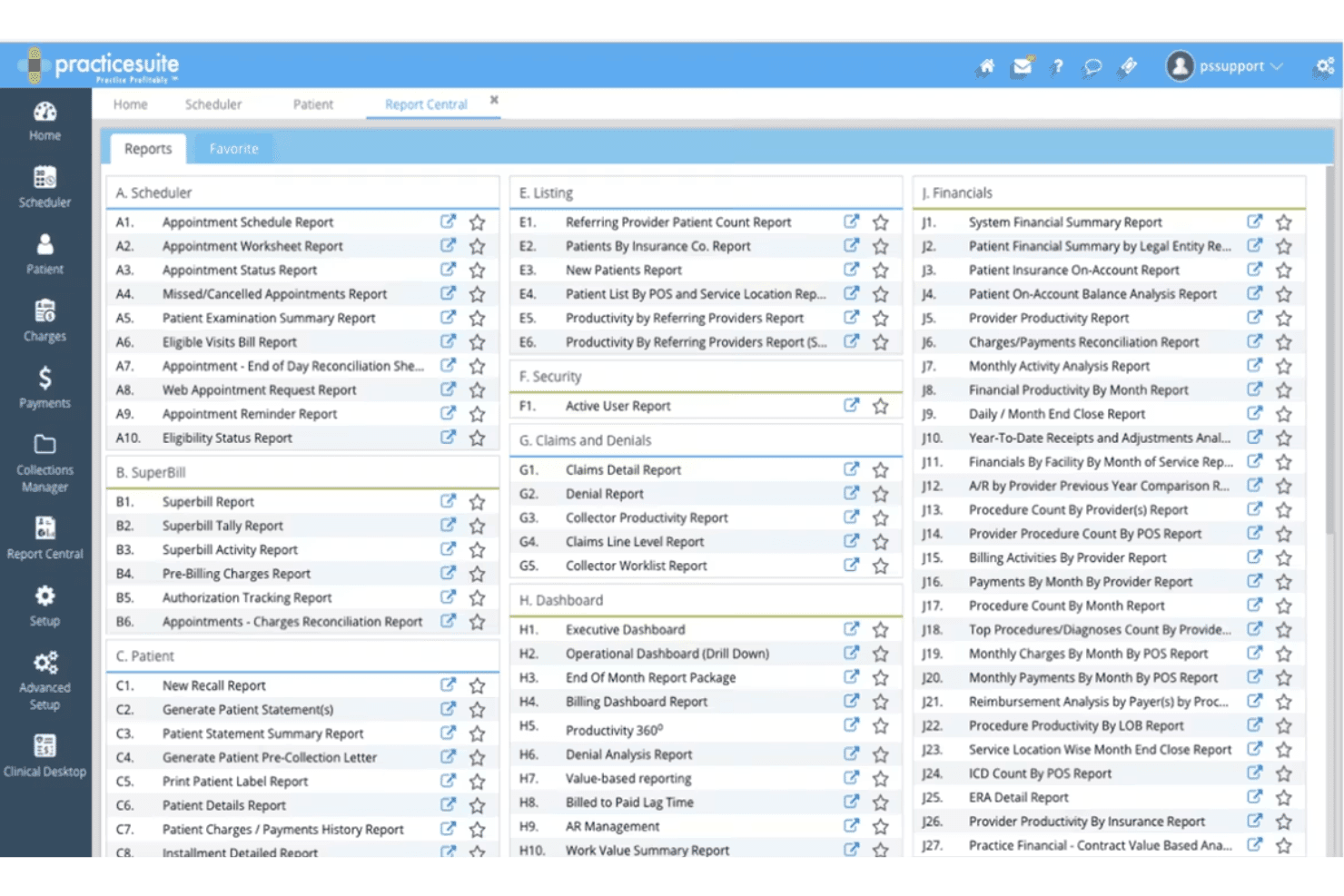
PracticeSuite Report Center highlights service location reports. PracticeSuite is a cloud-based medical billing platform that unifies claims management, RCM, EHR, practice management, scheduling, and patient billing across a single modular system built for practices of all sizes.
Who Is PracticeSuite Best For?
PracticeSuite suits physician groups and third-party billing companies that manage billing and RCM workflows across multiple providers or locations from a single platform.
Why I Picked PracticeSuite
I picked PracticeSuite as one of the best because its Central Billing Office gives me a single sign-on to handle denials, mass claim corrections, and payment posting across all client accounts without jumping between systems. Report Central adds another layer of control, with granular security settings that restrict data access by location, specific days, or hours. That kind of location-level configuration matters when your billing staff spans multiple sites with different access needs.
PracticeSuite Key Features
- EHR integration: Syncs billing and patient data across over 60 clinical specialties.
- AI denial intelligence: Flags claims issues before submission using AI-driven analysis.
- Scheduling module: Manages complex multi-provider and multi-specialty appointment workflows.
- Coding validation software: Validates ICD-10, CPT, and HCPCS codes for compliant charge capture.
PracticeSuite Integrations
PracticeSuite offers native integrations with Practice Fusion, Elation, Labcorp, Quest Diagnostics, and supports e-prescribing to over 70,000 pharmacies nationwide. An API is available for custom integrations.
Pros and Cons
Pros:
- Customizable reports and security by role
- AI-powered denial intelligence for claims
- Multi-location management with location-based controls
Cons:
- Complex setup for first-time configuration
- Occasional delays in customer support response
Learn more about PracticeSuite: Best built-in billing for smaller medical offices
- 14-day free trial + free demo available
- From $199/provider/month
Visit WebsiteCustomer Rating:3.7/5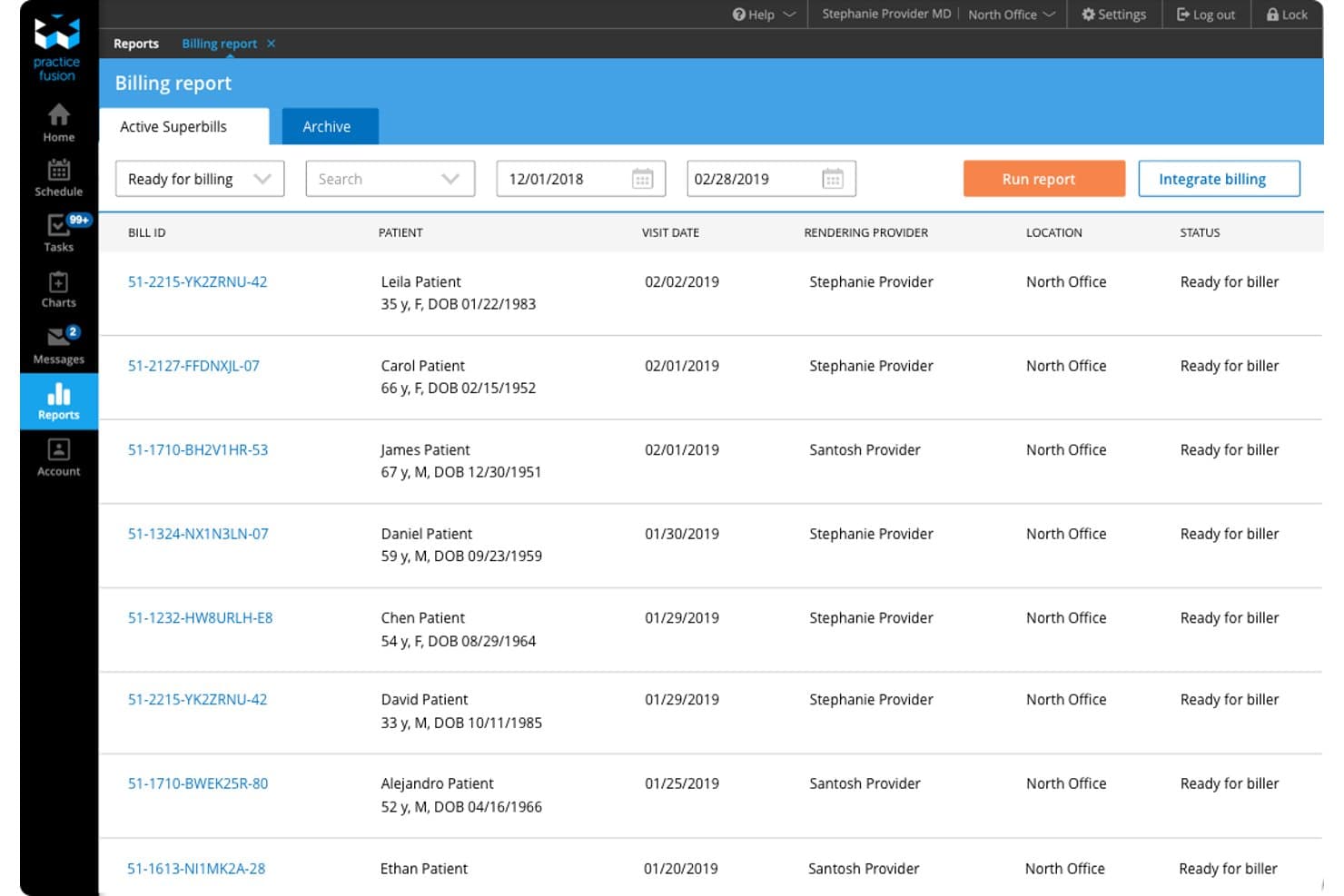
Practice Fusion offers an integrated billing report dashboard that displays active superbills with patient details, visit dates, rendering providers, and billing statuses. Practice Fusion is a cloud-based EHR platform for independent practices that combines clinical charting, scheduling, ePrescribing, and fully integrated billing services—including claims scrubbing, denial management, and payment posting—in a single system.
Who Is Practice Fusion Best For?
Practice Fusion is a strong fit for solo providers and small independent practices that want a single vendor for both EHR and billing services.
Why I Picked Practice Fusion
Practice Fusion earns its spot as one of the best on my shortlist because its billing services are genuinely native to the EHR, not a bolted-on third-party module. I like that the billing team handles everything from claims scrubbing and denial management to payment posting and payer credentialing, all pulled directly from chart data. The per-visit pricing model also makes it a practical pick for solo and small practices with variable monthly patient volume.
Practice Fusion Key Features
- Integrated ePrescribing: Send prescriptions, including controlled substances, electronically from the EHR to any pharmacy.
- Labs and imaging connectivity: Order tests and receive results directly within patient charts from hundreds of connected labs and imaging centers.
- Secure patient portal: Provide patients with 24/7 access to their health information and communication through the FollowMyHealth portal.
- Built-in clinical reporting: Generate regulatory and productivity reports using built-in dashboards for MIPS, clinical quality, and practice management.
Practice Fusion Integrations
Practice Fusion offers native integrations with FollowMyHealth for patient portal access and is natively connected to hundreds of labs and imaging centers for electronic order and result management. It also integrates with third-party billing partners like AdvancedMD and Kareo. An API is available for custom integrations.
Pros and Cons
Pros:
- E-prescribing for controlled substances supported
- Native lab and imaging integrations included
- Unified EHR, scheduling, and billing workflow
Cons:
- Billing automation less advanced than competitors
- Eligibility verification tools are limited
Learn more about Practice Fusion: Best dedicated support for complex specialties
- Free demo available
- Pricing upon request
Visit WebsiteCustomer Rating:3.6/5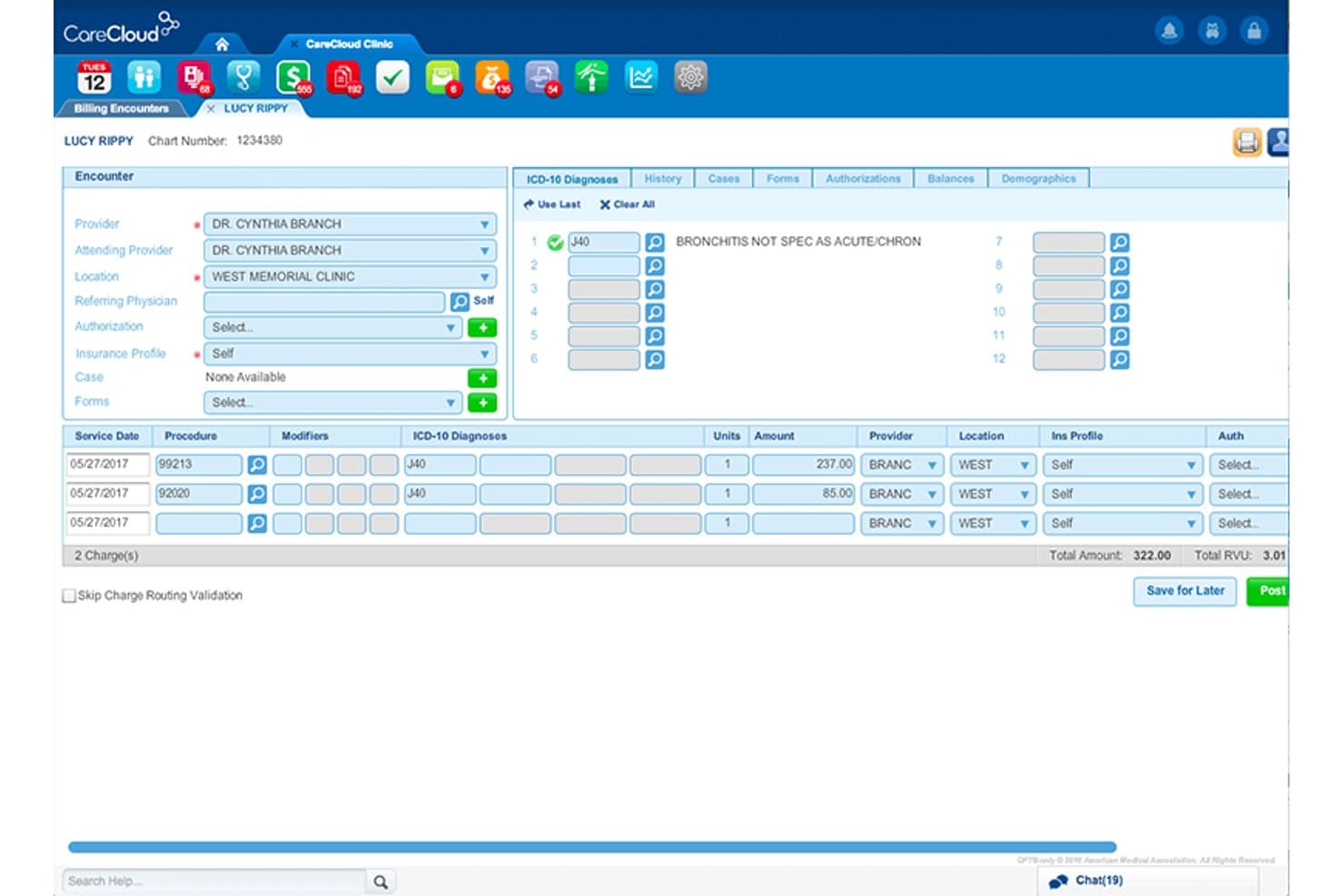
CareCloud offers an integrated billing encounter screen displaying ICD-10 diagnoses, procedure codes, charge amounts, and provider details for streamlined medical billing. CareCloud is an integrated medical billing and practice management platform that unifies EHR, claims management, coding, eligibility verification, and revenue cycle management across a single system.
Who Is CareCloud Best For?
CareCloud is a strong fit for medical practices with complex billing needs across specialty care settings, from independent practices to multi-provider groups.
Why I Picked CareCloud
I picked CareCloud as one of the best because its CollectiveIQ rules engine draws on over 180 million payer-specific billing rules to catch claim issues before submission. That matters most in specialty settings like cardiology or orthopedic surgery, where payer requirements are nuanced and denials are costly. The cirrusAI Appeals tool uses patient claim data to generate customized appeal letters, cutting manual effort on denial follow-up.
CareCloud Key Features
- Centralized billing dashboard: Manage billing activities and monitor claims status for multiple providers from one interface.
- ERA auto-posting: Automatically receive and post electronic remittance advice for faster payment reconciliation.
- Real-time eligibility verification: Instantly check patient insurance coverage and benefits before the visit.
- Patient payment portal: Allow patients to view invoices and submit payments securely online.
CareCloud Integrations
CareCloud offers native integrations with CareCloud Central (practice management), Charts (EHR), and pVerify for insurance eligibility. Additional integrations include Epic, Meditech, ICANotes, Praxis EMR, Sevocity, and Vital Interaction. An API is available for custom integrations.
Pros and Cons
Pros:
- Automated appeals generation saves RCM team time
- Built-in clearinghouse reduces need for third-party tools
- Rules engine catches specialty claim errors before submission
Cons:
- Onboarding process is often time-consuming
- Support responsiveness can be inconsistent
Learn more about CareCloud: Best insurance verification integration
- Free demo available
- Pricing upon request
Visit WebsiteCustomer Rating:3.5/5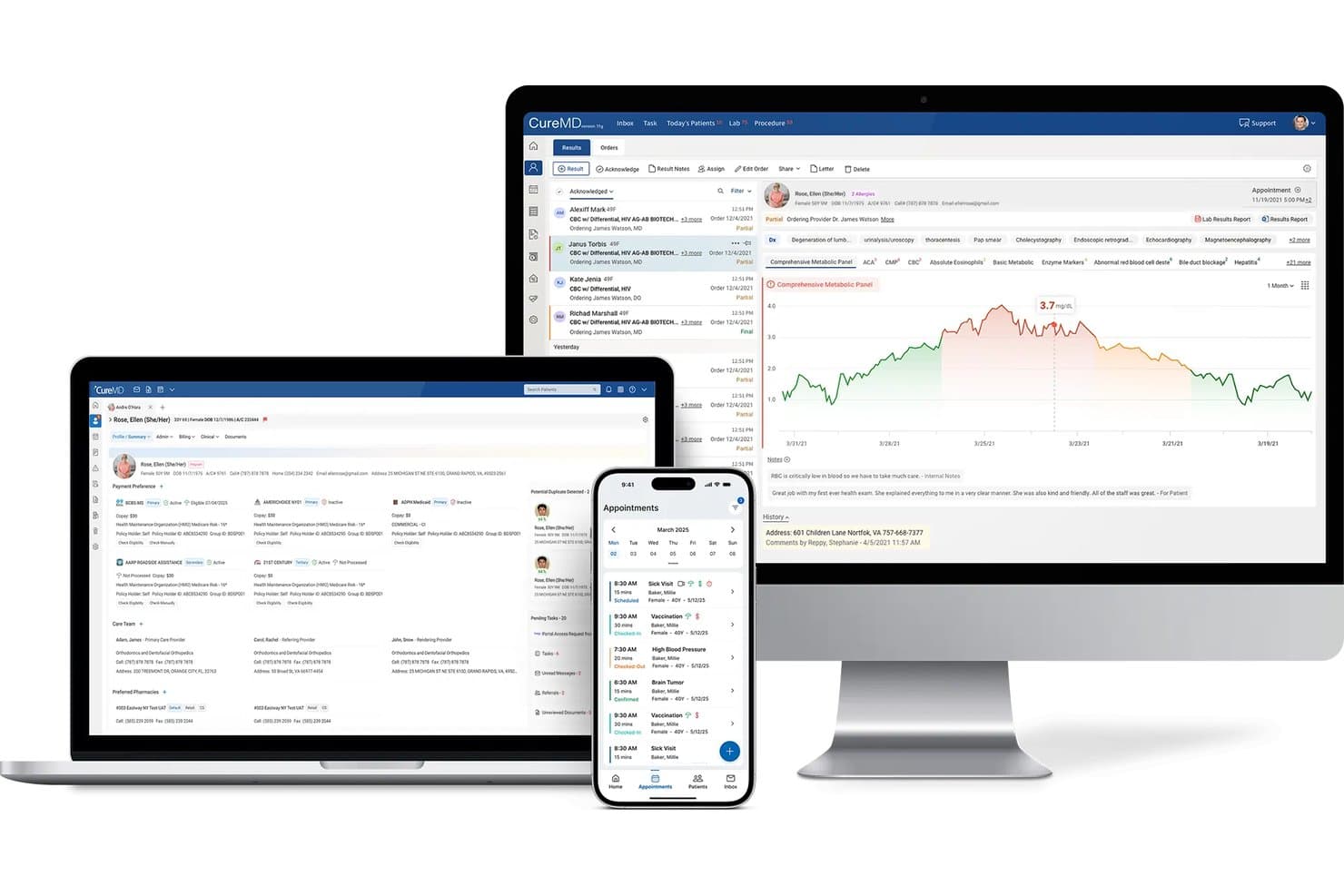
CureMD offers an integrated medical billing and patient management platform accessible across desktop, laptop, and mobile devices. CureMD is a cloud-based medical billing platform that unifies EHR, practice management, claims processing, clearinghouse integration, denial management, and patient payment tools in a single suite built for practices of all sizes.
Who Is CureMD Best For?
CureMD is a strong fit for independent and multi-specialty practices that want a single vendor managing their clinical, administrative, and billing workflows.
Why I Picked CureMD
CureMD earns its spot on my shortlist because of how deeply insurance verification is built into the billing workflow. I particularly like that eligibility checks run in real time before a visit, surfacing copay, deductible, and benefits details directly in the practice management module. That means my team can catch coverage issues before they become claim denials, rather than resolving them after the fact.
CureMD Key Features
- Integrated clearinghouse: Process claims and manage remittances directly within the platform.
- Patient portal: Offer online statements, payments, and secure access to records for patients.
- Automated denial management: Track, flag, and resolve denied claims using built-in workflows.
- ICD-10, CPT, and HCPCS code support: Use comprehensive medical code libraries and validation tools for accurate billing.
CureMD Integrations
CureMD offers native integrations with its own EHR, practice management, clearinghouse, and patient portal modules. The platform supports electronic prescribing to major pharmacy networks and electronic lab ordering with leading labs. An API is available for custom integrations.
Pros and Cons
Pros:
- Real-time eligibility checks integrated at scheduling
- Automated claim scrubbing and denial workflows
- Unified EHR, billing, and practice management suite
Cons:
- Long contract terms with early termination fees
- Occasional sluggish performance during peak hours
Learn more about CureMD: Best advanced analytics for billing optimization
- Free demo available
- From $499/user/month
Visit WebsiteCustomer Rating:3.4/5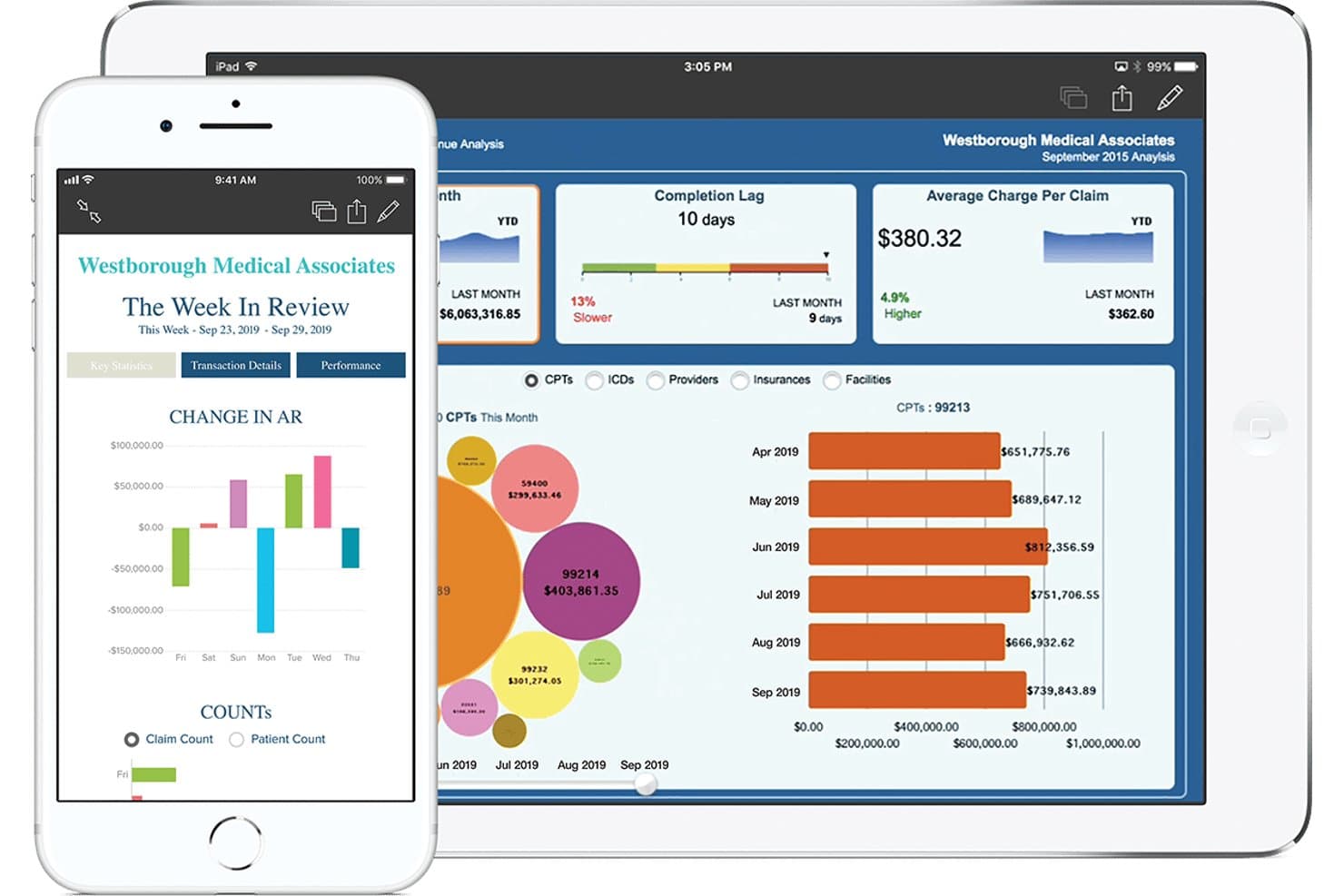
eClinicalWorks offers a revenue cycle management dashboard displaying charge analysis, completion lag, average charge per claim, and CPT-level billing breakdowns on tablet and smartphone. eClinicalWorks is an integrated EHR, practice management, and revenue cycle management platform that combines claims processing, medical coding, eligibility verification, payment posting, and denial management in a single system.
Who Is eClinicalWorks Best For?
It's a strong fit for independent practices and multi-provider groups that want a single vendor to handle their EHR, scheduling, and billing rather than stitching together separate systems.
Why I Picked eClinicalWorks
eClinicalWorks earns its spot on my shortlist because of how its analytics layer sits across the entire revenue cycle. I particularly like the RCM Dashboard and Provider Analytics, which let me monitor individual provider KPIs and track denial patterns in real time. The Learning Engine adapts to payer-specific rejection patterns and automatically refines claim edits over time, which directly reduces rework on submitted claims.
eClinicalWorks Key Features
- Appeals automation: Generate payer-specific appeals packets with one click, including forms and cover letters.
- AI workflow builder: Create billing automation rules using natural language instructions directly in the interface.
- Central Billing Office integration: Connect multiple practices to a single CBO for enterprise-level claim and payment management.
- Patient collections AI: Use an autonomous agent to handle patient calls and collect outstanding balances.
eClinicalWorks Integrations
eClinicalWorks offers native integrations with Sunoh and healow Genie for ambient clinical documentation and patient engagement. Native dictation integrations are available with Dragon Medical and M*Modal. An API is available for custom integrations.
Pros and Cons
Pros:
- Real-time eligibility checks and automated coding
- Advanced analytics for denial tracking and trends
- Unified EHR, scheduling, and billing platform
Cons:
- Custom reporting requires additional setup or fees
- Outdated user interface and navigation
Learn more about eClinicalWorks: Best integrated billing and payments dashboard
- Free demo available
- Pricing upon request
Visit WebsiteCustomer Rating:3.9/5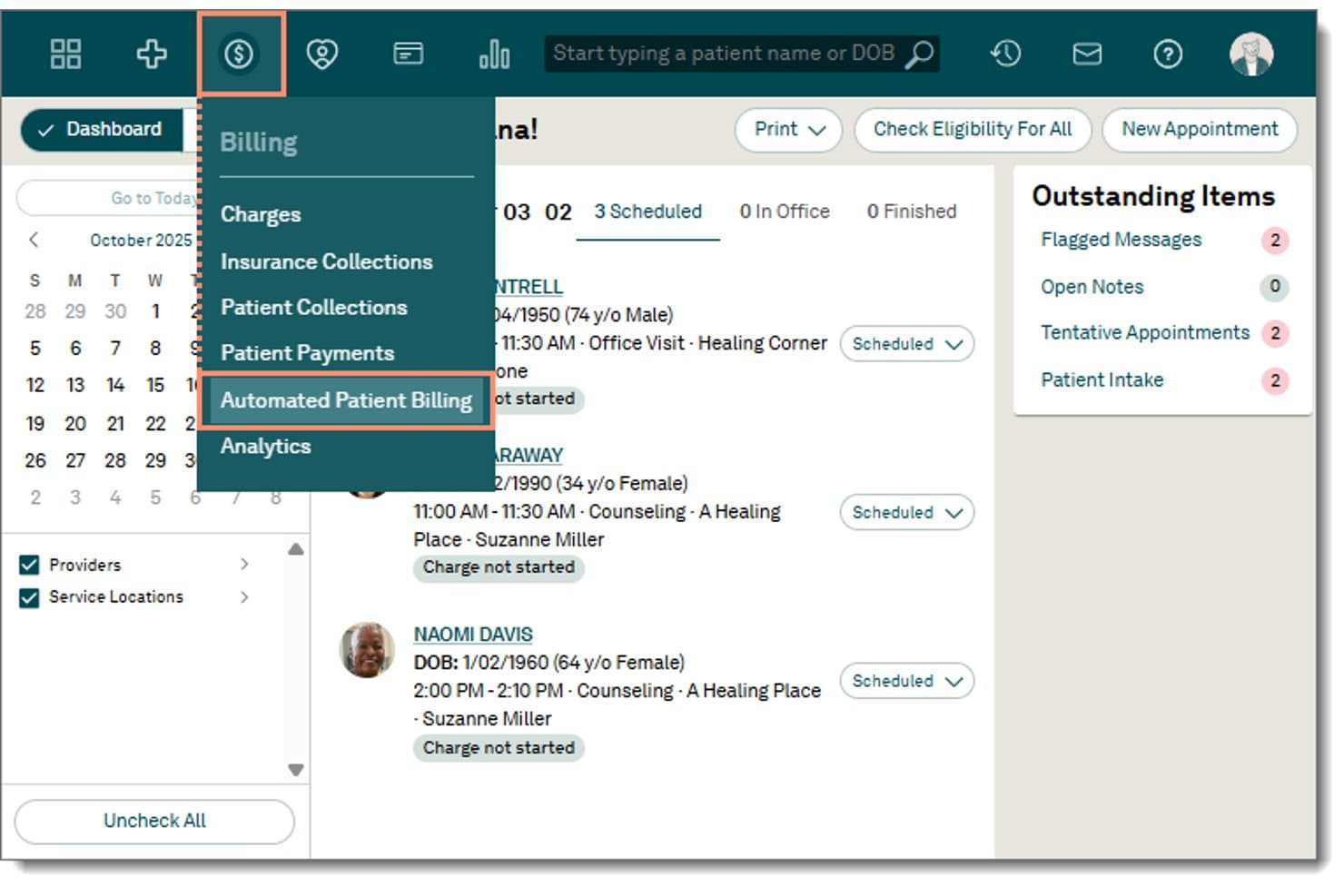
Tebra offers an Automated Patient Billing option within its Billing dropdown menu, accessible directly from the main navigation bar. Tebra is a unified EHR, practice management, and medical billing platform built for independent practices, combining claims submission, insurance eligibility verification, ERA auto-posting, and patient payments in a single integrated system.
Who Is Tebra Best For?
Tebra is a strong fit for small to mid-sized independent practices with up to 10 providers who want a single vendor for EHR, billing, and patient management.
Why I Picked Tebra
Tebra earns its spot on my shortlist because the billing dashboard pulls charge data directly from clinical encounters the moment a provider closes a note. I particularly like the real-time eligibility verification, which checks coverage across 2,700+ payers during scheduling, before a patient walks in. The RPA-driven ERA auto-posting applies practice-specific rules to reconcile payments without manual intervention.
Tebra Key Features
- Patient payment portal: Lets patients make payments online using customizable links and card-on-file.
- Batch and automated statements: Generates and delivers patient statements in both digital and paper formats.
- Integrated code validation engine: Checks ICD-10, CPT, and HCPCS codes for compliance in billing workflows.
- Bidirectional EHR and PM sync: Shares patient, encounter, and charge data in real time across modules.
Tebra Integrations
Tebra offers native integrations with WebPT, QuickEMR, Relatient, NextPatient, PayPal, Stripe Terminal, and DocSpera. An API is available for custom integrations, and EHR/PM connectivity is supported via HL7 and FHIR.
Pros and Cons
Pros:
- Batch and digital patient statement generation
- Automated real-time insurance eligibility checks
- Unified EHR, PM, and billing dashboard
Cons:
- Secondary claim workflows require manual steps
- Financial reporting features are limited
Learn more about Tebra: Best mobile-first billing experience
- Free demo available
- Pricing upon request
Visit WebsiteCustomer Rating:3.9/5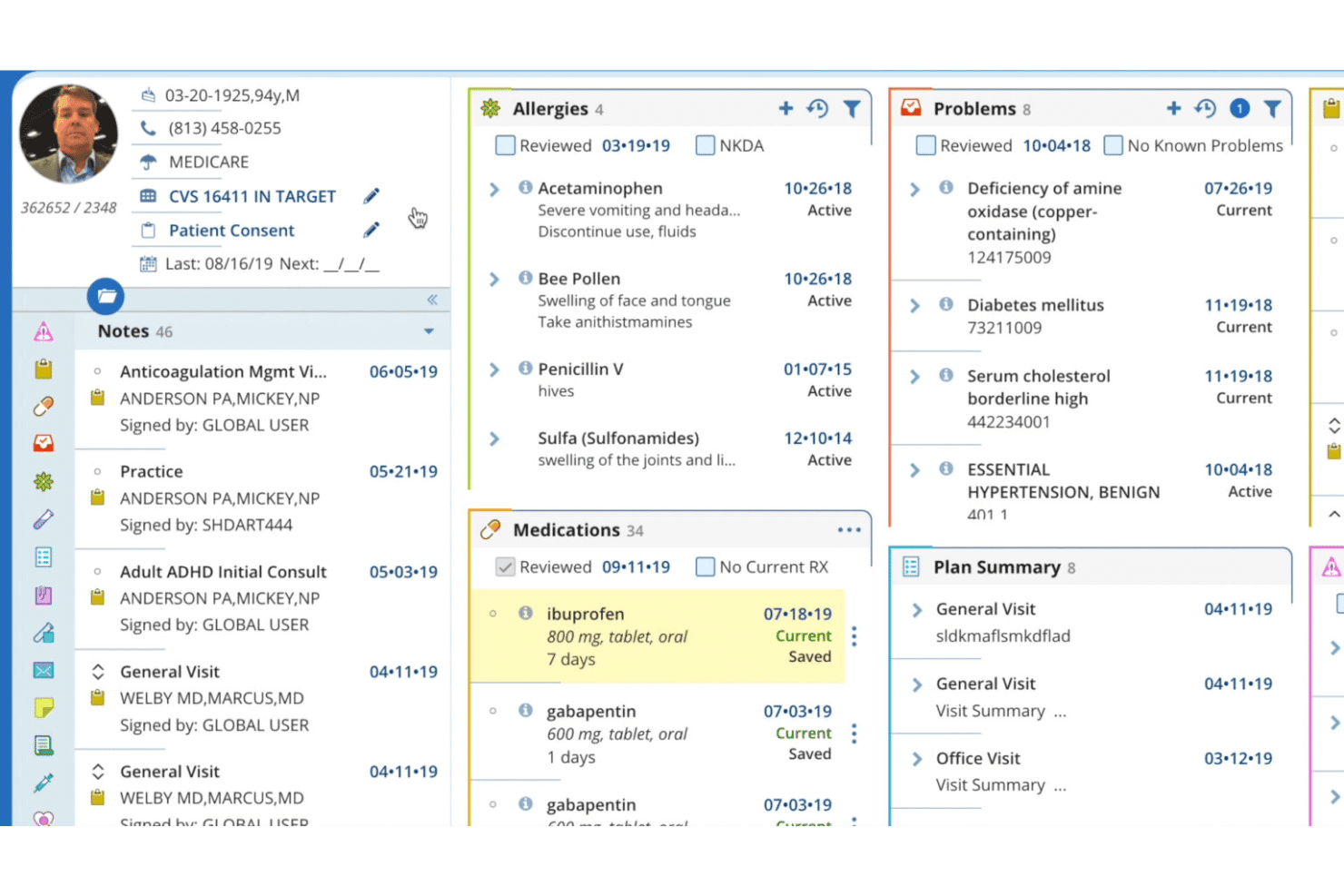
DrChrono mobile billing tools for appointments, eRx, and payment summaries. DrChrono is a cloud-based medical billing and EHR platform that natively unifies claims management, insurance eligibility verification, ERA posting, patient billing, and practice management in a single mobile-first system built for iOS.
Who Is DrChrono Best For?
DrChrono is a strong fit for independent practices and small medical groups that want billing, EHR, and practice management built into a single platform.
Why I Picked DrChrono
DrChrono earns its spot on my shortlist because the billing experience is genuinely built for mobile, not just adapted for it. I can run eligibility checks, track claim status in real time via the Live Claims Feed, and review ERA postings directly from an iPad, with no stripped-down functionality. The native iOS billing profiles, which store common CPT and ICD-10 codes per provider, make charge capture fast right at the point of care.
DrChrono Key Features
- Integrated ERA and EOB posting: Manage electronic remittance advice and explanation of benefits within the billing dashboard.
- Patient statement automation: Send digital or print statements with embedded payment links and track delivery preferences.
- Denial pattern reporting: Identify recurring denial issues by payer or procedure through built-in analytics.
- Custom billing profiles: Set up template profiles for commonly used codes and diagnoses, available during claim entry.
DrChrono Integrations
DrChrono offers native integrations with eProvider Solutions, TriZetto, Carisk Partners, Quest, LabCorp, Box, Ambra, Curogram, DeepScribe, and Square Point of Sale. An API is available for custom integrations.
Pros and Cons
Pros:
- Custom claims tracking for each payer
- Bulk eligibility checks before every visit
- True mobile billing and claim management
Cons:
- Support quality declined after EverHealth acquisition
- Billing only available with DrChrono EHR
Learn more about DrChrono: Best for scalable healthcare group operations
- Not available
- Pricing upon request
Visit WebsiteCustomer Rating:3.7/5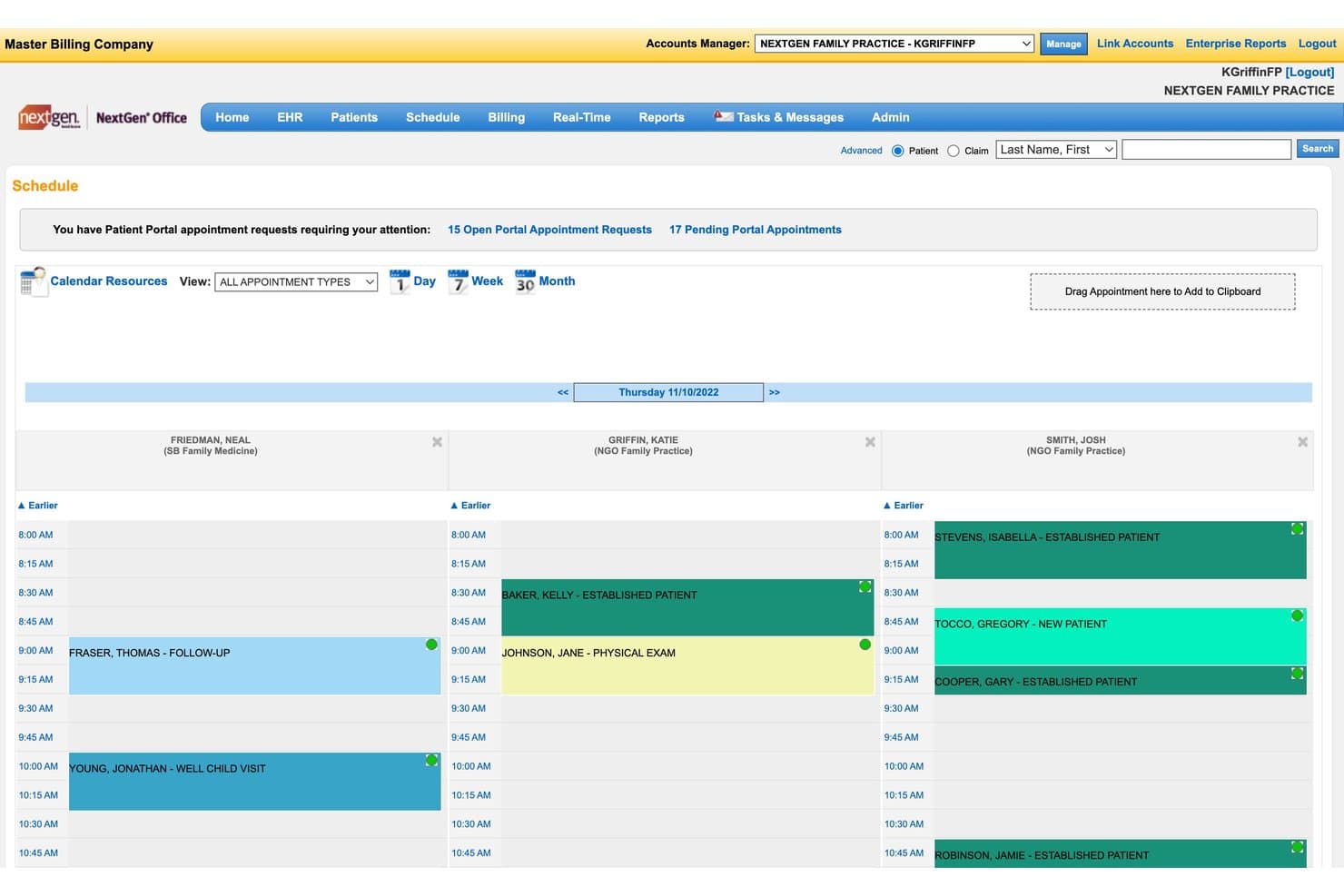
NextGen Office offers an integrated scheduling dashboard that displays multi-provider daily appointments, patient types, and portal request alerts to support streamlined medical billing workflows. NextGen Office is a cloud-based EHR and practice management platform that combines medical billing, claims management, insurance eligibility verification, patient payments, and revenue cycle management in a single unified system.
Who Is NextGen Office Best For?
NextGen Office suits medical billing companies and small-to-mid-sized practices that need a single platform to manage both clinical documentation and revenue cycle operations as they grow.
Why I Picked NextGen Office
I picked NextGen Office as one of the best because its tiered architecture is built for practices that plan to grow. Teams start on NextGen Office, and when they scale past 10 providers, the platform upgrades to NextGen Enterprise without a system switch. I also appreciate the multi-location record access, where every affiliate office shares a single login and duplicate chart alerts prevent data fragmentation across sites.
NextGen Office Key Features
- Automated claims scrubbing: Reviews claims for errors before submission to reduce rejections and denials.
- Integrated payment portal: Allows patients to pay with credit card, Google Pay, Apple Pay, or payment plans.
- Real-time insurance eligibility checks: Provides immediate verification of benefits and coverage for each patient.
- Specialty-specific EHR templates: Offers configurable documentation tools tailored to different medical specialties.
NextGen Office Integrations
NextGen Office offers native integrations with Doctible, Solutionreach, Clearwave, and InstaMed. It also supports integration with Apple Health, Amazon Marketplace, and over 725 labs via NextGen Share Diagnostic Hub. An API is available for custom integrations.
Pros and Cons
Pros:
- Instant real-time insurance eligibility verification
- Supports multi-location practice and group scaling
- Built-in claims scrubbing and denial tracking
Cons:
- Reporting requires navigating multiple modules
- Payment posting corrections require extra manual steps
Learn more about NextGen Office: Best all-in-one workflow automation
- 30-day free trial + free demo available
- From $130/user/month
Visit WebsiteCustomer Rating:3.6/5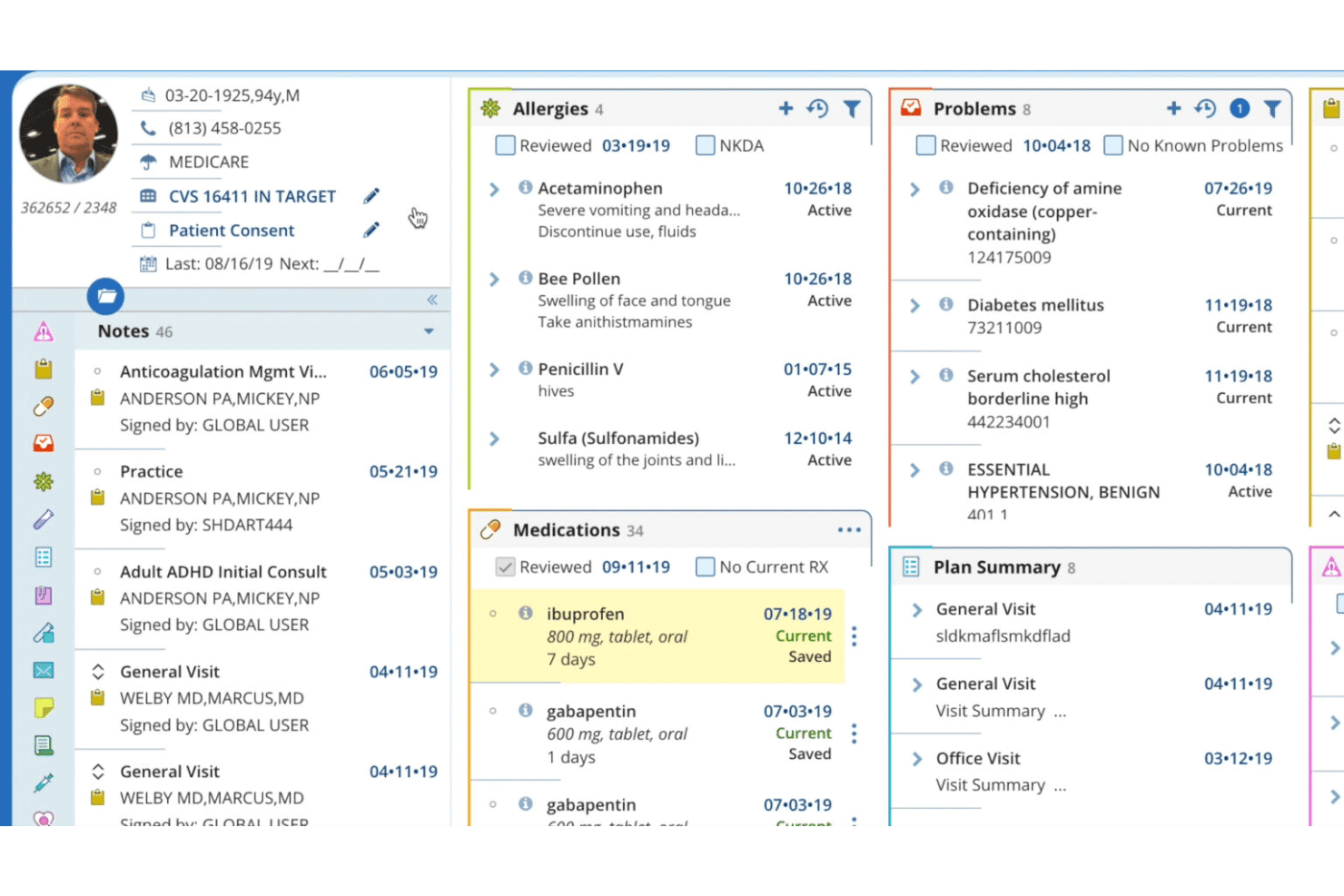
AdvancedMD patient record view with allergies, medications, and care plans. AdvancedMD is a cloud-based medical billing platform that unifies claims management, EHR, practice management, patient payments, insurance eligibility verification, and revenue cycle reporting in a single system for independent practices.
Who Is AdvancedMD Best For?
AdvancedMD suits independent practices and centralized billing offices that manage billing across multiple providers or client accounts from a single login.
Why I Picked AdvancedMD
AdvancedMD earns its spot as one of the best on my shortlist because the entire billing workflow runs without manual intervention. I particularly like ClaimInspector, which runs 3.5 million edits per claim against CCI, HIPAA, and LCD rules before submission. On the back end, ERA auto-posting and auto-generated A/R denial worklists mean my team isn't manually chasing remittances or building collections queues from scratch.
AdvancedMD Key Features
- Centralized Billing Office (CBO): Manage billing for multiple providers and locations from a single login and database.
- Integrated clearinghouse: Submit claims and download remittances directly through built-in clearinghouse connections to over 1,800 payors.
- Open API and integration marketplace: Connect EHR, HIE, CRM, and adjacent tools using an open API and prebuilt integration marketplace.
- Data migration service: Vendor-managed options for moving demographics, appointments, and insurance data from legacy systems.
AdvancedMD Integrations
AdvancedMD offers native integrations through its integrated clearinghouse, as well as an open API and an integration marketplace for connecting with third-party EHR, HIE, and CRM systems.
Pros and Cons
Pros:
- Automated worklists for billing denials
- Integrated clearinghouse supports 1,800+ payors
- Centralized dashboard for multi-location billing management
Cons:
- Occasional delays in customer support response
- No built-in certified medical coding services
 Best customizable claims management
- Free demo available
- Pricing upon request
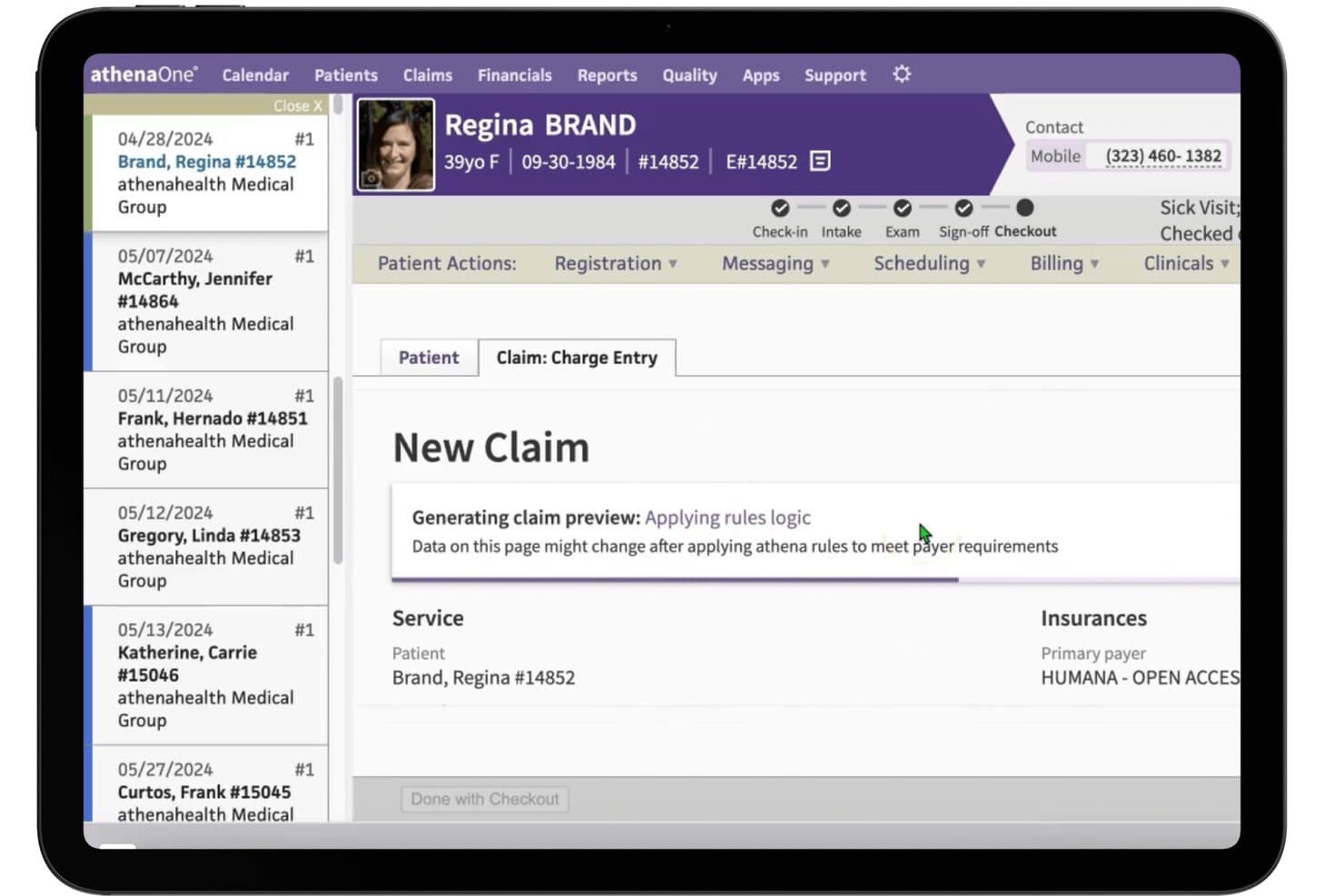
athenahealth (athenaOne) offers integrated claim charge entry with automated rules logic and payer requirement processing during patient checkout. athenaOne is a unified EHR, practice management, and medical billing platform that combines claims management, revenue cycle automation, insurance eligibility verification, patient billing, and medical coding support in a single cloud-based system.
Who Is athenahealth (athenaOne) Best For?
I'd recommend it most for independent and small-to-midsize medical practices that need a single platform to manage clinical, administrative, and billing workflows together.
Why I Picked athenahealth (athenaOne)
athenaOne earns its spot on my shortlist because of how deeply it lets you configure claims workflows around your practice's specific payer mix. I particularly like the 29,000-rule billing engine, which scrubs claims and fires targeted alarms before submission. When denials come back, the platform explains the likely coding issue and recommends next steps directly in the workflow, so my team isn't left guessing or manually cross-referencing payer policies.
athenahealth (athenaOne) Key Features
- Integrated EHR and practice management: Links clinical, scheduling, and billing workflows within one cloud-based platform.
- Real-time insurance verification: Checks patient eligibility and benefits at the point of scheduling or check-in.
- Patient payment portal: Lets patients access statements, make payments, and manage balances online.
- Centralized AR dashboard: Gives billing teams access to accounts receivable, payment posting, and performance insights in one interface.
athenahealth (athenaOne) Integrations
athenaOne offers dozens of native integrations through its marketplace, including rater8, GetWell, Experian Health, Dulcian Health, PatientPop, and esvyda. An API is available for custom integrations.
Pros and Cons
Pros:
- Built-in denial management guidance
- Real-time insurance eligibility checks
- Automated claim scrubbing with customizable rules
Cons:
- Occasional delays in support ticket resolution
- Patient portal experience is often frustrating
Learn more about athenahealth (athenaOne):
Alte software-uri integrate de facturare medicală
Iată câteva opțiuni suplimentare de software integrat de facturare medicală care nu au ajuns pe lista mea scurtă, dar care merită totuși analizate:
- 11PrognoCIS (Bizmatics)Best specialty-specific billing templates
- 12RXNTBest real-time claim status updates
- 13CharmHealthBest patient payment portal integration
- 14WRS HealthBest in-house clearinghouse connectivity
- 15ModMedBest AI-driven coding assistance
- 16NextechBest specialty EHR and billing integration
- 17DocVillaBest telemedicine billing support
- 18PracticeEHRBest one-click charge capture workflows
- 19MicroMD (Henry Schein)Best flexible claims rules engine
- 20Compulink AdvantageRCMBest automated denials management
How I Evaluate Integrated Medical Billing Software
I split my evaluation into baseline functionality—like claims scrubbing and EHR sync—and the differentiators that set tools apart for specific practice types and billing workflows.
Core Functionality (Table Stakes for This List)
When I'm selecting tools for my list, I rank each one on a scale from 0 (does not offer the functionality) to 5 (excels in this area) for each core functionality listed below. Then, I calculate the tool's total score into a percentage. Each tool needs to achieve a minimum total score of 65% to be considered for inclusion.
- Claims Management: I evaluate how each tool handles electronic claim generation, scrubbing, and submission through clearinghouse connections—plus whether denial tracking and appeal workflows are built in or bolted on.
- EHR/PM Integration: A billing tool should sync encounter data, patient demographics, and charges with clinical records in real time, not through nightly file exports that leave gaps.
- Insurance Eligibility Verification: I check whether the platform runs real-time 270/271 eligibility checks at scheduling or check-in so front desk staff can flag coverage issues before the visit.
- Patient Billing & Payments: From digital statements to online portals and payment plans, I look at how each tool handles the patient-facing side of collections beyond just printing a paper bill.
- ERA/Payment Posting: Automated 835 remittance posting with reconciliation saves billing teams hours of manual work, so I look at how each platform handles primary and secondary posting.
- Medical Coding Support: The platform should include current ICD-10, CPT, and HCPCS code libraries with charge capture and validation to catch errors before claims go out the door.
Once I have a list of tools that meet the criteria, I consider what sets each platform apart.
Differentiating Factors (What Sets Vendors Apart)
Here's how I compare and contrast different vendors:
Standout Features
Denial management workflows matter a lot here. I look for tools that go beyond flagging rejected claims to include root-cause analysis and automated appeal generation, so your billing team spends less time chasing payers. AI-assisted coding and claim scrubbing is another area I evaluate closely—platforms that suggest codes and catch errors before submission help improve first-pass acceptance rates. I also consider how configurable the reporting dashboards are, since billing managers need to track KPIs like days in A/R and clean claim rates without building reports from scratch.
Beyond Features
Specialty and practice size fit is one of the first things I check. A platform built for a solo dermatology office won't necessarily scale for a multi-location orthopedic group with multiple tax IDs. Clearinghouse connectivity matters just as much—I look at whether a vendor includes clearinghouse services or charges per claim, and how many payers they support for ERA and EFT. I also evaluate onboarding support, especially data migration from legacy systems, since a rough transition can stall your billing team for weeks.
Cum să alegeți un software integrat de facturare medicală
Este ușor să vă pierdeți în liste lungi de funcții și structuri complexe de prețuri. Pentru a vă ajuta să rămâneți concentrat în timp ce parcurgeți procesul unic de selectare a software-ului, iată o listă de verificare cu factorii de care trebuie să țineți cont:
| Factor | Aspecte de luat în considerare |
|---|---|
| FactorScalabilitate | Aspecte de luat în considerarePoate platforma să susțină creșterea viitoare, cum ar fi adăugarea de locații, furnizori sau specializări, fără să vă depășească fluxurile de lucru sau bugetul? |
| FactorIntegrări | Aspecte de luat în considerareSe va conecta software-ul nativ la sistemul dumneavoastră EHR, PM și la centrul de procesare a cererilor? Fiți atenți la costurile ascunse de integrare sau la soluțiile manuale alternative care creează blocaje. |
| FactorPosibilități de personalizare | Aspecte de luat în considerareCâtă flexibilitate aveți pentru a adapta regulile de facturare, câmpurile rapoartelor și permisiunile utilizatorilor la procesele și combinația dumneavoastră specifică de plătitori? |
| FactorUșurință în utilizare | Aspecte de luat în considerareEste interfața suficient de intuitivă atât pentru personalul din recepție, cât și pentru cel de facturare sau curba de învățare va crea încetiniri zilnice și apeluri către serviciul de asistență? |
| FactorImplementare și integrare inițială | Aspecte de luat în considerareCe resurse oferă furnizorul pentru migrarea datelor, instruirea personalului și asistența la lansare? Planurile clare de tranziție ajută la evitarea întreruperilor veniturilor. |
| FactorCost | Aspecte de luat în considerareComparați mai mult decât prețurile lunare — luați în calcul taxele de configurare, costurile per cerere și costurile pentru asistență, integrări sau orice module suplimentare neașteptate. |
| FactorMăsuri de securitate | Aspecte de luat în considerareFurnizorul respectă cerințele HIPAA și reglementările locale și oferă instrumente precum jurnale de audit, controale pentru utilizatori și stocarea criptată a datelor? |
| FactorDisponibilitatea asistenței | Aspecte de luat în considerareCare sunt programul și canalele de asistență ale furnizorului? Luați în considerare dacă aveți nevoie de ajutor în afara programului, chat live sau un manager de cont dedicat echipei dumneavoastră. |
Ce este software-ul integrat de facturare medicală?
Software-ul integrat de facturare medicală este o platformă unificată care combină facturarea medicală, dosarele electronice de sănătate și gestionarea cabinetului într-un singur sistem. Acesta permite echipei dumneavoastră să gestioneze cererile de plată, să urmărească plățile, să verifice asigurările și să se ocupe de facturarea pacienților fără a comuta între mai multe instrumente. Această abordare reduce introducerea manuală a datelor, diminuează erorile și îmbunătățește eficiența fluxurilor de lucru clinice, de facturare și administrative.
Funcțiile software-ului integrat de facturare medicală
Atunci când selectați un software integrat de facturare medicală, urmăriți următoarele funcții esențiale:
- Gestionarea cererilor de rambursare: Automatizează crearea, verificarea, trimiterea și urmărirea cererilor direct cu casele de compensare, ajutându-vă echipa să soluționeze respingerile și să eficientizeze rambursările.
- Integrarea cu EHR/gestionarea cabinetului: Conectează în timp real datele privind documentația clinică, programările și facturarea, eliminând introducerea duplicată a datelor și reducând erorile dintre sisteme.
- Verificarea eligibilității asigurării: Verifică instantaneu sau în loturi acoperirea asigurării pacientului la sosirea pentru consultație sau la programare, reducând respingerile cererilor cauzate de expirarea acoperirii sau de detalii incorecte.
- Facturarea și plățile pacienților: Trimite extrase digitale, gestionează portaluri online pentru plata facturilor și acceptă coplățile pacienților, facilitând plata pentru pacienți și înregistrarea plăților pentru personal.
- Înregistrarea automată a ERA/plăților: Înregistrează automat avizele electronice de remitere (fișiere 835) de la plătitori, reconciliază plățile și identifică plățile insuficiente sau respingerile.
- Asistență pentru codificarea medicală: Oferă biblioteci actualizate de coduri ICD-10, CPT și HCPCS, cu capturarea costurilor și validarea codurilor, ajutând personalul de facturare să trimită cereri conforme și exacte.
- Fluxuri de lucru pentru gestionarea respingerilor: Urmărește și gestionează cererile respinse, oferă analize ale cauzelor principale și ajută la corectarea și retrimiterea acestora pentru a minimiza veniturile pierdute.
- Rapoarte și analize personalizabile: Permite echipei să genereze rapoarte financiare, de productivitate și privind ciclul veniturilor, adaptate indicatorilor KPI și nevoilor operaționale.
- Controale ale utilizatorilor bazate pe roluri: Permite controlul detaliat asupra informațiilor pe care personalul le poate vedea și edita, protejând datele sensibile și sprijinind conformitatea.
- Planuri de plată pentru pacienți: Vă permite să configurați și să gestionați aranjamente de plată structurate pentru pacienții care au nevoie de mai multă flexibilitate pentru a-și achita soldurile.
Beneficiile software-ului integrat de facturare medicală
Implementarea unui software integrat de facturare medicală oferă mai multe beneficii pentru echipa și afacerea dumneavoastră. Iată câteva dintre acestea:
- Fluxuri de lucru eficientizate: Conectarea modulelor de facturare, EHR și programare reduce introducerea duplicată a datelor și transferurile manuale, economisind timpul personalului pe întregul ciclu al veniturilor.
- Reducerea respingerilor cererilor: Verificarea în timp real a asigurării, verificarea automată și fluxurile de lucru pentru gestionarea respingerilor identifică erorile și problemele de acoperire înainte ca cererile să fie trimise.
- Încasarea mai rapidă a plăților: Extrasele automate, portalurile digitale de plată și planurile flexibile de plată pentru pacienți ajută la încasarea rapidă a soldurilor și reduc creanțele restante A/R.
- Conformitate îmbunătățită: Bibliotecile de coduri actualizate, pistele de audit și permisiunile de utilizator aplicate vă ajută să facturați corect și să respectați cerințele de reglementare.
- Informații financiare utile: Rapoartele și tablourile de bord personalizabile evidențiază tendințele privind încasările, starea cererilor, performanța plătitorilor și productivitatea cabinetului.
- Operațiuni scalabile: Platforma potrivită se dezvoltă odată cu cabinetul dumneavoastră, susținând mai multe specialități, locații noi și o complexitate sporită a facturării pe măsură ce afacerea evoluează.
- Experiență mai bună pentru pacienți: Instrumentele de facturare și plată cu autoservire le facilitează pacienților înțelegerea și achitarea soldurilor, sporind satisfacția.
Costurile și prețurile software-ului integrat de facturare medicală
Selectarea unui software integrat de facturare medicală necesită înțelegerea diferitelor modele și planuri de tarifare disponibile. Costurile variază în funcție de funcții, dimensiunea echipei, suplimente și alți factori. Tabelul de mai jos prezintă planurile obișnuite, prețurile medii ale acestora și funcțiile incluse de regulă în soluțiile software integrate de facturare medicală:
Tabel comparativ al planurilor pentru software-ul integrat de facturare medicală
| Tipul planului | Preț mediu | Funcții comune |
|---|---|---|
| Tipul planuluiPlan gratuit | Preț mediu$0 | Funcții comuneCererile electronice de bază, raportare limitată, înregistrarea manuală a plăților și asistență limitată. |
| Tipul planuluiPlan personal | Preț mediu$50-$150/lună | Funcții comuneGestionarea standard a cererilor, integrarea EHR, verificarea asigurării, facturarea de bază a pacienților și acces pentru un singur utilizator. |
| Tipul planuluiPlan pentru companii | Preț mediu$200-$500/lună | Funcții comuneRoluri pentru mai mulți utilizatori, gestionarea avansată a respingerilor, înregistrarea automată a plăților, rapoarte personalizabile și acces la portalul de plată. |
| Tipul planuluiPlan pentru întreprinderi | Preț mediu$600-$1200/lună | Funcții comuneIntegrare complet personalizată, fluxuri de lucru specializate, cel mai înalt nivel de asistență, suport pentru mai multe locații și controale de conformitate îmbunătățite. |
Întrebări frecvente despre software-ul integrat de facturare medicală
Iată câteva răspunsuri la întrebările frecvente despre software-ul integrat de facturare medicală:
Cum îmbunătățește software-ul integrat de facturare medicală fluxul de numerar?
Software-ul integrat de facturare medicală reduce erorile din cererile de rambursare, accelerează trimiterea acestora și oferă instrumente de plată digitale, ajutând cabinetul dumneavoastră să încaseze plățile mai repede și să reducă numărul de zile în creanțe.
Poate software-ul integrat de facturare medicală să gestioneze mai multe locații sau specialități?
Da, majoritatea platformelor acceptă configurații pentru mai multe locații și specialități, cu opțiuni de personalizare pentru șabloane, reguli ale plătitorilor și rapoarte în funcție de locație sau de grupul de furnizori.
Pentru ce ar trebui să mă pregătesc în timpul implementării?
Ar trebui să planificați migrarea datelor din sistemele anterioare, instruirea echipei și colaborarea cu furnizorul pentru adaptarea software-ului la fluxurile dumneavoastră de lucru. Un proces clar de integrare ajută la minimizarea timpului de nefuncționare.
Cât de sigur este software-ul integrat de facturare medicală?
Furnizorii oferă, în general, stocarea datelor conformă cu HIPAA, controale de acces bazate pe roluri, jurnale de audit și transmisii criptate pentru a contribui la protejarea datelor sensibile ale pacienților și a datelor financiare.
Pot pacienții să își plătească facturile direct prin aceste sisteme?
Da, majoritatea soluțiilor integrate oferă portaluri de plată pentru pacienți, unde aceștia își pot consulta extrasele, pot plăti online, pot configura planuri de plată și chiar pot primi mementouri de plată prin e-mail sau mesaj text.