

Sistemele EMR gratuite (dosare medicale electronice) sunt instrumente digitale care vă permit să gestionați dosarele pacienților, programările, fișele medicale, facturarea și mesajele securizate fără costuri inițiale — acești furnizori oferă un plan sau o perioadă de testare fără costuri. Dacă sunteți în căutarea celui mai bun sistem EMR gratuit, probabil că trebuie să îmbunătățiți documentarea, comunicarea sau conformitatea fără presiuni asupra bugetului. Alegerea sistemului EMR potrivit poate oferi echipei dumneavoastră mai mult timp pentru activitățile clinice, o integrare mai rapidă și mai puține distrageri administrative. Mai jos veți găsi o listă atent selectată cu cele mai apreciate opțiuni EMR gratuite pentru 2026, cu funcții și detalii esențiale, astfel încât să puteți alege soluția potrivită pentru nevoile dumneavoastră clinice și operaționale.
Why Trust Our Software Recommendations
6,700+
Reviews
20
Industry experts
16+
Evaluation factors
14
Years
Our team has been testing and reviewing software since 2012. As medical practice leaders ourselves, we know how difficult—and important—it is to choose the right software.
For this guide, we evaluated tools using hands-on testing and independent research, scoring tools using our selection criteria.
Our reviews reflect our human editorial judgment, not a sales pitch.
Tabel comparativ pentru sistemele EMR gratuite
Deși toate sistemele EMR din lista mea au oferte gratuite, acestea au și planuri plătite, în cazul în care doriți să faceți un upgrade:
Score legend (out of 5)
- Excellent4.5–5
- Good4–4.4
- Average3–3.9
- Below average2–2.9
- Poor1–1.9
Sorted by: Default
| Tool | Starting Price | Website | |||||||
|---|---|---|---|---|---|---|---|---|---|
Best freemium EMR for notes and telehealth | 3.0 out of 5 | 1 | 4 | 3 | 4 | 4 | 2 | $31/user/month Free plan + 14-day free trial + free demo available | Website |
Best for behavioral health charting and compliance | Not rated | 3 | 5 | 4 | Not rated | 5 | 2 | $69/user/month 30-day free trial + demo available | Website |
Best free-plan EMR for solo providers | 3.7 out of 5 | 2 | 5 | 4 | 3 | 4 | 4 | $25/month Free plan + free demo available | Website |
Best for independent practices trialing before buying | Not rated | 4 | 5 | 5 | Not rated | 3 | 3 | Pricing upon request Free demo available | Website |
Best for trialing a mature e-prescribing EMR | Not rated | 5 | 5 | 4 | Not rated | 4 | 4 | $199/provider/month 14-day free trial + free demo available | Website |
Best for low-cost behavioral health trial charting | Not rated | 3 | 4 | 5 | Not rated | 5 | 2 | $59/month 30-day free trial | Website |
Best for independent NP-led practice charting | Not rated | 4 | 5 | 4 | Not rated | 5 | 2 | Pricing upon request Free demo available | Website |
Best for free, self-hosted clinical workflows | 4.2 out of 5 | 2 | 5 | 5 | 5 | 4 | 4 | Free forever plan Free plan + free demo available | Website |
Best open-source EMR for global health programs | 3.2 out of 5 | 1 | 4 | 3 | 5 | 2 | 4 | Free Free demo available | Website |
Best free EMR for low-resource global clinics | 3.2 out of 5 | 1 | 4 | 3 | 5 | 2 | 4 | Free Free demo available | Website |


Recenzii ale celor mai bune sisteme EMR gratuite
Mai jos sunt rezumatele mele detaliate ale sistemelor EMR gratuite care au ajuns pe lista scurtă. Recenziile mele oferă o analiză detaliată a funcțiilor, prețurilor și celor mai potrivite cazuri de utilizare pentru fiecare sistem, pentru a vă ajuta să găsiți cea mai bună opțiune pentru dumneavoastră.
 Best freemium EMR for notes and telehealth
- Free plan + 14-day free trial + free demo available
- From $31/user/month
Visit WebsiteCustomer Rating:4.4/5
Carepatron helps practices manage client records, personal details, contact information, provider details, staff assignments, tags, and custom client record sections. Carepatron is a freemium EHR platform for healthcare practitioners that combines clinical documentation, appointment scheduling, telehealth, billing, and a client portal in a single workspace.
Who Is Carepatron Best For?
Carepatron is a good fit for solo practitioners and small multidisciplinary clinics that need an all-in-one free EHR without committing to a paid plan upfront.
Why I Picked Carepatron
I picked Carepatron as one of the best because its free plan doesn't gate the three features that matter most to a solo clinician: telehealth, clinical notes, and appointment scheduling. What I find genuinely useful is the AI scribe, which drafts notes during a session and saves them directly to the client record. The telehealth window also keeps the client chart and past session notes open alongside the video call, so there's no switching between tabs mid-session.
Carepatron Key Features
- Client portal: Clients can self-book appointments, complete intake forms, and access shared documents from a dedicated portal.
- Treatment plan builder: Create structured treatment plans from templates and track progress across multiple sessions in a single client record.
- Online invoicing and payments: Generate invoices directly from completed appointments and collect payments online without leaving the platform.
- Insurance claims management: Submit insurance claims with built-in validation that checks for errors before sending.
Carepatron Integrations
Carepatron integrates with Zoom, Google Meet, Microsoft Teams, and Stripe for payments. It also connects with Google Calendar, Google Analytics, Xero, and Mailchimp. The integration library is more limited than some competing platforms, but it connects with Zapier, and an API is available for custom integrations.
Pros and Cons
Pros:
- Free plan includes telehealth and scheduling
- Large community-shared template library included
- AI scribe drafts notes during sessions
Cons:
- No e-prescribing on the free plan
- Telehealth video calls have reliability issues
Learn more about Carepatron: Best for behavioral health charting and compliance
- 30-day free trial + demo available
- From $69/user/month
Visit WebsiteCustomer Rating:4.4/5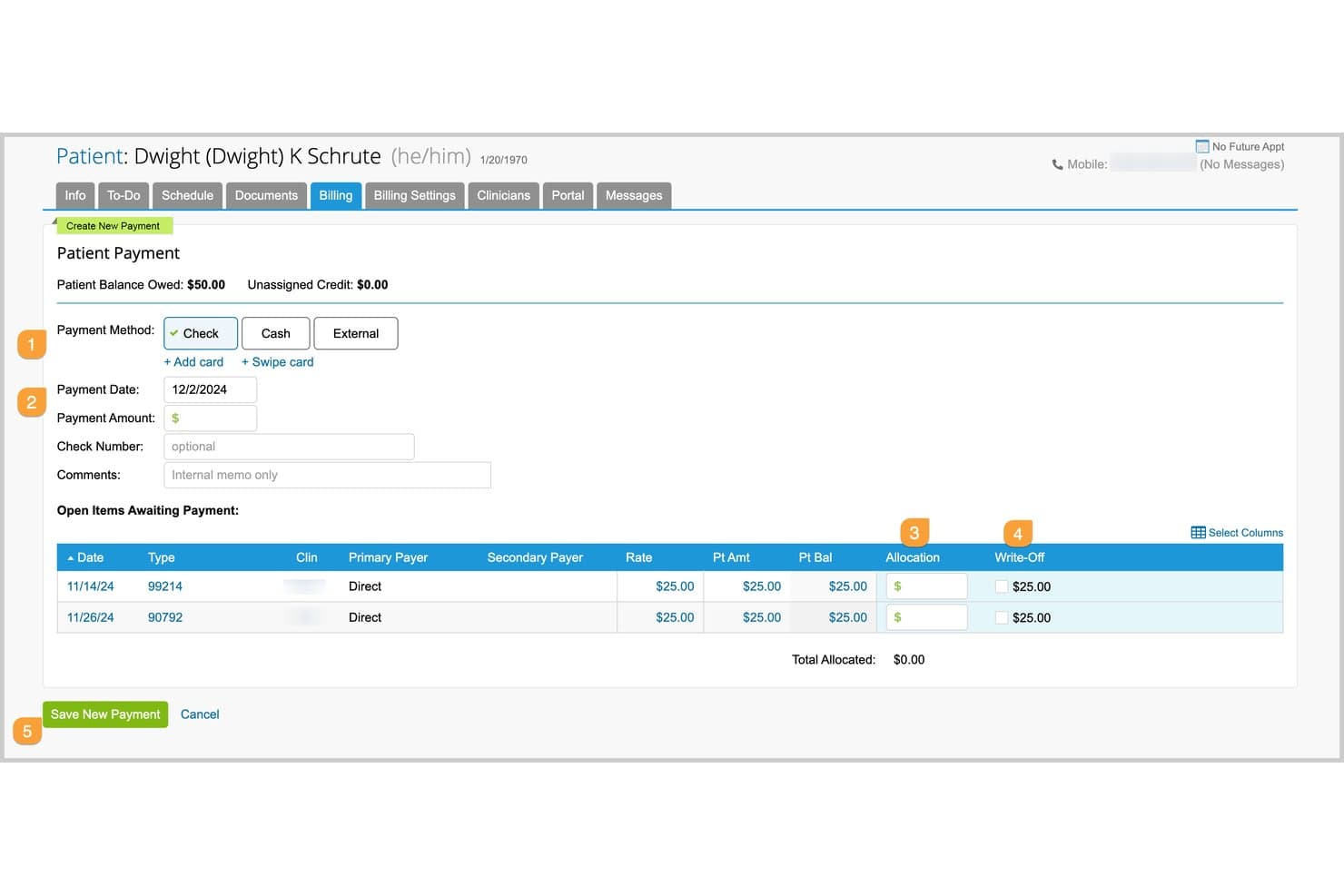
TherapyNotes lets users record and allocate patient payments to open invoices. For clinicians comparing free EMRs, TherapyNotes is a paid behavioral health EHR with charting, scheduling, billing, a client portal, and optional e-prescribing; it offers a 30-day trial rather than a free-forever plan.
Who Is TherapyNotes Best For?
TherapyNotes fits behavioral health clinicians who need specialized clinical workflows; its stated focus is “Best for behavioral health charting and compliance.”
Why I Picked TherapyNotes
I picked TherapyNotes for its specialty focus: Best for behavioral health charting and compliance. Structured SOAP-style notes and treatment-plan templates support therapy documentation, while audit logs help track chart activity. It has no free-forever plan, only a 30-day trial, so it’s a paid option to evaluate rather than a free EMR.
TherapyNotes Key Features
- Client portal: TherapyPortal supports paperless intake, self-scheduling, secure messaging, and online bill pay.
- Appointment scheduling: Create recurring sessions, group appointments, and automated reminders.
- Claims management: Submit electronic claims, receive ERAs, check eligibility, and create superbills.
- Telehealth: Basic video visits support two participants; Premium adds HD, screen sharing, and up to 16 participants.
TherapyNotes Integrations
TherapyNotes integrates with Google Calendar, Microsoft Outlook, iCloud, and Surescripts; calendar sync is one-way, and e-prescribing is a paid add-on.
What's Free?
TherapyNotes has no free-forever plan, but it offers a 30-day free trial. After the trial, it’s a paid service starting at $69 per month.
Pros and Cons
Pros:
- Audit logs support supervision and co-signing
- Reviewers praise responsive 24/7 human support
- Structured SOAP notes carry details forward
Cons:
- Behavioral-health focus excludes general practices
- No free-forever plan
Learn more about TherapyNotes: Best free-plan EMR for solo providers
- Free plan + free demo available
- From $25/month
Visit WebsiteCustomer Rating:4.2/5
CharmHealth helps practices manage invoices, receipts, refunds, claims, patient statements, billing reports, and net collection tracking. CharmHealth is a cloud-based EHR, practice management, and medical billing platform built around a free-tier model that makes it accessible to solo providers and small practices without upfront commitment.
Who Is CharmHealth Best For?
CharmHealth is a strong fit for independent ambulatory practices and solo providers who need a full EHR without the overhead of an enterprise system.
Why I Picked CharmHealth
CharmHealth earns its spot as one of the best on my shortlist because the free plan isn't a stripped-down teaser. Solo providers get real clinical tools, including SOAP note templates, a flowsheet for tracking vitals across visits, and e-prescribing connected to 70,000+ pharmacies. I also like that the AI Scribe is available as an add-on even on the free tier, so small practices can adopt ambient documentation without committing to a paid plan first.
CharmHealth Key Features
- Referral management: Track and manage patient referrals directly within the EHR without a separate tool.
- Role-based access control: Assign different permission levels to staff members based on their role in the practice.
- Pre-screening forms: Send customizable intake and pre-screening forms to patients before their appointment through the patient portal.
- Inventory management: Track and manage in-practice product inventory from within CharmHealth.
CharmHealth Integrations
CharmHealth integrates with major labs using the standard HL7 interface, routing lab orders directly and pushing results back into the EHR. Verified lab partners include LabCorp and Quest. It also integrates with Fullscript for supplement prescribing and fulfillment, Surescripts for e-prescribing, and marketplace partners like CrossTx, Dialog One, Docere Systems (DRIP), DocHelp, and DoctorConnect. Interoperability is supported through HL7 and FHIR standards for data sharing with third-party applications, laboratories, pharmacies, and medical devices. An API program is available for custom integrations.
Pros and Cons
Pros:
- Built-in patient portal and kiosk check-in
- Free plan includes real clinical tools
- Customizable charting templates and macros
Cons:
- Billing features require paid add-ons
- Customer support response times vary widely
Learn more about CharmHealth: Best for independent practices trialing before buying
- Free demo available
- Pricing upon request
Visit WebsiteCustomer Rating:4.4/5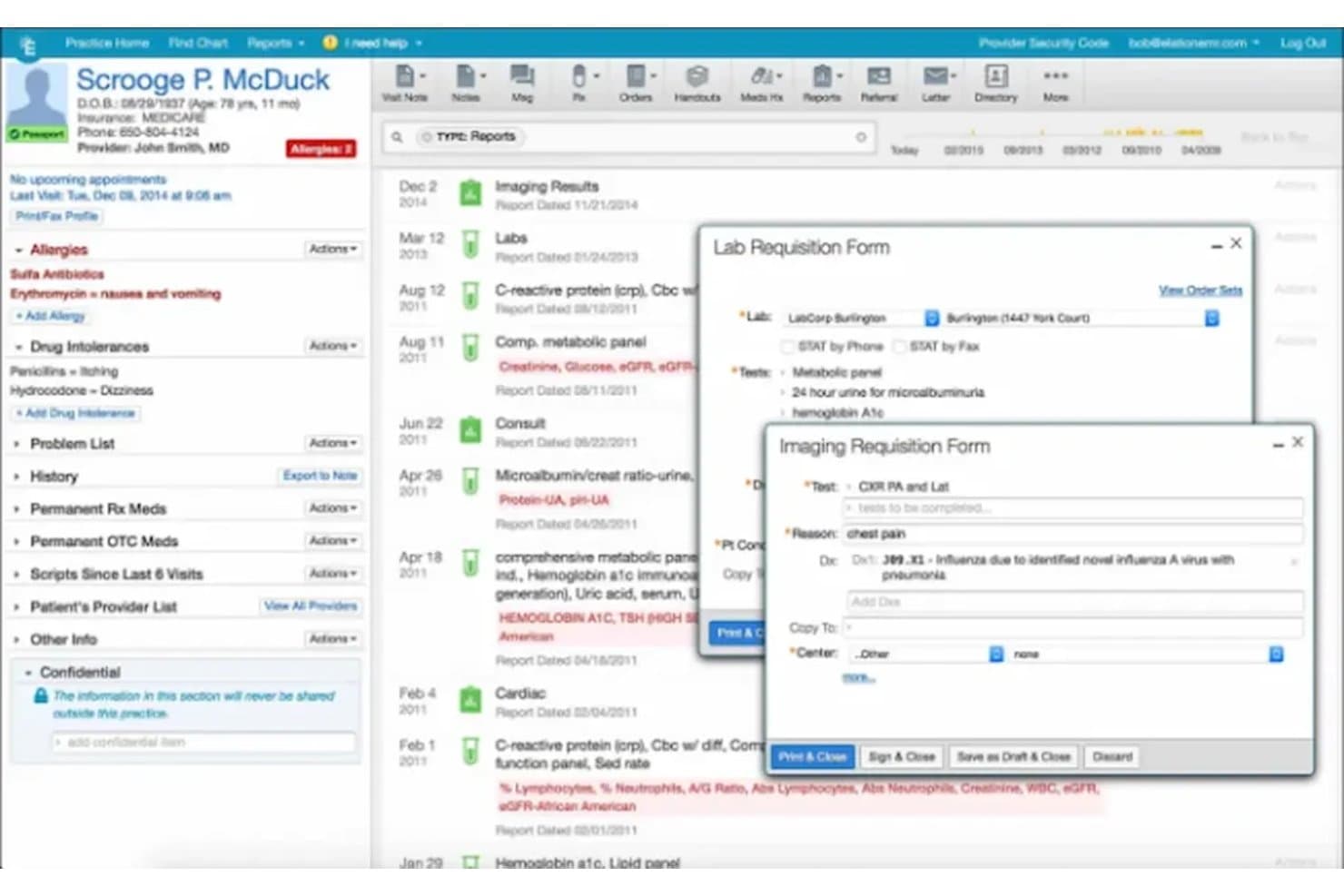
Elation Health streamlines lab and imaging orders from the patient chart. Elation Health is a cloud-based EMR for independent practices with structured patient charting, AI-assisted notes, e-prescribing, appointment scheduling, automated reminders, and a patient portal.
Who Is Elation Health Best For?
Elation Health is Best for independent practices trialing before buying, with demos and free trials available but no permanent free plan.
Why I Picked Elation Health
Elation Health fits “Best for independent practices trialing before buying” because its free trial lets me assess structured chart timelines and visit-note templates in practice. I can also test appointment scheduling and automated reminders within the same workflow. There’s no free-forever plan, so I consider it a trial option, not an ongoing free EMR.
Elation Health Key Features
- Free trial and demo: Elation offers demos and trials, but no permanent free plan; trial terms aren’t stated.
- E-prescribing: Send prescriptions through Surescripts, with controlled-substance prescribing available through MDToolbox.
- Patient portal: Elation Passport supports secure messaging, appointment management, and patient access to visit summaries.
- Telehealth: Built-in Zoom video appears within Elation’s clinical workspace.
Elation Health Integrations
Elation’s Partner Hub lists 300+ integrations, including Zocdoc, Fullscript, Zus, and Nsight Health. Built-in partners include Surescripts, MDToolbox, Medispan, Zoom, and Ribbon, and API access is available to existing customers and partners.
What's Free?
Elation Health has no free-forever plan, but it offers a free demo and trial; trial duration and restrictions aren’t stated.
Pros and Cons
Pros:
- Scheduling includes reminders and patient booking
- AI scribe drafts structured visit notes
- Reviewers praise intuitive, fast charting
Cons:
- Support response times draw complaints
- No free-forever plan
Learn more about Elation Health: Best for trialing a mature e-prescribing EMR
- 14-day free trial + free demo available
- From $199/provider/month
Visit WebsiteCustomer Rating:3.7/5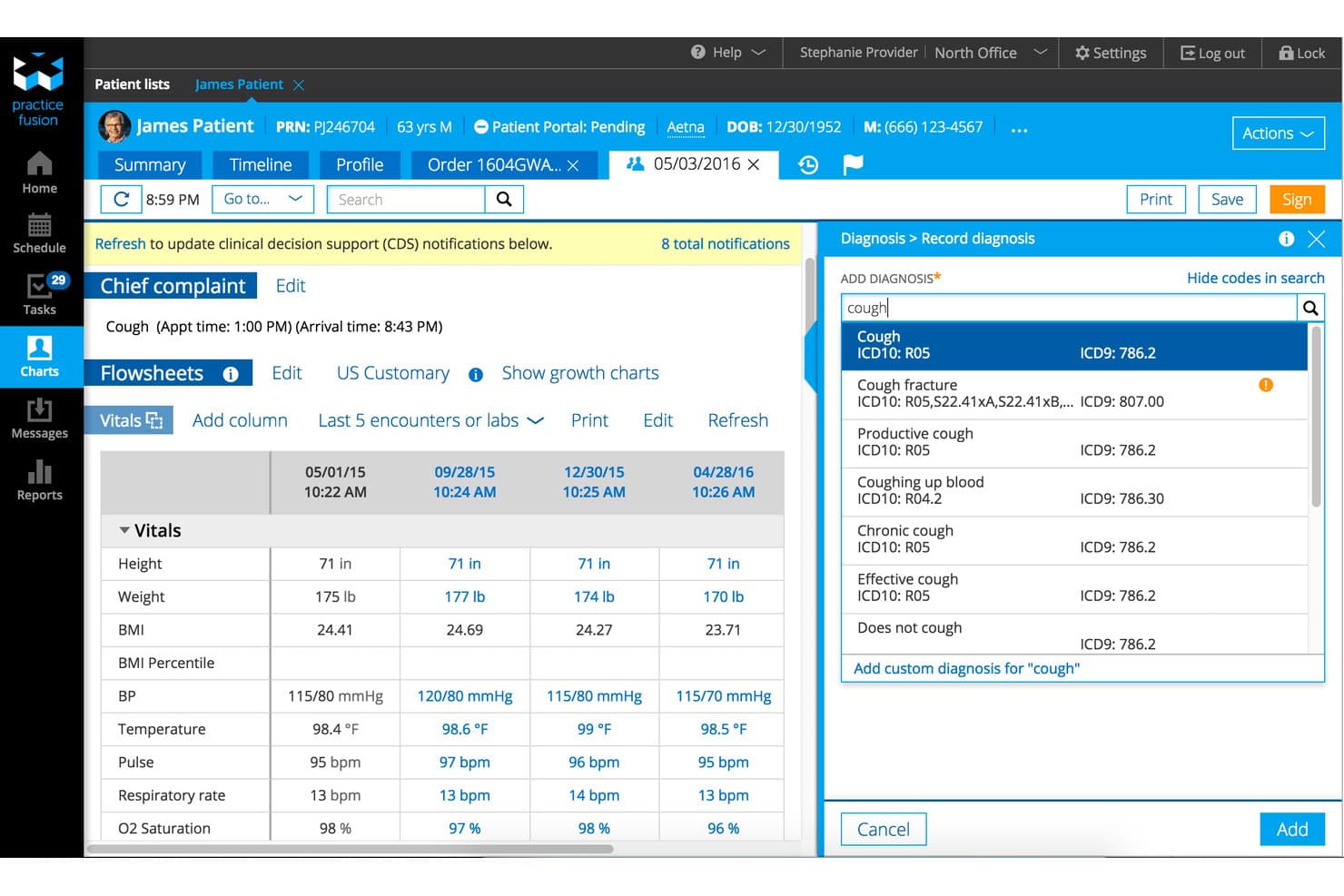
Practice Fusion streamlines diagnosis coding with ICD-10 search during visits. Practice Fusion is a cloud-based EMR with patient charting, e-prescribing, appointment scheduling, lab and imaging connections, and a patient portal; it offers a 14-day trial, not a free-forever plan.
Who Is Practice Fusion Best For?
Practice Fusion suits small practices comparing EMRs before purchase, with a 14-day trial; its positioning is “Best for evaluating EMR options before buying.”
Why I Picked Practice Fusion
I picked Practice Fusion as a comparison entry because its fit is “Best for evaluating EMR options before buying,” not free-forever use. Its 14-day trial and free demo let you assess specialty chart templates and e-prescribing workflows. I also look at its bulk CCD/C-CDA export option when evaluating how patient records can move to another system.
Practice Fusion Key Features
- Appointment scheduling : Schedule recurring visits and send email, text, or voice reminders.
- Patient portal : FollowMyHealth lets patients book appointments, check in, view instructions, and message the practice.
- Lab and imaging connections : Order tests and receive structured results from connected centers.
- Audit reports : Review account activity and track user actions.
Practice Fusion Integrations
Practice Fusion supports daily patient-record imports from athenahealth, NextGen, Amazing Charts, and eClinicalWorks, plus connections to pharmacy, health information exchange, immunization registry, lab, and imaging services.
What's Free?
Practice Fusion offers a 14-day free trial, not a free-forever plan; a free demo is also available. After the trial, plans start at $199 per user per month.
Pros and Cons
Pros:
- Bulk record exports support future transitions
- E-prescribing supports controlled-substance workflows
- Custom templates help organize patient charts
Cons:
- Annual commitment limits low-volume practices
- No free tier beyond evaluation
Learn more about Practice Fusion: Best for low-cost behavioral health trial charting
- 30-day free trial
- From $59/month
Visit WebsiteCustomer Rating:4.2/5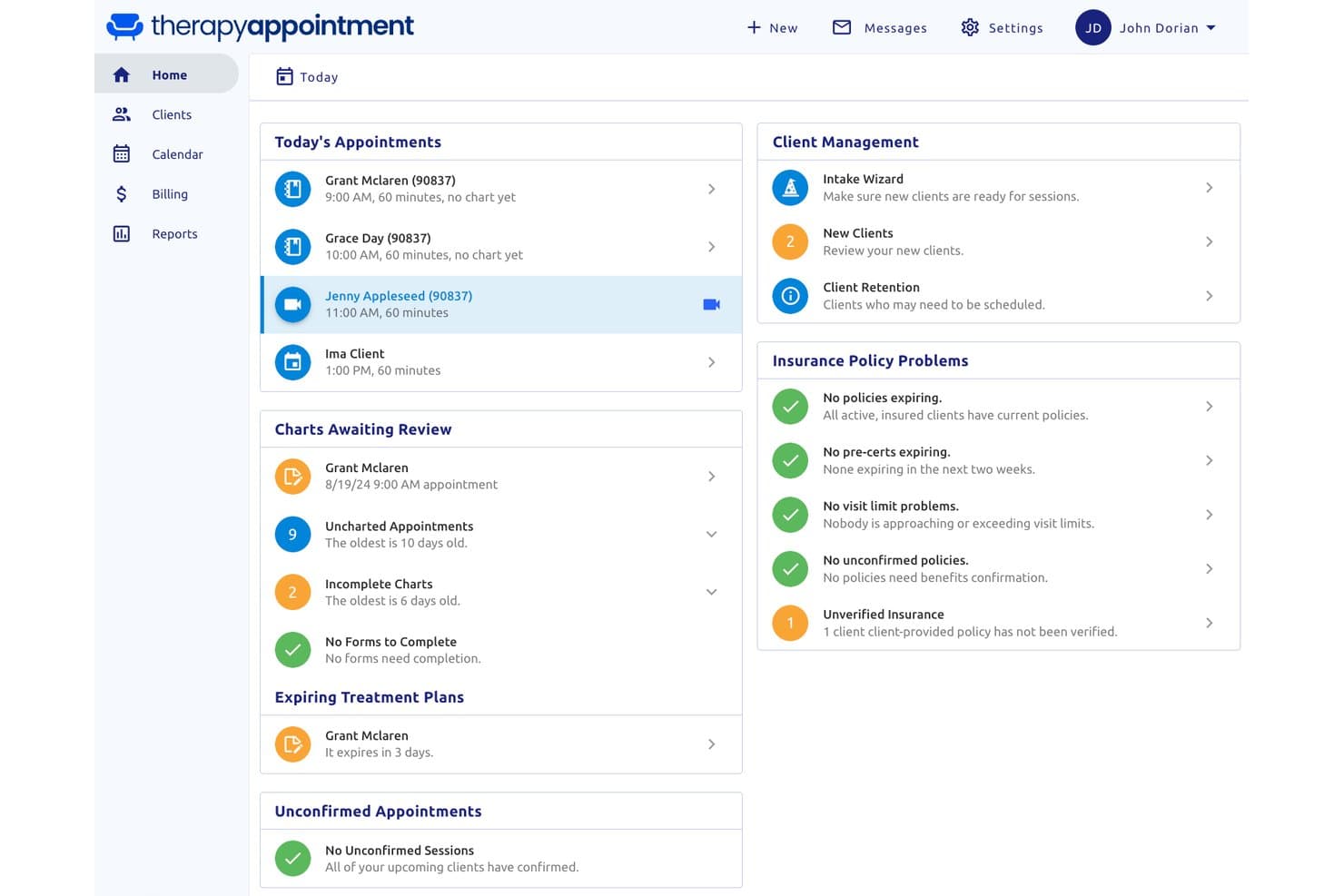
TherapyAppointment centralizes daily appointments, charts, and insurance status. For clinicians comparing free EMRs, TherapyAppointment is a behavioral health EMR and practice-management platform for session notes, treatment plans, intake, scheduling, and billing; it offers a 30-day trial, not a permanent free plan.
Who Is TherapyAppointment Best For?
TherapyAppointment—Best for low-cost behavioral health trial charting—fits solo and group practices focused on psychotherapy and related clinical care.
Why I Picked TherapyAppointment
I picked TherapyAppointment for low-cost behavioral health trial charting because its session notes, treatment plans, and 70+ intake and assessment templates support therapists’ day-to-day documentation. Supervisors can review and sign clinicians’ notes, a useful workflow for training practices. It has no permanent free plan, and the 30-day trial requires a credit card and converts to a paid plan.
TherapyAppointment Key Features
- Automated reminders: Sends appointment reminders by text, email, or phone.
- Client portal: Supports intake forms, e-signatures, self-scheduling, secure messaging, and invoice payments.
- Electronic claims: Connects to Office Ally for claims submission and automatic ERA posting.
- Security controls: Includes AES-256 encryption, two-factor authentication, role-based permissions, and audit trails.
TherapyAppointment Integrations
TherapyAppointment integrates with DoseSpot for e-prescribing, Office Ally for electronic claims, Zoom for Healthcare, and Google Calendar, iCal, and Outlook. State HIE connections are available in Connecticut, North Carolina, and Oklahoma; the vendor doesn’t document an API.
What’s Free?
TherapyAppointment offers a 30-day free trial, not a free-forever plan. The trial requires a credit card and converts to a paid plan when it ends.
Pros and Cons
Pros:
- Automated reminders and self-scheduling ease appointment coordination
- Session notes support supervisor review and sign-off
- Therapists praise responsive customer support
Cons:
- Mental-health-only charting excludes general medical workflows
- Trial requires a card and converts automatically
Learn more about TherapyAppointment: Best for independent NP-led practice charting
- Free demo available
- Pricing upon request
Visit WebsiteCustomer Rating:3.9/5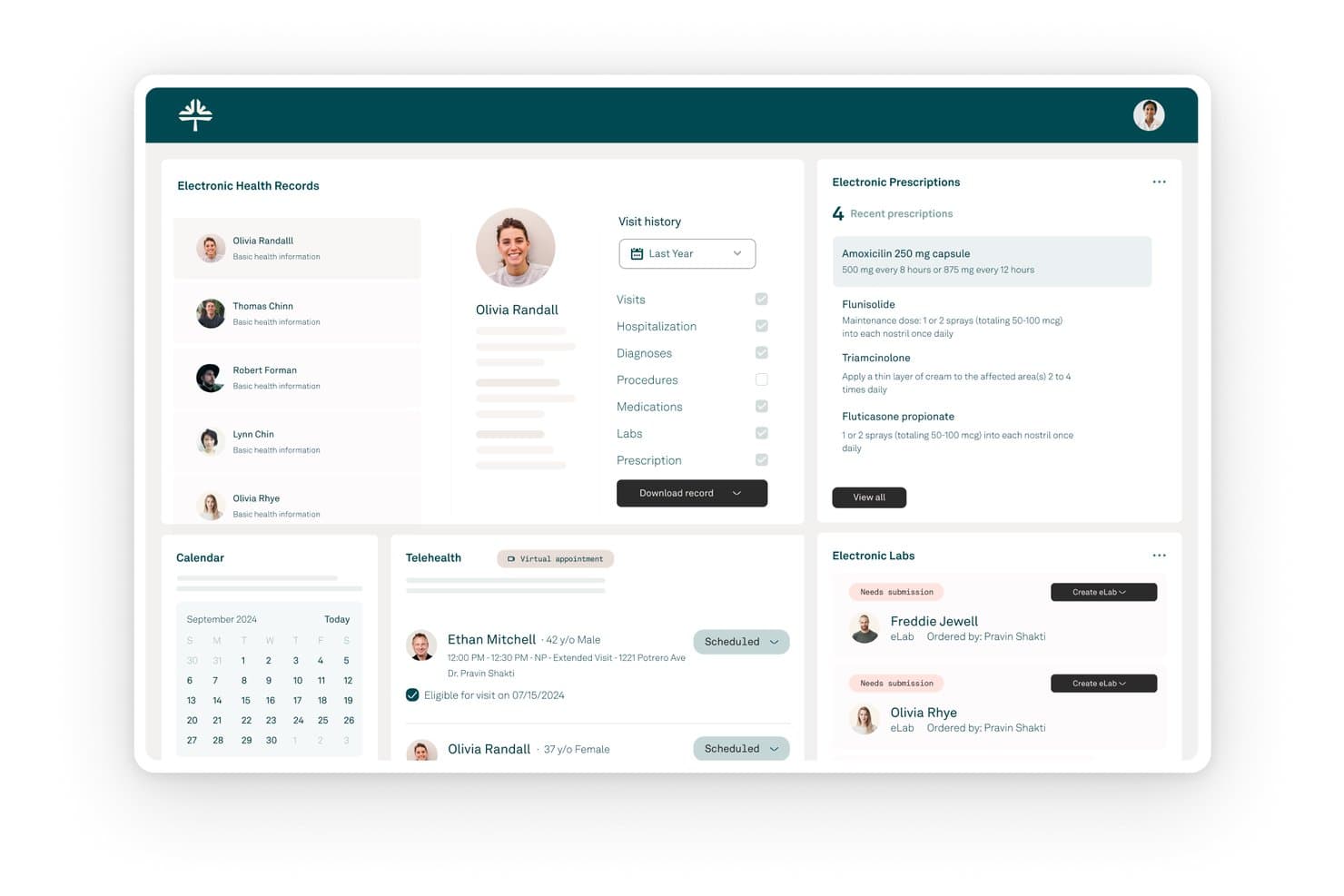
Kareo (Tebra) centralizes patient records, prescriptions, and lab orders in one dashboard. Kareo (Tebra) is a paid, cloud-based EMR and practice management platform with patient charting, e-prescribing, scheduling, billing, telehealth, and patient engagement; it has no free-forever plan.
Who Is Kareo (Tebra) Best For?
Kareo (Tebra): Best for independent NP-led practice charting, with integrated scheduling and billing on a paid subscription.
Why I Picked Kareo (Tebra)
I include Kareo (Tebra) as best for independent NP-led practice charting, with SOAP templates and co-signature tools for supervised visits. AI Note Assist can draft visit notes, which clinicians can review and complete. It has no free-forever plan, so it suits practices willing to consider a paid EMR, not buyers who require ongoing free access.
Kareo (Tebra) Key Features
- Patient portal: Patients can view visit summaries and test results, send secure messages, request appointments, and pay online.
- Lab and imaging orders: Send orders electronically from the chart and receive results in the patient record.
- Mobile charting: The iOS app supports clinical notes, medications, vitals, and patient history.
- Appointment reminders: Send reminders by text, email, or phone, with two-way confirmations.
Kareo (Tebra) Integrations
Tebra connects with Appriss Health for PDMP checks and GoodRx; reviewers also mention TriZetto and Practice Fusion integrations. It offers API access and HL7/FHIR connections for linking Tebra Billing with outside EHRs.
What’s Free?
Kareo (Tebra) has no free-forever plan, but it offers a 14-day free trial and a free demo. The platform is paid after the trial; confirm any trial terms with Tebra before signing up.
Pros and Cons
Pros:
- Scheduling and records share one system
- SOAP templates support structured visit notes
- NPs praise simple prescriber workflows
Cons:
- Billing reports frustrate some reviewers
- No ongoing free access for practices
Learn more about Kareo (Tebra): Best for free, self-hosted clinical workflows
- Free plan + free demo available
- Free forever plan
Visit WebsiteCustomer Rating:3.9/5
OpenEMR patient dashboard showing billing, insurance eligibility, clinical reminders, appointments, and prescriptions. OpenEMR is a free, open-source electronic health records and practice management system that covers scheduling, clinical charting, e-prescribing, medical billing, lab integration, and clinical decision support across 30+ languages.
Who Is OpenEMR Best For?
OpenEMR is a strong fit for independent clinics, community health centers, and multi-specialty practices that need a fully featured EMR without licensing costs.
Why I Picked OpenEMR
OpenEMR is one of my top picks because I love that it covers both clinical and practice workflows without splitting those into paid tiers. The clinical decision rules engine is genuinely useful, letting your team navigate complex patient care algorithms directly within a chart encounter. I also like that lab orders can be sent automatically to a lab and results pulled back into the patient's record, which cuts out the manual data entry that bogs down clinical staff. On top of that, OpenEMR is ONC Certified, so you're not trading compliance credibility for cost savings.
OpenEMR Key Features
- Advanced scheduling: Create repeating events, automated workflows triggered by patient check-in, and patient appointment reminders.
- e-Prescribing: Enter a prescription during an encounter and send it directly to the patient's pharmacy.
- Medical billing: Built-in billing module supports HIPAA ASC X12 Version 5010 Transaction and Code Set Standards.
- Advanced security: HIPAA-friendly access control with fine-grained permissions and industry-standard password hashing to protect patient data.
OpenEMR Integrations
OpenEMR provides REST and FHIR R4 APIs for external system integration, along with SMART on FHIR app launch support for connecting third-party clinical apps. It also offers installable modules for WENO Exchange (e-prescribing), Comlink (telehealth), ClaimRev (billing clearinghouse), and Sphere (payment processing), plus HL7 v2 messaging for lab orders, results, and ADT events via middleware like Mirth Connect.
Pros and Cons
Pros:
- Full source code access for customization
- ONC certified for regulatory compliance
- Supports 30+ languages for global use
Cons:
- Dated interface compared to newer EMRs
- Requires technical skill for self-hosting
Learn more about OpenEMR: Best open-source EMR for global health programs
- Free demo available
- Free
Visit WebsiteCustomer Rating:4.8/5
OpenMRS helps healthcare teams manage patient visits, appointments, service queues, active visits, check-ins, laboratory workflows, and billing in one open-source EMR platform. OpenMRS is an open-source EMR for global health programs, with configurable patient charts and forms, medication and test-result records, appointment management, and FHIR and REST APIs.
Who Is OpenMRS Best For?
OpenMRS fits global health programs, NGOs, and public health organizations with technical teams to configure and maintain an open-source EMR.
Why I Picked OpenMRS
I picked OpenMRS because its open-source EMR is designed for global health programs, not just small private practices. An NGO clinic can configure patient forms and track vitals, conditions, medications, and program enrollment in structured charts. FHIR and REST APIs support sharing records with other health systems, while implementation and ongoing maintenance require technical support.
OpenMRS Key Features
- Appointment statuses: Track appointments as requested, scheduled, checked in, completed, cancelled, or missed.
- Test results viewer: Review test results with trend displays.
- Clinical attachments: Add PDF, JPG, and PNG files or capture images with a webcam.
- Service queues: Manage patient queues, active visits, wards, and beds.
OpenMRS Integrations
OpenMRS supports integrations with DHIS2, while the OpenMRS HIS/Ozone distribution connects to Odoo, OpenELIS Global, and Apache Superset. FHIR and REST APIs support custom integrations, and OHDSI tools support OMOP data mapping.
What's Free?
OpenMRS is free open-source software with no license fees, not a time-limited trial. No user or integration limits are specified, but your organization should plan for hosting, implementation, configuration, and ongoing technical support.
Pros and Cons
Pros:
- Data ownership supports future system changes
- Frequent releases add clinical workflow updates
- Users praise flexible, configurable clinical records
Cons:
- No US e-prescribing or insurance claims
- Self-hosting demands dedicated technical support
Learn more about OpenMRS:
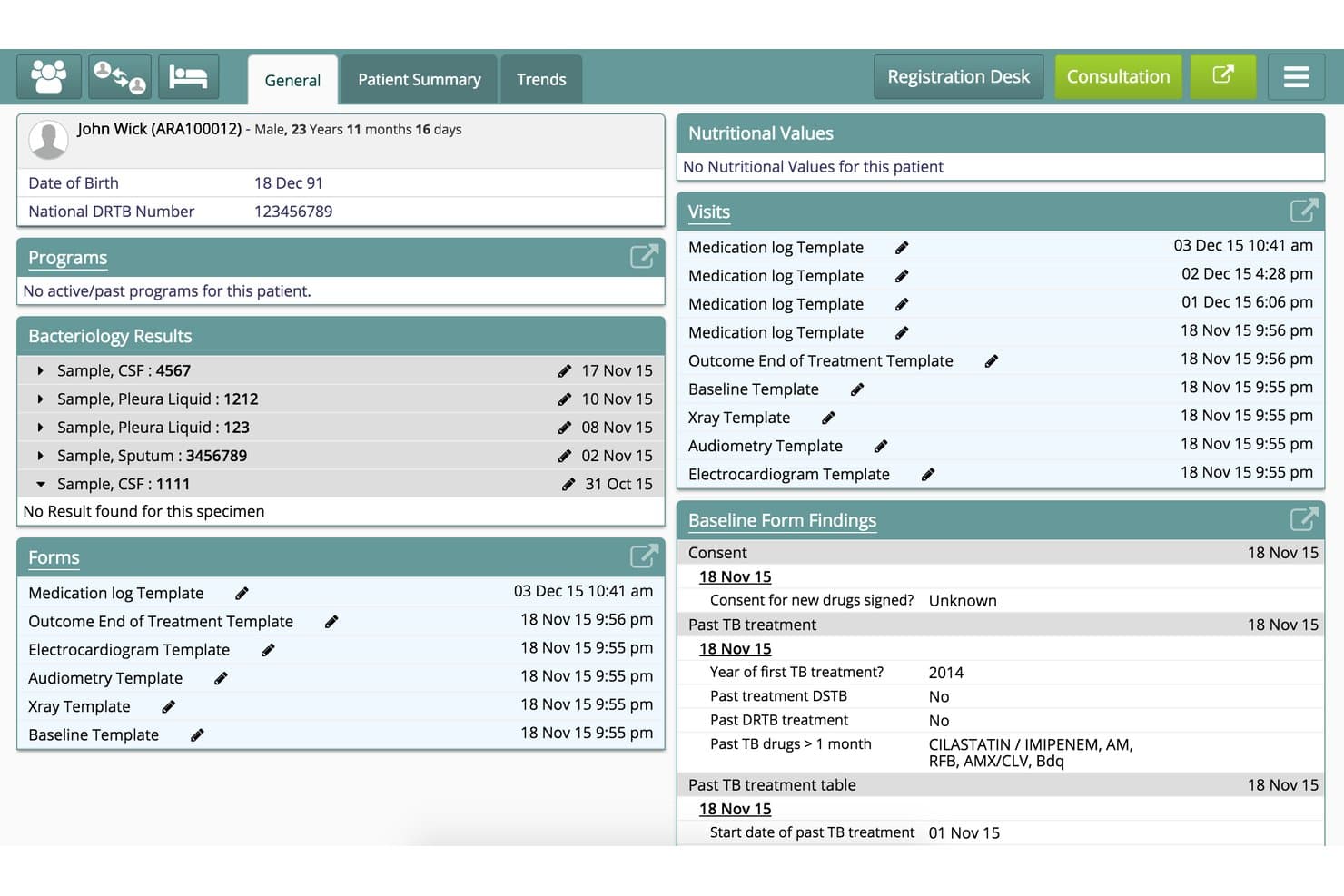
Bahmni centralizes patient history, lab results, and visits in one dashboard. Bahmni is an open-source EMR and hospital system that combines patient registration, configurable clinical charting, appointments, prescribing, laboratory, imaging, inpatient, billing, and reporting modules in a self-hosted platform.
Who Is Bahmni Best For?
Bahmni suits clinics and hospitals in low-resource settings that need a free, configurable, self-hosted EMR and have the technical capacity to run it.
Why I Picked Bahmni
I picked Bahmni as “Best free EMR for low-resource global clinics” because its on-site setup can keep working without internet. Configurable clinical forms and patient dashboards support structured charting, while its lab and inpatient modules cover workflows beyond the exam room. Self-hosting does require technical capacity.
Bahmni Key Features
- Patient registration: Records demographics, contacts, identifiers, and patient photos.
- Appointment management: Schedules visits across providers and supports SMS, WhatsApp, and email notifications.
- Audit logs: Tracks logins, access to clinical data, visits, and other system activity.
- Record exports: Exports reports as PDF or CSV and supports FHIR and HL7 data exchange.
Bahmni Integrations
Bahmni has documented integrations with OpenMRS, Odoo, OpenELIS, DCM4chee/Oviyam, Crater, Metabase, Jasper Reports, and Jitsi; available components depend on the version. It supports FHIR/HL7 and REST/HTTP APIs for custom connections.
What’s Free?
Bahmni is free, open-source software, not a time-limited trial. You’ll need to manage hosting and setup, and implementation or support services may cost extra.
Pros and Cons
Pros:
- Proven across large public health deployments
- Configurable clinical forms and dashboards
- Works without reliable internet
Cons:
- No US pharmacy e-prescribing or claims workflows
- Self-hosting demands dedicated technical support
Learn more about Bahmni:
How I Evaluate Free EMR
I look at free EMR options in two layers—baseline must-haves like HIPAA-compliant charting and eRx for a solo practice, and differentiators that reveal which tools hold up in real clinical use.
Core Functionality (Table Stakes For This List)
When I'm selecting tools for my list, I rank each one on a scale from 0 (does not offer the functionality) to 5 (excels in this area) for each core functionality listed below. Then, I calculate the tool's total score into a percentage. Each tool needs to achieve a minimum total score of 65% to be considered for inclusion.
- Electronic Charting: I check whether the EMR supports structured SOAP notes, problem lists, and allergy tracking—not just a blank text field where clinicians dump visit notes.
- Genuinely Free Access Tier: Each tool's free offering gets scrutinized for what's actually usable—some platforms like Practice Fusion and OpenEMR take very different approaches to delivering free access.
- E-Prescribing (eRx): I look for Surescripts-connected eRx so prescriptions route directly to the patient's pharmacy, including whether drug interaction alerts fire during ordering.
- HIPAA-Compliant Data Handling: Encryption, audit logs, role-based access, and a signed BAA all factor in—especially for cloud-hosted platforms where PHI lives on vendor servers.
- Clinical Coding & Billing: I evaluate whether the system includes ICD-10 and CPT code lookup at the point of documentation and can generate superbills or export claims for submission.
- Patient Scheduling & Demographics: A functional appointment calendar tied to patient demographics matters—clinicians need to book visits and pull up insurance or contact details in the same workflow.
Once I have a list of tools that meet this criteria, I consider what sets each platform apart.
Differentiating Factors (What Sets Vendors Apart)
Here's how I compare and contrast different vendors:
Standout Features
Telehealth is a big one—I look for built-in video visits so behavioral health and primary care providers aren't juggling a separate platform. A patient portal also makes a real difference when a small practice wants patients to handle intake forms and refill requests on their own. I evaluate lab integrations too, since direct connections to reference labs like Quest or LabCorp mean results flow back into the chart without manual entry.
Beyond Features
"Free" doesn't always mean free in practice, so I check for hidden costs like eRx surcharges or paid support tiers that can catch a solo provider off guard. Regulatory certifications matter just as much—ONC Health IT Certification determines whether a platform qualifies for Promoting Interoperability incentives. I also evaluate the deployment model, since open-source options like OpenEMR require self-hosting and IT overhead, while cloud platforms handle updates automatically but introduce vendor dependency.
Cum să alegeți un sistem EMR gratuit
Este ușor să vă pierdeți în liste lungi de funcții și structuri complexe de prețuri. Pentru a vă ajuta să rămâneți concentrați în timp ce parcurgeți procesul de selecție a programului, iată o listă de factori de care trebuie să țineți cont:
| Factor | Ce trebuie luat în considerare |
| Scalabilitate | Va putea instrumentul să gestioneze dezvoltarea viitoare — mai mulți pacienți, clinicieni sau locații — fără întreruperi majore? |
| Integrări | Se conectează la laboratoarele, sistemul de facturare, serviciile de telemedicină sau sistemele existente, direct sau prin API? |
| Posibilitate de personalizare | Puteți adapta fluxurile de lucru, șabloanele sau aspectul fișelor pentru a corespunde modului în care lucrează echipa dumneavoastră în prezent? |
| Ușurință în utilizare | Cât de repede poate învăța personalul să folosească sistemul și va adăuga acesta dificultăți fluxurilor clinice rapide? |
| Implementare și integrare inițială | Ce resurse, asistență pentru migrarea datelor și instruire sunt incluse — aveți nevoie de ajutor IT extern? |
| Cost | Dincolo de nivelul „gratuit”, există taxe de configurare, asistență sau suplimente care v-ar putea surprinde ulterior? |
| Măsuri de securitate | Sunt criptarea, jurnalele de audit și controalele de acces clare și suficiente pentru HIPAA și siguranța pacienților? |
| Disponibilitatea asistenței | Este disponibil ajutorul atunci când aveți nevoie — prin comunitate, e-mail sau asistență în timp real, și diferă acesta în funcție de plan? |
Ce este un sistem EMR gratuit?
Sistemele EMR gratuite sunt sisteme de dosare medicale electronice care oferă funcții esențiale de documentare clinică, prescriere electronică și programare fără costuri recurente pentru software. Aceste platforme oferă cabinetelor și clinicilor mici capacități esențiale de gestionare digitală a fișelor prin licențiere cu sursă deschisă sau niveluri gratuite cu numeroase funcții, ajutându-le să gestioneze informațiile pacienților fără investiții inițiale.
Funcțiile sistemelor EMR gratuite
Să analizăm funcțiile întâlnite în mod obișnuit în sistemele de dosare medicale electronice și să vedem care dintre acestea sunt de regulă incluse în planurile gratuite și în cele plătite.
Funcții de obicei gratuite ale dosarelor medicale electronice
- Gestionarea fișelor pacienților: Le permite clinicienilor să creeze, să organizeze și să consulte notele vizitelor pacienților, istoricul medical, alergiile și diagnosticele într-un dosar digital securizat.
- Programarea consultațiilor: Oferă un calendar integrat pentru programarea, vizualizarea și actualizarea consultațiilor pacienților, facilitând gestionarea fluxurilor de lucru zilnice.
- Prescriere electronică de bază: Permite crearea și tipărirea rețetelor, uneori cu transmitere digitală limitată către farmacii pentru medicamentele uzuale.
- Date demografice ale pacienților: Stochează și actualizează datele de contact ale pacienților, informațiile despre asigurare și datele de bază colectate la internare, pentru a menține dosarele complete și actualizate.
- Acces bazat pe roluri: Permite gestionarea drepturilor utilizatorilor, astfel încât doar personalul autorizat să poată vizualiza, edita sau șterge diferite tipuri de date despre pacienți și date clinice.
- Căutare ICD-10/CPT: Simplifică procesul de codificare prin liste consultabile pentru codurile de diagnostic și de proceduri, ajutând furnizorii să pregătească cereri de rambursare sau facturi detaliate.
- Jurnale de audit: Monitorizează accesul utilizatorilor și modificările aduse dosarelor pacienților pentru a spori responsabilitatea și a susține cerințele de bază privind conformitatea.
Funcții EMR de obicei plătite
- Prescriere electronică avansată (EPCS): Permite prescrierea electronică a substanțelor controlate și include verificări ale formularului, istoricul medicației și alerte privind interacțiunile medicamentoase.
- Șabloane personalizabile: Permite utilizatorilor să creeze sau să modifice șabloane de documentare pentru fluxuri de lucru specializate, documentație clinică unică sau preferințele organizației.
- Facturare integrată: Automatizează trimiterea cererilor de plată, integrarea cu casele de compensare, urmărirea plăților și acceptă mai multe tipuri de plătitori pentru gestionarea ciclului veniturilor.
- Portal pentru pacienți: Oferă pacienților acces online pentru vizualizarea analizelor, solicitarea reînnoirii prescripțiilor, trimiterea de mesaje furnizorilor și gestionarea propriilor dosare și informații.
- Integrarea serviciilor de telemedicină: Include funcții securizate pentru consultații video direct în cadrul EMR, pentru a sprijini consultațiile la distanță și furnizarea virtuală a îngrijirilor.
- Interfețe pentru laboratoare și imagistică: Se conectează direct la laboratoare sau centre de imagistică pentru a automatiza comenzile, a primi rezultatele și a arhiva rapoartele în dosar.
- Reamintiri automate: Trimite confirmări și reamintiri privind programările prin e-mail, SMS sau telefon, pentru a contribui la reducerea absențelor și la îmbunătățirea respectării programărilor.
- Instrumente pentru migrarea datelor: Oferă suport pentru importarea dosarelor din EMR-uri vechi, dosare pe hârtie sau sisteme externe la trecerea la noua platformă.
- Analiză avansată și raportare: Oferă tablouri de bord și rapoarte configurabile pentru programe de calitate, urmărirea performanței sau raportarea de reglementare, precum MIPS.
- Gestionarea mai multor locații: Permite administrarea, programarea și raportarea centralizate pentru grupuri sau organizații care își desfășoară activitatea în mai multe locații.
Beneficii
Implementarea unui EMR gratuit oferă mai multe beneficii pentru echipa și afacerea dumneavoastră. Iată câteva dintre acestea:
- Economii de costuri: Lipsa taxelor de licențiere a software-ului și opțiunile cu sursă deschisă ajută cabinetele mici să își digitalizeze dosarele fără povara costurilor inițiale sau recurente.
- Documentație fără hârtie: Documentarea electronică, programarea și prescrierea electronică elimină notițele scrise de mână și reduc volumul de documente pe parcursul fluxurilor de lucru clinice.
- Respectarea mai ușoară a reglementărilor: Funcții precum jurnalele de audit, controalele accesului și stocarea criptată sprijină conformitatea cu HIPAA, simplificând protejarea datelor pacienților.
- Gestionarea simplificată a pacienților: Programarea, urmărirea datelor demografice și accesul la dosare într-un singur sistem îmbunătățesc gestionarea programărilor și acuratețea dosarelor pacienților.
- Flexibilitate pentru dezvoltare: Multe planuri gratuite și platforme cu sursă deschisă se extind pe măsură ce adăugați utilizatori sau locații, permițând adaptarea fluxului de lucru pe măsură ce cabinetul se dezvoltă.
- Accesul și portabilitatea datelor: Posibilitatea de a exporta sau migra datele sprijină interoperabilitatea și reduce riscul dependenței de furnizor dacă trebuie să schimbați sistemele.
- Implementare rapidă: Multe soluții EMR gratuite oferă configurare simplă, documentație online și șabloane integrate care ajută clinicile să înceapă activitatea cu perioade minime de întrerupere.
Costuri și prețuri
Înțeleg că ați ajuns la acest articol în căutarea celor mai bune opțiuni de sisteme de dosare medicale electronice disponibile gratuit. Cu toate acestea, deoarece planurile gratuite oferă doar funcții limitate, există șanse mari să fie necesar să treceți la un plan superior în viitor.
Tabelul de mai jos prezintă un rezumat al planurilor obișnuite, al prețurilor medii și al funcțiilor incluse de obicei în sistemele de dosare medicale electronice:
Tabel comparativ al planurilor pentru EMR
| Tipul planului | Preț mediu | Funcții comune |
| Plan gratuit | $0 | Documentare de bază, programarea consultațiilor, date demografice ale pacienților, prescriere electronică de bază și asistență limitată. |
| Plan personal | $10–$40/utilizator/lună | Șabloane de documentare îmbunătățite, prescriere electronică extinsă, acces la portalul pacienților, raportare de bază și asistență prin e-mail. |
| Plan pentru companii | $30–$80/utilizator/lună | Facturare integrată, telemedicină, interfețe pentru laboratoare și imagistică, fluxuri de lucru personalizabile și asistență în timp real. |
| Plan pentru întreprinderi | $80–$150/utilizator/lună | Analiză avansată, gestionarea mai multor locații, integrări extinse, asistență premium și implementare dedicată. |
Întrebări frecvente despre sistemele EMR gratuite
Iată câteva răspunsuri la întrebările frecvente despre sistemele EMR gratuite:
Sunt sistemele EMR gratuite cu adevărat conforme cu HIPAA?
Da, unele sisteme EMR gratuite oferă găzduire conformă cu HIPAA, jurnale de audit și controale de acces, dar trebuie să verificați întotdeauna dacă este disponibil un acord de partener de afaceri (BAA) și să consultați documentația privind securitatea înainte de a stoca datele pacienților.
Pot migra datele dintr-un sistem EMR gratuit dacă fac o actualizare sau schimb furnizorul?
Da, majoritatea platformelor EMR gratuite vă permit să exportați datele pacienților în formate standard, precum CSV sau CCD, dar instrumentele de migrare a datelor pot fi limitate sau pot necesita procese manuale, așa că planificați din timp înainte de a face schimbarea.
Ce opțiuni de asistență sunt disponibile pentru utilizatorii sistemelor EMR gratuite?
Asistența pentru sistemele EMR gratuite include de obicei forumuri pentru utilizatori, baze de cunoștințe sau canale ale comunității, nu asistență în direct sau telefonică dedicată; pe măsură ce vă dezvoltați, pot fi disponibile planuri de asistență plătite.
Sunt incluse prescrierea electronică și telemedicina în planurile EMR gratuite?
Unele platforme includ funcții de bază pentru prescriere electronică și instrumente limitate de telemedicină în planurile gratuite, dar funcțiile mai avansate—precum EPCS sau videoconferințele integrate—sunt de obicei disponibile contra cost.
Este dificil să implementezi un sistem EMR gratuit într-un cabinet individual sau într-un cabinet mic?
Nu, majoritatea sistemelor EMR gratuite sunt concepute pentru o implementare simplă, cu ghiduri de configurare online și șabloane de bază, dar instrumentele cu sursă deschisă pot necesita o configurare tehnică suplimentară.