

O software de faturação para medicina interna ajuda a sua clínica a gerir a codificação, os pedidos de reembolso e os processos de pagamento específicos da medicina interna. Encontrar o melhor software de faturação para medicina interna é difícil quando tem de equilibrar a conformidade, as regras das entidades pagadoras e um volume de faturação crescente.
A sua equipa precisa de ferramentas desenvolvidas para a documentação da especialidade, o acompanhamento dos pedidos de reembolso em tempo real e a automatização integrada nos fluxos de trabalho clínicos — não de um software genérico de faturação médica. Neste guia, descobrirá as principais plataformas de faturação para medicina interna em 2026, com informações sobre a forma como cada uma apoia clínicas ocupadas que enfrentam prazos apertados, auditorias e regras de reembolso em constante evolução.
Why Trust Our Software Recommendations
6,700+
Reviews
20
Industry experts
16+
Evaluation factors
14
Years
Our team has been testing and reviewing software since 2012. As medical practice leaders ourselves, we know how difficult—and important—it is to choose the right software.
For this guide, we evaluated tools using hands-on testing and independent research, scoring tools using our selection criteria.
Our reviews reflect our human editorial judgment, not a sales pitch.
Tabela de comparação de software de faturação para medicina interna
\u003cheader class=\u0022c-block__content-block c-block__header b-ssl-summary__header c-listicle__header c-content-block c-content-block–layout-left\u0022\u003e
\u003cdiv class=\u0022c-block__description c-listicle__description t-sink s-sink c-content-block__content\u0022\u003e
Este quadro comparativo resume os detalhes de preços do meu principal software de faturação para medicina interna na área da saúde, para o ajudar a encontrar a melhor opção para o seu orçamento e as necessidades da sua atividade.
\u003c/div\u003e
\u003c/header\u003e
| Tool | Best For | Trial Info | Price | ||
|---|---|---|---|---|---|
| 1 | Best customizable specialty templates | Free demo available | Pricing upon request | Website | |
| 2 | Best template-driven billing processes | Free demo available | From $199/user/month | Website | |
| 3 | Best for rapid onboarding and setup | Free demo available | Pricing upon request | Website | |
| 4 | Best for multi-location practice support | Free demo available | Pricing upon request | Website | |
| 5 | Best for integrated mobile billing features | Free demo available | Pricing upon request | Website | |
| 6 | Best specialty-specific documentation tools | Free demo available | Pricing upon request | Website | |
| 7 | Best for customizable workflow automation | Free demo available | Pricing upon request | Website | |
| 8 | Best integrated revenue analytics suite | Free demo available | Pricing upon request | Website | |
| 9 | Best cloud-based access for small practices | Free demo available | From $199/user/month | Website | |
| 10 | Best real-time claims tracking | Free demo available | Pricing upon request | Website |


Avaliações do melhor software de faturação para medicina interna
\u003cspan style=\u0022font-weight: 400;\u0022\u003eApresentamos abaixo os meus resumos detalhados do melhor software de faturação para medicina interna que entrou na minha lista restrita. As minhas avaliações oferecem uma análise detalhada das funcionalidades, dos melhores casos de utilização e das integrações de cada software, para o ajudar a encontrar a melhor opção para si.\u003c/span\u003e
 Best customizable specialty templates
- Free demo available
- Pricing upon request
Visit WebsiteCustomer Rating:4.4/5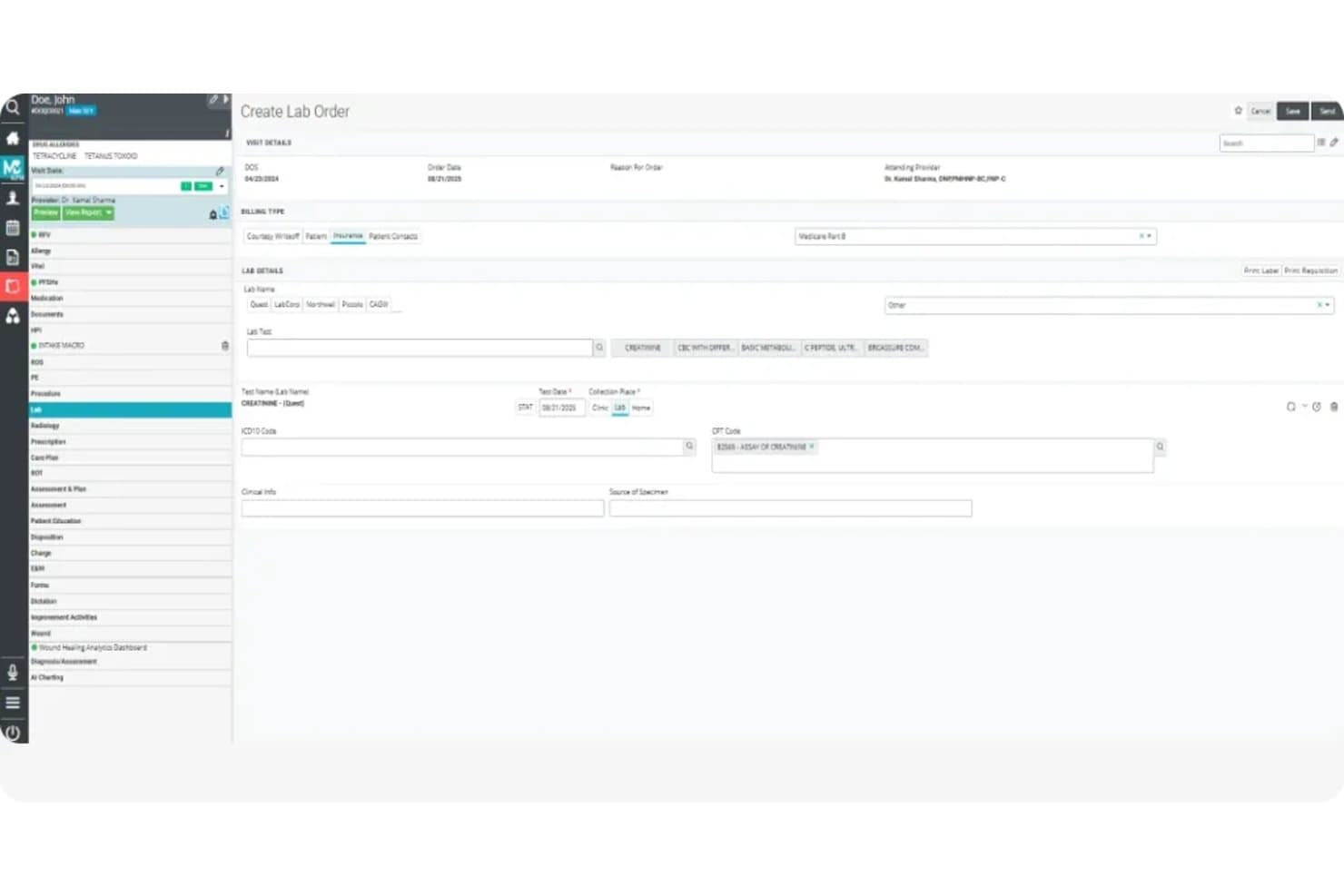
OmniMD offers an integrated lab order creation screen with billing type selection, lab test assignment, CPT code mapping, and insurance billing fields for internal medicine workflows. OmniMD is an internal medicine billing software platform that combines EHR, practice management, claims processing, specialty coding, and real-time eligibility verification in a single, integrated system for internal medicine practices.
Who Is OmniMD Best For?
Internal medicine practices and billing teams seeking integrated billing, coding, and specialty workflow capabilities in one platform.
Why I Picked OmniMD
I picked OmniMD as one of the best because I can tailor its specialty templates for documenting complex internal medicine workflows, automate code capture with built-in ICD-10 and CPT mapping, and customize billing logic for unique visit types.
OmniMD Key Features
- Electronic claim submission: Send claims directly to Medicare, Medicaid, and commercial insurers from the platform.
- Real-time insurance eligibility checks: Instantly verify patient insurance details at scheduling or check-in.
- Automated ERA payment posting: Apply electronic remittance advice (ERA) payments to patient accounts without manual entry.
- Denial and A/R analytics dashboards: Track denials, outstanding accounts receivable, and payer performance in real time.
OmniMD Integrations
OmniMD offers native integrations with Availity, Trizetto, RelayHealth, InstaMed, and Stripe, and provides an API for custom integrations.
Pros and Cons
Pros:
- Flexible rules for denial tracking workflows
- Real-time eligibility and claims scrubbing
- Specialty templates built for internal medicine
Cons:
- Customization setup can be time-consuming
- Interface feels dated for some staff
Learn more about OmniMD: Best template-driven billing processes
- Free demo available
- From $199/user/month
Visit WebsiteCustomer Rating:4.5/5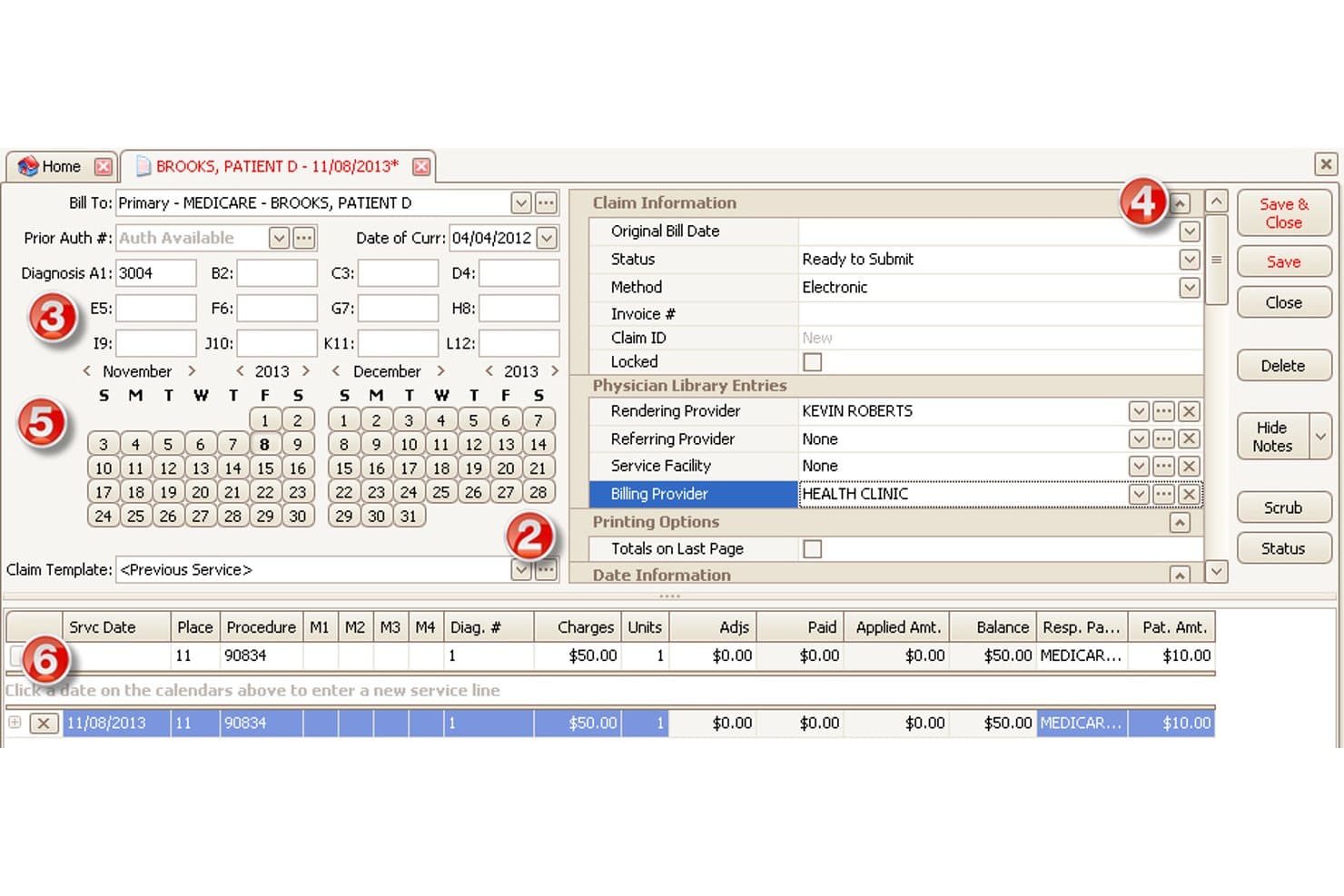
EZClaim offers a detailed medical billing claim form with diagnosis codes, provider fields, service dates, and charge breakdowns for internal medicine billing. EZClaim is a medical billing software platform designed for internal medicine practices, offering electronic claims management, payment posting, denial tracking, insurance eligibility verification, and patient billing in a template-based workflow.
Who Is EZClaim Best For?
Internal medicine billing managers and small to midsize practices that want customizable claim workflows and direct clearinghouse integrations.
Why I Picked EZClaim
I picked EZClaim as one of the best because its template-driven billing processes let me set up consistent, repeatable workflows for claim creation, coding, and payment posting. I use built-in claim scrubbers with standardized templates to handle internal medicine code sets.
EZClaim Key Features
- Real-time insurance eligibility checks: Instantly verify patient coverage with integrated clearinghouse connections.
- Denial management dashboard: Track claim denials and manage follow-up actions within a dedicated workspace.
- Automated ERA payment posting: Import and reconcile electronic remittance files directly from payers.
- Customizable reporting tools: Generate and schedule tailored financial and operational billing reports.
EZClaim Integrations
EZClaim offers native integrations with Change Healthcare, Waystar, Availity, Trizetto, Office Ally, BillFlash, InstaMed, MDToolbox, Cerbo, and Practice Fusion. An API is available for custom integrations.
Pros and Cons
Pros:
- Handles primary and secondary claim submissions smoothly
- Robust denial management with detailed status tracking
- Template workflows minimize billing errors for practices
Cons:
- Advanced reporting options are limited
- No internal medicine-specific coding suggestions
Learn more about EZClaim: Best for rapid onboarding and setup
- Free demo available
- Pricing upon request
Visit WebsiteCustomer Rating:4.1/5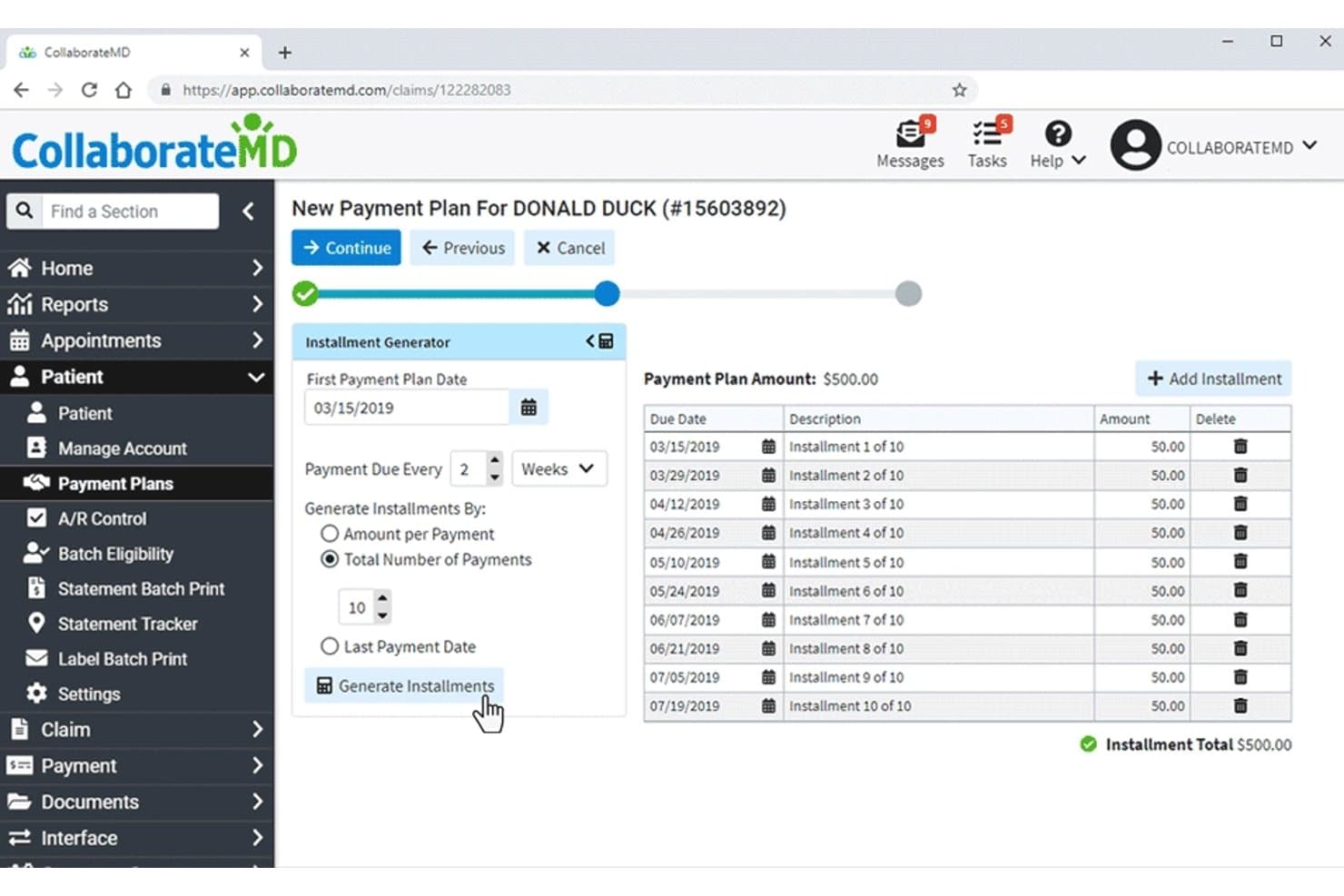
CollaborateMD offers a structured patient payment plan setup screen that allows billing staff to configure installment schedules, amounts, and due dates for internal medicine patients. CollaborateMD is a cloud-based internal medicine billing software that delivers automated claims management, integrated medical coding, real-time insurance eligibility checks, and patient billing tools to support end-to-end revenue cycle operations for medical practices.
Who Is CollaborateMD Best For?
Internal medicine practices and billing teams at small to midsize medical offices seeking fast implementation and integrated claims, coding, and payment workflows.
Why I Picked CollaborateMD
I picked CollaborateMD as one of the best because my team is able to get new providers up and running quickly, automate claims workflows, and use real-time eligibility checks for internal medicine billing from day one. The fast onboarding and setup stand out.
CollaborateMD Key Features
- Integrated ICD-10, CPT, and HCPCS search: Search and apply medical codes relevant to internal medicine directly within the billing interface.
- Electronic remittance advice (ERA) auto-posting: Automatically post payments received from payers and reconcile them against claims.
- Customizable denial management workflows: Set up structured workflows to track, appeal, and resolve denied claims by payer or reason.
- Batch patient statement generation: Generate, review, and send multiple patient billing statements at once for faster billing cycles.
CollaborateMD Integrations
CollaborateMD offers native integrations with EHR systems like eClinicalWorks, AdvancedMD, and Allscripts, and supports custom integrations through its API.
Pros and Cons
Pros:
- Automatic ERA posting with adjustment tracking
- Robust real-time insurance eligibility checks
- Claims are processed exceptionally quickly
Cons:
- Patient portal offers basic features only
- Reports require manual customization and setup
Learn more about CollaborateMD: Best for multi-location practice support
- Free demo available
- Pricing upon request
Visit WebsiteCustomer Rating:4.1/5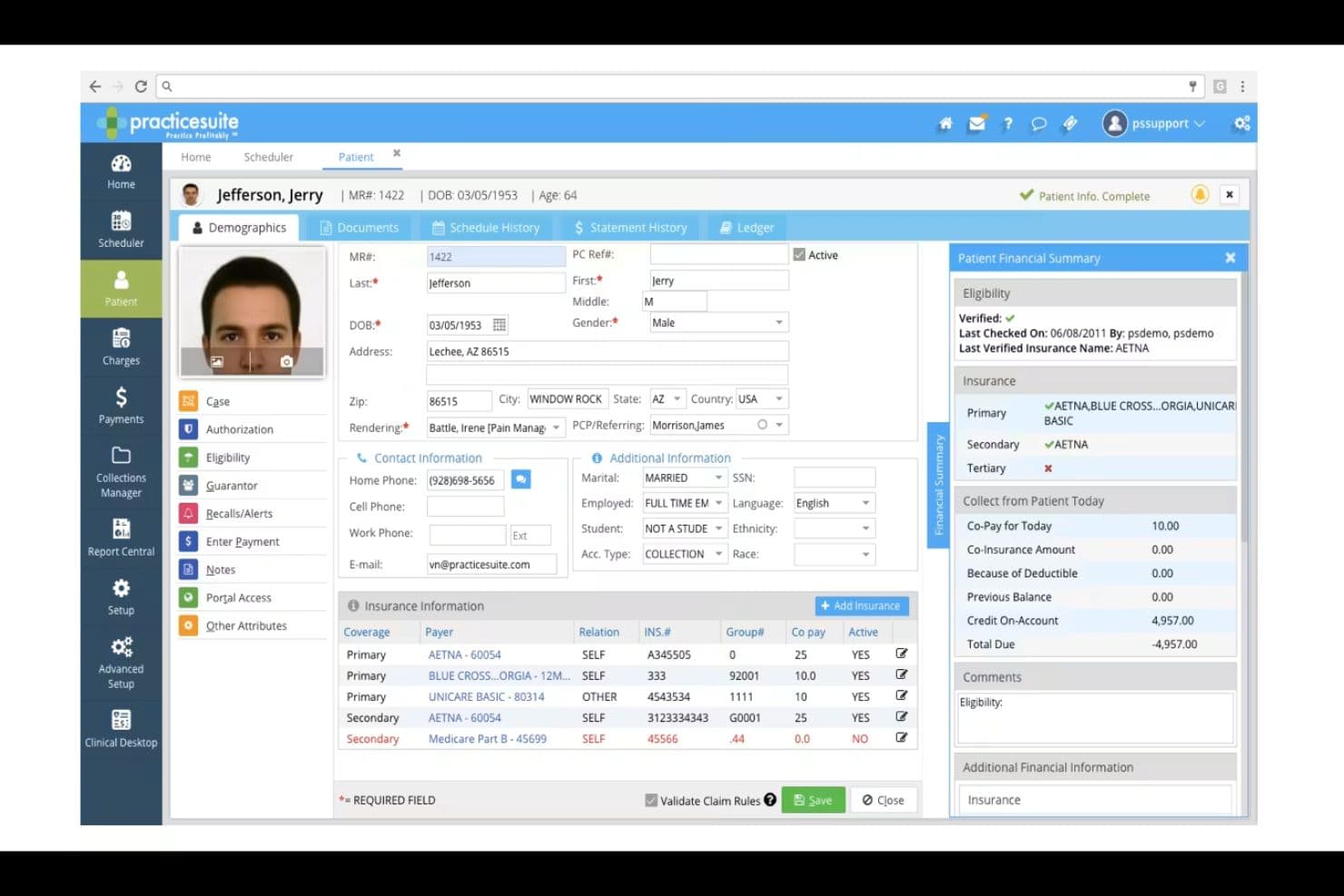
PracticeSuite patient dashboard for managing demographics, insurance details, eligibility, and financial summaries. PracticeSuite is a medical billing and practice management solution designed for internal medicine groups that need electronic claims processing, automated coding support, payment posting, patient statements, denial tracking, and insurance eligibility tools.
Who Is PracticeSuite Best For?
PracticeSuite suits multi-location internal medicine practices and billing teams seeking centralized oversight of claims, payments, and patient accounts.
Why I Picked PracticeSuite
I picked PracticeSuite as one of the best because I can centralize billing for multi-location internal medicine groups, automate insurance eligibility and payment posting, and manage denials with shared worklists across all sites.
PracticeSuite Key Features
- Customizable charge posting workflows: Set up specialty-specific templates for charge entry based on internal medicine coding needs.
- Real-time coding validation: Flag coding errors instantly during claim creation using built-in ICD-10, CPT, and NCCI logic.
- Batch electronic statement generation: Produce and send patient invoices in bulk directly from the billing module.
- Integrated denial analytics dashboard: Monitor denial trends and payer performance with detailed interactive reporting.
PracticeSuite Integrations
PracticeSuite offers native integrations with Change Healthcare, Availity, Office Ally, Stripe, Square, and its own EHR. An API is available for custom integrations.
Pros and Cons
Pros:
- Customizable charge entry for internal medicine
- Detailed denial management and tracking tools
- Centralizes billing across multi-site practices
Cons:
- Customer support response may be delayed
- Interface can feel outdated
Learn more about PracticeSuite: Best for integrated mobile billing features
- Free demo available
- Pricing upon request
Visit WebsiteCustomer Rating:3.9/5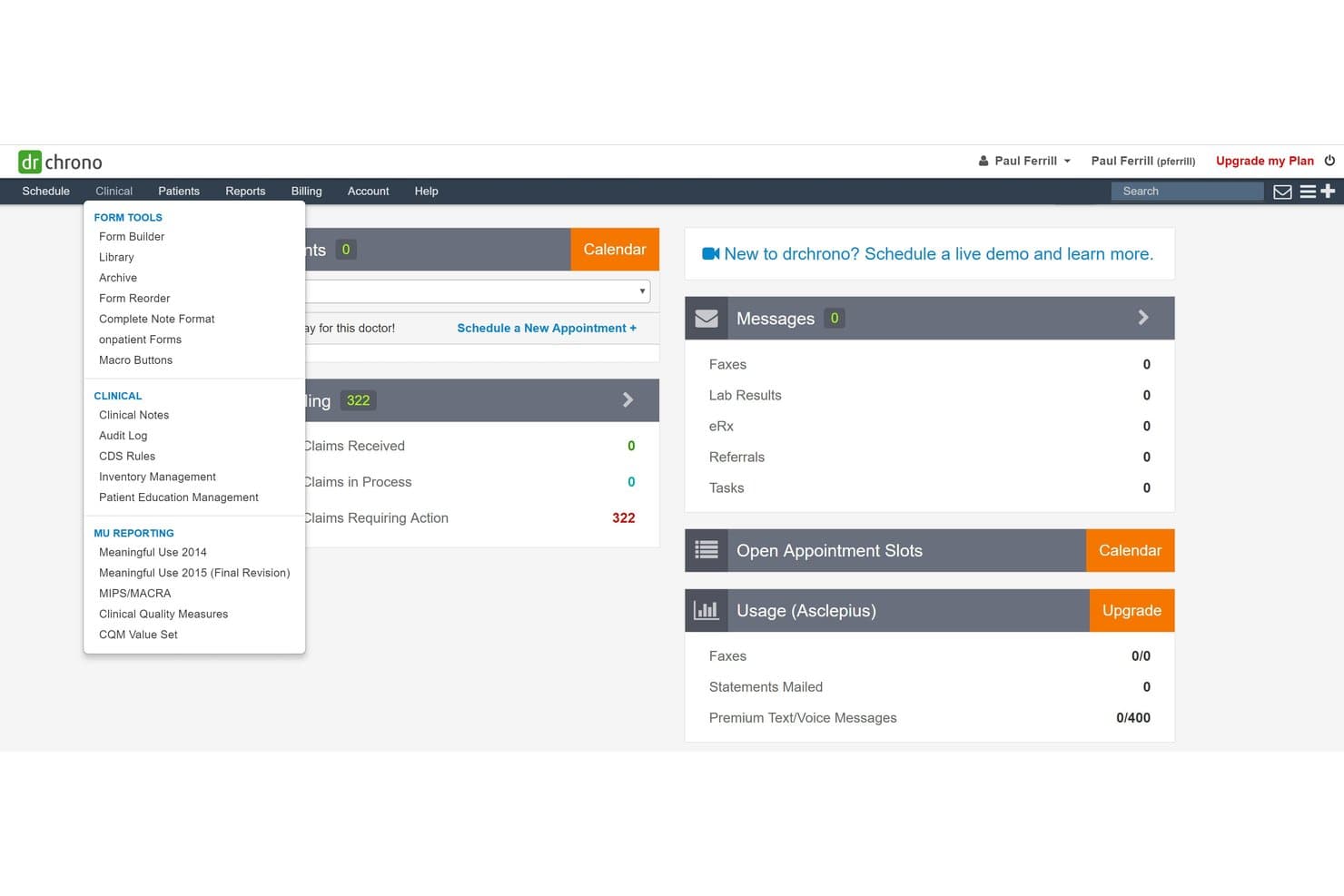
DrChrono offers a Clinical dropdown menu with billing-related tools including Claims Received, Claims in Process, and Claims Requiring Action visible on the dashboard. DrChrono is a mobile-centric medical billing and EHR platform designed for internal medicine practices, offering features for claims management, coding, insurance verification, payment posting, denial tracking, and patient billing.
Who Is DrChrono Best For?
Internal medicine practices and billing managers who need integrated mobile tools for claims and payment workflows.
Why I Picked DrChrono
I picked DrChrono as one of the best because I can manage claims and payment tasks directly from my phone or iPad. I like having mobile charge entry at the point of care and being able to review claim status in real time between patient visits.
DrChrono Key Features
- Real-time insurance eligibility checks: Instantly verifies patient insurance status and benefit details before appointments.
- ICD-10 and CPT coding support: Enables lookup and validation of codes needed for internal medicine billing.
- ERA auto-posting: Automatically posts payer payments and updates patient balances from 835 files.
- Denial and rejection dashboard: Displays reason codes and status for all denied or rejected claims.
DrChrono Integrations
DrChrono offers native integrations with Change Healthcare, Trizetto, Quest Diagnostics, LabCorp, Square, and Stripe. An API is available for custom integrations.
Pros and Cons
Pros:
- Patient billing and payment tools included
- Real-time insurance eligibility verification
- Mobile charge capture with iPad app
Cons:
- Coding assistance less advanced than RCM platforms
- Denial management lacks automated workflows
Learn more about DrChrono: Best specialty-specific documentation tools
- Free demo available
- Pricing upon request
Visit WebsiteCustomer Rating:3.7/5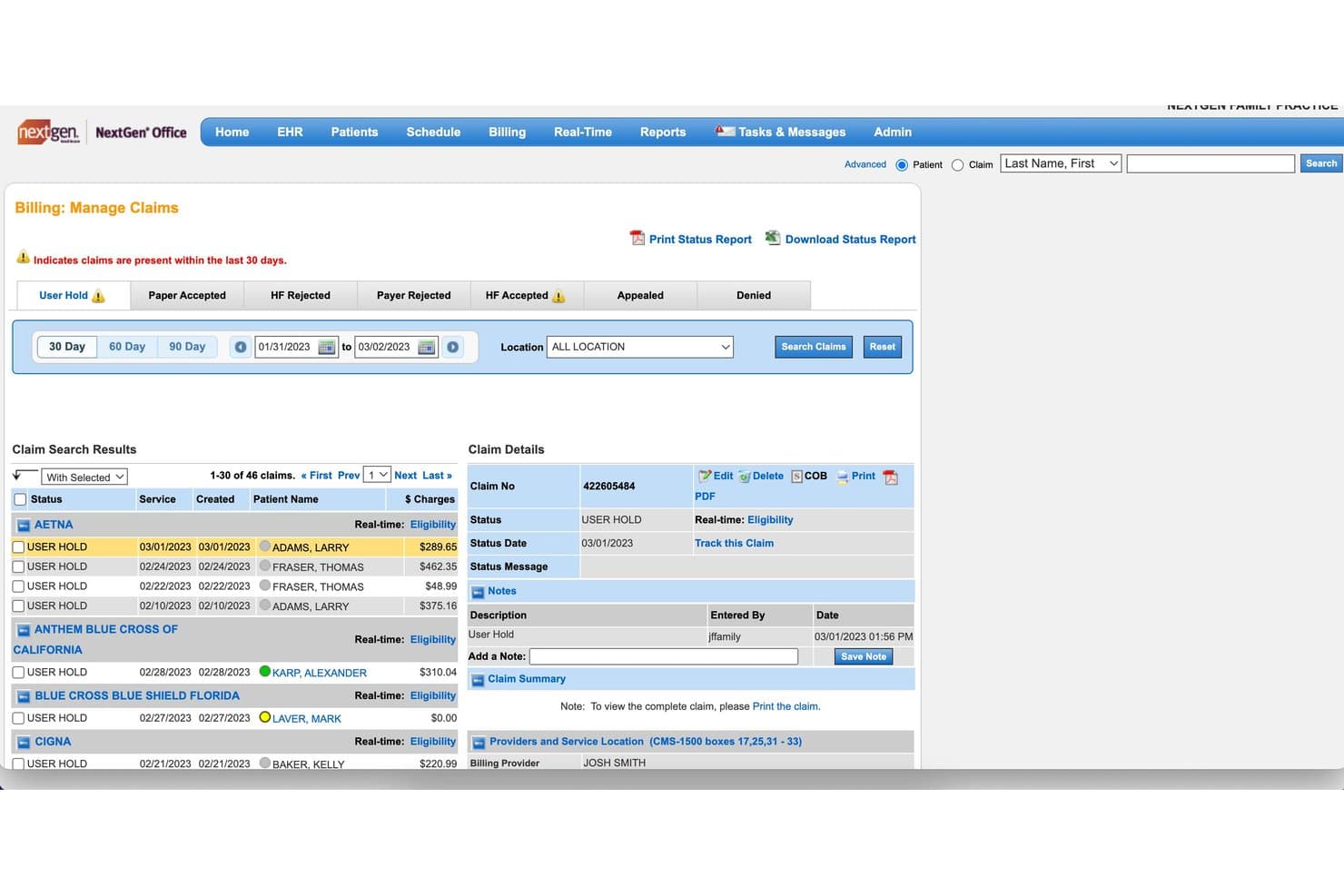
NextGen Healthcare offers a Manage Claims interface that displays claim statuses, patient charges, and detailed claim information for internal medicine billing workflows. NextGen Healthcare is an integrated EHR and practice management platform designed for internal medicine billing, combining electronic claims management, specialty-specific code support, eligibility verification, payment posting, and patient billing workflows.
Who Is NextGen Healthcare Best For?
Suited to medium and large internal medicine practices that need integrated documentation and billing tailored to specialty-specific workflows.
Why I Picked NextGen Healthcare
I picked NextGen Healthcare because it delivers specialty-specific documentation tools built for internal medicine billing. I rely on its tailored encounter templates, automated code validation, and real-time claim scrubbing to match unique specialty requirements.
NextGen Healthcare Key Features
- Automated insurance eligibility checks: Validate patient coverage and benefits before every visit within the billing workflow.
- Integrated patient payment portal: Collect copays and balances online with direct posting to patient accounts.
- Electronic remittance advice (ERA) posting: Apply payments and adjustments from ERAs directly to claims for real-time reconciliation.
- Denial management dashboard: Track, sort, and resolve denied claims by payer, reason, or aging status from a centralized view.
NextGen Healthcare Integrations
NextGen Healthcare offers native integrations with Change Healthcare, Availity, Quest Diagnostics, LabCorp, and Surescripts, and provides an API for custom integrations.
Pros and Cons
Pros:
- Real-time insurance eligibility verification
- Automated claim scrubbing for specialty billing
- Advanced encounter templates for internal medicine
Cons:
- Custom workflow changes often require vendor support
- Interface can overwhelm new billers
Learn more about NextGen Healthcare: Best for customizable workflow automation
- Free demo available
- Pricing upon request
Visit WebsiteCustomer Rating:3.6/5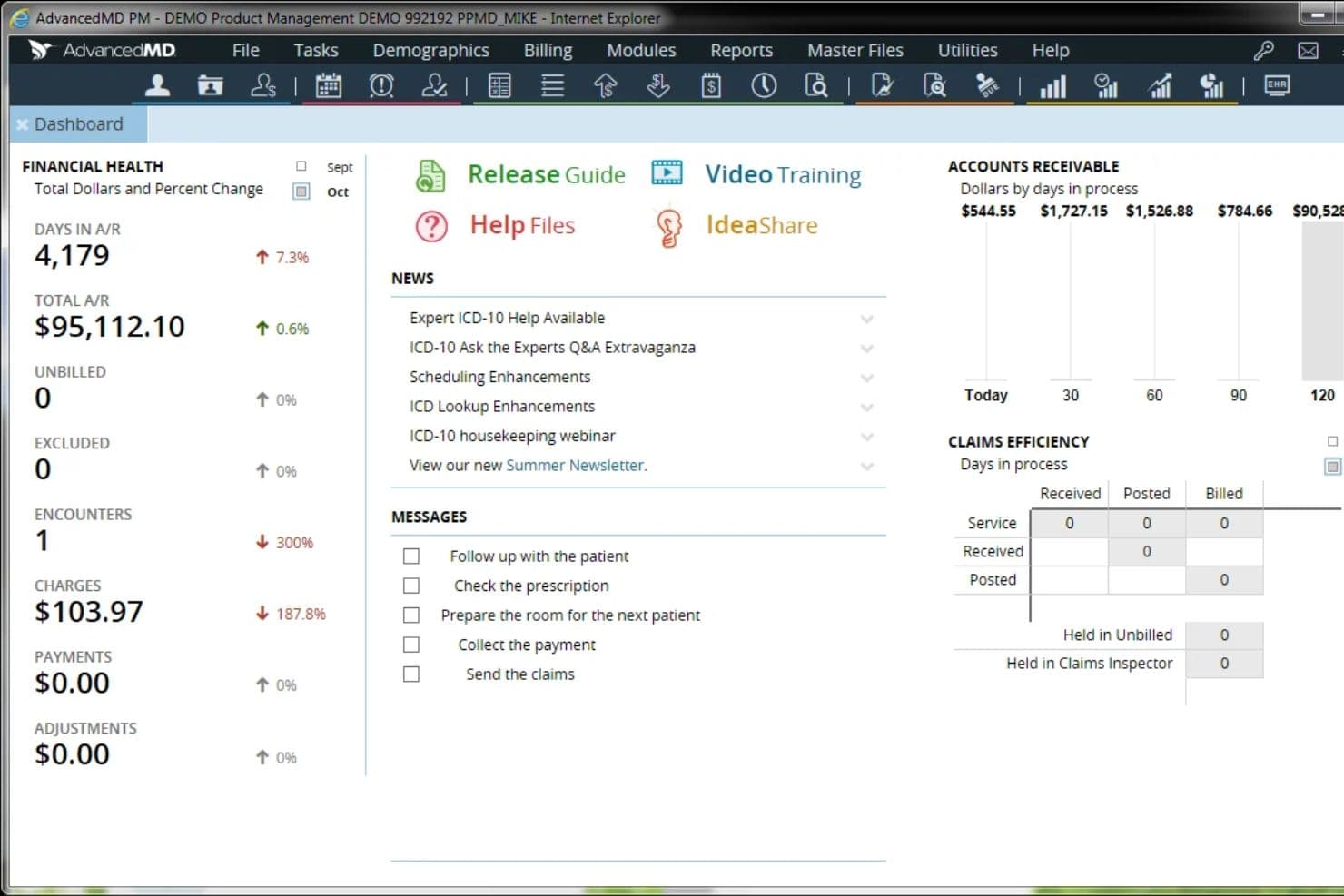
AdvancedMD dashboard showing financial health, accounts receivable, claims efficiency, and practice messages. AdvancedMD is a cloud-based internal medicine billing software that connects EHR, patient scheduling, customizable claims automation, and billing management for medical practices that want a single, integrated workflow.
Who Is AdvancedMD Best For?
Internal medicine practices and billing managers seeking a cloud-based solution that supports complex billing needs and customizable workflow structures.
Why I Picked AdvancedMD
I picked AdvancedMD as one of the best because I can set up tailored billing and claims workflows for internal medicine, automate real-time eligibility checks, and use built-in claims scrubbing that reduces manual errors for my team.
AdvancedMD Key Features
- Integrated EHR and billing platform: Connects clinical documentation, scheduling, and billing in a unified environment.
- Annual ICD-10 and CPT code updates: Automatically applies the latest internal medicine codes each year.
- Automated patient statement generation: Sends bills by mail, email, or text based on configured preferences.
- Custom financial and operational reporting: Generates recurring A/R, denial, and payer performance reports tailored to practice needs.
AdvancedMD Integrations
Native integrations are not clearly documented. AdvancedMD offers an API for custom integrations.
Pros and Cons
Pros:
- Flexible billing options
- Good for revenue visibility
- Strong claims automation
Cons:
- Costs can vary by setup
- May feel complex for smaller teams
 Best integrated revenue analytics suite
- Free demo available
- Pricing upon request
Visit WebsiteCustomer Rating:3.4/5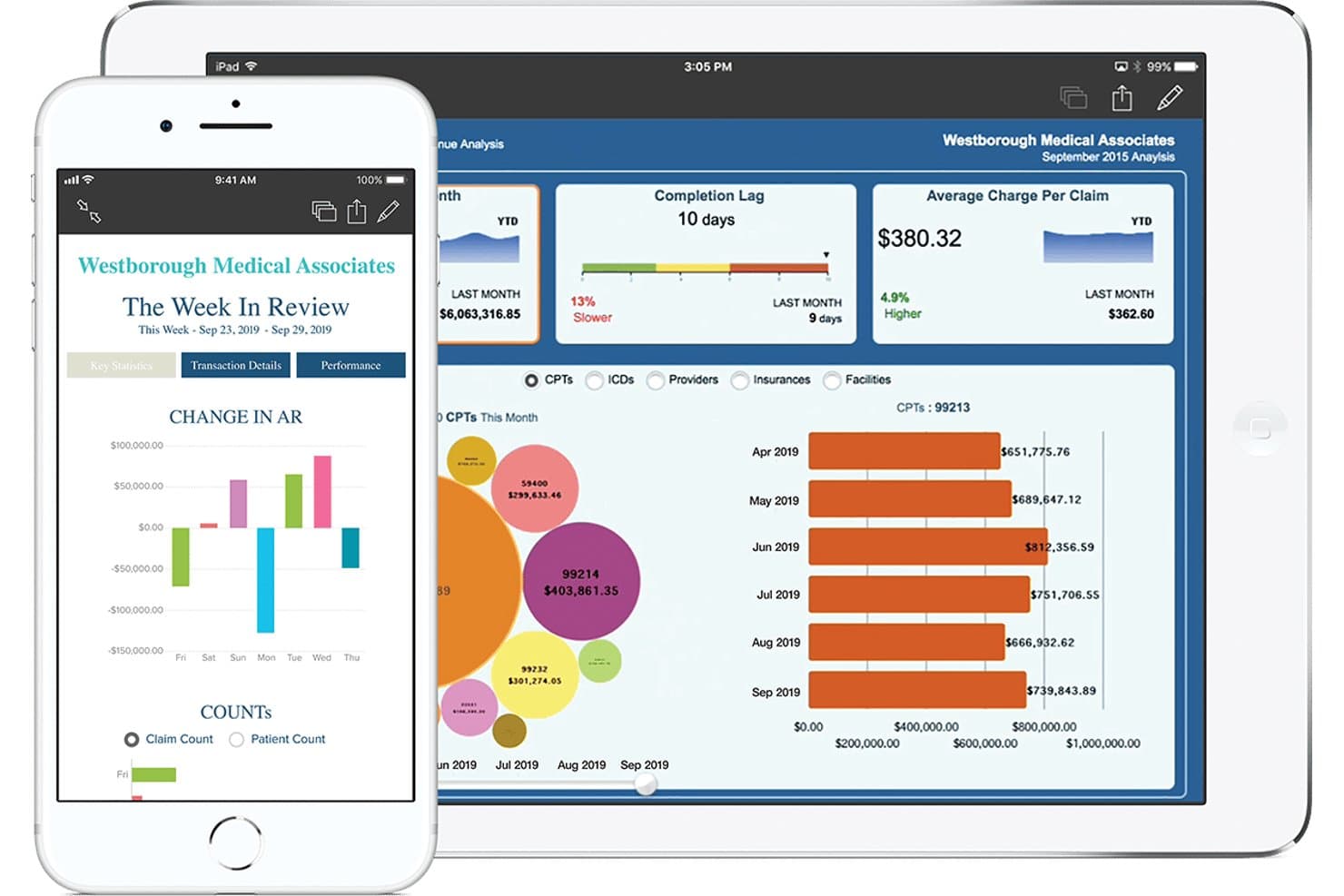
eClinicalWorks offers a revenue cycle management dashboard displaying CPT billing data, AR changes, completion lag, and average charge per claim on both tablet and smartphone. eClinicalWorks is a revenue cycle management software that offers claims automation, medical coding support, insurance eligibility checks, payment posting, denial tracking, and patient billing features designed for internal medicine billing requirements.
Who Is eClinicalWorks Best For?
Internal medicine billing managers and multi-provider practices that need full integration between EHR and revenue cycle management.
Why I Picked eClinicalWorks
I picked eClinicalWorks as one of the best because its integrated revenue analytics suite lets me track key A/R and denial metrics in real time. My team uses the system’s dashboards and intelligent claim scrubbing to reduce denials and highlight payer trends specific to internal medicine billing.
eClinicalWorks Key Features
- Automated code validation: Checks internal medicine CPT and ICD entries for errors before claim submission.
- Patient payment portal: Lets patients view and pay statements online or in the office.
- Eligibility verification tool: Confirms insurance coverage and benefits in real time for each visit.
- Custom denial work queues: Assigns denied claims to the right billing staff for rapid follow-up and correction.
eClinicalWorks Integrations
eClinicalWorks offers native integrations with the eClinicalWorks EHR and Practice Management system. OpenConnect enables multisite billing and central business office workflows across supported EHR platforms. An API is available for custom integrations.
Pros and Cons
Pros:
- Dedicated E/M code validation for internal medicine
- Real-time eligibility checks for insurance coverage
- Advanced denial tracking and correction workflows
Cons:
- Customer support response times are inconsistent
- Reporting customization is difficult for most users
Learn more about eClinicalWorks: Best cloud-based access for small practices
- Free demo available
- From $199/user/month
Visit WebsiteCustomer Rating:3.7/5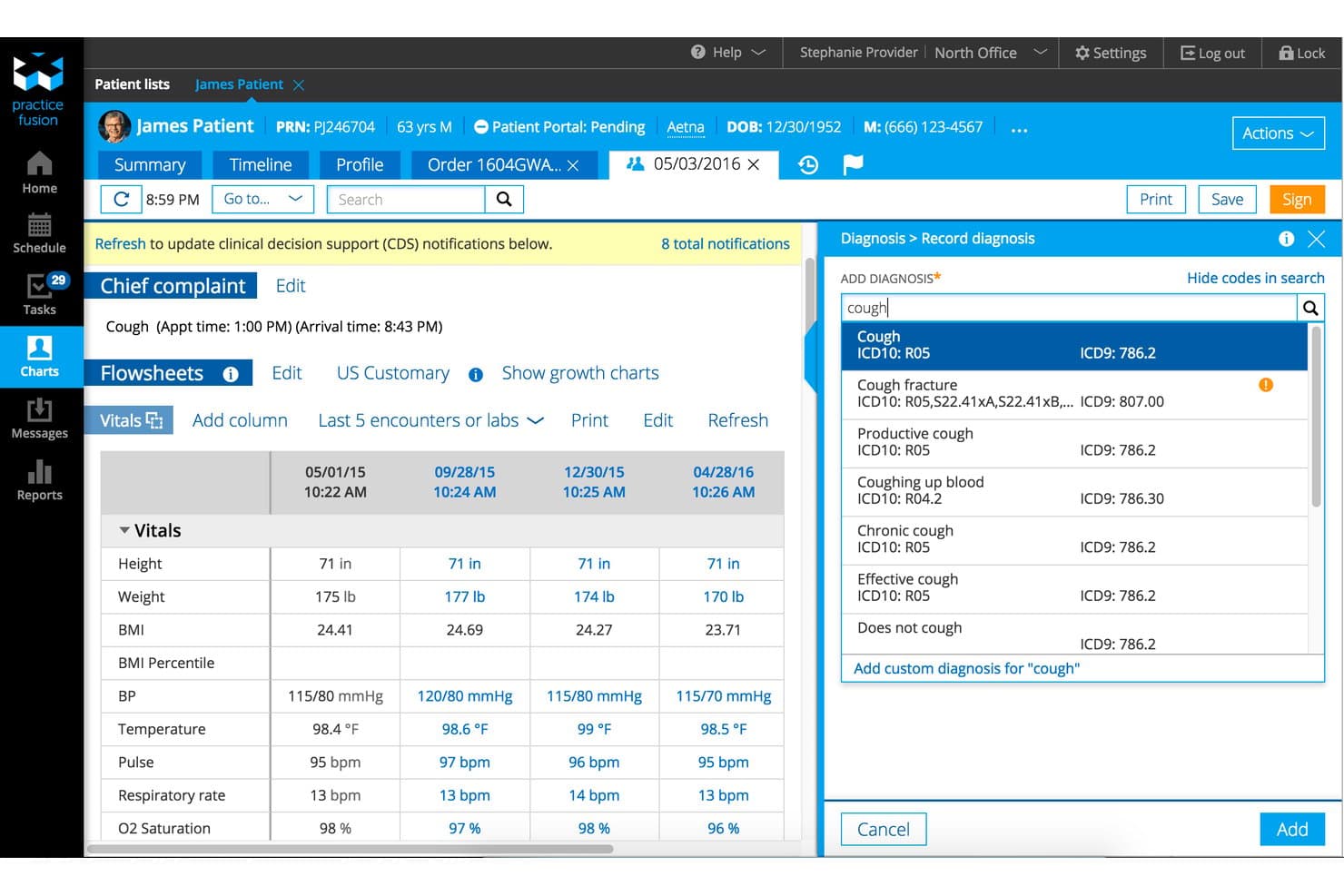
Practice Fusion offers an integrated diagnosis coding panel with ICD-10 and ICD-9 code search alongside patient vitals flowsheet for streamlined internal medicine billing. Practice Fusion is a cloud-based EHR platform that integrates with third-party billing systems to support claims management, coding, eligibility verification, and revenue cycle tasks for internal medicine practices.
Who Is Practice Fusion Best For?
Small internal medicine practices and independent providers needing a cloud-based EHR that connects with multiple billing software options.
Why I Picked Practice Fusion
I picked Practice Fusion as one of the best because I can access a cloud-based EHR from anywhere, connect it with billing platforms my team prefers, and manage internal medicine documentation with specialty codes and templates in one place.
Practice Fusion Key Features
- Electronic superbill creation: Quickly generate superbills linked to internal medicine encounters and chart notes.
- ICD-10, CPT, and HCPCS code search: Access and insert relevant billing codes during charting.
- Audit trail tracking: View detailed logs of user actions for HIPAA compliance and billing accuracy.
- Integrated e-prescribing: Send prescriptions electronically, syncing data for charge capture and patient records.
Practice Fusion Integrations
Practice Fusion offers native integrations with billing and practice management systems including AdvancedMD, Kareo, CollaborateMD, NueMD, AccuFund, and iPatientCare. An API is available for custom integrations.
Pros and Cons
Pros:
- Access from any device with internet
- Quick chart-to-claim superbill creation
- Specialty templates for internal medicine documentation
Cons:
- Billing workflows depend on third-party systems
- No built-in claims processing tools
Learn more about Practice Fusion: Best real-time claims tracking
- Free demo available
- Pricing upon request
Visit WebsiteCustomer Rating:3.6/5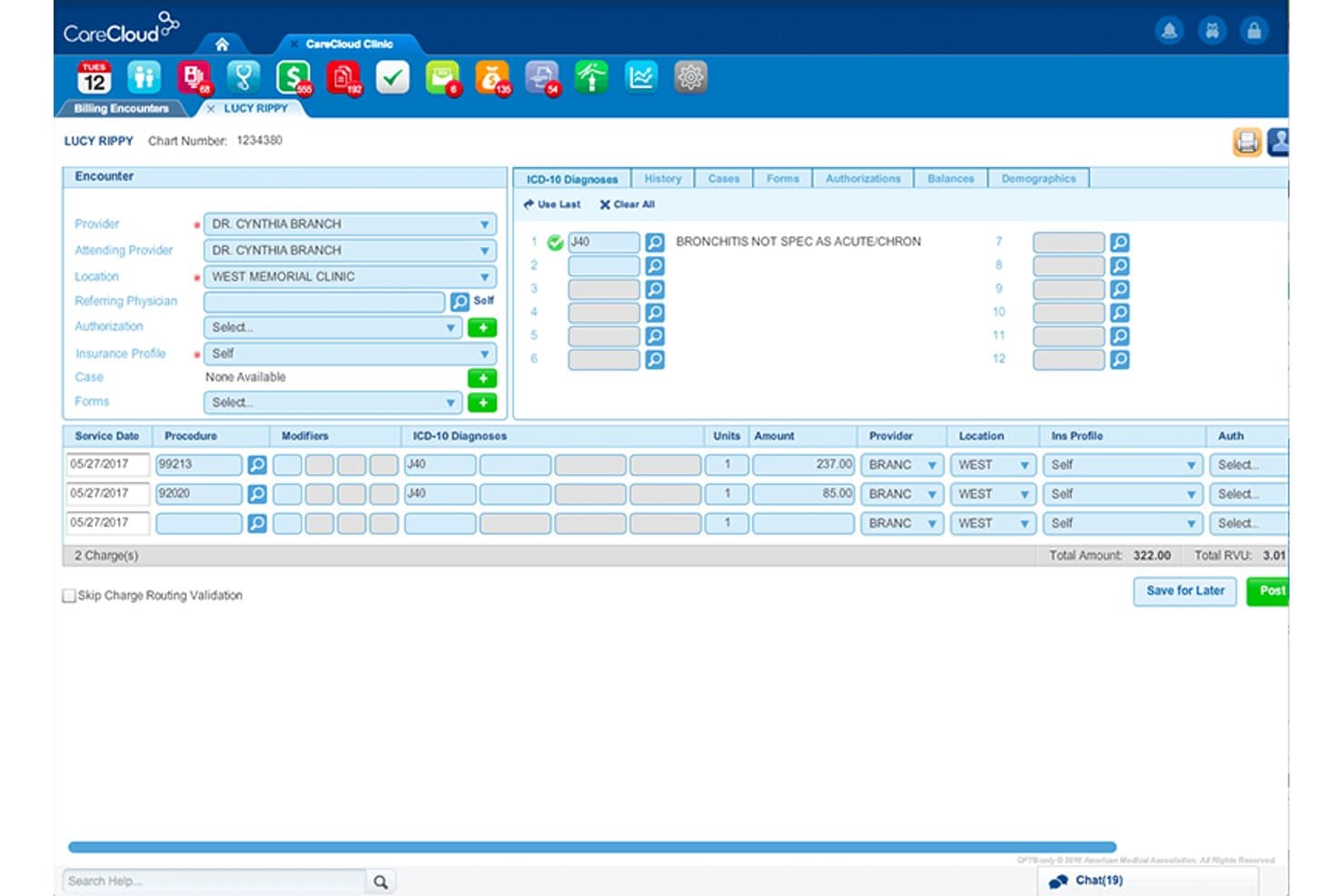
CareCloud offers a detailed billing encounter screen with ICD-10 diagnosis coding, procedure charges, and total amount tracking for internal medicine practices. CareCloud is a cloud-based internal medicine billing platform offering advanced claims management, integrated coding tools, automated eligibility checks, real-time A/R tracking, and a unified patient billing and payments experience.
Who Is CareCloud Best For?
CareCloud is a strong choice for internal medicine practices and billing teams that need detailed claims tracking and integrated billing across multiple payers.
Why I Picked CareCloud
I picked CareCloud as one of the best because its real-time claims tracking shows every claim status instantly and alerts me to payer updates. I can view denial codes and track multi-payer claims all in one dashboard.
CareCloud Key Features
- ICD-10 and CPT code validation: Provides built-in coding tools to check and validate internal medicine procedure codes.
- Automated eligibility verification: Lets you confirm patient insurance eligibility and benefits in real time before appointments.
- ERA auto-posting with reconciliation: Matches incoming electronic remittance advice with posted payments and patient balances.
- Patient statement generation: Creates electronic and paper statements and supports payment collection both online and in-office.
CareCloud Integrations
CareCloud offers native integrations with TriZetto, LabCorp, and Quest Diagnostics, supports clearinghouse and pharmacy interfaces, and provides an API for custom integrations.
Pros and Cons
Pros:
- Automated eligibility checks and patient statements
- Advanced coding and specialty rules built in
- Real-time claim and denial status updates
Cons:
- Custom workflow setup can take extra time
- Onboarding requires structured staff training
Learn more about CareCloud:
Outro software de faturação para medicina interna
\u003cspan style=\u0022font-weight: 400;\u0022\u003eEis algumas opções adicionais de software de faturação para medicina interna que não entraram na minha lista restrita, mas que vale a pena conhecer: \u003c/span\u003e
- 11CureMDBest centralized denial management workflow
- 12BillFlashBest automated patient statement delivery
- 13RXNTBest e-prescribing and billing in one platform
- 14WaystarBest AI-powered claims scrubbing tools
- 15Office Ally EHRBest flexible clearinghouse integration
How I Evaluate Internal Medicine Billing Software
My evaluation has two layers: the core functionality—claims management, coding support, eligibility verification—every tool must offer, and the differentiators that set the best options apart.
Core Functionality (Table Stakes for This List)
When I'm selecting tools for my list, I rank each one on a scale from 0 (does not offer the functionality) to 5 (excels in this area) for each core functionality listed below. Then, I calculate the tool's total score into a percentage. Each tool needs to achieve a minimum total score of 65% to be considered for inclusion.
- Claims Management: I evaluate how well each tool handles electronic claim generation, scrubbing, and submission across Medicare, Medicaid, and commercial payers that internal medicine practices bill most.
- Medical Coding Support: Each tool should offer ICD-10, CPT, HCPCS, and E/M code validation with NCCI edits, especially for encounters like chronic care management and annual wellness visits.
- Insurance Eligibility Verification: I look for real-time eligibility checks that return copay, deductible, and benefits detail before the patient arrives, since coverage gaps drive a large share of denials.
- Payment Posting & ERA: Automatic posting from ERA (835) files with reconciliation against submitted claims matters here, along with the ability to trigger secondary claims when needed.
- Denial Management & A/R: I check for denial tracking with reason code analytics, A/R aging reports, and follow-up workflows that help billing staff prioritize high-value claims sitting in queue.
- Patient Billing & Statements: The tool should support automated statement cycles, online payment options, and payment plans to help collect rising patient balances from high-deductible plans.
Once I have a list of tools that meet the criteria, I consider what sets each platform apart.
Differentiating Factors (What Sets Vendors Apart)
Here's how I compare and contrast different vendors:
Standout Features
Preloaded code libraries for CCM, AWV, and preventive services cut down on manual lookup and coding errors specific to internal medicine encounters. Value-based care reporting is another area I evaluate closely—native MIPS and MACRA support helps internists capture quality bonuses tied to chronic disease management. I also look at patient payment portals. Features like text-to-pay and payment plans make a real difference as patient financial responsibility grows under high-deductible plans.
Beyond Features
EHR integration matters a lot here. I check whether each tool offers bidirectional data flow with platforms like Epic, athenahealth, or Elation so charge capture from clinical documentation happens without duplicate entry. Clearinghouse connectivity is another key factor—internal medicine practices with Medicare-heavy panels need automated secondary claim submission and broad payer reach. I also consider the support model, since some practices need full-service RCM outsourcing while others just want self-service software with knowledgeable onboarding specialists.
Como escolher um software de faturação para medicina interna
É fácil perder-se em listas extensas de funcionalidades e estruturas de preços complexas. Para o ajudar a manter o foco enquanto percorre o seu processo específico de seleção de software, apresentamos uma lista de verificação dos fatores a ter em conta:
| Fator | O que considerar |
| Escalabilidade | O sistema continuará a responder às suas necessidades à medida que cresce de um prestador individual para um grupo com várias localizações? |
| Integrações | Estabelece uma ligação bidirecional ao seu EHR e a outras ferramentas da clínica para garantir um fluxo de dados sem problemas? |
| Personalização | Pode adaptar os fluxos de trabalho, os modelos e os relatórios às particularidades da faturação em medicina interna? |
| Facilidade de utilização | O pessoal da faturação e da receção adotará rapidamente a solução ou a interface criará novos obstáculos? |
| Implementação e integração inicial | Que formação, calendário e apoio à migração de dados disponibiliza o fornecedor durante a configuração? |
| Custo | Está a prever os custos de configuração, subscrição, transação e assistência? Os encargos aumentam de acordo com o volume? |
| Medidas de segurança | O fornecedor disponibiliza encriptação, registos de auditoria e controlos de acesso em conformidade com os requisitos relativos a PHI? |
| Disponibilidade do apoio | Pode contactar o apoio ao cliente durante o horário crítico para a atividade e estão incluídos recursos especializados? |
O que é um software de faturação para medicina interna?
O software de faturação para medicina interna é um sistema especializado concebido para gerir tarefas de codificação, pedidos de reembolso, pagamentos e faturação de doentes em clínicas de medicina interna. Simplifica a faturação às seguradoras e aos doentes, suporta códigos específicos da especialidade, ajuda a evitar recusas de pedidos de reembolso e assegura a conformidade com os regulamentos de saúde em vigor. Estas plataformas foram desenvolvidas para gerir os fluxos de trabalho de faturação, a combinação de entidades pagadoras e os requisitos de documentação específicos habituais nas clínicas de medicina interna.
Funcionalidades do software de faturação de medicina interna
Ao selecionar um software de faturação de medicina interna, esteja atento às seguintes funcionalidades essenciais:
- Gestão de pedidos de faturação: Automatiza a criação, validação, submissão eletrónica e acompanhamento de pedidos à Medicare, Medicaid e a vários pagadores comerciais.
- Suporte à codificação médica: Permite aceder a bibliotecas atualizadas de códigos ICD-10, CPT, HCPCS e E/M, com validação integrada para reduzir erros de codificação.
- Verificação da elegibilidade do seguro: Permite verificar em tempo real a cobertura e os benefícios do paciente no momento da marcação ou do registo de entrada, evitando recusas relacionadas com cobertura inativa ou insuficiente.
- Registo de pagamentos e ERA: Regista automaticamente os pagamentos provenientes de ficheiros de remessa (835 ERA) e reconcilia-os com os pedidos e as contas dos pacientes, reduzindo a introdução manual de dados.
- Gestão de recusas e acompanhamento de contas a receber: Acompanha os pedidos recusados através de análises, organiza fluxos de trabalho de acompanhamento e gera relatórios de antiguidade das contas a receber para melhorar as cobranças.
- Faturação e extratos dos pacientes: Gera faturas, gere copagamentos e franquias e suporta extratos eletrónicos e em papel dos pacientes, com opções de pagamento integradas.
- Portal de pagamentos dos pacientes: Disponibiliza o pagamento de faturas online, pagamento por mensagem de texto, configuração de planos de pagamento e extratos automatizados para melhorar as cobranças e facilitar a vida dos pacientes.
- Integração com o EHR e a gestão do consultório: Estabelece uma ligação perfeita com o seu registo eletrónico de saúde e com o software de marcações, minimizando a duplicação da introdução de dados e otimizando o fluxo de trabalho.
- Relatórios e análises: Fornece relatórios financeiros, operacionais e de conformidade para apoiar a tomada de decisões e o acompanhamento do desempenho em todo o ciclo de receitas.
- Controlos de segurança e conformidade: Garante a conformidade com a HIPAA através de armazenamento de dados encriptado, controlos de acesso e registos de auditoria regulares para proteger as informações de saúde dos pacientes.
Benefícios do software de faturação de medicina interna
A implementação de um software de faturação de medicina interna proporciona vários benefícios à sua equipa e à sua atividade. Eis alguns dos benefícios que pode esperar:
- Redução das recusas de pedidos: A validação automatizada, as bibliotecas de códigos da especialidade e as verificações de elegibilidade em tempo real reduzem o risco de pedidos recusados ou atrasados.
- Reembolsos mais rápidos: A submissão eletrónica e o registo automático através de ERA aceleram os ciclos de pagamento, tanto dos seguradores como dos pacientes.
- Codificação precisa: As ferramentas integradas de codificação ICD-10, CPT e E/M ajudam o seu consultório a registar todos os encargos elegíveis e a minimizar os erros de codificação.
- Melhoria das cobranças aos pacientes: Os portais de pagamento online, as opções de planos de pagamento e os extratos de faturação flexíveis facilitam o pagamento dos saldos pelos pacientes.
- Supervisão baseada em dados: Os painéis de relatórios financeiros e de contas a receber permitem acompanhar as cobranças, identificar estrangulamentos e melhorar o desempenho do ciclo de receitas.
- Melhoria da conformidade: Os dados encriptados, as permissões baseadas em funções e os registos de auditoria reduzem os riscos relacionados com a HIPAA e aumentam a confiança na conformidade regulamentar.
- Integração perfeita do fluxo de trabalho: As integrações com o EHR e com a gestão do consultório ajudam a minimizar a duplicação da introdução de dados e o trabalho manual da equipa.
Custos e preços do software de faturação de medicina interna
A seleção de um software de faturação de medicina interna requer uma compreensão dos vários modelos de preços e planos disponíveis. Os custos variam consoante as funcionalidades, o tamanho da equipa, os complementos, entre outros fatores. A tabela abaixo resume os planos mais comuns, os respetivos preços médios e as funcionalidades normalmente incluídas nas soluções de software de faturação de medicina interna:
Tabela de comparação de planos de software de faturação de medicina interna
| Tipo de plano | Preço médio | Funcionalidades comuns |
| Plano gratuito | $0 | Gestão básica de pedidos, pesquisa limitada de códigos, acompanhamento simples de contas a receber e registo manual de pagamentos. |
| Plano pessoal | $50-$150/mês | Submissão eletrónica de pedidos, verificação básica da elegibilidade, relatórios introdutórios e opções limitadas de faturação dos pacientes. |
| Plano empresarial | $200-$400/mês | Suporte avançado à codificação, registo de pagamentos ERA, verificação da elegibilidade em tempo real, gestão de recusas e integração com EHR/gestão do consultório. |
| Plano empresarial de grande escala | $500+/mês | Automatização completa, fluxos de trabalho personalizados, suporte para várias localizações, análises avançadas, suporte premium e ferramentas de conformidade melhoradas. |
Perguntas frequentes sobre software de faturação de medicina interna
Eis algumas respostas a perguntas frequentes sobre software de faturação de medicina interna: