

O software de faturação médica integrado liga os seus sistemas clínicos, administrativos e de faturação, para que possa gerir reclamações, pagamentos e registos de pacientes num só lugar. Se procura formas de reduzir a introdução manual de dados, diminuir os erros de faturação e manter a sua equipa alinhada, a plataforma integrada certa pode fazer uma grande diferença. Esta lista apresenta opções práticas adaptadas a ambientes médicos reais — quer trabalhe numa clínica individual, num grupo ou numa operação com várias unidades — para que possa escolher com confiança um sistema adequado à sua forma de trabalhar.
Why Trust Our Software Recommendations
6,700+
Reviews
20
Industry experts
16+
Evaluation factors
14
Years
Our team has been testing and reviewing software since 2012. As medical practice leaders ourselves, we know how difficult—and important—it is to choose the right software.
For this guide, we evaluated tools using hands-on testing and independent research, scoring tools using our selection criteria.
Our reviews reflect our human editorial judgment, not a sales pitch.
Tabela comparativa de software de faturação médica integrado
Esta tabela comparativa resume os detalhes de preços das minhas principais seleções de software de faturação médica integrado:
| Tool | Best For | Trial Info | Price | ||
|---|---|---|---|---|---|
| 1 | Best multi-location management tools | Free demo available | Pricing upon request | Website | |
| 2 | Best built-in billing for smaller medical offices | Free demo available | From $199/user/month | Website | |
| 3 | Best dedicated support for complex specialties | Free demo available | Pricing upon request | Website | |
| 4 | Best insurance verification integration | Free demo available | Pricing upon request | Website | |
| 5 | Best advanced analytics for billing optimization | Free demo available | Pricing upon request | Website | |
| 6 | Best integrated billing and payments dashboard | Free demo available | Pricing upon request | Website | |
| 7 | Best mobile-first billing experience | Free demo available | Pricing upon request | Website | |
| 8 | Best for scalable healthcare group operations | Not available | Pricing upon request | Website | |
| 9 | Best all-in-one workflow automation | Free demo available | Pricing upon request | Website | |
| 10 | Best customizable claims management | Free demo available | Pricing upon request | Website |


Análises do melhor software de faturação médica integrado
Apresento abaixo os meus resumos detalhados do melhor software de faturação médica integrado que entrou na minha seleção. As minhas análises apresentam uma perspetiva detalhada sobre as funcionalidades, integrações e melhores casos de utilização de cada software, para o ajudar a encontrar a melhor opção para si.
 Best multi-location management tools
- Free demo available
- Pricing upon request
Visit WebsiteCustomer Rating:4.1/5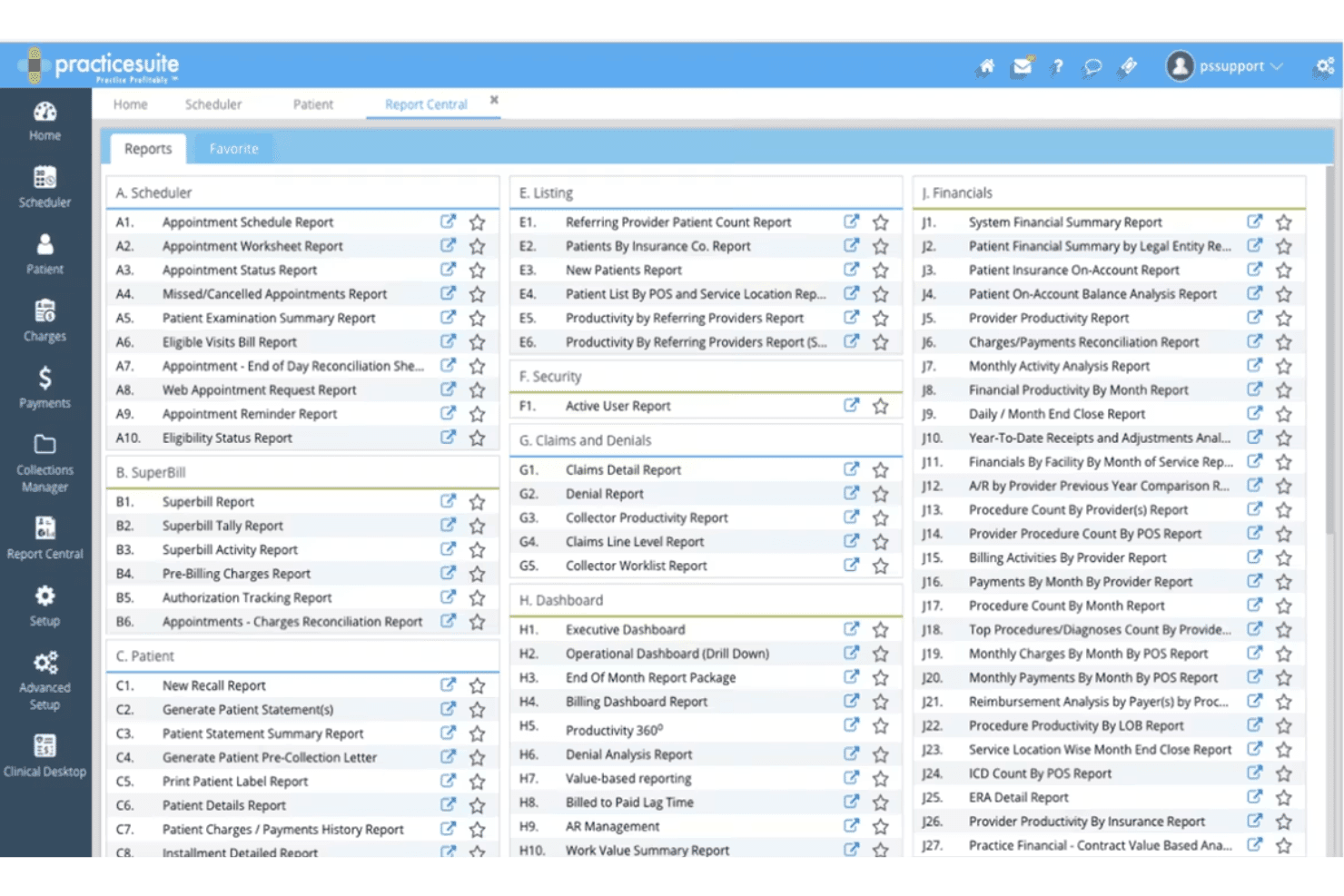
PracticeSuite Report Center highlights service location reports. PracticeSuite is a cloud-based medical billing platform that unifies claims management, RCM, EHR, practice management, scheduling, and patient billing across a single modular system built for practices of all sizes.
Who Is PracticeSuite Best For?
PracticeSuite suits physician groups and third-party billing companies that manage billing and RCM workflows across multiple providers or locations from a single platform.
Why I Picked PracticeSuite
I picked PracticeSuite as one of the best because its Central Billing Office gives me a single sign-on to handle denials, mass claim corrections, and payment posting across all client accounts without jumping between systems. Report Central adds another layer of control, with granular security settings that restrict data access by location, specific days, or hours. That kind of location-level configuration matters when your billing staff spans multiple sites with different access needs.
PracticeSuite Key Features
- EHR integration: Syncs billing and patient data across over 60 clinical specialties.
- AI denial intelligence: Flags claims issues before submission using AI-driven analysis.
- Scheduling module: Manages complex multi-provider and multi-specialty appointment workflows.
- Coding validation software: Validates ICD-10, CPT, and HCPCS codes for compliant charge capture.
PracticeSuite Integrations
PracticeSuite offers native integrations with Practice Fusion, Elation, Labcorp, Quest Diagnostics, and supports e-prescribing to over 70,000 pharmacies nationwide. An API is available for custom integrations.
Pros and Cons
Pros:
- Customizable reports and security by role
- AI-powered denial intelligence for claims
- Multi-location management with location-based controls
Cons:
- Complex setup for first-time configuration
- Occasional delays in customer support response
Learn more about PracticeSuite: Best built-in billing for smaller medical offices
- Free demo available
- From $199/user/month
Visit WebsiteCustomer Rating:3.7/5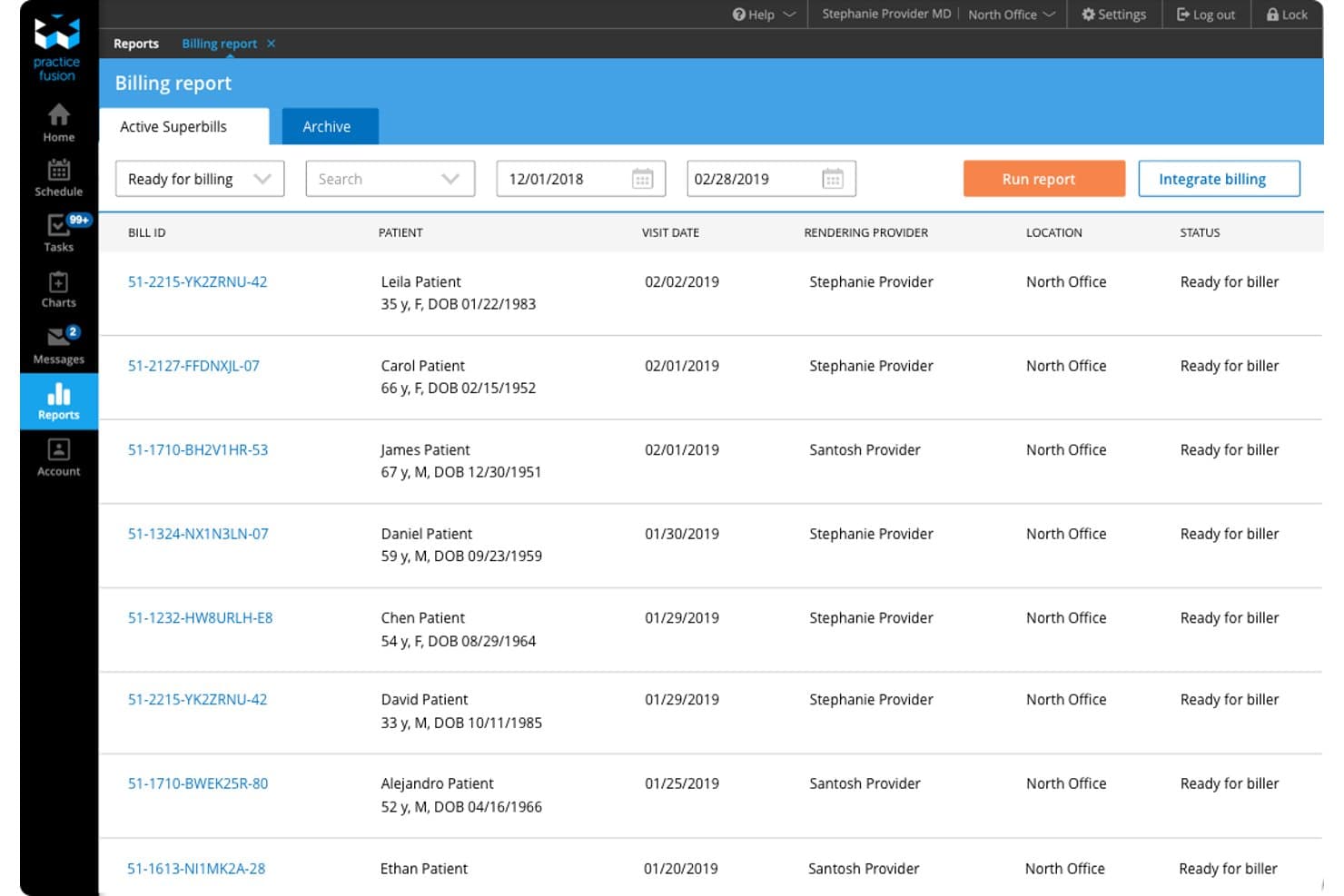
Practice Fusion offers an integrated billing report dashboard that displays active superbills with patient details, visit dates, rendering providers, and billing statuses. Practice Fusion is a cloud-based EHR platform for independent practices that combines clinical charting, scheduling, ePrescribing, and fully integrated billing services—including claims scrubbing, denial management, and payment posting—in a single system.
Who Is Practice Fusion Best For?
Practice Fusion is a strong fit for solo providers and small independent practices that want a single vendor for both EHR and billing services.
Why I Picked Practice Fusion
Practice Fusion earns its spot as one of the best on my shortlist because its billing services are genuinely native to the EHR, not a bolted-on third-party module. I like that the billing team handles everything from claims scrubbing and denial management to payment posting and payer credentialing, all pulled directly from chart data. The per-visit pricing model also makes it a practical pick for solo and small practices with variable monthly patient volume.
Practice Fusion Key Features
- Integrated ePrescribing: Send prescriptions, including controlled substances, electronically from the EHR to any pharmacy.
- Labs and imaging connectivity: Order tests and receive results directly within patient charts from hundreds of connected labs and imaging centers.
- Secure patient portal: Provide patients with 24/7 access to their health information and communication through the FollowMyHealth portal.
- Built-in clinical reporting: Generate regulatory and productivity reports using built-in dashboards for MIPS, clinical quality, and practice management.
Practice Fusion Integrations
Practice Fusion offers native integrations with FollowMyHealth for patient portal access and is natively connected to hundreds of labs and imaging centers for electronic order and result management. It also integrates with third-party billing partners like AdvancedMD and Kareo. An API is available for custom integrations.
Pros and Cons
Pros:
- E-prescribing for controlled substances supported
- Native lab and imaging integrations included
- Unified EHR, scheduling, and billing workflow
Cons:
- Billing automation less advanced than competitors
- Eligibility verification tools are limited
Learn more about Practice Fusion: Best dedicated support for complex specialties
- Free demo available
- Pricing upon request
Visit WebsiteCustomer Rating:3.6/5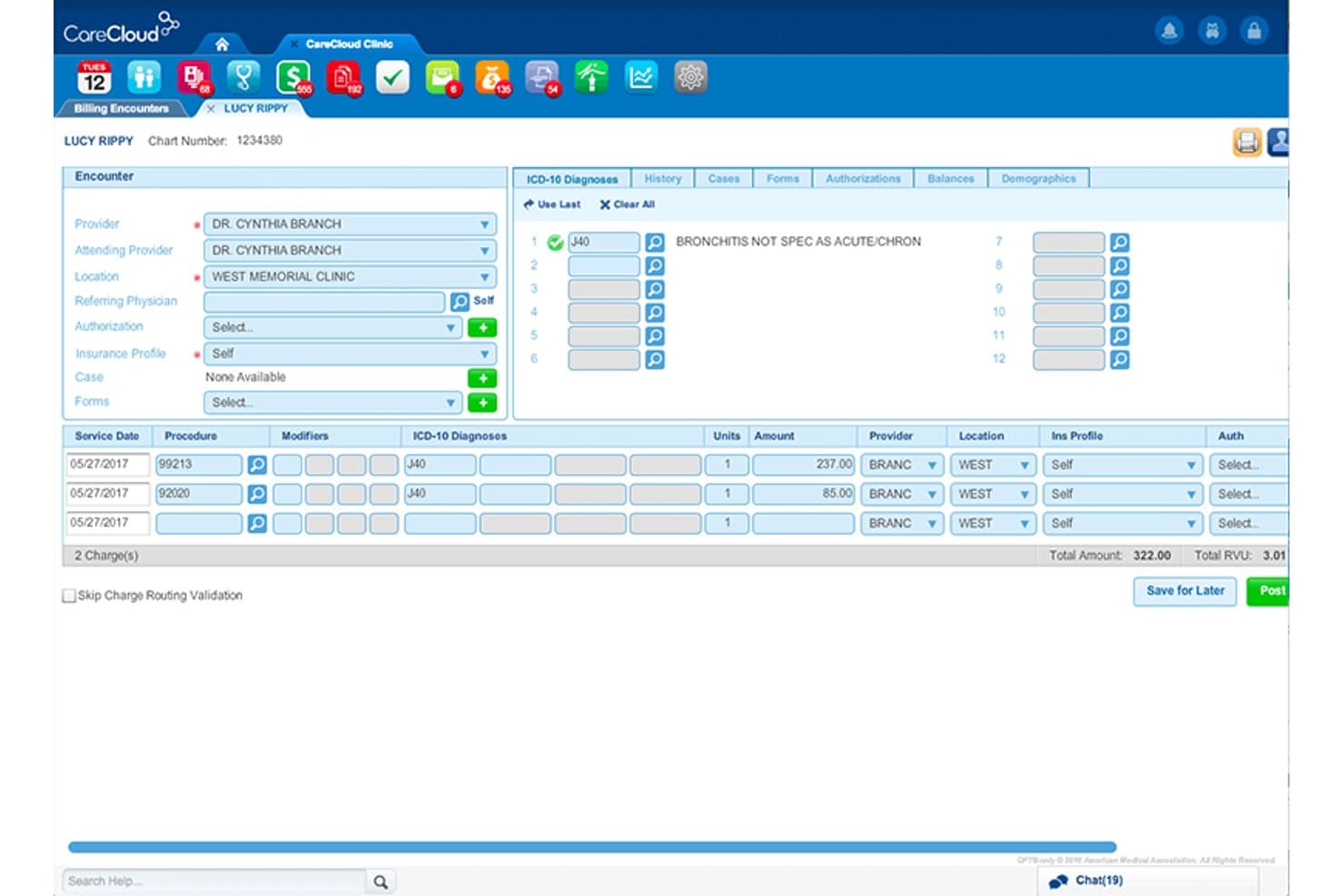
CareCloud offers an integrated billing encounter screen displaying ICD-10 diagnoses, procedure codes, charge amounts, and provider details for streamlined medical billing. CareCloud is an integrated medical billing and practice management platform that unifies EHR, claims management, coding, eligibility verification, and revenue cycle management across a single system.
Who Is CareCloud Best For?
CareCloud is a strong fit for medical practices with complex billing needs across specialty care settings, from independent practices to multi-provider groups.
Why I Picked CareCloud
I picked CareCloud as one of the best because its CollectiveIQ rules engine draws on over 180 million payer-specific billing rules to catch claim issues before submission. That matters most in specialty settings like cardiology or orthopedic surgery, where payer requirements are nuanced and denials are costly. The cirrusAI Appeals tool uses patient claim data to generate customized appeal letters, cutting manual effort on denial follow-up.
CareCloud Key Features
- Centralized billing dashboard: Manage billing activities and monitor claims status for multiple providers from one interface.
- ERA auto-posting: Automatically receive and post electronic remittance advice for faster payment reconciliation.
- Real-time eligibility verification: Instantly check patient insurance coverage and benefits before the visit.
- Patient payment portal: Allow patients to view invoices and submit payments securely online.
CareCloud Integrations
CareCloud offers native integrations with CareCloud Central (practice management), Charts (EHR), and pVerify for insurance eligibility. Additional integrations include Epic, Meditech, ICANotes, Praxis EMR, Sevocity, and Vital Interaction. An API is available for custom integrations.
Pros and Cons
Pros:
- Automated appeals generation saves RCM team time
- Built-in clearinghouse reduces need for third-party tools
- Rules engine catches specialty claim errors before submission
Cons:
- Onboarding process is often time-consuming
- Support responsiveness can be inconsistent
Learn more about CareCloud: Best insurance verification integration
- Free demo available
- Pricing upon request
Visit WebsiteCustomer Rating:3.5/5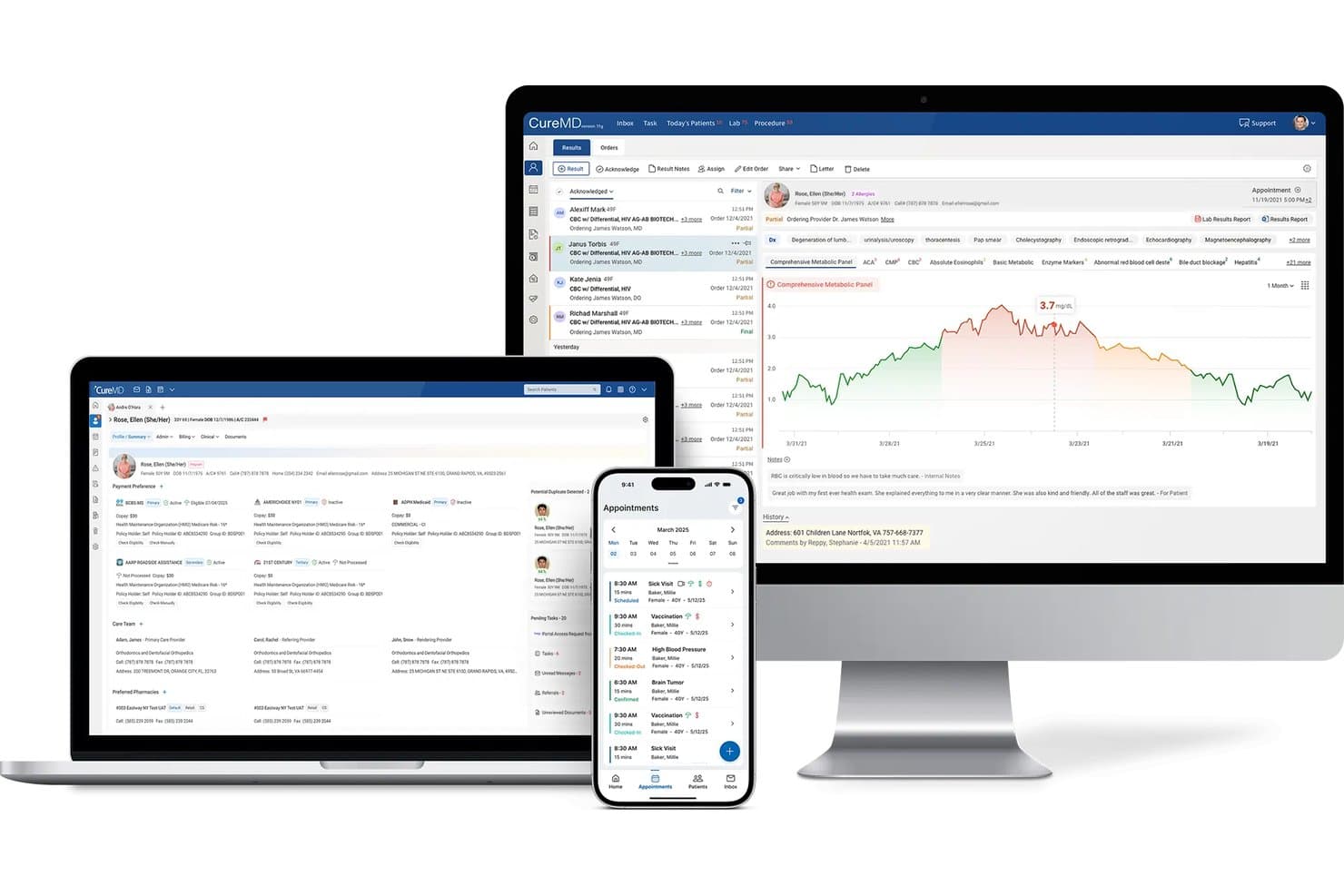
CureMD offers an integrated medical billing and patient management platform accessible across desktop, laptop, and mobile devices. CureMD is a cloud-based medical billing platform that unifies EHR, practice management, claims processing, clearinghouse integration, denial management, and patient payment tools in a single suite built for practices of all sizes.
Who Is CureMD Best For?
CureMD is a strong fit for independent and multi-specialty practices that want a single vendor managing their clinical, administrative, and billing workflows.
Why I Picked CureMD
CureMD earns its spot on my shortlist because of how deeply insurance verification is built into the billing workflow. I particularly like that eligibility checks run in real time before a visit, surfacing copay, deductible, and benefits details directly in the practice management module. That means my team can catch coverage issues before they become claim denials, rather than resolving them after the fact.
CureMD Key Features
- Integrated clearinghouse: Process claims and manage remittances directly within the platform.
- Patient portal: Offer online statements, payments, and secure access to records for patients.
- Automated denial management: Track, flag, and resolve denied claims using built-in workflows.
- ICD-10, CPT, and HCPCS code support: Use comprehensive medical code libraries and validation tools for accurate billing.
CureMD Integrations
CureMD offers native integrations with its own EHR, practice management, clearinghouse, and patient portal modules. The platform supports electronic prescribing to major pharmacy networks and electronic lab ordering with leading labs. An API is available for custom integrations.
Pros and Cons
Pros:
- Real-time eligibility checks integrated at scheduling
- Automated claim scrubbing and denial workflows
- Unified EHR, billing, and practice management suite
Cons:
- Long contract terms with early termination fees
- Occasional sluggish performance during peak hours
Learn more about CureMD: Best advanced analytics for billing optimization
- Free demo available
- Pricing upon request
Visit WebsiteCustomer Rating:3.4/5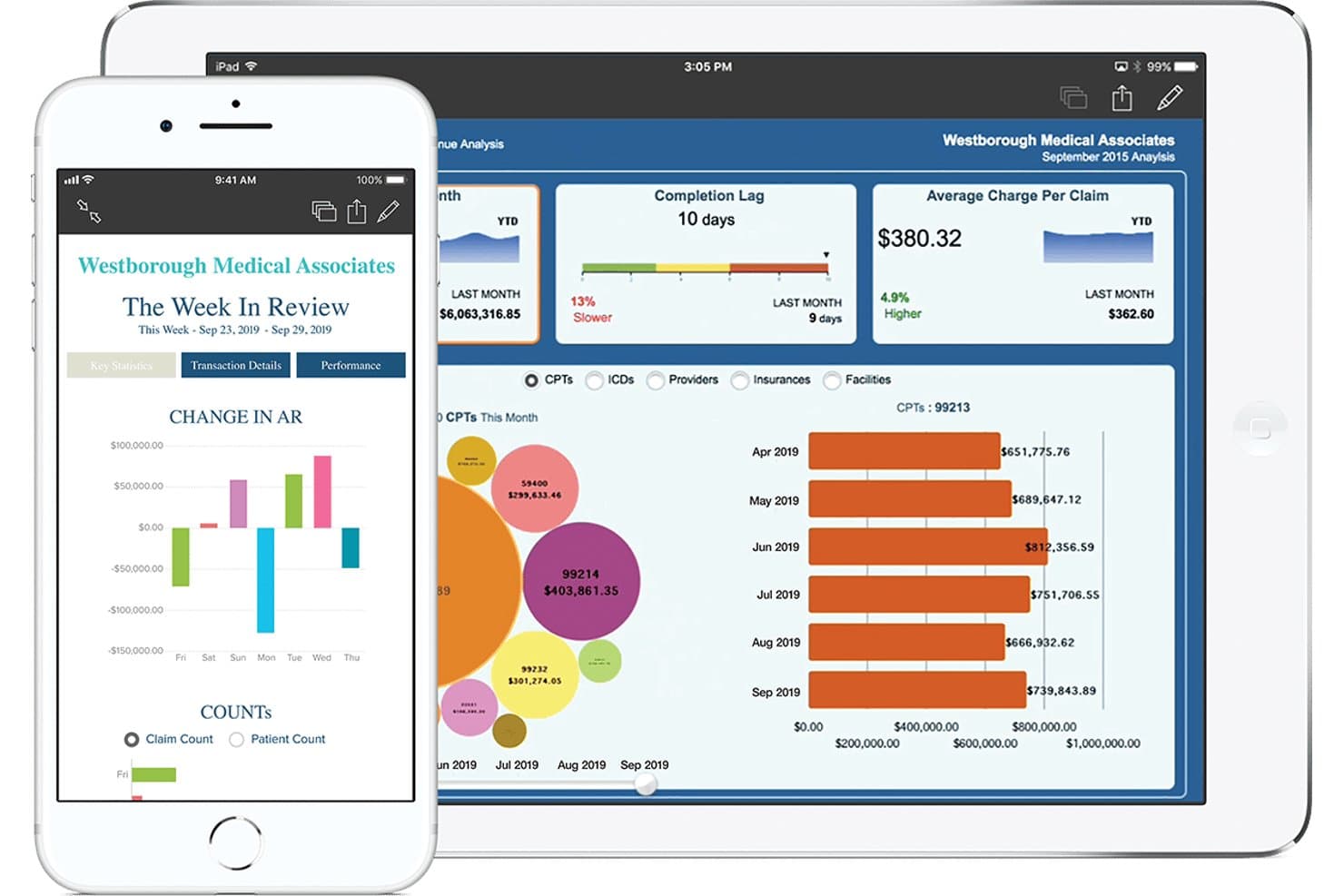
eClinicalWorks offers a revenue cycle management dashboard displaying charge analysis, completion lag, average charge per claim, and CPT-level billing breakdowns on tablet and smartphone. eClinicalWorks is an integrated EHR, practice management, and revenue cycle management platform that combines claims processing, medical coding, eligibility verification, payment posting, and denial management in a single system.
Who Is eClinicalWorks Best For?
It's a strong fit for independent practices and multi-provider groups that want a single vendor to handle their EHR, scheduling, and billing rather than stitching together separate systems.
Why I Picked eClinicalWorks
eClinicalWorks earns its spot on my shortlist because of how its analytics layer sits across the entire revenue cycle. I particularly like the RCM Dashboard and Provider Analytics, which let me monitor individual provider KPIs and track denial patterns in real time. The Learning Engine adapts to payer-specific rejection patterns and automatically refines claim edits over time, which directly reduces rework on submitted claims.
eClinicalWorks Key Features
- Appeals automation: Generate payer-specific appeals packets with one click, including forms and cover letters.
- AI workflow builder: Create billing automation rules using natural language instructions directly in the interface.
- Central Billing Office integration: Connect multiple practices to a single CBO for enterprise-level claim and payment management.
- Patient collections AI: Use an autonomous agent to handle patient calls and collect outstanding balances.
eClinicalWorks Integrations
eClinicalWorks offers native integrations with Sunoh and healow Genie for ambient clinical documentation and patient engagement. Native dictation integrations are available with Dragon Medical and M*Modal. An API is available for custom integrations.
Pros and Cons
Pros:
- Real-time eligibility checks and automated coding
- Advanced analytics for denial tracking and trends
- Unified EHR, scheduling, and billing platform
Cons:
- Custom reporting requires additional setup or fees
- Outdated user interface and navigation
Learn more about eClinicalWorks: Best integrated billing and payments dashboard
- Free demo available
- Pricing upon request
Visit WebsiteCustomer Rating:3.9/5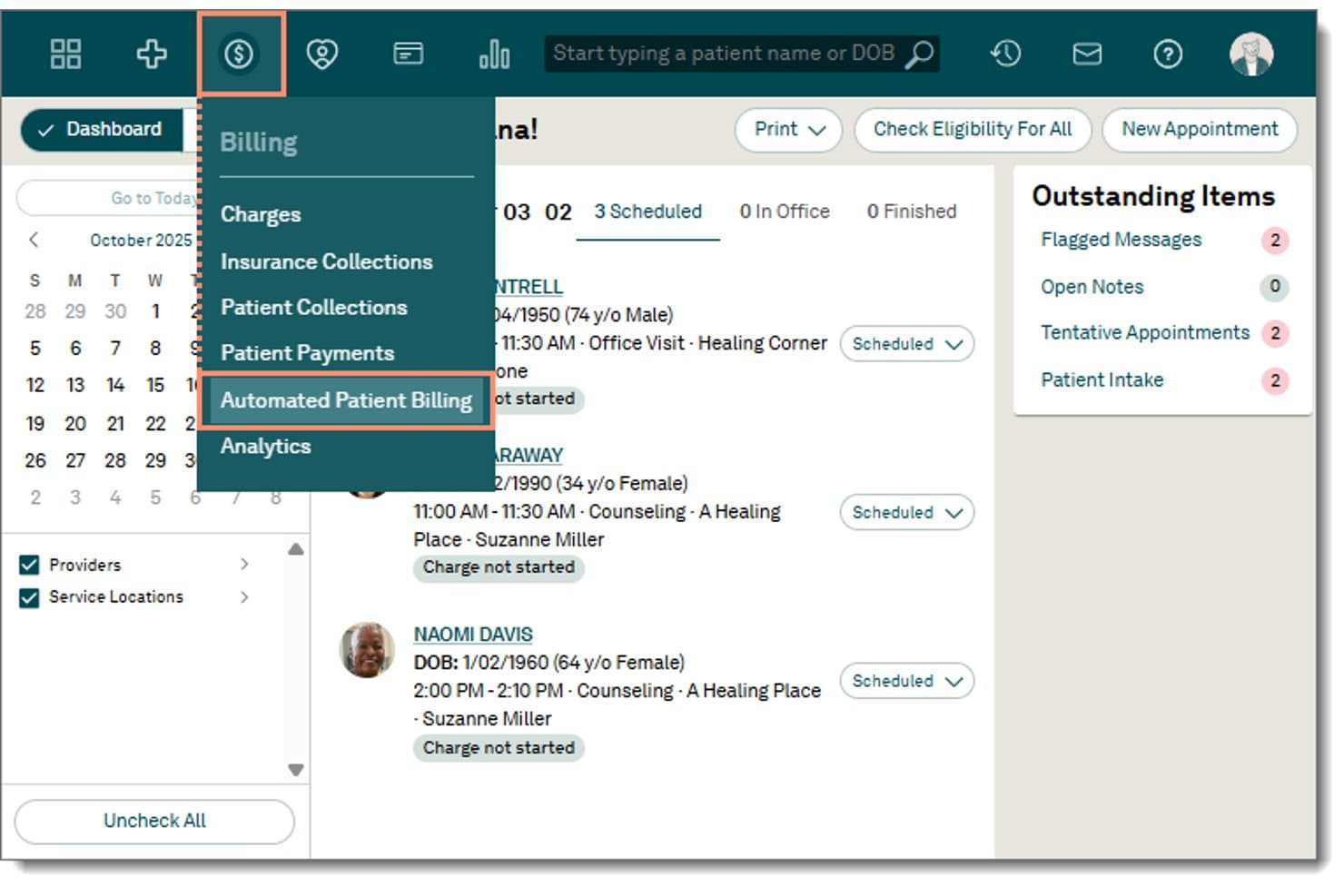
Tebra offers an Automated Patient Billing option within its Billing dropdown menu, accessible directly from the main navigation bar. Tebra is a unified EHR, practice management, and medical billing platform built for independent practices, combining claims submission, insurance eligibility verification, ERA auto-posting, and patient payments in a single integrated system.
Who Is Tebra Best For?
Tebra is a strong fit for small to mid-sized independent practices with up to 10 providers who want a single vendor for EHR, billing, and patient management.
Why I Picked Tebra
Tebra earns its spot on my shortlist because the billing dashboard pulls charge data directly from clinical encounters the moment a provider closes a note. I particularly like the real-time eligibility verification, which checks coverage across 2,700+ payers during scheduling, before a patient walks in. The RPA-driven ERA auto-posting applies practice-specific rules to reconcile payments without manual intervention.
Tebra Key Features
- Patient payment portal: Lets patients make payments online using customizable links and card-on-file.
- Batch and automated statements: Generates and delivers patient statements in both digital and paper formats.
- Integrated code validation engine: Checks ICD-10, CPT, and HCPCS codes for compliance in billing workflows.
- Bidirectional EHR and PM sync: Shares patient, encounter, and charge data in real time across modules.
Tebra Integrations
Tebra offers native integrations with WebPT, QuickEMR, Relatient, NextPatient, PayPal, Stripe Terminal, and DocSpera. An API is available for custom integrations, and EHR/PM connectivity is supported via HL7 and FHIR.
Pros and Cons
Pros:
- Batch and digital patient statement generation
- Automated real-time insurance eligibility checks
- Unified EHR, PM, and billing dashboard
Cons:
- Secondary claim workflows require manual steps
- Financial reporting features are limited
Learn more about Tebra: Best mobile-first billing experience
- Free demo available
- Pricing upon request
Visit WebsiteCustomer Rating:3.9/5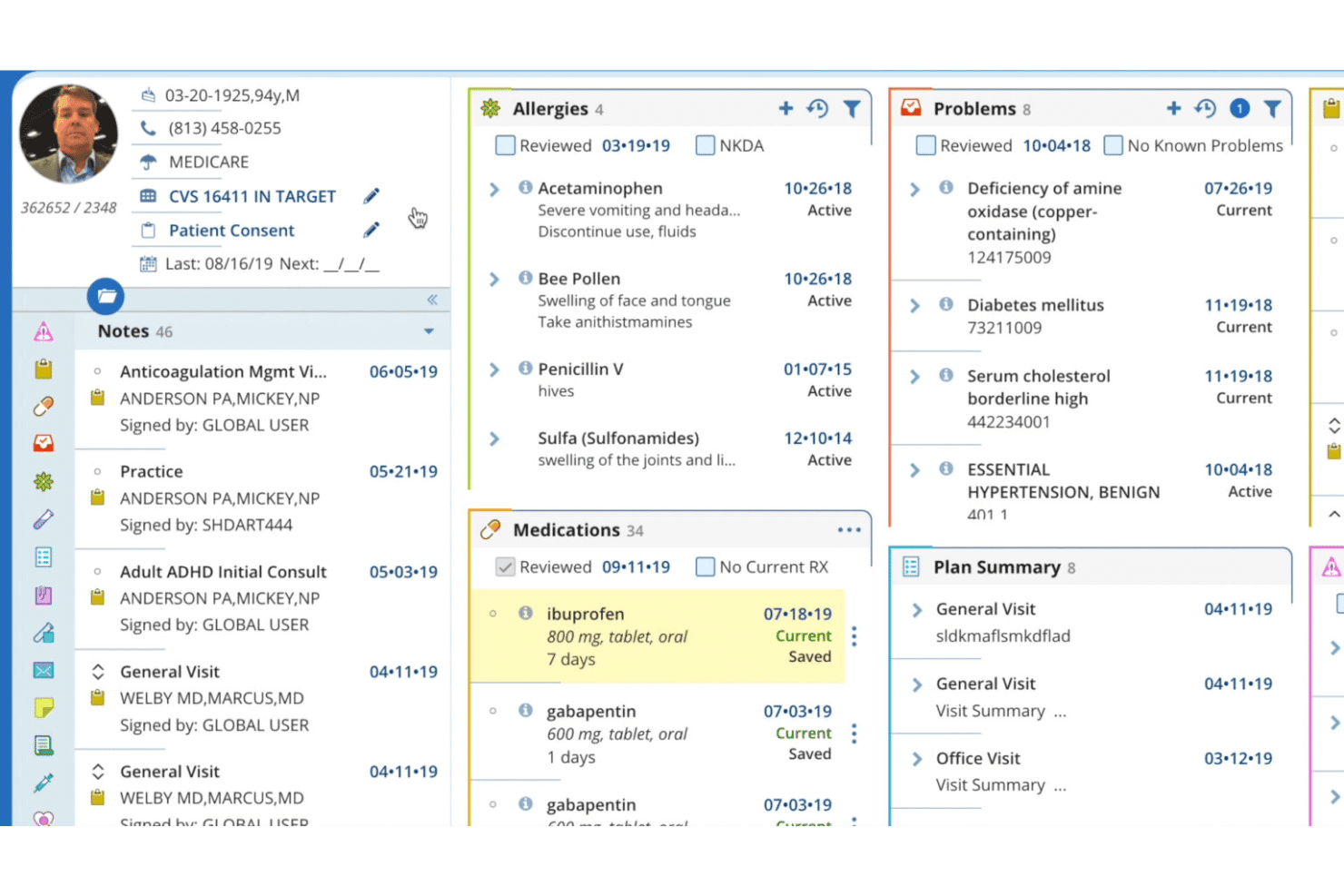
DrChrono mobile billing tools for appointments, eRx, and payment summaries. DrChrono is a cloud-based medical billing and EHR platform that natively unifies claims management, insurance eligibility verification, ERA posting, patient billing, and practice management in a single mobile-first system built for iOS.
Who Is DrChrono Best For?
DrChrono is a strong fit for independent practices and small medical groups that want billing, EHR, and practice management built into a single platform.
Why I Picked DrChrono
DrChrono earns its spot on my shortlist because the billing experience is genuinely built for mobile, not just adapted for it. I can run eligibility checks, track claim status in real time via the Live Claims Feed, and review ERA postings directly from an iPad, with no stripped-down functionality. The native iOS billing profiles, which store common CPT and ICD-10 codes per provider, make charge capture fast right at the point of care.
DrChrono Key Features
- Integrated ERA and EOB posting: Manage electronic remittance advice and explanation of benefits within the billing dashboard.
- Patient statement automation: Send digital or print statements with embedded payment links and track delivery preferences.
- Denial pattern reporting: Identify recurring denial issues by payer or procedure through built-in analytics.
- Custom billing profiles: Set up template profiles for commonly used codes and diagnoses, available during claim entry.
DrChrono Integrations
DrChrono offers native integrations with eProvider Solutions, TriZetto, Carisk Partners, Quest, LabCorp, Box, Ambra, Curogram, DeepScribe, and Square Point of Sale. An API is available for custom integrations.
Pros and Cons
Pros:
- Custom claims tracking for each payer
- Bulk eligibility checks before every visit
- True mobile billing and claim management
Cons:
- Support quality declined after EverHealth acquisition
- Billing only available with DrChrono EHR
Learn more about DrChrono: Best for scalable healthcare group operations
- Not available
- Pricing upon request
Visit WebsiteCustomer Rating:3.7/5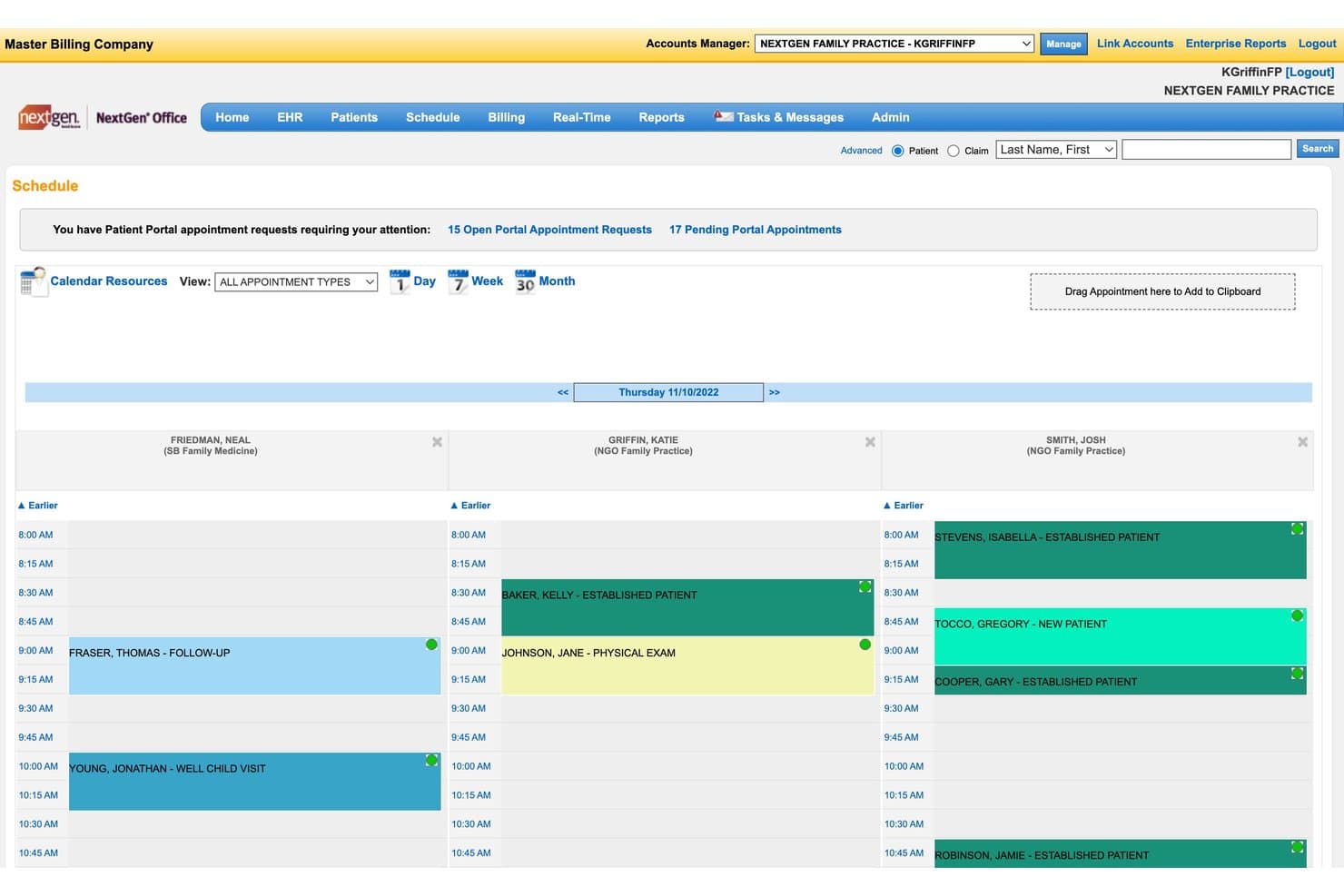
NextGen Office offers an integrated scheduling dashboard that displays multi-provider daily appointments, patient types, and portal request alerts to support streamlined medical billing workflows. NextGen Office is a cloud-based EHR and practice management platform that combines medical billing, claims management, insurance eligibility verification, patient payments, and revenue cycle management in a single unified system.
Who Is NextGen Office Best For?
NextGen Office suits medical billing companies and small-to-mid-sized practices that need a single platform to manage both clinical documentation and revenue cycle operations as they grow.
Why I Picked NextGen Office
I picked NextGen Office as one of the best because its tiered architecture is built for practices that plan to grow. Teams start on NextGen Office, and when they scale past 10 providers, the platform upgrades to NextGen Enterprise without a system switch. I also appreciate the multi-location record access, where every affiliate office shares a single login and duplicate chart alerts prevent data fragmentation across sites.
NextGen Office Key Features
- Automated claims scrubbing: Reviews claims for errors before submission to reduce rejections and denials.
- Integrated payment portal: Allows patients to pay with credit card, Google Pay, Apple Pay, or payment plans.
- Real-time insurance eligibility checks: Provides immediate verification of benefits and coverage for each patient.
- Specialty-specific EHR templates: Offers configurable documentation tools tailored to different medical specialties.
NextGen Office Integrations
NextGen Office offers native integrations with Doctible, Solutionreach, Clearwave, and InstaMed. It also supports integration with Apple Health, Amazon Marketplace, and over 725 labs via NextGen Share Diagnostic Hub. An API is available for custom integrations.
Pros and Cons
Pros:
- Instant real-time insurance eligibility verification
- Supports multi-location practice and group scaling
- Built-in claims scrubbing and denial tracking
Cons:
- Reporting requires navigating multiple modules
- Payment posting corrections require extra manual steps
Learn more about NextGen Office: Best all-in-one workflow automation
- Free demo available
- Pricing upon request
Visit WebsiteCustomer Rating:3.6/5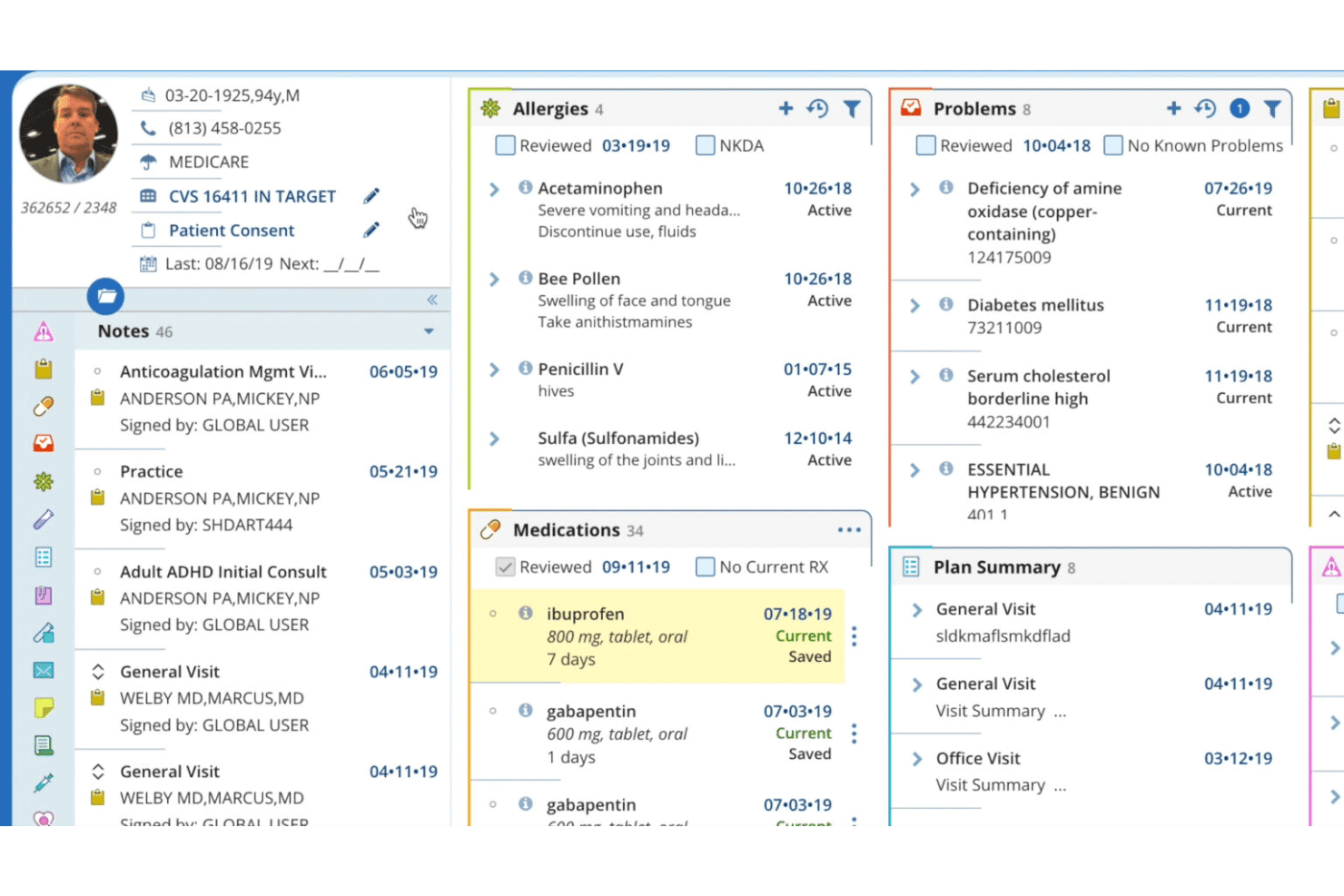
AdvancedMD patient record view with allergies, medications, and care plans. AdvancedMD is a cloud-based medical billing platform that unifies claims management, EHR, practice management, patient payments, insurance eligibility verification, and revenue cycle reporting in a single system for independent practices.
Who Is AdvancedMD Best For?
AdvancedMD suits independent practices and centralized billing offices that manage billing across multiple providers or client accounts from a single login.
Why I Picked AdvancedMD
AdvancedMD earns its spot as one of the best on my shortlist because the entire billing workflow runs without manual intervention. I particularly like ClaimInspector, which runs 3.5 million edits per claim against CCI, HIPAA, and LCD rules before submission. On the back end, ERA auto-posting and auto-generated A/R denial worklists mean my team isn't manually chasing remittances or building collections queues from scratch.
AdvancedMD Key Features
- Centralized Billing Office (CBO): Manage billing for multiple providers and locations from a single login and database.
- Integrated clearinghouse: Submit claims and download remittances directly through built-in clearinghouse connections to over 1,800 payors.
- Open API and integration marketplace: Connect EHR, HIE, CRM, and adjacent tools using an open API and prebuilt integration marketplace.
- Data migration service: Vendor-managed options for moving demographics, appointments, and insurance data from legacy systems.
AdvancedMD Integrations
AdvancedMD offers native integrations through its integrated clearinghouse, as well as an open API and an integration marketplace for connecting with third-party EHR, HIE, and CRM systems.
Pros and Cons
Pros:
- Automated worklists for billing denials
- Integrated clearinghouse supports 1,800+ payors
- Centralized dashboard for multi-location billing management
Cons:
- Occasional delays in customer support response
- No built-in certified medical coding services
 Best customizable claims management
- Free demo available
- Pricing upon request
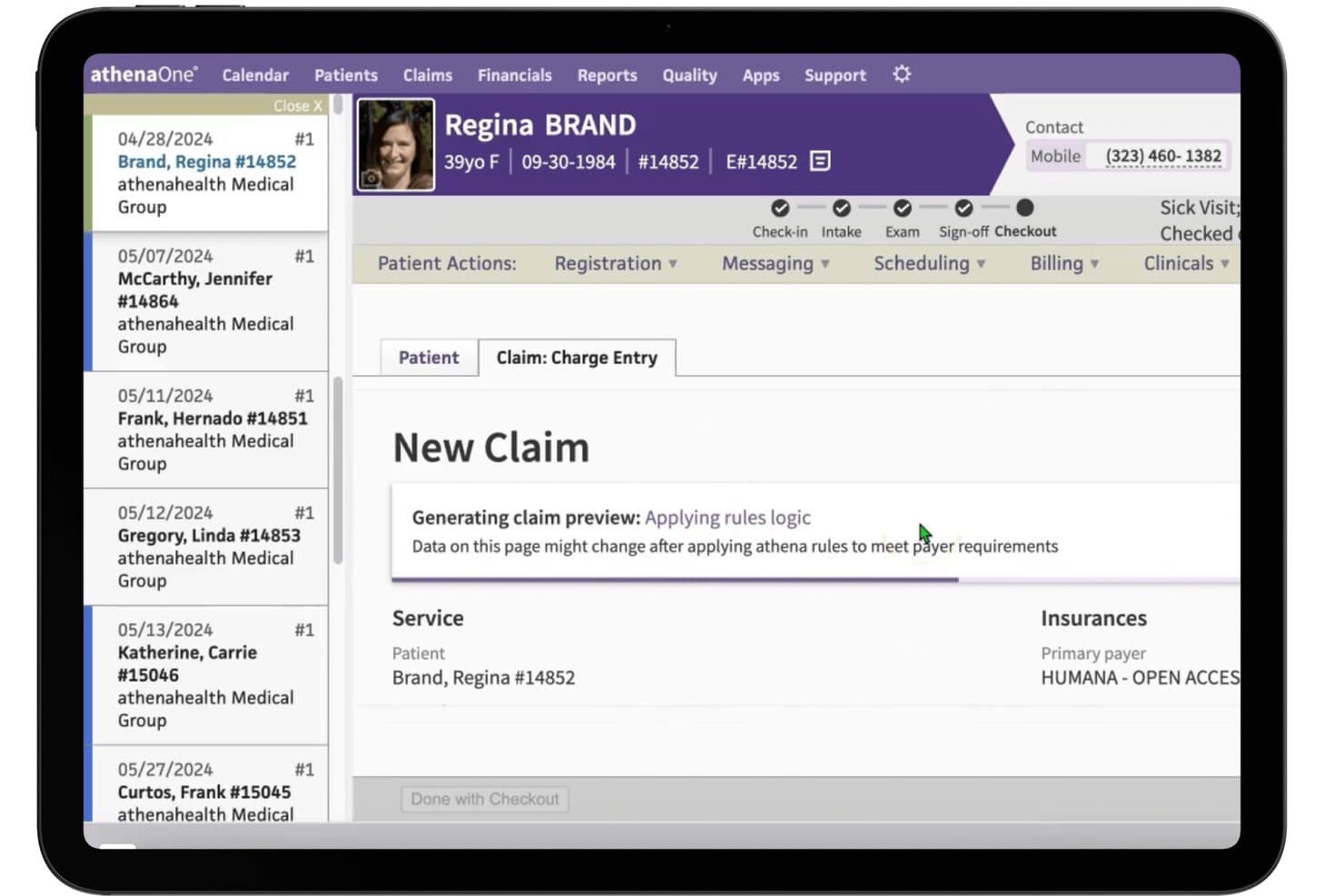
athenahealth (athenaOne) offers integrated claim charge entry with automated rules logic and payer requirement processing during patient checkout. athenaOne is a unified EHR, practice management, and medical billing platform that combines claims management, revenue cycle automation, insurance eligibility verification, patient billing, and medical coding support in a single cloud-based system.
Who Is athenahealth (athenaOne) Best For?
I'd recommend it most for independent and small-to-midsize medical practices that need a single platform to manage clinical, administrative, and billing workflows together.
Why I Picked athenahealth (athenaOne)
athenaOne earns its spot on my shortlist because of how deeply it lets you configure claims workflows around your practice's specific payer mix. I particularly like the 29,000-rule billing engine, which scrubs claims and fires targeted alarms before submission. When denials come back, the platform explains the likely coding issue and recommends next steps directly in the workflow, so my team isn't left guessing or manually cross-referencing payer policies.
athenahealth (athenaOne) Key Features
- Integrated EHR and practice management: Links clinical, scheduling, and billing workflows within one cloud-based platform.
- Real-time insurance verification: Checks patient eligibility and benefits at the point of scheduling or check-in.
- Patient payment portal: Lets patients access statements, make payments, and manage balances online.
- Centralized AR dashboard: Gives billing teams access to accounts receivable, payment posting, and performance insights in one interface.
athenahealth (athenaOne) Integrations
athenaOne offers dozens of native integrations through its marketplace, including rater8, GetWell, Experian Health, Dulcian Health, PatientPop, and esvyda. An API is available for custom integrations.
Pros and Cons
Pros:
- Built-in denial management guidance
- Real-time insurance eligibility checks
- Automated claim scrubbing with customizable rules
Cons:
- Occasional delays in support ticket resolution
- Patient portal experience is often frustrating
Learn more about athenahealth (athenaOne):
Outro software de faturação médica integrado
Eis algumas opções adicionais de software de faturação médica integrado que não entraram na minha seleção, mas que vale a pena conhecer:
- 11PrognoCIS (Bizmatics)Best specialty-specific billing templates
- 12RXNTBest real-time claim status updates
- 13CharmHealthBest patient payment portal integration
- 14ModMedBest AI-driven coding assistance
- 15NextechBest specialty EHR and billing integration
- 16DocVillaBest telemedicine billing support
- 17WRS HealthBest in-house clearinghouse connectivity
- 18PracticeEHRBest one-click charge capture workflows
- 19MicroMD (Henry Schein)Best flexible claims rules engine
- 20Compulink AdvantageRCMBest automated denials management
How I Evaluate Integrated Medical Billing Software
I split my evaluation into baseline functionality—like claims scrubbing and EHR sync—and the differentiators that set tools apart for specific practice types and billing workflows.
Core Functionality (Table Stakes for This List)
When I'm selecting tools for my list, I rank each one on a scale from 0 (does not offer the functionality) to 5 (excels in this area) for each core functionality listed below. Then, I calculate the tool's total score into a percentage. Each tool needs to achieve a minimum total score of 65% to be considered for inclusion.
- Claims Management: I evaluate how each tool handles electronic claim generation, scrubbing, and submission through clearinghouse connections—plus whether denial tracking and appeal workflows are built in or bolted on.
- EHR/PM Integration: A billing tool should sync encounter data, patient demographics, and charges with clinical records in real time, not through nightly file exports that leave gaps.
- Insurance Eligibility Verification: I check whether the platform runs real-time 270/271 eligibility checks at scheduling or check-in so front desk staff can flag coverage issues before the visit.
- Patient Billing & Payments: From digital statements to online portals and payment plans, I look at how each tool handles the patient-facing side of collections beyond just printing a paper bill.
- ERA/Payment Posting: Automated 835 remittance posting with reconciliation saves billing teams hours of manual work, so I look at how each platform handles primary and secondary posting.
- Medical Coding Support: The platform should include current ICD-10, CPT, and HCPCS code libraries with charge capture and validation to catch errors before claims go out the door.
Once I have a list of tools that meet the criteria, I consider what sets each platform apart.
Differentiating Factors (What Sets Vendors Apart)
Here's how I compare and contrast different vendors:
Standout Features
Denial management workflows matter a lot here. I look for tools that go beyond flagging rejected claims to include root-cause analysis and automated appeal generation, so your billing team spends less time chasing payers. AI-assisted coding and claim scrubbing is another area I evaluate closely—platforms that suggest codes and catch errors before submission help improve first-pass acceptance rates. I also consider how configurable the reporting dashboards are, since billing managers need to track KPIs like days in A/R and clean claim rates without building reports from scratch.
Beyond Features
Specialty and practice size fit is one of the first things I check. A platform built for a solo dermatology office won't necessarily scale for a multi-location orthopedic group with multiple tax IDs. Clearinghouse connectivity matters just as much—I look at whether a vendor includes clearinghouse services or charges per claim, and how many payers they support for ERA and EFT. I also evaluate onboarding support, especially data migration from legacy systems, since a rough transition can stall your billing team for weeks.
Como escolher um software de faturação médica integrado
É fácil ficar perdido entre listas extensas de funcionalidades e estruturas de preços complexas. Para o ajudar a manter-se concentrado enquanto percorre o seu processo específico de seleção de software, apresentamos uma lista de verificação dos fatores a ter em conta:
| Fator | O que deve considerar |
|---|---|
| FatorEscalabilidade | O que deve considerarA plataforma consegue suportar o seu crescimento futuro, como a adição de localizações, prestadores ou especialidades, sem ultrapassar os limites dos seus fluxos de trabalho ou orçamento? |
| FatorIntegrações | O que deve considerarO software liga-se nativamente ao seu EHR, PM e câmara de compensação? Tenha atenção aos custos de integração ocultos ou às soluções manuais que criam estrangulamentos. |
| FatorPersonalização | O que deve considerarQue nível de flexibilidade tem para adaptar as regras de faturação, os campos de relatórios e as permissões dos utilizadores aos seus processos específicos e à sua combinação de pagadores? |
| FatorFacilidade de utilização | O que deve considerarA interface é suficientemente intuitiva tanto para os funcionários da receção como para a equipa de faturação, ou a curva de aprendizagem irá causar atrasos diários e chamadas para o suporte? |
| FatorImplementação e integração inicial | O que deve considerarQue recursos oferece o fornecedor para a migração de dados, a formação da equipa e o suporte no lançamento? Planos de transição claros ajudam a evitar interrupções nas receitas. |
| FatorCusto | O que deve considerarCompare mais do que o preço mensal — tenha em conta as taxas de configuração, os custos por reclamação e os custos de suporte, integrações ou quaisquer complementos inesperados. |
| FatorMedidas de segurança | O que deve considerarO fornecedor cumpre os requisitos da HIPAA e da regulamentação local e disponibiliza ferramentas como registos de auditoria, controlos de utilizadores e armazenamento de dados encriptado? |
| FatorDisponibilidade do suporte | O que deve considerarQual é o horário e quais são os canais de suporte do fornecedor? Considere se precisa de ajuda fora do horário normal, chat em direto ou um gestor de conta dedicado para a sua equipa. |
O que é um software de faturação médica integrado?
O software de faturação médica integrado é uma plataforma unificada que combina a faturação médica, os registos de saúde eletrónicos e a gestão da clínica num único sistema. Permite à sua equipa gerir reclamações, acompanhar pagamentos, verificar seguros e tratar da faturação dos pacientes sem alternar entre várias ferramentas. Esta abordagem reduz a introdução manual de dados, diminui os erros e melhora a eficiência dos fluxos de trabalho clínicos, de faturação e administrativos.
Funcionalidades do software integrado de faturação médica
Ao selecionar um software integrado de faturação médica, esteja atento às seguintes funcionalidades essenciais:
- Gestão de sinistros: Automatiza a criação, verificação, submissão e acompanhamento de sinistros diretamente com as câmaras de compensação, ajudando a sua equipa a resolver recusas e a agilizar os reembolsos.
- Integração com o EHR/sistema de gestão do consultório: Liga a documentação clínica, o agendamento e os dados de faturação em tempo real, eliminando a introdução duplicada de dados e reduzindo os erros entre sistemas.
- Verificação da elegibilidade do seguro: Verifica instantaneamente ou em lotes a cobertura do seguro do paciente no momento do registo ou do agendamento, reduzindo as recusas de sinistros causadas por lapsos de cobertura ou dados incorretos.
- Faturação e pagamentos dos pacientes: Envia extratos digitais, gere portais de pagamento de faturas online e aceita copagamentos dos pacientes, facilitando o pagamento por parte dos pacientes e o registo dos pagamentos pela sua equipa.
- Registo automatizado de ERA/pagamentos: Regista automaticamente os avisos eletrónicos de remessa (ficheiros 835) dos pagadores, reconciliando os pagamentos e identificando pagamentos inferiores ao devido ou recusas.
- Suporte à codificação médica: Disponibiliza bibliotecas atualizadas de códigos ICD-10, CPT e HCPCS, com captura de encargos e validação de códigos, ajudando a sua equipa de faturação a submeter sinistros exatos e em conformidade.
- Fluxos de trabalho para a gestão de recusas: Acompanha e gere sinistros rejeitados, fornece análises das causas principais e ajuda nas correções e ressubmissões para minimizar a perda de receitas.
- Relatórios e análises personalizáveis: Permite à sua equipa gerar relatórios financeiros, de produtividade e do ciclo de receitas adaptados aos seus indicadores-chave de desempenho e necessidades operacionais.
- Controlos de utilizador baseados em funções: Permite um controlo detalhado sobre as informações que os funcionários podem consultar e editar, protegendo os dados sensíveis e apoiando a conformidade.
- Planos de pagamento para pacientes: Permite configurar e gerir acordos de pagamento estruturados para pacientes que necessitam de maior flexibilidade para pagar os seus saldos.
Benefícios do software integrado de faturação médica
A implementação de um software integrado de faturação médica proporciona vários benefícios à sua equipa e à sua empresa. Eis alguns dos benefícios que pode esperar:
- Fluxos de trabalho simplificados: A ligação dos módulos de faturação, EHR e agendamento reduz a introdução duplicada de dados e as transferências manuais, poupando tempo à equipa em todo o ciclo de receitas.
- Redução das recusas de sinistros: A verificação de seguros em tempo real, a verificação automatizada e os fluxos de trabalho de gestão de recusas detetam erros e problemas de cobertura antes do envio dos sinistros.
- Cobrança mais rápida dos pagamentos: Os extratos automatizados, os portais de pagamento digitais e os planos de pagamento flexíveis para pacientes ajudam a cobrar rapidamente os saldos e a reduzir as contas a receber pendentes.
- Melhoria da conformidade: As bibliotecas de códigos atualizadas, os registos de auditoria e as permissões de utilizador impostas ajudam-no a faturar com exatidão e a cumprir os requisitos regulamentares.
- Informações financeiras acionáveis: Os relatórios e painéis personalizáveis destacam tendências nas cobranças, no estado dos sinistros, no desempenho dos pagadores e na produtividade do consultório.
- Operações escaláveis: A plataforma certa cresce com o seu consultório, suportando várias especialidades, novas localizações e uma maior complexidade de faturação à medida que a sua empresa evolui.
- Melhor experiência do paciente: As ferramentas de faturação e pagamento de autosserviço facilitam a compreensão e a regularização dos saldos pelos pacientes, aumentando a satisfação.
Custos e preços do software integrado de faturação médica
A seleção de um software integrado de faturação médica exige uma compreensão dos vários modelos de preços e planos disponíveis. Os custos variam consoante as funcionalidades, o tamanho da equipa, os complementos e outros fatores. A tabela abaixo resume os planos mais comuns, os respetivos preços médios e as funcionalidades normalmente incluídas nas soluções de software integrado de faturação médica:
Tabela de comparação de planos para software integrado de faturação médica
| Tipo de plano | Preço médio | Funcionalidades comuns |
|---|---|---|
| Tipo de planoPlano gratuito | Preço médio$0 | Funcionalidades comunsSinistros eletrónicos básicos, relatórios limitados, registo manual de pagamentos e suporte limitado. |
| Tipo de planoPlano pessoal | Preço médio$50-$150/mês | Funcionalidades comunsGestão normal de sinistros, integração com EHR, verificação de seguros, faturação básica de pacientes e acesso para um único utilizador. |
| Tipo de planoPlano empresarial | Preço médio$200-$500/mês | Funcionalidades comunsFunções para vários utilizadores, gestão avançada de recusas, registo automatizado de pagamentos, relatórios personalizáveis e acesso ao portal de pagamentos. |
| Tipo de planoPlano empresarial de grande dimensão | Preço médio$600-$1200/mês | Funcionalidades comunsIntegração totalmente personalizada, fluxos de trabalho especializados, nível de suporte superior, suporte para várias localizações e controlos de conformidade reforçados. |
Perguntas frequentes sobre software integrado de faturação médica
Eis algumas respostas a perguntas frequentes sobre software integrado de faturação médica:
Como é que o software integrado de faturação médica melhora o fluxo de caixa?
O software integrado de faturação médica reduz os erros nos pedidos de reembolso, acelera o envio dos pedidos e disponibiliza ferramentas de pagamento digitais, ajudando a sua clínica a receber os pagamentos mais rapidamente e a reduzir o número de dias das contas a receber.
O software integrado de faturação médica consegue gerir várias localizações ou especialidades?
Sim, a maioria das plataformas suporta configurações com várias localizações e especialidades, permitindo personalizar modelos, regras das entidades pagadoras e relatórios por unidade ou grupo de profissionais.
O que devo planear durante a implementação?
Deve planear a migração de dados dos sistemas anteriores, a formação da sua equipa e a colaboração com o seu fornecedor para adaptar o software aos seus fluxos de trabalho. Um processo de integração inicial claro ajuda a minimizar o tempo de inatividade.
Quão seguro é o software integrado de faturação médica?
Os fornecedores disponibilizam geralmente armazenamento de dados em conformidade com a HIPAA, controlos de acesso baseados em funções, registos de auditoria e transmissões encriptadas para ajudar a proteger dados sensíveis dos pacientes e dados financeiros.
Os pacientes podem pagar as faturas diretamente através destes sistemas?
Sim, a maioria das soluções integradas disponibiliza portais de pagamento para pacientes, onde estes podem consultar extratos, pagar online, configurar planos de pagamento e até receber lembretes de pagamento por e-mail ou mensagem de texto.