Choosing the right medical software shapes how care gets delivered at every level. From electronic health records (EHR) software that centralizes patient data to medical billing tools that keep your revenue cycle moving, the category is wide—and the stakes are real. The wrong fit creates documentation gaps, billing delays, and care coordination breakdowns. This guide covers 7 types of medical software, what each one actually does, and what to weigh before adopting it into your workflow.
What Is Medical Software?
Medical software is digital technology that supports patient care and healthcare operations. It includes tools for managing clinical records, supporting diagnosis, handling billing, scheduling appointments, and coordinating care across teams. Each type addresses different workflows and may exchange data with other systems.
7 Key Types of Medical Software
From charting and scheduling to imaging and analytics, each category supports a distinct workflow through specific features and day-to-day benefits:
1. Electronic Health Records (EHR) Software
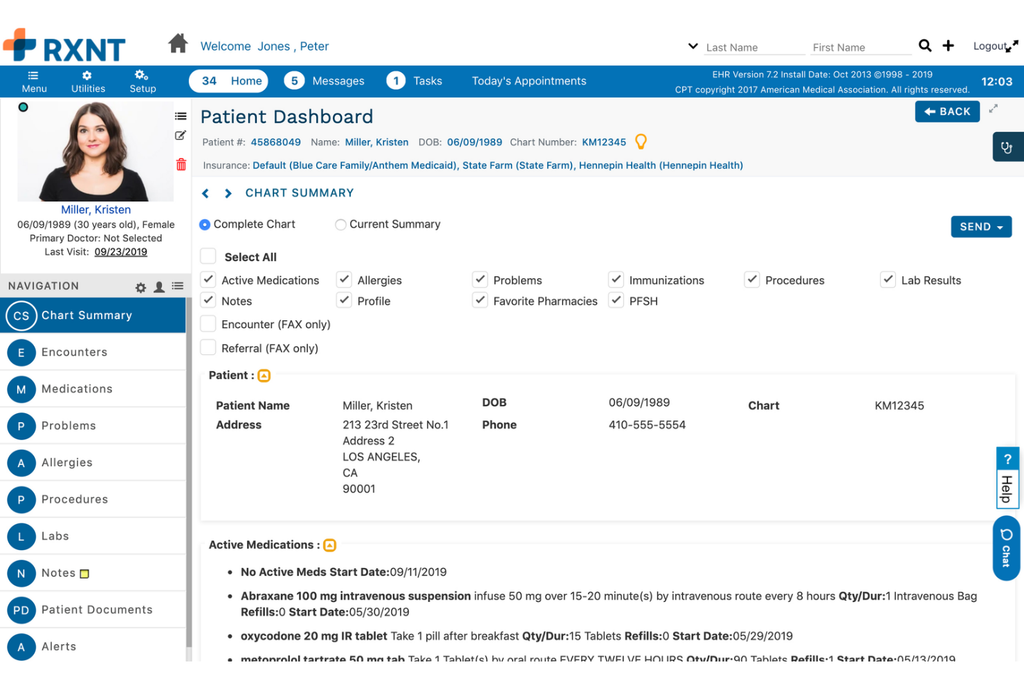
EHR software centralizes patient data—clinical notes, medications, lab results, and visit history—into a single digital record that clinicians and care teams can access and update in real time. In my experience, it's the foundation of most clinical workflows, reducing the documentation gaps that slow care coordination across departments and specialties.
Benefits
Integrated billing tools within EHR platforms can support eligibility verification, claims submission, coding validation, and denial tracking—which, in practice, cuts down on the back-and-forth between clinical and administrative staff significantly. Shared records also support continuity, referrals, and follow-up care across providers and care settings, so no one on your team is working with an incomplete picture. Tools like Epic and Elation Health take this further by combining clinical documentation, practice operations, and reimbursement in one platform, which makes day-to-day coordination far less fragmented.
Features
Here's what to look for when evaluating EHR platforms—these are the capabilities that actually shape your day-to-day clinical workflow:
- Clinical documentation: Capture structured notes, progress records, and visit summaries in real time. Systems like Epic and Oracle Health support customizable templates that reduce the time clinicians spend on documentation without sacrificing detail.
- Medication management: Track active prescriptions, flag drug interactions, and send orders directly to pharmacies—a capability that eliminates much of the routine phone traffic between clinical and pharmacy teams.
- Lab and imaging integration: Pull diagnostic results directly into the patient record without manual data entry. I find this especially useful for flagging critical values and keeping the care team on the same page.
- Patient portal access: Give patients direct access to their records, test results, and appointment history. Platforms like athenahealth and Elation Health include portal functionality that supports secure messaging between patients and providers.
- Interoperability and data exchange: Share records across facilities, specialists, and care settings using HL7 or FHIR standards. This is what makes referrals and transitions of care less error-prone.
- Clinical decision support: Surface evidence-based alerts, dosing guidance, and preventive care reminders at the point of care. This feature adds the most value when it's configured to your specialty and patient population rather than left at default settings.
- Audit trails and access controls: Log every record access and modification with timestamps and user credentials. This is non-negotiable for compliance with HIPAA and similar data protection requirements.
Good record keeping is paramount to good patient care, and communication is integral to the coordination and maintenance of that care.
My Top Medical Software Picks
Here’s my list of the top 10 medical software you should check out:
Clicks on the links below may earn a commission, which supports our independent testing and review of software and services. Learn more about how we stay transparent.

2. Practice Management Software
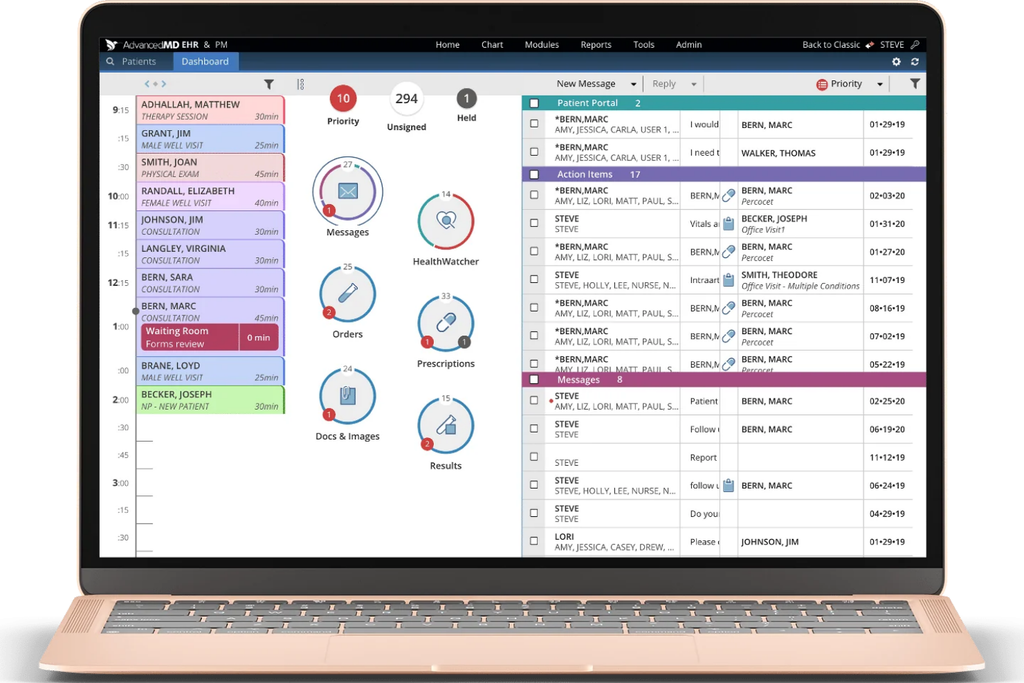
From what I've seen, the administrative layer of a clinic runs on this type of medical software—covering appointment scheduling, patient registration, insurance verification, and billing workflows in one place. Physicians, front desk staff, and billing teams use it to keep operations moving without dropping tasks between handoffs.
Benefits
Keeping scheduling, registration, insurance verification, and billing in one place means fewer tasks get lost between handoffs—and that alone cuts down on the administrative back-and-forth that drains staff time. Practice management software can standardize workflows across providers, departments, and locations, while improving visibility into revenue-cycle activity. Platforms like AdvancedMD and Tebra are good examples of tools that tie these operational functions together, giving both front desk and billing teams a clearer picture of where things stand at any given moment.
Features
These are the features that determine whether practice management software actually reduces administrative load or just adds another system to manage:
- Appointment scheduling: Book, reschedule, and manage patient appointments across providers and locations from a single calendar view. Tools like AdvancedMD include automated reminders that cut no-show rates without requiring staff to make manual confirmation calls.
- Patient registration and intake: Collect demographic, insurance, and medical history data digitally before the visit. This significantly reduces front desk bottlenecks when patients complete intake forms ahead of time.
- Insurance eligibility verification: Confirm coverage automatically at the time of scheduling or check-in. Catching eligibility issues before the appointment prevents most of the billing disputes that slow down your revenue cycle.
- Medical billing and claims management: Generate claims, submit them to payers, and track their status through adjudication. Platforms like Tebra include denial management tools that flag rejected claims and surface the reason codes your billing team needs to resubmit quickly.
- Revenue cycle reporting: Track collections, outstanding balances, claim aging, and payer performance in real time. This visibility is what separates practices that catch revenue leakage early from those that discover it at month-end.
- Task and workflow management: Assign, track, and follow up on administrative tasks across front desk and billing staff. This keeps handoffs clean when multiple team members are touching the same patient account.
- Multi-location and multi-provider support: Manage schedules, billing, and reporting across multiple sites or provider groups from one platform. This is especially useful for group practices where operational visibility across locations is otherwise hard to maintain.
Selecting Tebra has been the best decision I’ve ever made. That decision was the key turning point in how I was able to scale my practice… It has reduced the burden of running the business.
3. Medical Billing & Revenue Cycle Management Software
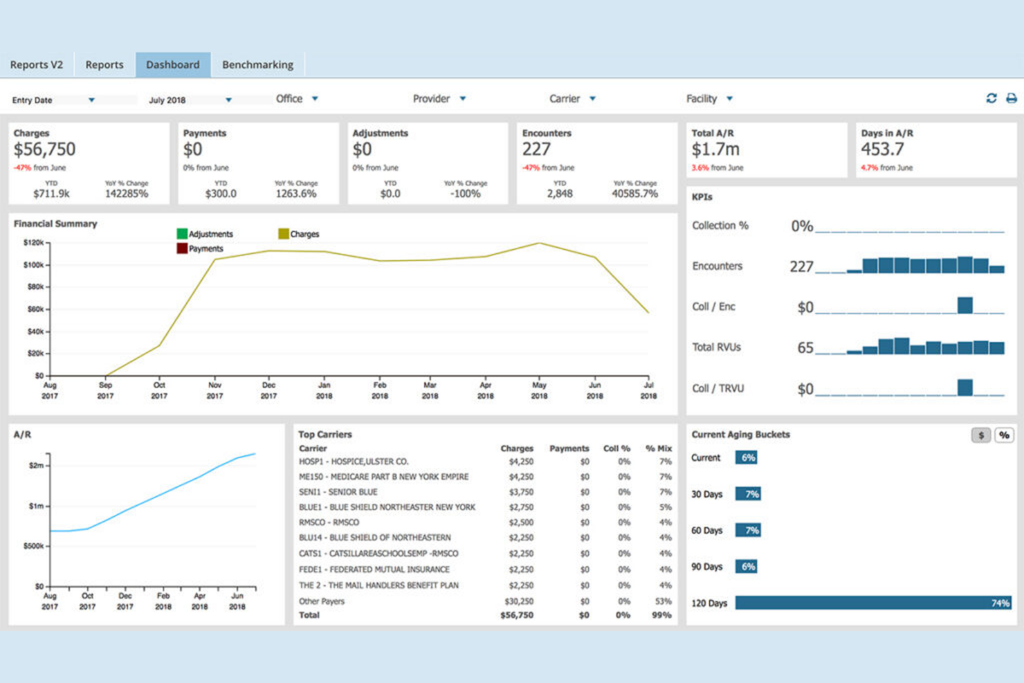
Dedicated billing and revenue cycle management tools handle the financial side of patient care—from charge capture and claims submission to payment posting and denial resolution. Billing teams and practice administrators rely on this type of medical software to close the gap between care delivery and reimbursement, keeping cash flow predictable without manually chasing down every claim.
Benefits
Dedicated billing and revenue cycle management tools take the financial complexity out of running a practice by keeping charge capture, claims submission, and denial resolution in one place. Having real-time visibility into claim status and payer performance—like you get with platforms such as Tebra or Waystar—means your billing team spends less time manually tracking down rejections and more time resolving them. That kind of oversight is what keeps cash flow predictable and prevents revenue from slipping through the cracks between care delivery and reimbursement.
Features
These are the features that determine whether a billing and revenue cycle management platform actually closes the gap between care delivery and reimbursement—or just adds another layer of administrative work:
- Charge capture: Record and code charges at the point of care, tied directly to clinical documentation. This reduces the lag between service delivery and claim submission that quietly erodes cash flow.
- Claims submission and tracking: Generate, scrub, and submit claims to payers electronically, then monitor their status through adjudication. Platforms like Waystar include pre-submission validation that catches coding errors before they become rejections.
- Denial management: Flag rejected claims, surface payer-specific reason codes, and route them to the right staff for resubmission. This is where the difference between a functional and a broken revenue cycle shows up most clearly.
- Payment posting: Automatically apply payments, adjustments, and remittance data to the correct patient accounts. This keeps your accounts receivable current without requiring manual reconciliation after every payer batch.
- Patient billing and collections: Generate statements, manage payment plans, and process patient-facing balances after insurance adjudication. Tools like Tebra include patient payment portals that reduce the volume of billing calls your front desk handles.
- Revenue cycle analytics: Track key metrics like days in accounts receivable, collection rates, and payer performance across time periods. This visibility is what separates practices that catch revenue leakage early from those that discover it at month-end.
- Compliance and audit support: Maintain documentation of billing activity, coding decisions, and payer communications to support audits and regulatory reviews. This is non-negotiable in any environment subject to payer audits or government program oversight.
The real power of modern revenue cycle technology is replacing manual tracking with real-time intelligence. When billing teams have full visibility into denial patterns and claim status, they can proactively stop revenue from slipping through the cracks and protect practice cash flow.
4. Telehealth & Telemedicine Platforms
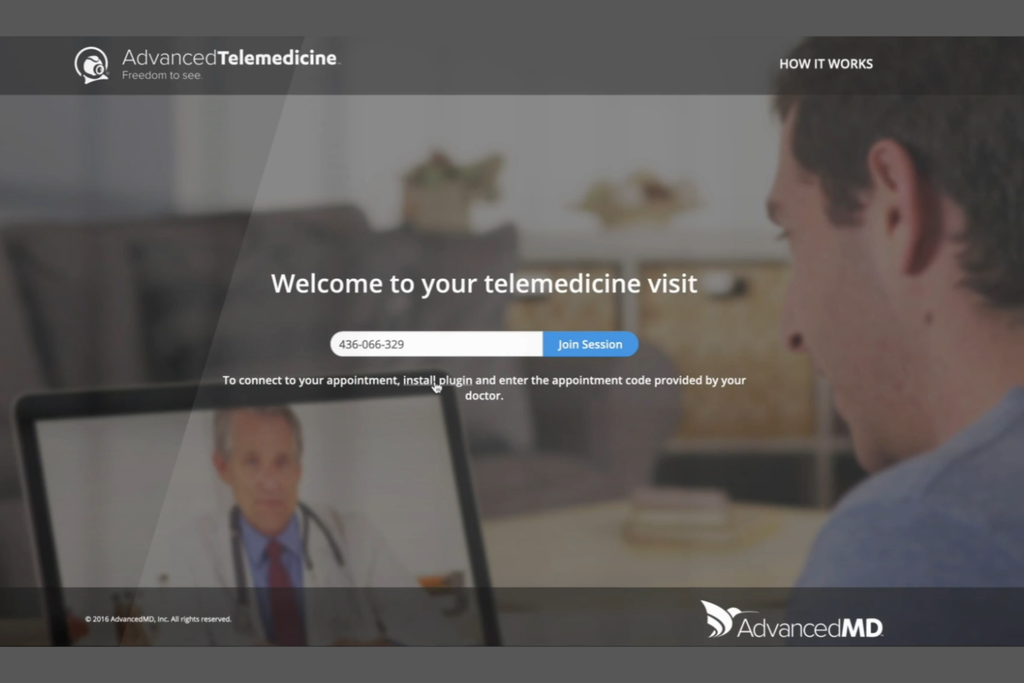
Video visits, asynchronous messaging, and remote patient monitoring tools let clinicians deliver care without requiring an in-person appointment—which, in my experience, meaningfully extends access for patients with mobility issues, distance barriers, or time constraints. Physicians, mental health providers, and care coordinators use these platforms to maintain continuity between visits and reduce unnecessary facility utilization.
Benefits
Video visits and asynchronous messaging tools extend your reach to patients who would otherwise miss appointments due to distance, mobility issues, or scheduling conflicts. Platforms like Doxy.me and Teladoc Health make it easier to maintain care continuity between in-person visits without adding significant administrative lift for your team. That consistent touchpoint is what actually reduces unnecessary facility utilization—patients get timely access to care, and your clinical staff spend less time managing gaps that compound into bigger issues.
Features
These are the features that determine whether a telehealth platform actually supports clinical care delivery—or just replaces the waiting room without solving anything else:
- Video consultations: Host synchronous, HIPAA-compliant video visits with patients from any device. Platforms like Doxy.me keep this deliberately simple—no app download required for patients, which dramatically reduces the technical friction that causes no-shows.
- Asynchronous messaging: Exchange secure text, images, and clinical information between visits without scheduling a live session. This is especially useful for low-acuity follow-ups that don't need real-time interaction.
- Remote patient monitoring (RPM): Collect patient-generated data from connected devices—blood pressure cuffs, glucose monitors, pulse oximeters—and surface it in the clinical workflow. This is where telehealth platforms like Teladoc Health create the most meaningful impact on chronic disease management.
- Patient scheduling and waiting rooms: Let patients book virtual visits and enter a digital waiting room without staff intervention. That self-service scheduling cuts the coordination burden significantly for high-volume telehealth programs.
- EHR integration: Sync visit notes, patient records, and encounter data directly with your existing electronic health record system. Without this, clinicians end up documenting in two places, which erodes any efficiency the platform creates.
- Multi-provider and group visit support: Host visits with multiple clinicians or patients simultaneously—useful for care team consultations, group therapy, or specialist referrals conducted remotely.
- Visit documentation and note capture: Record encounter summaries, generate visit notes, and attach them to the patient record during or immediately after the visit. This keeps documentation current without adding charting time after hours.
Virtual care and remote patient monitoring will become an increasingly vital option for health systems looking to expand care access, proactive chronic disease management, and population health without straining facility resources.
5. Medical Imaging Software
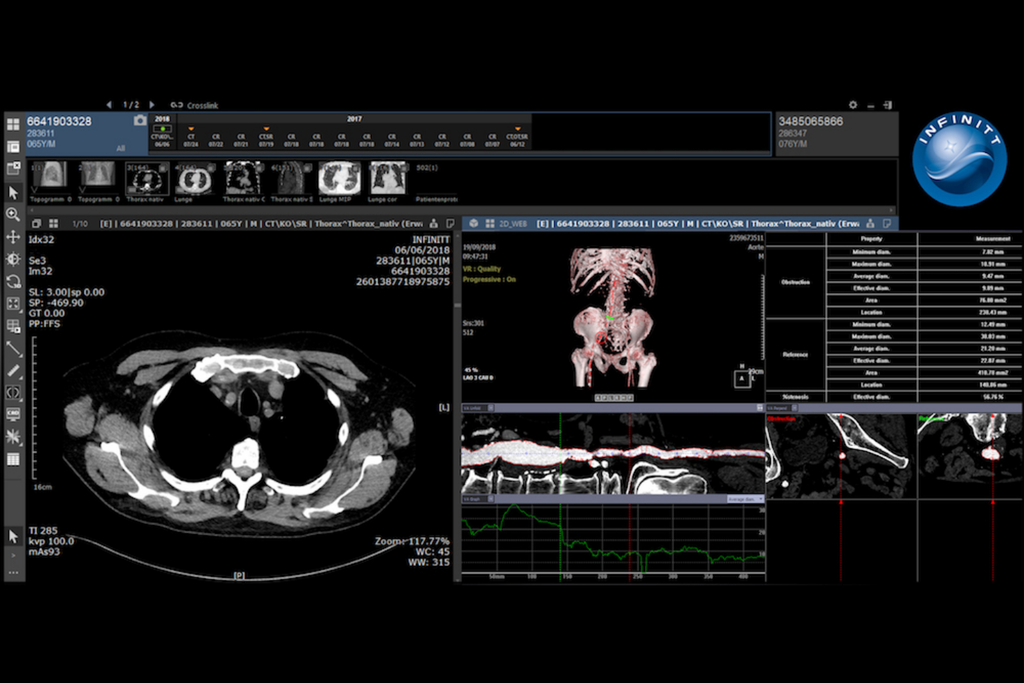
Radiologists, cardiologists, and diagnostic teams use medical imaging software to capture, store, view, and analyze images from modalities like MRI, CT, and X-ray—all within a single platform. Tools that integrate directly with your EHR and PACS eliminate the image-retrieval delays that slow down clinical decision-making and add unnecessary steps to an already demanding diagnostic workflow.
Benefits
Having all imaging data centralized in one place—accessible across modalities and tied directly to the patient record—is where tools like Intelerad and Sectra IDS7 make the biggest difference in a diagnostic workflow. Eliminating the image-retrieval delays that come from siloed PACS or CD-based sharing is what actually speeds up clinical decision-making, not just the viewing technology itself. That direct connection between image capture, storage, and EHR documentation reduces redundant scans and keeps diagnostic teams working from a complete, current picture of the patient.
Features
The right medical imaging software does more than display images—it connects diagnostic data to the clinical workflow in ways that actually change how fast and accurately decisions get made:
- Multi-modality image viewing: View and compare images from MRI, CT, X-ray, ultrasound, and other modalities within a single interface. Eliminating the need to switch between systems is where diagnostic teams recover the most time during a typical reading workflow.
- PACS integration: Connect image storage and retrieval directly to your picture archiving and communication system. Platforms like Intelerad are built around this integration, which means radiologists spend less time hunting for prior studies and more time interpreting them.
- EHR connectivity: Sync imaging results and reports with the patient's electronic health record so the full clinical picture is available at the point of care. Without this link, clinicians end up working from incomplete information, which is one of the most preventable diagnostic gaps in imaging workflows.
- AI-assisted image analysis: Surface automated measurements, anomaly flags, or pattern recognition to support the radiologist's read. Tools like Sectra IDS7 incorporate these capabilities to help prioritize worklists based on clinical urgency.
- Worklist management: Organize and prioritize imaging studies by modality, urgency, or referring provider so reading queues reflect clinical need. This is what prevents critical findings from sitting unread while routine studies move through first.
- Remote access and image sharing: Access studies from off-site locations and share images securely with referring physicians or specialist teams. This is especially important for teleradiology programs or multi-site health systems where radiologists cover more than one facility.
- Report generation and distribution: Draft, finalize, and distribute structured radiology reports directly from the imaging platform. Built-in templates and voice recognition tools—common in platforms like Intelerad—cut report turnaround time without sacrificing documentation quality.
Having fast, seamless access to imaging data through a unified PACS eliminates the delays of working across fragmented systems. When radiologists aren’t fighting retrieval bottlenecks, they can deliver faster, more confident reads from anywhere.
6. Pharmacy & Medication Management Software
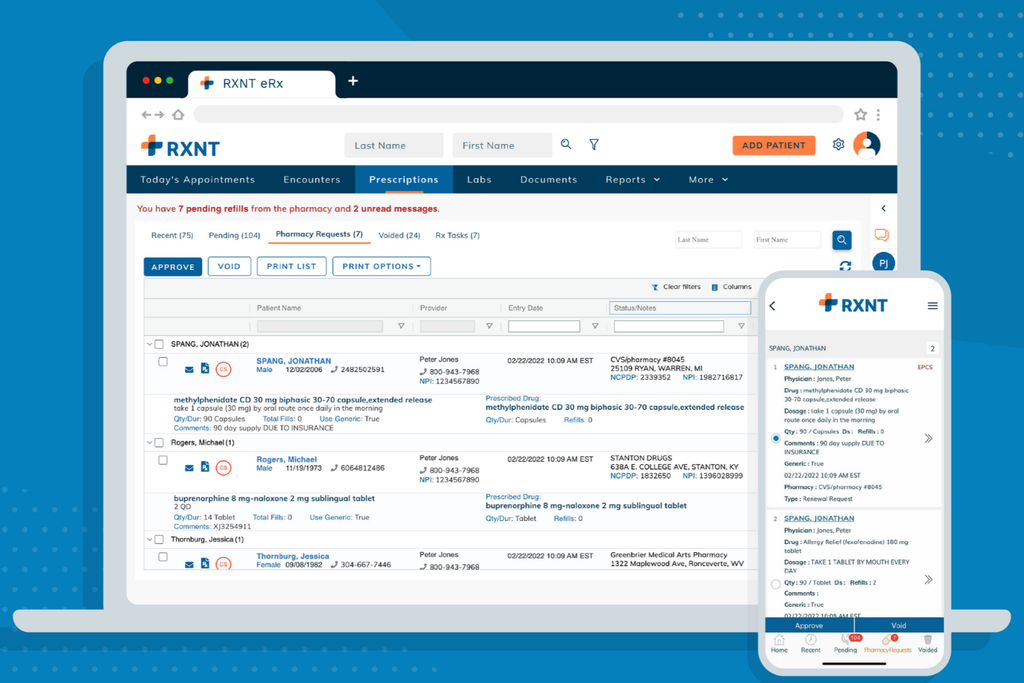
Built to handle the full medication lifecycle—from prescription intake and verification to dispensing and inventory tracking—pharmacy and medication management software sits at the intersection of clinical safety and operational throughput. Pharmacists and pharmacy technicians get the most out of these tools when they're connected directly to the prescribing EHR, because that's what actually cuts down on verification delays and catches interaction risks before dispensing.
Benefits
The biggest operational win I've seen from pharmacy and medication management software is the reduction in verification lag—when a tool like PioneerRx or QS/1 connects directly to the prescribing EHR, your team spends less time chasing down prescription details and more time on clinical review. These platforms make the clearest safety difference with automated drug interaction checks at the point of dispensing, catching contraindications that might otherwise slip through a manual process. Inventory tracking is another area where I've seen real returns: real-time stock visibility tied to dispensing activity helps prevent both shortages and overstock without requiring a separate manual count cycle.
Features
Pharmacy and medication management software earns its place in a clinical operation through features that connect prescription intake, verification, and dispensing into a single traceable workflow:
- Prescription intake and verification: Receive and validate prescriptions directly from the prescribing EHR, reducing manual data entry and cutting down on verification delays. PioneerRx handles this well for retail pharmacy environments where prescription volume is high.
- Drug interaction and allergy checks: Flag drug-drug interactions, contraindications, and allergy conflicts automatically at the point of dispensing. This is where these platforms make the clearest safety difference over a manual process.
- Dispensing workflow management: Guide pharmacy staff through each step of the dispensing process with built-in checks to confirm accuracy before a medication reaches the patient. This is what actually reduces dispensing errors in high-volume settings.
- Inventory tracking: Monitor stock levels in real time, tied directly to dispensing activity, so your team can identify shortages or overstock without running a separate manual count. QS/1 does this well for pharmacies managing a large and varied formulary.
- Medication history and patient profiles: Maintain a complete view of each patient's current medications, past fills, and documented allergies in one place. This context is what makes clinical review meaningful rather than just a checkbox.
- Compliance and audit reporting: Log dispensing activity, verification steps, and clinical overrides to support regulatory reporting and internal audits. This documentation layer is underappreciated until an audit actually happens.
- Billing and claims management: Process insurance claims and adjudicate payments directly within the platform, keeping billing tied to dispensing records rather than managed in a separate system.
Upgrading our pharmacy management platform to a fully integrated solution was a major turning point. Connecting prescription processing directly with our clinical workflows gives our staff the efficiency they need to catch safety issues early and focus on patient care.
More Articles
7. Healthcare Analytics & Business Intelligence Software
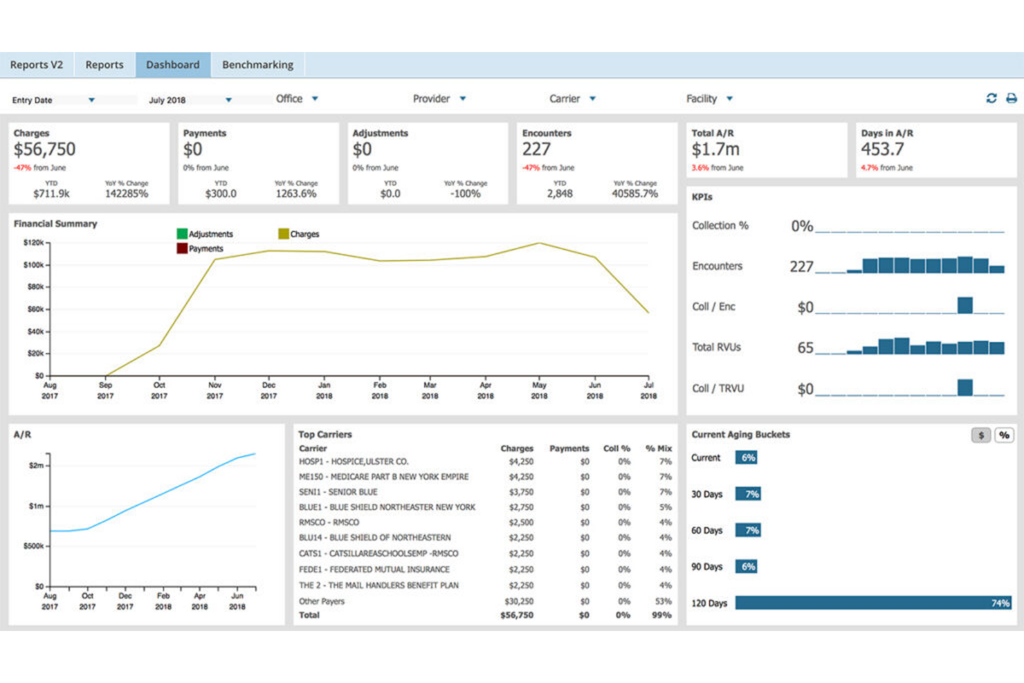
Turning clinical and operational data into decisions is what separates healthcare analytics and BI tools from standard reporting—these platforms aggregate data across EHRs, billing systems, and patient records to surface trends that inform staffing, quality improvement, and population health strategy. Administrators and clinical leaders get the most value here, because the visibility into outcomes and utilization patterns is what actually moves resource allocation conversations forward.
Benefits
The clearest win I've seen from healthcare analytics and BI software is the shift from gut-feel resource decisions to ones backed by actual utilization data—platforms like Health Catalyst and Tableau for Healthcare pull patterns across your EHR, billing, and operational systems that would take weeks to surface manually. Clinical leaders get the most out of these tools when they're using the outcome trend dashboards to drive quality improvement cycles, not just quarterly reporting. Population health views that segment patients by risk, condition, or care gap are where tools like this genuinely change how your team prioritizes outreach.
Features
Healthcare analytics and BI software works best when it connects data sources your team already relies on—EHRs, billing systems, and patient records—and turns that combined data into views that actually support decisions:
- Cross-system data aggregation: Pull data from your EHR, billing platform, and operational systems into a single analytics environment. Health Catalyst does this well for health systems managing data across multiple care sites.
- Outcome trend dashboards: Visualize clinical outcome data over time by department, condition, or patient population. This is what clinical leaders use to drive quality improvement cycles rather than just pull numbers for quarterly reports.
- Population health segmentation: Group patients by risk level, chronic condition, or care gap status so your team can prioritize outreach based on data rather than intuition. This view changes how care management resources actually get allocated.
- Utilization and capacity reporting: Track bed occupancy, appointment volume, and resource utilization across your organization. This is the layer that makes staffing and scheduling decisions defensible to leadership.
- Financial and billing analytics: Surface patterns in claims, reimbursements, and denials to identify revenue leakage and billing inefficiencies. This feature is underused given how directly it connects to operational sustainability.
- Custom report and dashboard building: Build condition- or department-specific views without relying on your IT team for every report. Tableau for Healthcare is strong here, especially for teams that need to adapt dashboards as reporting needs shift.
- Benchmarking and performance comparison: Compare your organization's clinical and operational metrics against peer benchmarks or internal targets to identify where performance is falling short and where it's ahead.
When you integrate data across your EHR, financial systems, and patient records into a flexible BI layer, you shift the conversation from ‘what happened’ to ‘how do we allocate our clinical resources right now.’ It makes every capacity and staffing decision defensible to executive leadership.
Ready to Find the Right Software for Your Practice?
The types of medical software you need will depend on your care model, team size, and operational priorities—but across all of them, compliance sits at the center. If you're evaluating platforms for your practice, understanding the key features of medical compliance software is a practical next step for narrowing your shortlist.