

Som helsepersonell ser du sannsynligvis etter programvare for pasientportaler som kan automatisere mange av de tidkrevende oppgavene som inngår i driften av en medisinsk praksis. Disse programvareløsningene, som vanligvis er nettbaserte og suppleres med en mobilapp, tilbyr en lang rekke funksjoner. De kan effektivisere alt fra pasienttimebestilling til journalføring og ONC-sertifisert medisinsk programvare, noe som gjør dem til et uvurderlig verktøy i enhver klinisk sammenheng.
Kort sagt gir programvare for pasientportaler helsepersonell de riktige verktøyene for å automatisere løsningen for praksisadministrasjon. Dette sparer tid samtidig som pasientopplevelsen forbedres. De kan få tilgang til og administrere alle relevante data fra smarttelefonene sine, noe som gjør arbeidet enda mer praktisk og effektivt.
Why Trust Our Software Recommendations
6,700+
Reviews
20
Industry experts
16+
Evaluation factors
14
Years
Our team has been testing and reviewing software since 2012. As medical practice leaders ourselves, we know how difficult—and important—it is to choose the right software.
For this guide, we evaluated tools using hands-on testing and independent research, scoring tools using our selection criteria.
Our reviews reflect our human editorial judgment, not a sales pitch.
Sammenligningstabell for programvare til pasientportaler
Denne sammenligningstabellen oppsummerer prisopplysningene for mine beste utvalgte løsninger for pasientportaler:
| Tool | Best For | Trial Info | Price | ||
|---|---|---|---|---|---|
| 1 | Best for integrated e-prescribing tools | Free demo + free expert consultation available | Pricing upon request | Website | |
| 2 | Best for seamless healthcare operations | Free demo available | From $5,000/year (billed annually) | Website | |
| 3 | Best for healthcare networks seeking improved patient engagement | Free demo available | Pricing upon request | Website | |
| 4 | Best for building custom patient portals with no coding | Free trial available | From $100/month | Website | |
| 5 | Best for offering multilingual patient portal solutions | Free demo available | From $15,000 (billed annually) | Website | |
| 6 | Best for facilitating telemedicine consultations | Free demo available | Pricing upon request | Website | |
| 7 | Best for a patient-centric experience with passport feature | Free demo available | Pricing upon request | Website | |
| 8 | Best for patient engagement tools | Free demo available | Pricing upon request | Website | |
| 9 | Best for cloud-based community care coordination | Free demo available | Pricing upon request | Website | |
| 10 | Best for mental health professionals needing robust diary management | 14-day free trial | From $19/month | Website |


Anmeldelser av den beste programvaren for pasientportaler
Nedenfor finner du mine detaljerte sammendrag av den beste programvaren for pasientportaler som kom med på kortlisten min. Anmeldelsene mine gir en detaljert gjennomgang av de viktigste funksjonene, fordelene & ulempene, integrasjonene og ideelle bruksområdene for hvert verktøy, slik at du kan finne det som passer best for deg.
 1Best for integrated e-prescribing tools
RXNT
- Free demo + free expert consultation available
- Pricing upon request
Visit WebsiteCustomer Rating:4.3/5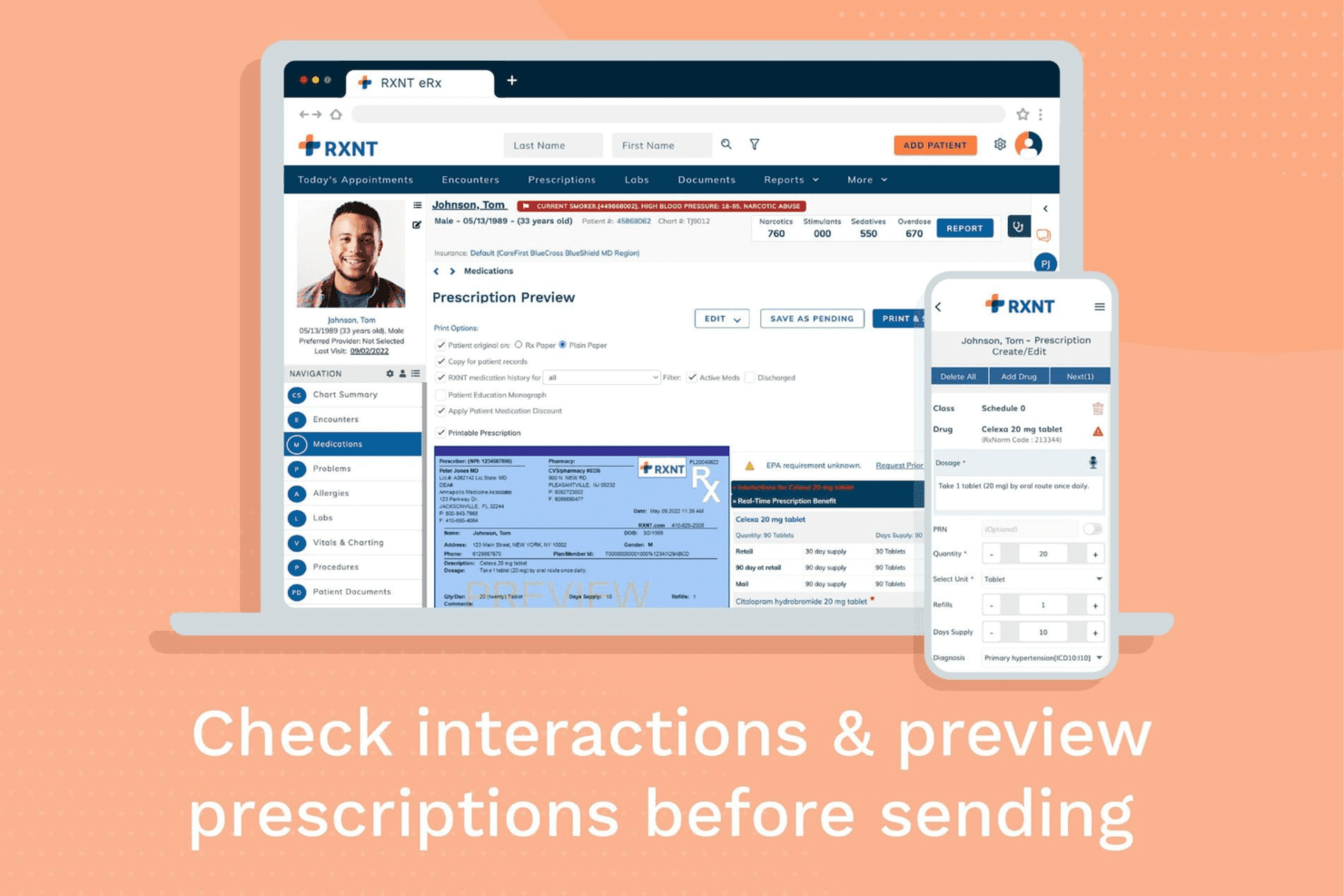
RXNT ePrescribing helps providers create, review, and send prescriptions electronically while checking medication interactions and patient-specific prescribing details. RXNT is a cloud-based EHR and practice management platform that combines patient portal access, e-prescribing, scheduling, billing, and telehealth tools for medical practices.
Who Is RXNT Best For?
RXNT works well for independent practices and small-to-mid-sized medical groups that want an all-in-one EHR, patient portal, and billing platform under one system.
Why I Picked RXNT
I picked RXNT as one of the best because its e-prescribing is built into the same system as the patient portal, not added on as a third-party feature. Patients can view and manage their prescriptions through the MyRXNT portal, while providers transmit scripts to any U.S. retail or mail pharmacy from within the EHR. I also like that RXNT is DEA-certified for EPCS (Electronic Prescribing for Controlled Substances, Schedule II–V) and connects to state Prescription Drug Monitoring Programs (PDMPs) via Bamboo Health, so controlled substance prescribing happens within the same workflow.
RXNT Key Features
- Secure patient messaging: Patients and providers exchange HIPAA-compliant messages directly through the MyRXNT portal.
- Online appointment scheduling: Patients request and manage appointments through the portal, receiving automated confirmations after booking.
- Lab result access: Providers deliver lab and imaging results through the portal for patients to view or download on demand.
- Online bill pay: Patients view balances and submit payments using RXNT's built-in billing tools.
RXNT Integrations
RXNT integrates with Kno2 for TEFCA-based health information exchange, connecting providers to over 10,000 participating organizations for bi-directional patient data sharing. It also integrates with Bamboo Health for direct access to state Prescription Drug Monitoring Programs (PDMPs) and with Change Healthcare (Relay Exchange) for claims clearinghouse connectivity. RXNT supports HL7 lab and radiology interfaces with national and regional diagnostic facilities, and connects with third-party telehealth platforms like Zoom and Doxy.me. Documentation for Zapier support is limited, and API details are not highlighted.
Pros and Cons
Pros:
- Controlled substances can be prescribed with PDMP access
- Billing, scheduling, and portal are integrated in one system
- E-prescribing works from mobile devices anywhere
Cons:
- Patients have reported issues logging into the portal
- Duplicate patient records sometimes happen
Learn more about RXNT: 2Best for seamless healthcare operations
Moxo
- Free demo available
- From $5,000/year (billed annually)
Visit WebsiteCustomer Rating:4.4/5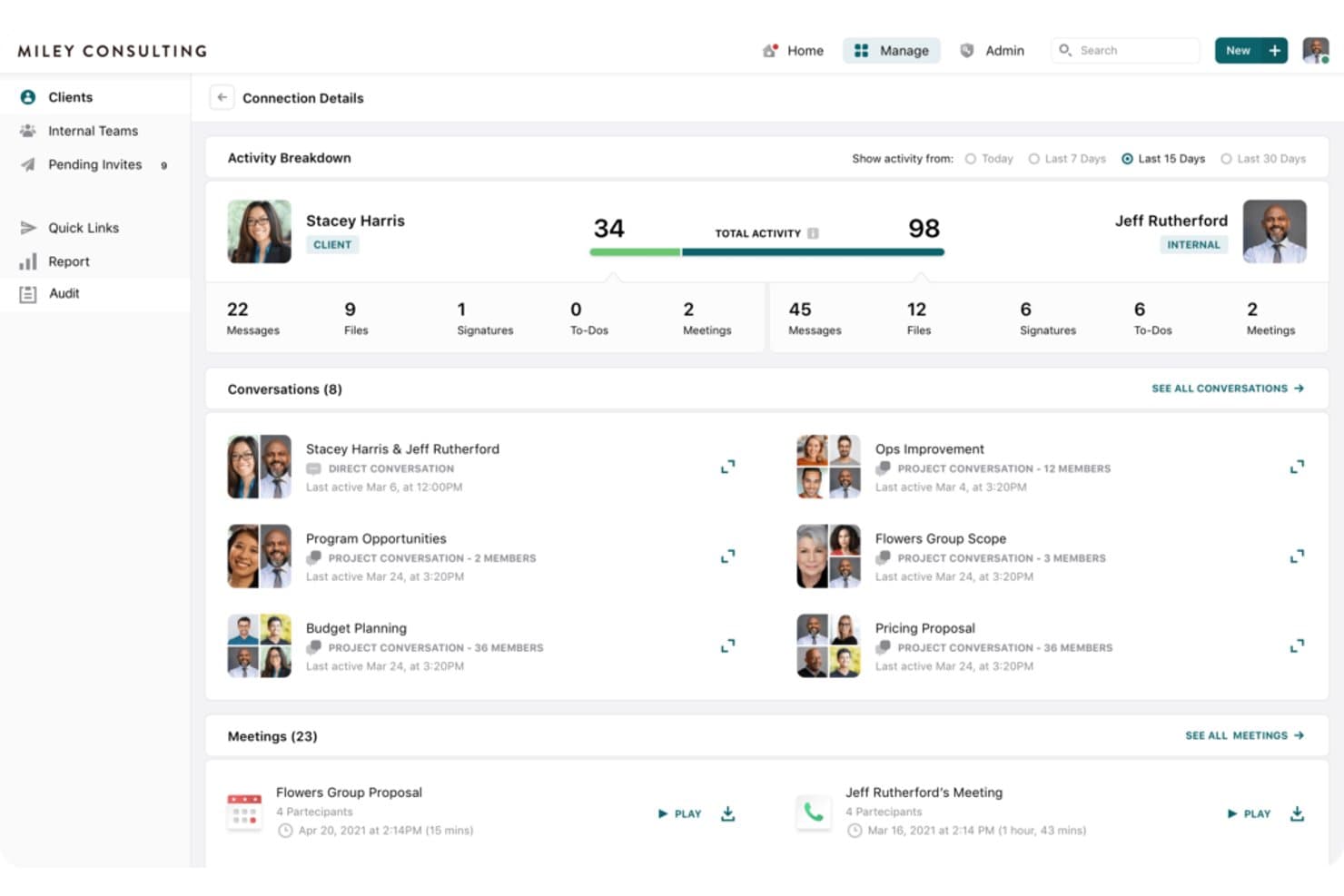
Moxo Matter Management Software Interface Moxo is a cloud-based client interaction and workflow platform that helps healthcare organizations coordinate patient communication, digital intake, scheduling, virtual care, and administrative processes in one secure workspace.
Who Is Moxo Best For?
Moxo works well for healthcare organizations that want to streamline patient-facing workflows while improving coordination between staff, providers, and patients.
Why I Picked Moxo
I picked Moxo because it combines patient engagement with workflow automation rather than focusing on communication alone. Healthcare teams can guide patients through scheduling, intake, document collection, approvals, payments, and virtual interactions within structured workflows. This makes Moxo a strong option for organizations that want to reduce fragmented processes and create a more consistent patient experience.
Moxo Key Features
- Patient self-scheduling: Let patients select available appointment times without relying on phone-based booking.
- Digital patient intake: Collect forms, documents, signatures, and patient information before appointments.
- Virtual care: Support remote interactions through secure digital communication and video-enabled workflows.
- Workflow automation: Build step-by-step processes for tasks, approvals, document collection, and patient follow-up.
Moxo Integrations
Moxo supports connections with EHRs, billing platforms, practice management systems, CRM tools, and other business applications. Its integration and API capabilities help healthcare organizations connect patient-facing workflows with existing clinical and administrative systems.
Pros and Cons
Pros:
- Supports a variety of integrations for comprehensive healthcare management
- Enhances patient experience through features like self-scheduling and virtual care
- Operational efficiency through feature-rich platform
Cons:
- The platform's wide range of features may be overwhelming for smaller practices
- Pricing information is not readily available
Learn more about Moxo: Best for healthcare networks seeking improved patient engagement
- Free demo available
- Pricing upon request
Visit WebsiteCustomer Rating:5/5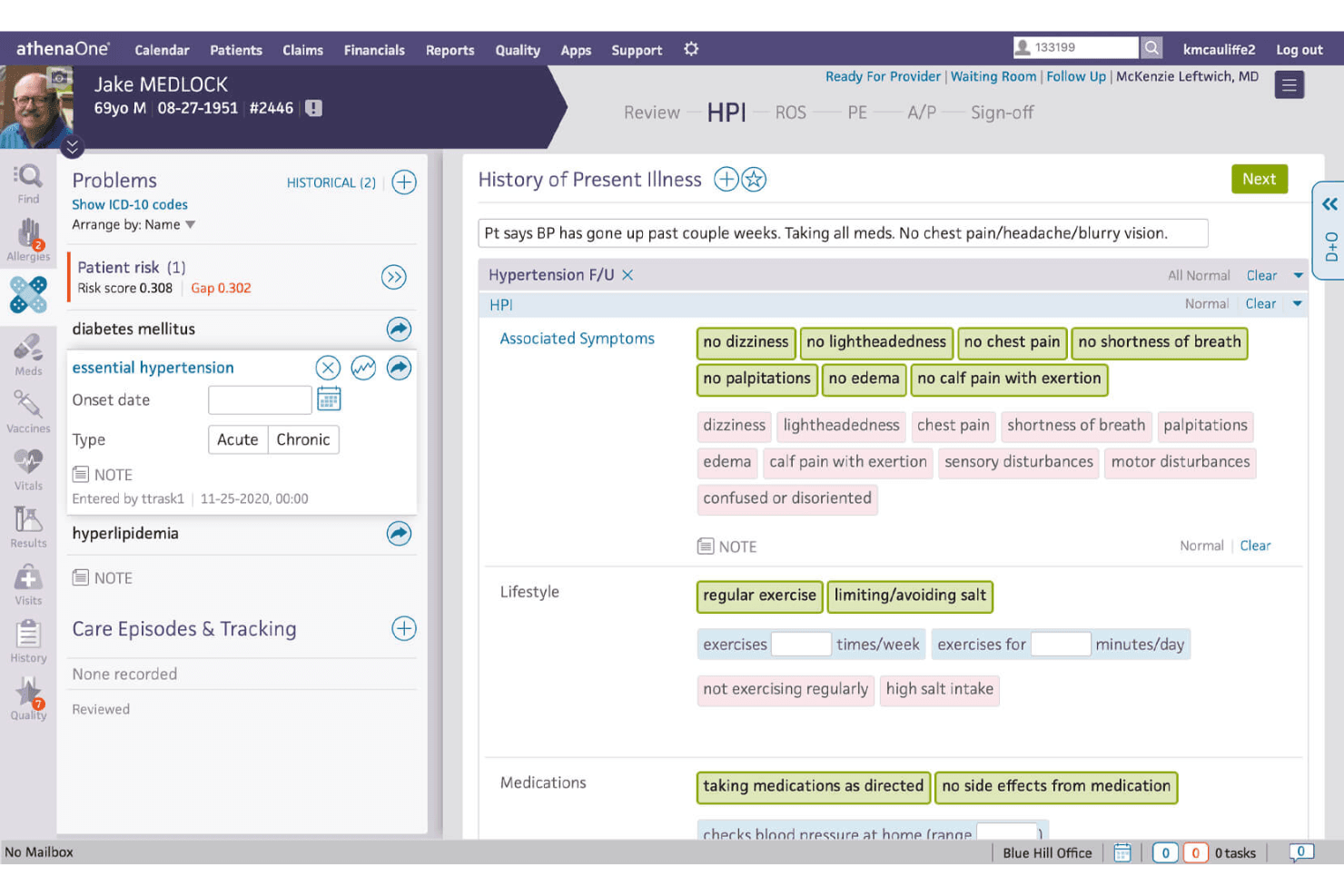
Athenahealth offers a centralized place to access patient records and manage information. athenahealth is a cloud-based healthcare IT platform that combines electronic health records, practice management, medical billing, patient engagement, and interoperability tools.
Who Is athenahealth Best For?
athenahealth works well for ambulatory practices and healthcare networks that want to improve patient engagement while managing clinical and administrative workflows in one system.
Why I Picked athenahealth
I picked athenahealth because its patient engagement tools are closely connected to the broader clinical and practice management platform. Patients can use the portal to review health information, schedule appointments, complete forms, and communicate securely with their care teams. This makes athenahealth a strong option for healthcare organizations that want to strengthen patient-provider communication without relying on a separate engagement platform.
athenahealth Key Features
- Patient portal: Give patients secure access to health records, test results, appointments, forms, and billing information.
- Online scheduling: Let patients request or book appointments through digital scheduling tools.
- Secure messaging: Support protected communication between patients and healthcare teams.
- Patient intake tools: Allow patients to complete registration forms and provide information before their visits.
athenahealth Integrations
athenahealth supports connections with laboratories, pharmacies, hospitals, imaging providers, payers, and third-party healthcare applications. Its APIs and interoperability tools help organizations exchange patient and operational data across connected systems.
Pros and Cons
Pros:
- Robust patient portal
- Comprehensive healthcare IT solution
- Emphasis on improved patient engagement
Cons:
- May require significant time investment for complete implementation
- Might have features that some smaller practices do not require
Learn more about Athenahealth: Best for building custom patient portals with no coding
- Free trial available
- From $100/month
Visit WebsiteCustomer Rating:4.5/5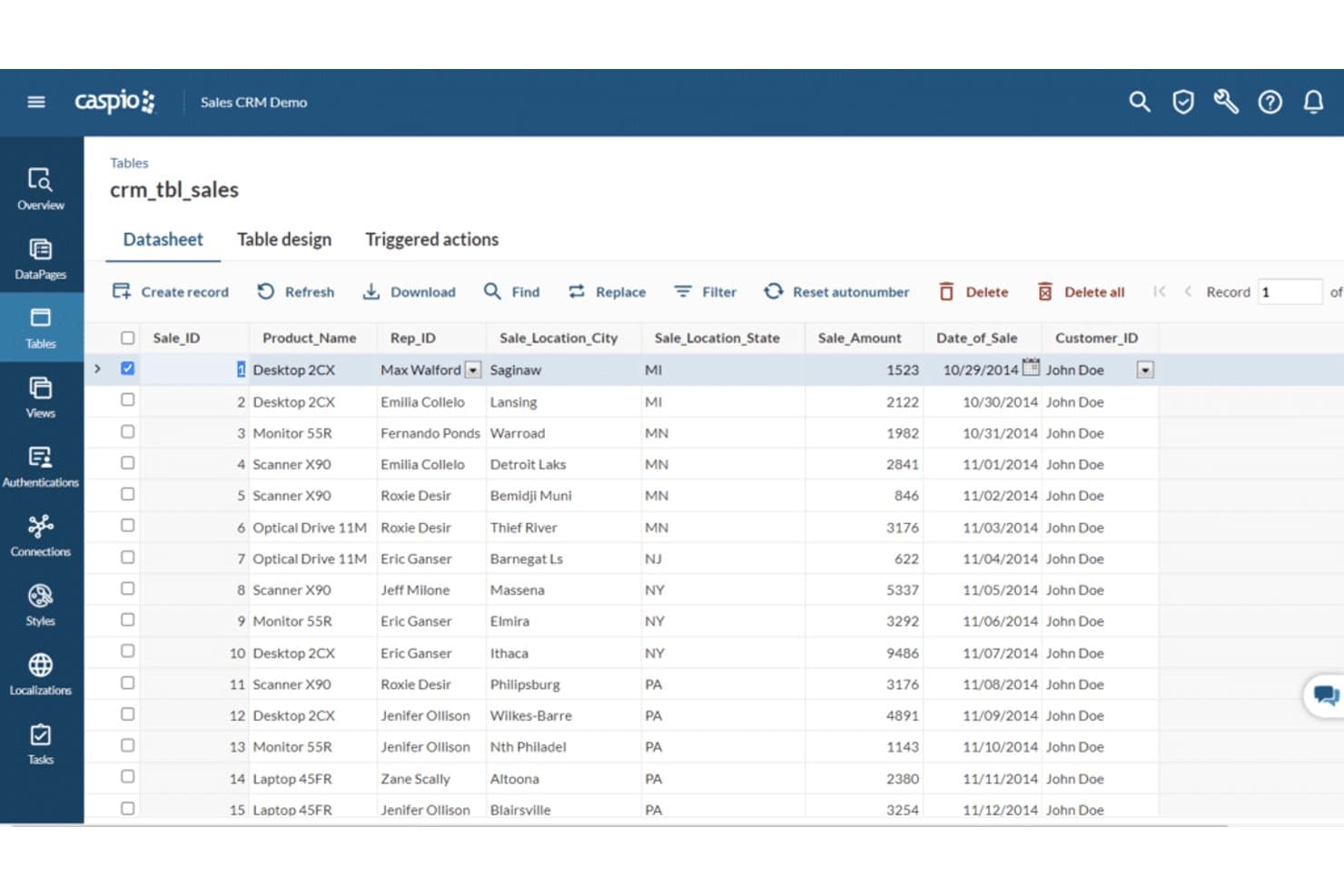
Caspio data sheet is simple and easy to use. Caspio is a low-code cloud platform that helps healthcare organizations build custom patient portals, workflow applications, and data management tools without extensive programming.
Who Is Caspio Best For?
Caspio works well for healthcare organizations that need a highly customized patient portal or internal application that cannot be handled by a standard, prebuilt system.
Why I Picked Caspio
I picked Caspio because it gives healthcare teams the flexibility to build patient portals around their own workflows instead of adapting to a fixed template. Its drag-and-drop tools make it possible to create forms, dashboards, databases, and user-facing applications with limited coding. This makes Caspio a strong option for organizations that need tailored portal functionality without investing heavily in custom software development.
Caspio Key Features
- Drag-and-drop app builder: Create patient portals, forms, and workflow applications using visual development tools.
- Custom dashboards: Build interactive views for patient information, operational metrics, and clinical or administrative data.
- Data management: Store, organize, and manage healthcare-related information in configurable cloud databases.
- Role-based access: Control what patients, providers, and staff members can view or edit within each application.
Caspio Integrations
Caspio supports connections with EHR systems, payment gateways, Microsoft 365, Google Workspace, and other third-party applications. Its APIs and automation tools also allow organizations to connect custom portals with existing clinical and administrative systems.
Pros and Cons
Pros:
- Extensive third-party integrations
- Highly customizable
- No coding knowledge required for portal creation
Cons:
- No free plan available
- May have a learning curve for non-technical users
Learn more about Caspio: Best for offering multilingual patient portal solutions
- Free demo available
- From $15,000 (billed annually)
Visit WebsiteCustomer Rating:4.2/5
A sneak peek at the Bridge appointment calendar feature. Bridge is a patient portal software that aims to break down language barriers in healthcare. It provides comprehensive features in a multilingual setting, making healthcare management accessible to a diverse patient population. Given its multilingual capabilities, Bridge is a top choice for offering multilingual patient portal solutions.
Why I Picked Bridge: In evaluating different patient portal software, I found that Bridge's commitment to multilingual support set it apart. By addressing the language needs of diverse patient populations, significantly enhances patient engagement and care.
I chose Bridge because it offers multilingual solutions, which is crucial in our globalized world where language barriers often impede access to healthcare.
Standout Features & Integrations:
Bridge offers an array of useful features such as appointment scheduling, bill payments, health information access, and secure messaging with healthcare providers, all accessible in multiple languages. It also integrates smoothly with several Electronic Health Record (EHR) systems, practice management systems, and revenue cycle management platforms, enhancing its functionality and ease of use.
Pros and Cons
Pros:
- Robust third-party integrations
- Wide range of features
- Multilingual support
Cons:
- Advanced features require higher-priced plans
- No free plan available
- High starting price
Learn more about Bridge: Best for facilitating telemedicine consultations
- Free demo available
- Pricing upon request
Visit WebsiteCustomer Rating:4.1/5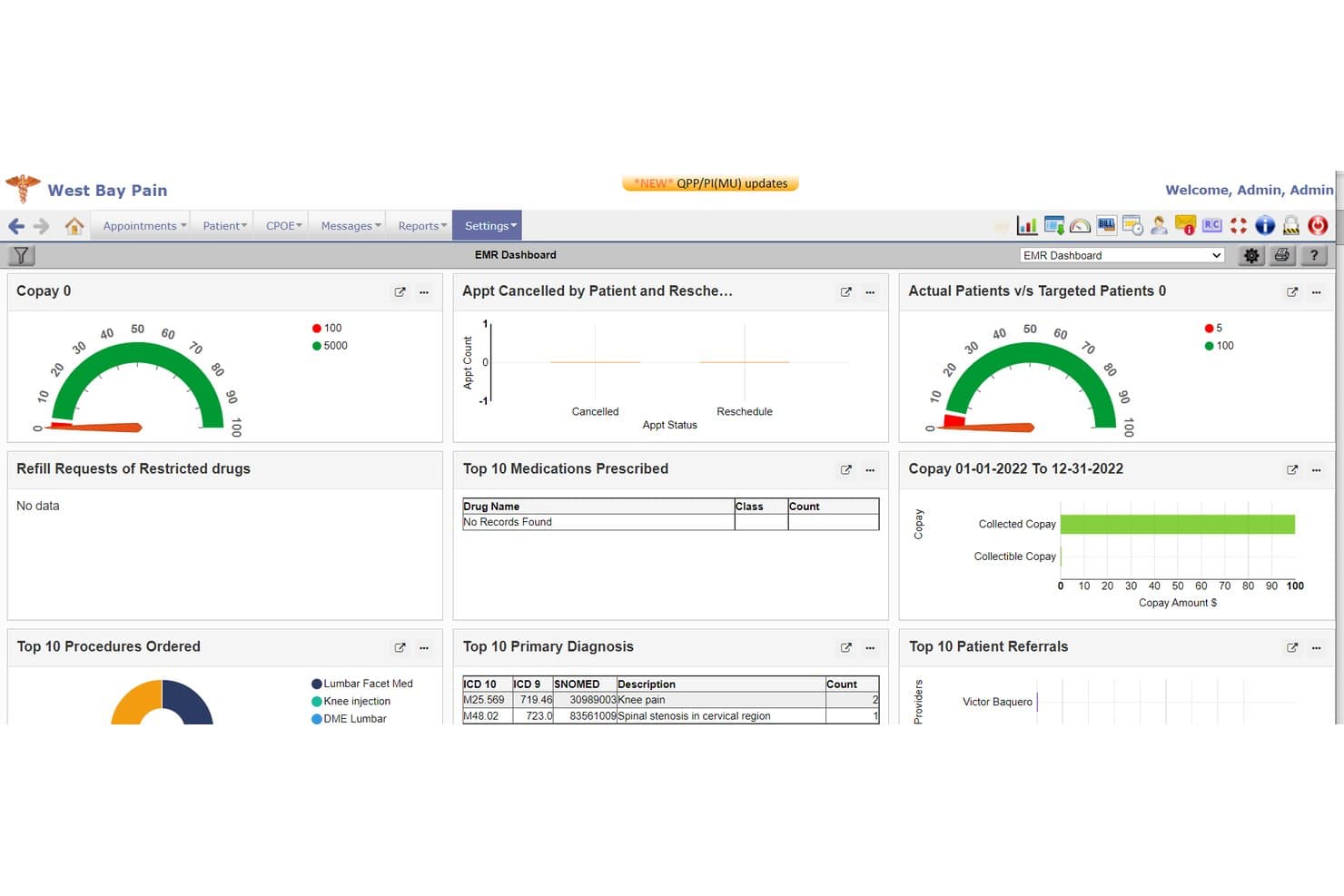
PrognoCIS EMR analytics dashboard PrognoCIS is a cloud-based EHR and patient engagement platform that combines clinical documentation, appointment scheduling, secure messaging, prescription management, billing, and patient portal tools.
Who Is PrognoCIS Best For?
PrognoCIS works well for ambulatory practices that want a patient portal closely connected to a comprehensive EHR and practice management system.
Why I Picked PrognoCIS
I picked PrognoCIS because its patient portal is integrated directly with the broader EHR platform. Patients can review medical information, schedule appointments, communicate securely with providers, and request prescription refills without relying on a separate portal system. This makes PrognoCIS a strong option for practices that want patient self-service tools connected to clinical and administrative workflows.
PrognoCIS Key Features
- Medical record access: Let patients review visit summaries, test results, medications, and other available health information.
- Online appointment scheduling: Allow patients to request or manage appointments through the portal.
- Secure messaging: Support protected communication between patients and healthcare providers.
- Prescription refill requests: Let patients request medication renewals electronically through their portal accounts.
PrognoCIS Integrations
PrognoCIS connects its patient portal with its EHR, scheduling, billing, telemedicine, and e-prescribing tools. It also supports integrations with laboratories, pharmacies, imaging providers, health information exchanges, payment systems, and other healthcare applications through HL7, FHIR, and API-based connections.
Pros and Cons
Pros:
- Supports secure messaging, enhancing communication between patients and providers
- Fully integrable with various EHR, billing, and scheduling systems
- Provides a comprehensive suite of features, improving patient autonomy
Cons:
- Limited information about user interface and ease of use
- The extensive functionality may be complex for smaller practices
Learn more about PrognoCIS: Best for a patient-centric experience with passport feature
- Free demo available
- Pricing upon request
Visit WebsiteCustomer Rating:4.4/5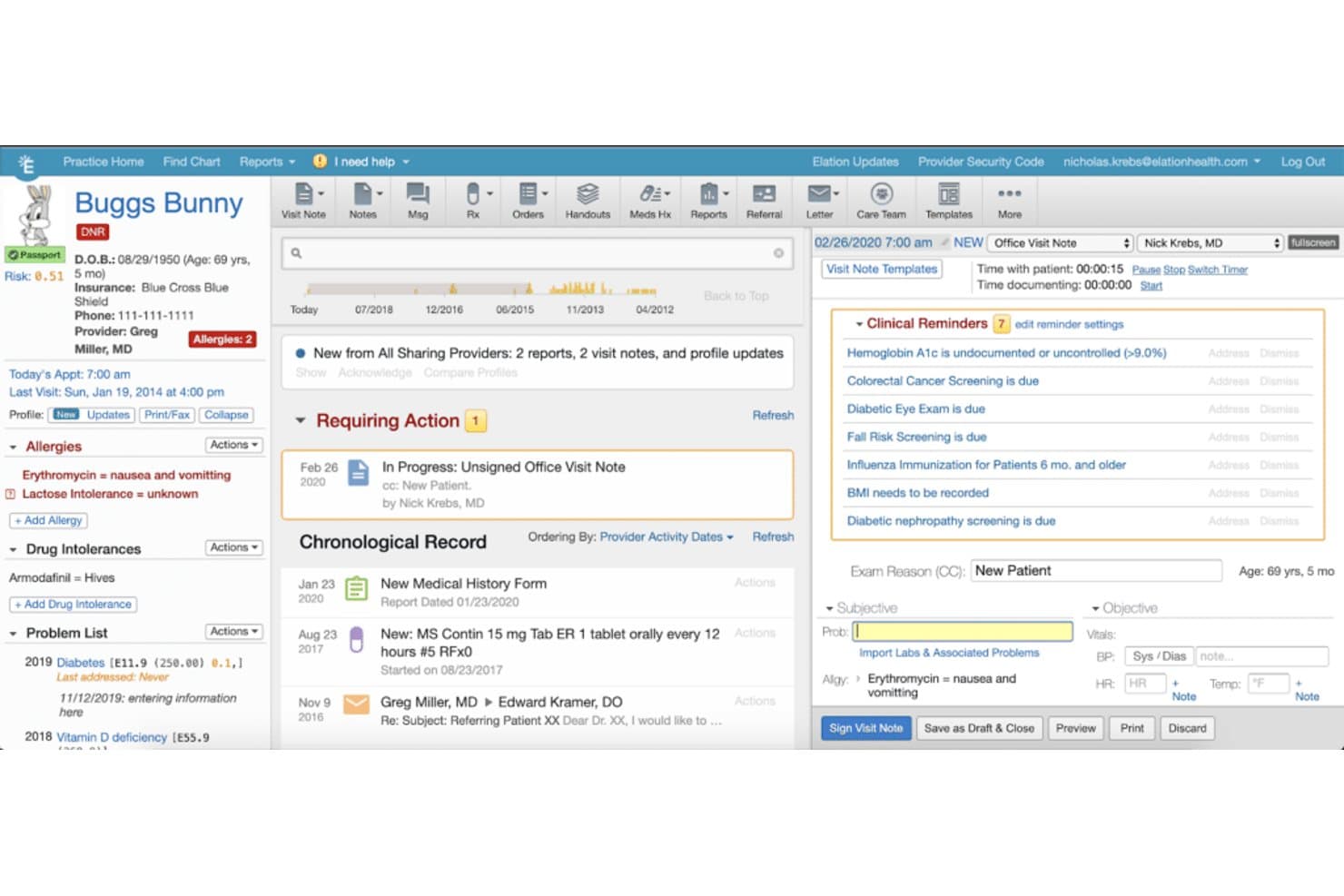
A look at the Elation Health patient summary feature. Elation Health is a clinical-first EHR and patient engagement platform that combines patient records, appointment management, prescription workflows, secure communication, and the Elation Passport patient portal.
Who Is Elation Health Best For?
Elation Health works well for independent primary care practices that want a patient-centered portal closely connected to the clinical record.
Why I Picked Elation Health
I picked Elation Health because its Passport portal gives patients a convenient way to access and manage their health information. Patients can review shared records, communicate with their care team, manage appointments, and participate more actively in their care. Since Passport connects directly with Elation’s EHR, providers can maintain patient communication and clinical information within the same workflow.
Elation Health Key Features
- Elation Passport: Give patients secure access to shared health information, visit details, and communication with their care team.
- Secure patient messaging: Allow patients and providers to exchange protected messages through the portal.
- Appointment management: Help patients review upcoming visits and manage appointment-related information.
- Prescription management: Support medication and prescription workflows through the connected EHR platform.
Elation Health Integrations
Elation Health supports connections with laboratories, pharmacies, billing platforms, health information exchanges, and other healthcare applications. Its APIs and integration network help practices connect clinical, financial, and patient engagement workflows.
Pros and Cons
Pros:
- Efficient third-party integrations
- Wide range of features
- Innovative passport feature for patient-centric care
Cons:
- Might require a learning curve for non-tech-savvy users
- High starting price
Learn more about Elation Health: Best for patient engagement tools
- Free demo available
- Pricing upon request
Visit WebsiteCustomer Rating:3.9/5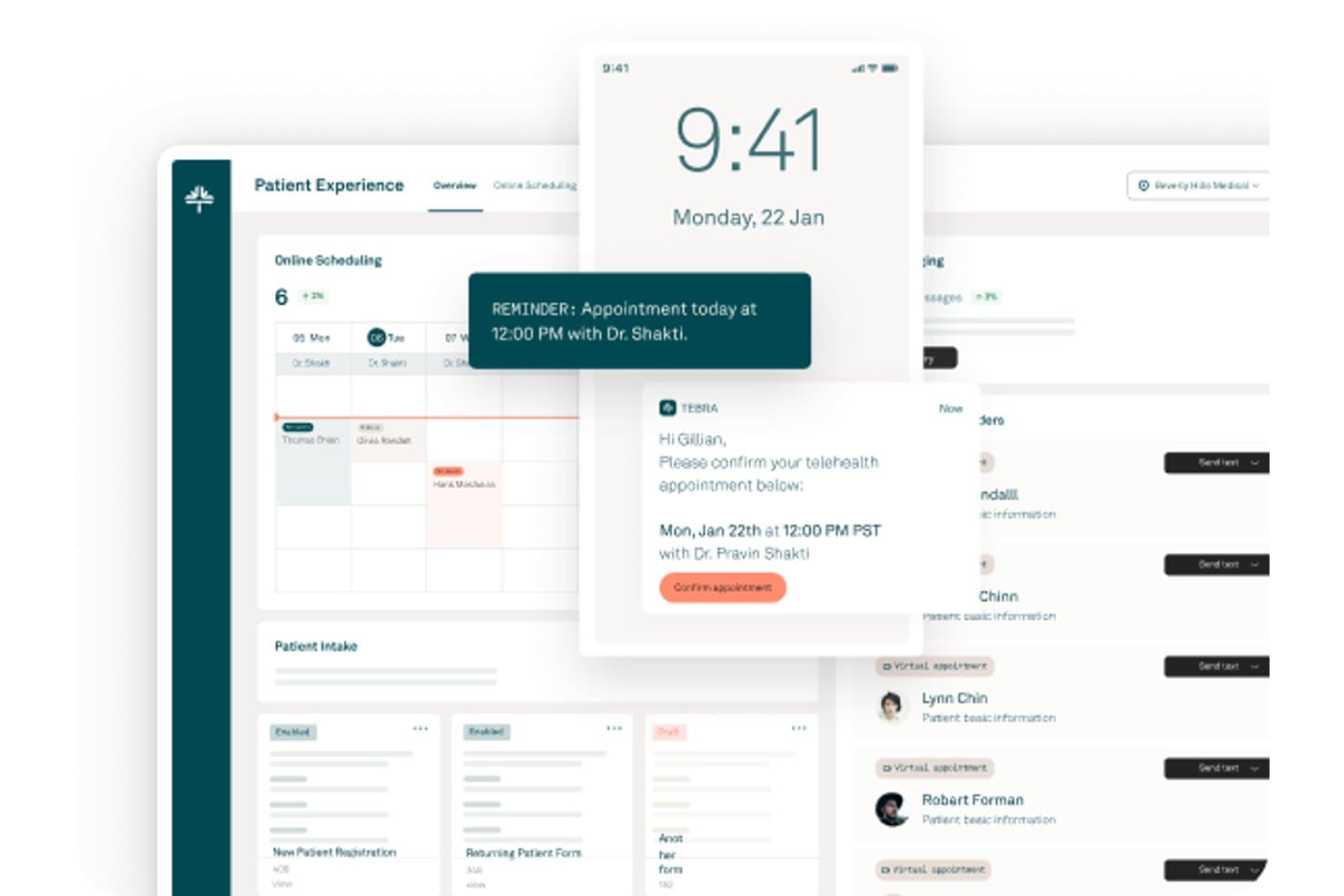
Tebra offers a patient experience dashboard with online scheduling, appointment reminders, telehealth confirmations, and patient intake management. Tebra is an all-in-one patient portal and practice management platform built for independent medical practices, combining secure messaging, digital intake, online scheduling, medical records access, and integrated billing in a single system.
Who Is Tebra Best For?
Tebra is a strong fit for independent and small-to-mid-size medical practices that want patient engagement and portal tools built into their existing EHR and billing workflows.
Why I Picked Tebra
I picked Tebra as one of the best because its patient engagement tools go well beyond a standard portal. I particularly like the AI-powered reputation management layer, which automatically sends post-visit review requests and generates HIPAA-compliant AI Review Replies. Paired with digital intake forms that deliver by text or email and sync directly to the EHR, Tebra turns routine patient touchpoints into active engagement moments.
Tebra Key Features
- Cloud-based EHR: Access patient records, chart notes, and visit summaries from any device.
- Integrated online bill pay: Patients can view and pay bills directly through the portal without external redirects.
- Provider calendar sync: Real-time appointment availability updates for accurate scheduling and rescheduling.
- HIPAA-compliant two-way messaging: Securely exchange messages between patients and care teams within the portal.
Tebra Integrations
Tebra offers native integrations with DrFirst, Fullscript, and Appriss Health, and syncs provider profiles across Google, Tebra Care Connect, and 80+ directories. An API is available for custom integrations.
Pros and Cons
Pros:
- Appointment scheduling links sync with EHR
- Seamless patient intake and consent forms
- Built-in automated review request workflow
Cons:
- Phone support can be slow during peak hours
- No patient-side cost estimator tool
Learn more about Tebra: Best for cloud-based community care coordination
- Free demo available
- Pricing upon request
Visit WebsiteCustomer Rating:3.6/5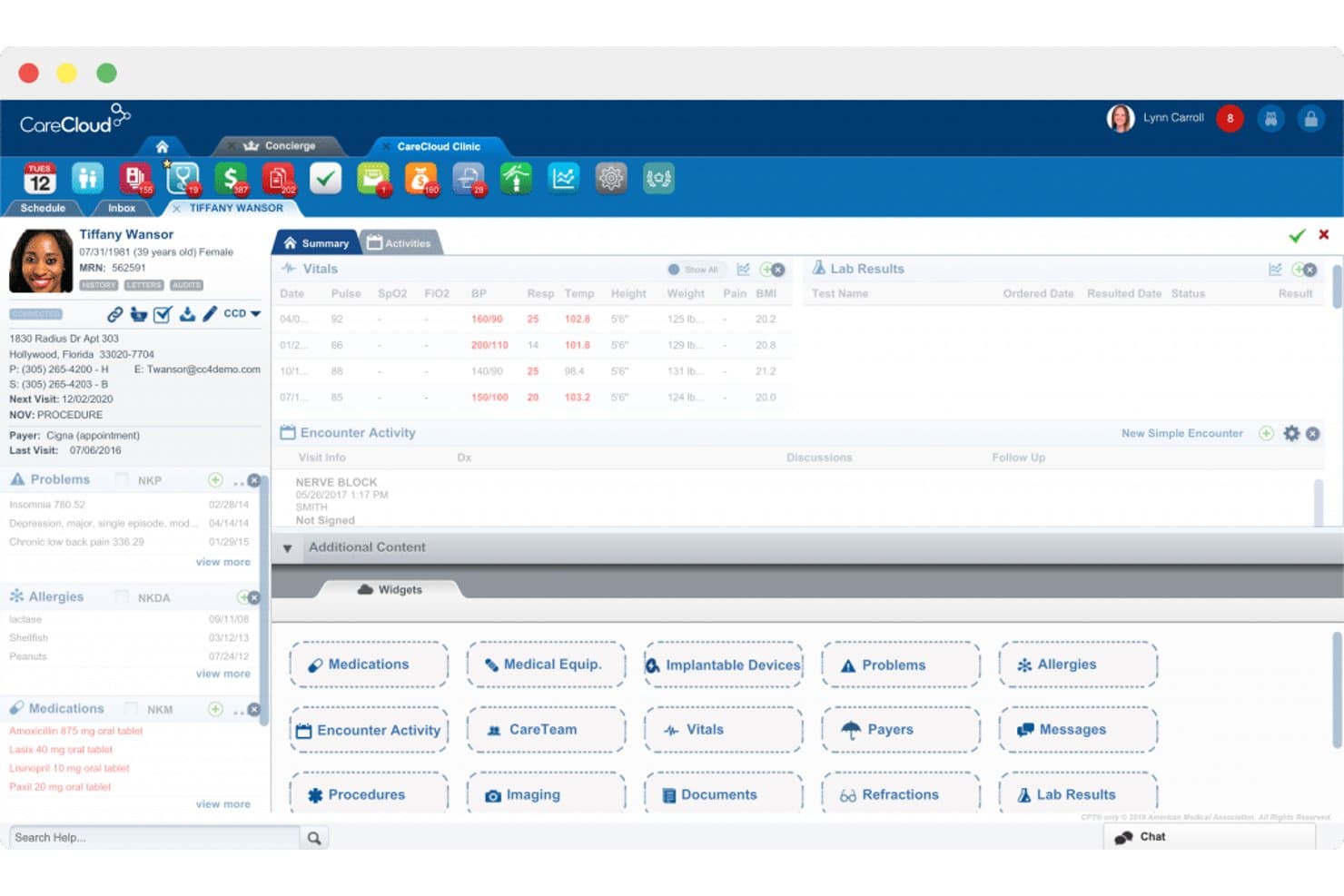
CareCloud patient summary feature. CareCloud is a cloud-based healthcare platform that combines patient engagement, electronic health records, practice management, billing, scheduling, and care coordination tools.
Who Is CareCloud Best For?
CareCloud works well for ambulatory practices and multi-location healthcare organizations that want to connect patient engagement with clinical, administrative, and financial workflows.
Why I Picked CareCloud
I picked CareCloud because its cloud-based platform helps patients, providers, and administrative teams access shared information across different locations. Its integrated portal, scheduling, EHR, and billing tools can support more consistent communication and reduce fragmented workflows. This makes CareCloud a strong option for organizations that want to improve patient access and coordinate care across multiple providers or sites.
CareCloud Key Features
- Patient portal: Give patients secure access to appointments, health information, messages, forms, and billing details.
- Appointment scheduling: Manage provider calendars and let patients request or book visits through digital scheduling tools.
- Electronic prescribing: Send prescriptions electronically from within the connected clinical workflow.
- Integrated billing: Manage claims, payments, patient balances, and financial reporting alongside clinical records.
CareCloud Integrations
CareCloud supports connections with laboratories, pharmacies, clearinghouses, payment systems, and other healthcare applications. Its interoperability tools help organizations exchange clinical and administrative data across connected systems.
Pros and Cons
Pros:
- User-friendly interface
- Efficient community care coordination
- Comprehensive cloud-based patient portal
Cons:
- One-time setup fee required
- Higher starting price compared to other software
Learn more about CareCloud: Best for mental health professionals needing robust diary management
- 14-day free trial
- From $19/month
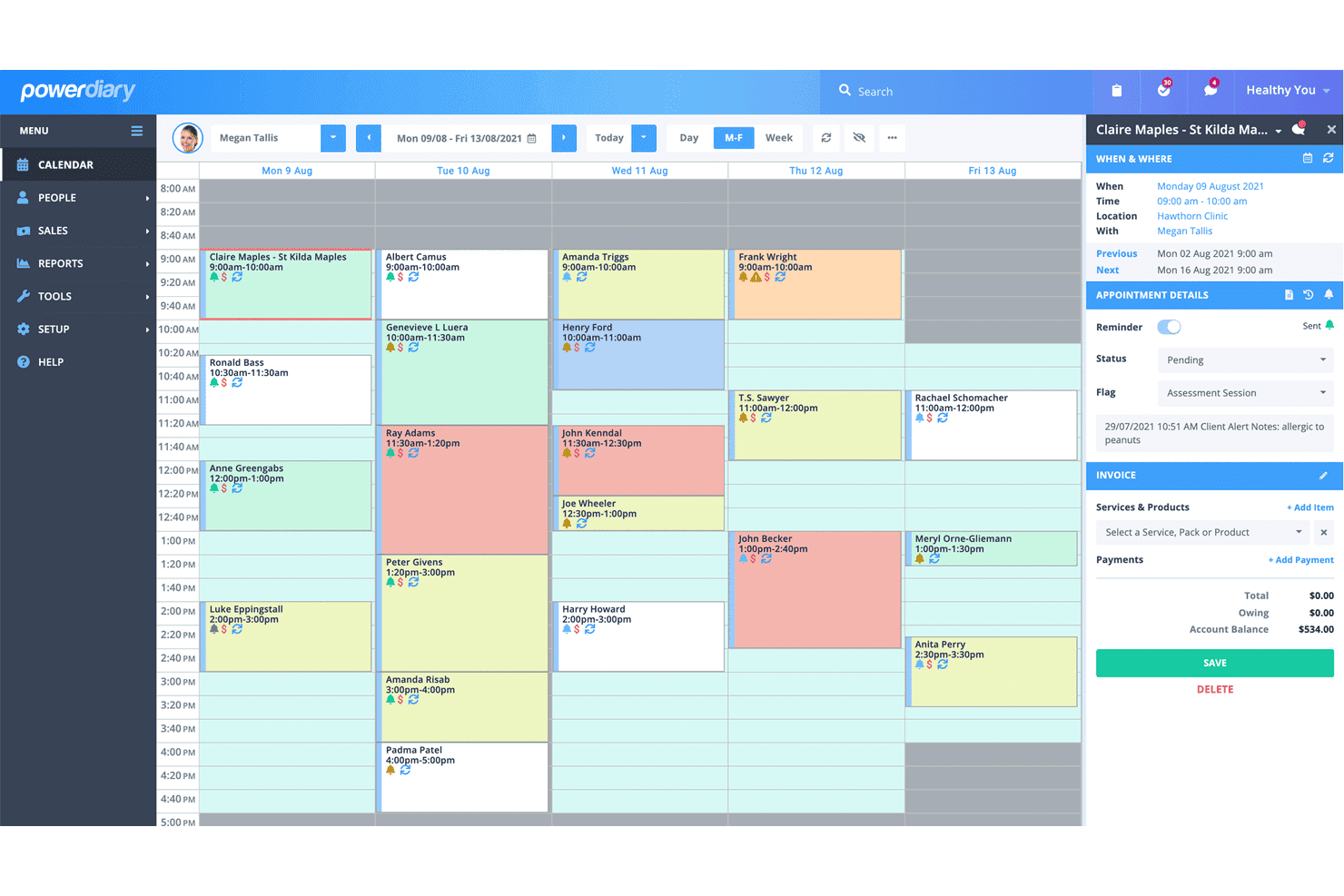
The PowerDiary calendar feature is designed to streamline practice management. PowerDiary is a practice management platform designed for mental health professionals. It combines appointment scheduling, client records, clinical notes, online booking, invoicing, payments, and communication tools in one system.
Who Is PowerDiary Best For?
PowerDiary works well for psychologists, counselors, therapists, and other mental health professionals who need to manage appointments, documentation, billing, and client communication from one platform.
Why I Picked PowerDiary
I picked PowerDiary because its diary and scheduling tools are built around the day-to-day needs of mental health practices. Providers can manage appointments, review client details, add notes, and organize their weekly workload without switching between separate systems. Its combination of diary management, clinical documentation, online booking, and payments makes it a strong option for mental health professionals seeking a focused practice management solution.
PowerDiary Key Features
- Diary management: View and manage appointments, practitioner schedules, availability, and daily or weekly workloads.
- Client records: Store contact details, appointment histories, notes, forms, and other client information in one place.
- Online booking: Let clients schedule appointments through a self-service booking page.
- Billing and payments: Create invoices, track payments, and manage practice finances alongside appointment records.
PowerDiary Integrations
PowerDiary integrates with Xero for accounting and Stripe for online payment processing. It also supports calendar, communication, and other practice workflow connections depending on the selected setup.
Pros and Cons
Pros:
- Integrates with popular tools like Xero and Stripe
- Focus on mental health professionals
- Robust diary management feature
Cons:
- Interface might be overwhelming for new users
- Some features may not be as robust as specialized solutions
Learn more about PowerDiary:
Annen programvare for pasientportaler
Her er noen flere alternativer for programvare til pasientportaler som ikke kom med på kortlisten min, men som likevel er verdt å se nærmere på:
- 11CorticoBest for canadian clinics seeking an EMR
- 12PlexiaBest for clinics needing advanced document management
- 13Creatio CRMBest for self-service options
- 14SimplePracticeBest for private practices seeking streamlined client management
- 15NextGENBest for scalable patient communication
- 16CarepatronBest for real-time communication with caregivers
- 17AdvancedMDBest for complete patient engagement features
- 18AIMDekBest for custom healthcare IT solutions
- 19OpenDentalBest for integrated dental practice management
- 20MedicsPortalBest for secure patient-provider messaging
How I Evaluate EMR Patient Portal Software
I split my evaluation into core requirements—like HIPAA-compliant messaging and EHR sync—and the differentiators that set platforms apart for specific practice types.
Core Functionality (Table Stakes for This List)
When I'm selecting tools for my list, I rank each one on a scale from 0 (does not offer the functionality) to 5 (excels in this area) for each core functionality listed below. Then, I calculate the tool's total score into a percentage. Each tool needs to achieve a minimum total score of 65% to be considered for inclusion.
- Secure Messaging: I check whether the portal supports HIPAA-compliant, two-way messaging between patients and care teams, including attachments and message threading.
- Appointment Self-Scheduling: Patients should be able to book, reschedule, or cancel visits on their own, with automated reminders sent via text, email, or both.
- Medical Records Access: I look for portals that let patients view lab results, medications, immunizations, and visit summaries without needing to call the office.
- Online Bill Pay: The portal should support integrated statement viewing and electronic payments so patients can handle balances directly after a visit.
- Digital Intake & Forms: I evaluate whether intake forms, e-signatures, and pre-visit questionnaires sync into the patient chart automatically before the appointment.
- EHR/PM Integration: Bidirectional data sync with EHR and practice management systems matters here, so updates flow both ways without manual re-entry.
Once I have a list of tools that meet the criteria, I consider what sets each platform apart.
Differentiating Factors (What Sets Vendors Apart)
Here's how I compare and contrast different vendors:
Standout Features
Telehealth integration is a key differentiator. I look for portals with built-in video visits and virtual waiting rooms so patients don't need a separate app to see their provider. Family and proxy access also matters—pediatric and geriatric practices need caregivers to manage records and messages on behalf of dependents with granular permission controls. A dedicated patient mobile app with biometric login and push notifications goes a long way toward driving portal adoption beyond the initial signup.
Beyond Features
Regulatory compliance is where I start. I check for HIPAA and HITECH compliance, SOC 2 Type II certification, and whether the vendor provides a BAA and audit logging. EHR/PM ecosystem fit is equally important—a portal that supports FHIR/HL7 APIs and certified integrations with your existing systems saves months of implementation headaches. I also evaluate how well each platform scales across practice sizes, from solo providers to multi-location groups, and whether it supports specialty-specific workflows like behavioral health consent or pediatric immunization tracking.
Slik velger du programvare for pasientportaler
Det er lett å gå seg vill i lange funksjonslister og kompliserte prisstrukturer. For å hjelpe deg med å holde fokus mens du går gjennom din unike prosess for valg av programvare, har vi laget en sjekkliste over faktorer du bør ha i mente:
| Faktor | Hva du bør vurdere |
|---|---|
| FaktorSkalerbarhet | Hva du bør vurdereKan programvaren vokse sammen med praksisen din? Kontroller om den støtter et økende antall brukere og datamengder uten ytelsesproblemer. |
| FaktorIntegrasjoner | Hva du bør vurdereKan den kobles til de eksisterende systemene dine, for eksempel EHR-er eller faktureringsprogramvare? Se etter innebygde integrasjoner for å unngå kompliserte tilpassede oppsett. |
| FaktorTilpasningsmuligheter | Hva du bør vurdereKan du tilpasse programvaren til behovene i praksisen din? Vurder fleksibiliteten i innstillinger, oppsett og brukertillatelser. |
| FaktorBrukervennlighet | Hva du bør vurdereEr programvaren intuitiv for alle brukere? Test grensesnittet for enkelhet og tydelighet for å redusere opplæringstiden og antallet feil. |
| FaktorImplementering og opplæring | Hva du bør vurdereHvor lang tid tar det å komme i gang? Vurder hvilke støttealternativer som er tilgjengelige under oppsettet, for eksempel opplæringsmateriell og hjelp med oppstart. |
| FaktorKostnad | Hva du bør vurdereHva er de totale eierkostnadene? Ta hensyn til abonnementsavgifter, mulige tillegg og eventuelle skjulte kostnader. |
| FaktorSikkerhetstiltak | Hva du bør vurdereHvordan beskytter programvaren pasientdata? Sørg for at den har kryptering, regelmessige sikkerhetsoppdateringer og overholder helseregelverk som HIPAA. |
| FaktorOverholdelse av krav | Hva du bør vurdereOppfyller programvaren nødvendige regulatoriske standarder? Kontroller at den overholder lokale og internasjonale bestemmelser som er relevante for praksisen din. |
Hva er programvare for pasientportaler?
Programvare for pasientportaler er et digitalt verktøy som gjør det mulig for pasienter å kommunisere med helsepersonell på nettet. Helsepersonell som leger, sykepleiere og administrativt personale bruker disse verktøyene for å forbedre kommunikasjonen og håndtere pasientinformasjon effektivt. Timebestilling, sikre meldinger og tilgang til medisinske journaler bidrar til pasientinvolvering og samordning av helsehjelpen. Alt i alt forbedrer disse verktøyene pasientopplevelsen ved å gjøre helsetjenester mer tilgjengelige og organiserte.
Funksjoner
Når du velger programvare for pasientportaler, bør du se etter følgende viktige funksjoner:
- Timebestilling: Gjør det mulig for pasienter å bestille og administrere timer på nettet, noe som reduserer den administrative arbeidsmengden og gjør det enklere.
- Sikre meldinger: Muliggjør sikker kommunikasjon mellom pasienter og helsepersonell, noe som øker pasientinvolveringen og tilfredsheten.
- Tilgang til medisinske journaler: Gir pasienter enkel tilgang til sykehistorikken og testresultatene deres, noe som fremmer åpenhet og informerte beslutninger.
- Betaling av regninger på nettet: Legger til rette for betaling av medisinske regninger på nettet, noe som gjør faktureringsprosessen mer effektiv for både pasienter og helsepersonell.
- Forespørsler om fornyelse av resepter: Lar pasienter be om fornyelse av resepter på nettet, noe som reduserer behovet for telefonsamtaler og forbedrer etterlevelsen av medisineringen.
- Integrasjon med telehelse: Støtter virtuelle konsultasjoner, utvider tilgangen til helsehjelp og imøtekommer pasientenes behov for konsultasjoner på avstand.
- Tilpassbare oversikter: Tilbyr personlige visninger og innstillinger for brukerne, slik at virksomheter kan tilpasse portalen til sine spesifikke behov.
- Analyse og rapportering: Gir innsikt i pasientdata og portalbruk, slik at virksomheter kan ta datadrevne beslutninger for å forbedre tjenestene.
Fordeler
Implementering av programvare for pasientportaler gir flere fordeler for teamet og virksomheten din. Her er noen av fordelene du kan se frem til:
- Økt pasientinvolvering: Sikre meldinger og tilgang til medisinske journaler holder pasientene informert og involvert i helsehjelpen de får.
- Forbedret kommunikasjon: Direkte kommunikasjonskanaler mellom pasienter og helsepersonell reduserer misforståelser og forbedrer samordningen av helsehjelpen.
- Økt effektivitet: Timebestilling og betaling av regninger på nettet sparer tid for både ansatte og pasienter og reduserer den administrative belastningen.
- Bedre datatilgang: Pasienter kan enkelt se helseopplysningene sine, noe som hjelper dem med å ta informerte beslutninger om helsehjelpen.
- Kostnadsbesparelser: Ved å automatisere rutineoppgaver som timebestilling og fakturering kan virksomheter redusere driftskostnadene og forbedre den økonomiske situasjonen.
- Større bekvemmelighet: Funksjoner som forespørsler om fornyelse av resepter og integrasjon med telehelse gir pasientene fleksibilitet når de skal håndtere helsebehovene sine.
- Datadrevet innsikt: Funksjoner for analyse og rapportering hjelper virksomheter med å forstå pasienttrender og forbedre tjenesteleveransen.
Kostnader & priser
Valg av programvare for pasientportaler krever en forståelse av de ulike prismodellene og abonnementene som er tilgjengelige. Kostnadene varierer basert på funksjoner, teamstørrelse, tillegg og mer. Tabellen nedenfor oppsummerer vanlige abonnementer, gjennomsnittsprisene deres og typiske funksjoner som er inkludert i programvareløsninger for pasientportaler:
Sammenligningstabell for abonnementer på programvare for pasientportaler
| Abonnementstype | Gjennomsnittspris | Vanlige funksjoner |
|---|---|---|
| AbonnementstypeGratisabonnement | Gjennomsnittspris$0 | Vanlige funksjonerGrunnleggende timebestilling, begrenset meldingsfunksjonalitet og minimal datatilgang. |
| AbonnementstypePersonlig abonnement | Gjennomsnittspris$5-$25/bruker/måned | Vanlige funksjonerTimebestilling, sikre meldinger og tilgang til medisinske journaler. |
| AbonnementstypeBedriftsabonnement | Gjennomsnittspris$30-$60/bruker/måned | Vanlige funksjonerAvansert timebestilling, full meldingsfunksjonalitet, betaling av regninger og analyse. |
| AbonnementstypeVirksomhetsabonnement | Gjennomsnittspris$70-$100/bruker/måned | Vanlige funksjonerTilpassede integrasjoner, omfattende analyse, telehelse og full tilpasning. |
Vanlige spørsmål om programvare for pasientportaler
Her er noen svar på vanlige spørsmål om programvare for pasientportaler:
Kan programvare for pasientportaler integreres med eksisterende EHR-systemer?
Ja, de fleste løsninger for pasientportaler kan integreres med eksisterende EHR-systemer. Integrasjonen sikrer en sømløs informasjonsflyt mellom systemene, reduserer behovet for manuell dataregistrering og minimerer feil. Når du velger en portal, bør du kontrollere kompatibiliteten med ditt nåværende EHR-system og ta hensyn til eventuelle ekstra integrasjonskostnader.
Hvor sikker er programvare for pasientportaler?
Programvare for pasientportaler er utviklet for å være sikker og i samsvar med regelverk som HIPAA. Se etter funksjoner som kryptering, tilgangskontroller og revisjonslogger for å beskytte pasientopplysninger. Kontroller alltid at programvareleverandøren følger bransjestandarder for databeskyttelse, slik at pasientenes data sikres.
Kan pasientportalen vise bildediagnostiske resultater?
Noen verktøy lar pasienter se bildediagnostiske resultater når en lege har godkjent dem, mens andre forsinker tilgangen eller utelater dem. Du må avgjøre hva som skal frigis automatisk, og hva som først må gjennomgås. Spør om portalen støtter forhåndsvisning av filer, eller om pasientene må laste ned PDF-filer. Noen klinikker begrenser tilgangen for å unngå forvirring eller oppfølgingsspørsmål.
Er det mulig å sende ut skjemaer gjennom portalen?
Ja, mange plattformer støtter digitale skjemaer, for eksempel innsjekking, samtykker eller helseoppdateringer. Du kan sende dem før besøket eller tildele dem når pasientene logger inn. Med noen verktøy kan du lage egne maler, mens andre tar betalt for tilpassede skjemaer. Sørg for at de fungerer på mobil, og at de ikke krever ekstra innlogginger. Pasientene har større sannsynlighet for å fylle ut skjemaene hvis det går raskt.
Hvor lang tid bør du beregne til oppsettet?
Det avhenger av leverandøren og hvor komplekst oppsettet ditt er. Noen verktøy er klare på noen få dager, mens andre tar flere uker hvis du trenger integrasjoner eller tilpassede arbeidsflyter. Du må sette av tid til å lære opp de ansatte, teste pasienttilgangen og rydde opp i gamle journaler. Spør om de utpeker noen som kan veilede deg gjennom utrullingen. Det gjør vanligvis prosessen enklere.