

Det kan være overveldende å navigere i verdenen av OB-GYN EMR-programvare. Du ønsker en løsning som dekker klinikkens unike behov uten å tilføre kompleksitet. Etter min erfaring kan riktig EMR-programvare gjøre det enklere å håndtere pasientjournaler og forbedre effektiviteten til teamet ditt.
Jeg har testet og gjennomgått ulike programvareløsninger uavhengig og forstår utfordringene du står overfor. Her finner du objektiv innsikt i de beste tilgjengelige OB-GYN EMR-alternativene, med fokus på funksjoner som virkelig betyr noe.
I denne artikkelen veileder jeg deg gjennom mine beste valg og fremhever de viktigste fordelene og det som skiller hvert alternativ fra de andre. Enten du ser etter bedre pasientkommunikasjon eller enklere arbeidsflyter, tror jeg du vil finne verdifull informasjon som kan hjelpe deg med å ta en informert beslutning for klinikken din.
Why Trust Our Software Recommendations
6,700+
Reviews
20
Industry experts
16+
Evaluation factors
14
Years
Our team has been testing and reviewing software since 2012. As medical practice leaders ourselves, we know how difficult—and important—it is to choose the right software.
For this guide, we evaluated tools using hands-on testing and independent research, scoring tools using our selection criteria.
Our reviews reflect our human editorial judgment, not a sales pitch.
Sammenligningstabell: OB-GYN EMR-programvare
Denne sammenligningstabellen oppsummerer prisopplysningene for mine beste utvalgte OB-GYN EMR-programvarer.
| Tool | Best For | Trial Info | Price | ||
|---|---|---|---|---|---|
| 1 | Best for integrated e-prescribing capabilities | Free demo + free expert consultation available | Pricing upon request | Website | |
| 2 | Best for interoperability and patient experience | Free demo available | Pricing upon request | Website | |
| 3 | Best for analytics-driven decision making | Free demo available | Pricing upon request | Website | |
| 4 | Best for specialty-specific workflows | Free demo available | Pricing upon request | Website | |
| 5 | Best for AI-assisted scheduling and billing | Free demo available | Pricing upon request | Website | |
| 6 | Best for OB/GYN billing and charting history | Free demo available | Pricing upon request | Website | |
| 7 | Best for end-to-end OB global billing workflows | Free demo available | Pricing upon request | Website | |
| 8 | Best for ACOG-aligned prenatal charting | Free demo available | Pricing upon request | Website | |
| 9 | Best for comprehensive cloud-based operations | Free demo available | From $295/user/month | Website | |
| 10 | Good for integrated practice management | Free demo available | Pricing upon request | Website |


Anmeldelser av den beste OB-GYN EMR-programvaren
Nedenfor finner du mine detaljerte sammendrag av den beste OB-GYN EMR-programvaren som kom med på kortlisten min. Anmeldelsene mine gir et detaljert innblikk i de viktigste funksjonene, fordelene og ulempene, integrasjonene og ideelle bruksområdene for hvert verktøy, slik at du kan finne det beste alternativet for deg.
 1Best for integrated e-prescribing capabilities
RXNT
- Free demo + free expert consultation available
- Pricing upon request
Visit WebsiteCustomer Rating:4.3/5
RXNT ePrescribing helps providers create, review, and send prescriptions electronically while checking medication interactions and patient-specific prescribing details. RXNT is a cloud-based EMR and practice management platform built for OB/GYN practices, combining specialty-specific charting templates, e-prescribing, scheduling, billing, and a patient portal in one system.
Who Is RXNT Best For?
RXNT serves independent OB/GYN practices and small-to-midsize women's health clinics that need a specialty-configured, all-in-one EMR and practice management system.
Why I Picked RXNT
I picked RXNT as one of the best for OB/GYN practices because its e-prescribing is built into the clinical workflow, not bolted on. As an OB/GYN provider, you can prescribe directly from the patient chart, with automatic drug interaction and allergy checks running in real time. RXNT is DEA-certified for EPCS, covering Schedule II–V controlled substances, and it connects directly to state Prescription Drug Monitoring Programs (PDMPs) via Bamboo Health, so you don't have to log into a separate database mid-visit.
RXNT Key Features
- OB/GYN charting templates: Access 36 pre-built, customizable templates for obstetric and gynecologic documentation.
- Lab order management: Order labs and receive results within the patient chart, with uploads to the patient record.
- Online patient intake forms: Send digital intake and consent forms to patients before their appointment so they can fill them out in advance.
- Mobile charge capture: Log charges from iOS or Android devices, keeping billing connected to point-of-care documentation.
RXNT Integrations
RXNT's e-prescribing software is available as part of its fully integrated suite or as a standalone product that works with most EHR systems. The platform connects to state PDMPs via Bamboo Health, is backed by Surescripts (connecting to over 95% of national pharmacies), and works with Change Healthcare for clearinghouse services. Providers can also use RXNT's VideoBridge tool to link with their preferred HIPAA-compliant video platform, such as Zoom or doxy.me. RXNT supports lab and radiology interfaces, and if your lab isn't connected, the platform can establish a connection to facilities across the country. The system follows interoperability standards like FHIR and HL7.
Pros and Cons
Pros:
- Mobile prescribing app works from any location
- Smart Forms and macros speed up charting
- Customizable prescription settings per patient
Cons:
- Occasional sluggishness delays record access
- Medication search and formulary data gaps
Learn more about RXNT: Best for interoperability and patient experience
- Free demo available
- Pricing upon request
Visit WebsiteCustomer Rating:5/5
Here is a screenshot of the NextGen EMR's generated patient report. NextGen is a powerful EMR solution for OB-GYN practices that emphasizes both interoperability and patient experience. It offers a blend of sophisticated functionality and integrative capabilities, ensuring both a smoother workflow for clinicians and a better experience for patients.
Why I Picked NextGen:
Selecting NextGen was an easy decision because of its superior capabilities in fostering interoperability and improving the patient experience. I have chosen it as the "Best for interoperability and patient experience" due to its seamless integration with other systems and patient-focused features.
Interoperability in healthcare is a critical factor for enhancing collaboration and coordination, and NextGen excels in this aspect.
What Do You Get for Free?
NextGen does not offer a free version of its EMR system. However, they do provide a complimentary demo for users to get a feel for the software's capabilities and potential benefits to their practice.
Standout Features and Integrations:
One of the standout features of NextGen is its unified and customizable dashboard that allows for efficient data management. Additionally, NextGen's mobile app enhances patient experience by providing easy access to health records, appointment scheduling, and communication with providers. The software also integrates seamlessly with multiple healthcare systems, pharmacies, and labs, which greatly improves practice workflow.
Pros and Cons
Pros:
- Customizable dashboard for efficient data management
- Patient-focused features enhance the overall patient experience
- Excellent interoperability with other systems
Cons:
- Learning curve may be steep for non-tech savvy users
- The cost might be higher for smaller practices
- Lack of a free version might be a deterrent for some
Learn more about NextGEN: Best for analytics-driven decision making
- Free demo available
- Pricing upon request
Visit WebsiteCustomer Rating:5/5
Here is a screenshot of the Athena Health vitals feature. Athena Health provides cloud-based services for electronic health records (EHR), revenue cycle management & medical billing services, patient engagement, and care coordination. Its robust analytics capabilities are particularly notable, equipping healthcare providers with the insights necessary for informed decision-making.
Why I Picked Athena Health:
I chose Athena Health for its focus on data analytics. In the vast landscape of EHR systems, Athena Health stands out with its sophisticated analytics capabilities. I believe these data-driven insights are crucial for improving patient outcomes, streamlining operations, and ultimately enhancing the overall efficiency of healthcare delivery. This is why Athena Health, in my opinion, is the best tool for analytics-driven decision-making.
What Do You Get for Free?
Athena Health does not provide a free tier or trial. However, they do offer a free demo that prospective users can request to get a sense of the software's capabilities and interface.
Standout Features and Integrations:
Athena Health's standout feature is its advanced analytics and reporting capabilities that allow users to track and evaluate key performance metrics. It also has an effective patient portal, providing patients with easy access to their health information.
In terms of integrations, Athena Health integrates well with a variety of hospital systems and third-party applications to ensure seamless data transfer and improved workflow efficiency.
Pros and Cons
Pros:
- Extensive integration possibilities
- Effective patient portal
- Advanced analytics and reporting capabilities
Cons:
- Potential for additional costs with certain integrations
- Customized pricing structure may not suit all practices
- No free tier or trial
Learn more about Athenahealth: Best for specialty-specific workflows
- Free demo available
- Pricing upon request
Visit WebsiteCustomer Rating:4.5/5
Here is a screenshot of ModMed's data analytics dashboard. ModMed, also known as Modernizing Medicine, offers a suite of healthcare IT solutions, including an advanced Electronic Health Record (EHR) system. With its specialized workflows, it caters to various medical specialties such as pediatrics, OB-GYN, cardiology, etc., making it ideal for practices looking for tailored solutions.
Why I Picked ModMed:
I picked ModMed for its specialty-specific focus, which differentiates it from more generic platforms. By tailoring its workflows to different medical specialties, it addresses unique needs that generalist tools often overlook. I believe ModMed is best for practices seeking solutions optimized for their specific field.
What Do You Get for Free?
ModMed doesn't offer a free plan. However, they do provide a free demo for interested users to understand the functionality and benefits of their system.
Standout Features and Integrations:
ModMed provides specialty-specific EHR, practice management, and revenue cycle management services, among other features. The platform's capability to create and customize workflows according to the needs of specific specialties is a standout feature. ModMed also integrates with various medical billing, telehealth, and lab service providers to extend its functionality.
Pros and Cons
Pros:
- Integrates with various external services
- Provides a suite of services including EHR, practice management, and revenue cycle management
- Tailored solutions for various medical specialties
Cons:
- Could be overwhelming for practices seeking simple solutions
- Pricing is not transparent, must contact them for a quote
- No free plan or trial
Learn more about ModMed: Best for AI-assisted scheduling and billing
- Free demo available
- Pricing upon request
Visit WebsiteCustomer Rating:4.3/5
Here is a screenshot of the Allegiance MD software on all devices. AllegianceMD is an electronic health records software developed for OB-GYN clinics. It leverages AI technology to streamline administrative tasks such as scheduling appointments for patients and medical professionals, and billing.
Why I Picked AllegianceMD:
I selected AllegianceMD for its innovative use of AI to automate administrative procedures, a feature I find quite unique among its competitors. This is why I believe it's "Best for AI-assisted scheduling and billing" - its AI features help save time and reduce errors in administrative tasks, contributing to the efficiency and accuracy of practice operations.
What Do You Get for Free?
While AllegianceMD doesn't provide a free plan, they do offer a free demo for interested customers. This is a chance for you to explore the software's capabilities and evaluate its fit for your specific needs.
Standout Features and Integrations:
AllegianceMD comes packed with a robust feature set, including charting, e-prescribing, and more. The key feature is its AI-driven technology that assists in scheduling and billing tasks, simplifying these critical operations. It also integrates with labs, pharmacies, and other healthcare service providers, creating a more seamless flow of patient data across different systems.
Pros and Cons
Pros:
- Integrates with various healthcare service providers for a seamless data flow
- Comprehensive set of features for practice management
- AI-assisted scheduling and billing improve efficiency and accuracy
Cons:
- Complexity of the AI feature may require a learning curve for some users
- Lack of a free plan or trial might deter some customers
- High starting price may be a barrier for smaller practices
Learn more about AllegianceMD: Best for OB/GYN billing and charting history
- Free demo available
- Pricing upon request
Visit WebsiteCustomer Rating:3.8/5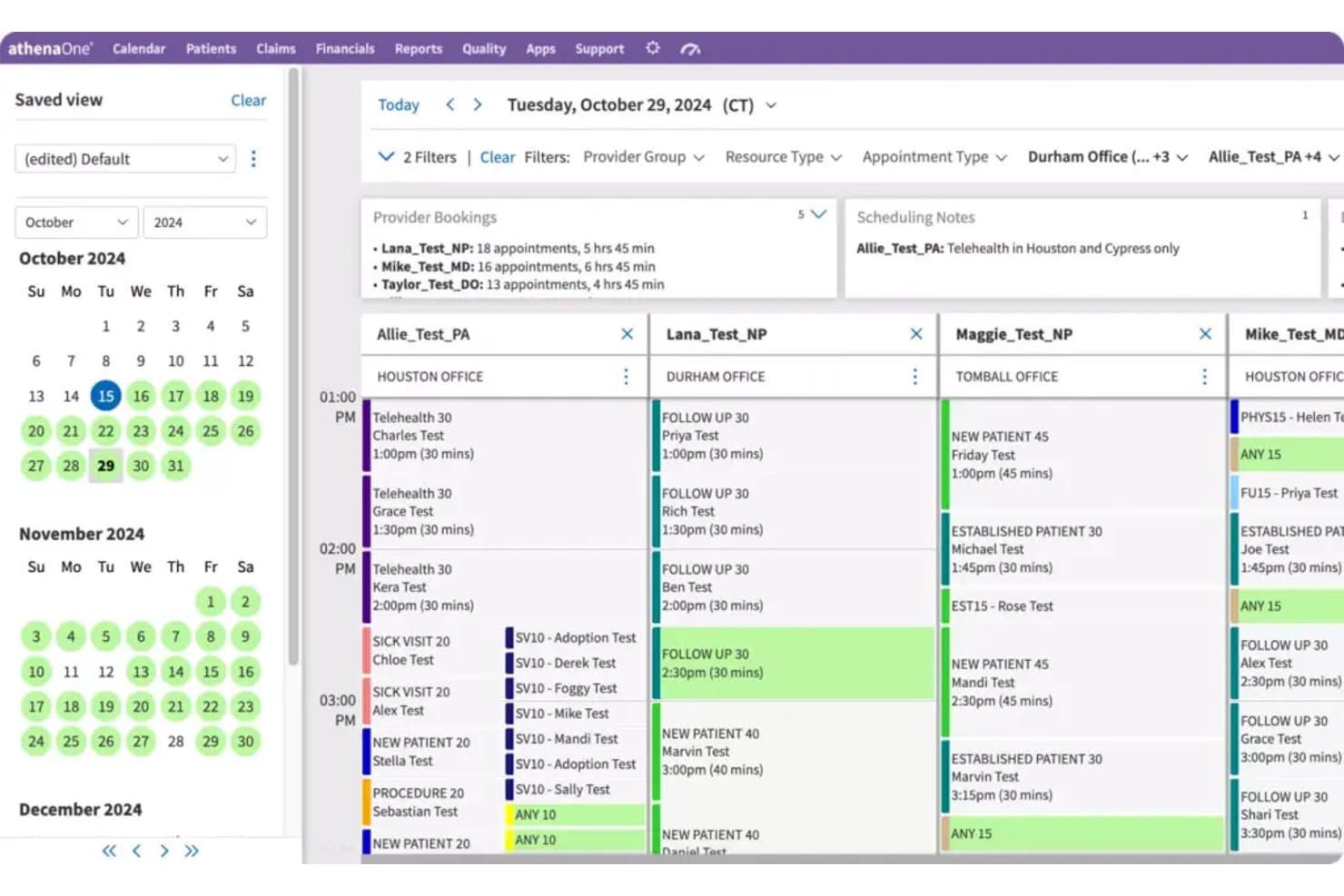
athenaOne lets users manage multi-provider daily schedules across office locations. athenaOne is an integrated EHR, medical billing, and practice management platform from athenahealth that includes a dedicated Women's Health module with OB/GYN-specific clinical templates, prenatal flowsheets, and specialty billing workflows.
Who Is athenaOne Best For?
athenaOne is a strong fit for OB/GYN practices that need a single platform to manage detailed pregnancy charting, longitudinal patient history, and specialty billing workflows.
Why I Picked athenaOne
athenaOne earns its spot on my shortlist because of how well it handles the two things OB/GYN practices wrestle with most: tracking a patient's full pregnancy history and keeping billing on track. The OB Episode API structures prenatal flowsheet data, including gestational age, fetal heart rate, fundal height, and cervix exams, so longitudinal records stay organized across the entire episode of care. I also like that encounter plans pre-populate routine orders by pregnancy stage, which cuts documentation time during prenatal visits.
athenaOne Key Features
- Specialty-specific clinical template library: athenaOne maintains a curated template library informed by specialty-society updates, clinician input, and Epocrates, with templates pre-loaded for specialty customers.
- Patient record sharing via CommonWell and Carequality: athenaOne automatically exchanges patient records across care sites through CommonWell and Carequality network connections.
- Role-based training journey: Onboarding includes structured core curriculums covering scheduling, check-in/check-out, exam, ordering, and revenue-cycle claims, plus OB/GYN-specific training and user groups.
- Women's health preventive outreach: Automated reminders support well visits, mammography, cancer screenings, and other women's health preventive care scheduling.
athenaOne Integrations
athenaOne offers native integrations with CommonWell Health Alliance and Carequality for patient-record exchange. It also provides 277K+ direct clinical integrations, 590+ Marketplace partners, and APIs for custom connections.
Pros and Cons
Pros:
- Reviewers value integrated charts and billing
- Reviewers praise scheduling and appointment reminders
- Pregnancy history stays organized across visits
Cons:
- Reviewers report click-heavy chart navigation
- Prenatal scheduling lacks gestational milestone automation
Learn more about athenaOne: Best for end-to-end OB global billing workflows
- Free demo available
- Pricing upon request
Visit WebsiteCustomer Rating:3.6/5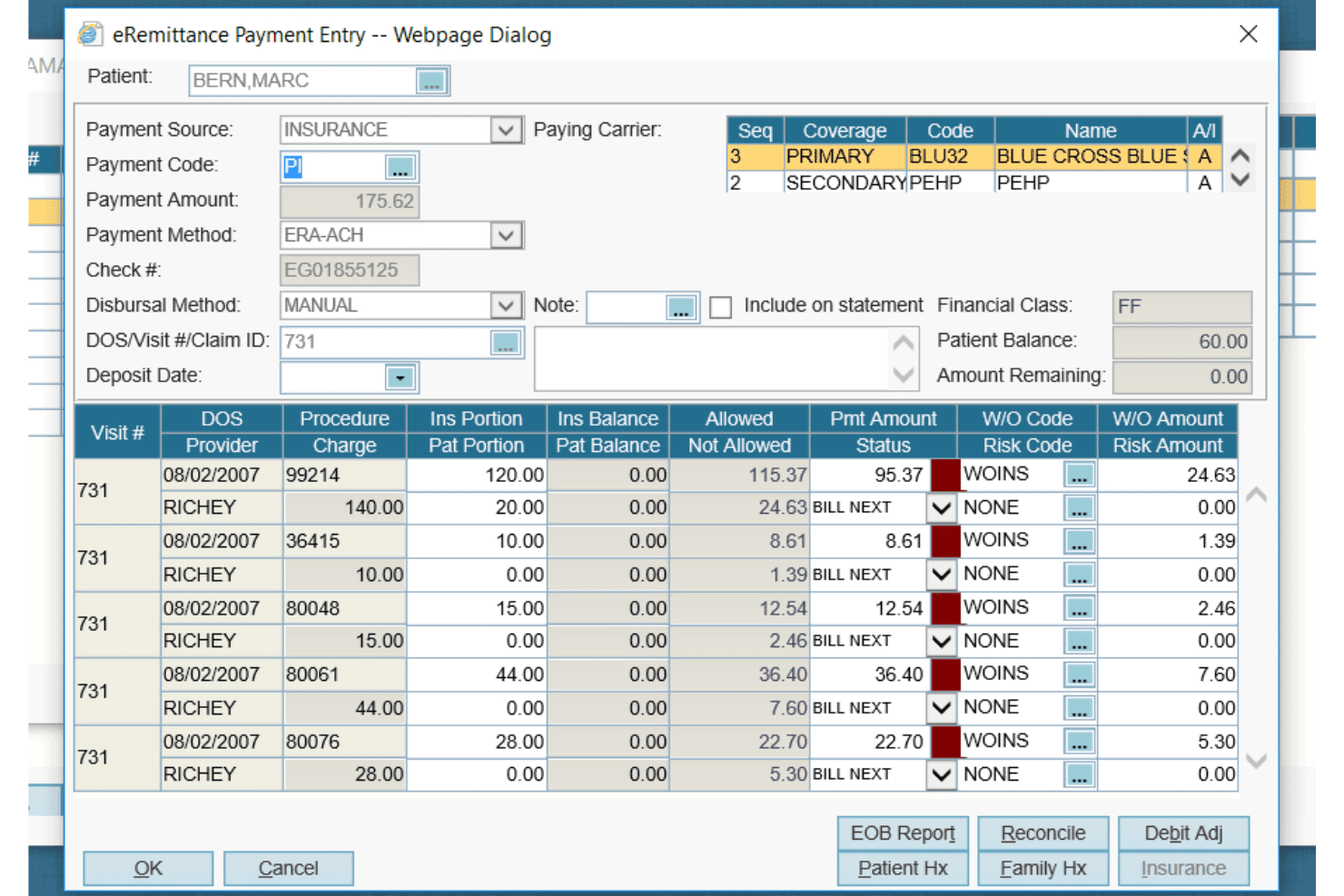
AdvancedMD offers a detailed eRemittance Payment Entry dialog for managing insurance billing, claim payments, and write-off codes per procedure. AdvancedMD is an OB/GYN practice management and EHR platform that combines obstetric charting, ACOG-similar prenatal flowsheets, global OB billing, scheduling, and patient engagement tools in a single suite.
Who Is AdvancedMD Best For?
AdvancedMD suits multi-provider OB/GYN practices that want billing, EHR, and patient engagement in one platform—especially those prioritizing OB global billing management.
Why I Picked AdvancedMD
AdvancedMD earns its spot on my list because of how it handles OB global billing, which is genuinely one of the trickiest parts of running an OB/GYN practice. The OB global package groups antepartum, delivery, and postpartum care into a single billable period, and quick charge entry feeds directly into Claims Center for scrubbing and submission. I also like that the ACOG-similar Show Date Vertical flowsheet and pregnancy note templates carry data forward visit to visit, keeping documentation tied tightly to billing.
AdvancedMD Key Features
- Bidirectional lab interface: Transfers patient data and lab orders in both directions and flags results that fall outside normal ranges.
- Patient portal: Lets patients self-schedule, complete intake forms, request prescription renewals, pay bills, and view lab results.
- AI Clinical Assistant: Uses ambient listening to generate visit notes in five formats and surface suggested chart action items.
- Electronic remittance advice: Automatically matches incoming payments and builds prioritized worklists for denials and unexpected payment amounts.
AdvancedMD Integrations
AdvancedMD offers 1,400+ integrations and 50+ billing partners through its marketplace, including InstaMed, Aquina, Healthix, NextPatient, and Falkondata. Its open API supports custom connections with laboratories, health information exchanges, and apps.
Pros and Cons
Pros:
- Reviewers praise billing reports and documentation
- Global billing connects care and claims
- Pregnancy notes carry data across visits
Cons:
- Reviewers report glitches and slowdowns
- Template setup takes substantial staff time
 Best for ACOG-aligned prenatal charting
- Free demo available
- Pricing upon request
Visit WebsiteCustomer Rating:3.5/5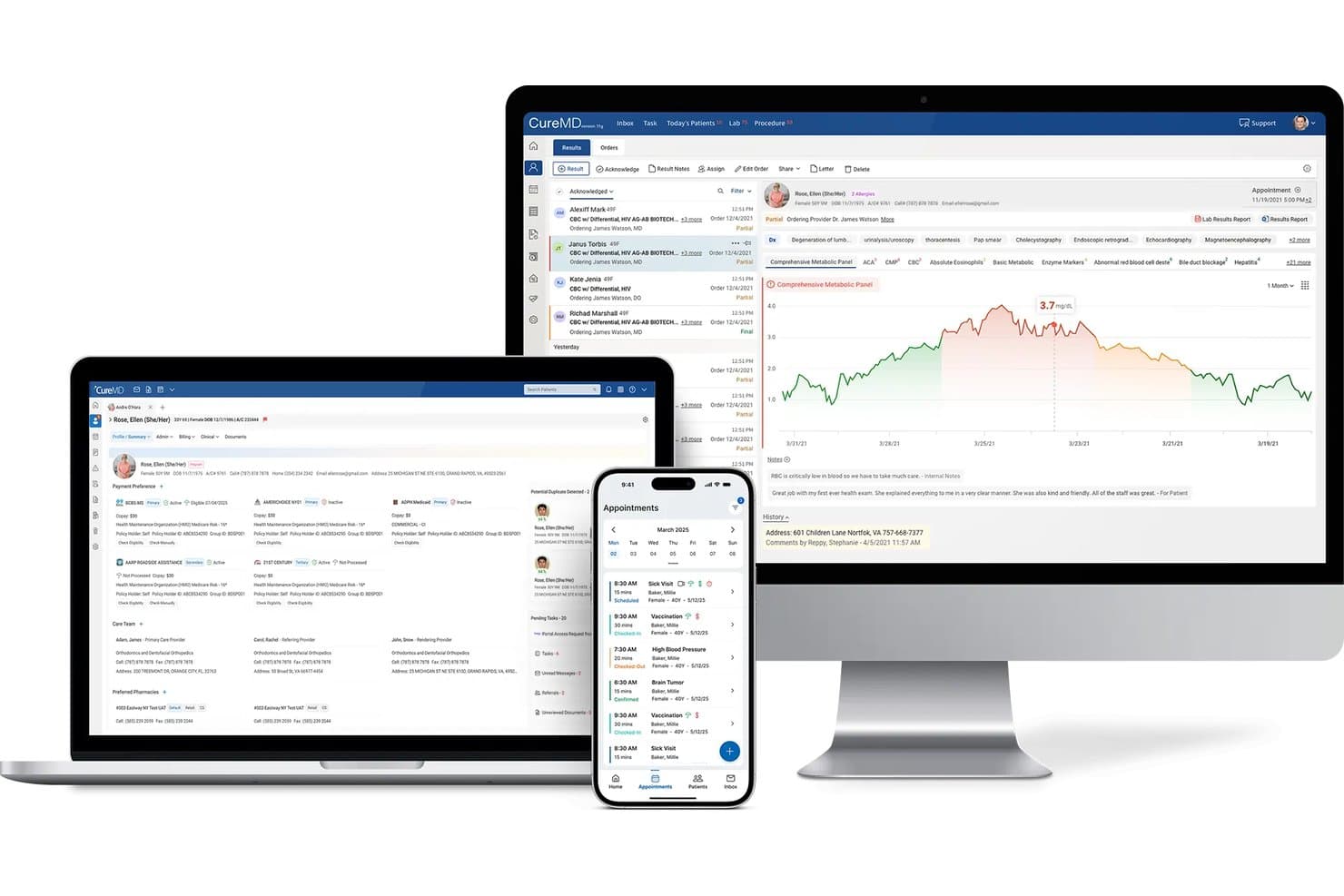
CureMD displays patient records, lab results, and appointments across devices. CureMD's ObGyn-Cloud is a cloud-based OB/GYN EHR that combines ACOG-aligned prenatal flowsheets, specialty charting templates, lab and ultrasound integration, and practice management tools built for obstetrics and gynecology workflows.
Who Is CureMD Best For?
CureMD's ObGyn-Cloud is a strong fit for OB/GYN practices that center their clinical workflow on ACOG-aligned prenatal documentation and need specialty charting built in from day one.
Why I Picked CureMD
I picked CureMD as one of the best because its ObGyn-Cloud is built squarely around ACOG-aligned prenatal flowsheets, which means your antepartum record, OB management list, and milestone tracking for things like fetal heart rate, weight gain, and glucose are structured to match the standards your practice already follows. I also like that preconfigured specialty templates cover GYN procedures like IUD insertion and Pap screenings, so charting doesn't require rebuilding workflows from scratch.
CureMD Key Features
- OB/GYN E&M coding: Automatically calculates service levels and applies OB/GYN-specific E&M codes at the point of charge entry.
- AI medical scribe: Listens to patient-provider encounters and generates specialty-tailored clinical notes with automated ICD-10 and CPT coding.
- Patient portal with self-scheduling: Lets patients book or reschedule appointments, request refills, and access lab results directly from the portal.
- Mobile EHR access: Supports real-time note capture, lab orders, and chart review on iOS and Android, including from hospital settings.
CureMD Integrations
CureMD documents 400+ plug-and-play connections, including Quest, LabCorp, Surescripts, HCA HealthCare, and GE Signature Series Ultrasound. It also offers a FHIR API for custom integrations.
Pros and Cons
Pros:
- Users report organized scheduling and faster reimbursement
- Reviewers value centralized patient records
- ACOG-aligned prenatal flowsheets structure milestone documentation
Cons:
- No documented partograph or postpartum outcome tracking
- Reviewers report lag, freezing, and workflow-disrupting bugs
Learn more about CureMD: Best for comprehensive cloud-based operations
- Free demo available
- From $295/user/month

Here is a screenshot of the Cure MD Mobile App with user panel. Cure MD is a cloud-based EMR software designed specifically for OB-GYN practices. Its central goal is to improve healthcare delivery through technology, offering a broad range of services from electronic health records to practice management and patient engagement.
Why I Picked Cure MD:
I chose Cure MD for its extensive, cloud-based capabilities that cover all aspects of OB-GYN EHR practices. Its distinguishing factor lies in its cloud-based structure that facilitates accessibility and data management. Thus, it's "Best for comprehensive cloud-based operations" because it provides a full suite of operations that are accessible anytime, anywhere, ensuring smooth workflows and improved patient care.
What Do You Get for Free?
Cure MD does not provide a free tier of their service, but they do offer a free demo. This provides a detailed walk-through of their platform and features to optimize practice management software, allowing you to gauge if it's the right fit for your practice.
Standout Features and Integrations:
Key features of Cure MD include charting, appointment scheduling, e-prescribing, and billing. These functions enable seamless day-to-day operations for an OB-GYN practice. It also integrates with lab systems, pharmacies, and radiology information systems, offering an interconnected network that enhances efficiency.
Pros and Cons
Pros:
- Seamless integrations with key systems such as labs and pharmacies
- Comprehensive suite of tools for efficient practice management
- Cloud-based platform ensures accessibility and ease of data management
Cons:
- Some may find the user interface less intuitive compared to other options
- Might require a learning curve to utilize the full feature set
- No free tier or trial could deter some users
Learn more about Cure MD:
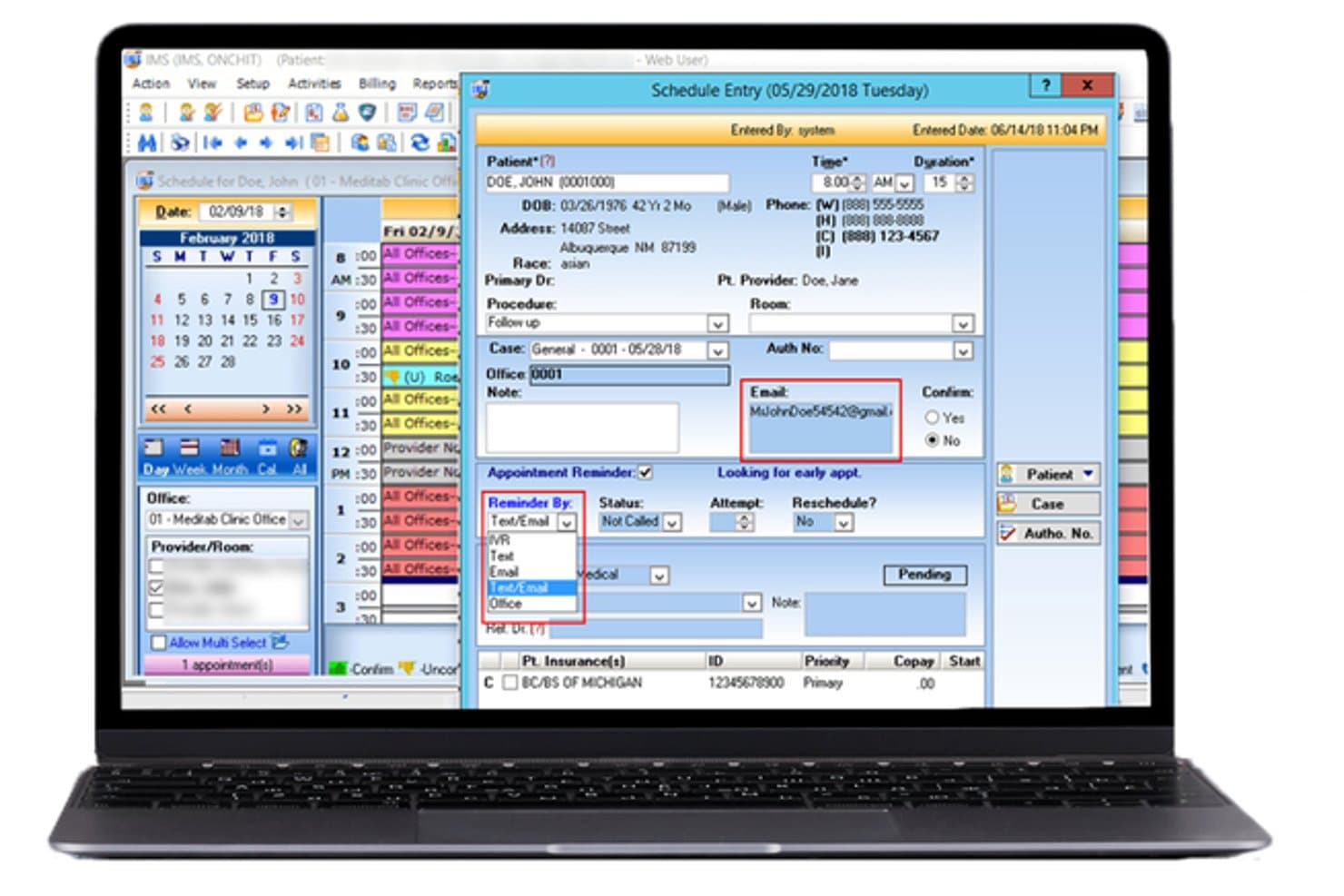
Meditab lets users schedule and confirm patient appointments with ease. Meditab's Intelligent Medical Software (IMS) is an OB/GYN EHR that combines clinical charting, antepartum records, prenatal flowsheets, practice management, and integrated billing in one platform.
Who Is Meditab Best For?
Meditab's IMS is a strong fit for OB/GYN practices that want EHR, practice management, billing, and office operations in a single integrated system.
Why I Picked Meditab
I picked Meditab's Intelligent Medical Software as one of the best because it brings EHR, practice management, billing, and office operations into a single system, which is genuinely useful for OB/GYN practices tired of stitching together separate tools. I especially like the antepartum record module, which consolidates current and past pregnancies, EDD/EGA calculations, labs, prescriptions, and vitals in one view alongside automatic Gravida/Para calculation. The prenatal flowsheets auto-import vitals and labs entered elsewhere in the system, so there's no manual re-entry between clinical and administrative workflows.
Meditab Key Features
- Built-in ACOG form: Generates an electronic ACOG pregnancy form that can be printed, faxed, shared to the patient portal, or saved as a patient document.
- Clinical decision support: Provides person-specific alerts to help identify potential adverse care events during clinical workflows.
- HL7 lab order and result integration: Sends lab orders and receives results electronically within the EHR using an HL7 interface.
- AI-powered ambient scribe: Listens to patient-provider conversations, produces real-time transcripts and structured summaries, and identifies codes and orders.
Meditab Integrations
Meditab's IMS documents integrations with Surescripts, Global Payments Integrated, Availity, BillFlash, and Nabla for HIE, payments, billing, and AI scribe workflows. REST and FHIR APIs support custom integrations, while ultrasound and laboratory connections are mentioned without vendor names.
Pros and Cons
Pros:
- Integrated tools support office workflows
- Reviewers praise configurable specialty templates
- Reviewers value quick chart lookup
Cons:
- Routine chart edits may take extra clicks
- Billing transfers can complicate claims work
Learn more about Meditab:
Annen OB-GYN EMR-programvare
Her er noen flere alternativer for OB-GYN EMR-programvare som ikke kom med på kortlisten min, men som likevel er verdt å undersøke:
- 11EPICBest for large-system OB/GYN care continuity
- 12ObGyn CloudGood for cloud-based access and updates
- 13PrognoCISBest for secure patient data handling
- 14eClinicalWorksBest for large OB/GYN group scalability
- 15Practice FusionBest for OB/GYN-specific charting templates
- 16PracticeFusionBest for collaborative healthcare delivery
- 17Accuro EMRBest for streamlined patient engagement
- 18Praxis EMRBest for knowledge-based charting
- 19EHNOTEBest for intuitive and easy navigation
How I Evaluate OB/GYN EMR Software
I split my evaluation into three parts, giving the most weight to core functionality: chart prenatal and GYN visits, track pregnancy history, and schedule recurring prenatal visits. Next, I consider standout features such as digital labor tracking. Finally, I weigh OB/GYN-specific onboarding, ongoing support, and value as the practice grows.
Core Functionality (Table Stakes For This List)
When I'm selecting tools for my list, I score each one on a scale from 0 (does not offer the functionality) to 5 (excels in this area) for each core functionality listed below. I then convert the total into a percentage to help assess each tool's overall fit, with extra weight on any functionalities I’ve deemed essential.
- EHR Charting (Essential): I look for structured notes and histories that support prenatal, postpartum, and GYN encounters without forcing staff to rely on free-text workarounds.
- OB/GYN Templates (Essential): I assess whether prenatal flowsheets, pregnancy tracking, and GYN exam templates cover routine visits and can be adapted to a practice’s documentation needs.
- Obstetric Scheduling: I check whether staff can plan recurring prenatal appointments around gestational milestones and keep due-date changes visible alongside GYN visits.
- OB Global Billing: I evaluate how the platform tracks bundled antepartum, delivery, and postpartum charges and supports reconciliation across an episode of care.
- Lab And Ultrasound Results: I look for results to appear in the patient chart in context, so teams can review prenatal labs and imaging alongside visit documentation.
- Reproductive Health History: I consider how clearly the chart carries reproductive and gynecologic history across visits and pregnancies, supporting continuity of care.
Once I have a list of tools that meet the criteria, I consider what sets each platform apart.
Differentiating Factors (What Sets Vendors Apart)
Here's how I compare and contrast different vendors:
Standout Features
I evaluate digital partograph tools that visualize labor progression, contractions, and fetal heart tracings alongside maternal vitals. When a provider can track cervical dilation against a real-time timeline, handoff communication improves. I also check for risk stratification dashboards that flag conditions like preeclampsia across a panel. A practice managing dozens of active pregnancies needs those alerts surfaced automatically, not buried in individual charts. Finally, I look at mobile charting access for bedside labor documentation, since tethering a provider to a desktop during delivery slows care.
Beyond Features
I evaluate how well each platform exchanges data with hospital labor and delivery systems, since a practice whose patients deliver at multiple facilities needs clean handoffs without duplicate charting. Vendor specialty expertise matters too—I check whether clinical content reflects practicing OB/GYN input and keeps pace with updated ACOG guidelines. Finally, I look at how reproductive health data is safeguarded, including role-based access controls that limit who can view sensitive GYN records across a multi-provider team.
Slik velger du OB-GYN EMR-programvare
Det er lett å gå seg vill i lange funksjonslister og komplekse prisstrukturer. For å hjelpe deg med å holde fokus mens du går gjennom den unike prosessen med å velge programvare, har jeg laget en sjekkliste over faktorer du bør ha i tankene:
| Faktor | Hva du bør vurdere |
|---|---|
| FaktorSkalerbarhet | Hva du bør vurdereKan programvaren vokse sammen med klinikken din? Vurder pasientvolum, antall brukere og fremtidige utvidelsesplaner. Unngå verktøy som ikke kan håndtere flere brukere eller større datamengder. |
| FaktorIntegrasjoner | Hva du bør vurdereKan den kobles til de eksisterende verktøyene dine? Kontroller kompatibiliteten med faktureringssystemer, laboratoriegrensesnitt og andre helserelaterte applikasjoner du bruker. |
| FaktorTilpasningsmuligheter | Hva du bør vurdereKan du tilpasse den til arbeidsflytene dine? Se etter muligheter for å endre maler, rapporter og oversikter slik at de samsvarer med behovene til klinikken din. |
| FaktorBrukervennlighet | Hva du bør vurdereEr den brukervennlig for teamet ditt? Vurder læringskurven og utformingen av grensesnittet. Unngå unødvendig komplekse systemer som hindrer den daglige driften. |
| FaktorImplementering og oppstart | Hva du bør vurdereHvor lang tid tar det å komme i gang? Vurder oppsettstid, opplæringsmateriell og støtte under overgangen. Sørg for at det passer med tidsplanen og ressursene dine. |
| FaktorKostnad | Hva du bør vurdereHva er budsjettet ditt? Sammenlign prisplaner, skjulte gebyrer og langsiktige kostnader. Sørg for at programvaren gir verdi uten å belaste økonomien din. |
| FaktorSikkerhetstiltak | Hva du bør vurdereEr pasientdata og personvern beskyttet? Kontroller samsvar med HIPAA og andre forskrifter, krypteringsstandarder og historikk for datainnbrudd. |
Hva er OB-GYN EMR-programvare?
OB-GYN EMR-programvare er en digital løsning utviklet for å administrere pasientjournaler, avtaler og kliniske arbeidsflyter som er spesifikke for fødsels- og gynekologipraksiser. Disse verktøyene brukes vanligvis av helsepersonell som fødselsleger, gynekologer og deres støttepersonell, og gir verdi ved å forbedre effektiviteten og pasientbehandlingen. Funksjoner som administrasjon av pasientjournaler, timebestilling og støtte for etterlevelse av regelverk bidrar til den daglige driften av en medisinsk praksis. Samlet sett forbedrer disse verktøyene helsepersonells evne til å levere effektiv og organisert behandling.
Funksjoner
Når du velger OB-GYN EMR-programvare, bør du se etter følgende viktige funksjoner:
- Administrasjon av pasientjournaler: Organiserer og lagrer pasientinformasjon på en sikker måte, slik at den er lett tilgjengelig for medisinsk personell.
- Timebestilling: Hjelper med å administrere og koordinere pasientavtaler effektivt, noe som reduserer uteblivelser og planleggingskonflikter.
- Fakturering og betalinger: Forenkler økonomiske transaksjoner ved å behandle fakturaer og betalinger, og forbedrer inntektsprosessen.
- Tilpassbare maler: Gjør det mulig å tilpasse skjemaer og dokumenter til spesifikke behov i praksisen, noe som øker effektiviteten i arbeidsflyten.
- Integrasjon med telehelse: Legger til rette for virtuelle konsultasjoner og utvider tilgangen til behandling for pasienter som ikke kan møte opp personlig.
- Tilgang til pasientportal: Gjør det mulig for pasienter å se journalene sine, bestille timer og kommunisere med behandlere på nettet.
- Avansert analyse: Gir innsikt i pasientdata og praksisens resultater, noe som støtter beslutningstaking og strategisk planlegging.
- Datasikkerhet: Sikrer etterlevelse av regelverk som HIPAA og beskytter sensitiv pasientinformasjon mot datainnbrudd.
- Støtte for flere lokasjoner: Administrerer driften på tvers av flere praksislokasjoner og sikrer konsistens og koordinering.
- Interaktive produktomvisninger: Tilbyr veiledede gjennomganger som hjelper nye brukere med å lære systemet og funksjonene raskt.
Fordeler
Implementering av OB-GYN EMR-programvare gir flere fordeler for teamet og virksomheten din. Her er noen av fordelene du kan se frem til:
- Økt effektivitet: Automatiserer rutineoppgaver som timebestilling og fakturering, slik at mer tid frigjøres til pasientbehandling.
- Bedre pasientbehandling: Gir rask tilgang til pasientjournaler og hjelper leger med å ta informerte beslutninger.
- Datakvalitet: Reduserer feil i pasientinformasjon og fakturering gjennom standardiserte maler og prosesser.
- Pasientengasjement: Tilbyr pasientportaler som gir enkel tilgang til helseinformasjon og fremmer bedre kommunikasjon og involvering.
- Etterlevelse av regelverk: Sikrer overholdelse av lover om databeskyttelse, beskytter pasientinformasjon og bidrar til å unngå juridiske problemer.
- Skalerbarhet: Støtter vekst ved å tilpasse seg økt pasientmengde og flere praksislokasjoner.
- Kostnadsbesparelser: Effektiviserer driften og reduserer administrative kostnader, noe som forbedrer resultatet.
Kostnader & priser
Valg av OB-GYN EMR-programvare krever en forståelse av de ulike prismodellene og abonnementene som er tilgjengelige. Kostnadene varierer basert på funksjoner, teamstørrelse, tillegg og mer. Tabellen nedenfor oppsummerer vanlige abonnementer, gjennomsnittspriser og typiske funksjoner som er inkludert i OB-GYN EMR-programvareløsninger:
Sammenligningstabell for abonnementer for OB-GYN EMR-programvare
| Abonnementstype | Gjennomsnittspris | Vanlige funksjoner |
|---|---|---|
| AbonnementstypeGratis abonnement | Gjennomsnittspris$0/user/month | Vanlige funksjonerGrunnleggende administrasjon av pasientjournaler, timebestilling og begrenset kundestøtte. |
| AbonnementstypePersonlig abonnement | Gjennomsnittspris$30-$50/user/month | Vanlige funksjonerForbedret journaladministrasjon, grunnleggende analyse og kundestøtte via e-post. |
| AbonnementstypeForretningsabonnement | Gjennomsnittspris$60-$100/user/month | Vanlige funksjonerAvansert timeplanlegging, integrasjon for fakturering og tilpassbare maler. |
| AbonnementstypeVirksomhetsabonnement | Gjennomsnittspris$150-$300/user/month | Vanlige funksjonerFull analysepakke, støtte for flere lokasjoner og dedikert kundeansvar. |
Vanlige spørsmål om OB-GYN EMR-programvare
\u003cspan style=\u0022font-weight: 400\u0022\u003eHer er noen svar på vanlige spørsmål om OB-GYN EMR-programvare:\u003c/span\u003e
Kan OB-GYN EMR-programvare integreres med andre helsesystemer?
\u003cspan style=\u0022font-weight: 400\u0022\u003eJa, OB-GYN EMR-programvare kan integreres med ulike helsesystemer, som laboratoriesystemer og faktureringsplattformer. Integrasjon bidrar til å sikre datakonsistens og reduserer manuell registrering. Før du kjøper programvaren, bør du kontrollere at den støtter systemene praksisen din allerede bruker, for å unngå kompatibilitetsproblemer.\u003c/span\u003e
Hvordan sikrer jeg datasikkerheten med OB-GYN EMR-programvare?
\u003cspan style=\u0022font-weight: 400\u0022\u003eFor å sikre datasikkerheten bør du kontrollere at programvaren overholder HIPAA og andre relevante forskrifter. Se etter funksjoner som datakryptering og tilgangskontroller. Det er også lurt å spørre leverandørene om sikkerhetsprotokollene deres og hvordan de håndterer datainnbrudd, for å beskytte pasientinformasjonen din.\u003c/span\u003e
Er det nødvendig med opplæring for å bruke OB-GYN EMR-programvare?
\u003cspan style=\u0022font-weight: 400\u0022\u003eJa, det er vanligvis nødvendig med opplæring for å få mest mulig ut av OB-GYN EMR-programvare. Leverandørene tilbyr ofte ulike ressurser, som webinarer, veiledninger og støtteteam, for å hjelpe deg og de ansatte. Sørg for å benytte deg av disse ressursene for å sikre en smidig overgang og maksimere fordelene ved programvaren.\u003c/span\u003e
Kan jeg tilpasse OB-GYN EMR-programvare etter behovene i praksisen min?
\u003cspan style=\u0022font-weight: 400\u0022\u003eJa, det meste av OB-GYN EMR-programvaren kan tilpasses praksisens unike arbeidsflyter. Tilpassbare maler og innstillinger kan bidra til å skreddersy programvaren etter spesifikke krav. Før du bestemmer deg, bør du spørre leverandørene om hvor omfattende tilpasningsmulighetene er, slik at du kan forsikre deg om at programvaren dekker behovene dine.\u003c/span\u003e
Omfatter programvaren vanligvis opplæring eller støtte?
Ja, de fleste leverandører av OB-GYN EMR-programvare tilbyr opplæring og støtte til brukerne. Dette kan være i form av nettbaserte veiledninger, brukerhåndbøker, direkte nettbasert opplæring eller til og med opplæringsøkter ansikt til ansikt. De tilbyr vanligvis også løpende kundestøtte for å løse eventuelle problemer brukerne måtte støte på.