

Medisinsk faktureringsprogramvare for hjemmebasert virksomhet er et digitalt verktøy som hjelper små og hjemmebaserte helsepersonell med å håndtere pasientfakturering, forsikringskrav, betalinger og inntektsoppfølging fra ett sted. Hvis du driver faktureringsarbeidet hjemmefra, trenger du programvare som er pålitelig, enkel å bruke og holder deg i samsvar med regelverket uten lang oppsettstid eller en bratt læringskurve. Med riktig løsning kan du unngå kostbare feil, få raskere refusjoner og holde fokuset på behandling – ikke papirarbeid. Nedenfor finner du en kortliste over faktureringsplattformer utviklet for hjemmebaserte virksomheter, med innsikt som hjelper deg med å sammenligne funksjoner, priser og styrker, slik at du kan velge den løsningen som passer best for deg i 2026.
Why Trust Our Software Recommendations
6,700+
Reviews
20
Industry experts
16+
Evaluation factors
14
Years
Our team has been testing and reviewing software since 2012. As medical practice leaders ourselves, we know how difficult—and important—it is to choose the right software.
For this guide, we evaluated tools using hands-on testing and independent research, scoring tools using our selection criteria.
Our reviews reflect our human editorial judgment, not a sales pitch.
Sammenligningstabell for medisinsk faktureringsprogramvare for hjemmebaserte virksomheter
Tabellen nedenfor sammenligner prisopplysninger for mine beste utvalg av medisinsk faktureringsprogramvare for hjemmebaserte virksomheter.
| Tool | Best For | Trial Info | Price | ||
|---|---|---|---|---|---|
| 1 | Best for billing companies and practices | Free demo available | Pricing upon request | Website | |
| 2 | Best for small-practice billing workflows | Not available | Pricing upon request | Website | |
| 3 | Best for mobile billing workflows | Free demo available | Pricing upon request | Website | |
| 4 | Best for established billing offices | Free consultation available | Pricing upon request | Website | |
| 5 | Best for integrated billing and RCM | Free demo available | Price upon request | Website | |
| 6 | Best for affordable medical billing | Free demo + free expert consultation available | Pricing upon request | Website | |
| 7 | Best for simple claims management | Free demo available | From $199/user/month | Website | |
| 8 | Best for cloud-based medical billing | Free demo available | Pricing upon request | Website | |
| 9 | Best for independent practice billing | Free demo available | Pricing upon request | Website | |
| 10 | Best for automated billing and claims | Free demo available | Pricing upon request | Website |


Anmeldelser av den beste medisinske faktureringsprogramvaren for hjemmebaserte virksomheter
Nedenfor finner du mine detaljerte sammendrag av den beste medisinske faktureringsprogramvaren for hjemmebaserte virksomheter som kom med på kortlisten. Anmeldelsene mine gir en detaljert gjennomgang av funksjonene, de beste bruksområdene og prisene for hver programvare, slik at du kan finne den beste løsningen for deg.
 Best for billing companies and practices
- Free demo available
- Pricing upon request
Visit WebsiteCustomer Rating:4.1/5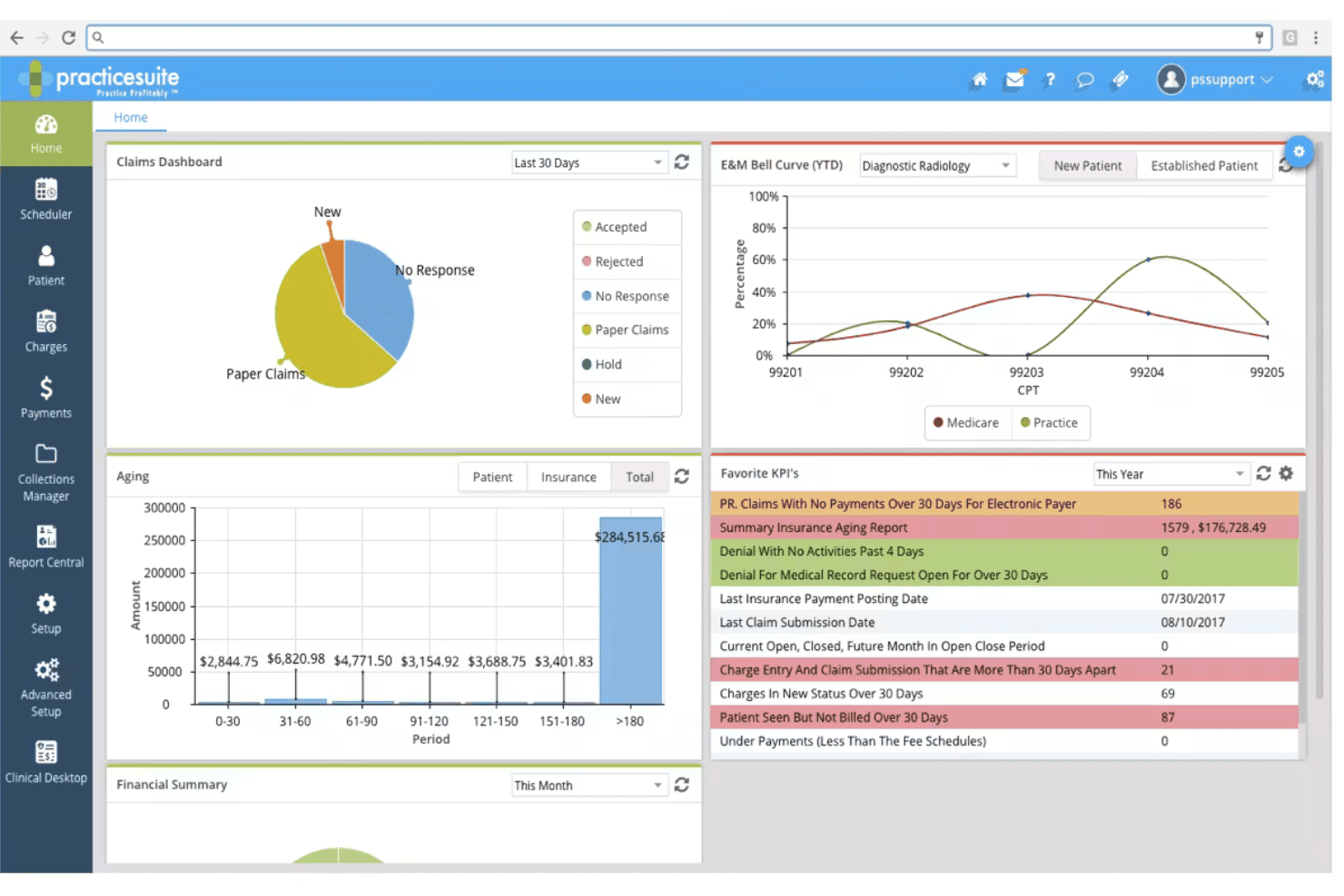
PracticeSuite coordinates claims, denials, eligibility, billing, and scheduling. PracticeSuite is a cloud-based medical billing and RCM platform built for both independent billing companies and medical practices, offering claims submission, denial management, multi-client account access, and patient billing across 150+ specialties.
Who Is PracticeSuite Best For?
It's a strong fit for independent billing services and third-party billing companies that manage claims across multiple provider clients from a single platform.
Why I Picked PracticeSuite
PracticeSuite earns its spot on my shortlist because of its Central Billing Office, which gives you single sign-on access across all your client practices without juggling separate logins. I also like the pre-submission denial intelligence, which flags potential claim issues before they go out. The month-end reconciliation reporting is purpose-built for billing services to track outstanding balances across each client account separately.
PracticeSuite Key Features
- Automated eligibility verification: Check patient insurance eligibility instantly through real-time integrations with payer databases.
- Bidirectional EHR integrations: Sync data with EHRs like Practice Fusion and Elation Health to eliminate manual entry between systems.
- 140-report financial dashboard: Run detailed, customizable reports for tracking AR, claims status, and collections by client or provider.
- Patient portal for online payments: Give patients a secure platform for viewing statements and making payments directly online.
PracticeSuite Integrations
PracticeSuite offers native integrations with Practice Fusion, Elation Health, and Opus EHR, and connects directly to clearinghouses like Availity, Change Healthcare, and Trizetto. An API is available for custom integrations.
Pros and Cons
Pros:
- Claims denials flagged before submission
- Extensive specialty and payer support included
- Central Billing Office for multi-client management
Cons:
- Full payer enrollment setup can be time-consuming
- Customized reporting can require vendor assistance
Learn more about PracticeSuite: Best for small-practice billing workflows
- Not available
- Pricing upon request
Visit WebsiteCustomer Rating:3.9/5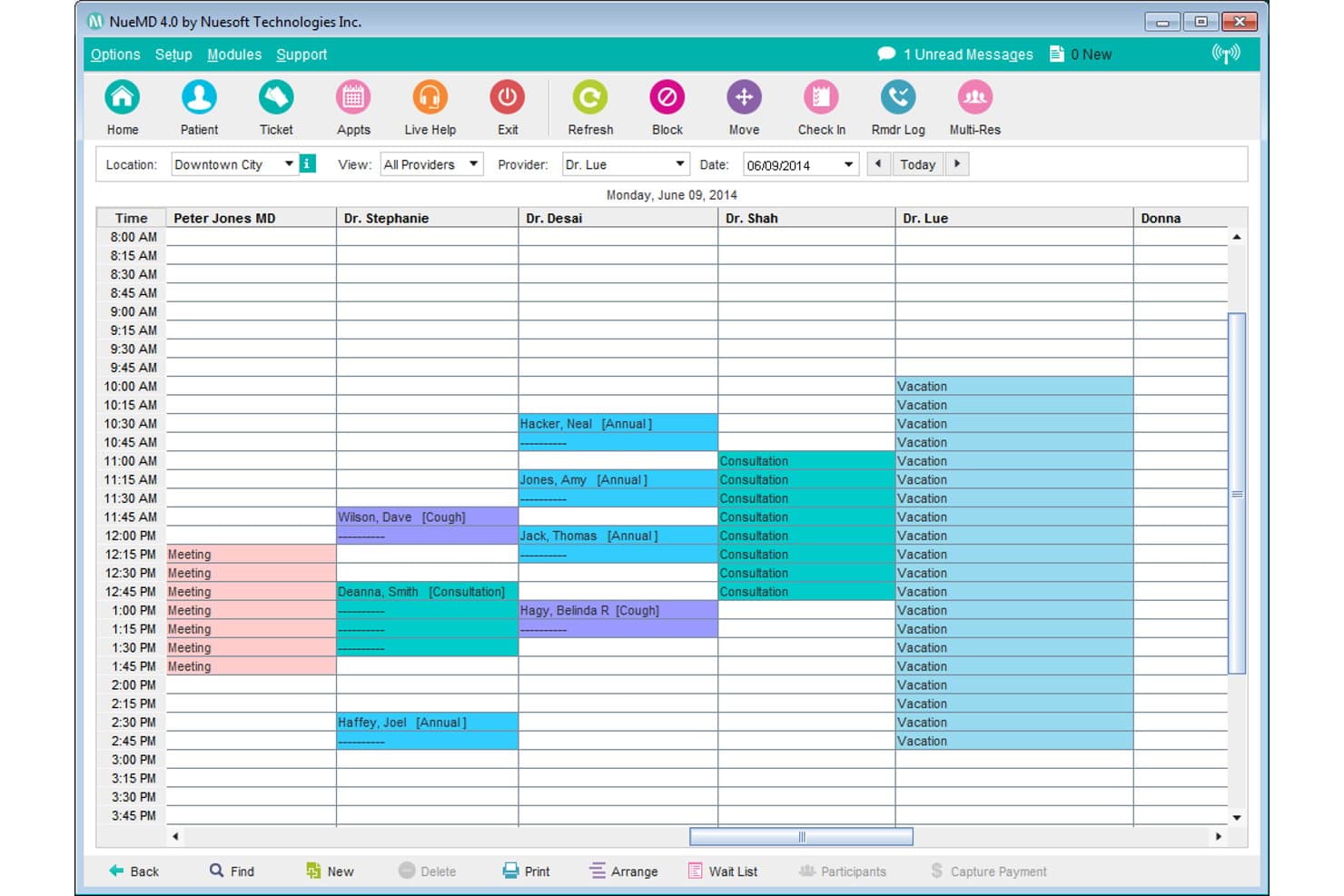
NueMD offers a multi-provider daily scheduling view that helps home-based medical billing businesses manage appointments, consultations, and provider availability in one calendar interface. NueMD is a cloud-based medical billing and practice management platform for small practices, combining claims submission through a native clearinghouse, patient statements, EHR, and appointment scheduling in one system.
Who Is NueMD Best For?
NueMD suits independent billers and small billing service owners managing claims for solo or small provider practices.
Why I Picked NueMD
I've included NueMD in my top picks because its native clearinghouse handles unlimited claim submissions, which is a real advantage when running a small billing service where per-claim fees add up. Patient statement generation and integrated credit card processing are built directly into the workflow, so closing a billing cycle doesn't require separate tools. The cloud-based setup lets me run the full billing workflow from a home office without any on-premise infrastructure.
NueMD Key Features
- Customizable reporting: Generate detailed reports on claim status, reimbursement, and accounts receivable for multiple providers or clients.
- Secure document management: Store and organize patient records, billing files, and EOBs in an encrypted environment.
- Integrated scheduling tools: Manage appointments, provider calendars, and patient reminders directly within the platform.
- Client and provider management: Handle billing and workflow for separate providers or practices from a single login.
NueMD Integrations
Native integrations are not clearly documented. The tool supports integrations via API and offers free integration with Practice Fusion through BillingParadise.
Pros and Cons
Pros:
- Multi-client management in one dashboard
- Built-in patient statement generation
- Unlimited electronic claim submissions included
Cons:
- Phone support discontinued for all users
- No longer available for new purchase
Learn more about NueMD: Best for mobile billing workflows
- Free demo available
- Pricing upon request
Visit WebsiteCustomer Rating:3.9/5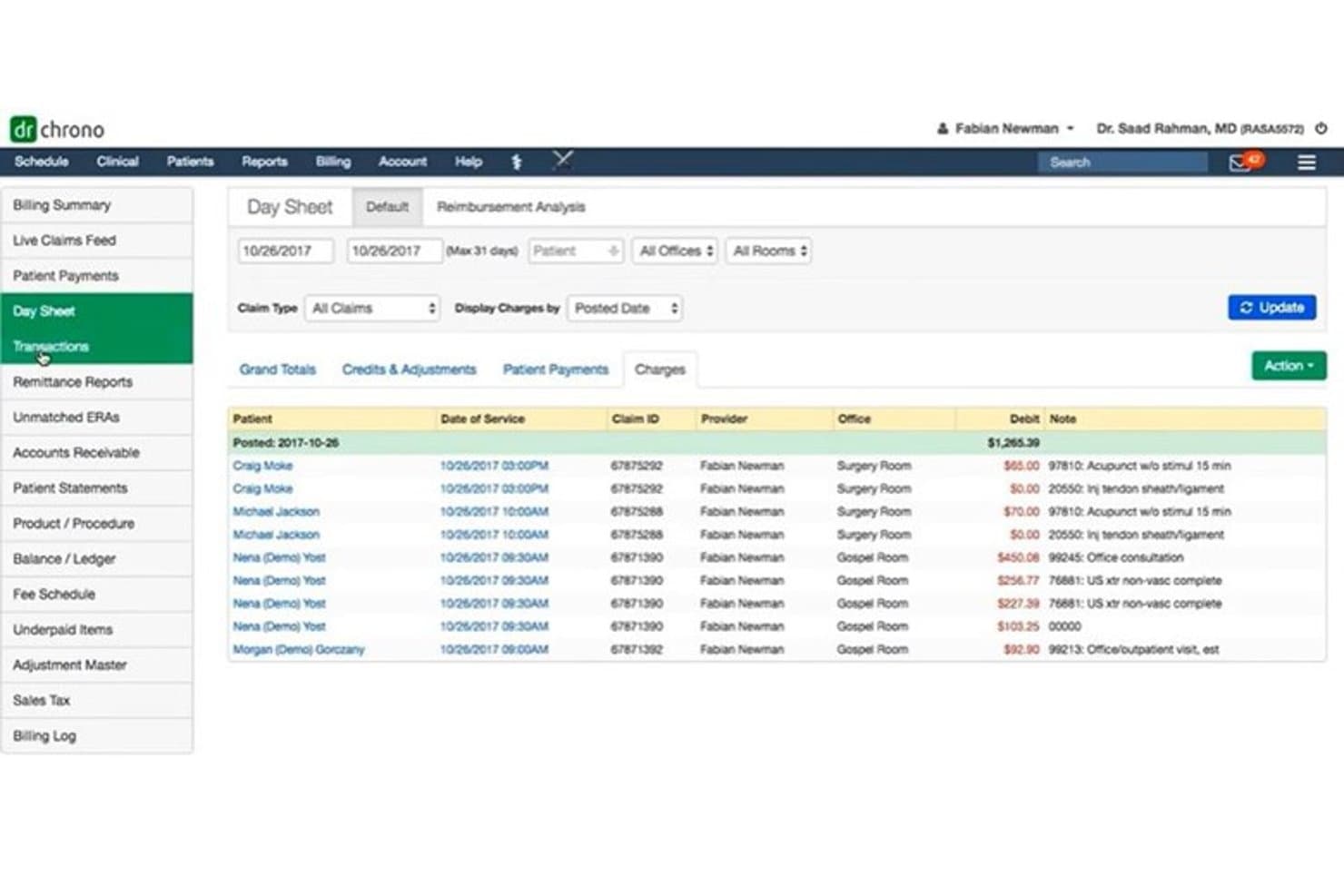
DrChrono offers a Day Sheet billing view that displays patient transactions, claim IDs, providers, and debit charges by posted date for home-based medical billing management. DrChrono is a cloud-based, iOS-native medical billing platform that combines electronic claims submission, ERA posting, denial management, and patient billing in one integrated, mobile-first system.
####Who Is DrChrono Best For?
DrChrono is a strong fit for small to mid-sized medical practices that run billing workflows on iPad or iPhone.
####Why I Picked DrChrono
DrChrono earns its spot on my shortlist because it's built natively for iOS, not just adapted for mobile. I use the Live Claims Feed to monitor claim status in real time directly from an iPad, without switching to a desktop portal. The Apple-native interface also lets me run real-time eligibility checks, submit claims through the built-in ePS clearinghouse, and post ERAs without being tied to a single workstation.
####DrChrono Key Features
- Real-time insurance eligibility checks: Instantly verify patient coverage across multiple payers at any point during the visit.
- Customizable medical billing profiles: Store frequently used codes and diagnoses for consistent, rapid claim creation.
- Denial pattern reporting: Analyze reasons for claim denials using built-in advanced reporting tools.
- Integrated patient portal: Give patients online access to statements, payment options, and communication with your billing office.
####DrChrono Integrations
DrChrono offers native integrations with eProvider Solutions, iHCFA, Quest Diagnostics, LabCorp, Collectly, Stripe, and ID.me. An API is available for building custom integrations.
Pros and Cons
Pros:
- Automated patient statement delivery options
- Real-time claims status and denial tracking
- Native iPad and iPhone billing functionality
Cons:
- Limited multi-client management for billing services
- Requires separate account for each provider
Learn more about DrChrono: Best for established billing offices
- Free consultation available
- Pricing upon request
Visit WebsiteCustomer Rating:4.4/5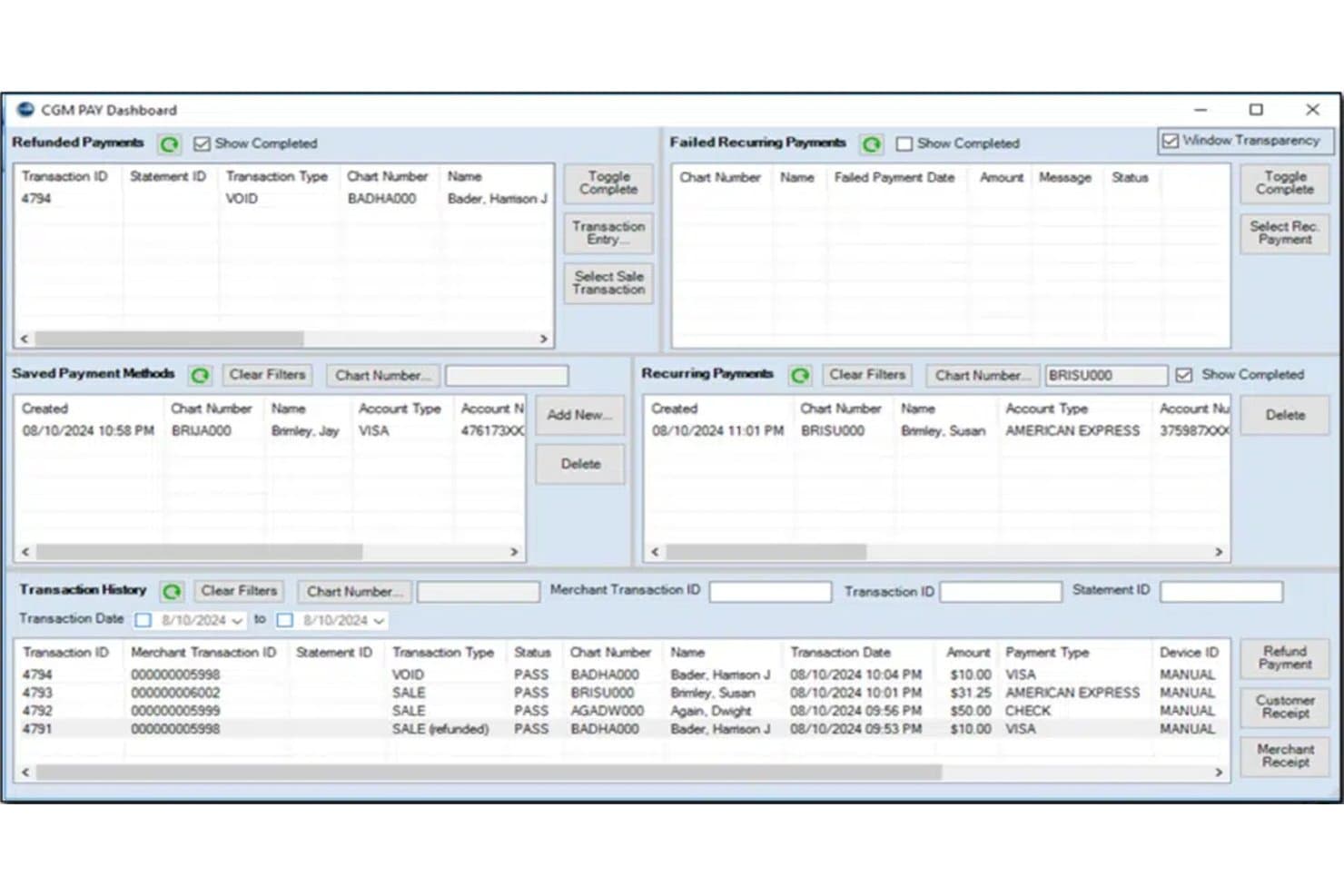
Medisoft's CGM PAY Dashboard offers home-based billing practices a centralized view of refunded payments, recurring payments, saved payment methods, and full transaction history. MEDISOFT is a practice management and medical billing platform that handles electronic claims submission, ERA posting, patient statements, payment collection, AR tracking, and multi-provider scheduling.
Who Is MEDISOFT Best For?
MEDISOFT is a strong fit for established medical billing offices and experienced independent billers managing claims across multiple provider clients.
Why I Picked MEDISOFT
I picked MEDISOFT as one of the best because it's built around the kind of volume and complexity that established billing offices actually deal with. I love how the AR tracker, KPI dashboards, and 200+ pre-built reports give me a real-time view of claim status across multiple providers. The Network Pro tier also lets my team work across multiple computers, which makes it practical for a billing office that has grown beyond a single-user setup.
MEDISOFT Key Features
- ERA posting and payment reconciliation: Post electronic remittance advice files and match payments within the platform.
- Eligibility verification add-on: Check patient insurance eligibility in real time through clearinghouse data.
- Patient kiosk and mobile app: Register patients or check them in using an iOS app or in-office kiosk mode.
- Customizable reporting suite: Access over 200 built-in reports for managed care, financials, marketing, and clinical data.
MEDISOFT Integrations
MEDISOFT offers native integrations with Aprima EHR, eMEDIX clearinghouse, CGM PAY, Vosita, RelayHealth, BillFlash, and Medisoft Clinical. An API is available for custom integrations.
Pros and Cons
Pros:
- Customizable reporting with over 200 templates
- Multi-provider scheduling within one platform
- Direct clearinghouse connections for claims and ERAs
Cons:
- Cloud HIPAA compliance details not fully transparent
- No built-in text message appointment reminders
Learn more about MEDISOFT: Best for integrated billing and RCM
- Free demo available
- Price upon request
Visit WebsiteCustomer Rating:3.6/5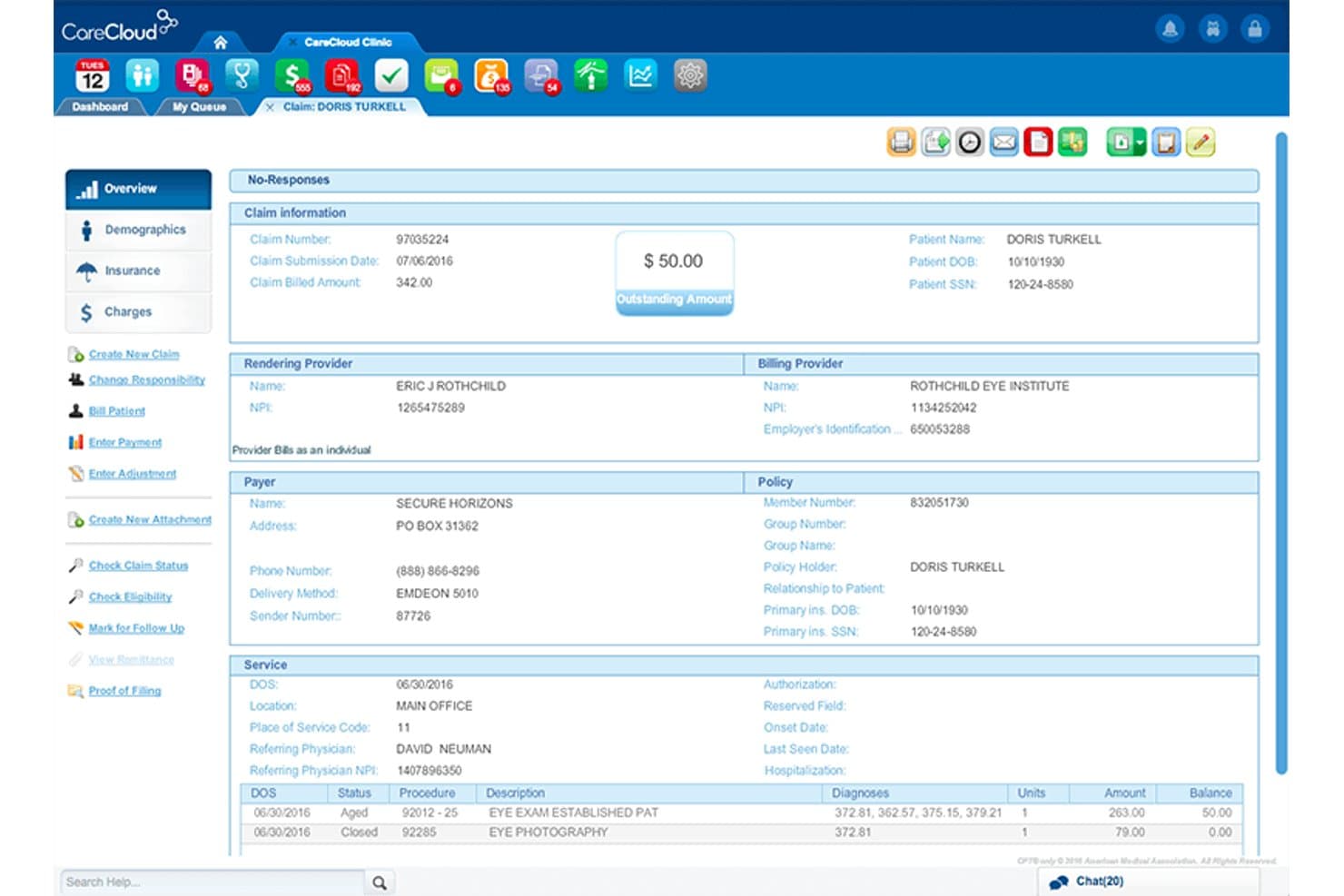
CareCloud Central offers a detailed claims management view displaying patient billing information, outstanding balances, provider details, payer information, and service line items for efficient medical billing. CareCloud Central is a cloud-based medical billing and practice management platform with a built-in clearinghouse, automated claims scrubbing via its CollectiveIQ rules engine, ERA posting, denial management, and centralized multi-provider billing.
Who Is CareCloud Central Best For?
CareCloud Central is a strong fit for billing contractors and solo practitioners managing higher-volume provider clients who need enterprise-grade RCM depth.
Why I Picked CareCloud Central
CareCloud Central earns its spot on my shortlist because of how deeply its billing and RCM capabilities are woven together in a single workflow. The CollectiveIQ rules engine runs automated billing rules directly inside the claims process, catching coding errors before submission rather than after rejection. I also like that its built-in clearinghouse handles direct payer submission with real-time scrubbing, and centralized billing lets me manage multiple provider NPIs from one login without juggling separate accounts.
CareCloud Central Key Features
- Centralized billing dashboard: Manage claims, payments, and reporting for multiple providers or locations from one interface.
- Real-time insurance eligibility checking: Instantly verify patient details and coverage before submitting claims.
- Automated patient statement generation: Create and send patient invoices and statements directly from the platform.
- Batch payment posting: Post payments to multiple claims at once to simplify reconciliation and speed up workflow.
CareCloud Central Integrations
CareCloud Central offers native integrations with CareCloud Charts (EHR), CareCloud Breeze (patient engagement), PrecisionBI (analytics), cirrusAI (AI clinical documentation), and CareCloud Concierge (RCM services). An API is available for custom integrations.
Pros and Cons
Pros:
- Real-time patient eligibility verification included
- Integrated denial tracking and appeals templates
- Centralized billing for multiple provider entities
Cons:
- Not tailored for third-party billing services
- Minimum contract length required for new users
Learn more about CareCloud Central: 6Best for affordable medical billing
RXNT
- Free demo + free expert consultation available
- Pricing upon request
Visit WebsiteCustomer Rating:4.3/5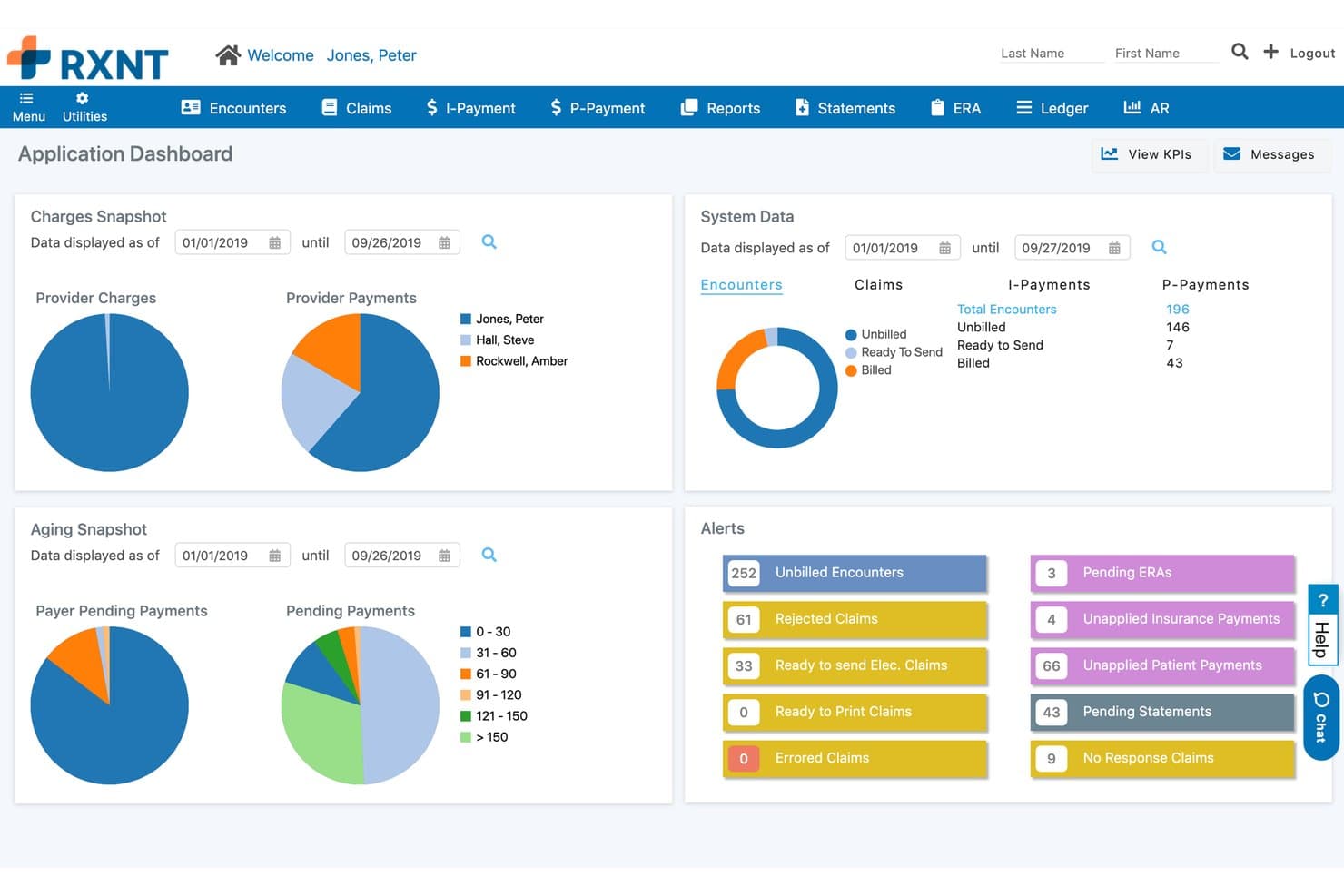
RXNT offers a comprehensive medical billing dashboard with charges, aging snapshots, system data, and real-time alerts for home-based billing management. RXNT is a cloud-based medical billing platform built for independent billers and small billing services, offering electronic claims submission, denial management, ERA posting, and multi-provider billing from a single account.
Who Is RXNT Best For?
RXNT is a strong fit for independent billers and small billing companies managing claims across multiple providers or practices from a home office.
Why I Picked RXNT
I picked RXNT as one of the best because its all-inclusive pricing model covers unlimited claims, unlimited eligibility checks, and unlimited ERAs with no clearinghouse fees added on top. That means I'm not watching per-claim costs climb as I add provider clients. The bulk charge uploader lets me process large batches of unbilled charges at once, and CBO-level reporting is included at no extra cost.
RXNT Key Features
- Central billing office reporting: Generate detailed reports segmented by provider, client, or practice for multi-client billing operations.
- Secure patient portal: Give patients access to view statements and pay bills online through a HIPAA-compliant web portal.
- Mobile charge capture app: Enter procedure, diagnosis, and modifier codes directly from iOS or Android devices without returning to your desk.
- Automated denial tracking: Track denial reasons and work them through configurable workflows with claim status updates and AR aging reports.
RXNT Integrations
RXNT offers a native integration with Relay Exchange for claims submission and ERA retrieval, and provides an API for custom integrations. Native integrations with other third-party billing or EHR systems are not clearly documented.
Pros and Cons
Pros:
- Mobile app for charge capture and billing
- Central billing features support multiple clients
- Includes unlimited claims and eligibility checks
Cons:
- Occasional delays in support response
- Scalability limited for large billing services
Learn more about RXNT: Best for simple claims management
- Free demo available
- From $199/user/month
Visit WebsiteCustomer Rating:4.5/5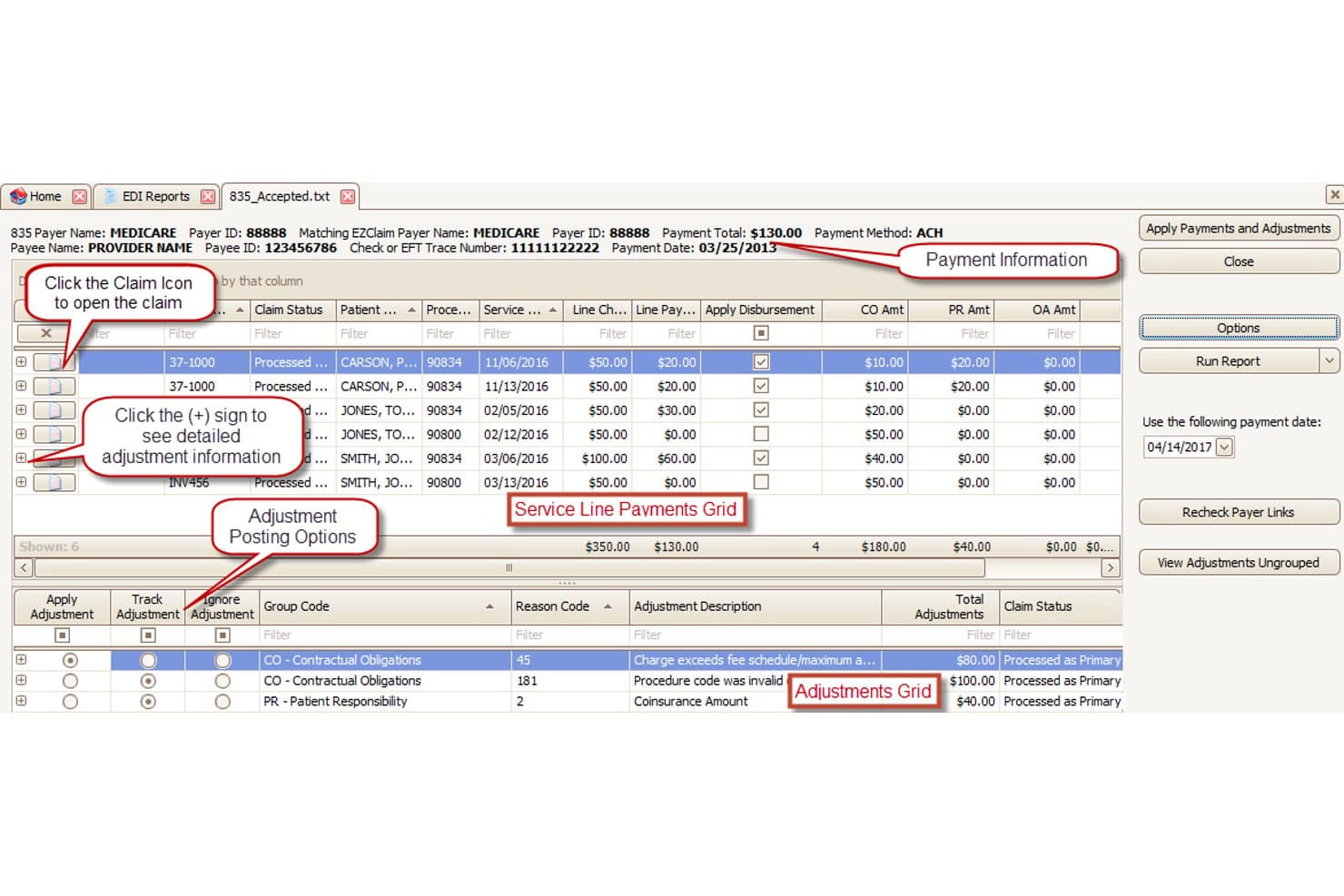
EZClaim offers an EDI 835 payment posting screen that displays service line payments, adjustment grids, and disbursement tools for streamlined medical billing workflows. EZClaim is a cloud-based medical billing platform built for small practices and independent billing services, covering electronic claims submission, real-time eligibility verification, payment posting, patient statements, and multi-client company file management.
Who Is EZClaim Best For?
EZClaim is a strong fit for home-based billing services and independent contractors managing claims across multiple provider clients from a single account.
Why I Picked EZClaim
I picked EZClaim as one of the best because its claims pipeline is genuinely uncomplicated without cutting corners. The 6,000+ payer connections include Medicare, Medicaid, Tricare, MCOs, and auto insurance, so I can take on new clients across specialties without rebuilding my payer list from scratch. Claim scrubbing catches errors before submission, and secondary claims management handles the downstream billing automatically once the primary payer responds.
EZClaim Key Features
- Multi-company file management: Track billing and payments separately for each client or provider using distinct, segmented files.
- HIPAA-compliant cloud access: Access the platform remotely with secure, encrypted login and user authentication from any Mac or PC.
- Real-time eligibility verification: Instantly check patient insurance eligibility before claim submission to reduce rejections.
- Custom patient statements: Generate and send branded statements with your company logo from within the billing platform.
EZClaim Integrations
EZClaim offers native integrations with TriZetto, Practice Fusion, Amazing Charts, Quick EMR, WebPT, AxisCare, and ElationHealth. An API is available for custom integrations.
Pros and Cons
Pros:
- Automated secondary claims handling
- Direct payer and clearinghouse connections included
- Multi-company management for billing services
Cons:
- Reporting tools lack advanced customization
- Limited denial management workflow features
Learn more about EZClaim: Best for cloud-based medical billing
- Free demo available
- Pricing upon request
Visit WebsiteCustomer Rating:4.1/5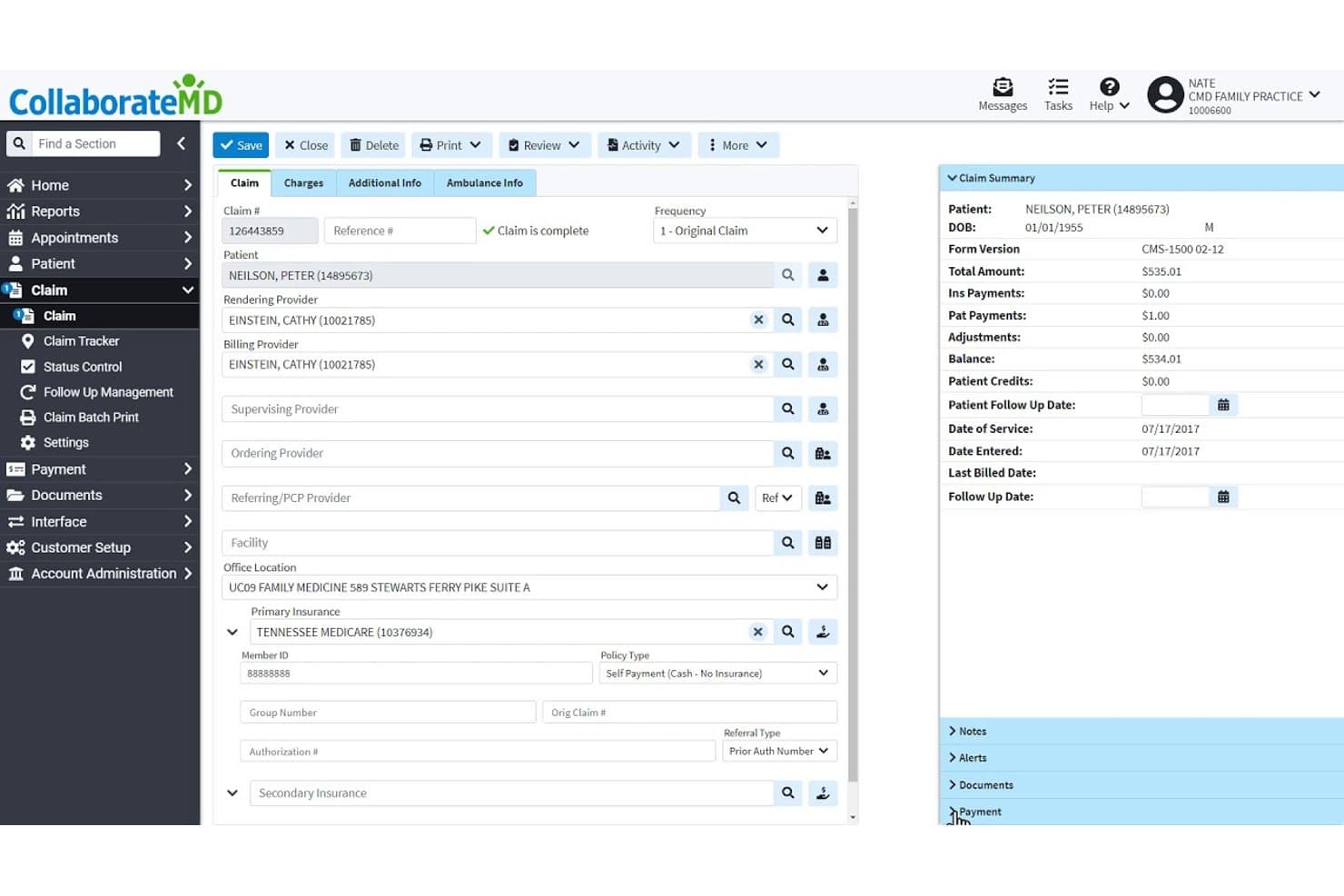
CollaborateMD offers a detailed claim management interface with patient info, provider fields, insurance details, and a claim summary panel showing balances and payments. CollaborateMD is a cloud-based medical billing platform built for independent billers and billing services, covering electronic claims submission, ERA posting, denial management, eligibility verification, and patient statements across multiple providers.
Who Is CollaborateMD Best For?
CollaborateMD suits independent medical billers and small billing services managing claims for multiple provider clients from a remote or home-based setup.
Why I Picked CollaborateMD
CollaborateMD earns its spot on my shortlist because its cloud-based architecture means I can run a full billing operation from a home office without any on-premise infrastructure. I particularly like the built-in clearinghouse with Level 2 claim scrubbing, which catches errors before submission. The AI-powered Intelligent Claim Rejection Support translates payer rejection codes into plain-language explanations with suggested next steps, cutting the time I spend chasing denial reasons.
CollaborateMD Key Features
- Automated eligibility verification: Instantly checks patient insurance details in real time for each claim.
- Integrated reporting suite: Offers 125+ customizable reports, dashboards, and KPI monitoring for multi-client tracking.
- Support for multiple specialties: Maintains specialty-specific fee schedules and code libraries for over 100 medical specialties.
- Patient payment plans: Lets you set up and manage custom payment schedules and prompt-pay discounts from within the platform.
CollaborateMD Integrations
CollaborateMD offers native integrations with Practice Fusion, Alleva, Amazing Charts, Elation Health, EyeMD EMR, Hello Health, Kipu EMR, and Medical Mime. API access is also available for custom integrations.
Pros and Cons
Pros:
- AI-powered claim rejection explanations provided
- Includes automated ERA posting with reconciliation
- Handles multi-provider billing in one account
Cons:
- Claim management dashboard lacks batch editing
- Limited reporting customization for advanced users
Learn more about CollaborateMD: Best for independent practice billing
- Free demo available
- Pricing upon request
Visit WebsiteCustomer Rating:3.9/5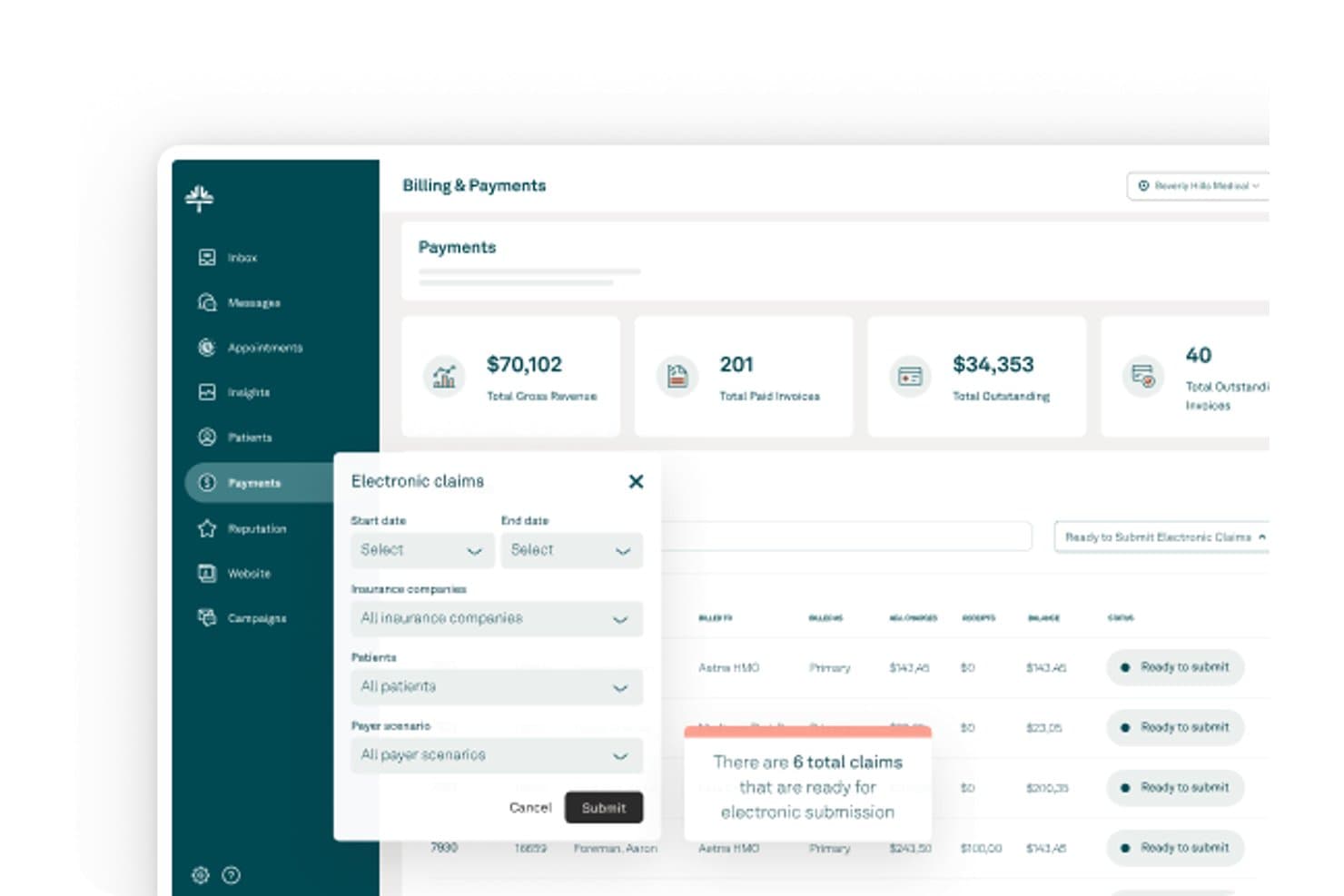
Tebra offers an Electronic Claims submission workflow with filtering options for insurance companies, patients, and payer scenarios within its Billing & Payments dashboard. Tebra is a cloud-based medical billing and practice management platform built for independent practices, combining electronic claims submission, integrated clearinghouse access, ERA posting, denial management, and patient billing tools.
Who Is Tebra Best For?
Tebra suits independent billers and small billing service owners who manage claims for multiple provider clients from a remote or home-based setup.
Why I Picked Tebra
I picked Tebra as one of the best because its native integrated clearinghouse connects to 2,700+ payers with real-time scrubbing and payer-specific rules applied at submission. I also rely on the RPA-driven ERA auto-posting, which processes remittances and unapplied payments without manual intervention. When a denial comes through, the rules engine queues it automatically for appeal or resubmission based on payer logic, which keeps AR moving without me manually triaging every rejection.
Tebra Key Features
- Real-time eligibility verification: Check patient insurance status instantly with integrated ANSI-X12 270/271 transactions.
- Multi-client account management: Organize billing for multiple practices and NPIs, each with separated data and reporting.
- Automated patient statements: Generate and send batch e-statements or paper statements with embedded payment links.
- Integrated eLabs connectivity: Connect with major labs like Quest and LabCorp for direct order and result syncing.
Tebra Integrations
Tebra offers native integrations with TriZetto, Quest, LabCorp, and over 2,700 payers through its built-in clearinghouse, plus HL7/FHIR and API options for connecting with certified EHRs and labs.
Pros and Cons
Pros:
- Handles multiple providers and client entities
- Auto-posts ERAs with RPA functionality
- Integrated clearinghouse supports 2,700+ payers
Cons:
- Customer support response times can be slow
- No free trial available
Learn more about Tebra: Best for automated billing and claims
- Free demo available
- Pricing upon request
Visit WebsiteCustomer Rating:3.6/5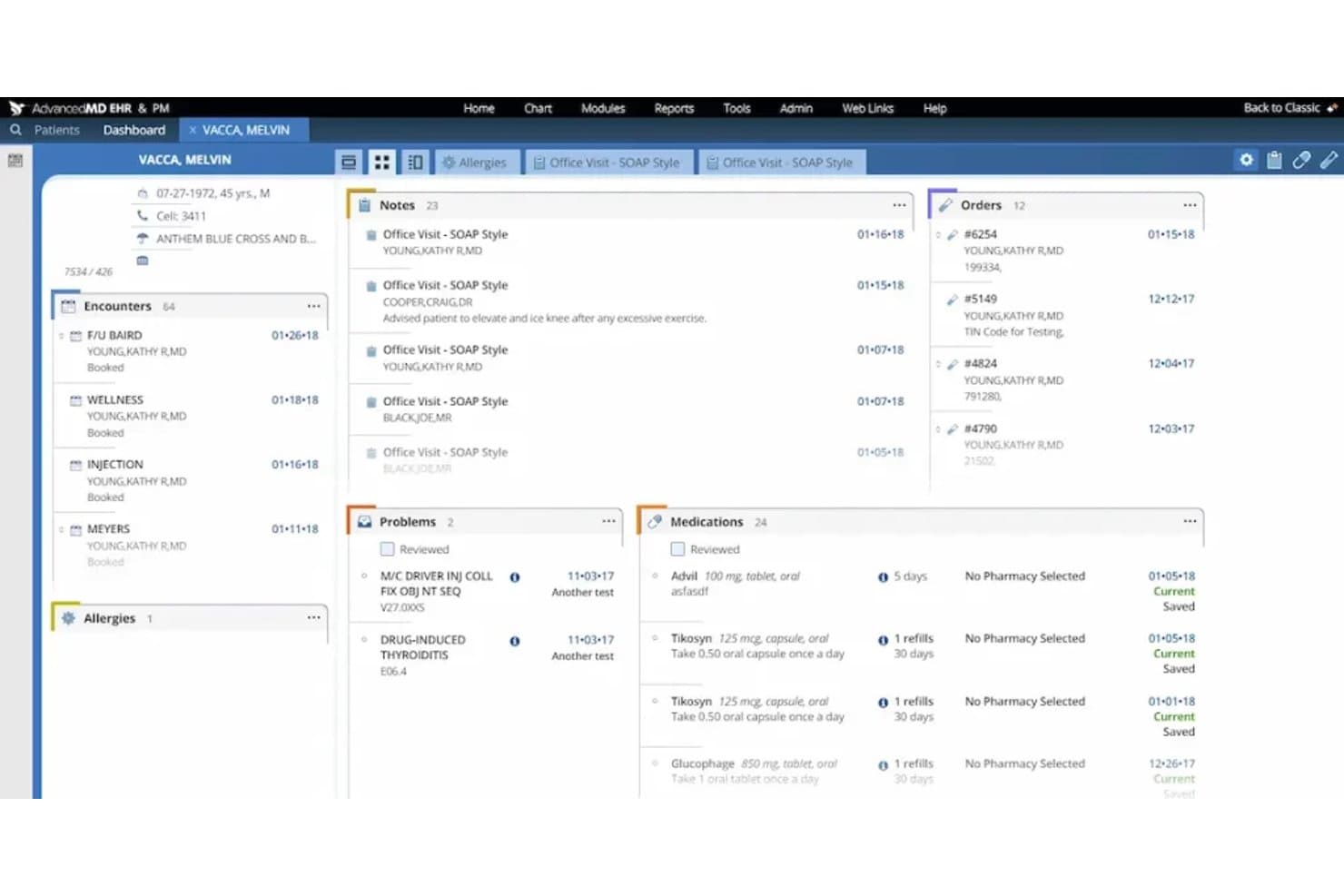
AdvancedMD offers a comprehensive patient dashboard displaying encounters, notes, orders, problems, medications, and allergies in a unified view. AdvancedMD is a cloud-based medical billing platform with a built-in clearinghouse, claims scrubbing, denial management, A/R tracking, and a Central Billing Office mode designed for independent billers managing multiple providers.
Who Is AdvancedMD Best For?
It's a strong fit for home-based billing services that manage multiple provider clients and need a single platform to handle the full billing cycle.
Why I Picked AdvancedMD
AdvancedMD earns its spot as one of the best on my shortlist because of how far it goes on automated claims processing. The built-in Claim Inspector scrubs every claim against compliance rules, code edits, and payer-specific requirements before submission, which is how the platform sustains a roughly 95% first-pass acceptance rate. I also like the A/R Control Center, which auto-routes denied claims into worklists with reason codes so I can track, correct, and resubmit without a single claim falling through the cracks.
AdvancedMD Key Features
- Central Billing Office mode: Lets you manage billing for multiple providers or clients from a single login with segmented data.
- Automated insurance eligibility checks: Verifies patient insurance coverage in real time before appointments and updates records.
- Integrated patient payment portal: Supports online payments, statement generation, and reconciliation directly within the system.
- Built-in iOS and Android mobile apps: Gives you mobile access to scheduling, patient information, and billing tools on the go.
AdvancedMD Integrations
AdvancedMD offers native integrations with ChartRequest, DAX Copilot, DeepScribe, Doctorsoft, InstaMed, LeadSquared, and NextPatient, plus has an Integration Marketplace and provides an API for custom integrations.
Pros and Cons
Pros:
- Real-time insurance eligibility verification included
- Multi-client management with segmented data access
- Automated claim scrubbing targets payer-specific edits
Cons:
- Some users report slow customer support
- Onboarding process can be time-consuming
Annen medisinsk faktureringsprogramvare for hjemmebaserte virksomheter
Her er noen flere alternativer for medisinsk faktureringsprogramvare for hjemmebaserte virksomheter som ikke kom med på kortlisten, men som likevel er verdt å undersøke:
- 11TotalMDBest for affordable billing management
- 12AthenahealthBest for billing and collections automation
- 13PrognoCISBest for customizable billing workflows
- 14SimplePracticeBest for therapy insurance billing
- 15TherapyNotesBest for mental health billing
- 16Office Ally (Service Center)Best for clearinghouse and claims services
- 17CureMDBest for integrated billing and EHR
- 18NextGen OfficeBest for small-practice billing automation
- 19Claim.MDBest for fast electronic claims processing
How I Evaluate Medical Billing Software for Home Based Business
I split my evaluation into core functionality every home-based biller needs—like ERA posting and multi-provider management—and the factors that separate good tools from great ones.
Core Functionality (Table Stakes for This List)
When I'm selecting tools for my list, I rank each one on a scale from 0 (does not offer the functionality) to 5 (excels in this area) for each core functionality listed below. Then, I calculate the tool's total score into a percentage. Each tool needs to achieve a minimum total score of 65% to be considered for inclusion.
- Electronic Claims Submission: I check for 837 claim generation, built-in scrubbing rules, and direct clearinghouse connections so claims don't bounce before reaching payers.
- HIPAA-Compliant Cloud Access: Home-based billers need secure remote access. I look for encryption, MFA, audit logs, and a signed BAA included by default.
- Multi-Provider/Client Management: I evaluate whether a platform lets you manage separate NPIs, tax IDs, and client books under one login without data bleeding across accounts.
- ERA & Payment Posting: Handling 835 files manually slows everything down. I look for automated posting, exception flagging, and support for secondary claim generation.
- Denial & AR Management: I consider whether the tool offers denial worklists, reason-code tracking, and aging reports that help solo billers prioritize follow-ups by dollar value.
- Patient Billing & Statements: Generating patient statements and collecting balances matters. I evaluate statement automation, online payment options, and balance reconciliation tools.
Once I have a list of tools that meet the criteria, I consider what sets each platform apart.
Differentiating Factors (What Sets Vendors Apart)
Here's how I compare and contrast different vendors:
Standout Features
Direct clearinghouse connections matter here. I look for platforms that submit claims, pull ERAs, and track rejections through built-in links to clearinghouses like Availity or Change Healthcare—no portal hopping. Automated eligibility verification is another differentiator. Real-time insurance checks before claim submission save hours you'd otherwise spend logging into payer sites one by one. I also evaluate denial management workflows, specifically whether a tool offers reason-code categorization and appeal templates that help solo billers recover revenue without a manual tracking system.
Beyond Features
Pricing structure is a big differentiator. I look for per-claim or flat monthly pricing that scales with a small book of business—enterprise contracts with steep minimums aren't practical for solo operators. HIPAA compliance also varies widely. A signed BAA should come standard, and I check for MFA and role-based access controls, especially if you bring on a virtual assistant. Onboarding support matters too. Live payer enrollment help and EDI setup guidance can save weeks compared to vendors that leave you with self-service docs alone.
Slik velger du medisinsk faktureringsprogramvare for hjemmebasert virksomhet
Det er lett å gå seg vill i lange funksjonslister og kompliserte prisstrukturer. For å hjelpe deg med å holde fokus mens du arbeider deg gjennom den unike prosessen med å velge programvare, er dette en sjekkliste over faktorer du bør ha i bakhodet:
| Faktor | Hva du bør vurdere |
| Skalerbarhet | Vil plattformen støtte veksten din hvis du får flere behandlere som kunder eller utvider tjenestetilbudet ditt? |
| Integrasjoner | Kan verktøyet enkelt kobles til oppgjørssentraler, EHR-systemer eller regnskapssystemer som kundene dine allerede bruker? |
| Tilpasningsmuligheter | Kan du tilpasse arbeidsflyter, kontoutskrifter og rapportering etter behovene og preferansene til hver enkelt behandlerkunde? |
| Brukervennlighet | Er systemet intuitivt nok for daglig håndtering av krav og grunnleggende feilsøking uten stadig hjelp fra IT? |
| Implementering og oppstart | Får du direkte hjelp med oppstart, støtte ved registrering hos betalere og hjelp med konfigureringen, slik at du unngår å bruke flere uker på å sette alt sammen alene? |
| Kostnad | Finnes det skjulte gebyrer, kostnader per krav eller månedlige minstebeløp som kanskje ikke passer for den lille eller voksende kundebasen din? |
| Sikkerhetstiltak | Tilbyr leverandøren MFA, revisjonslogger og en signert BAA for å holde hjemmekontoret ditt HIPAA-kompatibelt? |
| Tilgjengelig kundestøtte | Hvor raskt kan du få reell hjelp (ikke bare supportsaker) når et krav har stoppet opp eller du får et faktureringsproblem? |
Hva er medisinsk faktureringsprogramvare for hjemmebasert virksomhet?
Medisinsk faktureringsprogramvare for hjemmebasert virksomhet er en skybasert plattform som lar selvstendige fakturamedarbeidere håndtere krav, betalinger og pasientfakturering for flere behandlerkunder fra et hjemmekontor. Disse verktøyene tilbyr sikker, HIPAA-kompatibel tilgang, administrasjon av flere kunder og automatisering for å forenkle faktureringsarbeidsflyten uten behov for lokal infrastruktur eller IT-støtte.
Funksjoner i programvare for medisinsk fakturering for hjemmebasert virksomhet
Når du velger programvare for medisinsk fakturering for hjemmebasert virksomhet, bør du se etter følgende viktige funksjoner:
- Elektronisk innsending av krav: Gjør det mulig å opprette, kontrollere og sende inn HIPAA-kompatible krav elektronisk til oppgjørssentraler og betalere, noe som reduserer manuelt papirarbeid og fremskynder refusjoner.
- Administrasjon av flere klienter: Støtter administrasjon av fakturering, betalinger og rapportering for flere behandlere eller praksiser under én konto, med tydelig adskillelse av klientdata.
- ERA og bokføring av betalinger: Importerer automatisk elektroniske filer med betalingsinformasjon og bokfører betalinger, noe som gjør det enklere å avstemme forsikringsbetalinger og oppdage avvik.
- Pasientfakturering og kontoutskrifter: Genererer kontoutskrifter og fakturaer til pasienter, holder oversikt over saldoer og hjelper deg med å kreve inn betalinger fra pasienter, inkludert egenbetalinger og egenandeler.
- Automatisk kontroll av stønadsberettigelse: Kontrollerer pasientens forsikringsytelser og berettigelse umiddelbart for å redusere avviste krav og spare tid som ellers ville blitt brukt på manuell kontroll.
- Administrasjon av avviste krav og utestående fordringer: Tilbyr verktøy for å spore avviste krav, registrere årsaker og administrere aldersfordelingen for utestående fordringer, slik at oppfølging kan prioriteres og innbetalingene forbedres.
- HIPAA-kompatibel skytilgang: Tilbyr sikker innlogging, kryptert datalagring og revisjonsspor, slik at du trygt kan administrere sensitive helseopplysninger fra hjemmekontoret.
- Rapportering og analyse: Leverer tilpassbare rapporter om kravstatus, aldersfordeling for utestående fordringer, betalingstrender og klientaktivitet, slik at du kan følge med på resultater og dele innsikt med klienter.
- Nettbasert betalingsportal: Lar pasienter betale regninger på nett med kredittkort eller bankoverføring, noe som reduserer innkrevingstiden og forbedrer betalingsopplevelsen.
- Integrasjon med EHR/PM-systemer: Synkroniserer med elektroniske pasientjournaler eller verktøy for praksisadministrasjon for å eliminere dobbeltregistrering av data og effektivisere arbeidsflyter på tvers av plattformer.
Fordeler med programvare for medisinsk fakturering for hjemmebasert virksomhet
Implementering av programvare for medisinsk fakturering for hjemmebasert virksomhet gir flere fordeler for teamet og virksomheten din. Her er noen av fordelene du kan se frem til:
- Mer effektiv fakturering: Automatisk oppretting og innsending av krav samt bokføring av betalinger hjelper deg med å behandle flere krav på kortere tid og med færre manuelle trinn.
- Forbedret kontantstrøm: Kontroll av berettigelse i sanntid og raskere håndtering av avviste krav fremskynder betalinger fra både forsikringsselskaper og pasienter.
- Bedre datasikkerhet: Skybasert tilgang med HIPAA-kompatible sikkerhetstiltak beskytter sensitive opplysninger, også når du jobber hjemmefra.
- Fleksibel klientadministrasjon: Håndter enkelt fakturering, rapportering og betalingssporing for flere behandlere eller praksiser i ett kontrollpanel.
- Forenklet samsvar: Verktøyene tilbyr revisjonsspor, BAA-er og rollebaserte tilgangskontroller som bidrar til å oppfylle regulatoriske krav uten ekstra administrasjonsarbeid.
- Bedre pasientopplevelse: Nettbaserte kontoutskrifter og betalingsalternativer gir pasientene raske og praktiske måter å se og betale saldoene sine på.
- Datadrevet innsikt: Innebygd analyse viser trender for krav, aldersfordeling for utestående fordringer og klientresultater, noe som gir et bedre grunnlag for forretningsbeslutninger.
Kostnader og priser for programvare for medisinsk fakturering for hjemmebasert virksomhet
Når du velger programvare for medisinsk fakturering for hjemmebasert virksomhet, må du forstå de ulike prismodellene og abonnementene som er tilgjengelige. Kostnadene varierer basert på funksjoner, teamstørrelse, tilleggstjenester og mer. Tabellen nedenfor oppsummerer vanlige abonnementer, gjennomsnittsprisene deres og typiske funksjoner som inngår i løsninger for programvare for medisinsk fakturering for hjemmebasert virksomhet:
Sammenligningstabell for abonnementer på programvare for medisinsk fakturering for hjemmebasert virksomhet
| Abonnementstype | Gjennomsnittspris | Vanlige funksjoner |
| Gratisabonnement | $0 | Grunnleggende innsending av krav, begrenset støtte for behandlere og manuell faktureringsadministrasjon. |
| Personlig abonnement | $30-$70 per måned | Elektronisk innsending av krav, ERA-import, verktøy for én behandler og støtte via telefon eller e-post. |
| Forretningsabonnement | $90-$200 per måned | Administrasjon av flere behandlere, automatisk bokføring av betalinger, rapporteringspaneler og nettbaserte pasientbetalinger. |
| Virksomhetsabonnement | $250+ per måned | Ubegrenset antall klienter, avanserte integrasjoner, HIPAA-verktøy for samsvar, hjelp med oppstart og tilpasset rapportering. |
Medisinsk faktureringsprogramvare for hjemmebaserte virksomheter – vanlige spørsmål
Her er noen svar på vanlige spørsmål om medisinsk faktureringsprogramvare for hjemmebaserte virksomheter:
Trenger jeg spesialopplæring for å bruke medisinsk faktureringsprogramvare hjemmefra?
Nei, de fleste plattformene er utformet for å være intuitive, med innebygde veiledninger og støtte ved oppstart. Det er likevel nyttig å ha en grunnleggende forståelse av faktureringsprosedyrer og krav fra betalere, slik at du får best mulig utbytte av programvarens funksjoner.
Kan jeg håndtere fakturering for flere praksiser med én programvarekonto?
Ja, mange løsninger for medisinsk fakturering lar deg administrere separate behandlere eller praksiser under én innlogging, støtter separate skatte-ID-er og holder klientdata adskilt.
Hvordan holder disse plattformene pasientdata sikre hjemme?
Disse verktøyene bruker kryptering, flerfaktorautentisering og sikre tilgangskontroller. Se etter leverandører som tilbyr revisjonslogger og en signert avtale om forretningsforbindelse (BAA), slik at du sikrer HIPAA-samsvar på hjemmekontoret.
Vil medisinsk faktureringsprogramvare integreres med klientens EHR- eller praksisadministrasjonssystem?
Mange leverandører tilbyr direkte integrasjoner med populære EHR- og PM-verktøy eller støtter import og eksport av data. Kontroller alltid om programvaren din kobles til systemene klientene dine foretrekker, før du abonnerer.
Hvilken type støtte er tilgjengelig hvis jeg får problemer?
De fleste leverandører tilbyr støtte via e-post, chat eller telefon, og noen tilbyr hjelp i sanntid med oppstart og konfigurering av betalere. Det er viktig å bekrefte åpningstidene for brukerstøtten og svartidene, særlig hvis avviste krav påvirker kontantstrømmen din.