

Integrert programvare for medisinsk fakturering kobler sammen de kliniske, administrative og faktureringsrelaterte systemene dine, slik at du kan håndtere krav, betalinger og pasientjournaler på ett sted. Hvis du ser etter måter å redusere manuell registrering, begrense faktureringsfeil og holde teamet samkjørt på, kan den rette integrerte plattformen utgjøre en stor forskjell. Denne listen gir deg praktiske alternativer tilpasset reelle medisinske miljøer – enten du driver en solopraksis, en gruppepraksis eller en virksomhet med flere lokasjoner – slik at du trygt kan velge et system som passer arbeidsmåten din.
Why Trust Our Software Recommendations
6,700+
Reviews
20
Industry experts
16+
Evaluation factors
14
Years
Our team has been testing and reviewing software since 2012. As medical practice leaders ourselves, we know how difficult—and important—it is to choose the right software.
For this guide, we evaluated tools using hands-on testing and independent research, scoring tools using our selection criteria.
Our reviews reflect our human editorial judgment, not a sales pitch.
Sammenligningstabell for integrert programvare for medisinsk fakturering
Denne sammenligningstabellen oppsummerer prisopplysningene for mine beste utvalgte integrerte programmer for medisinsk fakturering:
| Tool | Best For | Trial Info | Price | ||
|---|---|---|---|---|---|
| 1 | Best multi-location management tools | Free demo available | Pricing upon request | Website | |
| 2 | Best built-in billing for smaller medical offices | Free demo available | From $199/user/month | Website | |
| 3 | Best dedicated support for complex specialties | Free demo available | Pricing upon request | Website | |
| 4 | Best insurance verification integration | Free demo available | Pricing upon request | Website | |
| 5 | Best advanced analytics for billing optimization | Free demo available | Pricing upon request | Website | |
| 6 | Best integrated billing and payments dashboard | Free demo available | Pricing upon request | Website | |
| 7 | Best mobile-first billing experience | Free demo available | Pricing upon request | Website | |
| 8 | Best for scalable healthcare group operations | Not available | Pricing upon request | Website | |
| 9 | Best all-in-one workflow automation | Free demo available | Pricing upon request | Website | |
| 10 | Best customizable claims management | Free demo available | Pricing upon request | Website |


Anmeldelser av den beste integrerte programvaren for medisinsk fakturering
Nedenfor finner du mine detaljerte sammendrag av den beste integrerte programvaren for medisinsk fakturering som kom med på kortlisten min. Anmeldelsene mine gir en detaljert oversikt over funksjonene, integrasjonene og de beste bruksområdene for hver programvare, slik at du kan finne den som passer best for deg.
 Best multi-location management tools
- Free demo available
- Pricing upon request
Visit WebsiteCustomer Rating:4.1/5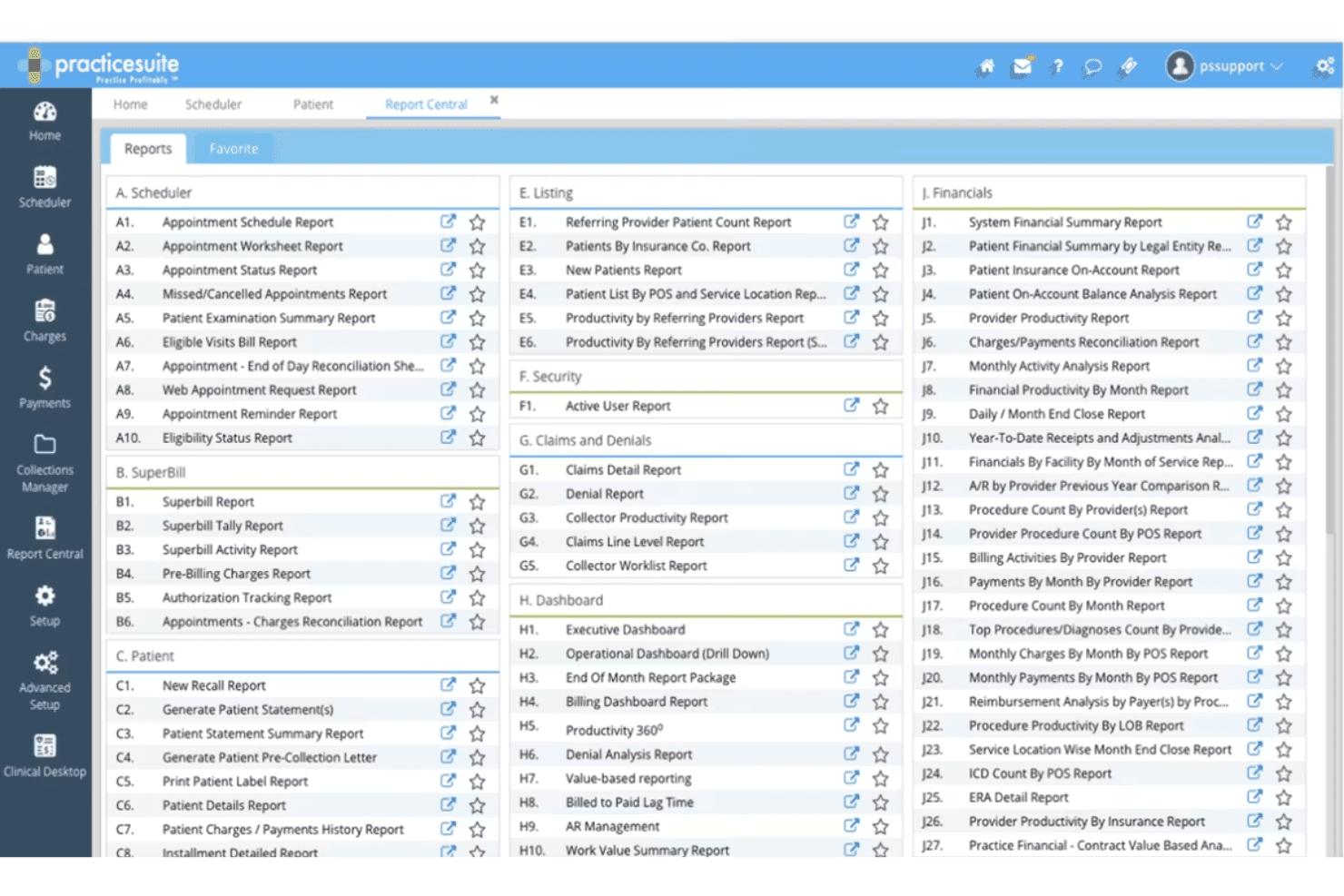
PracticeSuite Report Center highlights service location reports. PracticeSuite is a cloud-based medical billing platform that unifies claims management, RCM, EHR, practice management, scheduling, and patient billing across a single modular system built for practices of all sizes.
Who Is PracticeSuite Best For?
PracticeSuite suits physician groups and third-party billing companies that manage billing and RCM workflows across multiple providers or locations from a single platform.
Why I Picked PracticeSuite
I picked PracticeSuite as one of the best because its Central Billing Office gives me a single sign-on to handle denials, mass claim corrections, and payment posting across all client accounts without jumping between systems. Report Central adds another layer of control, with granular security settings that restrict data access by location, specific days, or hours. That kind of location-level configuration matters when your billing staff spans multiple sites with different access needs.
PracticeSuite Key Features
- EHR integration: Syncs billing and patient data across over 60 clinical specialties.
- AI denial intelligence: Flags claims issues before submission using AI-driven analysis.
- Scheduling module: Manages complex multi-provider and multi-specialty appointment workflows.
- Coding validation software: Validates ICD-10, CPT, and HCPCS codes for compliant charge capture.
PracticeSuite Integrations
PracticeSuite offers native integrations with Practice Fusion, Elation, Labcorp, Quest Diagnostics, and supports e-prescribing to over 70,000 pharmacies nationwide. An API is available for custom integrations.
Pros and Cons
Pros:
- Customizable reports and security by role
- AI-powered denial intelligence for claims
- Multi-location management with location-based controls
Cons:
- Complex setup for first-time configuration
- Occasional delays in customer support response
Learn more about PracticeSuite: Best built-in billing for smaller medical offices
- Free demo available
- From $199/user/month
Visit WebsiteCustomer Rating:3.7/5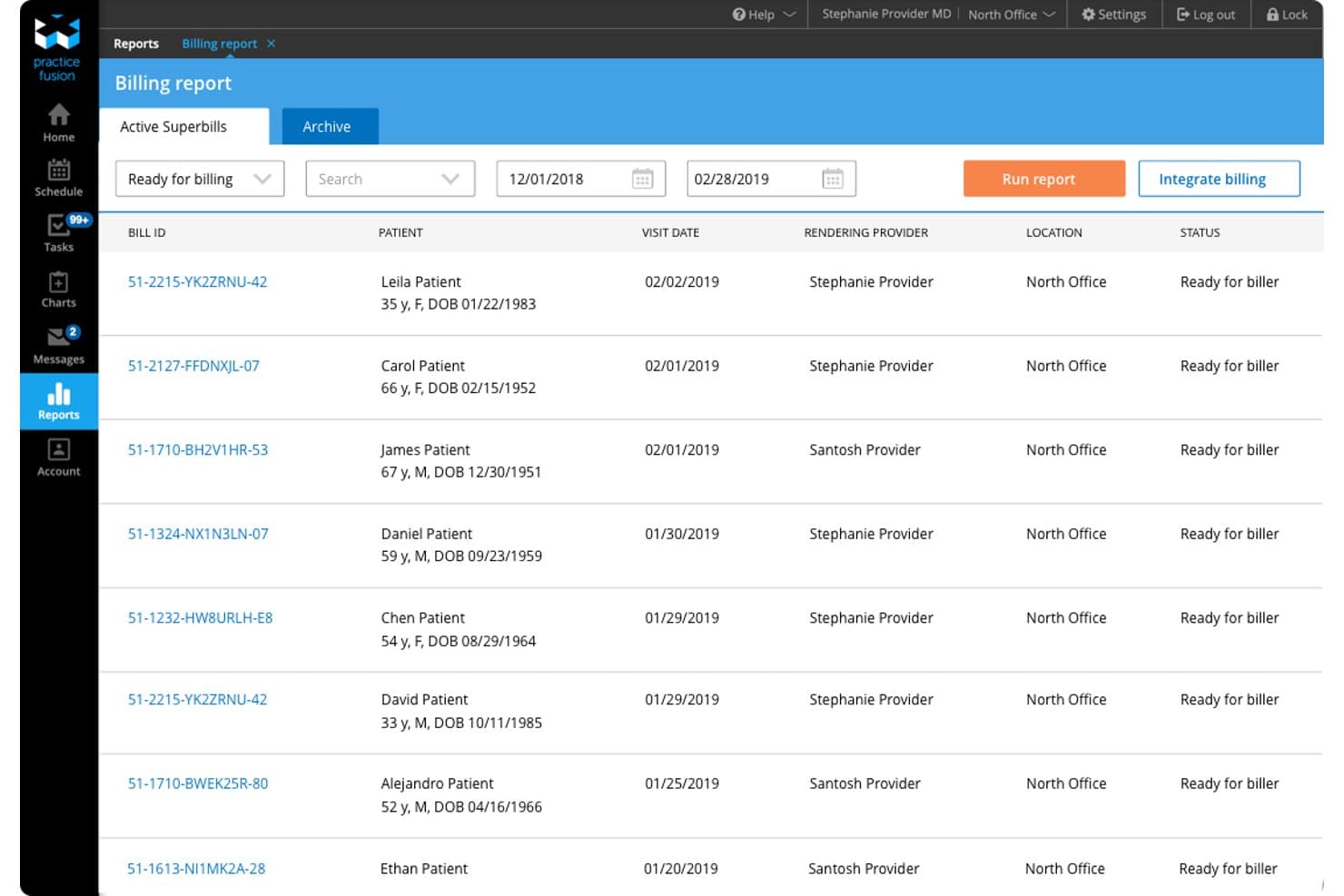
Practice Fusion offers an integrated billing report dashboard that displays active superbills with patient details, visit dates, rendering providers, and billing statuses. Practice Fusion is a cloud-based EHR platform for independent practices that combines clinical charting, scheduling, ePrescribing, and fully integrated billing services—including claims scrubbing, denial management, and payment posting—in a single system.
Who Is Practice Fusion Best For?
Practice Fusion is a strong fit for solo providers and small independent practices that want a single vendor for both EHR and billing services.
Why I Picked Practice Fusion
Practice Fusion earns its spot as one of the best on my shortlist because its billing services are genuinely native to the EHR, not a bolted-on third-party module. I like that the billing team handles everything from claims scrubbing and denial management to payment posting and payer credentialing, all pulled directly from chart data. The per-visit pricing model also makes it a practical pick for solo and small practices with variable monthly patient volume.
Practice Fusion Key Features
- Integrated ePrescribing: Send prescriptions, including controlled substances, electronically from the EHR to any pharmacy.
- Labs and imaging connectivity: Order tests and receive results directly within patient charts from hundreds of connected labs and imaging centers.
- Secure patient portal: Provide patients with 24/7 access to their health information and communication through the FollowMyHealth portal.
- Built-in clinical reporting: Generate regulatory and productivity reports using built-in dashboards for MIPS, clinical quality, and practice management.
Practice Fusion Integrations
Practice Fusion offers native integrations with FollowMyHealth for patient portal access and is natively connected to hundreds of labs and imaging centers for electronic order and result management. It also integrates with third-party billing partners like AdvancedMD and Kareo. An API is available for custom integrations.
Pros and Cons
Pros:
- E-prescribing for controlled substances supported
- Native lab and imaging integrations included
- Unified EHR, scheduling, and billing workflow
Cons:
- Billing automation less advanced than competitors
- Eligibility verification tools are limited
Learn more about Practice Fusion: Best dedicated support for complex specialties
- Free demo available
- Pricing upon request
Visit WebsiteCustomer Rating:3.6/5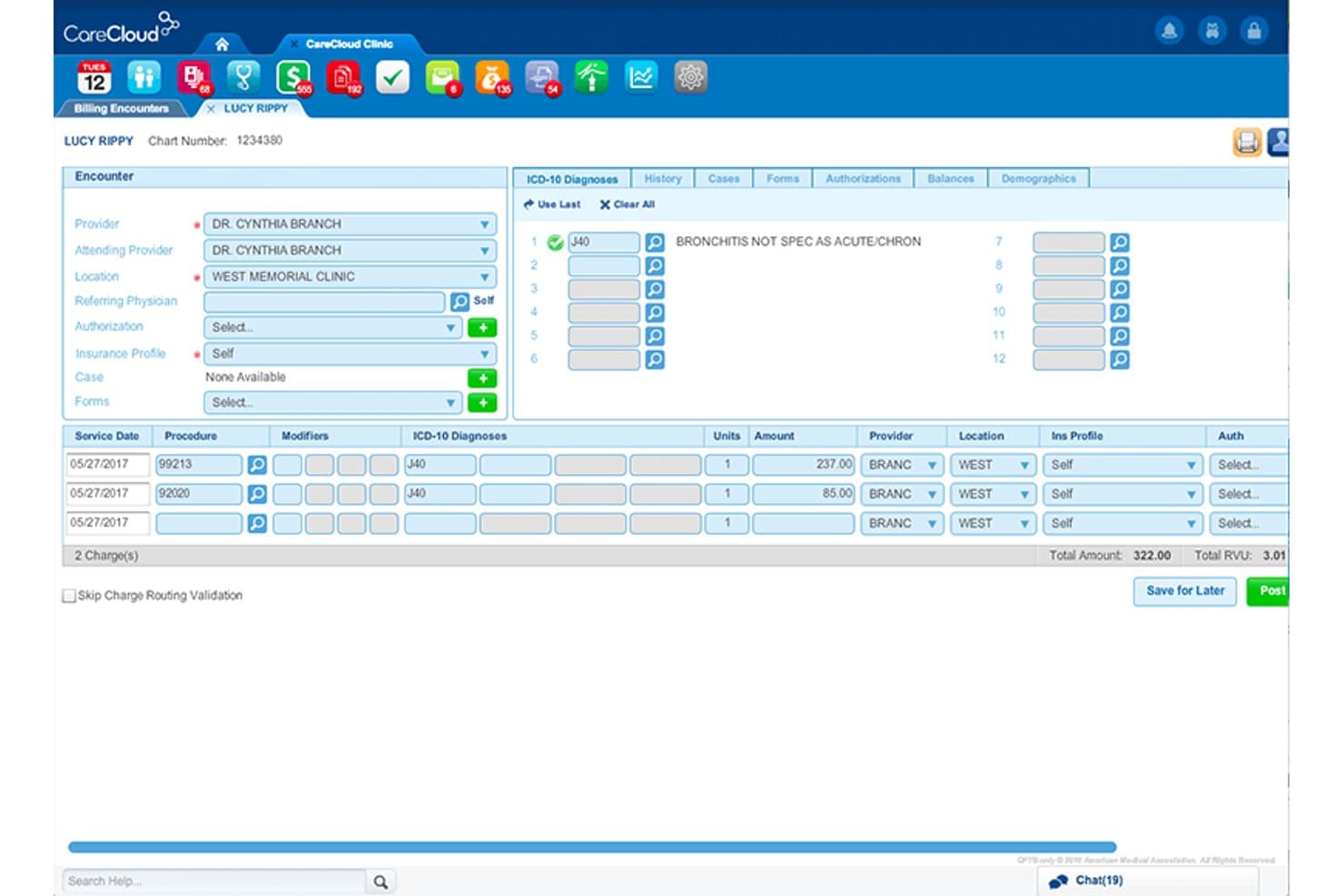
CareCloud offers an integrated billing encounter screen displaying ICD-10 diagnoses, procedure codes, charge amounts, and provider details for streamlined medical billing. CareCloud is an integrated medical billing and practice management platform that unifies EHR, claims management, coding, eligibility verification, and revenue cycle management across a single system.
Who Is CareCloud Best For?
CareCloud is a strong fit for medical practices with complex billing needs across specialty care settings, from independent practices to multi-provider groups.
Why I Picked CareCloud
I picked CareCloud as one of the best because its CollectiveIQ rules engine draws on over 180 million payer-specific billing rules to catch claim issues before submission. That matters most in specialty settings like cardiology or orthopedic surgery, where payer requirements are nuanced and denials are costly. The cirrusAI Appeals tool uses patient claim data to generate customized appeal letters, cutting manual effort on denial follow-up.
CareCloud Key Features
- Centralized billing dashboard: Manage billing activities and monitor claims status for multiple providers from one interface.
- ERA auto-posting: Automatically receive and post electronic remittance advice for faster payment reconciliation.
- Real-time eligibility verification: Instantly check patient insurance coverage and benefits before the visit.
- Patient payment portal: Allow patients to view invoices and submit payments securely online.
CareCloud Integrations
CareCloud offers native integrations with CareCloud Central (practice management), Charts (EHR), and pVerify for insurance eligibility. Additional integrations include Epic, Meditech, ICANotes, Praxis EMR, Sevocity, and Vital Interaction. An API is available for custom integrations.
Pros and Cons
Pros:
- Automated appeals generation saves RCM team time
- Built-in clearinghouse reduces need for third-party tools
- Rules engine catches specialty claim errors before submission
Cons:
- Onboarding process is often time-consuming
- Support responsiveness can be inconsistent
Learn more about CareCloud: Best insurance verification integration
- Free demo available
- Pricing upon request
Visit WebsiteCustomer Rating:3.5/5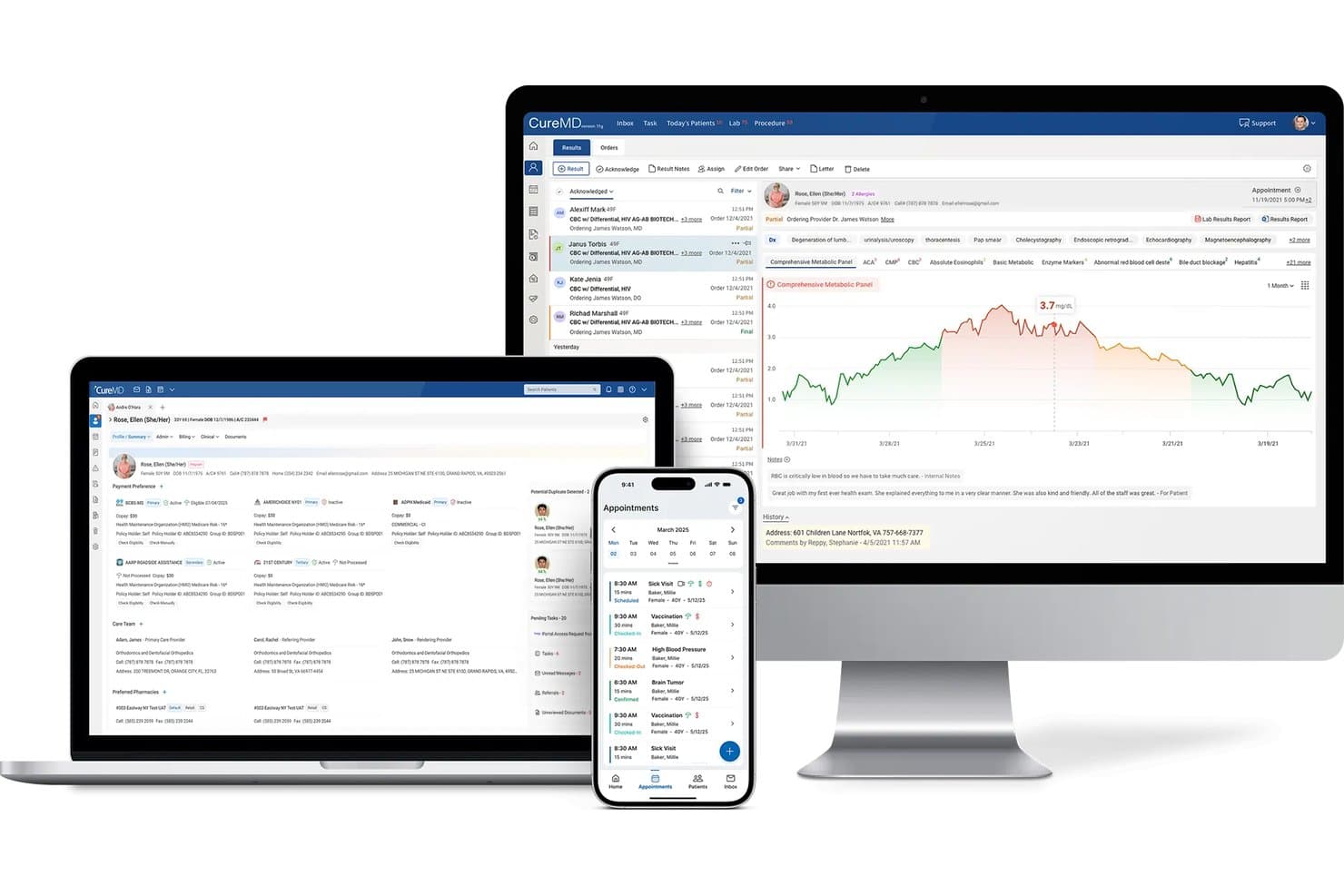
CureMD offers an integrated medical billing and patient management platform accessible across desktop, laptop, and mobile devices. CureMD is a cloud-based medical billing platform that unifies EHR, practice management, claims processing, clearinghouse integration, denial management, and patient payment tools in a single suite built for practices of all sizes.
Who Is CureMD Best For?
CureMD is a strong fit for independent and multi-specialty practices that want a single vendor managing their clinical, administrative, and billing workflows.
Why I Picked CureMD
CureMD earns its spot on my shortlist because of how deeply insurance verification is built into the billing workflow. I particularly like that eligibility checks run in real time before a visit, surfacing copay, deductible, and benefits details directly in the practice management module. That means my team can catch coverage issues before they become claim denials, rather than resolving them after the fact.
CureMD Key Features
- Integrated clearinghouse: Process claims and manage remittances directly within the platform.
- Patient portal: Offer online statements, payments, and secure access to records for patients.
- Automated denial management: Track, flag, and resolve denied claims using built-in workflows.
- ICD-10, CPT, and HCPCS code support: Use comprehensive medical code libraries and validation tools for accurate billing.
CureMD Integrations
CureMD offers native integrations with its own EHR, practice management, clearinghouse, and patient portal modules. The platform supports electronic prescribing to major pharmacy networks and electronic lab ordering with leading labs. An API is available for custom integrations.
Pros and Cons
Pros:
- Real-time eligibility checks integrated at scheduling
- Automated claim scrubbing and denial workflows
- Unified EHR, billing, and practice management suite
Cons:
- Long contract terms with early termination fees
- Occasional sluggish performance during peak hours
Learn more about CureMD: Best advanced analytics for billing optimization
- Free demo available
- Pricing upon request
Visit WebsiteCustomer Rating:3.4/5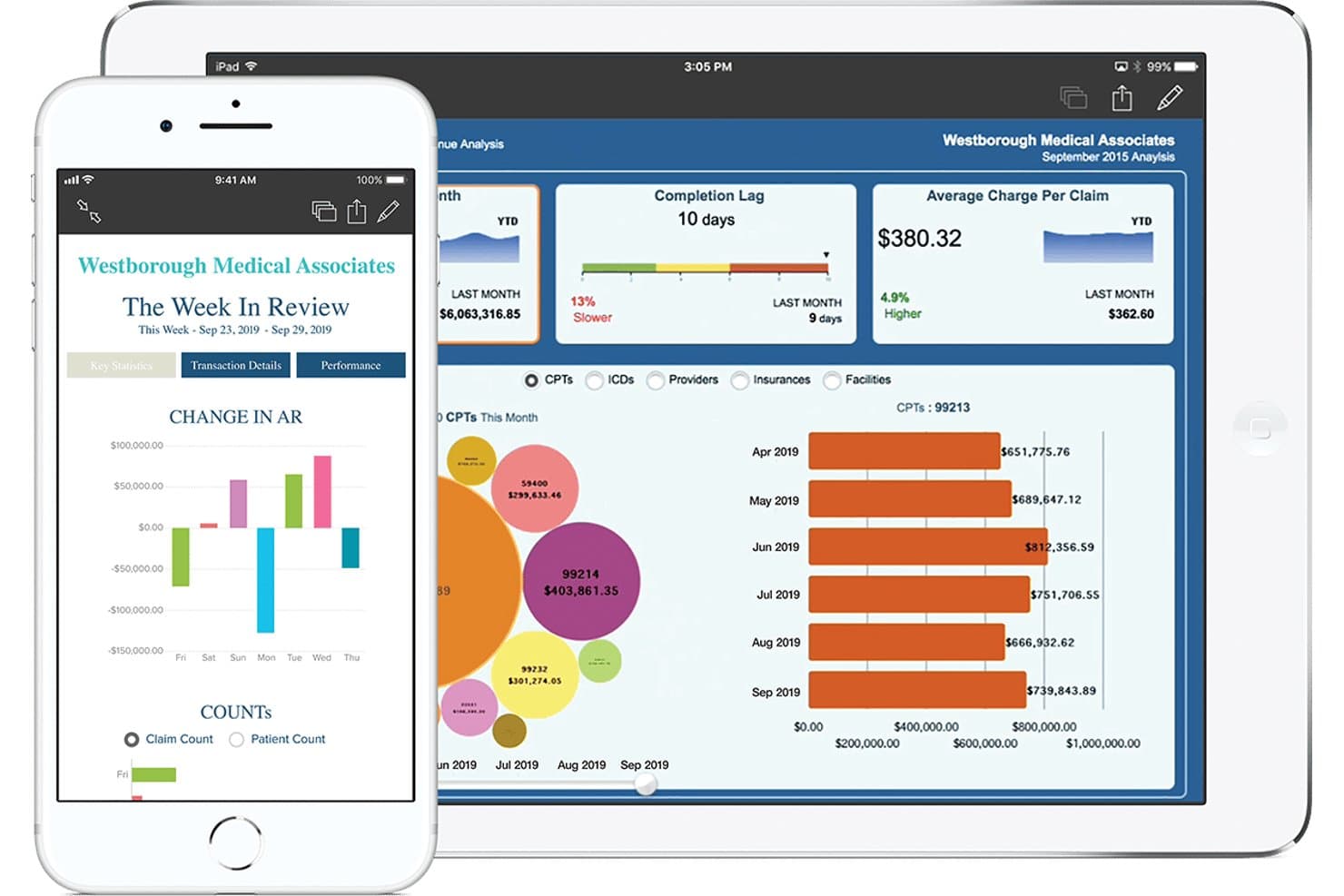
eClinicalWorks offers a revenue cycle management dashboard displaying charge analysis, completion lag, average charge per claim, and CPT-level billing breakdowns on tablet and smartphone. eClinicalWorks is an integrated EHR, practice management, and revenue cycle management platform that combines claims processing, medical coding, eligibility verification, payment posting, and denial management in a single system.
Who Is eClinicalWorks Best For?
It's a strong fit for independent practices and multi-provider groups that want a single vendor to handle their EHR, scheduling, and billing rather than stitching together separate systems.
Why I Picked eClinicalWorks
eClinicalWorks earns its spot on my shortlist because of how its analytics layer sits across the entire revenue cycle. I particularly like the RCM Dashboard and Provider Analytics, which let me monitor individual provider KPIs and track denial patterns in real time. The Learning Engine adapts to payer-specific rejection patterns and automatically refines claim edits over time, which directly reduces rework on submitted claims.
eClinicalWorks Key Features
- Appeals automation: Generate payer-specific appeals packets with one click, including forms and cover letters.
- AI workflow builder: Create billing automation rules using natural language instructions directly in the interface.
- Central Billing Office integration: Connect multiple practices to a single CBO for enterprise-level claim and payment management.
- Patient collections AI: Use an autonomous agent to handle patient calls and collect outstanding balances.
eClinicalWorks Integrations
eClinicalWorks offers native integrations with Sunoh and healow Genie for ambient clinical documentation and patient engagement. Native dictation integrations are available with Dragon Medical and M*Modal. An API is available for custom integrations.
Pros and Cons
Pros:
- Real-time eligibility checks and automated coding
- Advanced analytics for denial tracking and trends
- Unified EHR, scheduling, and billing platform
Cons:
- Custom reporting requires additional setup or fees
- Outdated user interface and navigation
Learn more about eClinicalWorks: Best integrated billing and payments dashboard
- Free demo available
- Pricing upon request
Visit WebsiteCustomer Rating:3.9/5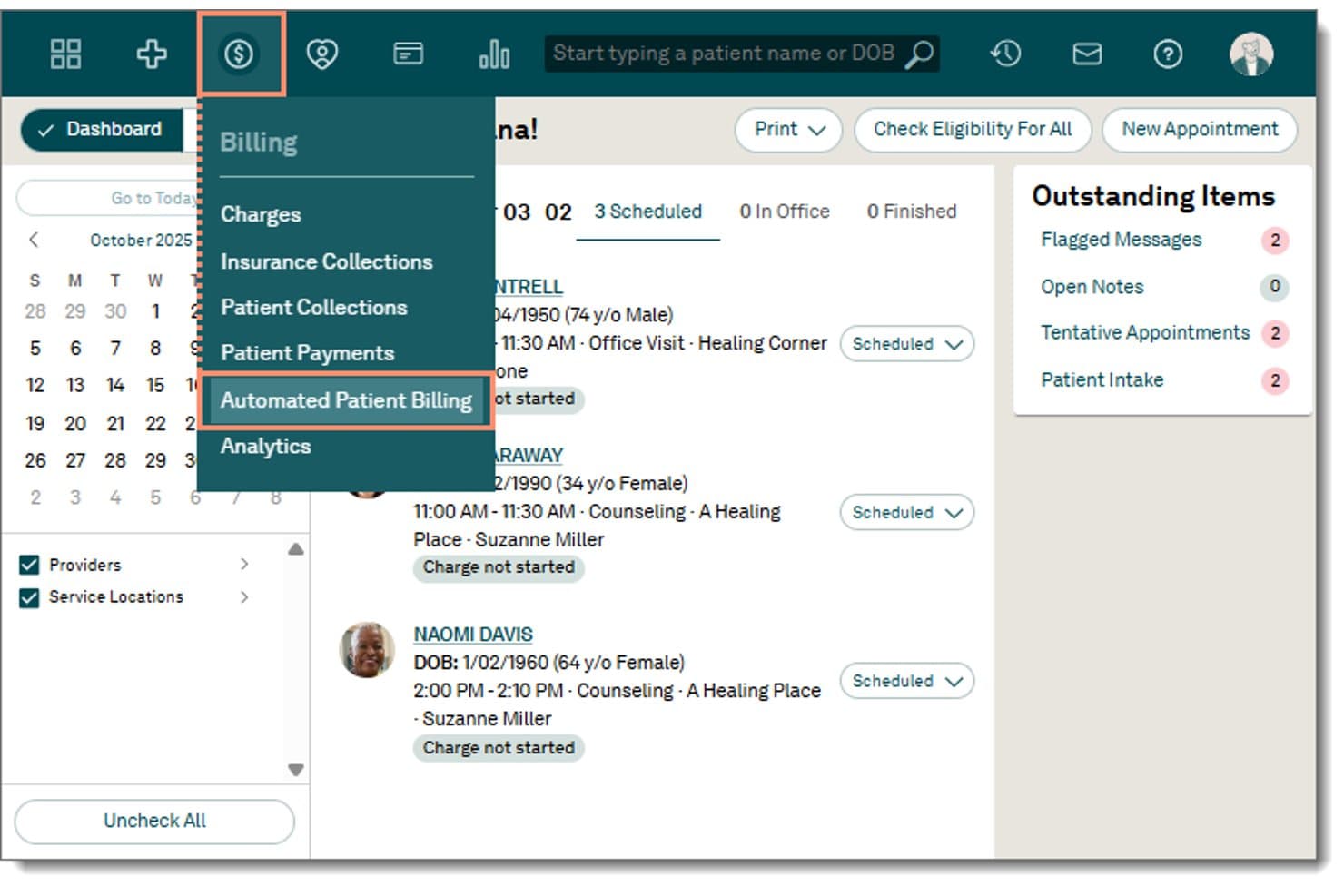
Tebra offers an Automated Patient Billing option within its Billing dropdown menu, accessible directly from the main navigation bar. Tebra is a unified EHR, practice management, and medical billing platform built for independent practices, combining claims submission, insurance eligibility verification, ERA auto-posting, and patient payments in a single integrated system.
Who Is Tebra Best For?
Tebra is a strong fit for small to mid-sized independent practices with up to 10 providers who want a single vendor for EHR, billing, and patient management.
Why I Picked Tebra
Tebra earns its spot on my shortlist because the billing dashboard pulls charge data directly from clinical encounters the moment a provider closes a note. I particularly like the real-time eligibility verification, which checks coverage across 2,700+ payers during scheduling, before a patient walks in. The RPA-driven ERA auto-posting applies practice-specific rules to reconcile payments without manual intervention.
Tebra Key Features
- Patient payment portal: Lets patients make payments online using customizable links and card-on-file.
- Batch and automated statements: Generates and delivers patient statements in both digital and paper formats.
- Integrated code validation engine: Checks ICD-10, CPT, and HCPCS codes for compliance in billing workflows.
- Bidirectional EHR and PM sync: Shares patient, encounter, and charge data in real time across modules.
Tebra Integrations
Tebra offers native integrations with WebPT, QuickEMR, Relatient, NextPatient, PayPal, Stripe Terminal, and DocSpera. An API is available for custom integrations, and EHR/PM connectivity is supported via HL7 and FHIR.
Pros and Cons
Pros:
- Batch and digital patient statement generation
- Automated real-time insurance eligibility checks
- Unified EHR, PM, and billing dashboard
Cons:
- Secondary claim workflows require manual steps
- Financial reporting features are limited
Learn more about Tebra: Best mobile-first billing experience
- Free demo available
- Pricing upon request
Visit WebsiteCustomer Rating:3.9/5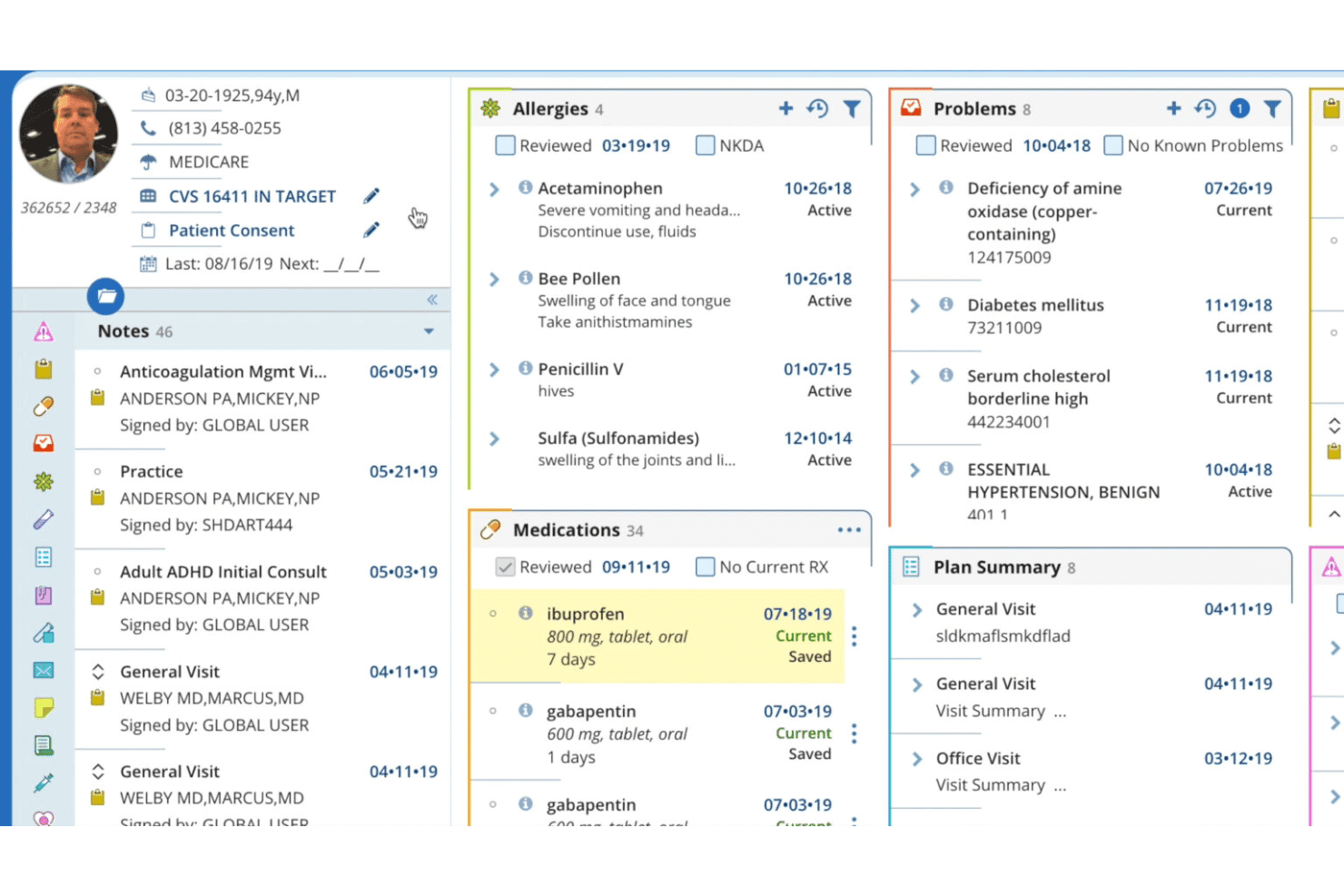
DrChrono mobile billing tools for appointments, eRx, and payment summaries. DrChrono is a cloud-based medical billing and EHR platform that natively unifies claims management, insurance eligibility verification, ERA posting, patient billing, and practice management in a single mobile-first system built for iOS.
Who Is DrChrono Best For?
DrChrono is a strong fit for independent practices and small medical groups that want billing, EHR, and practice management built into a single platform.
Why I Picked DrChrono
DrChrono earns its spot on my shortlist because the billing experience is genuinely built for mobile, not just adapted for it. I can run eligibility checks, track claim status in real time via the Live Claims Feed, and review ERA postings directly from an iPad, with no stripped-down functionality. The native iOS billing profiles, which store common CPT and ICD-10 codes per provider, make charge capture fast right at the point of care.
DrChrono Key Features
- Integrated ERA and EOB posting: Manage electronic remittance advice and explanation of benefits within the billing dashboard.
- Patient statement automation: Send digital or print statements with embedded payment links and track delivery preferences.
- Denial pattern reporting: Identify recurring denial issues by payer or procedure through built-in analytics.
- Custom billing profiles: Set up template profiles for commonly used codes and diagnoses, available during claim entry.
DrChrono Integrations
DrChrono offers native integrations with eProvider Solutions, TriZetto, Carisk Partners, Quest, LabCorp, Box, Ambra, Curogram, DeepScribe, and Square Point of Sale. An API is available for custom integrations.
Pros and Cons
Pros:
- Custom claims tracking for each payer
- Bulk eligibility checks before every visit
- True mobile billing and claim management
Cons:
- Support quality declined after EverHealth acquisition
- Billing only available with DrChrono EHR
Learn more about DrChrono: Best for scalable healthcare group operations
- Not available
- Pricing upon request
Visit WebsiteCustomer Rating:3.7/5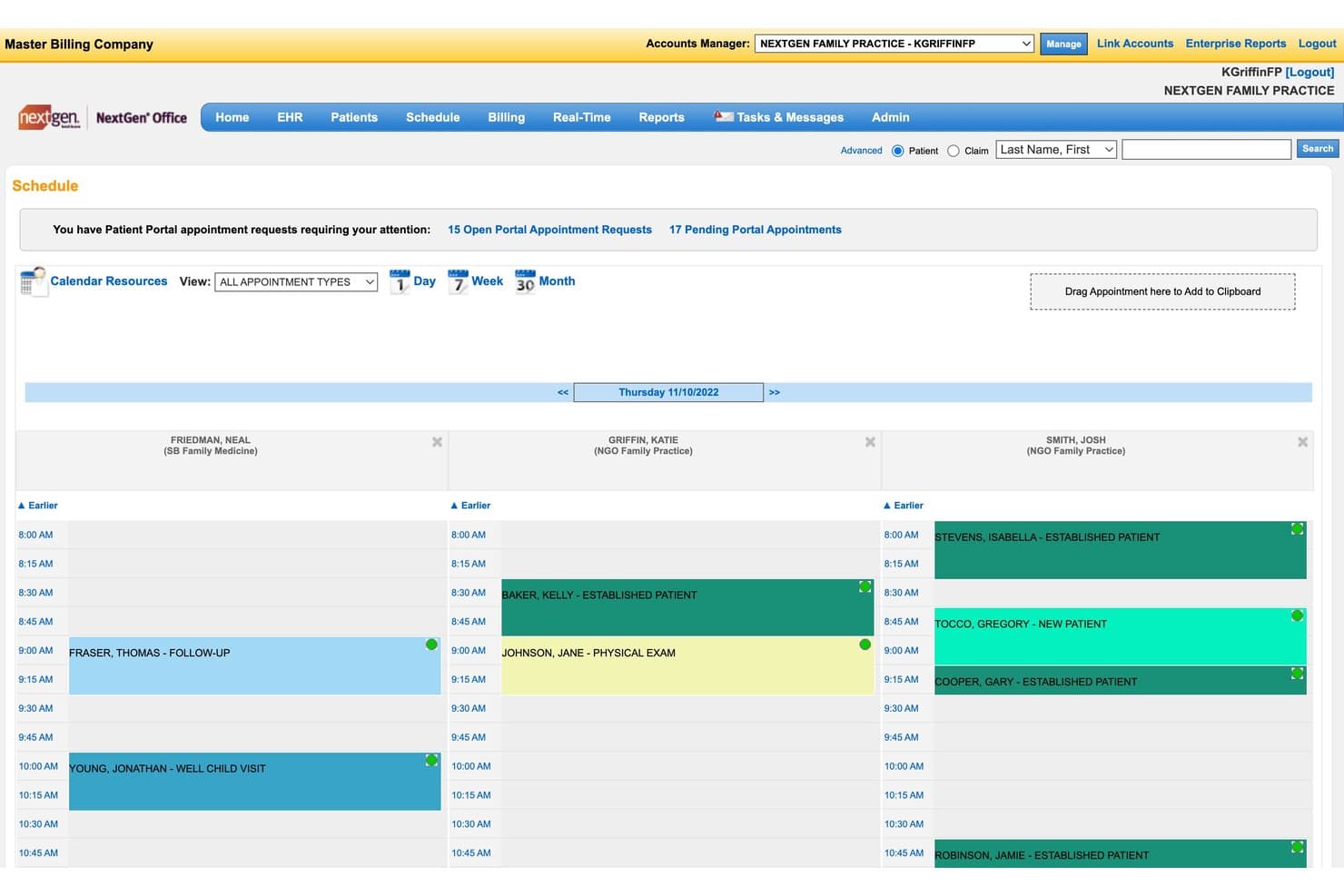
NextGen Office offers an integrated scheduling dashboard that displays multi-provider daily appointments, patient types, and portal request alerts to support streamlined medical billing workflows. NextGen Office is a cloud-based EHR and practice management platform that combines medical billing, claims management, insurance eligibility verification, patient payments, and revenue cycle management in a single unified system.
Who Is NextGen Office Best For?
NextGen Office suits medical billing companies and small-to-mid-sized practices that need a single platform to manage both clinical documentation and revenue cycle operations as they grow.
Why I Picked NextGen Office
I picked NextGen Office as one of the best because its tiered architecture is built for practices that plan to grow. Teams start on NextGen Office, and when they scale past 10 providers, the platform upgrades to NextGen Enterprise without a system switch. I also appreciate the multi-location record access, where every affiliate office shares a single login and duplicate chart alerts prevent data fragmentation across sites.
NextGen Office Key Features
- Automated claims scrubbing: Reviews claims for errors before submission to reduce rejections and denials.
- Integrated payment portal: Allows patients to pay with credit card, Google Pay, Apple Pay, or payment plans.
- Real-time insurance eligibility checks: Provides immediate verification of benefits and coverage for each patient.
- Specialty-specific EHR templates: Offers configurable documentation tools tailored to different medical specialties.
NextGen Office Integrations
NextGen Office offers native integrations with Doctible, Solutionreach, Clearwave, and InstaMed. It also supports integration with Apple Health, Amazon Marketplace, and over 725 labs via NextGen Share Diagnostic Hub. An API is available for custom integrations.
Pros and Cons
Pros:
- Instant real-time insurance eligibility verification
- Supports multi-location practice and group scaling
- Built-in claims scrubbing and denial tracking
Cons:
- Reporting requires navigating multiple modules
- Payment posting corrections require extra manual steps
Learn more about NextGen Office: Best all-in-one workflow automation
- Free demo available
- Pricing upon request
Visit WebsiteCustomer Rating:3.6/5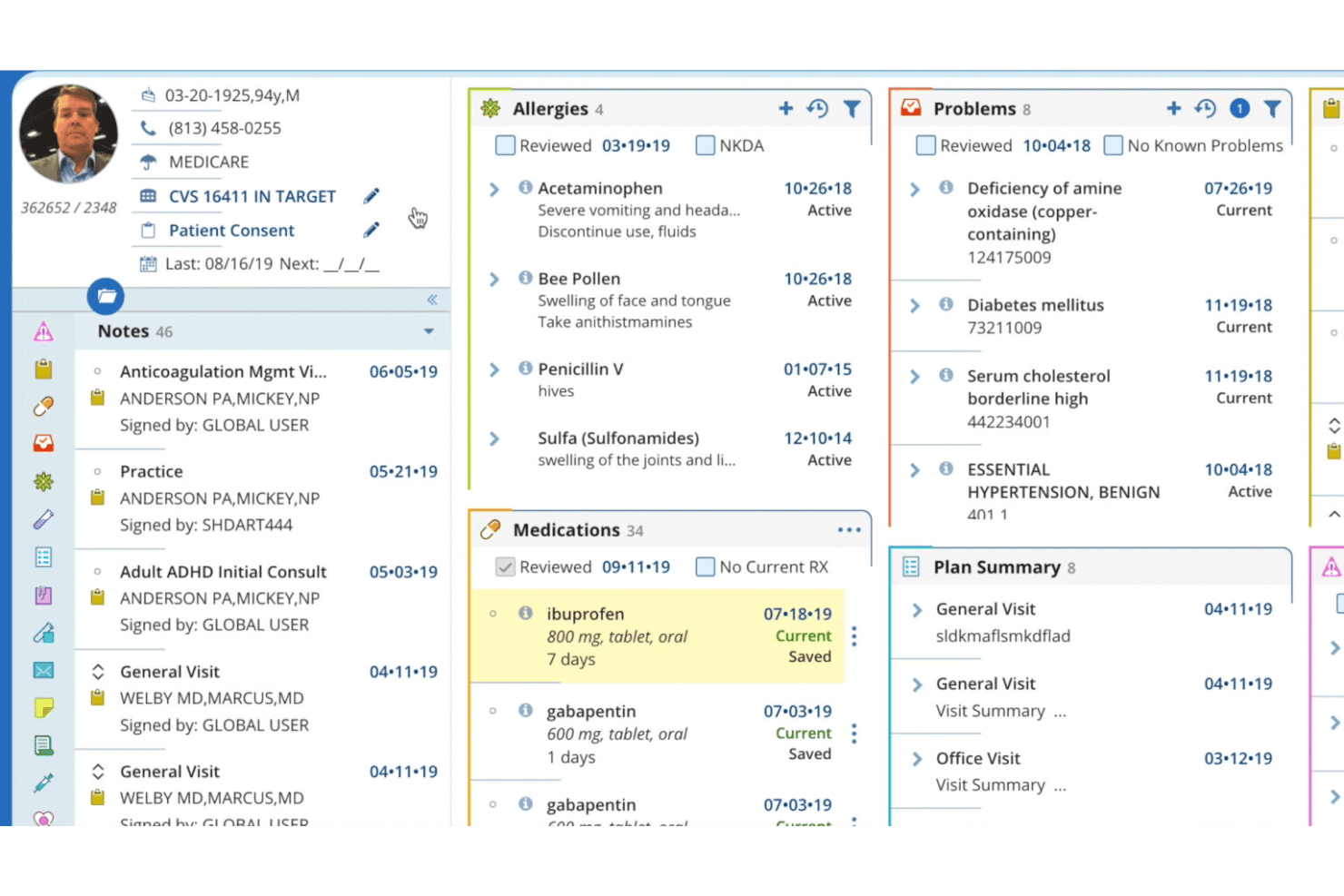
AdvancedMD patient record view with allergies, medications, and care plans. AdvancedMD is a cloud-based medical billing platform that unifies claims management, EHR, practice management, patient payments, insurance eligibility verification, and revenue cycle reporting in a single system for independent practices.
Who Is AdvancedMD Best For?
AdvancedMD suits independent practices and centralized billing offices that manage billing across multiple providers or client accounts from a single login.
Why I Picked AdvancedMD
AdvancedMD earns its spot as one of the best on my shortlist because the entire billing workflow runs without manual intervention. I particularly like ClaimInspector, which runs 3.5 million edits per claim against CCI, HIPAA, and LCD rules before submission. On the back end, ERA auto-posting and auto-generated A/R denial worklists mean my team isn't manually chasing remittances or building collections queues from scratch.
AdvancedMD Key Features
- Centralized Billing Office (CBO): Manage billing for multiple providers and locations from a single login and database.
- Integrated clearinghouse: Submit claims and download remittances directly through built-in clearinghouse connections to over 1,800 payors.
- Open API and integration marketplace: Connect EHR, HIE, CRM, and adjacent tools using an open API and prebuilt integration marketplace.
- Data migration service: Vendor-managed options for moving demographics, appointments, and insurance data from legacy systems.
AdvancedMD Integrations
AdvancedMD offers native integrations through its integrated clearinghouse, as well as an open API and an integration marketplace for connecting with third-party EHR, HIE, and CRM systems.
Pros and Cons
Pros:
- Automated worklists for billing denials
- Integrated clearinghouse supports 1,800+ payors
- Centralized dashboard for multi-location billing management
Cons:
- Occasional delays in customer support response
- No built-in certified medical coding services
 Best customizable claims management
- Free demo available
- Pricing upon request
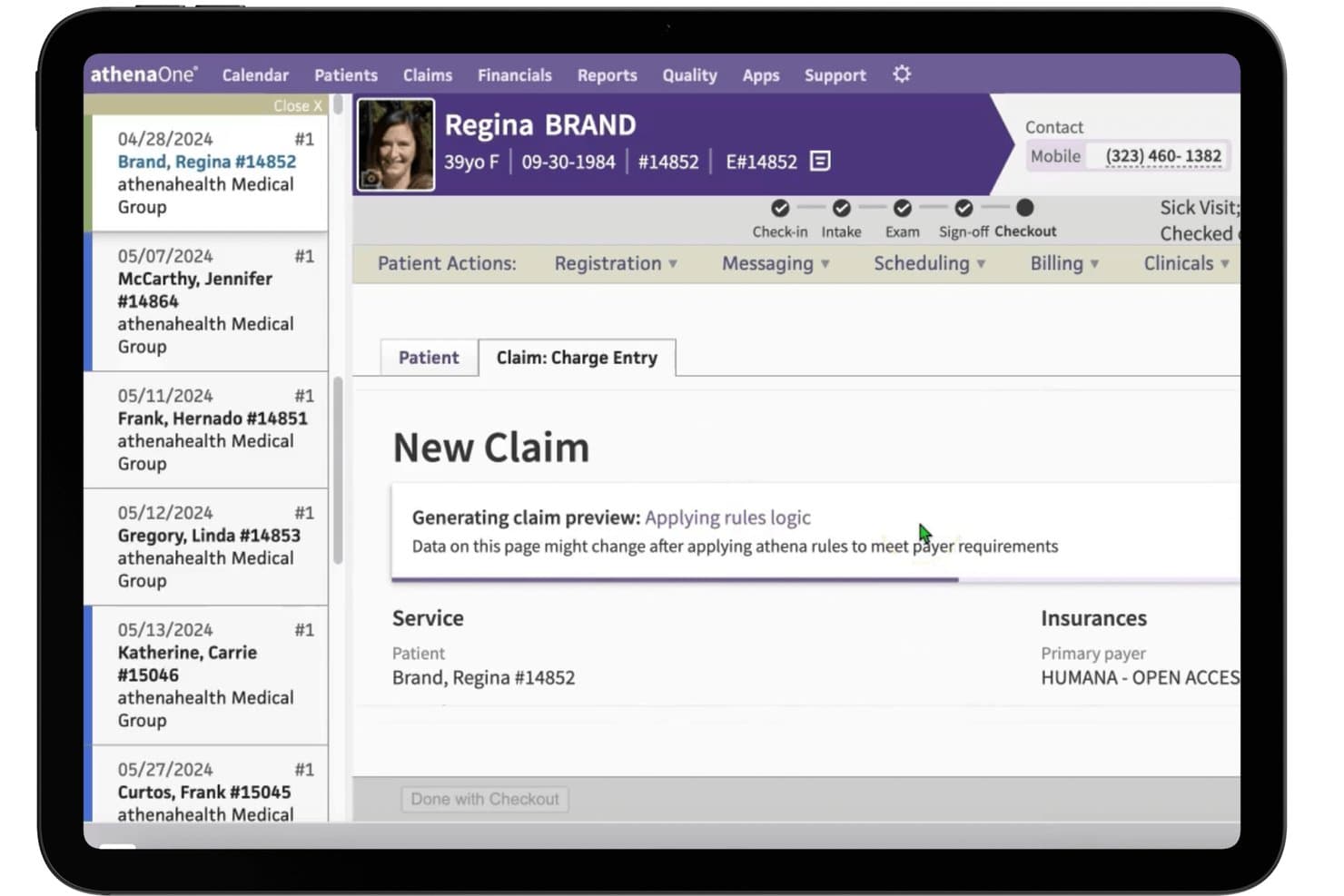
athenahealth (athenaOne) offers integrated claim charge entry with automated rules logic and payer requirement processing during patient checkout. athenaOne is a unified EHR, practice management, and medical billing platform that combines claims management, revenue cycle automation, insurance eligibility verification, patient billing, and medical coding support in a single cloud-based system.
Who Is athenahealth (athenaOne) Best For?
I'd recommend it most for independent and small-to-midsize medical practices that need a single platform to manage clinical, administrative, and billing workflows together.
Why I Picked athenahealth (athenaOne)
athenaOne earns its spot on my shortlist because of how deeply it lets you configure claims workflows around your practice's specific payer mix. I particularly like the 29,000-rule billing engine, which scrubs claims and fires targeted alarms before submission. When denials come back, the platform explains the likely coding issue and recommends next steps directly in the workflow, so my team isn't left guessing or manually cross-referencing payer policies.
athenahealth (athenaOne) Key Features
- Integrated EHR and practice management: Links clinical, scheduling, and billing workflows within one cloud-based platform.
- Real-time insurance verification: Checks patient eligibility and benefits at the point of scheduling or check-in.
- Patient payment portal: Lets patients access statements, make payments, and manage balances online.
- Centralized AR dashboard: Gives billing teams access to accounts receivable, payment posting, and performance insights in one interface.
athenahealth (athenaOne) Integrations
athenaOne offers dozens of native integrations through its marketplace, including rater8, GetWell, Experian Health, Dulcian Health, PatientPop, and esvyda. An API is available for custom integrations.
Pros and Cons
Pros:
- Built-in denial management guidance
- Real-time insurance eligibility checks
- Automated claim scrubbing with customizable rules
Cons:
- Occasional delays in support ticket resolution
- Patient portal experience is often frustrating
Learn more about athenahealth (athenaOne):
Annen integrert programvare for medisinsk fakturering
Her er noen flere alternativer for integrert programvare for medisinsk fakturering som ikke kom med på kortlisten min, men som likevel er verdt å undersøke:
- 11PrognoCIS (Bizmatics)Best specialty-specific billing templates
- 12RXNTBest real-time claim status updates
- 13CharmHealthBest patient payment portal integration
- 14ModMedBest AI-driven coding assistance
- 15NextechBest specialty EHR and billing integration
- 16DocVillaBest telemedicine billing support
- 17WRS HealthBest in-house clearinghouse connectivity
- 18PracticeEHRBest one-click charge capture workflows
- 19MicroMD (Henry Schein)Best flexible claims rules engine
- 20Compulink AdvantageRCMBest automated denials management
How I Evaluate Integrated Medical Billing Software
I split my evaluation into baseline functionality—like claims scrubbing and EHR sync—and the differentiators that set tools apart for specific practice types and billing workflows.
Core Functionality (Table Stakes for This List)
When I'm selecting tools for my list, I rank each one on a scale from 0 (does not offer the functionality) to 5 (excels in this area) for each core functionality listed below. Then, I calculate the tool's total score into a percentage. Each tool needs to achieve a minimum total score of 65% to be considered for inclusion.
- Claims Management: I evaluate how each tool handles electronic claim generation, scrubbing, and submission through clearinghouse connections—plus whether denial tracking and appeal workflows are built in or bolted on.
- EHR/PM Integration: A billing tool should sync encounter data, patient demographics, and charges with clinical records in real time, not through nightly file exports that leave gaps.
- Insurance Eligibility Verification: I check whether the platform runs real-time 270/271 eligibility checks at scheduling or check-in so front desk staff can flag coverage issues before the visit.
- Patient Billing & Payments: From digital statements to online portals and payment plans, I look at how each tool handles the patient-facing side of collections beyond just printing a paper bill.
- ERA/Payment Posting: Automated 835 remittance posting with reconciliation saves billing teams hours of manual work, so I look at how each platform handles primary and secondary posting.
- Medical Coding Support: The platform should include current ICD-10, CPT, and HCPCS code libraries with charge capture and validation to catch errors before claims go out the door.
Once I have a list of tools that meet the criteria, I consider what sets each platform apart.
Differentiating Factors (What Sets Vendors Apart)
Here's how I compare and contrast different vendors:
Standout Features
Denial management workflows matter a lot here. I look for tools that go beyond flagging rejected claims to include root-cause analysis and automated appeal generation, so your billing team spends less time chasing payers. AI-assisted coding and claim scrubbing is another area I evaluate closely—platforms that suggest codes and catch errors before submission help improve first-pass acceptance rates. I also consider how configurable the reporting dashboards are, since billing managers need to track KPIs like days in A/R and clean claim rates without building reports from scratch.
Beyond Features
Specialty and practice size fit is one of the first things I check. A platform built for a solo dermatology office won't necessarily scale for a multi-location orthopedic group with multiple tax IDs. Clearinghouse connectivity matters just as much—I look at whether a vendor includes clearinghouse services or charges per claim, and how many payers they support for ERA and EFT. I also evaluate onboarding support, especially data migration from legacy systems, since a rough transition can stall your billing team for weeks.
Slik velger du integrert programvare for medisinsk fakturering
Det er lett å gå seg vill i lange funksjonslister og komplekse prismodeller. For å hjelpe deg med å holde fokus når du går gjennom den unike prosessen med å velge programvare, får du her en sjekkliste over faktorer du bør ha i tankene:
| Faktor | Hva du bør vurdere |
|---|---|
| FaktorSkalerbarhet | Hva du bør vurdereKan plattformen støtte fremtidig vekst, for eksempel ved å legge til lokasjoner, behandlere eller spesialiteter, uten at arbeidsflytene eller budsjettet ikke lenger strekker til? |
| FaktorIntegrasjoner | Hva du bør vurdereKan programvaren kobles direkte til EHR-systemet, praksisadministrasjonssystemet og oppgjørssentralen din? Vær oppmerksom på skjulte integrasjonskostnader eller manuelle løsninger som skaper flaskehalser. |
| FaktorTilpasningsmuligheter | Hva du bør vurdereHvor fleksibelt kan du tilpasse faktureringsregler, rapporteringsfelt og brukertillatelser til dine spesifikke prosesser og din sammensetning av betalere? |
| FaktorBrukervennlighet | Hva du bør vurdereEr grensesnittet intuitivt nok for både frontpersonalet og faktureringspersonalet, eller vil læringskurven føre til daglige forsinkelser og flere henvendelser til brukerstøtten? |
| FaktorImplementering og opplæring | Hva du bør vurdereHvilke ressurser tilbyr leverandøren for datamigrering, opplæring av ansatte og støtte ved oppstart? Tydelige overgangsplaner bidrar til å unngå avbrudd i inntektene. |
| FaktorKostnad | Hva du bør vurdereSammenlign mer enn den månedlige prisen – ta også med etableringsgebyrer, kostnader per krav og utgifter til brukerstøtte, integrasjoner eller uventede tillegg. |
| FaktorSikkerhetstiltak | Hva du bør vurdereOppfyller leverandøren HIPAA-krav og lokale regulatoriske krav, og tilbyr de verktøy som revisjonslogger, brukerkontroller og kryptert datalagring? |
| FaktorTilgjengelig brukerstøtte | Hva du bør vurdereHvilke åpningstider og kanaler har leverandøren for brukerstøtte? Vurder om du trenger hjelp utenom åpningstid, direktechat eller en dedikert kundeansvarlig for teamet ditt. |
Hva er integrert programvare for medisinsk fakturering?
Integrert programvare for medisinsk fakturering er en samlet plattform som kombinerer medisinsk fakturering, elektroniske helsejournaler og praksisadministrasjon i ett system. Den lar teamet ditt håndtere krav, følge opp betalinger, kontrollere forsikring og håndtere pasientfakturering uten å bytte mellom flere verktøy. Denne tilnærmingen reduserer manuell dataregistrering, begrenser feil og forbedrer effektiviteten i kliniske, faktureringsrelaterte og administrative arbeidsflyter.
Funksjoner i integrert medisinsk faktureringsprogramvare
Når du velger integrert medisinsk faktureringsprogramvare, bør du se etter følgende nøkkelfunksjoner:
- Håndtering av refusjonskrav: Automatiserer oppretting, kontroll, innsending og sporing av refusjonskrav direkte mot oppgjørssentraler, slik at teamet kan håndtere avvisninger og effektivisere refusjonsutbetalinger.
- Integrasjon med EHR-/praksisadministrasjon: Kobler sammen klinisk dokumentasjon, timeplanlegging og faktureringsdata i sanntid, eliminerer dobbeltregistrering og reduserer feil mellom systemene.
- Verifisering av forsikringsberettigelse: Kontrollerer pasientens forsikringsdekning umiddelbart eller i grupper ved innsjekking eller timeplanlegging, og reduserer avviste krav som følge av utløpt dekning eller feilaktige opplysninger.
- Pasientfakturering og betalinger: Sender digitale fakturaer, administrerer nettbaserte betalingsportaler og tar imot pasientandeler – noe som gjør det enklere for pasientene å betale og for de ansatte å registrere betalinger.
- Automatisert registrering av ERA/betalinger: Registrerer elektroniske betalingsmeldinger (835-filer) fra betalere automatisk, avstemmer betalinger og identifiserer underbetalinger eller avvisninger.
- Støtte for medisinsk koding: Tilbyr oppdaterte kodebiblioteker for ICD-10, CPT og HCPCS, med registrering av utførte tjenester og kodevalidering, slik at faktureringspersonalet kan sende inn korrekte krav i samsvar med regelverket.
- Arbeidsflyter for håndtering av avvisninger: Sporer og administrerer avviste krav, tilbyr årsaksanalyse og bistår med korrigeringer og ny innsending for å minimere tapte inntekter.
- Tilpassbar rapportering og analyse: Lar teamet generere rapporter om økonomi, produktivitet og inntektssykluser, tilpasset deres KPI-er og driftsbehov.
- Brukerkontroller basert på roller: Gir detaljert kontroll over hvilken informasjon de ansatte kan se og redigere, beskytter sensitive data og støtter etterlevelse av regelverket.
- Betalingsplaner for pasienter: Lar deg opprette og administrere strukturerte betalingsavtaler for pasienter som trenger større fleksibilitet til å betale saldoen sin.
Fordeler med integrert medisinsk faktureringsprogramvare
Implementering av integrert medisinsk faktureringsprogramvare gir flere fordeler for teamet og virksomheten. Her er noen av fordelene du kan se frem til:
- Effektiviserte arbeidsflyter: Ved å koble sammen fakturerings-, EHR- og timeplanleggingsmoduler reduseres dobbeltregistrering og manuelle overleveringer, slik at de ansatte sparer tid gjennom hele inntektssyklusen.
- Færre avviste krav: Forsikringsverifisering i sanntid, automatisert kontroll og arbeidsflyter for håndtering av avvisninger fanger opp feil og problemer med dekningen før kravene sendes inn.
- Raskere innkreving av betalinger: Automatiserte fakturaer, digitale betalingsportaler og fleksible betalingsplaner for pasienter bidrar til å innkreve saldoer raskt og redusere utestående fordringer.
- Bedre etterlevelse: Oppdaterte kodebiblioteker, revisjonsspor og håndhevede brukertillatelser hjelper deg med å fakturere korrekt og oppfylle regulatoriske krav.
- Handlingsrettet økonomisk innsikt: Tilpassbare rapporter og oversikter fremhever trender innen innbetalinger, status for refusjonskrav, betaleres resultater og praksisens produktivitet.
- Skalerbar drift: Den riktige plattformen vokser sammen med praksisen din – den støtter flere spesialiteter, nye lokasjoner og mer kompleks fakturering etter hvert som virksomheten utvikler seg.
- Bedre pasientopplevelse: Selvbetjeningsverktøy for fakturering og betaling gjør det enklere for pasientene å forstå og gjøre opp saldoene sine, noe som øker tilfredsheten.
Kostnader og priser for integrert medisinsk faktureringsprogramvare
Valg av integrert medisinsk faktureringsprogramvare krever en forståelse av de ulike prismodellene og abonnementene som er tilgjengelige. Kostnadene varierer basert på funksjoner, teamstørrelse, tillegg og mer. Tabellen nedenfor oppsummerer vanlige abonnementer, gjennomsnittsprisene deres og typiske funksjoner som inngår i integrerte løsninger for medisinsk faktureringsprogramvare:
Sammenligningstabell for abonnementer på integrert medisinsk faktureringsprogramvare
| Abonnementstype | Gjennomsnittspris | Vanlige funksjoner |
|---|---|---|
| AbonnementstypeGratisabonnement | Gjennomsnittspris$0 | Vanlige funksjonerGrunnleggende elektroniske refusjonskrav, begrenset rapportering, manuell registrering av betalinger og begrenset brukerstøtte. |
| AbonnementstypePersonlig abonnement | Gjennomsnittspris$50-$150/måned | Vanlige funksjonerStandard håndtering av refusjonskrav, EHR-integrasjon, forsikringsverifisering, grunnleggende pasientfakturering og tilgang for én bruker. |
| AbonnementstypeForretningsabonnement | Gjennomsnittspris$200-$500/måned | Vanlige funksjonerRoller for flere brukere, avansert håndtering av avvisninger, automatisert registrering av betalinger, tilpassbare rapporter og tilgang til betalingsportal. |
| AbonnementstypeStorskalabonnement | Gjennomsnittspris$600-$1200/måned | Vanlige funksjonerFullstendig tilpasset integrasjon, arbeidsflyter for spesialiteter, høyeste brukerstøttenivå, støtte for flere lokasjoner og forbedrede kontroller for etterlevelse. |
Vanlige spørsmål om integrert programvare for medisinsk fakturering
Her er noen svar på vanlige spørsmål om integrert programvare for medisinsk fakturering:
Hvordan forbedrer integrert programvare for medisinsk fakturering kontantstrømmen?
Integrert programvare for medisinsk fakturering reduserer feil i krav, fremskynder innsendingen av krav og tilbyr digitale betalingsverktøy – slik at praksisen din kan kreve inn betalinger raskere og redusere antall dager med utestående fordringer.
Kan integrert programvare for medisinsk fakturering håndtere flere lokasjoner eller spesialiteter?
Ja, de fleste plattformer støtter oppsett med flere lokasjoner og spesialiteter, med tilpasninger for maler, regler for betalere og rapportering etter sted eller behandlergruppe.
Hva bør jeg planlegge for under implementeringen?
Du bør planlegge for datamigrering fra tidligere systemer, opplæring av teamet ditt og samarbeid med leverandøren for å tilpasse programvaren til arbeidsflytene deres. En tydelig innføringsprosess bidrar til å minimere nedetid.
Hvor sikker er integrert programvare for medisinsk fakturering?
Leverandører tilbyr vanligvis HIPAA-kompatibel datalagring, tilgangskontroller basert på roller, revisjonsspor og krypterte overføringer for å bidra til å beskytte sensitive pasient- og økonomidata.
Kan pasienter betale regninger direkte gjennom disse systemene?
Ja, de fleste integrerte løsninger tilbyr betalingsportaler for pasienter, der pasientene kan se kontoutskrifter, betale på nett, opprette betalingsplaner og til og med motta betalingspåminnelser på e-post eller SMS.