

Il software EMR ortopedico (cartella clinica elettronica) semplifica la gestione dei dati dei pazienti, delle anamnesi e dei flussi di lavoro per gli studi ortopedici, facendoti risparmiare tempo sulle pratiche burocratiche e migliorando l'assistenza ai pazienti. Utilizzando il sistema EMR giusto, puoi ridurre le difficoltà amministrative e colmare le lacune nella comunicazione con i tuoi pazienti.
Ho esaminato le opzioni più apprezzate, così puoi trovare facilmente un EMR ortopedico adatto al tuo studio e che ti aiuti a offrire un'assistenza migliore senza inutili complicazioni.
Perché fidarsi dei nostri consigli sui software
6,700+
Reviews
20
Industry experts
16+
Evaluation factors
14
Years
Il nostro team testa e recensisce software dal 2012. In quanto leader di studi medici noi stessi, sappiamo quanto sia difficile — e importante — scegliere il software giusto.
Per questa guida, abbiamo valutato gli strumenti attraverso test pratici e ricerche indipendenti, assegnando un punteggio agli strumenti in base ai nostri criteri di selezione.
Le nostre recensioni riflettono il nostro giudizio editoriale umano, non un discorso di vendita.
Tabella comparativa dei sistemi EMR ortopedici
| Tool | Best For | Trial Info | Price | ||
|---|---|---|---|---|---|
| 1 | Ideale per il suo sistema di gestione dello studio a suite completa | No | $65/utente/mese (fatturato annualmente) | Website | |
| 2 | Ideale per diagnostica integrata e telemedicina | Prova gratuita di 15 giorni + demo gratuita disponibile | Da $99/mese | Website | |
| 3 | Ideale per flussi di lavoro ortopedici specializzati | Demo gratuita disponibile | Prezzo su richiesta | Website | |
| 4 | Il migliore per la documentazione clinica specifica per specialità e la diagnostica per immagini PACS | No | $500/utente/mese (fatturato annualmente) | Website | |
| 5 | Ideale per personalizzazione e interoperabilità | No | $250/user/month | Website | |
| 6 | Ideale per l'automazione della fatturazione ortopedica | No | $429/utente/mese (fatturato annualmente) | Website | |
| 7 | Ideale per la fatturazione degli infortuni sul lavoro e delle lesioni | Demo gratuita disponibile | Prezzi su richiesta | Website | |
| 8 | Ideale per studi ortopedici di piccole e medie dimensioni | No | $59/utente/mese (fatturato annualmente) | Website |


Recensioni dei migliori sistemi EMR ortopedici
 1Ideale per il suo sistema di gestione dello studio a suite completa
RXNT
- No
- $65/utente/mese (fatturato annualmente)
Visit WebsiteCustomer Rating:4.3/5
Immagine 12: Interfaccia EMR RXNT Ortopedia RXNT offre una soluzione EHR completa e integrata, combinando funzionalità come fatturazione medica, gestione dello studio e programmazione degli appuntamenti dei pazienti. Si distingue per il suo sistema di gestione dello studio a suite completa, fornendo una vasta gamma di strumenti che soddisfano le diverse esigenze amministrative e cliniche degli studi ortopedici.
Perché ho scelto RXNT: Ho scelto RXNT per il suo sistema di gestione dello studio completo. Si differenzia dagli altri strumenti per la sua capacità di offrire una vasta gamma di funzionalità all'interno di un'unica piattaforma. Dopo aver valutato altre opzioni, ho concluso che RXNT è il più adatto per gli studi che richiedono una soluzione completamente integrata per gestire i diversi aspetti delle loro operazioni.
Caratteristiche e integrazioni di rilievo:
Caratteristiche degne di nota di RXNT includono promemoria automatici, prescrizioni elettroniche e verifiche in tempo reale dell'idoneità assicurativa. La piattaforma è inoltre progettata per integrarsi senza problemi con una vasta gamma di sistemi di fatturazione medica e altri sistemi sanitari, rendendola uno strumento versatile per molti studi.
Pros and Cons
Pros:
- Offre un'ampia gamma di funzionalità in un'unica piattaforma
- Si integra bene con altri sistemi sanitari
- Le verifiche in tempo reale dell'idoneità assicurativa semplificano le attività amministrative
Cons:
- La vasta suite di funzionalità può richiedere un periodo di apprendimento per alcuni utenti
- L'interfaccia potrebbe essere migliorata per una migliore esperienza utente
- La fatturazione annuale può scoraggiare alcune strutture
Learn more about RXNT: Ideale per diagnostica integrata e telemedicina
- Prova gratuita di 15 giorni + demo gratuita disponibile
- Da $99/mese
Visit WebsiteCustomer Rating:4.8/5
L’interfaccia di prenotazione di OptiMantra conferma appuntamenti e sessioni di telemedicina, aiutando gli studi ortopedici a ottimizzare la pianificazione di visite virtuali e in presenza dei pazienti. OptiMantra è una piattaforma EMR basata su cloud progettata per supportare le cliniche ortopediche con diagnostica integrata, telemedicina e funzionalità di gestione dello studio. Il sistema combina la compilazione delle cartelle cliniche dei pazienti, la connettività con i laboratori e le consultazioni video sicure—aiutando i professionisti ortopedici a gestire in modo efficiente sia l’assistenza in presenza che quella a distanza.
Perché ho scelto OptiMantra: Ho scelto OptiMantra per la sua solida integrazione diagnostica e di telemedicina, che lo rende ideale per gli specialisti ortopedici che gestiscono sia consulenze in presenza che a distanza. È possibile ordinare immagini o test di laboratorio direttamente dalla piattaforma, con i risultati che vengono automaticamente allegati alle cartelle dei pazienti. Apprezzo anche la funzione di telemedicina conforme a HIPAA, che permette di effettuare follow-up virtuali, rendendo più accessibili il monitoraggio post-operatorio e i controlli dei pazienti. Insieme ai modelli personalizzabili e al coinvolgimento dei pazienti automatizzato, rappresenta una soluzione flessibile per i flussi di lavoro ortopedici.
Funzionalità e integrazioni principali:
Le funzionalità includono modelli di cartelle ortopediche personalizzabili, telemedicina integrata, prescrizioni elettroniche e condivisione sicura dei documenti. OptiMantra si collega ai principali laboratori come LabCorp, Quest Diagnostics e Rupa Health, oltre che a strumenti di pagamento e comunicazione come Stripe, Zoom e SendGrid. La piattaforma supporta anche l’invio di fax elettronici e si integra con AWS e Box per l’archiviazione sicura dei dati.
Pros and Cons
Pros:
- Telemedicina e diagnostica integrate
- Cartelle ortopediche personalizzabili
- Condivisione sicura di documenti e risultati di laboratorio
Cons:
- La sezione dei report può sembrare complessa
- Curva di apprendimento per i nuovi utenti
Learn more about OptiMantra: Ideale per flussi di lavoro ortopedici specializzati
- Demo gratuita disponibile
- Prezzo su richiesta
Visit WebsiteCustomer Rating:5/5
Dashboard di NextGen Healthcare che mostra i riepiloghi delle attività recenti e strumenti di reportistica finanziaria. NextGen Healthcare è una piattaforma EMR e di gestione dello studio, di livello enterprise, progettata per studi ortopedici di medie e grandi dimensioni. Combina documentazione assistita dall’IA, cartelle mobili e flussi di lavoro specifici per la specialità per migliorare l’assistenza ortopedica e le performance operative.
Perché ho scelto NextGen: Ho scelto NextGen perché offre contenuti clinici e strumenti di cartella specifici per l’ortopedia, oltre alla documentazione mobile, fondamentale per gli studi ortopedici più impegnativi. Lo strumento Ambient Assist può generare note SOAP dalle conversazioni con i pazienti, risparmiando tempo e riducendo il peso della documentazione manuale. Il vasto marketplace di integrazioni—come programmazione chirurgica, monitoraggio remoto e strumenti di coinvolgimento pazienti—offre una flessibilità difficile da eguagliare.
Funzionalità e integrazioni principali:
Le funzionalità includono modelli specifici per l’ortopedia, presa di appunti alimentata dall’IA, telemedicina, portali per pazienti e gestione del ciclo dei ricavi. NextGen offre inoltre strumenti di analisi e reporting normativo. Tra le integrazioni figurano Relaymed, Medsender, Klara, Surgimate, Transform9, CallMyDoc, rater8, Arcadia e altri ancora.
Pros and Cons
Pros:
- Note SOAP generate dall’IA tramite mobile
- Marketplace di integrazione di terze parti ampio
- Modelli incorporati per varie specialità
Cons:
- Alcune funzioni ottimizzate per iOS; supporto Android variabile
- Curva di apprendimento per funzionalità più avanzate
Learn more about NextGEN: Il migliore per la documentazione clinica specifica per specialità e la diagnostica per immagini PACS
- No
- $500/utente/mese (fatturato annualmente)
Visit WebsiteCustomer Rating:4.4/5
Immagine 2: Interfaccia EMR ortopedica di ModMed ModMed, noto anche come Modernizing Medicine, è un solido sistema EHR progettato con flussi di lavoro specifici per le specialità, inclusa l'ortopedia. La sua piattaforma intuitiva e personalizzabile è pensata per ottimizzare i processi negli studi ortopedici, offrendo un'integrazione fluida del flusso di lavoro che consente una gestione efficiente dei pazienti.
Perché ho scelto ModMed: Nel mio processo di selezione, mi sono concentrato sulla capacità di uno strumento di integrarsi perfettamente nel flusso di lavoro di uno studio ortopedico. ModMed si è distinto per il suo approccio alla progettazione di flussi di lavoro specifici per la specialità, con una struttura e funzionalità che si allineano bene alle esigenze uniche degli studi ortopedici. Questa efficienza dell'integrazione è il motivo per cui ho scelto ModMed come migliore soluzione per un'integrazione fluida del flusso di lavoro.
Funzionalità e integrazioni distintive:
ModMed offre funzionalità chiave come modelli intuitivi specifici per l'ortopedia, funzionalità di telemedicina integrate e un efficiente portale per i pazienti. Inoltre, l'atlante anatomico interattivo EMA® di ModMed consente una documentazione precisa degli esami e dei trattamenti ortopedici. Lo strumento si integra con i sistemi di gestione degli studi, i servizi di fatturazione medica e gli strumenti per il coinvolgimento dei pazienti, offrendo una soluzione completa per le cliniche ortopediche.
Pros and Cons
Pros:
- Progettato specificamente per gli studi specializzati, inclusi quelli ortopedici
- Semplifica il flusso di lavoro con integrazioni intelligenti
- Include la fatturazione specifica per l'ortopedia integrata
Cons:
- Le informazioni sui prezzi non sono facilmente accessibili
- Potrebbe non essere completo quanto altri EMR disponibili sul mercato
- Per alcuni utenti potrebbe essere necessario un periodo di apprendimento a causa dell'ampia gamma di funzionalità
Learn more about ModMed:

Immagine 4: Interfaccia EMR Ortopedica PrognoCIS PrognoCIS è una soluzione EMR basata su cloud pluripremiata che offre un'esperienza altamente personalizzabile, permettendo agli studi di ortopedia di adattare il software alle loro esigenze specifiche. In particolare, pone grande enfasi sull'interoperabilità, facilitando la condivisione semplice dei dati tra diversi sistemi sanitari.
Perché ho scelto PrognoCIS: Ho selezionato PrognoCIS per questa lista principalmente per il suo alto grado di personalizzazione e l'impressionante interoperabilità. Molte soluzioni EMR adottano un approccio standard, ma PrognoCIS si distingue per la sua capacità di adattarsi alle esigenze uniche di ogni studio. Il suo impegno verso l'interoperabilità consente di scambiare dati senza soluzione di continuità con vari sistemi, rendendolo perfetto per reti sanitarie integrate.
Caratteristiche principali e integrazioni:
PrognoCIS offre numerose funzionalità come prescrizioni elettroniche, portale pazienti, programmazione degli appuntamenti e modelli personalizzabili specifici per l'ortopedia. Vanta anche un solido modulo di telemedicina, una caratteristica sempre più importante nell’attuale panorama sanitario. In quanto a integrazioni, PrognoCIS è compatibile con diversi software di fatturazione medica e sistemi di gestione dello studio, aumentando la sua versatilità.
Pros and Cons
Pros:
- Alto grado di personalizzazione
- Interoperabilità senza interruzioni con altri sistemi
- Include funzionalità come prescrizione elettronica, portale pazienti e telemedicina
Cons:
- Le informazioni sui prezzi non sono direttamente disponibili
- Può richiedere conoscenze tecniche per la personalizzazione
- L'interfaccia può sembrare complessa per alcuni utenti
Learn more about PrognoCIS: Ideale per l'automazione della fatturazione ortopedica
- No
- $429/utente/mese (fatturato annualmente)
Visit WebsiteCustomer Rating:3.6/5
Immagine 10: Interfaccia EMR ortopedica di AdvancedMD AdvancedMD è una suite completa di software medico che offre cartelle cliniche elettroniche, gestione dello studio, telemedicina e strumenti per il coinvolgimento dei pazienti. Questa piattaforma si distingue per le sue solide funzionalità di automazione che semplificano le attività amministrative, rendendola particolarmente vantaggiosa per gli studi ortopedici che desiderano ottimizzare le proprie operazioni.
Perché ho scelto AdvancedMD: Ho scelto AdvancedMD perché offre potenti funzionalità di automazione per le attività amministrative. Questa caratteristica non è comune tra i fornitori di cartelle cliniche elettroniche e rende AdvancedMD distintiva. Ho stabilito che fosse l'opzione migliore per gli studi ortopedici che cercano modi per automatizzare le attività di routine e ottimizzare i propri flussi di lavoro.
Caratteristiche e integrazioni distintive:
AdvancedMD offre una vasta gamma di funzionalità, come promemoria automatici degli appuntamenti, verifica dell'idoneità assicurativa e gestione delle richieste di rimborso. Queste funzionalità mirano a ridurre le attività manuali e migliorare l'efficienza dello studio. Per quanto riguarda le integrazioni, offre una connettività fluida con i principali laboratori e sistemi di radiologia, migliorando il coordinamento dell'assistenza.
Pros and Cons
Pros:
- Solide funzionalità di automazione per le attività amministrative
- Suite integrata di strumenti software per uso medico
- Connettività fluida con i principali laboratori e sistemi di radiologia
Cons:
- Prezzo di partenza elevato
- La piattaforma potrebbe essere complessa per i nuovi utenti
- La fatturazione annuale potrebbe rappresentare un ostacolo per alcuni studi
 Ideale per la fatturazione degli infortuni sul lavoro e delle lesioni
- Demo gratuita disponibile
- Prezzi su richiesta
Visit WebsiteCustomer Rating:3.4/5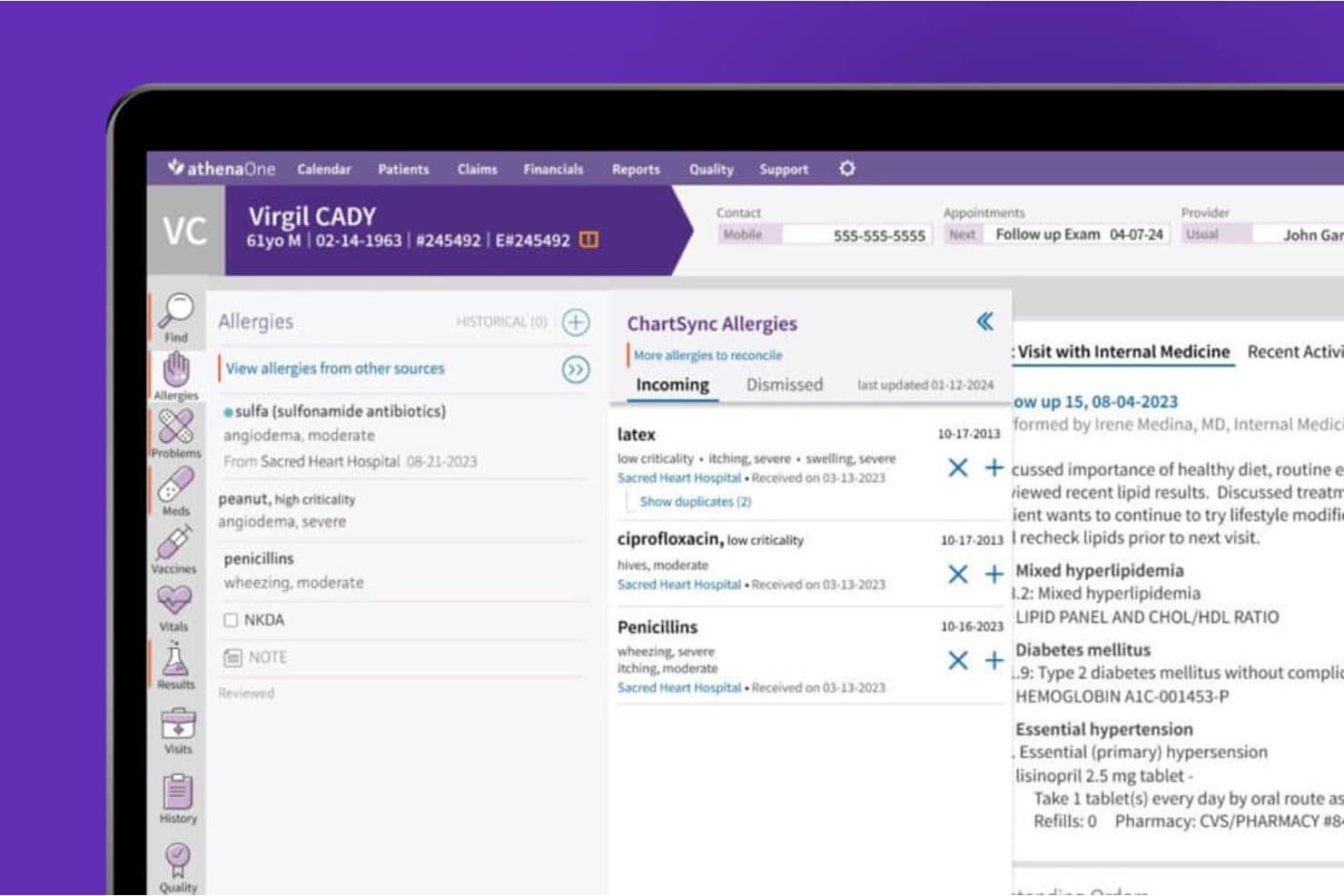 Learn more about athenahealth:
 Ideale per studi ortopedici di piccole e medie dimensioni
- No
- $59/utente/mese (fatturato annualmente)

Immagine 6: Interfaccia EMR ortopedica di PracticeEHR Practice EHR è una soluzione di Cartella Clinica Elettronica (EHR) progettata specificamente per soddisfare le esigenze uniche degli studi ortopedici di piccole e medie dimensioni. Offrendo processi semplificati di pianificazione, compilazione delle cartelle e fatturazione, Practice EHR rende la gestione dello studio più semplice per queste realtà sanitarie specifiche.
Perché ho scelto Practice EHR: Ho selezionato Practice EHR per questo elenco grazie al suo focus di nicchia sugli studi ortopedici di piccole e medie dimensioni. Comprendendo le necessità specifiche e il flusso di lavoro di queste strutture sanitarie, lo strumento si distingue da altri che offrono soluzioni più generiche. Credo che Practice EHR sia la scelta migliore per questi studi grazie alla sua interfaccia intuitiva, alle funzionalità su misura e al prezzo accessibile.
Caratteristiche e integrazioni principali:
Practice EHR offre una varietà di funzionalità utili come la compilazione digitale delle cartelle, la prescrizione elettronica e i portali pazienti, tutti particolarmente preziosi in un contesto ortopedico. Per quanto riguarda le integrazioni, Practice EHR si sincronizza con numerosi centri di laboratorio e imaging, consentendo un percorso di cura del paziente più efficiente.
Pros and Cons
Pros:
- Adattato alle esigenze di studi ortopedici di piccole e medie dimensioni
- Interfaccia intuitiva
- Varietà di funzionalità essenziali per uno studio ortopedico
Cons:
- Offre solo fatturazione annuale, che potrebbe non essere adatta a tutti gli studi
- Potrebbe mancare di alcune funzionalità avanzate presenti in sistemi più completi
- Capacità di personalizzazione limitate
Learn more about Practice EHR:
Come valuto un EMR ortopedico
Divido la mia valutazione in tre parti, dando il maggior peso alle funzionalità fondamentali: documentare gli esami muscoloscheletrici e accedere a radiografie e risonanze magnetiche. Successivamente, considero le funzionalità distintive, come le misure degli esiti riferiti dai pazienti. Infine, valuto gli aspetti che vanno oltre le funzionalità, tra cui l'implementazione specifica per la specialità, l'assistenza e il valore del prezzo.
Funzionalità fondamentali (requisiti essenziali per questo elenco)
Quando seleziono gli strumenti da inserire nel mio elenco, assegno a ciascuno un punteggio su una scala da 0 (non offre la funzionalità) a 5 (eccelle in quest'area) per ogni funzionalità fondamentale elencata di seguito. Successivamente, converto il totale in una percentuale per aiutare a valutare l'idoneità complessiva di ciascuno strumento, attribuendo un peso aggiuntivo alle funzionalità che ho ritenuto essenziali.
- Documentazione clinica ortopedica (essenziale): Cerco modelli che acquisiscano gli esami muscoloscheletrici, i dettagli delle lesioni e le diagnosi ortopediche senza fare affidamento su campi generici.
- Accesso alle immagini (essenziale): Valuto il modo in cui i medici prescrivono o visualizzano radiografie e risonanze magnetiche nella cartella del paziente, comprese le connessioni a sistemi di imaging come PACS.
- Flussi di lavoro chirurgici: Verifico se la programmazione è collegata alla pianificazione preoperatoria e alla documentazione del follow-up postoperatorio per ogni episodio chirurgico.
- Fatturazione ortopedica: Cerco un supporto alla codifica collegato alla documentazione per il trattamento delle fratture, la sostituzione articolare e le richieste di rimborso per DME.
- Prescrizione elettronica: Valuto i flussi di lavoro per la prescrizione di farmaci postchirurgici e per la gestione del dolore, comprese le sostanze controllate e i controlli di sicurezza.
- Comunicazione con i pazienti: Considero se i pazienti possono accedere alle cartelle cliniche e ai riepiloghi delle visite, inviare messaggi e gestire le richieste di appuntamento tramite un portale o un sistema equivalente.
Dopo aver ottenuto un elenco di strumenti che soddisfano i criteri, considero ciò che distingue ciascuna piattaforma.
Fattori distintivi (ciò che differenzia i fornitori)
Ecco come confronto e metto in contrapposizione i diversi fornitori:
Funzionalità distintive
Verifico se una piattaforma automatizza la raccolta delle misure degli esiti riferiti dai pazienti per procedure come le sostituzioni dell'anca e del ginocchio, poiché il monitoraggio dei PROMs nel tempo è il modo per dimostrare l'efficacia del trattamento a pagatori e registri. Valuto anche il monitoraggio dei DME e dei dispositivi ortesici, perché gli studi che dispensano tutori o materiali per ingessature in sede hanno bisogno di una gestione delle scorte e della fatturazione direttamente collegate all'incontro con il paziente. Anche la documentazione clinica mobile è importante: i chirurghi che fanno il giro in sala operatoria o al letto del paziente hanno bisogno di interfacce ottimizzate per tablet che non li costringano a tornare a un computer fisso per completare la documentazione.
Oltre le funzionalità
Valuto se una piattaforma scambia dati con i sistemi ospedalieri e dei centri chirurgici ambulatoriali utilizzando gli standard HL7 o FHIR, poiché i chirurghi che dividono il proprio tempo tra ambulatorio e sala operatoria hanno bisogno di cartelle chirurgiche condivise senza duplicare la documentazione. Anche l'implementazione specifica per la specialità è importante: i fornitori che offrono modelli ortopedici e formano il personale addetto alla fatturazione sulla gestione delle fratture e sulla codifica degli impianti riducono di settimane i tempi di avvio operativo. Verifico inoltre come le licenze aumentano in base alle dimensioni dello studio, perché un chirurgo singolo e un gruppo di cinque professionisti hanno strutture di costo ed esigenze di programmazione molto diverse.
Come scegliere i sistemi EMR ortopedici
È facile perdersi in lunghi elenchi di funzionalità e strutture tariffarie complesse. Per aiutarti a rimanere concentrato mentre affronti il tuo particolare processo di selezione del software, ecco un elenco di fattori da tenere presenti:
| Fattore | Cosa considerare |
|---|---|
| FattoreScalabilità | Cosa considerareIl software può crescere insieme al tuo studio? Considera l'espansione futura e se lo strumento è in grado di gestire un numero maggiore di pazienti o sedi senza problemi. |
| FattoreIntegrazioni | Cosa considerareFunziona con i tuoi sistemi attuali? Verifica la compatibilità con gli altri software che utilizzi, come gli strumenti per la fatturazione o la pianificazione degli appuntamenti. |
| FattorePersonalizzazione | Cosa considerarePuoi adattarlo al tuo flusso di lavoro? Cerca opzioni per modificare modelli e report in modo che rispondano alle esigenze del tuo studio. |
| FattoreSemplicità d'uso | Cosa considerareÈ intuitivo per il tuo team? Valuta la curva di apprendimento e se il personale può navigare facilmente nel sistema senza frustrazione. |
| FattoreImplementazione e avviamento | Cosa considerareQuanto è agevole la transizione? Valuta il supporto fornito durante la configurazione e le risorse disponibili per formare efficacemente il tuo team. |
| FattoreCosto | Cosa considerareRientra nel tuo budget? Confronta i piani tariffari e assicurati di capire quali funzionalità sono incluse nel prezzo base e quali invece sono componenti aggiuntivi. |
| FattoreMisure di sicurezza | Cosa considerareLe cartelle dei pazienti sono protette? Assicurati che il software sia conforme alle leggi sulla protezione dei dati e disponga di una solida crittografia e di controlli degli accessi. |
| FattoreRequisiti di conformità | Cosa considerareRispetta gli standard sanitari? Verifica che il software supporti i requisiti di conformità necessari per il tuo studio, come le normative HIPAA. |
Cosa sono i sistemi EMR ortopedici?
L'EMR ortopedico è un software progettato per gestire le cartelle cliniche elettroniche specificamente per gli studi ortopedici. I chirurghi ortopedici, i fisioterapisti e altri professionisti sanitari utilizzano questi strumenti per migliorare l'assistenza ai pazienti e semplificare le attività amministrative.
Le funzionalità di pianificazione degli appuntamenti, fatturazione e monitoraggio dei pazienti aiutano a gestire efficacemente lo studio e a garantire la conformità normativa. Nel complesso, questi strumenti migliorano il flusso di lavoro e l'accuratezza dei dati dei pazienti in ambito ortopedico.
Funzionalità
Quando si seleziona un EMR ortopedico, è opportuno prestare attenzione alle seguenti funzionalità chiave:
- Gestione delle cartelle cliniche: Organizza e conserva informazioni dettagliate sui pazienti per facilitarne l'accesso e l'aggiornamento.
- Pianificazione: Semplifica la prenotazione e la gestione degli appuntamenti per ottimizzare il flusso dei pazienti e ridurre le mancate presentazioni.
- Fatturazione ed emissione delle fatture: Automatizza i processi di fatturazione e genera fatture per semplificare le operazioni finanziarie.
- Sicurezza dei dati: Garantisce la protezione dei dati dei pazienti tramite crittografia e controlli degli accessi, rispettando gli standard di conformità.
- Modelli personalizzabili: Consente alle strutture di personalizzare moduli e report in base alle specifiche esigenze del flusso di lavoro.
- Funzionalità di telemedicina: Supporta le consultazioni a distanza con i pazienti per ampliare l'accesso alle cure e migliorare la flessibilità.
- Analisi e reportistica: Fornisce informazioni sulle prestazioni della struttura e sugli esiti dei pazienti attraverso report dettagliati.
- Integrazione con i dispositivi: Si collega ai dispositivi indossabili per monitorare i parametri di salute dei pazienti e migliorare i piani di trattamento.
- Riconoscimento vocale: Consente di documentare in modo efficiente le note sui pazienti tramite la funzionalità di conversione da voce a testo.
- Risorse per la formazione: Offre video, webinar e guide per aiutare il personale a imparare a usare il software in modo efficace.
Vantaggi
L'implementazione di un EMR ortopedico offre diversi vantaggi al team e all'attività. Ecco alcuni dei benefici che è possibile ottenere:
- Maggiore efficienza: Automatizza attività come la fatturazione e la pianificazione, liberando tempo da dedicare all'assistenza ai pazienti.
- Assistenza ai pazienti migliorata: Fornisce un accesso rapido a cartelle cliniche dettagliate, favorendo diagnosi e pianificazione dei trattamenti migliori.
- Sicurezza dei dati: Protegge le informazioni sensibili dei pazienti con una solida crittografia e controlli degli accessi, garantendo la conformità alle normative.
- Maggiore flessibilità: Offre funzionalità di telemedicina, consentendo al team di effettuare consultazioni a distanza e raggiungere un bacino più ampio di pazienti.
- Analisi approfondite: Fornisce report sulle prestazioni della struttura e sugli esiti dei pazienti, aiutando a prendere decisioni informate.
- Personalizzazione: Si adatta alle esigenze specifiche della struttura grazie a modelli e moduli personalizzabili, migliorando l'allineamento del flusso di lavoro.
Costi e prezzi
La scelta di un EMR ortopedico richiede la comprensione dei vari modelli e piani tariffari disponibili. I costi variano in base alle funzionalità, alle dimensioni del team, ai componenti aggiuntivi e ad altri fattori. La tabella seguente riassume i piani più comuni, i relativi prezzi medi e le funzionalità generalmente incluse nelle soluzioni EMR ortopediche:
Tabella comparativa dei piani per l'EMR ortopedico
| Tipo di piano | Prezzo medio | Funzionalità comuni |
|---|---|---|
| Tipo di pianoPiano gratuito | Prezzo medio$0 | Funzionalità comuniCartelle cliniche di base, pianificazione limitata e assistenza di base. |
| Tipo di pianoPiano personale | Prezzo medio$20-$50/utente/mese | Funzionalità comuniGestione delle cartelle cliniche, pianificazione degli appuntamenti e reportistica di base. |
| Tipo di pianoPiano aziendale | Prezzo medio$50-$100/utente/mese | Funzionalità comuniPianificazione avanzata, fatturazione ed emissione delle fatture e modelli personalizzabili. |
| Tipo di pianoPiano per grandi aziende | Prezzo medio$100-$200/utente/mese | Funzionalità comuniReportistica e analisi complete, funzionalità di telemedicina e assistenza dedicata. |
Domande frequenti sui sistemi EMR ortopedici
Ecco alcune risposte alle domande comuni sugli EMR ortopedici:
Gli EMR ortopedici possono integrarsi con altri sistemi sanitari?
Sì, molte soluzioni EMR ortopediche offrono funzionalità di integrazione con altri sistemi sanitari, come software per la fatturazione, i laboratori e le farmacie. Questo garantisce un flusso continuo dei dati e riduce gli errori di inserimento manuale. Verificate con il vostro fornitore quali integrazioni specifiche sono disponibili per garantire la compatibilità con i sistemi già in uso.
Come posso garantire la sicurezza dei dati con gli strumenti EMR ortopedici?
Garantite la sicurezza dei dati scegliendo un EMR conforme agli standard di protezione dei dati come l’HIPAA. Cercate funzionalità come la crittografia, i controlli degli accessi degli utenti e gli aggiornamenti regolari della sicurezza. Discutete le misure di sicurezza con il vostro fornitore per capire come protegge le informazioni dei pazienti.
Gli EMR ortopedici includono generalmente il supporto integrato per i flussi di lavoro di diagnostica per immagini?
Sì, molte piattaforme ortopediche sono progettate per gestire la diagnostica per immagini come parte del flusso di lavoro clinico. Spesso supportano l’integrazione con i sistemi PACS per accedere e archiviare radiografie, risonanze magnetiche o scansioni TC. La configurazione e la compatibilità variano a seconda della piattaforma.
È necessaria una formazione per utilizzare gli strumenti EMR ortopedici?
Sì, spesso è necessaria una formazione per familiarizzare il team con l’interfaccia e le funzionalità del software. La maggior parte dei fornitori offre risorse formative come tutorial, webinar e assistenza clienti. Investire tempo nella formazione può migliorare l’adozione da parte degli utenti e l’efficienza della vostra struttura.
Questi sistemi possono essere utilizzati sia in ospedale sia negli studi privati?
Sì, anche se alcune piattaforme sono più adatte a un contesto rispetto all’altro. I sistemi progettati per gli ospedali possono includere integrazioni più complesse e supportare ambienti con più professionisti. Altri sono ottimizzati per le cliniche ambulatoriali con team più piccoli e flussi di lavoro più semplici.