

Todos hemos pasado por ello: citas perdidas, comunicación desarticulada y una carga de trabajo administrativo abrumadora. Es suficiente para provocar un fuerte dolor de cabeza incluso al profesional médico más experimentado. El software para la participación del paciente es la solución que deberían aprovechar las organizaciones sanitarias. Impulsa, automatiza y agiliza la comunicación entre los proveedores de atención sanitaria y los pacientes. Facilita que sus pacientes accedan a usted y que usted acceda a ellos, mejorando en última instancia la coordinación de la atención y la experiencia del paciente.
Proporciona una solución escalable para la admisión de pacientes, el registro, la comunicación, la programación de citas, la programación en línea, la mensajería segura y la automatización de tareas administrativas, lo que le deja más tiempo y energía para centrarse en lo que realmente importa: sus pacientes.
Por qué confiar en nuestras recomendaciones de software
6,700+
Reviews
20
Industry experts
16+
Evaluation factors
14
Years
Nuestro equipo lleva probando y evaluando software desde 2012. Como líderes de centros médicos, sabemos lo difícil —y lo importante— que es elegir el software adecuado.
Para esta guía, evaluamos las herramientas mediante pruebas prácticas e investigación independiente, puntuando las herramientas según nuestros criterios de selección.
Nuestras reseñas reflejan nuestro criterio editorial humano, no un discurso de ventas.
Tabla comparativa de software para la participación del paciente
La siguiente tabla compara los detalles de precios de mis principales selecciones de software para la participación del paciente.
| Tool | Best For | Trial Info | Price | ||
|---|---|---|---|---|---|
| 1 | Mejor para el análisis en tiempo real de opiniones de pacientes | Demo gratuita disponible | Precio a consultar | Website | |
| 2 | El mejor por sus herramientas optimizadas de programación y gestión de consultorios | Demo gratuita disponible | El precio inicial de RXNT es desde $85/usuario/mes. Sin embargo, el precio puede ser más alto dependiendo de las funcionalidades específicas incluidas. | Website | |
| 3 | Mejor para gestionar operaciones de consulta en una sola plataforma | Demostración gratuita disponible | Los detalles de precios de DocVilla no están disponibles públicamente y se proporcionan bajo pedido. | Website | |
| 4 | La mejor opción para EHR y gestión de consultas especializadas | Demostración gratuita disponible | La información sobre precios de ModMed se proporciona bajo solicitud. | Website | |
| 5 | Ideal para un EHR integral con capacidades de telemedicina | Demostración gratuita disponible | El precio de PrognoCIS se proporciona a solicitud. | Website | |
| 6 | El mejor por sus servicios en red para registros médicos, ciclo de ingresos, participación del paciente y coordinación de la atención | Demostración gratuita disponible | El precio de athenaOne inicia desde $140/usuario/mes, ofreciendo una completa suite de servicios habilitados en red. Este es el precio inicial y puede variar dependiendo de las funciones y servicios adicionales requeridos. | Website | |
| 7 | Mejor para servicios de salud ambulatoria con EHR y facturación integrados | Demostración gratuita disponible | Los detalles de precios de NextGen Office se proporcionan bajo solicitud. | Website | |
| 8 | La mejor por sus conocimientos basados en datos y análisis avanzados en el sector salud | Demo gratuita disponible | IQVIA opera con un modelo de precios personalizado, por lo tanto, el precio exacto se proporciona a solicitud. Este enfoque permite adaptar los servicios a las necesidades específicas de cada cliente. | Website | |
| 9 | La mejor opción para acelerar ensayos clínicos con flujos de trabajo de documentos optimizados | La información sobre precios de Florence Healthcare no está disponible públicamente, por lo que es 'Precio bajo solicitud'. | Website | ||
| 10 | Mejor para la comunicación automatizada con pacientes y recordatorios personalizados | El precio de Intiveo parte desde $149/mes, excluyendo posibles costos adicionales relacionados con la configuración o el aumento del uso. | Website |


Reseñas del mejor software para la participación del paciente
A continuación se incluyen mis resúmenes detallados del mejor software para la participación del paciente que llegó a mi lista de preseleccionados. Mis reseñas ofrecen un análisis detallado de las funciones clave, ventajas y desventajas, integraciones y casos de uso ideales de cada herramienta para ayudarle a encontrar la mejor opción para usted.
 Mejor para el análisis en tiempo real de opiniones de pacientes
- Demo gratuita disponible
- Precio a consultar
Visit WebsiteCustomer Rating:4.7/5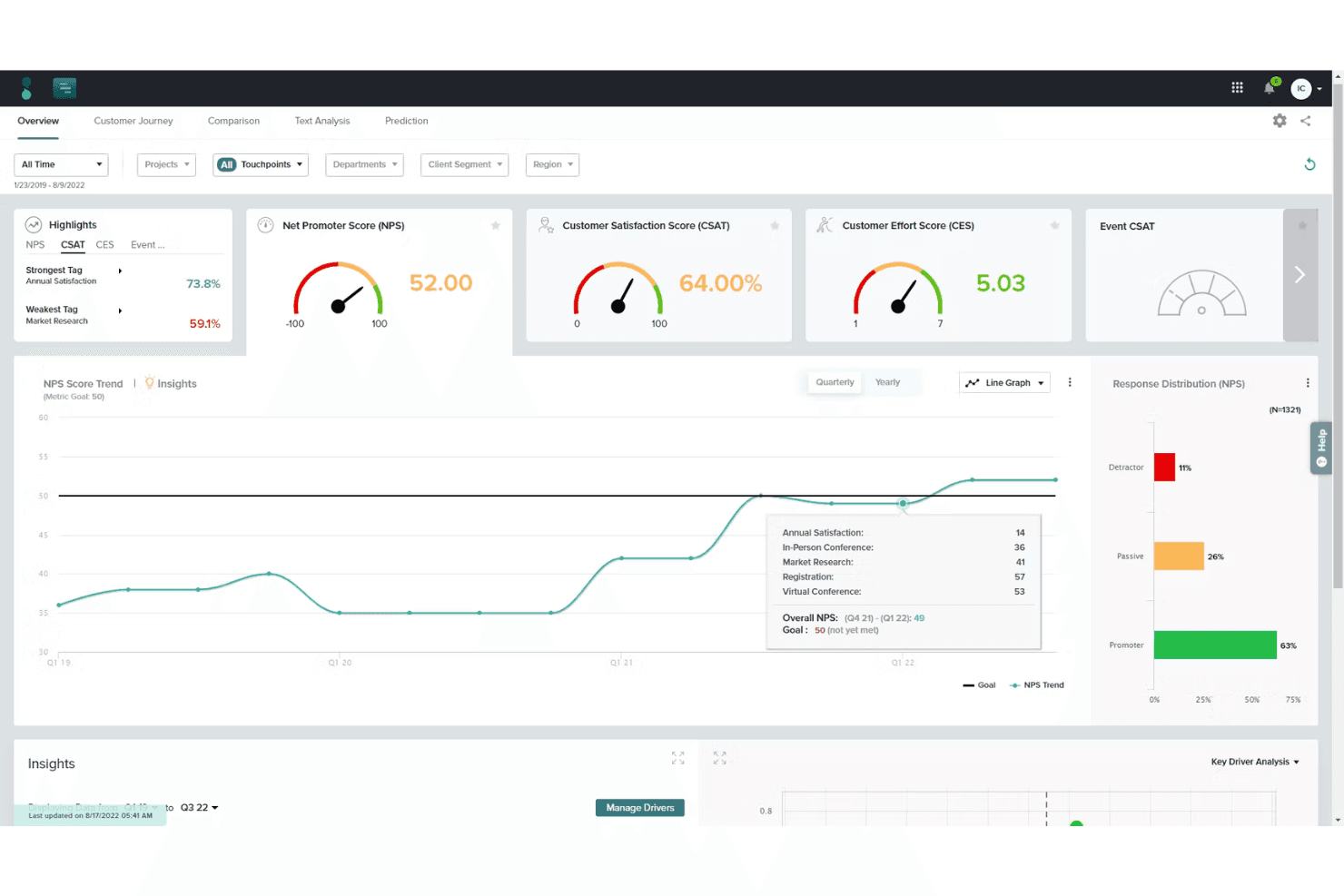
Sogolytics ofrece un panel de análisis que muestra una gráfica de tendencia del puntaje NPS y análisis de la distribución de respuestas. Sogolytics es una plataforma de gestión de experiencias con módulos específicos para el sector sanitario que permiten la recopilación de opiniones de pacientes, distribución de encuestas multicanal, análisis de sentimiento impulsado por IA y paneles de informes en tiempo real.
¿Para Quién es Mejor Sogolytics?
Responsables de experiencia del paciente en hospitales y sistemas de salud que necesitan información estructurada y basada en datos sobre la satisfacción del paciente a lo largo de múltiples puntos de contacto asistencial.
Por Qué Elegí Sogolytics
Elegí Sogolytics como uno de los mejores porque su análisis de sentimiento con IA procesa miles de respuestas abiertas de pacientes en minutos, identificando temas que a un equipo le llevaría semanas reconocer manualmente. También me gusta cómo las tabletas a pie de cama y las microencuestas por SMS capturan opiniones mientras los pacientes aún están en atención, no días después mediante un formulario enviado por correo. Esa inmediatez significa que el personal puede abordar una preocupación antes incluso de que el paciente sea dado de alta.
Características Clave de Sogolytics
- Distribución de encuestas multicanal: Envía encuestas por correo electrónico, SMS, enlaces web y códigos QR para alcanzar a los pacientes en todos los canales.
- Cumplimiento normativo en datos de salud: Protege los datos de pacientes con estándares de seguridad HIPAA, ISO 27001, SOC 2 y GDPR.
- Integración con EHR y CRM: Conéctate con sistemas como Epic, Cerner, Salesforce y otras principales plataformas de salud.
- Generación automática de informes: Crea paneles personalizables e informes exportables con análisis útiles en tiempo real.
Integraciones de Sogolytics
Sogolytics ofrece integraciones nativas con Epic, Cerner, Salesforce, Microsoft Teams, HubSpot, ServiceNow, Zendesk y Freshdesk, y se conecta con Zapier y Workato. Hay una API disponible para integraciones personalizadas.
Pros and Cons
Pros:
- Informes en tiempo real de sentimiento y temas
- Cumple con HIPAA para datos de encuestas en salud
- Opciones multilingües para distribuir encuestas a pacientes
Cons:
- No tiene funciones de recordatorio de citas automatizadas
- No permite mensajes bidireccionales reales con el paciente
Learn more about Sogolytics: 2El mejor por sus herramientas optimizadas de programación y gestión de consultorios
RXNT
- Demo gratuita disponible
- El precio inicial de RXNT es desde $85/usuario/mes. Sin embargo, el precio puede ser más alto dependiendo de las funcionalidades específicas incluidas.
Visit WebsiteCustomer Rating:4.3/5
Interfaz del software de participación del paciente RXNT RXNT es un software de atención médica versátil que ofrece registros electrónicos de salud (EHR), gestión de consultorios y sistemas de facturación médica. Su característica destacada son las herramientas optimizadas de programación y gestión de consultorios, lo que lo convierte en una excelente opción para los proveedores de atención médica que buscan una programación simplificada.
Por qué elegí RXNT: Al hacer mi selección, me incliné por RXNT debido a sus impresionantes herramientas de programación y gestión de consultorios. Comparado con otros software de esta lista, las herramientas de programación de RXNT parecen ser las más completas e intuitivas, lo que refuerza mi creencia de que es 'el mejor por sus herramientas optimizadas de programación y gestión de consultorios'.
Funciones destacadas e integraciones:
Las funciones notables de RXNT incluyen un sistema de EHR totalmente integrado, facturación médica y gestión de consultorios. También ofrece sólidas funciones de programación que automatizan el proceso, haciéndolo más eficiente.
En cuanto a integraciones, RXNT se conecta sin problemas con varios laboratorios, farmacias y sistemas hospitalarios para un intercambio fluido de datos de los pacientes.
Pros and Cons
Pros:
- Herramientas completas de programación y gestión de consultorios
- Sólidas capacidades de integración
- Ofrece una solución todo en uno con EHR, gestión de consultorios y facturación médica
Cons:
- El precio puede ser más elevado en comparación con otras soluciones
- La interfaz puede parecer compleja para algunos usuarios
- El sistema puede funcionar ocasionalmente de forma más lenta, según informan algunos usuarios
Learn more about RXNT: Mejor para gestionar operaciones de consulta en una sola plataforma
- Demostración gratuita disponible
- Los detalles de precios de DocVilla no están disponibles públicamente y se proporcionan bajo pedido.
Visit WebsiteCustomer Rating:5/5
Interfaz de software de compromiso del paciente DocVilla DocVilla es una plataforma versátil e integrada que ofrece una gama de servicios como gestión de consultorios, telemedicina e historias clínicas electrónicas (EHR). Su enfoque unificado de las operaciones sanitarias refuerza su posición como la mejor herramienta para gestionar las operaciones de una consulta en una sola plataforma.
Por qué elegí DocVilla: Elegí DocVilla debido a su diseño integral, donde todas las herramientas necesarias para la gestión de la consulta se encuentran en una sola plataforma. Esta característica destacada la diferencia de otras soluciones similares, ofreciendo una propuesta de valor única. Creo que DocVilla es 'la mejor para gestionar operaciones de consulta en una sola plataforma' por su enfoque integral que simplifica y optimiza los flujos de trabajo operativos.
Características destacadas e integraciones:
Las principales características de DocVilla incluyen telemedicina, programación de citas, EHR y portal del paciente. La plataforma también ofrece valiosas integraciones con sistemas de facturación, servicios de laboratorio y una variedad de sistemas EHR para operaciones fluidas y gestión de datos.
Pros and Cons
Pros:
- Plataforma unificada para múltiples operaciones sanitarias
- Incluye capacidades de telemedicina
- Agiliza la programación y la comunicación con pacientes
Cons:
- La información sobre precios no es transparente
- La interfaz de usuario podría ser más intuitiva
- La capacidad de respuesta del soporte al cliente puede mejorarse
Learn more about DocVilla: La mejor opción para EHR y gestión de consultas especializadas
- Demostración gratuita disponible
- La información sobre precios de ModMed se proporciona bajo solicitud.
Visit WebsiteCustomer Rating:4.5/5
Interfaz de software de compromiso del paciente de ModMed ModMed es un conjunto de herramientas de gestión sanitaria diseñadas específicamente para diferentes especialidades médicas. El sistema ofrece historiales médicos electrónicos (EHR) y soluciones de gestión de consultas adaptadas a cada especialidad, lo que justifica su posición como la mejor opción para EHR y gestión de consultas especializadas.
Por qué elegí ModMed: Elegí ModMed por su enfoque único en ofrecer soluciones personalizadas para diversas especialidades médicas. Esta característica clave lo diferencia de la competencia, ya que muchos otros sistemas EHR ofrecen soluciones genéricas que pueden no abordar completamente las necesidades únicas de cada especialidad. Considero que ModMed es 'la mejor opción para EHR y gestión de consultas especializadas' porque responde de forma precisa a los requerimientos individuales de cada especialidad, incrementando así la eficiencia y la productividad.
Funciones destacadas e integraciones:
Entre las características principales de ModMed se encuentran un EHR específico para cada especialidad, soluciones de gestión de consultas y un portal para pacientes. Además, proporciona capacidades de telemedicina, algo cada vez más importante en el panorama sanitario actual.
La plataforma se integra con sistemas de facturación populares, servicios de laboratorio y otros sistemas EHR para garantizar un flujo de trabajo fluido.
Pros and Cons
Pros:
- Soluciones personalizadas para diversas especialidades médicas
- Ofrece gestión de consultas y EHR integrados
- Incluye capacidades de telemedicina
Cons:
- La información sobre precios no es transparente
- Puede tener una curva de aprendizaje para nuevos usuarios
- Algunos usuarios indican que se necesita mejor soporte al cliente
Learn more about ModMed: Ideal para un EHR integral con capacidades de telemedicina
- Demostración gratuita disponible
- El precio de PrognoCIS se proporciona a solicitud.
Visit WebsiteCustomer Rating:4.1/5
Interfaz del software de participación del paciente PrognoCIS PrognoCIS es una solución de historia clínica electrónica (EHR) totalmente integrada y personalizable, diseñada para optimizar el flujo de trabajo de los proveedores de atención médica. Fusiona la telemedicina, la participación del paciente, la gestión de la práctica y los servicios de EHR, lo que la hace ideal para quienes buscan un enfoque holístico en la atención al paciente y la gestión sanitaria.
Por qué elegí PrognoCIS: Elegí PrognoCIS por sus sólidas funciones de telemedicina que se integran perfectamente con el sistema EHR, destacándose frente a otros programas de salud. Determiné que PrognoCIS es la mejor opción para un EHR integral con capacidades de telemedicina debido a su plataforma rica en funciones que permite a los proveedores de salud gestionar la atención al paciente de manera remota y eficiente.
Características y integraciones destacadas:
PrognoCIS ofrece un conjunto de características impresionantes, como un EHR personalizable, telemedicina, portal del paciente y receta electrónica, que en conjunto mejoran el proceso de prestación de servicios de salud.
Integraciones importantes incluyen integración con los principales sistemas de gestión de consultorios y facturación, integraciones de laboratorio para órdenes y gestión de resultados sin inconvenientes, e interoperabilidad con otros sistemas EHR para mejorar el intercambio de datos.
Pros and Cons
Pros:
- EHR robusto con plantillas personalizables
- Capacidades de telemedicina integradas
- Portal del paciente completo para la participación del paciente
Cons:
- La información sobre precios no está fácilmente disponible
- La curva de aprendizaje puede ser pronunciada para los nuevos usuarios
- Algunos usuarios reportan que el servicio al cliente puede mejorar
Learn more about PrognoCIS: El mejor por sus servicios en red para registros médicos, ciclo de ingresos, participación del paciente y coordinación de la atención
- Demostración gratuita disponible
- El precio de athenaOne inicia desde $140/usuario/mes, ofreciendo una completa suite de servicios habilitados en red. Este es el precio inicial y puede variar dependiendo de las funciones y servicios adicionales requeridos.
Visit WebsiteCustomer Rating:3.8/5
Interfaz de Software de Participación del Paciente de AthenaOne athenaOne es un proveedor líder de servicios habilitados en red para registros electrónicos de salud (EHR), gestión del ciclo de ingresos, participación del paciente y coordinación de la atención. Dada su amplia gama de funciones, athenaOne es una opción altamente adecuada para los proveedores de atención médica que requieren un abanico amplio de servicios, especialmente en las áreas de registros médicos, ciclo de ingresos, participación del paciente y coordinación de la atención.
Por qué elegí athenaOne: Elegí athenaOne para esta lista debido a su capacidad de ofrecer servicios habilitados en red que son sólidos e integrales. Esta versatilidad es lo que distingue a athenaOne, convirtiéndolo en una opción preferida para los proveedores de atención médica. Su capacidad de proporcionar servicios en múltiples ámbitos de la práctica médica resalta aún más su posición como 'El mejor por sus servicios en red para registros médicos, ciclo de ingresos, participación del paciente y coordinación de la atención.'
Características destacadas & integraciones:
athenaOne ofrece varias características destacadas incluyendo un EHR basado en la web, portal para pacientes, facturación médica y soluciones de gestión de consultorios. También cuenta con una aplicación móvil que brinda acceso en tiempo real a los registros de los pacientes.
La plataforma se integra con múltiples laboratorios, farmacias y sistemas hospitalarios, lo que la convierte en una herramienta muy adaptable en la industria de la salud.
Pros and Cons
Pros:
- Servicios completos habilitados en red en una sola plataforma
- Aplicación web y móvil para accesibilidad
- Se integra con múltiples sistemas externos
Cons:
- La interfaz de usuario puede ser compleja para usuarios principiantes
- El precio puede ser elevado en comparación con otras soluciones
- Algunos usuarios han reportado demoras en las respuestas del servicio al cliente
Learn more about athenaOne: Mejor para servicios de salud ambulatoria con EHR y facturación integrados
- Demostración gratuita disponible
- Los detalles de precios de NextGen Office se proporcionan bajo solicitud.
Visit WebsiteCustomer Rating:3.7/5
Interfaz del software de participación del paciente Nextgen Office NextGen Office proporciona una solución basada en la nube diseñada para consultorios ambulatorios, ofreciendo características integradas de registros electrónicos de salud (EHR) y facturación. Está equipado para cubrir las necesidades únicas de los servicios ambulatorios, lo que justifica su selección como la mejor herramienta para servicios de salud ambulatoria con EHR y facturación integrados.
Por qué elegí NextGen Office: Elegí NextGen Office porque ofrece una solución integral diseñada específicamente para servicios ambulatorios. Este enfoque particular lo distingue de otros programas, muchos de los cuales no proporcionan tal funcionalidad a medida. La integración de las funciones de EHR y facturación lo convierte en la herramienta óptima para estos entornos; por ello decidí que es 'el mejor para servicios de salud ambulatoria con EHR y facturación integrados'.
Características destacadas e integraciones:
NextGen Office ofrece características robustas que incluyen EHR y facturación integrados, gestión de la consulta y herramientas de participación del paciente. Se integra con varias aplicaciones de terceros como laboratorios, farmacias y sistemas hospitalarios, asegurando un flujo de trabajo sin interrupciones para los proveedores de salud.
Pros and Cons
Pros:
- Diseñado específicamente para consultorios ambulatorios
- Funcionalidad integrada de EHR y facturación
- Herramientas robustas de participación del paciente
Cons:
- La información de precios no es transparente
- Puede requerir un período de aprendizaje para nuevos usuarios
- Algunos usuarios han informado que el soporte al cliente podría mejorar
Learn more about NextGen Office: La mejor por sus conocimientos basados en datos y análisis avanzados en el sector salud
- Demo gratuita disponible
- IQVIA opera con un modelo de precios personalizado, por lo tanto, el precio exacto se proporciona a solicitud. Este enfoque permite adaptar los servicios a las necesidades específicas de cada cliente.

Interfaz de software de compromiso del paciente de IQVIA IQVIA es una empresa de tecnología de la información en salud e investigación clínica. Se especializa en ofrecer perspectivas basadas en datos y análisis avanzados que ayudan a los proveedores de atención médica a mejorar sus servicios. Su fortaleza radica en su capacidad para aprovechar los datos y la analítica, por lo que se considera la mejor opción para quienes desean explotar estas capacidades en el ámbito sanitario.
Por qué elegí IQVIA: Elegí IQVIA por sus análisis avanzados y sus conocimientos derivados de los datos, que destacan en el campo de la tecnología en salud. Al comparar diferentes herramientas, descubrí que el compromiso de IQVIA con la obtención de perspectivas accionables extraídas de datos la hace única. La elección de «La mejor por sus conocimientos basados en datos y análisis avanzados en el sector salud» se basa en este enfoque en datos y analítica.
Características y compatibilidades destacadas:
IQVIA cuenta con potentes herramientas para la gestión de datos, analítica e investigación clínica, ofreciendo perspectivas que pueden mejorar la toma de decisiones en el sector salud. Su plataforma Orchestrated Clinical Trials agiliza los procesos de ensayos clínicos, haciéndolos más eficientes.
Las integraciones se centran principalmente en fuentes de datos, con capacidades para integrar una amplia gama de datos sanitarios y de pacientes.
Pros and Cons
Pros:
- Ofrece potentes análisis y conocimientos basados en datos
- Gestión optimizada de ensayos clínicos mediante la plataforma Orchestrated Clinical Trials
- Puede integrar una amplia gama de datos sanitarios y de pacientes
Cons:
- El modelo de precios personalizado puede resultar poco claro para algunos usuarios
- Puede ser complejo para usuarios con poca experiencia en análisis de datos
- Algunos clientes han reportado problemas con el servicio al cliente
Learn more about IQVIA: La mejor opción para acelerar ensayos clínicos con flujos de trabajo de documentos optimizados
- La información sobre precios de Florence Healthcare no está disponible públicamente, por lo que es 'Precio bajo solicitud'.

Interfaz del Software de Participación del Paciente de Florence Healthcare Florence Healthcare ofrece una Suite eBinder que tiene como objetivo principal simplificar y acelerar los ensayos clínicos. La solución optimiza los flujos de trabajo de documentos, permitiendo que los investigadores, coordinadores de estudio y otros miembros del personal colaboren de manera más eficiente. Esta alineación directa con la aceleración de ensayos clínicos lo convierte en una herramienta adecuada para esta necesidad específica.
Por qué elegí Florence Healthcare: Al elegir Florence Healthcare, consideré su potencial para transformar el proceso tradicional de gestión de documentos en ensayos clínicos. Su cualidad destacada es el enfoque en la optimización de los flujos de trabajo de documentos, algo crucial para acortar los tiempos de los ensayos clínicos. Este enfoque único lo convierte en la 'Mejor opción para acelerar ensayos clínicos con flujos de trabajo de documentos optimizados.'
Características y
integraciones destacadas:La Suite eBinder de Florence Healthcare incluye características importantes como el monitoreo remoto, eISF (Archivo del Centro de Investigación) y la gestión centralizada de ensayos. Estas funciones garantizan que el flujo de trabajo documental en ensayos clínicos sea lo más eficiente posible.
Florence se integra con otros sistemas EHR comunes, mejorando el intercambio de datos y la comunicación en el contexto de un ensayo.
Pros and Cons
Pros:
- Optimiza los flujos de trabajo documentales en ensayos clínicos
- Facilita el monitoreo remoto de ensayos
- Admite integración con sistemas EHR comunes
Cons:
- Falta de información de precios transparente
- La curva de aprendizaje puede ser pronunciada debido a su funcionalidad diversa
- No todas las funciones pueden ser útiles para estudios o ensayos a pequeña escala
Learn more about Florence Healthcare: 10Mejor para la comunicación automatizada con pacientes y recordatorios personalizados
Intiveo
- El precio de Intiveo parte desde $149/mes, excluyendo posibles costos adicionales relacionados con la configuración o el aumento del uso.

Interfaz del software de participación del paciente de Intiveo Intiveo es una plataforma de comunicación para la atención médica que se especializa en la participación del paciente a través de comunicaciones automatizadas y recordatorios personalizados. El software proporciona una solución práctica y eficiente para los proveedores de salud que buscan mejorar el cumplimiento, la participación y la satisfacción de los pacientes, lo que lo convierte en la opción ideal por sus beneficios específicos.
Por qué elegí Intiveo: Elegí Intiveo por su enfoque principal en la comunicación con el paciente, que lo diferencia de otras herramientas. Destaca por automatizar recordatorios personalizables, diseñados para aumentar la asistencia de los pacientes a las citas y al seguimiento de los cuidados. Esta capacidad para mejorar la comunicación y ofrecer recordatorios personalizados lo posiciona como el 'Mejor para la comunicación automatizada con pacientes y recordatorios personalizados.'
Funciones destacadas e integraciones:
Las funciones clave de Intiveo incluyen comunicación automatizada con pacientes, recordatorios personalizados y seguimiento del compromiso del paciente. Es destacable la capacidad de la herramienta para personalizar las comunicaciones según los perfiles de los pacientes.
Se integra con diversos sistemas de gestión de consultorios, lo que facilita la sincronización de datos y reduce la necesidad de ingresar información manualmente.
Pros and Cons
Pros:
- Comunicación automatizada con pacientes efectiva
- Los recordatorios personalizados mejoran el compromiso de los pacientes
- Integración fluida con sistemas de gestión de consultorios
Cons:
- El precio puede ser elevado para consultorios pequeños
- Requiere inversión de tiempo para personalizar e implementar de manera efectiva
- Utilidad limitada si tu consultorio no depende en gran medida de la comunicación y recordatorios con pacientes
Learn more about Intiveo:
Otro software para la participación del paciente
A continuación se incluye una lista de software adicional para la participación del paciente que preseleccionamos, pero que no llegó a los 10 primeros puestos. Sin duda, merece la pena echarles un vistazo.
- 11Smartpatient MyTherapy OSMejor para la participación del paciente y la adherencia a la medicación
- 12Creatio CRMIdeal para procesos de compromiso personalizables
- 13Luna HealthBueno para servicios de telesalud y fisioterapia en casa
Cómo evalúo el software de compromiso del paciente
Divido mi evaluación en dos capas: los requisitos esenciales que toda herramienta debe cumplir—como mensajería compatible con HIPAA y sincronización con el EHR—y los diferenciadores que separan lo bueno de lo excelente.
Funcionalidad central (Requisitos mínimos para esta lista)
Cuando selecciono herramientas para mi lista, califico cada una en una escala del 0 (no ofrece la funcionalidad) al 5 (sobresale en esta área) para cada funcionalidad esencial que se indica a continuación. Luego, calculo la puntuación total de la herramienta como un porcentaje. Cada herramienta necesita lograr una puntuación total mínima del 65% para ser considerada para su inclusión.
- Recordatorios automáticos de citas: Verifico si una herramienta admite recordatorios multicanal mediante SMS, correo electrónico y voz, además de cuánto control se tiene sobre el horario, la frecuencia y las confirmaciones.
- Mensajería segura para el paciente: Aquí busco mensajería bidireccional compatible con HIPAA, incluyendo hilos, enrutamiento al equipo y soporte para adjuntos como resultados o indicaciones.
- Registro digital y formularios: Valoro si los pacientes pueden completar el registro, consentimientos y formularios de seguro en sus propios dispositivos antes de la visita, y cómo fluye esa información al historial clínico.
- Agenda en línea y autoservicio: La reserva, reprogramación y cancelación en tiempo real son importantes aquí, junto con un acceso más amplio de autoservicio como el pago de facturas o la visualización de saldos.
- Opinión del paciente y encuestas: Busco encuestas post-visita de satisfacción, recopilación de NPS y flujos de solicitudes de reseñas, especialmente los disparadores automáticos ligados a la finalización de una cita.
- Integración con sistemas EHR/PM: Evalúo qué tan bien se conecta cada herramienta con EHRs ampliamente usados como Epic, athenahealth y NextGen, enfocándome en la sincronización bidireccional para demografía, agendas e historiales.
Una vez que tengo una lista de herramientas que cumplen con este criterio, considero qué distingue a cada plataforma.
Factores diferenciadores (lo que distingue a los proveedores)
Así es como comparo y contrasto a diferentes proveedores:
Características destacadas
Las campañas automáticas de recordatorio son un diferenciador clave. Busco herramientas que identifiquen pacientes atrasados y activen campañas para exámenes anuales o seguimientos sin intervención del personal. La gestión de la reputación también es importante, especialmente cuando una plataforma dirige a los pacientes satisfechos a dejar reseñas en Google o Healthgrades. Para prácticas que atienden comunidades diversas, el soporte multilingüe en recordatorios, formularios y mensajes puede mejorar significativamente las tasas de respuesta y reducir ausencias.
Más allá de las características
El cumplimiento de HIPAA es un requisito base, pero voy más allá evaluando si el proveedor ofrece acuerdos comerciales firmados (BAA), certificación SOC 2 Tipo II y controles de acceso basados en roles con registro de auditoría. El tamaño de la práctica y la especialidad también son relevantes. Un consultorio dermatológico pequeño tiene necesidades de flujo de trabajo muy diferentes a las de un grupo de atención primaria con varias sedes, así que evalúo si el precio varía según la cantidad de proveedores y si hay plantillas específicas para cada especialidad. También considero el soporte durante la puesta en marcha, ya que una implementación complicada puede frenar la adopción en toda la práctica.
Cómo elegir un software para la participación del paciente
Es fácil perderse entre largas listas de funciones y complejas estructuras de precios. Para ayudarle a mantener la concentración mientras avanza en su proceso único de selección de software, aquí tiene una lista de factores que debe tener en cuenta:
| Factor | Qué debe tener en cuenta |
|---|---|
| FactorEscalabilidad | Qué debe tener en cuenta¿Puede el software crecer junto con su consulta? Busque herramientas que admitan un aumento del número de pacientes sin sacrificar el rendimiento ni la facilidad de uso. |
| FactorIntegraciones | Qué debe tener en cuenta¿Funciona con sus herramientas actuales? Compruebe la compatibilidad con sistemas EHR, software de facturación y plataformas de comunicación. |
| FactorPersonalización | Qué debe tener en cuenta¿Puede adaptarlo a sus flujos de trabajo? Considere la facilidad con la que puede ajustar la configuración y las funciones para satisfacer sus necesidades específicas. |
| FactorFacilidad de uso | Qué debe tener en cuenta¿La interfaz es intuitiva para su equipo? Pruebe la experiencia de usuario para garantizar una adopción rápida y un tiempo de formación mínimo. |
| FactorImplementación e incorporación | Qué debe tener en cuenta¿Con qué rapidez puede empezar? Evalúe el proceso de configuración, los recursos disponibles y la asistencia para garantizar una transición fluida. |
| FactorCoste | Qué debe tener en cuenta¿Se ajusta a su presupuesto? Compare los planes de precios, las tarifas ocultas y el valor general que proporciona la herramienta. |
| FactorMedidas de seguridad | Qué debe tener en cuenta¿Están protegidos los datos y las comunicaciones de los pacientes? Verifique el cumplimiento de la HIPAA y de otras normas pertinentes de protección de datos. |
| FactorDisponibilidad de asistencia | Qué debe tener en cuenta¿Puede obtener ayuda cuando la necesita? Evalúe los canales de asistencia del proveedor, los tiempos de respuesta y la disponibilidad para ayudar a su equipo. |
¿Qué es el software para la participación del paciente?
El software de participación del paciente es una herramienta que ayuda a los proveedores de atención médica a comunicarse e interactuar con los pacientes de manera más eficaz. Los médicos, enfermeros y el personal administrativo suelen utilizar estas herramientas para mejorar la satisfacción del paciente y agilizar las operaciones. Los recordatorios de citas, la mensajería segura y la recopilación de comentarios ayudan con la comunicación, la programación y la participación de los pacientes. Estas herramientas mejoran la experiencia general del paciente y aumentan la eficiencia de las consultas médicas.
Características
Al seleccionar un software de participación del paciente, presta atención a las siguientes características clave:
- Programación de citas: Automatiza el proceso de reserva, reduce las ausencias y alivia la carga de trabajo administrativo.
- Mensajería segura: Permite la comunicación privada entre pacientes y proveedores, garantizando la confidencialidad y el cumplimiento de las normativas.
- Recordatorios automatizados: Envía notificaciones oportunas a los pacientes sobre las próximas citas, lo que ayuda a reducir las visitas perdidas.
- Recopilación de comentarios de los pacientes: Recoge información de los pacientes para mejorar la calidad del servicio y su satisfacción.
- Portales de pacientes personalizables: Permite a los pacientes acceder a su información médica y gestionar sus citas en línea.
- Integración con la telesalud: Admite consultas virtuales, ampliando el acceso a la atención y la comodidad de los pacientes.
- Asistencia mediante chat en tiempo real: Proporciona asistencia inmediata a los pacientes, mejorando su experiencia y participación.
- Análisis e informes: Ofrece información sobre las interacciones con los pacientes y el rendimiento de la consulta para facilitar la toma de decisiones fundamentadas.
- Asistencia multilingüe: Garantiza la accesibilidad para los pacientes que hablan distintos idiomas, mejorando la comunicación.
- Recursos de formación: Incluye tutoriales y guías para ayudar al personal a aprender rápidamente a utilizar el software de manera eficaz.
Beneficios
La implementación de un software de participación del paciente ofrece varios beneficios para tu equipo y tu empresa. Estos son algunos de los que puedes esperar:
- Mejora de la comunicación: La mensajería segura y la asistencia mediante chat en tiempo real fomentan una mejor interacción entre pacientes y proveedores.
- Mayor satisfacción de los pacientes: Los recordatorios automatizados y la recopilación de comentarios ayudan a garantizar que los pacientes se sientan escuchados y valorados.
- Eficiencia operativa: La programación de citas y los portales de pacientes personalizables reducen las tareas administrativas y mejoran el flujo de trabajo.
- Mayor acceso a la atención: La integración con la telesalud permite a los pacientes recibir atención a distancia, aumentando la comodidad y la accesibilidad.
- Información basada en datos: Los análisis y los informes proporcionan información valiosa para tomar decisiones fundamentadas y optimizar el rendimiento de la consulta.
- Inclusión cultural: La asistencia multilingüe garantiza que las barreras lingüísticas no dificulten la comunicación ni la atención de los pacientes.
- Adopción rápida: Los recursos de formación y las interfaces intuitivas facilitan que el personal aprenda a utilizar el software de manera eficaz.
Costes & precios
Seleccionar un software de participación del paciente requiere comprender los distintos modelos y planes de precios disponibles. Los costes varían en función de las características, el tamaño del equipo, los complementos y otros factores. La tabla siguiente resume los planes habituales, sus precios medios y las características que suelen incluir las soluciones de software de participación del paciente:
Tabla comparativa de planes de software de participación del paciente
| Tipo de plan | Precio medio | Características habituales |
|---|---|---|
| Tipo de planPlan gratuito | Precio medio$0 | Características habitualesProgramación básica de citas, mensajería segura limitada y recopilación básica de comentarios. |
| Tipo de planPlan personal | Precio medio$5-$25/usuario/mes | Características habitualesProgramación de citas, mensajería segura, recordatorios automatizados y portales de pacientes. |
| Tipo de planPlan empresarial | Precio medio$30-$60/usuario/mes | Características habitualesProgramación avanzada, mensajería mejorada, funciones de telesalud, análisis y asistencia multilingüe. |
| Tipo de planPlan para empresas | Precio medio$70-$100/usuario/mes | Características habitualesIntegraciones personalizadas, análisis exhaustivos, asistencia especializada, seguridad avanzada y personalización completa. |
Preguntas frecuentes sobre el software de participación del paciente
Estas son algunas respuestas a preguntas frecuentes sobre el software de participación del paciente:
¿Cómo se integra el software de participación del paciente con los sistemas EHR?
El software de participación del paciente suele integrarse con los sistemas EHR para garantizar la precisión de los datos y agilizar la coordinación de la atención. Al seleccionar una solución, compruebe si admite la sincronización de datos en tiempo real y un flujo de información fluido entre plataformas. Esta integración ayuda a su equipo a mantener una visión integral de la salud del paciente.
¿Cómo funcionan los encuentros de pacientes por vídeo en el software de participación del paciente?
Las consultas por vídeo permiten reuniones virtuales entre pacientes y profesionales sanitarios. El proceso suele incluir la programación, la preparación del paciente, la realización de la sesión y la documentación del encuentro. Esta función es valiosa para ampliar el acceso a la atención y mejorar la satisfacción del paciente.
¿Cómo puede el software de participación del paciente mejorar la gestión de la atención al paciente?
Estas herramientas agilizan la atención de los pacientes con enfermedades crónicas al facilitar la comunicación, realizar un seguimiento de los indicadores de salud y favorecer el cumplimiento de los planes de tratamiento. Ayudan a coordinar la atención entre distintos profesionales, mejorando los resultados y reduciendo los costes. Evalúe cómo respalda el software estas actividades en su consulta.