

Medical billing software for billing companies manages claims, payments, and client accounts so you can handle multiple healthcare providers from one platform. If you’re under pressure to speed up reimbursement, minimize errors, and reduce manual tracking, the right software can help your team stay organized and responsive.
You’ll find out which tools I think are built for billing services, what challenges they solve, and what to weigh before making your choice. This guide helps you sort through your options so you can pick medical billing software that keeps clients satisfied and your operation running smoothly.
Why Trust Our Software Recommendations
6,700+
Reviews
20
Industry experts
16+
Evaluation factors
14
Years
Our team has been testing and reviewing software since 2012. As medical practice leaders ourselves, we know how difficult—and important—it is to choose the right software.
For this guide, we evaluated tools using hands-on testing and independent research, scoring tools using our selection criteria.
Our reviews reflect our human editorial judgment, not a sales pitch.
Medical Billing Software for Billing Companies Comparison Table
This comparison table summarizes pricing details for my medical billing software for billing companies:
| Tool | Best For | Trial Info | Price | ||
|---|---|---|---|---|---|
| 1 | Best for centralized denial management tools | Free demo available | Pricing upon request | Website | |
| 2 | Best for rapid onboarding of new clients | Free demo available | Pricing upon request | Website | |
| 3 | Best for advanced eligibility verification | Free demo available | Pricing upon request | Website | |
| 4 | Best for payer connectivity and integrations | Free demo available | Pricing upon request | Website | |
| 5 | Best for regulatory compliance features | Free demo available | Pricing upon request | Website | |
| 6 | Best for custom report scheduling | Free demo available | From $199/user/month | Website | |
| 7 | Best for real-time claims tracking | Free demo available | Pricing upon request | Website | |
| 8 | Best for multi-client billing dashboards | Free demo available | Pricing upon request | Website | |
| 9 | Best for workflow automation across clients | Free demo available | Pricing upon request | Website | |
| 10 | Best for batch claims submission options | Free demo available | Pricing upon request | Website |


Best Medical Billing Software for Billing Companies Reviews
Below are my detailed summaries of the best medical billing software for billing companies that made it onto my shortlist. My reviews offer a detailed look at the features, pricing, and integrations of each platform to help you find the best one for you.
 Best for centralized denial management tools
- Free demo available
- Pricing upon request
Visit WebsiteCustomer Rating:4.4/5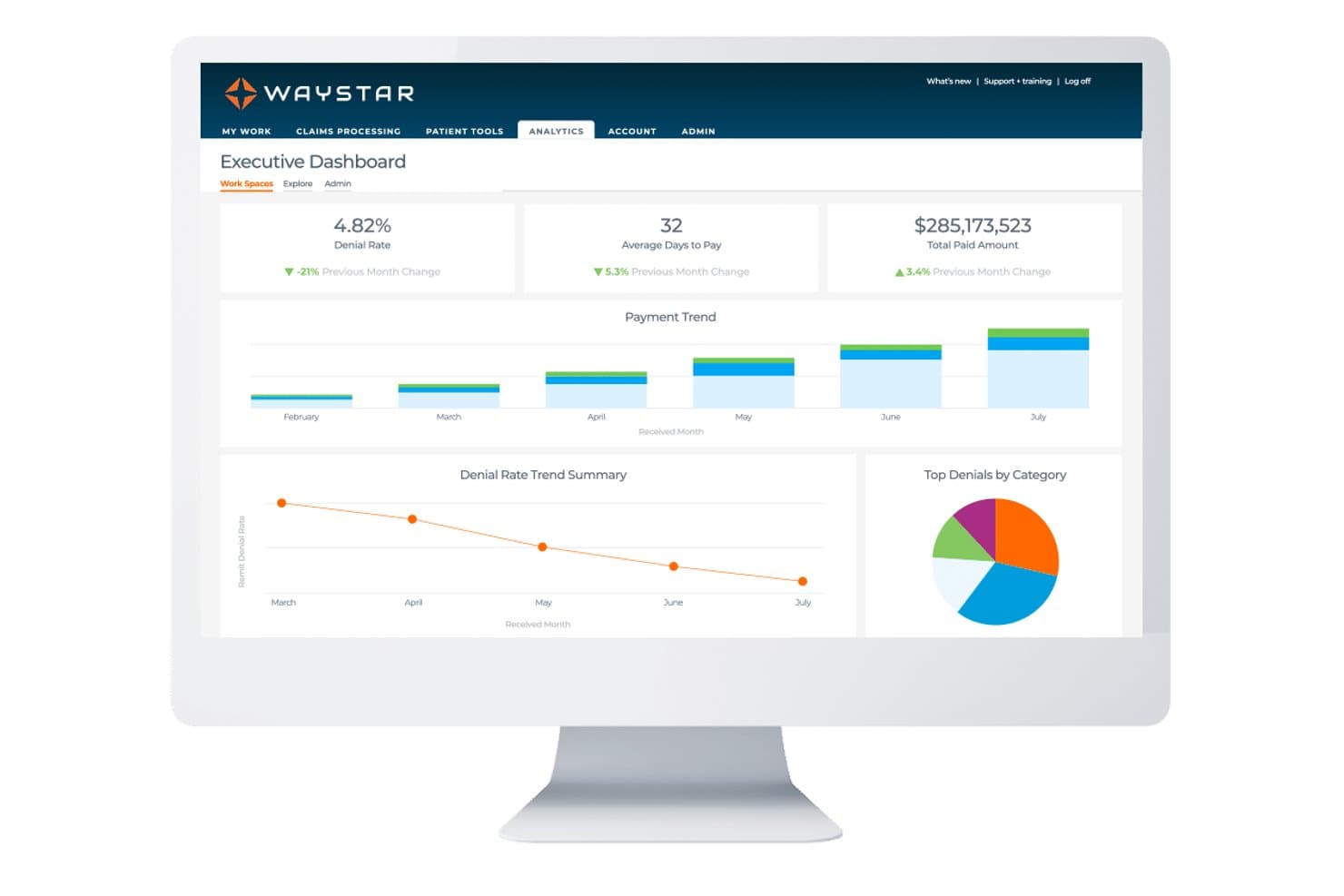
Waystar offers an Executive Dashboard with key billing metrics including denial rate, average days to pay, total paid amount, payment trends, and denial rate summaries. Waystar is a cloud-based revenue cycle management platform built for third-party billing companies to handle claims submission, denial management, eligibility verification, payment posting, and multi-client reporting from a single login.
Who Is Waystar Best For?
Waystar is a strong fit for third-party billing companies that manage revenue cycle operations across multiple physician specialty practices simultaneously.
Why I Picked Waystar
Waystar earns its spot on my shortlist because of how it handles denials at scale. I like that billers can batch up to 100 similar appeals to the same payer in a single action, and the 3-step paperless appeals wizard with 1,100+ pre-populated payer templates cuts the time spent building appeals from scratch. The denial workflow also surfaces root-cause reporting, so my team can pinpoint which payer rules or coding patterns are driving repeat rejections across client accounts.
Waystar Key Features
- Multi-client user management: Assign users to specific client clinics to maintain separate data, workflows, and access across multiple practices.
- Eligibility verification tools: Run real-time and batch insurance eligibility checks through over 600 payer connections directly within the platform.
- Customizable client reporting: Create financial and productivity reports segmented by client, provider, payer, and biller with custom dashboards and scheduled delivery options.
- Advanced claim scrubbing: Detect payer-specific issues and apply editing rules to electronic claims before submission to minimize rejections.
Waystar Integrations
Waystar offers native integrations with Allscripts and eClinicalWorks, and connects to most major EHR and practice management systems. An API is available for custom integrations.
Pros and Cons
Pros:
- Dedicated billing services vertical for multi-client management
- Over 1,100 pre-populated payer-specific appeal templates included
- Batch-submits up to 100 payer appeals simultaneously
Cons:
- Contract renewal pricing can increase significantly
- Reporting dashboards feel dated compared to competitors
Learn more about Waystar: Best for rapid onboarding of new clients
- Free demo available
- Pricing upon request
Visit WebsiteCustomer Rating:3.9/5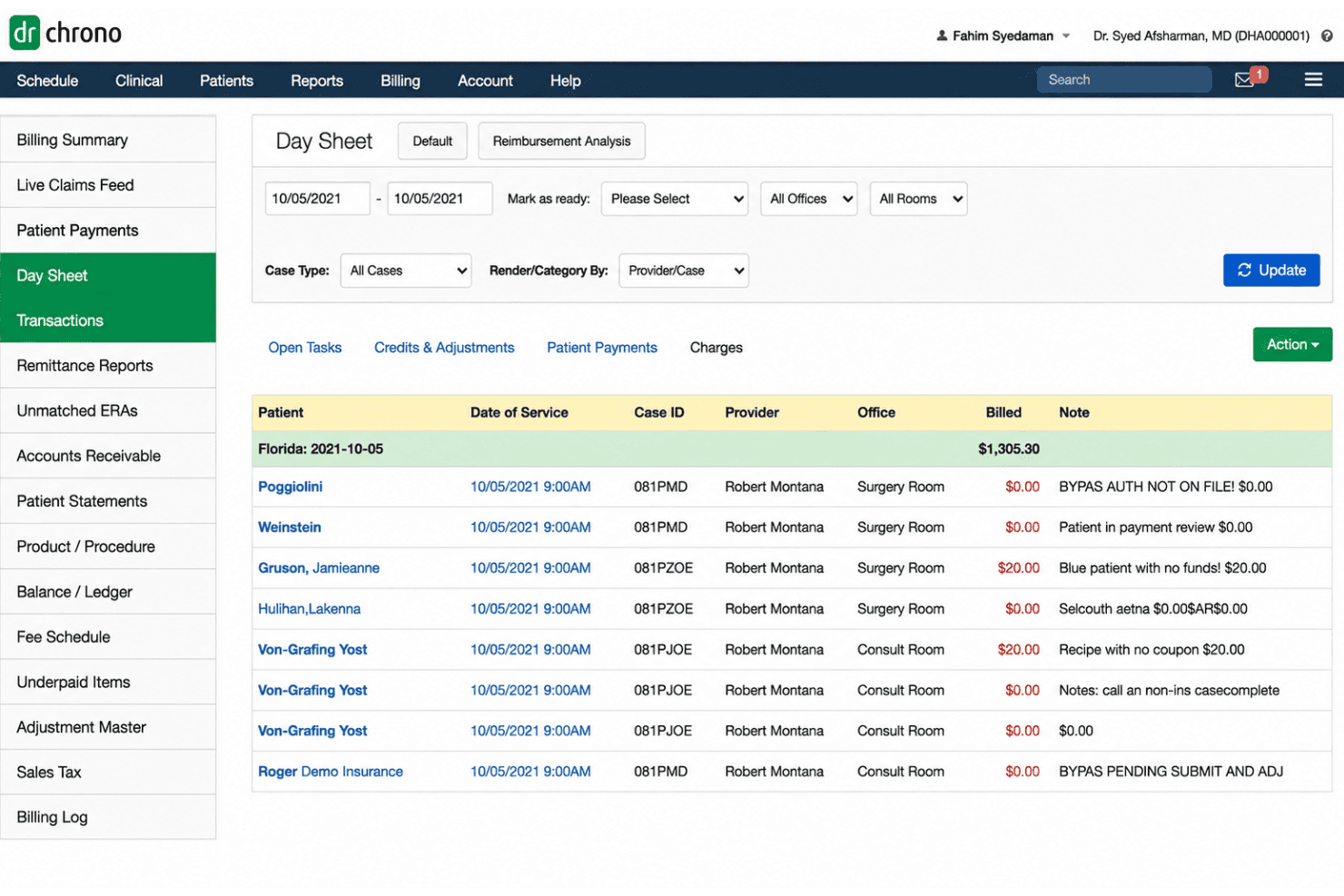
DrChrono processes claims, eligibility, ERA/EOB posting, denials, and billing. DrChrono is an EHR-integrated medical billing platform that combines claims submission, eligibility verification, ERA and EOB posting, and denial management through a built-in clearinghouse.
Who Is DrChrono Best For?
DrChrono suits independent and small-to-mid-sized medical practices that want a single platform covering both clinical documentation and insurance billing.
Why I Picked DrChrono
I've included DrChrono in my top picks because getting a new practice live is genuinely fast: implementation is bundled into the subscription price, and pre-built billing profiles with 73,000+ ICD-10, CPT, and DSM-5 codes mean clients can start submitting claims right away. I also like the Live Claims Feed, which gives every new client real-time visibility into their claim status from day one. Automated bulk eligibility checks run before the first appointment, so there are fewer upfront rejections to chase from the start.
DrChrono Key Features
- ERA and EOB posting: Manage electronic remittance and paper EOBs with automated claim status updates.
- Integrated payments: Collect patient payments directly within the DrChrono system, with support for card-on-file processing.
- Bulk insurance eligibility checks: Run batch eligibility verification across multiple appointments or payers before the date of service.
- Custom billing profiles: Store frequently used code sets and modifiers in reusable templates for consistent charge entry.
DrChrono Integrations
DrChrono offers native integrations with eProvider Solutions clearinghouse, Quest Diagnostics, LabCorp, iHCFA, and Stripe, and provides an API for custom integrations. Marketplace integrations are also available through its partner ecosystem.
Pros and Cons
Pros:
- Reported 96–98% clean claims rate
- Live Claims Feed shows real-time claim status
- 73,000+ code library for fast charge entry
Cons:
- Single-practice design limits multi-client billing management
- Reporting requires extra manual steps to access
Learn more about DrChrono: Best for advanced eligibility verification
- Free demo available
- Pricing upon request
Visit WebsiteCustomer Rating:3.7/5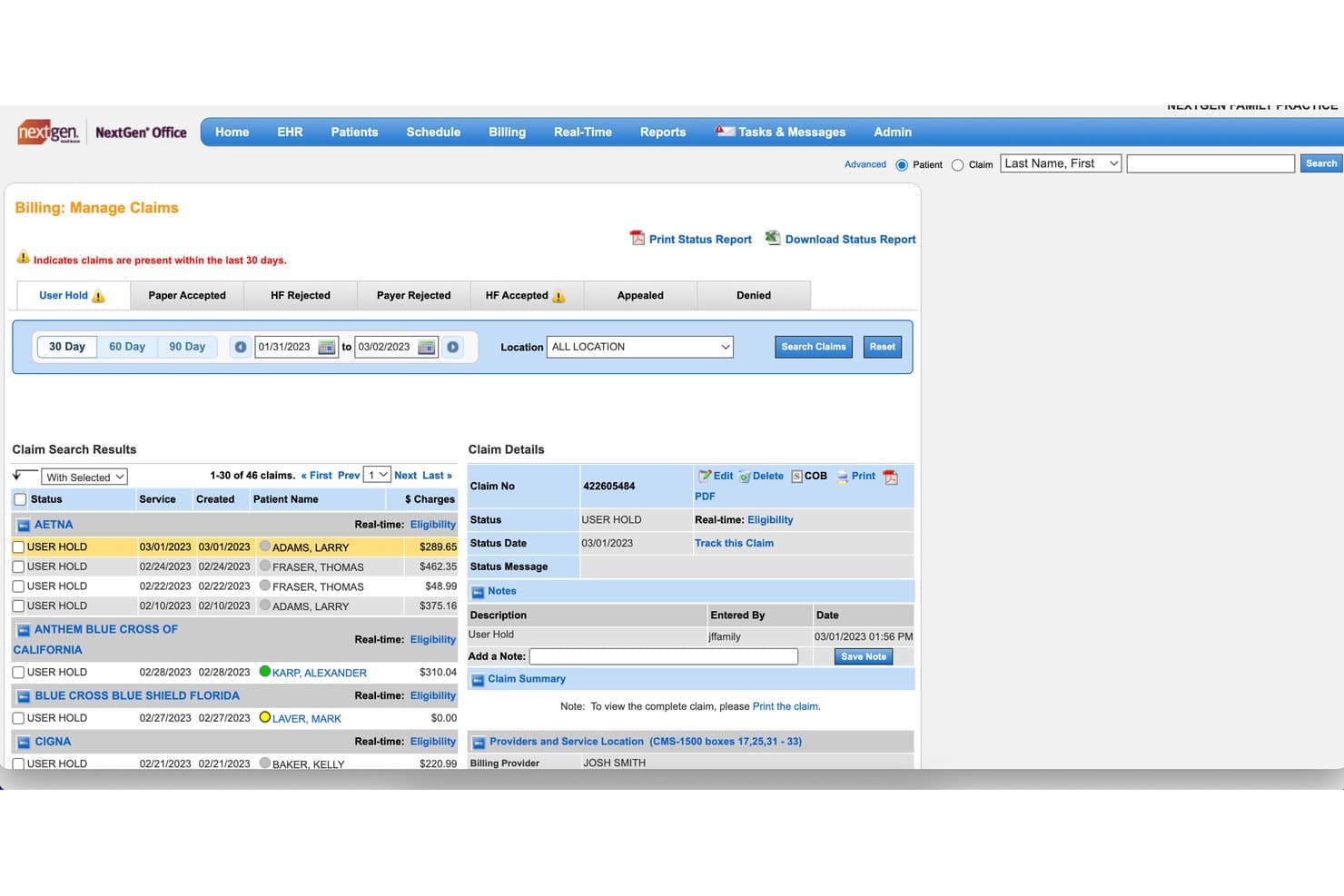
NextGen Healthcare offers a Billing: Manage Claims screen where billing companies can search, filter, and review claim statuses such as User Hold, HF Rejected, and Payer Rejected with detailed claim information. NextGen Healthcare is a practice management and RCM platform built for third-party billing companies to handle multi-client claims submission, eligibility verification, payment posting, denial management, and A/R tracking across multiple providers and tax IDs.
Who Is NextGen Healthcare Best For?
NextGen Healthcare is a strong fit for third-party billing companies managing RCM across multiple ambulatory care practices and provider groups.
Why I Picked NextGen Healthcare
NextGen Healthcare earns its spot on my shortlist because of how its automated eligibility verification tool handles 270/271 transactions at scale. I like that it runs batch checks tied directly to scheduling triggers, which catches coverage gaps before a claim is ever generated. Billing companies managing dozens of practices can run verification across all client accounts without switching platforms, and the system flags eligibility-related issues before they turn into denials downstream.
NextGen Healthcare Key Features
- Multi-client practice management: Manage separate provider groups, tax IDs, and client practices from a unified dashboard.
- Automated payment posting: Use proprietary tools to automate reconciliation and posting of ERAs and patient payments by client.
- Custom client reporting: Deliver scheduled, segmented financial and productivity reports branded for each client.
- Integrated clearinghouse workflows: Create, validate, and submit claims with embedded payer rules and batch submission capabilities.
NextGen Healthcare Integrations
NextGen Healthcare offers native integrations with NextGen Enterprise EHR, Mirth Connect, NextGen Share Diagnostic Hub, and InstaMed. An API is available for custom integrations.
Pros and Cons
Pros:
- Dedicated product line built for billing companies
- Enterprise-level multi-practice management under one login
- Automated batch eligibility verification across multiple clients
Cons:
- Reporting setup requires significant configuration time
- Support quality inconsistent per user reviews
Learn more about NextGen Healthcare: Best for payer connectivity and integrations
- Free demo available
- Pricing upon request
Visit WebsiteCustomer Rating:3.6/5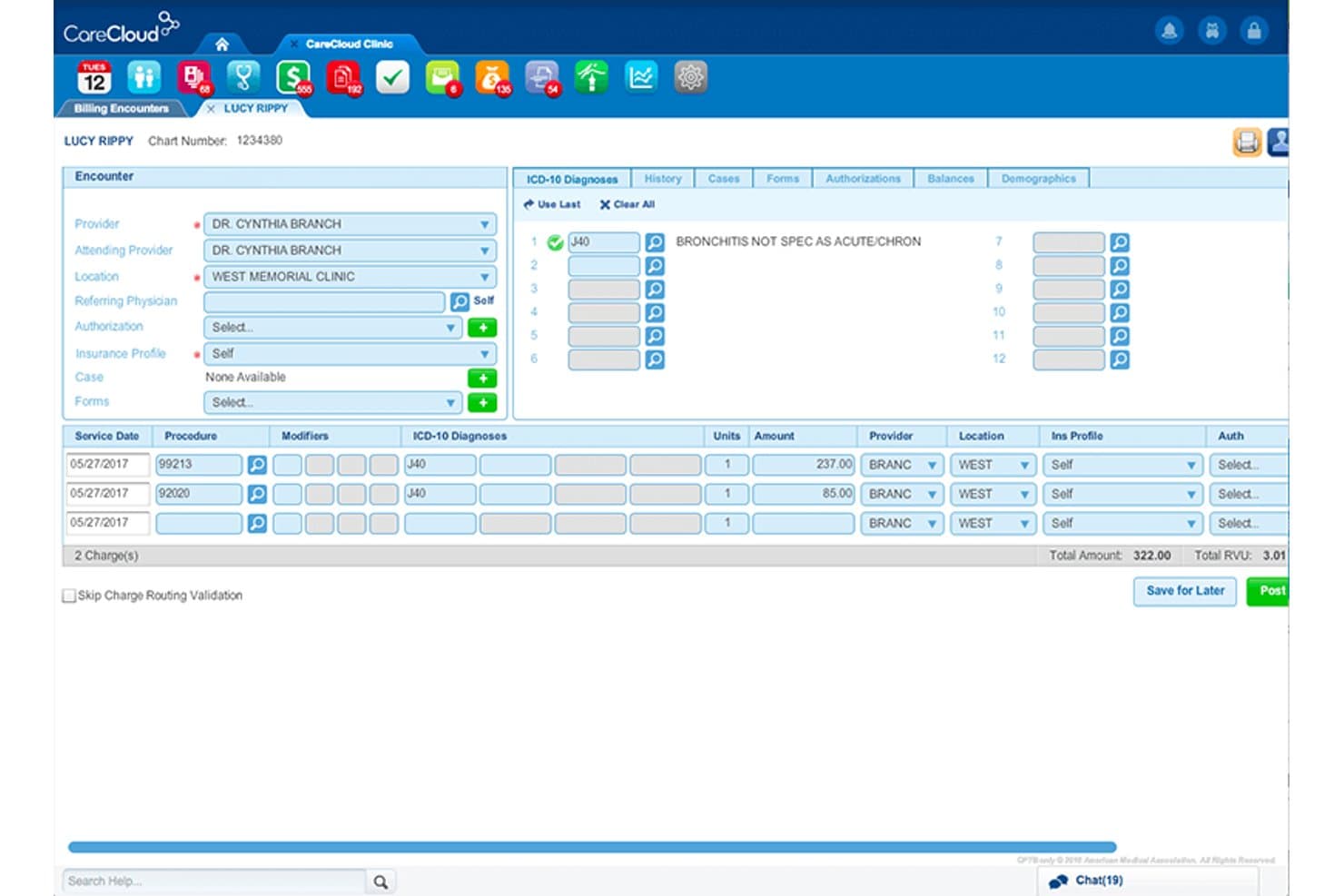
CareCloud offers a detailed billing encounter interface that displays ICD-10 diagnoses, procedure codes, charge amounts, and provider information for streamlined medical billing workflows. CareCloud Central is a cloud-based practice management and medical billing platform built for billing companies, covering claims scrubbing, denial management, ERA processing, eligibility verification, and multi-client RCM workflows.
Who Is CareCloud Best For?
CareCloud Central is a strong fit for third-party billing companies managing RCM across multiple provider clients spanning a range of specialties.
Why I Picked CareCloud
I picked CareCloud as one of the best because of how its payer connectivity is built directly into the claims workflow. The CollectiveIQ rules engine scrubs claims against a constantly updated database of payer-specific edits sourced from clearinghouses nationwide, including Change Healthcare, TriZetto, and Availity. I also like that CareCloud connects directly with over a million Medicare and commercial payers, which keeps rejection rates low without requiring manual payer-rule maintenance on my team's end.
CareCloud Key Features
- Multi-client dashboards: Manage multiple client practices, providers, and tax IDs from a single login with structured client-level data segregation.
- Role-based access controls: Assign permissions so each billing team member or client only sees the data relevant to their role.
- ERA import and auto-posting: Ingest electronic remittance advice files and automate payment posting for multiple clients.
- Customizable client reporting: Create financial and productivity reports segmented by client, provider, payer, and biller.
CareCloud Integrations
CareCloud offers native integrations with Change Healthcare, TriZetto, Availity, PrecisionBI, Surescripts, Relatient, ChartLogic, M*Modal, Dragon, Clover, and NextPatient. An API is available for custom integrations.
Pros and Cons
Pros:
- Dedicated onboarding for billing company transitions
- Built-in clearinghouse cuts third-party submission costs
- High first-pass claim rate across payers
Cons:
- Support responsiveness issues reported by users
- Requires long-term contracts limiting client flexibility
Learn more about CareCloud: Best for regulatory compliance features
- Free demo available
- Pricing upon request
Visit WebsiteCustomer Rating:3.5/5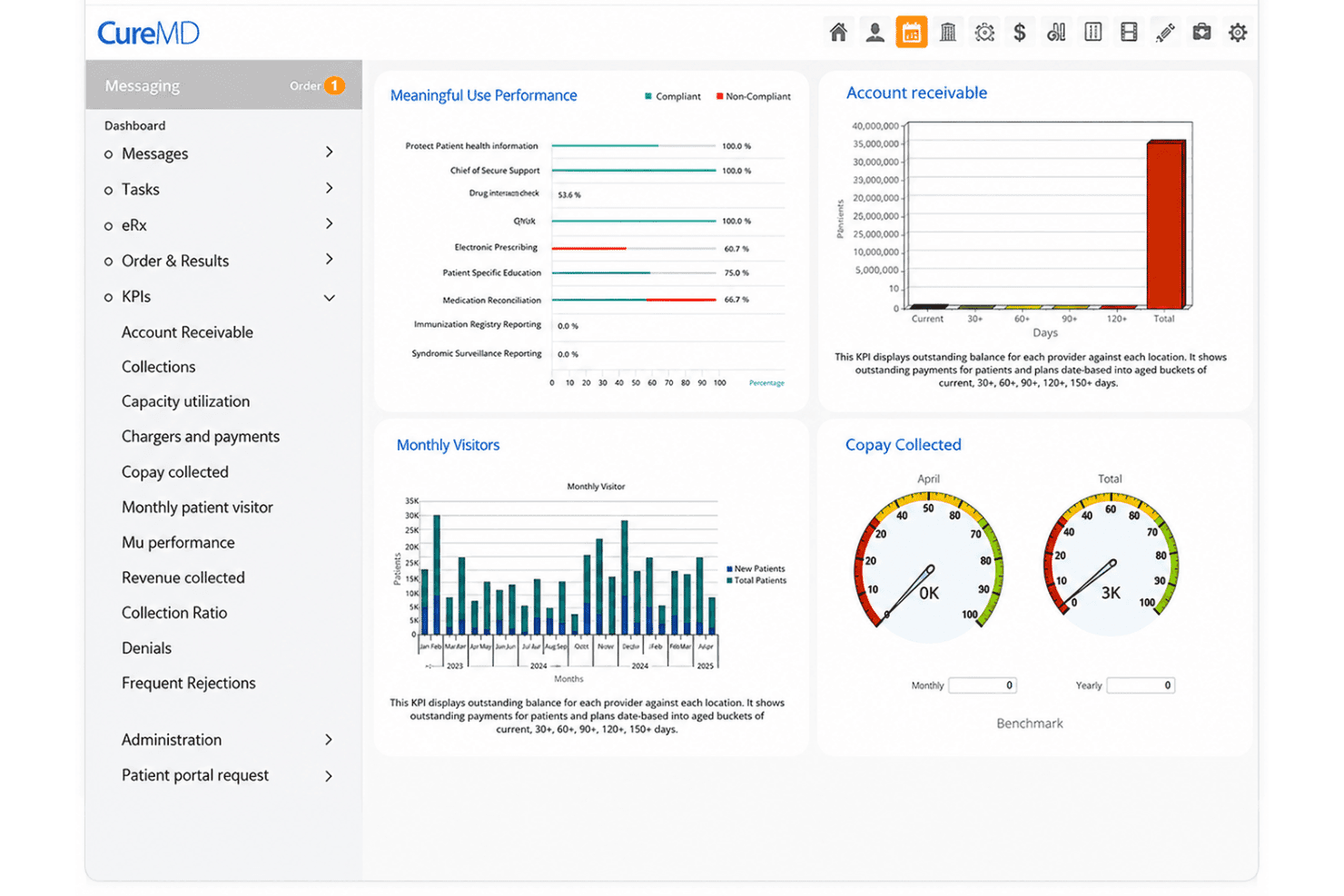
CureMD offers a medical billing dashboard with KPIs including Meaningful Use Performance, Account Receivable, Monthly Visitors, and Copay Collected metrics. CureMD is a cloud-based medical billing platform that combines automated claims scrubbing, integrated clearinghouse connectivity, ERA payment posting, denial management, and real-time eligibility verification for RCM operations.
Who Is CureMD Best For?
CureMD is a strong fit for RCM teams and billing service managers at multi-specialty practices who need a fully integrated billing and practice management platform with built-in compliance controls.
Why I Picked CureMD
CureMD earns its spot on my shortlist because of how deeply compliance is baked into the billing workflow. I particularly like the AI Coder, which surfaces real-time ICD-10 and CPT code suggestions during documentation, catching coding errors before a claim is ever submitted. The platform also maintains SOC 2 Type II certification, role-based access controls, and full audit trails, which matter when billing teams need to demonstrate accountability across client accounts.
CureMD Key Features
- Multi-client billing dashboard: Centralizes billing tasks for multiple practices, with user and data segmentation by client.
- Integrated clearinghouse: Supports electronic claims submission, eligibility checks, and ERA retrieval in one interface.
- Automated patient statement processing: Generates and sends patient billing statements for all managed providers.
- Advanced reporting and analytics: Offers client, provider, and payer-segmented financial and productivity reports.
CureMD Integrations
CureMD offers native integrations with LabCorp, Quest Diagnostics, BioReference, Enzo Clinical Labs, Ameripath, HCA HealthCare, UPMC, UCSF Medical Center, ProPath, and Natera. An API is available for custom integrations.
Pros and Cons
Pros:
- Dedicated account manager for billing services users
- Real-time eligibility triggered at scheduling
- Includes SOC 2 and ONC certifications
Cons:
- Data access restricted after contract cancellation
- Not purpose-built for third-party billing companies
Learn more about CureMD: Best for custom report scheduling
- Free demo available
- From $199/user/month
Visit WebsiteCustomer Rating:4.5/5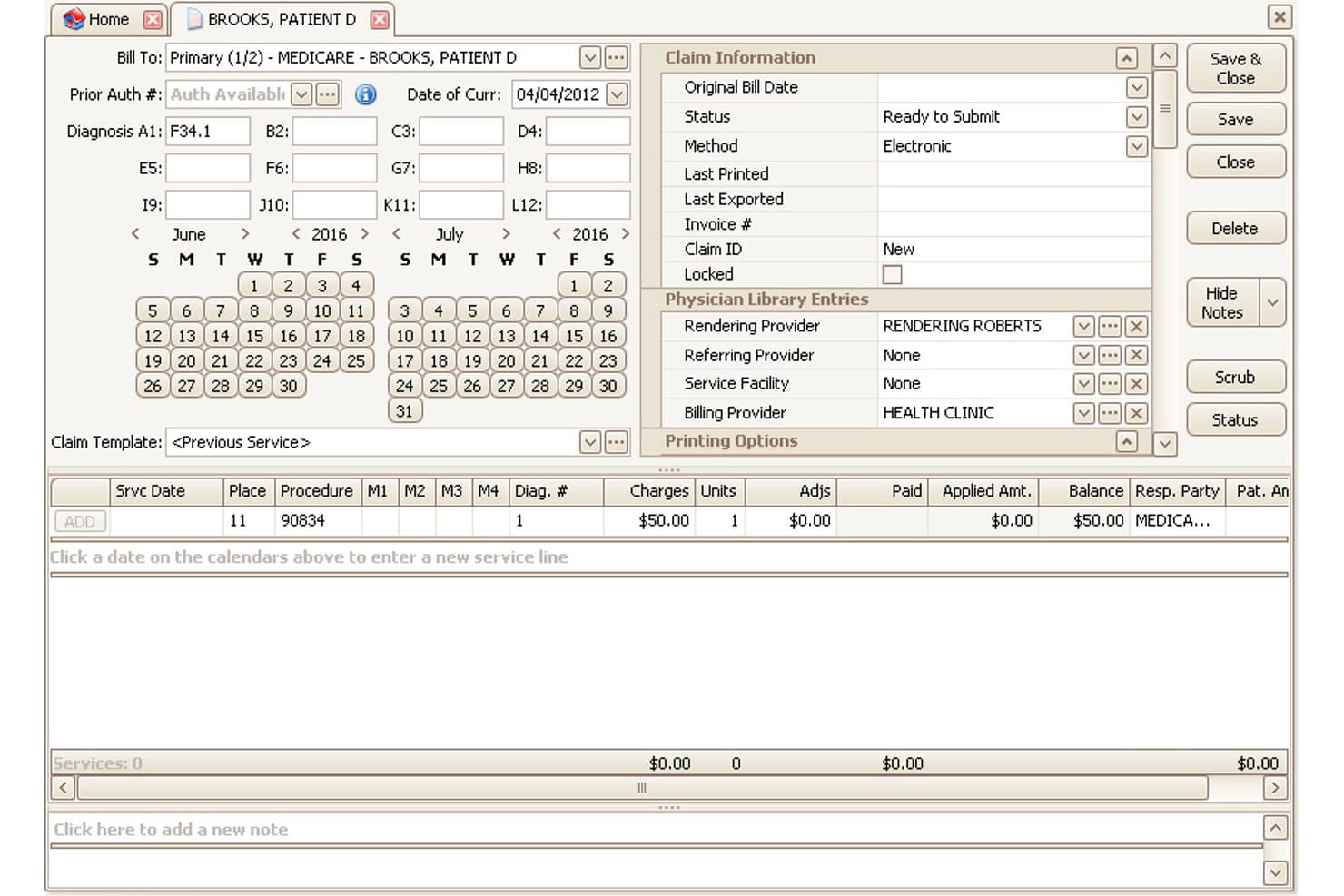
EZClaim offers a detailed claim entry interface where billing companies can manage patient billing, diagnosis codes, service lines, charges, and provider assignments in one screen. EZClaim is a cloud-based medical billing platform built for small-to-mid-sized practices and billing companies, offering claims submission, claim scrubbing, ERA posting, eligibility verification, and multi-client company file management.
Who Is EZClaim Best For?
EZClaim is a strong fit for small-to-mid-sized third-party billing companies that manage multiple client practices and need a cost-effective, dedicated billing platform.
Why I Picked EZClaim
I picked EZClaim as one of the best because its custom report scheduling is genuinely useful when managing billing across multiple client practices. I can schedule reports to run and deliver automatically by client, provider, or payer, cutting out the manual work of pulling data for each account. The customizable report grids let me tailor exactly which fields appear, so I'm not sorting through columns that don't apply to the client I'm reviewing.
EZClaim Key Features
- Multi-company file support: Set up and manage billing for multiple separate client practices under one login.
- Integrated clearinghouse connectivity: Submit claims directly to clearinghouses like TriZetto, Claim.MD, and Availity from within the platform.
- Role-based user permissions: Assign different access levels to users based on specific client or job function.
- Automated ERA posting: Import and auto-post electronic remittance advice (835 files) for faster payment reconciliation.
EZClaim Integrations
EZClaim offers native integrations with TriZetto, Claim.MD, Availity, WebPT, Practice Fusion, Amazing Charts, and BillFlash, and provides an API for custom integrations.
Pros and Cons
Pros:
- Schedulable custom reports by client or payer
- Alpha II scrubbing catches payer-specific errors
- Supports multiple separate client company files
Cons:
- Report formatting options are hard to customize
- Denial resubmission workflows are limited
Learn more about EZClaim: Best for real-time claims tracking
- Free demo available
- Pricing upon request
Visit WebsiteCustomer Rating:4.1/5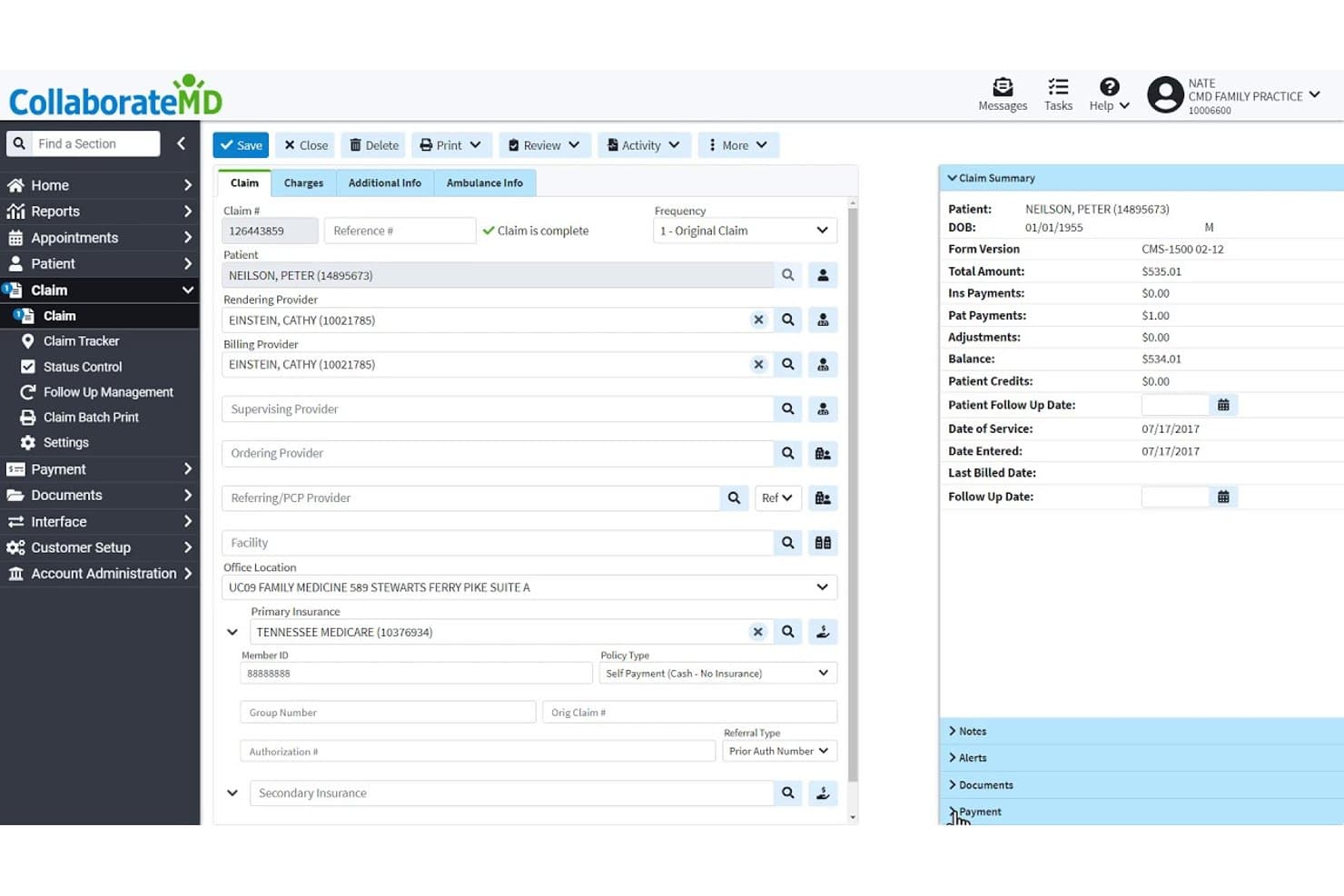
CollaborateMD offers a detailed claim management interface displaying patient info, provider assignments, insurance details, and a real-time claim summary with billing totals. CollaborateMD is a cloud-based medical billing platform built for both practices and third-party billing companies, offering multi-client claim management, built-in clearinghouse claim scrubbing, ERA auto-posting, real-time eligibility verification, and multi-client reporting.
Who Is CollaborateMD Best For?
CollaborateMD is a strong fit for third-party billing companies managing multiple provider clients under a single platform with segregated reporting and per-transaction pricing.
Why I Picked CollaborateMD
CollaborateMD earns its spot on my shortlist because of how it handles real-time claim visibility across multiple client accounts. I particularly like the built-in clearinghouse, which submits claims and surfaces rejections instantly, paired with AI-powered rejection explanations that translate payer denial codes into plain language. That combination means my team can identify and act on problem claims without waiting on reports or digging through payer portals.
CollaborateMD Key Features
- Multi-client reporting: Generate customizable reports segmented by client, provider, payer, or biller for granular financial analysis.
- Unlimited ERA auto-posting: Post electronic remittance advice payments and handle reconciliation across multiple client accounts.
- Role-based access controls: Manage user permissions at the client, provider, and team level to maintain data segregation and security.
- HIPAA-compliant audit logs: Track all user actions and access for compliance and risk management in a multi-tenant environment.
CollaborateMD Integrations
CollaborateMD offers native integrations with Practice Fusion, Nexus Clinical, Alleva, Quest Diagnostics, LabCorp, LabDAQ, MDTech, and MediMobile, and provides an API for custom integrations.
Pros and Cons
Pros:
- 125+ reports segmentable by client or payer
- Real-time claim status visible across all clients
- Built-in clearinghouse eliminates third-party submission fees
Cons:
- Setup requires sales contact for all plans
- Interface feels dated compared to newer platforms
Learn more about CollaborateMD: Best for multi-client billing dashboards
- Free demo available
- Pricing upon request
Visit WebsiteCustomer Rating:4.1/5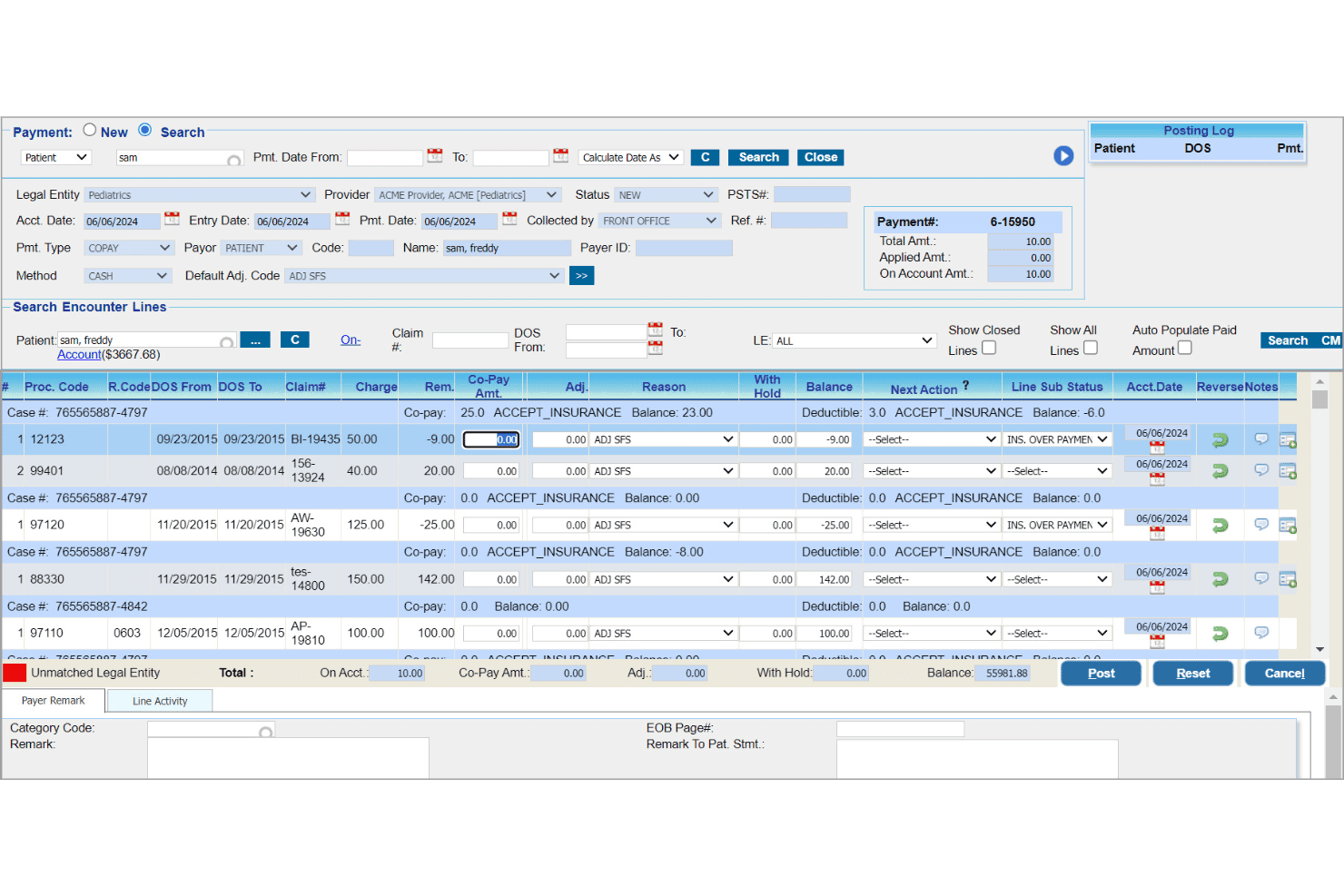
PracticeSuite oversees client claims, denials, payments, and financial reports. PracticeSuite is a cloud-based medical billing and practice management platform built for third-party billing companies, offering multi-client claims management, denial tracking, payment posting, and enterprise-wide financial reporting across all client accounts.
Who Is PracticeSuite Best For?
PracticeSuite is a strong fit for third-party billing companies managing claims, denials, and reporting across multiple physician practice clients.
Why I Picked PracticeSuite
PracticeSuite earns its spot on my shortlist because of its Central Billing Office, which gives my team a single login to access every client practice and work denials, rejections, and payment posting across all accounts from one screen. The enterprise claims management view makes it easy to run mass claim corrections across clients at once. I also rely on Report Central's 140+ templates to pull client-segmented A/R and payer performance data without any manual aggregation.
PracticeSuite Key Features
- Real-time eligibility verification: Instantly check insurance eligibility for patients across all clients.
- Report Central: Access 140+ customizable financial and productivity reports by client, provider, or payer.
- Integrated patient portal: Enable clients to offer secure bill-pay and access for their patients.
- HIPAA-compliant internal chat: Communicate securely within and across client teams inside the platform.
PracticeSuite Integrations
PracticeSuite offers native integrations with Practice Fusion, numerous EHRs across 60 specialties, and connects directly with insurance clearinghouses, labs, pharmacies, and HIE networks. An API is available for custom integrations.
Pros and Cons
Pros:
- 140+ reports segmented by client and payer
- Cross-client denial worklists with AI prioritization
- Single login across all client practices
Cons:
- Invoice accuracy concerns reported by long-term clients
- Platform stability issues under high claim volume
Learn more about PracticeSuite: Best for workflow automation across clients
- Free demo available
- Pricing upon request
Visit WebsiteCustomer Rating:3.6/5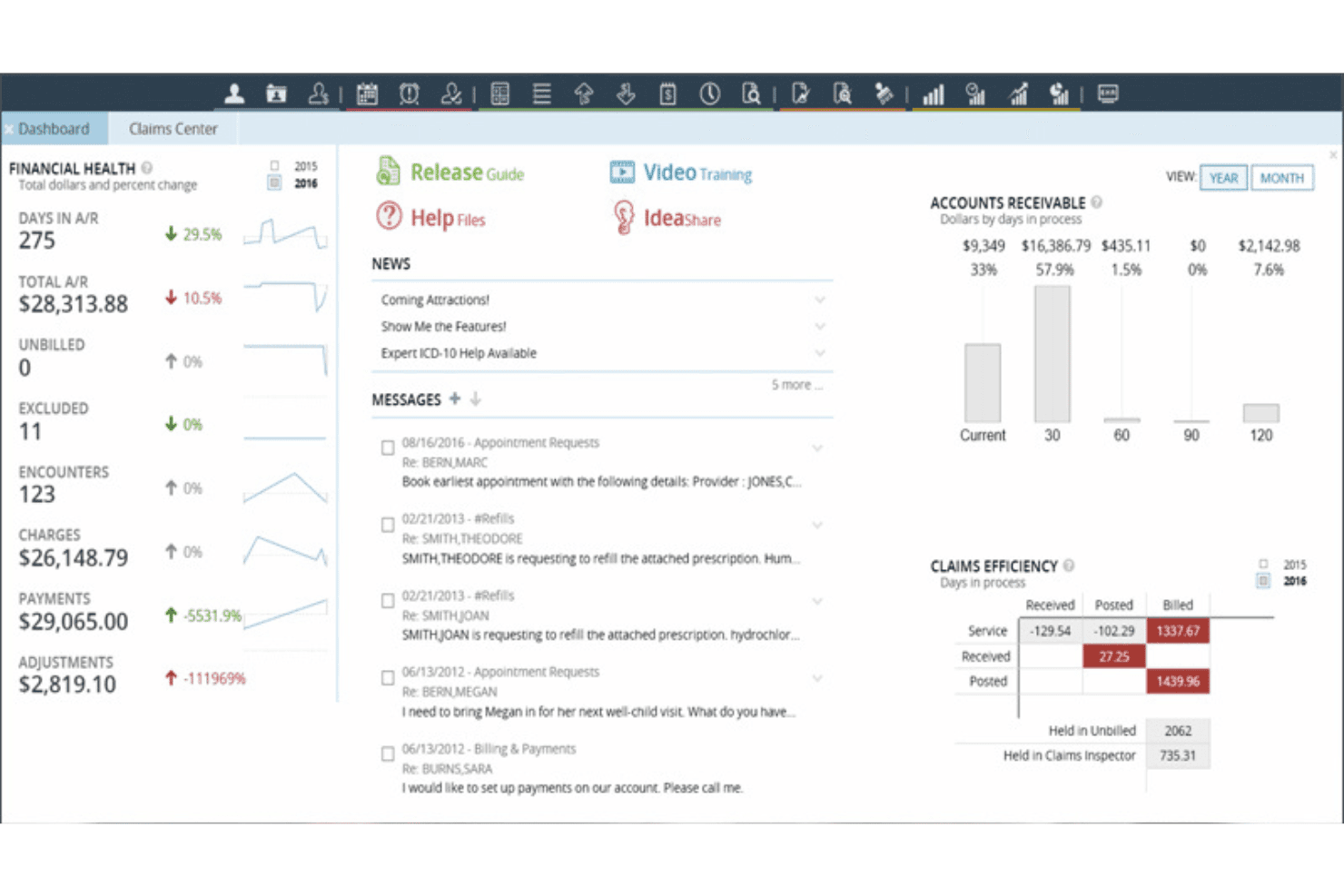
AdvancedMD manages client claims, scrubbing, denials, ERA, and eligibility. AdvancedMD is a cloud-based medical billing and practice management platform built for third-party billing companies, with multi-client claims management, automated claim scrubbing, denial tracking, ERA processing, and eligibility verification.
Who Is AdvancedMD Best For?
AdvancedMD is a strong fit for mid-to-large third-party billing companies managing revenue cycle operations across multiple client practices simultaneously.
Why I Picked AdvancedMD
AdvancedMD earns its spot on my shortlist because the Central Billing Office (CBO) handles cross-client workflow from a single login. My team can work across every client database at once, without switching sessions. ClaimInspector then automatically runs 3.5 million edits per claim before submission, catching payer-specific errors at the source. The intelligent denial worklists route rejections into organized queues by client, keeping A/R action items visible and prioritized.
AdvancedMD Key Features
- Centralized client setup: Manage separate databases, tax IDs, and NPIs for each client from one admin console.
- White-labeled custom reporting: Generate client-branded reports and schedule automated delivery for revenue, A/R, and denial metrics.
- Role-based access controls: Restrict user access to only the relevant client accounts and sensitive information within your roster.
- Integrated clearinghouse connectivity: Submit claims and receive ERAs directly through AdvancedMD’s bundled clearinghouse integrations.
AdvancedMD Integrations
AdvancedMD offers native integrations with ChartRequest, DAX Copilot, DeepScribe, Doctorsoft, InstaMed, and NextPatient. It provides an Integration Marketplace, supports an open API for custom integrations, and includes direct clearinghouse integrations.
Pros and Cons
Pros:
- Cross-client A/R reporting is highly customizable
- ClaimInspector catches payer-specific errors pre-submission
- CBO manages all client accounts simultaneously
Cons:
- Onboarding complexity overwhelms smaller billing operations
- Support response times are frequently reported slow
 Best for batch claims submission options
- Free demo available
- Pricing upon request
Visit WebsiteCustomer Rating:3.9/5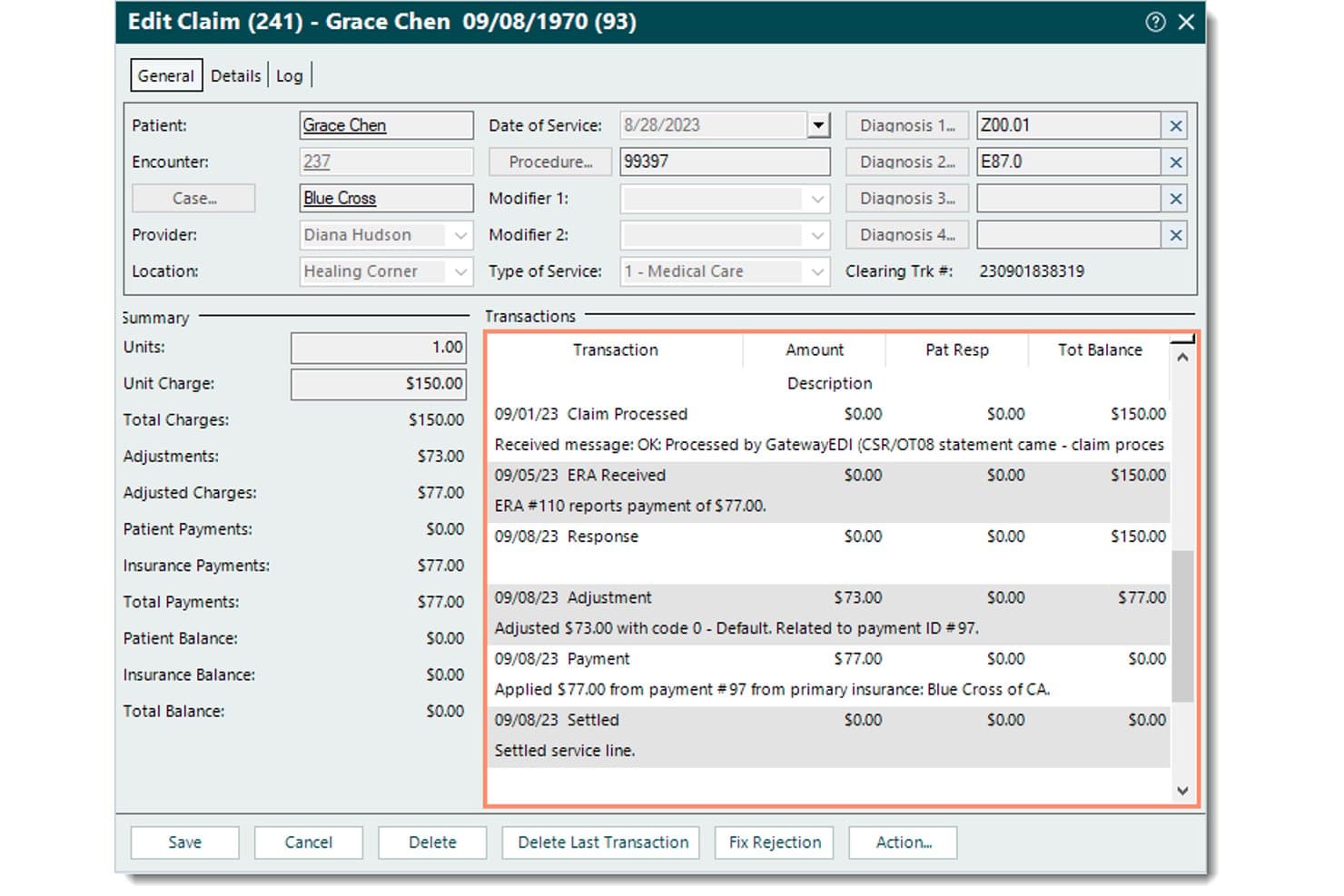
Kareo (Tebra) offers a detailed claim editing interface that displays transaction history, payment adjustments, and insurance billing summaries for medical billing workflows. Tebra (formerly Kareo) is a medical billing platform built for third-party billing companies, offering multi-client management, electronic claims submission, ERA auto-posting, real-time eligibility verification, and denial tracking across multiple provider accounts.
Who Is Kareo (Tebra) Best For?
Tebra is a strong fit for third-party billing companies managing revenue cycle operations across multiple independent medical practices.
Why I Picked Kareo (Tebra)
Tebra earns its spot on my shortlist because of how it handles batch claims submission at scale. I like that the platform auto-detects errors before sending and applies payer-specific rules automatically, so claims go out clean the first time. My team can also use built-in RPA to auto-post ERAs in bulk, which cuts manual reconciliation work significantly when processing remittances across multiple client accounts simultaneously.
Kareo (Tebra) Key Features
- Multi-client management dashboard: Manage multiple practices, providers, and tax IDs from one unified interface with segregated reporting.
- Customizable client reporting: Create white-labeled, client-specific financial and productivity reports.
- Automated eligibility verification: Run real-time or batch checks on insurance eligibility across thousands of payers.
- Role-based access controls: Set granular user permissions so each biller or provider only sees data relevant to their assigned clients.
Kareo (Tebra) Integrations
Tebra offers native integrations with major EHRs through HL7 and FHIR connections and supports connections with lab systems and clearinghouses for claim and payment workflows. An API is available for custom integrations.
Pros and Cons
Pros:
- Real-time eligibility checks across 2,700+ payers
- ERA auto-posting via RPA at scale
- Batch claims submission across multiple clients
Cons:
- Denial analytics less sophisticated than top competitors
- Medicaid secondary billing still needs improvement
Learn more about Kareo (Tebra):
Other Medical Billing Software for Billing Companies
Here are some additional medical billing software for billing companies options that didn’t make it onto my shortlist, but are still worth checking out:
- 11eClinicalWorksBest for tailored client financial reports
- 12RXNTBest for integrated electronic remittance advice
- 13NueMDBest for built-in patient eligibility checks
- 14athenahealthBest for integrated payer rules management
- 15Office Ally EHRBest for direct clearinghouse connectivity
- 16TotalMDBest for flexible EHR and billing integration
- 17MedicsPremier (ADS)Best for automated multi-client AR tracking
- 18Inovalon Provider CloudBest for analytics-driven revenue insights
- 19PracticeAdminBest for client-specific billing portals
- 20ClaimTek MedOfficeBest for customizable client permission controls
How I Evaluate Medical Billing Software for Billing Companies
I split my evaluation into baseline requirements—like multi-client data segregation and ERA auto-posting—and the differentiators that separate good platforms from great ones.
Core Functionality (Table Stakes For This List)
When I'm selecting tools for my list, I rank each one on a scale from 0 (does not offer the functionality) to 5 (excels in this area) for each core functionality listed below. Then, I calculate the tool's total score into a percentage. Each tool needs to achieve a minimum total score of 65% to be considered for inclusion.
- Multi-client management: I look for full data segregation so each practice's financials, users, and payer data stay isolated under one login.
- Claims submission & scrubbing: Payer-specific edit rules matter here—I check whether the tool catches modifier and coding errors before batch submission.
- ERA & payment posting: I evaluate how the platform handles auto-posting across multiple payers, including split payments and adjustment codes.
- Denial & A/R management: Aging worklists segmented by client and payer are key—I look for tools that route denied claims and support appeal tracking.
- Eligibility verification: Real-time and batch 270/271 checks help prevent front-end errors, so I evaluate payer coverage breadth and scheduling options.
- Multi-client reporting: I check for client-segmented financials, scheduled report delivery, and the ability to benchmark performance across your book of business.
Once I have a list of tools that meet the criteria, I consider what sets each platform apart.
Differentiating Factors (What Sets Vendors Apart)
Here's how I compare and contrast different vendors:
Standout Features
Custom client reporting is a big differentiator. I look for platforms that let you white-label A/R and denial reports with your branding and deliver them to clients on a set schedule. Denial and appeals workflows also separate vendors—the strongest tools route denied claims to the right biller by reason code or payer and include templated appeal letters. Role-based access controls round this out, since billing companies need granular permissions to keep each client's PHI visible only to authorized users.
Beyond Features
Pricing model matters a lot for billing companies. I look for per-claim or volume-based pricing instead of per-provider seat fees, which get expensive fast as you scale your client roster. Clearinghouse and payer connectivity is another factor—I check whether the platform bundles a clearinghouse or connects directly to major ones like Availity or Change Healthcare. EHR integration flexibility also counts. Platforms that support HL7/FHIR APIs or flat-file imports make it far easier to onboard clients running different systems without custom development costs.
How to Choose Medical Billing Software for Billing Companies
It’s easy to get bogged down in long feature lists and complex pricing structures. To help you stay focused as you work through your unique software selection process, here’s a checklist of factors to keep in mind:
| Factor | What to Consider |
|---|---|
| FactorScalability | What to ConsiderCan the system handle growth—from a few clients to dozens—without licensing or workflow bottlenecks? Think about how your needs may change in 2026 and beyond. |
| FactorIntegrations | What to ConsiderWill it connect with your clients’ EHRs, clearinghouses, and accounting systems through APIs, flat files, or direct links? Limited options can slow onboarding. |
| FactorCustomizability | What to ConsiderDoes the software let you tailor client reports, portals, and user permissions to fit each client’s needs and branding? Beware rigid templates that frustrate clients. |
| FactorEase of use | What to ConsiderWill new users and clients be able to learn the tool quickly? Look for intuitive dashboards and clear workflows—complex menus can lead to staff errors or slowdowns. |
| FactorImplementation and onboarding | What to ConsiderWhat support is included for migrating existing data, configuring accounts, and training your team? Slow or shallow onboarding may hurt your client relationships. |
| FactorCost | What to ConsiderAre pricing structures transparent and a good match for a billing company model? Watch for hidden fees—especially with clearinghouse use, report delivery, or add-on users. |
| FactorSecurity safeguards | What to ConsiderIs role-based access, client data segregation, and audit logging built in? Make sure the software keeps PHI protected for each distinct client according to regulations. |
| FactorSupport availability | What to ConsiderCan you reach help by phone, email, or chat when client issues arise? Check for SLAs and local hours—billing delays can reflect poorly on your business. |
What Is Medical Billing Software for Billing Companies?
Medical billing software for billing companies is a platform designed for third-party firms to manage insurance claims, payments, and reporting for multiple healthcare clients. These systems centralize multi-client workflows, automate claim scrubbing and submission, and enable clear financial segregation for each provider.
They support streamlined payment reconciliation, denial tracking, and customizable client reporting—giving billing service teams the tools they need to serve diverse healthcare practices efficiently.
Features of Medical Billing Software for Billing Companies
When selecting medical billing software for billing companies, keep an eye out for the following key features:
- Multi-client management: Manage multiple practices and providers under one login with strict data segregation, so each client’s financials and workflows remain separate and secure.
- Automated claims scrubbing: Built-in editing engines check claims for coding, modifier, and payer-specific errors before submission, helping catch mistakes early and prevent denials.
- Batch claims submission: Send large volumes of claims to clearinghouses or payers at once, accelerating workflow and reducing manual entry for billing teams.
- Electronic remittance (ERA) posting: Automatically ingest, match, and post payments from ERAs to client accounts, reducing manual reconciliation and speeding up cash flow.
- Denial and A/R worklists: Create worklists and aging reports to organize, track, and resolve denied or unpaid claims across clients, improving collections and reducing write-offs.
- Real-time eligibility verification: Check patient insurance eligibility directly from the platform for many payers, minimizing upfront claim errors and rejections.
- Custom client reporting: Generate detailed, client-facing reports on revenue, denials, and account performance that can be white-labeled to reflect each client's brand and needs.
- Role-based access controls: Assign granular permissions so each user only accesses data for their assigned clients, protecting patient privacy and reducing organizational risk.
- Client and provider portals: Secure portals let your clients access financial reports, claim statuses, and communication tools in real time, reducing email back-and-forth.
- Integrated appeals management: Tools for generating, tracking, and submitting appeal letters streamline the follow-up process for denied claims and support revenue recovery.
Benefits of Medical Billing Software for Billing Companies
Implementing medical billing software for billing companies provides several benefits for your team and your business. Here are a few you can look forward to:
- Centralized multi-client management: Oversee all client accounts from one login, with strict data segregation, simplifying administration and security.
- Reduced claim denials: Automated scrubbing and batch submission features help catch errors early and ensure cleaner, more accurate claim submissions.
- Faster payment cycles: Integrated ERA posting and streamlined payment workflows speed up reconciliation and help improve your clients’ cash flow.
- Improved transparency: Custom client reporting and secure client portals keep all stakeholders informed on revenue, denials, and account performance.
- Increased operational efficiency: Worklists, eligibility checks, and appeals tools automate repetitive tasks, letting your team focus on higher-value activities.
- Enhanced compliance and security: Role-based access controls and built-in safeguards protect PHI and support regulatory requirements for billing companies.
- Scalability for growth: The right platform makes it easy to take on new clients or specialties without adding manual processes or paying for unnecessary seat licenses.
Costs and Pricing of Medical Billing Software for Billing Companies
Selecting medical billing software for billing companies requires an understanding of the various pricing models and plans available. Costs vary based on features, team size, add-ons, and more. The table below summarizes common plans, their average prices, and typical features included in medical billing software for billing companies solutions:
Plan Comparison Table for Medical Billing Software for Billing Companies
| Plan Type | Average Price | Common Features |
|---|---|---|
| Plan TypeFree Plan | Average Price$0 | Common FeaturesBasic claim tracking, limited user support, manual reporting, and access to standard billing tools. |
| Plan TypePersonal Plan | Average Price$50-$150/month | Common FeaturesSingle-client management, electronic claims submission, ERA import, and basic support. |
| Plan TypeBusiness Plan | Average Price$200-$500/month | Common FeaturesMulti-client management, automated claim scrubbing, payment posting, reporting tools, and role-based access. |
| Plan TypeEnterprise Plan | Average Price$700-$2,000/month | Common FeaturesUnlimited clients, white-labeled client portals, advanced integrations, dedicated onboarding, and premium support. |
Medical Billing Software for Billing Companies FAQs
Here are some answers to common questions about medical billing software for billing companies:
How does medical billing software for billing companies handle multiple clients?
These platforms offer multi-client management tools that let you keep all practice data, claims, and financials separate. You can manage multiple clients under one login, with user access and reporting tailored to each practice.
Can I customize reports and client communications with this software?
Yes, most leading solutions let you white-label reports and client portals with your branding. You can also set up automated report delivery and custom communications for each client, making your services feel personalized and professional.
What should I look for when evaluating integration capabilities?
Check if the software offers direct APIs to major EHRs, clearinghouses, and accounting platforms. SFTP, flat-file, or CSV import options are important for onboarding clients on diverse or legacy systems without custom builds or manual data entry.
Is HIPAA compliance built in?
Yes, reputable vendors provide role-based controls, data segregation, signed BAAs, and audit logs to support HIPAA compliance and secure each client’s PHI. Always confirm the vendor’s certifications and security controls when evaluating options.
How does pricing typically work for billing companies?
Pricing is often per-claim or volume-based, which works well for scaling a multi-client roster. Watch for additional costs like clearinghouse fees, statement charges, onboarding, and extra support tiers when comparing software plans.