

HIPAA compliant software for therapists gives you secure, purpose-built tools to protect client data while managing sessions, notes, billing, and virtual care. If you’re searching for solutions that balance critical privacy requirements with real-world usability, you know what’s at stake—one wrong choice can disrupt care and compromise confidentiality. This guide will help you compare the top options, consider their strengths, and decide what fits your practice’s needs.
Why Trust Our Software Recommendations
6,700+
Reviews
20
Industry experts
16+
Evaluation factors
14
Years
Our team has been testing and reviewing software since 2012. As medical practice leaders ourselves, we know how difficult—and important—it is to choose the right software.
For this guide, we evaluated tools using hands-on testing and independent research, scoring tools using our selection criteria.
Our reviews reflect our human editorial judgment, not a sales pitch.
HIPAA-Compliant Software for Therapists Comparison Table
Use this comparison table to review pricing details for my top HIPAA-compliant software selections for therapists.
| Tool | Best For | Trial Info | Price | ||
|---|---|---|---|---|---|
| 1 | Best for scheduling and multidisciplinary care | Free demo available | From $59/month | Website | |
| 2 | Best for simple mental health practice management | 30-day free trial | From $39/month | Website | |
| 3 | Best for browser-based teletherapy | Free plan available | Pricing upon request | Website | |
| 4 | Best for virtual care and client engagement | 14-day free trial | From $19.99/month | Website | |
| 5 | Best for AI-assisted therapy notes | 14-day free trial | From $19.99/month | Website | |
| 6 | Best for all-in-one therapy practice management | 30-day free trial | From $49/month | Website | |
| 7 | Best for behavioral health documentation | 30-day free trial | From $69/month | Website | |
| 8 | Best for teletherapy and client engagement | 30-day free trial | From $39/month | Website | |
| 9 | Best for behavioral health clinical notes | 30-day free trial | From $55/month | Website | |
| 10 | Best for solo therapist practice management | 30-day free trial | From $59/month | Website |


HIPAA Compliant Software for Therapists Reviews
Below are my detailed summaries of the best HIPAA compliant software for therapists that made it onto my shortlist. My reviews offer a detailed look at the features, best use cases, and integrations of each software to help you find the best one for you.
 1Best for scheduling and multidisciplinary care
Jane
- Free demo available
- From $59/month
Visit WebsiteCustomer Rating:4.8/5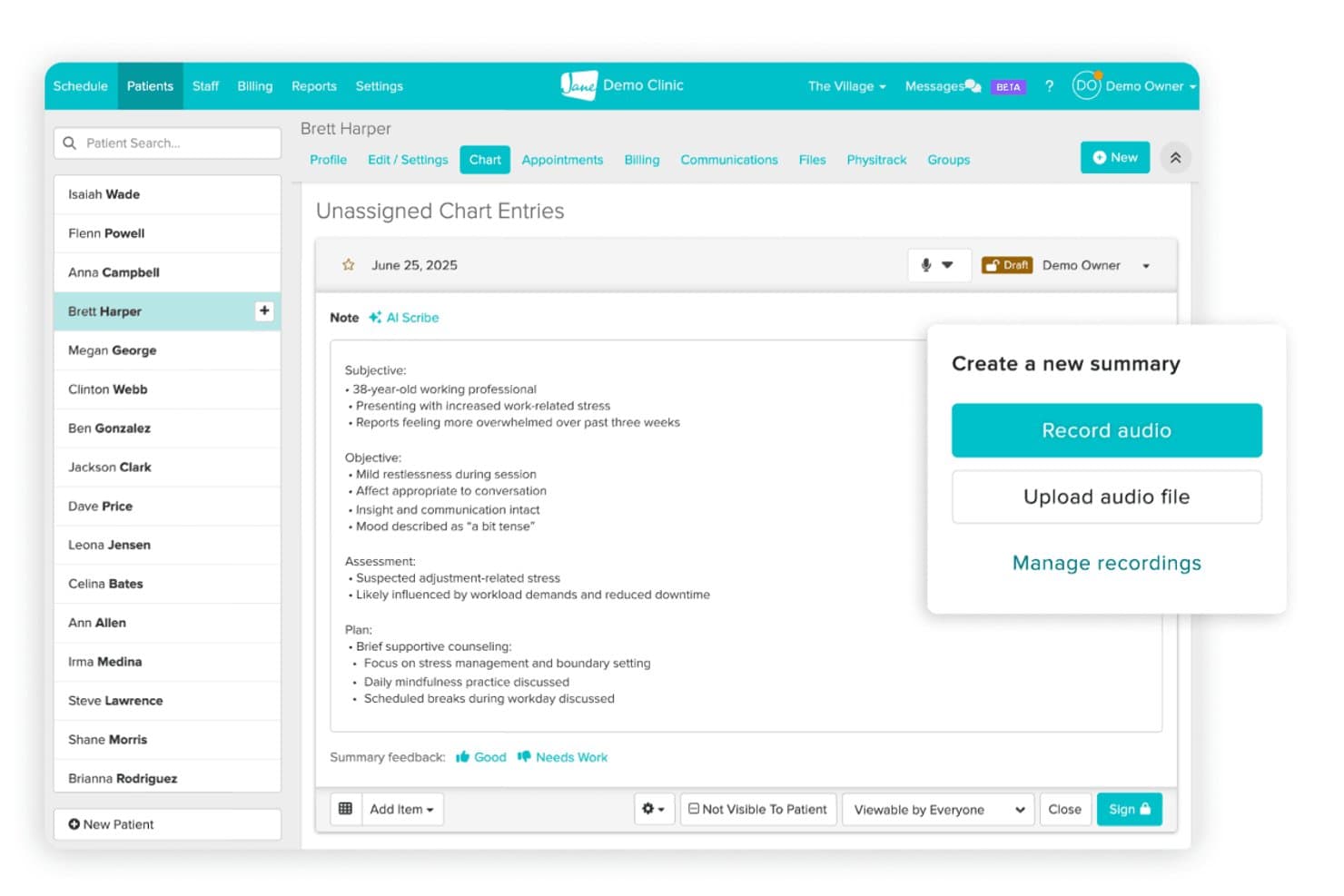
Jane offers an AI Scribe feature that auto-generates SOAP notes from session audio, helping therapists document securely within a HIPAA-compliant chart. Jane is a HIPAA-compliant practice management platform for health and wellness clinics, combining online booking, clinical charting, integrated telehealth, secure messaging, and insurance billing under one system.
Who Is Jane Best For?
Jane is a strong fit for mental health and allied health clinics running multiple practitioners across disciplines who need scheduling, charting, and telehealth in one place.
Why I Picked Jane
I picked Jane as one of the best because its scheduling tools are built specifically for clinics running multiple practitioners across disciplines. The automated waitlist management fills canceled slots without manual follow-up, and availability tagging lets each practitioner control exactly when and how they're bookable. I also like the Relationships feature, which lets parents manage appointments for minors while therapists retain full control over each family member's privacy settings, a genuinely complex workflow that Jane handles cleanly.
Jane Key Features
- Integrated AI Scribe: AI-powered charting auto-generates SOAP and DAP notes from session audio or text.
- Secure client portal: Clients access forms, documents, and secure messaging through a HIPAA-compliant portal.
- Insurance billing add-on: Electronic claims submission and real-time eligibility checks through Claim.MD integration.
- Custom chart templates: Build and share therapy note templates, assessments, and intake forms for mental health workflows.
Jane Integrations
Jane offers native integrations with Claim.MD, Stripe, and Mailchimp. An API is available for custom integrations.
Pros and Cons
Pros:
- Customizable charting templates for therapy notes
- Built-in telehealth with HIPAA-compliant video
- Supports multi-practitioner scheduling across disciplines
Cons:
- Telehealth lacks group session support
- Insurance billing requires a paid add-on
Learn more about Jane: Best for simple mental health practice management
- 30-day free trial
- From $39/month
Visit WebsiteCustomer Rating:4.9/5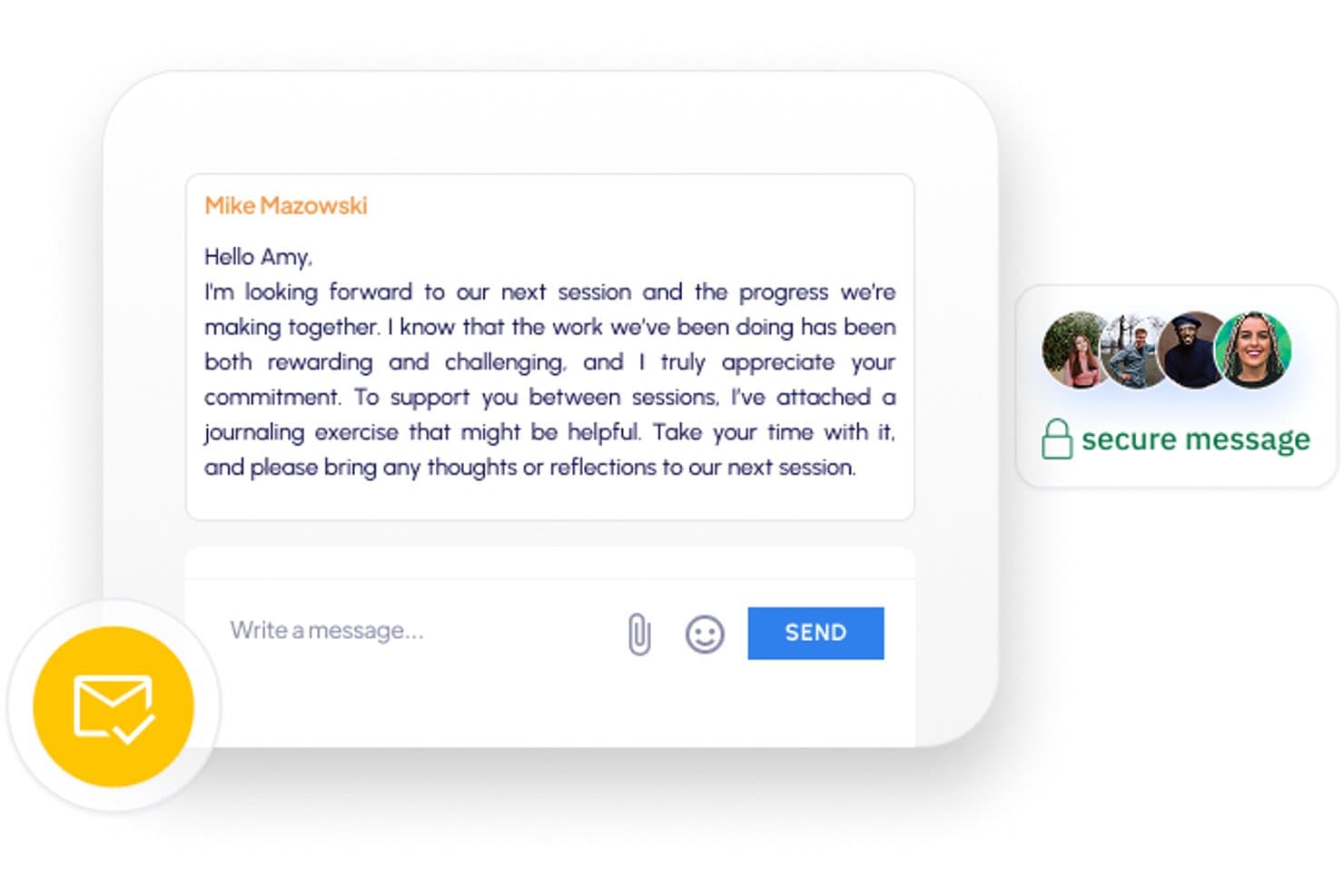
Sessions Health offers HIPAA-compliant secure messaging between therapists and clients directly within the client portal. Sessions Health is a HIPAA-compliant EHR built for mental health professionals, covering clinical documentation, scheduling, telehealth, client portal, and insurance billing in one platform.
Who Is Sessions Health Best For?
Sessions Health is a strong fit for solo therapists and small group practices that want a straightforward, affordable EHR without the complexity of larger platforms.
Why I Picked Sessions Health
Sessions Health earns its spot on my shortlist because it's one of the few EHRs built by a therapist, and that shows in how the documentation actually works. I particularly like the auto-scored assessments that track client outcomes directly within the note workflow, and the paperless intake that feeds straight into a HIPAA-compliant client portal with e-signed consents. That combination keeps the clinical side of a small practice organized without needing a separate admin tool or manual data transfer.
Sessions Health Key Features
- Integrated telehealth video: Host encrypted video sessions directly in the browser with virtual waiting rooms and screen sharing.
- Measurement-based care tools: Use auto-scored, validated assessments like PHQ-9 and GAD-7 for ongoing outcome tracking.
- Role-based permissions: Control clinician, administrative, and supervisor access to sensitive records with detailed user roles.
- Electronic insurance claims: Submit insurance claims electronically, process ERAs, and manage mental health CPT codes within the platform.
Sessions Health Integrations
Sessions Health offers native integrations with Google Calendar and Office 365 for calendar syncing. An API is available for custom integrations.
Pros and Cons
Pros:
- Supports couples, family, and group session billing
- Auto-scored outcome measures within note workflows
- Built-in AI documentation assist for clinical notes
Cons:
- Fewer specialty note templates than competitors like TherapyNotes
- Reporting depth limited compared to larger EHR platforms
Learn more about Sessions Health: Best for browser-based teletherapy
- Free plan available
- Pricing upon request
Visit WebsiteCustomer Rating:4.6/5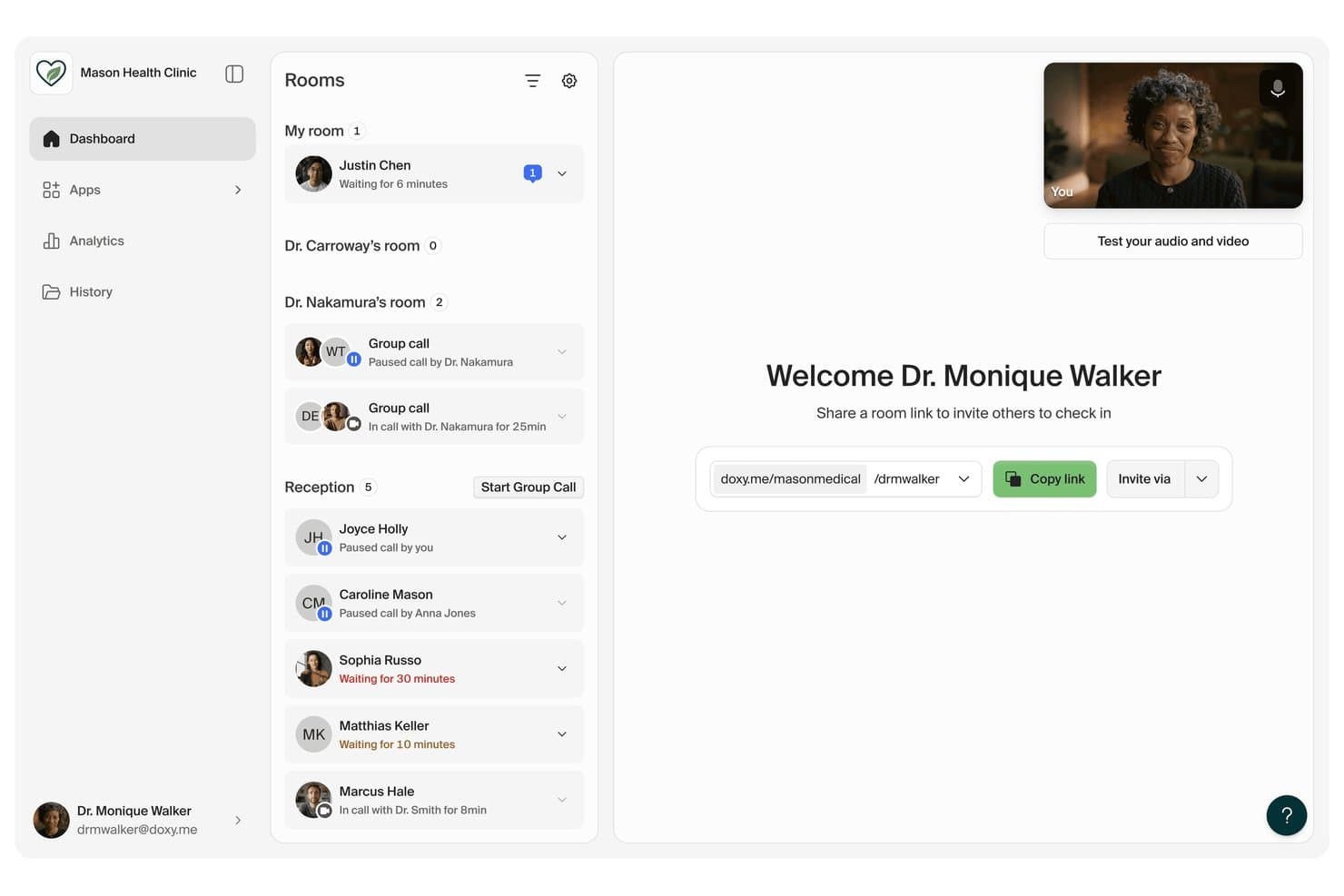
doxy.me offers a HIPAA-compliant telehealth dashboard where therapists can manage patient waiting rooms, monitor active calls, and share secure room links. Doxy.me is a browser-based, HIPAA-compliant telehealth platform built for therapists and behavioral health providers, offering secure video sessions, virtual waiting rooms, group calling, and in-session clinical tools like EMDR, CBT activities, and digital consent forms.
Who Is Doxy.me Best For?
Doxy.me is a strong fit for solo therapists and small behavioral health practices that need a dedicated telehealth tool to run alongside their existing EHR.
Why I Picked Doxy.me
I picked doxy.me because no-download, browser-based access is genuinely rare in HIPAA-compliant telehealth. Clients click a single, persistent link, land directly in the virtual waiting room, and I get a real-time notification when they arrive. I also rely on the therapy-specific in-session apps, particularly the built-in EMDR tool and CBT activity modules. These let me run structured clinical interventions directly within the session, without switching platforms mid-call.
Doxy.me Key Features
- Role-based user management: Set permissions for multiple providers and admins across a clinic account.
- Virtual waiting room: Hold clients in a branded online queue until you’re ready to start a session.
- Automated session notetaking: Use built-in tools to generate summaries or transcripts of telehealth visits.
- Stripe payments integration: Collect secure session payments from clients without leaving the platform.
Doxy.me Integrations
Doxy.me offers native integrations with Stripe for payments and supports single sign-on through Okta, Azure Active Directory, and Auth0. An API is available for custom integrations.
Pros and Cons
Pros:
- Free plan includes HIPAA-compliant video access
- Built-in EMDR and CBT session tools
- Clients join sessions without downloading anything
Cons:
- No scheduling or billing tools included
- No built-in clinical notes or documentation
Learn more about doxy.me: Best for virtual care and client engagement
- 14-day free trial
- From $19.99/month
Visit WebsiteCustomer Rating:4.4/5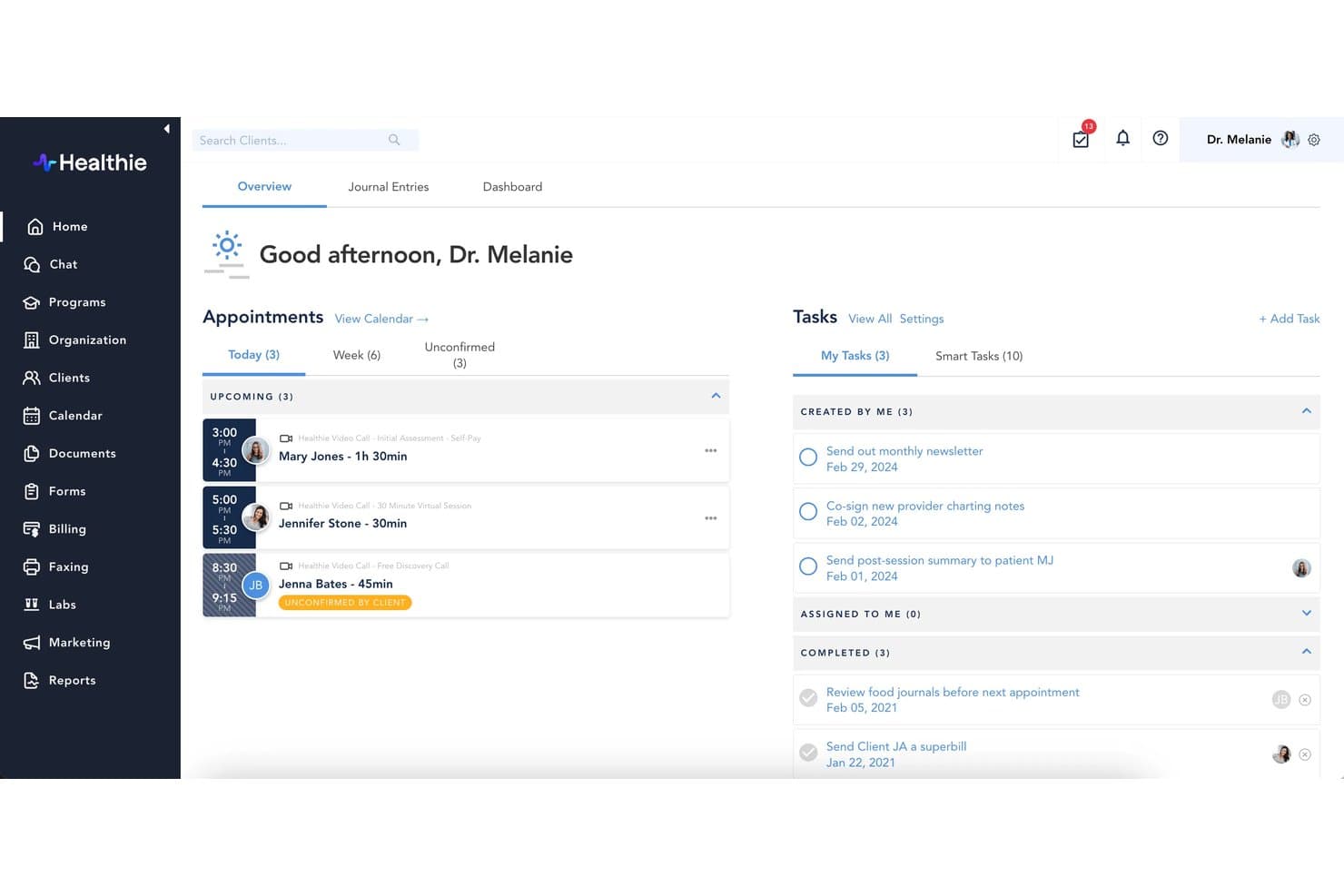
Healthie offers a HIPAA-compliant provider dashboard with appointment scheduling, task management, and client session tracking for therapists. Healthie is a HIPAA-compliant EHR and practice management platform built for health and wellness providers, combining clinical documentation, telehealth, scheduling, client engagement, and billing in one system.
Who Is Healthie Best For?
Healthie suits solo therapists and multi-provider behavioral health practices that run virtual-first or hybrid care models and need a unified platform for client engagement.
Why I Picked Healthie
I picked Healthie as one of the best because its telehealth and client engagement features are genuinely built around virtual care delivery. The HIPAA-compliant Zoom integration handles individual and group sessions without extra setup, and clients stay connected between appointments through secure messaging and a branded mobile app. I also like that group telehealth and structured online programs let therapists run cohort-based care, not just one-off sessions.
Healthie Key Features
- Customizable charting templates: Build and edit intake forms, SOAP notes, and outcome assessments tailored to different therapy specialties.
- Role-based access controls: Set granular permissions to manage provider, admin, and support staff access to client records and practice tools.
- Insurance claim management: Submit electronic claims, track claim statuses, and manage billing directly within the platform.
- Secure client document sharing: Upload, store, and share consent forms or treatment plans with clients through the HIPAA-compliant portal.
Healthie Integrations
Healthie offers native integrations with Zoom, Stripe, Square, QuickBooks Online, and ClaimMD. An API is available for custom integrations.
Pros and Cons
Pros:
- PHQ-9 and GAD-7 scoring built in
- Branded mobile app for client engagement
- Built-in group telehealth with waiting room
Cons:
- Insurance billing requires significant manual configuration
- Steeper setup for solo practitioners
Learn more about Healthie: Best for AI-assisted therapy notes
- 14-day free trial
- From $19.99/month
Visit WebsiteCustomer Rating:4.5/5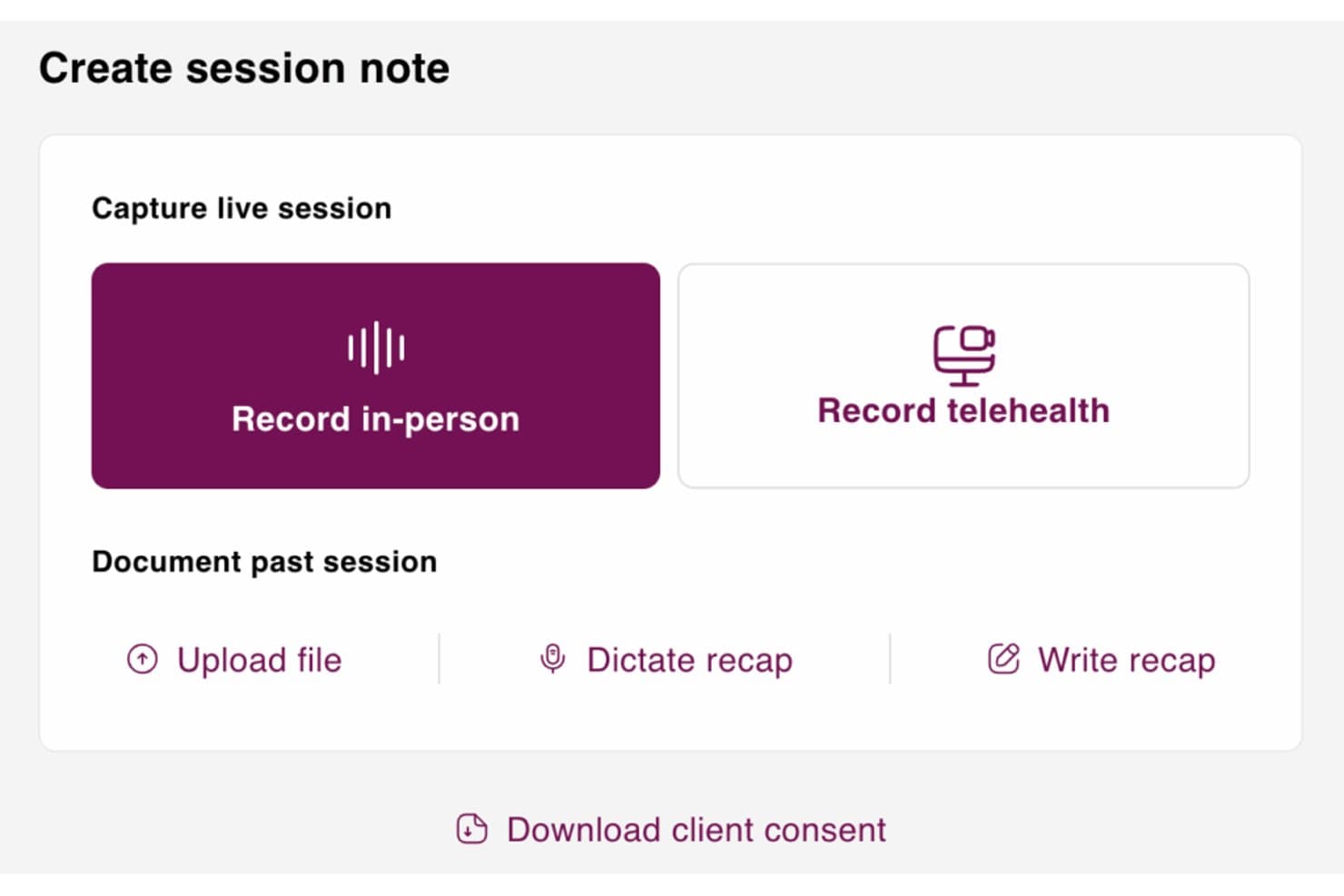
Mentalyc offers multiple session note creation options including live in-person recording, telehealth recording, file upload, dictate recap, and write recap. Mentalyc is an AI-powered clinical documentation tool for mental health professionals that transcribes therapy sessions and auto-generates progress notes, treatment plans, and assessments across a wide range of therapy-specific note formats.
Who Is Mentalyc Best For?
Mentalyc is a strong fit for solo therapists and group practice clinicians who spend significant time on session documentation and want to reduce that load with AI.
Why I Picked Mentalyc
I've included Mentalyc in my top picks because it's the only AI scribe I know that pulls therapy-specific notes directly from session audio, without the therapist needing to prompt or guide it. I particularly like Alliance Genie™, which scores therapeutic alliance from session content rather than client questionnaires. The HIPAA compliance infrastructure is also solid: SOC 2 Type II certified, with a signed BAA available directly from account settings and audio deleted immediately after transcription.
Mentalyc Key Features
- Modality-specific note templates: Choose from templates designed for EMDR, Brainspotting, Play Therapy, Psychiatry, and ABA.
- Custom template library: Access over 100 prebuilt formats including BIRP, GIRP, PIE, SIRP, and supervision notes.
- Client type support: Document for individuals, couples, families, group therapy, and supervised sessions.
- Automatic risk detection: Flags risk indicators and supports the creation of safety plans directly from your session transcripts.
Mentalyc Integrations
Native integrations are not clearly documented. An API is available for custom integrations.
Pros and Cons
Pros:
- Works across individual, couples, group, and family sessions
- Session audio is deleted within three days of processing
- Notes are generated without manual prompting
Cons:
- Occasional app freezes reported by some users
- No scheduling, billing, or EHR features built in
Learn more about Mentalyc: Best for all-in-one therapy practice management
- 30-day free trial
- From $49/month
Visit WebsiteCustomer Rating:4.6/5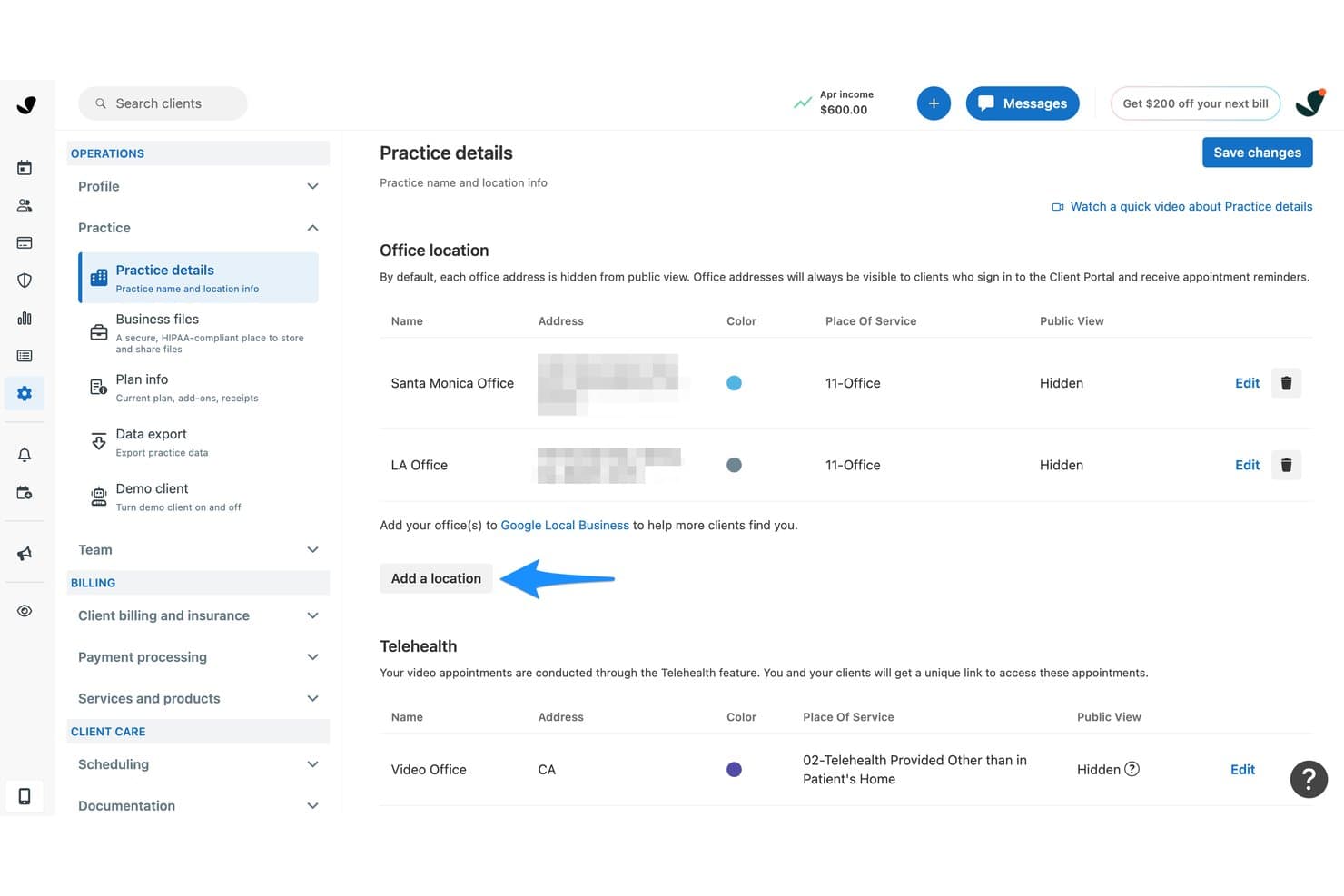
SimplePractice offers a Practice Details settings page where therapists can manage multiple HIPAA-compliant office locations and telehealth options. SimplePractice is a HIPAA-compliant EHR and practice management platform built for therapists and behavioral health professionals, covering clinical documentation, integrated telehealth, client scheduling, insurance billing, and a secure client portal.
Who Is SimplePractice Best For?
SimplePractice fits solo therapists and small group practices who need a single platform to handle clinical, administrative, and billing workflows without stitching together separate tools.
Why I Picked SimplePractice
I picked SimplePractice as one of the best because it keeps every HIPAA-covered workflow under a single BAA, from telehealth to insurance billing to clinical notes. I especially like the integrated telehealth, which includes a virtual waiting room and group sessions for up to 15 participants. Automatic ERA reconciliation is another feature I rely on: when insurers send payment explanations, SimplePractice matches them against outstanding claims automatically.
SimplePractice Key Features
- Customizable note templates: Create, edit, and reuse templates for SOAP, DAP, and intake assessments tailored to therapy specialties.
- Role-based user permissions: Assign different access levels for clinicians, supervisors, and admin staff to safeguard client information.
- Secure client portal: Share documents, collect intake forms, and send secure messages with clients in a protected online space.
- Integrated measurement tools: Use built-in PHQ-9 and GAD-7 assessments with automated scoring for progress tracking.
SimplePractice Integrations
SimplePractice offers native integrations with Google Calendar, Stripe, Telehealth by SimplePractice, Wiley Treatment Planners, and has an API for custom integrations.
Pros and Cons
Pros:
- BAA covers all subprocessors handling PHI
- PHQ-9 and GAD-7 scoring built in
- Telehealth built in with no extra subscription
Cons:
- Reporting lacks depth for larger group practices
- No e-prescribing for psychiatry or prescribers
Learn more about SimplePractice: Best for behavioral health documentation
- 30-day free trial
- From $69/month
Visit WebsiteCustomer Rating:4.4/5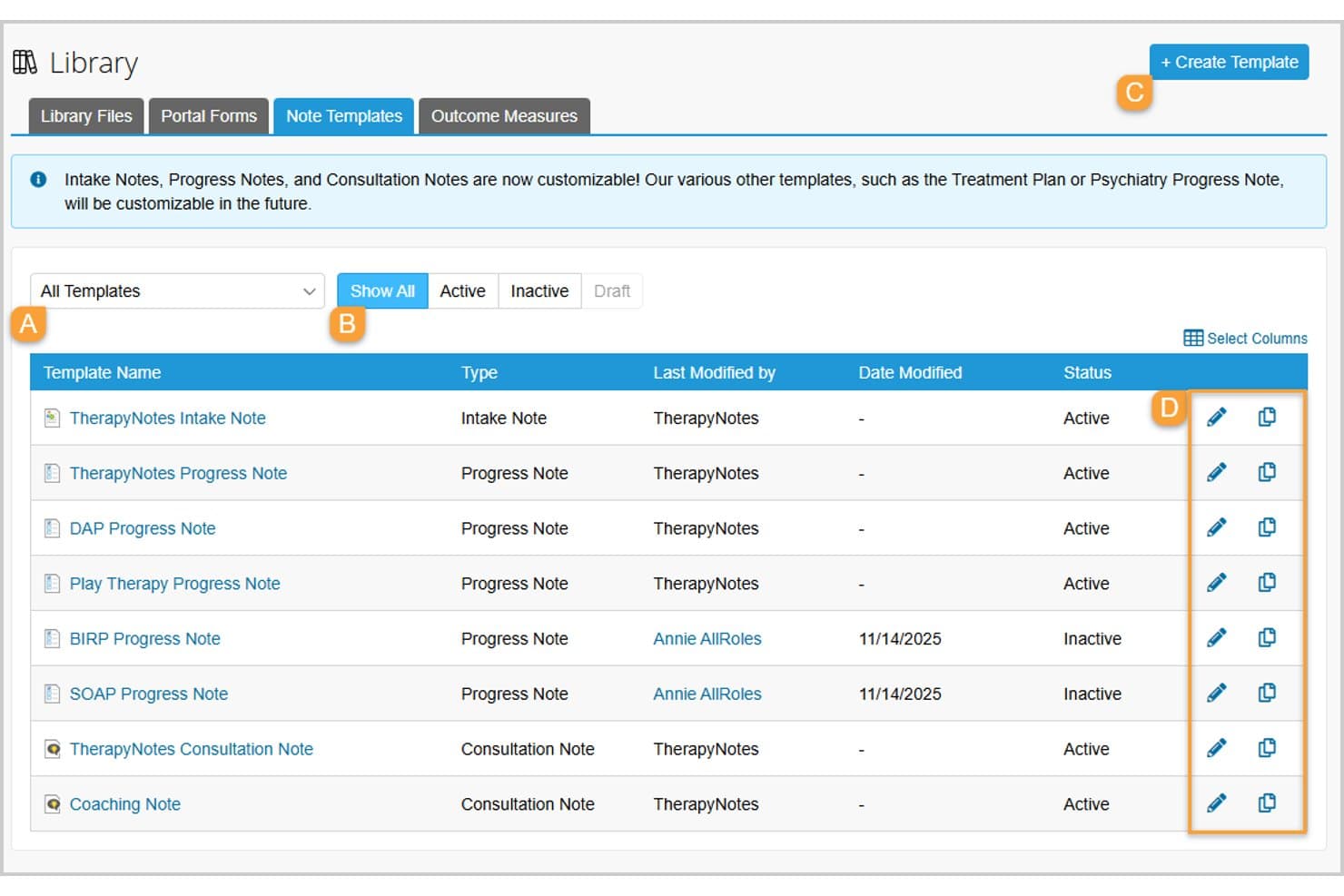
TherapyNotes offers a customizable Note Templates library where therapists can manage, edit, and duplicate Intake, Progress, and Consultation note templates with active or inactive statuses. TherapyNotes is a HIPAA-compliant EHR and practice management platform built specifically for behavioral health professionals, combining clinical documentation, scheduling, billing, telehealth, and secure client communication in one system.
Who Is TherapyNotes Best For?
TherapyNotes is a strong fit for solo therapists and small-to-mid-size behavioral health practices that need a purpose-built EHR with integrated billing and documentation.
Why I Picked TherapyNotes
TherapyNotes earns its spot on my shortlist because of how purpose-built its documentation tools are for behavioral health. I like that it offers form-based progress notes, treatment plans, and intake assessments designed specifically for behavioral health workflows. The outcome measures tool automatically scores client responses and tracks progress over time. TherapyFuel, its AI note assistant, drafts session notes directly within the EHR rather than through a separate tool.
TherapyNotes Key Features
- HIPAA-compliant client portal: Clients can self-schedule, complete intake forms, and securely message their clinician through a dedicated portal.
- Integrated telehealth platform: Built-in video sessions for one-on-one or group therapy are compliant with healthcare privacy requirements.
- Electronic insurance claims submission: Clinicians can generate and submit claims directly to over 2,000 payers with ERA payment posting and superbill support.
- Role-based permissions and audit trails: Administrators can assign granular access levels to users and monitor activity for compliance.
TherapyNotes Integrations
TherapyNotes offers native integrations with Office Ally, Availity, Stripe, and BluePay for insurance claims and payment processing. An API is available for custom integrations.
Pros and Cons
Pros:
- Billing and documentation live in one place
- Outcome measures scored and tracked automatically
- Behavioral health-specific note templates built in
Cons:
- Limited fit for non-behavioral health specialties
- No dedicated mobile app for clinicians
Learn more about TherapyNotes: Best for teletherapy and client engagement
- 30-day free trial
- From $39/month
Visit WebsiteCustomer Rating:4.4/5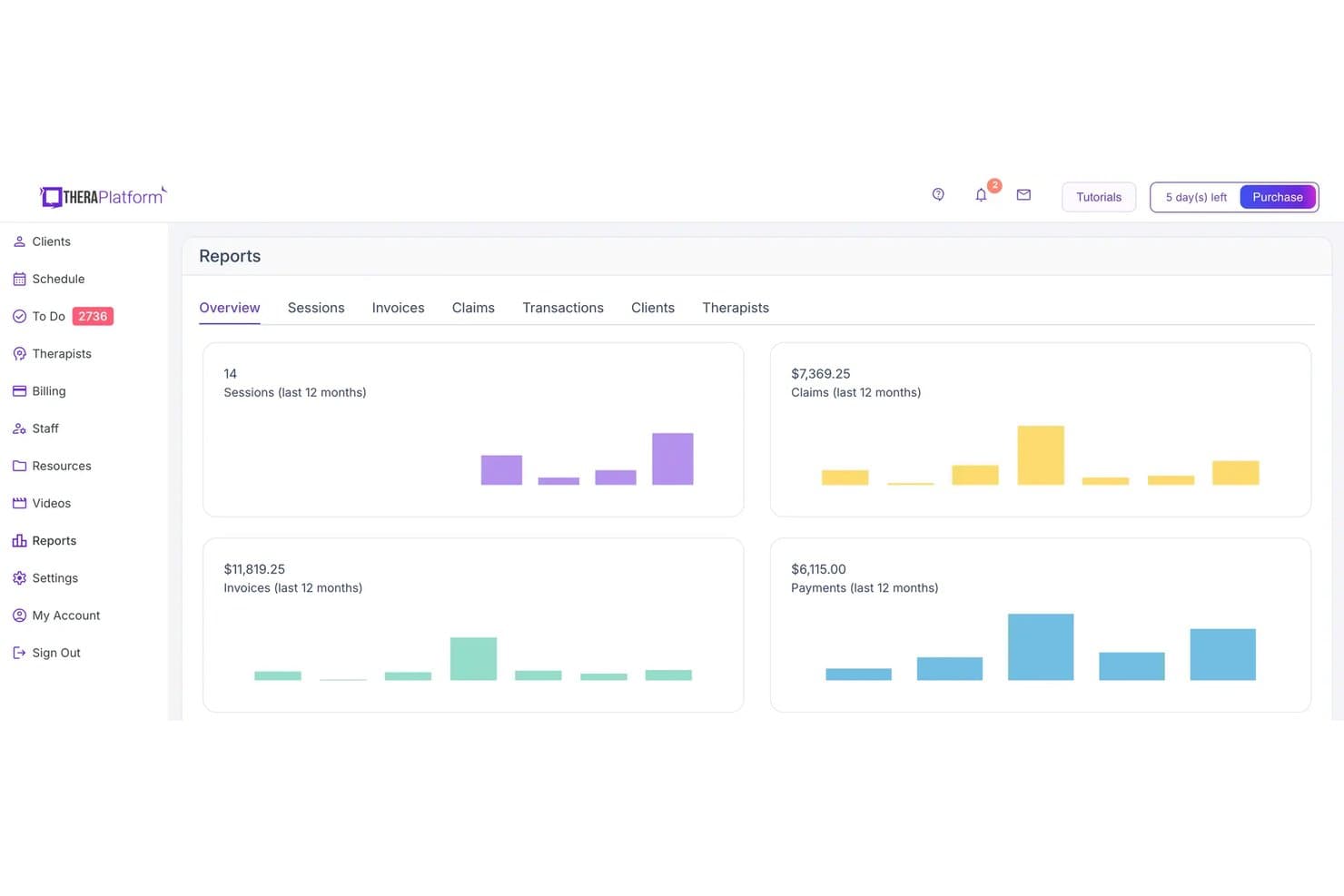
TheraPlatform displays a Reports overview dashboard with metrics for sessions, claims, invoices, and payments over the last 12 months. TheraPlatform is a HIPAA-compliant EHR and practice management platform built for mental and behavioral health therapists, combining integrated teletherapy, clinical documentation, scheduling, client portal, and insurance billing in one system.
Who Is TheraPlatform Best For?
TheraPlatform is a strong fit for solo therapists and small group practices across mental health, speech, occupational, and physical therapy disciplines.
Why I Picked TheraPlatform
TheraPlatform earns its spot on my shortlist because no other therapy EHR packs this much into its teletherapy suite. I particularly like the built-in library of 30+ interactive therapy apps and games you can run directly inside a live session, alongside a shared whiteboard and two-way screen sharing. The secure client portal rounds out the engagement picture, letting clients complete e-intake forms, access session homework, and message their therapist between visits.
TheraPlatform Key Features
- Wiley Treatment Planner integration: Access over 1,000 evidence-based treatment goals, objectives, and interventions within your documentation workflow.
- Insurance eligibility verification: Verify client coverage electronically before or during intake to reduce billing errors.
- Customizable clinical documentation: Use built-in templates for SOAP, DAP, intake notes, and create your own forms or assessments.
- Role-based permissions: Control access to client records and features by job function, supporting teams and group practice workflows.
TheraPlatform Integrations
TheraPlatform offers native integrations with Stripe for payment processing and Google Calendar for scheduling. An API is available for custom integrations.
Pros and Cons
Pros:
- Measurement-based care tools with automated scoring
- Supports group, couples, and family billing workflows
- Built-in therapy apps for live sessions
Cons:
- Mobile app experience is limited for clinicians
- Billing features lag behind dedicated RCM tools
Learn more about TheraPlatform: Best for behavioral health clinical notes
- 30-day free trial
- From $55/month
Visit WebsiteCustomer Rating:4.1/5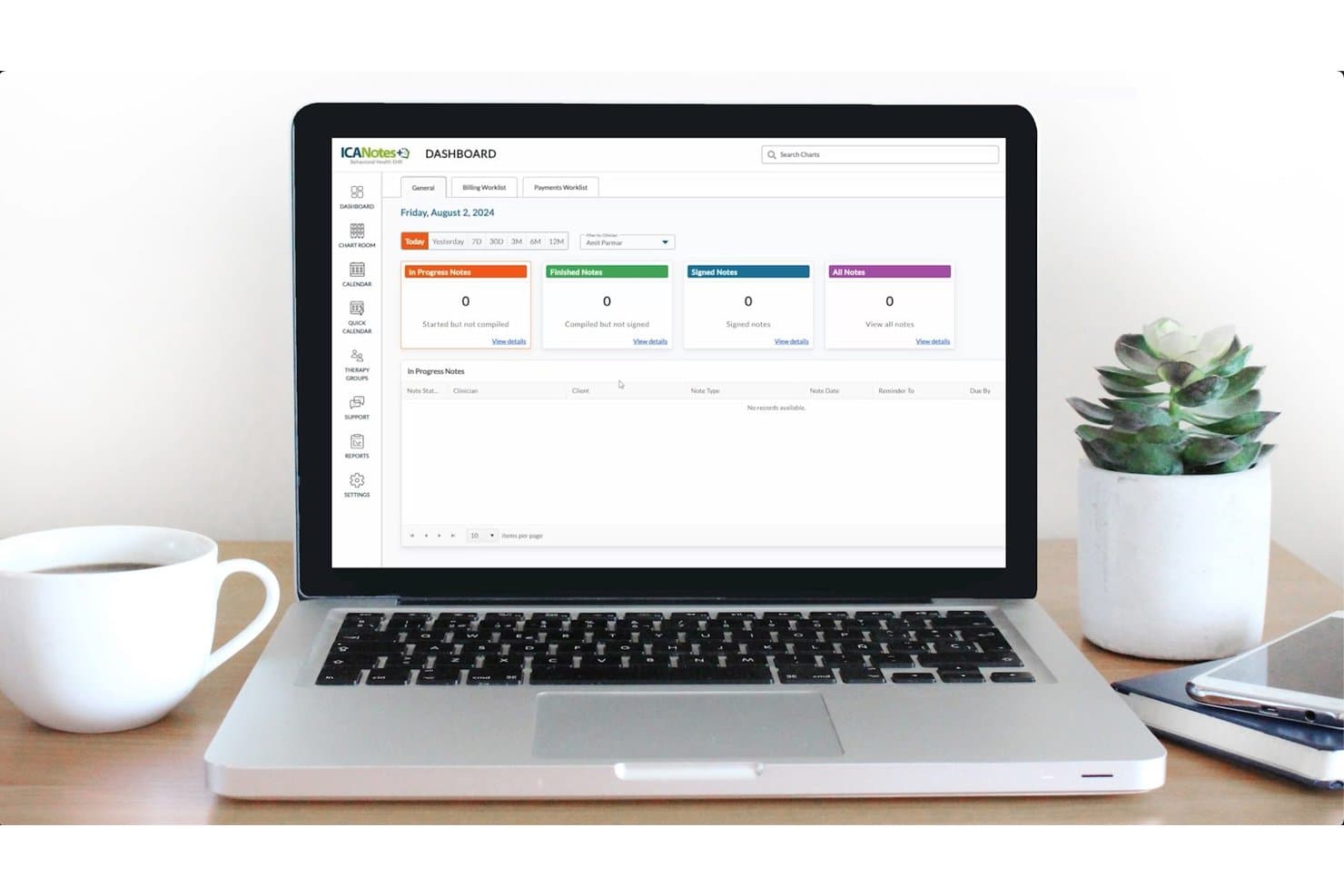
ICANotes offers a centralized dashboard where therapists can track in-progress, finished, and signed clinical notes in one HIPAA-compliant view. ICANotes is a cloud-based EHR built exclusively for behavioral health, combining HIPAA-compliant clinical documentation, integrated telehealth, scheduling, client portal, and billing tools designed around the workflows of mental health and psychiatric clinicians.
Who Is ICANotes Best For?
ICANotes is a strong fit for solo therapists, group practices, and behavioral health clinics that need psychiatry- and therapy-focused documentation workflows in one system.
Why I Picked ICANotes
ICANotes earns its spot on my shortlist because of how far its clinical documentation goes beyond basic note templates. I particularly like the proprietary content engine, which draws on 75,000+ behavioral health-specific clinical phrases to help clinicians build audit-ready SOAP, BIRP, and DAP notes quickly. Add in 100+ built-in standardized rating scales, and I think it's one of the most documentation-complete platforms available for behavioral health clinicians.
ICANotes Key Features
- Integrated telehealth: Launch HIPAA-compliant video sessions directly from the platform with client invitations and appointment tracking.
- Automated billing and claims management: Submit electronic claims, auto-post ERA payments, and manage denials for behavioral health insurance billing.
- Role-based user permissions: Set access levels for clinical and administrative team members to protect sensitive health information.
- Client portal with secure messaging: Let clients schedule, complete intake forms, send documents, and communicate through a secure online portal.
ICANotes Integrations
ICANotes provides native integrations with Office Ally and TriZetto for claims management, ERAs, and eligibility checks. An API is available for custom integrations.
Pros and Cons
Pros:
- Supports both psychiatric and therapy documentation workflows
- Built-in standardized rating scales for assessments
- Behavioral health-specific note templates built in
Cons:
- Setup and onboarding can take considerable time
- Dated interface compared to newer EHR platforms
Learn more about ICANotes: Best for solo therapist practice management
- 30-day free trial
- From $59/month
Visit WebsiteCustomer Rating:4.2/5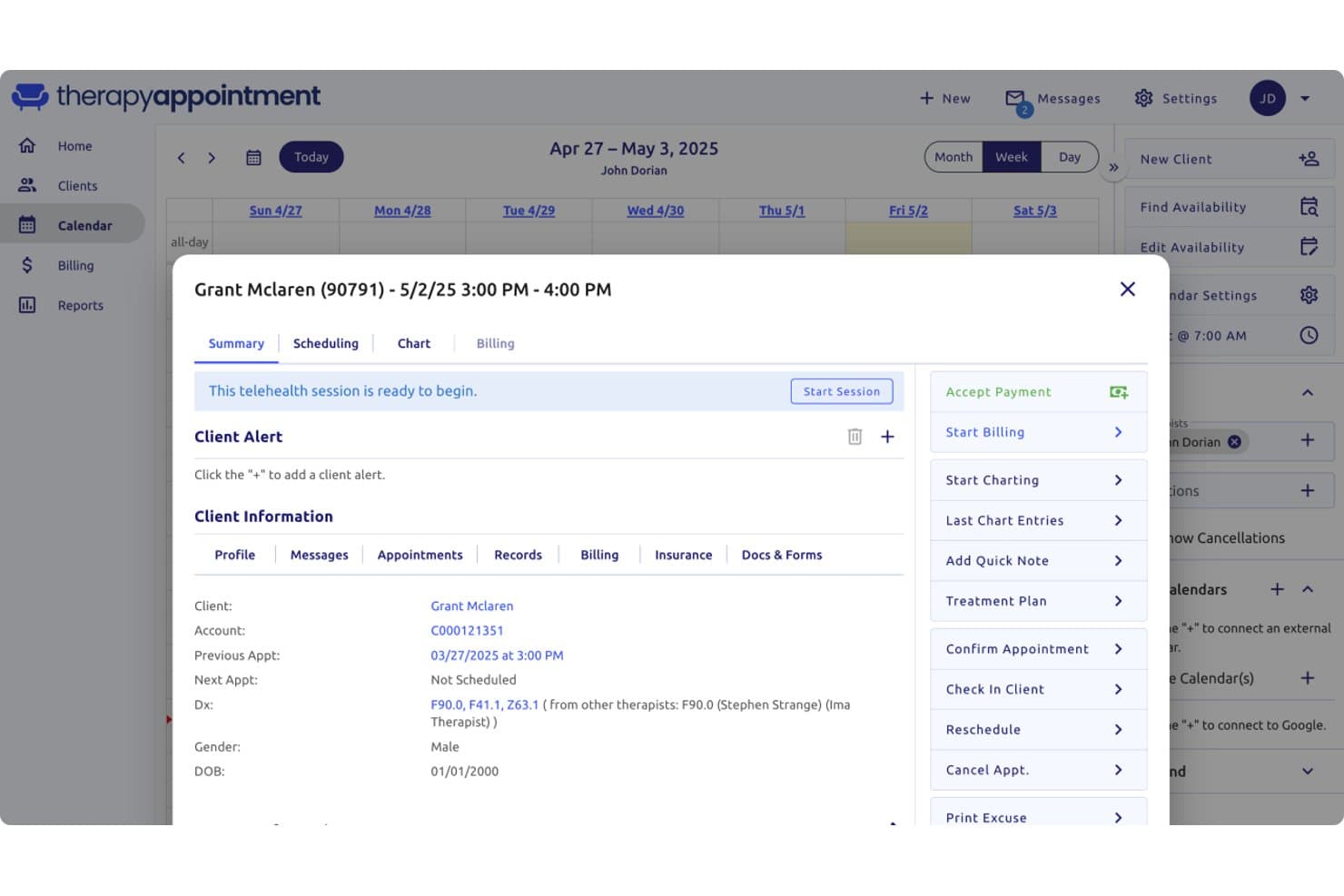
TherapyAppointment offers a detailed client appointment summary modal displaying telehealth session controls, client alerts, diagnoses, and HIPAA-relevant billing and charting options. TherapyAppointment is a HIPAA-aligned practice management platform built specifically for mental health professionals, combining clinical documentation, client scheduling, insurance billing, telehealth, and a secure client portal in one system.
Who Is TherapyAppointment Best For?
TherapyAppointment is a strong fit for solo therapists and small mental health practices that want an affordable, all-in-one system without juggling separate tools for billing, notes, and scheduling.
Why I Picked TherapyAppointment
I picked TherapyAppointment as one of the best because it's built around the solo therapist's day-to-day workflow. The AI Notes feature generates draft session notes and treatment plans at $0.59 per note, cutting documentation time when there's no admin team to share the load. The client portal handles intake forms, e-signatures, and self-scheduling automatically, so onboarding a new client doesn't require manual back-and-forth before the first session.
TherapyAppointment Key Features
- Telehealth integration: Launch secure, HIPAA-compliant video sessions from within the provider dashboard.
- Customizable note templates: Access built-in SOAP, DAP, and intake templates for detailed clinical documentation.
- Electronic claims management: Submit insurance claims electronically and track ERA posting from start to finish.
- Role-based access controls: Set granular permissions for clinicians, supervisors, and admins to protect sensitive client data.
TherapyAppointment Integrations
TherapyAppointment offers native integrations with Google Calendar, Outlook, and Zoom for Healthcare. An API is available for custom integrations.
Pros and Cons
Pros:
- Affordable flat-fee pricing suits solo private practice budgets
- Billing dashboard flags incomplete charts before claim submission
- Automated appointment reminders reduce no-shows noticeably
Cons:
- Scaling beyond solo practice reveals gaps in multi-client record management
- No dedicated mobile app for therapists on the go
Learn more about TherapyAppointment:
Other HIPAA Compliant Software for Therapists
Here are some additional HIPAA compliant software for therapists options that didn’t make it onto my shortlist, but are still worth checking out:
- 11ValantBest for behavioral health EHR workflows
- 12Owl PracticeBest for Canadian therapy practices
- 13Practice BetterBest for wellness client management
- 14CounSolBest for therapist scheduling and billing
- 15CarePathsBest for behavioral health outcomes tracking
- 16UphealBest for AI therapy documentation
- 17QuenzaBest for digital therapy activities
How I Evaluate HIPAA Compliant Software for Therapists
I split my evaluation into two layers: baseline requirements like BAA coverage and clinical note templates, then differentiators like billing workflows and client portal depth.
Core Functionality (Table Stakes For This List)
When I'm selecting tools for my list, I rank each one on a scale from 0 (does not offer the functionality) to 5 (excels in this area) for each core functionality listed below. I then calculate the tool's total score into a percentage, using 65% as a benchmark to help assess its overall fit for the list.
- HIPAA-Compliant Infrastructure: I check whether the vendor provides a signed BAA and uses AES-256 encryption for PHI at rest and in transit.
- Clinical Documentation: Templates for SOAP, DAP, and intake assessments matter—I look for customizable formats that match how therapists actually write notes.
- Secure Telehealth: I evaluate whether video is built into the platform or relies on a third-party link, and whether it supports group sessions and screen sharing.
- Client Scheduling & Portal: I look for self-scheduling, automated reminders, and a secure portal where clients can complete intake forms and send messages.
- Behavioral Health Billing: Claim submission workflows, CPT code support for mental health services, and superbill generation all factor in—especially clearinghouse connections.
- Access Controls & Audit Logs: Role-based permissions and audit trails are key for group practices where supervisors need to review and co-sign clinical notes.
Once I have a list of tools that meet the criteria, I consider what sets each platform apart.
Differentiating Factors (What Sets Vendors Apart)
Here's how I compare and contrast different vendors:
Standout Features
Measurement-based care tools are a real differentiator. Built-in assessments like PHQ-9 and GAD-7 with automated scoring help track client progress and support insurance audit documentation. I also look at group and couples session support—multi-client note templates and shared billing workflows matter when your caseload extends beyond individual clients. Client portals with e-signature capability are worth evaluating too, since they let clients complete consent forms before their first session.
Beyond Features
BAA availability across all pricing tiers matters—some vendors only include a signed BAA on higher plans, which creates compliance gaps for solo therapists on starter subscriptions. I also evaluate practice size fit, since a group practice with supervisors needs clinician-level permissions and co-sign workflows that a solo practitioner would never use. Pricing transparency is another factor I check closely, especially whether telehealth and claims submission are bundled or billed as add-ons.
How to Choose HIPAA Compliant Software for Therapists
When you need to pick HIPAA compliant software for therapists, focus first on which daily headaches you want this tool to solve—and then verify the vendor’s real-world approach to privacy, billing, and practice fit:
| If your priority is… | Prioritize… |
| Seamless, secure telehealth | Built-in encrypted video, not third-party |
| Documenting care for insurance audits | Customizable templates and auto-scoring |
| Managing scheduling and reminders | Self-serve client portals with messaging |
| Submitting insurance claims without rework | Native superbill and e-claim workflows |
| Clear compliance protection for all clinicians | Signed BAA available at all plan levels |
How to Vet Your Shortlist
- Request a sample BAA: Review it in full and confirm coverage for all subprocessors—don’t just accept a marketing blurb.
- Run a trial with one real client intake: Upload a test intake form, complete documentation, and check user access logs within five days.
- File a support ticket: Submit a compliance scenario (breach reporting or PHI export) and track the vendor’s response for accuracy and detail.
- Audit billing workflows: Submit a test insurance claim or batch superbill—look for clearinghouse integration and CPT code coverage.
- Solo-practice simplicity vs. group-practice controls: Decide if you value hands-off workflows or layered permissions and multi-clinician audit features.
What Are HIPAA Compliant Software for Therapists?
HIPAA compliant software for therapists are digital platforms designed to protect client privacy, ensure secure recordkeeping, and support therapy workflows while meeting stringent healthcare privacy rules. These systems offer features like encrypted data storage, secure telehealth, customizable clinical documentation, and client portals—allowing therapists to manage appointments, notes, and billing without putting protected health information at risk.
Features of HIPAA Compliant Software for Therapists
When selecting HIPAA compliant software for therapists, keep an eye out for the following key features:
- HIPAA-compliant infrastructure: End-to-end encryption and Business Associate Agreements ensure all stored and transmitted client data stays protected and meets regulatory requirements.
- Customizable clinical documentation: Therapy-focused templates for SOAP, DAP, and intake assessments help standardize progress notes and treatment plans for more consistent recordkeeping.
- Integrated telehealth: Built-in secure video conferencing tools allow you to easily host remote therapy sessions without exposing client data to third-party risks.
- Client scheduling and portal: Self-service appointment booking, automated reminders, and secure client messaging simplify day-to-day administrative work and boost client engagement.
- Electronic billing and superbills: Insurance claims, superbill generation, and CPT code support streamline billing and reimbursement for both insurance and private-pay clients.
- Role-based access controls: Define permission levels for clinicians, supervisors, and administrative staff so only authorized users access sensitive information and actions.
- Audit logs and activity tracking: Automatically record access and edits to client records, helping practices comply with HIPAA audit requirements and monitor user actions.
- E-signature and consent management: Collect client signatures and manage consent forms digitally, allowing clients to complete intake paperwork remotely and securely.
- Mobile accessibility: Native mobile apps or responsive portals let therapists and clients access records, appointments, and telehealth sessions on the go.
- Automated outcome assessments: Built-in tools for administering clinical questionnaires (PHQ-9, GAD-7, etc.) support measurement-based care and track client progress over time.
Benefits of HIPAA Compliant Software for Therapists
Implementing HIPAA compliant software for therapists provides several benefits for your team and your business. Here are a few you can look forward to:
- Stronger data security: End-to-end encryption, audit logs, and role-based permissions keep client information private and your practice in regulatory alignment.
- Simplified session documentation: Built-in therapy note templates and e-signatures speed up writing, reviewing, and signing clinical notes and treatment plans.
- Consistent telehealth experience: Secure, integrated video tools let you deliver remote care without juggling external apps or risking PHI exposure.
- Streamlined scheduling and reminders: Self-serve client portals cut back on manual appointment management and help clients stay engaged in their therapy.
- Faster insurance reimbursement: Native electronic billing workflows, superbills, and CPT code support make it easier to submit claims and track reimbursement.
- Reduced administrative workload: Secure e-forms, intake management, and digital paper trails mean less manual paperwork and more time for clinical work.
- Clear audit and compliance support: Automated trails and reporting features help you stay ready for audits and demonstrate compliance if needed.
Costs and Pricing of HIPAA Compliant Software for Therapists
Selecting HIPAA compliant software for therapists requires an understanding of the various pricing models and plans available. Costs vary based on features, team size, add-ons, and more. The table below summarizes common plans, their average prices, and typical features included in HIPAA compliant software for therapists solutions:
Plan Comparison Table for HIPAA Compliant Software for Therapists
| Plan Type | Average Price | Common Features |
| Free Plan | $0 | Basic note-taking, limited scheduling, and secure data storage. |
| Personal Plan | $25-$40/user/month | HIPAA compliance, telehealth tools, intake forms, client portal, and basic billing. |
| Business Plan | $45-$80/user/month | Advanced documentation, insurance claims, e-signatures, group workflows, and expanded user permissions. |
| Enterprise Plan | $100+/user/month | Custom integrations, priority support, robust compliance features, onboarding services, and data export. |
HIPAA Compliant Software for Therapists FAQs
Here are some answers to common questions about HIPAA compliant software for therapists:
Do I need a signed Business Associate Agreement (BAA) with my software vendor?
Yes, you need a signed BAA to ensure the vendor assumes responsibility for protecting client health information, which is a core HIPAA requirement.
Can I use regular video conferencing tools for telehealth sessions?
No, general-purpose video tools like Zoom or Skype are not automatically HIPAA compliant—your software must provide encrypted sessions and a BAA.
How do these platforms help with insurance billing?
Most HIPAA compliant software for therapists offers built-in claim submission, CPT code support, and superbill creation to simplify working with insurance payers.
What does role-based access control provide in these systems?
Role-based access ensures only authorized staff—like therapists, supervisors, or admins—can see or edit specific client data, reducing the risk of unauthorized access.
Are there options for solo and group practices?
Yes, many solutions offer scalable plans and features to fit solo practitioners, group practices, and even larger therapy organizations.