

Dermatology EHR (electronic health record) software is designed to support the clinical, administrative, and billing needs of dermatology practices in one system. If you’re comparing the best dermatology EHR options, you’re likely looking for tools that fit your unique workflows, deliver on documentation demands, and make care coordination smoother for your team.
With so many systems on the market, sorting out which ones are genuinely built for dermatology can feel overwhelming. This guide gives you expert insight into the top options, what they do best, and how they stand up for real dermatology practices today.
Why Trust Our Software Recommendations
6,700+
Reviews
20
Industry experts
16+
Evaluation factors
14
Years
Our team has been testing and reviewing software since 2012. As medical practice leaders ourselves, we know how difficult—and important—it is to choose the right software.
For this guide, we evaluated tools using hands-on testing and independent research, scoring tools using our selection criteria.
Our reviews reflect our human editorial judgment, not a sales pitch.
Dermatology EHR Comparison Table
This comparison table summarizes pricing details for my top dermatology EHR selections:
| Tool | Best For | Trial Info | Price | ||
|---|---|---|---|---|---|
| 1 | Best for dermatology booking and records | Free demo available | From $65/user/month (billed annually) | Website | |
| 2 | Best for mobile dermatology charting | Free demo available | Pricing upon request | Website | |
| 3 | Best for specialty dermatology workflows | Free demo available | Pricing upon request | Website | |
| 4 | Best for dermatology billing and EHR | 30-day free trial + free demo available | From $130/month | Website | |
| 5 | Best for connected dermatology care | Free demo available | Pricing upon request | Website | |
| 6 | Best for adaptive dermatology charting | Free demo available | Pricing upon request | Website | |
| 7 | Best for visual dermatology workflows | Free demo available | Pricing upon request | Website | |
| 8 | Best for dermatology EHR and imaging | Free demo available | Pricing upon request | Website | |
| 9 | Best for cosmetic treatment charting | 14-day free trial | From $15/user/month | Website | |
| 10 | Best for all-in-one dermatology management | Free demo available | Pricing upon request | Website |


Best Dermatology EHR Reviews
Below are my detailed summaries of the best dermatology EHR that made it onto my shortlist. My reviews offer a detailed look at the features, integrations, and best use cases of each system to help you find the best one for you.
 Best for dermatology booking and records
- Free demo available
- From $65/user/month (billed annually)
Visit WebsiteCustomer Rating:4.7/5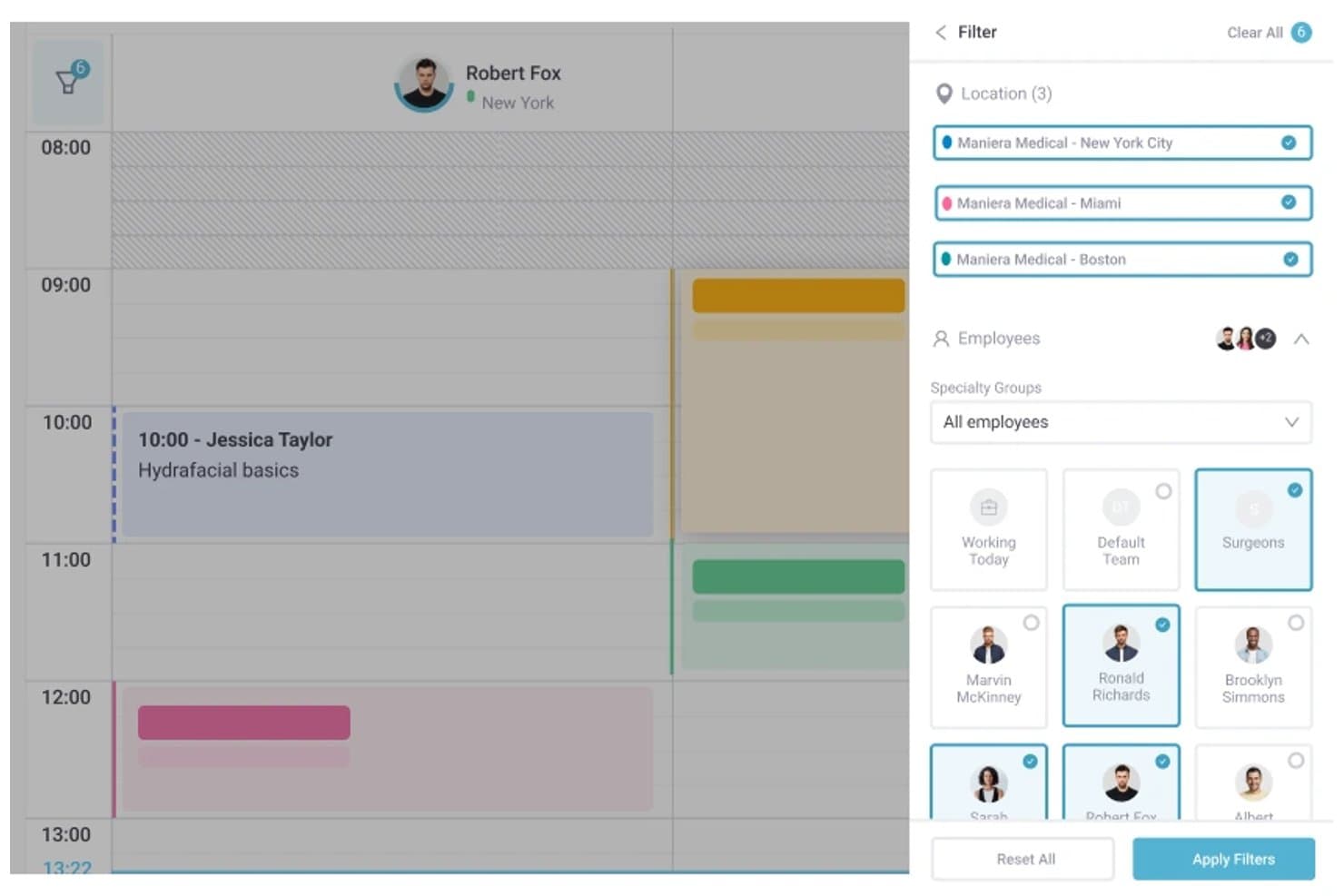
Pabau offers multi-location filtering and employee group selection within its scheduling calendar view. Pabau is an all-in-one practice management and EHR platform combining appointment scheduling, digital patient records, clinical photo documentation, consent management, and billing tools for cosmetic and hybrid dermatology practices.
Who Is Pabau Best For?
Pabau suits small to mid-sized cosmetic and hybrid dermatology clinics that need integrated booking, records, and patient communications in one platform.
Why I Picked Pabau
I've included Pabau in my top picks because it connects booking and clinical records in a way that fits dermatology workflows. When a patient books, digital intake forms and consent documents go out automatically before they arrive. During the visit, I document treatment areas on anatomical body diagrams and attach before/after photos directly to the chart. The AI Medical Scribe then captures notes with ICD/SNOMED codes in real time.
Pabau Key Features
- Digital patient intake forms: Patients submit medical history and consents electronically before their visit.
- Integrated billing and claims tools: Manage invoicing, insurance claims, and remittance in one system.
- Clinical photo documentation: Store and organize before-and-after photos within patient charts.
- AI-powered medical scribe: Automatically capture visit notes and standardized clinical codes during encounters.
Pabau Integrations
Pabau offers native integrations with Stripe, Xero, Klarna, The Doctors Laboratory, Reserve with Google, Google Calendar, Outlook Calendar, and Google Analytics. An API is available for custom integrations.
Pros and Cons
Pros:
- AI scribe captures clinical notes automatically
- Before/after photo documentation built in
- Automated patient booking and intake forms
Cons:
- Lacks Mohs surgery workflow support
- No ONC certification for US practices
Learn more about Pabau: Best for mobile dermatology charting
- Free demo available
- Pricing upon request
Visit WebsiteCustomer Rating:3.9/5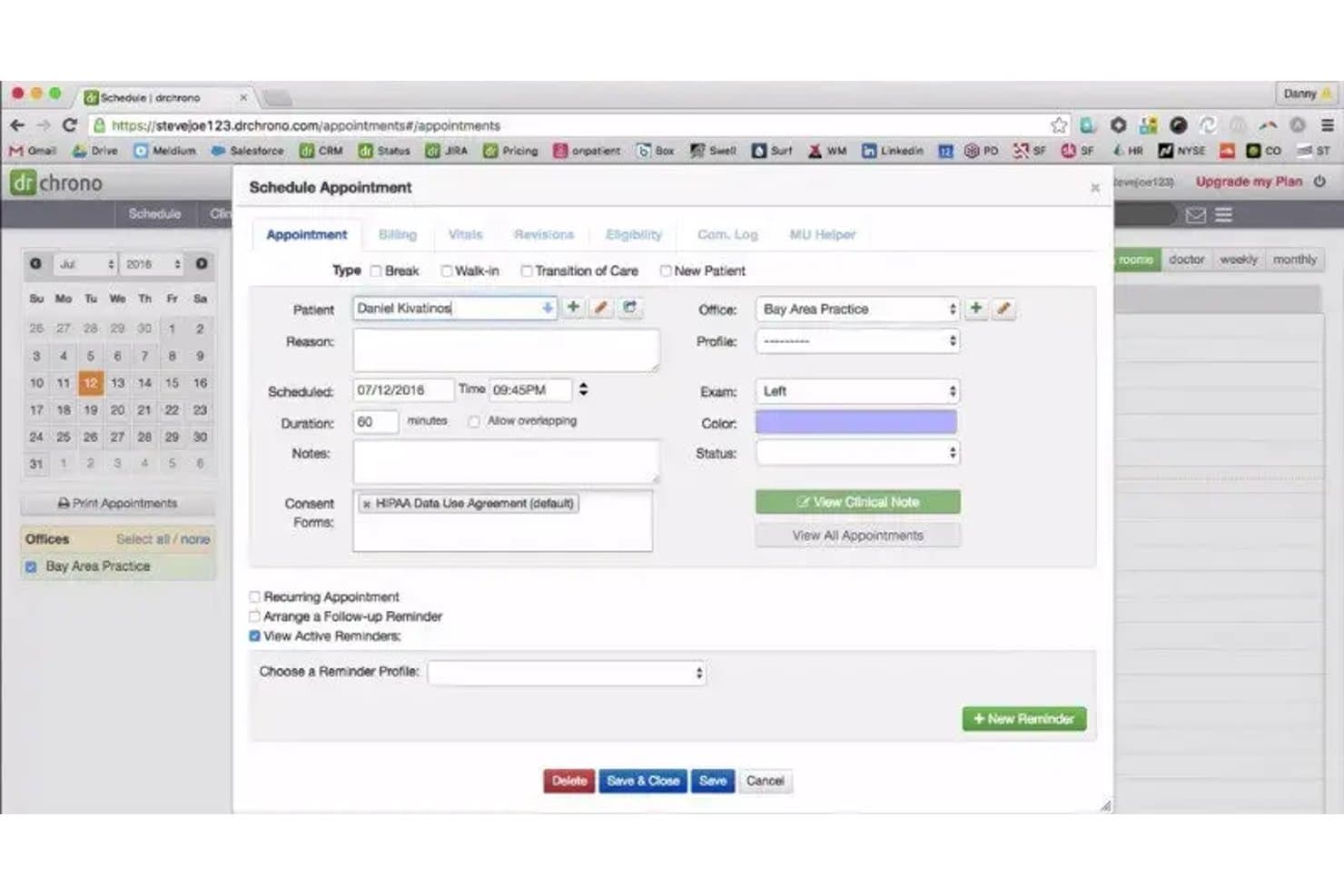
DrChrono offers a detailed Schedule Appointment modal with fields for patient info, exam side, consent forms, and reminders, relevant to dermatology visit scheduling. DrChrono is a cloud-based, iPad-native EHR that combines clinical charting, practice management, medical billing, and revenue cycle tools for small to mid-sized medical practices, including dermatology.
Who Is DrChrono Best For?
DrChrono suits solo and small-group dermatology practices that want a mobile-first, iPad-native EHR with integrated billing.
Why I Picked DrChrono
I picked DrChrono as one of the best because of its iPad-native charting architecture. The platform's integrated photo and drawing tools let me capture and annotate lesion images directly within the patient chart. In a dermatology exam room, that means I'm not switching devices or managing a separate camera between documenting and treating a patient.
DrChrono Key Features
- Customizable dermatology templates: Create and modify specialty charting templates to fit medical dermatology workflows.
- Bidirectional lab integration: Connects with major labs like Quest and LabCorp for dermatopathology result delivery and specimen tracking.
- ONC certification and e-prescribing: Supports electronic prescriptions, EPCS, and compliance with HIPAA and MIPS reporting requirements.
- Integrated patient portal: Lets patients access records, upload information, and communicate directly with your office.
DrChrono Integrations
DrChrono offers native integrations with Quest Diagnostics, LabCorp, Surescripts, CoverMyMeds, Iron Bridge, Square, Collectly, Holly, Box, and Ambra. An open API is available for custom integrations.
Pros and Cons
Pros:
- ONC-certified with EPCS and MIPS support
- In-chart photo and annotation tools included
- iPad-native charting for point-of-care use
Cons:
- Few prebuilt dermatology-specific charting templates
- No Mohs mapping or staging module
Learn more about DrChrono: Best for specialty dermatology workflows
- Free demo available
- Pricing upon request
Visit WebsiteCustomer Rating:3.7/5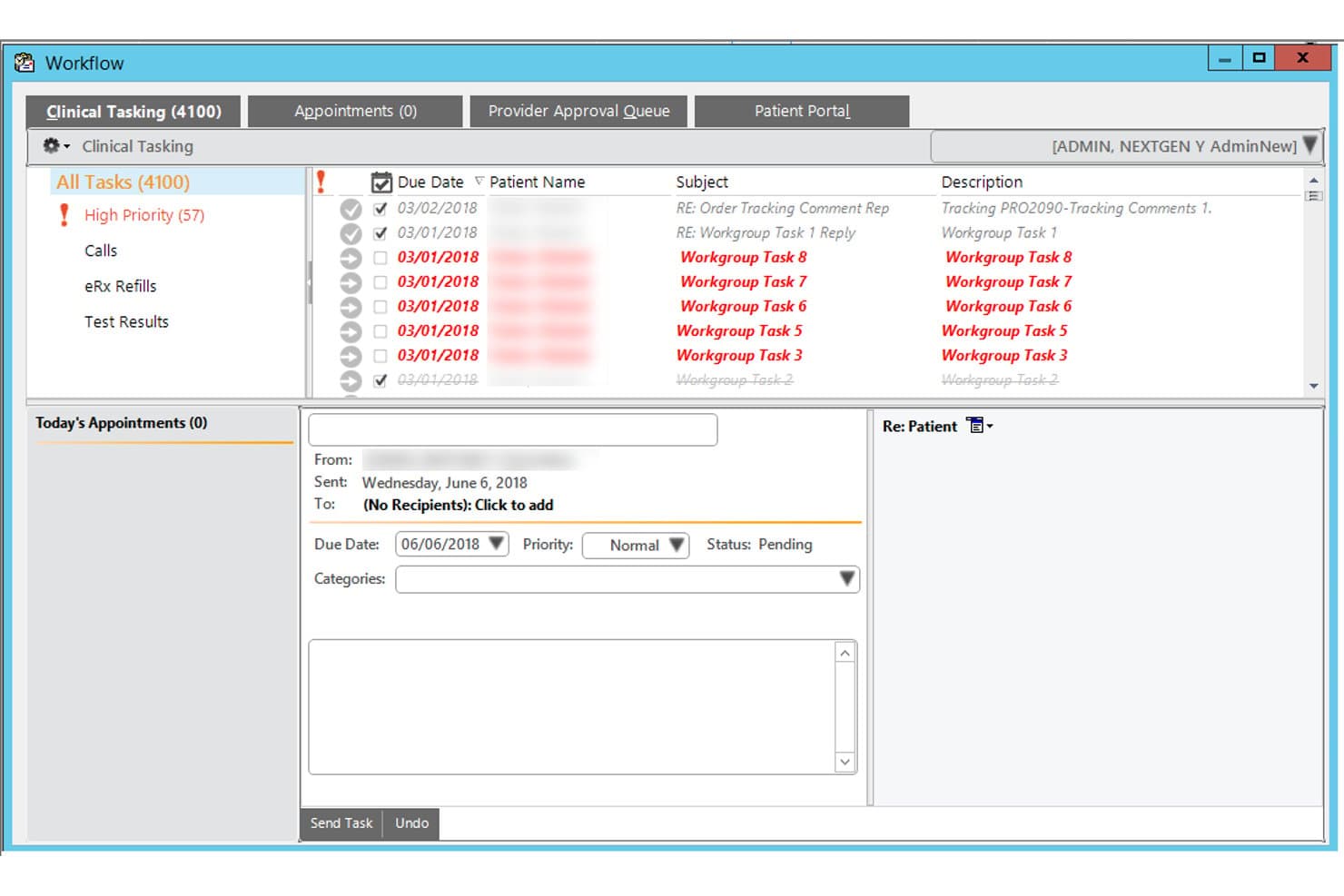
NextGen Healthcare offers a Clinical Tasking workflow interface that allows providers to manage and prioritize patient-related tasks, appointments, and messages in one view. NextGen Healthcare is an ambulatory EHR and practice management platform built for specialty practices, offering dermatology-specific templates, clinical image integration, AI-assisted documentation, lab connectivity, and integrated RCM.
Who Is NextGen Healthcare Best For?
NextGen Healthcare is a strong fit for multi-location dermatology groups with 10 or more providers that need enterprise-grade practice management alongside specialty clinical workflows.
Why I Picked NextGen Healthcare
I picked NextGen Healthcare as one of the best because its dermatology content is built specifically for the specialty, covering biopsy logs, skin cancer staging, and direct image integration into the patient chart. I like that the two-click documentation defaults let providers move through high-volume derm visits without rebuilding templates from scratch. The Ambient Assist AI also captures patient-provider conversations and generates structured SOAP notes automatically.
NextGen Healthcare Key Features
- Integrated patient portal: Lets patients access lab results, upload documents, and communicate with providers securely.
- Mobile-enabled documentation: Allows clinicians to capture notes, images, and patient data directly from smartphones or tablets.
- Bidirectional lab interfaces: Connects with dermatopathology labs to send orders and receive results directly into patient charts.
- Mirth Connect interoperability engine: Facilitates data exchange with external systems and national networks for full care coordination.
NextGen Healthcare Integrations
NextGen Healthcare offers native integrations with Clearwave, Doctible, Solutionreach, Luma, and InstaMed, supports lab connectivity with over 725 labs through NextGen Share, and provides an API and Mirth Connect for custom integrations.
Pros and Cons
Pros:
- Skin cancer staging with direct image chart integration
- Ambient AI captures and structures clinical notes automatically
- Dermatology-built templates reduce charting time significantly
Cons:
- Implementation complexity frustrates smaller derm practices
- No dedicated Mohs mapping module documented
Learn more about NextGen Healthcare: Best for dermatology billing and EHR
- 30-day free trial + free demo available
- From $130/month
Visit WebsiteCustomer Rating:3.6/5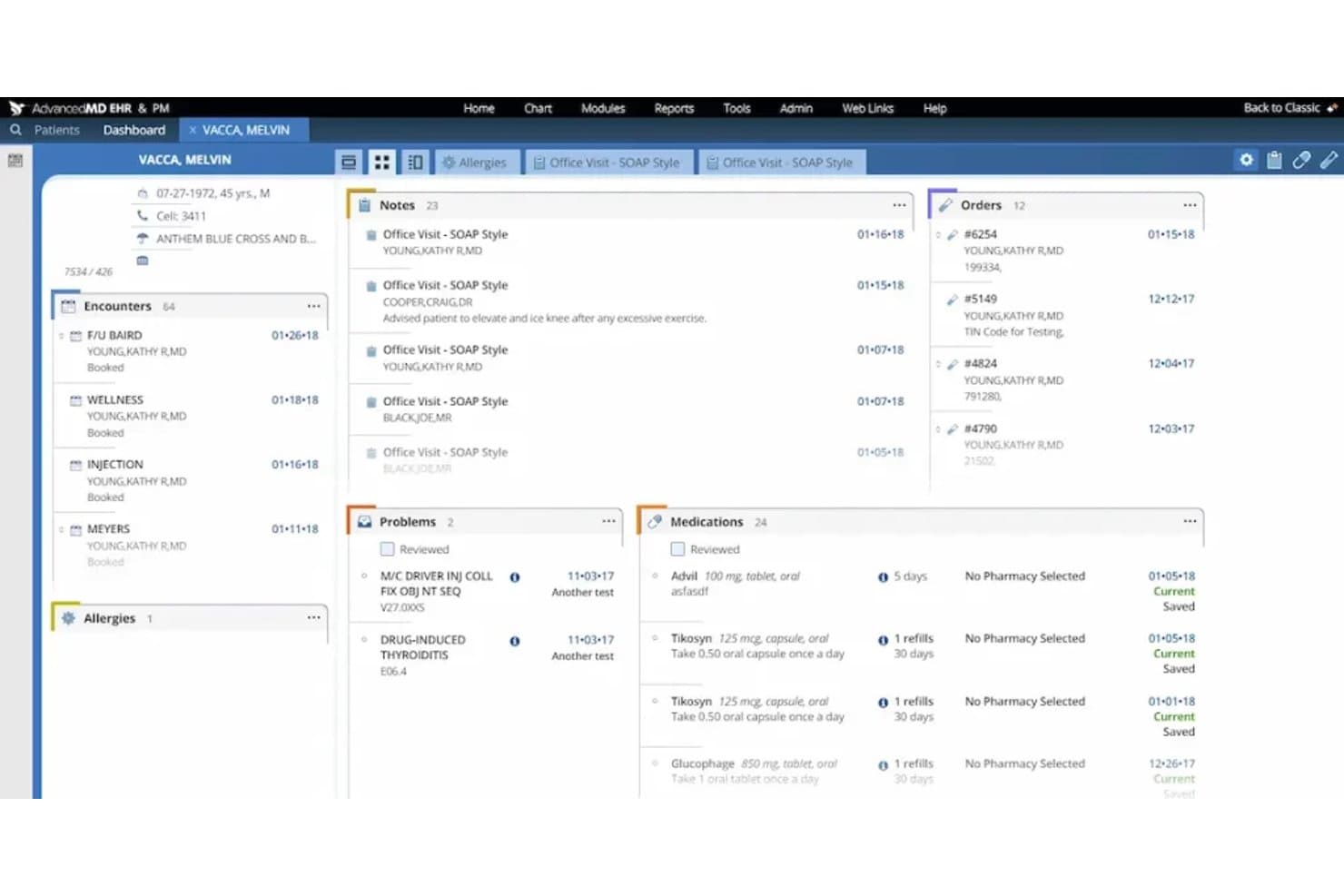
AdvancedMD offers a comprehensive patient dashboard displaying encounters, notes, orders, problems, medications, and allergies in a unified view. AdvancedMD is a cloud-based EHR and practice management platform that combines dermatology-specific charting templates, integrated billing, and revenue cycle management tools designed for independent dermatology practices.
Who Is AdvancedMD Best For?
AdvancedMD is a strong fit for small to mid-sized independent dermatology practices that need a single platform for clinical documentation and billing.
Why I Picked AdvancedMD
I picked AdvancedMD as one of the best because the EHR-to-billing hand-off is genuinely tight: encounter data flows directly from the chart into the billing module with no manual re-entry. This keeps dermatology-specific CPT codes and ICD-10 diagnoses accurate from the exam room to the claim. I also like HealthWatcher, a built-in tool that reads the patient chart to flag overdue dermatology screenings and follow-up visits automatically.
AdvancedMD Key Features
- Customizable dermatology templates: Build and modify templates for documenting acne, skin cancer, and cosmetic visits.
- MIPS and quality reporting tools: Access built-in dashboards and reports to support regulatory reporting requirements.
- Patient engagement suite: Use the online portal, messaging, and appointment reminders for ongoing patient communications.
- Integrated telehealth visits: Schedule and conduct video visits through the EHR platform with secure documentation.
AdvancedMD Integrations
AdvancedMD offers native integrations with electronic labs, radiology systems, digital faxing, Zoom for telehealth, and integrated credit card processing through Global Payments. An API is available for custom integrations.
Pros and Cons
Pros:
- HealthWatcher flags overdue dermatology screenings automatically
- Built-in MIPS reporting and quality dashboards
- Strong integrated billing and RCM tools
Cons:
- Limited clinical image annotation for skin conditions
- No dedicated Mohs surgery mapping module
 Best for connected dermatology care
- Free demo available
- Pricing upon request
Visit WebsiteCustomer Rating:3.4/5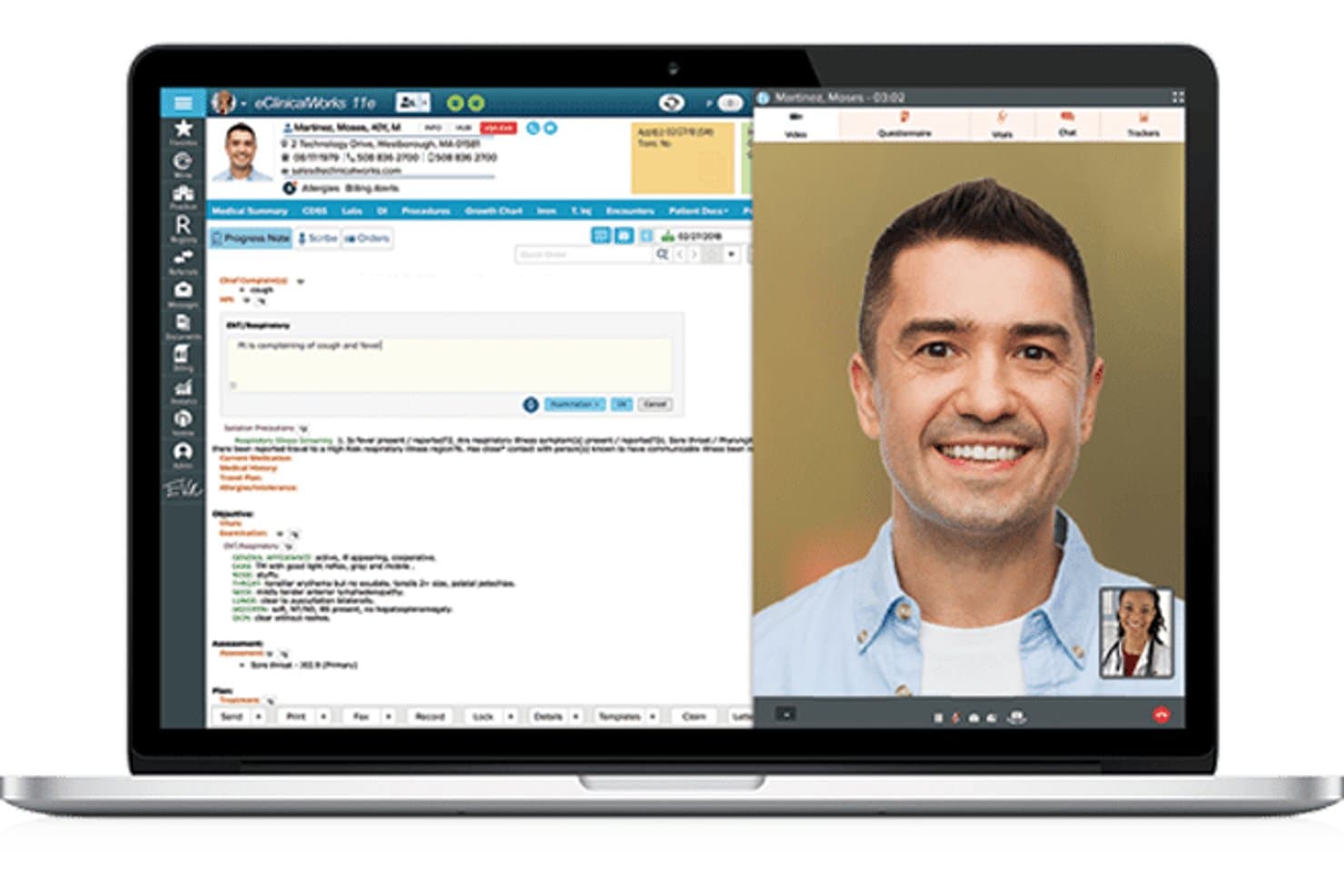
eClinicalWorks offers a telehealth interface with a progress note panel alongside a live video consultation view. eClinicalWorks is a cloud-based EHR and practice management platform with a dedicated dermatology module that combines AI-assisted clinical documentation, image capture, integrated billing, and patient engagement tools.
Who Is eClinicalWorks Best For?
It's a strong fit for mid-to-large dermatology practices that need an integrated EHR, billing, and patient engagement system under one platform.
Why I Picked eClinicalWorks
I picked eClinicalWorks because its connected care story is genuinely differentiated. PRISMA, the platform's AI-powered health information search engine, pulls external patient records from nationwide interoperability networks directly into the clinical note at the point of care. Paired with Sunoh.ai, a dermatology-tuned AI scribe that captures skin condition details like location, size, and color, dermatologists can document faster without sacrificing clinical detail.
eClinicalWorks Key Features
- Dermatology charting templates: Prebuilt templates for acne, eczema, psoriasis, skin cancer screenings, biopsies, and excisions.
- Integrated lab ordering: Connects directly to major labs for ordering and receiving pathology results within patient charts.
- Role-based access controls: Customizable user permissions help practices manage clinical and billing workflows securely.
- Patient portal with telehealth: Patients can view results, communicate with care teams, and join telehealth visits online.
eClinicalWorks Integrations
eClinicalWorks offers native integrations with Sunoh.ai, healow (including TeleVisits, Open Access, Genie contact center), and supports bidirectional lab interfaces for dermatopathology labs. APIs are available for custom integrations.
Pros and Cons
Pros:
- Bundled ICD-10, CPT, and E/M coder
- PRISMA aggregates records from nationwide networks
- Sunoh.ai captures lesion location and size
Cons:
- Image tools lack dermatoscopy support
- No Mohs mapping or staging tools
Learn more about eClinicalWorks: Best for adaptive dermatology charting
- Free demo available
- Pricing upon request
Visit WebsiteCustomer Rating:4.5/5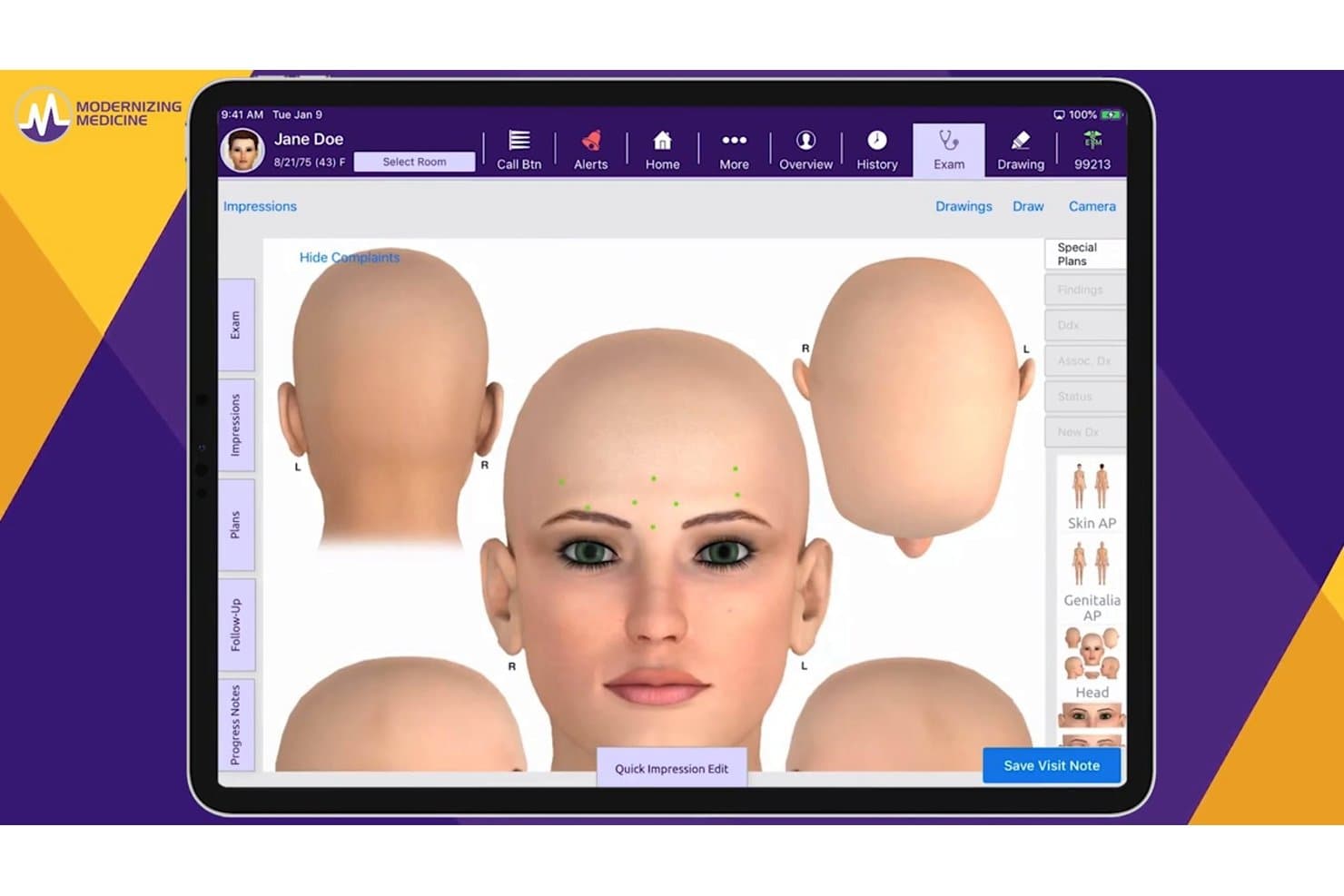
ModMed offers a 3D anatomical body diagram tool within its EHR platform, allowing providers to visually map patient complaints directly on a rendered head model during the exam. ModMed is a dermatology-specific EHR built around its EMA® platform, combining specialty charting, clinical image management, in-house pathology, AI-assisted documentation, and integrated practice management and billing tools.
Who Is ModMed Best For?
ModMed suits dermatology practices of all sizes that want a single platform covering clinical, billing, and patient engagement workflows.
Why I Picked ModMed
ModMed earns its spot on my shortlist because of how EMA's charting adapts to the way a dermatologist actually works. Customizable master visits let you build tap-and-go templates for your most common visit types, and ModMed Scribe 2.0 converts real patient dialogue into suggested chart notes and billing codes without extra documentation steps.
ModMed Key Features
- Integrated in-house pathology module: Enables specimen tracking and direct result integration within the patient chart.
- Interactive body mapping: Lets you draw, annotate, and attach clinical images to specific body locations.
- Patient engagement tools: Built-in messaging, appointment reminders, and intake forms help manage patient communication end to end.
- Revenue cycle management services: Provides dermatology-aware coding support and in-house billing expertise for claim optimization.
ModMed Integrations
ModMed offers native integrations with pathology labs such as Aurora Diagnostics and Bako, as well as interfaces for HL7 connections, FHIR APIs, hospital systems, and its Klara patient engagement platform. An API is available for custom integrations.
Pros and Cons
Pros:
- iPad-native design speeds clinical workflows
- Native in-house pathology module included
- AI-assisted charting trained on derm encounters
Cons:
- Implementation timeline can be lengthy
- Limited to Apple devices for charting
Learn more about ModMed: Best for visual dermatology workflows
- Free demo available
- Pricing upon request
Visit WebsiteCustomer Rating:5/5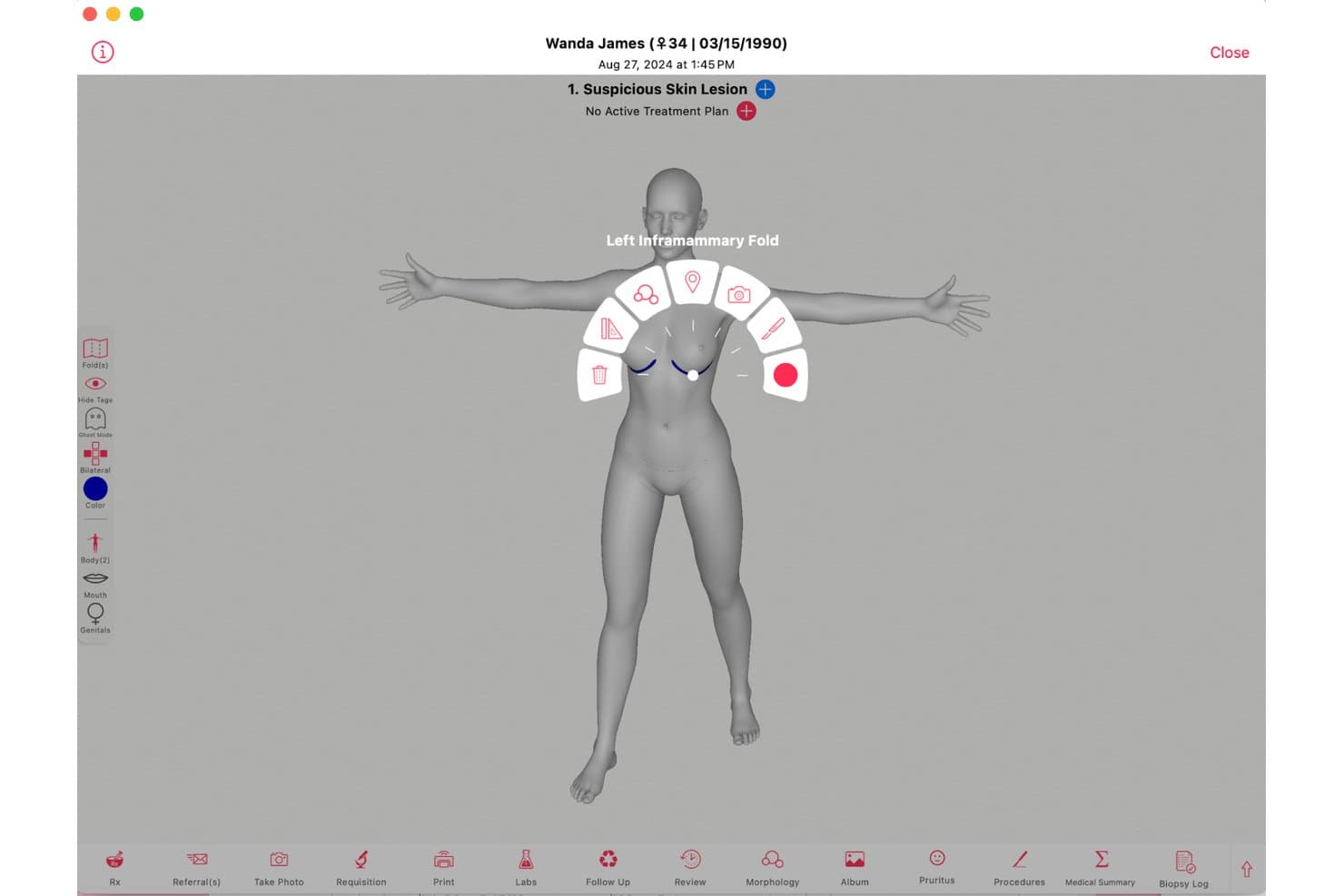
Ezderm offers an interactive 3D body mapping tool that allows dermatologists to tag and document suspicious skin lesions by precise anatomical location. EzDerm is a dermatology-only EHR built by a practicing dermatologist, combining a 3D anatomical body map, Mohs surgery documentation, biopsy tracking, automated coding, and integrated practice management in a single platform.
Who Is EzDerm Best For?
EzDerm is a strong fit for medical and surgical dermatology practices in the U.S. that need a dedicated platform for Mohs, biopsies, and procedure-heavy workflows.
Why I Picked EzDerm
EzDerm earns its spot on my shortlist because the 3D Anatomical Body Map is genuinely unlike anything else in dermatology EHR. I like that tapping a location on the map auto-populates morphology, assessment, plan, and CPT codes in one step. The Mohs module layers on top of that with multi-stage digital mapping and specimen tracking tied directly to the same chart.
EzDerm Key Features
- Pre-built dermatology templates: Choose from more than 1,100 customizable treatment plans for common conditions and procedures.
- Integrated biopsy and malignancy log: Track biopsies, pathology results, and malignancy histories across encounters.
- Automated coding engine: ICD-10, CPT, and SNOMED codes are auto-populated based on chart entries and lesion location.
- Isotretinoin management module: Handle iPLEDGE documentation, automated dose calculations, and lab result monitoring within the EHR.
EzDerm Integrations
EzDerm offers native integrations with Surescripts, Healthmonix for MIPS reporting, Square for payments, and Nuance for speech recognition. Lab and pathology integrations are supported for digital results delivery, and an API is available for custom integrations.
Pros and Cons
Pros:
- Fast implementation for small and solo practices
- Dermatology-specific support team praised by users
- 3D body map links visual charting to CPT coding
Cons:
- ICD code depth falls short for complex cosmetic coding
- Pathology result tracking requires more manual follow-up
Learn more about Ezderm: Best for dermatology EHR and imaging
- Free demo available
- Pricing upon request
Visit WebsiteCustomer Rating:4.3/5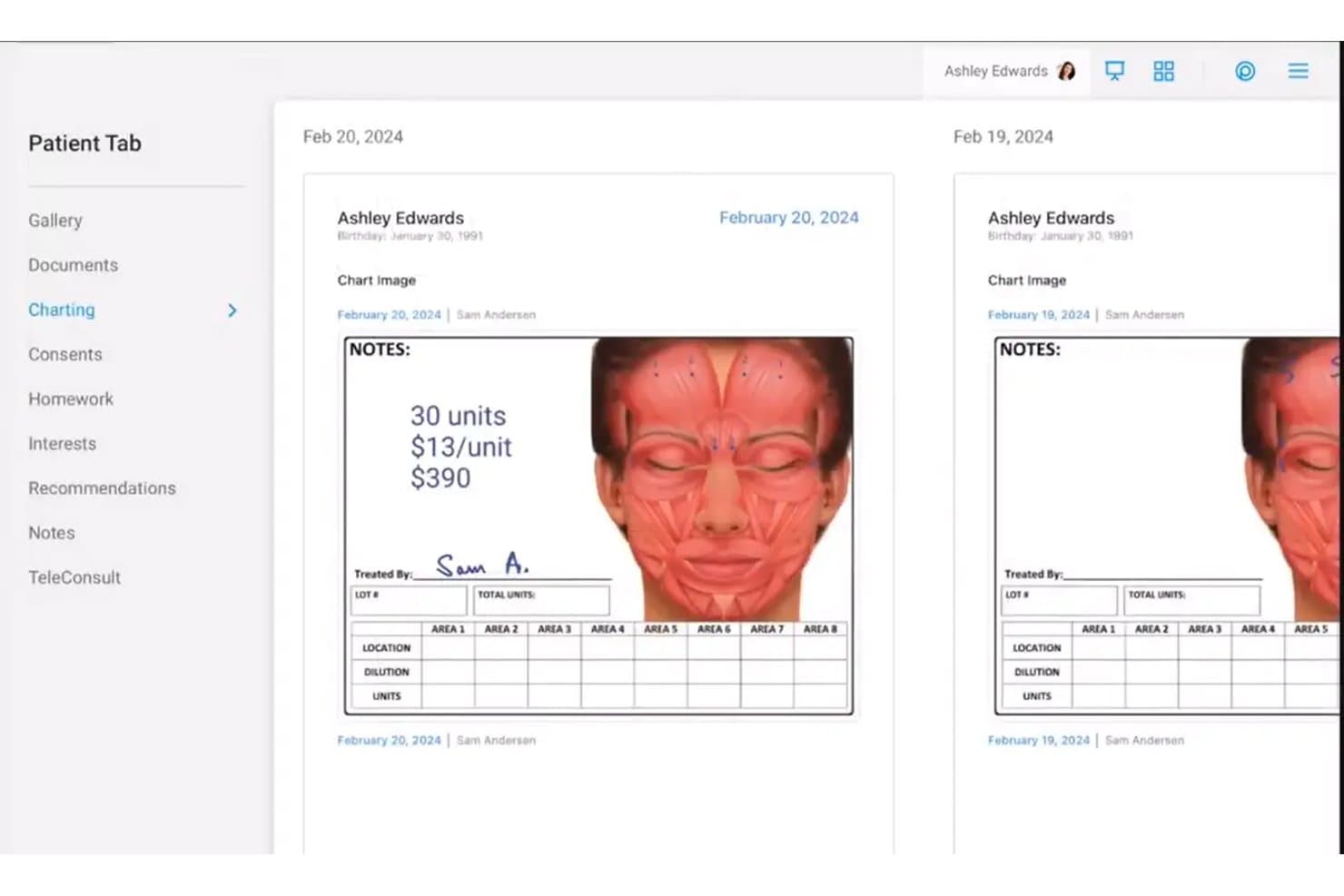
Nextech dermatology EHR showing facial treatment charting, clinical notes, and patient image documentation Nextech is a cloud-based EHR and practice management platform built exclusively for dermatology, covering specialty charting templates, clinical image management, Mohs workflow documentation, e-prescribing, and integrated billing.
Who Is Nextech Best For?
Nextech is a strong fit for medical and surgical dermatology practices of all sizes that need specialty-specific documentation, Mohs surgery workflows, and clinical image management in one platform.
Why I Picked Nextech
Nextech earns its spot on my shortlist because of how deeply the imaging tools are woven into the clinical workflow. I can attach annotated photos directly to a patient chart, pull up side-by-side lesion comparisons at the point of care, and use smart-stamping on anatomical diagrams without leaving the encounter. The SkinIO integration adds AI-powered full-body imaging for mole tracking, which I haven't seen built this tightly into another derm EHR.
Nextech Key Features
- Dermatology-specific charting templates: Access customizable templates for acne, biopsies, excisions, psoriasis, and cosmetic visits.
- Mohs surgery workflow module: Document mapping, staging, and pathology for complex Mohs procedures directly in patient charts.
- Dermatopathology lab interface: Send specimens to external labs and receive results attached to the patient record automatically.
- Automated CPT and ICD-10 coding: Use built-in lesion-based and procedure-aware code suggestions designed for dermatology billing.
Nextech Integrations
Nextech offers 10+ native integrations, including TouchMD, SkinIO, Weave, Solutionreach, Demandforce, Podium, FlexOptical, Harmony, MedEvolve, and Abyde. An API is available for custom integrations.
Pros and Cons
Pros:
- Built-in DataDerm registry auto-submission available
- AI scribe reduces derm charting time
- Mohs documentation goes deeper than competitors
Cons:
- Recent user reports flag reliability issues
- Body diagram stampers require manual configuration
Learn more about Nextech: Best for cosmetic treatment charting
- 14-day free trial
- From $15/user/month
Visit WebsiteCustomer Rating:3.5/5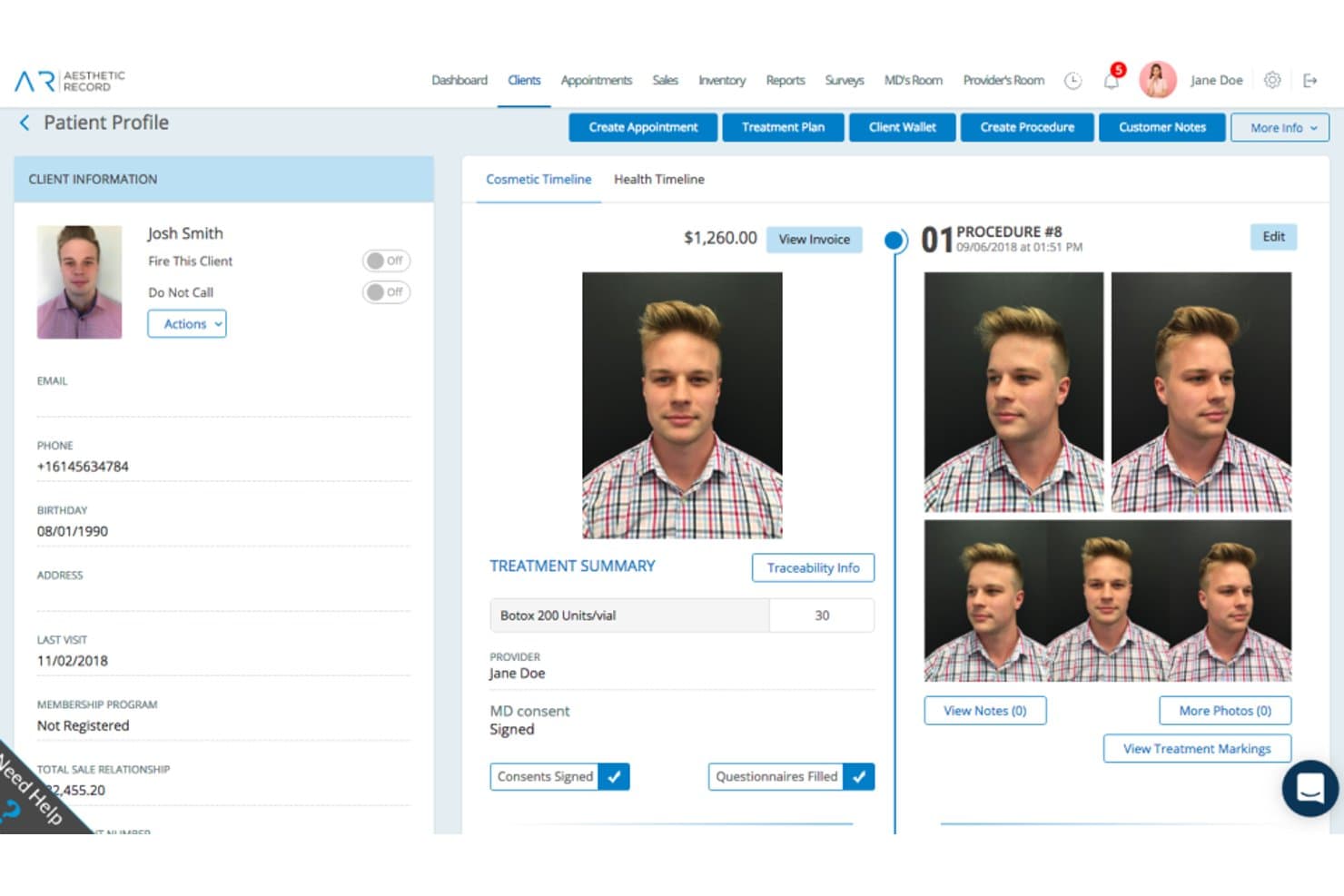
Aesthetic Record offers a detailed patient profile view with cosmetic timeline, treatment summaries, before-and-after photos, and consent tracking for dermatology practices. Aesthetic Record is an aesthetic-focused EMR and practice management platform built for cosmetic dermatology, combining procedure charting, before/after photo management, ePrescribing, point-of-sale, and patient engagement tools.
Who Is Aesthetic Record Best For?
Aesthetic Record suits small to mid-sized cosmetic dermatology and aesthetic medicine practices running cash-based, retail-forward operations.
Why I Picked Aesthetic Record
I picked Aesthetic Record as one of the best because its cosmetic treatment charting goes well beyond basic documentation. ChartSmart AI generates SOAP notes and procedure documentation automatically, while injection mapping lets me track products placed at each treatment site. The built-in before/after photo management ties high-resolution visual records directly to the patient chart, which is exactly how cosmetic dermatology documentation should work.
Aesthetic Record Key Features
- Full ePrescribing with EPCS: Prescribe medications directly from the platform, including controlled substances when enabled.
- Integrated POS and inventory tracking: Manage sales, memberships, and track skincare or injection inventory within a single system.
- Practice management dashboards: Access KPI dashboards and business insights for revenue, patient flows, and team performance.
- Patient portal and loyalty programs: Offer online access for appointment management and run built-in patient rewards or memberships.
Aesthetic Record Integrations
Aesthetic Record offers native integrations with RepeatMD, TouchMD, JOYA, PatientFi, Constant Contact, ActiveCampaign, MailChimp, Zoho, HubSpot, ASPIRE Galderma Rewards, and eFax. An API is available for custom integrations.
Pros and Cons
Pros:
- Built-in cosmetic procedure injection mapping
- ChartSmart AI auto-generates procedure notes
- Strong before/after photo documentation tools
Cons:
- Not ONC-certified for insurance-based practices
- No Mohs surgery workflow or mapping
Learn more about Aesthetic Record: Best for all-in-one dermatology management
- Free demo available
- Pricing upon request
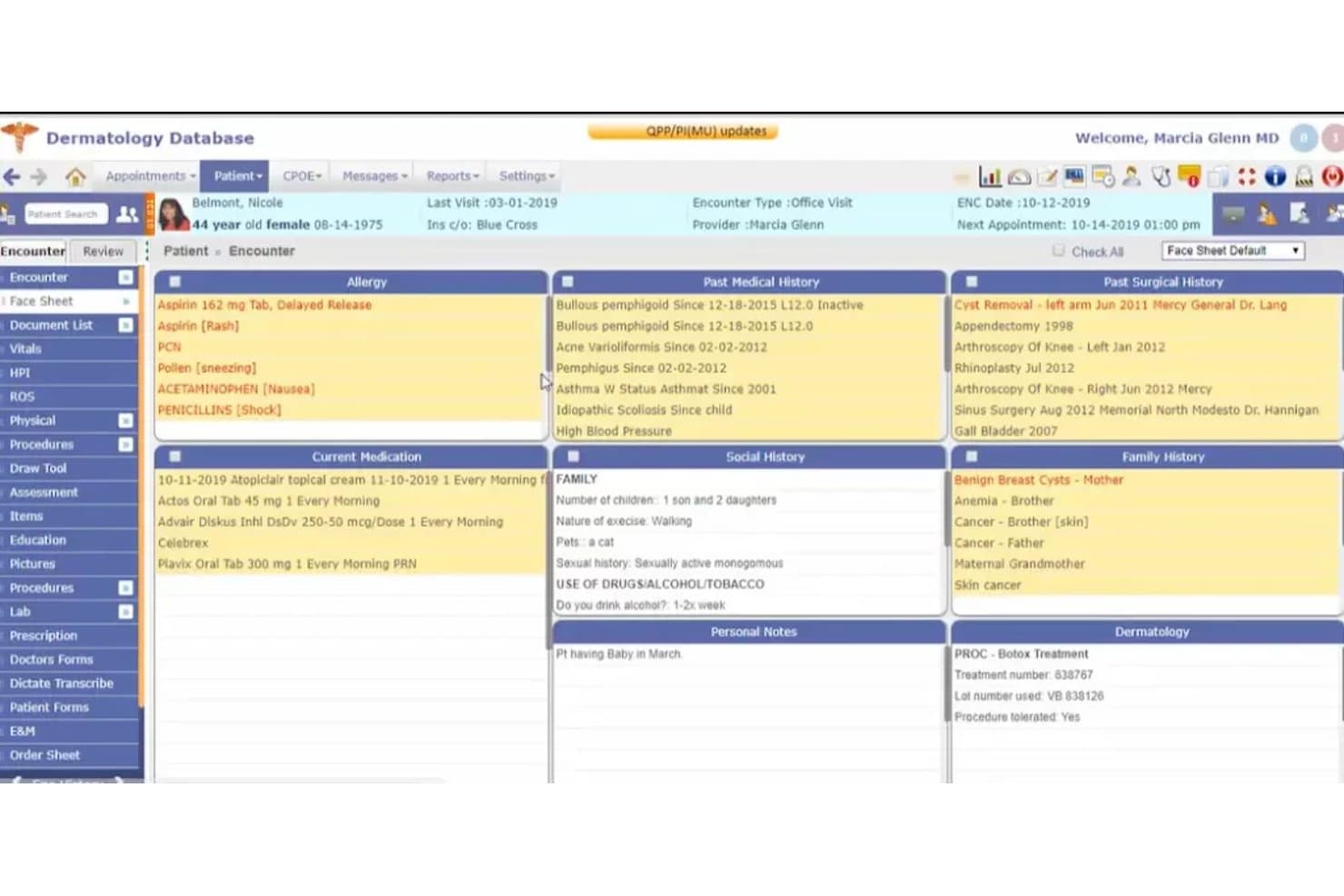
Compulink Dermatology Advantage offers a comprehensive face sheet view displaying patient allergies, medical history, current medications, social history, family history, and dermatology procedure notes in a single dashboard. Compulink Dermatology Advantage is a specialty-specific EHR and practice management platform built for dermatology practices, combining clinical documentation, Mohs surgery workflows, image capture, dermatopathology integration, and automated billing in one system.
Who Is Compulink Dermatology Advantage Best For?
It's a strong fit for dermatology practices that handle a mix of medical, cosmetic, and Mohs surgery cases and want a single platform covering clinical and billing workflows.
Why I Picked Compulink Dermatology Advantage
I've included Compulink Dermatology Advantage in my top picks because it's one of the few dermatology EHRs that covers medical, cosmetic, and Mohs surgery workflows in one platform. I particularly like how the Pathology Management module ties specimen tracking directly to patient charts, keeping dermatopathology results alongside clinical documentation. The AI Ambient Virtual Scribe with SMART Orders also cuts charting time by handling documentation automatically as providers move through encounters.
Compulink Dermatology Advantage Key Features
- Integrated body mapping: Lets you capture, annotate, and track lesion locations directly on patient body diagrams.
- Dermatology E/M and CPT coding: Handles automatic coding suggestions with built-in dermatology-specific CPT and ICD-10 libraries.
- Bidirectional dermatopathology lab integration: Sends specimen orders and receives results tied to patient records in real time.
- Cosmetic and retail management: Supports inventory tracking, product sales, and membership program management for aesthetic service workflows.
Compulink Dermatology Advantage Integrations
Compulink Dermatology Advantage offers native integrations with SureScripts for e-prescribing, as well as laboratory and dermatopathology systems for sending and receiving specimen orders and results. An API is available for custom integrations.
Pros and Cons
Pros:
- AI scribe captures documentation during live encounters
- Single platform for medical, cosmetic, and surgical
- Dedicated Mohs mapping and staging within charts
Cons:
- Initial setup complexity requires significant time investment
- System performance can feel slow at times
Learn more about Compulink Dermatology Advantage:
Other Dermatology EHR
Here are some additional dermatology EHR options that didn’t make it onto my shortlist, but are still worth checking out:
- 11PatientNowBest for dermatology CRM and engagement
- 12SymplastBest for mobile dermatology management
- 13RXNTBest for integrated dermatology workflows
- 14CharmHealthBest for affordable dermatology EHR
- 15Practice EHRBest for customizable dermatology EHR
- 16Legend EHRBest for straightforward dermatology charting
How I Evaluate Dermatology EHR
I split my evaluation into baseline requirements—like ONC certification, Mohs workflow support, and clinical image management—and the differentiators that set one platform apart from another.
Core Functionality (Table Stakes For This List)
When I'm selecting tools for my list, I rank each one on a scale from 0 (does not offer the functionality) to 5 (excels in this area) for each core functionality listed below. Then, I calculate the tool's total score into a percentage. Each tool needs to achieve a minimum total score of 65% to be considered for inclusion.
- Dermatology-Specific Templates: I check whether the system includes prebuilt templates for conditions like acne, psoriasis, and eczema, plus procedure-specific notes for biopsies and Mohs.
- Clinical Image Management: Practices need to photograph lesions and track changes over time, so I look for annotation tools, body diagrams, and side-by-side image comparison.
- Procedure & Mohs Workflow: I evaluate how well the platform handles Mohs mapping, stage-by-stage documentation, specimen tracking, and margin notation within a single encounter.
- Dermatopathology Integration: Sending specimens and pulling results back into the chart should happen through a bidirectional lab interface, not manual data entry.
- Dermatology E/M & CPT Coding: I look for automated coding suggestions tied to lesion count, size, and location, along with built-in modifier logic for codes like 25, 59, and 51.
- ONC-Certified EHR: Each platform should carry current ONC certification with e-prescribing, EPCS support, HIPAA compliance, and MIPS/quality reporting capabilities.
Once I have a list of tools that meet the criteria, I consider what sets each platform apart.
Differentiating Factors (What Sets Vendors Apart)
Here's how I compare and contrast different vendors:
Standout Features
Integrated body mapping is where I see real separation between platforms. Interactive diagrams that let you pinpoint lesion locations and compare images visit-over-visit matter when you're monitoring patients with dozens of atypical moles. I also evaluate cosmetic and retail management features, especially for practices mixing medical and aesthetic work. Tracking cosmetic procedures alongside skincare inventory and membership programs in one system saves front-desk staff from juggling separate tools.
Beyond Features
Practice type matters a lot here. A solo cosmetic clinic and a multi-location Mohs group have very different workflow needs, so I check whether a platform supports mixed medical-cosmetic billing pathways and scales across locations. Implementation is another big factor—I look for vendors that offer dermatology-trained onboarding specialists rather than generic support teams. Revenue cycle expertise also plays a role. Derm-aware billing with built-in modifier logic for codes like 25 and 59 can meaningfully reduce claim denials.
How to Choose Dermatology EHR
It’s easy to get bogged down in long feature lists and complex pricing structures. To help you stay focused as you work through your unique software selection process, here’s a checklist of factors to keep in mind:
| Factor | What to Consider |
| Scalability | Will the system handle additional providers or locations? Consider your growth plans and avoid outgrowing the platform. |
| Integrations | Does the EHR connect with labs, billing, imaging, and existing PMS or CRM systems your practice relies on? Test integration depth. |
| Customizability | Can you adapt templates, reports, and patient flows for your specific practice model or subspecialty—without high consultant costs? |
| Ease of use | Is the platform intuitive for physicians, MAs, and front-desk staff? Demo with multiple user types and ask about the learning curve. |
| Implementation and onboarding | Ask about go-live timelines, data migration support, and whether the vendor offers dermatology-trained trainers for onboarding. |
| Cost | Beyond base subscription, check for costs tied to image storage, patient portals, clearinghouse fees, or premium support tiers. |
| Security safeguards | How does the vendor handle HIPAA and ePHI risk? Ask about data encryption, audit logs, and security certifications beyond the basics. |
| Compliance requirements | Does the system align with requirements for e-prescribing, ONC certification, MIPS/MACRA, and local regulatory changes? |
What Are Dermatology EHR?
Dermatology EHR are electronic health record systems designed specifically for dermatology practices, supporting specialty charting, clinical image management, Mohs procedure workflows, pathology integration, and billing for lesion-based care. These platforms help streamline documentation and care delivery in high-volume, image-heavy dermatologic environments so your team can focus more on patient care and less on manual data entry.
Features of Dermatology EHR
When selecting dermatology EHR, keep an eye out for the following key features:
- Dermatology-specific templates: Prebuilt note templates for acne, mole checks, biopsies, excisions, and common dermatologic procedures, helping providers document efficiently and consistently.
- Clinical image management: Tools to capture, upload, annotate, and compare patient photos or dermoscopy images alongside body diagrams within the chart.
- Integrated body mapping: Interactive diagrams that let you mark lesion locations, track changes visually, and attach clinical photos for accurate longitudinal care.
- Mohs surgery workflow: Modules for mapping tumor stages, tracking surgical margins, and documenting each Mohs layer during the procedure—essential for surgical practices.
- Pathology lab integration: Bi-directional connectivity to send biopsies, receive dermatopathology results, and link lab data directly to patient visits.
- Automated coding and billing: Lesion-based CPT/ICD-10 coding tools with modifier logic and support for dermatology-specific billing and claim management.
- E-prescribing (EPCS): Secure, compliant tools for sending prescriptions—including controlled substances—directly to pharmacies from within the EHR.
- Patient portal: Gives patients secure access to visit notes, lab results, and direct messaging, helping streamline communication and reduce administrative phone calls.
- HIPAA compliance: Security measures like access controls, encryption, and audit logging to safeguard electronic protected health information (ePHI).
- Customizable reporting: Built-in analytics and reporting dashboards tailored for dermatology practices to measure volume, outcomes, and support quality reporting compliance.
Benefits of Dermatology EHR
Implementing dermatology EHR provides several benefits for your team and your business. Here are a few you can look forward to:
- Streamlined charting: Specialty templates, integrated body mapping, and clinical image tools let you document much faster than with generic EHR software.
- Improved diagnostic accuracy: Visual tracking of lesions and image comparison over time support earlier detection of skin changes and reduce missed findings.
- Simplified Mohs and procedure workflows: Purpose-built modules help surgeons map, stage, and document each step, keeping clinical data organized for every patient.
- Fewer billing errors: Automated CPT coding, modifier logic, and derm-specific billing tools minimize rework and cut down on insurance denials.
- Better care coordination: Bi-directional lab integration and interoperability ensure pathology results, clinical notes, and prescriptions are available in one place.
- Enhanced compliance and security: HIPAA safeguards, audit logging, and ONC certification help keep patient data secure and your practice aligned with regulatory requirements.
- Stronger patient engagement: Patient portals, e-prescribing, and messaging tools empower patients to access information and stay in touch with your care team.
Costs and Pricing of Dermatology EHR
Selecting dermatology EHR requires an understanding of the various EHR pricing models and plans available. Costs vary based on features, team size, add-ons, and more. The table below summarizes common plans, their average prices, and typical features included in dermatology EHR solutions:
Plan Comparison Table for Dermatology EHR
| Plan Type | Average Price | Common Features |
| Free Plan | $0 | Basic note templates, limited clinical image storage, and standard HIPAA security. |
| Personal Plan | $50-$150/user/month | Dermatology templates, image upload and annotation, e-prescribing, and basic reporting. |
| Business Plan | $150-$300/user/month | Advanced image management, integrated body mapping, lab and pathology connectivity, customizable billing, and patient portal. |
| Enterprise Plan | $300+/user/month | Multi-site support, implementation assistance, in-house RCM options, advanced analytics, API integrations, and robust compliance tools. |
Dermatology EHR FAQs
Here are some answers to common questions about dermatology EHR:
How is a dermatology EHR different from a general EHR?
A dermatology EHR includes specialty tools like clinical image management, body mapping, and lesion-specific templates, which support the unique documentation and workflow needs of dermatology practices.
Can dermatology EHR systems handle both medical and cosmetic workflows?
Yes, many platforms let you document and bill for both medical visits and cosmetic services, offering features like inventory tracking, retail product management, and separate billing pathways.
What should a dermatology practice look for when evaluating EHR implementation support?
You should look for vendors offering dermatology-trained implementation specialists, strong support for data migration from legacy systems, and training tailored to your team’s workflow and charting needs.
Is it possible to integrate dermatology EHR with dermatopathology labs?
Yes, leading systems offer bi-directional lab interfaces so you can send specimens, receive pathology results, and reconcile reports directly within the patient chart.
Do dermatology EHRs support compliance for insurance and regulatory requirements?
Yes, most specialty EHRs come with tools for HIPAA compliance, ONC certification, MIPS/MACRA reporting, and secure e-prescribing—including for controlled substances.