

Găsirea sistemului EHR potrivit pentru oftalmologie poate fi o provocare în lumea medicală aflată într-un ritm alert. Aveți nevoie de o soluție care să faciliteze gestionarea dosarelor pacienților și a programărilor, fără să vă mărească volumul de muncă.
Cunosc în detaliu tehnologia utilizată în cabinetele medicale și am testat diverse sisteme EHR. Scopul meu este să vă ofer o perspectivă imparțială asupra celor mai bune opțiuni disponibile.
În acest articol veți găsi o listă a celor mai bune sisteme EHR pentru oftalmologie, fiecare cu funcționalități unice. Voi prezenta ce oferă fiecare instrument, ajutându-vă să luați o decizie informată pentru cabinetul dumneavoastră.
Why Trust Our Software Recommendations
6,700+
Reviews
20
Industry experts
16+
Evaluation factors
14
Years
Our team has been testing and reviewing software since 2012. As medical practice leaders ourselves, we know how difficult—and important—it is to choose the right software.
For this guide, we evaluated tools using hands-on testing and independent research, scoring tools using our selection criteria.
Our reviews reflect our human editorial judgment, not a sales pitch.
Tabel comparativ al sistemelor EHR pentru oftalmologie
Acest tabel comparativ rezumă detaliile privind prețurile pentru selecția mea de top de sisteme EHR pentru oftalmologie:
Score legend (out of 5)
- Excellent4.5–5
- Good4–4.4
- Average3–3.9
- Below average2–2.9
- Poor1–1.9
Sorted by: Default
| Tool | Starting Price | Website | |||||||
|---|---|---|---|---|---|---|---|---|---|
Best for customizable ophthalmology charting | Not rated | 3 | Not rated | 1 | 2 | 3 | 1 | $99/month 15-day free trial | Website |
Best for mobile-first ophthalmology workflows | Not rated | Not rated | 2 | 1 | 4 | 5 | 3 | Pricing upon request Free demo available | Website |
Best for optical and surgery center operations | 3.7 out of 5 | 4 | 3 | 3 | 5 | 3 | 4 | Pricing upon request Free demo available | Website |
Best for customizable workflows | 3.5 out of 5 | 4 | 4 | 2 | 4 | 5 | 2 | Pricing upon request Free demo available | Website |
Good for comprehensive clinical documentation | 3.7 out of 5 | 4 | 2 | 3 | 4 | 5 | 4 | Pricing upon request Free demo available | Website |
Good for robust electronic health record capabilities | 3.5 out of 5 | 3 | 4 | 2 | 4 | 4 | 4 | Pricing upon request Free demo available | Website |
Good for streamlined patient scheduling | 3.8 out of 5 | 3 | 4 | 4 | 4 | 5 | 3 | Pricing upon request Free demo available | Website |
Good for specialized ophthalmology features | 3.7 out of 5 | 3 | 4 | 3 | 4 | 4 | 4 | Pricing upon request Free demo available | Website |
Best for user-friendly interfaces | 3.3 out of 5 | 3 | 1 | 3 | 4 | 5 | 4 | Pricing upon request Free demo available | Website |
Best for advanced billing and coding support | 3.8 out of 5 | 4 | 2 | 4 | 5 | 4 | 4 | Pricing upon request Free demo available | Website |


Recenzii ale celor mai bune sisteme EHR pentru oftalmologie
 Best for customizable ophthalmology charting
- 15-day free trial
- From $99/month
Visit WebsiteCustomer Rating:4.8/5
OptiMantra’s patient portal speeds up intake and communication for ophthalmology patients. OptiMantra is a versatile electronic health record (EHR) and practice management platform designed to support multiple healthcare specialties, including ophthalmology. Its customizable templates, telehealth functionality, and integrated patient engagement tools make it a strong choice for practices seeking a balance between flexibility and functionality.
Why I Picked OptiMantra: I picked OptiMantra because its customizable charting templates and intake forms give ophthalmologists full control over how patient data is collected and documented. This flexibility helps you capture detailed vision assessments, diagnostic findings, and treatment plans with precision. The platform’s built-in telehealth tools also support HIPAA-compliant video consultations, which are increasingly essential for remote or follow-up eye care. Additionally, its diagnostic lab integrations and e-prescribing capabilities through SureScripts streamline test ordering and medication management directly from within the system.
Standout Features & Integrations:
OptiMantra includes customizable SOAP notes, integrated billing and payment processing, and a patient portal where patients can complete pre-visit forms and access treatment documents. You can securely share test results and collaborate with other providers using e-faxing and encrypted messaging. Integrations include Surescripts, LabCorp, Quest Diagnostics, Rupa Health, SimonMed, Fullscript, Stripe, and Zoom—enhancing interoperability across clinical, billing, and communication workflows.
Pros and Cons
Pros:
- Secure patient portal access
- Integrated lab and eRx workflows
- Flexible charting templates for eye care
Cons:
- Analytics features somewhat limited
- Learning curve for new users
Learn more about OptiMantra: Best for mobile-first ophthalmology workflows
- Free demo available
- Pricing upon request
Visit WebsiteCustomer Rating:5/5
NextGen Healthcare dashboard displaying recent activity summaries and financial reporting tools. NextGen is a comprehensive EHR and practice management solution that supports a wide range of specialties, including ophthalmology. Its platform combines AI-assisted documentation, patient engagement tools, and financial automation in a system designed to scale with growing practices.
Why I Picked NextGen: I picked NextGen for its robust AI documentation capabilities and mobile-first design—two features that can make a big difference in high-volume ophthalmology clinics. Providers can capture SOAP notes using ambient AI, access real-time patient data from mobile devices, and rely on automated referral workflows and billing tools. The system also includes specialty-specific templates and integrations with imaging systems, helping ophthalmologists manage clinical data efficiently without sacrificing speed or accuracy.
Standout Features & Integrations:
Key features include ambient AI-powered note capture, real-time analytics, configurable templates, and patient self-scheduling tools. The system’s Mirth Data Platform supports interoperability with labs and diagnostic imaging tools, while NextGen Share enables secure data exchange with referring providers. Notable integrations include Relaymed, Medsender, Klara, Surgimate, Transform9, CallMyDoc, rater8, Arcadia, and more.
Pros and Cons
Pros:
- Strong interoperability tools and vendor ecosystem
- Mobile access with smart documentation shortcuts
- Highly customizable templates for eye care workflows
Cons:
- Mobile app is limited on Android devices
- Ambient AI feature may come with added cost
Learn more about NextGEN: Best for optical and surgery center operations
- Free demo available
- Pricing upon request
Visit WebsiteCustomer Rating:4.5/5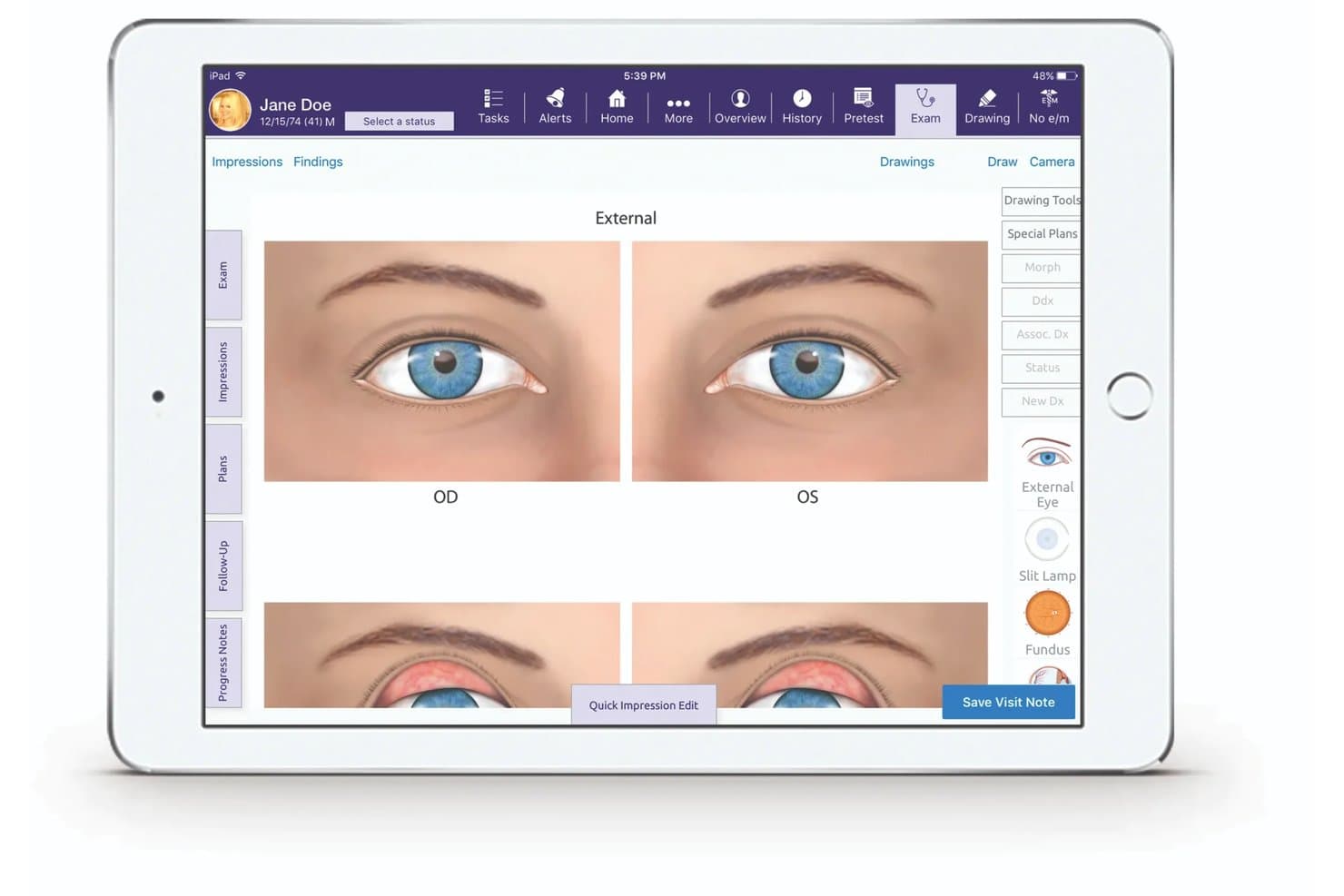
ModMed's EMA ophthalmology exam screen, with external eye views for each eye and exam tools. ModMed is an ophthalmology-specific EHR and practice management platform that combines subspecialty documentation, AI-assisted coding and billing, image management, optical inventory, and surgery center tools in a single iPad-based system.
Who Is ModMed Best For?
ModMed is a strong fit for ophthalmology practices that run an optical shop, perform in-office procedures, or operate an ambulatory surgery center alongside their clinical workflows.
Why I Picked ModMed
I picked ModMed as one of the best because it's the only ophthalmology EHR I've seen that ties optical inventory management and surgery center operations directly into the same platform as clinical documentation. If your practice runs an optical shop, you can track frame inventory and dispensing without switching systems. ModMed ASC extends that same logic to ambulatory surgery centers, keeping pre-op planning, procedure notes, and post-op evaluations in one place.
ModMed Key Features
- Subspecialty workflow templates: EMA includes dedicated documentation workflows for cataract and refractive care, glaucoma, oculoplastics, and pediatric ophthalmology.
- AI-assisted coding suggestions: The EHR surfaces suggested billing codes during the encounter, supporting accurate charge capture without manual lookups.
- ePrescribing with EPCS and PDMP: Providers can send prescriptions electronically, including controlled substances, with built-in prescription drug monitoring program access.
- IRIS registry reporting: ModMed supports direct data reporting to the IRIS registry alongside MIPS, helping practices meet quality reporting requirements.
ModMed Integrations
Documented integrations include Eyefinity and FlexSys for optical point-of-sale workflows, plus Change Healthcare for connections with 1,200+ lab entities. ModMed supports certified FHIR R4/SMART on FHIR, proprietary FHIR, and HL7 APIs for custom connectivity.
Pros and Cons
Pros:
- Optical and surgery center workflows connect
- Image tools support longitudinal review
- Subspecialty templates cover complex eye exams
Cons:
- Scribe output needs careful clinical review
- Notes can require many screen changes
Learn more about ModMed: Best for customizable workflows
- Free demo available
- Pricing upon request
Visit WebsiteCustomer Rating:4.3/5
Nextech's Interface Nextech's EHR solution, tailored for ophthalmologists, provides a platform where managing patient medical history, scheduling, and billing becomes less cumbersome. This solution shines in its ability to offer customizable workflows, helping you tailor the platform to your practice's unique needs.
Why I Picked Nextech: Nextech stood out to me for its highly customizable workflows, a feature that allows practices to mould the system to their specific needs. This capability to adapt to the practice's existing ways of working makes it best for customizable workflows and adds to its versatility.
Standout Features & Integrations:
Nextech comes with an array of features modernizing medicine, including a fully integrated EHR, practice management system, and patient portal. It also offers a variety of customizable templates for different ophthalmic subspecialties. The integrations are quite extensive as well, including lab, imaging systems, and billing solutions.
Pros and Cons
Pros:
- Wide range of integrations
- Robust set of features including a patient portal
- Highly customizable workflows suit a variety of practices
Cons:
- Limited customer support hours
- Interface may seem complex initially
- Pricing could be a barrier for smaller practices
Learn more about Nextech: Good for comprehensive clinical documentation
- Free demo available
- Pricing upon request
Visit WebsiteCustomer Rating:3.5/5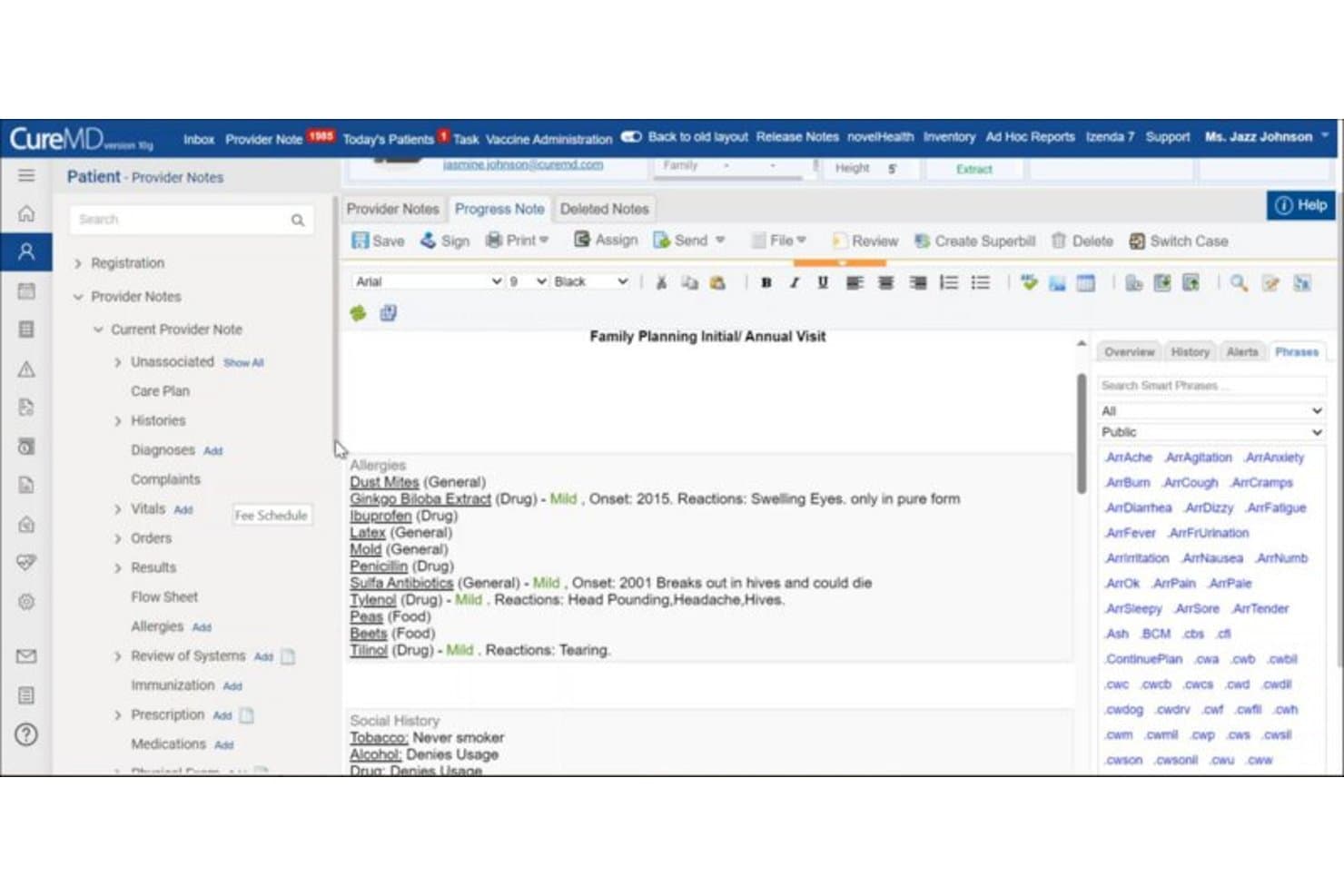
CureMD progress note screen showing allergies, social history, and smart phrases during a patient visit. CureMD is a cloud-based ophthalmology EHR that combines subspecialty-specific documentation templates, diagnostic imaging integration, e-prescribing, and built-in coding and billing tools across 11 ophthalmic subspecialties.
Who Is CureMD Best For?
CureMD suits ophthalmologists and eye care practices that need subspecialty-specific documentation across a broad range of clinical areas, from cornea to vitreoretinal surgery.
Why I Picked CureMD
CureMD earns its spot on my shortlist because of how thoroughly it covers clinical documentation across ophthalmology subspecialties. I particularly like that it supports 11 subspecialties, from glaucoma to vitreoretinal surgery, each with specialty-specific exam templates and procedure documentation built in. The platform also pulls retinal scan images and automated refraction data directly into patient records, so documentation stays connected to diagnostic findings without manual re-entry.
CureMD Key Features
- E-prescribing with safety checks: Sends prescriptions to 40,000+ pharmacies and runs drug-interaction, drug-allergy, and drug-diagnosis checks before submission.
- AI-generated SOAP notes: Converts patient conversations into structured, specialty-specific SOAP notes with ICD-10 and CPT code suggestions surfaced during documentation.
- MIPS and quality reporting dashboard: Tracks MIPS readiness and Meaningful Use compliance through a built-in dashboard with clinical quality measure monitoring.
- Role-based access controls and audit logs: Restricts chart and billing access by user role and maintains a full audit trail of system activity.
CureMD Integrations
CureMD lists 500+ pre-built integrations across 300+ healthcare vendors, including Oracle Health, Cerner, NextGen, Allscripts, and eClinicalWorks. It supports FHIR and HL7 interfaces plus secure APIs for custom integrations.
Pros and Cons
Pros:
- Built-in E&M and ICD/CPT charge capture
- Procedure notes and follow-ups support eye-care visits
- Specialty templates span 11 ophthalmic subspecialties
Cons:
- Pre-op and post-op surgical workflows remain unclear
- Users report lag and freezing during work
Learn more about CureMD: Good for robust electronic health record capabilities
- Free demo available
- Pricing upon request
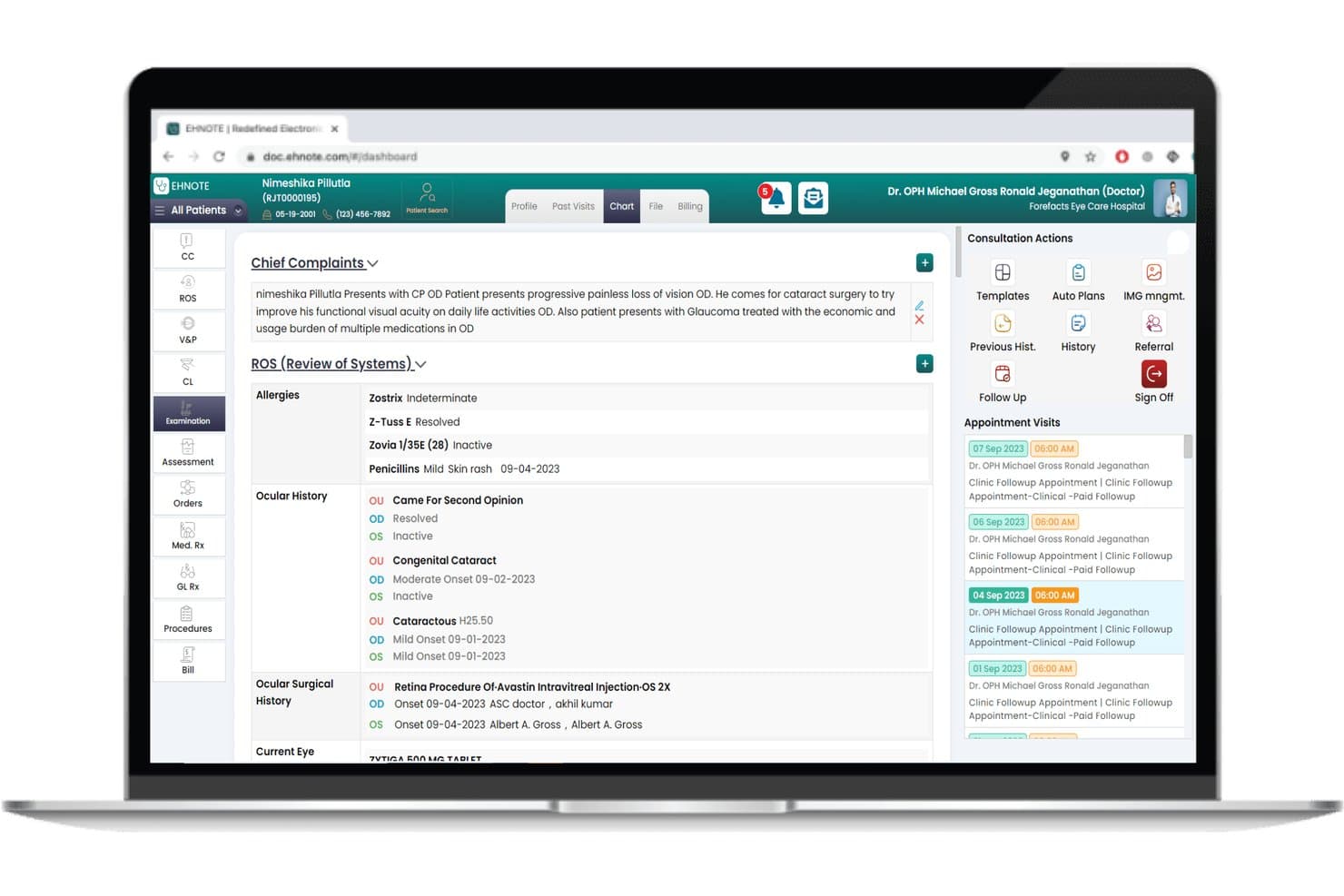
EHNOTE's ophthalmology chart view records eye-specific history, OU/OD/OS laterality, and upcoming follow-up visits. EHNOTE is an ophthalmology EHR platform that offers subspecialty charting templates, AI-assisted billing and coding, surgical workflow tools, and an ambulatory surgical care module built specifically for eye care practices.
Who Is EHNOTE Best For?
EHNOTE suits ophthalmology practices that need subspecialty-specific charting, AI-assisted billing, and surgical workflow tools in a single cloud-based platform.
Why I Picked EHNOTE
I've included EHNOTE in my top picks because its electronic health record capabilities are built specifically around how ophthalmology practices actually document care. I like that it offers configurable subspecialty templates for Retina, Glaucoma, Cornea, and Pediatric cases, with one-page charting that consolidates visual acuity, slit-lamp findings, imaging, and prescriptions in a single consultation view. The AI-assisted ICD-10 and CPT code generation, pulled directly from consultation notes, also reduces the manual coding work that slows down high-volume eye care practices.
EHNOTE Key Features
- Ambulatory surgical care module: Covers the full surgical episode from pre-op to post-op, including anesthesia documentation, operative notes, discharge summaries, and barcode IOL verification.
- MIPS tracking: Captures MIPS measures automatically at the point of care and tracks performance over time.
- Multi-location practice management: Centralizes staff, schedules, and equipment management across multiple clinic locations from a single dashboard.
- Patient engagement tools: Sends appointment reminders and care messages via WhatsApp, SMS, and email, and supports online booking, digital intake forms, and bill pay.
EHNOTE Integrations
EHNOTE offers integrations with DrFirst Rcopia for e-prescribing, EMR Direct for secure email, and Concurred for fax services. Its Carefluence Open API R4 supports FHIR-based custom integrations.
Pros and Cons
Pros:
- AI coding targets ophthalmology-specific billing
- ASC workflows carry records through postoperative care
- Subspecialty templates consolidate eye exam documentation
Cons:
- Few independent reviews validate ophthalmology performance
- OCT and visual field links aren't named
Learn more about EHNOTE: Good for streamlined patient scheduling
- Free demo available
- Pricing upon request
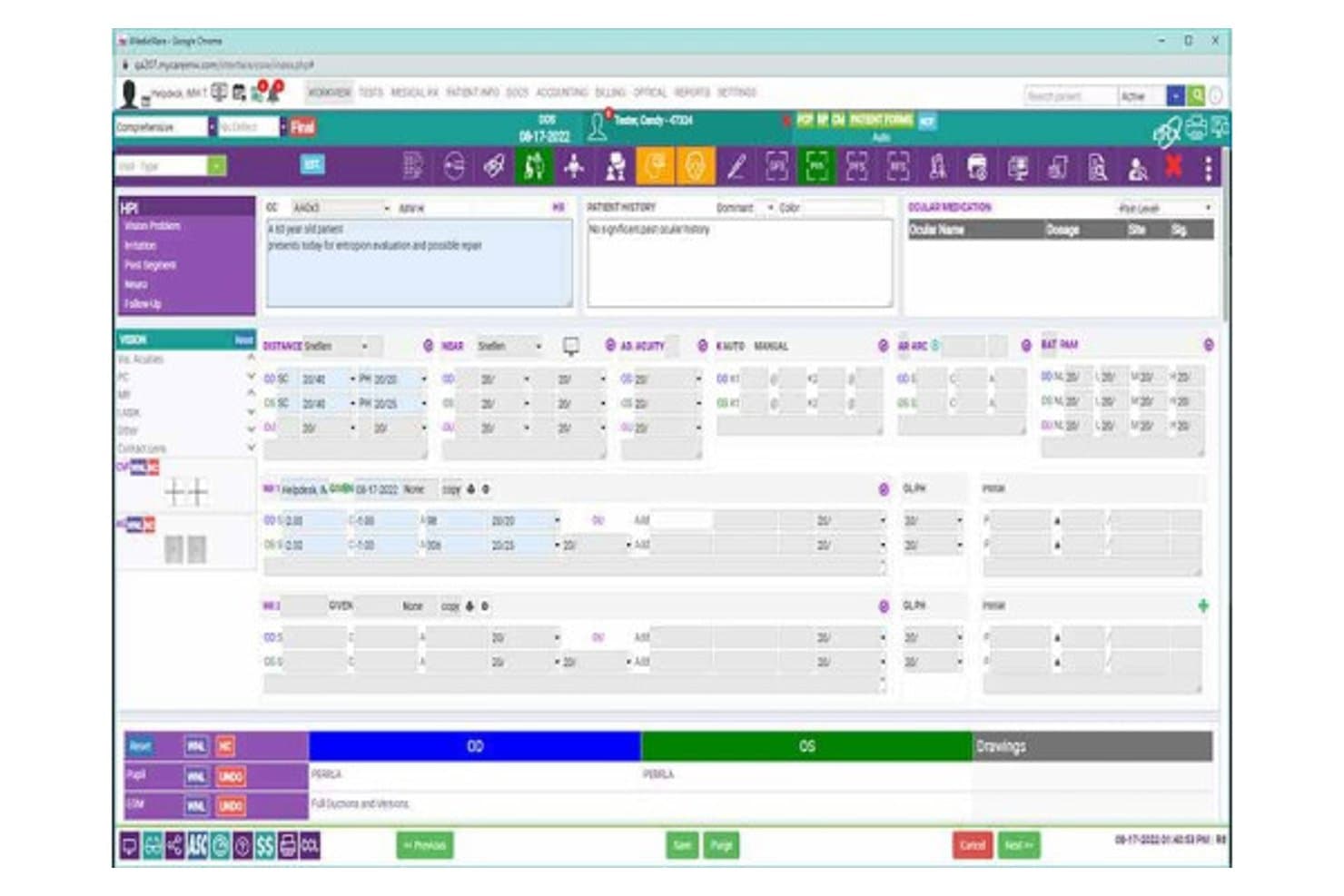
iMedicWare's ophthalmology exam screen records refraction, visual acuity, IOP and OD/OS findings in one view. iMedicWare is an ophthalmology and optometry EHR that covers clinical charting, surgical planning, diagnostic device integration, practice management, optical sales, and ambulatory surgery center workflows.
Who Is iMedicWare Best For?
iMedicWare is a strong fit for ophthalmology and optometry practices that need end-to-end support across clinical, surgical, and optical workflows in a single system.
Why I Picked iMedicWare
I've included iMedicWare in my top picks because its scheduling tools are built around how eye care practices actually run. The Promptly integration enables real-time patient self-scheduling, automated reminders, and recall messaging, so front-desk staff spend less time on the phone. I also like that scheduling links directly to the clinical record, letting staff pull up prior exam data and imaging without switching screens.
iMedicWare Key Features
- Subspecialty exam templates: Pre-built templates for retina, glaucoma, cataract, and other ophthalmology subspecialties support structured clinical documentation.
- Ambulatory surgery center module: A dedicated ASC workflow covers patient check-in, vitals, operative reports, and real-time audit tools.
- Diagnostic device integration: Direct integrations with Heidelberg Engineering, NIDEK, and Optos pull imaging data into the patient record.
- Optical point of sale: Built-in tools let staff generate orders, process payments, and sync optical prescriptions without leaving the system.
iMedicWare Integrations
iMedicWare lists integrations with Promptly, Heidelberg Engineering, NIDEK, Optos, DrFirst, TriZetto, and Global Payments. It supports a FHIR-based Patient and Population Services API through Blue Button Pro for custom connectivity.
Pros and Cons
Pros:
- Reviewers praise quick chart and imaging access
- ASC tools cover operative documentation and audits
- Retina and glaucoma templates fit specialty exams
Cons:
- Older reviews cite slow screens and support delays
- Some reviewers report schedule and overbooking problems
Learn more about iMedicWare: Good for specialized ophthalmology features
- Free demo available
- Pricing upon request
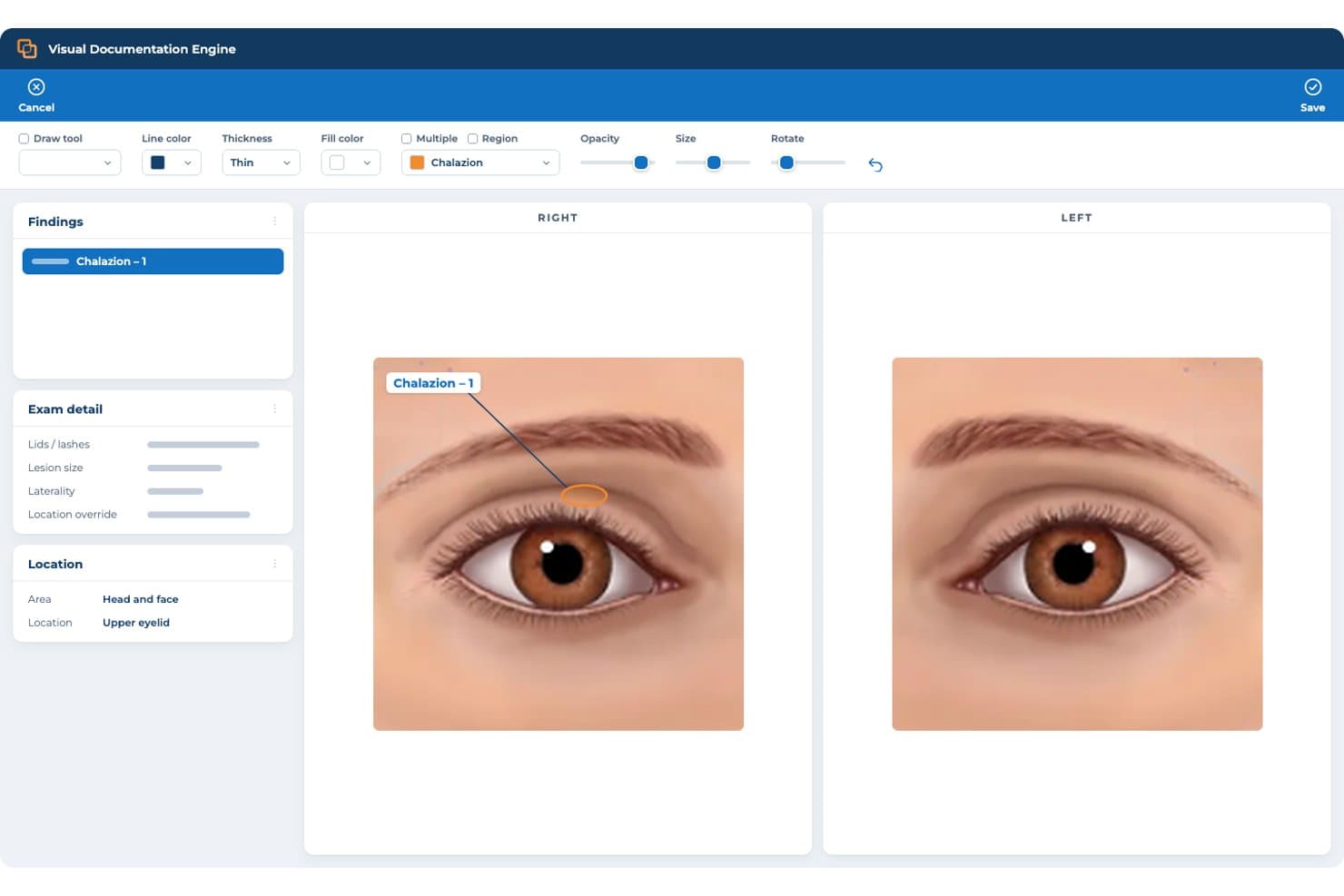
Compulink Advantage's Visual Documentation Engine marking an upper eyelid chalazion on right and left eye diagrams. Compulink Ophthalmology Advantage is an all-in-one ophthalmology EHR that combines specialty-specific charting, practice management, optical POS, surgical workflow tools, integrated e-prescribing, and revenue cycle management in a single platform.
Who Is Compulink Ophthalmology Advantage Best For?
Compulink Ophthalmology Advantage is a strong fit for ophthalmology practices that want a single platform covering clinical documentation, surgical workflows, optical POS, and billing without stitching together separate systems.
Why I Picked Compulink Ophthalmology Advantage
I picked Compulink Ophthalmology Advantage because its specialized ophthalmology features go deeper than most EHRs I've seen. The OneTab charting screen lets providers document an entire exam from one place, with subspecialty layouts for glaucoma, cataract pre-op, retina, and LASIK planning built right in. I also like the dedicated ASC module, which handles surgical scheduling, physician preference cards, and outcomes reporting without needing a separate system.
Compulink Ophthalmology Advantage Key Features
- Standard of care engine: A rules-based worklist automatically identifies required, recommended, or optional care tasks before each patient arrives, based on appointment reason.
- Advantage Analytics: Interactive dashboards combine clinical, financial, and operational data, letting you filter results down to the individual patient level.
- Ambient virtual scribe: Ambient listening converts patient conversations into structured EHR documentation in real time, with support for 18 languages.
- Optical POS with lab ordering: An integrated optical point-of-sale system manages frame and contact lens inventory and transmits spectacle Rx orders directly to major labs.
Compulink Ophthalmology Advantage Integrations
Compulink Ophthalmology Advantage integrates with ABB Optical Group, VisionWeb, Clearwave, Updox, and Surescripts, plus over 400 ophthalmic devices. It supports FHIR and proprietary APIs for custom integrations.
Pros and Cons
Pros:
- Reviewers praise customizable screens and detailed reports
- ASC workflows connect scheduling, preference cards, outcomes
- OneTab captures subspecialty exams in one screen
Cons:
- Reviewers cite multi-click navigation and update glitches
- New staff report setup and training demands
Learn more about Compulink Ophthalmology Advantage:

EyeMD EMR's Interface EyeMD EMR is a well-designed Electronic Health Record (EHR) system, created to specifically cater to the needs of ophthalmologists. It excels in offering a user-friendly interface, making patient data management, scheduling, and other essential tasks straightforward and manageable.
Why I Picked EyeMD EMR: EyeMD EMR caught my attention due to its unique emphasis on providing a user-friendly experience. It offers a simplified and intuitive interface, which can significantly reduce the learning curve and time spent on training, making it best for user-friendly interfaces.
Standout Features & Integrations:
EyeMD EMR brings in valuable features such as a comprehensive EHR, practice management, telemedicine, and patient engagement tools. Its intelligent decision support system can aid in improving clinical decisions. It integrates well with PACS/Imaging, Optical Shop Management, and various Billing Solutions, enhancing its utility for an ophthalmology practice.
Pros and Cons
Pros:
- Broad range of integration capabilities
- Comprehensive EHR with intelligent decision support
- User-friendly interface simplifies workflows
Cons:
- Mobile app functionality can be enhanced
- Customization options could be improved
- Pricing is on the higher end of the scale
Learn more about EyeMD EMR:
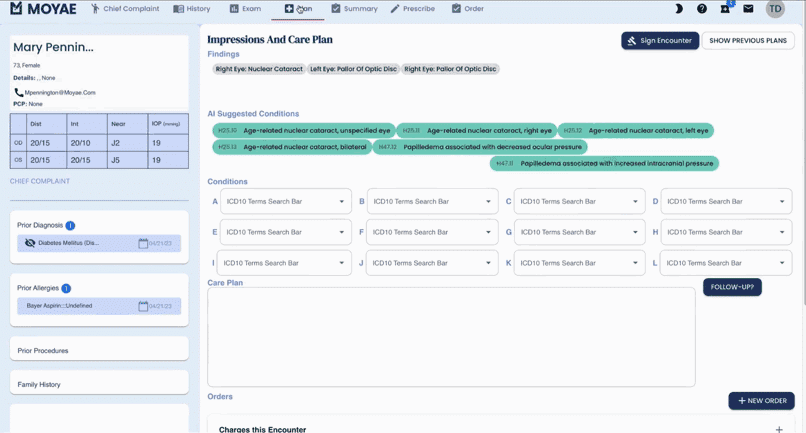
Moyae's Interface Moyae is an ophthalmology-focused EHR that combines specialty documentation, diagnostic imaging integration, AI-assisted coding, and MIPS/IRIS Registry reporting in a single platform built exclusively for vision-care practices.
Who Is Moyae Best For?
Moyae is a strong fit for ophthalmology practices that want coding and billing support built directly into their clinical workflow.
Why I Picked Moyae
I picked Moyae as one of the best because its AI-suggested ICD-10 and CPT coding is built directly into the clinical workflow, pulling code suggestions from documented exam findings rather than requiring billers to interpret notes after the fact. I also like that it flags retired CPT and HCPCS codes in real time and surfaces E&M suggestions once a procedure is added to an encounter, which catches errors before a claim ever leaves the practice.
Moyae Key Features
- Longitudinal tracking: Displays IOP, visual acuity, and other clinical metrics across visits with procedures and treatments overlaid for side-by-side comparison.
- Moyae Draw: Lets clinicians annotate findings directly on a retina diagram using structured labels that link to encounter documentation.
- Recall campaigns: Uses clinical data like treatment intervals and exam dates to automatically trigger patient outreach for follow-up injections or pressure checks.
- IRIS Registry submission: Sends quality-measure data directly to the AAO IRIS Registry from within the EHR without a separate export step.
Moyae Integrations
Moyae offers native integrations with the AAO IRIS Registry and Google Business Profile, plus API connectivity with b.well and Flexpa. Its FHIR R4, SMART on FHIR, and REST-hook APIs support custom integrations.
Pros and Cons
Pros:
- Custom coding phrases support MIPS documentation
- Retired-code warnings help prevent claim errors
- Finding-linked ICD-10 and CPT suggestions
Cons:
- AI still requires manual documentation edits
- No built-in practice-management system
Learn more about Moyae:
How I Evaluate Ophthalmology EHR
I split my evaluation into three parts, giving core needs the most weight: document eye exams and import diagnostic results into charts. Next, I look for differentiators such as IOL calculation support. Finally, I consider onboarding, specialty implementation help, and total cost.
Core Functionality (Table Stakes For This List)
When I'm selecting tools for my list, I score each one on a scale from 0 (does not offer the functionality) to 5 (excels in this area) for each core functionality listed below. I then convert the total into a percentage to help assess each tool's overall fit, with extra weight on any functionalities I’ve deemed essential.
- Eye Exam Documentation (Essential): I look for customizable templates, drawing tools, and eye-specific terms for recording refraction, visual fields, and anterior or posterior segment findings.
- Diagnostic Device Integration (Essential): I assess whether OCT, visual field, and fundus camera results can enter the patient chart directly, with images linked to the right encounter.
- Surgical Workflows: I check for procedure scheduling, pre-op planning documentation, and structured follow-up tracking across an ophthalmic surgery episode.
- E-Prescribing: I evaluate whether prescribers can send ophthalmic prescriptions electronically and review medication details and interaction alerts.
- Ophthalmology Billing: I look for charge capture and coding support for common eye visits, tests, and procedures, including clear documentation links.
- Compliance And Certification: I consider applicable EHR certification, documentation standards, interoperability, and reporting tools that support compliance requirements.
Once I have a list of tools that meet the criteria, I consider what sets each platform apart.
Differentiating Factors (What Sets Vendors Apart)
Here's how I compare and contrast different vendors:
Standout Features
I look for built-in optical shop management that ties frame and contact lens inventory to patient records, since juggling a separate dispensary system creates ordering errors. IOL calculation support matters for any cataract-focused practice—I check whether biometry data flows into lens power tools without manual re-entry. I also evaluate patient flow features like tablet check-in and tech rooming queues, which keep multi-lane clinics moving during high-volume days.
Beyond Features
I check whether a vendor's onboarding team includes ophthalmology-specific implementation specialists, since device integrations and custom exam templates make specialty EHR transitions far more complex than general practice rollouts. Interoperability matters just as much—HL7/FHIR support and device-agnostic imaging connections prevent long-term lock-in to a single hardware vendor. I also evaluate how well each platform scales from a solo optometry office to a multi-location surgical group with ASC coordination needs.
Cum să alegeți un sistem EHR pentru oftalmologie
Este ușor să vă pierdeți în liste lungi de funcționalități și structuri complexe de prețuri. Pentru a vă ajuta să rămâneți concentrat în timp ce parcurgeți procesul unic de selectare a software-ului, iată o listă de factori de care trebuie să țineți cont:
| Factor | Ce trebuie avut în vedere |
|---|---|
| FactorScalabilitate | Ce trebuie avut în vedereVa crește sistemul EHR odată cu cabinetul dumneavoastră? Verificați dacă poate gestiona un număr mai mare de pacienți, utilizatori și date fără costuri ridicate sau scăderi ale performanței. |
| FactorIntegrări | Ce trebuie avut în vedereSe conectează la instrumentele pe care le utilizați deja? Verificați dacă funcționează cu dispozitivele de imagistică, software-ul de facturare și portalurile pentru pacienți pe care le folosiți deja. |
| FactorPosibilitatea de personalizare | Ce trebuie avut în vedereÎl puteți adapta fluxului dumneavoastră de lucru? Căutați șabloane și tablouri de bord personalizabile, adaptate nevoilor cabinetului dumneavoastră. |
| FactorUșurință în utilizare | Ce trebuie avut în vedereEste simplu de utilizat pentru toți utilizatorii? Asigurați-vă că interfața este intuitivă atât pentru personalul familiarizat cu tehnologia, cât și pentru cel fără experiență tehnică. |
| FactorImplementare și inițiere | Ce trebuie avut în vedereCât de simplă este tranziția? Evaluați timpul și resursele necesare pentru configurare și instruire. Căutați furnizori care oferă asistență cuprinzătoare. |
| FactorCost | Ce trebuie avut în vedereCare este costul total de deținere? Comparați taxele inițiale, modelele de abonament și costurile ascunse, precum întreținerea sau funcționalitățile suplimentare. |
| FactorMăsuri de securitate | Ce trebuie avut în vedereCât de sigure sunt datele dumneavoastră? Verificați conformitatea cu HIPAA și cu alte reglementări relevante. Verificați existența criptării datelor și a protocoalelor de acces securizat. |
| FactorDisponibilitatea asistenței | Ce trebuie avut în vedereEste ajutorul disponibil rapid? Luați în considerare opțiunile de servicii pentru clienți oferite de furnizor, timpii de răspuns și disponibilitatea unor resurse precum întrebările frecvente și tutorialele. |
Ce este un sistem EHR pentru oftalmologie?
Sistemul EHR pentru oftalmologie este un tip de software EHR conceput pentru a gestiona nevoile specifice ale cabinetelor de îngrijire a ochilor. Aceste instrumente sunt utilizate în general de oftalmologi, optometriști și personalul acestora pentru a îmbunătăți îngrijirea pacienților și eficiența cabinetului. Funcționalitățile de programare a consultațiilor, gestionare a dosarelor pacienților și prescriere electronică ajută la îndeplinirea sarcinilor zilnice și îmbunătățesc interacțiunile cu pacienții. Per ansamblu, aceste instrumente economisesc timp și reduc erorile, făcând gestionarea cabinetului mai eficientă.
Funcționalități
Atunci când selectați un sistem EHR pentru oftalmologie, acordați atenție următoarelor funcționalități esențiale:
- Gestionarea dosarelor pacienților: Organizează și stochează în siguranță informațiile despre pacienți, făcându-le ușor accesibile personalului medical.
- Programarea consultațiilor: Permite programarea și gestionarea eficientă a consultațiilor pacienților, reducând conflictele de programare.
- Prescrierea electronică: Facilitează gestionarea electronică a prescripțiilor, sporind acuratețea și comoditatea atât pentru medici, cât și pentru pacienți.
- Integrarea cu dispozitivele de imagistică: Se conectează la echipamentele de diagnosticare pentru a importa și gestiona imaginile direct în dosarul pacientului.
- Șabloane personalizabile: Oferă flexibilitatea de a adapta formularele și documentele la nevoile specifice ale cabinetului dumneavoastră.
- Acces la portalul pacientului: Oferă pacienților acces online securizat la informațiile lor medicale, îmbunătățind comunicarea și implicarea.
- Facturarea și procesarea cererilor de despăgubire: Simplifică operațiunile financiare prin automatizarea sarcinilor de facturare și gestionarea eficientă a cererilor de despăgubire către asigurări.
- Funcționalități de telemedicină: Permite consultații la distanță, extinzând accesul la îngrijire și comoditatea pentru pacienți.
- Analiză și raportare avansate: Oferă informații despre performanța cabinetului și rezultatele pacienților, sprijinind luarea deciziilor în cunoștință de cauză.
- Măsuri de securitate: Asigură conformitatea cu reglementări precum HIPAA, protejând datele pacienților prin criptare și controale de acces securizate.
Beneficii
Implementarea unui EHR pentru oftalmologie oferă mai multe beneficii echipei și afacerii dumneavoastră. Iată câteva dintre acestea:
- Eficiență îmbunătățită: Automatizează sarcinile de rutină, precum programarea și facturarea, eliberând timp pentru îngrijirea pacienților.
- Îngrijire îmbunătățită a pacienților: Oferă acces rapid la dosare complete ale pacienților, permițând luarea unor decizii de tratament informate și prompte.
- Comunicare mai bună: Portalurile pacienților permit comunicarea directă cu aceștia, îmbunătățind implicarea și satisfacția.
- Reducerea costurilor: Reduce documentele pe suport de hârtie și cheltuielile administrative, economisind bani din costurile operaționale.
- Securitatea datelor: Asigură protejarea datelor pacienților prin criptare și acces securizat, respectând standardele de conformitate.
- Accesibilitate sporită: Funcțiile de telemedicină oferă consultații la distanță, extinzând accesul pacienților la îngrijire.
- Luarea deciziilor în cunoștință de cauză: Instrumentele de analiză și raportare oferă informații despre performanța cabinetului, orientând planificarea strategică.
Costuri și prețuri
Selectarea unui EHR pentru oftalmologie necesită înțelegerea diferitelor modele și planuri tarifare disponibile. Costurile variază în funcție de funcții, dimensiunea echipei, suplimente și alți factori. Tabelul de mai jos prezintă pe scurt planurile comune, prețurile medii ale acestora și funcțiile incluse de obicei în soluțiile EHR pentru oftalmologie:
Tabel comparativ al planurilor pentru EHR de oftalmologie
| Tipul planului | Preț mediu | Funcții comune |
|---|---|---|
| Tipul planuluiPlan gratuit | Preț mediu$0 | Funcții comuneGestionarea de bază a dosarelor pacienților, programarea consultațiilor și asistență limitată. |
| Tipul planuluiPlan personal | Preț mediu$50-$100/utilizator/lună | Funcții comuneProgramare avansată, prescriere electronică, acces la portalul pacientului și raportare de bază. |
| Tipul planuluiPlan pentru companii | Preț mediu$100-$200/utilizator/lună | Funcții comuneȘabloane personalizabile, facturare și procesarea cererilor de despăgubire și opțiuni de integrare. |
| Tipul planuluiPlan pentru întreprinderi | Preț mediu$200-$500/utilizator/lună | Funcții comuneAsistență cuprinzătoare, analiză avansată, funcționalități de telemedicină și măsuri de securitate. |
Întrebări frecvente despre EHR pentru oftalmologie
Pot sistemele EHR să ofere suport pentru telemedicină?
Da, multe sisteme EHR pentru oftalmologie oferă suport pentru telemedicină. Căutați funcții care permit consultații video și partajarea securizată a datelor pacienților. Acest lucru extinde accesul la îngrijire, în special pentru pacienții din zone îndepărtate, și oferă comoditate atât medicilor, cât și pacienților.
Cum asigur securitatea datelor cu un EHR pentru oftalmologie?
Pentru a asigura securitatea datelor, verificați dacă EHR respectă reglementările HIPAA. Căutați funcții precum criptarea și controalele de acces securizate. Actualizați periodic software-ul și instruiți personalul cu privire la cele mai bune practici pentru a proteja informațiile pacienților împotriva accesului neautorizat sau a breșelor de securitate.
Ce ar trebui să iau în considerare atunci când integrez EHR cu sistemele existente?
Atunci când integrați EHR cu sistemele existente, asigurați-vă că este compatibil cu hardware-ul și software-ul actual. Verificați dacă EHR acceptă integrarea cu dispozitivele de imagistică și sistemele de facturare pe care le utilizați deja. Acest lucru va ajuta la evitarea întreruperilor și va asigura o tranziție fără probleme, fără pierderea datelor valoroase.