

Software-ul IDX pentru facturare medicală este un sistem specializat care ajută echipele medicale să gestioneze cererile de despăgubire, să automatizeze sarcinile de facturare și să urmărească plățile cu precizie. Dacă evaluați cele mai bune opțiuni, probabil vă confruntați cu procese învechite, cereri respinse sau dificultatea de a urmări fiecare plată — în timp ce gestionați cerințele de conformitate și îngrijirea pacienților.
Acest ghid vă ajută să găsiți un software IDX care se potrivește fluxului dumneavoastră de lucru din lumea reală, reduce erorile și menține veniturile în mișcare. Veți vedea ce platforme oferă funcții practice pentru prioritățile dumneavoastră, cum se compară între ele și care ar putea fi potrivită pentru cabinetul sau organizația dumneavoastră.
Why Trust Our Software Recommendations
6,700+
Reviews
20
Industry experts
16+
Evaluation factors
14
Years
Our team has been testing and reviewing software since 2012. As medical practice leaders ourselves, we know how difficult—and important—it is to choose the right software.
For this guide, we evaluated tools using hands-on testing and independent research, scoring tools using our selection criteria.
Our reviews reflect our human editorial judgment, not a sales pitch.
Tabel comparativ al software-urilor IDX pentru facturare medicală
Acest tabel comparativ rezumă detaliile privind prețurile pentru software-ul meu IDX pentru facturare medicală:
Sorted by: Default
| Tool | Starting Price | Website | |
|---|---|---|---|
Best for independent practice workflows | 4.1 out of 5 | Pricing upon request Free demo available | Website |
Best for efficient medical billing workflows | 4.1 out of 5 | Pricing upon request Free demo available | Website |
Best for mobile-friendly billing access | 3.9 out of 5 | Pricing upon request Free demo available | Website |
Best for scalable solution options | 3.6 out of 5 | Pricing upon request Free demo available | Website |
Best for specialty-specific billing needs | 3.5 out of 5 | Pricing upon request Free demo available | Website |
Best for claims and payment analytics | 4.4 out of 5 | Pricing upon request Free demo available | Website |
Best for unified billing and scheduling | 3.9 out of 5 | Pricing upon request Free demo available | Website |
Best for integrated reporting tools | 3.7 out of 5 | Pricing upon request Free demo available | Website |
Best for customizable workflow automation | 3.6 out of 5 | $130/user/month 30-day free trial + free demo available | Website |
Best for hands-on revenue cycle support | 3.4 out of 5 | Pricing upon request Free demo available | Website |


Recenzii ale celor mai bune software-uri IDX pentru facturare medicală
Mai jos sunt rezumatele mele detaliate ale celor mai bune software-uri IDX pentru facturare medicală care au ajuns pe lista mea scurtă. Recenziile mele oferă o privire detaliată asupra funcțiilor, celor mai potrivite cazuri de utilizare și prețurilor fiecărei platforme, pentru a vă ajuta să o găsiți pe cea mai potrivită pentru dumneavoastră.
 Best for independent practice workflows
- Free demo available
- Pricing upon request
Visit WebsiteCustomer Rating:4.1/5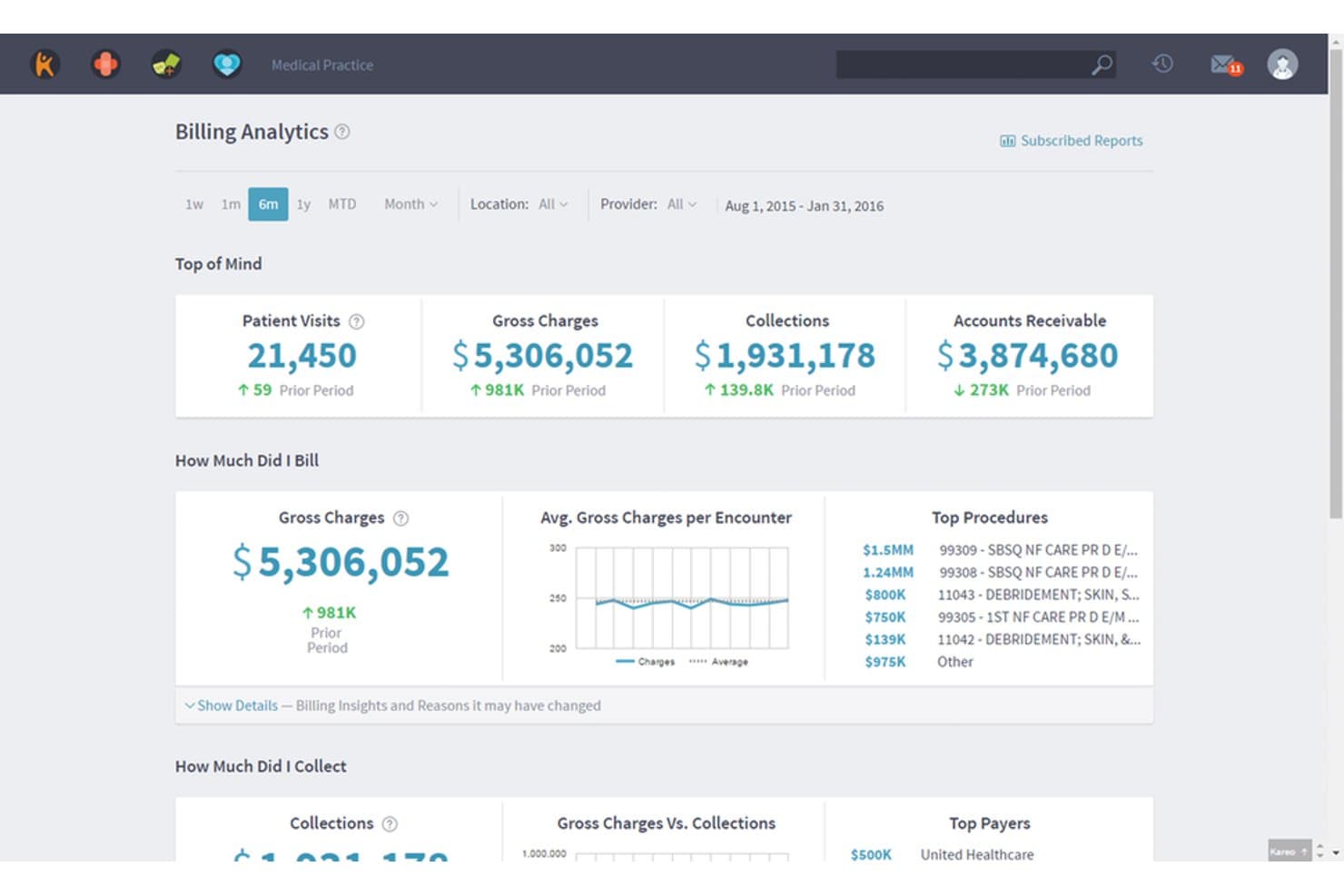
Kareo Billing offers a comprehensive billing analytics dashboard displaying patient visits, gross charges, collections, and accounts receivable metrics. Kareo Billing is a cloud-based medical billing platform built for independent practices that handles claims submission, insurance eligibility verification, ERA auto-posting, and patient statement generation in a single system.
Who Is Kareo Billing Best For?
Kareo Billing is a strong fit for independent practices and small billing companies that manage the full revenue cycle without a dedicated enterprise IT team.
Why I Picked Kareo Billing
I picked Kareo Billing as one of the best because its real-time eligibility verification checks coverage, copays, and deductibles across 2,700+ payers and feeds directly into scheduling and billing workflows. The RPA engine auto-posts ERAs and applies unapplied payments using business rules, which matters when a small practice team handles billing without a dedicated RCM staff. Payer-specific scrubbing rules catch errors before claims go out.
Kareo Billing Key Features
- Automated patient statements: Generate and send branded batch statements with QR codes for online payment.
- Third-party EHR integration: Connect with external EHRs through HL7/FHIR or API bridges.
- Customizable AR dashboards: Track accounts receivable aging and denials with interactive visual analytics.
- Multi-channel payment collection: Accept patient payments via online portal, card on file, or in-person options.
Kareo Billing Integrations
Kareo Billing offers native integrations with third-party EHR systems via HL7 and FHIR connections. An API is available for custom integrations.
Pros and Cons
Pros:
- Batch patient statements with QR code payments
- Automated ERA posting with unapplied payment logic
- Real-time insurance eligibility checks with most payers
Cons:
- No predictive denial analytics or AI code suggestions
- Reports require manual exporting for customization
Learn more about Kareo Billing: Best for efficient medical billing workflows
- Free demo available
- Pricing upon request
Visit WebsiteCustomer Rating:4.1/5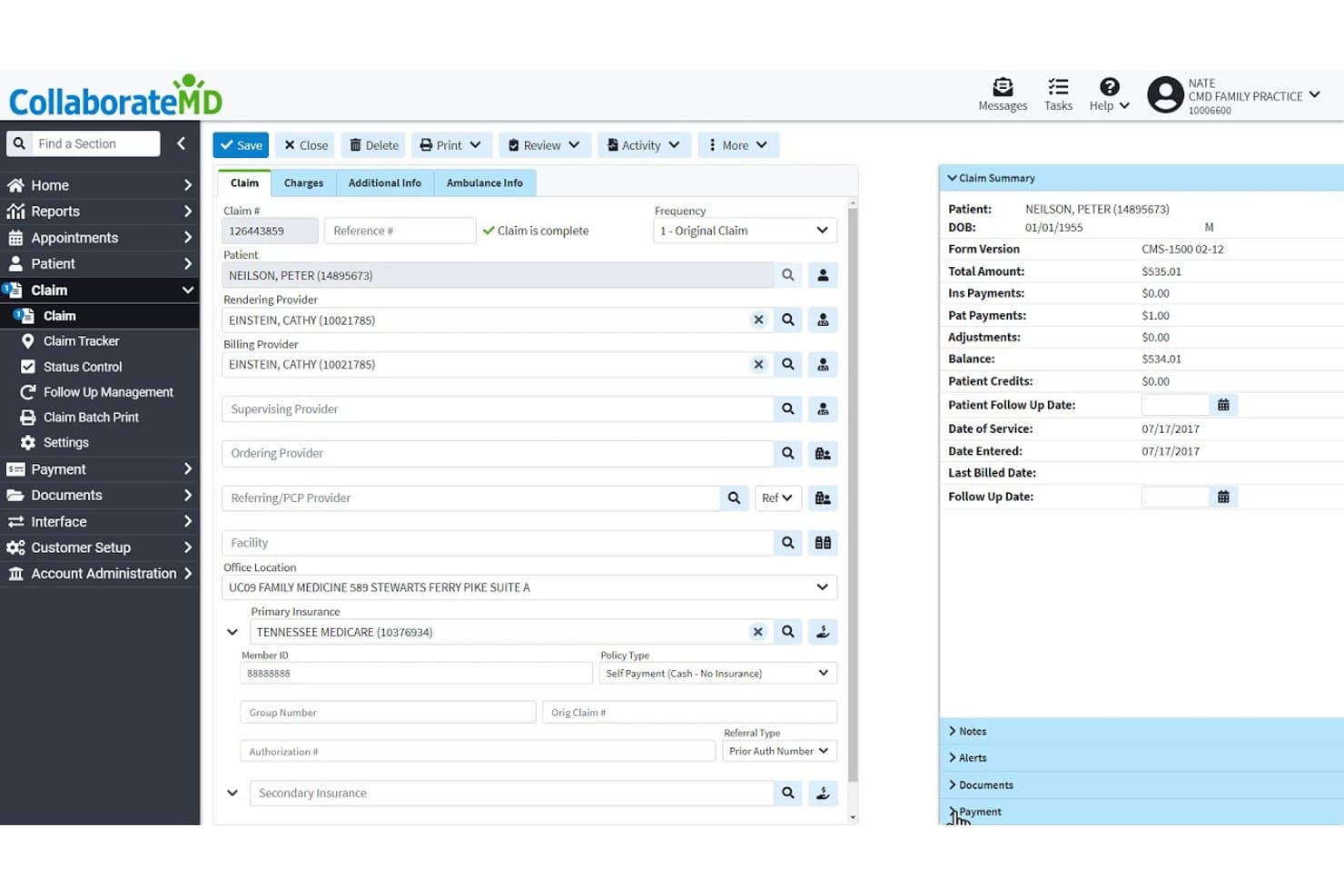
CollaborateMD offers a detailed claim management interface displaying patient info, provider details, insurance data, and a claim summary panel with billing financials. CollaborateMD is a cloud-based medical billing and practice management platform that combines claims processing, clearinghouse integration, real-time eligibility verification, denial management, and patient payment collection in a single system.
Who Is CollaborateMD Best For?
It's a strong fit for small to mid-sized medical practices and independent billing services managing high claim volumes across multiple specialties.
Why I Picked CollaborateMD
CollaborateMD earns its spot because of how tightly its billing workflow holds together from claim creation to payment posting. I particularly like its built-in clearinghouse with Level 2 Claim Edits, which checks for CCI, NCD/LCD, and modifier conflicts before a claim ever leaves the system. The AI-powered rejection support then translates payer rejection codes into plain-language explanations, so billing staff spend less time decoding remittances and more time resolving issues.
CollaborateMD Key Features
- Real-time insurance eligibility checks: Instantly verify patient insurance coverage and benefits within the platform.
- Appointment scheduling module: Manage patient and provider calendars using a built-in scheduling tool connected to billing.
- Patient payment portal: Accept online payments and enable set-up of payment plans for patient balances.
- Custom HL7 and EHR integrations: Connect to a wide range of EHRs with HL7 interfaces and custom mapping options.
CollaborateMD Integrations
CollaborateMD offers native integrations with Practice Fusion, Elation, Kipu, Amazing Charts, Alleva, and Hello Health, plus supports custom HL7 interfaces and provides an API for custom integrations.
Pros and Cons
Pros:
- Patient payment portal with online billing statements
- Real-time eligibility checks for insurance verification
- Automated claim scrubbing for CCI and LCD edits
Cons:
- Support available only during business hours
- No mobile app for claim management
Learn more about CollaborateMD: Best for mobile-friendly billing access
- Free demo available
- Pricing upon request
Visit WebsiteCustomer Rating:3.9/5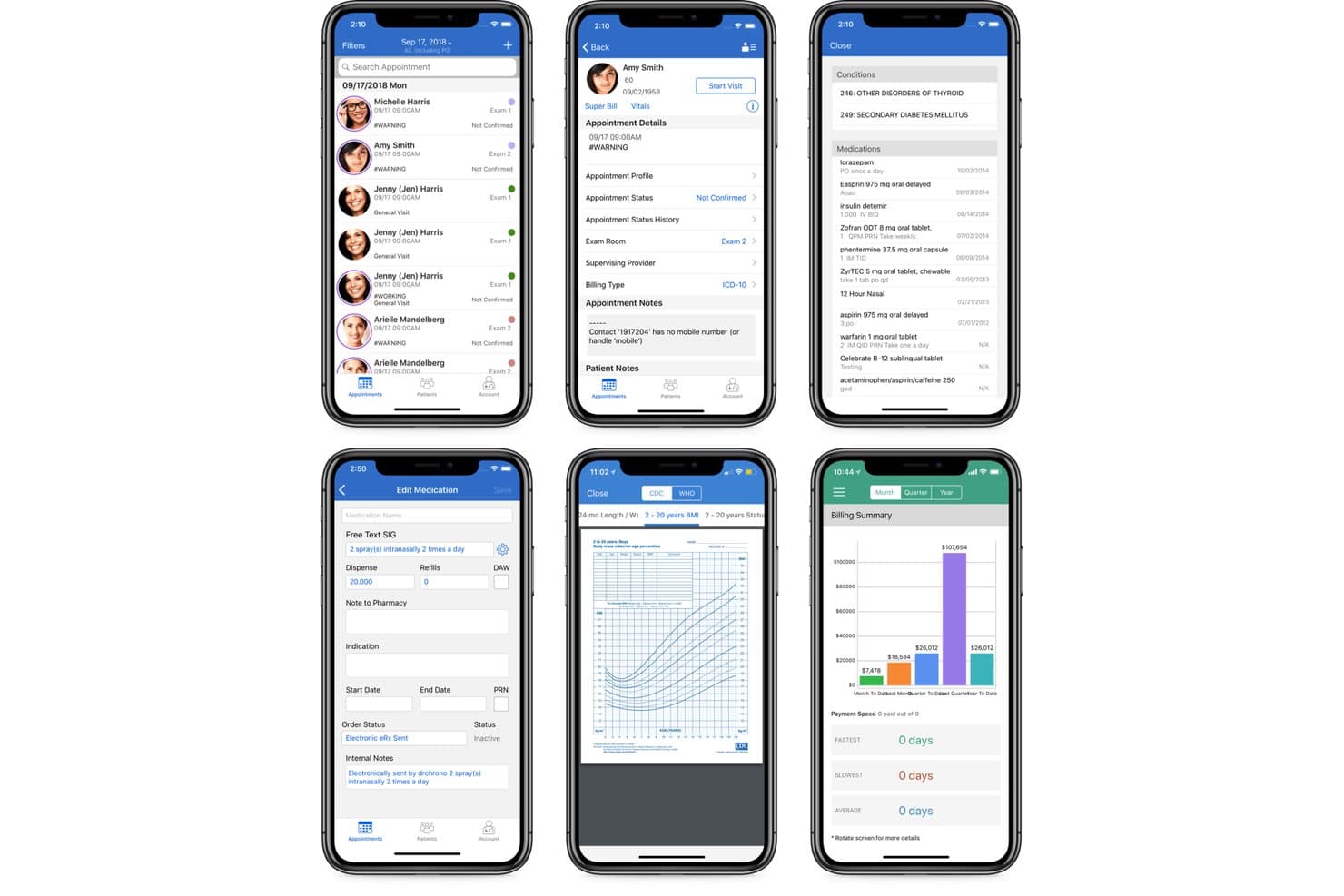
DrChrono offers a mobile billing summary dashboard alongside appointment scheduling, patient records, and medication management screens for family practice workflows. DrChrono is a cloud-based EHR and medical billing platform that combines claims submission, insurance eligibility verification, denial management, and revenue cycle management in a single system built natively for iOS devices.
Who Is DrChrono Best For?
DrChrono is a strong fit for independent practices and small-to-mid-size clinics that run on Apple devices and want billing built into their EHR.
Why I Picked DrChrono
DrChrono earns its spot as one of the best on my shortlist because it's the only medical billing platform built natively for iOS from the ground up. I can pull up the Live Claims Feed on an iPad mid-rounds, run a real-time insurance eligibility check before a patient walks in, and review denial statuses without touching a desktop. The integrated ePS clearinghouse is fully accessible from iPhone or iPad, so claim submission doesn't have to wait until someone's back at a workstation.
DrChrono Key Features
- Billing profiles: Store frequently used code combinations for faster charge entry.
- Automated ERA and EOB posting: Manage both electronic and paper remittance directly within the platform.
- Patient statements by text, email, or mail: Send balance due notifications through multiple channels with embedded payment links.
- Integrated eligibility verification: Run bulk or on-demand checks for insurance coverage before or during patient visits.
DrChrono Integrations
DrChrono offers native integrations with Quest Diagnostics, LabCorp, eProvider Solutions, and Carisk Partners. Extended lab integrations cover 40,000+ individual labs and imaging centers. An API is available for custom integrations.
Pros and Cons
Pros:
- Integrated billing and EHR on iOS devices
- Built-in denial management with AI translation
- Mobile-first billing and claims management
Cons:
- Limited advanced AR reporting features
- Requires use of DrChrono EHR system
Learn more about DrChrono: Best for scalable solution options
- Free demo available
- Pricing upon request
Visit WebsiteCustomer Rating:3.6/5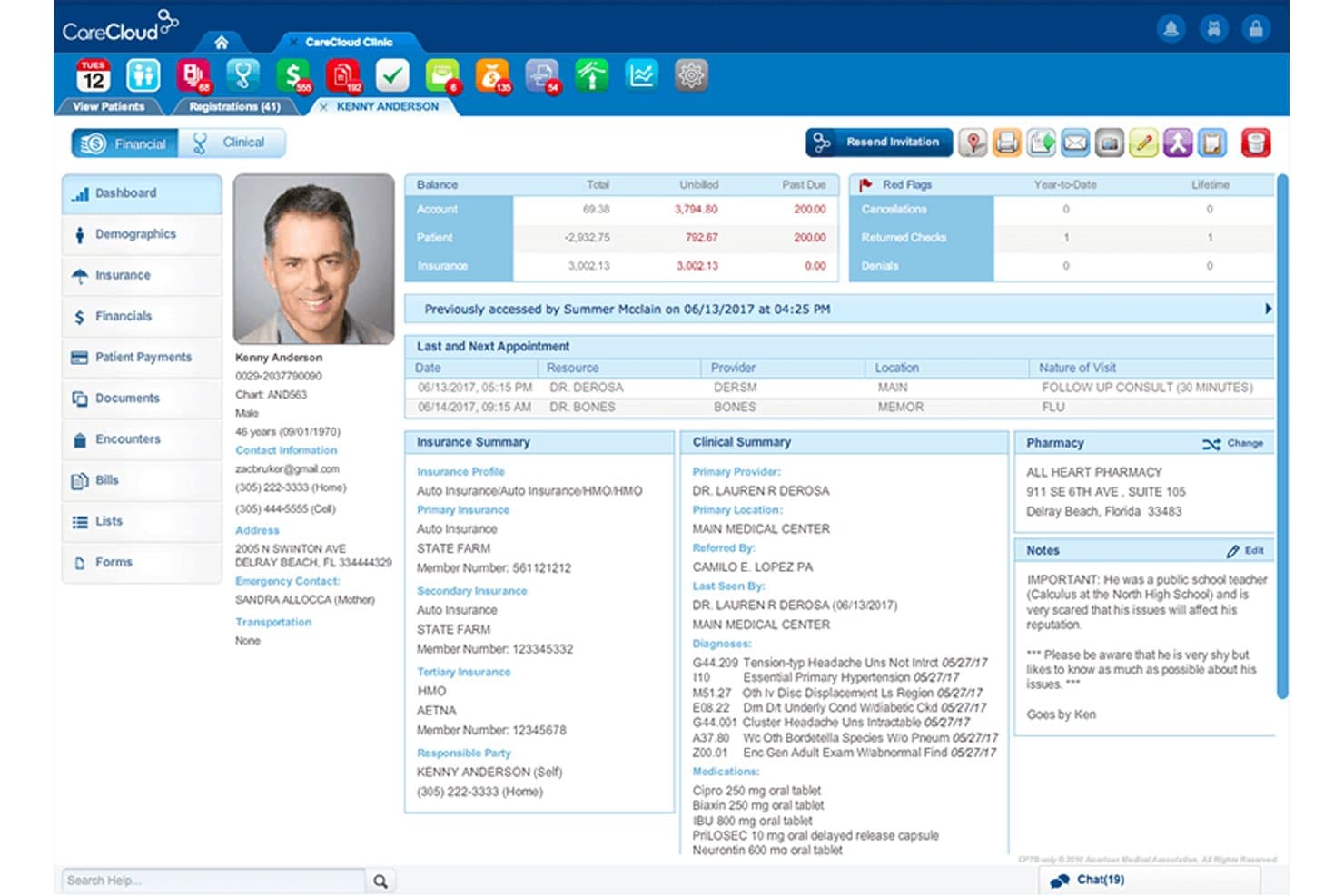
CareCloud offers a comprehensive patient portal dashboard displaying financial summaries, insurance details, clinical notes, and appointment history in one unified view. CareCloud is a cloud-based medical billing platform that combines claims management, automated scrubbing via its CollectiveIQ rules engine, ERA posting, eligibility verification, and RCM services across self-service, hybrid, and fully outsourced engagement models.
Who Is CareCloud Best For?
CareCloud is a strong fit for medical practices of any size that want to choose how much of their billing they manage in-house versus outsource.
Why I Picked CareCloud
I picked CareCloud as one of the best because its three-tier engagement model is genuinely rare in medical billing. You can start with self-service claims software, layer in hybrid billing support, or hand off your full RCM to CareCloud's Concierge service, all without switching platforms. I also like that it's PM-agnostic, so the CollectiveIQ billing engine layers onto your existing practice management system without forcing a full migration.
CareCloud Key Features
- Built-in clearinghouse: Process and submit electronic claims directly to payers without manual data entry.
- Batch payment posting: Post multiple payments across claims in a single workflow to save time.
- Real-time eligibility verification: Instantly check patients’ insurance coverage before services are rendered.
- Practice analytics dashboard: Access real-time reporting on accounts receivable, denials, and revenue cycle KPIs.
CareCloud Integrations
CareCloud integrates with third-party platforms like AdvancedMD, Allscripts Practice Management, Kareo Clinical, Nextech EHR, Raintree Systems, and pVerify for eligibility. An API is available for custom integrations.
Pros and Cons
Pros:
- Real-time insurance eligibility checks
- Built-in clearinghouse for electronic claims
- Multi-tiered self-service and RCM options
Cons:
- Medical coding services excluded from base tier
- Some users report slow customer support
Learn more about CareCloud: Best for specialty-specific billing needs
- Free demo available
- Pricing upon request
Visit WebsiteCustomer Rating:3.5/5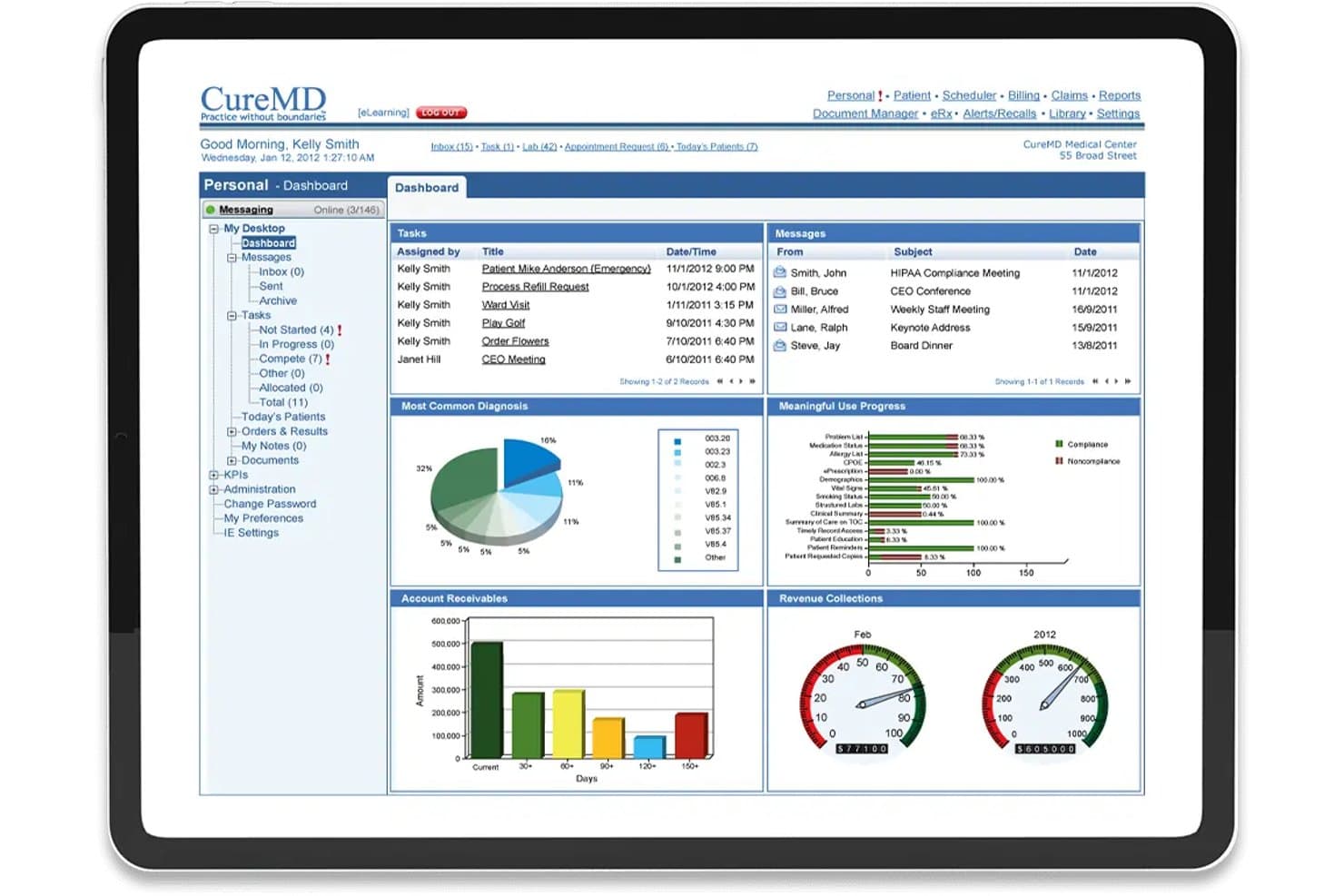
CureMD offers a comprehensive medical billing dashboard with revenue collections, account receivables, tasks, and meaningful use progress tracking. CureMD is a cloud-based EHR and medical billing platform that integrates claims management, coding support, eligibility verification, and revenue cycle tools across 30+ specialty-specific workflows.
Who Is CureMD Best For?
CureMD is a strong fit for small to midsize specialty practices that need an integrated EHR and billing platform tailored to their specific clinical workflows.
Why I Picked CureMD
I picked CureMD as one of the best because its billing intelligence goes deeper than a generic code library. For a cardiology practice, that means the system applies bundling logic across stress tests, echos, and catheterization procedures automatically. I also like how oncology billing incorporates cancer staging and chemotherapy regimen tracking directly into the coding workflow. The LCD-aligned documentation tools for pain management keep injection service claims defensible without extra manual review.
CureMD Key Features
- Integrated clearinghouse: Electronic claims and remittances process through a connected clearinghouse without switching platforms.
- Real-time insurance eligibility verification: Instantly check patient insurance eligibility and benefits before visits.
- Workflow automation tools: Claim scrubbing, denial management, and payment posting are all automated to reduce manual steps.
- Advanced reporting dashboards: Access real-time financial data and revenue cycle analytics directly from centralized dashboards.
CureMD Integrations
CureMD offers native integrations with Quest Diagnostics, LabCorp, Surescripts, and supports connectivity with over 400 EHRs and external systems. An API is available for custom integrations.
Pros and Cons
Pros:
- AI-powered claim scrubbing with coding intelligence
- Real-time eligibility and denial tracking dashboard
- Specialty billing logic for over 30 specialties
Cons:
- No published trial or transparent pricing
- Occasional delays processing claim batches
Learn more about CureMD: Best for claims and payment analytics
- Free demo available
- Pricing upon request
Visit WebsiteCustomer Rating:4.4/5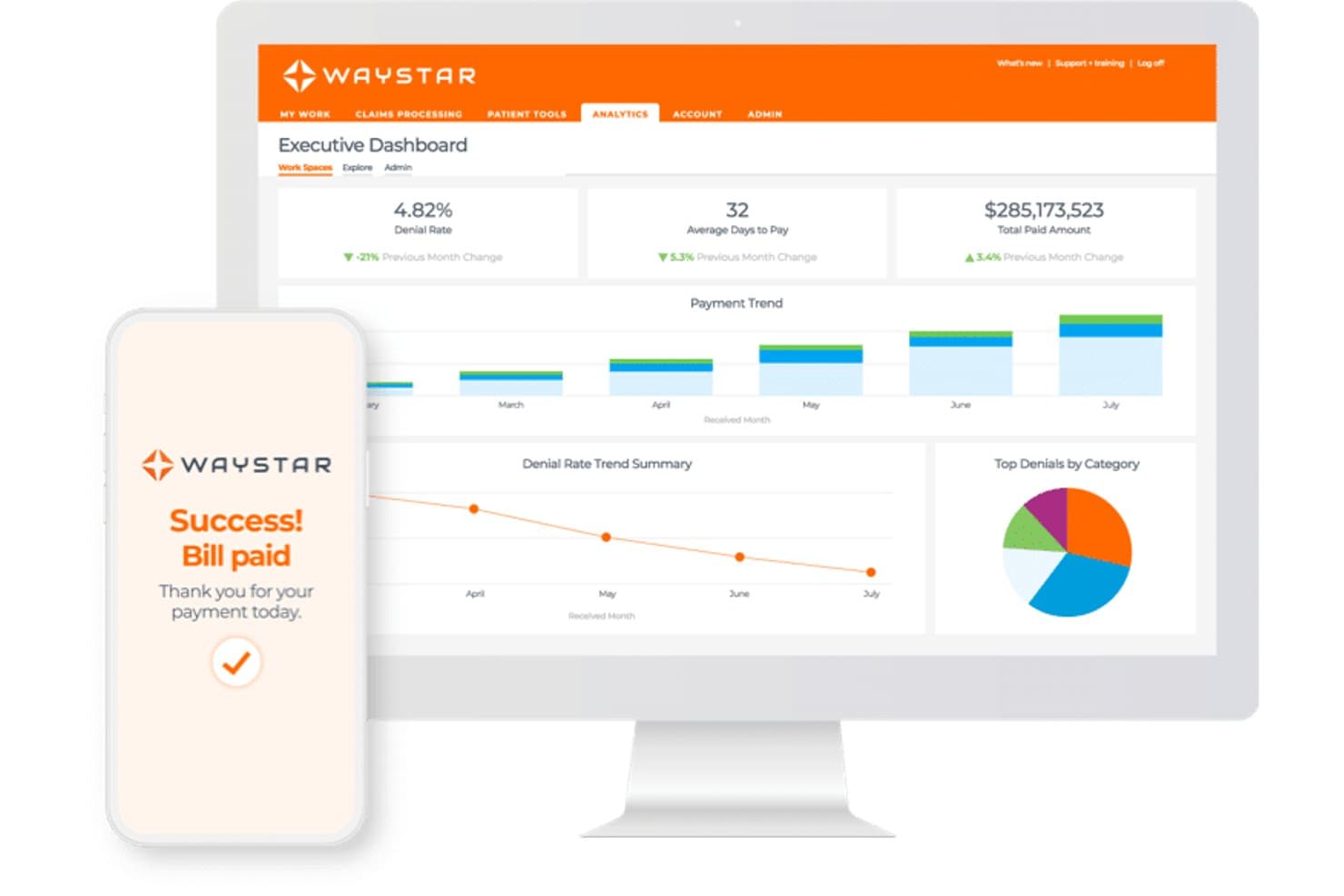
Waystar offers an Executive Dashboard with denial rate tracking, payment trends, and a mobile bill payment confirmation screen. Waystar is an AI-powered revenue cycle management platform that handles claims submission and scrubbing, insurance eligibility verification, denial management, payment posting, and patient billing across the full billing lifecycle.
Who Is Waystar Best For?
Waystar is a strong fit for revenue cycle teams at mid-to-large health systems and hospitals that manage high claim volumes across multiple payers.
Why I Picked Waystar
Waystar earns its spot on my shortlist because of how its analytics layer surfaces actionable claims data at every step of the revenue cycle. I particularly like the ClaimFlow Scoreboard, which shows exactly where each claim sits in the lifecycle so my team can intervene before a denial compounds. The predictive AI inside Claim Manager also determines the optimal time to status or appeal each claim, which keeps A/R moving without manual follow-up guesswork.
Waystar Key Features
- Eligibility verification: Verify patient insurance coverage in real time for 600+ payers.
- Automated payment posting: Auto-post electronic remittance advice and reconcile payments across payers.
- Denial and appeal management: Manage denials and launch payer-specific appeals using built-in templates.
- Patient statement tools: Generate and deliver electronic and print patient statements with integrated payment options.
Waystar Integrations
Waystar offers native integrations with Allscripts Practice Management, CGM eMDs, ChiroTouch, ICANotes, Practice Pro, AdvancedMD EHR, Cerner Millennium, and eClinicalWorks. An API is available for custom integrations.
Pros and Cons
Pros:
- Extensive payer-specific denial management tools
- Predictive AI for claim resolution timing
- Industry-leading claim analytics dashboard
Cons:
- Slow support response for complex cases
- Requires multi-year contract for most accounts
Learn more about Waystar: Best for unified billing and scheduling
- Free demo available
- Pricing upon request
Visit WebsiteCustomer Rating:3.9/5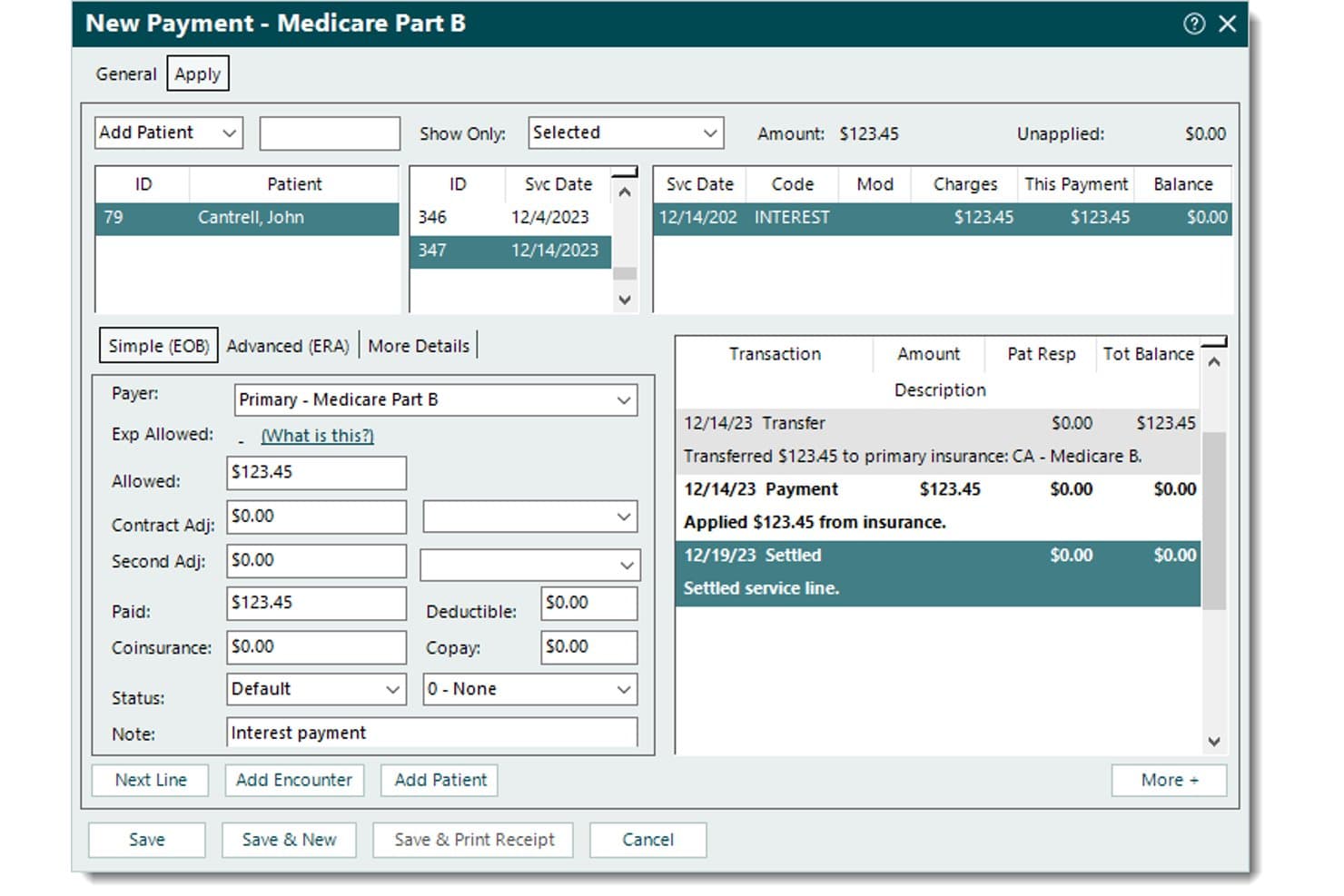
Tebra records Medicare payments, applied amounts, patient balances, adjustments, and transaction history. Tebra is a cloud-based medical billing and practice management platform that combines electronic claims submission, insurance eligibility verification, ERA auto-posting, and patient billing with integrated scheduling tools.
Who Is Tebra Best For?
Tebra works well for small independent practices and billing service companies that manage claims across multiple provider clients from a single platform.
Why I Picked Tebra
I've included Tebra in my top picks because its billing and scheduling tools share the same patient and provider data layer, which removes a real friction point in claim preparation. When a patient's appointment is confirmed, insurance eligibility verification triggers automatically via ANSI-X12 270/271 inquiries across 2,700+ payers. That real-time connection means my team catches coverage gaps before the encounter, not after the claim drops.
Tebra Key Features
- Automated claim scrubbing: Built-in rules engine reviews claims for errors before submission to reduce rejections.
- Electronic remittance auto-posting: ERA files are automatically posted to patient accounts for faster payment reconciliation.
- Multi-client billing dashboard: Access and manage billing for multiple provider clients from a single interface.
- Automated patient statements: Generate and send patient billing statements with payment links embedded for direct payment collection.
Tebra Integrations
Tebra offers native integrations with WebPT, QuickEMR, Relatient, NextPatient, PayPal, Stripe Terminal, and DocSpera. It supports connectivity with most major EHRs via HL7, FHIR, or API bridges, and provides an API for custom integrations.
Pros and Cons
Pros:
- Automated ERA import and autoposting included
- Multi-client billing dashboard for service companies
- Real-time insurance eligibility verification built in
Cons:
- Lacks batch claim correction for rejected claims
- Reporting features are limited and inflexible
Learn more about Tebra: Best for integrated reporting tools
- Free demo available
- Pricing upon request
Visit WebsiteCustomer Rating:3.7/5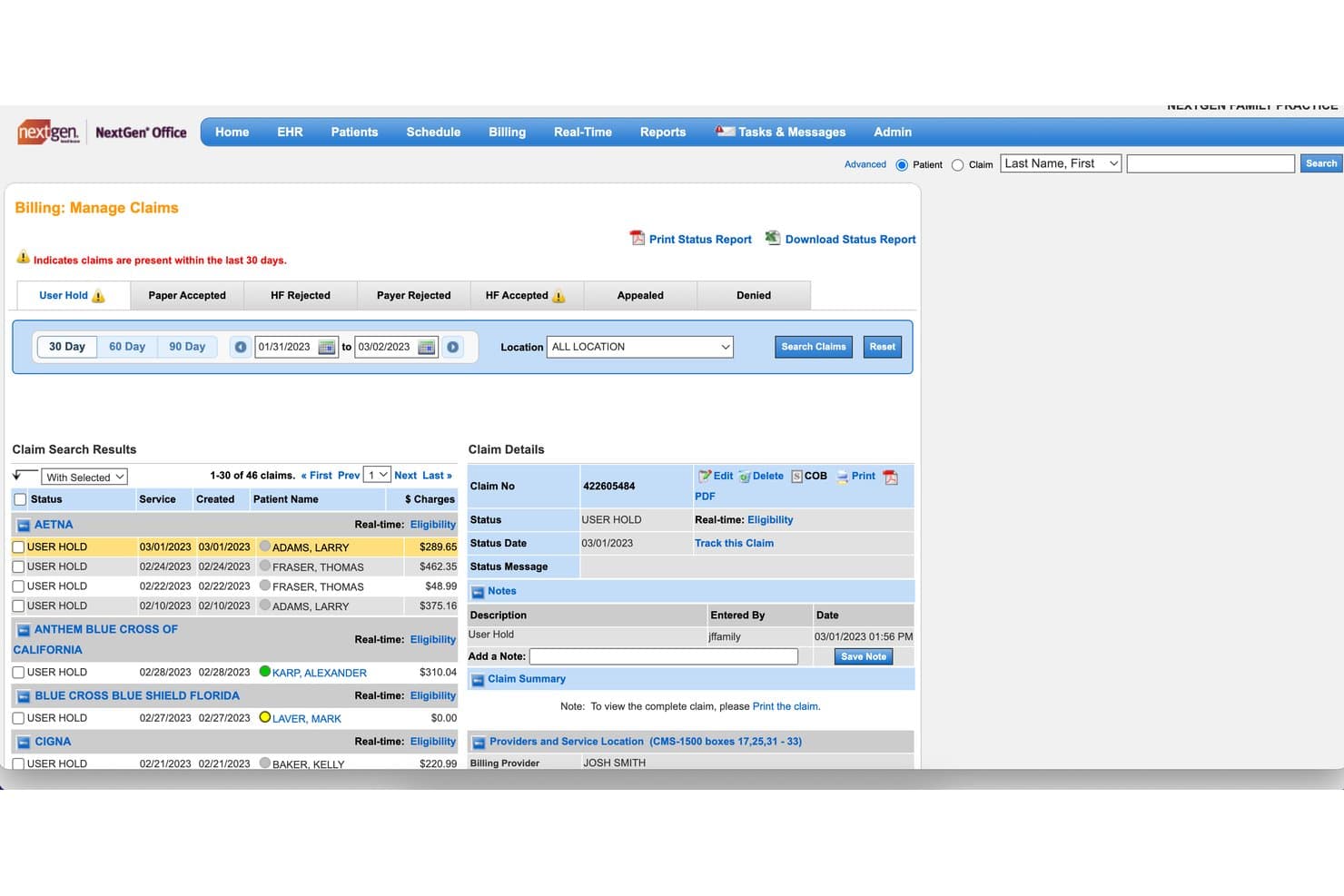
NextGen Healthcare offers a Billing Manage Claims screen that allows medical billers to view, filter, and manage claims by status, payer, and date range. NextGen Healthcare is a revenue cycle management platform that combines claims management, eligibility verification, medical coding, payment posting, A/R tracking, and patient billing for ambulatory practices.
Who Is NextGen Healthcare Best For?
NextGen Healthcare fits mid-size to enterprise ambulatory practices with dedicated revenue cycle staff who need specialty-specific billing workflows.
Why I Picked NextGen Healthcare
I picked NextGen Healthcare as one of the best because its reporting layer is more developed than most IDX billing platforms I've used. It tracks 100+ KPIs across all payers and specialties, with dashboards that drill into denial patterns and A/R aging by provider. I especially like that the reporting is SQL-based. Billing managers can build precise custom queries instead of working around pre-built views.
NextGen Healthcare Key Features
- Automated claims scrubbing: Built-in claim edits flag errors before submission to reduce denials.
- Eligibility verification module: Real-time or batch insurance checks help confirm patient coverage before visits.
- Integrated payment processing: NextGen Pay allows for credit card, Apple Pay, or Google Pay transactions from the patient portal.
- Multi-specialty coding engine: Dedicated coding team supports ICD-10, CPT, and HCPCS code workflows for over 40 specialties.
NextGen Healthcare Integrations
NextGen Healthcare offers native integrations with NextGen Office, OnBase by Hyland, InstaMed (NextGen Pay), Mirth Connect, and NextGen Share Diagnostic Hub. An API is available for custom integrations.
Pros and Cons
Pros:
- Denial management includes root-cause analytics
- Handles multi-specialty coding with dedicated services
- Reporting dashboards support 100+ customizable KPIs
Cons:
- System setup requires extensive initial configuration
- Patient portal interface feels dated
Learn more about NextGen Healthcare: Best for customizable workflow automation
- 30-day free trial + free demo available
- From $130/user/month
Visit WebsiteCustomer Rating:3.6/5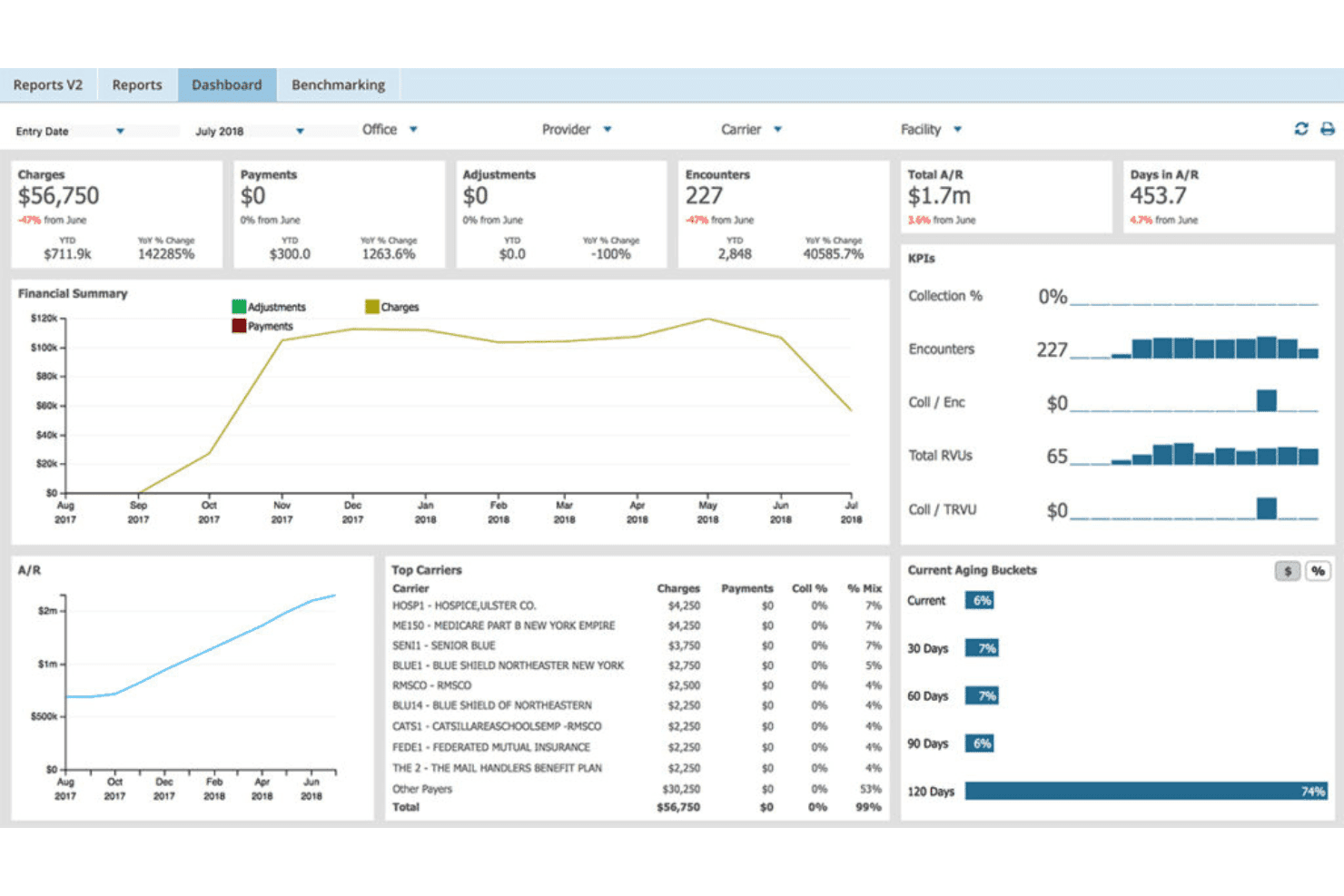
AdvancedMD unites EMR, documentation, billing, claims, eligibility, and RCM. AdvancedMD is a cloud-based medical billing platform that combines claims management, coding validation, eligibility verification, ERA processing, and A/R tracking in a single unified suite built for practices and billing companies.
Who Is AdvancedMD Best For?
AdvancedMD is a strong fit for independent billing service owners and multi-provider practices that need centralized billing office tools to manage multiple clients or locations from one system.
Why I Picked AdvancedMD
I picked AdvancedMD because its ClaimInspector lets me configure scrubbing rules against CCI, HIPAA, and LCD edits before a claim ever leaves the system. I also use the A/R Control Center's customizable worklists to build denial queues sorted by payer, reason code, or age bucket. In practice, that means my team routes specific denial types directly to assigned staff without manually sorting through a general queue each morning.
AdvancedMD Key Features
- Integrated clearinghouse: Submit electronic claims directly without needing third-party upload or download steps.
- Batch eligibility verification: Check patient insurance eligibility for multiple appointments at once using real-time 270/271 transactions.
- Electronic remittance advice (ERA) processing: Automatically apply 835 remittance files and reconcile patient accounts.
- Practice analytics dashboard: Access dashboards and reports showing AR, denials, productivity and payer trends in real time.
AdvancedMD Integrations
AdvancedMD offers 50+ marketplace integrations with tools like QuickBooks (via qbSolutioneers), InstaMed, Healthix HIE, Promptly, NextPatient, and ChartRequest, and provides FHIR and ODBC APIs for custom integrations.
Pros and Cons
Pros:
- Supports multi-client centralized billing offices
- Denial management with configurable worklists
- Extensive rules engine for claim scrubbing
Cons:
- EHR and billing setup requires considerable onboarding
- Dashboard widgets provide limited customization
 Best for hands-on revenue cycle support
- Free demo available
- Pricing upon request
Visit WebsiteCustomer Rating:3.4/5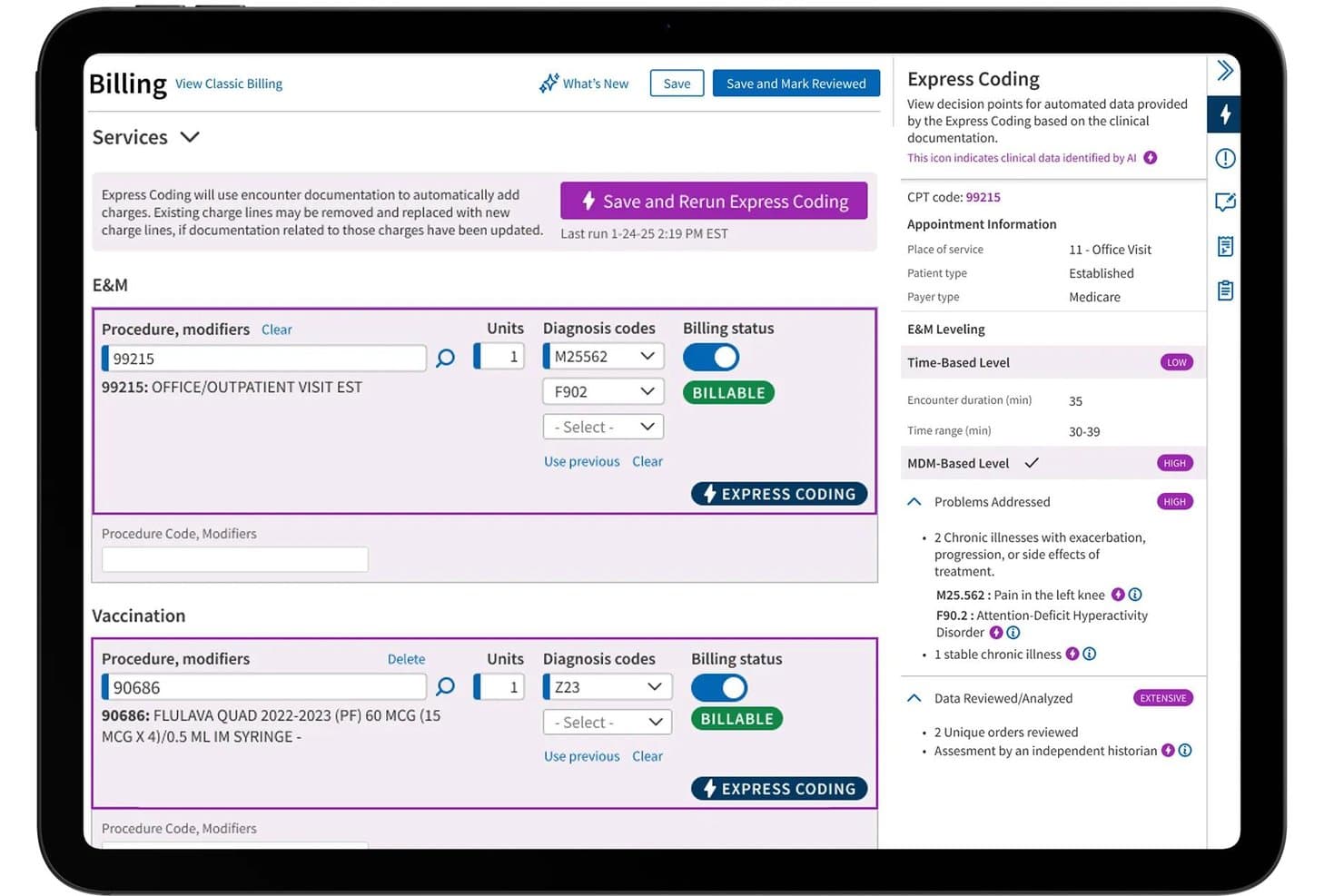
athenahealth offers an Express Coding feature that automates medical billing charge entry using AI-driven clinical documentation analysis. athenahealth is a cloud-based revenue cycle management platform that combines claims scrubbing, insurance eligibility verification, payment posting, denial management, and AR reporting across a single billing infrastructure.
Who Is athenahealth Best For?
It's a strong fit for revenue cycle directors and billing teams at mid-to-large medical groups, health systems, and BPO billing organizations managing complex, multi-payer environments.
Why I Picked athenahealth
athenahealth earns its spot on my shortlist because its co-sourcing model sets it apart from pure-software RCM tools. Rather than leaving denial follow-up entirely to your billing team, athenahealth's staff takes on the most cumbersome RCM tasks at scale, including automatic payment posting reviewed by an expert team. I also like that a dedicated customer success manager is built into the service, not sold as an add-on.
athenahealth Key Features
- Automated claims scrubbing: Applies over 30,000 billing rules to every claim before submission to reduce rejections.
- Intelligent coding engine: Supports ICD-10, CPT, and HCPCS code validation for accurate and compliant claim processing.
- Real-time insurance eligibility verification: Automatically checks patient coverage and benefits prior to scheduling.
- Accounts receivable and denial reporting dashboards: Provides actionable reporting on AR aging, denial trends, and collection efficiency.
athenahealth Integrations
athenahealth offers native integrations with Epic, Cerner, Meditech, Allscripts, and eClinicalWorks, as well as an API for custom integrations. Additional integration options are available through the athenahealth Marketplace.
Pros and Cons
Pros:
- Automatic payment posting with human review
- Strong AR and denial reporting dashboards
- Expert staff handles claim denials directly
Cons:
- Some users report delayed onboarding timelines
- Quoting process can be slow and complex
Learn more about athenahealth:
Alte software-uri IDX pentru facturare medicală
Iată câteva opțiuni suplimentare de software IDX pentru facturare medicală care nu au ajuns pe lista mea scurtă, dar care merită totuși analizate:
- 11eClinicalWorksBest for cloud-based claims management
- 12RXNTBest for real-time claim tracking
- 13PracticeSuiteBest for multi-location revenue management
- 14TherapyNotesBest for mental health practice billing
- 15EZClaimBest for rapid insurance claim entry
- 16Office Ally (Service Center)Best for clearinghouse integration
- 17AllegianceMDBest for AI-powered billing automation
- 18AvailityBest for payer-provider connectivity
- 19TherabillBest for behavioral health billing workflows
- 20MedicsPremier (ADS)Best for specialty coding support
How I Evaluate IDX Software for Medical Billing
I split my evaluation into two layers: the core billing functions a tool must handle—like claim scrubbing and ERA posting—and the differentiators that separate the best from the rest.
Core Functionality (Table Stakes for This List)
When I'm selecting tools for my list, I rank each one on a scale from 0 (does not offer the functionality) to 5 (excels in this area) for each core functionality listed below. Then, I calculate the tool's total score into a percentage. Each tool needs to achieve a minimum total score of 65% to be considered for inclusion.
- Claims Management: I evaluate how each tool handles 837 generation, claim scrubbing, and clearinghouse connectivity—plus whether denial workflows let billers act on rejections without leaving the platform.
- Medical Coding Support: The code libraries should cover ICD-10, CPT, and HCPCS with built-in validation, so coders catch modifier errors or bundling issues before claims go out the door.
- Insurance Eligibility Verification: I check whether real-time 270/271 checks pull back benefits detail like copays and deductibles, not just a simple active/inactive status from the payer.
- Payment Posting & ERA: Auto-posting 835/ERA files saves hours of manual reconciliation, so I look at how each tool handles exceptions, adjustments, and secondary payer balances.
- Patient Billing & Statements: Generating statements is table stakes, but I look for options like online payment portals, payment plans, and e-statements that reduce days in AR on the patient side.
- AR & Denial Reporting: Good reporting means more than a basic aging bucket. I look for dashboards that break down denials by reason code, payer, and provider so you can spot patterns fast.
Once I have a list of tools that meet the criteria, I consider what sets each platform apart.
Differentiating Factors (What Sets Vendors Apart)
Here's how I compare and contrast different vendors:
Standout Features
Denial management workflows are a big differentiator. I look for configurable worklists that sort denials by reason code and assign follow-up tasks, so your team isn't manually tracking appeals in spreadsheets. A patient payment portal also matters—patients who can view balances, set up payment plans, and pay online tend to resolve accounts faster. I also evaluate KPI dashboards that let you drill into clean claim rates and days in AR by payer or provider, which helps you pinpoint where revenue is stalling.
Beyond Features
Practice size and specialty fit shape which platform works for you. A solo dermatology office has very different needs than a multi-entity billing company managing claims across several tax IDs. I also evaluate EHR and clearinghouse integrations—bidirectional connections cut down on duplicate charge entry and speed up remittance cycles. Pricing model matters too, since a percentage-of-collections structure hits your margin very differently at high volume than a flat per-provider subscription.
Cum să alegeți software-ul IDX pentru facturare medicală
Este ușor să vă pierdeți în liste lungi de funcții și structuri complexe de prețuri. Pentru a vă ajuta să rămâneți concentrat în timp ce parcurgeți procesul dumneavoastră unic de selectare a software-ului, iată o listă de verificare a factorilor de care trebuie să țineți cont:
| Factor | Ce trebuie avut în vedere |
|---|---|
| FactorScalabilitate | Ce trebuie avut în vedereVa putea software-ul să gestioneze un volum crescut de cereri, mai multe specializări sau locații noi pe măsură ce organizația dumneavoastră se dezvoltă? |
| FactorIntegrări | Ce trebuie avut în vedereSe conectează nativ cu sistemul dumneavoastră EHR, sistemul de compensare și sistemele de contabilitate sau este necesară o integrare personalizată? |
| FactorPosibilități de personalizare | Ce trebuie avut în vederePuteți adapta fluxurile de lucru, seturile de coduri și rapoartele pentru specializarea sau modelul dumneavoastră de facturare fără intervenția furnizorului? |
| FactorUșurință în utilizare | Ce trebuie avut în vedereVor avea nevoie persoanele responsabile de facturare și administratorii de instruire extinsă sau interfața este intuitivă pentru sarcinile zilnice? |
| FactorImplementare și integrare inițială | Ce trebuie avut în vedereCe presupune migrarea creanțelor vechi, instruirea personalului și lansarea — există taxe de configurare, termene sau riscuri privind datele? |
| FactorCost | Ce trebuie avut în vedereSunt clarificate toate costurile, inclusiv tranzacțiile, extrasele, taxele sistemului de compensare și costurile recurente? |
| FactorMăsuri de securitate | Ce trebuie avut în vedereOferă platforma conformitate cu HIPAA, piste de audit și permisiuni pentru utilizatori, pentru a proteja PHI și a reduce riscurile de încălcare a securității? |
| FactorDisponibilitatea asistenței | Ce trebuie avut în vedereCât de repede puteți contacta serviciul de asistență pentru probleme urgente legate de cereri — oferă chat live, asistență telefonică sau doar tichete? |
Ce este software-ul IDX pentru facturare medicală?
Software-ul IDX pentru facturare medicală este o platformă specializată care automatizează și gestionează cererile de despăgubire, codificarea, înregistrarea plăților și creanțele pentru furnizorii de servicii medicale. Aceste sisteme ajută echipele de facturare și administrative să reducă erorile, să urmărească respingerile, să verifice eligibilitatea asigurării și să respecte reglementările, făcând gestionarea ciclului veniturilor mai precisă și mai eficientă.
Funcțiile software-ului IDX pentru facturare medicală
Atunci când selectați software pentru facturare medicală IDX, acordați atenție următoarelor funcții esențiale:
- Gestionarea cererilor de plată: Automatizează generarea, verificarea, trimiterea și urmărirea cererilor pentru a îmbunătăți acuratețea și a accelera rambursarea de către plătitori.
- Asistență pentru codificarea medicală: Oferă biblioteci încorporate de coduri ICD-10, CPT și HCPCS, împreună cu instrumente de validare pentru a asigura codificarea conformă și a reduce respingerile cererilor.
- Verificarea eligibilității pentru asigurare: Permite verificări în timp real sau în loturi ale eligibilității pentru a confirma acoperirea și beneficiile pacientului înainte de furnizarea serviciilor.
- Înregistrarea plăților și ERA: Acceptă înregistrarea automată a notificărilor electronice de remitere și introducerea manuală a plăților pentru reconcilierea eficientă a tuturor tranzacțiilor plătitorilor și pacienților.
- Facturarea pacienților și extrasele de cont: Generează și transmite extrase de cont pacienților, acceptă diverse modele de facturare și oferă portaluri de plată pentru confortul pacienților.
- Raportarea creanțelor: Oferă rapoarte privind vechimea creanțelor, urmărirea respingerilor și tablouri de bord financiare pentru a ajuta utilizatorii să gestioneze soldurile neachitate și să monitorizeze indicatorii-cheie de performanță ai ciclului veniturilor.
- Fluxuri de lucru pentru gestionarea respingerilor: Semnalează cererile respinse, organizează sarcinile de urmărire și monitorizează contestațiile pentru a ajuta echipele să rezolve problemele și să prevină pierderea veniturilor.
- Integrarea cu platformele de compensare: Se conectează direct la principalele platforme de compensare pentru a simplifica trimiterea electronică a cererilor, înregistrarea plăților și procesarea notificărilor de remitere.
- Securitate și conformitate: Oferă instrumente și măsuri de protecție precum piste de audit, permisiuni pentru utilizatori și asistență pentru conformitatea cu HIPAA și cu reglementările privind facturarea serviciilor medicale.
Beneficiile software-ului IDX pentru facturarea serviciilor medicale
Implementarea software-ului IDX pentru facturarea serviciilor medicale oferă mai multe beneficii echipei și companiei dumneavoastră. Iată câteva dintre acestea:
- Mai puține cereri respinse: Verificarea automată a cererilor și validarea codificării identifică erorile înainte de trimitere, reducând respingerile costisitoare și retrimiterile.
- Plăți mai rapide din partea asigurătorilor: Verificările în timp real ale eligibilității și integrarea cu platformele de compensare accelerează procesarea cererilor și ciclurile de remitere.
- Flux de numerar îmbunătățit: Instrumentele solide pentru înregistrarea plăților și facturarea pacienților facilitează colectarea rapidă și corectă a soldurilor.
- Informații mai bune despre venituri: Tablourile de bord pentru raportarea creanțelor și a respingerilor vă permit să monitorizați indicatorii-cheie de performanță și să identificați din timp pierderile de venituri.
- Conformitate simplificată: Asistența încorporată pentru standardele de reglementare și gestionarea securizată a datelor pacienților vă ajută să fiți pregătiți pentru audit și să respectați cerințele HIPAA.
- Fluxuri de lucru optimizate: Gestionarea centralizată a cererilor, plăților și sarcinilor de urmărire economisește timpul personalului și reduce povara administrativă.
- Experiență îmbunătățită pentru pacienți: Portalurile de plată și extrasele de cont clare le permit pacienților să își consulte soldurile și să plătească online, atunci când le este convenabil.
Costurile și prețurile software-ului IDX pentru facturarea serviciilor medicale
Alegerea software-ului IDX pentru facturarea serviciilor medicale necesită înțelegerea diferitelor modele și planuri de preț disponibile. Costurile variază în funcție de caracteristici, dimensiunea echipei, modulele suplimentare și alți factori. Tabelul de mai jos prezintă pe scurt planurile comune, prețurile medii ale acestora și caracteristicile incluse de obicei în soluțiile software IDX pentru facturarea serviciilor medicale:
Tabel comparativ al planurilor pentru software-ul IDX destinat facturării serviciilor medicale
| Tipul planului | Preț mediu | Caracteristici comune |
|---|---|---|
| Tipul planuluiPlan gratuit | Preț mediu$0 | Caracteristici comuneProcesare limitată a cererilor, raportare de bază, acces pentru un singur utilizator și asistență prin e-mail. |
| Tipul planuluiPlan personal | Preț mediu$50-$150/utilizator/lună | Caracteristici comuneGestionarea standard a cererilor, asistență pentru codificarea medicală, verificarea asigurării, înregistrarea plăților și asistență telefonică. |
| Tipul planuluiPlan pentru companii | Preț mediu$200-$500/lună | Caracteristici comuneAcces pentru mai mulți utilizatori, integrări cu dosarele electronice de sănătate și platformele de compensare, transmiterea automată a extraselor de cont și analize avansate. |
| Tipul planuluiPlan pentru întreprinderi | Preț mediu$1,000+/lună | Caracteristici comuneFluxuri de lucru personalizate, asistență pentru mai multe entități, acces API, asistență prioritară, asistență pentru migrare și instrumente de conformitate. |
Întrebări frecvente despre software-ul IDX pentru facturarea medicală
Iată câteva răspunsuri la întrebările frecvente despre software-ul IDX pentru facturarea medicală:
Ce tipuri de cabinete beneficiază cel mai mult de software-ul IDX pentru facturarea medicală?
Software-ul IDX pentru facturarea medicală este potrivit pentru clinicile ambulatorii, grupurile de specialități, cabinetele individuale și serviciile de facturare. Este deosebit de util pentru grupurile care gestionează un volum mare de solicitări de plată, reguli complexe ale plătitorilor sau operațiuni desfășurate în mai multe locații.
Se poate integra software-ul IDX cu sistemul EHR și casa de compensare existente?
Da, majoritatea soluțiilor IDX oferă integrări cu principalele sisteme EHR și case de compensare. Confirmați întotdeauna sincronizarea bidirecțională pentru tarife, remiteri și datele pacienților, pentru a evita introducerea duplicată a datelor și erorile de reconciliere.
Cât durează de obicei implementarea?
Majoritatea soluțiilor software IDX bazate pe cloud se implementează complet în câteva săptămâni, inclusiv migrarea datelor, instruirea și înscrierea la plătitori. Cabinetele cu cerințe complexe pentru mai multe entități pot avea nevoie de o perioadă mai lungă de integrare.
Este software-ul IDX personalizabil pentru diferite specialități?
Da, multe platforme oferă șabloane, biblioteci de coduri și fluxuri de lucru configurabile pentru specialități precum radiologia, sănătatea mintală sau fizioterapia. Verificați dacă sunt acceptate codurile CPT și codurile de diagnostic utilizate cel mai frecvent.
Ce opțiuni de asistență sunt disponibile dacă întâmpin probleme la trimiterea solicitărilor de plată?
Ar trebui să aveți acces la asistență prin telefon, chat sau tichete, precum și la baze de cunoștințe online. Planurile de nivel superior pot include manageri de cont dedicați sau timpi de răspuns garantați pentru probleme urgente de facturare.
Ce măsuri de securitate există pentru datele pacienților?
Software-ul IDX oferă, în general, conformitate cu HIPAA, acces pe baza rolurilor și actualizări continue pentru a menține protejate informațiile medicale ale pacienților. Verificați întotdeauna certificările furnizorului și jurnalele de audit pentru a asigura responsabilitatea.